Virtual Assistant vs Employee: Which Hire Pays Off?
A side-by-side look at the real cost, control and risk of hiring a virtual assistant versus a full-time employee, with a clear verdict for each situation.
On this page
- What is the difference between a virtual assistant and an employee?
- Key Virtual Assistant and Employee Terms You Should Know
- Virtual Assistant vs Employee at a Glance
- Why does the VA vs employee choice matter so much?
- How does hiring a virtual assistant work compared with hiring an employee?
- What types of virtual assistant and employee arrangements exist?
- How does a virtual assistant differ from related hiring options?
- Virtual assistant vs freelancer
- Virtual assistant vs BPO
- Virtual assistant vs temp worker
- What are the pros and cons of a virtual assistant vs an employee?
- The Benefits of a Virtual Assistant
- The Drawbacks of a Virtual Assistant
- When should you hire an employee instead of a virtual assistant?
- Virtual Assistant vs Employee Examples
- Virtual Assistant Good Examples
- Virtual Assistant Bad Examples
- How do you move work from an employee model to a virtual assistant, step by step?
- Step #1
- Step #2
- Step #3
- Step #4
- Step #5
- What does a good hybrid staffing setup look like?
- Tools a Virtual Assistant and Your Team Share
- 9 Tips for Choosing Between a Virtual Assistant and an Employee
- What goes wrong with virtual assistants, and how do you fix it?
- How do you measure whether a virtual assistant is working out?
- How long does it take a virtual assistant to get up to speed?
- How much does a virtual assistant cost compared with an employee?
- Is a virtual assistant worth it instead of an employee?
- How do you choose a virtual assistant agency?
- Remote Staffing Trends and Where They Are Heading
- Will AI replace virtual assistants or employees?
- FAQs
Keep more of every dollar you pay out
Hyperstaff places pre-vetted remote specialists from five regions, with rates from $3/hour and placement in 5 business days. Our dedicated virtual assistant services have put 70+ assistants to work for 30+ clients, each backed by an account manager and an Operations Vault that keeps your processes written down, so a replacement is up to speed fast.
What is the difference between a virtual assistant and an employee?
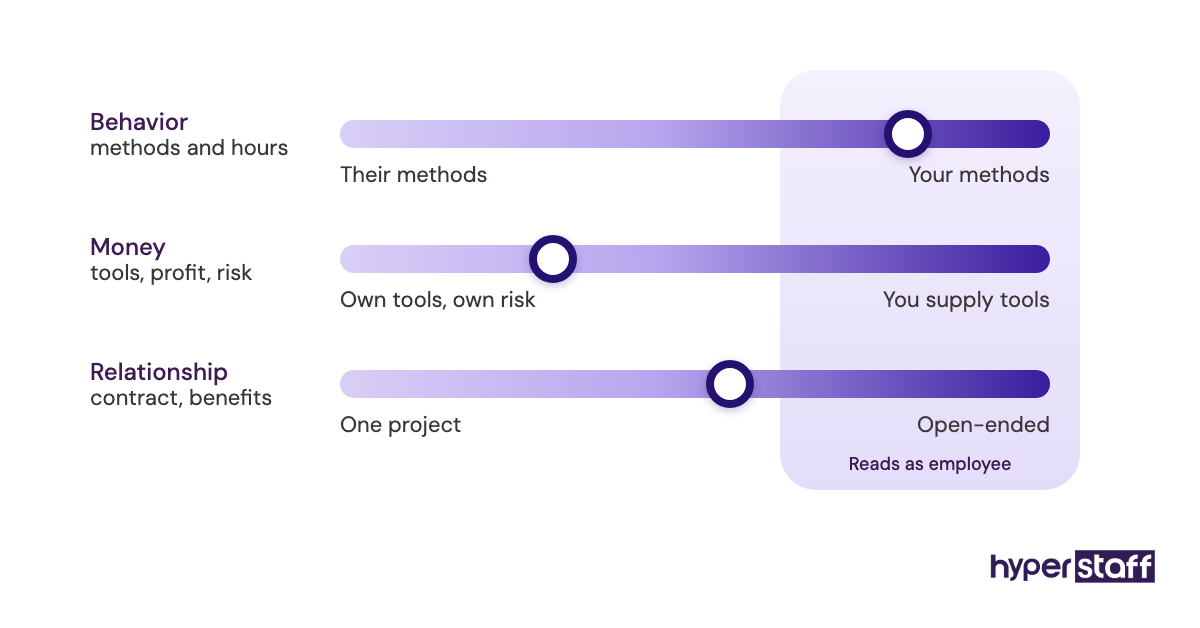
A virtual assistant works for your business remotely but is employed or contracted by someone else, while an employee sits on your own payroll. You direct the virtual assistant's daily work, but taxes, benefits, equipment and legal employment stay with the agency or the contractor.
The employee route gives you more control and more obligations. You withhold taxes, fund benefits, follow local labor law and carry the cost of a bad hire yourself.
The work itself often looks the same from the outside. A virtual assistant can run customer support, lead generation, bookkeeping prep, digital marketing or operations, and the inbox and calendar are only a small part of it.
Key Virtual Assistant and Employee Terms You Should Know
- Virtual assistant (VA) = a remote worker who handles business tasks for you while being employed or contracted outside your payroll.
- W-2 employee = a US worker on your payroll, with taxes withheld and benefits owed by you.
- Independent contractor = a self-employed worker who controls how the work gets done and handles their own taxes.
- Worker misclassification = treating someone as a contractor when the relationship legally makes them an employee.
- Fully loaded cost = wage plus benefits, payroll taxes, equipment, software and office space.
- Dedicated VA = one assistant assigned to one client, as opposed to a shared pool.
- Offshore staffing = hiring workers based in another country, usually at lower rates.
- SOP = a standard operating procedure, the written steps for a recurring task.
- Ramp-up period = the weeks before a new hire works at full speed without help.
- Replacement guarantee = an agency promise to swap in a new worker if the first one is not a fit.
Virtual Assistant vs Employee at a Glance
Cost, control and flexibility are where the two options split hardest. The table below compares a typical US in-house hire with a dedicated offshore virtual assistant placed through an agency.
| Factor | In-house employee | Virtual assistant (agency) |
|---|---|---|
| Who employs them | You | The agency |
| Payroll taxes and benefits | You pay them | Included in the rate |
| Typical time to hire | Several weeks to months | Days to two weeks |
| Hours | Fixed, often 40/week | Part-time or full-time bundles |
| Equipment and desk | You provide | Worker provides |
| Ending the arrangement | Notice, severance, legal care | Per contract terms |
| On-site work | Yes | No |
| Replacement if it fails | Restart hiring | Agency sources a new one |
Why does the VA vs employee choice matter so much?
The VA vs employee choice decides your fixed costs for years. A wage looks like the whole price of a hire, but the Bureau of Labor Statistics reports that benefits make up 30.0% of private industry compensation costs, $14.07 of every $46.89 per hour worked.
Recruiting adds more. SHRM's benchmarking report put the average cost per hire at $4,129, and that money is gone again if the person leaves in month four.
Speed matters too. A role that sits open for two months still has work piling up, and someone on your team is absorbing it without anyone noticing.
How does hiring a virtual assistant work compared with hiring an employee?
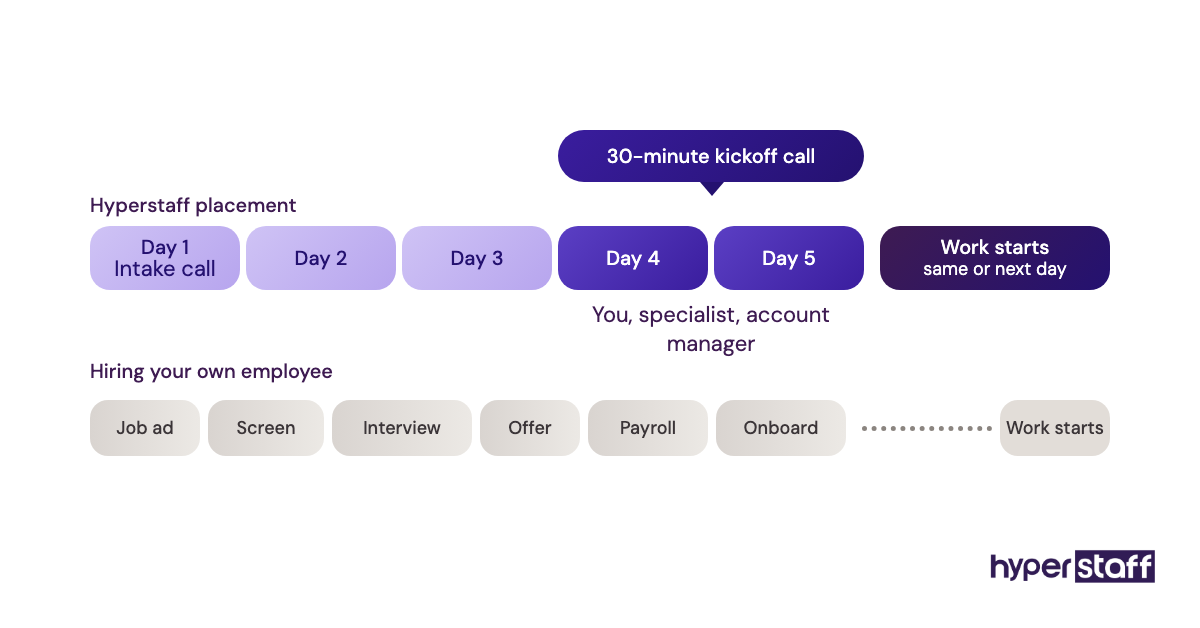
Hiring an employee runs through job ads, screening, interviews, an offer, payroll setup and onboarding. Hiring a virtual assistant through an agency skips most of that, since the agency has already screened candidates and handles employment.
With Hyperstaff, the sequence is short. You get placement within 5 business days, a 30-minute kickoff call, and work usually starts that day or the next morning.
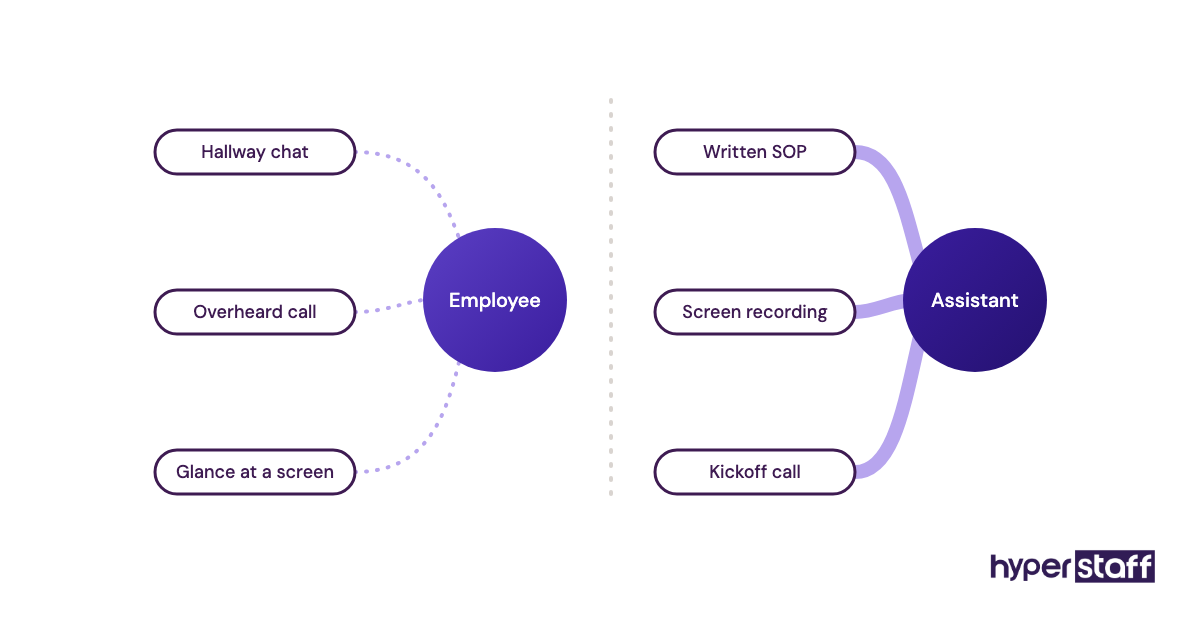
The real difference shows up after day one. An employee picks up context from hallway chats and overheard calls, and a remote assistant gets only what you write down or say on a call.
What types of virtual assistant and employee arrangements exist?
Staffing arrangements range from a full-time employee in your office to a shared outsourced team you never meet. Each one shifts cost, control and risk differently.
| Arrangement | Who employs them | Typical commitment | Best fit | Watch out for |
|---|---|---|---|---|
| Full-time employee | You | Open-ended, 40 hrs/week | Core, on-site or leadership roles | Highest fixed cost |
| Part-time employee | You | Open-ended, under 30 hrs/week | Local roles with light hours | Still needs payroll and compliance |
| Remote employee | You | Open-ended | Roles needing deep authority | Multi-state tax and labor rules |
| Freelance VA | Themselves | Per task or per hour | Short projects | No backup if they disappear |
| Agency dedicated VA | The agency | Monthly hour bundles | Ongoing remote work | Quality varies by agency vetting |
| Shared VA pool | The agency | Hours drawn as needed | Occasional admin tasks | A different person each time |
| BPO team | The outsourcing firm | Long contracts, volume-based | High-volume calls or data work | Little say over who does the work |
| Temp staff | The temp agency | Weeks to months | Seasonal on-site cover | High markups, short tenure |
Location adds one more layer. Our guide to onshore and offshore assistants covers how rates and time zones change between regions.
How does a virtual assistant differ from related hiring options?
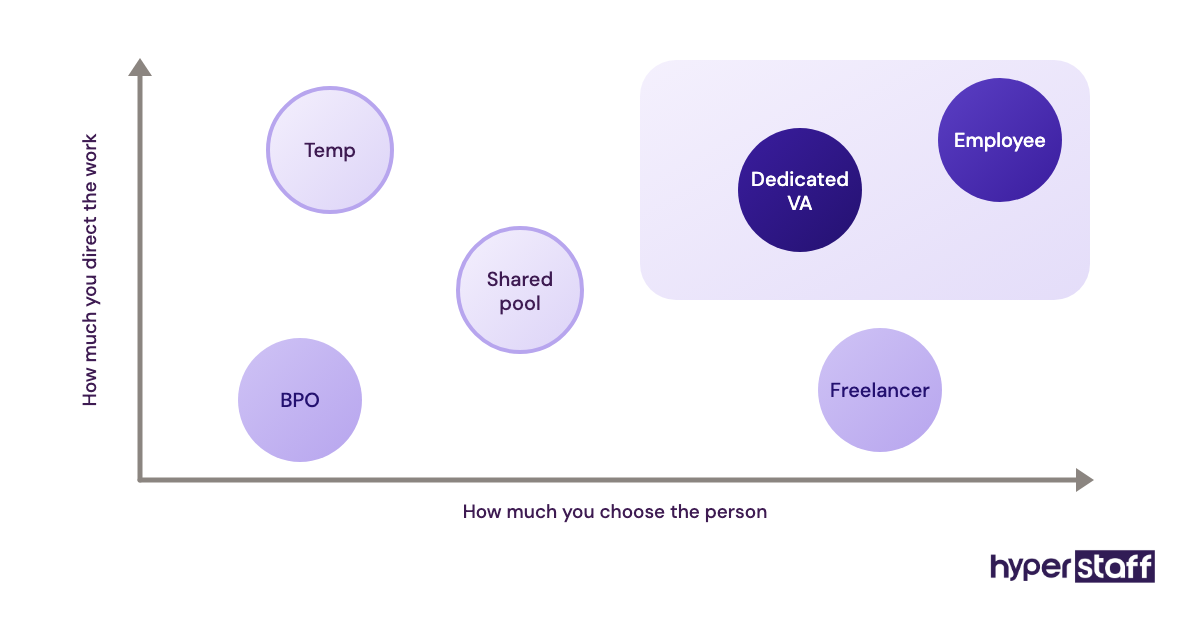
Virtual assistants get lumped in with freelancers, outsourcing firms and temps. The overlap is real, but each option answers to you differently.
Virtual assistant vs freelancer
A freelancer sells finished output, often to several clients at once, and decides how and when to work. A dedicated virtual assistant works set hours inside your business and learns your systems over time.
For a deeper split of the two, read our breakdown of a virtual assistant vs freelancer.
Virtual assistant vs BPO
A BPO runs a whole process for you, such as a support queue, with its own managers and its own staff rotation. You rarely pick the individual, and that is the trade-off for volume.
A VA is one named person you manage directly. When you compare a VA against a BPO contract, team size and how much control you want decide it.
Virtual assistant vs temp worker
Temps cover a gap, usually on-site, and leave when it closes. A virtual assistant is set up to stay, so the time you spend training them keeps paying back.
What are the pros and cons of a virtual assistant vs an employee?
A virtual assistant wins on cost and flexibility, while an employee wins on presence and loyalty that builds over years. Most of the drawbacks below can be managed with documentation and clear hours.
The Benefits of a Virtual Assistant
- No payroll taxes, benefits or equipment to fund
- Rates that start far below a US hourly wage
- Part-time hours without hiring a part-time employee
- A replacement from the agency if the fit is wrong
- Time zone coverage beyond your own working day
The Drawbacks of a Virtual Assistant
- No on-site work of any kind
- Context has to be written down or explained
- Time zone gaps can slow quick questions
- Less long-term commitment than a career employee
When should you hire an employee instead of a virtual assistant?
Hire an employee when the role needs a body in the building, legal authority, or someone who will lead others for years. Warehouse staff, front-desk roles and senior managers fit the employee model.
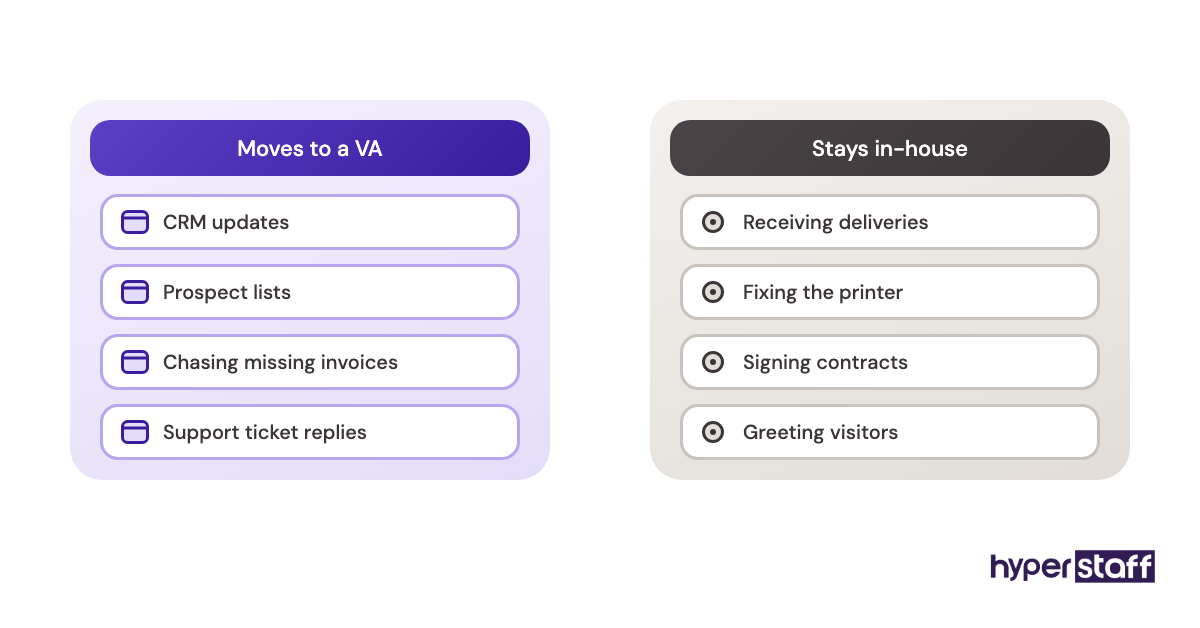
Hire a virtual assistant when the work happens in a browser and repeats week to week. Support tickets, CRM updates, lead research, invoicing, social scheduling and order management all fit.
The gray zone is the second hire at a small company. Practitioners genuinely disagree here: some founders want their first non-founder hire in the room to absorb culture, and others want the cheapest capable help so the founder can sell more. Both have a point, and the deciding factor is whether the work is mostly remote already.
Virtual Assistant vs Employee Examples
The same role can succeed or fail depending on how it is set up. These patterns repeat across industries.
Virtual Assistant Good Examples
Customer support inbox
Email and chat support run from a help desk, with saved replies and a clear escalation rule. A VA can answer the 80% of tickets that repeat and pass the rest up.
Lead research for a sales team
Building prospect lists, checking emails and logging them in a CRM is steady, measurable work. Output is easy to count each week.
Bookkeeping prep
Matching receipts, tagging transactions and chasing missing invoices suits a detail-minded assistant. Your accountant still signs off on the books.
Virtual Assistant Bad Examples
Office manager for a physical site
Receiving deliveries, fixing the printer and greeting visitors need someone present. No remote hire can do this.
Undefined "help with everything" role
A job with no task list fails with any hire, but it fails faster remotely. The assistant waits for direction that never comes.
Replacing a senior decision-maker
Pricing calls, hiring choices and vendor negotiations need authority and judgment built over years. An Expert-tier VA can support that person, but should not replace them.
How do you move work from an employee model to a virtual assistant, step by step?
Moving work to a virtual assistant goes best in a fixed order: pick tasks, write them down, then hand them over in stages. Rushing the handover is the most common reason a good assistant looks bad in month one.
Step #1: List every recurring task for two weeks
Write down each task you or your team repeat, with how long it takes. The list is almost always longer than people expect.
Step #2: Sort tasks into remote and on-site
Anything done in a browser or on a phone call can move. Anything needing hands or a signature stays.
Step #3: Document the first five tasks
Short written steps plus a screen recording are enough. With Hyperstaff, these go into your Operations Vault, which we maintain for you.
Step #4: Pick the tier and hours
Match experience to the work. Essential suits repeatable admin, Professional suits client-facing work, and Expert suits specialist tasks.
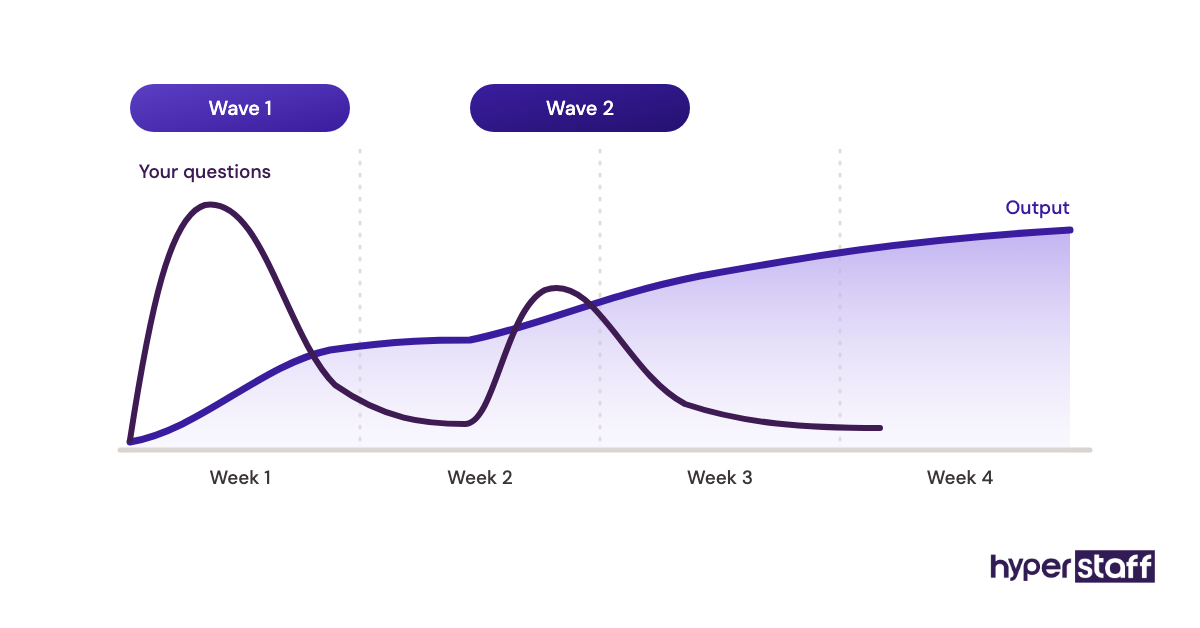
Step #5: Hand over in two waves
Give the first batch in week one and the second only after the first runs without your help. Expect a slow stretch around days 3 to 5 while questions dry up and speed picks up.
What does a good hybrid staffing setup look like?
A hybrid setup keeps a small in-house core for leadership and on-site work and gives remote, repeatable work to dedicated virtual assistants. The in-house staff own decisions, and the assistants own volume.
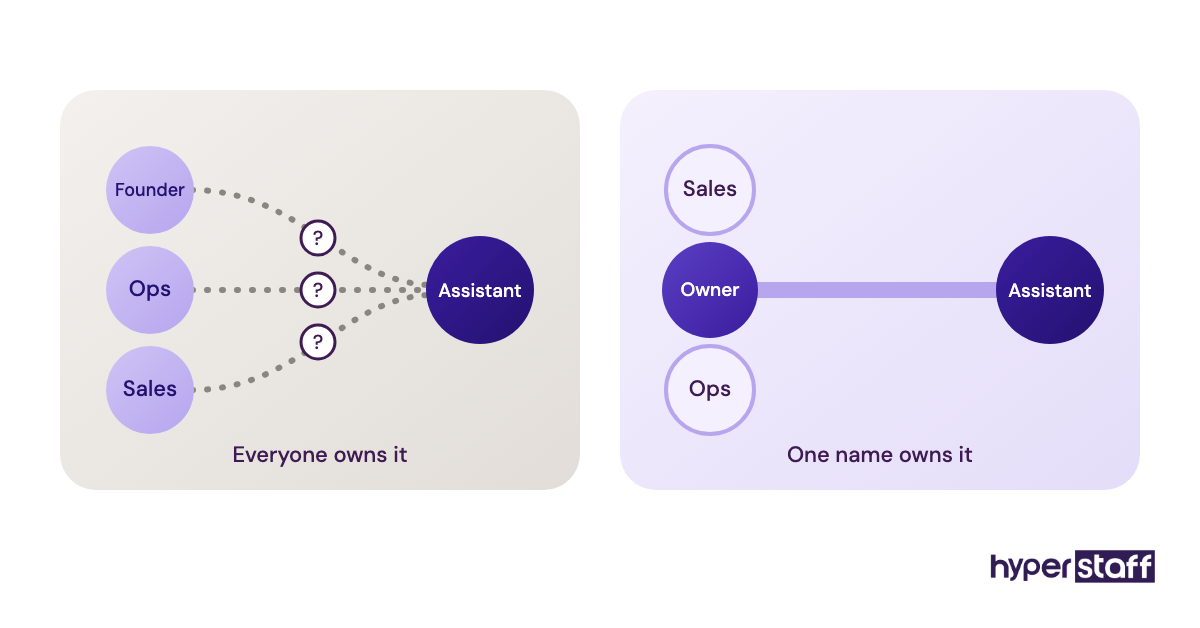
The setups that work give each assistant one named owner inside the company. Shared ownership sounds fair, but in practice nobody answers the assistant's questions and the work stalls.
Weekly check-ins of 15 to 20 minutes beat daily status meetings. Daily meetings tend to fade by week three anyway, and the weekly one survives.
Tools a Virtual Assistant and Your Team Share
Remote work runs on a short stack of software, and most of it costs less than one hour of an employee's wage per month. Prices change often, so check each vendor's own pricing page for your region.
- Slack: chat and quick questions, with a free plan and paid plans priced per user per month.
- Google Workspace: shared email, docs and calendars, priced per user with Starter as the entry plan.
- Hubstaff: time tracking and activity reports, with a 14-day free trial and per-seat pricing (its own pricing FAQ uses $10 per seat per month for the Team plan).
- 1Password: shared vaults so you never send passwords in chat.
- Loom: screen recordings for training, which turn into SOPs.
- Gusto: payroll for in-house staff, with a Contractor Only plan listed at around $35 per month plus $6 per contractor.
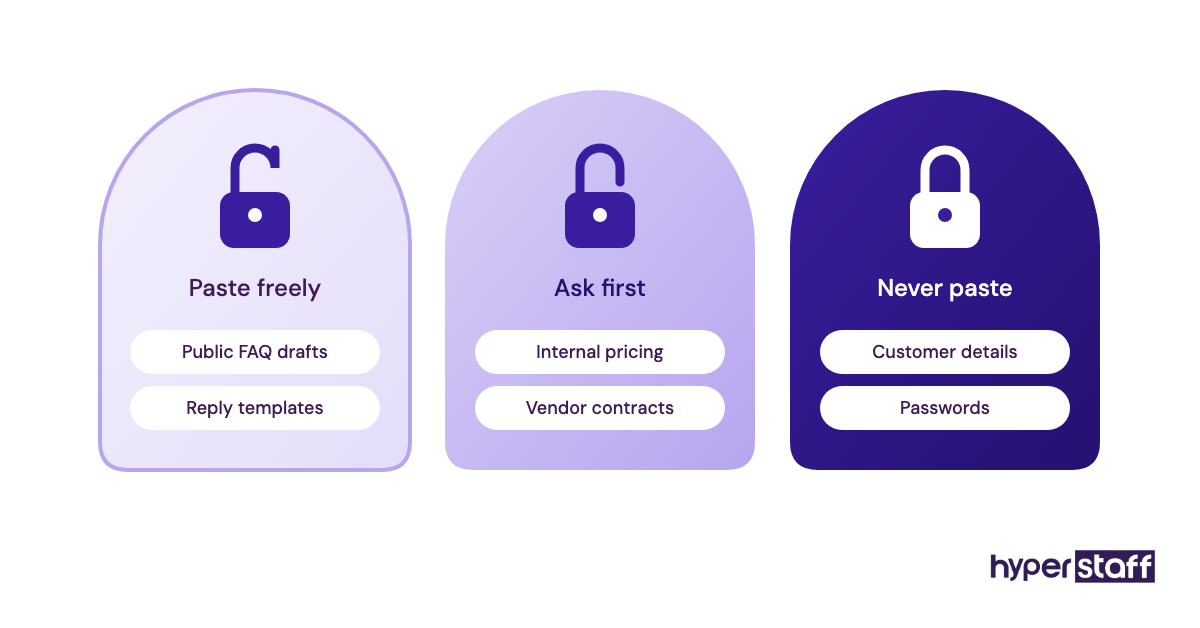
A password manager is the one tool that should never be skipped. Passwords pasted into chat are the most common security gap in remote setups.
9 Tips for Choosing Between a Virtual Assistant and an Employee
These tips come from patterns that show up again and again when businesses make this decision.
- Price the employee at fully loaded cost, never at wage alone.
- Start with the tasks you dread most, since those get dropped first.
- Write the task list before choosing the hire type.
- Ask for at least 3 to 4 hours of overlap with your working day.
- Choose a dedicated assistant over a shared pool for anything client-facing.
- Give account access in stages, starting with read-only.
- Judge output after 30 days, not after the first week.
- Keep one internal owner for every assistant.
- Hire an employee for any role that has to be on-site.
What goes wrong with virtual assistants, and how do you fix it?
Most virtual assistant problems trace back to missing context, not low skill. When an assistant keeps asking the same question, the answer usually lives only in the owner's head.
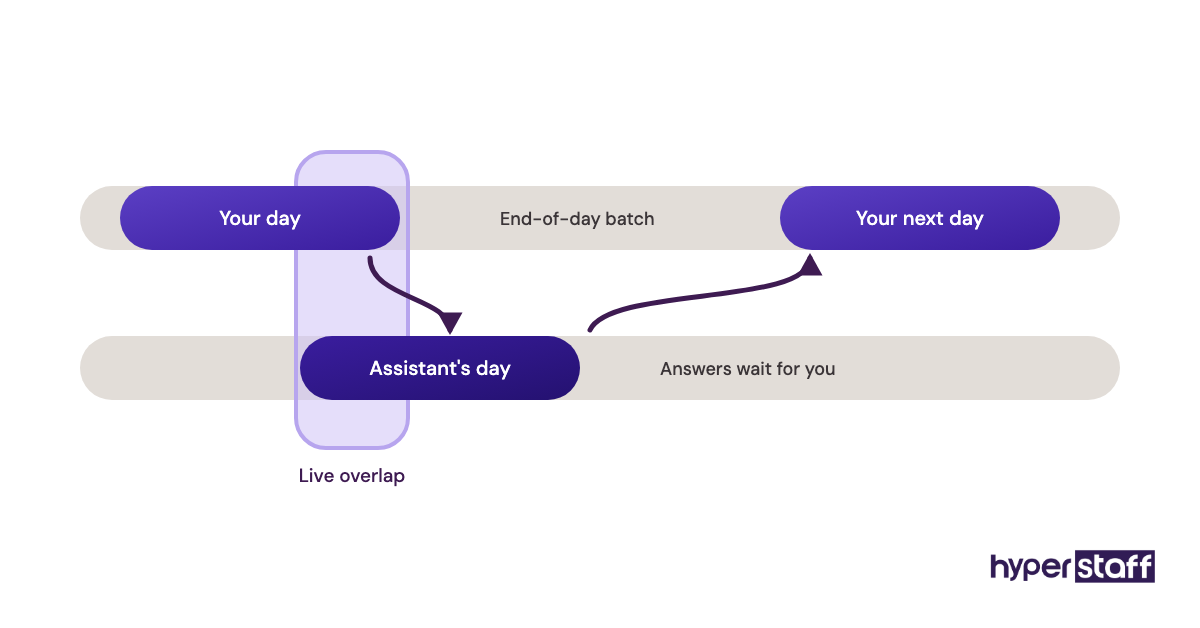
Time zones cause the next most common friction. A question sent at 5 p.m. your time can wait until the next morning, so batch questions into one end-of-day message and agree on overlap hours.
Turnover hurts most when the process left with the person. Written SOPs fix that, which is why our replacements are briefed from your Operations Vault and placed in 5 to 7 business days.
How do you measure whether a virtual assistant is working out?
Measure a virtual assistant on output and hours freed up for you. Pick two or three numbers tied to the task, such as tickets closed, leads added or invoices sent per week.
Then track your own time. If you are not getting back at least as many hours as you are paying for by month two, the task list or the handover needs fixing.
Error rates matter more than speed early on. A slower assistant who makes few mistakes usually speeds up, while a fast one who makes many rarely slows down to fix them.
How long does it take a virtual assistant to get up to speed?
Most virtual assistants handle simple, documented tasks within the first week and reach full speed on a role in roughly 30 to 60 days. Complex or judgment-heavy work takes longer.
The first two weeks are usually the slowest for you, since you are answering questions you have never had to explain. That time drops off sharply once the answers are written down.
An in-house employee often ramps on a similar curve. The difference is that the VA reached their first day in about a week, while the employee may have taken months to hire.
How much does a virtual assistant cost compared with an employee?
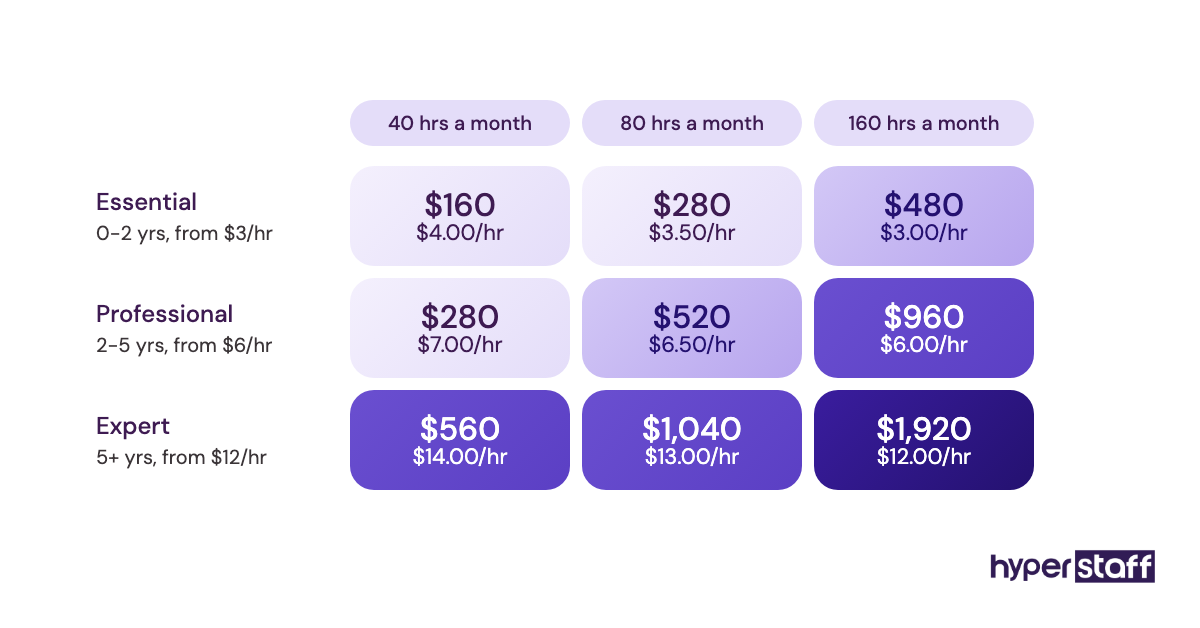
A dedicated offshore virtual assistant typically costs a small fraction of a US employee once benefits, taxes and recruiting are counted. Here's how the line items compare.
| Cost item | US in-house employee | Hyperstaff virtual assistant |
|---|---|---|
| Hourly rate | Varies by role, often $18 to $30+ in wages | From $3 (Essential), $6 (Professional), $12 (Expert) |
| Benefits and payroll taxes | About 30% of compensation (BLS) | Included |
| Recruiting cost | About $4,129 per hire (SHRM) | No separate hiring fee charged to you |
| Equipment and office | You pay | Not needed |
| Time to start | Weeks to months | 5 business days |
| Replacement | Full rehire | Free, in 5 to 7 business days |
| Hours | Usually fixed full-time | 40, 80 or 160 hours a month |
| Prepay discount | None | 10% off when paid quarterly |
Important: Hyperstaff prices above are starting rates and averages, not fixed quotes. Your actual cost depends on the role, the experience tier and the hours your work needs.
Is a virtual assistant worth it instead of an employee?
Yes, for remote and repeatable work a virtual assistant is one of the highest-return hires a small business can make. Done right, it frees thousands of dollars a year and many hours a week, and the savings grow as the assistant takes on more.
Here's an example calculation. Take an employee paid $22 an hour in wages; since BLS data shows wages are about 70% of total compensation, the loaded cost is about $31.43 an hour, or roughly $65,370 for 2,080 hours, plus around $4,129 to recruit.
A Professional-tier virtual assistant at $6 an hour for 160 hours a month costs $960 a month, or $11,520 a year. Paid quarterly, that drops to about $10,370, which leaves close to $59,000 in difference before you count desk space or equipment.
The honest catch is your time. You still need to train, check work and answer questions, so budget a few hours a week for the first month.
How do you choose a virtual assistant agency?
Choose a virtual assistant agency on vetting, replacement terms and whether you get one dedicated person. Price matters, but a cheap rate with a rotating pool usually costs more in retraining.
Ask how candidates are tested, how fast a replacement arrives, and who keeps your processes documented. Ask about time zone overlap too.
Marketplaces are the other route. Our comparison of Upwork and a VA agency covers the screening work you take on yourself there.
If you are already weighing US-based providers, our roundups of options to Belay and Time Etc alternatives compare pricing models side by side.
Remote Staffing Trends and Where They Are Heading
Remote staffing is moving from general admin help to specialist roles. Businesses now hire assistants for marketing operations, customer success and finance support, not only calendars.
Employer costs keep climbing, which widens the gap between a loaded employee and an offshore assistant. The BLS employer cost data shows benefits holding at roughly a third of total compensation, so that gap is unlikely to close soon.
Our expectation, held with moderate confidence, is that more small firms will run a hybrid model: a lean local core plus two or three dedicated remote specialists.
Will AI replace virtual assistants or employees?
AI tools are cutting the time some tasks take, but they are not replacing the person who runs the task. Drafting emails, summarizing calls and sorting tickets are faster with AI, while checking the output and handling exceptions still need a human.
The practical shift is in what a VA does all day. An assistant who uses AI tools well can cover more volume in the same hours.
Disclaimer: This article is for general information only and is not legal, tax or financial advice. Costs, laws and tool pricing change and vary by location, so consult a qualified professional before making hiring decisions.
Common questions
Is a virtual assistant considered an employee?
No, a virtual assistant hired through an agency is employed by that agency, not by you. A VA you contract directly may count as an employee if you control their work closely, so check your local rules.
Can a virtual assistant work full-time for one company?
Yes. A dedicated VA can work 160 hours a month for a single business, which matches a full-time schedule.
Do I need to pay taxes for a virtual assistant?
You don't withhold payroll taxes for an agency-placed VA, since the agency handles employment. The fees are usually a deductible business expense, so ask your accountant how to record them.
Is a virtual assistant cheaper than a part-time employee?
Usually, yes. A 40- or 80-hour monthly bundle covers part-time needs without payroll setup, benefits or local hiring costs.
What should I not give a virtual assistant?
Keep on-site tasks, final hiring and firing calls, and unshared master passwords with your in-house team. Give access through a password manager and limit permissions to what each task needs.
Book a free 15 min call
We place a pre-vetted specialist in 5 business days, fully managed, from $3/hour.