What Is an Administrative Virtual Assistant? Roles, Types and Costs
An administrative virtual assistant is a remote, dedicated team member who runs the recurring admin work of a business, from inbox and calendar to invoicing and CRM upkeep.
On this page
- What Is an Administrative Virtual Assistant?
- Key Administrative VA Terms You Should Know
- Why Does an Administrative Virtual Assistant Matter for a Small Team?
- How Does an Administrative Virtual Assistant Work Day to Day?
- Types of Administrative Virtual Assistants
- How Is an Admin VA Different From Similar Roles?
- Administrative Virtual Assistant vs. Executive Assistant
- Administrative Virtual Assistant vs. Personal Assistant
- Administrative Virtual Assistant vs. In-House Administrative Assistant
- What Are the Benefits of an Administrative Virtual Assistant?
- What Are the Drawbacks?
- Who Needs an Administrative Virtual Assistant?
- Administrative Virtual Assistant Examples, Good and Bad
- Good Administrative Virtual Assistant Examples
- Bad Administrative Virtual Assistant Examples
- How Do You Create an Administrative VA Plan, Step by Step?
- Step #1
- Step #2
- Step #3
- Step #4
- Step #5
- What Does an Effective Admin VA Setup Look Like?
- Administrative Virtual Assistant Tools and Software
- 10 Tips for Working With an Administrative Virtual Assistant
- How Do You Overcome Common Admin VA Challenges?
- How Do You Measure Administrative VA Success?
- How Long Does an Administrative Virtual Assistant Take to Work?
- How Much Does an Administrative Virtual Assistant Cost?
- Is an Administrative Virtual Assistant Worth It?
- How Do You Choose an Administrative VA Agency?
- Administrative Support Statistics, Trends and Predictions
- Administrative Virtual Assistants and AI
- FAQs
Hand Off Admin, Win Back Billable Hours
Hyperstaff places pre-vetted administrative virtual assistant services with growing businesses, matching each client with one dedicated specialist who learns the business. We've placed 70+ assistants across 30+ clients, with rates from $3/hour and placement in 5 business days, so your admin backlog can start shrinking within a week.
What Is an Administrative Virtual Assistant?
An administrative virtual assistant is a remote professional who runs the recurring admin work of a business: email triage, calendar management, data entry, document prep, invoicing support and client follow-ups. They work from their own location, log into your tools, and often stay with one company for months or years.
The job title undersells the role. A capable admin VA often ends up covering customer support replies, CRM hygiene, light bookkeeping and vendor coordination, because those tasks sit right next to the inbox they already own.
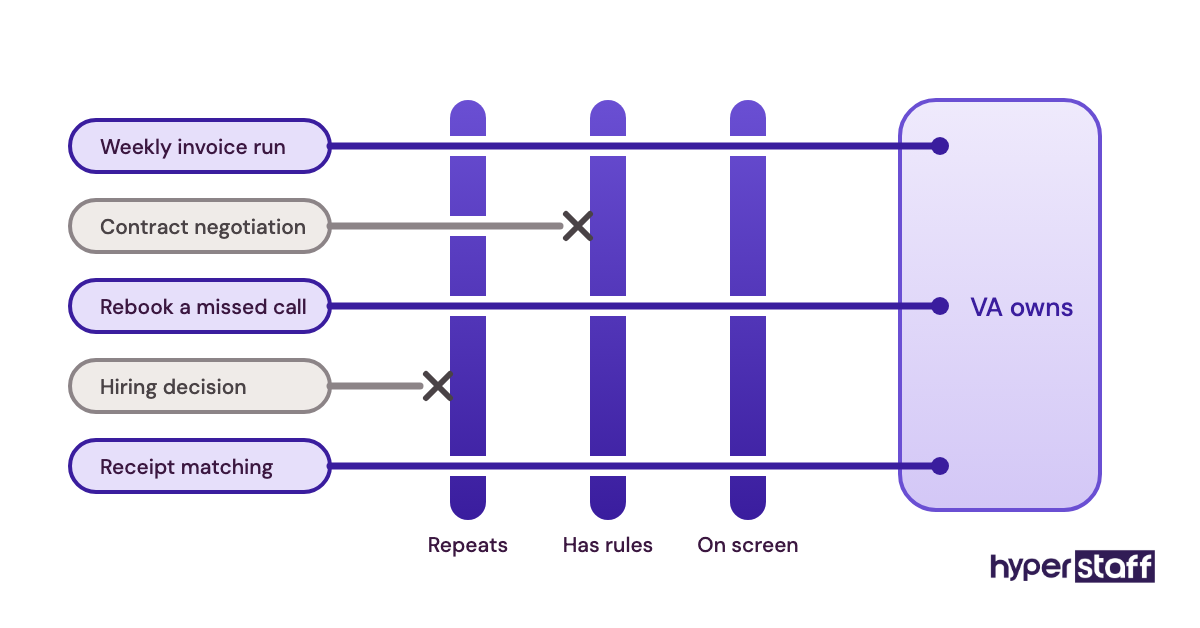
Our list of administrative virtual assistant tasks goes deeper on what to hand off first. The short version: anything repeatable, rule-based and done on a screen is a candidate.
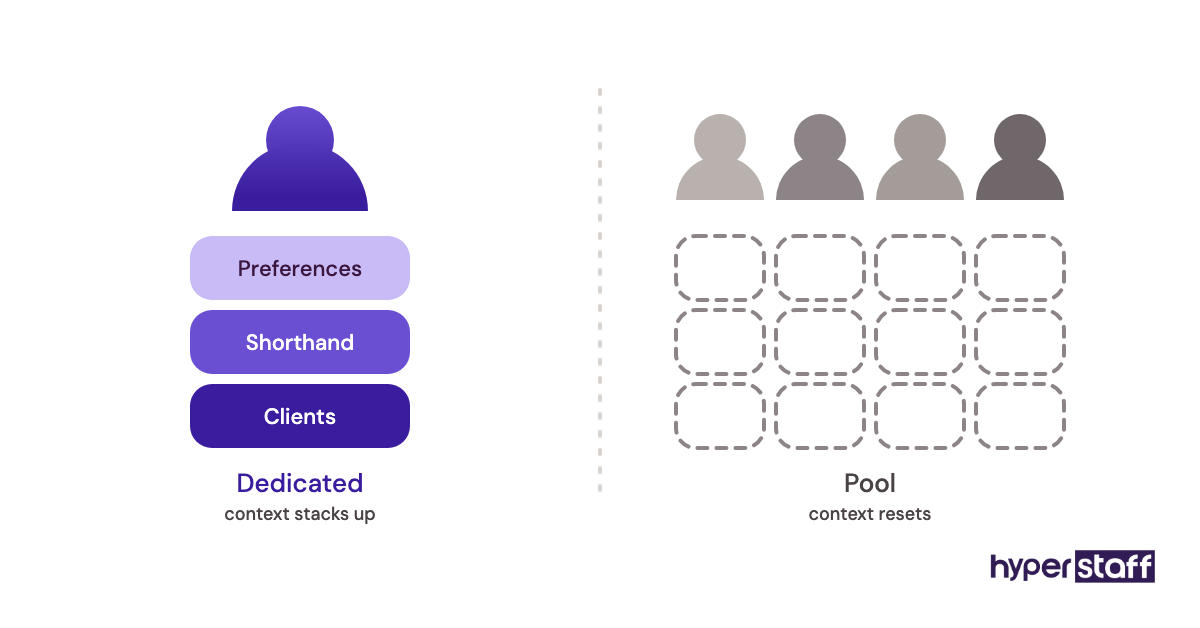
Dedicated is the word that matters most. A pool-based service routes your request to whoever is free, but a dedicated admin VA learns your clients, your shorthand and your preferences, and that accumulated context is where most of the time savings come from.
Key Administrative VA Terms You Should Know
- Dedicated VA = one assistant assigned to your business only, full-time or part-time
- Hourly bundle = a block of prepaid monthly hours, such as 40, 80 or 160
- SOP = standard operating procedure, a written how-to for a recurring task
- Delegated access = permission to act inside your inbox or calendar without sharing your password
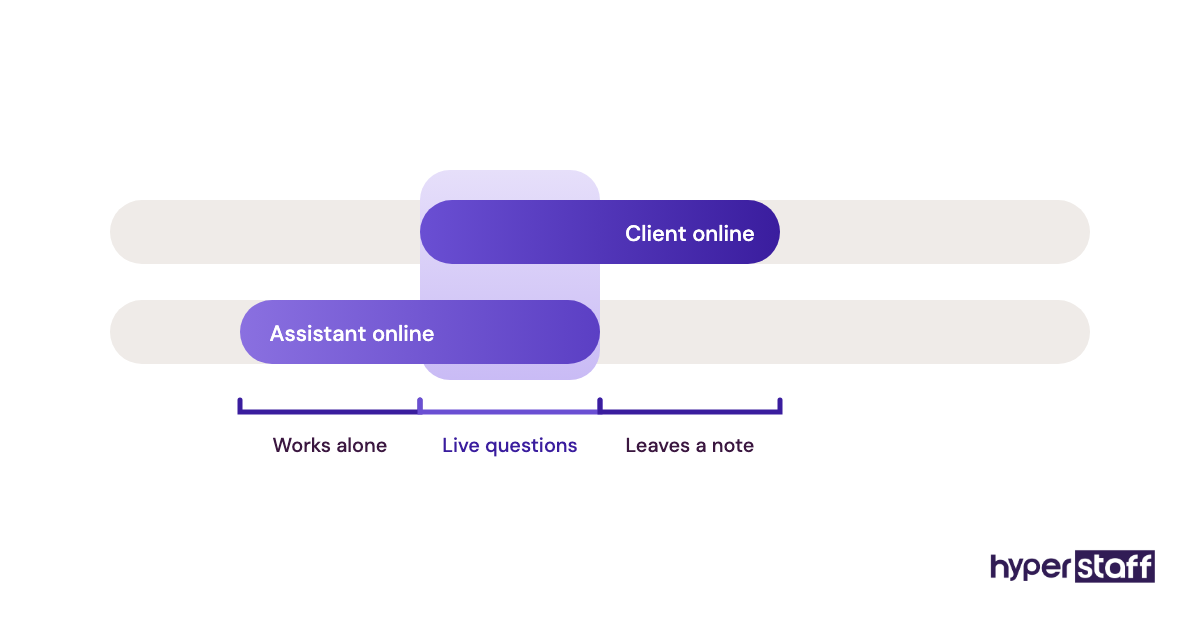
- Time zone overlap = the hours when you and your assistant are both online
- Async handoff = passing work through notes, task comments or recorded videos instead of live calls
- EOD report = an end-of-day summary of tasks done, pending and blocked
- Fully loaded cost = an employee's wage plus benefits, payroll taxes and overhead
- Replacement guarantee = an agency's promise to swap in a new assistant if the fit fails
- Experience tier = a pricing level tied to years of experience, from entry level to senior
Why Does an Administrative Virtual Assistant Matter for a Small Team?
Admin work matters because it grows with every client a business adds, yet it rarely earns money on its own. An administrative virtual assistant absorbs that growing load at an hourly cost far below a local hire, which frees senior people for sales, delivery and decisions.
The second reason is consistency. Invoices that go out on the same day each week get paid faster, and follow-up emails that never slip keep deals from stalling.
There's also a less obvious benefit. Once an assistant writes down how each task is done, the business owns its own processes on paper, instead of keeping them in one founder's head.
How Does an Administrative Virtual Assistant Work Day to Day?
An administrative virtual assistant works inside your existing tools, on an agreed schedule, against a written task list. Most days start with an inbox and calendar sweep, move through recurring tasks, and close with a short end-of-day report.
Communication usually runs through Slack, Teams or email, with a weekly check-in call. Here's how a Hyperstaff placement moves from first call to first task:
| Stage | Timing | What happens |
|---|---|---|
| Discovery call | Day 0, free | Scope tasks, hours and tools |
| Matching and placement | Within 5 business days | Pre-vetted assistant chosen from 5 regions |
| Kickoff call | 30 minutes | Access, priorities, first task list |
| First tasks | Same day or next morning | Work starts on the agreed list |
| Operations Vault | Ongoing | SOPs, tools and context written and maintained |
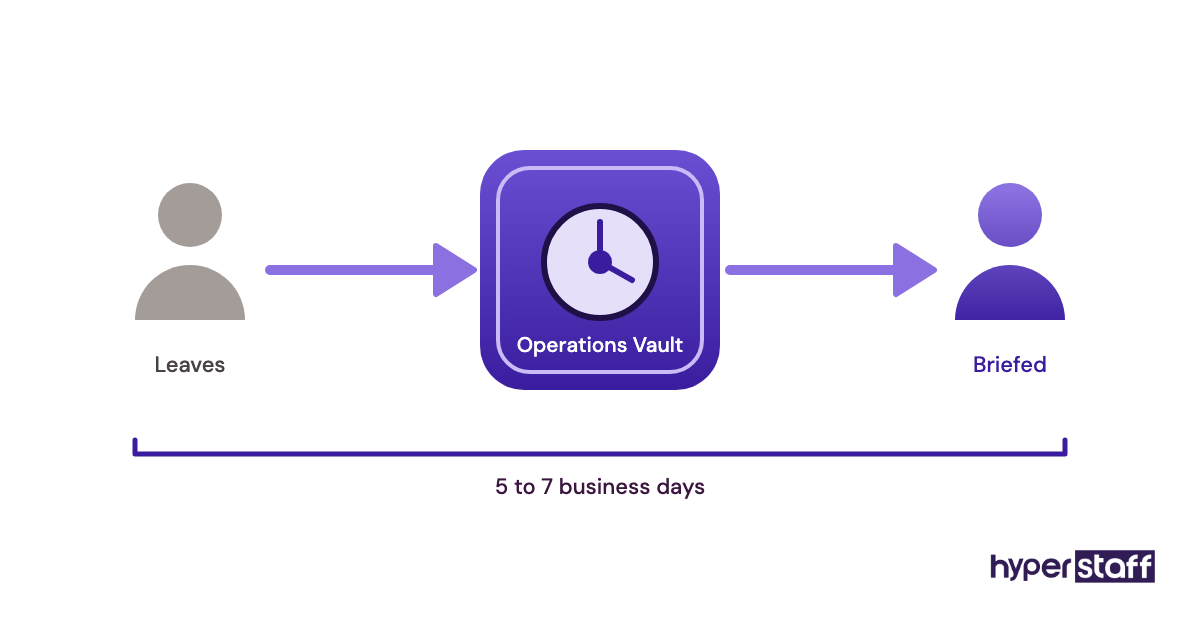
| Replacement, if needed | 5 to 7 business days | New assistant briefed from the Vault |
Types of Administrative Virtual Assistants
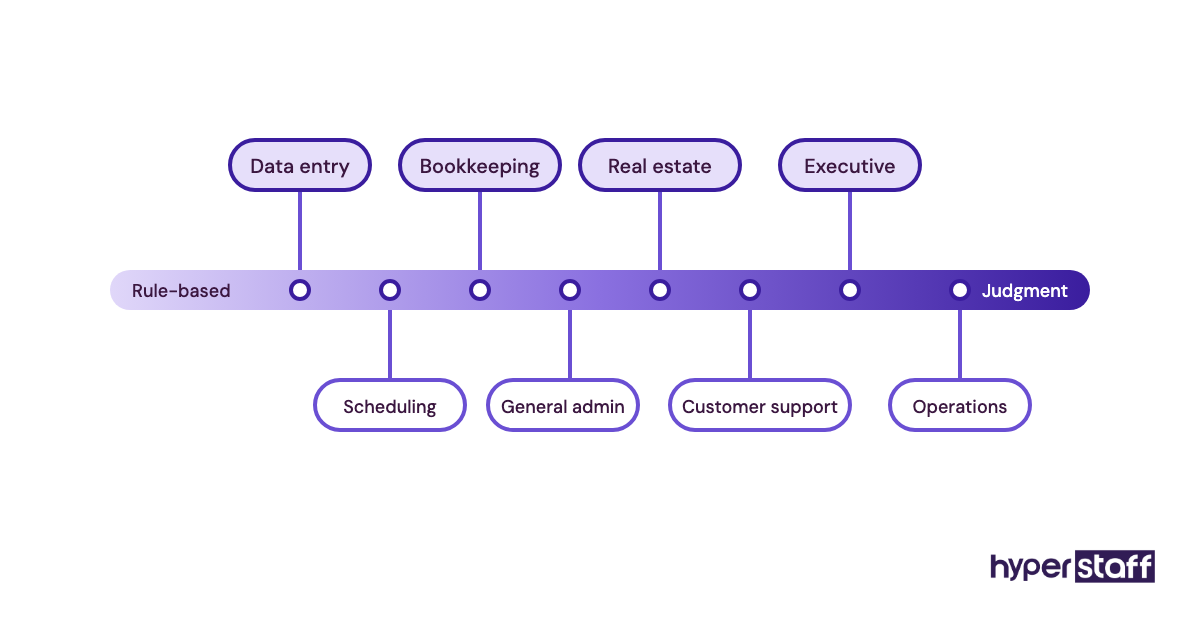
Administrative virtual assistants specialize by the kind of admin they carry. The right type depends on where your backlog actually sits.
| Type | Core work | Typical hours | Best fit |
|---|---|---|---|
| General admin VA | Inbox, calendar, documents, data entry | 40 to 80/month | Solo founders, small teams |
| Executive admin VA | Calendar ownership, travel, meeting prep | 80 to 160/month | Busy executives |
| Data entry VA | CRM updates, spreadsheets, records cleanup | 40 to 160/month | Sales and ops teams |
| Bookkeeping admin VA | Invoices, receipts, payment follow-ups | 40 to 80/month | Service firms, agencies |
| Customer support admin VA | Ticket replies, order status, FAQs | 80 to 160/month | E-commerce, SaaS |
| Scheduling VA | Bookings, reminders, rescheduling | 40 to 80/month | Clinics, coaches, consultants |
| Real estate admin VA | Listings, transaction files, showings | 80 to 160/month | Agents and brokerages |
| Operations admin VA | SOPs, vendor coordination, project tracking | 80 to 160/month | Growing teams of 10+ |
How Is an Admin VA Different From Similar Roles?
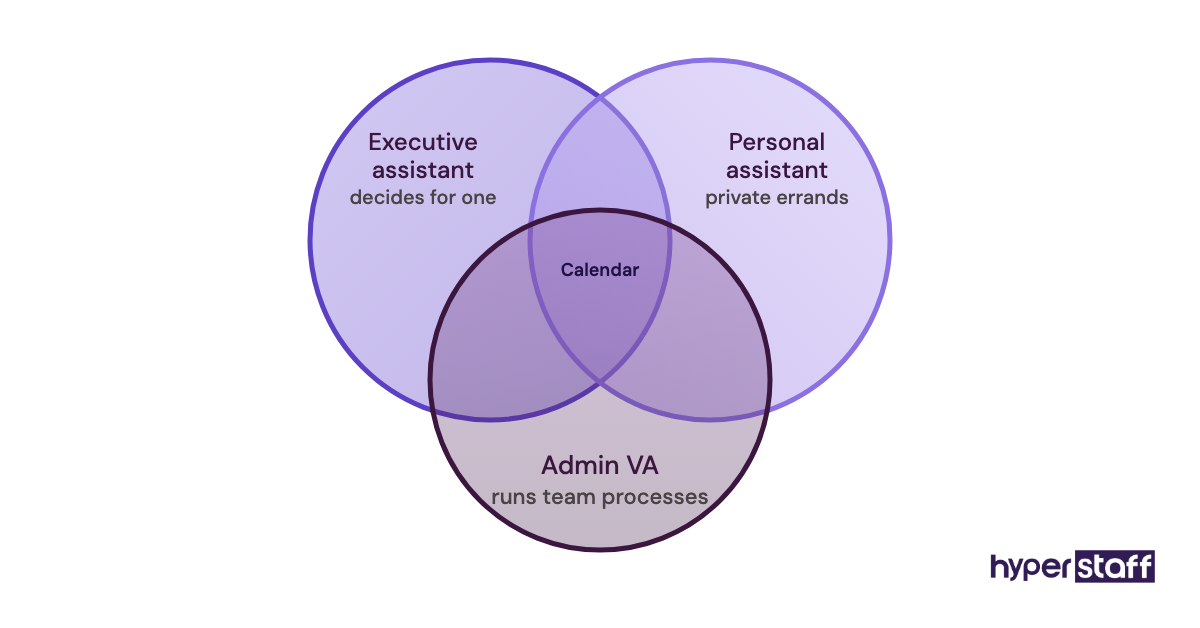
An admin VA overlaps with several office roles, and the lines blur in practice. The differences come down to scope, seniority and where the person sits.
Administrative Virtual Assistant vs. Executive Assistant
An executive assistant supports one leader and acts as their gatekeeper, often making judgment calls on their behalf. An admin VA usually supports a whole team or business process, with more rule-based work and fewer judgment calls.
Many admin VAs grow into executive support after six months or so, once they know the business well. Hiring straight into the executive role costs more and needs a senior candidate from the start.
Administrative Virtual Assistant vs. Personal Assistant
A personal assistant handles private errands: family calendars, personal bills, gift orders. An administrative VA stays on business work, which keeps data access cleaner and makes the role easier to measure.
Administrative Virtual Assistant vs. In-House Administrative Assistant
The in-house assistant can sign for deliveries, greet visitors and handle paper mail. The remote version can't, but it costs far less and draws from a much wider talent pool.
We break down the full trade-off in our guide to an administrative virtual assistant vs in-house hire, including which tasks genuinely need someone in the building.
What Are the Benefits of an Administrative Virtual Assistant?
- Lower cost per hour than a local hire, with no benefits, desk or equipment to fund
- Flexible hours through monthly bundles you can scale up or down
- Faster hiring: placement in days, against weeks or months for a local search
- Coverage across time zones, so some admin gets done while you sleep
- Written SOPs that stay with the business even if the assistant changes
What Are the Drawbacks?
- No physical presence for mail, deliveries or in-office errands
- Upfront time to write task lists and record walkthroughs
- Access and security setup that needs care on day one
- Possible lag on urgent requests if time zone overlap is thin
Who Needs an Administrative Virtual Assistant?
Businesses where senior people still do their own scheduling, invoicing or data entry need an administrative virtual assistant most. Founder-led service firms, agencies, real estate teams, clinics, consultants and e-commerce stores are the most common fits.
A simple test helps. If the same admin task gets done more than twice a week and follows a pattern, an assistant can likely own it, and 40 hours a month is often enough to find out.
The fit is weaker for companies with almost no repeatable admin, or where every task needs a physical presence. Very early startups with no settled process can also struggle, because there's nothing stable yet to hand over.
Administrative Virtual Assistant Examples, Good and Bad
The same assistant can thrive or flounder depending on how the work is set up. These patterns show up again and again in remote admin support.
Good Administrative Virtual Assistant Examples
Inbox Triage With Written Rules
The owner writes a one-page rule set: which senders get answered by the VA, which get flagged, which get archived. The assistant clears the inbox twice a day and leaves only the flagged decisions for the owner.
Calendar Ownership With Clear Preferences
The assistant knows no calls before 10 a.m., 15-minute buffers, and which clients get priority slots. Booking stops being a back-and-forth because the VA owns the calendar end to end.
A Weekly Invoicing Rhythm
Every Friday the VA sends invoices, logs payments and chases anything past due with a polite template. Cash flow becomes predictable because the task runs on a fixed schedule.
Bad Administrative Virtual Assistant Examples
"Just Help Me With Everything"
No task list, no priorities, no SOPs. The assistant waits for instructions, the owner gets frustrated, and both sides decide remote help doesn't work. Our guide to administrative virtual assistant mistakes covers this one in detail.
Passwords Shared Over Chat
Logins pasted into Slack or email are a security risk and a mess to revoke later. A password manager with shared vaults fixes this in an afternoon.
Screen-Share Micromanagement
Watching every click kills the time savings. Outcome-based check-ins, plus a short EOD report, give the same visibility for a fraction of the effort.
How Do You Create an Administrative VA Plan, Step by Step?
An administrative VA plan moves from task audit to a stable routine in five steps. Skipping the first two is the most common reason a placement stalls.
Step #1: Audit and List the Tasks
Track your admin for one week and write every recurring task down, with how often it happens. That list becomes the core of your administrative virtual assistant job description.
Step #2: Pick Hours and Experience Level
Match the bundle to the list. Rule-based data work suits an entry-level assistant, while client-facing email and calendar ownership usually call for 2 to 5 years of experience.
Step #3: Hire or Get Matched
You can recruit directly or use an agency that pre-vets candidates. Either way, our guides on how to hire an admin VA and the interview questions to ask help you spot real skill over polished answers.
Step #4: Onboard With Access and SOPs
Set up delegated access, a password manager and short screen recordings of each task. A structured plan for onboarding an administrative virtual assistant cuts the ramp-up from weeks to days.
Step #5: Review Weekly, Then Expand
Hold a 20-minute weekly check-in for the first month. Once the core tasks run without questions, add the next batch from your list.
What Does an Effective Admin VA Setup Look Like?
An effective admin VA setup has one owner on your side, one written task list, one place for SOPs and one reporting rhythm. Everything else is detail.
Practitioners disagree on one point: whether to start with a narrow task list or hand over a broad role on day one. Narrow starts build trust and reveal skill gaps early; broad starts work only when the procedures already exist on paper, so we lean narrow for most teams.
Ownership also matters more than instructions. An assistant who "owns the calendar" makes better decisions than one who "books meetings when asked", because ownership invites them to spot conflicts before you do.
Administrative Virtual Assistant Tools and Software
The core admin VA tool stack covers email, calendar, tasks, communication, passwords and documents. Most businesses already pay for half of it.
- Google Workspace or Microsoft 365 for email, calendar and documents, with built-in delegate access
- Calendly for booking links that remove scheduling back-and-forth
- Asana, Trello or ClickUp for task lists the assistant updates daily
- Slack or Microsoft Teams for quick questions during overlap hours
- 1Password or Bitwarden for shared logins that can be revoked in one click
- Loom for recorded walkthroughs that double as SOPs
- QuickBooks or Xero for invoicing and payment tracking
One opinion from the field: the password manager matters more than the project tool. Any task app works if people use it, but shared logins without a manager create risk that's hard to undo. More detail sits in our roundup of administrative virtual assistant tools.
10 Tips for Working With an Administrative Virtual Assistant
These habits separate placements that last from those that fizzle in the first month.
- Write the task list before the first day, even if it's rough.
- Start with 5 to 8 recurring tasks, then add more.
- Use delegated access instead of sharing your main password.
- Record each task once on video instead of explaining it live every time.
- Agree on at least 2 to 3 hours of daily time zone overlap.
- Ask for a short EOD report from week one.
- Define what "urgent" means, with examples.
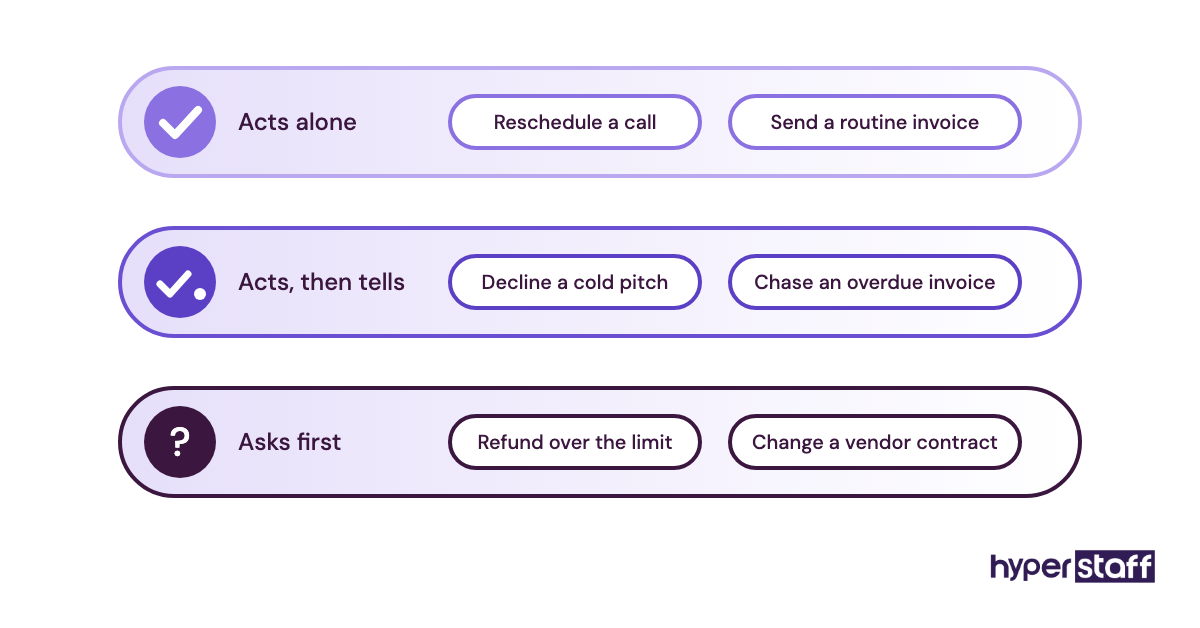
- Give decision rules, such as "approve refunds under $50".
- Review weekly for the first month, then every two weeks.
- Keep SOPs in one shared folder that outlives any single hire.
How Do You Overcome Common Admin VA Challenges?
Most admin VA challenges trace back to unclear instructions, thin time zone overlap or slow access setup. Each has a fast fix once you spot the pattern.
Vague tasks get rewritten as outcomes: "every invoice sent by Friday 5 p.m." beats "help with invoices". Overlap gaps close by shifting the assistant's hours or by moving urgent work to the overlap window.
Access delays are the sneakiest. An assistant who spends the first three days waiting for logins loses momentum, so set up the password vault and delegate access before kickoff.
How Do You Measure Administrative VA Success?
Measure administrative VA success by hours you got back, tasks completed on time and errors caught before they reached a client. Those three numbers tell you more than any satisfaction survey.
Track a simple weekly scorecard: recurring tasks done on schedule, inbox response time, invoices sent and paid, and how many questions the assistant still needs to ask. That last number should drop steadily over the first eight weeks.
If it doesn't, the problem is usually missing SOPs. Assistant skill is the less common cause.
How Long Does an Administrative Virtual Assistant Take to Work?
An administrative virtual assistant typically handles simple recurring tasks within the first week and runs a full routine within four to eight weeks. The speed depends on how well the work is documented.
Expect a dead zone around days 3 to 10. The assistant knows the tools but not your preferences, so questions spike before they fall.
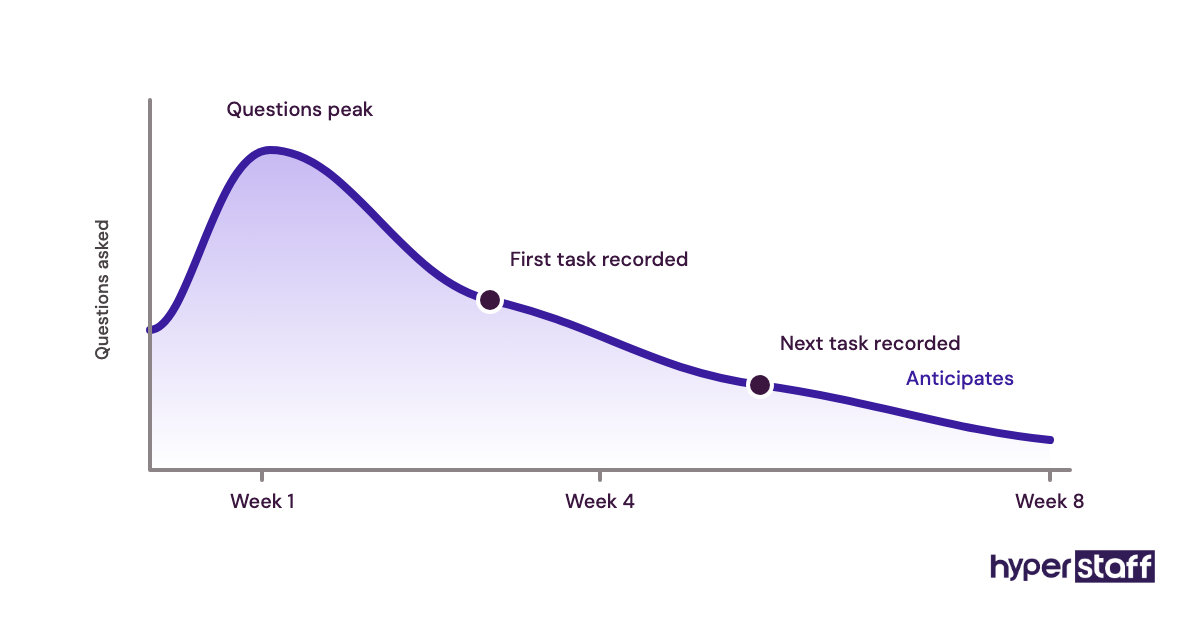
By month two or three, most assistants anticipate requests instead of waiting for them. That's when owner time saved shows up clearly on the calendar.
How Much Does an Administrative Virtual Assistant Cost?
An administrative virtual assistant costs roughly $3 to $15 per hour through an offshore agency, depending on experience. A US in-house administrative assistant earns a median of $23.23 per hour before benefits, according to the U.S. Bureau of Labor Statistics.
| Option | Experience | Hourly rate | 40 hrs/month | 80 hrs/month | 160 hrs/month |
|---|---|---|---|---|---|
| Hyperstaff Essential | 0 to 2 years | From $3 | From $120 | From $240 | From $480 |
| Hyperstaff Professional | 2 to 5 years | From $6 | From $240 | From $480 | From $960 |
| Hyperstaff Expert | 5+ years | From $12 | From $480 | From $960 | From $1,920 |
| US in-house, wage only | Median | $23.23 | $929 | $1,858 | $3,717 |
| US in-house, fully loaded | Median | About $33 | About $1,330 | About $2,655 | About $5,310 |
The fully loaded row assumes wages make up 70% of total compensation, in line with the BLS Employer Costs for Employee Compensation release for private industry. Paying quarterly with Hyperstaff saves another 10%, and the administrative virtual assistant cost guide covers the rest of the math.
Important: Hyperstaff prices shown are starting averages. Your final cost depends on the hours, experience tier and type of work you need, which we confirm on the discovery call.
Is an Administrative Virtual Assistant Worth It?
Yes, an administrative virtual assistant is one of the highest-return hires a small business can make when the tasks are clear and the assistant is dedicated. The math is rarely close, and the time you get back compounds as the assistant learns your business.
Here's a sample calculation. A US in-house assistant at the median wage costs about $33 per hour fully loaded, so 80 hours a month runs roughly $2,655.
A Hyperstaff Professional assistant for the same 80 hours starts at $480, or $432 with quarterly billing. That's a gap of over $2,100 a month, before counting recruiting time or desk space.
The honest caveat: the savings disappear if nobody defines the work. Our deeper take on whether an admin VA is worth it walks through the cases where it isn't.
How Do You Choose an Administrative VA Agency?
Choose an administrative VA agency by checking four things: how it vets candidates, whether your assistant is dedicated, what happens if the fit fails, and who owns your documented processes. Price matters, but those four decide whether the placement lasts.
Ask how fast replacements happen and how the new person gets briefed. An agency that keeps your SOPs in a shared system, such as the Hyperstaff Operations Vault, can swap an assistant in 5 to 7 business days without restarting from zero.
Also check for a named account manager and clear hourly bundles. Vague contracts and pooled staff are the two warning signs worth walking away from.
Administrative Support Statistics, Trends and Predictions
The US employs about 3.5 million secretaries and administrative assistants, with a median wage of $48,310 per year, according to the BLS Occupational Outlook Handbook. The same source projects a 2% decline in these jobs over the coming decade, yet still expects about 314,400 openings each year from turnover.
Benefits add real weight to that wage. Per the BLS compensation data, wages account for 70% of private-industry employer costs, with benefits making up the other 30%.
Our prediction, stated as opinion: in-office admin roles will keep shrinking, while remote admin roles absorb more operations work. Software handles more single tasks, and people are needed for the judgment that connects them.
Administrative Virtual Assistants and AI
AI tools now draft emails, summarize meetings and suggest calendar slots, and admin VAs use them daily. The assistant's job shifts toward checking output, handling exceptions and making the calls software gets wrong.
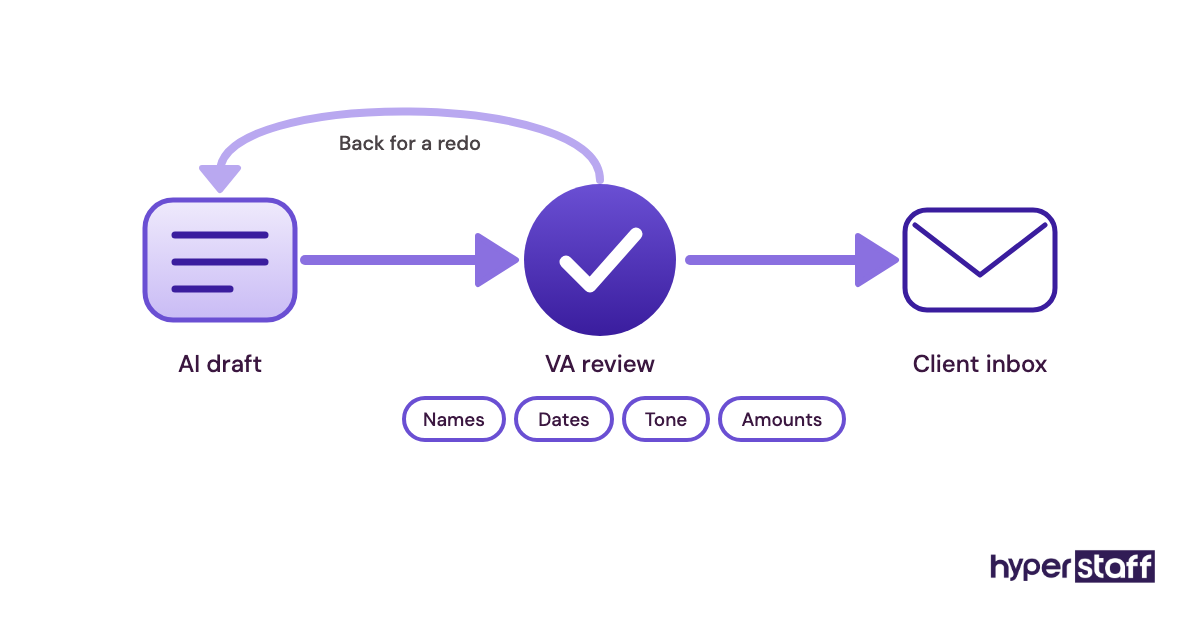
In practice, AI is strong at first drafts and weak at context. It doesn't know that one client hates Monday calls or that a vendor needs a phone call before an email, and that kind of knowledge is what a dedicated assistant builds over months.
Disclaimer: This article is for general information only and does not constitute legal, financial or employment advice. Figures and pricing may change; confirm details with Hyperstaff and qualified professionals before making decisions.
Common questions
Is an administrative virtual assistant the same as a secretary?
No. A secretary traditionally works on-site and handles phones, filing and visitors. An administrative virtual assistant works remotely and covers digital admin, often extending into support, data and operations work.
Can an administrative virtual assistant work in my time zone?
Yes, most can shift hours to give you at least 2 to 3 hours of overlap. Assistants in Latin America and the US match American hours closely, while the Philippines and India often cover overnight work plus a morning overlap.
Is it safe to give an admin VA access to my email?
It can be, with the right setup. Use delegated access in Google Workspace or Microsoft 365 and a password manager for other logins, so you can revoke everything in minutes.
How many hours does an administrative virtual assistant need each month?
It depends on your task list. Many small businesses start with 40 hours a month, then move to 80 or 160 once recurring tasks are running smoothly.
Can an administrative virtual assistant do bookkeeping?
You can hand an admin VA invoicing, receipt matching and payment follow-ups. Tax filing and financial statements should stay with a qualified accountant.
Book a free 15 min call
We place a pre-vetted specialist in 5 business days, fully managed, from $3/hour.