Data Entry Virtual Assistant Interview Questions: A Copyable Template
A complete data entry virtual assistant interview template with questions, a live test and a scoring rubric, plus how to adapt it to your own data.
On this page
- What Are Data Entry Virtual Assistant Interview Questions?
- Key Data Entry Interview Terms You Should Know
- Why Do Interview Questions Matter So Much for Data Entry Hires?
- How Does a Data Entry Virtual Assistant Interview Work?
- The Complete Data Entry Virtual Assistant Interview Template
- Types of Data Entry Virtual Assistant Interview Questions
- How Data Entry VA Interviews Differ From Related Interviews
- Data Entry VA Interview vs. General Virtual Assistant Interview
- Data Entry VA Interview vs. In-House Data Entry Clerk Interview
- Data Entry VA Interview vs. Skills Test Only
- The Benefits of a Structured Data Entry Interview
- The Drawbacks of a Structured Data Entry Interview
- Who Needs a Data Entry VA Interview Template?
- Data Entry VA Interview Answer Examples
- Good Data Entry Interview Answers
- Bad Data Entry Interview Answers
- Creating a Data Entry VA Interview Plan, Step-by-Step
- Step #1
- Step #2
- Step #3
- Step #4
- Step #5
- How to Adapt the Interview Template to Your Business
- Data Entry VA Interview Tools and Software
- 9 Proven Data Entry Interview Tips and Best Practices
- Overcoming Common Data Entry Interview Challenges
- How to Measure Data Entry Interview Success
- How Long Does a Data Entry VA Hiring Process Take?
- How Much Does Hiring a Data Entry Virtual Assistant Cost?
- Is a Structured Data Entry VA Interview Worth It?
- How to Choose a Data Entry Virtual Assistant Agency
- Data Entry Hiring Statistics, Trends and Future Predictions
- Data Entry Virtual Assistants and AI
- FAQs
Clean data pays. Hire the person who keeps it clean.
A data entry hire who keys invoices, orders and leads correctly protects revenue you'd otherwise lose to billing errors and dead CRM records. Hyperstaff has placed 70+ virtual assistants with 30+ clients, and our dedicated data entry virtual assistants are pre-vetted across five regions, start from $3/hour and can be placed in 5 business days, with a free replacement if the fit is wrong.
What Are Data Entry Virtual Assistant Interview Questions?
Data entry virtual assistant interview questions are a structured set of prompts that test whether a remote candidate can move information from one source to another accurately, on schedule and securely. They cover experience, spreadsheet skills, error handling, data privacy and how the person communicates when nobody is online to help.
The role itself is broader than most people expect. A data entry virtual assistant's day can include CRM updates, invoice processing, product catalog uploads, lead list cleaning and order reconciliation, so the questions need to reach past "how fast do you type."
Key Data Entry Interview Terms You Should Know
- Accuracy rate = the share of records entered with zero errors, usually checked on a sample.
- KPH (keystrokes per hour) = the standard speed measure for numeric and alphanumeric entry.
- WPM (words per minute) = typing speed on running text, less useful for numbers and codes.
- Double-keying = entering the same data twice and comparing the results to catch mistakes.
- Data validation = spreadsheet or form rules that block entries in the wrong format.
- Deduplication = finding and merging records that describe the same customer, product or order.
- OCR = software that reads text from scans and PDFs, which still needs human correction.
- PII = personally identifiable information, such as names, addresses, ID numbers and bank details.
- SOP = a written procedure that tells the assistant exactly how a recurring task is done.
- Work sample test = a timed task during the interview that mirrors the real job.
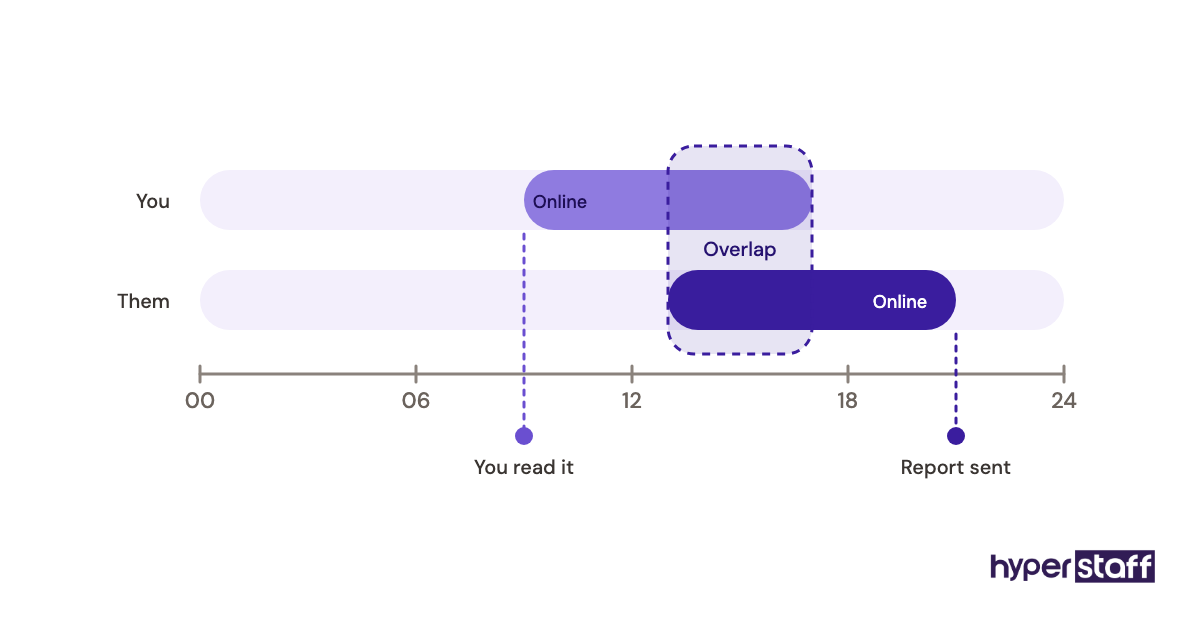
- Time zone overlap = the hours when you and the assistant are both online.
Why Do Interview Questions Matter So Much for Data Entry Hires?
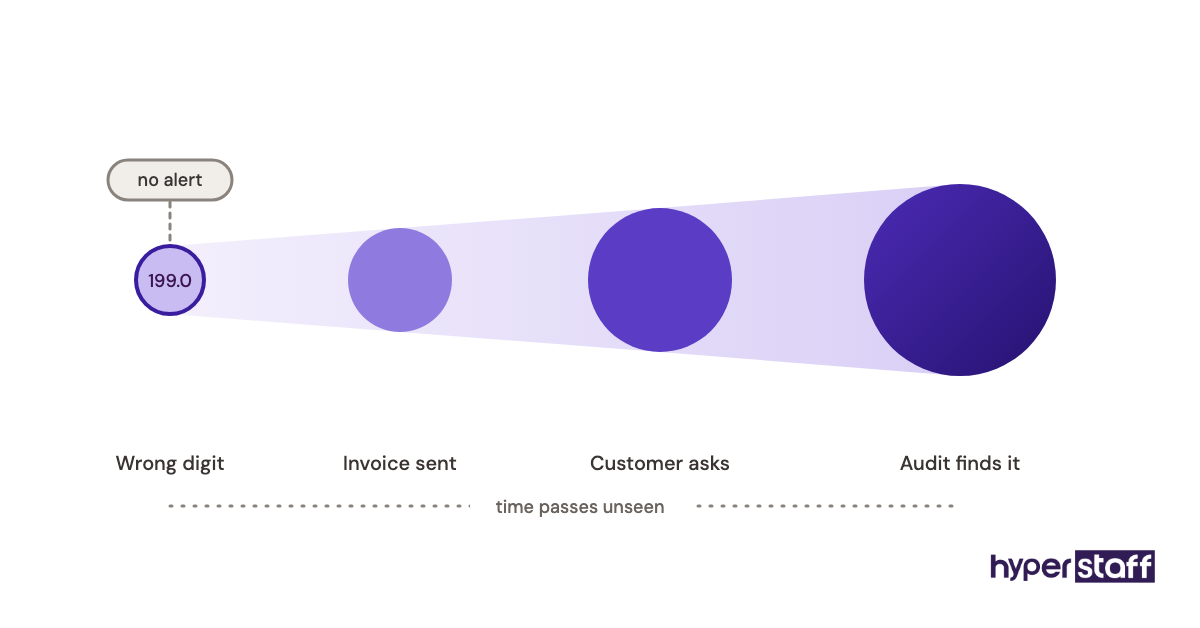
Interview questions matter because data entry errors are easy to miss. A wrong digit in a price field or a swapped postcode doesn't throw an alert, and it can sit in your system for months before a customer, an accountant or an auditor finds it.
Résumés in this field look alike. Most candidates list "attention to detail" and "proficient in Excel," so the interview is the only place you separate claims from habits.
The hard part is that strong typists can still be weak data entry hires. Speed without a checking routine just produces errors faster, which is why the template below spends more time on verification than on keyboard skill.
How Does a Data Entry Virtual Assistant Interview Work?
A data entry virtual assistant interview usually runs in two or three stages: a short written or recorded screen, a live video interview of 30 to 45 minutes, and a timed work sample. Some teams fold the work sample into the live call so they can watch how the candidate approaches it.
The sequencing has dead zones. Candidates often need a day or two to return a recorded screen, and scheduling across time zones adds another day, so a realistic first-contact-to-offer window is about one to two weeks when you run it yourself.
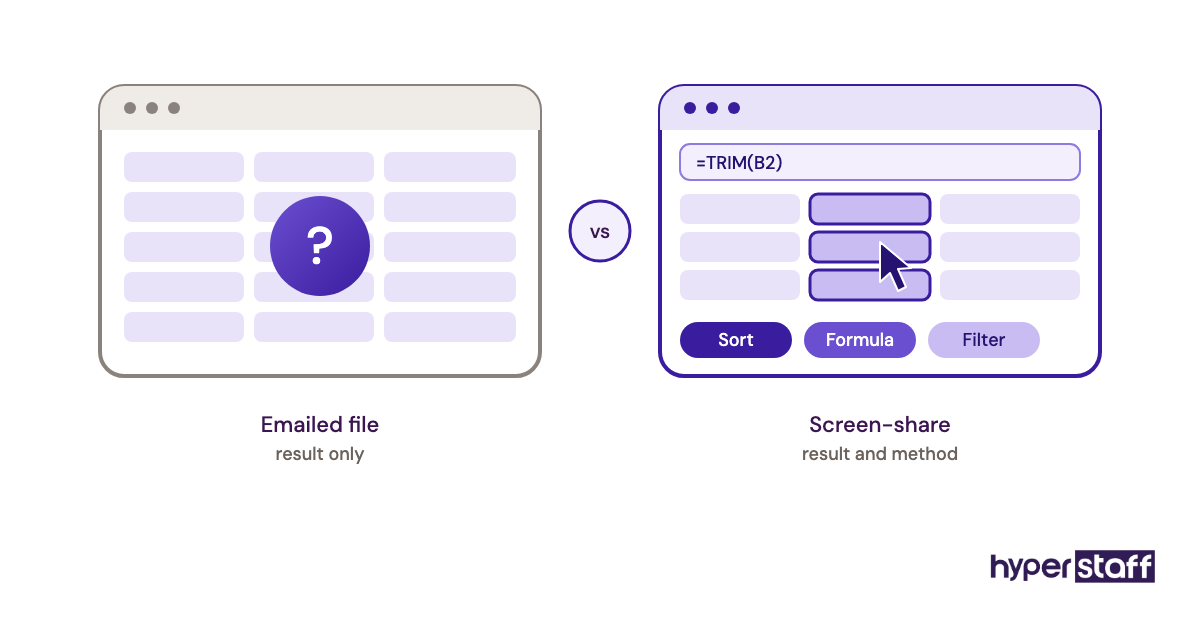
Worth knowing: Send the work sample during the live call and ask the candidate to share their screen while they do it, because a test returned by email tells you the result but hides whether they used formulas, sorted carefully or simply retyped everything by hand.
The Complete Data Entry Virtual Assistant Interview Template
The template below is ready to copy into a doc or your hiring tool. It holds 31 questions across eight parts, plus a 20-minute live test, and fits into a 45-minute call if you trim Part A for candidates who already passed a written screen.
Data Entry Virtual Assistant Interview Template
Part A: Fit and logistics (5 minutes)
- Which hours can you work, and how many of them overlap with our business hours in [your time zone]?
- What's your internet speed, and what do you do if power or internet drops in the middle of a shift?
- Are you working with other clients right now? How many hours a week do they take?
- Which computer and operating system will you use for this work?
Part B: Experience (8 minutes)
- Walk me through the last data entry project you finished. What was the source, where did the data go, and roughly how many records were there?
- What's the largest dataset you've worked with, in rows?
- Which CRMs, accounting tools, ecommerce platforms or databases have you entered data into?
- Tell me about a time you found a mistake after you'd already submitted the work. What did you do next?
- How fast do you type, and how was that measured?
Part C: Accuracy and judgement (8 minutes)
- How do you check a batch of entries before you mark it as done?
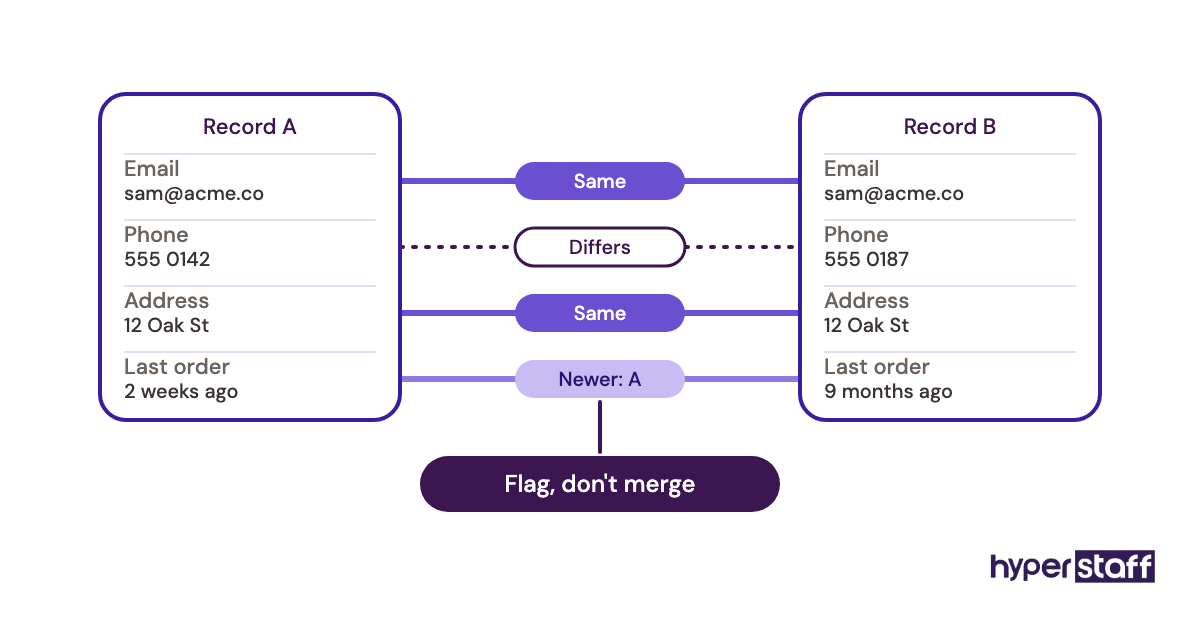
- Two customer records share an email address but list different phone numbers. What do you do?
- A scanned invoice has a smudged total you can't read. How do you handle it?
- The instructions say to enter dates as MM/DD/YYYY, but the source uses three different formats. Walk me through your approach.
- What error rate would you consider acceptable, and how would you track your own?
- Six hours into repetitive entry, what keeps your accuracy from slipping?
Part D: Tools and spreadsheet skills (6 minutes)
- In Excel or Google Sheets, how would you find duplicates in a 3,000-row list?
- What does XLOOKUP or VLOOKUP do, and when did you last use one?
- How would you split a "Full Name" column into first name and last name?
- Have you set up data validation or dropdown lists to stop bad entries?
- Have you used OCR or PDF-to-spreadsheet tools? What did you have to fix by hand afterwards?
- How do you name and store files so someone else can find them later?
Part E: Data security (4 minutes)
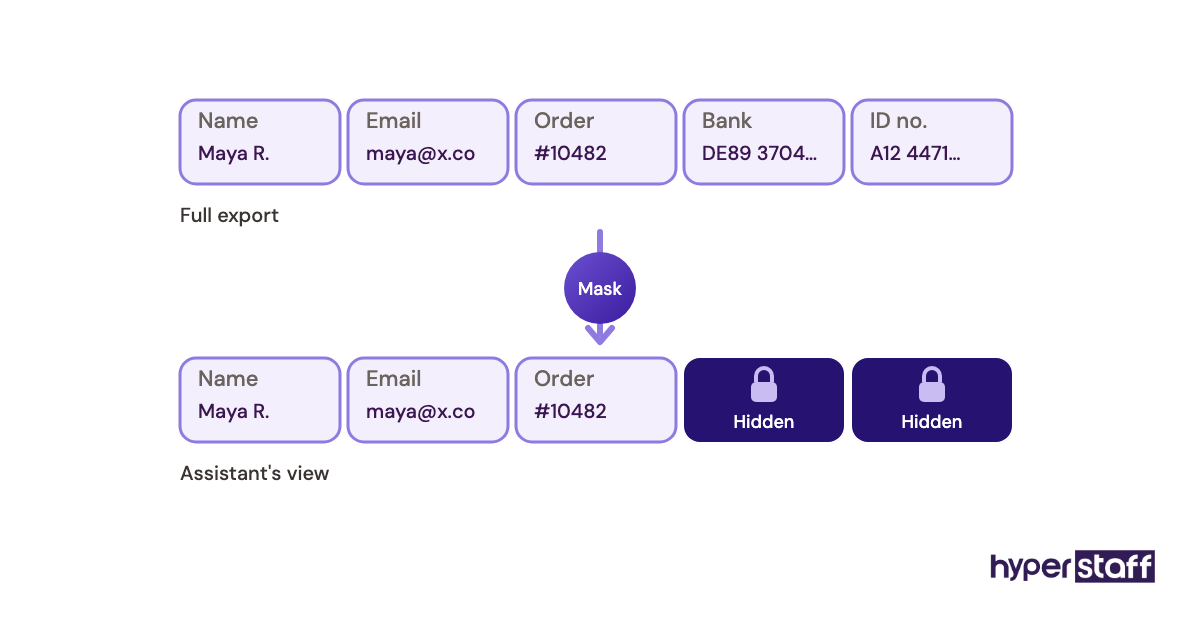
- How do you handle sensitive customer data such as addresses, ID numbers or bank details?
- Do you use a password manager and two-factor authentication?
- Have you worked under an NDA before, and are you comfortable signing one?
- What would you do if you received a file you weren't meant to see?
Part F: Communication (4 minutes)
- The instructions are unclear and your manager is offline for the next eight hours. What do you do?
- How would you report your progress at the end of each day?
- Tell me about a time you thought a task was set up the wrong way. What did you say?
- How do you prefer to get feedback on your work?
Part G: Live work sample (20 minutes)
- Share your screen. Here's a 60-row spreadsheet copied from a messy source. Please (a) standardise the date and phone formats, (b) flag or merge duplicate records, and (c) enter the five records from the attached PDF at the bottom of the sheet. Tell us anything you'd question before finishing.
Part H: Their questions (5 minutes)
- What would you like to know about the role, our tools or how we work?
Scoring: rate each part from 1 to 4 straight after the call, using the rubric in the next sections.
Questions 11, 12 and 26 do the most work. They have no single correct answer, so they show whether the candidate asks before guessing, which is the habit that keeps a database clean.
Types of Data Entry Virtual Assistant Interview Questions
Data entry virtual assistant interview questions fall into seven types, and each one reveals something a résumé can't. The table maps every type to what it tests and the answer pattern that should make you pause.
| Question type | What it tests | Template questions | Red-flag answer |
|---|---|---|---|
| Logistics | Availability, setup, backup plan | 1–4 | No plan for outages |
| Experience | Real volume and systems used | 5–9 | Vague, no record counts |
| Behavioural | How past mistakes were handled | 8, 28 | "I never make mistakes" |
| Situational | Judgement on messy data | 11–13 | Guesses without flagging |
| Technical | Spreadsheet and tool skill | 16–21 | Manual fixes for everything |
| Security | Handling of PII | 22–25 | Shared passwords, personal email |
| Communication | Async reporting and questions | 26–29 | Waits silently for help |
| Work sample | Accuracy under time pressure | 30 | Fast but unchecked |
How Data Entry VA Interviews Differ From Related Interviews
A data entry interview leans harder on verification and repetitive accuracy than most remote hiring conversations. The three comparisons below show where the emphasis shifts and which questions you'd swap.
Data Entry VA Interview vs. General Virtual Assistant Interview
A general virtual assistant interview tests range: inbox handling, scheduling, customer replies, light research. The data entry version narrows to accuracy over long, repetitive sessions, so it drops most writing and phone questions and adds the live spreadsheet test.
Data Entry VA Interview vs. In-House Data Entry Clerk Interview
An in-house clerk interview rarely asks about internet backup, time zone overlap or written daily reports. Remote hires need those questions because nobody is at the next desk to notice a stalled task, and the security section matters more when data lives on a personal device. Our data entry virtual assistant vs in-house comparison goes deeper on the trade-offs.
Data Entry VA Interview vs. Skills Test Only
Some hiring managers skip the conversation and rely on a typing test. Practitioners genuinely split on this: a test-only process is faster and less biased by charm, while the interview catches communication gaps a test can't. Our position is to keep both, with the test carrying more weight in the score.
The Benefits of a Structured Data Entry Interview
- Every candidate answers the same questions, so comparisons are fair.
- The live test shows real accuracy, which résumés can't prove.
- Situational questions reveal whether someone flags problems or guesses.
- Security questions surface risky habits before the person touches customer data.
- Written scores make it easy to explain the decision to a co-founder or manager.
The Drawbacks of a Structured Data Entry Interview
- It takes 45 to 60 minutes per candidate, plus prep time for the test file.
- Nervous candidates can underperform on a timed screen-share.
- A fixed script can miss strengths that fall outside it.
Who Needs a Data Entry VA Interview Template?
Any business hiring its first remote data entry assistant needs a template, because there's no previous hire to benchmark against. Founders running ecommerce stores, bookkeeping practices, real estate teams and sales teams with growing CRMs are the most common users.
Teams replacing an assistant benefit too. If the last hire failed, the template lets you write questions aimed at that exact failure, whether it was missed deadlines, sloppy formatting or poor communication.
Keep in mind: Before writing interview questions, list the actual tasks the hire will do in week one, because a question set built on a clear data entry task list tests the job you have instead of a generic one.
Data Entry VA Interview Answer Examples
Answer examples help you score consistently. The good answers below share one trait: they describe a specific action, and the weak ones describe a personality.
Good Data Entry Interview Answers
Good Answer: Checking a Batch
"I sort by each key column to spot blanks and odd values, then spot-check every tenth record against the source. For financial data I total the amounts and compare them with the source total before I submit."
The candidate named a method with a control total, which is the habit you want.
Good Answer: The Duplicate Record
"I wouldn't merge them yet. I'd check the order history to see which number was used most recently, note both in a comment and ask whoever owns the CRM which rule they want me to follow."
Flagging before merging protects data that can't be recovered once deleted.
Good Answer: Unclear Instructions Overnight
"I'd write down the question with a screenshot, move to the next task I'm sure about, and post it where you'll see it first in the morning."
Bad Data Entry Interview Answers
Bad Answer: "I'm Very Detail-Oriented"
Every candidate says it. Without a described routine, the answer scores a 1 no matter how confidently it's delivered.
Bad Answer: "I'd Just Pick the Newest Number"
Quick decisions on conflicting records feel efficient. They also overwrite good data with no trail, and that pattern shows up again in the common data entry VA mistakes most teams run into.
Bad Answer: "I Save Client Files to My Personal Drive"
Convenient for the assistant, risky for you. Any answer that moves customer data outside your tools needs a correction during the interview and a firm policy after it.
Creating a Data Entry VA Interview Plan, Step-by-Step
An interview plan turns the template into a repeatable process you can run for every opening. Expect to spend about two hours on setup the first time and almost none after that.
Step #1: Define the Data and Systems
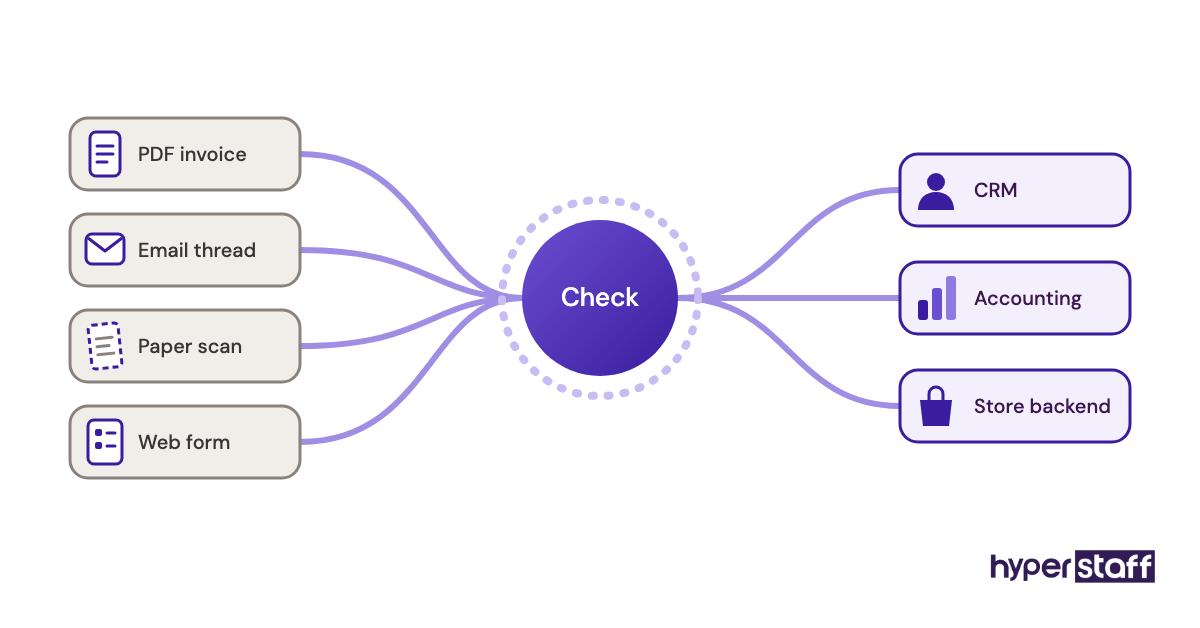
Write down the sources (PDFs, emails, forms, paper scans) and destinations (CRM, accounting software, store backend). Those two lists decide which Part D questions you keep.
Step #2: Write the Job Description First
The interview should test what the job ad promised. A clear data entry VA job description also filters out applicants who lack your must-have tools before you spend call time on them.
Step #3: Build the Work Sample File
Copy 60 rows of real data, anonymise it, then plant errors: mixed date formats, three duplicates, a missing postcode and one obviously wrong price. Keep an answer key so you can score in two minutes.
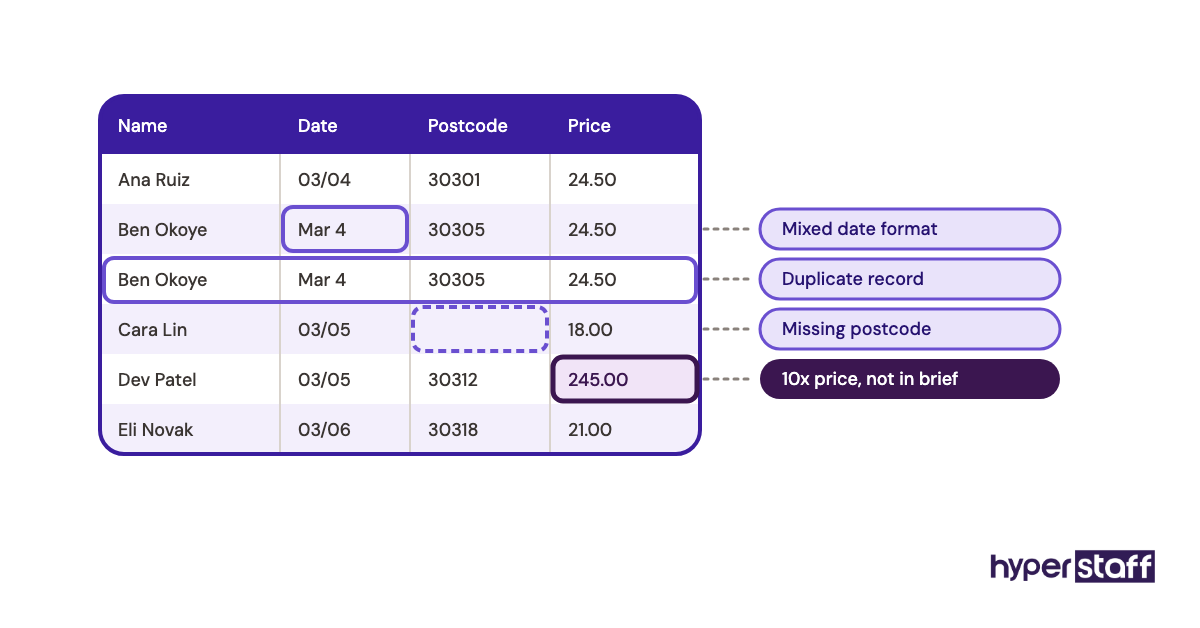
Tip: Plant one error that the instructions don't mention, such as a price ten times higher than the others, since candidates who notice and ask about it are showing the exact judgement that prevents costly billing mistakes later.
Step #4: Run Screens Before Live Calls
Send Part A as a short written form. Candidates with no time zone overlap or no backup internet drop out before you book a call.
Step #5: Score Within an Hour
Memory fades fast across a day of calls. Fill in the rubric straight after each interview, then compare scores only when every candidate is done.
How to Adapt the Interview Template to Your Business
Adapting the template means swapping the generic prompts for your own data, tools and failure points while keeping the structure and the scoring. The rubric below is the part to keep fixed so your scores stay comparable across hires.
| Criterion | Weight | Score 1 | Score 4 |
|---|---|---|---|
| Work sample accuracy | 35% | 3+ errors left | 0 errors, planted issue flagged |
| Judgement (Part C) | 20% | Guesses | Flags, documents, asks |
| Tool skill (Part D) | 15% | Manual only | Uses formulas, validation |
| Security (Part E) | 15% | Risky habits | 2FA, password manager, NDA |
| Communication (Part F) | 15% | Waits silently | Clear async updates |
For an ecommerce store, rewrite question 7 around Shopify or WooCommerce product uploads and use a product CSV for the test. A bookkeeping practice should swap the test file for receipts and a bank export, then raise the security weight.
Medical, legal and financial records deserve a higher security weight, up to 25%, taken from the communication score. Keep the work sample at 35% no matter what, because it's the only criterion based on observed work.
Data Entry VA Interview Tools and Software
The tools for a data entry interview are mostly ones you already own: a video call app, a spreadsheet and a form builder. Paid assessment platforms help most when you're screening more than a dozen applicants.
- Google Sheets or Microsoft Excel for the work sample file. Use whichever the hire will actually work in.
- Zoom or Google Meet for the live call with screen-share.
- Google Forms or Typeform for the Part A written screen.
- TestGorilla or a similar assessment platform for timed typing and attention-to-detail tests at volume.
- Loom for asking candidates to record a short walkthrough of how they'd approach a task.
Our earned opinion: free online typing tests are fine for a speed number, but they use clean prose and say nothing about numeric accuracy. The full software stack the hire will use day to day is covered in our guide to data entry virtual assistant tools.
9 Proven Data Entry Interview Tips and Best Practices
These tips come from the failure points that most often turn a promising interview into a weak hire.
- Use your own messy data in the test, anonymised, instead of a textbook sample.
- Ask for record counts and row numbers in experience answers. Specifics are hard to fake.
- Watch the screen-share for formulas versus manual retyping.
- Give the same time limit to every candidate and write it down.
- Ask at least one question with no right answer, then score how they reason.
- Check written English through the Part A form, since daily reports will be written.
- Score before discussing candidates with anyone else.
- Run a paid trial week for the top candidate when the role touches finance or customer records.
- Reuse the same template next time and add one question for each problem the last hire had.
Overcoming Common Data Entry Interview Challenges
The most common challenge is a polished interviewee who fails the test. Trust the test: confidence on video and accuracy in a sheet are separate skills, and the role needs the second.
Connection drops during screen-share also trip people up. Let the candidate finish the sample offline and send the file with version history, which still shows how they worked.
Shortlists that are too long cause fatigue. Cap live calls at five candidates and let the written screen do the rest.
How to Measure Data Entry Interview Success
Interview success shows up after the hire starts. Compare each new assistant's accuracy on a weekly sample against their interview work sample score; if the two track together, your test is predictive.
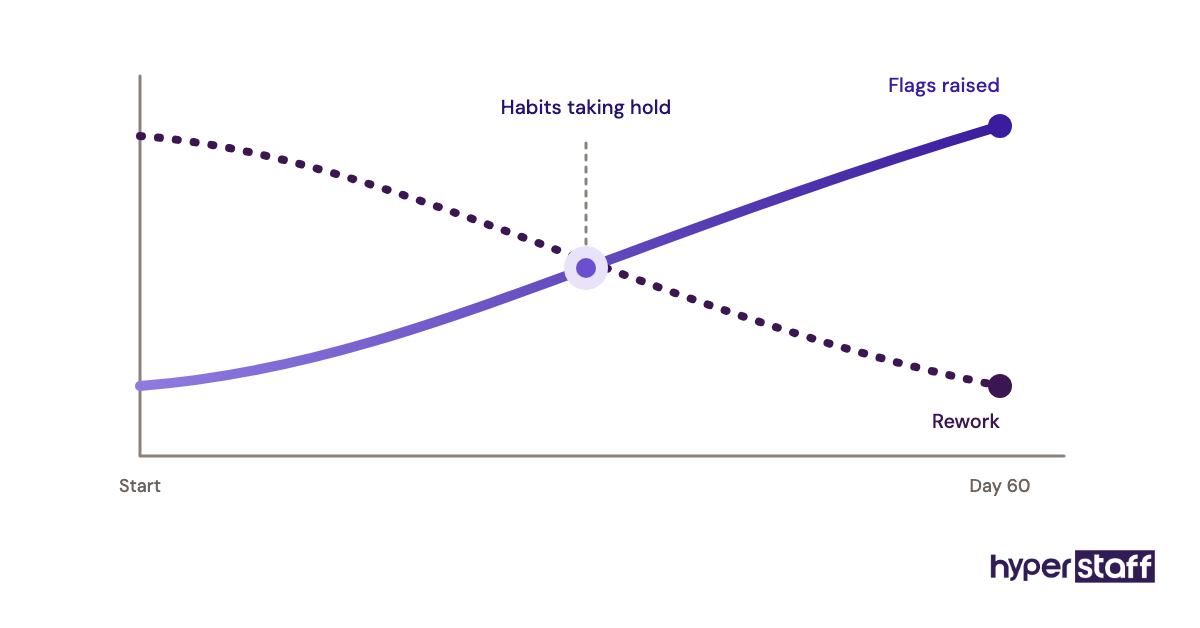
Watch two other signals over the first 60 days: how often the assistant flags a problem before you find it, and how many tasks need rework. A rising flag count paired with falling rework means the interview picked the right habits.
How Long Does a Data Entry VA Hiring Process Take?
A self-run data entry VA hiring process takes about one to three weeks: a few days to collect applicants, a few more for written screens, then live calls and scoring. Time zone scheduling usually adds the most delay.
The first two weeks after the hire are a ramp. A structured data entry VA onboarding plan, with SOPs written before day one, shortens that ramp more than any interview question can.
How Much Does Hiring a Data Entry Virtual Assistant Cost?
Hiring a data entry virtual assistant through Hyperstaff costs from $3 to $12+ per hour depending on experience, against a US median of $21.64 per hour for general office clerks reported by the Bureau of Labor Statistics, before benefits and payroll taxes.
| Experience level | Hyperstaff hourly (from) | Hyperstaff 160 hrs/month (from) | US in-house clerk, 160 hrs (wage only) |
|---|---|---|---|
| Essential (0–2 yrs) | $3/hr | $480 | ~$3,460 |
| Professional (2–5 yrs) | $6/hr | $960 | ~$3,460 |
| Expert (5+ yrs) | $12/hr | $1,920 | ~$3,460 |
Bundles come in 40, 80 or 160 hours a month, and paying quarterly saves 10%. Our full data entry virtual assistant cost breakdown covers part-time scenarios.
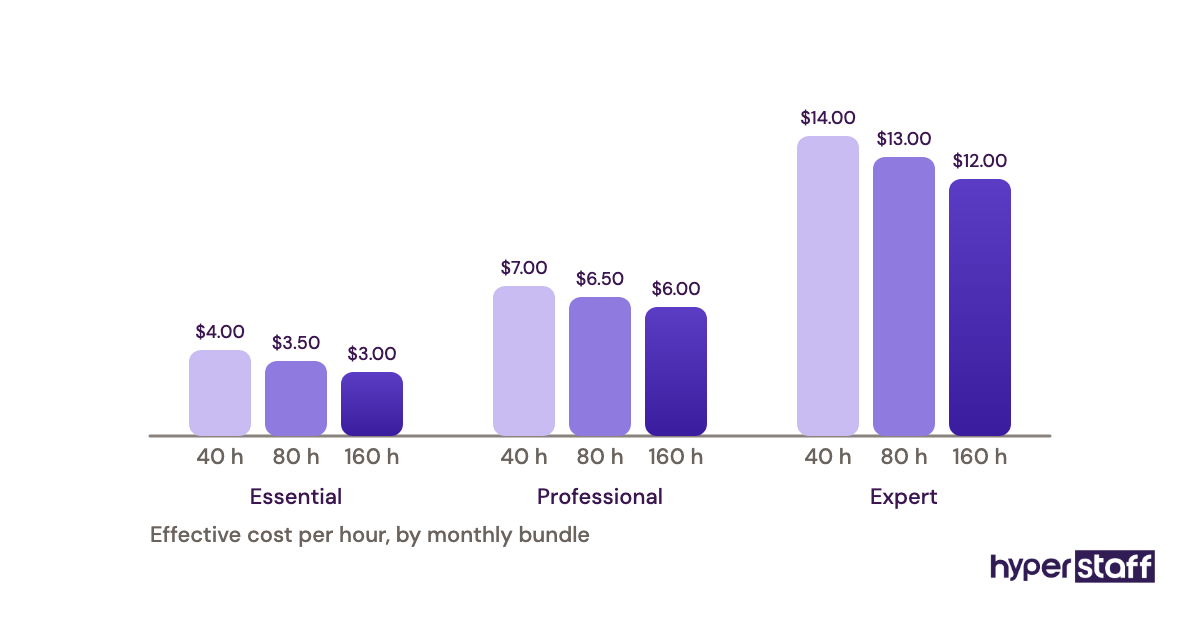
Important: Hyperstaff prices shown are starting averages. Your final rate depends on the assistant's experience, the hours you book and the complexity of your data work.
Is a Structured Data Entry VA Interview Worth It?
Yes, a structured data entry VA interview is worth it, because a few hours of testing protect every record the assistant will touch for months. Done right, it's one of the highest-return hours a small business owner spends on hiring.
Here's an example calculation. Five candidates at 45 minutes each, plus two hours of setup and an hour of scoring, comes to roughly 6.75 hours of your time.
Now take a weaker hire with a 2% error rate on 4,000 records a month: that's 80 bad records. At about five minutes each to find and fix, you'd lose close to 6.7 hours every month, so the interview pays for itself in the first month and keeps paying after that.
The broader return question, covering wages, output and management time, is answered in our post on whether a data entry virtual assistant is worth it.
How to Choose a Data Entry Virtual Assistant Agency
Choose a data entry virtual assistant agency by asking how it vets accuracy, what happens when a placement doesn't work, and who owns the knowledge of your processes. An agency that only checks résumés is passing the interview work back to you.
Ask to see the agency's own test results for a shortlisted candidate. You should still run your own work sample, using the template above, since only you know your data.
Replacement terms matter more than most buyers expect. At Hyperstaff, a replacement arrives in 5 to 7 business days, briefed from your Operations Vault, where your SOPs, tools and context are written down and maintained, so the new assistant isn't starting from zero.
If you'd prefer to run the whole search yourself, our step-by-step guide on how to hire a data entry virtual assistant covers sourcing and offers.
Data Entry Hiring Statistics, Trends and Future Predictions
Demand for pure keying work is shrinking. The Bureau of Labor Statistics projects a 6% decline in general office clerk employment over the coming decade, with about 2.6 million such jobs in the US today.
What's replacing raw keying is checking, cleaning and exception handling. Interview questions are shifting the same way, with more weight on judgement and tool skill and less on WPM.
Our prediction, held with moderate confidence: within a few years, most data entry interviews will include an OCR correction task as standard. We're less certain how fast smaller businesses will adopt that, because many still work from email attachments and paper.
Data Entry Virtual Assistants and AI
AI tools now extract text from invoices, receipts and forms with useful accuracy, and that changes what you should test. The assistant's value moves to reviewing AI output, catching misread fields and fixing records the software flags as uncertain.
Add one AI question to the template: "You're given 200 invoices already extracted by OCR. How do you check them?" Strong candidates describe sampling, control totals and field-by-field checks on low-confidence values.
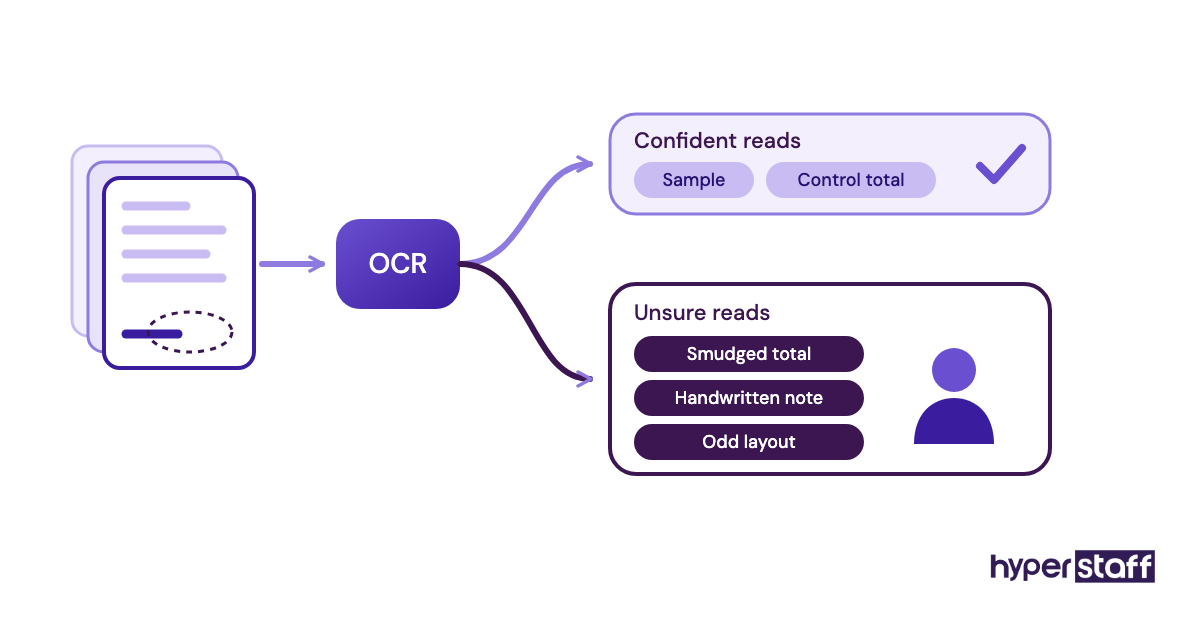
Watch for this: Candidates who say AI makes checking unnecessary are describing a failure mode, because extraction tools still misread smudged totals, handwritten notes and unusual layouts, and those are exactly the records that cost money when nobody reviews them.
Disclaimer: This article is for general information only and isn't legal, HR or employment advice. Hiring practices, pay rules and data protection laws vary by location, so check local requirements before interviewing or engaging any worker. Figures cited were accurate when published and may change.
Common questions
How many interview questions should I ask a data entry VA?
Around 20 to 30 questions fit a 45-minute call with a work sample. Fewer is fine if a written screen already covered logistics and experience.
Should I pay candidates for the data entry test?
A 20-minute test during the interview is normally unpaid. A trial longer than an hour, or one using live business data, should be paid.
What typing speed should a data entry virtual assistant have?
Most roles work well at 40 to 60 WPM or roughly 8,000 to 10,000 KPH for numeric entry. Accuracy matters more, so weigh the work sample above the speed score.
Can I interview a data entry VA without video?
You can, but you lose the screen-share, which is the best view of how someone works. If video isn't possible, ask for a Loom recording of the test instead.
What's the biggest red flag in a data entry VA interview?
Guessing on conflicting or unreadable data without flagging it. That habit spreads errors without anyone noticing, and it's hard to train out after hiring.
Book a free 15 min call
We place a pre-vetted specialist in 5 business days, fully managed, from $3/hour.