What Is a Data Entry Virtual Assistant? Roles, Costs and Fit
A data entry virtual assistant is a remote specialist who keys, cleans and maintains the records your business runs on, from CRM contacts to invoices.
On this page
- What Is a Data Entry Virtual Assistant?
- Key Data Entry Virtual Assistant Terms You Should Know
- Why Does a Data Entry Virtual Assistant Matter for a Business?
- How Does a Data Entry Virtual Assistant Work Day to Day?
- Types and Forms of Data Entry Virtual Assistant Work
- How a Data Entry Virtual Assistant Differs From Related Roles
- Data Entry VA vs. General Virtual Assistant
- Data Entry VA vs. Bookkeeper
- Data Entry VA vs. Data Analyst
- The Benefits of a Data Entry Virtual Assistant
- The Drawbacks of a Data Entry Virtual Assistant
- Who Needs a Data Entry Virtual Assistant?
- Data Entry Virtual Assistant Examples
- Good Data Entry VA Examples
- Bad Data Entry VA Examples
- Creating a Data Entry VA Plan, Step-by-Step
- Step #1
- Step #2
- Step #3
- Step #4
- Step #5
- What Does an Effective Data Entry VA Strategy Look Like?
- Data Entry Virtual Assistant Tools and Software
- 9 Proven Data Entry VA Tips That Hold Up
- Overcoming Common Data Entry VA Challenges
- How to Measure Data Entry VA Success
- How Long Does a Data Entry VA Take to Work?
- How Much Does a Data Entry Virtual Assistant Cost?
- Is a Data Entry Virtual Assistant Worth It?
- How to Choose a Data Entry Virtual Assistant Agency
- Data Entry VA Statistics, Trends and Future Predictions
- Data Entry Virtual Assistants and AI
- FAQs
Clean Records Get Invoices Paid Sooner
Hyperstaff places pre-vetted data entry virtual assistant services specialists who learn one business and stay with it. We've placed 70+ virtual assistants for 30+ clients, with rates from $3/hour and a match in 5 business days. Your SOPs live in your Operations Vault, so a replacement, if you ever need one, starts briefed.
What Is a Data Entry Virtual Assistant?
A data entry virtual assistant is a remote worker who moves information into your systems, keeps it accurate and keeps it current. The work covers typing from scanned documents, importing spreadsheets, updating CRM fields, matching invoices to orders and fixing the duplicates nobody else wants to touch.
The job title undersells it. A good one notices that a supplier changed its invoice layout before the totals start landing in the wrong column, and asks before guessing.
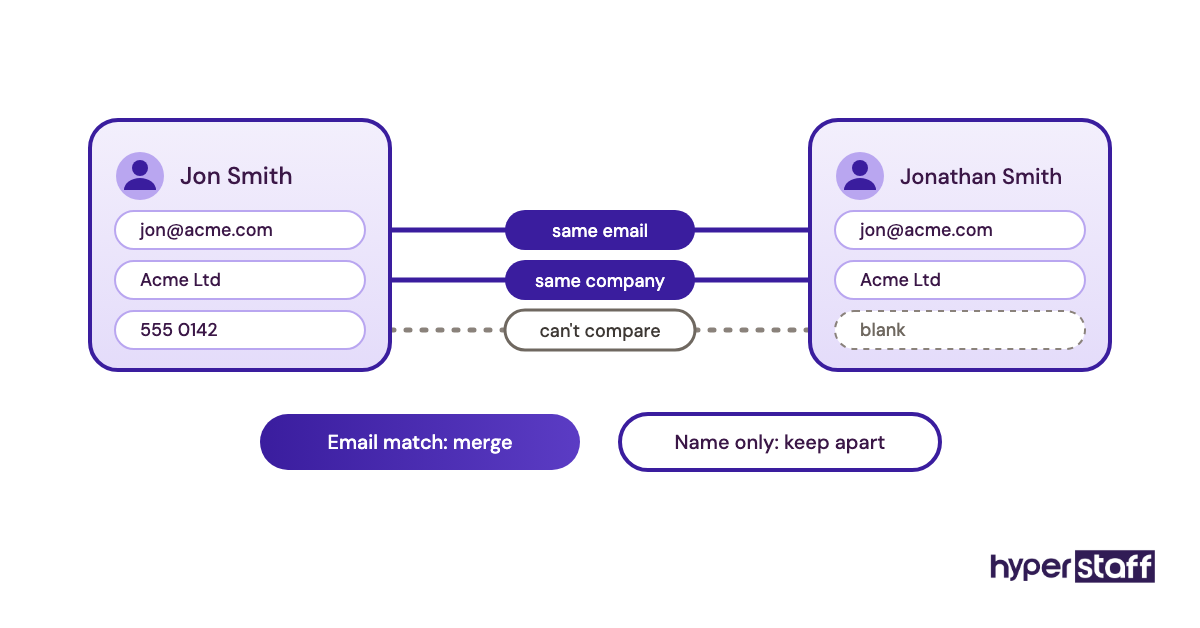
Most people picture someone copying numbers from a PDF into Excel all day. That's part of it. The rest is judgment: deciding whether "Jon Smith" and "Jonathan Smith" at the same company are one contact, or whether a blank phone field should stay blank or say "unknown." Those calls decide whether your reports can be trusted.
Key Data Entry Virtual Assistant Terms You Should Know
- Data entry = moving information from one source, such as paper, email or a PDF, into a digital system.
- Data cleansing = fixing typos, inconsistent formats and outdated values in records that already exist.
- Deduplication = finding and merging records that describe the same customer, product or order.
- Data validation = rules that reject bad input, like an email field that refuses text without an @ sign.
- OCR (optical character recognition) = software that reads text from scans and images so it doesn't need retyping.
- CSV import = uploading a comma-separated file to add or update many records at once.
- Field mapping = matching each spreadsheet column to the right field in the destination system.
- Accuracy rate = the share of records entered with zero errors, checked on a sample.
- SOP = a standard operating procedure, the written steps for a recurring task.
- Turnaround time = how long a batch takes from arrival to being live in your system.
- Audit trail = the log showing who changed which record and when.
Why Does a Data Entry Virtual Assistant Matter for a Business?
A data entry virtual assistant matters because every report, invoice and follow-up email depends on records someone typed correctly. When that typing falls to an owner or a sales rep, it gets done late, in a hurry, and in a slightly different format each time.
Bad data costs money in ways that rarely show up as a line item. Thomas C. Redman estimated in Harvard Business Review that bad data costs the U.S. about $3 trillion a year, mostly through people fixing errors they didn't make.
On a smaller scale it looks like this. A lead sits in a spreadsheet for nine days because nobody moved it into the CRM. A shipment goes to an old address. A quote uses last quarter's price list.
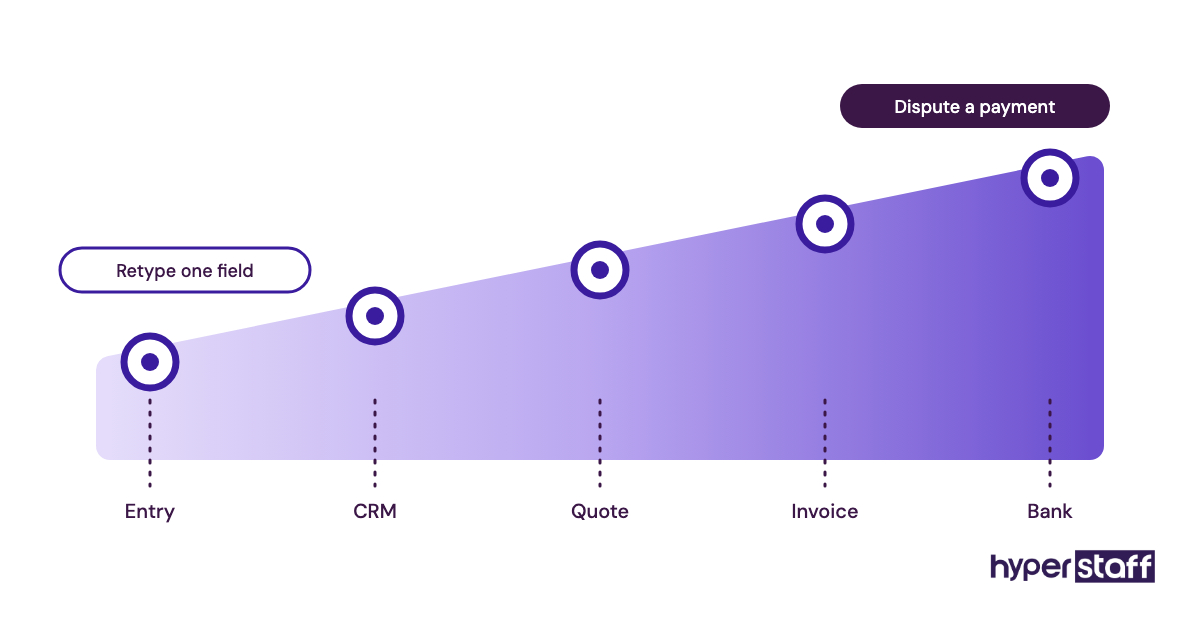
Handing the work to one dedicated person also gives you a single owner for record quality. That matters more than speed. When three people each update the CRM "when they get a minute," nobody is accountable for the mess.
How Does a Data Entry Virtual Assistant Work Day to Day?
A data entry virtual assistant works from a queue: source material arrives by email, upload or shared folder, gets entered or cleaned against written rules, then gets flagged as done. The day usually starts with the overnight backlog and ends with a short status note on what's finished and what's blocked.
The access setup comes first. Your VA gets a named login to each tool, permissions limited to what the job needs, and a password manager entry instead of passwords sent over chat.
Then come the rules. Date format, how to write state names, what to do when a field is missing, which duplicates to merge and which to leave alone. Without those rules written down, two weeks in you'll find "CA," "Calif." and "California" sitting side by side.
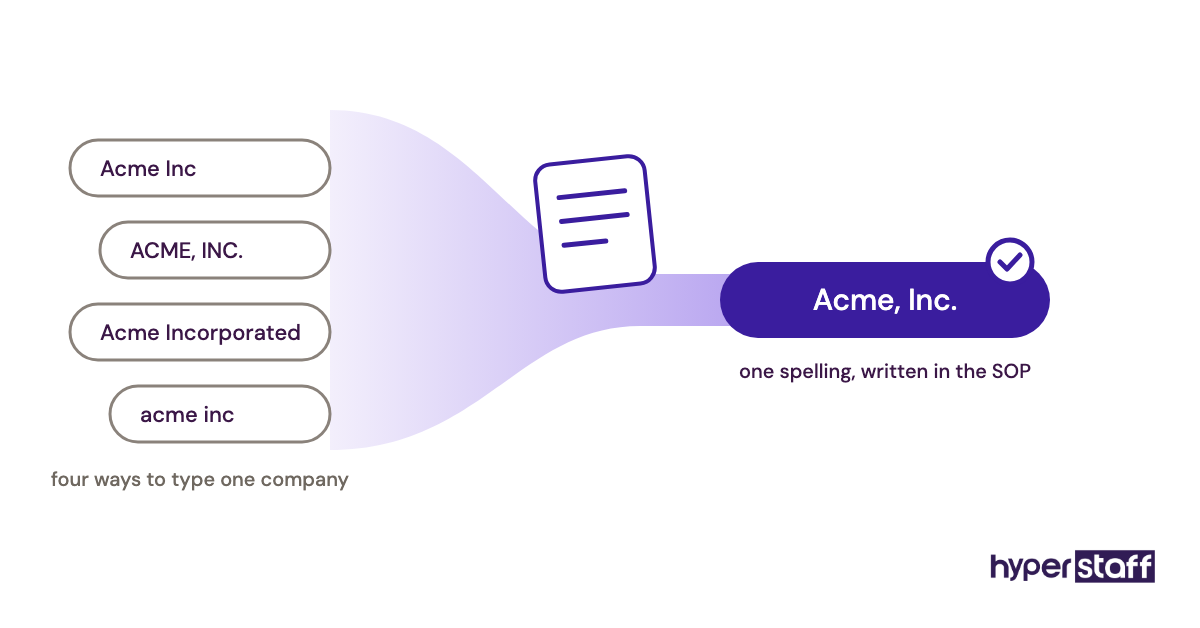
Questions are where the real work happens. A VA who asks four questions in week one and none in week six has learned the business. One who never asks is guessing, and the guesses compound.
Types and Forms of Data Entry Virtual Assistant Work
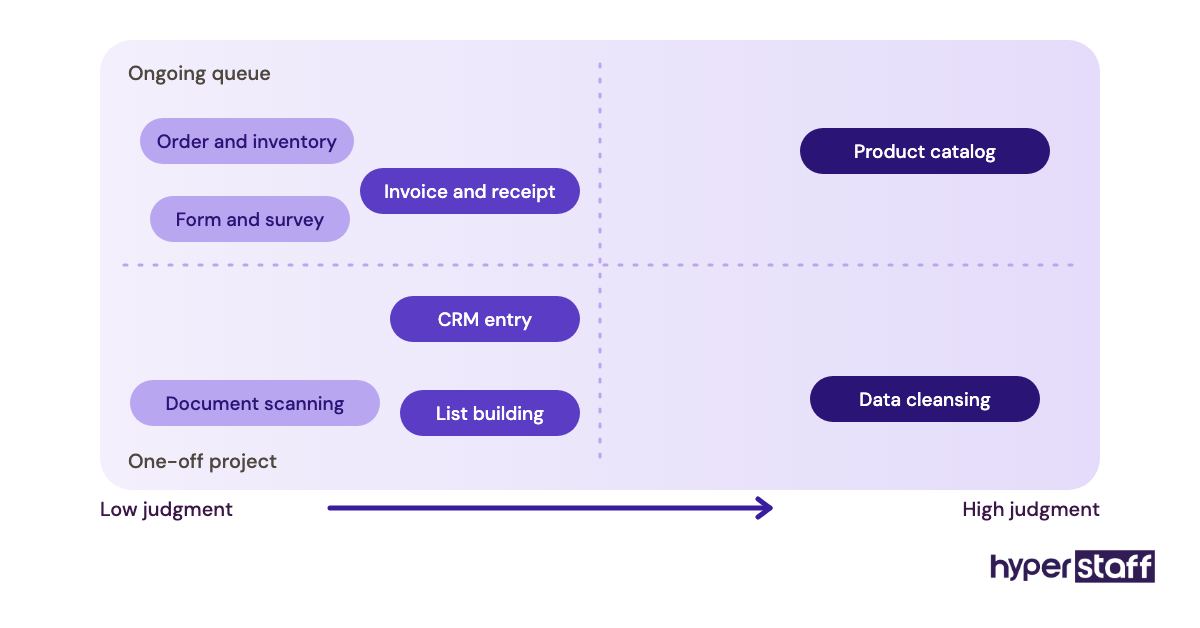
Data entry virtual assistant work splits into a handful of types that differ in source material, tools and how much judgment they need. Most businesses need two or three of them, rarely all.
| Type | Typical source | Common tools | Judgment needed | Good fit for |
|---|---|---|---|---|
| CRM data entry | Business cards, web forms, event lists | HubSpot, Salesforce, Pipedrive | Medium (duplicates, ownership) | Sales teams, agencies |
| Invoice and receipt entry | PDF invoices, emailed receipts | QuickBooks, Xero, Dext | Medium (coding to accounts) | Bookkeepers, service firms |
| Product catalog entry | Supplier sheets, spec PDFs | Shopify, WooCommerce, Amazon Seller Central | High (titles, variants) | Ecommerce stores |
| Order and inventory updates | Order emails, warehouse counts | Spreadsheets, inventory apps | Low to medium | Retail, wholesale |
| Data cleansing | Existing databases | Excel, Google Sheets, OpenRefine | High (merge decisions) | Any business with an old CRM |
| Document digitization | Paper forms, scans | Adobe Acrobat, OCR tools | Low (checking OCR output) | Clinics, law firms, property managers |
| Web research and list building | Websites, directories, LinkedIn | Sheets, Apollo, CRM | Medium (fit criteria) | B2B sales and recruiting |
| Form and survey processing | Typeform, paper surveys | Sheets, Airtable | Low | Nonprofits, research teams |
How a Data Entry Virtual Assistant Differs From Related Roles
Data entry virtual assistants overlap with several roles, and the overlap causes most bad hires. The difference usually comes down to who decides what the numbers mean.
Data Entry VA vs. General Virtual Assistant
A general virtual assistant juggles inbox, calendar, customer replies and odd jobs across the week. A data entry VA spends most hours inside records, so accuracy and consistency get the attention that a generalist spreads across ten task types. If your record work runs past 15 to 20 hours a week, a specialist usually pays back the narrower scope.
Data Entry VA vs. Bookkeeper
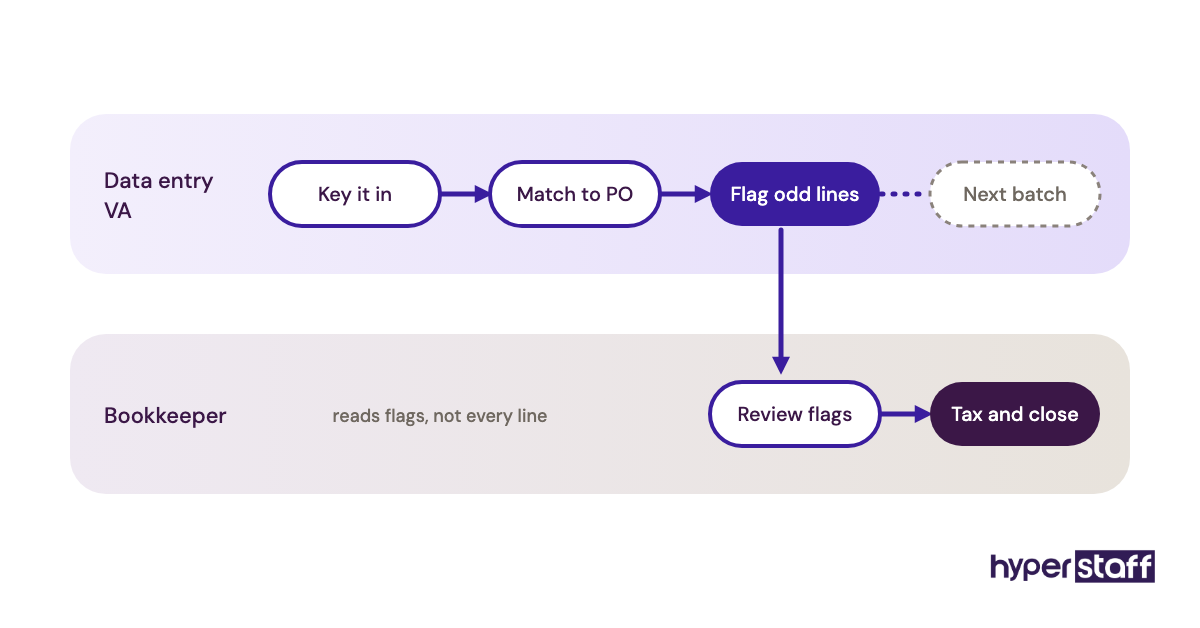
A bookkeeper reconciles accounts and stands behind the books at month end. A data entry VA can key invoices and receipts into QuickBooks or Xero, but shouldn't be the person deciding tax treatment or closing the month. Plenty of businesses pair the two: the VA does the volume, the bookkeeper reviews.
Data Entry VA vs. Data Analyst
An analyst asks what the data says. A data entry VA makes sure the data is there and correct before anyone asks. Hiring an analyst to fix 4,000 messy CRM rows is an expensive way to get clean rows.
The Benefits of a Data Entry Virtual Assistant
The benefits of a data entry virtual assistant show up first as hours returned to you, then as fewer errors in the reports you rely on.
- Owners and sales staff stop keying records at night.
- One person owns record quality, so errors get traced and fixed at the source.
- Rates start well below in-house pay, with hours sized to your volume.
- Backlogs clear on a schedule instead of "when things calm down."
- Written SOPs make the process survive vacations and turnover.
- A time zone gap can turn overnight batches into morning-ready records.
The Drawbacks of a Data Entry Virtual Assistant
The drawbacks of a data entry virtual assistant are real, and nearly all of them come from setup rather than the person.
- The first two weeks cost you time writing rules and answering questions.
- Sharing access to finance or customer data needs careful permissions.
- Vague instructions produce consistent, confident errors.
- Time zone gaps slow down urgent same-hour fixes.
Who Needs a Data Entry Virtual Assistant?
A business needs a data entry virtual assistant when record work takes more than about 10 hours a week and is done by someone whose time is worth more elsewhere. That's often the owner, an account manager or a salesperson updating the CRM after hours.
The usual candidates are ecommerce stores adding products, agencies logging leads, property managers handling tenant files, clinics and law firms digitizing paperwork, and service businesses entering invoices. Small teams tend to feel it first, since nobody has "data" in their job title.
The enterprise view is different. Larger companies often already have operations staff, so they bring in a VA for a defined project, like a CRM migration, or for a recurring overflow queue. Our list of data entry VA tasks breaks the work down by department if you want to size your own queue.
Data Entry Virtual Assistant Examples
Data entry virtual assistant work succeeds or fails on a few repeatable patterns. The examples below are the setups we see go well, and the ones that go sideways, described by how they're structured.
Good Data Entry VA Examples
Each good setup has a clear source, a clear destination and a rule for the odd cases.
Daily Lead Logging With a Duplicate Rule
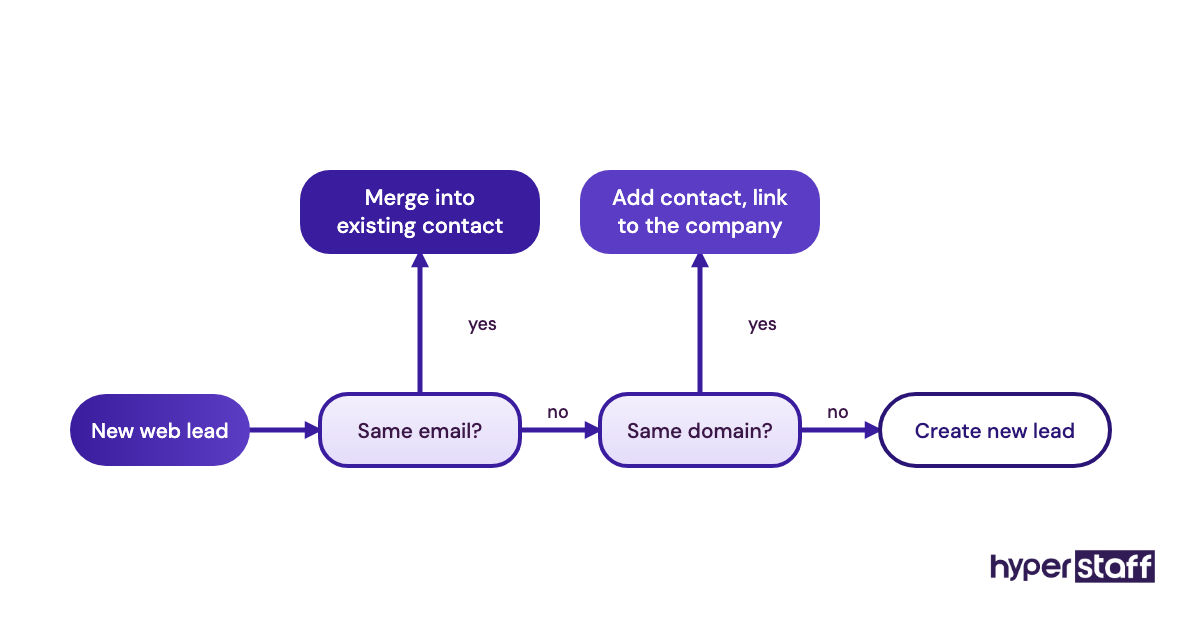
Web form leads land in a shared inbox, and the VA logs them in the CRM by 10 a.m. local time. The rule says: search by email first, then by company domain, and merge only on an exact email match. Sales reps get a clean pipeline every morning.
Supplier Invoices Matched to Purchase Orders
Invoices are forwarded to one address. The VA enters each one in the accounting tool, matches it to the open purchase order and flags any line where quantity or price differs by more than a set amount. The bookkeeper reviews flags only, which cuts their review time sharply.
Product Listings From a Template
An ecommerce store gives its VA a listing template with title formula, required attributes and image naming. New supplier SKUs go live in batches with consistent titles, and the store owner checks five listings per batch instead of all of them.
Bad Data Entry VA Examples
Bad setups look busy. The output just can't be trusted.
"Clean Up the CRM" With No Definition
Without a rule for what counts as a duplicate, a VA merges records that share a company name. Two different contacts at two branch offices become one. Nobody notices until a renewal email goes to the wrong person.
Speed Targets Without Accuracy Checks
Measuring records per hour alone rewards skipping fields. The count looks great for a month, then the finance report stops matching the bank.
Shared Logins and No Audit Trail
When everyone uses one admin account, nobody can see who changed a price. A single wrong edit becomes a week of detective work.
Creating a Data Entry VA Plan, Step-by-Step
A data entry VA plan is five decisions made in order, before anyone types a record. Skipping ahead is how businesses end up rewriting rules mid-project.
Step #1: List Every Recurring Record Task
Write down each task, its source, its destination and how often it happens. Add rough weekly hours. This list becomes your hours estimate and the first draft of the job description.
Step #2: Write the Rules for Odd Cases
Formats, blanks, duplicates, and what to do when a document is unreadable. Short is fine. Two pages of rules beat ten pages nobody reads.
Step #3: Pick the Right Hiring Route
Freelance marketplace, direct hire abroad or a staffing agency each trade price against vetting and replacement. Our guide on hiring a data entry VA walks through each route, and the data entry VA job description template saves you writing one from scratch.
Step #4: Test Before You Commit
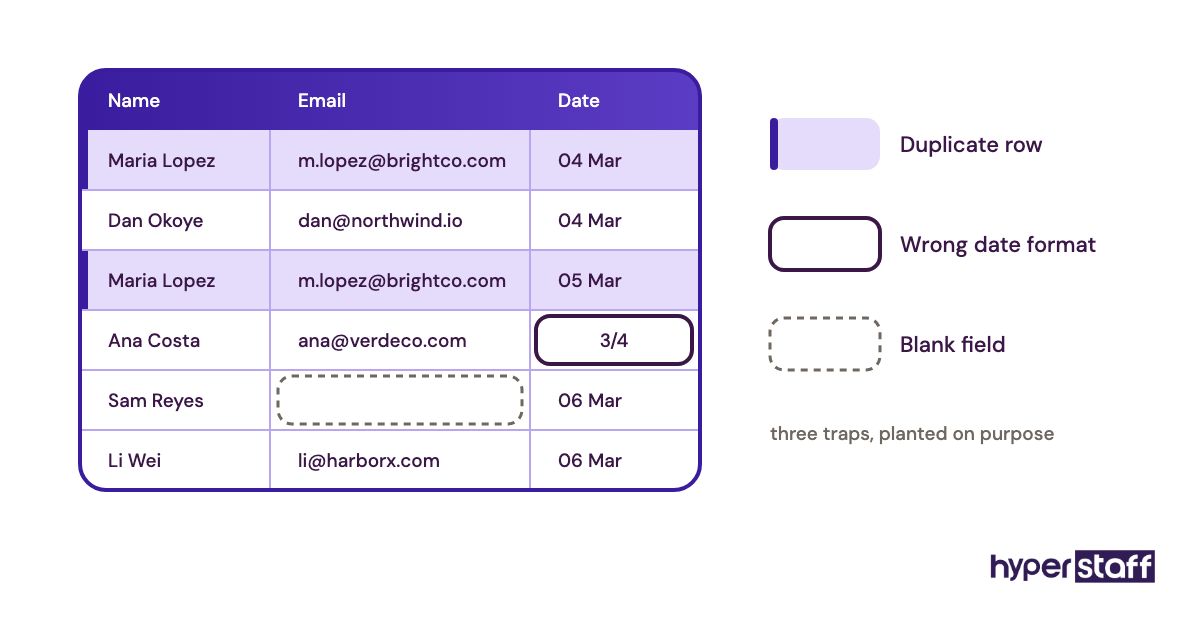
Give finalists a small paid sample: 30 to 50 records with a few planted traps, like a duplicate and a date in the wrong format. Our interview questions for data entry VAs pair well with that test.
Step #5: Onboard in Small Batches
Start with one task type, check every record for a few days, then widen scope. Expect a dead zone in week one where access requests and tool invites slow everything down. The full sequence is in our post on onboarding a data entry VA.
What Does an Effective Data Entry VA Strategy Look Like?
An effective data entry VA strategy puts accuracy checks on a calendar, keeps rules in one document and grows scope only after quality holds steady. A simple weekly rhythm covers most of it.
| When | VA does | You do | Time for you |
|---|---|---|---|
| Daily | Clears queue, posts a status note | Reads note, answers flagged questions | 5 to 10 min |
| Weekly | Pulls a random 20-record sample | Checks sample for errors | 15 to 20 min |
| Monthly | Updates SOP with new decisions | Approves changes, reviews scope | 30 min |
| Quarterly | Runs a duplicate and stale-record sweep | Decides what to archive | About 1 hour |
Practitioners disagree on how heavy the checking should be. Some owners check 100% of records for the first month. Others sample from day three. We lean toward sampling early, as long as the sample is random and the error log is honest, because full checks slowly turn you back into the data entry clerk.
Data Entry Virtual Assistant Tools and Software
Data entry virtual assistant tools fall into three groups: where records live, how they get captured and how access stays safe. Your VA should work inside your accounts, never theirs.
For storage and editing, Google Sheets and Microsoft Excel still do most of the work, with Airtable stepping in when a spreadsheet starts acting like a database. CRMs like HubSpot and Pipedrive, and accounting tools like QuickBooks and Xero, are the usual destinations.
Capture tools save the most typing. Adobe Acrobat and receipt apps like Dext read scans, and Zapier or Make can move form entries into a sheet without a human. OCR output still needs a human check on totals and dates, because a smudged 8 reads as a 3 often enough to matter.
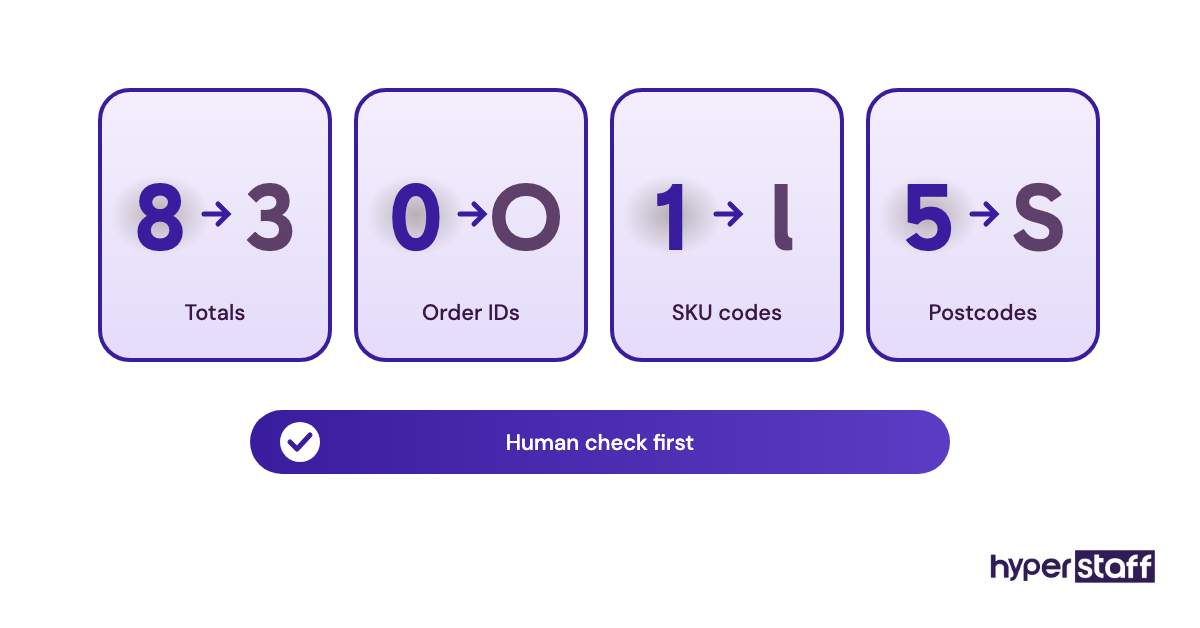
For access, a password manager such as 1Password or Bitwarden is the one tool we'd call non-negotiable. Our roundup of data entry VA tools compares them in detail.
9 Proven Data Entry VA Tips That Hold Up
These tips come from what separates setups that run for years from ones that get abandoned in month two.
- Write the date format into the SOP on day one. 03/04 means March in the US and April in the UK.
- Give every VA a named login, never a shared one.
- Decide the duplicate rule before the first import.
- Check a random sample weekly, picked by you.
- Track accuracy and turnaround together, never speed alone.
- Keep one source of truth per record type.
- Turn every answered question into a line in the SOP.
- Add one task type at a time once accuracy holds for two weeks.
- Read our list of common data entry VA mistakes before your first batch.
Overcoming Common Data Entry VA Challenges
The common data entry VA challenges are unclear rules, messy source files and slow answers across time zones. Each one has a cheap fix.
Unclear rules get fixed with a decisions list. Messy sources, like handwritten forms or supplier PDFs that change layout, need a "can't read it" flag instead of a guess. A flagged record costs a minute. A guessed one can cost a refund.
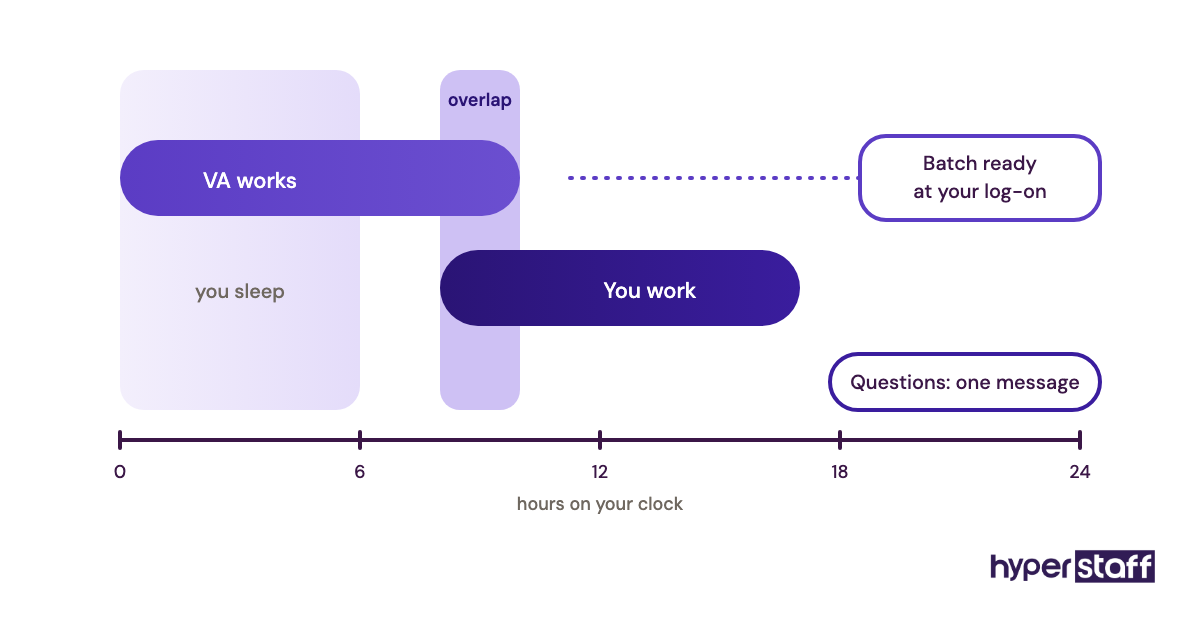
Time zones are the hardest. Agree on a daily window of one or two overlapping hours for questions, and let the VA batch everything else into a single message.
How to Measure Data Entry VA Success
Data entry VA success is measured by accuracy rate on a random sample, turnaround time per batch and backlog size at week's end. Those three numbers tell you almost everything.
Accuracy matters most. Check 20 random records weekly and log every error by type, so patterns point to a missing rule rather than a careless person.
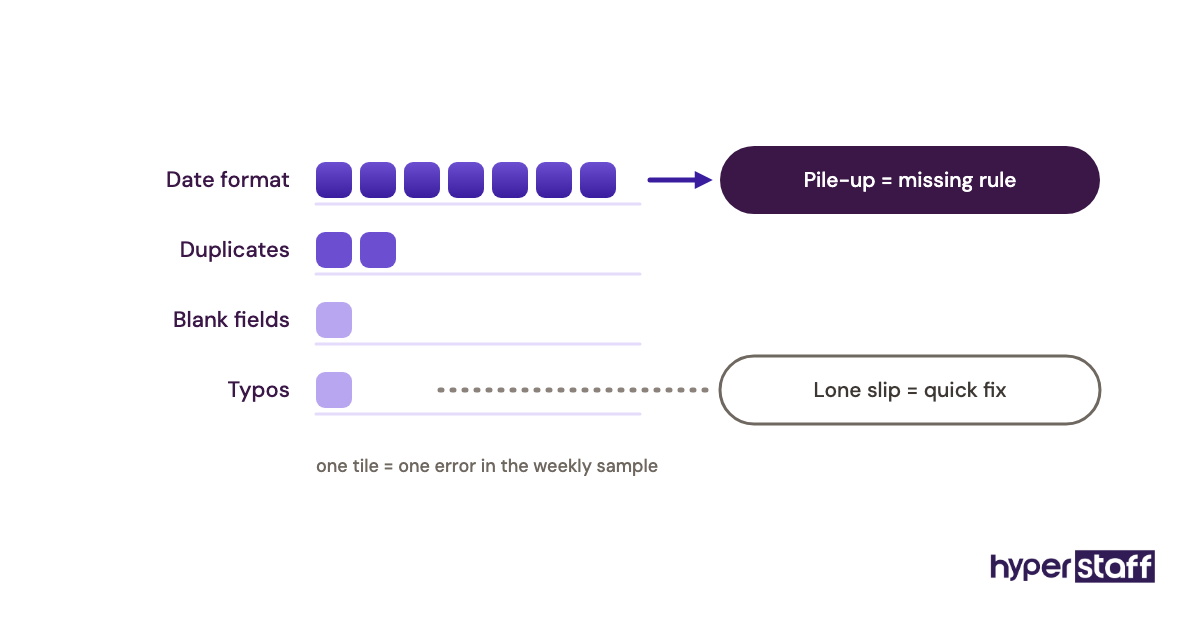
Also watch the indirect signals: fewer "is this number right?" messages from your team, and invoices going out on schedule.
How Long Does a Data Entry VA Take to Work?
A data entry VA usually takes one to two weeks to work at full speed on a single task type, and four to six weeks to handle a mixed queue without daily questions. Simple, repetitive entry gets there faster.
The first week is mostly access and questions. Output is real but slower, and you should check everything.
By week three, error logs should be short and questions rare. If they aren't, look at the rules first. A missing rule is the usual gap.
How Much Does a Data Entry Virtual Assistant Cost?
A data entry virtual assistant costs roughly $3 to $15 an hour offshore, depending on experience and region, compared with an in-house clerk whose wage alone runs far higher. For a detailed breakdown, see our guide to data entry VA cost.
| Option | Experience | Hourly rate | 160 hours a month | Extra costs |
|---|---|---|---|---|
| Hyperstaff Essential | 0 to 2 years | From $3 | From $480 | None for recruiting or replacement |
| Hyperstaff Professional | 2 to 5 years | From $6 | From $960 | None for recruiting or replacement |
| Hyperstaff Expert | 5+ years | From $12 | From $1,920 | None for recruiting or replacement |
| In-house office clerk (U.S.) | Varies | About $21.64 median wage | About $3,460 before benefits | Benefits, payroll tax, equipment, hiring time |
The in-house wage figure is the median pay for general office clerks from the U.S. Bureau of Labor Statistics. Hyperstaff also sells bundles of 40 or 80 hours, and paying quarterly saves 10%.
Important: Our Hyperstaff prices above are typical starting rates, not fixed quotes. Your final cost depends on the hours, skills and tools your data entry work needs.
Is a Data Entry Virtual Assistant Worth It?
Yes, a data entry virtual assistant is one of the best-returning hires a small business can make when the setup is right. Say you spend 10 hours a week on records and value your time at $60 an hour: that's about $2,600 a month of your time, against a 40-hour Professional bundle from $240.
The math gets less dramatic if your record work is under five hours a week, or so tangled that only you understand it. In that case, fix the process first. Our breakdown of whether a data entry VA is worth it runs the numbers for different volumes, and the data entry VA vs in-house comparison covers when an employee makes more sense.
The hidden return is what those hours turn into. Owners rarely spend recovered time on rest. It goes into sales calls, quotes and client work that bills.
How to Choose a Data Entry Virtual Assistant Agency
Choose a data entry virtual assistant agency by checking how it vets accuracy, how fast it replaces a poor fit and whether you get one dedicated person or a rotating pool. Price matters less than those three answers.
Ask for a skills test that uses real-looking records with planted duplicates and format errors. A typing speed score tells you almost nothing about duplicate handling or attention to formats.
Ask what happens if the match doesn't work. Hyperstaff replaces at no cost in 5 to 7 business days, and the new person is briefed from your Operations Vault, so you don't retrain from zero. Every client also gets a dedicated account manager.
Finally, ask who you'll actually talk to. A pool model means a different person may touch your records each week, which makes accuracy hard to own.
Data Entry VA Statistics, Trends and Future Predictions
Data entry VA demand is shifting from pure keying toward checking and cleaning, as capture tools take over the simplest typing. The employment numbers point the same direction.
The BLS projects employment of general office clerks to fall about 6% over the next decade, with collecting information and entering data listed among their core duties. Fewer in-house clerk roles leave the same records to be handled somewhere.
Our prediction, as an opinion: the role keeps its name but the day changes. Less typing from paper, more reviewing OCR output, fixing imports and keeping CRMs clean. VAs who can write a lookup formula or spot a broken field mapping will earn more than those who only type fast.
We're less sure about pace. Some businesses still run on paper forms and will for years. Others will automate capture within months and need a VA mainly for exceptions.
Data Entry Virtual Assistants and AI
AI already reads invoices, receipts and business cards well enough to replace much first-pass typing. What it does poorly is decide what to do when a record is ambiguous, and that's where a data entry VA earns the rate.
In practice, AI extraction works best with a human checking totals, dates and names before anything posts. A wrong vendor name on 1 invoice in 40 is fine to fix by hand. A wrong vendor name posted straight to the ledger 40 times isn't.
The useful setup pairs both: AI captures, the VA verifies and handles exceptions. That lets a 40-hour bundle cover volume that once needed 80.
Disclaimer: This article is for general information only and isn't legal, financial or tax advice. Rates, statistics and tool features can change, so confirm details before making hiring or data-handling decisions.
Common questions
Is data entry VA work safe for sensitive customer data?
It can be, with named logins, limited permissions and a password manager. Avoid sending files over personal email, and ask your provider to sign an NDA before access is granted.
How many hours a week does a data entry virtual assistant need?
Most small businesses start with 10 to 20 hours a week. A 40-hour monthly bundle suits light, steady work, while 160 hours fits a full-time queue or a large cleanup project.
Can a data entry VA work in my CRM and accounting software?
Yes. Most work directly in tools like HubSpot, Salesforce, QuickBooks and Xero. Give them their own user seat so changes are traceable.
What skills should a data entry virtual assistant have?
Accuracy, attention to formats and solid spreadsheet skills matter most. Comfort with lookups, filters and CSV imports separates strong candidates from fast typists.
Can a data entry VA work part-time?
Yes. Part-time setups are common, often 40 or 80 hours a month, and they work well for steady weekly volume like lead logging or invoice entry.
Book a free 15 min call
We place a pre-vetted specialist in 5 business days, fully managed, from $3/hour.