Data Entry Virtual Assistant Job Description: A Free Template You Can Adapt
A copy-and-paste data entry virtual assistant job description, plus the edits that attract accurate, reliable candidates.
On this page
- What Is a Data Entry Virtual Assistant Job Description?
- Data Entry Virtual Assistant Job Description Template (Copy and Paste)
- How to adapt the template to your role
- Key Data Entry Job Description Terms You Should Know
- Why Does a Data Entry Job Description Matter So Much?
- How Does a Data Entry VA Job Description Work in Practice?
- Types of Data Entry Virtual Assistant Roles
- How a Data Entry VA Role Differs From Related Roles
- Data entry VA vs. general virtual assistant
- Data entry VA vs. data analyst
- Data entry VA vs. bookkeeper
- The Benefits of a Clear Data Entry VA Job Description
- The Drawbacks of a Detailed Data Entry Job Description
- Who Needs a Data Entry Virtual Assistant Job Description?
- Data Entry Virtual Assistant Job Description Examples
- Data entry VA job description good examples
- Data entry VA job description bad examples
- Creating a Data Entry VA Hiring Plan, Step-by-Step
- Step #1
- Step #2
- Step #3
- Step #4
- Step #5
- What Does an Effective Data Entry VA Job Post Look Like?
- Data Entry VA Tools and Software to Name in the Job Description
- 10 Proven Tips for Writing a Data Entry VA Job Description
- Overcoming Common Data Entry VA Hiring Challenges
- How to Measure Data Entry VA Success
- How Long Does a Data Entry VA Hire Take to Work?
- How Much Does a Data Entry Virtual Assistant Cost?
- Is a Data Entry Virtual Assistant Worth It?
- How to Choose a Data Entry Virtual Assistant Agency
- Data Entry Statistics, Trends and Future Predictions
- Data Entry Virtual Assistants and AI
- FAQs
Clean data is money you stop losing
Hyperstaff has placed 70+ virtual assistants with 30+ clients across the Philippines, Latin America, India, Eastern Europe and the United States, and every placement starts with your SOPs written into an Operations Vault. If you'd rather not write and post a job ad at all, our data entry virtual assistant services match you with a pre-vetted specialist in 5 business days, from $3/hour.
What Is a Data Entry Virtual Assistant Job Description?
A data entry virtual assistant job description is the written outline of a remote data role: which records come in, where they go, how accurate they must be, how much arrives each day and who checks the work. Candidates read it to decide whether to apply, and you'll use it later as the scope you both work from.
Most posts get the first half right and skip the second. If you're still pinning down the role itself, start with our explainer on what a data entry virtual assistant does, then come back to the template below.
Data Entry Virtual Assistant Job Description Template (Copy and Paste)
The template below is a complete data entry VA job description you can copy, fill in and post. Square brackets mark the parts to replace, and any line that doesn't match your role should be deleted rather than left vague.
Job title: Remote Data Entry Virtual Assistant, [Product Catalog / CRM / Invoice Processing / Records]
About us: [Company name] is a [type of business] with [number] staff. We process about [number] [orders / leads / invoices / forms] each [day / week], and we need one dependable person to keep that data accurate and up to date.
Role summary: You'll take information from [source: PDFs, scanned forms, emails, web pages, spreadsheets, call notes] and enter it into [destination system]. You'll work [full-time / part-time, 40 / 80 / 160 hours a month] and report to [name, role].
What you'll do:
- Enter [number] [records] per day from [source] into [system], following our field guide.
- Check each entry against the source before saving, and flag anything unreadable or missing.
- Find and merge duplicate records in [CRM / spreadsheet] each [week].
- Format names, addresses, dates, SKUs and phone numbers to our standard.
- Update existing records when [prices / contacts / stock levels] change.
- Pull a short weekly summary of volume completed and errors found.
- [Role-specific task, for example: upload product listings to Shopify, code invoices in QuickBooks, tag leads by source in HubSpot.]
Systems you'll use: [Excel / Google Sheets], [CRM or platform name], [accounting or inventory tool], [Slack / email], [password manager].
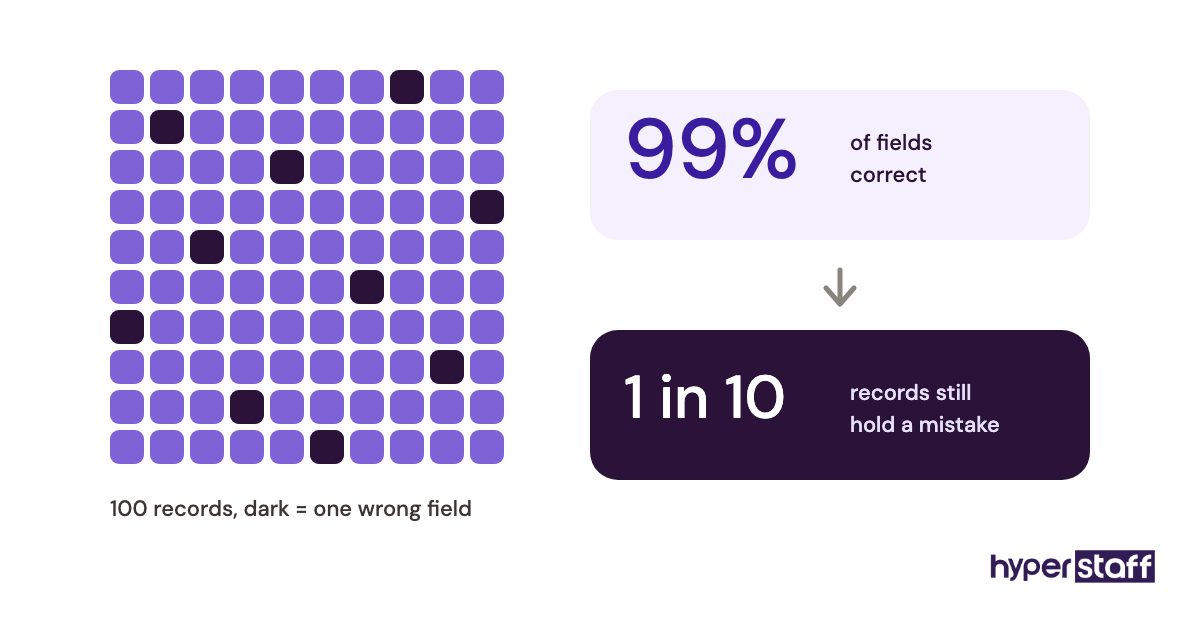
Accuracy and output standards: We expect [99% / 99.5%] field-level accuracy, measured by a weekly spot check of [number] random records. Typical turnaround is [same day / 24 hours] from when a batch arrives.
Hours and time zone: [Number] hours a week, with at least [2 to 4] hours of overlap with [time zone] for questions.
You'll do well here if you:
- Have [6+ months / 2+ years] of data entry experience in [industry or system].
- Catch small inconsistencies, like a transposed digit or a swapped first and last name.
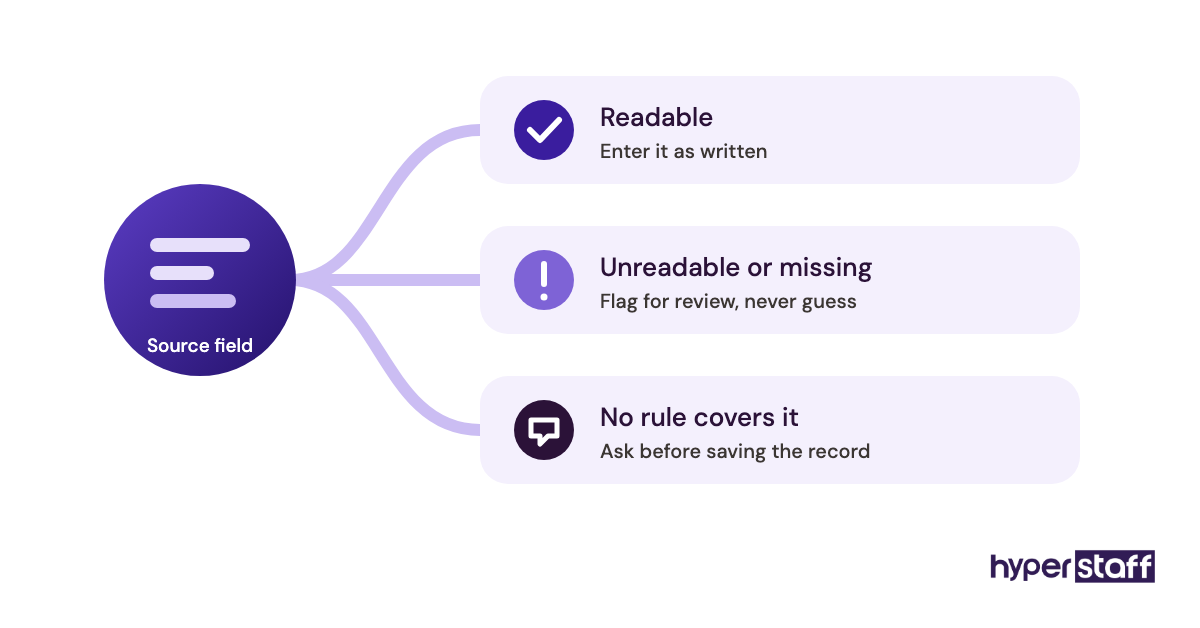
- Ask when something is unclear instead of guessing.
- Can work from a written process and keep it updated when it changes.
- Have a reliable computer and a stable internet connection.
Nice to have: Experience with [OCR tool / Zapier / VLOOKUP and pivot tables / a specific CRM].
Data handling: You'll work with [customer / financial / patient] information. You'll sign an NDA and access accounts through [password manager] with only the permissions the role needs.
Pay and terms: [Rate or range] per hour, paid [weekly / monthly] via [method]. [Contract length or trial period.]
How to apply: Reply with the subject line "[code word]", a short note on the data systems you've used, and your completed sample task (attached). We read every application that follows these steps.
Two lines in that template carry most of the weight: the accuracy standard and the sample task. A post that leaves both out tends to attract fast typists rather than careful ones, and in data entry those aren't the same people.
How to adapt the template to your role
Adapting the data entry job description starts with the "What you'll do" list. Swap in the real records your business handles, and use the full list of data entry virtual assistant tasks to catch duties you'd otherwise forget, like deduplication or monthly archive cleanup.
Keep the daily volume honest. If you write "50 invoices a day" and the real number spikes to 200 at month-end, say so, because the candidate who handles the spike is the one you want.
Cut the "Nice to have" line entirely if nothing there would change your decision. Padding a post with optional skills mostly discourages good applicants who don't tick every box.
Key Data Entry Job Description Terms You Should Know
- Data entry virtual assistant = a remote specialist who moves information from source documents into business systems and keeps it accurate.
- Field-level accuracy = the share of individual fields entered correctly, the most common quality target in data entry.
- KPH (keystrokes per hour) = a raw speed measure; useful for screening, weak as a hiring decider.
- Double-key verification = two people enter the same record and a tool flags any mismatch.
- OCR = optical character recognition, software that turns scanned text into editable data that a person then checks.
- Data validation = rules that block wrong formats, like a letter in a phone number field.
- Deduplication = finding and merging repeat records in a CRM or spreadsheet.
- Turnaround time = how long a batch takes from arrival to finished entry.
- PII = personally identifiable information, such as names, addresses or ID numbers, that needs restricted access.
- SOP = standard operating procedure, the written step-by-step for each data task.
- Sample task = a short test on realistic records that shows accuracy before you hire.
Why Does a Data Entry Job Description Matter So Much?
A data entry job description matters because the role has almost no room for interpretation. One wrong format rule, repeated across 4,000 rows, can take a full week to undo.
Vague posts also attract the wrong volume, because "data entry" sounds like work anyone with a laptop can do. A specific post with a test and a code word cuts that pile down to people who actually read it.
There's a legal side too: when the role touches customer, financial or health records, the job description is where you first state the NDA, the access rules and what the assistant may download. Writing it down early is cheaper than retrofitting it after someone already has the keys.
How Does a Data Entry VA Job Description Work in Practice?
A data entry VA job description works as a filter first and a contract second. It screens applicants at the posting stage, sets the terms you interview against, and then becomes the baseline you review performance against after the hire.
The sequence usually runs like this: post, collect applications for 5 to 10 days, send the sample task to a shortlist, interview the top few, then onboard. The dead zone most people underestimate is between sample task and offer, because good candidates often take other work while you deliberate.
After the hire, the same document feeds straight into onboarding a data entry virtual assistant. Your field rules, systems list and accuracy target become their first-week checklist.
Types of Data Entry Virtual Assistant Roles
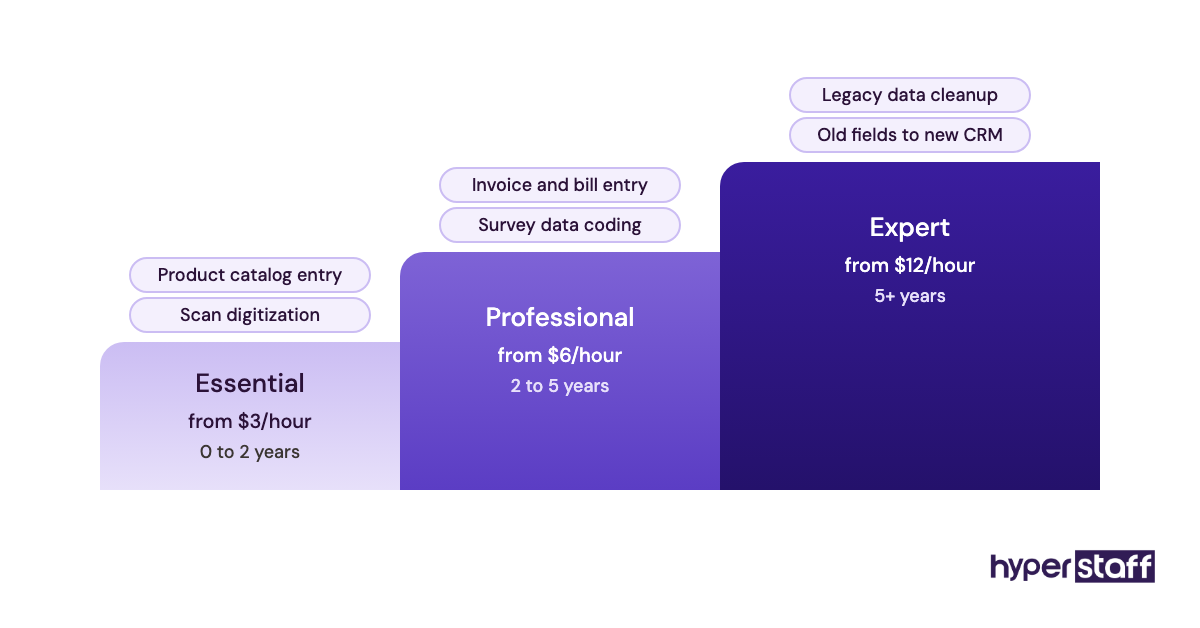
Data entry virtual assistant roles split by the kind of record and the system it lands in. Each type needs slightly different wording in the job description, mostly in the systems and accuracy lines.
| Role type | Typical source | Destination system | Key JD line to add | Usual tier |
|---|---|---|---|---|
| Product catalog entry | Supplier sheets, photos | Shopify, Amazon, WooCommerce | SKU and variant rules | Essential |
| CRM and lead data | Web forms, LinkedIn, call notes | HubSpot, Salesforce, Pipedrive | Dedupe and tagging standard | Essential to Professional |
| Invoice and bill entry | PDF invoices, receipts | QuickBooks, Xero | Coding to account categories | Professional |
| Medical or insurance records | Intake forms, claims | EHR or practice software | HIPAA training and access limits | Professional to Expert |
| Real estate listings | MLS sheets, agent notes | MLS, CRM, website | Listing field checklist | Essential |
| Research and survey data | Survey exports, web pages | Excel, Google Sheets, Airtable | Coding scheme for answers | Professional |
| Document digitization | Scans, handwritten forms | Database or spreadsheet | OCR review and unreadable-field flagging | Essential |
| Data cleanup projects | Messy legacy spreadsheets | New CRM or ERP | Mapping old fields to new | Expert |
How a Data Entry VA Role Differs From Related Roles
Data entry VA roles overlap with general admin, analysis and bookkeeping, and job posts often blur them. Naming the boundary in the description saves you from hiring for one job and getting another.
Data entry VA vs. general virtual assistant
A general virtual assistant job description spreads across inbox, scheduling, customer messages and research. A data entry post narrows to records, systems and accuracy, and that narrowness is the point: the hire you want is someone who enjoys repetitive precision, which isn't everyone who enjoys variety.
Data entry VA vs. data analyst
Data analysts interpret data; data entry assistants make sure it's correct and complete in the first place. If your post asks for dashboards, SQL or forecasting, you're writing an analyst job, and the rate should start at the Expert tier.
Data entry VA vs. bookkeeper
Invoice entry looks like bookkeeping from the outside, but the line sits at judgment: a data entry assistant codes bills to categories you define, while a bookkeeper reconciles accounts and decides how unusual items get treated.
If you're comparing remote and local options for either, our breakdown of a data entry virtual assistant vs in-house hire covers the trade-offs.
The Benefits of a Clear Data Entry VA Job Description
A clear data entry VA job description pays off at every stage, from the size of your applicant pile to how fast the hire reaches full accuracy.
- Fewer, better applicants, because the test and code word screen out mass replies.
- A fair way to compare candidates, since everyone takes the same sample task.
- Faster onboarding, because the field rules are already written.
- A built-in performance baseline for the 30, 60 and 90-day reviews.
- Clearer data security, with access rules stated before anyone logs in.
The Drawbacks of a Detailed Data Entry Job Description
Detailed job descriptions do have costs, mostly in time and in how they read to candidates.
- Writing one properly takes 1 to 3 hours, longer if your process isn't documented yet.
- Strict experience lines can screen out a careful beginner who'd have been excellent.
- It goes stale fast when your systems change, unless someone keeps it updated.
Who Needs a Data Entry Virtual Assistant Job Description?
Anyone hiring a data entry assistant directly needs one, from a solo e-commerce seller to an operations lead at a 200-person firm. The bigger the gap between how the work is done today and what's written down, the more the job description earns its keep.
Small businesses usually use it to hand off work the owner has been doing at night, while larger teams want consistency, so the fifth data hire follows the same rules as the first.
If you hire through an agency, you'll still want the core of it, because it's the brief your account manager works from.
Data Entry Virtual Assistant Job Description Examples
The excerpts below show the same section of a job post written well and written badly. They're composites of common wording on job boards, so read them for the pattern rather than the details.
Data entry VA job description good examples
E-commerce catalog entry
"You'll add 30 to 60 new products a week to Shopify from supplier spreadsheets, including titles, variants, SKUs, weights and alt text, following our listing guide." It names the volume, the source, the system and the fields, so a candidate can picture Tuesday.
CRM lead cleanup
"Each Friday you'll export new HubSpot contacts, merge duplicates, fix name capitalization and tag each lead by source, and we spot-check 25 records a week against a 99% accuracy target." The measurement line is what makes this one work.
Invoice processing
"You'll enter supplier invoices into QuickBooks within one business day of receipt and code them to our 14 expense categories, putting anything that doesn't fit in a flagged column for review." Good posts tell people what to do when the rule runs out.
Data entry VA job description bad examples
The speed-only post
"Looking for a fast typist, 80+ WPM, for data entry." Speed is the cheapest thing to test and the least predictive, since plenty of 90 WPM typists transpose digits and the post gives a careful candidate no reason to choose it.
The everything role
"Data entry, customer service, social media, bookkeeping and light design." That's four jobs, and the common data entry virtual assistant mistakes often start right here, with a scope nobody could do well.
The no-system post
"Must be good with computers and spreadsheets." Excel macros and a shared Google Sheet are very different skills, and a candidate fluent in Salesforce may never have opened Xero.
Creating a Data Entry VA Hiring Plan, Step-by-Step
A data entry VA hiring plan turns the job description into a short, repeatable process. The five steps below are the order we'd follow, with the waiting time between them left in.
Step #1: Document the records before you write the post
Pull 20 real examples of the records you want entered and note every field and format rule. This takes an afternoon and it's the step most people skip, which is why so many posts end up vague.
Step #2: Fill in the template and set the accuracy bar
Use the template above, and choose an accuracy number you'll actually measure. 99% field-level accuracy is a reasonable starting target for most business data; regulated records often need higher.
Step #3: Build a sample task from messy data
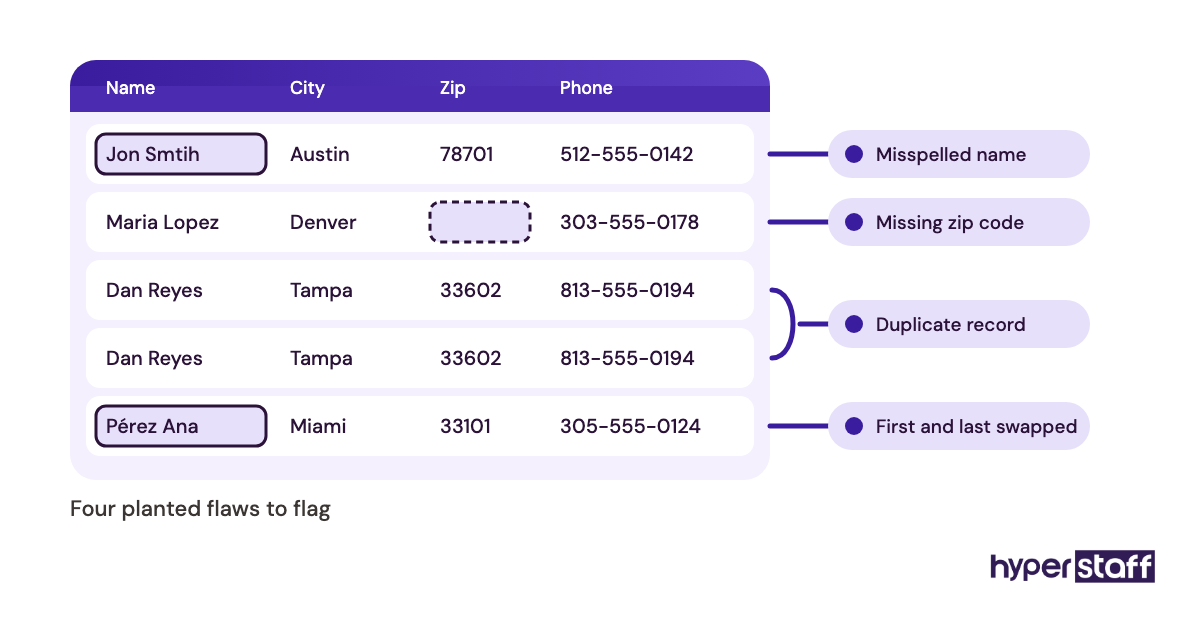
Strip personal details out of 10 to 15 real records and leave the mess in: a missing zip code, a misspelled name, a duplicate. The candidates who flag the problems, rather than silently "fixing" them, are the ones to call.
Step #4: Post, shortlist and interview
Give the post 5 to 10 days, then score sample tasks before reading cover letters. Our guide on how to hire a data entry virtual assistant covers sourcing, and these data entry interview questions help test judgment on the shortlist.
Step #5: Start with a supervised first batch
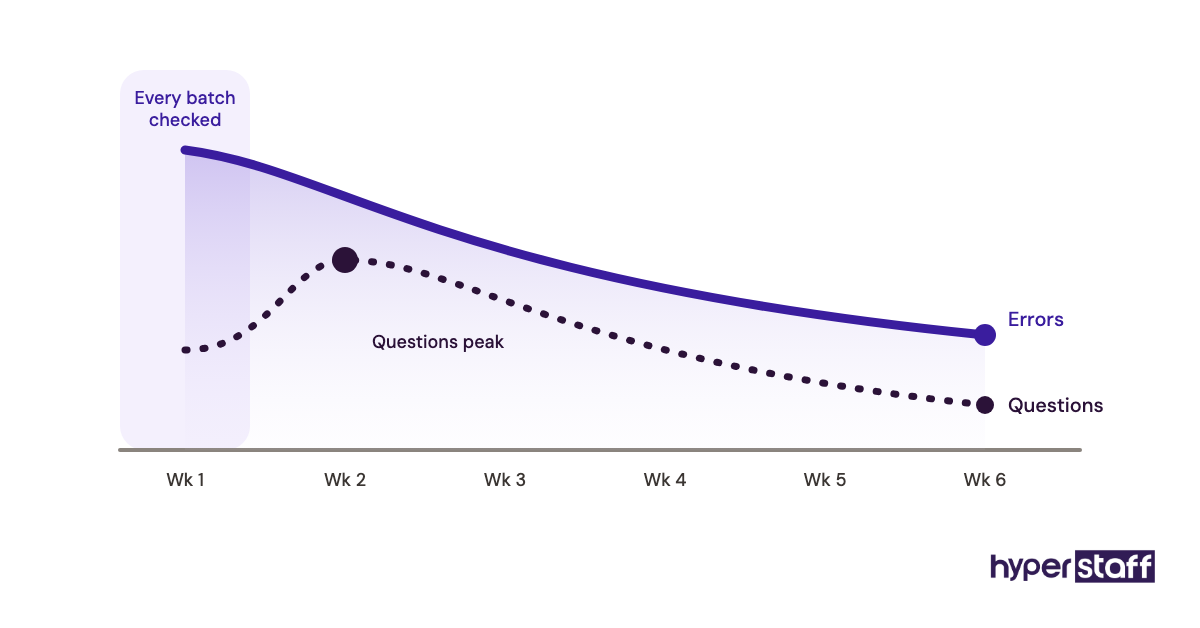
Plan a first week where every batch gets checked. Accuracy in week one tells you less than how fast the error rate falls by week three.
What Does an Effective Data Entry VA Job Post Look Like?
An effective data entry VA job post is specific in five places: volume, systems, accuracy, hours and the application test. The table compares strong and weak versions of each.
| Section | Strong version | Weak version |
|---|---|---|
| Volume | 40 to 60 invoices a day, 150 at month-end | "High volume" |
| Systems | Xero, Google Sheets, Dext | "Spreadsheets" |
| Accuracy | 99%, 25-record weekly spot check | "Detail-oriented" |
| Hours | 80 hours a month, 3 hours EST overlap | "Flexible" |
| Application | Code word plus sample task | "Send your CV" |
| Data access | NDA, password manager, view-only where possible | Not mentioned |
Data Entry VA Tools and Software to Name in the Job Description
The tools section of a data entry VA job description should list the exact software the assistant will open each day. Naming them lets a candidate say "yes, I've used that" instead of "I'm good with computers."
Most posts need a spreadsheet tool (Microsoft Excel or Google Sheets), the destination system (a CRM like HubSpot, a store like Shopify, accounting software like QuickBooks or Xero) and a password manager such as 1Password or Bitwarden. Add OCR or document tools like Adobe Acrobat if scans are involved, and automation tools like Zapier if records move between apps.
Excel skill deserves a precise line, because VLOOKUP, XLOOKUP, filters and pivot tables separate a data entry specialist from someone who types into cells. Our roundup of data entry virtual assistant tools goes through the wider stack.
10 Proven Tips for Writing a Data Entry VA Job Description
These tips come from what tends to separate posts that fill well from posts that pull in hundreds of generic replies.
- Put the record type in the job title, like "Invoice Data Entry VA."
- State daily or weekly volume as a range, including peaks.
- Name every system the assistant will log into.
- Write the accuracy target as a number and say how you'll check it.
- Ask for a sample task on messy, realistic data.
- Add a code word to the application instructions.
- Say what to do with unreadable or missing data.
- Spell out time-zone overlap in hours, not "some overlap."
- Mention the NDA and access rules for sensitive records.
- Publish the pay rate or range, because hidden pay lowers response quality.
Overcoming Common Data Entry VA Hiring Challenges
The most common data entry hiring challenge is applicant volume, since a public post can bring in well over 100 replies within days. In our experience, a code word and a sample task remove most of them before you read a single CV.
The second is accuracy that looks fine at first and slips later, usually when volume rises or the process changes. Weekly spot checks catch it early.
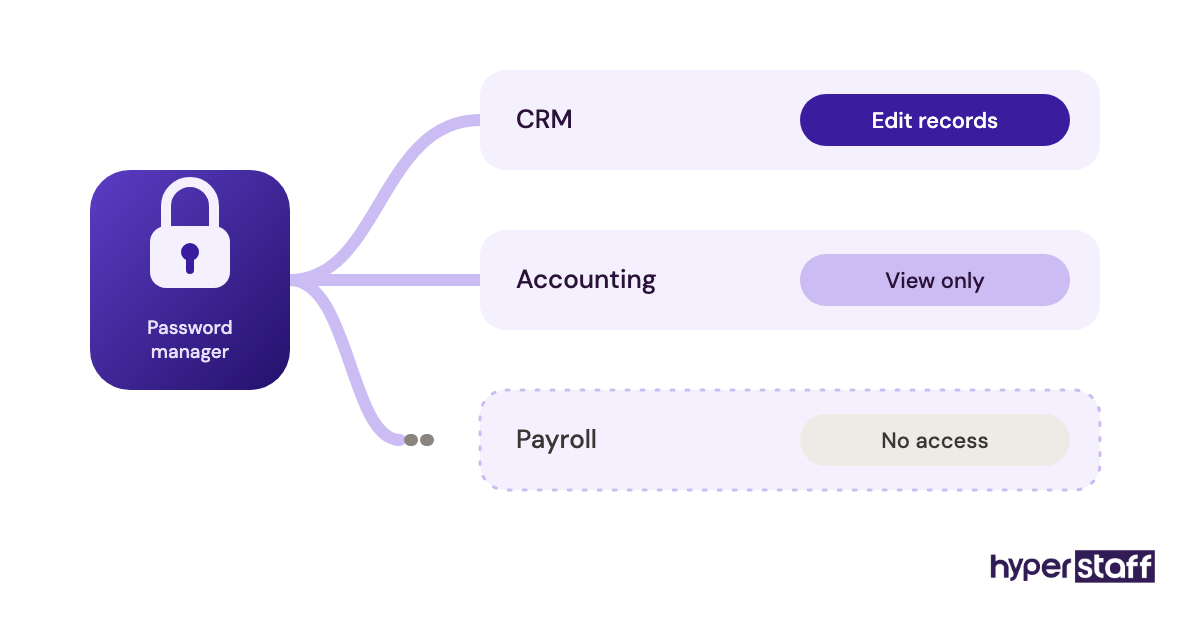
The third is trust with sensitive records. Use a password manager, grant the narrowest permissions the role needs, and never share login details over email.
How to Measure Data Entry VA Success
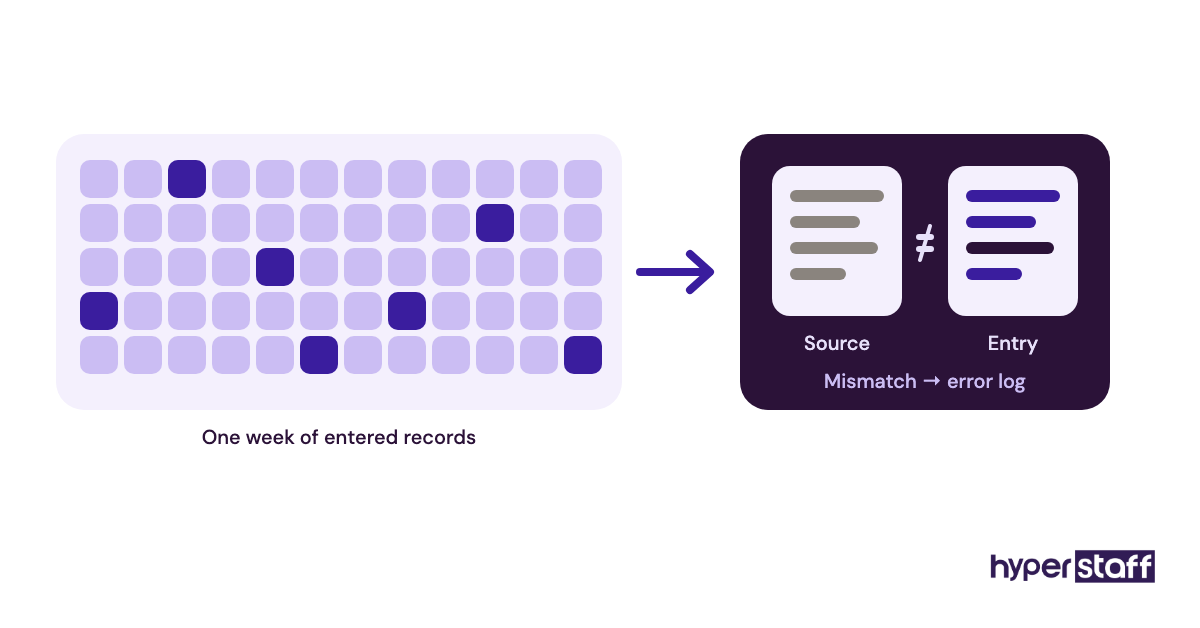
Data entry VA success comes down to accuracy, turnaround and volume, measured against the targets in your job description. Spot-check 20 to 30 random records a week and log the error rate.
Track turnaround from batch arrival to completion, plus how many questions the assistant raises. Questions often rise in week two and fall by week six, which is the pattern you want.
How Long Does a Data Entry VA Hire Take to Work?
A data entry VA hire typically works at a basic level within the first week and reaches steady accuracy in 3 to 6 weeks. Simple, repetitive records get there faster; invoice coding and records with judgment calls take longer.
Hiring directly adds 2 to 4 weeks before day one for posting, testing and interviews. Through Hyperstaff, placement takes 5 business days, then a 30-minute kickoff call, and work starts that day or the next morning.
How Much Does a Data Entry Virtual Assistant Cost?
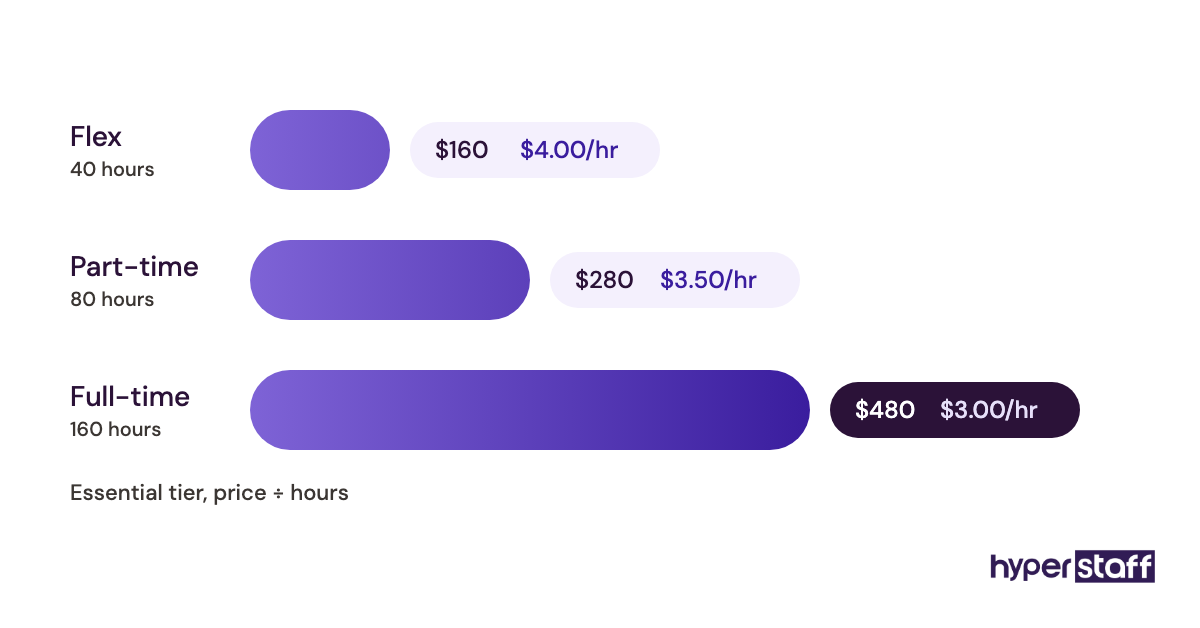
A data entry virtual assistant costs from $3 to $12+ per hour through Hyperstaff, depending on experience tier, compared with a US general office clerk median of $21.64 an hour according to the U.S. Bureau of Labor Statistics, before benefits. For a full line-by-line comparison, see our guide to data entry virtual assistant cost.
| Option | Experience | Hourly rate | 160 hours a month |
|---|---|---|---|
| Hyperstaff Essential | 0 to 2 years | From $3 | From $480 |
| Hyperstaff Professional | 2 to 5 years | From $6 | From $960 |
| Hyperstaff Expert | 5+ years | From $12 | From $1,920 |
| US in-house clerk, wages only | Varies | About $21.64 median | About $3,460 |
| US in-house clerk, with benefits | Varies | About $30 to $31 | About $4,900 to $5,000 |
Important: Hyperstaff prices shown are starting averages, not fixed quotes. Your final rate depends on the tier, hours, bundle and the specific data work you need covered.
Is a Data Entry Virtual Assistant Worth It?
For most businesses with a steady stream of records, a data entry virtual assistant is worth it, and a well-written job description is what makes it pay off. Accurate data compounds: cleaner CRM records mean better follow-ups, and correct invoices mean fewer awkward supplier calls.
Benefits make up about 30% of private-industry compensation, per the BLS Employer Costs for Employee Compensation release, so a full-time $21.64 wage works out near $31 an hour all in.
At 160 hours a month that's roughly $4,950, against $960 for a Hyperstaff Professional assistant at the starting rate, or $864 if you pay quarterly and save 10%.
The saving only holds if the work is documented, so budget the hours for Step #1. Our full answer to whether a data entry VA is worth it covers the cases where it isn't, such as tiny, irregular volumes.
How to Choose a Data Entry Virtual Assistant Agency
Choosing a data entry virtual assistant agency comes down to how they vet accuracy, who manages the relationship and what happens if the hire doesn't work out. Ask each agency to describe its data entry test, because "we screen for skills" tells you nothing.
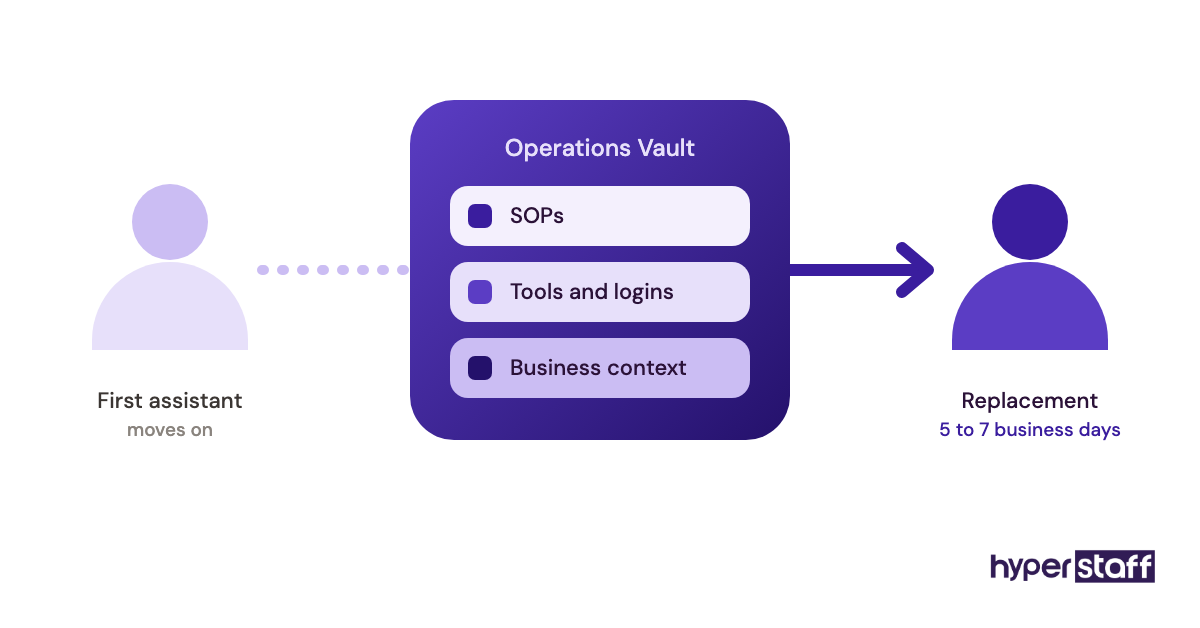
Look for a dedicated assistant rather than a rotating pool, since data entry depends on learning your specific field rules. Ask how replacements are briefed: at Hyperstaff, a free replacement arrives in 5 to 7 business days and is briefed from your Operations Vault, so your process doesn't leave with the person.
Check the commercial terms too. Monthly bundles of 40, 80 or 160 hours suit data work, which often starts part-time and grows once the backlog clears.
Data Entry Statistics, Trends and Future Predictions
Data entry jobs in the US are shrinking as in-house roles. The BLS projects a 6% decline in general office clerk employment over its ten-year outlook, largely because software now handles part of the routine work.
Fewer in-house clerks doesn't mean less data. Businesses still run more systems than ever, and the work is moving toward remote specialists who check, clean and connect data rather than retype it.
Our view, from the roles we place: the data entry job descriptions that hold up best over the next few years will ask for verification and cleanup skills first and raw typing second. Posts still asking for 80 WPM are already a sign the writer hasn't looked at the work lately.
Data Entry Virtual Assistants and AI
AI tools now handle a growing share of first-pass data entry, from OCR on scanned forms to extracting line items from invoices. A data entry virtual assistant's job is shifting toward reviewing that output, catching what the model misread and fixing records the software couldn't place.
Put that shift in your job description. A line like "You'll review AI-extracted invoice data and correct errors before posting" attracts people comfortable with the tools, and it sets a fair expectation about volume, since checking is faster than typing.
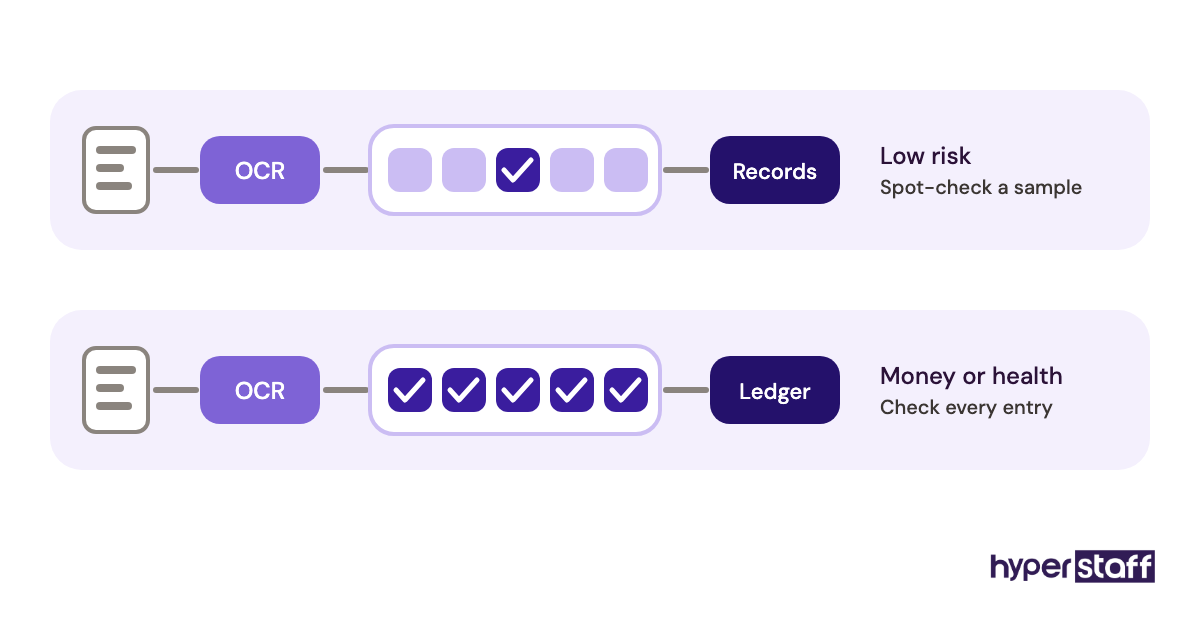
Practitioners still disagree on how far to trust automated extraction: some teams spot-check 1 in 20 AI-extracted records, and others check every financial entry by hand. For anything touching money or health data, we'd lean toward the second.
Disclaimer: This article is for general information only and does not constitute legal, employment or financial advice. Wage figures come from public sources and may change; check current data and local employment law before hiring.
Common questions
What skills should a data entry VA job description list?
List accuracy, the specific software you use, spreadsheet functions like VLOOKUP and filters, and clear written communication. Add industry knowledge only if the records need it, such as medical coding or accounting categories.
Should I ask for a typing speed test?
You can, but don't let it decide the hire. A sample task on messy, realistic records shows accuracy and judgment, which matter far more in data entry than words per minute.
How many hours does a data entry VA usually need?
It depends on volume. Many businesses start with 40 or 80 hours a month to clear a backlog, then move to full-time once the assistant takes on ongoing entry and cleanup.
Can a data entry VA handle confidential data safely?
Yes, with the right setup. State the NDA in the job description, share access through a password manager, and give only the permissions the role needs.
Do I need a different job description for part-time data entry?
Use the same template and change the hours, volume and overlap lines. Keep the accuracy target and sample task identical, because the quality bar shouldn't drop with the hours.
Book a free 15 min call
We place a pre-vetted specialist in 5 business days, fully managed, from $3/hour.