Data Entry Virtual Assistant Mistakes That Quietly Corrupt Your Records
Most data entry errors start with how the work is set up, and these ten mistakes are the ones that cost the most to clean up later.
On this page
- Mistake #1: Hiring for typing speed when accuracy pays the bills
- Why speed tests win the screening round
- What a fast, careless hire ends up costing
- Screen for judgment with a messy sample file
- Mistake #2: Handing over a spreadsheet with no field rules
- Where unwritten rules come from
- The damage inconsistent formats do
- Write a one-page data dictionary first
- Mistake #3: Catching errors in review instead of blocking them at entry
- Why teams lean on review
- The real cost of review-only quality control
- Lock the fields that have a fixed answer
- Mistake #4: Sharing logins in a chat message
- How shared passwords creep in
- What a loose access model exposes you to
- Give each tool its own seat and the smallest role
- Mistake #5: Judging the assistant on records per hour
- Why volume becomes the scoreboard
- How a speed target backfires
- Track error rate per batch, weighted by field
- Mistake #6: Going full volume on day one
- Why the pilot gets skipped
- What a skipped pilot puts at risk
- Run a small batch, review fast, then scale
- Mistake #7: Letting the assistant quietly fix the source data
- Why careful assistants make this mistake
- How unlogged edits hurt you
- Keep an exceptions log and split fixes into two lists
- Mistake #8: Paying a person to retype what software can capture
- How manual copying survives
- What unnecessary retyping costs
- Automate the capture and keep the person on exceptions
- Mistake #9: Running two sources of truth for the same records
- Why parallel lists form
- What duplicates do to your numbers
- Name one system of record per entity
- Mistake #10: Keeping the process in one person's head
- Why documentation never gets written
- What a blank handover costs
- Write the process down and keep it current
- FAQs
Clean records protect the revenue you already earned
Hyperstaff places pre-vetted data entry specialists who learn one business and stay with it. Through our data entry virtual assistant services, we've placed 70+ assistants with 30+ clients, at rates from $3/hour and with placement in 5 business days. After a 30-minute kickoff call, work starts that day or the next morning, and a free replacement arrives in 5 to 7 business days if the fit is wrong.
Mistake #1: Hiring for typing speed when accuracy pays the bills
Typing speed is the most common screening test for data entry roles, and it predicts the wrong thing. A fast typist who misreads a date format or guesses at a smudged invoice number simply produces errors faster.
The work a data entry virtual assistant does is closer to careful reading than to typing. Speed matters once accuracy is proven, and rarely before.
Why speed tests win the screening round
- WPM tests are free and take five minutes.
- Job boards list typing speed as the headline skill.
- Accuracy only shows up after weeks of real work.
- Candidates practise for speed tests.
- Few hiring managers test how someone handles an unreadable field.
What a fast, careless hire ends up costing
A wrong digit in an invoice total gets paid, reconciled and reported before anyone notices it. Fixing it later means unpicking every report and email that used the bad number.
Errors get more expensive the further they travel from the keyboard. A typo caught at entry costs seconds, while the same typo found in a quarterly report can cost a full afternoon of tracing.
Screen for judgment with a messy sample file
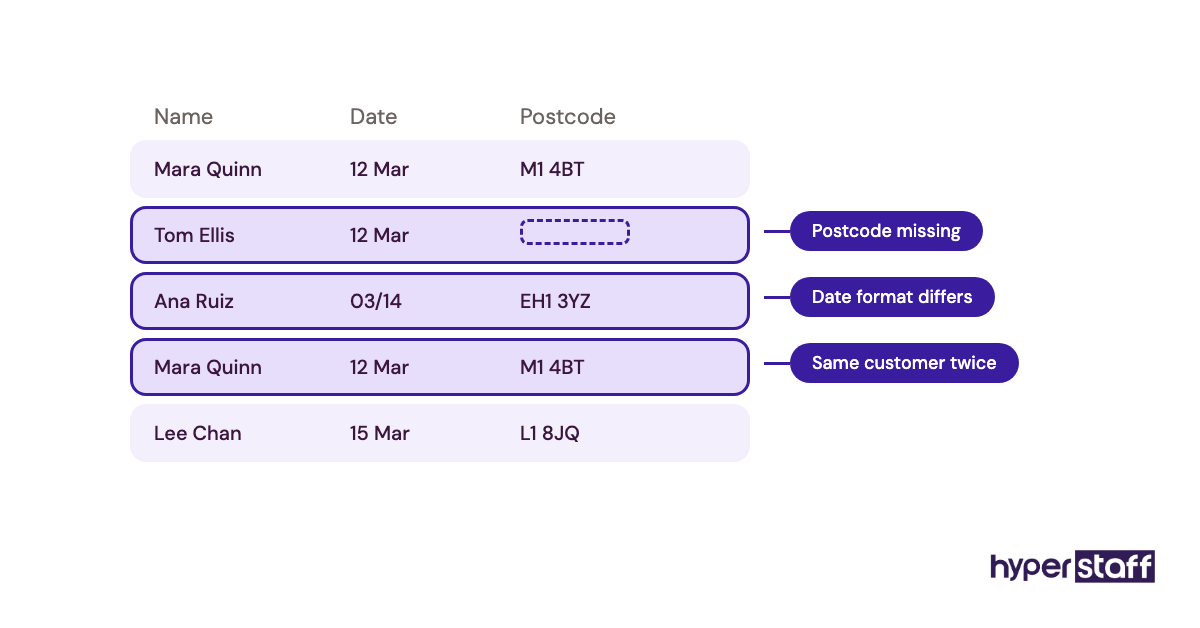
Give candidates a 20-record test pulled from your real sources, with a few deliberate problems planted inside: a missing postcode, a date written two ways, a customer who appears twice. Score them first on how many problems they flag, and only then on time.
Our guide on how to hire a data entry assistant sets out the full screening order. In the interview itself, ask what the candidate did the last time a source document didn't match the template.
For a ready-made list, these data entry interview questions focus on exactly that kind of judgment call.
Mistake #2: Handing over a spreadsheet with no field rules
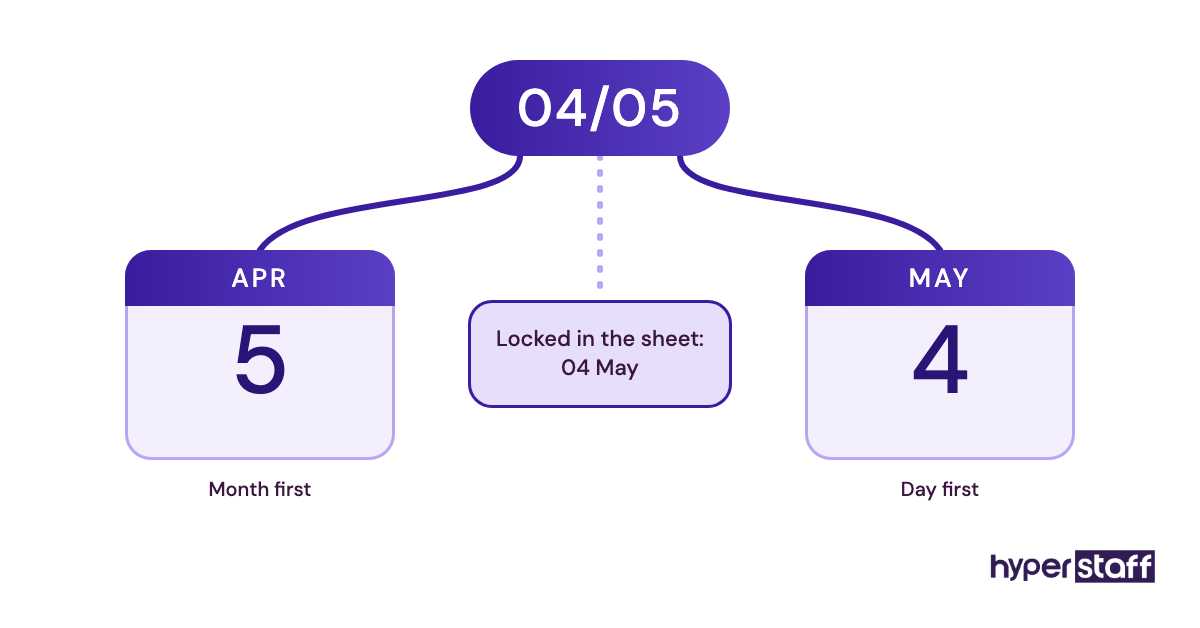
Field rules are the decisions behind every column, and most spreadsheets don't carry them. A header like "Phone" leaves open whether the country code goes in, and "Date" leaves open whether 04/05 means April or May.
Each new assistant will settle those choices their own way unless the answer is written down. Two people working the same sheet can produce two formats in the same column within a day.
Where unwritten rules come from
- The owner knows the rules and forgets they're rules.
- Column headers look self-explanatory.
- Writing standards down feels like overhead.
- The rules lived with whoever did the job last.
The damage inconsistent formats do
Mixed formats break sorting, filtering and imports. A contact list where some numbers lack a country code can fail partway through a CRM import or a dialer upload, and someone has to fix the rows by hand before it runs again.
Write a one-page data dictionary first
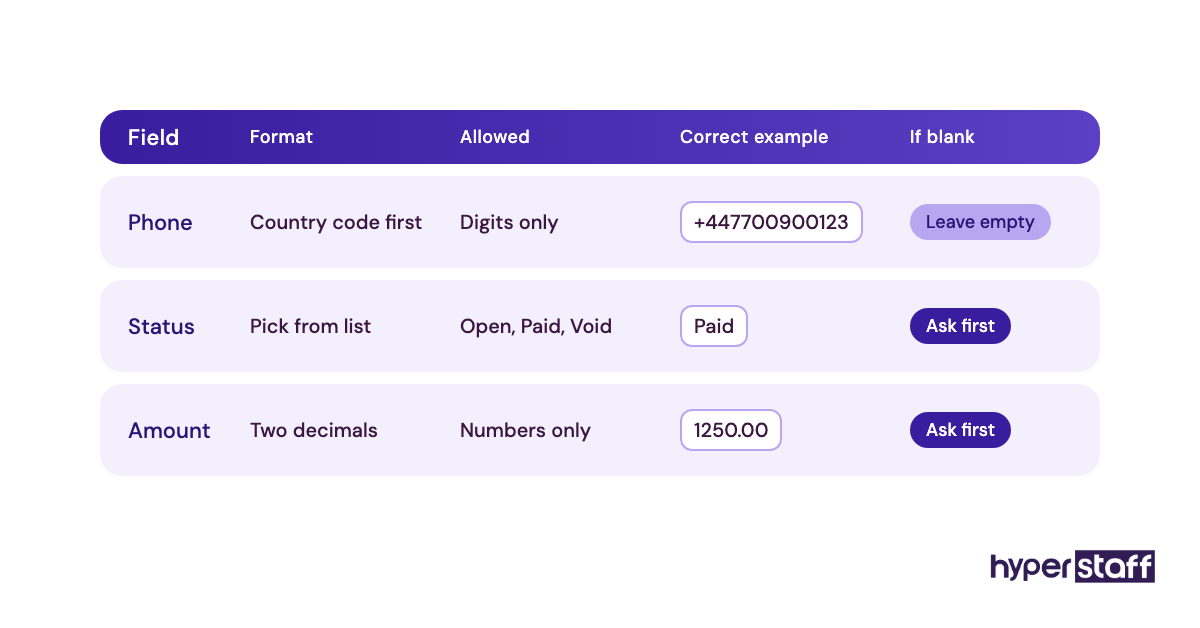
A data dictionary is a short table with one row per field: the format, the allowed values, a correct example and what to do when the source is blank. Hand it over before the first batch, and update it the moment a new edge case appears.
Put the same standards into your data entry job description so candidates see the level of precision you expect before they apply.
Mistake #3: Catching errors in review instead of blocking them at entry
Input validation stops bad data at the keyboard, and review only finds it afterwards. Of the two, review is far slower and far more expensive.
A sheet with dropdowns, date-only cells and required fields rejects whole categories of error before they exist. Without those controls, every mistake has to be spotted by a human who is reading hundreds of rows.
Why teams lean on review
- Spreadsheets start small and grow without structure.
- Setting up validation feels technical.
- Review feels safer because a person looks at everything.
- Nobody owns the template.
- The sheet was built for one user, then shared.
The real cost of review-only quality control
Reviewers tire, and tired reviewers miss the same subtle errors the typist missed. You end up paying twice for the same records and still shipping mistakes.
Lock the fields that have a fixed answer
Google Sheets and Excel both have data validation built in, and Airtable's single-select and date field types do the same job with less setup. Use dropdowns for status, region and category, and restrict date and number columns to their type.
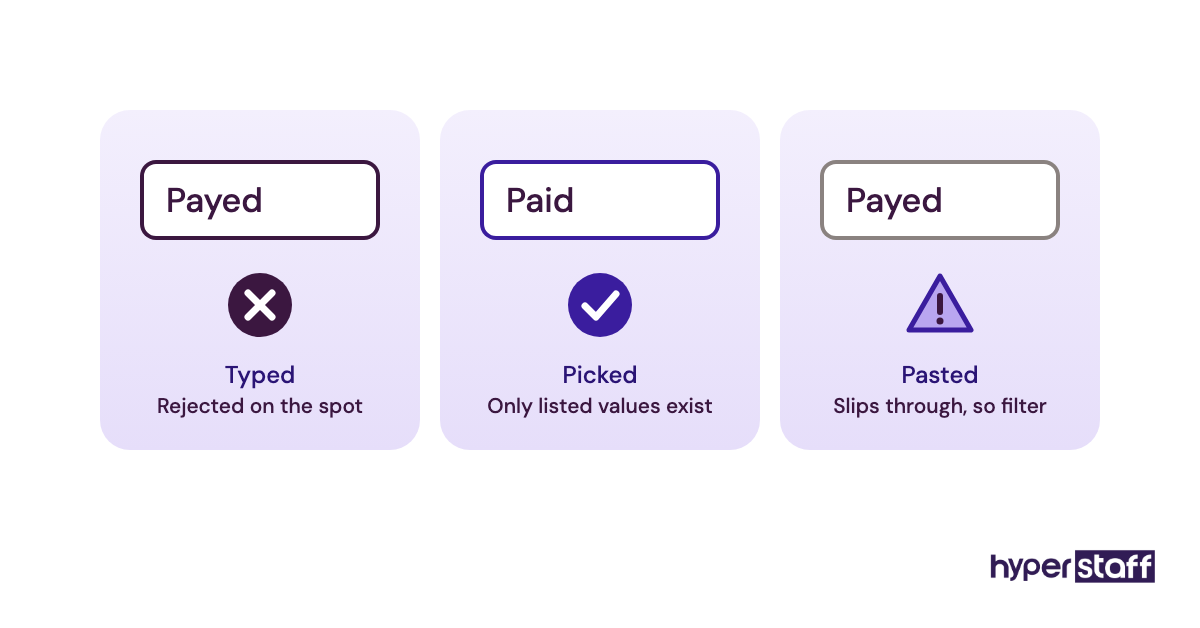
One catch from practice: pasting can override validation in both Excel and Google Sheets. Ask the assistant to use dropdowns in locked columns, then filter for invalid cells before closing each batch.
We compare these and other options in our roundup of data entry assistant tools.
Mistake #4: Sharing logins in a chat message
Login sharing over Slack, WhatsApp or email is the most common security slip in remote data entry setups. The password then sits in a searchable chat history for as long as the account exists.
Data entry assistants often touch customer records, invoices and sometimes payroll. That's sensitive access, and it deserves the same controls you'd use for anyone on your own payroll.
How shared passwords creep in
- The first task is urgent and the password is right there.
- Some tools charge per user, so people share one seat.
- Password managers feel like a future project.
- Nobody plans for the day the assistant leaves.
What a loose access model exposes you to
With a shared login, there's no record of who changed what. When the assistant moves on, every password they saw has to be rotated, and the ones you forget stay open.
Privacy laws such as the GDPR in the UK and EU hold the business responsible for who can reach personal data, contractors included. A chat thread full of credentials is hard to defend if a customer asks how their data is protected.
Give each tool its own seat and the smallest role
Share credentials through a password manager such as 1Password or Bitwarden, which can share a vault item without revealing the password itself. Wherever the tool allows it, create a named user with the narrowest role that still lets the job get done, and turn on two-factor authentication.
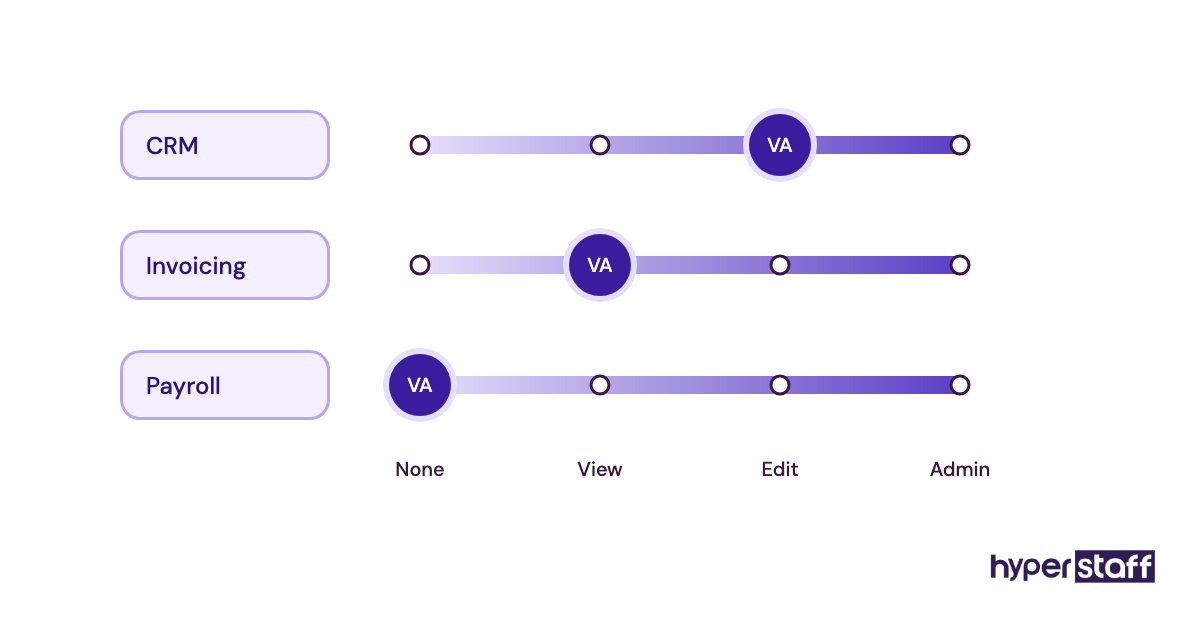
Access control is one of the honest trade-offs covered in our remote versus in-house comparison, and the controls themselves are the same either way.
Mistake #5: Judging the assistant on records per hour
Records per hour is easy to count, which is why it becomes the default measure for data entry work. Errors stay invisible until someone samples the output, so a speed metric rewards exactly the wrong behaviour.
Why volume becomes the scoreboard
- Tools report counts automatically.
- Error checking takes effort.
- Hourly billing makes speed feel like value.
- A growing backlog creates pressure to clear it.
How a speed target backfires
An assistant measured on volume learns to skip the record that needs a second look. Those skipped judgment calls become the errors you find months later.
It also distorts the math on data entry assistant cost. A cheaper hour that needs a second pass from you is a more expensive hour.
Track error rate per batch, weighted by field
Sample each batch, roughly 5% to 10% of records or at least 20, and count errors per field checked. Routine fields can tolerate a 99% accuracy target, while amounts, account numbers and bank details deserve a 100% check.
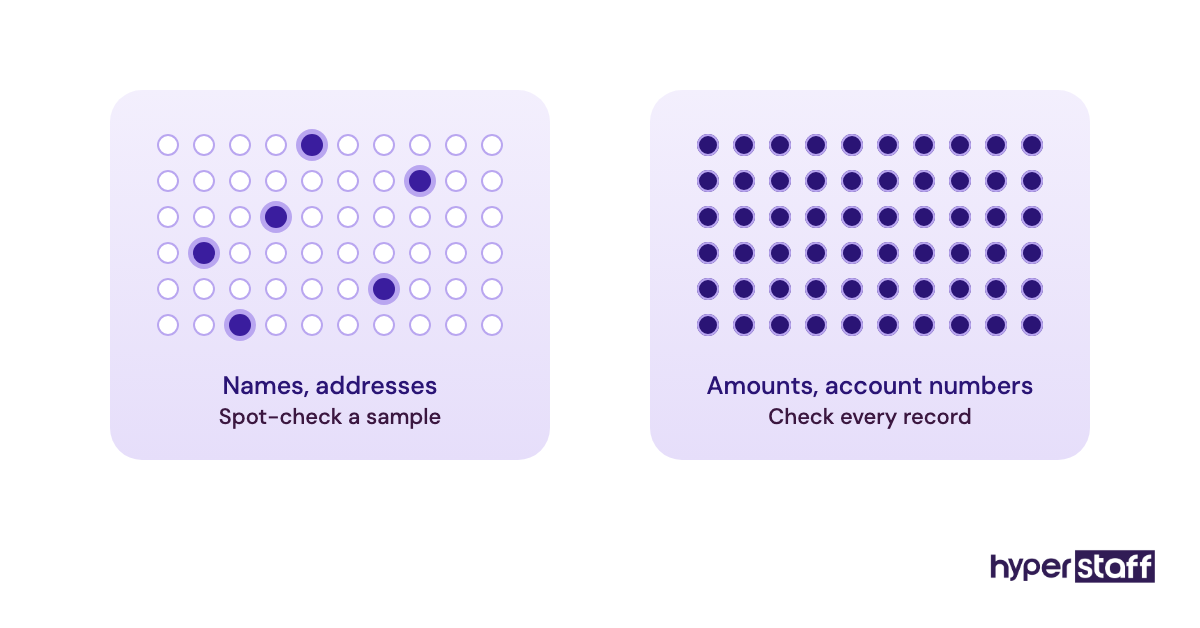
Practitioners genuinely split on the critical fields. Some prefer double-key entry, where two passes are compared automatically, and others prefer one careful pass plus a full human review; double-keying catches more but roughly doubles the hours, so it suits high-stakes financial data better than contact lists.
Mistake #6: Going full volume on day one
A pilot batch is the cheapest insurance in data entry. Hand over the full backlog on day one and any misunderstanding gets copied hundreds of times before anyone looks.
Why the pilot gets skipped
- The backlog is the reason for hiring.
- The task looks too simple to need a trial.
- Reviewing a pilot means blocking time on your own calendar.
- Early output looks fine at a glance.
- Nobody agreed on who reviews it.
What a skipped pilot puts at risk
If the assistant read one rule differently from how you meant it, every record carries that reading. Rework then means going back through the entire backlog, and the deadline you hired for slips anyway.
Run a small batch, review fast, then scale
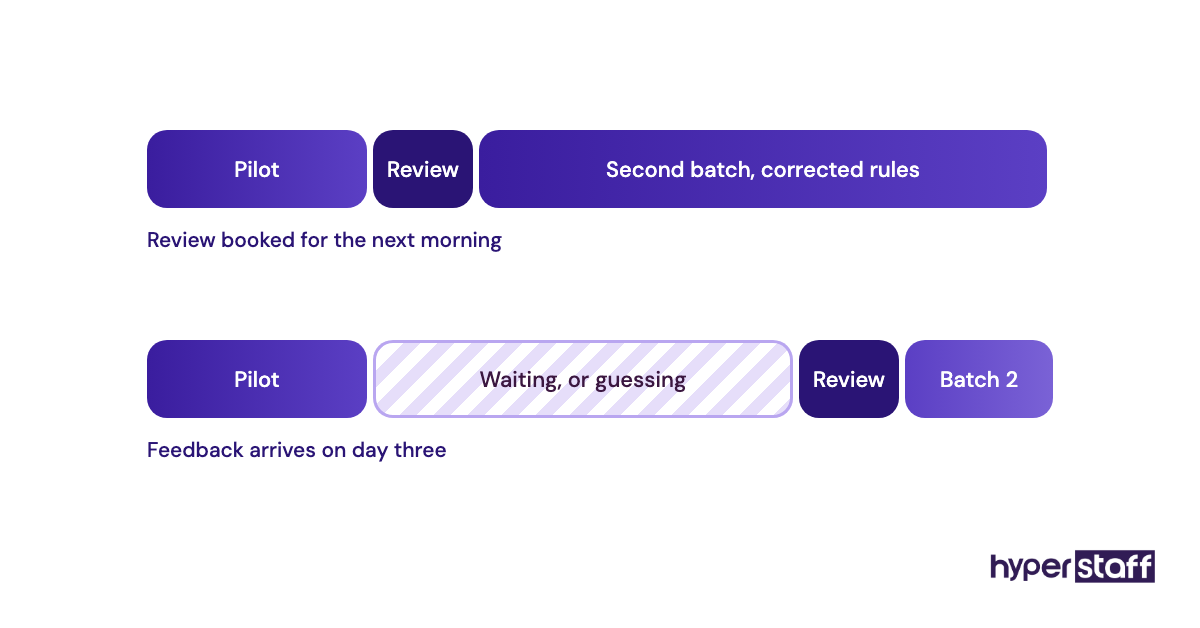
The order that works is a kickoff, a 25 to 50 record pilot, your review within 24 hours, a rules update, then a second batch at double the size. The dead zone to avoid sits between pilot and review: if feedback takes three days, the assistant either waits idle or keeps going on wrong assumptions.
Our guide to onboarding a data entry assistant covers the first two weeks in more detail, including what to send before the kickoff call.
Mistake #7: Letting the assistant quietly fix the source data
Silent corrections are the hardest data entry errors to find, because they look like good data. A helpful assistant fixes a misspelled company name or looks up a missing postcode, and some of those fixes are wrong.
The real problem is that nobody knows which records were changed. Guessed values and customer-supplied values end up looking identical.
Why careful assistants make this mistake
- They want to hand back a complete sheet.
- Blank fields feel like unfinished work.
- Nobody said which fixes are allowed.
- Flagging every issue feels like bothering the client.
How unlogged edits hurt you
A looked-up postcode that's wrong sends a parcel to the wrong place, and nobody suspects the record because it was "complete". In regulated work, an unrecorded change to customer data can also be a compliance issue in its own right.
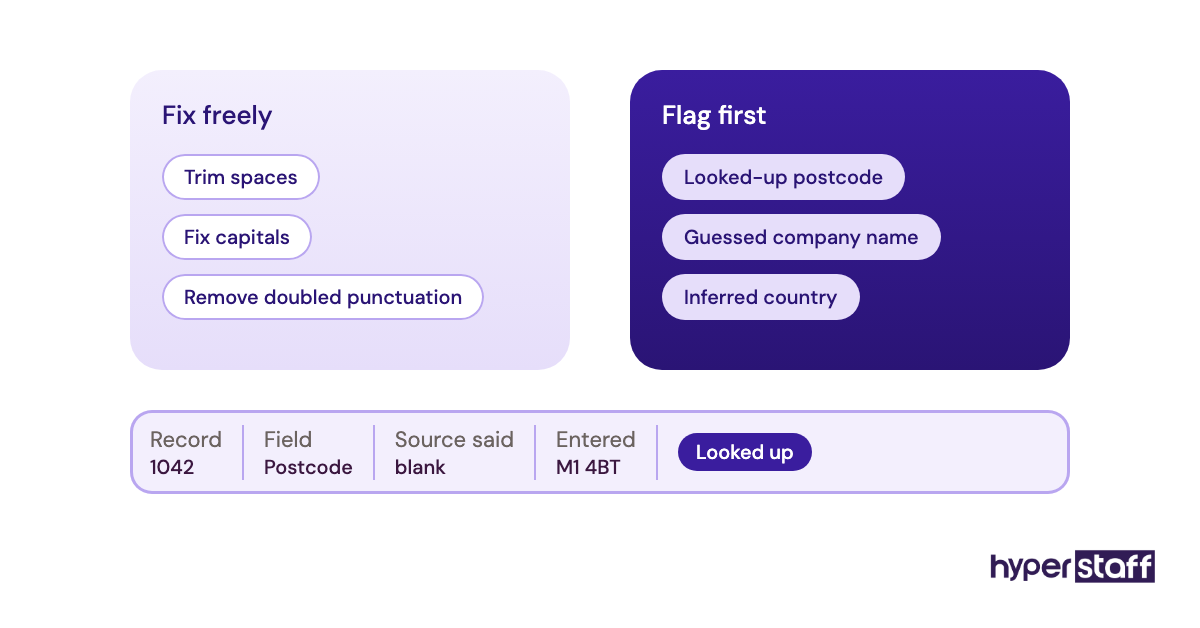
Keep an exceptions log and split fixes into two lists
Set up an exceptions tab with the record ID, the field, what the source said, what was entered and why. Then write two short lists: fixes the assistant may make freely, such as trimming spaces and fixing capitalisation, and fixes that must be flagged, such as anything looked up or inferred.
Mistake #8: Paying a person to retype what software can capture
Retyping between systems that could connect directly is the most expensive way to move data. If a value already exists digitally, a human copying it adds a new chance of error and little else.
How manual copying survives
- The process predates the tools.
- Integrations sound like a developer job.
- Hiring someone feels faster than setting up automation.
- Nobody audited the task list before handing it over.
What unnecessary retyping costs
You pay for hours that buy no judgment. The assistant's skill also goes to waste on copy work when it could go to the records that genuinely need a human eye.
Automate the capture and keep the person on exceptions
Audit the work before you hand it over. Form submissions can flow into a CRM through Zapier or Make, and receipt and invoice capture tools such as Dext or Hubdoc pull totals straight from documents, so the assistant checks the output and handles the misreads.
OCR has a limit, though. On faded scans and handwritten forms, checking every OCR guess can take longer than typing, so low-volume handwritten work is often faster done by hand.
The split between automatable and judgment-based work is mapped in our list of data entry assistant tasks.
Mistake #9: Running two sources of truth for the same records
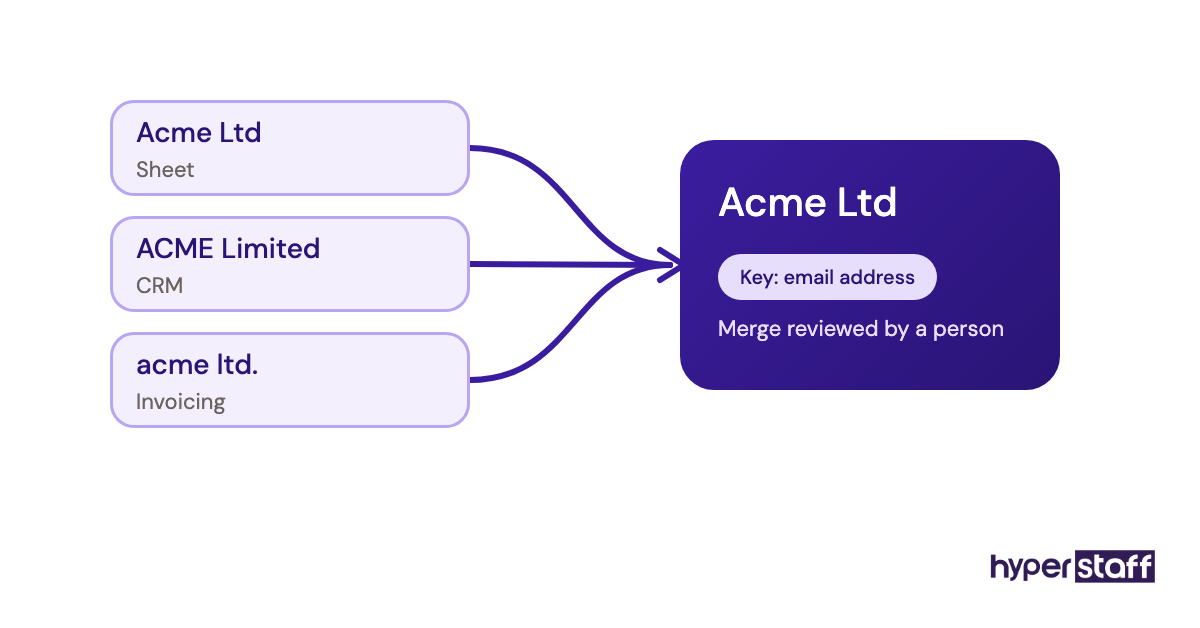
Duplicate records multiply when the same customer lives in a spreadsheet, the CRM and the invoicing tool at once. An assistant updates one copy, and the other two drift out of date.
Why parallel lists form
- Each tool was adopted by a different person.
- Exports get edited and never re-imported.
- Searching before creating a record feels slow.
- No field acts as a unique key.
- Small spelling differences hide matches.
What duplicates do to your numbers
A customer listed twice gets two copies of a campaign and two follow-up calls. Pipeline totals inflate, and reports built on the data overstate what you actually have.
Name one system of record per entity
Decide where each type of record lives: customers in the CRM, invoices in accounting, and so on. Add a search-before-create rule to the process, choose a unique key such as email address, VAT number or SKU, and run the CRM's merge or duplicate tool on a fixed schedule.
Mistake #10: Keeping the process in one person's head
Undocumented processes are the mistake that makes every other one come back. The rules your assistant learns in month one are worth more than the data they typed, and if those rules live only in memory, they leave with the person.
Why documentation never gets written
- The assistant is doing well, so it feels unnecessary.
- Rules change faster than anyone updates a document.
- Writing SOPs falls to nobody in particular.
- Knowledge builds up in chat threads instead.
What a blank handover costs
A replacement starts from zero and rediscovers every edge case the hard way. The first weeks then repeat mistakes one through nine.
Write the process down and keep it current
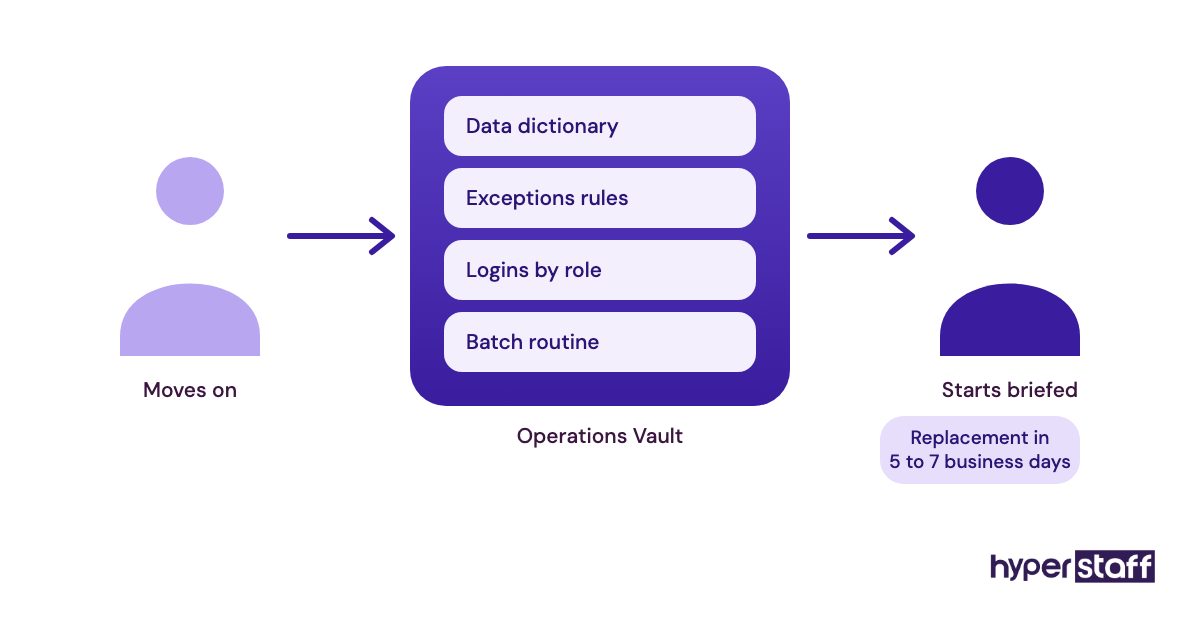
Store the data dictionary, the exceptions rules, tool logins by role and the batch routine in one place, and update it whenever a rule changes. At Hyperstaff, that place is the Operations Vault: your SOPs, tools and context, written down and maintained for you, so a replacement in 5 to 7 business days is briefed from it before day one.
That continuity is a large part of whether a data entry assistant is worth it over a year rather than a single month.
Disclaimer: This article is for general information only and isn't legal, security or professional advice. Data protection duties vary by jurisdiction, so check your obligations with a qualified adviser. Tool features named here may change; confirm details with each provider. Hyperstaff accepts no liability for actions taken based on this content.
Common questions
What error rate is acceptable for a data entry VA?
It depends on the field. Around 99% accuracy is a common target for routine fields like names and addresses, while financial amounts and account numbers should be checked in full. Measure by field, because a single average hides the errors that matter.
How do I check a data entry VA's work without redoing it?
Sample it. Pull 5% to 10% of each batch, or at least 20 records, compare them against the source and log the errors by field.
Should a data entry assistant get admin access to my CRM?
No. Give them a named user with the narrowest role that still allows the work, share credentials through a password manager and turn on two-factor authentication.
My VA keeps making the same data entry mistake. What should I do?
Check the rule before the person. Repeated errors usually point to a missing or unclear line in the data dictionary, so rewrite that rule with an example, then review the next batch closely.
Can a data entry virtual assistant work from scanned or handwritten documents?
You can assign that work, and it's a good fit for a careful assistant. Agree upfront on how to flag unreadable values, and have OCR handle clean typed scans while the assistant types the messy ones.
Book a free 15 min call
We place a pre-vetted specialist in 5 business days, fully managed, from $3/hour.