The Best Amazon Virtual Assistant Tools, Compared
Eight tools an Amazon virtual assistant uses every week, what each one costs, and how to give your VA access without putting the seller account at risk.
On this page
💡 Key Takeaways:
1) The core Amazon virtual assistant tools are Seller Central with Brand Analytics, one keyword suite such as Helium 10 or Jungle Scout, Keepa for price history, and a profit tracker such as Sellerboard.
2) Most paid Amazon seller tools include at least one extra user seat, so a virtual assistant can get their own login instead of sharing the owner's password.
3) A lean stack for a small brand runs roughly $60 to $200 a month on top of the Amazon selling plan, and adding inventory forecasting can push that past $300.
The right tools turn VA hours into sales
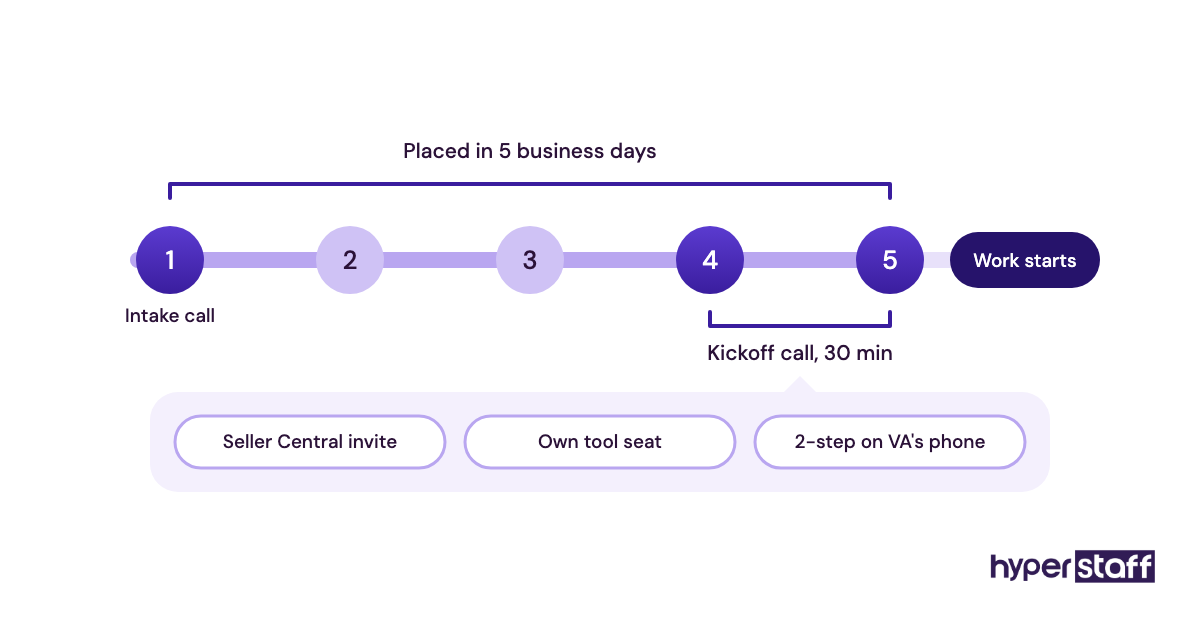
An Amazon VA with the right software finds the keywords, catches the stockout and fixes the margin leak before it costs you a month of revenue. Hyperstaff has placed 70+ virtual assistants for 30+ clients, and a dedicated Amazon virtual assistant can start within 5 business days, with rates from $3/hour and a dedicated account manager behind every placement.
Best Amazon Virtual Assistant Tools Comparison
The best Amazon virtual assistant tools cover four jobs: search data, listing work, profit tracking and inventory. The table below compares eight of them on what a VA does with each tool, the starting price and whether a second user seat is included.
If you're still mapping out what an Amazon virtual assistant does, read the "main job" column first. It shows which part of the account each tool touches.
| Tool | Best for | Main job for a VA | Starting price | VA seat | Free option |
|---|---|---|---|---|---|
| Amazon Seller Central | First-party data and safe access | Listings, Business Reports, Brand Analytics, cases | $39.99/month Professional plan (US) | Secondary users with set permissions | Included with the selling plan |
| Helium 10 | Keyword research and listing work | Reverse-ASIN lookups, listing drafts, rank tracking | $99/month billed yearly, $129 monthly | 1 extra user on Platinum, 5 total on Diamond | None listed on pricing page |
| Jungle Scout | Product research on a tighter budget | Sales estimates, product and keyword research | $29/month billed yearly, $49 monthly | 3 users on Brand Owner, extra seats $49/month | 7-day money-back guarantee |
| Keepa | Price and sales rank history | Competitor pricing, stock gaps, deal checks | Roughly €19 to €29/month for the paid tier | Per account | Free price charts and alerts |
| Sellerboard | Daily profit tracking | Cost of goods updates, refund and fee checks | $15/month billed yearly, $19 monthly | 1 to 4+ extra users by plan | 1-month free trial |
| Data Dive | Listing optimization from competitor data | Master keyword lists, rank tracking, copy drafts | $39/month | Seller Central connections by plan | None listed |
| SoStocked | Inventory forecasting and FBA restocks | Reorder planning, purchase orders, shipments | From $175/month | Check with vendor | None listed |
| Canva | Listing images and A+ content drafts | Infographics, A+ modules, ad creative | Roughly $15 to $18/month for Pro | Per-seat Business plan | Free plan |
Best Amazon Virtual Assistant Tools Reviews
Each review below covers what the tool costs, where a VA gets the most out of it and where it falls short. Prices come from each vendor's own pricing page and do change, so confirm the tier before you buy.
1) Amazon Seller Central: Best for free first-party data and safe VA access
Seller Central is the one tool every Amazon VA needs, and it's the only one on this list where the data comes straight from Amazon. Owners on the Professional selling plan can invite a VA as a secondary user and control exactly which pages they see.
Key highlights
- Professional plan at $39.99/month (US)
- Secondary users with page-level permissions
- Brand Analytics with Brand Registry
- Search Query Performance reports
- No extra fee per VA login
Why your VA should open Brand Analytics before any paid tool
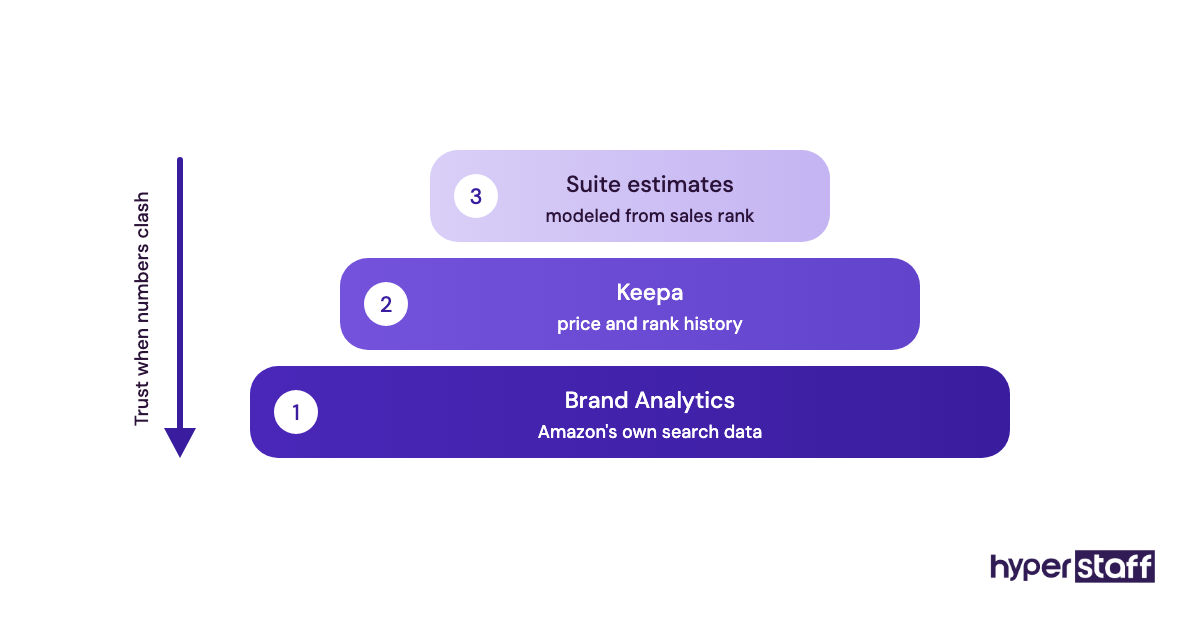
Brand Analytics is Amazon's own search dataset, available to sellers enrolled in Brand Registry. Its Search Query Performance report shows impressions, clicks, cart adds and purchases for your ASINs next to the total for each search term.
Paid keyword tools model their search volume from outside the platform. When a Helium 10 estimate and the Brand Analytics numbers disagree on a term your listing already ranks for, trust Amazon's figure and treat the third-party number as a direction.
Pros
- Included with a Professional account
- First-party search and conversion data
- Permissions set page by page
- Each VA gets their own login
- Business Reports show sessions and conversion
Cons
- Brand Analytics requires Brand Registry
- Reports are slow to load and export
- No data on products you don't sell
- Menus move with each redesign
- Weekly and monthly views only for search data
Is Seller Central enough on its own?
For a brand with a handful of ASINs and a clear keyword set, it covers more than most owners ever open.
2) Helium 10: Best for keyword research and listing work in one login
Helium 10 is a suite of Amazon seller tools that puts keyword research, listing building and rank tracking under one subscription. On the Helium 10 pricing page, Platinum runs $129 a month, or $99 a month billed yearly, and Diamond runs $359 monthly or $279 billed yearly.
Key highlights
- Platinum from $99/month billed yearly
- Reverse-ASIN keyword lookups
- Listing builder with keyword checks
- 1 extra user on Platinum
- 5 total users on Diamond
The 100-search ceiling on Platinum
Platinum caps keyword searches at 100 a month and tracked ASINs at 20. A VA rewriting eight or ten listings in one push can burn through that allowance in the first week.
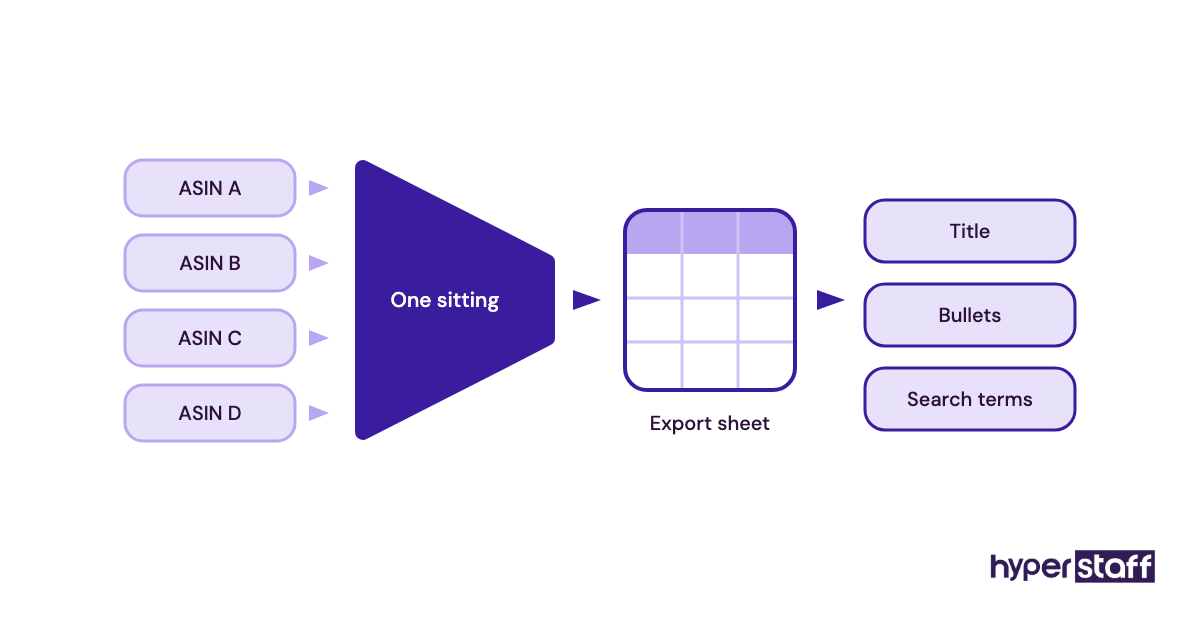
Batch the research. Have your VA run every reverse-ASIN lookup for a product family in one sitting, export the results to a sheet and write from the sheet. Diamond lifts most of these caps, but it's hard to justify for a brand under the $100K yearly sales mark the tier is priced for.
Pros
- Most research jobs in one login
- VA seat included on Platinum
- Large training library for new VAs
- Exports cleanly to spreadsheets
- Connects up to 2 Seller Central accounts on Platinum
Cons
- Platinum search limits bite fast
- Diamond is a big price jump
- Search volumes are estimates
- Many features most VAs never touch
- Annual billing needed for the lower rate
Who should pay for Helium 10?
Brands that want one tool for keywords, listings and rank tracking get the most from it.
3) Jungle Scout: Best for product research on a tighter budget
Jungle Scout is an Amazon research tool known for its browser extension, which shows estimated monthly sales on search result pages. The Jungle Scout plans page lists Starter at $49 a month, Growth Accelerator at $79 and Brand Owner at $149, with annual billing dropping those to $29, $49 and $129.
Key highlights
- Starter from $29/month billed yearly
- Sales estimates right in search results
- Tracks up to 200 ASINs
- 3 users on Brand Owner
- Extra seats at $49/month
Sales estimates are ranges, so read them that way
Jungle Scout and Helium 10 each estimate sales from sales rank, and the two often land far apart on the same product. Sellers argue about which model is closer, and there's no settled answer because Amazon doesn't publish unit sales.
The practical fix is to pick one tool and stay with it, so the VA compares products against the same yardstick. Ask them to check any product that looks promising against its Keepa rank history before it goes into a report, because one good month can inflate an estimate.
Pros
- Lowest entry price among the big suites
- Extension is quick for a VA to learn
- Strong for product and niche research
- Brand Owner includes 3 users
- 7-day money-back guarantee
Cons
- Starter is a single-user license
- Extra seats cost $49/month each
- Rank tracking needs a higher plan
- Estimates differ from other tools
- Fewer listing tools than Helium 10
Where Jungle Scout earns its place
It fits brands still choosing what to launch next, more than brands tuning 50 live listings.
4) Keepa: Best for price and sales rank history
Keepa is an Amazon price tracker that charts a product's price, sales rank and offer count over time, right on the product page through a browser extension. Price charts and alerts are free at keepa.com, and the paid tier, which adds sales rank and seller data, sits in the €19 to €29 a month range.
Key highlights
- Free price history and alerts
- Paid tier around €19 to €29/month
- Charts appear on every product page
- Shows when Amazon itself sells
- API priced separately
Reading a Keepa chart without fooling yourself
A sales rank spike on a Keepa chart often lines up with a lightning deal or a coupon, and a VA who misses that will report demand that isn't there. Gaps in the price line usually mean the product was out of stock, which is when competitors pick up sales.
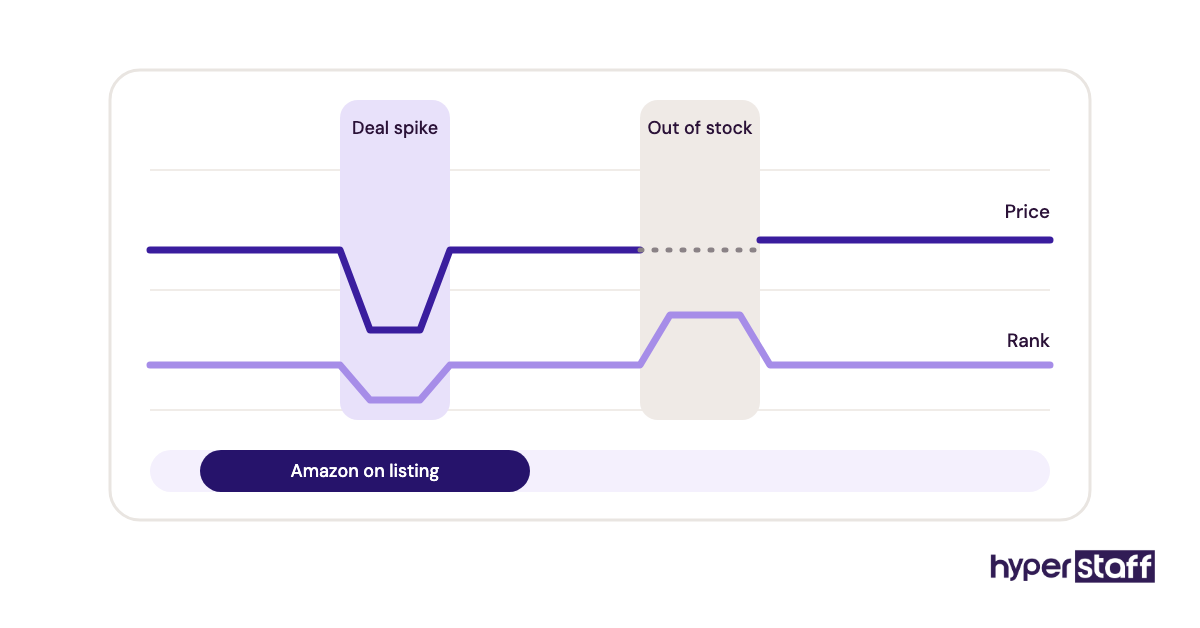
Ask your VA to note three things on any competitor chart: when Amazon was on the listing, how often stock ran out and whether the price held after a deal. Reading a chart out loud is one of the better Amazon VA interview questions you can use, because the answer shows quickly who has actually done the work.
Pros
- Free tier is useful by itself
- Years of price and rank history
- Catches stockouts and deal spikes
- Low cost for the paid tier
- Price drop alerts by email
Cons
- Charts are dense for beginners
- No keyword research
- Euro billing for most buyers
- API costs extra
- Easy to misread deal spikes
Should every Amazon VA have Keepa?
Yes, at least the free version, since it's the fastest sanity check on any number another tool gives you.
5) Sellerboard: Best for daily profit tracking
Sellerboard is a profit analytics tool that pulls Amazon fees, ad spend, refunds and cost of goods into one daily profit figure. According to Sellerboard's pricing, plans run $19 to $79 a month, or $15 to $63 billed yearly, with a 1-month free trial.
Key highlights
- From $15/month billed yearly
- Profit after fees, ads and refunds
- Extra user seats on every plan
- Order caps from 3,000 to 50,000 a month
- 1-month free trial
A profit dashboard is only as good as its cost of goods
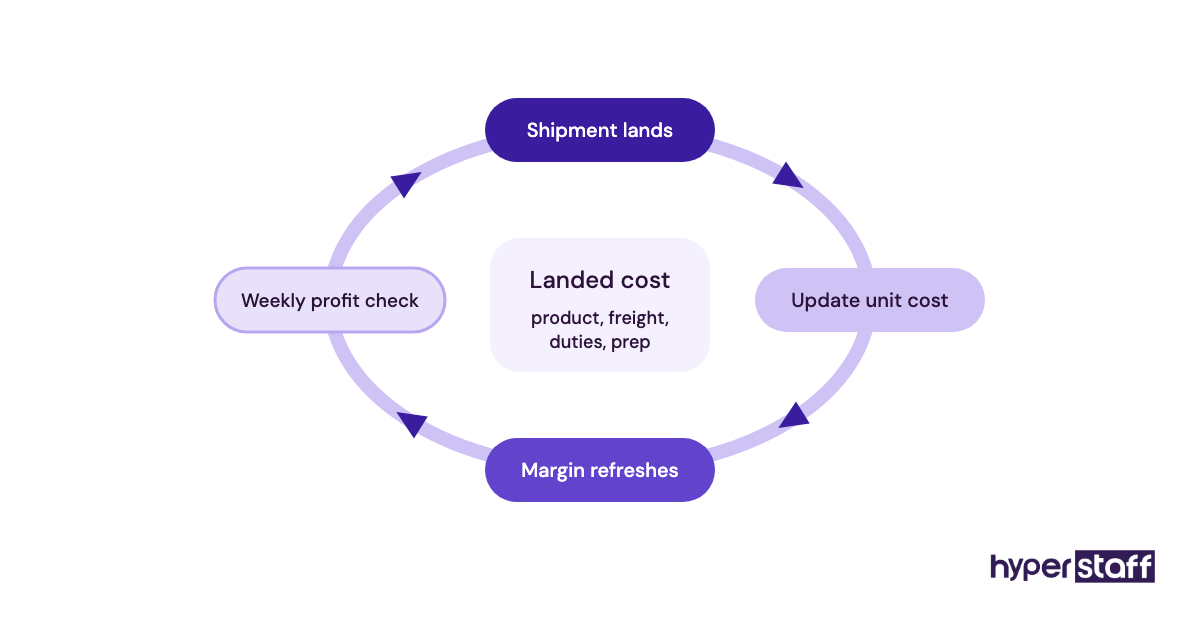
Sellerboard can't know your landed cost per unit unless someone enters it. When freight rates or supplier prices change and nobody updates the figure, the dashboard keeps showing last quarter's margin.
Make cost updates part of the VA's routine every time a shipment lands. Stale costs sit near the top of the Amazon VA mistakes list, and they're easy to prevent with a recurring task tied to each purchase order.
Pros
- Low price for what it tracks
- Daily profit by product
- Flags refunds and fee changes
- VA seats included
- Review request automation
Cons
- Needs accurate cost inputs
- Order caps on lower plans
- Dashboard takes time to learn
- Little research functionality
- Multi-channel brands need extra setup
Is Sellerboard worth adding early?
It's worth it from the first month you have steady sales, since profit questions start the day revenue does.
6) Data Dive: Best for listing optimization from competitor data
Data Dive is a listing optimization tool that builds a master keyword list from your top competitors and tracks where you rank for each term. The Data Dive pricing page lists Starter at $39 a month, Standard at $149 and Enterprise at $490.
Key highlights
- Starter at $39/month
- Competitor-based keyword "Dives"
- Rank Radar keyword tracking
- AI copywriter tasks included
- Standard connects up to 10 accounts
Why Data Dive suits process-driven VAs
Data Dive lays out keyword relevance in a fixed, step-by-step format, which makes listing work repeatable. A VA can follow the same steps on every product and hand you a draft you can review in minutes.
The weak spot is Starter's limit of 25 tracked keywords, which covers one product and not much else. If listing optimization will be a weekly duty, put it in your Amazon VA job description and budget for Standard from the start.
Pros
- Repeatable listing process
- Competitor keywords in one view
- Cheap entry plan
- Rank tracking built in
- Good fit for written SOPs
Cons
- Starter caps tracking at 25 keywords
- Steep jump to Standard
- Narrow focus on listings
- Learning curve on the method
- No product research tools
Data Dive or a full suite?
Choose Data Dive when listings are the bottleneck and a suite when product research matters just as much.
7) SoStocked: Best for inventory forecasting and FBA restocks
SoStocked is an inventory forecasting tool for Amazon brands that plans reorders by SKU and tracks stock from supplier to fulfillment center. Its SoStocked pricing page lists the Inventory + Profit plan from $175 a month.
Key highlights
- From $175/month
- Forecasts by SKU with seasonality
- Tracks purchase orders and shipments
- Inventory and profit in one plan
- Built for multi-SKU brands
Lead times are where forecasts break
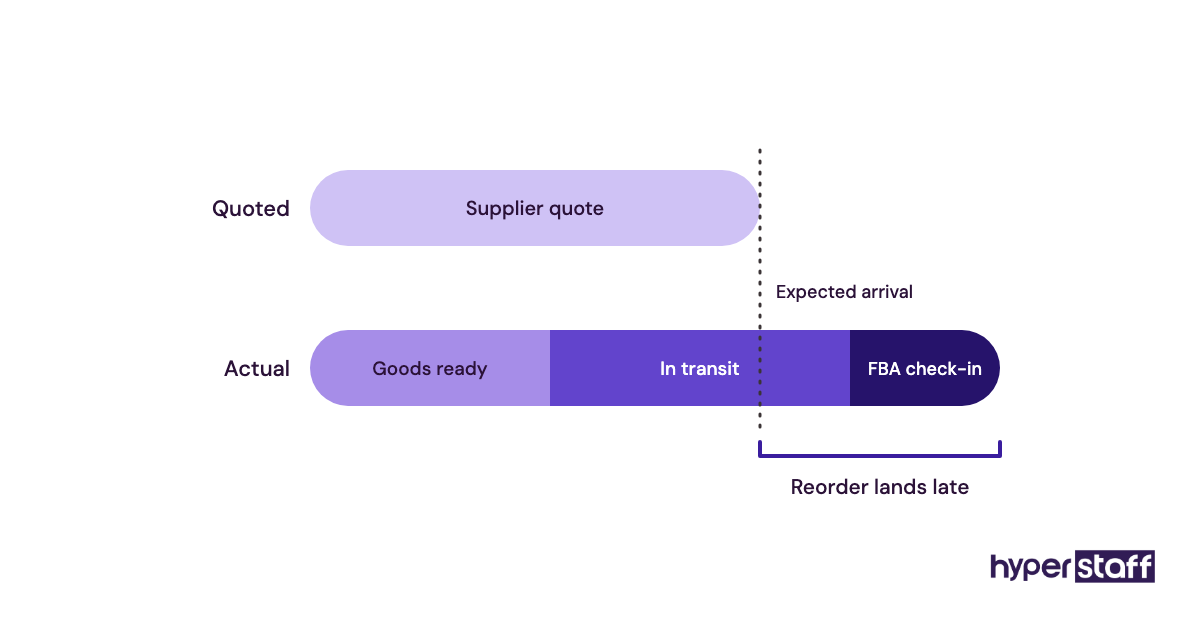
A reorder forecast depends on the lead time someone types in. If your VA enters the supplier's quoted 30 days while shipments really take 45 plus FBA check-in, the tool will tell you to reorder two weeks too late.
Have your VA record actual dates for each purchase order: order placed, goods ready, shipped and received by Amazon. After two or three cycles, those real numbers replace the quoted ones and the forecast gets far more reliable.
Pros
- Forecasts handle seasonality
- Purchase order tracking
- Covers stock outside FBA
- Reduces stockout risk
- Gives a VA a clear weekly routine
Cons
- Highest entry price here
- Needs accurate lead times
- Setup takes real effort
- Overkill for a few SKUs
- One public plan only
When SoStocked pays for itself
A single avoided stockout on a best seller usually covers months of the subscription.
8) Canva: Best for listing images and A+ content drafts
Canva is a browser-based design tool that Amazon VAs use for secondary listing images, A+ content modules and ad creative. A free plan exists, and Canva Pro for one person runs roughly $15 to $18 a month depending on billing, per Canva's pricing page.
Key highlights
- Free plan available
- Pro around $15 to $18/month
- Brand Kit for fonts and colors
- Resize designs across formats on Pro
- Shared folders for owner review
Where Canva stops and a designer starts
Amazon requires a pure white background on the main image, and that image needs real product photography. Canva is the right tool for infographic slides, comparison charts and A+ drafts built around those photos.
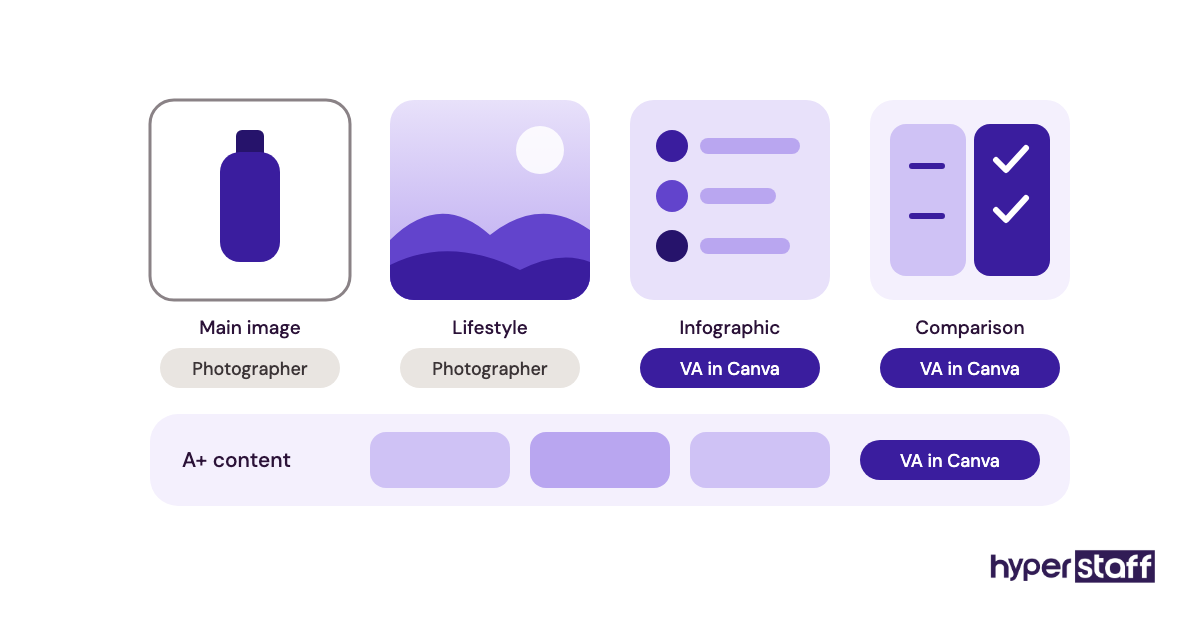
Set up a Brand Kit before your VA designs anything. Once fonts, colors and logo are locked in, the VA's drafts look consistent and your review becomes a quick check on claims and spelling.
Pros
- Fast for infographic images
- Useful free plan
- Brand Kit keeps work consistent
- Easy owner review and comments
- Large template library
Cons
- Templates look generic if used as-is
- No product photography
- Main images need a photographer
- Per-seat pricing on Business
- Export sizes need manual checking
Is Canva enough for Amazon images?
For secondary images and A+ drafts, yes, as long as the photos underneath are good.
How do you give an Amazon VA tool access safely?
Safe access means every VA gets their own login with only the permissions their tasks need. It protects the seller account, keeps an audit trail and makes it simple to remove access later.
Seller Central permissions
Amazon lets the primary user invite secondary users from the User Permissions page in Settings. Each permission can be set to none, view, edit or admin.
Shared passwords are the habit to break. One login used from two countries can trigger security checks, and you lose any record of who changed what.
Start with view access
Give view-only rights on reports and listings for the first week or two. Expand to edit as your VA proves out each task.
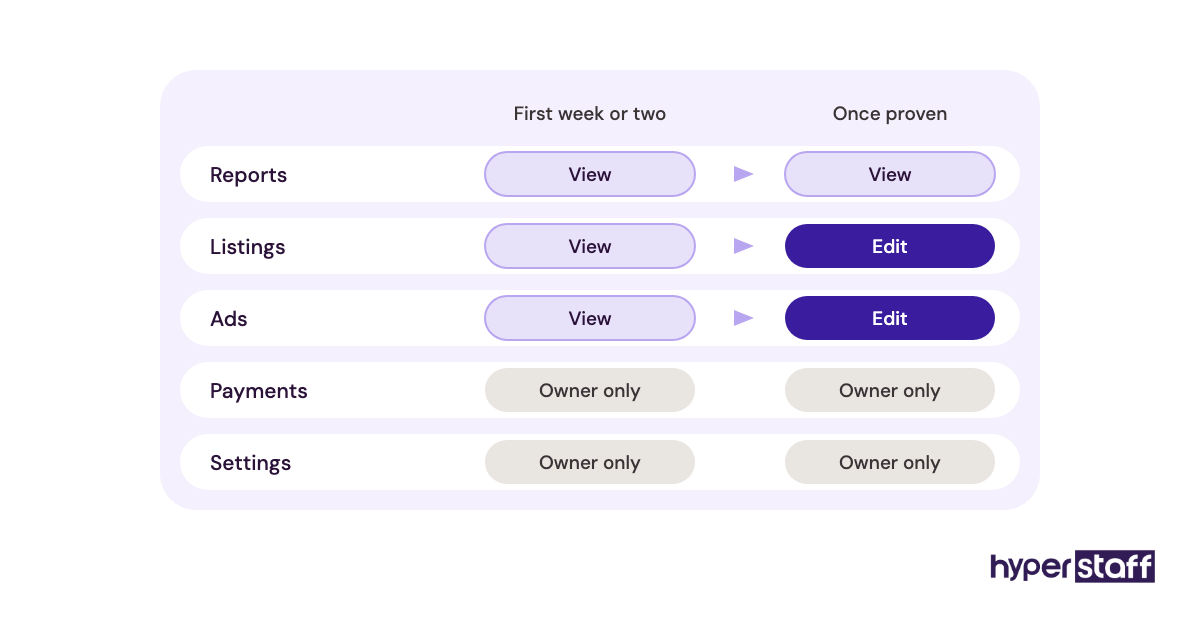
Keep payments, deposit methods and account settings with the owner. Those pages rarely appear in a VA's daily work.
Two-step verification
Each secondary user sets up two-step verification on their own phone or authenticator app. If codes go to the owner's phone, the VA gets locked out every time they sign in.
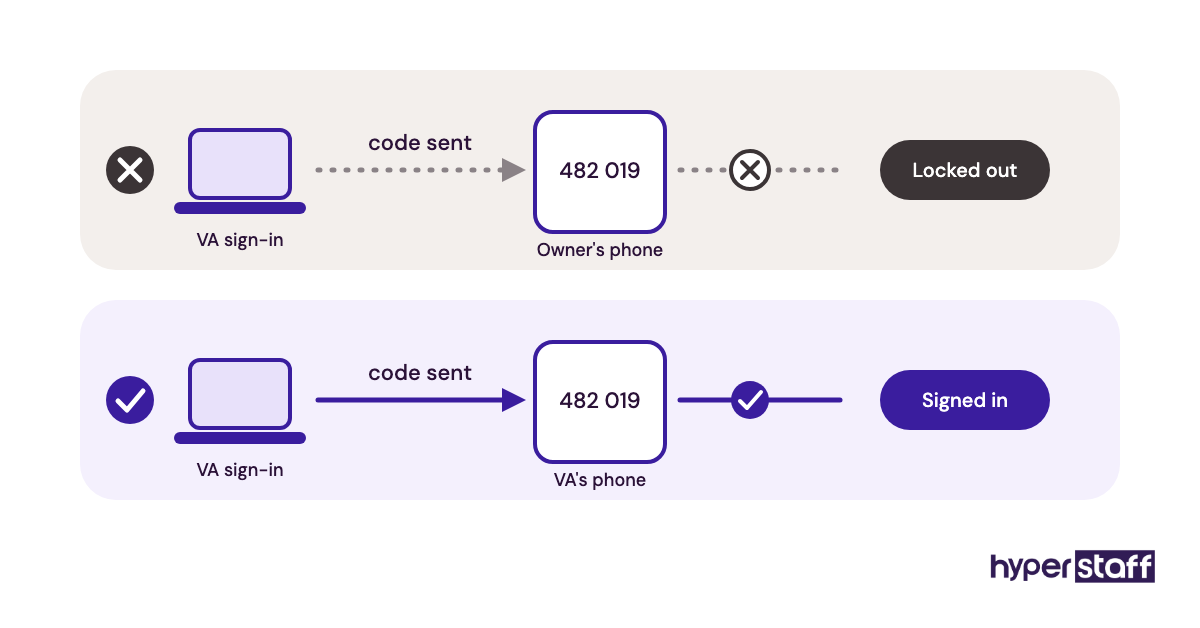
Sort this on day one of onboarding an Amazon VA. It's the most common reason a first day stalls.
Third-party tool seats
Helium 10, Jungle Scout and Sellerboard all sell or include extra user seats. The subscription should sit in the business's name so the data stays with you.
Check seat counts before choosing a plan. An extra Jungle Scout seat at $49 a month can make Brand Owner cheaper than Growth Accelerator plus a seat.
Seats vs shared logins
A seat gives your VA their own history and settings. A shared login mixes their searches with yours and can break the tool's terms.
Budget seats into the Amazon VA cost from the start. Tools are part of the real monthly number.
Offboarding checklist
Keep a list of every tool a VA can reach, with the date access was granted. Removal then takes minutes.
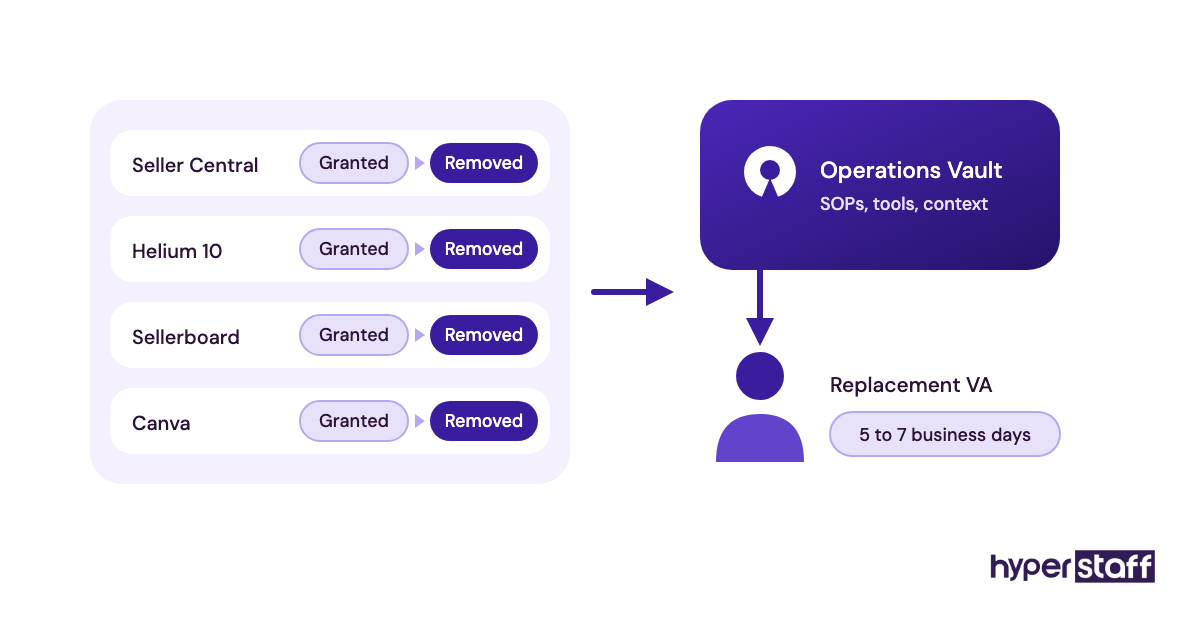
The same list helps if you weigh an Amazon VA vs in-house hire, since access rules apply to both.
Disclaimer: This article is for general information only. Tool features and prices change often, so confirm details with each vendor before buying. Naming a tool is not an endorsement, and Hyperstaff accepts no liability for decisions made based on this content.
Common questions
What tools does an Amazon VA need on day one?
Seller Central access with the right permissions, the free Keepa extension and a shared folder for files cover day one. Add a keyword suite and a profit tracker once the first tasks are running.
Do I need both Helium 10 and Jungle Scout?
No. Both cover keyword and product research, so paying for two mostly duplicates data. Pick the one your VA knows best and use Keepa as the cross-check.
Can my VA just use my Helium 10 login?
You can, but a separate seat is safer and Platinum already includes one extra user. Separate seats keep your settings and history clean and make it easy to cut access later.
Who should pay for Amazon VA tools, me or the VA?
The business should own every subscription. That way the research, reports and settings stay with you if the VA changes.
Are free Amazon seller tools good enough for a VA?
For a small catalog, Seller Central, Brand Analytics and free Keepa go a long way. Paid tools start earning their cost when you research new products or manage more than a few listings each week.
Book a free 15 min call
We place a pre-vetted specialist in 5 business days, fully managed, from $3/hour.