10 Amazon Virtual Assistant Mistakes That Quietly Cost Sellers Money
Ten Amazon virtual assistant mistakes sellers make with access, scope, PPC and Account Health, and the fix for each.

On this page
- Mistake #1: Why is sharing your Seller Central password a mistake?
- Mistake #2: One job post that tries to hire five Amazon roles
- Mistake #3: Interviewing for personality when the job is pattern spotting
- Mistake #4: What happens when Amazon VA training is never written down?
- Mistake #5: Does FBA protect you from Account Health problems?
- Mistake #6: Why does Amazon PPC spend creep up after handing it to a VA?
- Mistake #7: Listing edits with no before-and-after record
- Mistake #8: Is the cheapest Amazon VA rate a false saving?
- Mistake #9: How should you measure an Amazon virtual assistant?
- Mistake #10: Having no backup when your Amazon VA is out
- FAQs
💡 Key Takeaways:
1) Most Amazon virtual assistant mistakes happen before the first task, in how access, job scope and written processes get set up during week one.
2) Amazon measures Order Defect Rate over a 60-day window, so one careless week of buyer handling can stay on your Account Health page for two months.
3) A written playbook that you own, covering SOPs, guardrails and a short scorecard, prevents most of these errors and makes any handoff to a new assistant far less painful.
Fewer handoff errors mean more margin kept
Hyperstaff has placed 70+ virtual assistants with 30+ clients, and the Amazon setups that go well share one trait: a single specialist who learns your catalog, with SOPs written down in an Operations Vault from day one. Our dedicated Amazon virtual assistants start from $3/hour and can be placed in 5 business days.
Mistake #1: Why is sharing your Seller Central password a mistake?
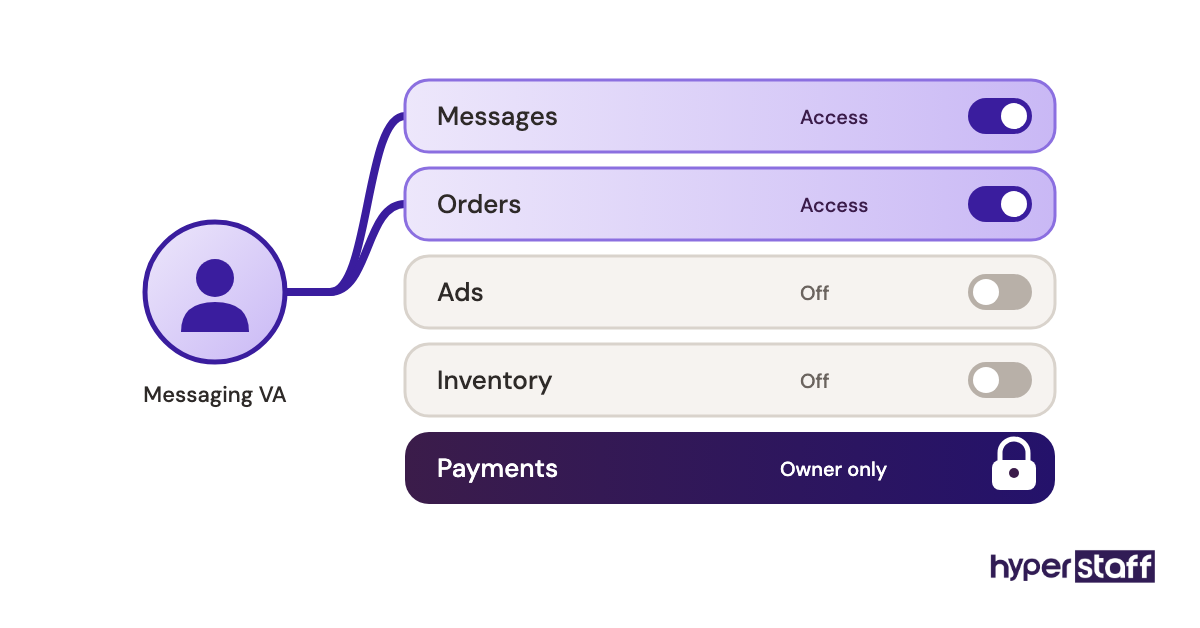
Sharing the primary Seller Central login is the most common Amazon virtual assistant mistake, and the easiest one to fix. Amazon built User Permissions so a seller can give someone access to specific parts of the account without handing over the owner's identity.
Amazon staff say it plainly in their User Permissions guide on the Seller Forums: don't share your password, and add external service providers as Authorized Partners instead of Secondary Users.
Why sellers hand over the login anyway
- Permission setup feels like a chore on a busy day
- Two-step verification codes go to the owner's phone
- The VA asks for full access to avoid permission errors
- Nobody has mapped which rights each task needs
- Some freelancers request the master login by default
What a shared password puts at risk
A shared primary login gives the assistant every power the owner has, including bank and disbursement settings. Every action also traces back to one identity, so when something odd happens there's no record of who did it.
The exit is messy too. Changing a primary password and re-pairing two-step verification while orders are flowing is the kind of job sellers put off for weeks after a VA leaves.
Grant access task by task
Invite the assistant through User Permissions, or as an Authorized Partner if they work through an outside company, then give the narrowest rights each task needs. A VA who answers buyer messages needs order and messaging access and has no reason to open payment settings.
Mistake #2: One job post that tries to hire five Amazon roles
An Amazon virtual assistant job post asking for PPC, listing copy, FBA shipments, account health and customer service tends to attract generalists who are average at all of it. Those areas use different reports, different rules and different instincts.
Ad management rewards someone comfortable with spreadsheets and attribution lag. Buyer messaging rewards tone and speed, which is a separate kind of person.
How the task list keeps growing
- Job posts get copied from other sellers
- Each task looks small as a single line
- One hire seems cheaper than two part-time ones
- Nobody ranked tasks by revenue impact
The hidden cost of a scattered role
Context switching costs more on Amazon than in most admin roles. A VA who spends Monday on inbound shipment plans and Tuesday on bid changes rarely builds the pattern memory that spots a problem early.
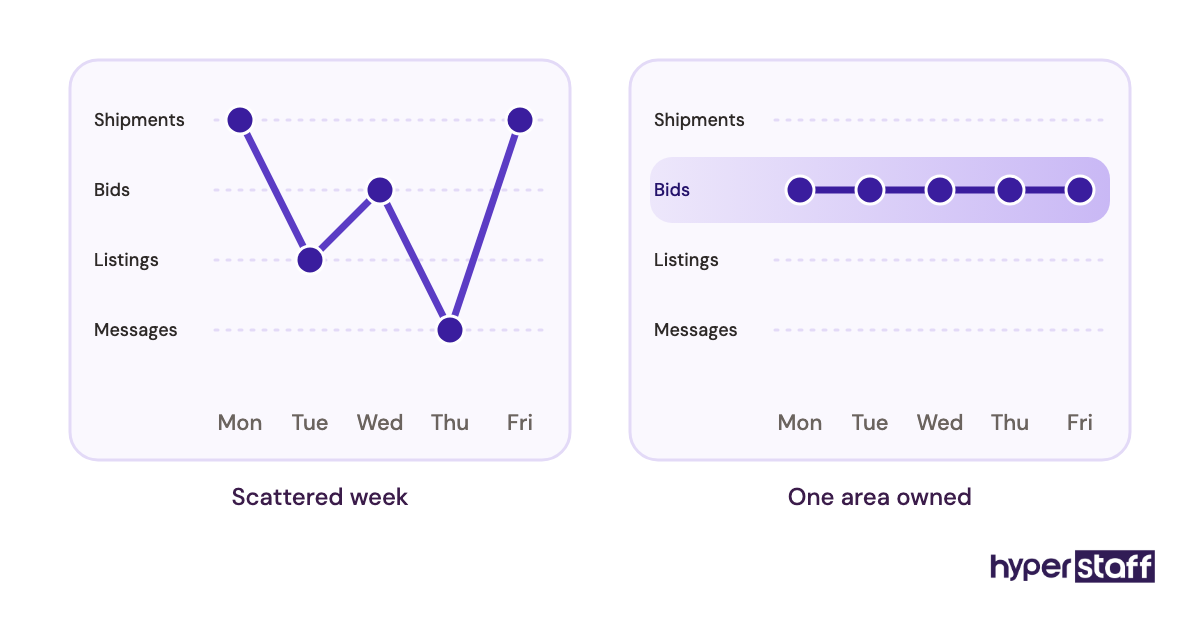
The usual result is a hire who stays busy and moves no number you care about.
Start from the outcome you need owned
Rank your work by what loses money fastest when ignored, then hire for the top one or two areas. Our Amazon VA job description template starts from that outcome and lists tasks underneath, and the full menu of common Amazon VA tasks helps you rank them.
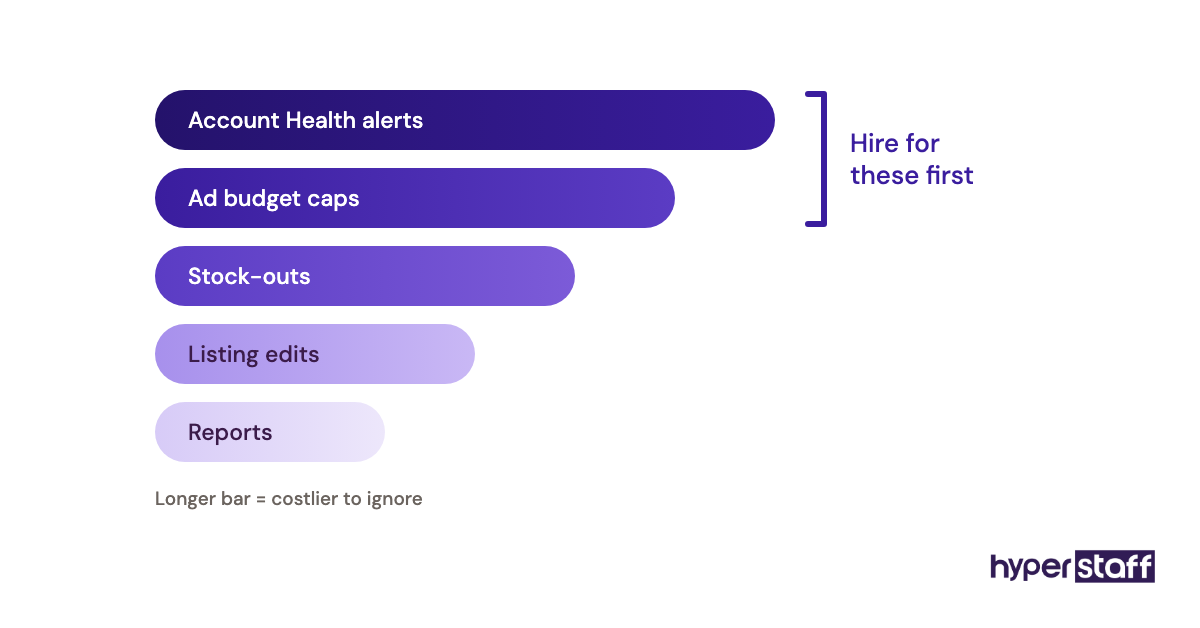
Monthly bundles of 40, 80 or 160 hours make a narrow start practical. If you're still working out what the role covers at all, our explainer on what an Amazon virtual assistant does is the better first read.
Mistake #3: Interviewing for personality when the job is pattern spotting
A friendly Amazon VA interview tells you very little about how someone reads a search term report. The work rewards people who notice what looks wrong in a spreadsheet, and that skill only shows when you give them one.
Why standard interviews miss it
- Sellers reuse questions from general admin hiring
- Candidates rehearse answers about Helium 10 and Jungle Scout
- Naming tools sounds like skill on a call
- A practical test feels like extra setup
- Reference checks rarely cover Amazon specifics
The bill for a wrong hire
A poor fit usually surfaces somewhere in weeks three to six, after the onboarding time is spent. You then repeat sourcing, interviews and access setup, while the work sat idle in between.
Use a short live exercise
Hand finalists a redacted search term report and ask which terms they'd negate and why. A suppressed listing screenshot works too, and our list of Amazon VA interview questions includes prompts built this way.
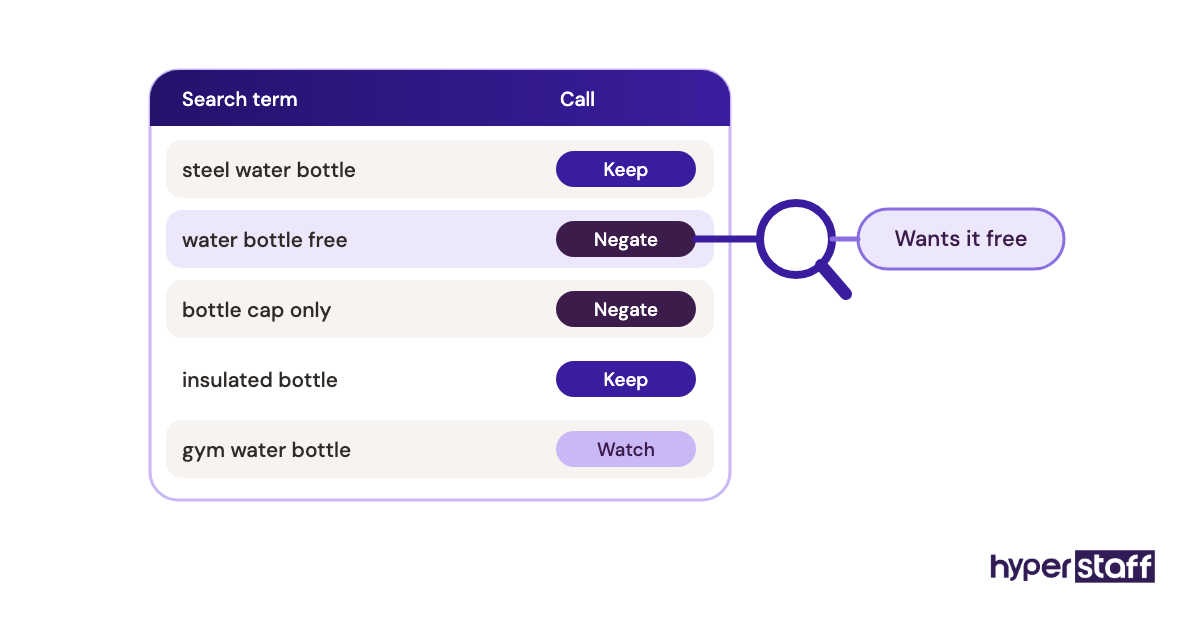
Sellers split on format. Some pay for a 2 to 4 hour trial task, and others prefer a 20-minute screen-share where they watch the candidate think.
We lean toward the screen-share, since the reasoning matters more than the polish. Our step-by-step guide on how to hire an Amazon virtual assistant shows where it fits in the process.
Mistake #4: What happens when Amazon VA training is never written down?
Training an Amazon virtual assistant only by screen-share leaves your processes stored in one person's memory. When that person is sick or leaves, the process leaves with them.
Why nothing gets documented
- Showing feels faster than writing
- The seller's own process changes every month
- SOPs sound like a big-company habit
- The VA takes notes, so it feels covered
- Nobody owns keeping documents current
- Edge cases get explained once, out loud
Where undocumented work leaks money
Undocumented decisions drift. A call like when to refund without a return gets made differently each time, and you only notice when the refund report looks strange.
Replacement hurts most. The next assistant starts from zero and asks every question again, often during your busiest weeks.
Write the playbook during week one
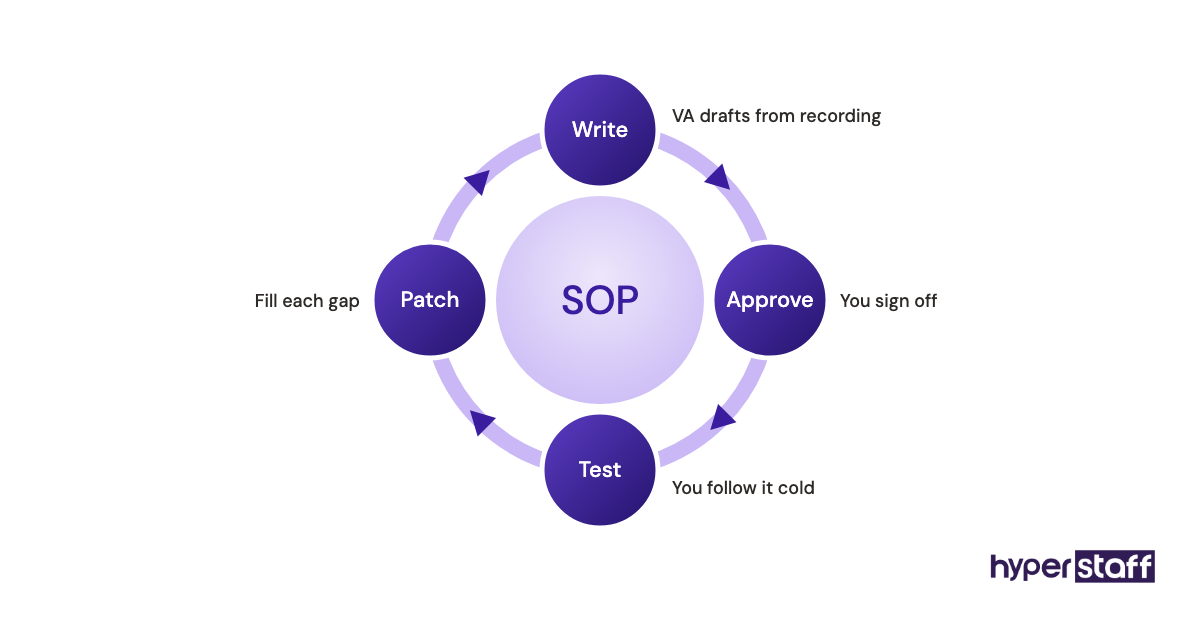
Record the first walkthrough, then have the assistant turn it into a written SOP that you approve. Our guide to onboarding an Amazon virtual assistant sets the order: access first, then one process at a time, with sign-off before the next one starts.
Every Hyperstaff client gets an Operations Vault, which holds your SOPs, tools and context, written down and maintained for you. It's the reason a replacement can be briefed and working in 5 to 7 business days.
Mistake #5: Does FBA protect you from Account Health problems?
No. FBA moves shipping metrics like Late Shipment Rate onto Amazon for those orders, but the Order Defect Rate still counts negative feedback, A-to-z Guarantee claims that aren't denied, and credit card chargebacks.
Amazon's Monitor your account health page sets the targets below and states that an ODR above 1% may result in account deactivation.
| Metric | Amazon target | Measured over | Applies to |
|---|---|---|---|
| Order Defect Rate | Under 1% | 60 days | All orders |
| Cancellation Rate | Under 2.5% | 7 days | Seller-fulfilled orders |
| Late Shipment Rate | Under 4% | 10 or 30 days | Seller-fulfilled orders |
| Valid Tracking Rate | Above 95% | 30 days | Seller-fulfilled orders |
Why nobody watches the dashboard
- FBA feels hands-off
- Numbers sit flat for weeks, then jump
- Warnings land in an inbox nobody reads daily
- The VA was never told it's their job
What a missed warning costs
ODR runs over 60 days, so a burst of A-to-z claims from one bad batch weighs on the account for two months. By the time the number crosses 1%, the window to fix it is short and an appeal needs a plan of action.
Hybrid sellers carry extra exposure. A slow week on merchant-fulfilled orders during an FBA stockout can push Late Shipment Rate past 4% while every FBA number looks clean.
Give one person the daily check
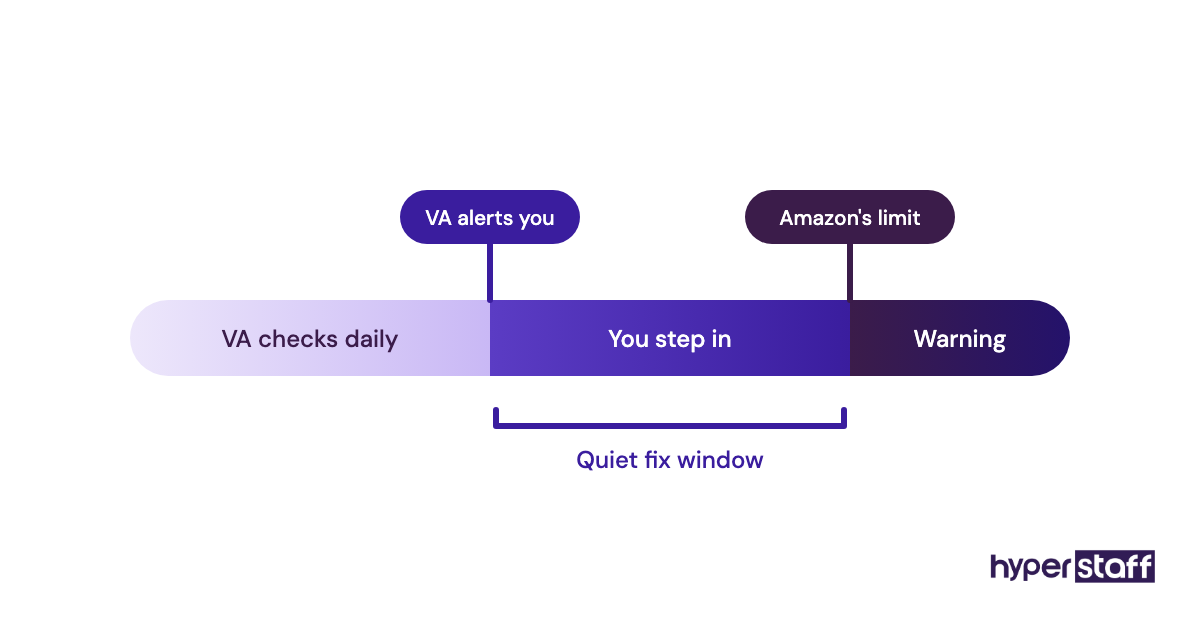
Make the VA owner of a daily Account Health check with written alert levels tighter than Amazon's. We suggest alerting at half the limit, so an ODR of 0.5% triggers a message to you well before Amazon sends a warning.
Policy notices, such as IP complaints and listing policy violations, belong on the same checklist because they appear on the same page.
Mistake #6: Why does Amazon PPC spend creep up after handing it to a VA?
PPC spend creeps up when an Amazon virtual assistant gets full ad control with no budget cap, bid ceiling or change log. The VA usually means well, and the account loses money anyway.
What drives over-managed bids
- Daily changes look like hard work
- Attribution lags, so fresh data looks worse than it is
- No ceiling on daily budgets or max bids
- Broad match runs without negative keyword passes
- Nobody reviews changes before they go live
Where the ad budget leaks
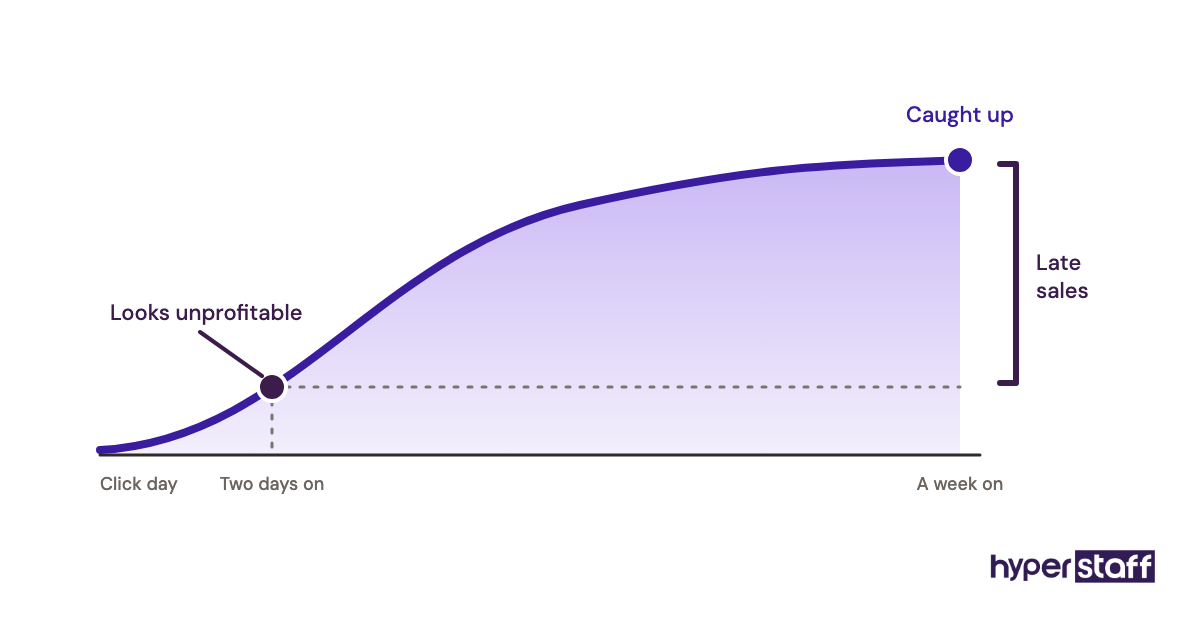
Sponsored Products sales keep attributing to clicks for several days. A keyword that looks unprofitable on Tuesday can look fine a week later, so a VA cutting bids on two-day-old data is reacting to noise.
Broad match campaigns without regular negative keyword work are the other leak. Spend drifts toward loosely related searches that rarely convert.
Write the rules before handing over Ads
Put guardrails in the SOP: a maximum daily budget per campaign, a bid ceiling per keyword, a rule that bid changes wait for at least a week of data unless something is clearly broken, and a weekly review. A simple change log lets you match results to edits.
Sellers disagree on whether a VA should touch PPC at all. Our view: an Expert-tier VA with 5+ years can own bid changes inside guardrails, and an Essential-tier VA is better kept on search term harvesting and reporting.
Mistake #7: Listing edits with no before-and-after record
Untracked listing edits are a quiet Amazon VA mistake, because a title or bullet change can drop rankings or suppress a listing days before anyone connects the cause. With no record of the old version, rolling back means guessing.
Why edits go untracked
- Edits feel small and easy to undo
- Keyword tool suggestions get pasted in wholesale
- Several people touch the same ASIN
- Changes go live with no second look
What a bad edit costs
A title that breaks the category's style rules can suppress the listing, and a suppressed ASIN sells nothing until it's fixed. Variation family edits carry more risk, since merging or splitting parents can separate reviews or hide child ASINs.
Keep a listing change log
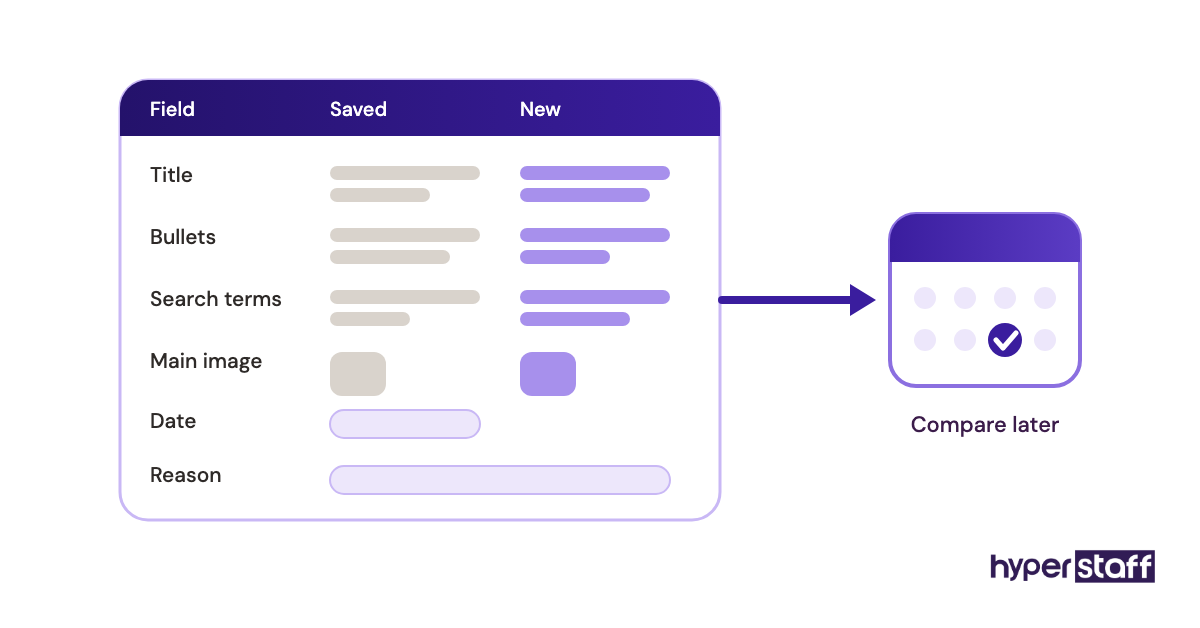
Before any edit, the VA saves the current title, bullets, backend search terms and main image to a shared sheet with the date and reason. Then check Business Reports for that ASIN 7 to 14 days later and note what moved.
Only one person should edit a given ASIN at a time. When a copywriter and a VA both edit the same listing, nobody can tell which change caused a ranking drop.
Mistake #8: Is the cheapest Amazon VA rate a false saving?
Yes, when the work needs judgment. Putting a junior assistant on PPC or account appeals saves a few dollars an hour and loses that saving the first time a mistake has to be undone.
Why price wins the decision
- Rates are the easiest thing to compare
- Job boards sort by price
- Sellers underestimate how much judgment the work needs
- The first two weeks look fine either way
The real cost of the cheaper hire
Low rates paired with slow or wrong work raise your cost per finished outcome. The gap also lands on your own calendar, because a less experienced VA needs more review.
Our breakdown of Amazon virtual assistant cost compares rates by region and experience level in more detail.
Match the experience tier to the task
Hyperstaff prices by experience: Essential (0 to 2 years) from $3/hour, Professional (2 to 5 years) from $6/hour, and Expert (5+ years) from $12/hour. Rule-based work like order follow-ups or inventory sheet updates suits Essential well.
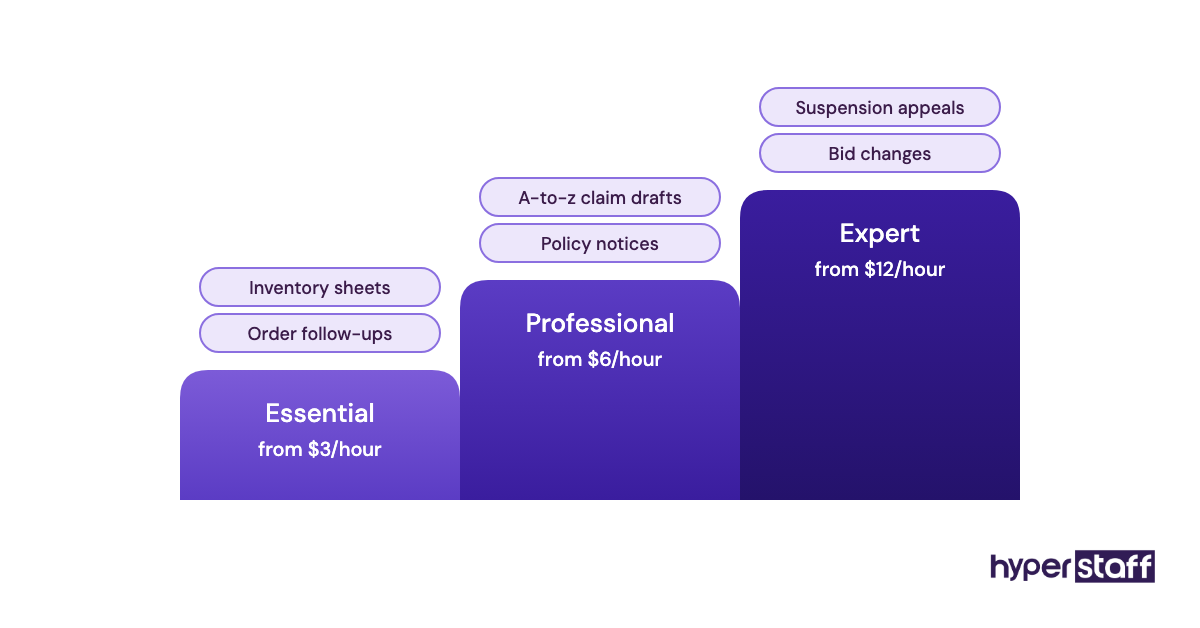
Anything where a wrong call costs ad spend or account standing belongs with Professional or Expert. Our take on whether an Amazon VA is worth it walks through how that choice changes the return.
Mistake #9: How should you measure an Amazon virtual assistant?
Measure an Amazon virtual assistant by the numbers they're meant to move, such as buyer response time, ACoS or open cases. Hours logged and screenshots prove activity, and they say nothing about whether those numbers improved.
Why activity gets tracked instead
- Hours are easy to count
- Time trackers come bundled with freelance platforms
- Outcomes take weeks to show
- Nobody recorded a baseline before day one
What busy work hides
An assistant can close 40 tickets a week while response times slip, or spend 20 hours on keyword research that never reaches a listing. Activity reports make both look like progress.
Agree on a short scorecard
Before the VA starts, write down a baseline for each area they own and review it in a 15-minute weekly call. Keep it to two to five numbers, because a longer list stops getting read.
The same scorecard makes comparisons honest. Our comparison of an Amazon VA vs in-house hire uses output measures like these.
Mistake #10: Having no backup when your Amazon VA is out
One assistant means one point of failure, and most sellers find out during a holiday week. Buyer messages, inbound shipment deadlines and stranded inventory keep piling up whether anyone is logged in or not.
Why backup gets skipped
- One VA feels like enough
- Access is tied to one person
- Processes live in that person's head
- Replacement feels like a later problem
What a gap costs you
A missed week of messages shows up in contact response time and feedback. A stalled inbound shipment can leave a bestseller out of stock, and restarting a hire from scratch often takes several weeks.
Plan the handoff before you need it
Keep credentials in a password manager the business owns, keep SOPs current, and decide in advance who covers urgent tasks. The software side, from password managers to repricers, is in our roundup of Amazon virtual assistant tools.
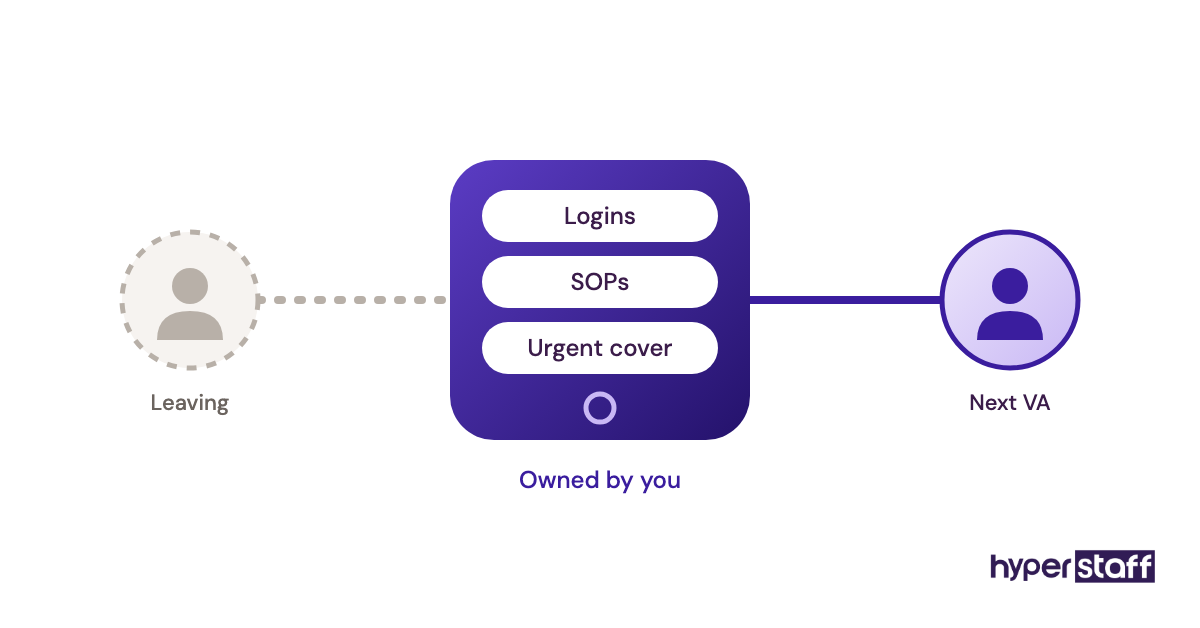
With Hyperstaff, a free replacement is briefed from your Operations Vault in 5 to 7 business days, and your dedicated account manager runs the switch.
Disclaimer: This article is general information about working with Amazon virtual assistants and is not legal, tax or Amazon policy advice. Amazon's policies and performance targets change, so confirm current requirements in Seller Central before acting. Hyperstaff is not affiliated with Amazon.
Common questions
What's the biggest mistake when hiring an Amazon VA?
Sharing your primary Seller Central login. Add the VA through User Permissions, or as an Authorized Partner if they work through an outside company, and grant only the rights each task needs.
Can my Amazon virtual assistant get my account suspended?
Yes. Anything done in your account counts as yours, so careless buyer handling, risky listing edits or ignored policy notices can push Account Health past Amazon's limits.
How do I undo a listing mistake my VA made?
Restore the saved version from your listing change log. If the ASIN is suppressed, check the suppression reason in Manage Inventory and fix that field first.
Should my Amazon VA respond to A-to-z claims?
It depends on experience. A Professional or Expert VA can draft responses inside a written SOP, but you should approve anything involving refunds above a set amount.
How soon can I tell my Amazon VA isn't a good fit?
Usually within three to six weeks. If scorecard numbers haven't moved from baseline and you're still correcting the same errors, the fit is wrong.
Book a free 15 min call
We place a pre-vetted specialist in 5 business days, fully managed, from $3/hour.