Amazon Virtual Assistant vs In-House Hire: Which Fits Your Store?
A side-by-side look at hiring an Amazon virtual assistant or an in-house employee, covering cost, control, ramp-up time and the cases where each one wins.
On this page
- What's the difference between an Amazon virtual assistant and an in-house hire?
- Key Amazon staffing terms you should know
- Why does the in-house vs virtual assistant choice matter on Amazon?
- How does each model work day to day?
- Types of Amazon seller support setups
- How does an Amazon VA compare with other options?
- What are the pros and cons of an Amazon VA over an in-house hire?
- When does an in-house Amazon hire make more sense?
- Amazon staffing examples that work and ones that don't
- How to build your Amazon staffing plan, step by step
- What does an effective hybrid Amazon team look like?
- Amazon tools and software both setups need
- 9 proven tips for working with an Amazon VA instead of an in-house hire
- How do you overcome common Amazon VA challenges?
- How do you measure whether your Amazon VA is working?
- How long does an Amazon VA take to get up to speed?
- How much does an Amazon VA cost compared with an in-house hire?
- Is an Amazon virtual assistant worth it over an in-house hire?
- How to choose an Amazon virtual assistant agency
- Amazon virtual assistants and AI
- FAQs
💡 Key Takeaways:
1) An Amazon virtual assistant is a remote specialist who runs listings, inventory, PPC reports and buyer messages inside Seller Central. An in-house hire does the same work as your employee, so salary, benefits and payroll taxes all land on you.
2) Once benefits are counted, a US in-house Amazon specialist usually costs several times more per month than a dedicated offshore virtual assistant, and the hiring process takes weeks longer.
3) In-house wins when the role involves physical product work, supplier relationships or brand strategy. A dedicated remote virtual assistant wins for repeatable Seller Central execution backed by written processes.
Put More Amazon Margin Back Into Your Store
Hyperstaff has placed 70+ virtual assistants with 30+ clients, and our dedicated Amazon virtual assistant services start from $3 an hour, with placement in 5 business days. Below, we put that model next to an in-house hire on cost, control and ramp-up time, and point out the cases where hiring locally is the better call.
What's the difference between an Amazon virtual assistant and an in-house hire?
An Amazon virtual assistant and an in-house hire differ in three ways: how they're employed, what they cost and where they work. Both can run Seller Central, but the VA works remotely at an hourly rate through a staffing partner, while the in-house employee is on your payroll with salary, benefits and taxes.
Here's how the two compare on the factors that matter most to an Amazon seller.
| Factor | Dedicated Amazon virtual assistant | In-house Amazon hire |
|---|---|---|
| Typical cost | From $3 to $12+ per hour (Hyperstaff tiers) | Salary plus roughly 30% in benefits |
| Time to start | Placement in 5 business days | Often 4 to 8 weeks to hire |
| Hours | 40, 80 or 160 a month | Usually fixed full-time |
| If it doesn't work out | Free replacement in 5 to 7 business days | New search from scratch |
| Seller Central access | Secondary user, set permissions | Secondary user, set permissions |
| Physical tasks (samples, prep, photos) | No | Yes |
| Time zone overlap | Depends on region chosen | Full |
| Management | Shared with an account manager | Entirely yours |
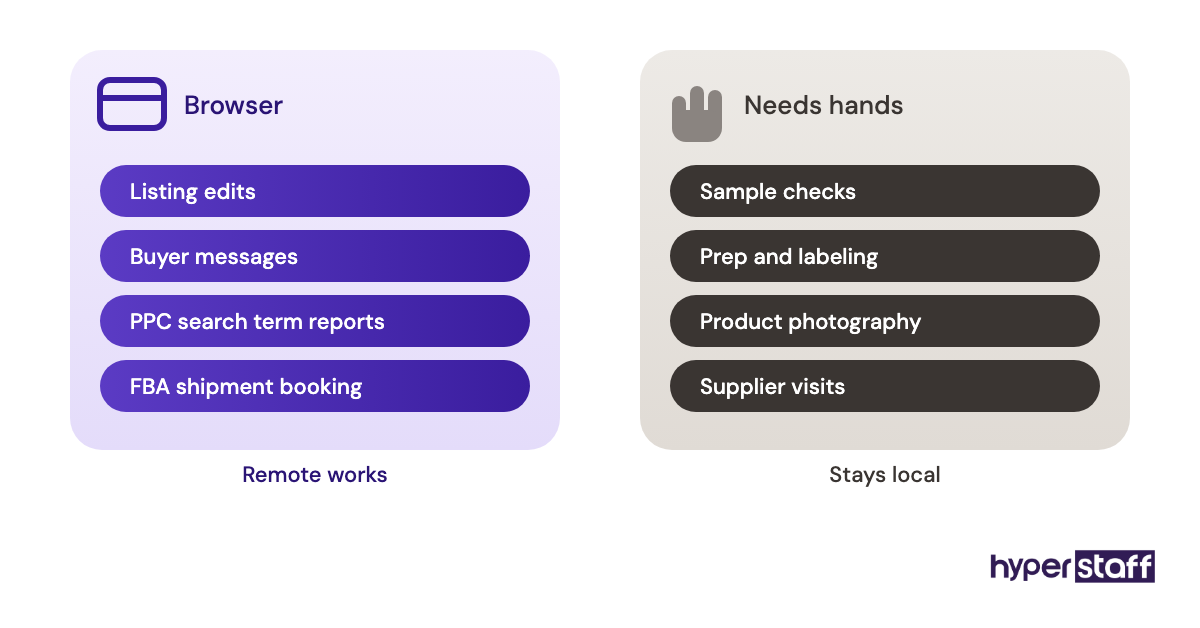
The first two rows account for most of the gap. Because Seller Central work happens in a browser, the real question is which of your tasks need someone physically near the product.
Key Amazon staffing terms you should know
- Seller Central = Amazon's back office for listings, orders, ads, payments and reports
- Secondary user = a person added to your Seller Central account with their own login and limited permissions
- User Permissions = the Seller Central page where the owner grants view or edit access per section
- FBA = Fulfillment by Amazon, where Amazon stores, picks and ships your inventory
- ASIN = Amazon's unique ID for each product listing
- ACoS = ad spend divided by ad-attributed sales, the main PPC efficiency measure
- Account Health = Amazon's dashboard of policy and performance metrics that can put a seller account at risk
- Brand Registry = Amazon's program that gives brand owners extra listing control and content tools
- Fully loaded cost = salary plus benefits, payroll taxes and overhead for an employee
- Dedicated VA = one assistant assigned to one business, as opposed to a shared pool
- SOP = a standard operating procedure, the written steps for a recurring task
- Overlap hours = the part of the workday when you and a remote hire are both online
Why does the in-house vs virtual assistant choice matter on Amazon?
The in-house vs virtual assistant choice matters because Amazon margins are thin and the workload never stops. Listings, stock levels, ad bids and buyer messages all need daily attention, so what you pay per hour for that work decides how much profit is left after fees.
Most of the marketplace runs on small operators. Amazon says more than 60% of sales in its store come from independent sellers, and most of them are small and mid-sized businesses.
Fixed costs pile up before anyone is hired. The Professional selling plan alone is $39.99 a month plus selling fees, and research software, repricers and ad spend come on top.
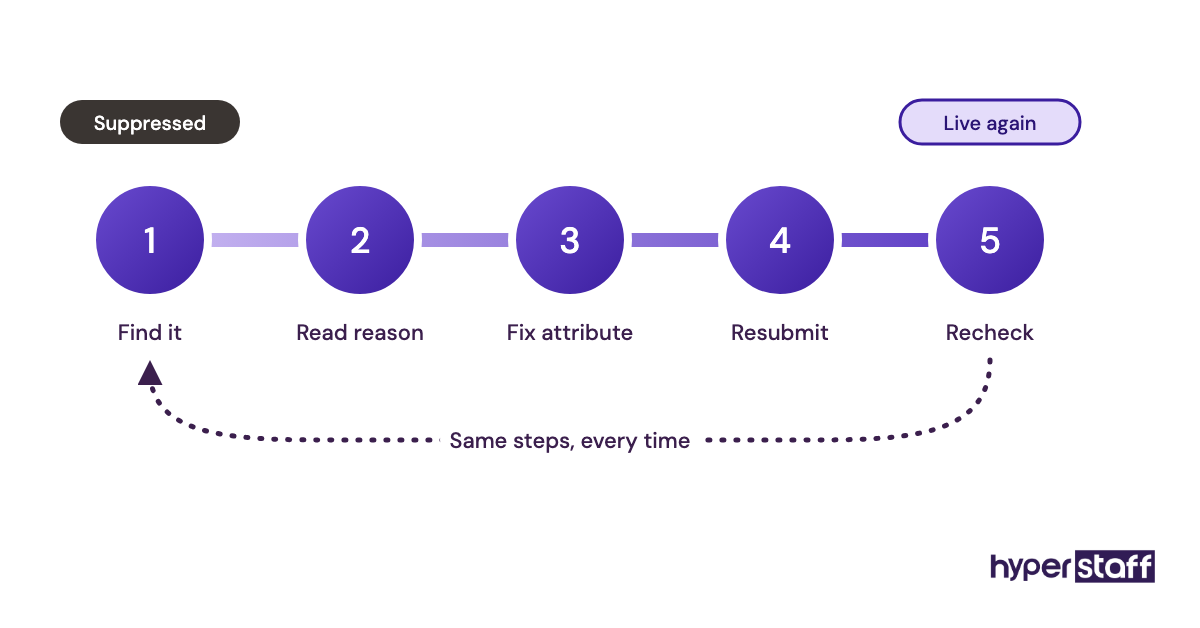
Most of the work is repetitive and rule-based. Fixing a suppressed listing, reconciling an FBA shipment or pulling a search term report follows the same steps every time, and that kind of work moves to a trained remote specialist with very little loss.
How does each model work day to day?
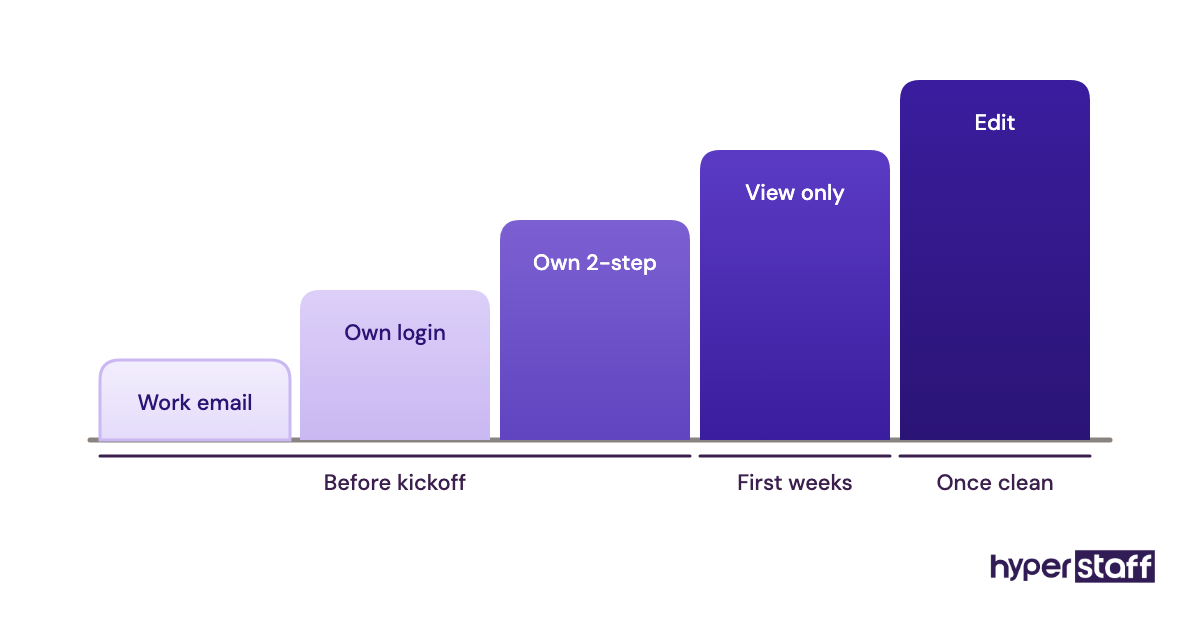
Day to day, both models run through the same Seller Central account. The owner adds the person as a secondary user under User Permissions and grants view or edit rights section by section, and the hire then works from SOPs, a task tracker and a shared inbox.
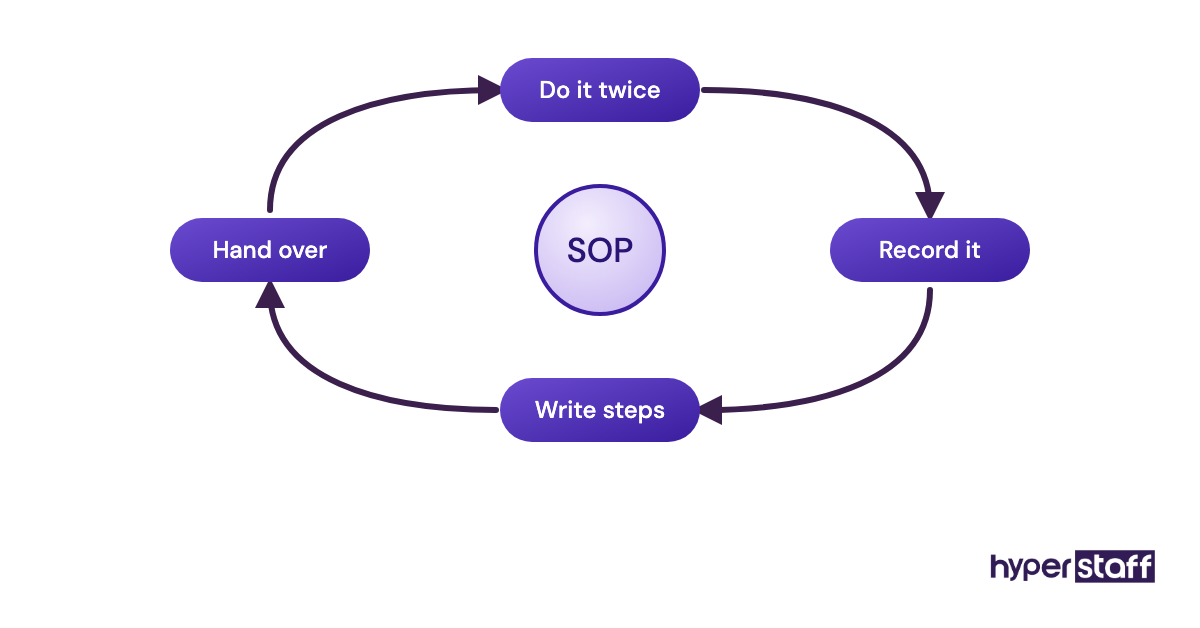
An in-house hire picks up context informally, from supplier calls, sample deliveries and conversations nobody writes down. A remote VA only knows what has been written down, so documentation ends up mattering more than the hire.
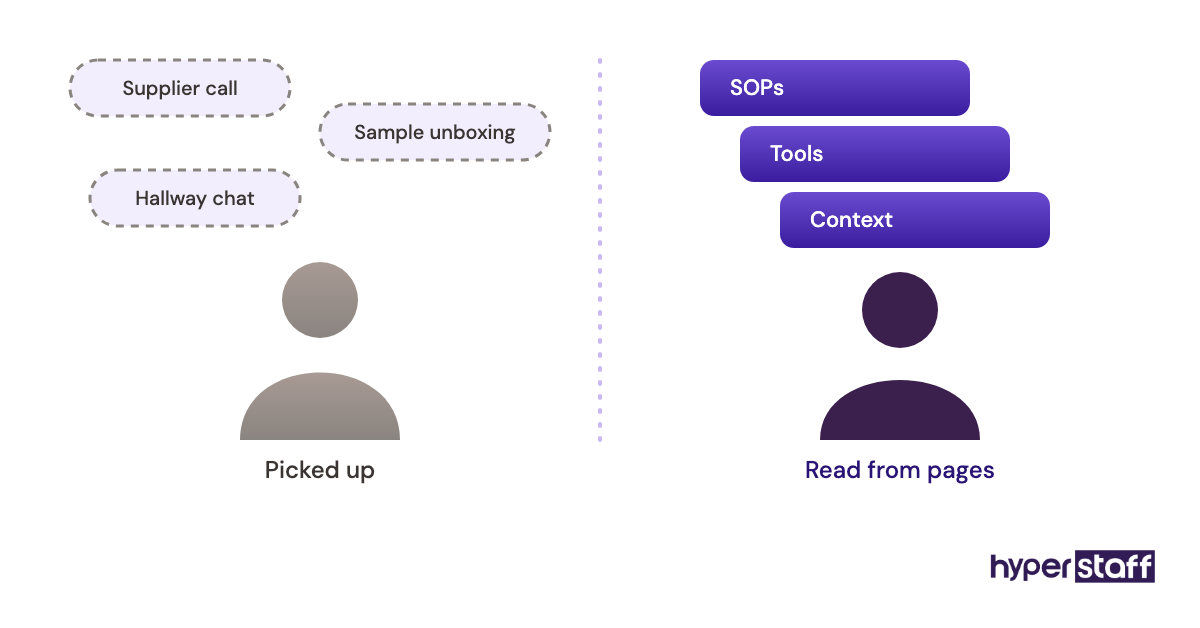
At Hyperstaff, that context lives in the Operations Vault: your SOPs, tools and context, written down and maintained for you. After a 30-minute kickoff call, work starts that day or the next morning, and a dedicated account manager stays on the engagement.
For the full spread of work you can hand over, from catalog edits to review monitoring, see our list of Amazon virtual assistant tasks.
One problem shows up in almost every remote setup during week one: two-step verification. If the codes only go to the owner's phone, the VA is stuck every time a session expires, so set up the user's own login and verification method before the first shift.
Types of Amazon seller support setups
Amazon sellers usually choose between six staffing setups, and each one trades cost against control in a different way. The table compares them on what drives day-to-day results.
| Setup | Typical cost | Your control | Best for | Main risk |
|---|---|---|---|---|
| In-house full-time employee | Salary plus about 30% benefits | Full | Brands with physical product work and steady volume | Fixed cost when sales dip |
| In-house part-time | Hourly wage plus payroll costs | High | Local prep, samples and photography | Hard to hire for few hours |
| Marketplace freelancer | Wide hourly range | Medium | One-off projects like listing rewrites | Availability and turnover |
| Dedicated VA via staffing agency | From $3/hour at Hyperstaff | High, with shared management | Daily Seller Central execution | Weak documentation slows ramp-up |
| Full-service Amazon agency | Monthly retainer, often plus a share of ad spend or sales | Low | Brands handing off strategy too | Less visibility into daily work |
| Owner does it alone | Your time | Full | Very early stores | The owner becomes the bottleneck |
How does an Amazon VA compare with other options?
An Amazon VA sits between the cheapest option, doing it yourself, and the most hands-off one, a full-service agency. Next to a freelancer, the main difference is consistency: one person who learns your catalog, as opposed to whoever happens to be free this week.
Amazon virtual assistant vs freelancer
A freelancer suits a single, well-defined job such as rewriting 40 listings or building an A+ Content module. Ongoing work goes worse, because freelancers juggle several clients and your catalog knowledge leaves with them.
A dedicated VA works a set number of hours for you each month, so knowledge of your SKUs, suppliers and ad structure keeps building instead of resetting every project.
Amazon virtual assistant vs full-service Amazon agency
A full-service agency owns the strategy and the execution, often charging a retainer plus a percentage of ad spend or sales. You hand over decisions along with the work.
A VA carries out the plan you set. Sellers who already know what they want done, and mostly need hands, usually get more out of a VA than out of an agency retainer.
Amazon virtual assistant vs doing it yourself
Doing it yourself costs nothing in cash and a lot in hours. The tipping point usually comes when daily upkeep crowds out sourcing, product development and supplier talks, the work that only the owner can do.
Start with the hours. A store that eats 10 owner hours a week on repeatable tasks fits a 40-hour monthly bundle almost exactly.
What are the pros and cons of an Amazon VA over an in-house hire?
The main advantage of an Amazon VA over an in-house hire is cost: a fraction of the monthly spend for the same Seller Central work. The main drawbacks are less time zone overlap and no ability to touch physical product.
The benefits of an Amazon virtual assistant
- Monthly cost starts at a few hundred dollars instead of a full salary plus benefits
- Placement in days, without a recruiting cycle lasting weeks
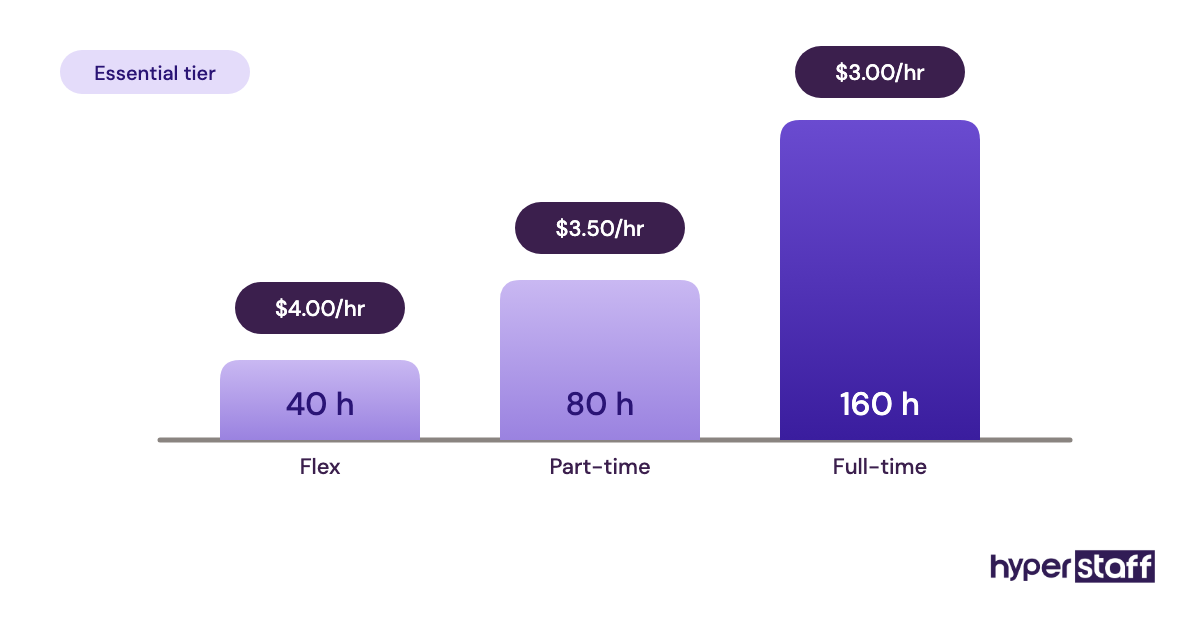
- Hours flex with volume through 40, 80 or 160-hour bundles
- A replacement arrives in 5 to 7 business days, already briefed from your documentation
- Offshore time zones can cover buyer messages and reports while you're offline
The drawbacks of an Amazon virtual assistant
- No physical work: samples, prep, labeling and product photography need someone local
- Less live overlap, depending on the region you choose
- Results depend heavily on how well your processes are written down
- Access setup takes care, especially permissions and two-step verification
When does an in-house Amazon hire make more sense?
An in-house Amazon hire makes more sense when the role needs physical access to product, live supplier negotiation or ownership of brand decisions. Those tasks depend on presence and authority, and remote execution can't fully replace either.
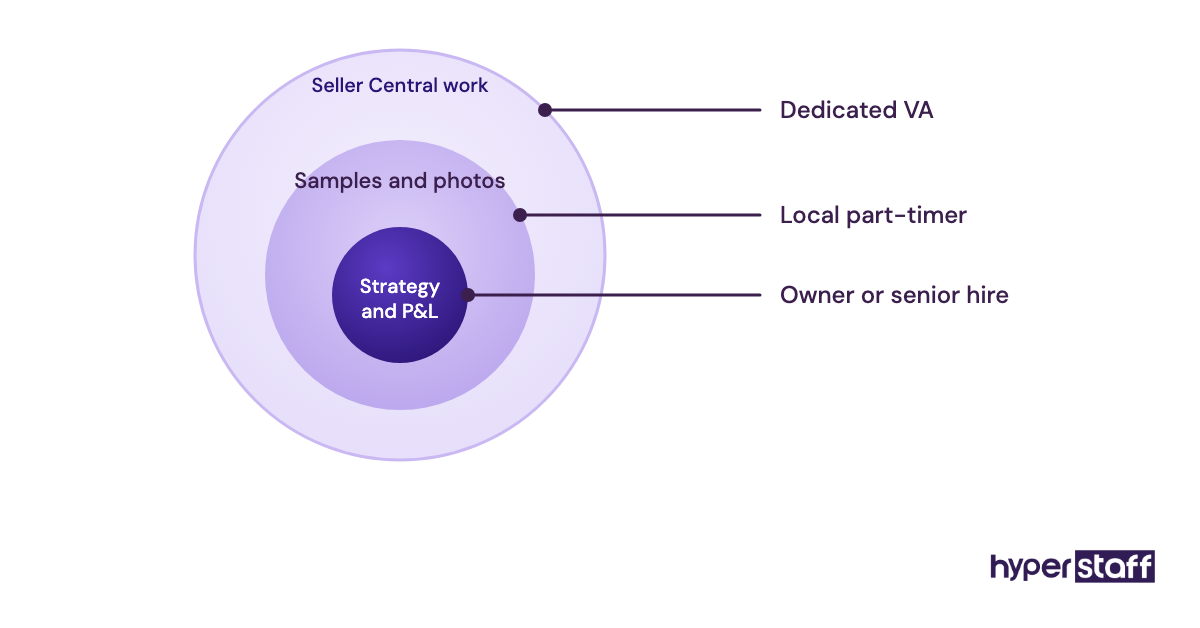
Established brands often keep one senior in-house person who owns strategy and the P&L, then build execution capacity around them. Small sellers usually can't justify that salary yet, so the owner keeps strategy and a VA takes on the execution.
PPC is where practitioners disagree most. One camp keeps ad bidding in-house because it touches margin directly. The other argues that a trained remote specialist running bid rules and search term harvests every day beats an in-house generalist who checks campaigns once a week.
Both camps make a fair point. Our view: send the daily mechanics to the VA, and keep budget limits and new-product launch strategy with whoever owns the numbers.
Amazon staffing examples that work and ones that don't
Amazon staffing setups succeed or fail on the same few decisions: how the work is split, how access is granted and how much is written down. Below are setups that tend to work and ones that tend to break.
Good examples of Amazon staffing setups
A wholesale seller hiring remote help for listing volume
Wholesale catalogs grow by hundreds of ASINs, and each needs an eligibility check, matching and pricing. A full-time remote VA working from a checklist gets through that volume at a cost that an in-house salary can't match.
A private-label brand splitting local and remote work
The founder keeps supplier calls and product development, and a part-time local hire handles samples and photos. A dedicated VA runs inventory forecasts, listing updates and case logs, so each person does only the work their location suits.
A growing brand moving PPC reporting to a dedicated VA
Weekly search term reports, negative keyword cleanup and bid changes based on set rules all go to the VA. The owner reviews a summary and decides on budgets.
Bad examples of Amazon staffing setups
Sharing the primary Seller Central login
Handing over the owner's credentials removes every audit trail and every permission limit. Amazon's own setup sends extra people through User Permissions, and that's the route to use.
A full-time in-house hire for 15 hours of real work
Some stores hire locally for a role that only fills part of a week. The salary is fixed, the idle hours get paid anyway, and the hire often leaves out of boredom.
A remote hire with no written process
A capable VA with no SOPs ends up guessing, and guessing in Seller Central creates listing errors that take weeks to undo. Our guide to common Amazon VA hiring mistakes covers this failure and its relatives.
How to build your Amazon staffing plan, step by step
An Amazon staffing plan comes down to five decisions made in order: list the work, count the hours, choose the model, set up access and review the results. Skipping the hour count is where most plans go wrong.
Step #1: List every Amazon task and tag it remote or physical
Write down everything that happens in a typical month, from replying to buyer messages to booking FBA shipments. Tag each task "browser" or "needs hands", and a well-written Amazon VA job description will practically write itself from the browser column.
Step #2: Count the real hours
Estimate the weekly hours for each task, then multiply by about 4.3. Totals near 40, 80 or 160 hours a month map straight onto Hyperstaff's bundles, and that number usually settles the in-house question by itself.
Step #3: Pick the model and start hiring
Fewer than 40 browser hours a month suits a freelancer or the owner. More than that, with steady volume, points to a dedicated VA, and our walkthrough on hiring an Amazon VA covers sourcing and trial tasks.
Screen for real Seller Central experience, not general admin. These Amazon VA interview questions test whether a candidate has actually fixed a stranded inventory report.
Step #4: Set up access and onboard
Create the work email, add the secondary user, grant view-only access and sort out two-step verification. A structured plan for onboarding an Amazon VA keeps week one from turning into a series of locked-out logins.
Step #5: Review at 30 and 90 days
At 30 days, check accuracy and response times, then widen permissions where the work has been clean. At 90 days, revisit the hours and decide whether the bundle should move up or down.
What does an effective hybrid Amazon team look like?
An effective hybrid Amazon team keeps decisions and physical work close to the owner and sends daily Seller Central work to a dedicated remote specialist. The split follows the task list from step one.
Sequencing matters more than the org chart. Start the VA on low-risk tasks such as buyer messages, reports and listing audits, then move to inventory and pricing once the first few weeks are clean.
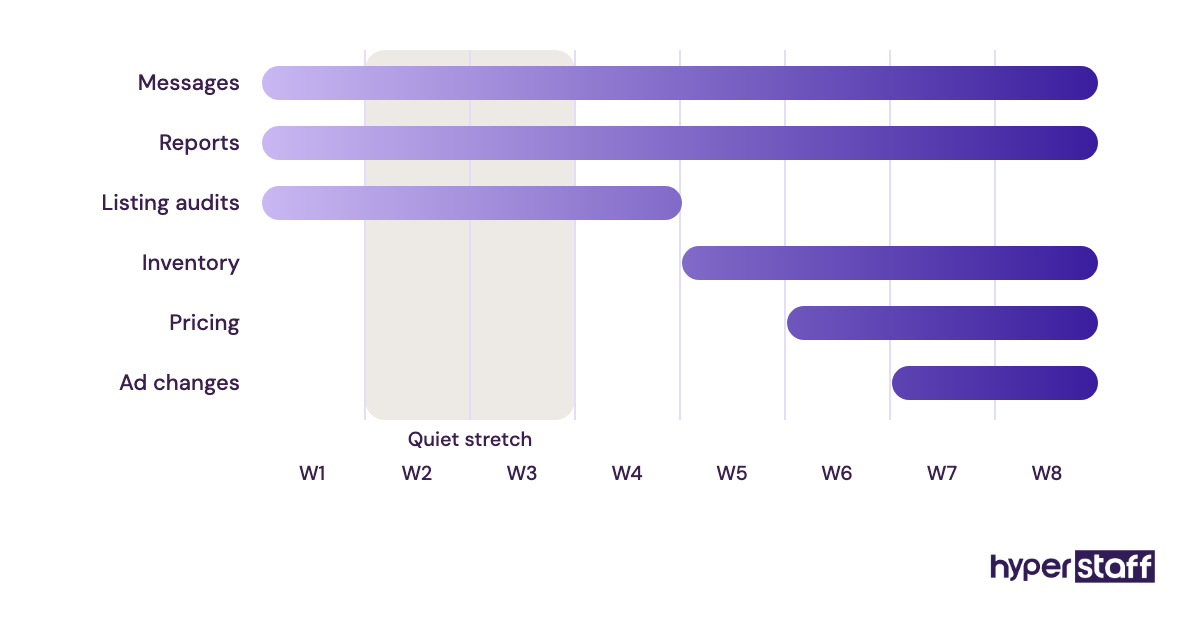
Ad changes come last. Expect a slow stretch around weeks two and three, when the VA knows the tasks but not yet the quirks of your catalog.
Amazon tools and software both setups need
An Amazon VA and an in-house hire use the same core software: Seller Central, one research suite, a password manager, a task tracker and a screen recorder. Where they differ is in setting up access, which takes more care for a remote hire.
- Seller Central User Permissions: free, and the only safe way to give anyone access
- Helium 10: Platinum is $129 a month billed monthly or $99 a month billed yearly, and Diamond is $359 or $279
- Jungle Scout: plans run from about $49 to $399 a month, with extra seats on the higher tiers
- A password manager with shared vaults: lets you grant and revoke tool logins without sending passwords in chat
- Loom or a similar screen recorder: the fastest way to turn a task you do into an SOP
Our earned opinion: pay for Helium 10 or Jungle Scout, not both. They overlap on keyword research, product tracking and listing analysis, and a VA working in one tool every day gets more done than one switching between two. Our roundup of tools for Amazon VAs goes further.
9 proven tips for working with an Amazon VA instead of an in-house hire
These habits separate remote Amazon setups that last from ones that get replaced within a quarter.
- Write a rough SOP before the hire starts, even if it's only a bulleted list.
- Give the VA a dedicated work email and their own two-step verification method.
- Start with view-only permissions and widen them after two clean weeks.
- Keep every task in one tracker, never split across chat, email and sticky notes.
- Record a short screen video any time you do a task more than twice.
- Agree on two to four hours of live overlap each day, and leave the rest asynchronous.
- Ask for an end-of-shift report: what got done, what's blocked, and two or three key numbers.
- Keep price changes and refunds above a set dollar amount behind owner approval.
- Review hours every quarter, moving between 40, 80 and 160-hour bundles as volume shifts.
How do you overcome common Amazon VA challenges?
The common Amazon VA challenges are access, time zones and missing context, and each has a known fix. Sort out access first: own login, own verification, least-privilege permissions.
Time zones are a choice. Latin America and the United States overlap most with US sellers, while the Philippines and India suit overnight coverage of messages and reports.
Missing context is the hardest problem and the one people talk about least. Written SOPs fix it, and so does a replacement process that briefs the next person from those documents, which is why Hyperstaff replacements arrive within 5 to 7 business days already briefed from your Operations Vault.
How do you measure whether your Amazon VA is working?
Measure an Amazon VA on the same outcomes you'd expect from an in-house hire: Account Health, response times, listing accuracy and hours returned to you. Pick four or five numbers and track them weekly.
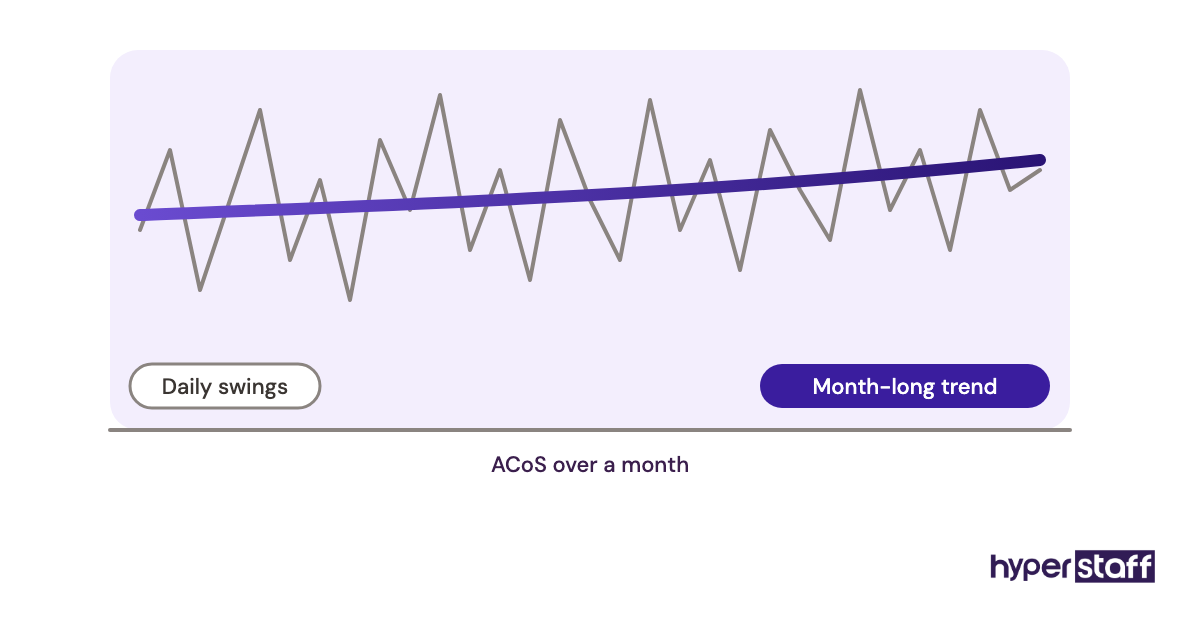
Useful measures include buyer messages answered inside Amazon's response window, open cases closed, suppressed listings fixed, and stockouts avoided. For PPC work, watch ACoS trends over a month, not daily swings.
The softest measure matters most: how many hours a week you got back. If that number isn't going up by week six, the task split or the documentation needs work.
How long does an Amazon VA take to get up to speed?
An Amazon VA placed through Hyperstaff starts within 5 business days, and work begins that day or the next morning after a 30-minute kickoff. Full speed on your specific catalog usually takes two to four weeks.
An in-house hire typically needs four to eight weeks to recruit, then a similar learning curve on your catalog. In total, the remote route often reaches a productive state a month or more sooner.
Expect the dip between weeks two and three. Accuracy holds, but speed lags while the VA learns the exceptions.
How much does an Amazon VA cost compared with an in-house hire?
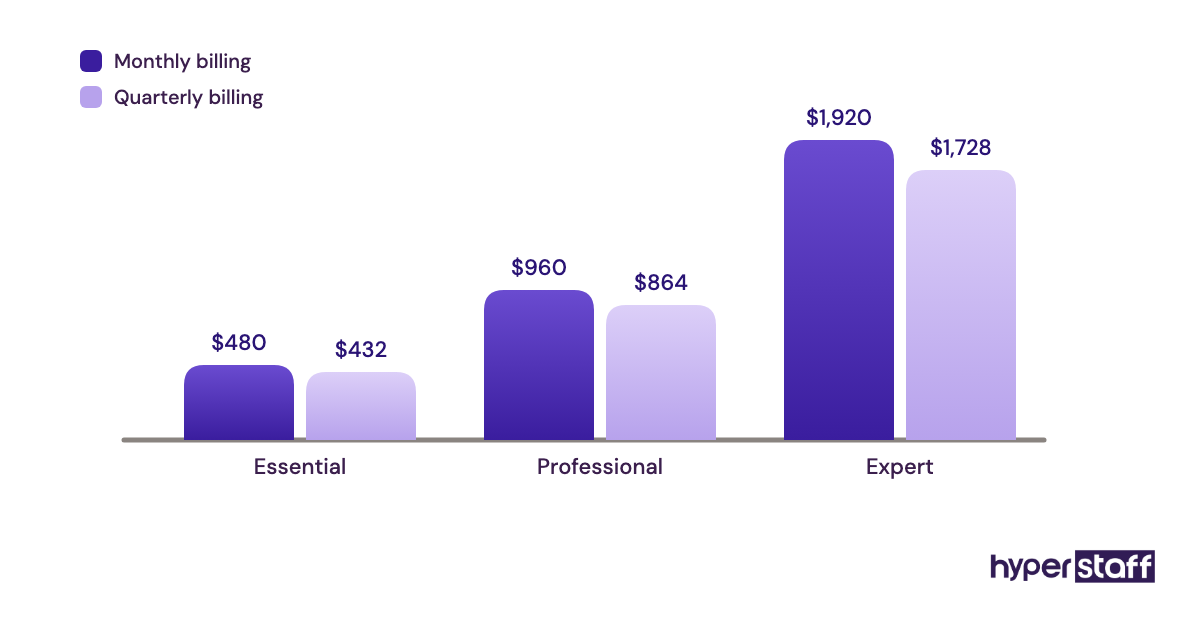
An Amazon VA through Hyperstaff costs from $480 to $1,920 a month at 160 hours, depending on experience tier. A US in-house Amazon specialist usually costs several thousand dollars a month once benefits are added.
On benefits, BLS data shows wages make up about 70% of private-industry compensation costs, with benefits making up the other 30%. The table uses that ratio to load the in-house salaries.
| Option | Experience | Hourly rate | Monthly at 160 hours |
|---|---|---|---|
| Hyperstaff Essential | 0 to 2 years | From $3 | From $480 |
| Hyperstaff Professional | 2 to 5 years | From $6 | From $960 |
| Hyperstaff Expert | 5+ years | From $12 | From $1,920 |
| US in-house specialist, $45,000 salary | Varies | About $31 loaded | About $5,360 loaded |
| US in-house specialist, $70,000 salary | Varies | About $48 loaded | About $8,330 loaded |
Hyperstaff also offers 40 and 80-hour bundles, and paying quarterly saves 10%. Our breakdown of Amazon VA cost covers freelancer and agency rates too.
Important: Hyperstaff prices shown are starting averages. Your actual cost depends on the hours, experience tier and specific Amazon work your store needs, which we confirm on the discovery call.
Is an Amazon virtual assistant worth it over an in-house hire?
For most small and mid-sized Amazon sellers, a dedicated virtual assistant is one of the best-returning hires available, as long as the work is written down and the physical tasks stay local. The savings are large enough to fund inventory or ad spend, and a well-run VA keeps getting better as your documentation grows.
Here's an example. An in-house Amazon specialist on a $52,000 salary costs about $74,300 a year once benefits are loaded at the BLS ratio.
A Professional-tier Hyperstaff VA at 160 hours a month, from $6 an hour, costs $960 a month or $11,520 a year. Quarterly billing takes 10% off, which brings the year to about $10,370.
The gap is roughly $62,800 a year at monthly billing. That figure leaves out recruiting and equipment on the in-house side, and it also leaves out the extra management time a remote hire needs in month one.
The math gets weaker when most of the role is physical, or when you need someone senior to own the strategy. For a fuller look at whether an Amazon VA pays off, including the cases where it doesn't, see our separate guide.
How to choose an Amazon virtual assistant agency
Choose an Amazon virtual assistant agency on four things: whether the assistant is dedicated to you, how replacements work, who maintains your documentation, and whether candidates are vetted for real Seller Central experience. Price comes after those.
Ask whether you get one person or a rotating pool. A shared pool resets your catalog knowledge every time someone new picks up the ticket.
Ask for replacement terms in writing, including how fast and how the new person gets briefed. Then check the regions on offer against the overlap you need, and confirm hours can move between bundles without a new contract.
Amazon virtual assistants and AI
AI is changing what an Amazon virtual assistant spends time on more than it's changing whether you need one. Amazon's own generative tools can draft titles and bullet points from a few keywords, and research suites now summarize reviews and keyword data.
Someone still has to check that output against category style guides, restricted claims and the actual product. In our experience that review work suits a dedicated VA who knows the catalog well, and pure drafting is getting cheaper every year.
Where we're less certain is PPC automation. Rule-based bidding tools are good, but they still need someone to set the rules and catch the moment a campaign goes off track.
Disclaimer: This article is for general information only and isn't legal, tax, employment or financial advice. Prices, Amazon policies and third-party tool plans change, so verify current terms with the relevant provider and consult a qualified professional before making hiring decisions.
Common questions
Is it safe to give an Amazon virtual assistant Seller Central access?
Yes, when you add them as a secondary user through User Permissions and grant only the sections they need. Never share the primary owner login, and keep payment and bank settings restricted to yourself.
Can I switch from an in-house Amazon hire to a VA without disrupting sales?
You can, if both overlap for a week or two. Have the outgoing employee record their main tasks on video and document their exceptions, then hand the VA low-risk work first.
Will an Amazon virtual assistant work during my business hours?
It depends on the region you hire from. Latin America and the United States give the most overlap with US sellers, while the Philippines and India suit overnight coverage, and most setups agree on a few shared hours each day.
Is an Amazon VA from an agency my employee?
No. With an agency placement, you pay the agency's invoice and the VA isn't on your payroll, though your accountant should confirm how that applies to your business.
What happens to my processes if my Amazon virtual assistant leaves?
With Hyperstaff, your SOPs and context stay in your Operations Vault, and a free replacement arrives in 5 to 7 business days, briefed from it. With an in-house hire, the knowledge leaves unless you've written it down yourself.
Book a free 15 min call
We place a pre-vetted specialist in 5 business days, fully managed, from $3/hour.