Data Entry Virtual Assistant Tasks: A 9-Point Handoff Checklist
Nine checks to run before and after you hand data entry tasks to a virtual assistant, so the records stay accurate after week one.
On this page
- Checkbox 1: Does every field have a written rule before the first record?
- What to check in your field rules
- Why field rules decide accuracy
- Done when the rule sheet answers the odd cases
- Checkbox 2: Have you mapped where each record comes from and lands?
- What belongs on the source map
- Why the map changes what you delegate
- Done when every task has one source and one destination
- Checkbox 3: Is the assistant's access scoped to each task?
- What to check on every login
- Why scoped access protects both sides
- Done when removing access takes five minutes
- Checkbox 4: Does the assistant search before creating a new record?
- What a search-first step covers
- Why duplicates cost more than they look
- Done when new duplicates stop appearing
- Checkbox 5: Is there a "flag it, don't guess" lane for unclear records?
- What the exception lane needs
- Why guessing is the expensive option
- Done when flags shrink week over week
- Checkbox 6: Are batches small enough to sample-check?
- What to check in your batch setup
- Why sampling beats checking everything
- Done when the sample tells you what to fix
- Checkbox 7: Will you hear about it when a source changes format?
- What a source-change habit looks like
- Why drift slips past normal checks
- Done when a format change gets flagged the same day
- Checkbox 8: Do two lists that should match get compared on a schedule?
- What to put on the reconciliation schedule
- Why scheduled comparison pays for itself
- Done when the gaps list arrives before you ask
- Checkbox 9: Does each day end with a record count and a handoff note?
- What the daily note should include
- Why counts catch what samples miss
- Done when the numbers add up every day
- How should you order these checks when you start?
- FAQs
Clean Records Get Invoices Paid Faster
Hyperstaff has placed 70+ virtual assistants with 30+ clients, and our dedicated data entry virtual assistants start from $3/hour, placed in 5 business days. Every client gets a dedicated account manager, and your field rules and SOPs live in an Operations Vault we keep up to date, so a replacement (free, in 5 to 7 business days) starts from your notes on day one.
Checkbox 1: Does every field have a written rule before the first record?
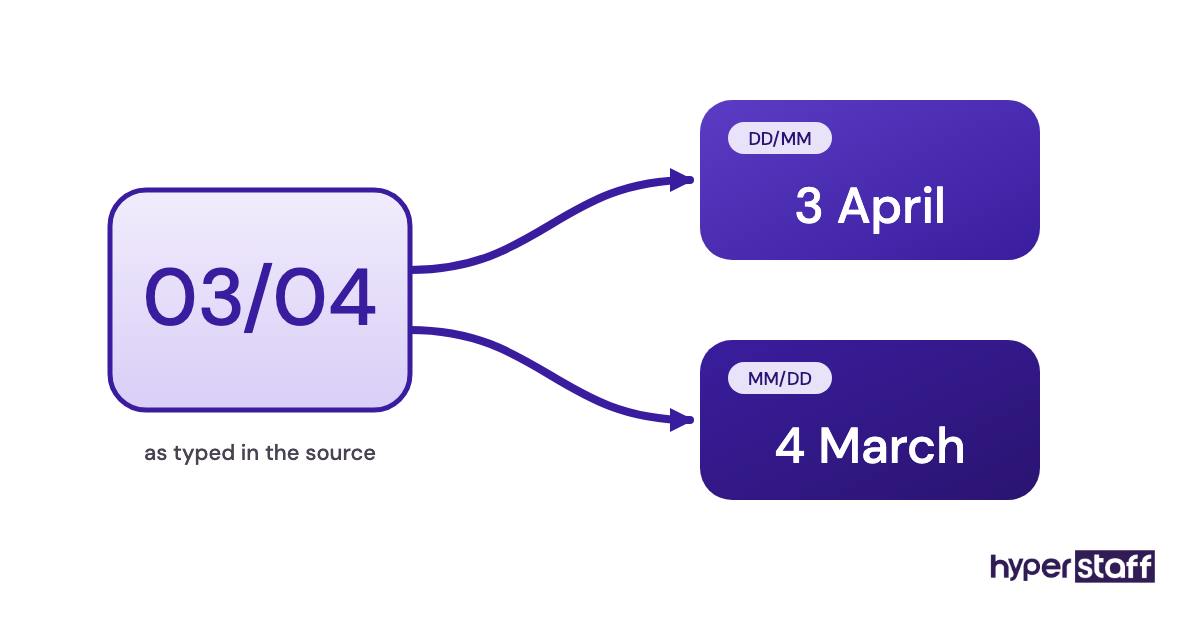
A field rule is one line that says exactly how a single column or form field gets filled: the date format, how names are split, what to type when a value is missing. Data entry virtual assistant tasks go wrong here more than anywhere else, because "enter the customer name" sounds clear until the source says "Smith, J. / Smith Logistics Ltd".
Owners usually skip this step because the rules live in their heads. Nobody wrote down that phone numbers carry a country code, since nobody needed to.
What to check in your field rules
Open the destination sheet or system and go column by column. For each one, confirm you can point to a written answer for these:
- Date format (DD/MM/YYYY or MM/DD/YYYY, never both)
- Name order and how company names are written
- Phone and currency formats, including country codes and decimals
- What goes in a field when the source is blank
- Which fields are mandatory and which can wait
Why field rules decide accuracy
Without a rule, an assistant has to guess, and guesses drift from record to record. Two hundred rows later you have three spellings of the same supplier and a filter that misses half of them.
A list of rules also makes errors measurable. If a record breaks a written rule, it's an error you can count.
If no rule exists, it's an argument.
Done when the rule sheet answers the odd cases
You can hand the rule sheet to someone who has never seen your business, and they fill ten records the way you would. Any question they ask becomes a new line on the sheet.
Checkbox 2: Have you mapped where each record comes from and lands?
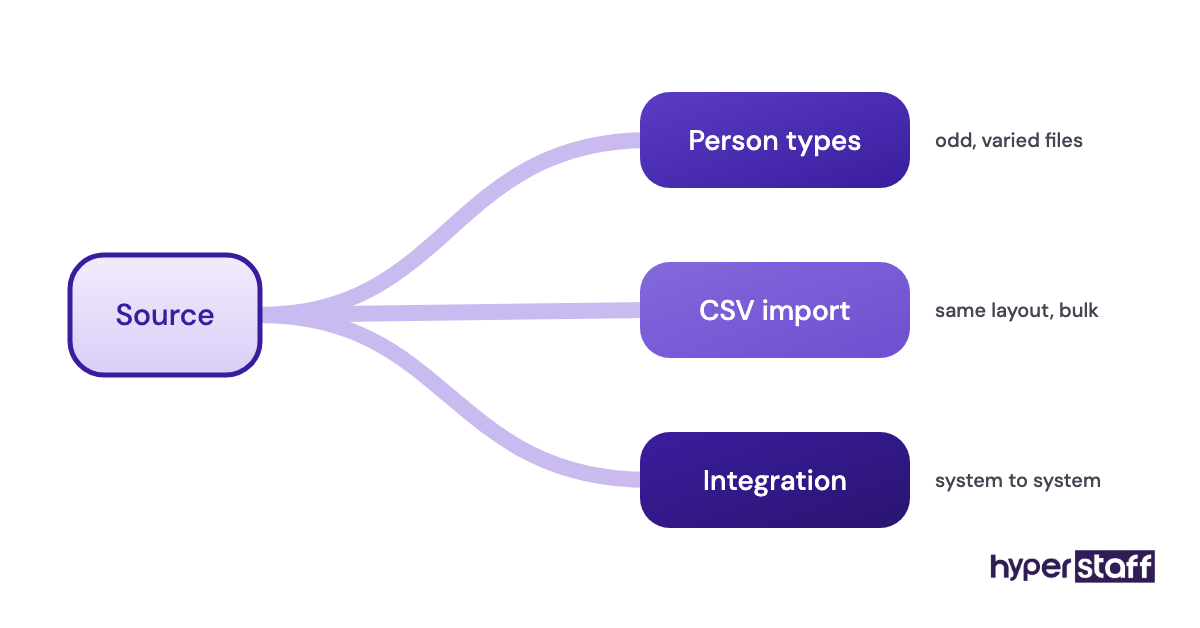
Every data entry task has a source and a destination. The source might be an emailed order, a scanned receipt, a supplier price list or a web form, and the destination is usually a spreadsheet, a CRM, accounting software or a store back end.
Writing the map down sounds like busywork. It's the step that tells you which tasks a person should type and which ones an import or integration could handle instead.
What belongs on the source map
One row per task is enough. Each row should show:
- The source, with an example file or screenshot attached
- The destination system and the exact screen or tab
- How often new records arrive (daily, weekly, in bursts)
- Rough volume per batch
- Who owns the source if it changes or breaks
Why the map changes what you delegate
The map exposes tasks that shouldn't be typed at all. A store owner keying 300 products from a supplier spreadsheet one by one is often looking at a job a CSV import does in minutes, with the assistant cleaning the file first and checking a sample of live listings after.
It also shows the full range of the role. Data entry virtual assistant tasks spread across bookkeeping inputs, CRM upkeep, catalog work and lead lists, which is why our guide on what a data entry virtual assistant does treats it as an operations role with typing inside it.
Done when every task has one source and one destination
No task on the list says "various" in the source column. If it does, split it into separate tasks until each one has a single starting point.
Checkbox 3: Is the assistant's access scoped to each task?
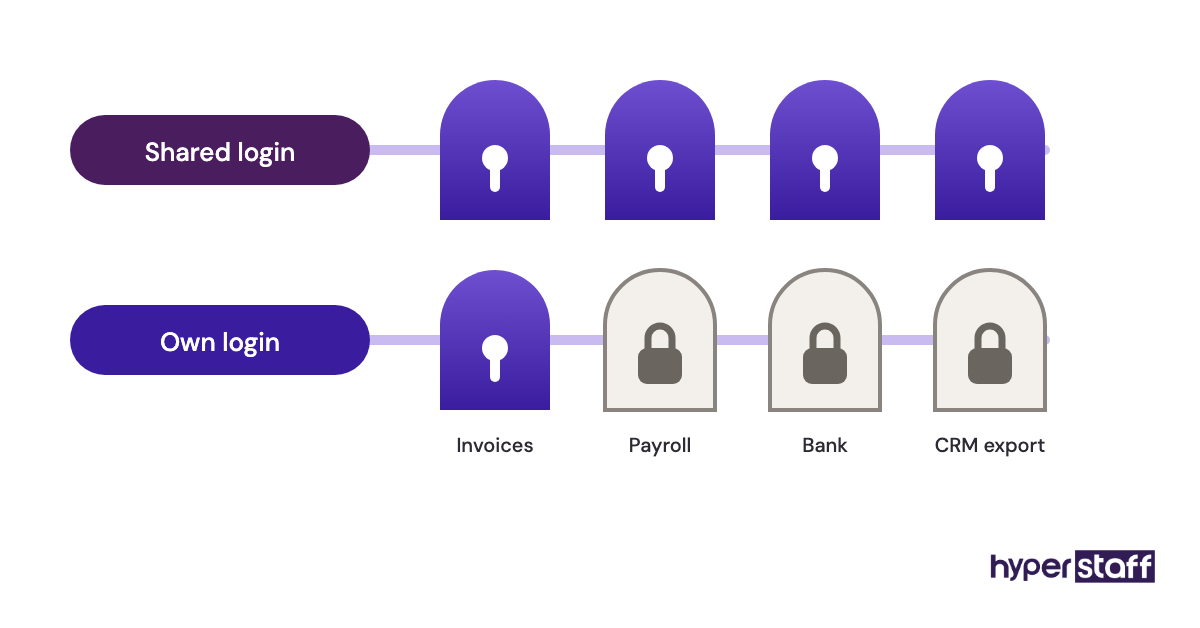
Scoped access means the assistant has their own login in every system, with permissions set to the minimum the task needs. Shared passwords and owner-level accounts are the most common shortcut in remote data entry, and the hardest one to undo later.
The Federal Trade Commission's data security guidance for businesses sets out the same ideas for any staff member: collect what you need, limit who can see it and dispose of it properly.
What to check on every login
Walk through each system on your source map and confirm the following:
- A named user account for the assistant, never a shared one
- Two-factor authentication switched on
- Edit rights only on the objects the task touches
- Export and bulk-delete rights turned off unless the task needs them
- Passwords shared through a password manager, not chat or email
- A note of who removes access if the role changes
Why scoped access protects both sides
Someone entering invoices doesn't need payroll. Someone updating CRM notes doesn't need the button that exports every contact, and if they don't have it, nobody has to wonder whether it was pressed.
Named logins also give you an audit trail. Most CRMs and accounting tools record who changed what, but only when each person signs in as themselves.
Done when removing access takes five minutes
You could revoke every permission the assistant holds in one sitting, from a list you already have. If that list doesn't exist yet, the checkbox stays open.
Checkbox 4: Does the assistant search before creating a new record?
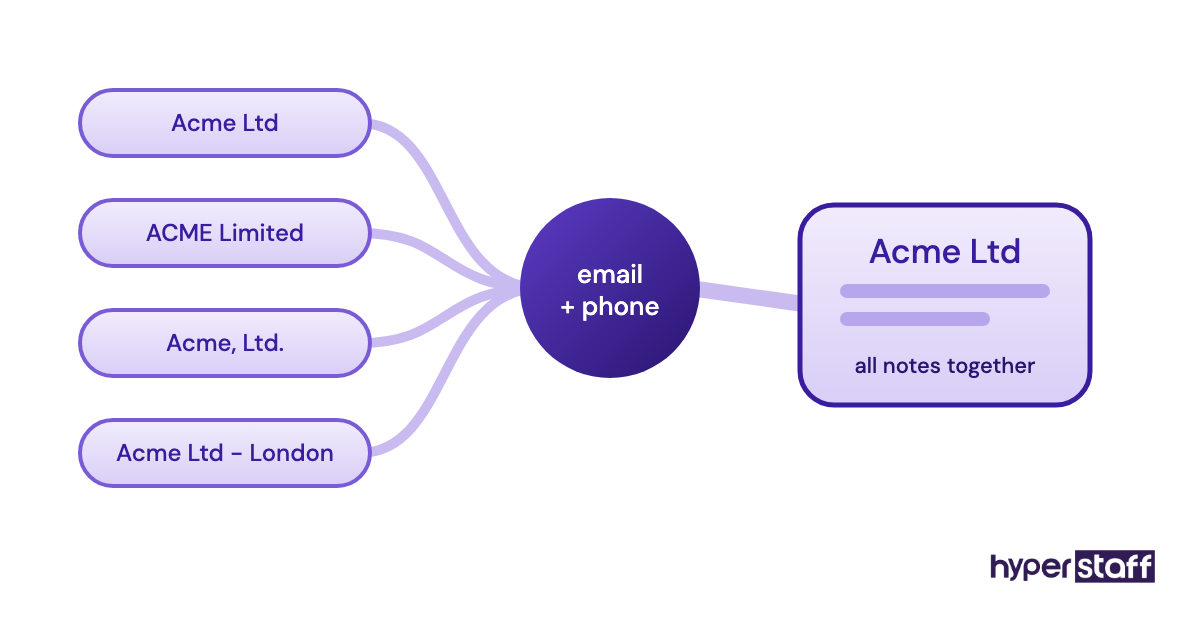
A search-first rule tells the assistant to look for an existing contact, product or vendor before adding a new one. It's the cheapest duplicate prevention there is, and plenty of data entry SOPs leave it out.
Duplicates are slow to spot. They sit in the CRM looking like normal records until two salespeople email the same buyer the same pitch.
What a search-first step covers
Before any "create new" click, the assistant should check:
- Email address or domain for contacts
- SKU or supplier code for products
- Tax ID or bank details for vendors
- Close name variants ("Ltd" vs "Limited", missing initials)
Why duplicates cost more than they look
Each duplicate splits history across two records. Notes, invoices and order counts end up half in one place and half in the other, and reports built on that data undercount your best customers.
Merging later is slower than searching now, and some tools lose fields during a merge.
There's an honest debate here: some operators prefer weekly bulk deduplication with a tool over a search-first habit, on the grounds that it's faster per record. We lean toward search-first for CRM and vendor data, where a wrong merge does real damage, and bulk cleanup for marketing lists, where it doesn't.
Done when new duplicates stop appearing
A weekly duplicate report on your CRM or product list shows few or no new pairs created since the assistant started. Old duplicates can be cleaned as a separate task.
Checkbox 5: Is there a "flag it, don't guess" lane for unclear records?
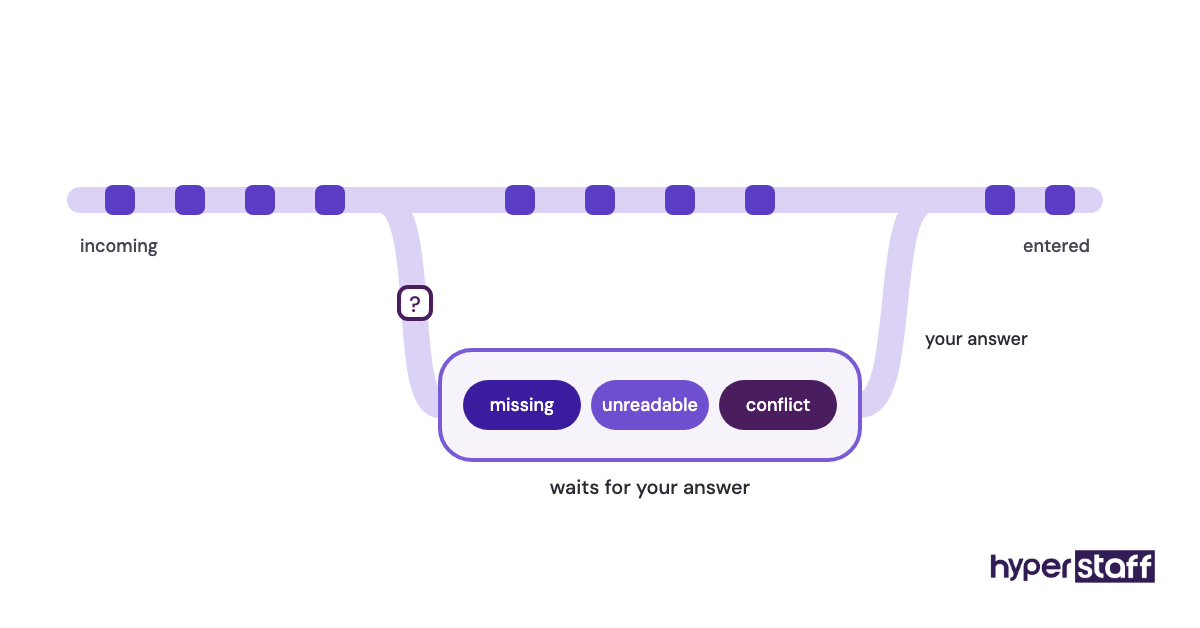
An exception lane is a set place, such as a tab, a tag or a shared list, where the assistant parks any record they can't complete with confidence. It turns unclear records into a short list for you to answer instead of a silent guess inside your data.
Good data entry assistants flag a lot in week one. Early flags mean the lane works.
What the exception lane needs
Set it up before the first batch, with these pieces in place:
- One location for flagged records, the same for every task
- A short reason code (missing value, unreadable, conflicting source)
- A named person who answers flags, and how often
- A rule for what happens to the record while it waits
Why guessing is the expensive option
One wrong expense category, entered on 200 receipts, means 200 corrections before your accountant can close the month. For financial records, our bookkeeping virtual assistants work from a fixed chart of accounts for exactly this reason, and anything outside it gets flagged.
Your answers to flags also become new field rules. After a few weeks the flag count drops, because each answer settles a whole category of future records.
Done when flags shrink week over week
Flags get answered within a day, and each answer is added to the rule sheet. If the same question shows up twice, the rule sheet is missing a line.
Checkbox 6: Are batches small enough to sample-check?
Batch size is how many records the assistant enters before a check happens. Long, unbroken runs of several hundred records raise error rates for anyone, and they also make a pattern of errors harder to trace back to its cause.
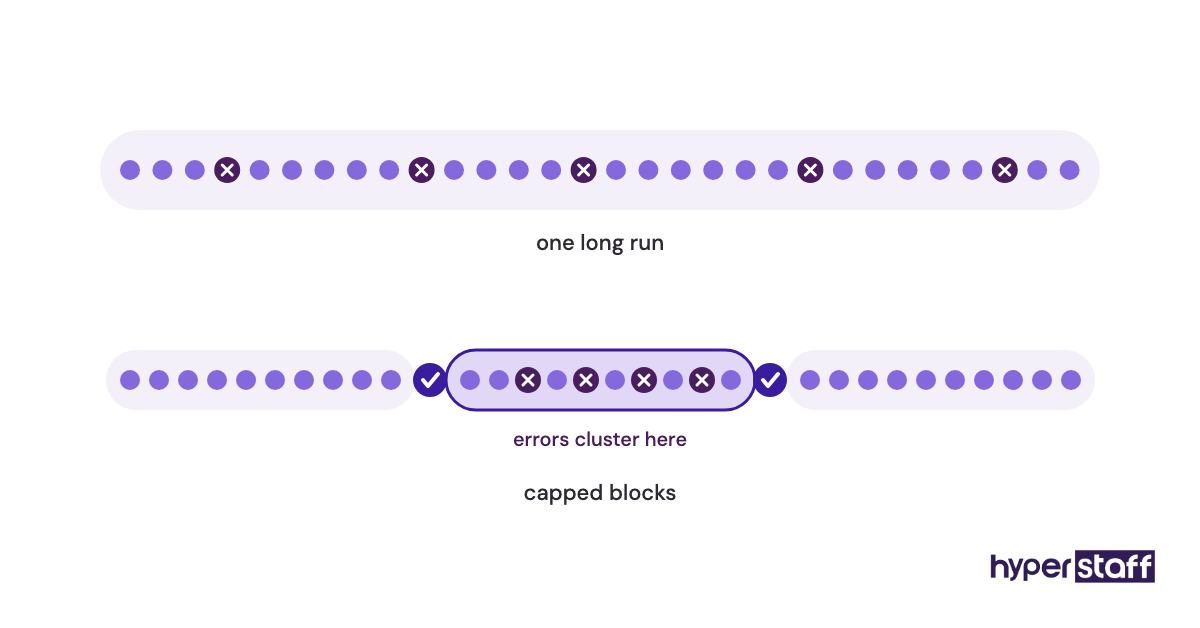
Sampling is the check that fits remote work. Pull a random handful from each batch, compare them to the source and track the miss rate over time.
What to check in your batch setup
Look at how work is actually split today and confirm:
- Batches are capped (blocks of 50 or 100 work for most tasks)
- The assistant self-checks a few records at the end of each block
- You or a reviewer sample about 5% of each batch at first
- Misses are logged with the field and the cause
- The sample size drops as the miss rate holds low
Why sampling beats checking everything
Checking every record doubles the cost of the work. Checking nothing means the first sign of trouble is a customer, an auditor or a report that doesn't add up.
A steady sample sits in between and gives you a trend line.
The most common slip we see is a miss rate that looks fine on average but clusters in one field, usually dates or amounts, and only a field-level log shows it.
Our post on common data entry VA mistakes covers the patterns worth watching.
Done when the sample tells you what to fix
You can name the field with the most misses this week. When the miss rate stays low for a few weeks, you check less and hand over the next task.
Checkbox 7: Will you hear about it when a source changes format?
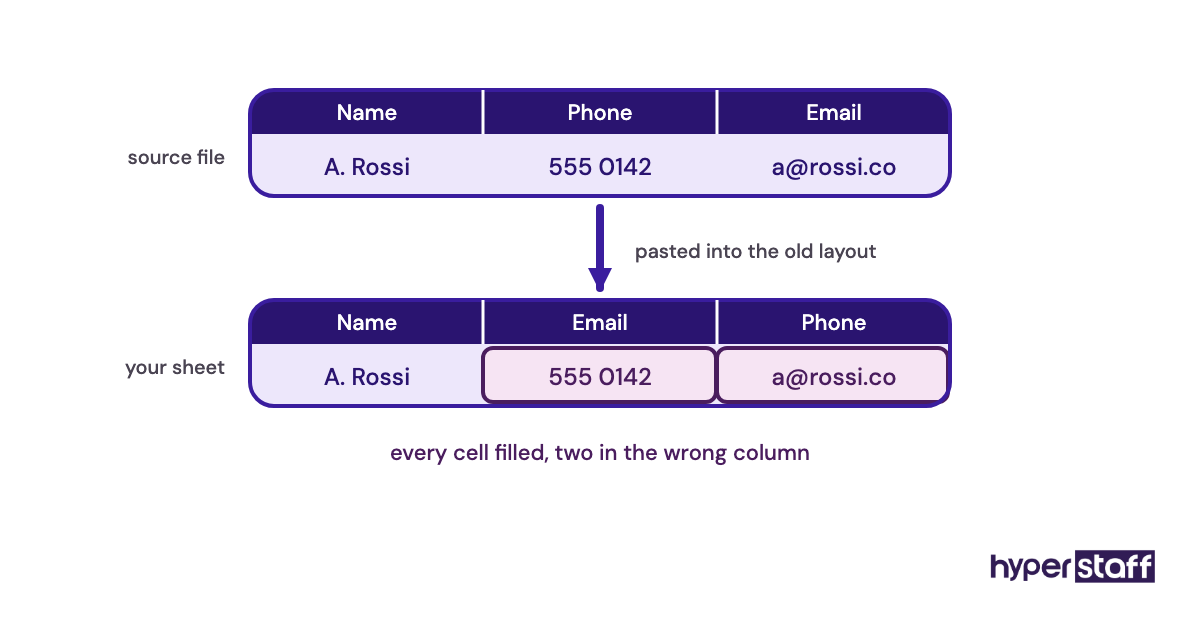
Source drift is when the file or form feeding a task changes shape without warning. A supplier reorders the columns in its price list, a web form gets a new field, a bank export switches date formats, and the assistant keeps pasting into the old layout.
It's the hardest error to catch because every record still looks complete. The values are just in the wrong places.
What a source-change habit looks like
Agree on a few simple rules with the assistant:
- Compare each new source file to the last one before starting
- Stop and flag if column headers, order or count differ
- Keep one sample of each source format on file
- Log the date and the change when a format is updated
Why drift slips past normal checks
A sample check compares the record to the source. If the assistant read the wrong column, the sample matches the wrong value and passes.
Interviewing for this habit is worth a question of its own. Our list of data entry VA interview questions includes ways to test whether a candidate notices when a file looks different before they start typing.
Done when a format change gets flagged the same day
The next time a source changes, you hear about it before any records are entered. Keep the sample formats in your Operations Vault so a new team member sees them too.
Checkbox 8: Do two lists that should match get compared on a schedule?
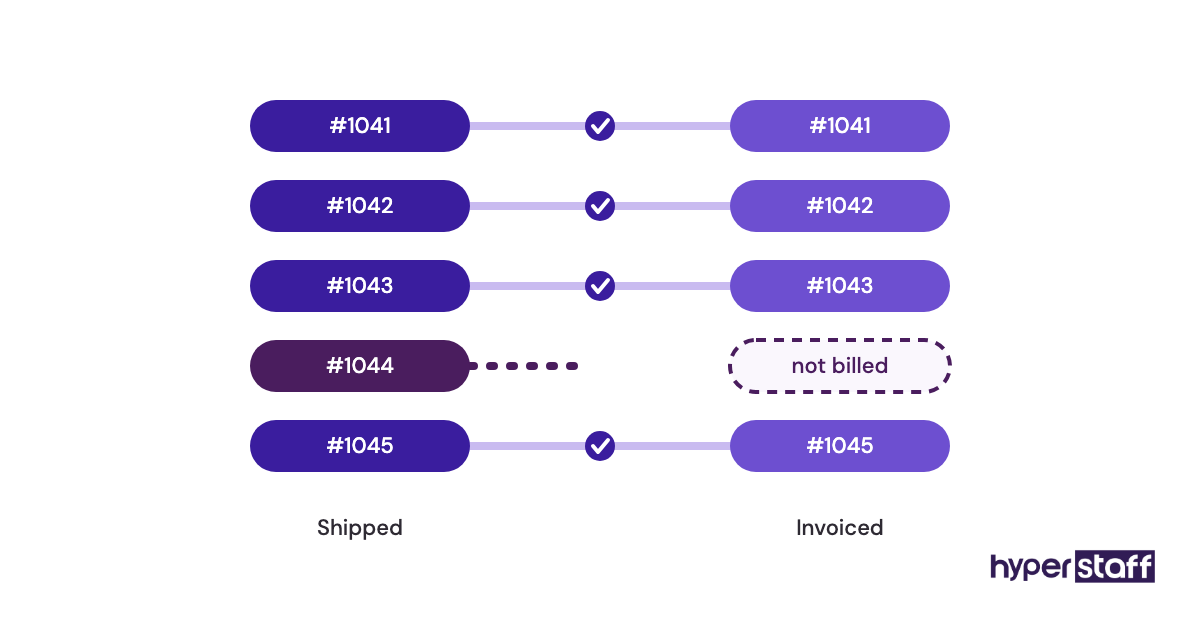
Reconciliation means comparing two records of the same thing, such as orders shipped against orders invoiced, or store stock against the warehouse sheet, and fixing the gaps. It's one of the most useful data entry virtual assistant tasks and one of the least requested.
Owners tend to reconcile only when something breaks. By then the gap is weeks old.
What to put on the reconciliation schedule
Pick the pairs that matter most to cash and customers:
- Orders shipped vs orders invoiced
- Marketplace stock counts vs your inventory sheet
- Bank deposits vs payments recorded
- CRM deal stages vs signed contracts
- Product prices on the store vs the supplier's latest list
Why scheduled comparison pays for itself
An unbilled order is revenue you've already earned and haven't collected. A stock mismatch on a store means selling something you don't have, and on marketplaces that can affect your seller account.
Store owners often pair this with catalog work, and our Shopify virtual assistants run stock and price checks as part of the routine. The spreadsheet and matching tools behind the job are in our roundup of data entry virtual assistant tools.
Done when the gaps list arrives before you ask
Each comparison runs on a set day and produces a short exception list. Fixed items are marked, and anything that needs your decision is in the flag lane from Checkbox 5.
Checkbox 9: Does each day end with a record count and a handoff note?
A daily handoff log is a short note at the end of each shift: records received, records entered, records flagged and anything unusual. It takes the assistant two or three minutes and gives you a count you can check against the source without opening a single record.
It also keeps time zones from becoming a problem. You read the note in the morning, answer flags, and the next shift starts with answers waiting.
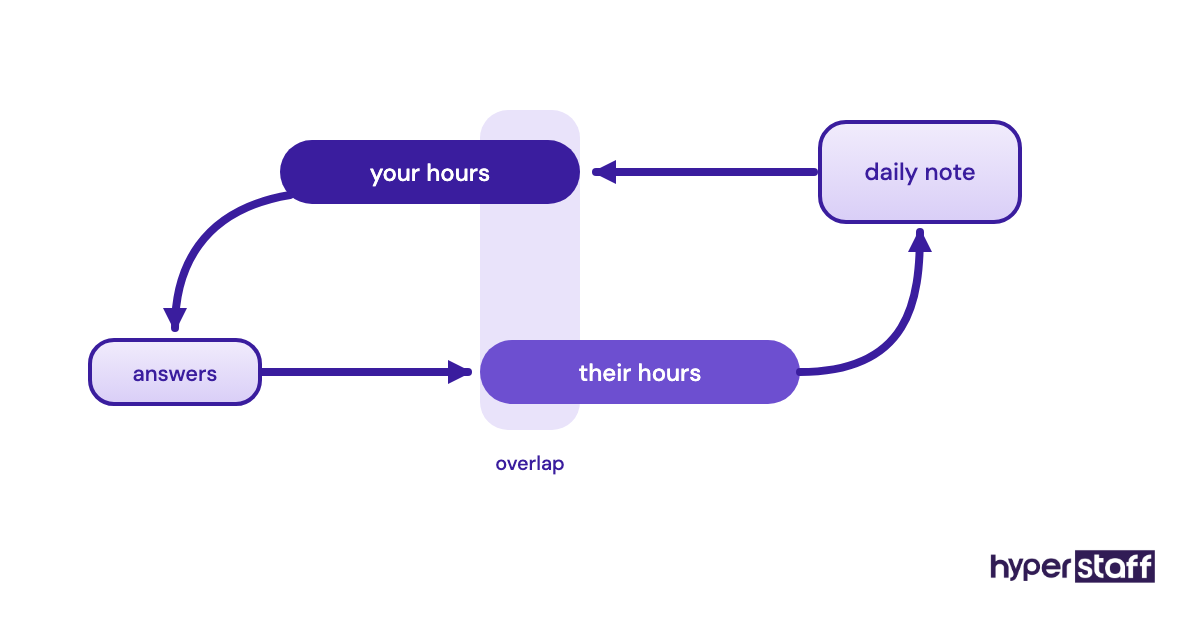
What the daily note should include
Keep the format fixed so it's quick to scan:
- Records in vs records completed, per task
- Flags raised and their reason codes
- Any source changes spotted
- Questions that block tomorrow's work
Why counts catch what samples miss
Samples tell you whether records are right. Counts tell you whether all of them made it, and a missing batch of 40 emailed orders never shows up in a sample at all.
The log is also your evidence when weighing the arrangement. Our posts on whether a data entry VA is worth it and the cost of a data entry VA both work from hours and volume, and the handoff log gives you both numbers from your own business.
Done when the numbers add up every day
Records in, minus records completed, equals records flagged or carried over. When that sum holds for a few weeks, the task can run without daily review.
How should you order these checks when you start?
Start with field rules, the source map and scoped access before the assistant's first day, since none of them need the assistant to exist yet. The remaining six checks get set up during the first batch, while you're working alongside the assistant.
The realistic sequence has a gap in it. Placement takes 5 business days, and the hours before your 30-minute kickoff call are the best time to write rules, because once work starts your attention goes to answering flags.
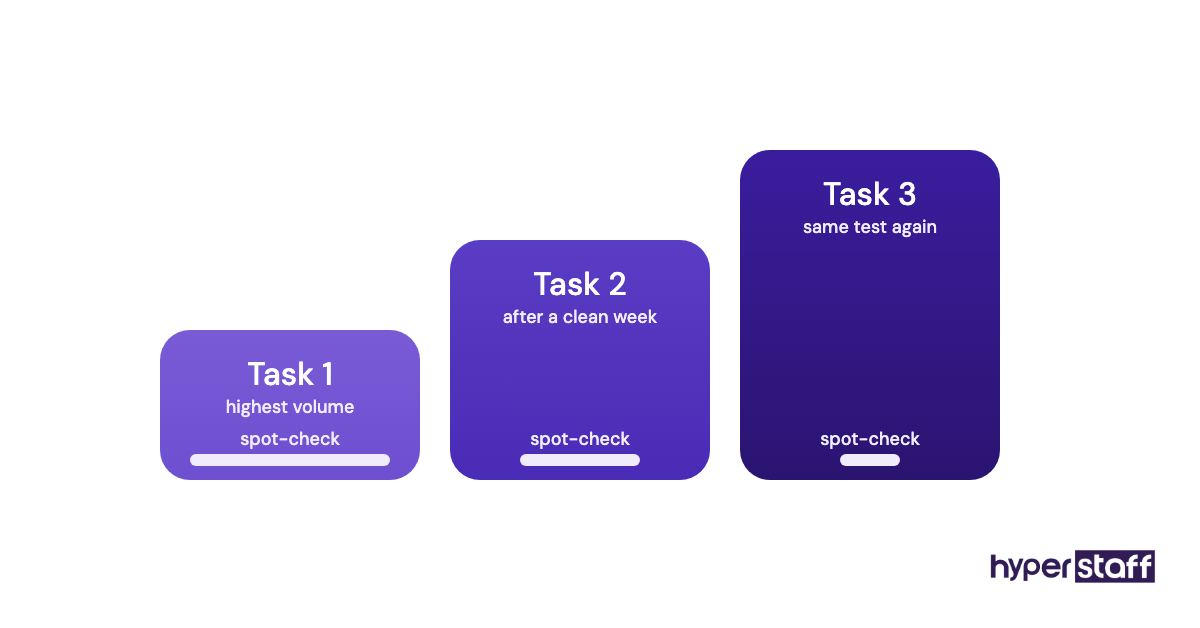
Hand over one task first, the one with the highest volume and the clearest rules. Add the next only after the first runs a full week with a low miss rate.
Our guide to onboarding a data entry virtual assistant walks through the first two weeks in detail.
If you haven't hired yet, the checklist doubles as a scoping tool. Each checkbox becomes a line in your data entry VA job description, and the full hiring process is in how to hire a data entry VA.
Some owners compare this setup work against simply hiring locally. It's the same work either way, since an in-house clerk also needs field rules and scoped logins, and our comparison of a data entry virtual assistant vs in-house staff sets out where the two really differ.
Disclaimer: This article is for general information only and isn't legal, financial or data protection advice. Requirements for handling personal and financial data vary by location and industry, so check with a qualified professional before setting up access to sensitive records.
Common questions
Can a data entry VA do tasks other than typing?
Yes. Most data entry virtual assistants also clean lists, merge duplicates, reconcile records, convert PDFs into editable files and prepare raw numbers for reports.
How many hours a week do data entry tasks usually take?
It depends on volume and how clean your sources are. Hyperstaff offers monthly bundles of 40, 80 or 160 hours, and 40 hours on one task is a sensible start, then size up once the daily handoff log shows the real workload.
Should I give my data entry VA tasks with customer payment details?
Card numbers shouldn't pass through spreadsheets or chat at all. Keep payment data inside your payment processor, and give the assistant access only to the order or invoice fields the task needs.
Which data entry tasks should I keep for myself?
Keep anything that needs a judgment call on money, tax treatment or contracts. The assistant can prepare the records and flag questions, while the decision and sign-off stay with you or your accountant.
What experience level do data entry tasks need?
Straightforward keying and list cleaning suit the Essential tier (0 to 2 years, from $3/hour). Work inside accounting software or messy multi-system reconciliation usually fits the Professional tier (2 to 5 years, from $6/hour).
Book a free 15 min call
We place a pre-vetted specialist in 5 business days, fully managed, from $3/hour.