Data Entry Virtual Assistant vs In-House: Which Hire Fits Your Business?
A side-by-side look at a remote data entry virtual assistant and an in-house clerk, covering real costs, the work each model suits and how to decide.
On this page
- What is the difference between a data entry virtual assistant and an in-house clerk?
- Data entry virtual assistant vs in-house at a glance
- Key data entry staffing terms you should know
- How does each model work day to day?
- Types of data entry staffing arrangements
- How a data entry VA differs from related options
- Data entry VA vs freelancer
- Data entry VA vs outsourced BPO team
- Data entry VA vs automation software
- Pros and cons of a data entry virtual assistant
- The benefits of a data entry VA
- The drawbacks of a data entry VA
- When does an in-house data entry hire make more sense?
- When a data entry VA is the better call
- Data entry staffing examples
- Good examples of a remote data entry setup
- Bad examples of a remote data entry setup
- Creating a data entry staffing plan, step by step
- Step #1
- Step #2
- Step #3
- Step #4
- Step #5
- Data entry tools and software for remote and in-house teams
- 8 proven tips for choosing between a data entry VA and an in-house hire
- Overcoming common data entry VA challenges
- How to measure data entry VA success
- How long does a data entry VA take to work?
- How much does a data entry VA cost compared with an in-house clerk?
- Is a data entry virtual assistant worth it over an in-house hire?
- How to choose a data entry VA agency
- Data entry statistics, trends and future predictions
- Data entry and AI
- FAQs
Cut your data entry bill without losing control
Hyperstaff places dedicated, pre-vetted remote specialists who learn one business and stay with it, and our data entry virtual assistant services start from $3/hour. We've placed 70+ virtual assistants across 30+ clients, usually within 5 business days, and every client gets a dedicated account manager plus an Operations Vault that keeps your SOPs written down and current.
What is the difference between a data entry virtual assistant and an in-house clerk?
A data entry virtual assistant is a remote specialist who keys, cleans and updates your records from their own location, paid by the hour or by a monthly bundle. An in-house data entry clerk is your employee, on your payroll, working from your office or under your direct employment terms.
The work itself is often identical. Both type invoices into accounting software, update CRM fields, build product listings and reconcile spreadsheets, and our guide on what a data entry virtual assistant does covers the role in more depth.
What changes is the employment relationship. With an in-house clerk you carry recruiting, payroll tax, benefits, equipment and turnover risk. With a VA placed through an agency, the agency carries most of that, and you carry the job of writing down how your data should look.
Data entry virtual assistant vs in-house at a glance
The fastest way to compare the two models is line by line. Here's how they stack up on the factors buyers actually ask about.
| Factor | Data entry virtual assistant | In-house data entry clerk |
|---|---|---|
| Typical hourly cost | From $3 to $12+ (offshore) | Around $18 median wage, before benefits (US) |
| Benefits and payroll tax | None on your side | Roughly 30% of total pay cost |
| Time to start | Days | Several weeks |
| Flexible hours | 40, 80 or 160 hours a month | Usually full-time |
| Equipment and software | VA uses own setup; you share logins | You buy and maintain it |
| Replacement if it doesn't work out | Agency replaces | You restart hiring |
| Handling paper and mail | Only after you scan it | Yes |
| Strict on-premises data rules | Hard to meet | Easy to meet |
Key data entry staffing terms you should know
- Keying = typing data from a source document into a system by hand.
- Double-entry verification = two people (or two passes) key the same record, and mismatches get flagged.
- Field validation = rules in a sheet or database that reject bad formats, such as a ZIP code with letters.
- Error rate = wrong fields divided by total fields keyed, usually checked on a sample.
- OCR = software that reads text from scans and photos so a person checks it instead of typing it.
- Fully loaded cost = wages plus benefits, payroll tax, equipment, software and recruiting.
- Offshore staffing = hiring a remote person in another country through a staffing agency.
- Turnaround time = how long a batch takes from hand-off to finished, checked records.
- SOP = a written standard operating procedure, here the step-by-step rules for each data task.
- Least-privilege access = giving a person only the system permissions their task needs.
How does each model work day to day?
An in-house clerk works the way most employees do. They sit inside your network, pick up paper or digital batches from a manager and ask questions across the room or on chat.
A remote data entry VA runs on written hand-offs. Batches land in a shared folder, a ticket queue or a sheet, the VA works them in their own time zone, and finished records come back with notes on anything they couldn't read or match.
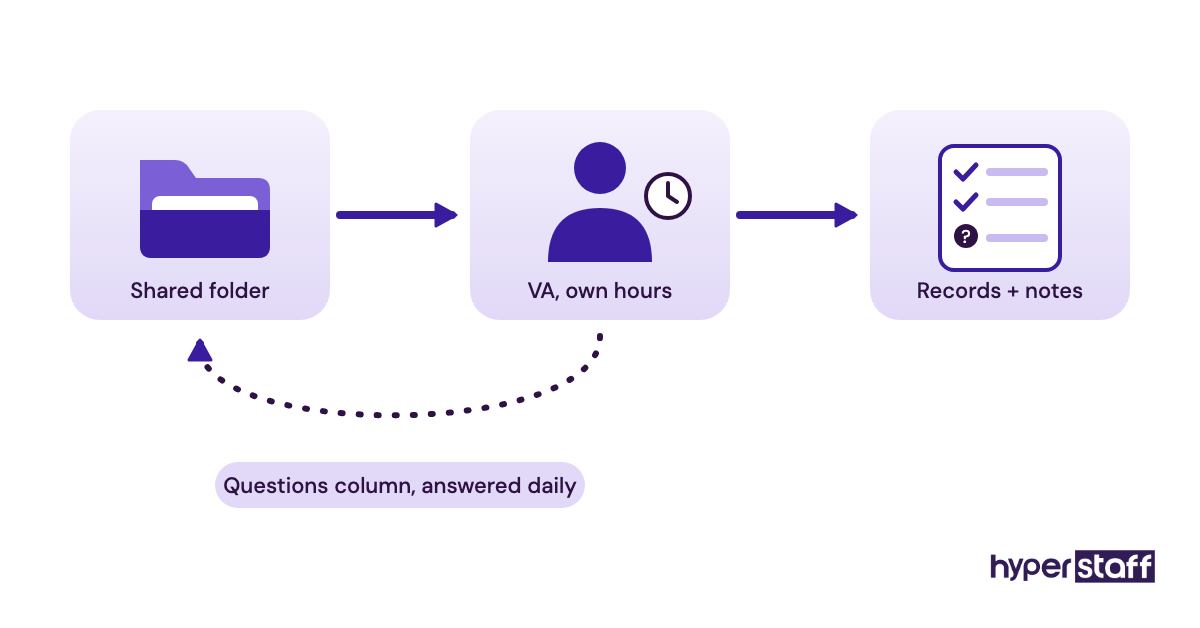
That asynchronous rhythm suits data entry better than most VA roles. Live customer support needs time-zone overlap, while a stack of 400 invoices only needs to be done and checked by a deadline. The friction shows up when your rules live in someone's head, because a remote VA can't overhear the answer.
Types of data entry staffing arrangements
Data entry staffing comes in more shapes than "VA or employee." Each one trades cost against control differently.
| Arrangement | Who manages the person | Typical cost model | Best fit | Main risk |
|---|---|---|---|---|
| In-house full-time clerk | You | Salary plus benefits | Paper-heavy or on-premises-only data | Highest fixed cost |
| In-house part-time clerk | You | Hourly wage | Local, light, steady volume | Hard to hire and keep |
| Temp agency worker | Agency employs, you direct | Marked-up hourly rate | Short on-site spikes | Re-training each time |
| Dedicated VA through an agency | You direct, agency supports | Hourly or monthly bundle | Ongoing digital records work | Weak results without SOPs |
| Freelancer from a marketplace | You | Per hour or per task | One-off clean-up projects | No backup if they vanish |
| Outsourced BPO team | Vendor | Per record or per contract | Very high, uniform volume | Rotating staff, less context |
| Automation tools plus human check | You or your VA | Software subscription | Repeatable, structured inputs | Silent errors at scale |
How a data entry VA differs from related options
Most buyers weighing a VA against an in-house hire also have a third option on the table. Here's where the lines sit.
Data entry VA vs freelancer
A freelancer usually juggles several clients and takes work by the project. That's fine for a one-time migration of 5,000 contacts, and risky for ongoing work, because nobody covers the gap when they take a bigger contract.
A dedicated VA works your queue on set hours and builds knowledge of your naming rules, your odd vendor codes and your customers. Agency placement also means a replacement path if the fit breaks.
Data entry VA vs outsourced BPO team
BPO data entry vendors price by the record and staff work from a shared pool. That model works for huge, uniform jobs like keying survey forms.
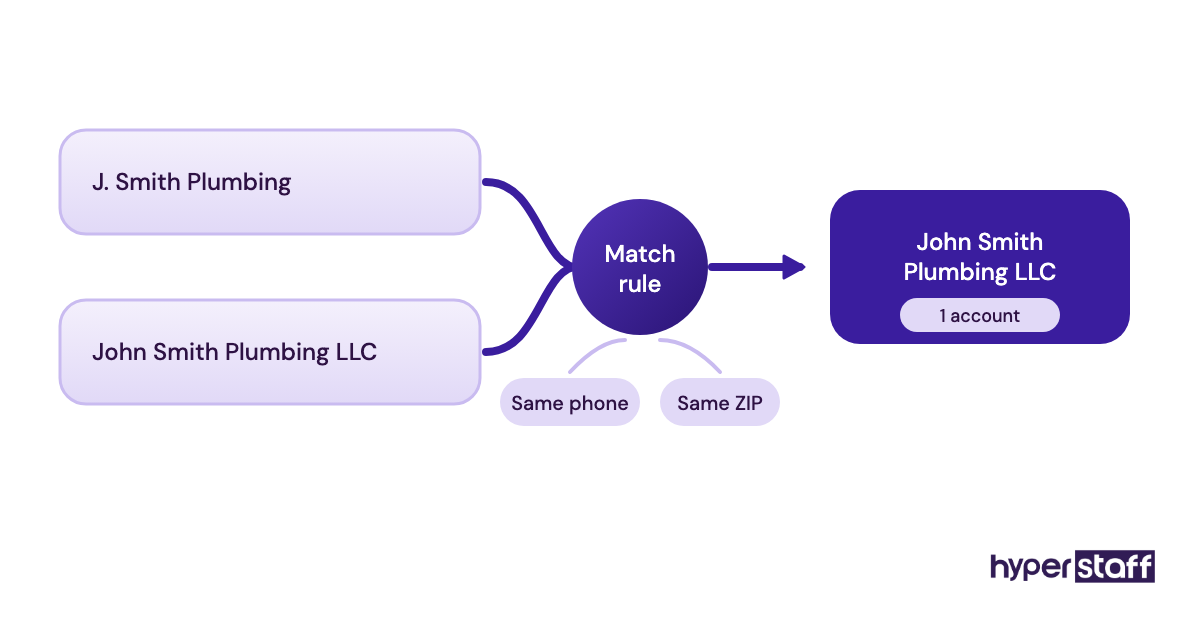
It works less well when your records need judgment, such as deciding whether "J. Smith Plumbing" and "John Smith Plumbing LLC" are the same CRM account. A dedicated person learns those calls. A pool relearns them.
Data entry VA vs automation software
OCR and integration tools can move clean, structured data without a person. They break on handwriting, odd layouts and anything that needs a decision.
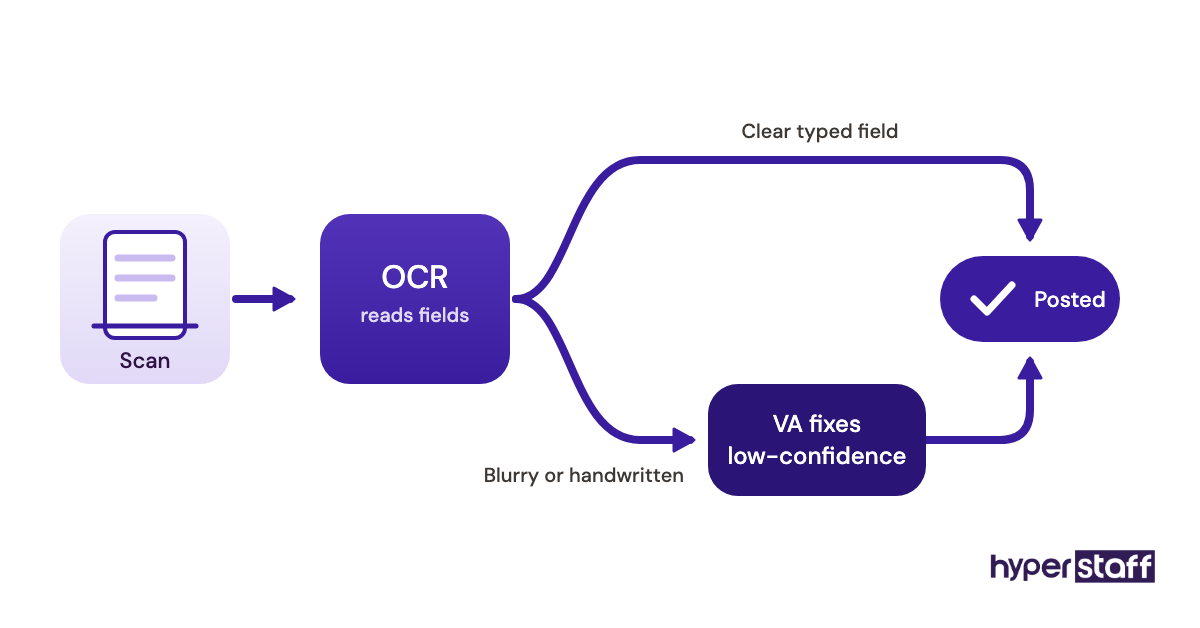
The setup that holds up best pairs the two: software extracts, and a VA checks exceptions and fixes what the tool misread. Treat automation as something your VA runs, rather than a replacement for a hire.
Pros and cons of a data entry virtual assistant
A data entry VA wins on cost and flexibility, and loses ground on physical tasks and tight data-residency rules. Here's the honest split.
The benefits of a data entry VA
- Lower hourly cost, with no benefits or payroll tax on your books.
- Hours that match volume: 40, 80 or 160 a month instead of a fixed 40-hour week.
- Faster start, often within a week rather than a hiring cycle.
- Agency-backed replacement if the person leaves or underperforms.
- Forces you to write down your data rules, which helps every future hire.
The drawbacks of a data entry VA
- Paper documents must be scanned before anyone remote can touch them.
- Some regulated data can't leave your network without extra controls.
- Questions take longer to answer across time zones.
When does an in-house data entry hire make more sense?
An in-house clerk is the better pick when physical handling is part of the job. If someone has to open mail, sort paper files, scan records or tag inventory in a warehouse, a remote person can only do half the work.
The second case is regulation. Health records, payment card data and some government contracts carry rules about who sees the data and where. A remote setup can meet many of them with access controls and signed agreements, but if your compliance team requires on-premises access only, that settles it.
Volume matters less than people assume. A business keying 40 hours a week of digital records gets the same output from a full-time VA, and the cost gap stays the same at any size.
When a data entry VA is the better call
A VA fits when the source data is already digital: PDFs, emails, web forms, spreadsheets, e-commerce exports or CRM records. It also fits when volume swings month to month, since a bundle of 40 hours can rise to 160 without a new hire.
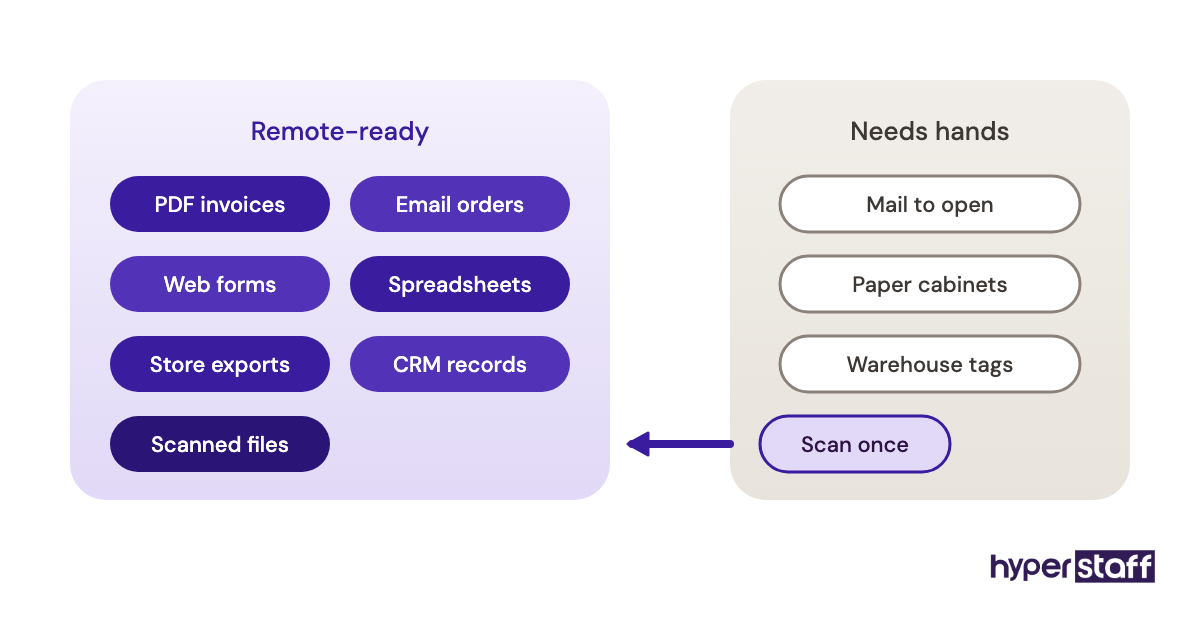
Before you decide, map the actual work. Our full list of data entry tasks helps you sort what's remote-ready from what needs hands on paper.
Data entry staffing examples
The same role can succeed or fail depending on how the work is set up. These are common patterns, good and bad.
Good examples of a remote data entry setup
Accounts payable invoice keying
Vendor invoices arrive by email, land in a shared inbox and get keyed into accounting software against a written coding guide. The VA flags any invoice without a matching purchase order instead of guessing, and a finance lead approves the flagged list once a day.
E-commerce product catalog updates
A supplier sends a price and stock sheet each week. The VA updates listings from a template with fixed rules for titles, variants and units, then logs every change in a sheet the owner can scan in two minutes.
CRM clean-up after a trade show
Lead lists from badge scans and forms get de-duplicated, standardized and tagged by source. The VA follows a matching rule for company names, so duplicates don't creep back in next month.
Bad examples of a remote data entry setup
Paper records with no scanning plan
A business hires a VA for a filing backlog that only exists in cabinets. Nobody owns the scanning, so the VA waits, and the hours are wasted.
Rules that live in the owner's head
The VA gets logins and the instruction "you'll pick it up." Every batch comes back with the same small errors, because the formats were never written down. We cover this trap and others in our guide to common data entry VA mistakes.
Admin access to everything on day one
A new remote hire receives the owner's own login to banking, payroll and the CRM. Even with an honest VA, that's a security exposure, and it makes any error impossible to trace to a person.
Creating a data entry staffing plan, step by step
A good plan answers three things before you post a role: which work moves, who checks it and how you'll know it's right. These five steps get you there.
Step #1: Audit the data work you have
List every recurring data task for two weeks, with hours spent and where the source data lives. Mark each one paper or digital, sensitive or routine.
Digital and routine tasks are the obvious candidates for a VA. Paper-bound or tightly regulated tasks may stay in-house.
Step #2: Write the field rules
Document formats for dates, names, addresses, SKUs and anything else people key differently. Add screenshots of a correct record.
This step takes longer than people expect, often a few evenings. It's also the step that decides accuracy for any hire, remote or local.
Step #3: Define the role and screen for it
Turn the audit into a clear job description with tools, volume and accuracy targets. Then test candidates on a real, anonymized batch instead of a generic typing test.
Our guides on hiring a data entry virtual assistant and on data entry interview questions walk through the screening in detail.
Step #4: Set up access and a review loop
Create a separate login for the new hire with only the permissions the task needs. Store shared passwords in a password manager, never in a chat thread.
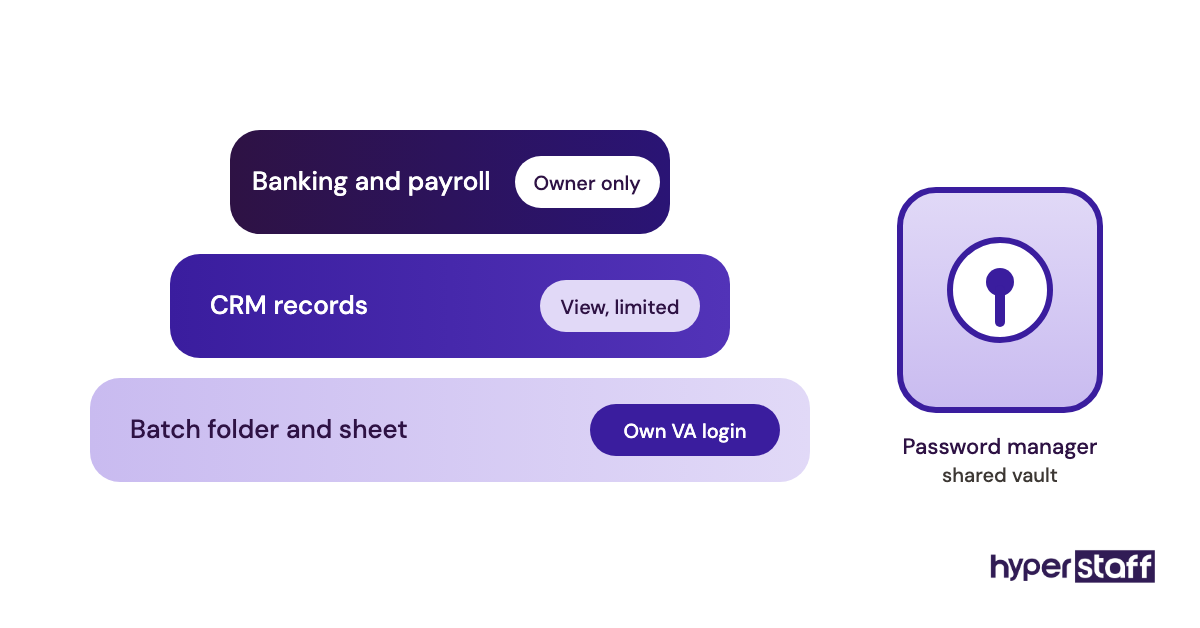
For the first two weeks, check a sample of every batch. Corrections in this window teach faster than any training document.
Step #5: Onboard, measure and adjust hours
Follow an onboarding plan for a data entry VA that starts with one task and adds the next once error rates settle. After the first month, compare actual hours with your bundle and move up or down.
Data entry tools and software for remote and in-house teams
The software is usually the same whichever model you pick. What changes is that a remote VA needs shared, cloud-based access from day one.
Google Sheets covers more data entry work than most teams give it credit for. Its built-in data validation and dropdowns block bad formats at the point of entry, which beats catching them in review.
Airtable suits records that need linked tables and forms, with paid plans starting around $20 per seat per month on annual billing. Zapier moves data between apps without retyping, with a free tier and paid plans from about $20 a month on annual billing.
OCR and document parsing tools handle typed invoices and forms well, and handwriting poorly. A password manager with shared vaults is the one tool we'd call non-negotiable for any remote hire. For a fuller breakdown, see our data entry VA tool stack.
Time tracking is where practitioners disagree. Some managers want screenshot-based trackers for remote staff, while others find output-based checks (records done, error rate) tell them more and cost less trust.
8 proven tips for choosing between a data entry VA and an in-house hire
These tips come from the practical side of placing remote specialists, and they apply whichever way you go.
- Price the fully loaded cost of an employee, not the wage alone.
- Scan a sample of your paper records first to see how much is truly remote-ready.
- Write field rules before you hire anyone.
- Test candidates on a real batch with known errors planted in it.
- Give each hire their own login with limited permissions.
- Track error rate per field, since one wrong digit in a bank detail matters more than a typo in a note.
- Start with one task and add more only after accuracy holds for two weeks.
- Keep in-house the work that needs hands on paper, and move the rest.
Overcoming common data entry VA challenges
The most common challenge is slow answers to quick questions. Fix it with a shared "questions" column in the batch sheet, answered once a day, and fold repeat answers into the SOP.
Security worries come next. Separate logins, a password manager and restricted permissions handle most of them, and an NDA covers the rest for routine business data.
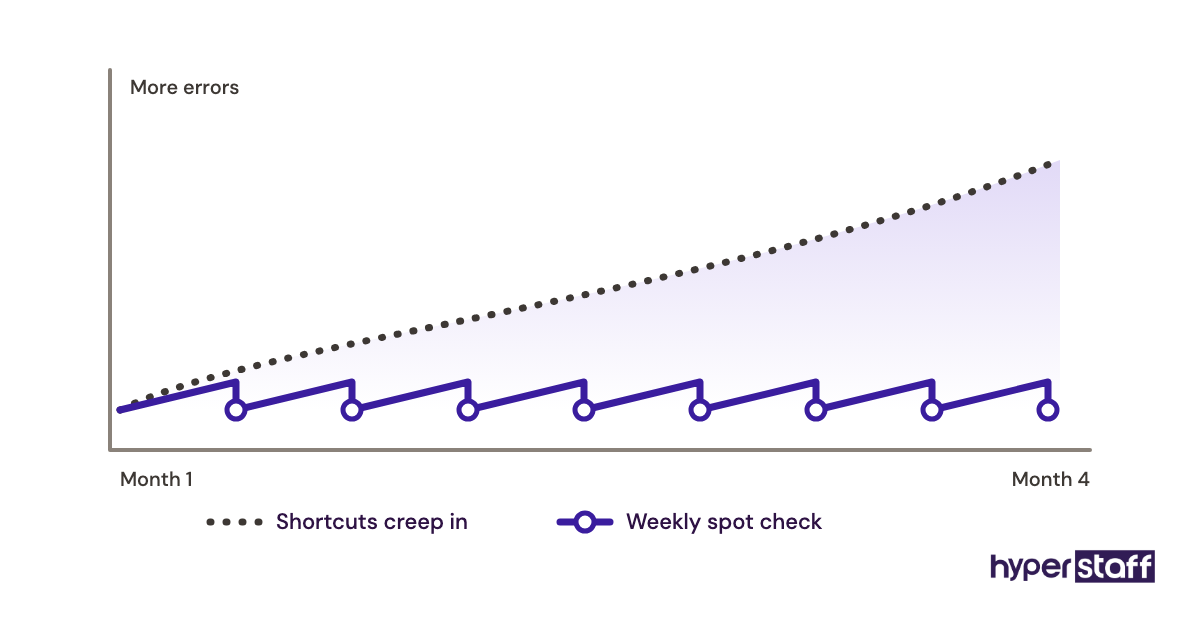
The third challenge is drift: accuracy is high in month one and slips by month four as shortcuts creep in. A small weekly spot check catches it early.
How to measure data entry VA success
Measure success with error rate on a sample, turnaround time per batch and backlog size. Volume per hour matters, but only after accuracy is stable.
Check 20 to 50 records from each batch in the first month, then fewer once the numbers hold. Compare the results against what your in-house process produced before, if you tracked it.
Practitioners split on records per hour as a metric. It's useful for spotting a stalled workflow, and harmful as a target, because it rewards speed over care.
How long does a data entry VA take to work?
Most data entry VAs handle routine batches with light review within two to four weeks. Simple, well-documented tasks get there faster.
At Hyperstaff, placement takes 5 business days, and after a 30-minute kickoff call, work starts that day or the next morning. The ramp-up after that depends on how complete your field rules are.
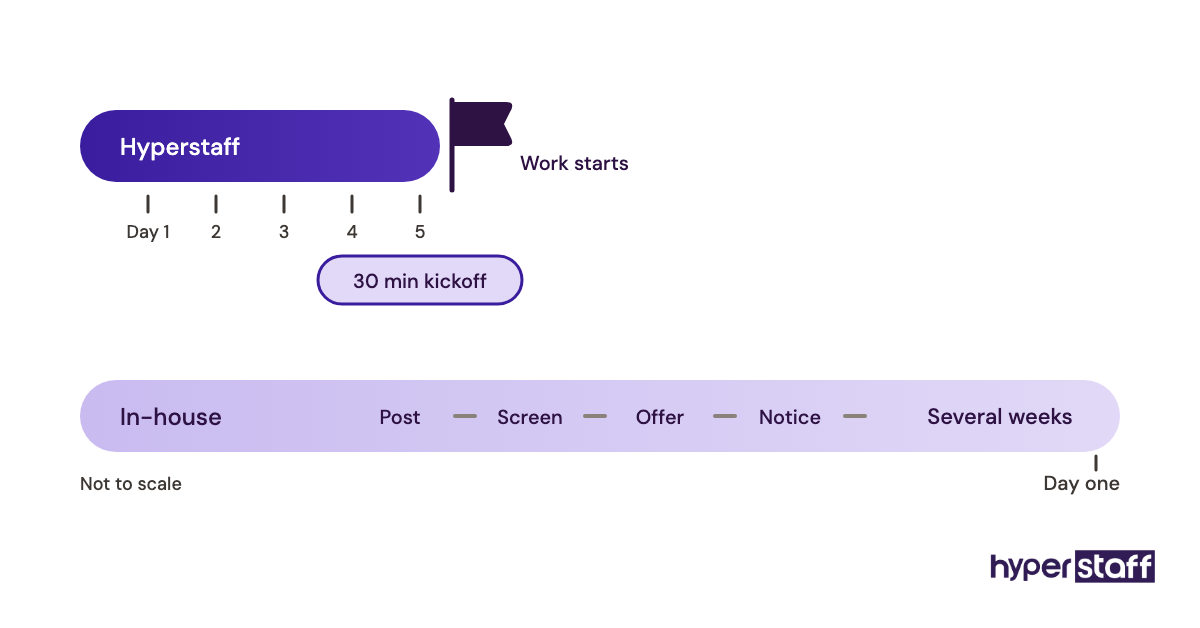
An in-house hire follows a similar learning curve, plus a recruiting cycle of several weeks before day one.
How much does a data entry VA cost compared with an in-house clerk?
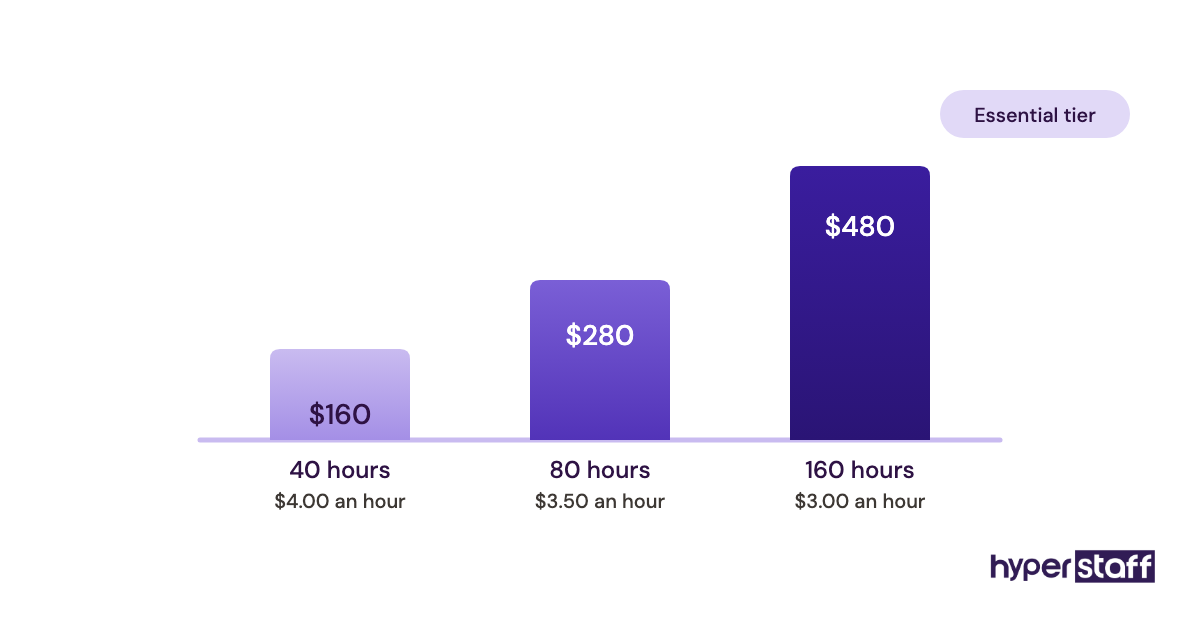
A full-time data entry VA through Hyperstaff starts at about $480 a month at the Essential tier, while an in-house US clerk at median pay costs over $3,000 a month in wages alone. The Bureau of Labor Statistics puts median pay for data entry keyers at $18.17 an hour.
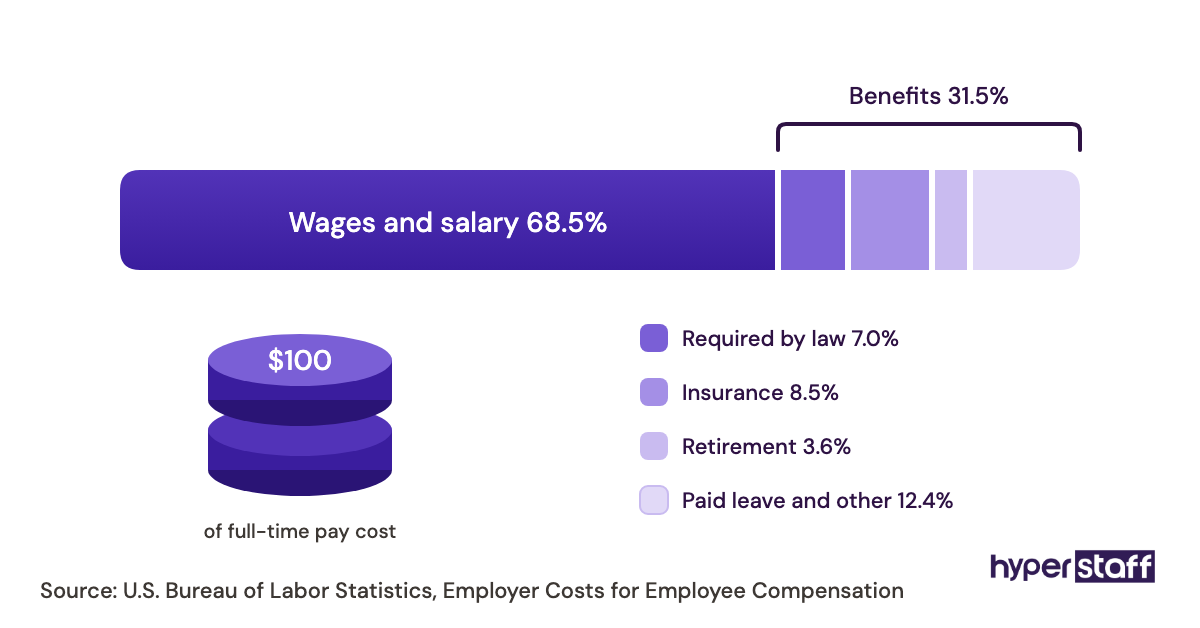
Wages are only part of an employee's cost. BLS data on employer costs for employee compensation shows benefits make up about 30% of total compensation in private industry.
| Cost line (160 hours/month) | In-house clerk (US median) | Hyperstaff Essential | Hyperstaff Professional | Hyperstaff Expert |
|---|---|---|---|---|
| Experience | Varies | 0 to 2 years | 2 to 5 years | 5+ years |
| Hourly rate | About $18 wage | From $3 | From $6 | From $12 |
| Monthly | About $2,900 wage, $4,100+ with benefits | From $480 | From $960 | From $1,920 |
| Yearly | About $35,000 wage, $49,000+ with benefits | From $5,760 | From $11,520 | From $23,040 |
| Benefits and payroll tax | Your cost | None on your side | None on your side | None on your side |
| Replacement | New hiring cycle | Free, 5 to 7 business days | Free, 5 to 7 business days | Free, 5 to 7 business days |
Paying quarterly saves another 10% on Hyperstaff bundles. Our data entry virtual assistant cost breakdown goes deeper into part-time bundles and regional pricing.
Important: Hyperstaff prices shown are starting averages. Your final cost depends on the tasks, experience level, hours and region your work needs.
Is a data entry virtual assistant worth it over an in-house hire?
For digital data work, yes, and the savings are large enough to change how a small business staffs its back office. When the field rules are written and a review loop is in place, a dedicated VA delivers the same records at a fraction of the cost, with hours that flex with volume.
Here's a simple calculation. An in-house clerk at the BLS median wage costs about $37,800 a year in pay, and with benefits at roughly 30% of total compensation, the fully loaded figure lands near $54,000 before equipment and recruiting.
A Professional-tier Hyperstaff VA at $6/hour for 160 hours a month costs $11,520 a year, or about $10,370 paid quarterly. That leaves roughly $42,000 a year to spend on something else, or to put toward a second hire for a different role.
The math flips only when the job needs physical presence or on-premises data access. For a closer look at the trade-offs, read our guide on whether a data entry VA is worth it.
How to choose a data entry VA agency
Pick an agency that places a dedicated person rather than routing your work through a rotating pool. Data entry accuracy depends on someone learning your quirks, and that knowledge disappears when the person changes every month.
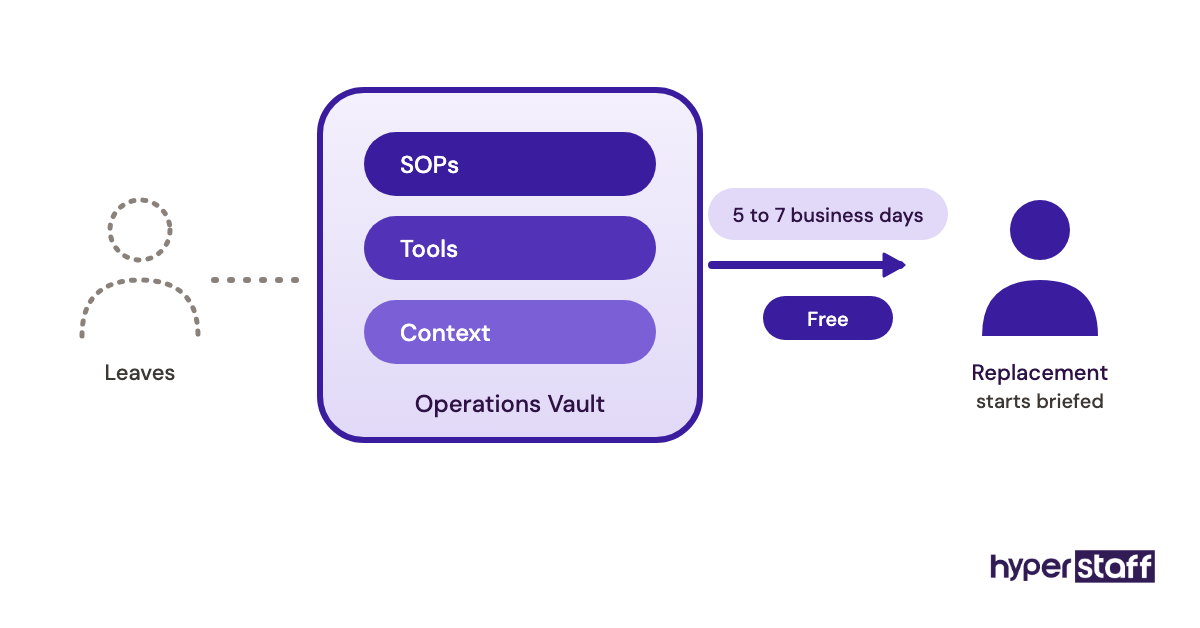
Ask how they vet candidates, how fast they replace someone and whether your processes get documented so a replacement starts briefed. At Hyperstaff, replacements arrive in 5 to 7 business days, briefed from your Operations Vault.
Check the pricing structure too. Hourly tiers by experience and monthly bundles make costs predictable, and a dedicated account manager gives you one person to call when something slips.
Data entry statistics, trends and future predictions
Demand for traditional keying is shrinking. The BLS lists data entry keyers among its fastest declining occupations, with employment projected to fall 25.5% over the next decade.
That decline reflects the work changing shape, and the volume of business data keeps climbing. Fewer people type raw records, while more people check, clean and reconcile what software captures.
The likely result is a smaller, more skilled role. Expect data entry hires to spend more time on exceptions, de-duplication and quality checks, and less on pure keystrokes.
Data entry and AI
AI tools now read invoices, receipts and forms with good accuracy on clean, typed documents. They still misread handwriting, merged table cells and low-quality scans, and they rarely flag their own mistakes.
That makes the human check more important. A data entry VA who runs the extraction tool, reviews low-confidence fields and fixes errors gets far more done than one who types everything by hand.
Disclaimer: This article is for general information only and does not constitute legal, financial, tax or compliance advice. Costs, wage data and tool pricing change over time; verify current figures and your regulatory obligations before making hiring decisions.
Common questions
Is my data safe with a remote data entry VA?
It can be, with the right setup. Give the VA their own login with limited permissions, share passwords through a password manager and sign an NDA. For regulated data, check your compliance rules before sharing anything.
Can a data entry VA work part-time?
Yes. Hyperstaff offers monthly bundles of 40, 80 or 160 hours, so a small business can start with 40 hours and scale up as volume grows.
What if my data entry VA makes too many errors?
First check whether the field rules are written down, since most repeat errors trace back to missing instructions. If accuracy still doesn't improve, Hyperstaff provides a free replacement in 5 to 7 business days.
Should I hire in-house if I have paper records?
It depends on the volume. A small paper backlog can be scanned and handed to a VA. If paper arrives every day, an in-house person is usually needed for at least the scanning.
Can I switch from an in-house clerk to a data entry VA?
You can. Have the current clerk document their process before the switch, then run both side by side on the same batch for a week to check accuracy.
Book a free 15 min call
We place a pre-vetted specialist in 5 business days, fully managed, from $3/hour.