Is a Virtual Assistant Worth It? The Real Math for Small Businesses
A virtual assistant is worth it when the hours it frees go into work that earns more than the assistant costs, and the math below shows when that happens.
On this page
- What Does "Worth It" Mean for a Virtual Assistant?
- Key Virtual Assistant Value Terms You Should Know
- Why Should You Run the Numbers Before Hiring a VA?
- How Does a Virtual Assistant Pay for Itself?
- Types of Virtual Assistant Setups and Where Each Pays Off
- How Is a Virtual Assistant Different From Other Hiring Options?
- What Are the Benefits of Hiring a Virtual Assistant?
- What Are the Drawbacks of a Virtual Assistant?
- Who Gets the Most Value From a Virtual Assistant?
- Virtual Assistant Examples: When It Pays and When It Doesn't
- Creating a Virtual Assistant Plan, Step-by-Step
- What Does an Effective Virtual Assistant Strategy Look Like?
- Which Virtual Assistant Tools Do You Need?
- 10 Proven Tips for Getting Your Money's Worth From a VA
- Overcoming Common Virtual Assistant Challenges
- How Do You Measure Whether a Virtual Assistant Is Worth It?
- How Long Does It Take for a Virtual Assistant to Pay Off?
- How Much Does a Virtual Assistant Cost?
- Is a Virtual Assistant Worth It?
- How Do You Choose a Virtual Assistant Agency?
- Virtual Assistant Statistics, Trends and Future Predictions
- Does AI Change Whether a Virtual Assistant Is Worth It?
- FAQs
💡 Key Takeaways:
1) A virtual assistant is worth it when the hours it frees go into work that earns more than the assistant costs, such as sales calls, client delivery or billable hours. Where the freed time goes decides the return.
2) Offshore virtual assistants cost a fraction of an in-house hire once wages, benefits and recruiting are counted. The savings hold only when tasks are written down and someone reviews the work for the first few weeks.
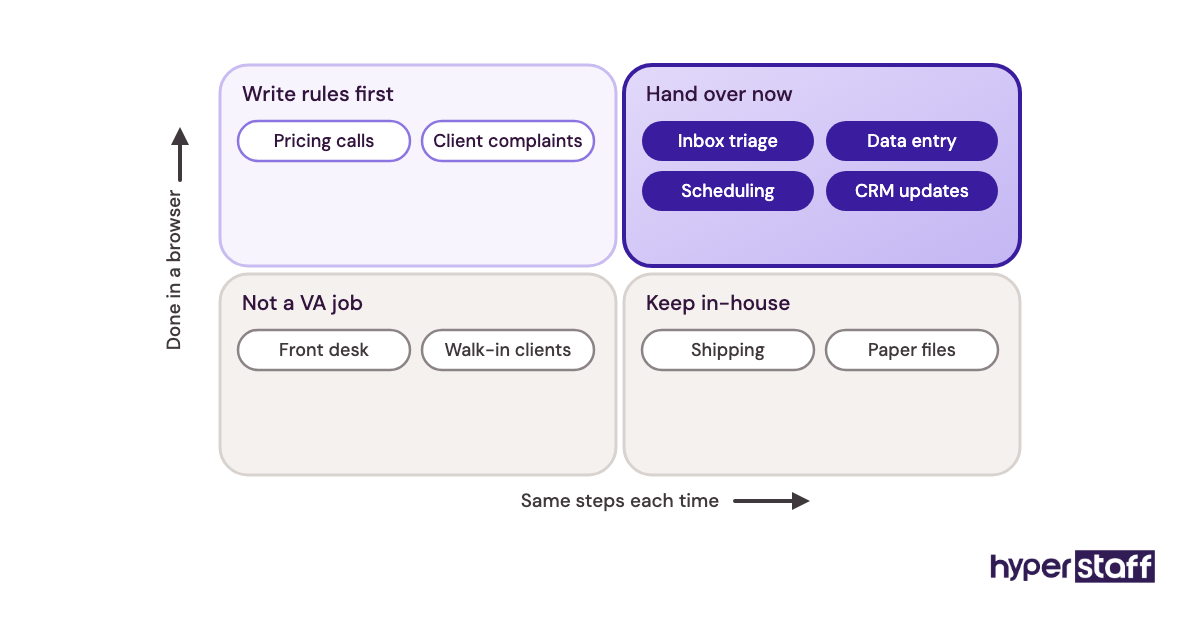
3) Most virtual assistants settle in after four to eight weeks. The earliest results come from repetitive, rules-based work such as inbox triage, data entry, scheduling and CRM updates.
Bought-back hours turn into new revenue
Hyperstaff has placed 70+ pre-vetted virtual assistants with 30+ clients, at rates from $3/hour across five talent regions, and our offshore virtual assistant services match you with a dedicated specialist in 5 business days, with a dedicated account manager, a 30-minute kickoff call and work starting that day or the next morning.
What Does "Worth It" Mean for a Virtual Assistant?
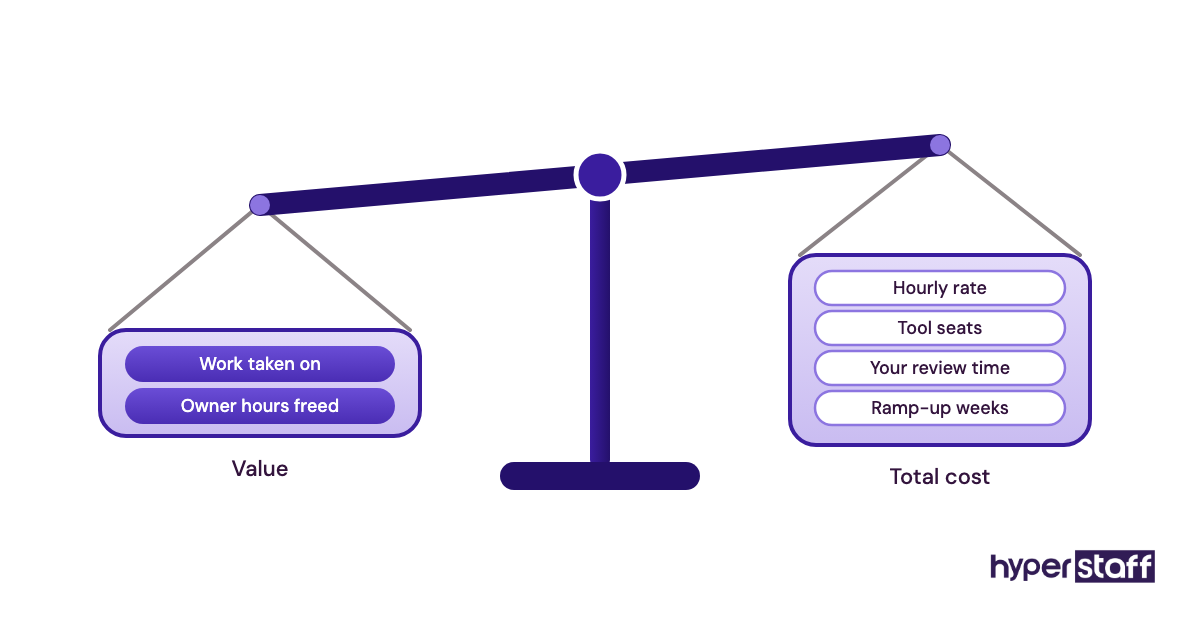
A virtual assistant is worth it when the value of the work they take on, plus the owner hours they free up, is greater than their total cost. Total cost covers the hourly rate, tool seats, your management time and the weeks it takes them to get productive.
The role is wider than most people assume. A remote virtual assistant can run customer support, lead generation, digital marketing, bookkeeping prep and day-to-day operations management, and each of those gets valued in its own way.
Support work is judged on response times and kept customers, lead generation on booked meetings. Admin work is judged on the hours it hands back to you.
Key Virtual Assistant Value Terms You Should Know
- Fully loaded cost = wages plus benefits, payroll taxes, equipment and recruiting for an in-house hire.
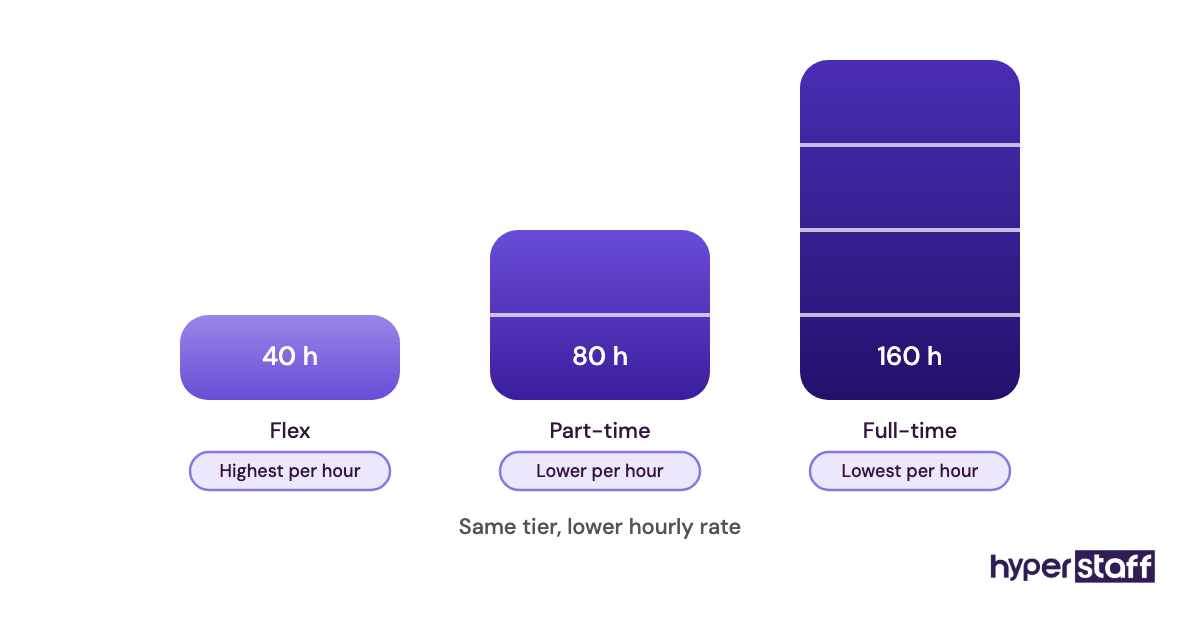
- Hourly bundle = a prepaid block of VA hours each month, such as 40, 80 or 160.
- Dedicated VA = one assistant who works only for your business.
- Opportunity cost = the revenue an owner gives up by spending time on low-value tasks.
- Ramp-up period = the weeks before a new assistant works without close review.
- SOP = standard operating procedure, a written step-by-step guide for one recurring task.
- Replacement guarantee = an agency's promise to bring in a new assistant if the first one isn't a fit.
- Time zone overlap = the working hours you and your assistant share for live questions.
- Payback period = how long it takes before the value a VA creates exceeds what you've spent.
Why Should You Run the Numbers Before Hiring a VA?
Running the numbers before hiring a VA stops you from judging the hire on hourly rate alone. A $3/hour assistant doing work nobody needed is a worse deal than a $12/hour expert who takes over your sales follow-up.
The exercise also forces the decision most owners skip: deciding exactly what gets handed over. If you can't list 10 to 15 recurring tasks, a 40-hour bundle is a safer first step than 160 hours.
How Does a Virtual Assistant Pay for Itself?
A virtual assistant pays for itself in two ways: doing work for less than you or an in-house hire would cost, and freeing hours you move into revenue work. The second one is where most of the return sits.
Cost savings are simple arithmetic. If a recurring virtual assistant task like invoice chasing takes five hours a week, handing it to a $6/hour professional costs about $30 a week.
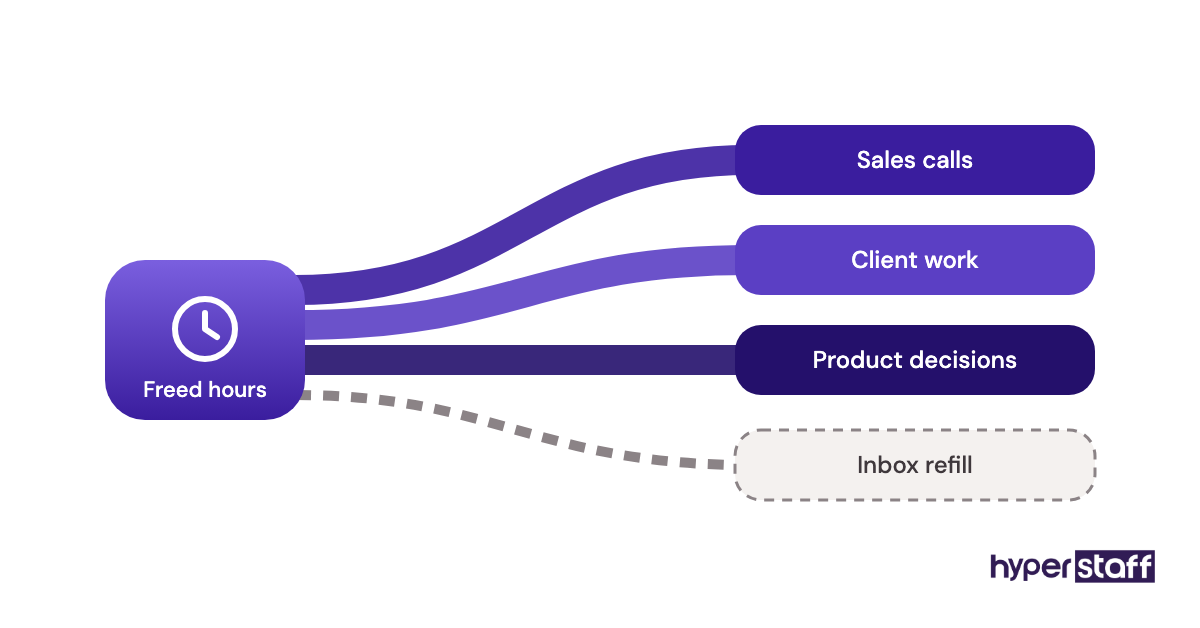
Revenue recovery is harder to measure and bigger when it works. The five freed hours only earn money if they go into sales calls, client work or product decisions, and plenty of owners fill them with more email.
There's a third, smaller return that rarely shows up in a spreadsheet: speed. Leads answered within the hour, invoices sent the day a job finishes and support tickets cleared overnight all shorten the gap between work and cash.
Types of Virtual Assistant Setups and Where Each Pays Off
Virtual assistant setups differ by hours, role and where the return lands. The table maps common forms to the work each one pays off on.
| Setup | Typical hours a month | Best for | Where the value shows up | Watch out for |
|---|---|---|---|---|
| Part-time admin VA | 40 to 80 | Solo owners, consultants | Inbox, calendar, travel, documents | Too few hours to build context |
| Full-time general VA | 160 | Teams of 5 to 20 | Cross-team admin, reporting, operations | Scope creep without a task list |
| Customer support VA | 80 to 160 | Ecommerce, SaaS, service firms | Faster replies, overnight coverage | Needs written refund and escalation rules |
| Lead generation VA | 80 to 160 | B2B services, agencies | List building, outreach, booked meetings | Data quality and email deliverability |
| Digital marketing VA | 40 to 160 | Brands posting weekly | Scheduling, community replies, reports | Brand voice drift |
| Bookkeeping support VA | 40 to 80 | Service firms, online stores | Reconciliation prep, invoicing, receivables | Access controls, accountant sign-off |
| Executive assistant | 80 to 160 | Founders, executives | Calendar control, meeting prep, follow-ups | Needs high trust and judgment |
| Industry-specific VA | 80 to 160 | Real estate, healthcare, legal | CRM updates, listings, intake admin | Learning curve on industry software |
How Is a Virtual Assistant Different From Other Hiring Options?
A virtual assistant differs from other options in cost, commitment and how much business context they keep over time. Owners usually weigh three alternatives: an in-house hire, a marketplace freelancer and an AI tool.
Virtual Assistant vs. In-House Employee
An in-house admin employee costs far more per hour once benefits are added, and you carry recruiting, payroll and equipment. Our breakdown of a virtual assistant vs an in-house hire walks through each line item.
In-house still wins for roles that need physical presence, such as front desk, shipping or paper files. For work done in a browser, the in-house premium buys little extra.
Virtual Assistant vs. Freelance Marketplace Hire
Freelancers on marketplaces suit one-off projects like a spreadsheet cleanup or a website migration. Recurring work tends to break down, because freelancers juggle several clients and can vanish between contracts.
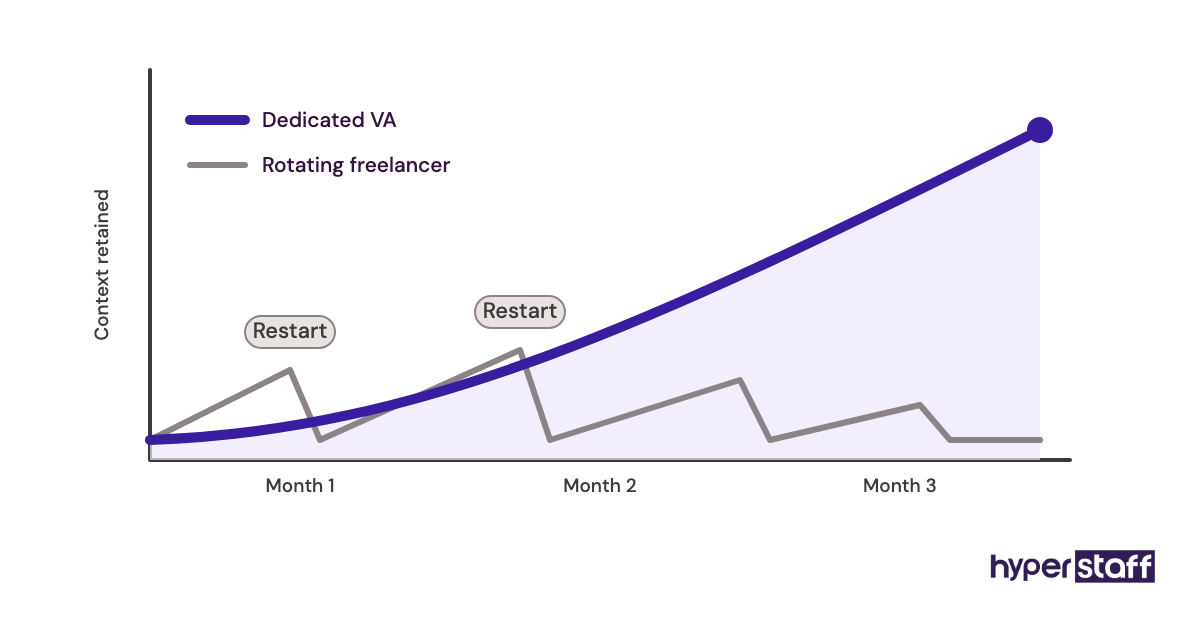
A dedicated VA learns one business, and that knowledge compounds. By month three they know your customers, tools and preferences in a way a rotating freelancer rarely gets to.
Virtual Assistant vs. AI Assistant Tools
AI tools draft emails, summarize meetings and sort data for a few cents a task. They don't own outcomes, so nobody chases a vendor, spots a duplicate invoice or calls a lead back unless a person does.
The pairing beats either one alone. A VA using AI for drafts and research finishes faster and spends the saved time on the judgment calls software skips.
What Are the Benefits of Hiring a Virtual Assistant?
The main benefits of a virtual assistant are lower hourly cost, flexible hours and owner time freed for revenue work.
- Lower cost per hour than an in-house hire, with no benefits, payroll tax or office costs on your side
- Flexible hours, starting at 40 a month and scaling to full-time
- Time zone coverage that keeps support and admin moving outside your working day
- Owner hours moved into sales, delivery and decisions
- Skills like CRM admin or bookkeeping prep without a senior full-time salary
What Are the Drawbacks of a Virtual Assistant?
The drawbacks of a virtual assistant are real but mostly front-loaded, and each one has a fix.
- A ramp-up period of a few weeks where you review most of the work
- Less day-to-day visibility than having someone in the next room
- Limited live overlap when time zones are far apart
- Security risk if logins are shared carelessly
Who Gets the Most Value From a Virtual Assistant?
Owners and small teams who spend 10 or more hours a week on repeatable work get the most value from a virtual assistant. Repeatable means the task follows the same steps each time and can be written down.
Service businesses with billable hours see the clearest return, since every freed hour has a price. Ecommerce brands gain from support and order admin that runs while the owner sleeps.
Larger companies use VAs differently. A 50-person firm tends to place assistants inside one department, such as sales operations, where the gain shows up as more pipeline per rep.
A VA is a poor fit when the work changes every day, depends on in-person contact or has no one willing to review it for the first month.
Virtual Assistant Examples: When It Pays and When It Doesn't
The setups below are common patterns, described by role. In each one, the return depends more on how the work is handed over than on who does it.
Good Virtual Assistant Examples
A Consultant Moving Freed Hours Into Billable Work
A solo consultant hands inbox triage, scheduling, invoicing and proposal formatting to an 80-hour VA. The gain comes from putting those freed hours straight into client work at their usual billing rate.
A Support Inbox Covered Overnight
An online store places a support VA in a time zone that covers its evenings and nights. Tickets that used to wait until morning get first replies within hours, and written refund rules let the VA close most of them alone.
A Sales Team With a Lead Generation VA
A B2B services firm gives a VA list building, CRM cleanup and first-touch outreach. Reps spend their research time on calls instead, and the CRM gets cleaner along the way.
Bad Virtual Assistant Examples
Each of these maps to a pattern in our list of common virtual assistant mistakes.
Hiring Before Knowing What to Hand Over
An owner books 160 hours, then hands over tasks as they come to mind. The VA spends half the month waiting for instructions, and the owner concludes VAs don't work.
Handing Over Judgment Work on Day One
Pricing decisions and client complaints land on a new VA in week one with no written rules. Errors follow, trust drops and the owner takes everything back.
No Review and No Feedback Loop
Work gets handed off and never checked. Small errors in a CRM or bookkeeping file sit for months and cost more to fix than the VA ever saved.
Creating a Virtual Assistant Plan, Step-by-Step
A virtual assistant plan settles what gets handed over and who checks it before anyone is hired. Five steps cover it.
Step #1: List and Time Your Recurring Tasks
Track every task for one to two weeks with rough minutes next to each. Anything repeated weekly and done in a browser goes on the handover list.
Step #2: Put a Price on Your Own Hour
Divide your yearly revenue or target income by the hours you work. Any task you could pay someone $3 to $12 an hour to do belongs on the list.
Step #3: Write the Role Before You Hire
Turn the list into a clear virtual assistant job description with tools, hours and expected outcomes. Then build interview questions for a VA that test the real tasks.
Step #4: Document Before Day One
Record a short screen video for each task and keep logins in a password manager. Good virtual assistant onboarding is mostly this prep work.
Step #5: Set a 30-Day Review
Pick two numbers to check at day 30, such as hours freed and error rate. Decide in advance which result means you'll add hours, change the role or stop.
What Does an Effective Virtual Assistant Strategy Look Like?
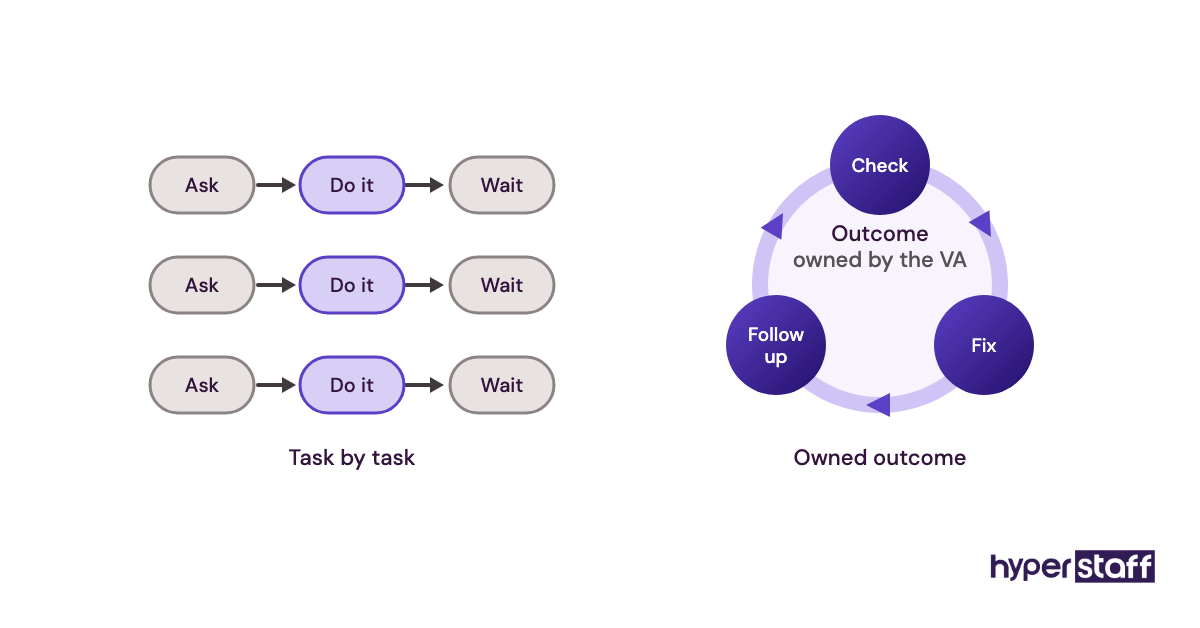
An effective virtual assistant strategy gives the VA a defined lane, written processes and a weekly check-in. Inside that lane, the assistant owns outcomes instead of waiting for task-by-task instructions.
Ownership separates a VA who saves 10 hours from one who saves 25. "Keep the CRM accurate and follow up every lead within a day" gets better results than "update these 40 records."
Sequencing matters too. Most setups start with admin and inbox work, then move into customer-facing or revenue work after the first month, once the VA knows your tone and rules.
Practitioners split on generalist versus specialist roles. Generalists suit solo owners who need many small things done, while specialists suit teams where one function, such as support or lead generation, has a clear backlog.
We lean specialist once a business passes about five people. Narrow roles are easier to measure, and a measurable role is easier to judge as worth it.
Which Virtual Assistant Tools Do You Need?
A virtual assistant needs shared email and documents, team chat, a task tracker, a password manager and a way to record processes. Most of these have free plans that work for one owner and one assistant.
| Tool | Job | Free plan | Paid pricing (per user, per month) |
|---|---|---|---|
| Google Workspace | Email, docs, calendars | Trial only | About $7 to $22 on annual plans |
| Slack | Team chat | Yes, 90 days of history | About $7.25 to $15 on annual plans |
| Asana | Task tracking | Yes, up to 2 users | About $10.99 to $24.99 on annual plans |
| 1Password | Shared logins | Trial only | About $24.95 a month for 10 users, or $8.99 per user |
| Loom | Recorded walkthroughs | Yes, 25 videos up to 5 minutes | About $18 to $24 |
| Notion | SOP library | Yes | About $10 to $20 |
| Hubstaff | Time tracking | Yes, 1 seat | About $5 to $12 per seat |
Of these, the password manager and the screen recorder do the most for the return, since they decide how fast a new or replacement assistant gets productive. Vendors change prices often, so confirm each one on its pricing page before you buy.
10 Proven Tips for Getting Your Money's Worth From a VA
These tips come from the setups that hold up past the first quarter.
- Start with a 40- or 80-hour bundle and add hours once the task list fills them.
- Attach a written outcome to every task you hand over.
- Record each process on video the next time you do it yourself.
- Keep every account and seat under your business, never the VA's personal email.
- Set a fixed daily overlap window for live questions.
- Run all work through one task tracker so nothing lives only in chat.
- Review work daily in week one, twice a week in month one, then weekly.
- Give feedback the same day an error shows up.
- Move the VA toward revenue-facing work after the first month.
- Revisit hours and scope every quarter.
Overcoming Common Virtual Assistant Challenges
Most virtual assistant challenges come down to communication gaps, loose scope and access security. Each one has a known fix.
For communication, set a daily overlap window and ask for a short end-of-day note covering what's done, what's stuck and what's next. Scope creep shrinks once tasks live in one tracker with an owner and a due date.
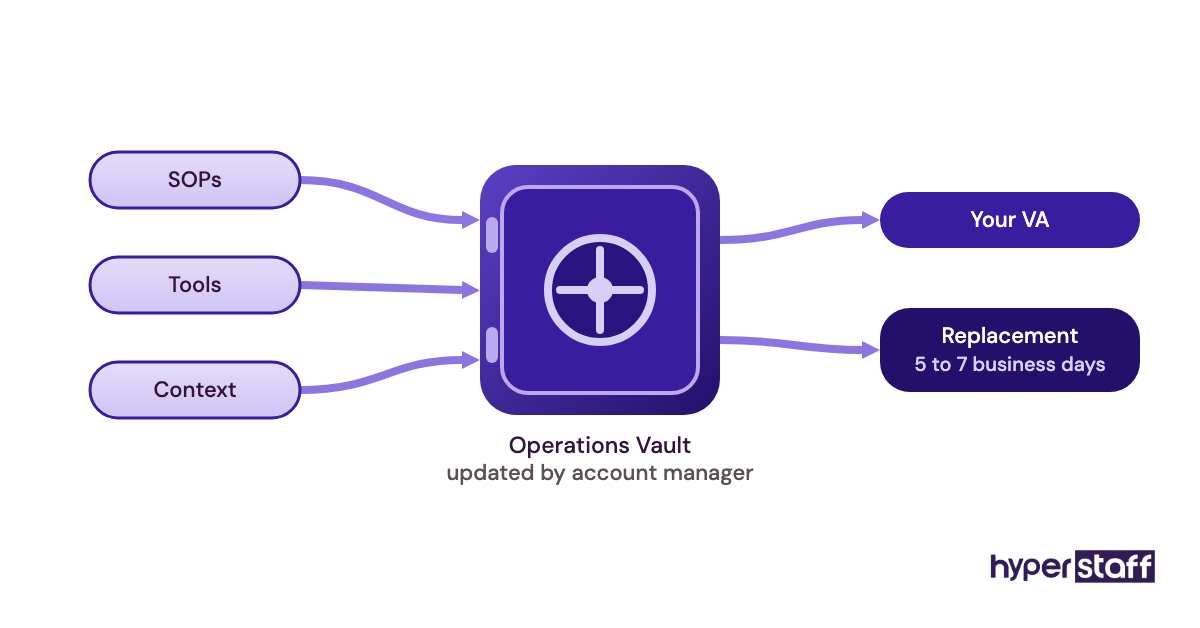
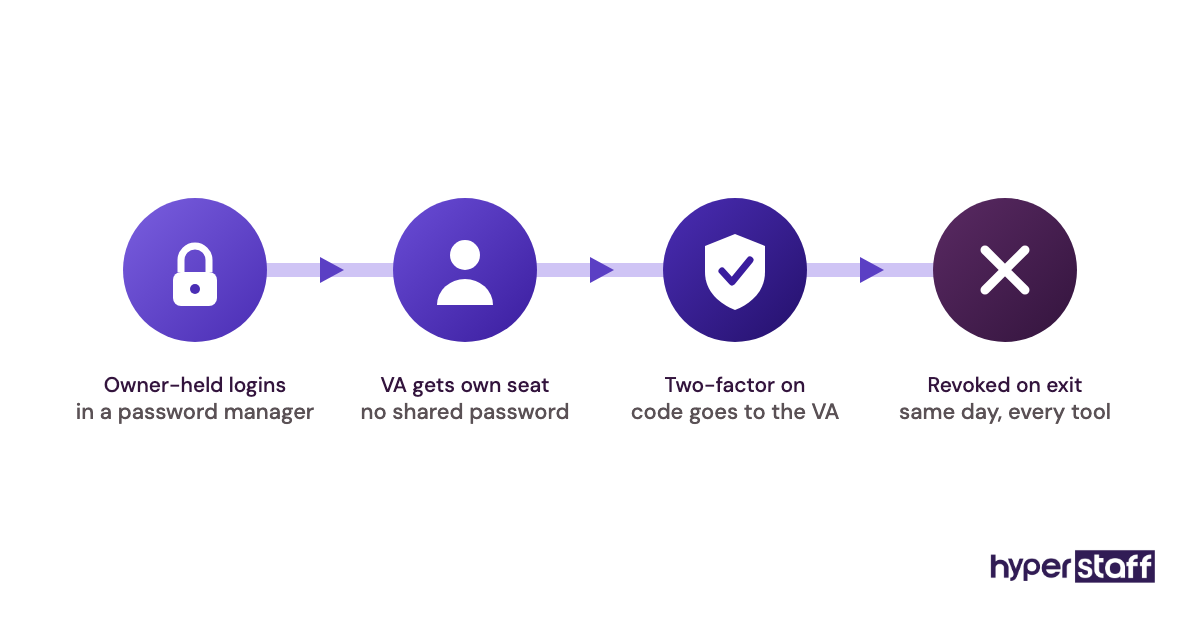
Security holds when every login goes through a password manager and gets removed on the assistant's last day. If fit is the problem, swap early, since a replacement briefed from written SOPs gets up to speed faster than months of coaching a mismatch.
How Do You Measure Whether a Virtual Assistant Is Worth It?
Measure a virtual assistant by hours freed, output quality and where the freed time went. Count hours weekly in your time tracker and spot-check 5 to 10 pieces of work.
Role metrics add precision: first-response time for support, booked meetings for lead generation and days to payment for invoicing. Compare each against your own numbers from before the hire.
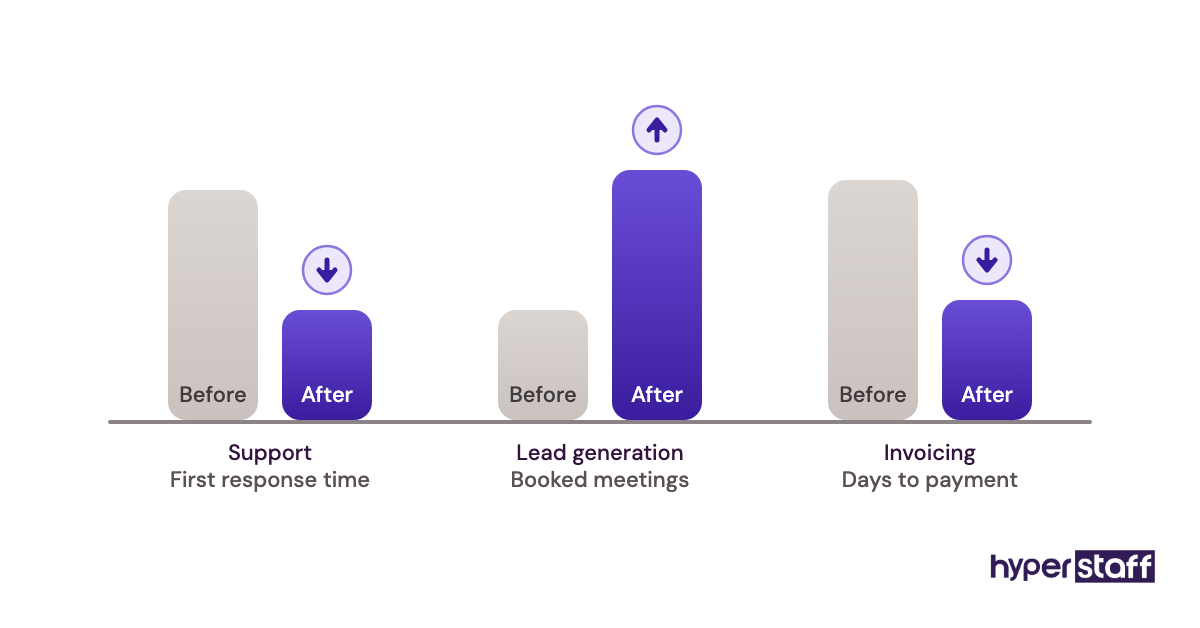
The number that settles it is revenue time. If your calendar shows more client, sales or build hours by month two, the VA is paying for itself.
How Long Does It Take for a Virtual Assistant to Pay Off?
Most virtual assistants start paying off within four to eight weeks. Simple, documented tasks usually run without supervision inside the first two weeks.
Judgment-heavy work like client emails or lead qualification takes two to three months, because the VA needs to see enough edge cases. Weeks two to four are the dead zone, when you're still reviewing and the savings feel small.
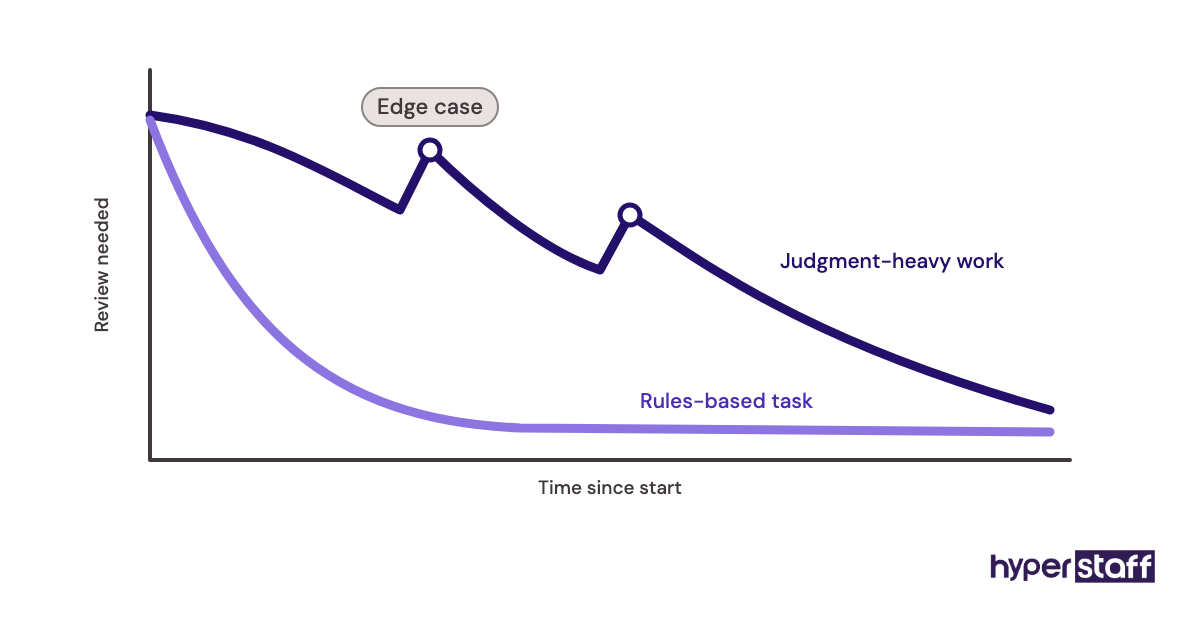
Owners who quit inside that window rarely gave the setup a fair test.
How Much Does a Virtual Assistant Cost?
A virtual assistant through Hyperstaff costs from $3 to $12+ per hour depending on experience, compared with roughly $33 an hour for an in-house administrative assistant once benefits are counted. The in-house figure starts from the BLS median wage of $23.23 an hour and adds benefits at 30% of total compensation, the private-industry share in the BLS employer cost data.
| Cost item | Hyperstaff Essential | Hyperstaff Professional | Hyperstaff Expert | In-house admin assistant |
|---|---|---|---|---|
| Experience | 0 to 2 years | 2 to 5 years | 5+ years | Varies |
| Hourly cost | From $3 | From $6 | From $12 | About $33 with benefits |
| 40 hours a month | From $120 | From $240 | From $480 | About $1,330 |
| 80 hours a month | From $240 | From $480 | From $960 | About $2,655 |
| 160 hours a month | From $480 | From $960 | From $1,920 | About $5,310 |
| Hiring | Placed in 5 business days | Placed in 5 business days | Placed in 5 business days | Job ads, interviews, weeks of your time |
| Replacement | Free, 5 to 7 business days | Free, 5 to 7 business days | Free, 5 to 7 business days | Restart the hiring process |
| Prepay discount | Save 10% paying quarterly | Save 10% paying quarterly | Save 10% paying quarterly | None |
Important: Hyperstaff prices shown are starting averages. Your actual cost depends on the role, the skills it needs, the hours you book and the region your assistant works from.
Is a Virtual Assistant Worth It?
Yes, for most owners with 10 or more hours of repeatable weekly work, a virtual assistant is worth it, and done right it's one of the highest-return hires a small business makes. The return comes from documenting the work and moving the freed hours into revenue.
Here's an example calculation. An owner who bills $100 an hour books a Professional VA for 80 hours a month at $6/hour, which is $480, plus about $40 in tool seats.
Say the VA frees 15 owner hours a week, roughly 65 a month, and the owner moves just 10 of them into billable work. That's $1,000 of new revenue against $520 in cost, and every extra billable hour adds another $100.
Paying quarterly drops the VA cost from $480 to $432. The same 80 hours from an in-house assistant would cost about $2,655 with benefits, so the math only closes at a much higher billing rate.
The calculation fails if the freed hours turn into more email. It also leaves out the first month, when your own review time eats into the gain.
How Do You Choose a Virtual Assistant Agency?
Choose a virtual assistant agency by checking how it vets talent, whether you get one dedicated assistant and how fast replacements arrive. Published hourly rates are a good sign, since you can run the math before the first call.
Ask to see the vetting steps and whether you can interview candidates yourself. Then ask who keeps your process documentation if the assistant leaves, because an agency holding no SOPs sends you back to square one.
At Hyperstaff, every client gets a dedicated account manager, and we keep your SOPs, tools and context in an Operations Vault. A replacement arrives in 5 to 7 business days, already briefed from it.
Virtual Assistant Statistics, Trends and Future Predictions
The cost gap behind the virtual assistant model is easy to trace in federal data. The BLS puts median pay for secretaries and administrative assistants at $48,310 a year, and its employer cost survey shows $14.07 of every $46.89 spent per private-industry work hour going to benefits.
Offshore staffing moves that benefits layer off the client's books. It's a large part of why the hourly gap between the two options is so wide.
Our prediction is that demand keeps shifting from general admin toward specialist remote roles such as lead generation, support and bookkeeping prep. AI is handling more first drafts, so a VA's value ties to how well they know one business's rules.
Where we're less sure is time zones. Some teams insist on full overlap and hire from Latin America, others prefer overnight coverage from the Philippines or India, and we haven't seen a clear winner yet.
Does AI Change Whether a Virtual Assistant Is Worth It?
AI makes each virtual assistant hour produce more, while review, judgment and follow-through stay with a person. A VA using AI for drafts, summaries and data cleanup covers more ground in the same 40 hours.
What AI hasn't replaced is ownership. Chasing a late vendor, spotting a refund that breaks policy or calling back a lead who stopped replying still needs someone accountable.
Some owners skip the VA and run AI tools themselves. For a few hours of admin a week that can work, but past 10 hours the owner ends up working as the AI's assistant.
Disclaimer: This article is for general information only and isn't financial, legal or tax advice. Costs, rates and figures are estimates that vary by business and change over time, so confirm them before making hiring decisions.
Common questions
Is a virtual assistant worth it if I have no employees yet?
Often, yes. A VA is a low-risk first hire because you can start at 40 hours a month with no payroll setup. The catch is that you'll do all the training, so write down your top tasks first.
Should I get a part-time or full-time virtual assistant?
Start part-time unless you already have 30+ hours of documented weekly work. Most owners move up from 40 or 80 hours once the task list grows and the VA has proven reliable.
Is it safe to give a virtual assistant access to my accounts?
It's safe when you share logins through a password manager and use separate user seats where tools allow it. Turn on two-factor authentication and remove access the day an assistant leaves.
Is an offshore virtual assistant worth it if English isn't their first language?
It depends on the role. Back-office work like data entry or bookkeeping prep needs solid written English, while customer-facing roles need strong spoken English. Test both with a short paid task or a recorded call during interviews.
Can I try a virtual assistant before committing long-term?
You can start with a 40-hour monthly bundle and judge the results after 30 days. Set two clear measures, such as hours freed and error rate, before the trial starts.
Book a free 15 min call
We place a pre-vetted specialist in 5 business days, fully managed, from $3/hour.