Virtual Assistant Tasks: A Checklist for What to Hand Off First
A nine-point checklist for deciding which virtual assistant tasks to hand off, how to define them and how many hours they fill.
On this page
- Which virtual assistant tasks repeat often enough to delegate first?
- Can you describe what finished looks like in one sentence?
- Which customer support tasks can a virtual assistant own end to end?
- Is lead generation a research task or an outreach task?
- Which digital marketing tasks need your approval before they go live?
- What access will your virtual assistant need, and at what level?
- Operations tasks that live only in your head
- How many hours does your virtual assistant task list fill?
- Who covers the tasks when your virtual assistant is out?
- FAQs
💡 Key Takeaways:
1) Virtual assistant tasks go well past inbox and calendar work, covering customer support, lead generation, digital marketing, operations and online business management.
2) The best tasks to delegate first repeat on a schedule, have a written definition of done, and need only limited access to the tools involved.
3) A task list should be sized in weekly hours before you hire, because a part-time load and a full-time load call for different experience levels and setups.
Hand off the work that's costing you revenue
Delegated well, virtual assistant tasks give you back the hours that actually bring money in. Hyperstaff matches you with one pre-vetted specialist through our dedicated virtual assistant services, with 70+ assistants placed for 30+ clients across five regions. Rates start at $3/hour, placement takes 5 business days, and after a 30-minute kickoff call, work starts that day or the next morning.
Which virtual assistant tasks repeat often enough to delegate first?
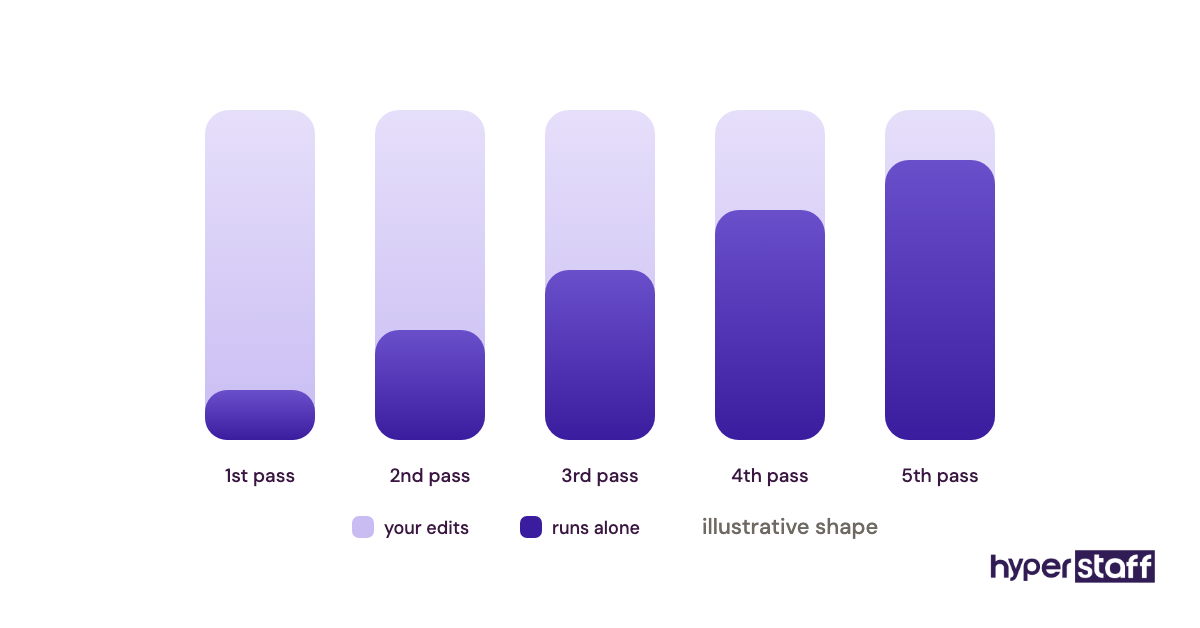
The virtual assistant tasks worth delegating first are the ones that come back daily or weekly on a predictable schedule. A recurring task gets faster with every pass, so the time you spend explaining it once pays back each week after.
One-off projects work the other way. They take as long to brief as to do, and the assistant learns little from them that carries over to next month.
What to look for in your calendar
Pull up the last two weeks and mark anything you did more than once.
- Inbox triage and replies to routine questions
- Sending invoices and chasing late payments
- Social media scheduling
- CRM updates after sales calls
- Weekly reports pulled from the same sources
Why repetition beats difficulty
Owners often hand off the hardest task first, because it's the one they dread. A hard, rare task gives the assistant one attempt to learn it, and the first attempt usually misses.
Repeating tasks build pattern knowledge. By the fourth or fifth weekly report, a good assistant spots a missing number before you do.
Ready to move on once
You have a list of five to ten recurring tasks, each tagged with how often it happens. Daily and weekly items sit at the top.
Can you describe what finished looks like in one sentence?
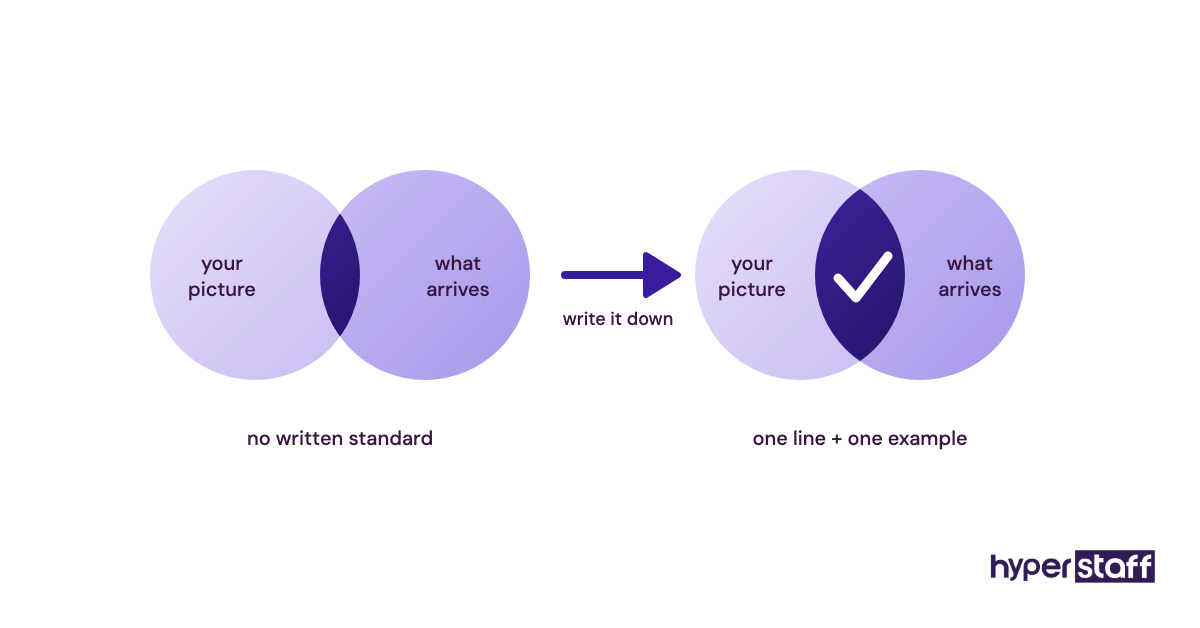
A task is ready for a virtual assistant when you can state its finished state in one sentence. "Reply to support emails" is vague; "every support email gets a reply within four business hours using the saved templates" is something another person can own.
Most handoffs that go wrong trace back to this gap. The assistant did the work, just to a different standard than the one in the owner's head.
Questions to answer before the handoff
Write these down for every task on your list.
- What the output is: a sent email, an updated row, a published post
- The deadline or response time
- Who sees the result
- What counts as an error
- When to ask you instead of deciding
The cost of skipping it
Without a written standard, you end up reviewing everything. Review time then eats the hours you brought in help to free up, which is one of the most common virtual assistant mistakes in the first month.
There's a quieter cost too. Assistants who get corrected without a clear rule start checking with you on every small call, and the work slows down for both sides.
You'll know it's set when
Each task has a one-line definition plus one example of a finished version. A new person could read both and produce the right result without a call.
Which customer support tasks can a virtual assistant own end to end?
A virtual assistant can own most tier-one customer support: answering email and chat tickets, handling order status questions, processing refunds within set limits and routing complaints that need you. The line sits at decisions that cost real money or set policy.
Support tasks to sort
Split your support work into what follows a rule and what needs judgment.
- Ticket replies drawn from a saved macro library
- Tracking and shipping questions
- Refunds under a dollar limit you set
- Logging reviews and product feedback
- Escalations sent to you with a short summary attached
- Follow-ups on tickets left open too long
Why support makes a strong first handoff
Customer support has a built-in feedback loop. Tickets get answered or they don't, and customers say so quickly when a reply misses.
Helpdesk tools like Zendesk, Gorgias, Help Scout and Freshdesk all offer agent roles and saved replies, so an assistant can work inside guardrails from day one. A shared Gmail inbox copes at low volume, but it gets messy once two people reply to the same customer without seeing each other's thread.
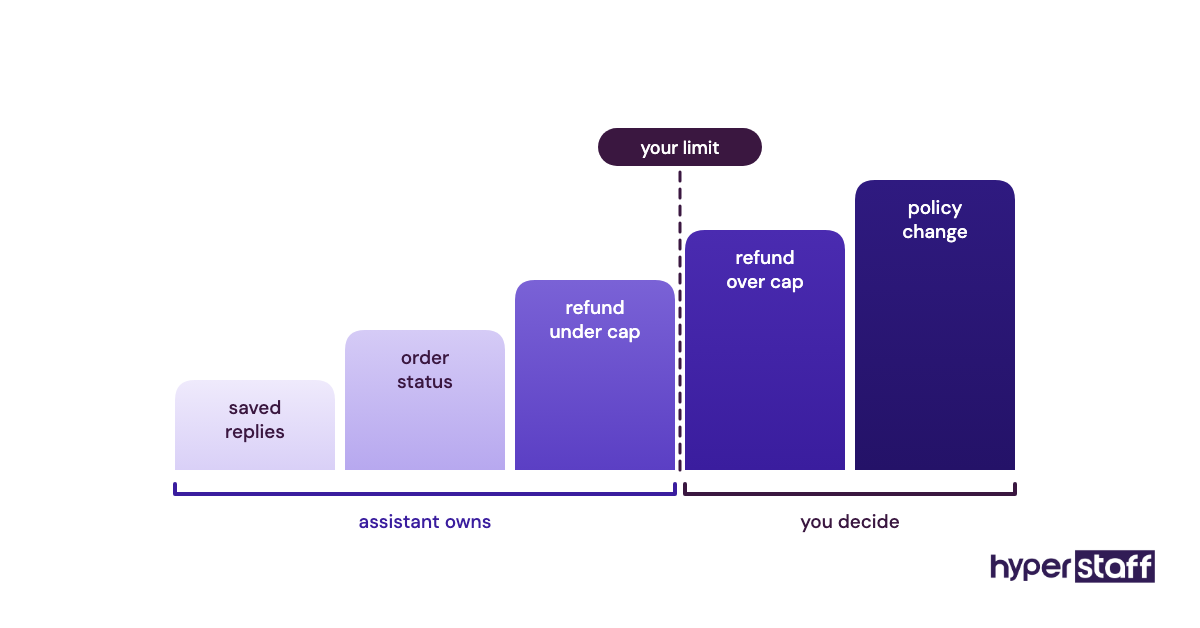
Owners split on refunds. Some keep every refund in-house, while others hand them over with a cap, and we lean toward the cap because it removes the slowest step in most support queues once the escalation rule is trusted.
Handoff complete when
The assistant has a macro library, a written refund limit and an escalation path to a named person. You stop reading every ticket and start reading a weekly summary.
Is lead generation a research task or an outreach task?
Lead generation for a virtual assistant covers two separate jobs: research (building and cleaning prospect lists) and outreach (sending messages and booking calls). Research can be handed off on day one, and outreach can follow once your offer and voice are written down.
Points to check on lead work
Settle these before assigning any lead generation.
- Who your ideal customer is, in writing
- Which tool holds the list: Apollo, LinkedIn Sales Navigator or a plain spreadsheet
- How many new contacts a week counts as on target
- Who writes the outreach copy
- Where booked calls land on your calendar
Why the split matters
Treating lead generation as one task is where many setups stall. An assistant told to "find leads and reach out" has to guess at targeting, tone and offer all at once.
Research errors are cheap, since a wrong contact just gets deleted. Outreach errors cost sender reputation, and a domain flagged for spam can take weeks to recover.
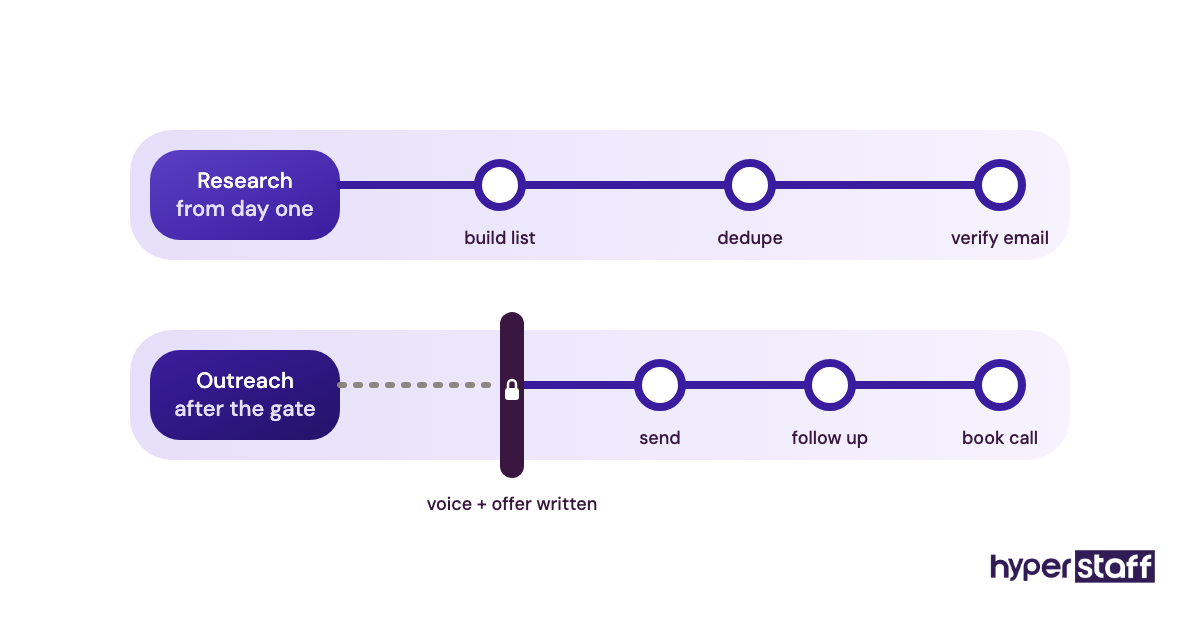
If outreach is part of the role, test for it before hiring. Good virtual assistant interview questions ask the candidate to write a sample message to one of your real prospects.
Ready to run when
Research happens weekly against a written customer profile. Outreach either has approved templates or stays with you until it does.
Which digital marketing tasks need your approval before they go live?
Digital marketing tasks that publish under your name, such as social posts, newsletters and ad copy, need your approval until the assistant has a voice guide and a track record. Behind-the-scenes work like scheduling, reporting and resizing images can run without sign-off from the start.
What to sort in your marketing work
Tag each marketing task as public-facing or behind the scenes.
- Post scheduling in Buffer, Later or Meta Business Suite
- Newsletter formatting in your email platform
- Monthly traffic pulls from Google Analytics
- Graphics built from your Canva templates
Where approval protects you
Brand voice is the hardest thing to write down and the easiest thing to get wrong in public. A post can be accurate and still sound like a stranger wrote it.
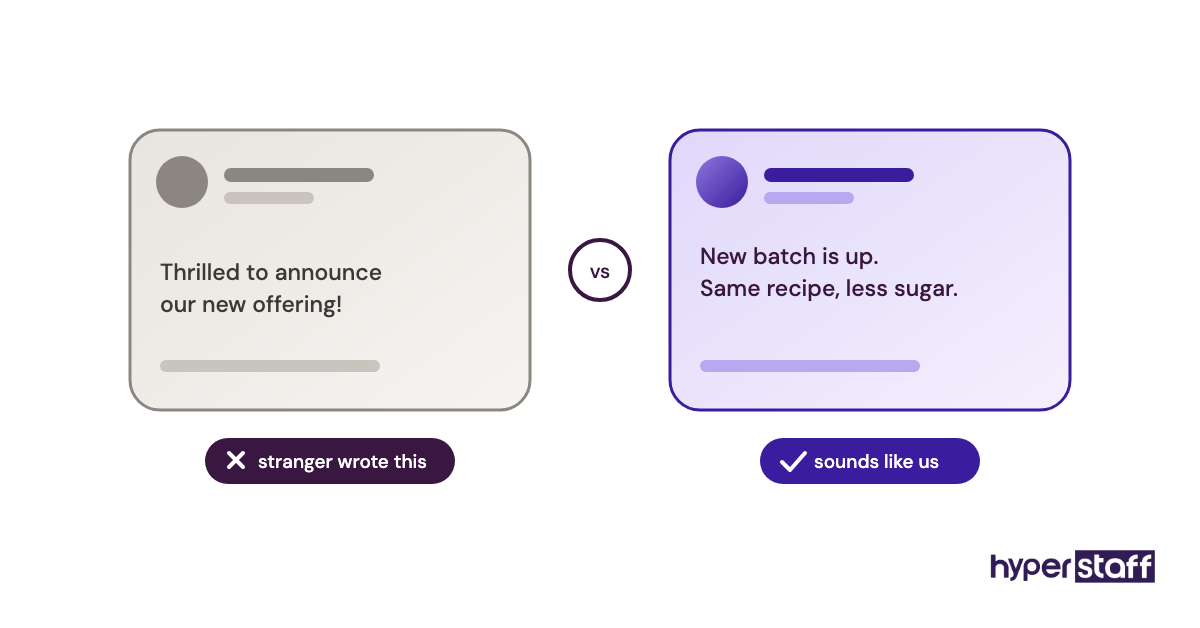
Practitioners disagree on how long approval should last. Our view: keep it on anything public for the first month, then drop it format by format once a few weeks pass without edits.
Signed off when
There's a voice guide with real examples, an approval step built into the scheduling tool, and a date on the calendar to decide whether that step can go.
What access will your virtual assistant need, and at what level?
Every virtual assistant task needs a login, and each login should sit at the lowest permission level that still lets the work happen. Map tools to tasks before day one, so access is ready at the kickoff call and no password gets passed around by text.
Access items to map
List every tool on your task sheet and decide the access level for each.
- A password manager with shared vaults, such as 1Password or Bitwarden
- Role-based seats in your CRM, helpdesk and project tool
- Delegated inbox and calendar access in Google Workspace or Microsoft 365
- Read-only views of payment dashboards, if they're needed at all
- Two-factor codes stored in the password manager instead of your phone
Why permission levels come first
Access trouble is a common reason a new assistant's first week stalls. Logins aren't ready, two-factor prompts hit your phone at odd hours, and the first days go to setup.
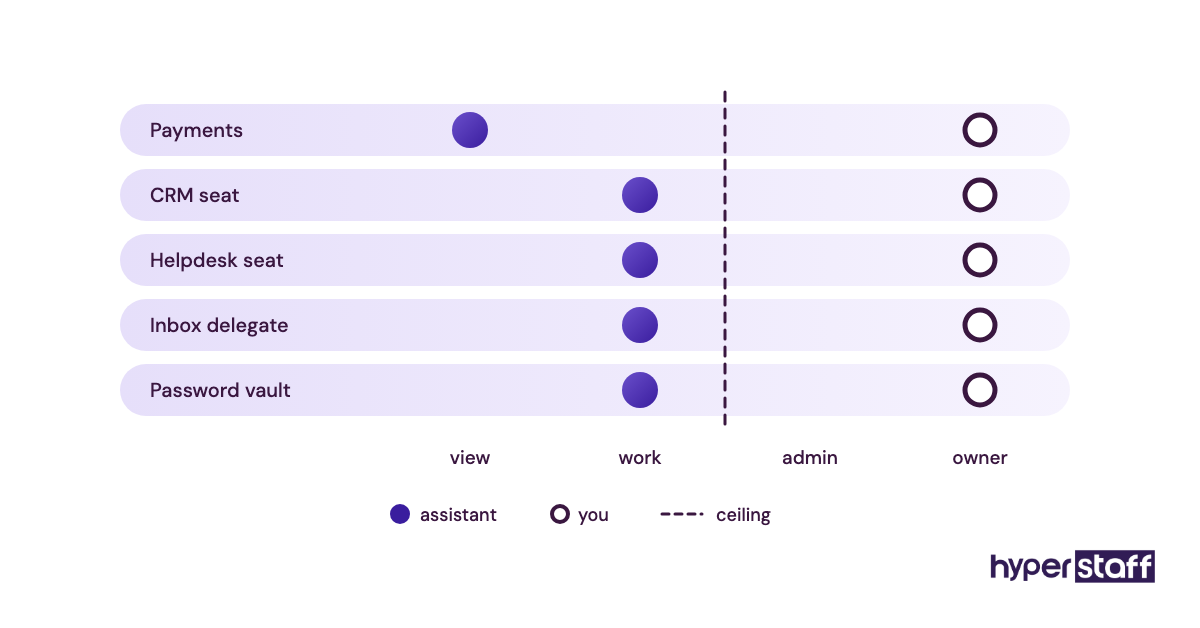
Limited permissions also make offboarding quick. Remove the shared vault and the role seats, and the access is gone in minutes.
Access is done when
Every tool has a named access level, all logins live in the password manager, and one login has been tested from the assistant's side before kickoff.
Operations tasks that live only in your head
Operations work is usually the last category owners delegate, because nobody has written it down. Vendor follow-ups, stock checks, subscription renewals and month-end file cleanup tend to exist only as habits.
A narrow picture of what a virtual assistant is, limited to inbox and calendar, hides this whole category. Operations and online business management are often where an assistant saves the most owner time.
What to pull out of your head
For one week, note every operations task as you do it.
- Supplier and vendor follow-ups
- Inventory or stock-level checks
- Receipt collection for your bookkeeper
- Board updates in Asana, Trello or ClickUp
- Domain, software and subscription renewals
Why unwritten tasks are a risk
Undocumented work leaves with whoever does it. If an assistant learns a process by watching and later moves on, you're back to explaining it from scratch.
Hyperstaff writes this down for every client in an Operations Vault: your SOPs, tools and context, maintained for you. If a replacement is ever needed, they're briefed from the Vault and placed free within 5 to 7 business days.
A screen recording of you doing the task makes a decent first draft of an SOP. It won't hold up as the final version, since videos are hard to search and go stale the moment one step changes.
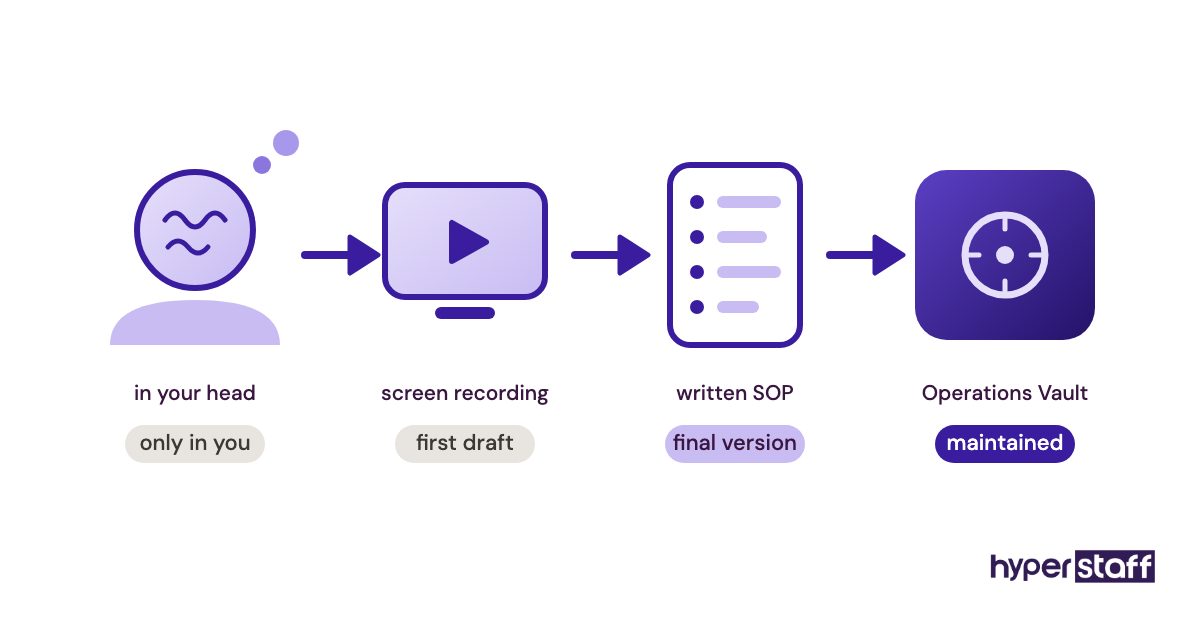
Written processes also make onboarding a virtual assistant faster. They're far easier to write before the first day than during it.
Written down when
Each operations task has an SOP naming the tool, the trigger and the finished state. Someone new could follow it without asking you anything.
How many hours does your virtual assistant task list fill?
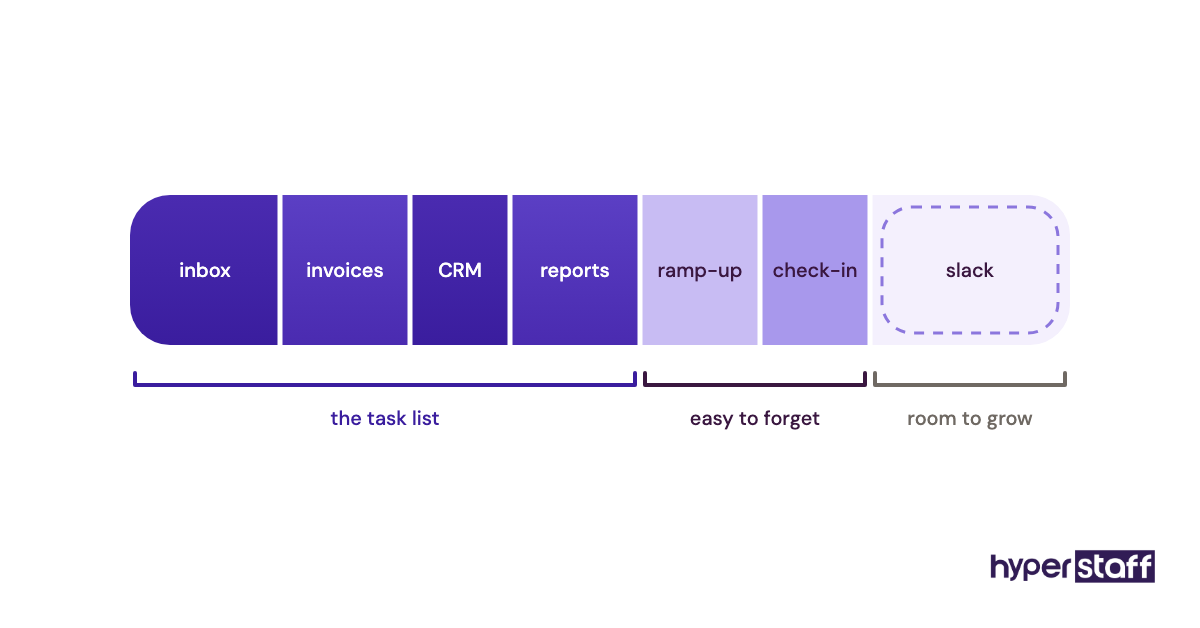
Add up the weekly time for every task on your list before choosing a plan. Hyperstaff offers monthly bundles of 40, 80 or 160 hours, which roughly match a light part-time, half-time and full-time load.
Numbers to estimate
Estimate weekly minutes for each task, then pad them for the learning period.
- Current time per task, taken from your own calendar
- How many times a week it happens
- A ramp-up buffer for the first few weeks
- Seasonal peaks such as holiday sales or tax deadlines
- Growth you expect over the next quarter
- Time for a weekly check-in with you
| Monthly bundle | Approx. weekly hours | Typical fit |
|---|---|---|
| 40 hours | About 10 | One or two task areas, such as inbox plus scheduling |
| 80 hours | About 20 | Support plus admin, or lead research plus CRM upkeep |
| 160 hours | About 40 | A full role spanning several task areas |
Why sizing shapes the hire
Hours and task type together decide the experience tier. A small bundle of rule-based tasks suits Essential (0 to 2 years, from $3/hour), and a full-time mix with judgment calls usually needs Professional (2 to 5 years, from $6/hour) or Expert (5+ years, from $12/hour).
Sizing is also the fair way to judge whether a virtual assistant is worth it, because the math runs on real hours. For a full-time load, run the virtual assistant vs in-house comparison too, and remember that paying quarterly saves 10%.
Sized when
You have a weekly hour total, a bundle that covers it with some slack, and a tier matched to the hardest task on the list.
Who covers the tasks when your virtual assistant is out?
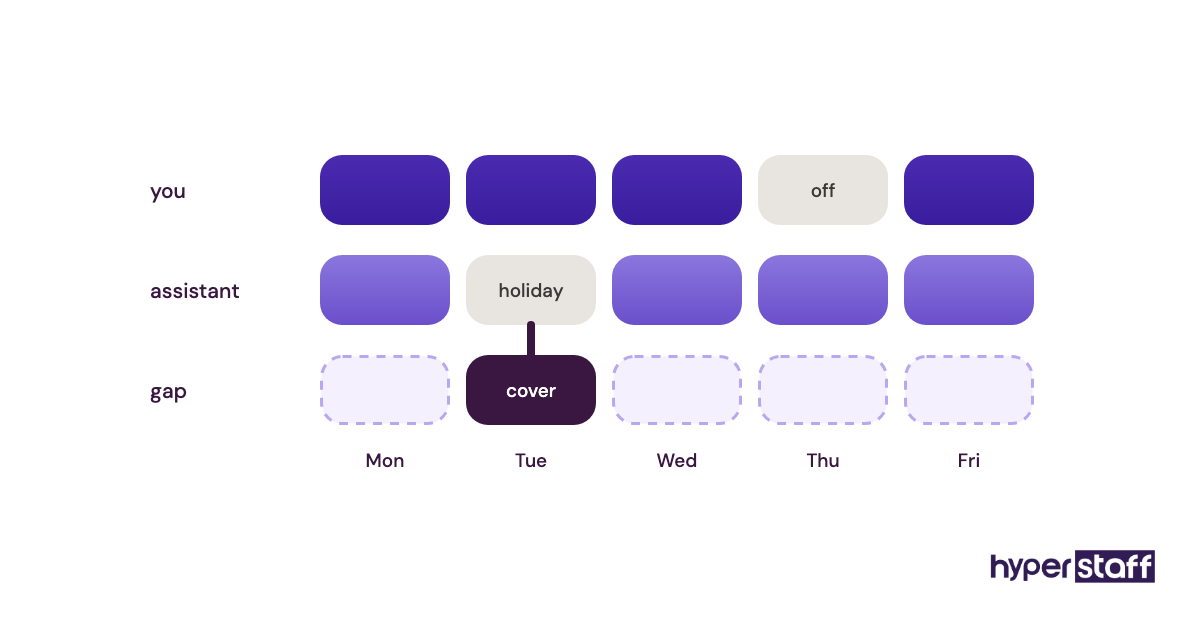
Every delegated task needs a coverage plan for sick days, holidays and the rare case where an assistant leaves. Decide now which tasks pause, which come back to you for a few days, and which need someone else.
Coverage items to settle
Go through the list and tag each task by how long it can wait.
- Tasks that can pause a week without harm
- Tasks that return to you for a few days
- Customer-facing tasks that need same-day cover
- Public holidays in the assistant's region
- Your contact at the agency if something slips
Why coverage gets skipped
Coverage feels like a later problem until the first absence lands in a busy week. Support queues and outreach sequences hurt most when they stop without warning.
Holiday calendars also differ by region. Assistants in the Philippines, India or Latin America observe public holidays you may not, so add them to your shared calendar early.
Every Hyperstaff client has a dedicated account manager, which means one person to call when cover needs arranging. Put the coverage rules into the virtual assistant job description so they're agreed before the first day.
Covered when
Every task carries a pause, return or cover tag, regional holidays are on the calendar, and you know exactly who to call when something slips.
Disclaimer: This article is for general information only and is not legal, financial or tax advice. Tool features and terms change, so check each provider's current details before relying on them. Hyperstaff accepts no liability for decisions made based on this content.
Common questions
What tasks should I not give a virtual assistant?
Keep anything that sets prices, signs contracts or decides hiring and firing. Your assistant can prepare the research or a draft for these, but the final call stays with you.
Can a virtual assistant do bookkeeping tasks?
Yes, for data entry, receipt collection, sending invoices and matching transactions in tools like QuickBooks or Xero. Tax filing and financial advice belong with a licensed accountant.
How many tasks should a new VA get in week one?
Start with two or three recurring tasks that already have written instructions. Add more once those run without corrections, usually over the next few weeks.
Do virtual assistant tasks change by region?
The task types stay the same, but time zone and language shape what fits best. A US-based assistant suits live phone support during your hours, and assistants in the Philippines or India often take overnight queues and back-office work.
Can one virtual assistant handle tasks across departments?
Yes, as long as the hours allow it and each task has its own SOP. Mixing support, marketing and admin works best with a weekly priority list, so the assistant knows what comes first when time runs short.
Book a free 15 min call
We place a pre-vetted specialist in 5 business days, fully managed, from $3/hour.