Virtual Assistant vs In-House Hire: Cost, Control and Which One Fits
A side-by-side look at hiring a virtual assistant versus an in-house employee, with real costs, trade-offs and a straight verdict.
On this page
- What Does "Virtual Assistant vs In-House" Actually Compare?
- Virtual Assistant vs In-House Employee: Side by Side
- Key VA vs In-House Hiring Terms You Should Know
- Why Does the VA vs In-House Choice Matter So Much?
- How Does Hiring Work for a VA vs an In-House Employee?
- Hiring Models for Support Roles Compared
- How a VA Differs From Related Staffing Options
- The Benefits of Hiring a Virtual Assistant Over In-House
- The Drawbacks of a Virtual Assistant Compared to In-House
- Who Should Hire a VA and Who Should Hire In-House?
- Virtual Assistant vs In-House Examples
- Choosing Between a VA and In-House, Step by Step
- What Does a Smart Support Staffing Strategy Look Like?
- Tools and Software for Managing a VA vs In-House Staff
- 10 Proven Tips for Choosing Between a VA and an In-House Hire
- Overcoming Common VA vs In-House Challenges
- How to Measure Success With a VA or In-House Hire
- How Long Does It Take a VA or In-House Hire to Work?
- How Much Does a Virtual Assistant Cost vs an In-House Employee?
- Is a Virtual Assistant Worth It Compared to In-House?
- How to Choose a Virtual Assistant Agency
- VA vs In-House Statistics, Trends and Future Predictions
- Virtual Assistants, In-House Staff and AI
- FAQs
💡 Key Takeaways:
1) A virtual assistant usually costs a fraction of an in-house employee because you pay for hours worked, with no payroll taxes, benefits, office space or equipment on your side.
2) An in-house hire is the better choice when the job needs physical presence, handles tightly regulated data on your premises, or will grow into a management role inside the company.
3) Most small businesses get the best result from a dedicated remote assistant for repeatable digital work, with in-house hiring kept for the roles that genuinely need someone on site.
Keep more margin from every hour of admin
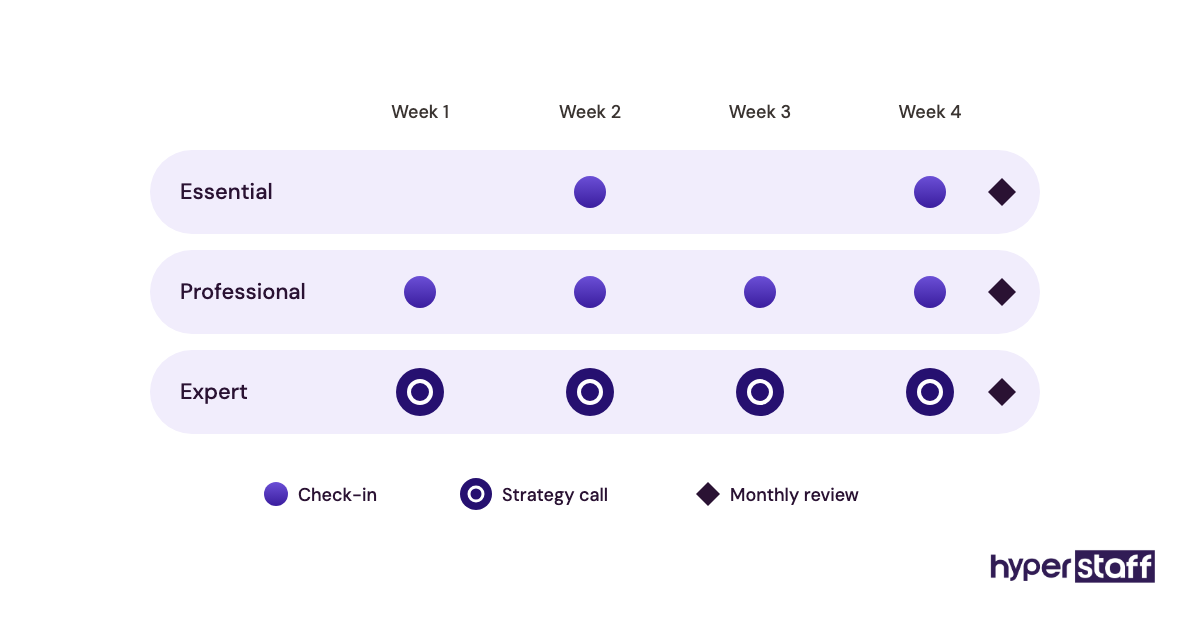
Hyperstaff has placed 70+ pre-vetted virtual assistants with 30+ clients, with rates from $3/hour and a specialist matched to you in 5 business days. Our dedicated virtual assistant services give you one person who learns your business, a dedicated account manager, and a free replacement in 5 to 7 business days if the fit is wrong, so the money you'd spend on overhead stays in the business.
What Does "Virtual Assistant vs In-House" Actually Compare?
Virtual assistant vs in-house compares two ways to staff the same support work: a remote professional who works for you online, usually through an agency or as a contractor, against an employee on your own payroll who typically works from your office. The choice shapes your cost, your legal obligations and how fast the person can start.
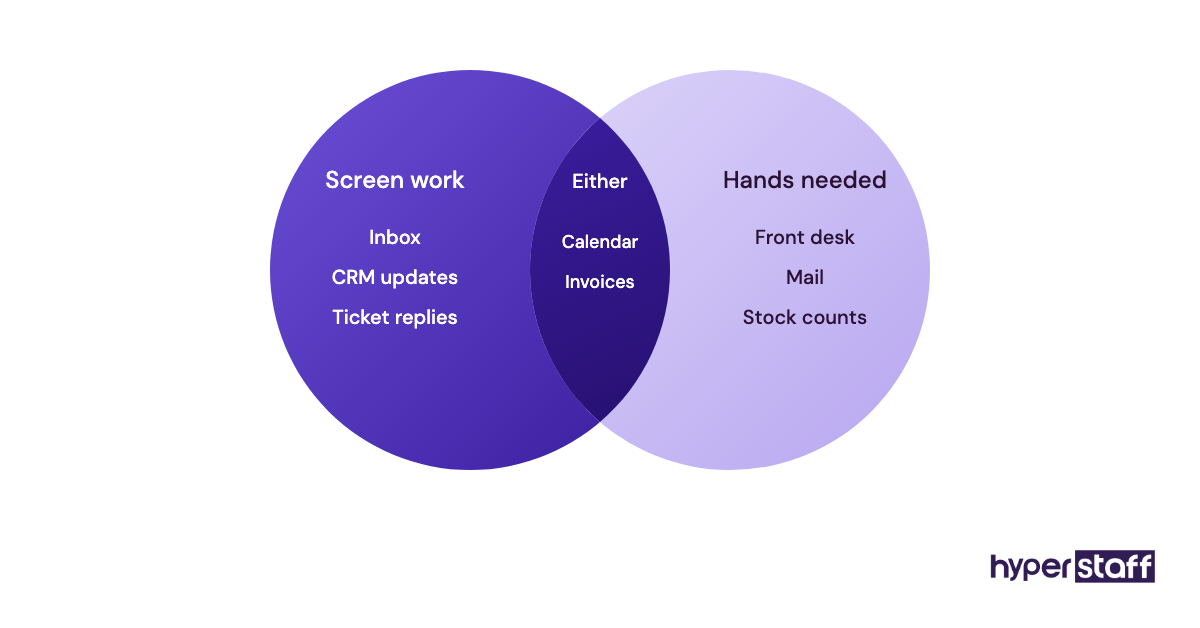
The work itself overlaps more than most owners expect. If you still picture a VA as someone who sorts email, it helps to read up on what a virtual assistant does, because the role now reaches customer support, lead generation, digital marketing, bookkeeping support and online operations.
Virtual Assistant vs In-House Employee: Side by Side
The fastest way to see the gap is to put both options against the same questions. Figures below are typical ranges for a full-time support role in the United States.
| Factor | Virtual assistant (dedicated, via agency) | In-house employee |
|---|---|---|
| Yearly cost, full time | About $5,800 to $23,000 | About $60,000 to $75,000 with benefits |
| Time to start | Days to two weeks | Often 4 to 10 weeks |
| Payroll tax and benefits | Handled by the provider | Paid by you |
| Equipment and desk | Assistant supplies their own | You supply them |
| Hours | 40, 80 or 160 a month, flexible | Fixed, usually 40 a week |
| Replacing a bad fit | Provider replaces, often in a week | You restart recruiting |
| Physical tasks | Not possible | Yes |
| Walk-over-and-ask access | Chat, call or video | In person |
Key VA vs In-House Hiring Terms You Should Know
- Dedicated VA = one remote assistant assigned only to your business, as opposed to a shared pool.
- Fully loaded cost = salary plus payroll taxes, benefits, equipment, software and office space for one employee.
- W-2 employee = a US worker on your payroll, with taxes withheld and employer obligations attached.
- 1099 contractor = a self-employed US worker who invoices you and handles their own taxes.
- Employer of record (EOR) = a company that legally employs a worker abroad on your behalf.
- Misclassification = treating someone as a contractor when the law sees them as an employee.
- SOP = a written standard operating procedure for one repeatable task.
- Time-zone overlap = the hours each day when you and your assistant are both working.
- Ramp-up period = the weeks before a new hire reaches full, unsupervised output.
- Offshore staffing = hiring talent based in another country, usually for cost and coverage.
Why Does the VA vs In-House Choice Matter So Much?
The choice matters because a support hire is one of the largest fixed costs a small business takes on, and it's hard to undo. A US employee commits you to payroll, taxes, benefits and, in many states, specific termination rules, while a VA engagement can usually be resized month to month.
Speed matters as much as money. Every week a role sits empty, the owner does the work, and owner hours are the most expensive hours in the company.
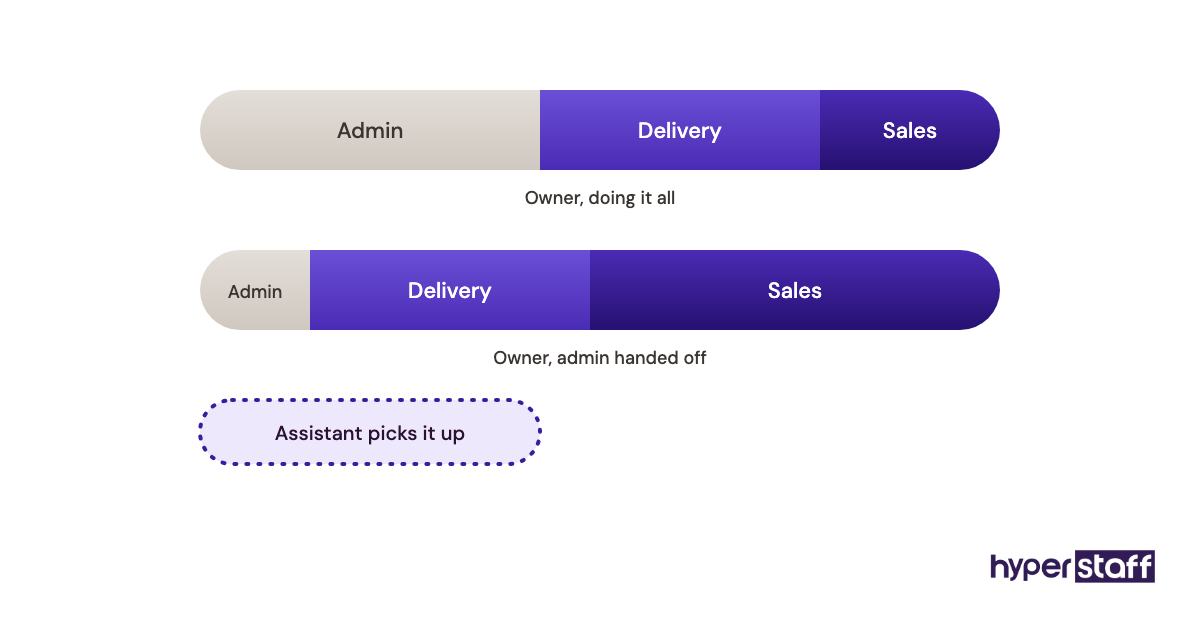
A slow hire costs you twice: once in salary later, and once in your own time now. Fit is the last piece, since some work needs hands and a physical presence, while most of what fills a typical virtual assistant task list does not.
How Does Hiring Work for a VA vs an In-House Employee?
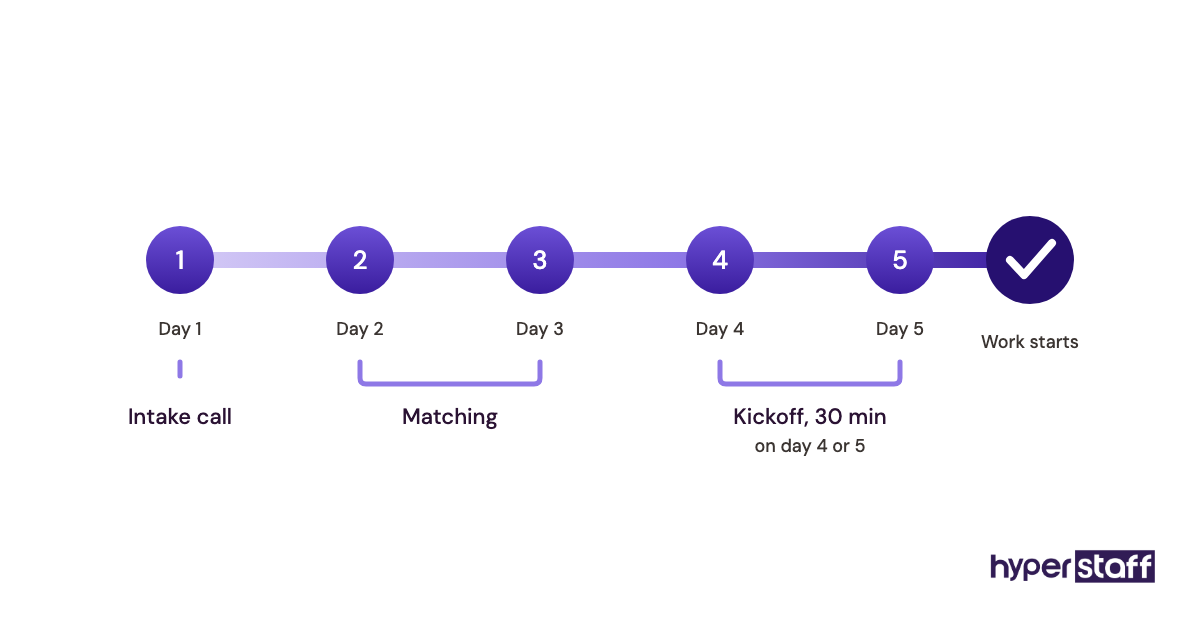
Hiring in-house runs through job ads, screening, interviews, an offer, payroll setup and a first day at the office. A VA through an agency skips most of it: you describe the role, the agency shortlists pre-vetted people, you interview, and work starts after a kickoff call.
For an in-house role, you write the post, filter a pile of applicants, run two or three interview rounds, check references, then wait out a notice period. Six to ten weeks from first ad to productive work is normal.
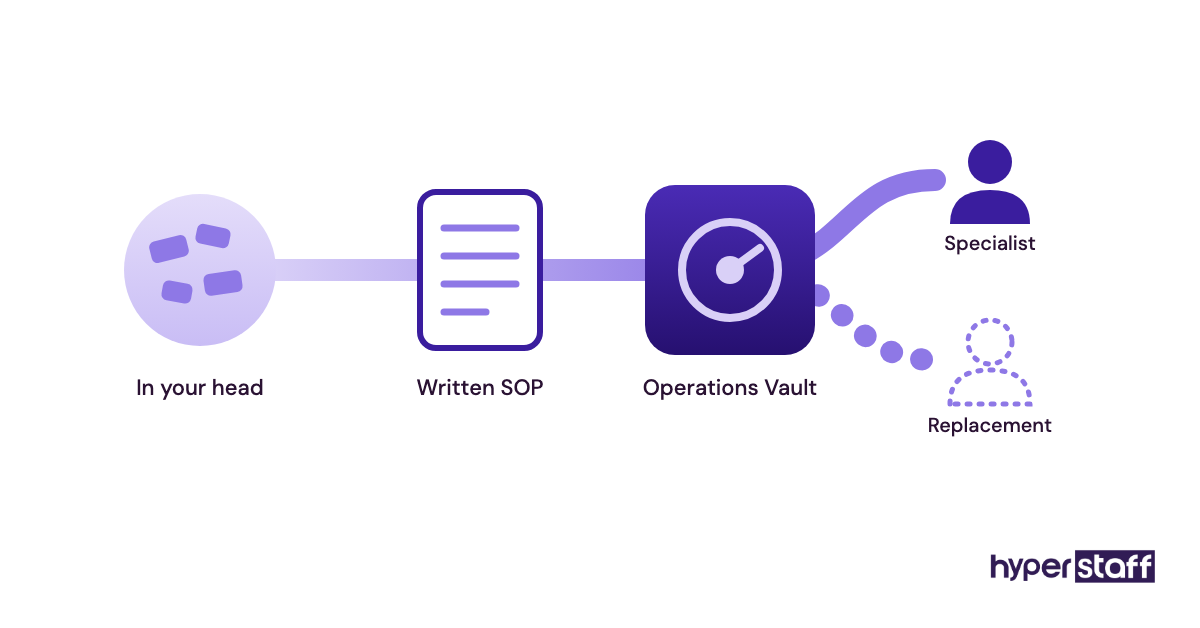
With Hyperstaff, we match you with a specialist in 5 business days, you run a 30-minute kickoff call, and work starts that day or the next morning. Your SOPs, tools and context go into an Operations Vault that we write down and maintain for you.
The interview stage is where owners save or lose the most time on either path. A good set of virtual assistant interview questions tests real tasks, which tells you more than a polished CV.
Hiring Models for Support Roles Compared
Support work can be staffed in at least seven ways, and the cost, control and legal exposure change with each model.
| Model | Who employs them | Typical cost level | Control over the work | Best fit |
|---|---|---|---|---|
| In-house full time | You | Highest | Full | On-site, core roles |
| In-house part time | You | High per hour | Full | Steady local workload under 30 hours |
| Freelance VA (marketplace) | Themselves | Low to mid | Moderate | One-off projects |
| Dedicated VA via agency | The agency | Low | High, day to day | Ongoing digital support |
| Shared VA pool | The provider | Low to mid | Low | Small, scattered tasks |
| Employer of record hire | The EOR firm | Mid to high | Full | A specific foreign hire you found yourself |
| Temp agency worker | The temp agency | High per hour | Moderate | Short-term cover on site |
How a VA Differs From Related Staffing Options
Owners often lump several remote options together. They behave very differently once work starts, and the differences show up in continuity and accountability.
Virtual Assistant vs Freelancer
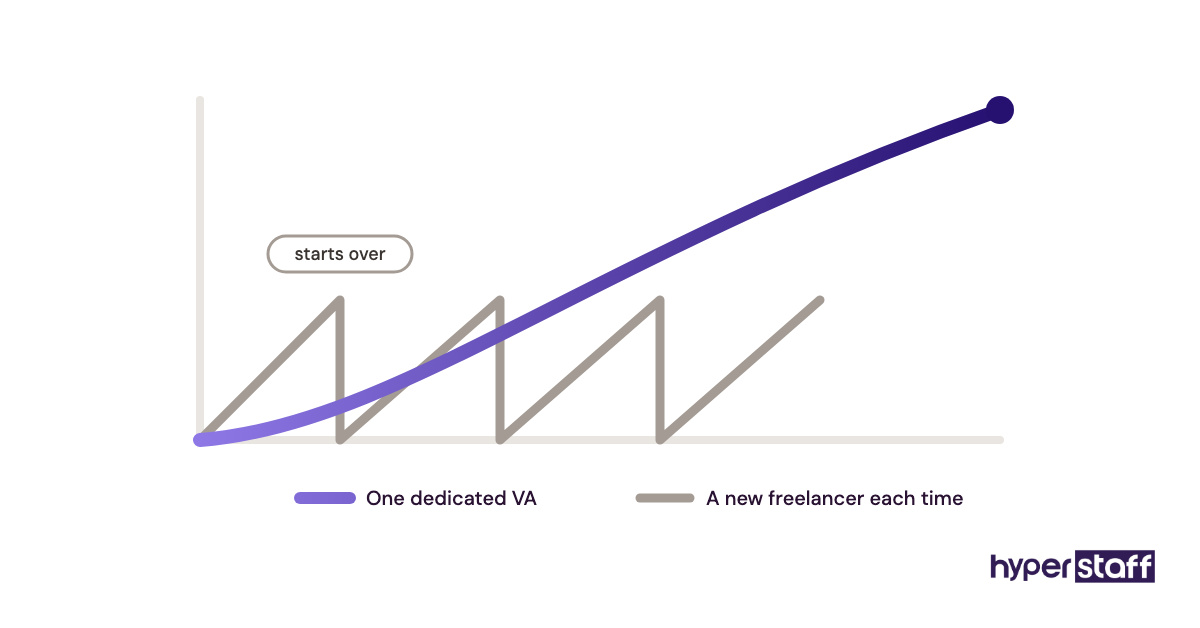
A freelancer sells deliverables to many clients at once, while a dedicated VA works ongoing hours inside your business. Freelancers suit a logo, a website rebuild or a one-time data clean-up.
For daily work, the switching cost hurts: every new freelancer relearns your tools and customers from scratch.
Virtual Assistant vs BPO Outsourcing
A business process outsourcing firm takes over a whole function, such as a call center, and runs it with its own team and its own rules. You get volume and coverage but little say in who answers your customers, whereas a dedicated VA is managed with you and works to your standards.
Virtual Assistant vs Employer of Record Hire
An EOR legally employs a person you already chose, in their country, for a monthly fee on top of salary. Deel's published EOR price is $599 per employee per month before salary, a sound route for a senior specialist you want long term and an expensive one for an assistant role.
The Benefits of Hiring a Virtual Assistant Over In-House
The benefits of a virtual assistant come down to lower cost, faster starts and flexibility the payroll model can't match.
- Total cost often lands at 10% to 35% of a US employee for the same hours.
- No payroll tax, benefits, desk, laptop or software seat on your bill.
- Hours flex from 40 to 160 a month as the workload changes.
- Pre-vetted talent pools shorten hiring from weeks to days.
- Time-zone spread can give you evening or overnight coverage.
- A replacement through an agency doesn't restart your hiring process.
The Drawbacks of a Virtual Assistant Compared to In-House
The drawbacks are real, and most of them come from distance and documentation rather than skill.
- No physical tasks: mail, front desk, stock or site visits.
- Less informal learning from overhearing the office.
- Limited overlap if the time zone is chosen badly.
- Work stalls when processes live only in the owner's head.
Who Should Hire a VA and Who Should Hire In-House?
Businesses with mostly digital, repeatable support work should hire a virtual assistant first. Businesses whose support work involves customers walking in, physical goods or on-premises systems should hire in-house for those duties.
A VA tends to fit founders, agencies, e-commerce stores, real estate teams, coaches, consultants and professional practices whose clients reach them by phone, email or online. An in-house person tends to fit clinics with a front desk, warehouses, retail and any role where security policy forbids remote access to core systems.
Plenty of companies end up with both. A common pattern we see is one in-house office manager paired with a remote assistant who handles inbox, CRM updates, scheduling and support tickets behind them.
Virtual Assistant vs In-House Examples
The clearest way to judge the split is by role. Below are roles where a VA usually works well and roles where it usually goes wrong.
Good Examples of Choosing a Virtual Assistant
Customer Support Inbox for an Online Store
Ticket replies, order lookups, refund requests and return labels all happen inside a help desk and a store admin. A VA in a time zone that covers your evenings can clear the overnight queue before you wake up.
Lead Research and CRM Hygiene for a B2B Sales Team
Building prospect lists, verifying emails and logging calls is screen-based and measurable. Output is easy to count, which makes remote management simple.
Scheduling and Admin for a Busy Consultant
Calendar management, travel booking, invoicing reminders and document prep are classic remote work. The key is shared logins through a password manager from day one.
Bad Examples of Choosing a Virtual Assistant
Front Desk Reception for a Walk-In Clinic
Patients arrive in person, paperwork is physical and someone has to open the door. A remote assistant can confirm appointments, but the desk itself needs a local person.
Inventory Counts in a Warehouse
Counting stock and receiving deliveries needs hands. A VA can reconcile the counts in a spreadsheet afterwards, which is a different job.
A Vague "Help Me With Everything" Role
Remote hires fail fastest when nobody has defined the work. Without a written virtual assistant job description, the assistant waits for instructions and the owner concludes VAs don't work.
Choosing Between a VA and In-House, Step by Step
A five-step decision plan keeps the choice grounded in your actual workload instead of habit.
Step #1: List Every Task for Two Weeks
Write down each support task you or your team does, with the time it takes. Two weeks catches most recurring work, including month-end jobs if you time it right.
Step #2: Mark Each Task Remote or On-Site
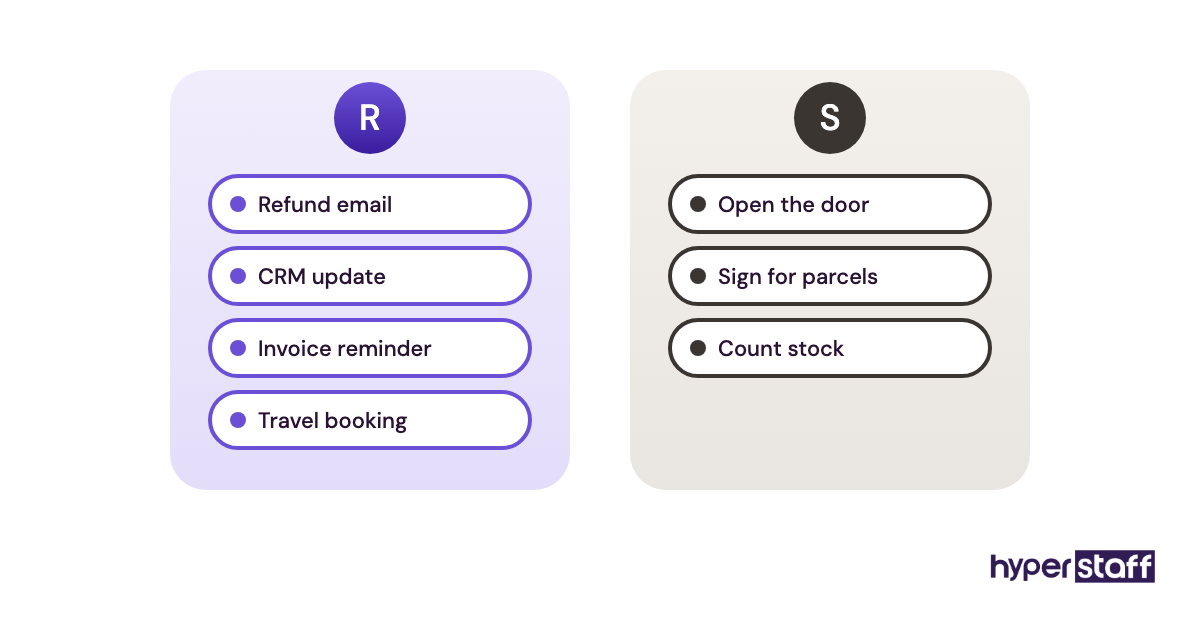
Anything done on a screen gets an R, and anything that needs hands, a building or local paperwork gets an S. In most service businesses the R column is far longer.
Step #3: Add Up Hours per Column
If the remote column fills 40 to 160 hours a month, a VA bundle fits it. If the on-site column alone fills 30+ hours a week, that part needs a local hire.
Step #4: Price Both Options Fully Loaded
Compare the in-house salary plus taxes, benefits and equipment against the VA's all-in hourly rate. Use the cost table further down as a starting point.
Step #5: Start With a Trial Scope
Hand over one workflow first, such as the support inbox, and add more once it runs well. A slow start beats dumping 30 tasks on day one.
What Does a Smart Support Staffing Strategy Look Like?
A smart support staffing strategy keeps in-house headcount for work that needs presence or deep company ownership, and moves repeatable digital work to dedicated remote specialists. It treats the split as something you revisit every six months as tasks change.
Practitioners disagree on one point: whether to hire the remote assistant before or after the in-house manager. Our view is to hire the VA first when the owner is the bottleneck, and to hire the VA as the manager's support when a manager is already in place.
The handover is where strategies fail. Onboarding takes more care with a remote hire, and our guide to onboarding a virtual assistant lays out a first-month plan.
Tools and Software for Managing a VA vs In-House Staff
Remote and in-house staff need mostly the same tools, plus a few that replace what an office provides in person. Prices below come from each vendor's pricing pages and change often, so check before you buy.
- Gusto: US payroll for in-house staff, from about $49 a month plus around $6 per person on its entry plan.
- Deel: EOR and contractor payments for people you hire abroad yourself.
- Hubstaff: time tracking with optional screenshots, roughly $5 to $12 per seat a month depending on plan and billing.
- 1Password: shared vaults so you never send passwords over chat.
- Slack or Google Chat: daily communication and quick questions.
- Loom: recorded walkthroughs that become your SOP library.
- Asana, Trello or ClickUp: task boards with clear owners and due dates.
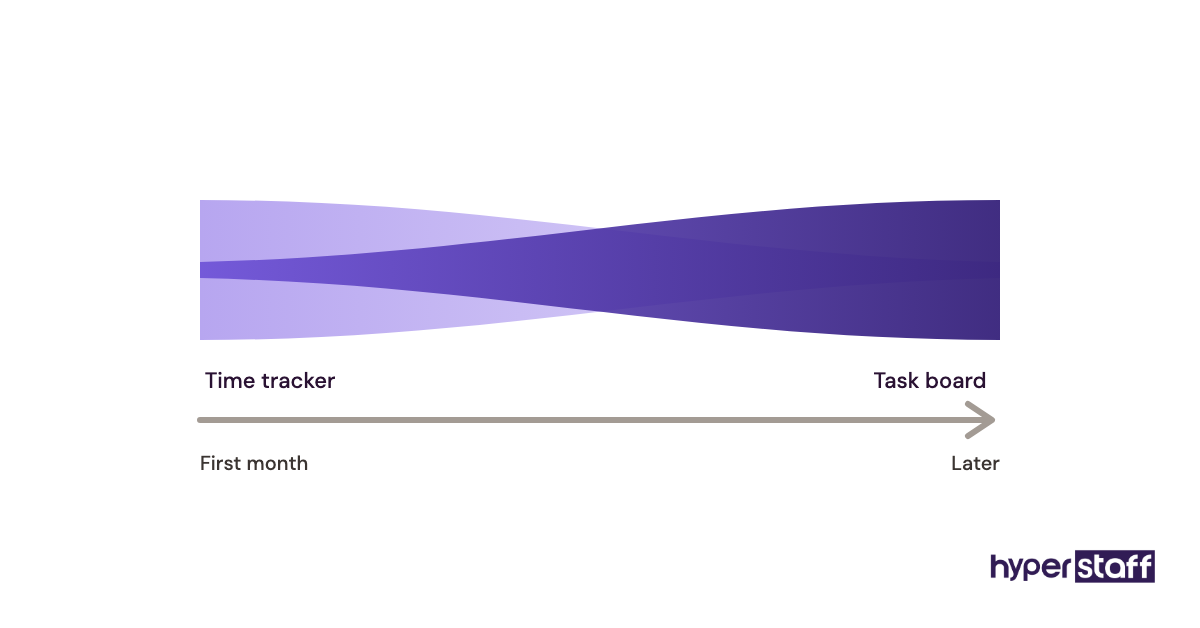
Our take on time trackers: they help in the first month and with hourly billing, then matter less once output is visible in the task board. Heavy screenshot settings tend to hurt trust with good assistants.
10 Proven Tips for Choosing Between a VA and an In-House Hire
These tips come from the patterns that decide whether a support hire works out, on either path.
- Price the in-house role fully loaded, never by salary alone.
- Pick a time zone with at least two to four hours of overlap.
- Write SOPs for the first five tasks before the hire starts.
- Give access through a password manager, with separate logins where tools allow it.
- Interview with a sample task as well as conversation.
- Start with one workflow and expand weekly.
- Hold a 15-minute check-in daily for the first two weeks.
- Choose a dedicated assistant over a shared pool for anything customer-facing.
- Check how the provider handles replacements before you sign.
- Review the split between remote and on-site work every six months.
Overcoming Common VA vs In-House Challenges
The most common challenge with a VA is unclear instructions, and the most common one in-house is cost creep: raises, benefits and equipment that grow every year. Both fail the same way when nobody owns the documentation.
Communication gaps with a remote hire close quickly with a daily written update and a shared task board. Data security improves with a password manager, two-factor login and access you can revoke in minutes.
Turnover hits both models. With an agency, a replacement briefed from documented processes softens the blow, and a list of common virtual assistant mistakes shows which problems to fix before day one.
How to Measure Success With a VA or In-House Hire
Measure a support hire by output against cost: tasks completed, response times, error rates and hours of your own time recovered each week. Set those numbers before the hire starts so the comparison is fair.
For a VA, track turnaround on routine requests, first-reply time on tickets and how often work needs redoing. Use the same measures for an in-house hire, so the two models are judged on one scale.
The single most telling number is owner hours freed per week. If it isn't rising by week four, the scope or the documentation needs work.
How Long Does It Take a VA or In-House Hire to Work?
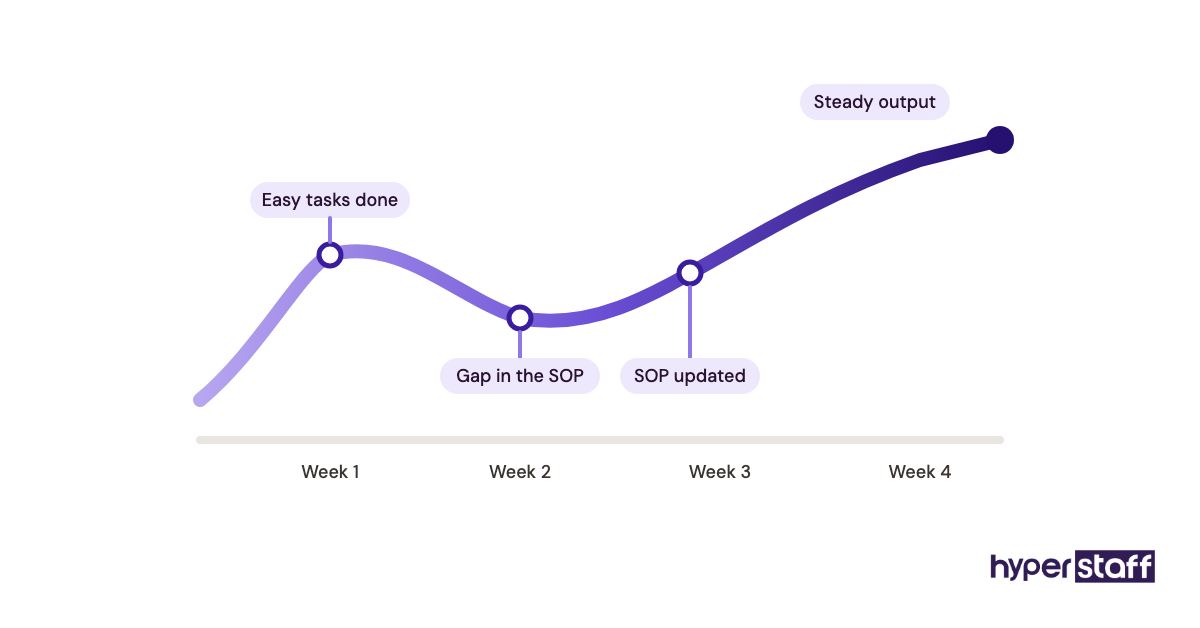
A dedicated VA usually handles simple tasks within the first week and reaches steady output in two to four weeks. An in-house hire typically takes four to ten weeks to recruit, then a similar ramp of several weeks once they start.
The dead zone for in-house hiring is the gap between the offer and the first day, often two weeks of notice. With Hyperstaff, a match comes within 5 business days and work starts the day of the kickoff call or the next morning.
Expect a dip around week two, when the easy tasks are done and the harder ones expose gaps in your SOPs.
How Much Does a Virtual Assistant Cost vs an In-House Employee?
A full-time dedicated VA through Hyperstaff costs about $480 to $1,920 a month, depending on experience tier. An in-house administrative employee in the US costs far more once benefits are added: the BLS median pay for administrative assistants is $48,310 a year, and benefits make up about 31% of employer compensation costs.
| Option | Experience | Hourly rate | Monthly, 160 hours | Yearly, full time |
|---|---|---|---|---|
| Hyperstaff Essential | 0 to 2 years | From $3 | From $480 | From $5,760 |
| Hyperstaff Professional | 2 to 5 years | From $6 | From $960 | From $11,520 |
| Hyperstaff Expert | 5+ years | From $12 | From $1,920 | From $23,040 |
| In-house admin assistant (US) | Mixed | About $23 wage, $33+ loaded | About $5,800 | About $70,000 with benefits |
| Hyperstaff part time, 80 hours | Professional | From $6 | From $480 | From $5,760 |
The in-house loaded figure divides median pay by the share of compensation that is wages, before desk, laptop or software costs. Paying Hyperstaff quarterly saves a further 10%.
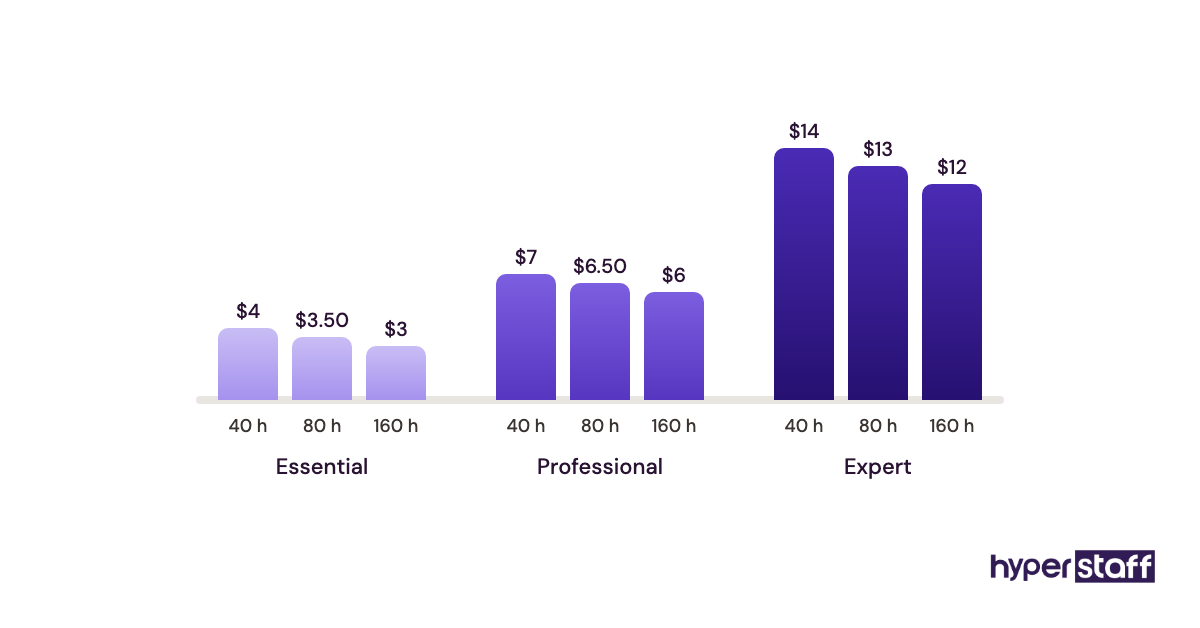
Important: Our Hyperstaff prices above are typical starting averages. Your actual cost depends on the role, the skills needed and the hours you choose, so we confirm an exact figure on a free discovery call.
Is a Virtual Assistant Worth It Compared to In-House?
Yes, for most digital support roles a virtual assistant is worth it, and done right it's one of the most rewarding hires a small business makes. You pay for skilled hours instead of overhead, you start in days, and the owner time you recover goes straight back into sales and delivery.
Take a full-time in-house assistant at about $70,000 a year loaded, against a Professional-tier Hyperstaff specialist at 160 hours a month: $960 × 12 = $11,520. The gap is roughly $58,000 a year, before you count the desk and laptop.
Pay quarterly and the VA figure drops to about $10,370. Even if the remote hire needs an extra hour of your management time each week in the first quarter, the numbers stay lopsided.
The return depends on scope. A VA with no clear tasks is wasted money at any price, so check whether a virtual assistant is worth it for your workload before the contract.
How to Choose a Virtual Assistant Agency
Choose a virtual assistant agency on vetting depth, dedicated assignment, replacement terms and how they handle your processes. Price matters, but a cheap agency that rotates assistants costs more in retraining.
Ask each agency these questions before signing:
- Is the assistant dedicated to my business, or shared with others?
- How fast is a replacement, and who briefs them?
- Do I get an account manager?
- Which regions does your talent come from, and what overlap can I expect?
- Are there minimum contract lengths or setup fees?
- Who writes and maintains the documentation for my tasks?
Hyperstaff answers those with one dedicated specialist, a dedicated account manager, a free replacement in 5 to 7 business days briefed from your Operations Vault, and pre-vetted talent in the Philippines, Latin America, India, Eastern Europe and the United States.
VA vs In-House Statistics, Trends and Future Predictions
The cost gap between US support salaries and offshore rates is the main reason remote assistants keep spreading. With median administrative pay at $48,310 and benefits adding close to a third of total compensation, the in-house baseline for a single support hire is high for a small company.
From our work with clients, roles are widening from admin into lead generation, support and marketing operations. Owners increasingly ask for one dedicated person over a rotating pool, and Latin America has grown as a choice for US companies that want more working-hour overlap.
We're less certain about where blended teams settle. Some businesses go fully remote for support, others keep one local office lead, and we expect the mix to depend mostly on whether the business has walk-in customers.
Virtual Assistants, In-House Staff and AI
AI tools now draft emails, summarize calls and fill spreadsheets, which shifts support roles toward checking, judging and handling exceptions. VAs and in-house staff feel the change equally, since both work in the same software.
In practice, AI raises the value of a trained assistant. Someone still has to write the prompt, verify the output, catch the wrong invoice total and reply to the angry customer with the right tone.
Our read: AI will absorb some of the simplest data entry. It hasn't removed the need for a person who knows your business and owns the result.
Disclaimer: This article is for general information only and isn't legal, tax, financial or HR advice. Salaries, prices and tool details change, so verify them with the relevant source or a qualified professional before making hiring decisions.
Common questions
Is a virtual assistant cheaper than an in-house employee?
Yes, in most cases by a wide margin. You skip payroll taxes, benefits, equipment and office space, and offshore hourly rates start far below US wages.
Can a virtual assistant replace an in-house admin completely?
You can replace most of the role if the work is digital. Anything physical, such as mail, reception or stock, still needs someone on site.
Is it legal to hire a VA instead of an employee?
Yes. Hiring through an agency keeps employment obligations with the agency, while hiring a person directly as a contractor needs care, because labor law decides whether they're truly a contractor.
Are virtual assistants as reliable as in-house staff?
A dedicated, vetted VA is as reliable as a local hire when the tasks and expectations are written down. Reliability drops with rotating pools and vague instructions, on either side.
Should I hire a VA or in-house for my first support hire?
For most small businesses, the VA comes first. It costs less, starts faster and frees the owner's time, which shows you what an in-house role would actually need later.
Book a free 15 min call
We place a pre-vetted specialist in 5 business days, fully managed, from $3/hour.