10 Virtual Assistant Mistakes Business Owners Keep Making
Ten virtual assistant mistakes that turn paid hours into rework, and the specific fix for each one.
On this page
- Mistake #1: Handing Over Tasks That Only Exist in Your Head
- Mistake #2: Writing One Job Description for Four Different People
- Mistake #3: Hiring on a Good Conversation and No Work Sample
- Mistake #4: Choosing the Experience Tier by Hourly Rate Alone
- Mistake #5: Judging a Virtual Assistant on Week One
- Mistake #6: Pasting Passwords Into Chat
- Mistake #7: Keeping the Role Stuck on Inbox and Calendar
- Mistake #8: Watching Screenshots Instead of Results
- Mistake #9: Ignoring the Time Zone Overlap
- Mistake #10: Letting One Person Hold All the Knowledge
- FAQs
💡 Key Takeaways:
1) Most virtual assistant mistakes happen before the first task: unwritten processes, a job description that asks for four different roles, and an interview that never tests real work.
2) The first two to four weeks are a ramp period, so judge a virtual assistant on week-four output and on whether corrections stick, and leave week-one speed out of it.
3) Access, scope and documentation decide whether a virtual assistant lasts: share logins through a password manager, delegate work that touches revenue, and keep every process written where a replacement can read it.
Stop paying for hours that produce rework
Hyperstaff has placed 70+ virtual assistants with 30+ clients, and our dedicated virtual assistant services start from $3/hour, with placement in 5 business days. Every client gets a dedicated account manager plus an Operations Vault that holds their SOPs, tools and context, which is how the mistakes below get caught in week one instead of month three.
Mistake #1: Handing Over Tasks That Only Exist in Your Head
Delegating an undocumented task forces the virtual assistant to rebuild your process from fragments. They'll get the result roughly right and the details wrong, and the details are usually what customers notice.
Writing it down costs an afternoon. Skipping it costs weeks.
Why the SOP never gets written
- The process feels too obvious to explain.
- Writing it takes longer than doing it once.
- Exceptions live in memory.
- The "quick call" covers half the steps.
- Nobody owns keeping the doc current.
What the guesswork costs you
Undocumented work produces a steady drip of small corrections: the wrong invoice template, a refund approved that should have been escalated, a reply in the wrong tone. Each fix takes minutes, but they stack until the owner is reviewing every output.
Once that review habit sets in, delegation stops saving time. The assistant feels it too, and starts asking permission for things they could have decided alone.
Record first, write second
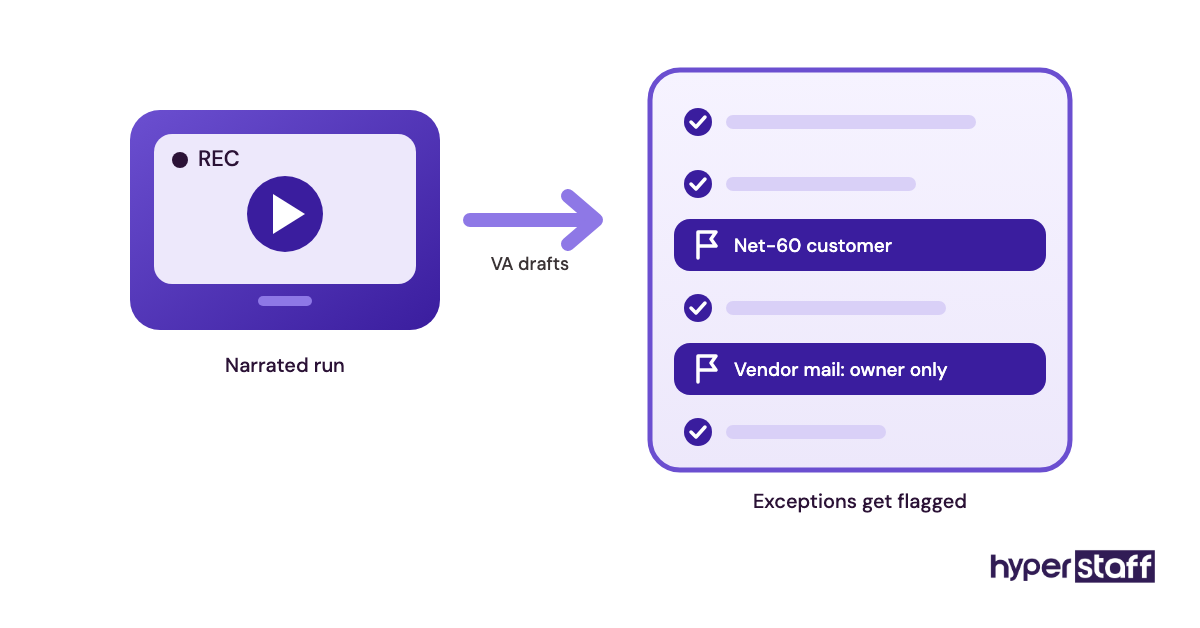
Record the task once with a screen recorder like Loom while doing it for real, and talk through each decision out loud. A rough recording with the edge cases spoken aloud beats a polished document that skips them.
Then have the virtual assistant turn the recording into the written SOP. Their draft shows exactly what they understood, and gaps surface before a customer sees them.
Our guide to onboarding a virtual assistant lays out the order: access, recorded walkthroughs, supervised runs, then solo work. At Hyperstaff those SOPs live in the client's Operations Vault, which we maintain after the first month too.
Mistake #2: Writing One Job Description for Four Different People
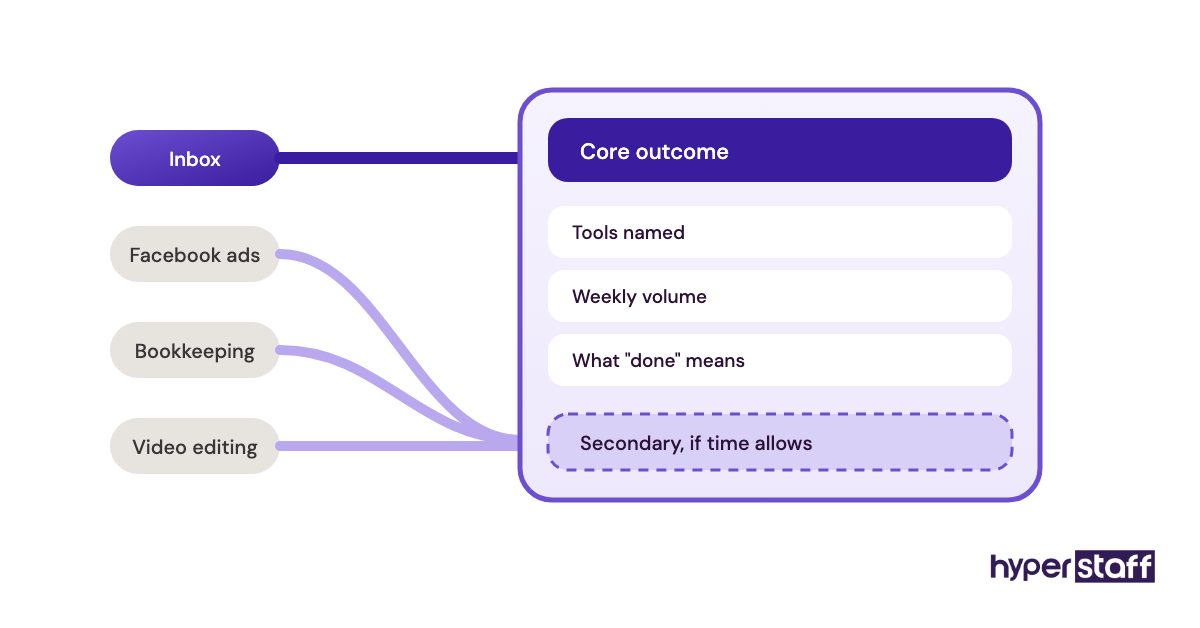
A virtual assistant job description that asks for inbox management, Facebook ads, bookkeeping and video editing describes four roles. The candidates who say yes to all four tend to be average at each.
Specialists read that list and move on.
Why the list keeps growing
- Every pending task lands in one post.
- The budget covers one hire.
- "Flexible" reads well in an ad.
- Nobody ranks the tasks by importance.
What a catch-all hire costs
The person hired covers the easy tasks well and the skilled ones badly. Ads go live without conversion tracking, and transactions get categorized by guesswork that an accountant later has to unpick.
The mismatch also shows up late. It often takes a full month of output before the weak half of the role becomes obvious.
Write around one outcome
Pick the outcome that matters most and build the role around it, with everything else marked as secondary. A good virtual assistant job description names the tools, the weekly volume and what "done" means for the core task.
When two skilled areas both matter, two part-time specialists usually cost less than fixing a generalist's errors. Hyperstaff's monthly bundles come in 40, 80 or 160 hours, which makes a split like that simple to set up.
Mistake #3: Hiring on a Good Conversation and No Work Sample
A strong interview proves a candidate interviews well. Remote work happens in writing and inside tools, often outside your hours, and a 30-minute call tests almost none of it.
Why the test gets skipped
- Fluent English on a call feels like proof.
- Asking for a test feels awkward.
- Designing one takes time.
- The first likeable candidate ends the search.
- Résumés list tools, which sounds like skill.
- Hiring starts only once the backlog hurts.
The price of a wrong hire
A wrong hire usually shows itself in weeks two to four, after logins are shared and processes explained. Starting over means a second search and a second onboarding, while the backlog that triggered the hire keeps growing.
Vet with real work
Give finalists a short, paid task that mirrors the job, such as triaging 15 sample emails or cleaning a messy lead list. Pay attention to the questions they ask before starting, because a candidate who asks nothing tends to guess later.
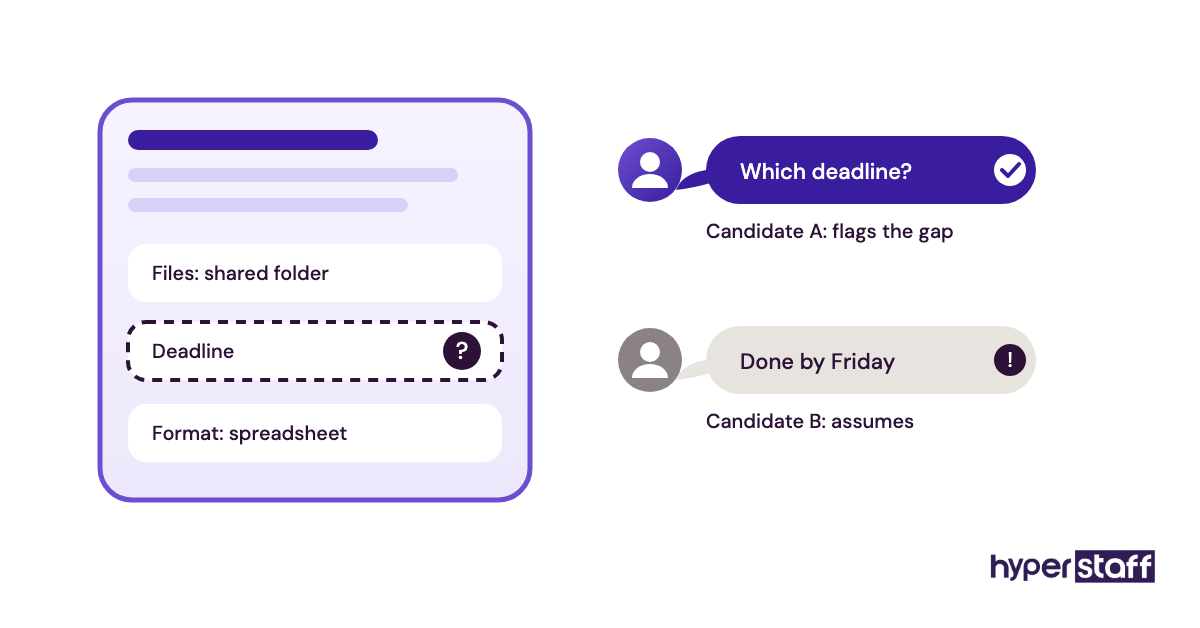
Our list of virtual assistant interview questions pairs well with a test like that. One question carries most of the weight: ask how they'd approach a task they've never done before.
Mistake #4: Choosing the Experience Tier by Hourly Rate Alone
The hourly rate is the number everyone compares, and it's the least useful one. What matters is the cost per finished task, which depends on how much checking the work needs.
Why the rate wins the argument
- Rates compare easily. Output doesn't.
- Budgets get set before tasks are scoped.
- Senior skills look like overkill on paper.
- Supervision time never appears on an invoice.
Where a low rate turns expensive
An entry-level assistant on judgment work, like handling escalated complaints or managing an ad budget, needs close review on every output. The owner's hours spent checking quickly outweigh the rate saved.
The reverse happens too. Paying senior rates for data entry buys experience the task never uses.
Match the tier to the hardest recurring task
Size the tier to the most demanding task the role does every week, then check the math. Our breakdown of whether a virtual assistant is worth it runs those numbers for common roles.
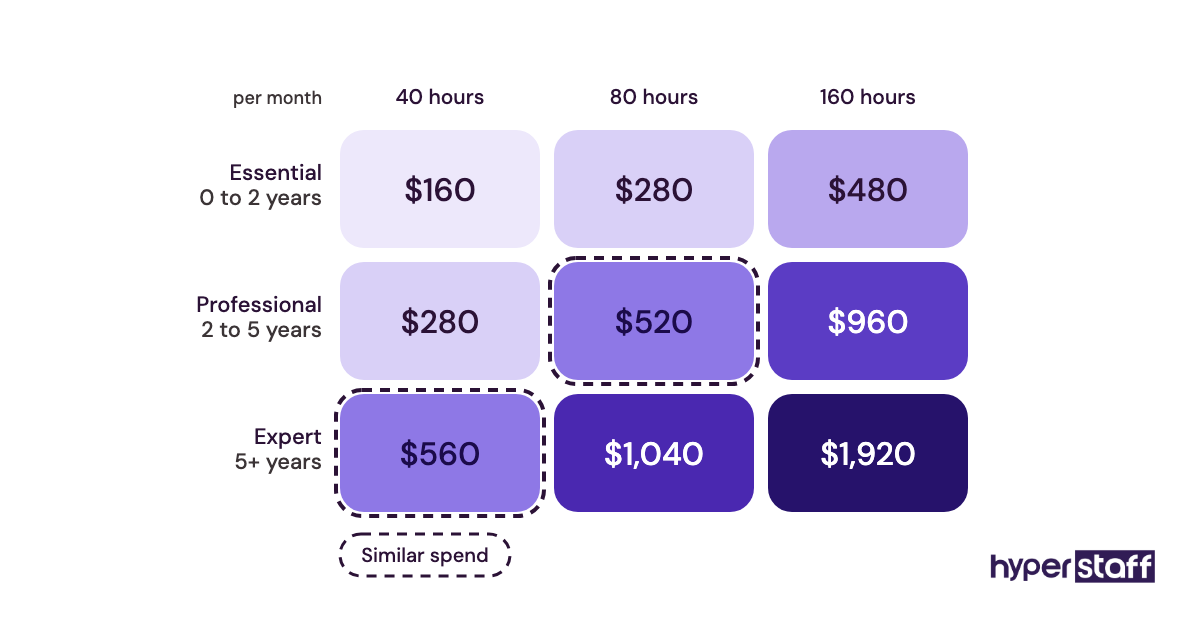
| Tier | Experience | Rate from | Typical fit |
|---|---|---|---|
| Essential | 0 to 2 years | $3/hour | Data entry, inbox sorting, scheduling, list building |
| Professional | 2 to 5 years | $6/hour | Customer support, CRM upkeep, social media, bookkeeping prep |
| Expert | 5+ years | $12/hour | Ad management, operations management, client-facing account work |
Mistake #5: Judging a Virtual Assistant on Week One
Week one is the slowest week a new virtual assistant will ever have. Owners who judge on it either let go of someone who would have been good or start micromanaging before the role has settled.
Why the first week feels bad
- Access requests trickle in for days.
- Every task is a first attempt.
- Questions arrive faster than answers.
- Expectations were never written down.
- Early errors feel bigger than later ones.
What an early verdict costs
A replacement restarts the ramp from zero, so swapping after a slow first week means paying for two ramp periods. We've seen the pattern often enough to spot it on the first check-in: the complaints are about speed, and the SOPs don't exist yet.
Use a phased timeline
Week one covers access and supervised runs. Weeks two and three are solo work with daily review, and by week four the core tasks should run with spot checks only.
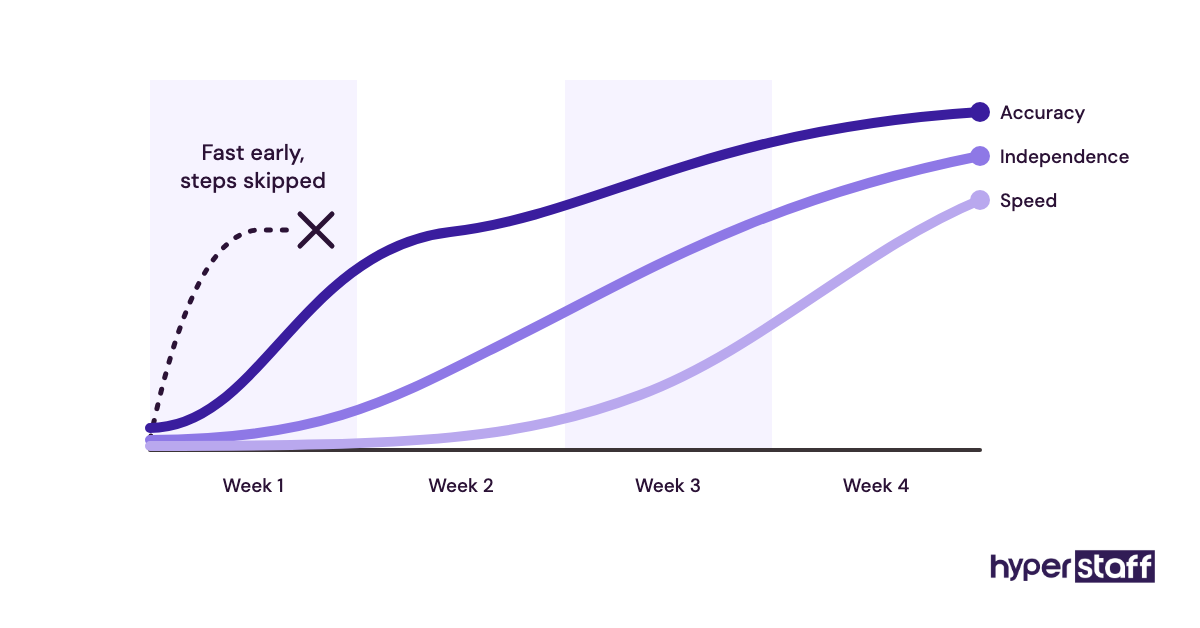
Judge the trend, meaning whether corrections stick and whether questions get more specific. At Hyperstaff, work starts after a 30-minute kickoff call, that day or the next morning, so the dead time before the ramp is short.
Mistake #6: Pasting Passwords Into Chat
A login pasted into Slack, WhatsApp or email stays in a searchable thread indefinitely. When the assistant leaves, nobody knows which passwords they saw, so nobody rotates them.
Why it happens anyway
- It's the fastest way to unblock someone.
- Password managers feel like enterprise software.
- Two-factor codes go to the owner's phone.
- Nobody tracks what was shared.
The real exposure
A leaked thread or a compromised laptop exposes every system pasted into it, including banking, payroll and the company domain. Offboarding turns into guesswork, and owners end up changing a dozen passwords or, more often, none.
Two-factor codes cause a less obvious problem. An assistant who needs the owner for every code is blocked whenever the owner is offline.
Set up access properly
Use a password manager with shared vaults, such as 1Password or Bitwarden, and give the assistant a vault holding only the logins their role needs. Revoking access then takes a single click.
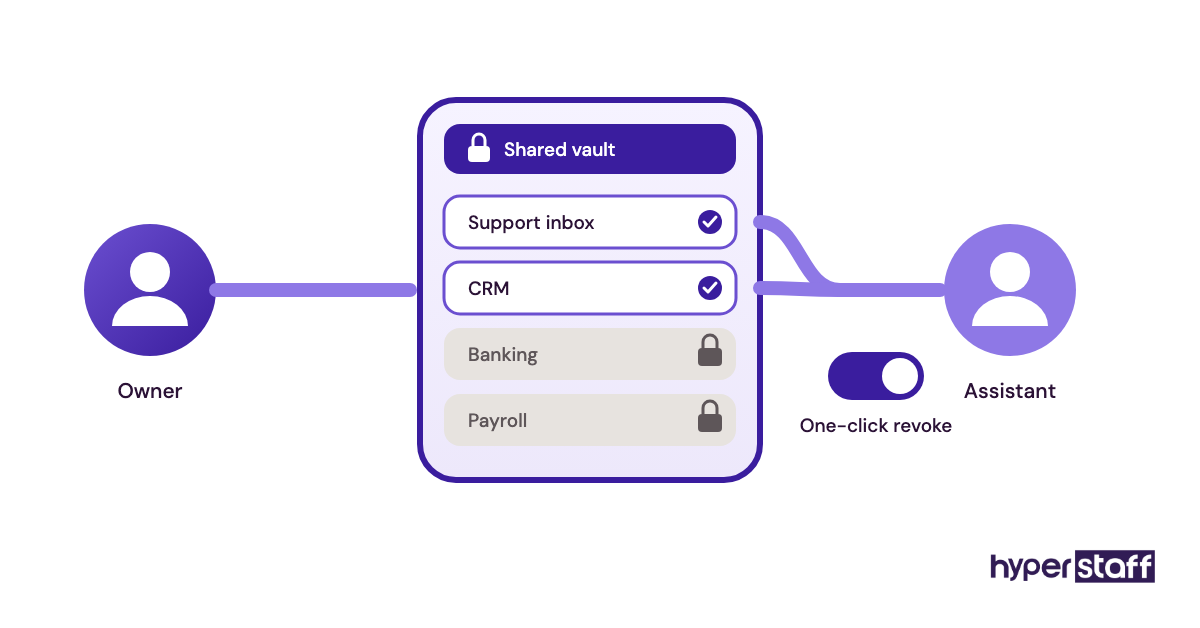
Both tools can also store two-factor codes inside a shared item, which removes the phone bottleneck. Where a tool offers named user seats, use them: the audit log then shows who changed what, which a shared login never will.
Mistake #7: Keeping the Role Stuck on Inbox and Calendar
Many owners hire a virtual assistant for email and scheduling and never widen the role. Admin rarely fills the hours, and the spare time drifts into busywork.
The job itself is far broader. As our guide on what a virtual assistant is explains, the role spans customer support, lead generation, digital marketing, operations and online business management.
Why the scope stays narrow
- Admin is the first pain owners notice.
- Revenue work feels too important to hand off.
- The original job post set the boundaries.
- Nobody reviews the role after month one.
- Owners don't know what else VAs do.
The revenue left on the table
Revenue-adjacent work is where delegation pays most, such as following up on quotes that went cold or keeping the CRM pipeline current. Both connect directly to money, and sorting the inbox mostly doesn't.
Widen the role in stages
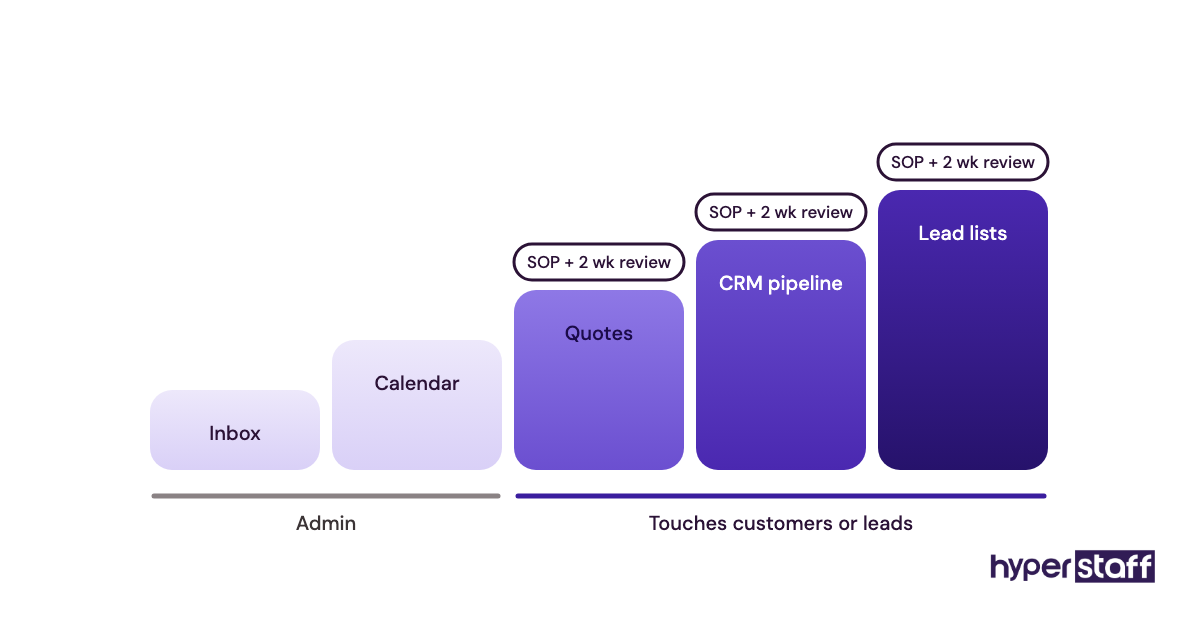
List every recurring task from last week and mark the ones that touch customers or leads. Our checklist of virtual assistant tasks by function helps, since recurring work is easy to forget when listed from memory.
Add one revenue task at a time, each with its own SOP and a two-week review period. Stack them faster and quality drops everywhere at once.
Mistake #8: Watching Screenshots Instead of Results
Time trackers that capture screenshots every few minutes prove a virtual assistant was at the keyboard. They say nothing about whether the follow-ups went out or the accounts reconcile.
Why owners lean on trackers
- Remote work feels invisible.
- Hours are easy to count.
- Billing is hourly, so hours get watched.
- One bad past hire made trust harder.
What surveillance costs
Heavy monitoring trains people to look busy. In our experience the strongest assistants are also the first to notice when they're trusted less than their output deserves.
Measure output first
Set two to five weekly numbers per role: tickets closed, leads added, invoices sent, response time on the shared inbox. Review them in a 15-minute weekly call.
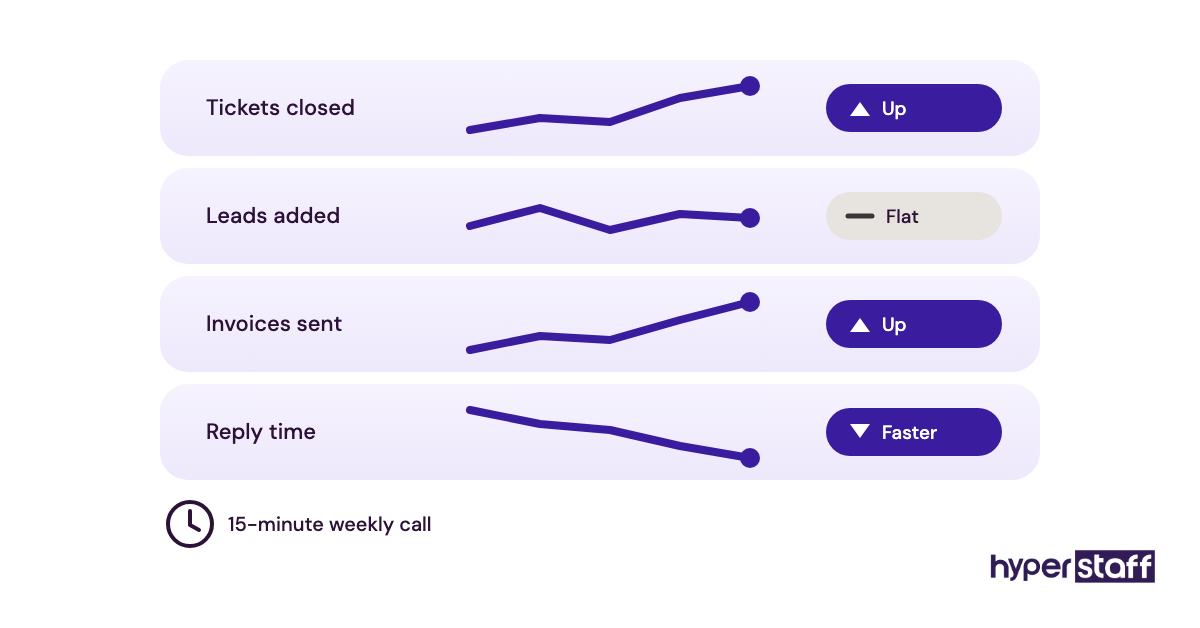
Practitioners genuinely split on trackers like Hubstaff, and the hourly-billing camp has a fair case when hours are billed onward to a client. Our view: track time only where hours get billed onward, and judge on output everywhere else.
Mistake #9: Ignoring the Time Zone Overlap
A virtual assistant can match your hours, overlap them partly or work entirely while you're offline. Each setup suits different tasks, and picking one without looking at the tasks adds a one-day lag to every question.
Why the overlap gets overlooked
- Rates get compared before schedules.
- Overnight work sounds efficient.
- Async tools seem like they'll cover it.
- Live support needs show up after hiring.
How a bad schedule costs you
A question sent at the end of the assistant's day gets answered during yours, after they've logged off. One unclear instruction can stall a task for two working days.
Plan overlap around the work
Live work like phone support, chat and real-time scheduling needs full overlap. Back-office work such as research or bookkeeping prep runs well overnight, provided there's a 1 to 2 hour window each day for questions.
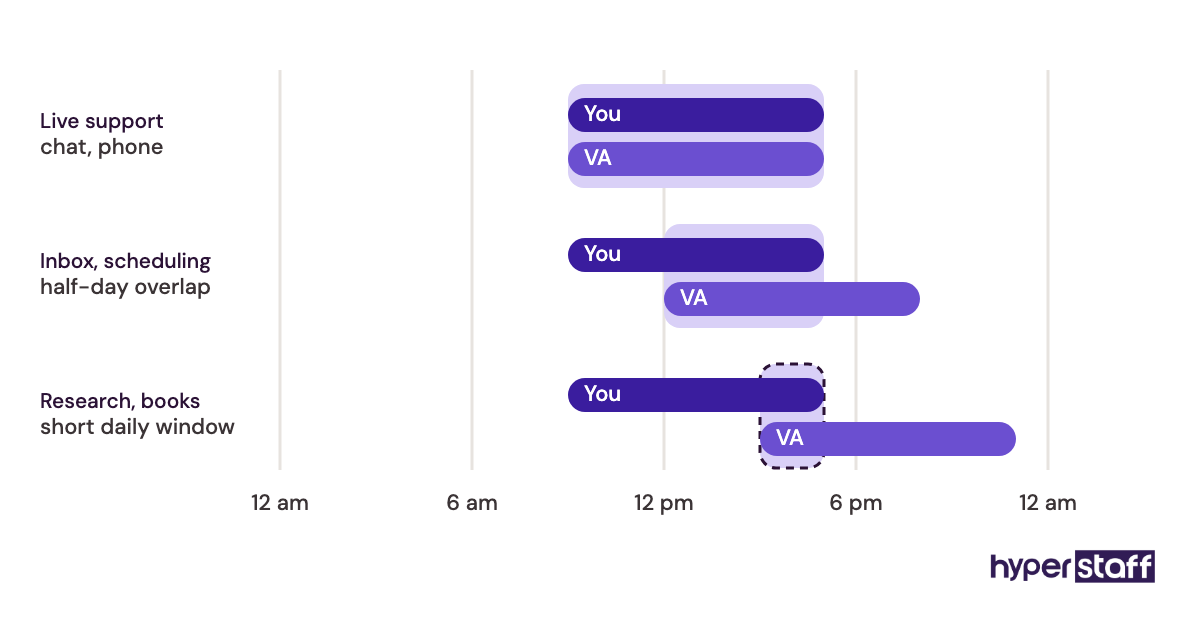
Hyperstaff places pre-vetted talent in the Philippines, Latin America, India, Eastern Europe and the United States. Latin America is usually the simplest match when a role needs live US business hours.
Mistake #10: Letting One Person Hold All the Knowledge
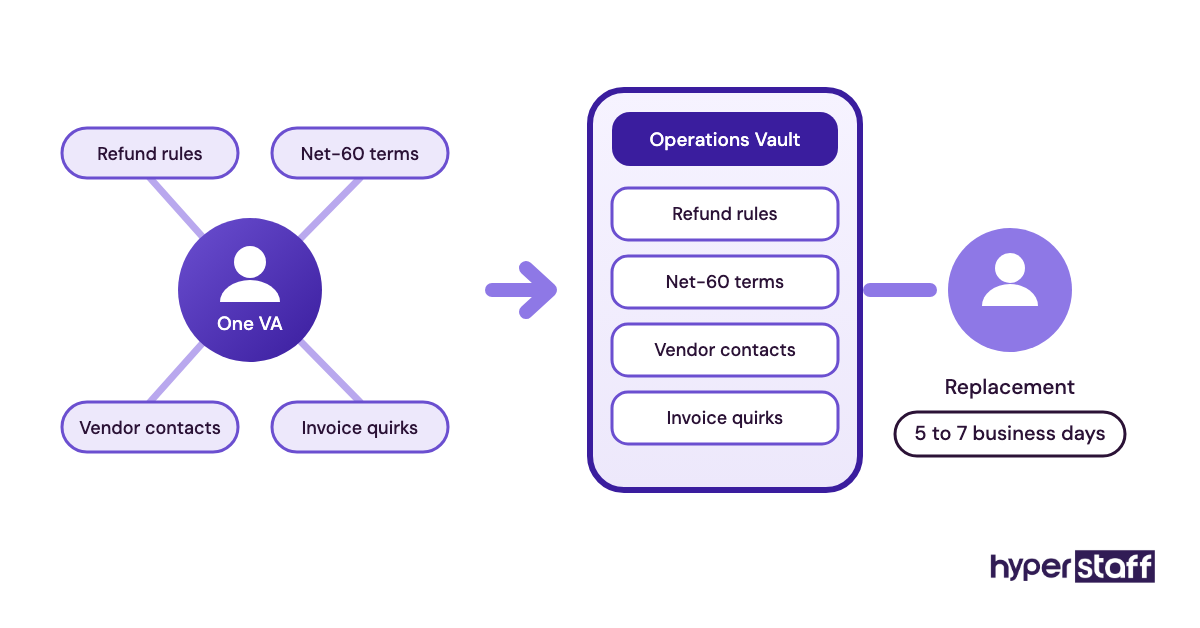
A virtual assistant who has run your operations for a year knows things nobody wrote down. When they get sick, take leave or move on, that knowledge walks out with them.
How knowledge piles up in one place
- Good assistants fix problems without reporting them.
- SOPs get written once and never updated.
- Owners stop asking how tasks get done.
- No backup ever learns the role.
- Leaving feels unlikely until it happens.
What a sudden exit costs
Replacing an assistant with no documentation means rebuilding the role from scratch while the backlog grows. In-house staff carry the same risk, which our comparison of virtual assistants vs in-house hires covers in detail.
Build the backup into the job
Make SOP upkeep a weekly task in the assistant's own role, with 30 minutes blocked for it. When a process changes, the doc changes the same week.
Hyperstaff keeps each client's SOPs, tools and context in an Operations Vault that we maintain. If a placement doesn't work out, a free replacement arrives in 5 to 7 business days, briefed from that vault.
Disclaimer : This article is general information about working with virtual assistants and is not legal, financial, security or employment advice. Tool features and terms change, so confirm details with each provider and get professional advice for your situation.
Common questions
What's the most common mistake when hiring a virtual assistant?
Skipping a paid work sample. A call shows how someone talks, and a short real task shows how they work, which is the part you're paying for.
How long should I give a new VA before deciding it's not working?
About four weeks. Judge whether corrections stick and questions get sharper, and treat week-one speed as noise.
Is hiring the cheapest virtual assistant a mistake?
It depends on the work. Entry-level rates suit repeatable tasks like data entry, but judgment work at a low tier usually costs more in review time than it saves.
Should I give my virtual assistant my passwords?
Share access through a password manager instead of sending passwords directly. A shared vault limits what the assistant sees and lets you revoke access in one step when the role ends.
How do I stop my VA from repeating the same mistakes?
Check the SOP first, since repeat errors usually trace back to a missing or outdated instruction. Fix the doc, walk through one example together, then review the next few outputs closely.
Book a free 15 min call
We place a pre-vetted specialist in 5 business days, fully managed, from $3/hour.