Onboarding a Virtual Assistant: A Plan That Gets Real Work Done in Week One
A practical plan for onboarding a virtual assistant, from the first login to a fully owned workload, with tools, costs and the mistakes to skip.
On this page
- What Is Onboarding a Virtual Assistant?
- Key VA Onboarding Terms You Should Know
- Why Does Onboarding a Virtual Assistant Matter?
- How Does Virtual Assistant Onboarding Work?
- Types and Forms of Virtual Assistant Onboarding
- How VA Onboarding Differs From Related Processes
- The Benefits of Onboarding a Virtual Assistant Properly
- The Drawbacks of VA Onboarding
- Who Needs a Formal VA Onboarding Process?
- Virtual Assistant Onboarding Examples
- Creating a Virtual Assistant Onboarding Plan, Step-by-Step
- What Does an Effective VA Onboarding Strategy Look Like?
- VA Onboarding Tools and Software
- 10 Proven VA Onboarding Tips and Best Practices
- Overcoming Common VA Onboarding Challenges
- How to Measure VA Onboarding Success
- How Long Does Onboarding a Virtual Assistant Take?
- How Much Does Onboarding a Virtual Assistant Cost?
- Is Onboarding a Virtual Assistant Worth It?
- How to Choose a Virtual Assistant Agency That Helps With Onboarding
- VA Onboarding Statistics, Trends and Future Predictions
- Virtual Assistant Onboarding and AI
- FAQs
💡 Key Takeaways:
1) Onboarding a virtual assistant means giving them access, written processes, context about your customers and a clear first-month plan, so they can own tasks instead of waiting for instructions.
2) Most VAs reach steady output within two to four weeks when the owner hands over one workflow at a time and reviews work daily in the first week.
3) The biggest onboarding failures come from missing documentation and passwords shared over chat, and both are fixed before the assistant's first login.
Faster onboarding means billable hours back sooner
Hyperstaff has placed 70+ pre-vetted virtual assistants with 30+ clients, and every placement starts with a 30-minute kickoff call, then work begins that day or the next morning. Our dedicated virtual assistant services match you with a specialist in 5 business days, with rates from $3/hour and an Operations Vault that keeps your SOPs, tools and context written down for you.
What Is Onboarding a Virtual Assistant?
Onboarding a virtual assistant is the process of preparing a remote assistant to do your work without you: setting up accounts and permissions, documenting tasks, explaining your customers and standards, then handing over responsibility in stages. It usually runs from the day before their first login through their first 30 days.
Hiring decides who does the work. Onboarding decides whether they can do it by Thursday or by next month, and if the role itself is still fuzzy, read what a virtual assistant actually does before you build the plan.
The scope reaches well past inbox and calendar admin. A VA might run customer support tickets, build lead lists, schedule social posts, reconcile invoices or manage projects, and each of those needs its own access, its own SOP and its own definition of done.
Key VA Onboarding Terms You Should Know
- SOP = a standard operating procedure, the written steps for one recurring task.
- Least-privilege access = giving the VA only the permissions a task needs.
- Shadowing = the VA watches you, or a recording of you, do a task before trying it.
- Reverse shadowing = you watch the VA do the task and correct them live.
- Ramp period = the weeks before a new assistant reaches full, unsupervised output.
- Handover document = a single file holding context, contacts, tools and open tasks.
- Escalation rule = a written line saying which decisions the VA makes alone and which come back to you.
- Time zone overlap = the hours when you and the VA are both working.
- Quality bar = a concrete example of finished work the VA matches.
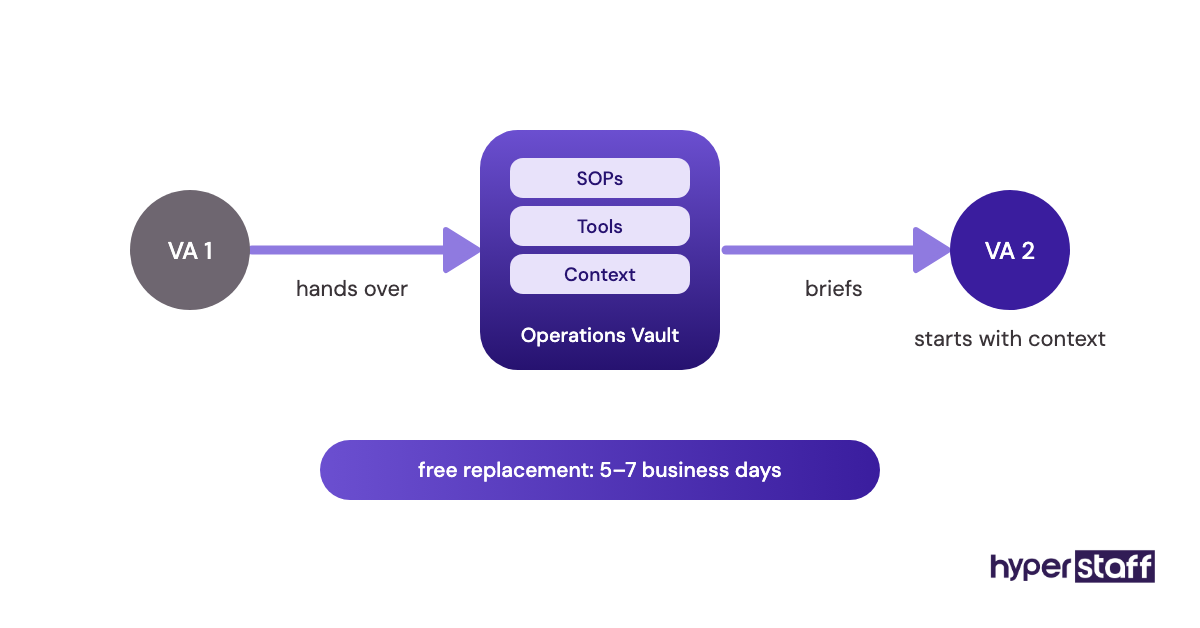
- Operations Vault = Hyperstaff's maintained record of a client's SOPs, tools and context.
Why Does Onboarding a Virtual Assistant Matter?
VA onboarding matters because a remote assistant can't absorb context by sitting near you. Everything they know about your business arrives through documents, recordings and messages, so gaps in those become gaps in their work.
Weak onboarding is common well beyond the VA world. Gallup reports that only 12% of employees strongly agree their organization does a great job of onboarding, and most of those people work alongside their managers.
The cost shows up as rework. An assistant who was never told that your top three clients get same-day replies will treat them like everyone else, and you'll hear about it from the client.
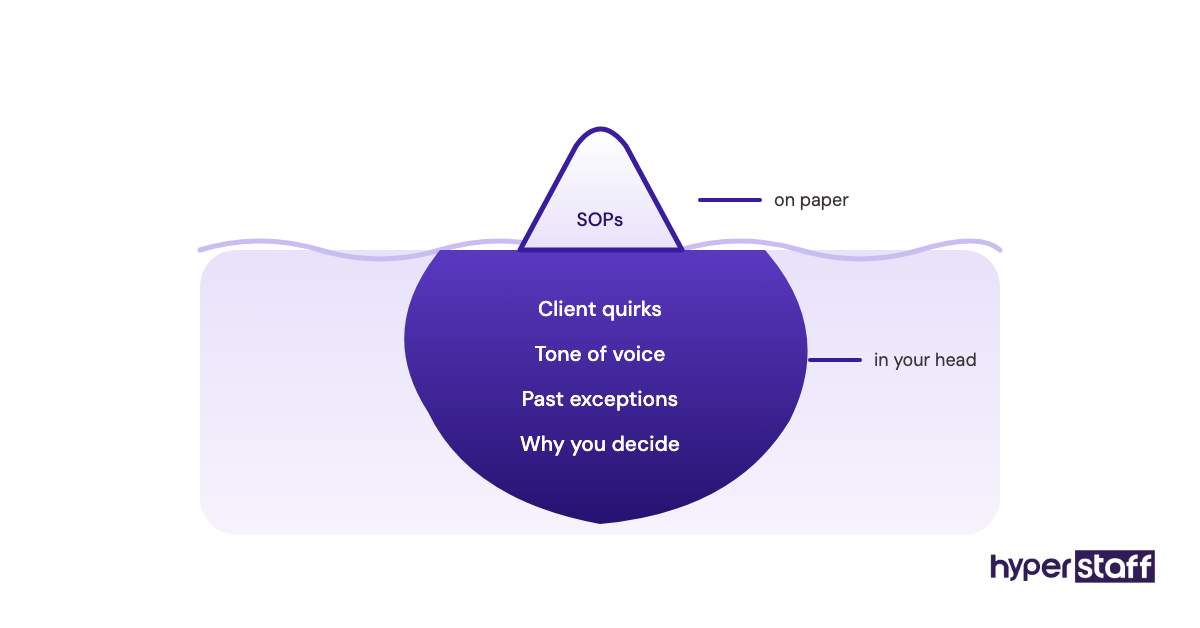
Owners underrate a second payoff. Writing onboarding material forces you to decide how a task should be done, and plenty of businesses discover three different versions of the same process living in three people's heads.
How Does Virtual Assistant Onboarding Work?
Virtual assistant onboarding works in four phases: preparation before day one, a kickoff conversation, a supervised first week and a gradual handover of ownership across the first month. Skip a phase and the gap usually surfaces two weeks later.
Preparation covers accounts, a password manager, the handover document and SOPs for the first two or three tasks. The kickoff is a short call about priorities, communication hours and escalation rules.
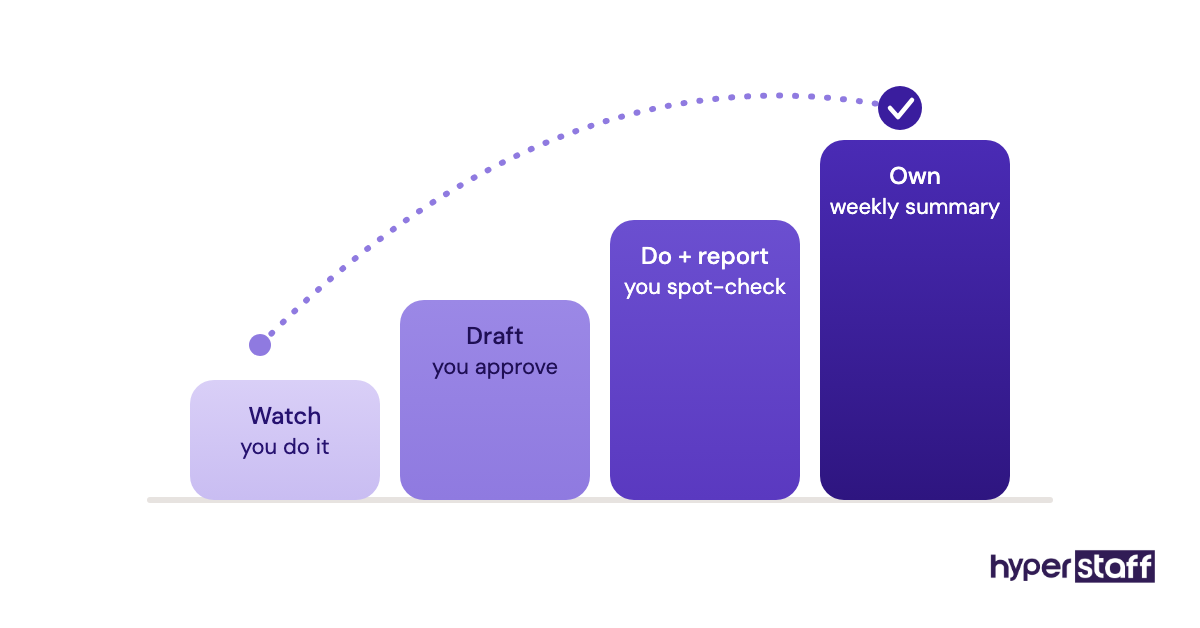
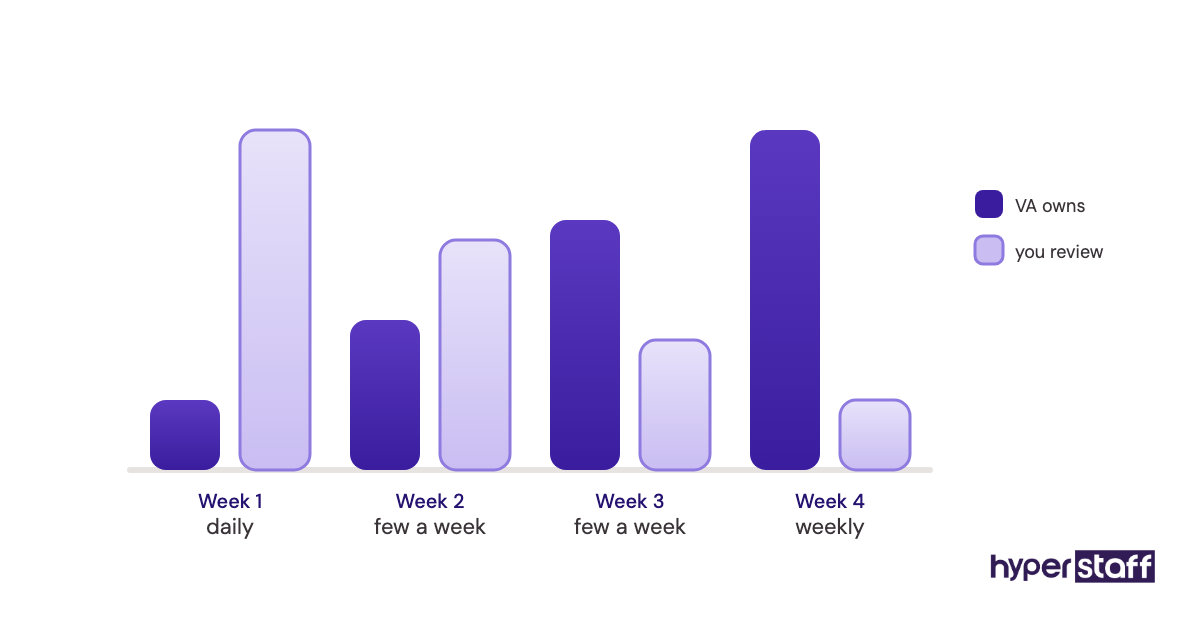
Week one is shadowing and reverse shadowing on real work, with a daily review at a fixed time. Weeks two to four add tasks one by one, and your reviews drop from daily to a few times a week.
Types and Forms of Virtual Assistant Onboarding
Virtual assistant onboarding comes in several forms, and the right one depends on who runs it, how documented your business already is and how many hours the VA works. The table compares the common setups.
| Onboarding type | Who runs it | Typical ramp time | Best fit | Main risk |
|---|---|---|---|---|
| Owner-led, live | The business owner | 2 to 4 weeks | One owner, one VA | Owner runs out of time mid-ramp |
| SOP-first, async | Owner writes, VA self-trains | 1 to 3 weeks | Well-documented businesses | Outdated SOPs |
| Video library | Owner records, VA watches | 1 to 3 weeks | Screen-based tasks | Videos miss the reasoning |
| Team buddy | An existing team member | 2 to 3 weeks | Businesses with staff | Buddy's own work slips |
| Agency-assisted | Account manager plus owner | 1 to 3 weeks | Owners new to delegation | Owner stays too hands-off |
| Phased by role | Owner or manager | 3 to 6 weeks | Multi-skill roles (support plus marketing) | Second skill gets rushed |
| Replacement handover | Outgoing VA or agency | Days, if documented | Swapping one VA for another | No written record to hand over |
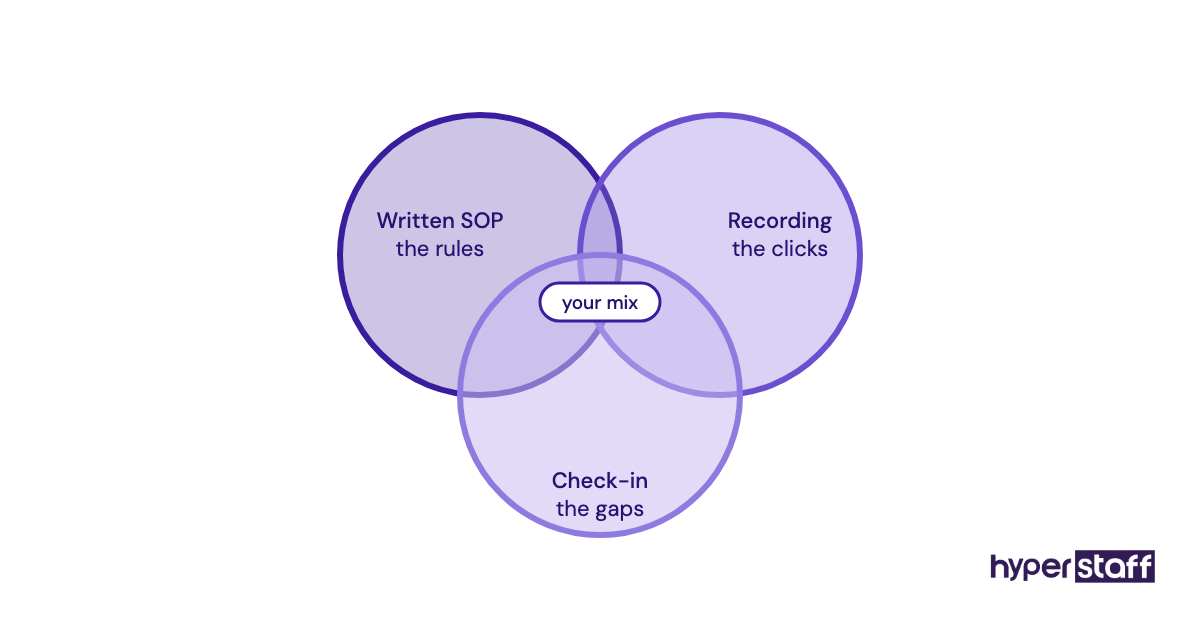
Most real onboarding blends two or more of these. An SOP-first base with a few recordings and a daily 15-minute check-in suits most small businesses.
How VA Onboarding Differs From Related Processes
Onboarding a virtual assistant borrows from employee onboarding, freelancer briefing and skills training, yet it matches none of them exactly. The differences decide what you write down and what you can skip.
VA Onboarding vs. Employee Onboarding
Employee onboarding carries HR weight: payroll, benefits, equipment and company culture sessions. A VA placed through an agency skips most of that, so the whole effort goes into task knowledge, tool access and communication rules.
VA onboarding adds written context. An in-house hire overhears how you talk to clients, while a remote assistant only learns what you write, record or say on a call.
VA Onboarding vs. Freelancer Briefing
A freelancer briefing covers one project with a defined output, like a logo or a set of blog posts. You hand over a brief and wait for the deliverable.
A dedicated VA is ongoing and learns the business over months. Documentation you'd never write for a one-off freelancer pays back every week with a VA.
VA Onboarding vs. VA Training
Training builds a skill, such as learning your CRM or a design tool. Onboarding is the broader package of access, context, priorities and rules that makes the skill useful inside your business.
Practitioners disagree on whether to teach new skills during onboarding at all. Our view: hire for the skill, onboard for the context, then add training once the core workflow is stable.
The Benefits of Onboarding a Virtual Assistant Properly
A structured onboarding plan gets a VA to independent work sooner and keeps them there. Owners tend to notice these gains first:
- Faster ramp, often two to four weeks instead of months of drip-fed instructions.
- Fewer interruptions, since written escalation rules answer most "should I?" questions.
- Consistent output, because the quality bar is a real example.
- Safer access, with logins shared through a password manager and permissions you can revoke in a minute.
- A reusable asset: the same SOPs onboard the next VA, or a replacement, in days.
The Drawbacks of VA Onboarding
Onboarding has real costs, and most of them land on the owner in the first two weeks. Plan for them up front.
- Up-front time: writing SOPs and recording videos takes hours.
- A slower first week, since you review work you could have done faster yourself.
- Documentation goes stale unless someone owns updating it.
- Time zone gaps can delay answers to early questions by a full day.
Who Needs a Formal VA Onboarding Process?
Any business hiring a VA for more than a handful of hours a week needs a formal onboarding process. The need grows with the number of tools, clients and decisions involved.
Solo founders handing off their first tasks gain the most, because they're usually the only source of knowledge in the business. Agencies, e-commerce stores and professional services firms with client-facing work need it for a different reason: one wrong reply reaches a paying customer.
Larger teams face another gap. A VA joining a 15-person company needs to know who to ask about what, so the org chart becomes part of onboarding in a way it never is for a solo owner.
Virtual Assistant Onboarding Examples
The onboarding patterns below come from common VA roles. Good versions share a narrow start and a clear quality bar, while bad ones share vague handovers.
Good VA Onboarding Examples
Customer Support VA With a Ticket Shadow Week
The VA reads the last 100 resolved tickets on day one, then drafts replies that the owner approves before sending for the rest of week one. From week two they send routine replies alone and escalate refunds above a set amount.
Lead Generation VA With a Calibration List
The owner hands over 20 leads they'd call good and 20 they'd reject, with a line on why. The VA builds a first batch of 50, the owner marks errors, and the criteria document gets revised before the VA scales up.
Executive Assistant With Tiered Inbox Rules
The owner writes three tiers: emails the VA answers alone, emails they draft for approval and emails they flag without touching. Calendar access starts as view-only and moves to full booking rights after a week of correct suggestions.
Bad VA Onboarding Examples
The Password Dump
Twenty logins land in a chat message on day one, with admin rights on everything. It's a security problem, and it tells the VA nothing about which tools matter, which is why it sits near the top of common virtual assistant mistakes.
The Chat Firehose
Instructions arrive as dozens of messages through the day, with no document collecting them. Two weeks in, nobody can find the rule about invoice approvals, and the VA asks again.
The One Call and Good Luck
An hour-long video call covers everything, then the owner disappears into their own work. The VA guesses, gets corrected after the fact, and confidence drops by week two.
Creating a Virtual Assistant Onboarding Plan, Step-by-Step
A VA onboarding plan has five steps, and the first three happen before the assistant logs in. Each step builds on the one before it.
Step #1: Define the Role and the First Three Tasks
Write down the outcome you expect from the role, then pick the first three tasks to hand over. A clear virtual assistant job description makes this quick, since the responsibilities are already listed.
Pick tasks that are frequent, low-risk and easy to check. A list of common tasks to delegate to a VA helps if you're unsure where to start.
Step #2: Set Up Access and Security
Create a business email account for the VA, add them to a shared vault in a password manager and grant only the permissions the first tasks need. Turn on two-factor authentication everywhere it's offered.
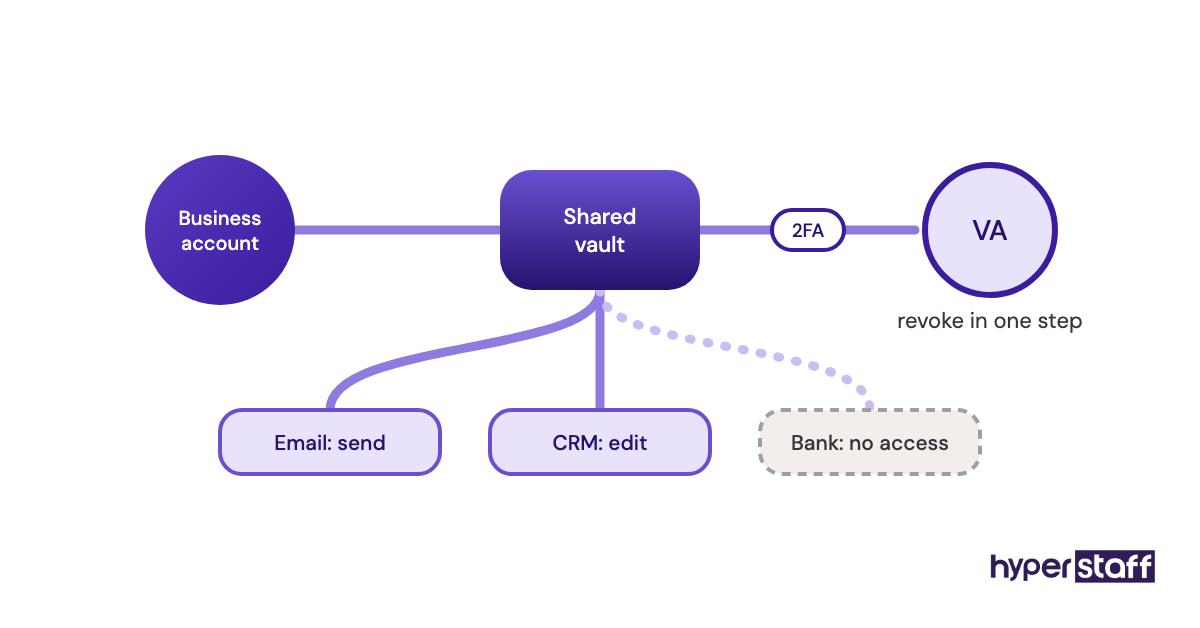
Keep every subscription under the business's own account. A tool registered to the VA's personal email becomes a problem the day they leave.
Step #3: Document Processes Before Day One
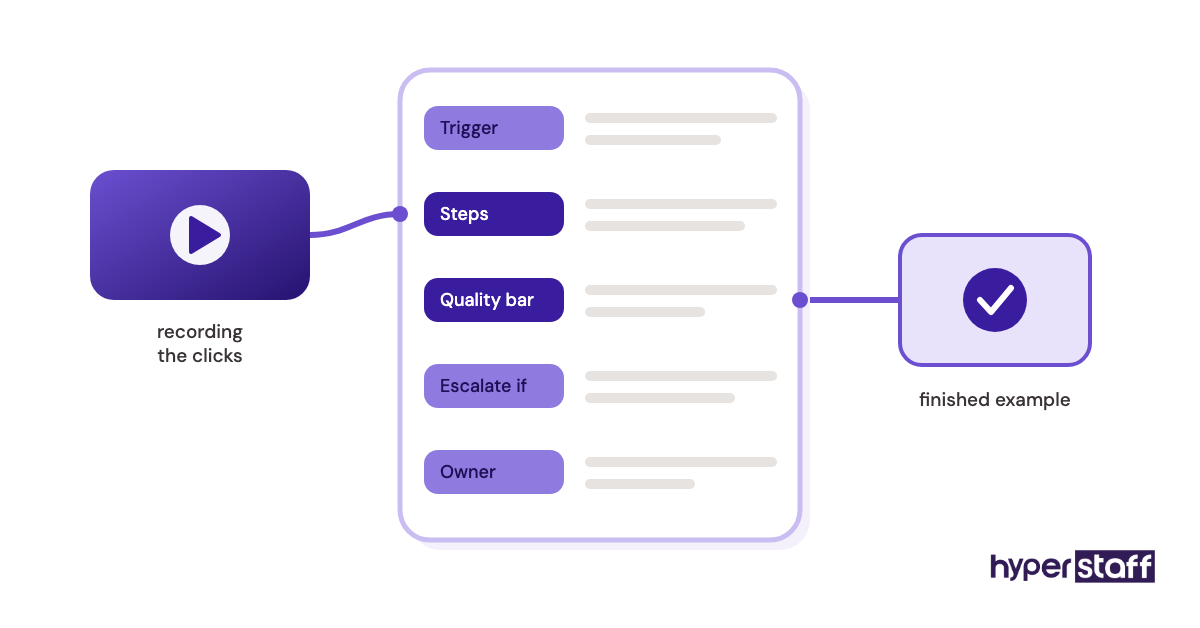
Record a screen video of each of the first three tasks while you talk through your decisions, then turn each one into a short written SOP. The recording shows the clicks, and the SOP holds the rules.
Step #4: Run a Kickoff Call and a Supervised First Week
Use the kickoff call to cover priorities, working hours, response times and escalation rules. Then let the VA do real tasks from day one, with a short daily review at a fixed time.
Answer questions inside the SOP itself, then send the link. The document improves every time someone asks.
Step #5: Hand Over Ownership in Stages
Once a task runs cleanly for three or four days, the VA owns it and you move to spot checks. Add the next task only then.
By the end of week four, the VA should own most of the first-month list and report on it in a weekly summary. Your reviews move from daily to weekly.
What Does an Effective VA Onboarding Strategy Look Like?
An effective VA onboarding strategy hands over outcomes along with tasks and builds documentation as a side effect of the work. It's planned for 30 days, written down and reviewed on a fixed rhythm.
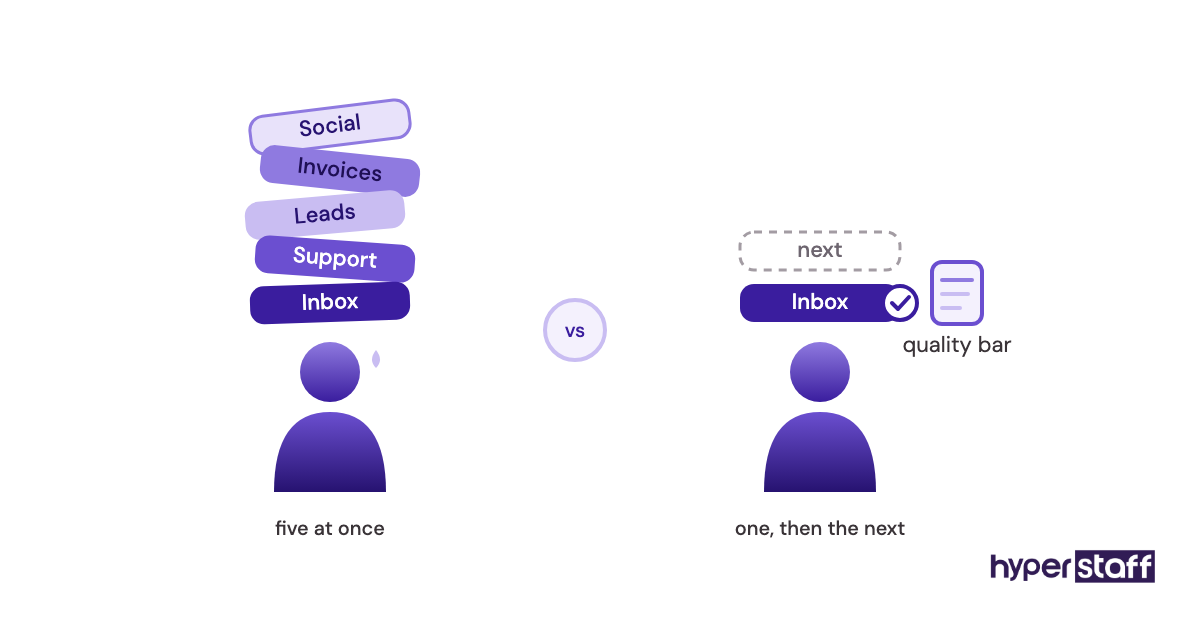
Strong plans pair each task with an SOP, an example of finished work and an escalation rule. A task missing any of those is where most first-month confusion starts.
Communication rules belong in the strategy too. Decide which channel handles urgent issues, which holds questions that can wait and when the VA should expect replies, especially when time zone overlap is only two or three hours.
Trust works best when it expands on a schedule. Some owners hand over full access on day one and others hold back for months; we've found that growing rights as each task proves itself causes fewer problems in both directions.
VA Onboarding Tools and Software
The core VA onboarding stack is a password manager, a screen recorder, a documentation space and a process-capture tool, plus the email and chat tools you already use. Prices below come from each vendor's pricing page and change often, so confirm before buying.
| Tool | Onboarding job | Free plan | Paid pricing (per user, per month) |
|---|---|---|---|
| Bitwarden | Shared logins without exposing passwords | Personal only | $4 (Teams) to $6 (Enterprise), billed annually |
| Loom | Screen recordings of tasks | Yes, 25 videos, 5-minute limit | From $18 (Business) |
| Notion | SOP library and handover document | Yes | $10 (Plus) to $20 (Business) |
| Scribe | Auto-generated step-by-step guides | Yes, browser capture | About $13 to $35 per seat, by plan and billing |
| Trainual | Structured training courses and quizzes | No | Quote-based, plus a one-time implementation fee |
For a single VA, the free plans of Loom, Notion and Scribe cover the first month. Loom's 5-minute cap is the first limit people hit, since a real task walkthrough often runs longer.
Trainual earns its price once you're onboarding several people a year. For one assistant, a Notion page per task does the same job.
10 Proven VA Onboarding Tips and Best Practices
These onboarding practices cut the most time from a VA's ramp period:
- Write the handover document before you post the job.
- Start with one workflow and add the next only after it runs cleanly.
- Share logins through a password manager, never through chat or email.
- Give a real example of finished work for every task.
- Put escalation rules in writing, with money thresholds where they apply.
- Hold a daily 15-minute review in week one at the same time each day.
- Answer every question by updating the SOP, then send the link.
- Ask the VA to rewrite one SOP in their own words in week two.
- Agree on core overlap hours and response times for urgent issues.
- Book a 30-day review to decide which tasks the VA owns next.
Overcoming Common VA Onboarding Challenges
The most common VA onboarding challenge is the owner's own time. Documentation and reviews compete with client work, so block two hours on the calendar before day one and treat them as fixed.
Silence comes next. Many assistants hesitate to ask questions early, and a daily review makes questions routine.
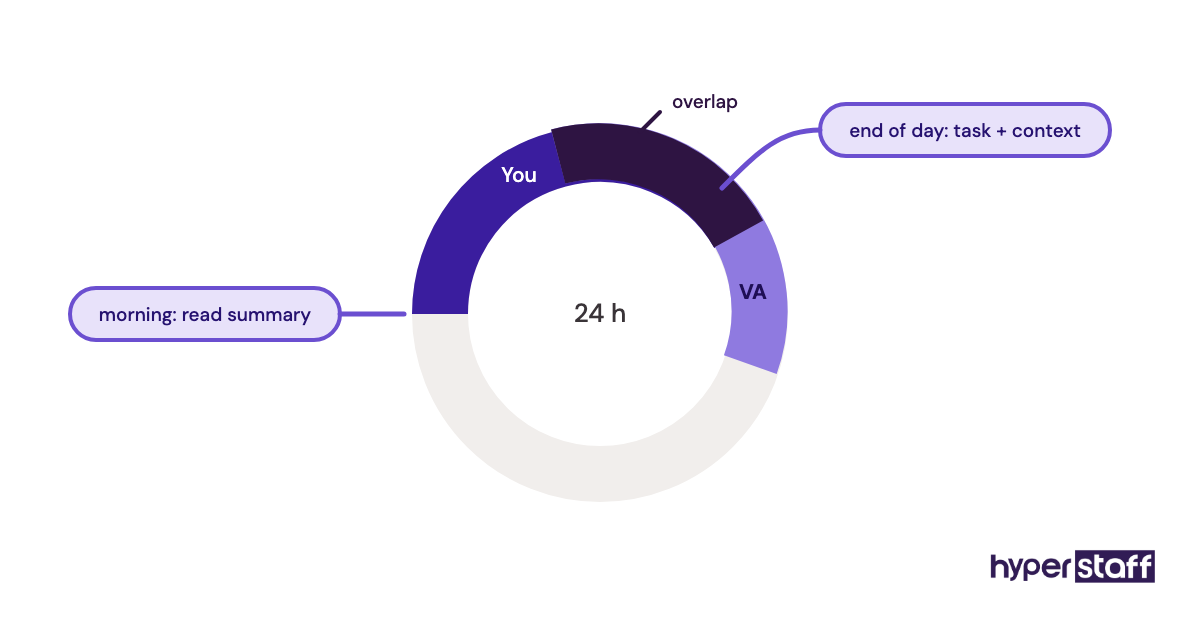
Time zones round out the list. When overlap is short, send tasks with full context at the end of your day and read the VA's summary first thing the next morning.
How to Measure VA Onboarding Success
Measure VA onboarding success by how many tasks the VA owns without review by day 30, and how often their work needs correcting. Both numbers should improve week by week.
Track a few signals: revision rate on deliverables, questions asked per day, tasks fully handed over and hours you no longer spend on the work.
Questions per day is the one owners misread. A spike in week two is often healthy, because the VA has moved from following steps to understanding them.
How Long Does Onboarding a Virtual Assistant Take?
Onboarding a virtual assistant usually takes two to four weeks to reach steady output on core tasks. Multi-skill roles, such as support plus marketing, can take six weeks or more.
The first few days are mostly access and shadowing. Week two is where real hours come back to you, and by week four most of the first-month list should sit with the VA.
With Hyperstaff, work starts the day of the kickoff call or the next morning, because the Operations Vault already holds your SOPs, tools and context.
How Much Does Onboarding a Virtual Assistant Cost?
Onboarding a virtual assistant costs mostly owner time plus a few tool subscriptions, while the VA's hours during ramp-up are the largest cash line. The table compares a month of Hyperstaff VA hours with a full-time in-house assistant.
| Cost item (160 hours a month) | Hyperstaff Essential | Hyperstaff Professional | Hyperstaff Expert | Typical in-house assistant (US) |
|---|---|---|---|---|
| Hourly rate | From $3 | From $6 | From $12 | About $23 median wage |
| Monthly hours cost | From $480 | From $960 | From $1,920 | About $3,700 in wages |
| Employee benefits | None to cover | None to cover | None to cover | About 30% of total compensation |
| Estimated total per month | From $480 | From $960 | From $1,920 | About $5,300 |
| Time to start | 5 business days | 5 business days | 5 business days | Often 4 to 8 weeks |
| Onboarding tools | $0 to $50 | $0 to $50 | $0 to $50 | $0 to $50 |
In-house figures use the BLS median wage of $23.23 an hour for secretaries and administrative assistants, and the BLS finding that benefits make up about 30% of private-industry compensation. Hyperstaff also sells 40 and 80-hour bundles, paying quarterly saves 10%, and our VA vs in-house comparison breaks down the rest.
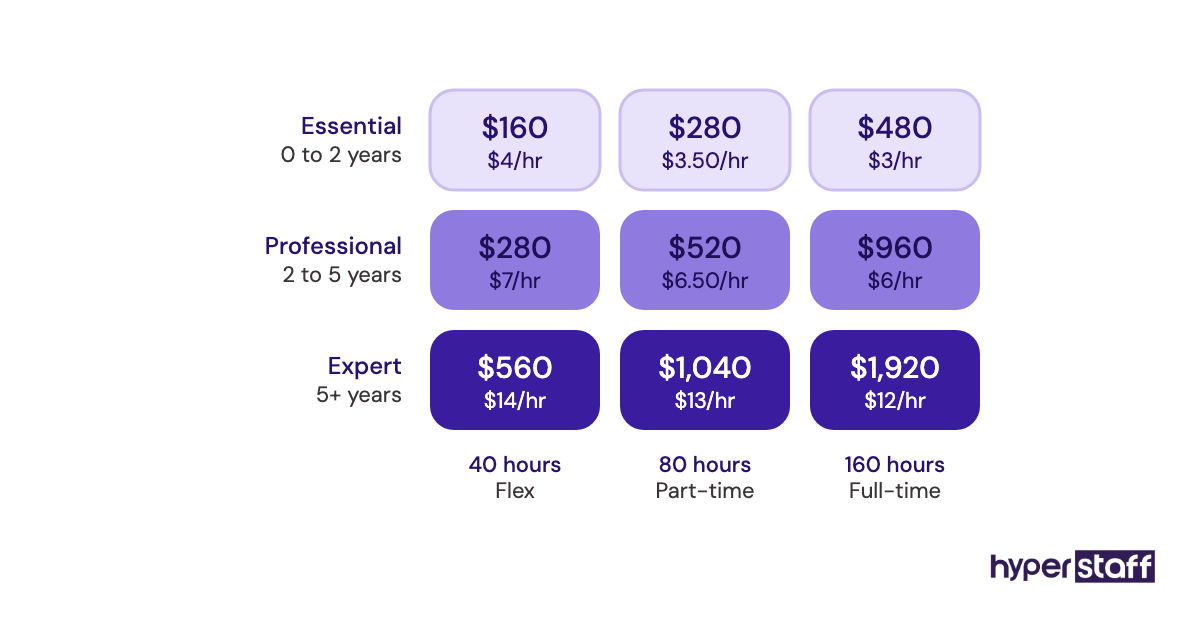
Important: Hyperstaff prices shown are averages, not fixed quotes. Your final cost depends on the role, the experience tier, your hours and the work involved.
Is Onboarding a Virtual Assistant Worth It?
Yes, onboarding a virtual assistant properly is one of the highest-return hours an owner can spend, because a few hours of setup pay back every week the VA works. Done well, it turns an extra pair of hands into someone who runs part of the business.
Here's an example calculation. Say an owner bills $75 an hour and hands 15 hours a week of admin and support to a Professional-tier VA on an 80-hour bundle, at about $480 a month.
That's roughly 65 owner hours a month, worth about $4,875 at the owner's rate, for $480 in VA cost. Even after 10 hours of onboarding work in month one, the time returned is several times the spend.
The math only holds if the onboarding happens. Skip it, and those 65 hours shrink because half the work comes back for fixes; our guide on whether a virtual assistant is worth it covers the full return picture.
How to Choose a Virtual Assistant Agency That Helps With Onboarding
Choose a VA agency by what it does after the match, since placement is the easy part. Ask who keeps your processes documented, how fast a replacement starts and whether you get a named account manager.
Ask how candidates were vetted, and run your own short interview using a few VA interview questions about past tools and tasks. A good agency welcomes this step.
Replacement terms are where agencies differ most. Hyperstaff replaces a VA free in 5 to 7 business days, and the new assistant is briefed from your Operations Vault, so onboarding never restarts from zero.
VA Onboarding Statistics, Trends and Future Predictions
Onboarding quality is low across most workplaces, and AI is adding a new kind of team member to onboard. The figures below come from named sources.
Gallup's onboarding research finds that only 12% of employees strongly agree their organization onboards new people well. For remote assistants, who can't pick up context in person, the gap is likely wider.
Microsoft's Work Trend Index reports that 82% of leaders expect to use digital labor to expand their workforce in the next 12 to 18 months. The same report finds leaders expect their teams to be training (41%) and managing (36%) AI agents within five years.
Our prediction: the written SOP becomes the center of onboarding, because the same document will brief a human VA and the AI tools that VA runs. Businesses with no written processes will feel that twice.
Virtual Assistant Onboarding and AI
AI speeds up VA onboarding mainly by turning recordings into written SOPs and answering routine "how do I" questions from your own documents. The kickoff call, the quality bar and your judgment on escalation rules stay with people.
Scribe already generates step-by-step guides from a recorded process, and most documentation apps now include an AI assistant that searches your pages. Both cut the hours owners spend writing SOPs.
Security needs a line in the plan too. Your onboarding document should say which AI tools the VA may use and which client data stays out of them.
Disclaimer: This article is for general information only and isn't legal, financial or HR advice. Prices, statistics and tool details may change, so verify them with the relevant provider before acting.
Common questions
What should I give my VA on the first day?
Give them a business email, access to a password manager vault, the handover document and SOPs for their first two or three tasks. Add a set time for daily check-ins in week one.
How do I share passwords safely when onboarding a virtual assistant?
Use a business password manager with a shared vault, so the VA can log in without copying the password elsewhere. You can revoke access in one step if the arrangement ends.
Should my VA sign an NDA before onboarding?
Yes, if they'll handle client data, financials or anything confidential. Sign it before granting access, and pair it with least-privilege permissions so the agreement isn't your only protection.
How many hours of my time does VA onboarding take?
Plan on about 6 to 12 hours across the first month, front-loaded into week one. Most of it goes to recording tasks and reviewing early work, and it drops sharply after week two.
What if my virtual assistant isn't working out after onboarding?
Check the onboarding first, since unclear SOPs and missing examples cause most early problems. If the fit is still wrong, an agency replacement with documented processes restarts the ramp in days.
Book a free 15 min call
We place a pre-vetted specialist in 5 business days, fully managed, from $3/hour.