What Is a Virtual Assistant? Roles, Costs and How It Works
What a virtual assistant does, how the arrangement works, what it costs and how to tell a good setup from a bad one.
On this page
- What Is a Virtual Assistant?
- Key Virtual Assistant Terms You Should Know
- Why Is a Virtual Assistant Important for a Growing Business?
- How Does a Virtual Assistant Work?
- What Types of Virtual Assistants Are There?
- How Does a Virtual Assistant Differ From Related Roles?
- What Are the Benefits of a Virtual Assistant?
- What Are the Drawbacks of a Virtual Assistant?
- Who Needs a Virtual Assistant?
- Virtual Assistant Examples
- Creating a Virtual Assistant Hiring Plan, Step by Step
- What Does an Effective Virtual Assistant Strategy Look Like?
- Virtual Assistant Tools and Software
- 10 Proven Virtual Assistant Tips and Best Practices
- What Are Common Virtual Assistant Challenges, and How Do You Fix Them?
- How Do You Measure Virtual Assistant Success?
- How Long Does a Virtual Assistant Take to Work Out?
- How Much Does a Virtual Assistant Cost?
- Is a Virtual Assistant Worth It?
- How Do You Choose a Virtual Assistant Agency?
- Virtual Assistant Statistics, Trends and Future Predictions
- How Is AI Changing Virtual Assistant Work?
- FAQs
💡 Key Takeaways:
1) A virtual assistant is a remote professional who handles recurring business work, from admin and scheduling to customer support, lead generation, bookkeeping and operations, on a set number of hours per week or month.
2) Virtual assistants usually work as contractors through a freelance platform or a staffing agency, so the business pays for hours instead of salary, benefits, equipment and office space.
3) The arrangement works best when one assistant owns whole workflows, has written processes and secure access from day one, and is judged on finished output each week.
Free up the hours that bring in revenue
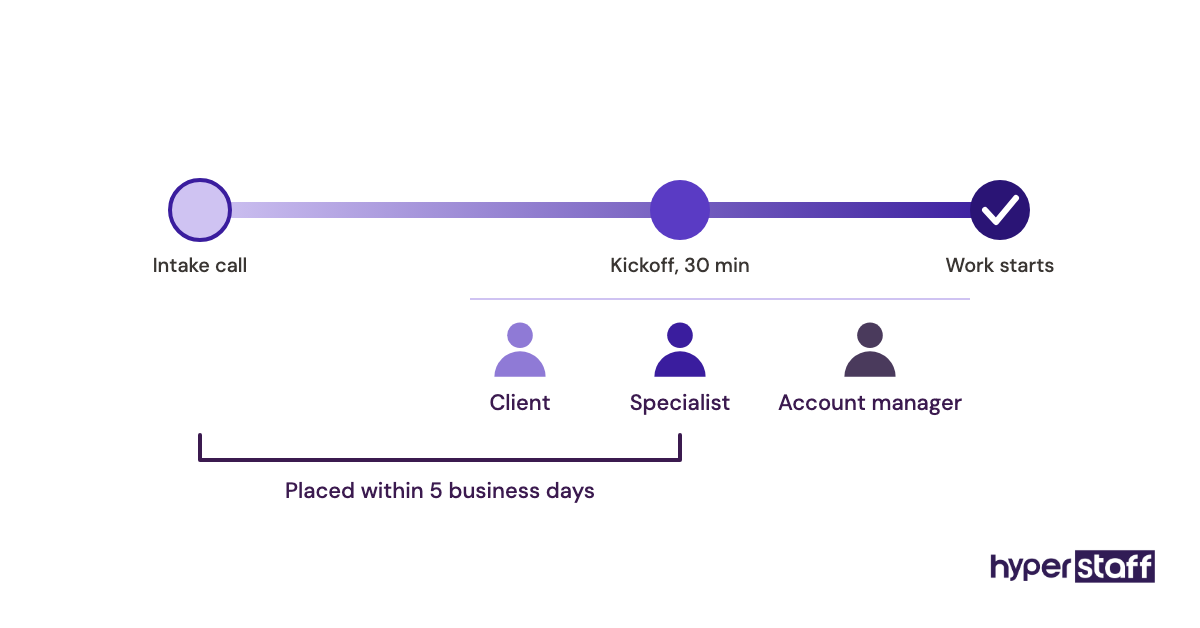
Hyperstaff has placed 70+ virtual assistants with 30+ clients, and each one is a dedicated specialist who learns a single business. You can hire a pre-vetted virtual assistant from five talent regions at rates from $3/hour, with placement in 5 business days and a dedicated account manager on your side from the first call.
What Is a Virtual Assistant?
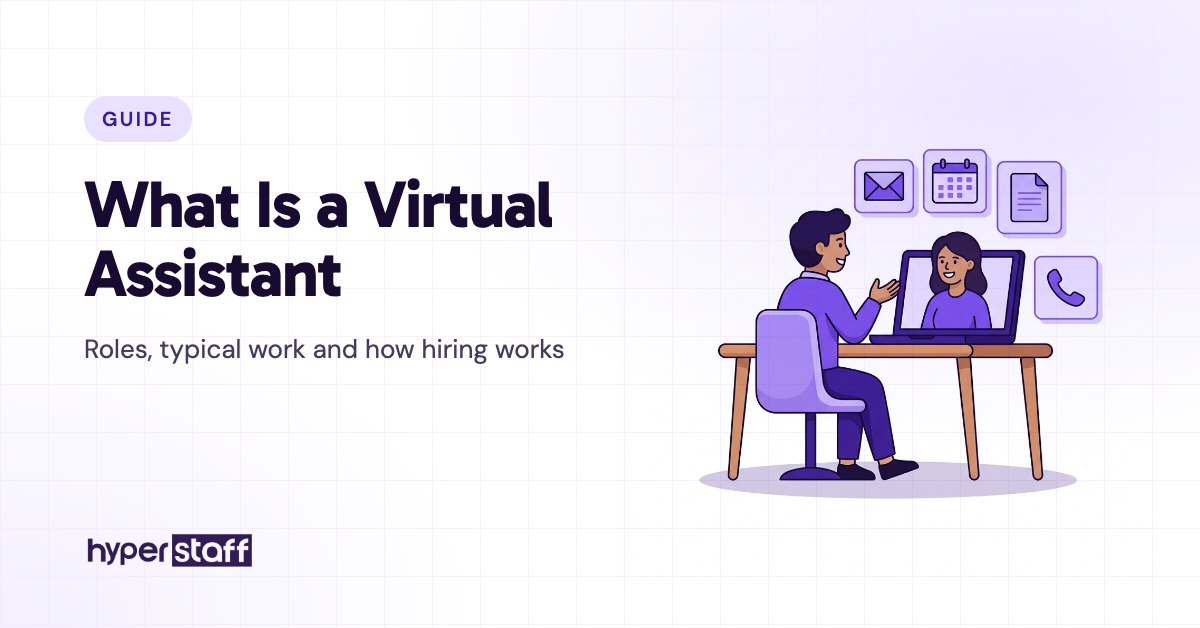
A virtual assistant is a remote professional who handles business tasks for a company from outside its office, usually on an agreed number of hours each week. The work spans admin, customer support, lead generation, bookkeeping, digital marketing and operations, depending on the person's skills.
The same term also names software helpers like Siri, Alexa and Google Assistant. This guide covers the human kind: a person who joins your tools, learns how your business runs and takes ownership of part of the work.
Most VAs work as independent contractors, either freelance or through a staffing agency. They can be full-time or part-time, and they might live in the Philippines, Latin America, India, Eastern Europe or a few states away.
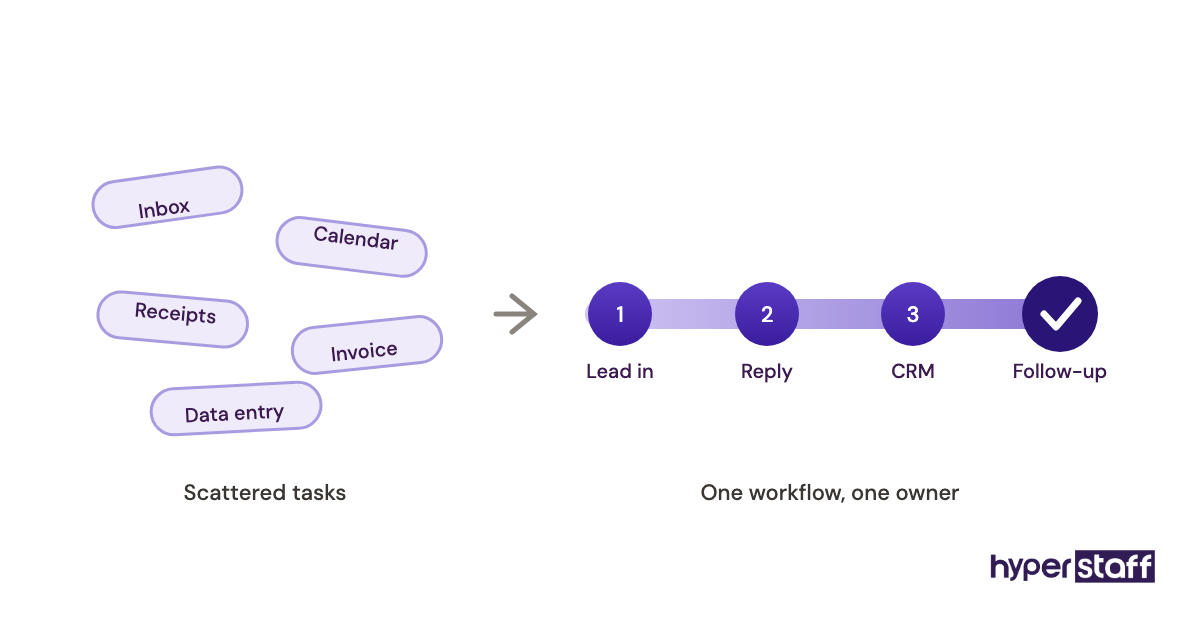
Inbox and calendar admin is where most owners start, and it's the narrowest version of the job. Owners who hand over an entire workflow, like refund requests or new-lead follow-up, tend to get far more back than owners who hand over a scattered pile of small tasks.
Key Virtual Assistant Terms You Should Know
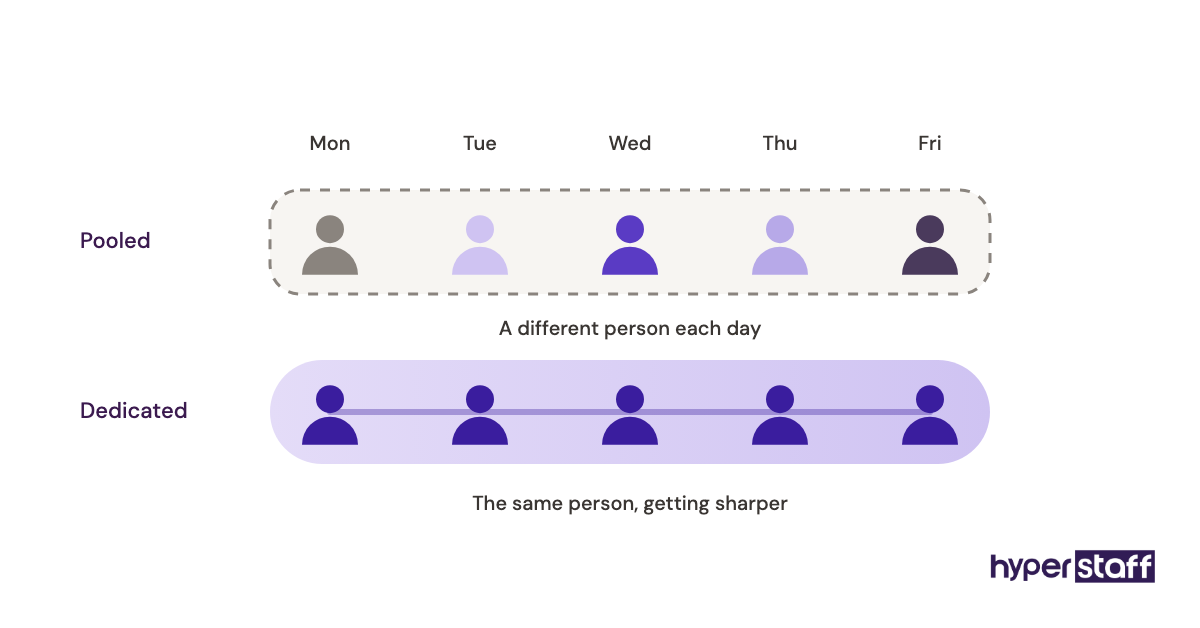
- Dedicated VA = one assistant assigned to one business, who builds up knowledge of its clients, tools and habits.
- Pooled VA = a shared team where different people pick up your tasks on different days.
- General VA = an assistant for admin, scheduling, data entry and inbox work.
- Specialist VA = an assistant trained for one function, such as bookkeeping, support, social media or lead generation.
- SOP = standard operating procedure, a written step-by-step guide for a recurring task.
- Hourly bundle = a prepaid block of monthly hours, such as 40, 80 or 160.
- Delegated access = permission to work inside your email, calendar or software without knowing your password.
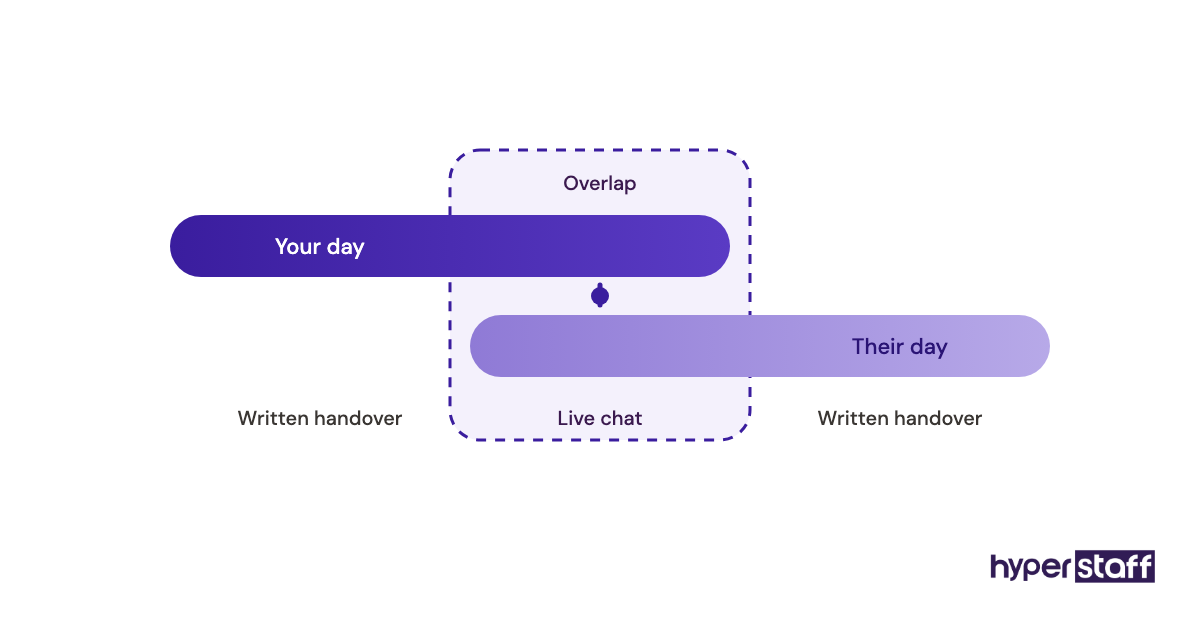
- Overlap hours = the part of the day when you and your assistant are both online.
- Independent contractor = a worker paid under a contract who isn't on your payroll.
- Offshore staffing = hiring talent based in another country, usually at a lower hourly rate.
- Replacement guarantee = an agency's promise to place a new assistant if the first one isn't a fit.
Why Is a Virtual Assistant Important for a Growing Business?
A virtual assistant matters because it adds working hours to a business without a full-time payroll commitment. Owner time shifts away from repeat tasks and toward sales, clients and decisions nobody else can make.
Cost drives most hiring decisions. The US Bureau of Labor Statistics lists the median pay for administrative assistants at $48,310 a year, and its employer cost data shows benefits make up about 31% of total compensation on top of that.
A contractor VA on a monthly bundle carries none of that overhead. There's no health plan, no desk and no laptop budget to fund.
Flexibility is the second reason. A business can start with 40 hours a month, see which tasks stick, and move to full-time once the work proves itself.
We'd argue the biggest payoff is less obvious. Writing processes down for an assistant leaves a business with an operation that no longer lives in one person's head, the owner's included.
How Does a Virtual Assistant Work?
A virtual assistant works through shared software: email, team chat, a task manager and a password manager. You assign work in the task tool, the assistant completes it during agreed hours, and progress shows up in a daily update or a weekly report.
Most arrangements follow the same order. The business sets the hours, grants access, explains each process once on a call or in a recording, and then reviews finished work.
Communication splits two ways. Urgent questions go to chat during overlap hours, and everything else travels as checklists, screen recordings and written handovers.
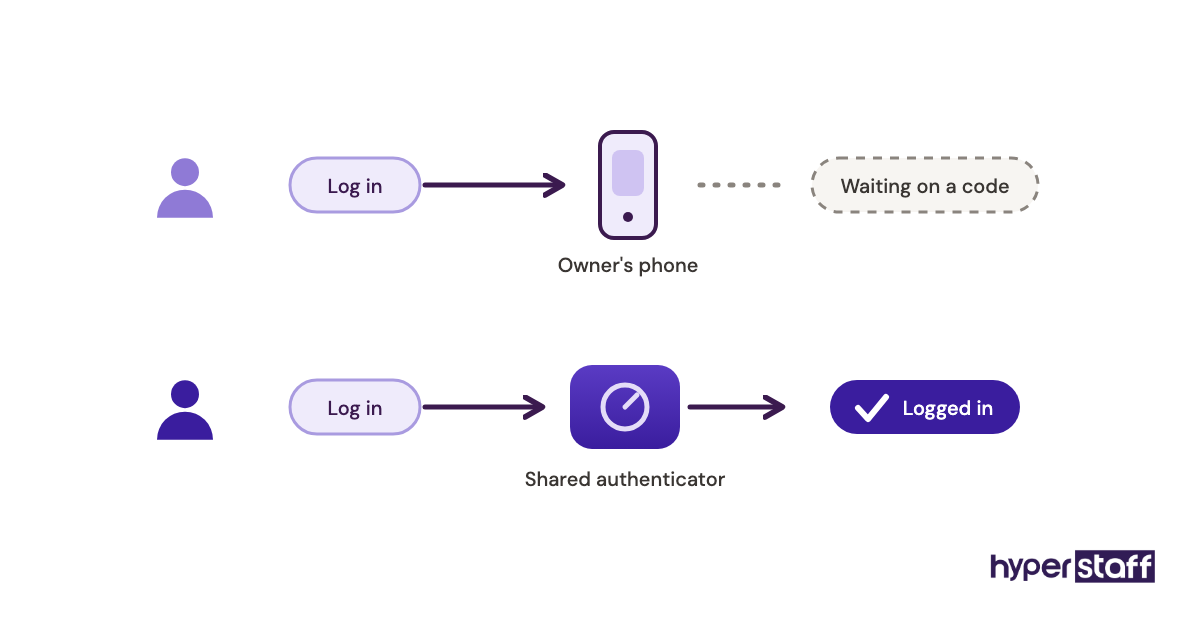
On paper, an assistant gets every login on day one. In practice, owners often stall for days over passwords and two-factor codes, and the assistant waits while paid hours tick by.
What Types of Virtual Assistants Are There?
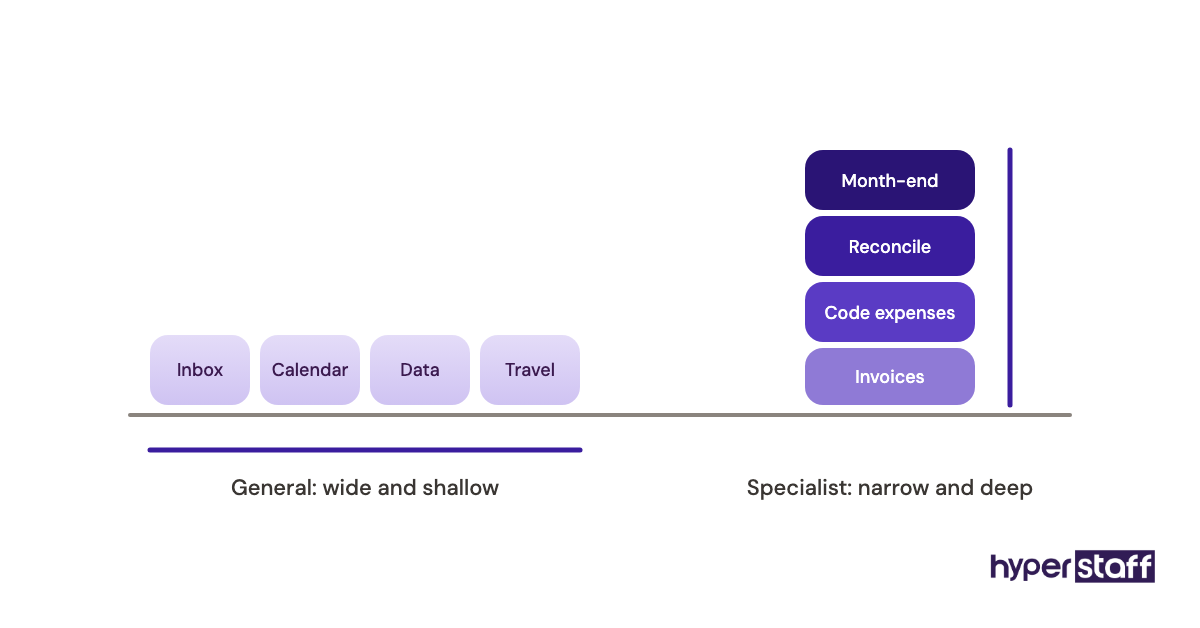
Virtual assistants fall into general and specialist types. General VAs cover admin and coordination, and specialists focus on one function like support, sales, finance or marketing, usually with deeper tool knowledge and a higher rate.
| VA type | Typical tasks | Common tools | Best fit | Experience usually needed |
|---|---|---|---|---|
| General admin VA | Inbox, calendar, data entry, travel booking | Google Workspace, Microsoft 365 | Busy founders and small teams | 0 to 2 years |
| Executive VA | Meeting prep, priority inbox, follow-ups for one leader | Gmail, Outlook, Calendly | CEOs and senior managers | 2 to 5 years |
| Customer support VA | Tickets, live chat, refunds, order questions | Zendesk, Gorgias, Help Scout | E-commerce and SaaS businesses | 0 to 5 years |
| Lead generation VA | Prospect research, list building, outreach, CRM updates | HubSpot, Apollo, LinkedIn Sales Navigator | B2B sales teams and agencies | 2 to 5 years |
| Bookkeeping VA | Invoicing, reconciliations, expense coding, month-end prep | QuickBooks, Xero | Service firms and online stores | 2 to 5+ years |
| Marketing VA | Social scheduling, email campaigns, blog uploads, reporting | Canva, Buffer, Mailchimp, WordPress | Coaches, creators and local brands | 0 to 5 years |
| E-commerce VA | Product listings, inventory updates, supplier emails | Shopify, Amazon Seller Central | Online stores | 0 to 2 years |
| Operations VA | SOP upkeep, vendor management, project tracking, reporting | Asana, Notion, ClickUp | Growing companies with several workflows | 5+ years |
Specialist roles cost more per hour and need less training. A general VA is cheaper but needs clearer instructions for anything outside routine admin.
How Does a Virtual Assistant Differ From Related Roles?
A virtual assistant differs from similar roles in three places: how long the relationship lasts, where the person works, and whether a human or software does the job. The comparisons below are the ones buyers mix up most.
Virtual Assistant vs. Freelancer
A virtual assistant works ongoing hours inside your business, and a freelancer typically delivers a defined project, like a logo or a website, and moves on. Plenty of VAs are freelancers on paper, so the useful distinction is the shape of the work.
Hire a freelancer when the job has an end date. Hire a VA when the work repeats every week and gets better with context.
Virtual Assistant vs. Executive Assistant
An executive assistant supports one senior leader, usually on salary and often in the office. A virtual assistant can do much of the same work remotely, and many executive VAs do exactly that.
The trade-offs sit in cost, control and time zones, all covered in our comparison of virtual assistants versus in-house staff. In-house still wins when the job needs a person physically present, like greeting visitors or handling mail.
Virtual Assistant vs. AI Assistant
AI assistants such as ChatGPT, Gemini and Siri draft, summarize and answer questions on request. They don't own outcomes: they won't chase a late supplier, notice a customer is about to churn, or decide which email can wait.
Most good VAs now use AI tools themselves. Pairing the two gets a faster first draft and a human who checks it and sends it.
What Are the Benefits of a Virtual Assistant?
The benefits of a virtual assistant come down to lower cost, more flexibility and access to skills a local market may not offer.
- Lower cost per hour than an in-house hire, with no benefits, desk or equipment to fund
- Hours that scale from 40 a month to full-time as work grows
- Access to talent across several countries and time zones
- Coverage before or after your own working day
- Written processes that stay with the business if people change
- Faster hiring, often days instead of the weeks a local search takes
What Are the Drawbacks of a Virtual Assistant?
The drawbacks are real but mostly fixable with setup. They show up in the first month, which is when most hires that fail actually fail.
- Time-zone gaps can slow replies on urgent issues
- The first two weeks take real owner time for walkthroughs and feedback
- Sharing system access is risky without a password manager
- Quality varies widely among freelancers on open marketplaces
Who Needs a Virtual Assistant?
A virtual assistant suits any owner or team losing 10 or more hours a week to repeatable work that someone else could follow from a checklist. Founders, agencies, online stores, real estate teams, coaches and professional service firms are the most common buyers.
Scanning a list of common virtual assistant tasks against your own calendar is the fastest test. If a third of your week appears on that list, you have a role.
Solo founders usually hire a generalist first, someone to take the inbox, invoicing and scheduling. Larger companies tend to hire specialists into one team, such as a support VA reporting to a support lead, because the process already exists and only the hours are missing.
A VA is the wrong move for a business with no repeatable process yet. If every task changes daily and lives in the owner's head, write two or three processes down first.
Virtual Assistant Examples
Good and bad VA setups usually differ in scope and access, and rarely in the assistant's talent. The patterns below repeat across industries.
Good Virtual Assistant Examples
A Support VA Who Owns the Refund Queue
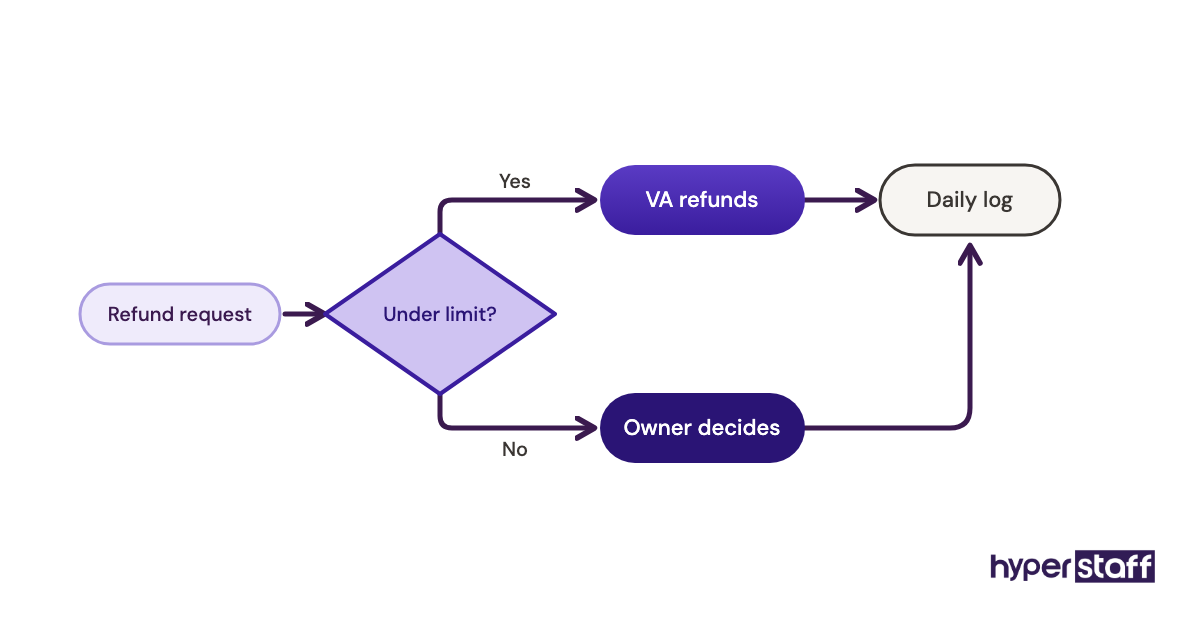
An online store hands its assistant the whole refund process: reading the request, checking the order in Shopify, issuing refunds under a set dollar limit and escalating the rest. The owner reviews a short daily log.
The setup works because the assistant can finish the job alone. A clear approval threshold removes most of the back-and-forth.
A Lead Generation VA Building Prospect Lists
A B2B agency gives its VA a written ideal-customer profile, an Apollo seat and a CRM. Each week the assistant researches 100 to 200 prospects, verifies emails and loads them into a sequence the sales lead approves.
Volume targets plus a quality check from the sales lead keep the list clean. Bounce rate and reply rate tell the owner within a month whether the research is good.
A Bookkeeping VA Closing the Month
A small consultancy hands monthly reconciliation in Xero to a VA with bookkeeping experience. The accountant reviews the books at quarter end, and the owner stops spending the first Saturday of every month on receipts.
Bad Virtual Assistant Examples
The "Do Everything" Hire
An owner hires a VA with no task list and says "just help me out." Two weeks in, the assistant is waiting for instructions every morning and the owner decides VAs don't work.
The fix costs an hour: a written virtual assistant job description with five or six owned tasks.
The Password Spreadsheet
Logins go out in a shared Google Sheet, including the business bank account. Nothing bad has to happen for the setup to fail; the owner simply can't revoke access cleanly when the assistant leaves.
Paying for Activity Screenshots
Some owners judge a VA by screenshots and mouse activity. The assistant learns to look busy, and nobody notices that the inbox still has 300 unread emails.
Creating a Virtual Assistant Hiring Plan, Step by Step
A virtual assistant hiring plan takes about two weeks of prep and five steps. Skipping the first two is the single most common reason a hire stalls.
Step #1: Track Where Your Week Goes
Log your tasks for one to two weeks, with rough times. Highlight anything repeatable, rule-based or done more than once a week.
Step #2: Group Tasks Into One Role and Pick a Level
Bundle the highlighted tasks into a role with a clear owner, such as support, admin or lead research. Match the role to an experience level: routine admin rarely needs five years of experience, but bookkeeping and executive support usually do.
Step #3: Test for the Actual Work
Use a short paid task alongside the interview, like triaging ten sample emails. Our list of virtual assistant interview questions covers what to ask about judgment, tools and availability.
Step #4: Prepare Access and Processes Before Day One
Set up accounts, a password manager and two or three recorded walkthroughs before the start date. Our guide to onboarding a virtual assistant walks through the first week in order.
Step #5: Review at 30 Days and Widen the Scope
Check finished output against what you expected, then add the next workflow. Most assistants take on more once the first job runs without supervision.
What Does an Effective Virtual Assistant Strategy Look Like?
An effective virtual assistant strategy gives one person ownership of whole workflows, documents each one, and grows scope in stages after each workflow runs cleanly. A weekly 15-minute check-in and output-based targets hold it together.
Practitioners disagree on hours. One camp starts part-time at 40 to 80 hours to test the fit cheaply; the other goes full-time from the start, because a part-time VA often splits attention across several clients and never builds deep context.
We lean toward the second camp when the work is customer-facing and the first when it's back-office admin. A dedicated assistant who knows your customers by name answers faster and makes fewer escalations.
We're less certain about meeting cadence. Daily stand-ups help in month one, and some owners keep them for years, while others switch to async written updates and see no drop in quality.
Virtual Assistant Tools and Software
A virtual assistant needs five kinds of software: shared email and documents, chat, task tracking, password sharing and screen recording. Most have free plans that work for one owner and one assistant at the start.
- Google Workspace for email, calendar and files, about $7 to $22 per user per month on annual plans
- Slack for daily chat, with a free plan and paid plans around $7.25 to $15 per user
- Asana for task tracking, free for small teams and about $10.99 to $24.99 per user on paid tiers
- 1Password for shared logins, about $24.95 a month for up to 10 users on Teams
- Loom for recorded walkthroughs, with a free plan and paid seats around $18 to $24
- Hubstaff for time tracking, roughly $5 to $12 per seat
Buy the password manager first. Every other tool on the list is only as safe as the way its login gets shared, and it's the one purchase owners most often put off.
Time-tracking screenshots split opinion. They're useful for billing disputes and nearly useless for judging quality, so set them up for records and judge the assistant on output.
10 Proven Virtual Assistant Tips and Best Practices
These virtual assistant tips come from the setups that last past the first quarter.
- Give the assistant whole workflows to own, with a finish line for each.
- Write a dollar or decision limit the VA can act under without asking.
- Record a screen walkthrough for every recurring task.
- Share logins only through a password manager.
- Agree on two to four overlap hours each working day.
- Keep one task tool as the single source of what's due.
- Hold a short weekly review in the first two months.
- Correct mistakes in writing so the fix becomes part of the SOP.
- Buy every software seat under the business's own account.
- Add one new workflow at a time, and only after the last one runs cleanly.
What Are Common Virtual Assistant Challenges, and How Do You Fix Them?
The common virtual assistant challenges are vague scope, slow access, time-zone friction and owners who can't let go. Each one has a direct fix, and most of them start with writing things down.
Vague scope is fixed with an owned task list. Slow access is fixed before day one with a password manager, and time-zone friction shrinks once you agree on fixed overlap hours.
Letting go is the hardest. Owners who redo the assistant's work in secret never find out whether it was good enough, and our rundown of common virtual assistant mistakes covers that trap and several others.
How Do You Measure Virtual Assistant Success?
Virtual assistant success is measured by finished output and owner hours saved, with hours logged a distant third. Pick two or three numbers tied to each workflow the assistant owns.
For support, track first-response time and tickets closed. For lead generation, track verified prospects added and reply rate, and for admin, track inbox count at end of day and missed follow-ups.
The number that matters most is your own calendar. If you aren't getting back five or more hours a week by the second month, the scope is wrong, and adding hours won't fix it.
How Long Does a Virtual Assistant Take to Work Out?
A virtual assistant usually takes 30 to 60 days to work independently on a defined workflow. Simple admin can run unsupervised within two weeks, and specialist roles like bookkeeping take longer.
The sequence has dead zones. Matching and placement take days, access setup can eat the first week if nobody prepared it, and weeks two to four are the learning curve where mistakes are normal.
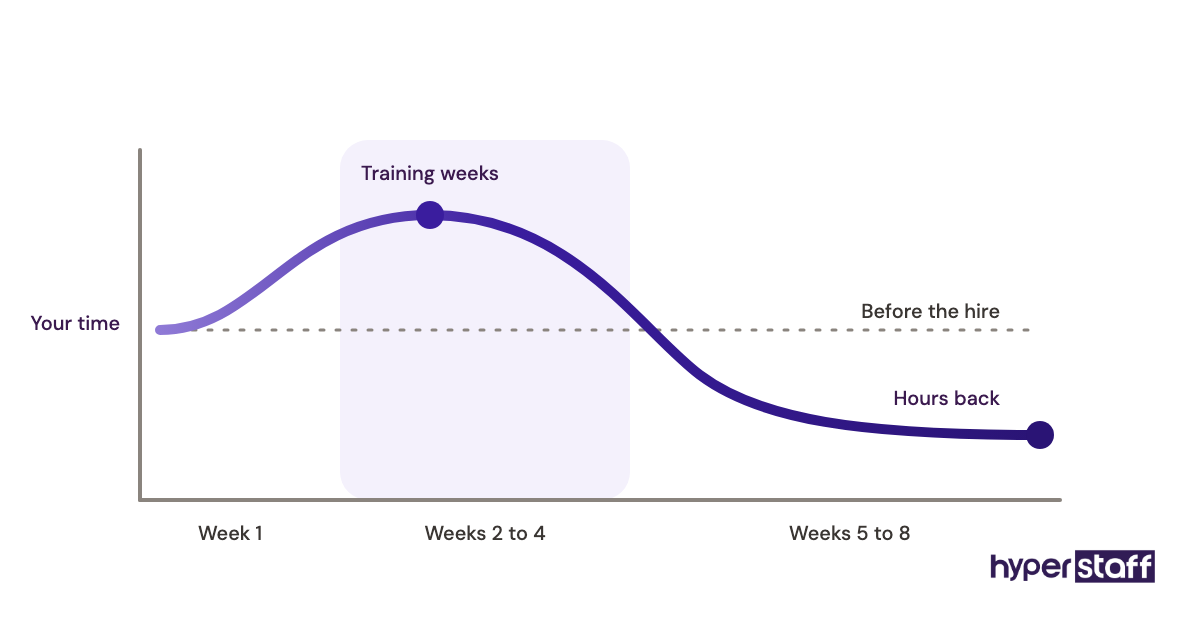
Expect your own time to rise slightly in month one before it drops. Owners who quit during that dip never see the payoff.
How Much Does a Virtual Assistant Cost?
A virtual assistant costs about $3 to $40 or more per hour, depending on region, experience and whether you hire freelance or through an agency. Offshore VAs sit at the lower end, and US-based specialists at the top.
| Experience level | Hyperstaff rate | Hyperstaff full-time (160 hrs/month) | Typical US in-house cost per hour | Typical US in-house per month, with benefits |
|---|---|---|---|---|
| Essential (0 to 2 years) | From $3/hour | From $480 | About $18 to $23 in wages | About $4,500 to $5,800 |
| Professional (2 to 5 years) | From $6/hour | From $960 | About $23 to $30 in wages | About $5,800 to $7,500 |
| Expert (5+ years) | From $12/hour | From $1,920 | About $30 to $45 in wages | About $7,500 to $11,300 |
Hyperstaff sells monthly bundles of 40, 80 or 160 hours, and paying quarterly saves 10%. In-house figures assume benefits at roughly 31% of total compensation, in line with the BLS data cited earlier.
Important: Hyperstaff prices shown are starting averages. Your final rate depends on the role, the skills it needs, the region and the hours you book, which we confirm on a free discovery call.
Is a Virtual Assistant Worth It?
Yes, a virtual assistant is worth it when the role is scoped well, because few hires return this much owner time for this little money. Done right, it is one of the most rewarding changes a small business can make.
Here's a sample calculation. A US in-house administrative assistant at the BLS median of $48,310, with benefits at about 31% of total compensation, costs roughly $70,000 a year.
A full-time Hyperstaff Professional assistant starts at $6 an hour for 160 hours, or $960 a month and $11,520 a year. Paid quarterly, that drops to about $10,370, a gap of roughly $59,600 against the in-house hire.
The owner-time side matters as much. If the assistant frees 10 hours of your week and your time bills at $100 an hour, that's over $4,000 a month of capacity back for sales or client work.
The calculation breaks when the role is vague or the owner won't hand over access. We go deeper on that trade-off in our piece on whether a virtual assistant is worth it.
How Do You Choose a Virtual Assistant Agency?
Choose a virtual assistant agency on how it vets talent, whether you get a dedicated person or a pool, its replacement terms and how fast it can place someone. Pricing comes after those, since a cheap mismatch costs more than a fair rate.
Ask how candidates are tested. A skills test for the actual role tells you more than a resume screen.
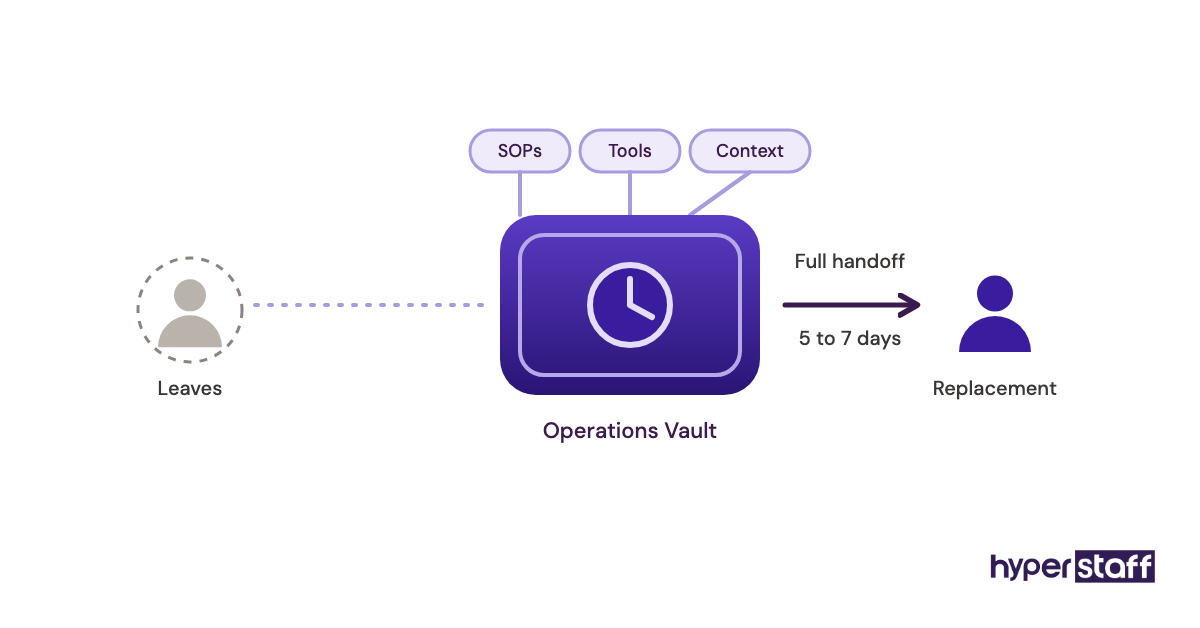
Ask what happens when the assistant leaves. Hyperstaff replaces an assistant free in 5 to 7 business days and briefs the new person from your Operations Vault, where your SOPs, tools and context are written down and maintained for you.
Ask who you talk to when something goes wrong. A named account manager beats a support inbox, and every Hyperstaff client has one.
Virtual Assistant Statistics, Trends and Future Predictions
Virtual assistant hiring is growing as in-house administrative roles shrink. BLS projects a 2% decline in US secretary and administrative assistant jobs over the coming decade, even as replacements keep openings high.
| Metric | Figure | Source |
|---|---|---|
| Median annual pay, US administrative assistants | $48,310 | BLS Occupational Outlook Handbook |
| Median hourly pay | $23.23 | BLS Occupational Outlook Handbook |
| US jobs in the occupation | 3,515,600 | BLS Occupational Outlook Handbook |
| Projected 10-year employment change | -2% | BLS Occupational Outlook Handbook |
| Average annual openings | About 314,400 | BLS Occupational Outlook Handbook |
| Benefits share of total compensation | About 31% | BLS Employer Costs for Employee Compensation |
The trend we see is a shift from generalist to specialist VAs. Buyers who once hired "an assistant" now ask for a support VA who knows Gorgias, or a bookkeeper who already works in Xero.
Our prediction, held loosely: pure data-entry roles keep shrinking as AI absorbs them, and demand moves to assistants who can run a workflow end to end and check AI output.
How Is AI Changing Virtual Assistant Work?
AI is changing virtual assistant work by speeding up drafting, summarizing, research and data cleanup. A VA with AI tools gets through routine writing and sorting faster, which frees hours for follow-up, judgment calls and customer contact.
We're confident about the drafting side. Email replies, meeting notes and product descriptions now start as AI drafts and get edited by a person who knows the brand.
We're less sure how far voice agents and autonomous AI tools will go with phone work. Today they handle simple bookings, and they still struggle with upset customers and unusual requests.
Disclaimer: This article is for general information only and isn't legal, tax or financial advice. Figures from third-party sources and software prices change over time, so check current terms with each provider, and Hyperstaff rates vary by engagement.
Common questions
Can a virtual assistant work only for my business?
Yes, if you hire a dedicated assistant on full-time hours. Freelancers on part-time hours often serve several clients, so ask before you sign.
Can a virtual assistant make phone calls for my business?
Yes, most VAs handle calls through a business phone app like RingCentral, Dialpad or Google Voice. Choose someone with strong spoken English and agree on a call script for common questions.
Do I pay payroll taxes on a virtual assistant?
Usually not, because most VAs are contractors or employed by their agency. Rules differ by country, so confirm worker classification with an accountant before hiring a freelancer directly.
Should a virtual assistant sign an NDA?
Yes, ask any virtual assistant with access to client data, finances or internal documents to sign a confidentiality agreement. Agencies often include one in their standard contract.
What hours does an offshore virtual assistant work?
Most offshore VAs adjust their schedule to overlap with yours for at least part of the day. Many in the Philippines and India work US business hours as a night shift, and Latin American assistants usually share most of the US workday.
Book a free 15 min call
We place a pre-vetted specialist in 5 business days, fully managed, from $3/hour.