Virtual Assistant Job Description: A Free Template and How to Adapt It
A copy-and-paste virtual assistant job description, plus the edits that make it attract the right hire for your business.

On this page
- What Is a Virtual Assistant Job Description?
- Virtual Assistant Job Description Template (Copy and Paste)
- Key Virtual Assistant Job Description Terms You Should Know
- Why Does a Clear VA Job Description Matter?
- How Do You Adapt the Template to Your Business?
- Types of Virtual Assistant Job Descriptions
- How a VA Job Description Differs From Related Roles
- The Benefits of a Detailed VA Job Description
- The Drawbacks of a Detailed VA Job Description
- Who Needs a Virtual Assistant Job Description?
- Virtual Assistant Job Description Examples
- Writing Your Virtual Assistant Job Description, Step-by-Step
- Tools to Name in a Virtual Assistant Job Description
- 10 Tips for a VA Job Description That Attracts the Right Hire
- Overcoming Common VA Job Description Challenges
- How to Measure Whether Your Job Description Worked
- How Long Does It Take to Hire a VA From a Job Description?
- How Much Does a Virtual Assistant Cost?
- Is Hiring a Virtual Assistant Worth It?
- How to Choose a Virtual Assistant Agency
- Virtual Assistant Statistics, Trends and Future Predictions
- Virtual Assistant Job Descriptions and AI
- FAQs
💡 Key Takeaways:
1) A virtual assistant job description lists the workflows the assistant will own, the tools they'll use, the hours and time-zone overlap, the pay, and how results get measured after 90 days.
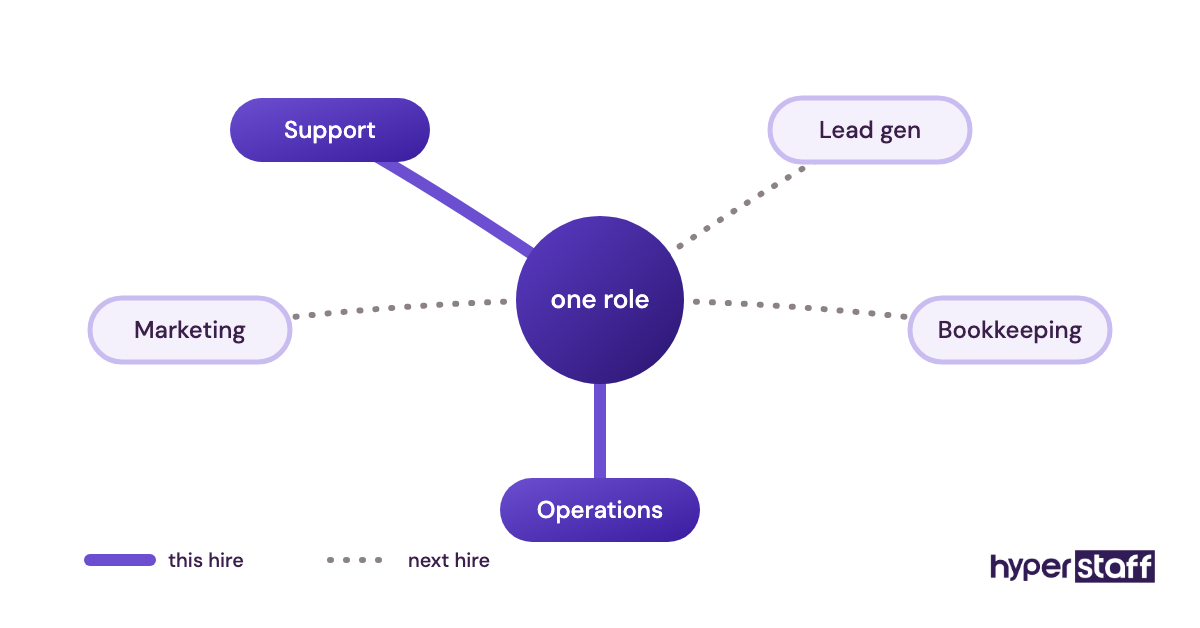
2) The strongest VA job descriptions name one or two core functions, such as customer support, lead generation, bookkeeping or operations, instead of a long list of unrelated admin tasks.
3) A specific application instruction, like a short recorded answer or a subject-line code word, filters out mass applicants faster than any list of required skills.
A sharper job post buys back billable hours
Hyperstaff has placed 70+ virtual assistants with 30+ clients, and every role we fill gets its SOPs, tools and context written into an Operations Vault before work starts. If you'd rather skip the job board, we can match you with a dedicated virtual assistant in 5 business days, from $3/hour, with an account manager on your side from day one.
What Is a Virtual Assistant Job Description?
A virtual assistant job description is the written outline of a remote assistant's role: the work they own, the tools they need, their hours, their pay and the results they're judged on. It's the document candidates read first, and later it becomes the scope you and the assistant both work from.
Virtual assistant work reaches well past inbox and calendar admin into customer support, lead generation, digital marketing, bookkeeping and online business management, so a good job description says which of those the role includes. If the role itself is still fuzzy, read up on what a virtual assistant does before you write a word of the post.
Virtual Assistant Job Description Template (Copy and Paste)
The template below is a complete VA job description you can copy, fill in and post today. Square brackets mark the parts you replace, and any line that doesn't fit your role should be deleted rather than left generic.
Job title: Remote Virtual Assistant, [Customer Support / Operations / Lead Generation / Executive Support]
About us: [Business name] sells [product or service] to [type of customer]. We're a team of [number] based in [city or time zone], and we're hiring our [first / second] remote assistant.
Role summary: You'll own [workflow 1] and [workflow 2] for [business name], reporting to [name, role]. The role is [40 / 80 / 160] hours a month, with at least [3–4] hours a day overlapping [time zone].
What you'll own:
- Manage the shared inbox at [address]: sort every message within [X] business hours, reply from saved templates, and escalate [refunds, complaints, legal questions] to [name].
- Run the calendar for [name]: book, confirm and reschedule meetings, and send a short prep note the evening before each one.
- Update [CRM name] after every call, form fill or email reply, so every lead has an owner, a next step and a date.
- Answer customer tickets in [help desk tool] about [order status, returns, product questions], sending anything over [$X] for approval.
- Prepare a weekly report every [day] covering [3–5 named metrics].
- Write a step-by-step SOP in [Google Drive / Notion folder] the first time you complete any recurring task.
- [One role-specific duty, such as invoicing in QuickBooks Online or scheduling social posts]
What success looks like after 90 days:
- [Inbox / ticket queue] cleared by the end of each working day
- [Metric, such as first reply time] under [target]
- Every recurring task documented in a written SOP
- [Name] spending under [X] hours a week on the tasks you took over
What you need:
- [0–2 / 2–5 / 5+] years of experience in [function]
- Written English clear enough to reply to customers without edits
- Daily working experience with [two or three named tools]
- A reliable internet connection and a backup plan for outages
Nice to have: experience with [industry, tool or platform].
Schedule: [Full-time / part-time], [days], [start and end time with time zone].
Tools you'll use: [Email platform], [project tool], [CRM or help desk], [password manager], [video tool].
Pay: [$X–$Y] per hour, paid [weekly / every two weeks / monthly].
Access and confidentiality: You'll log in through [password manager] and sign an NDA before your first day.
How to apply: Send your CV and a 2-minute screen recording answering "[one question about the role]" to [email], with the subject line "[code word]". Applications without the code word won't be reviewed.
Key Virtual Assistant Job Description Terms You Should Know
- Role summary = two or three sentences naming the workflows, the reporting line and the hours.
- Responsibilities = the recurring tasks the assistant owns, written as outcomes with a tool and a deadline.
- Dedicated VA = one assistant who works only on your business, as opposed to a shared pool.
- Time-zone overlap = the hours each day when you and the assistant are both online.
- SOP = a written standard operating procedure for one recurring task.
- Escalation rule = the line that tells the assistant which decisions go back to you.
- Experience tier = the band of years in the function you're hiring for, which sets the rate.
- Hour bundle = a fixed monthly block of hours, such as 40, 80 or 160.
- Least-privilege access = giving the assistant only the logins their tasks require.
- Trial task = a short exercise that tests the core duty before you hire.
- Independent contractor = the usual legal status of an offshore VA, which affects tax and benefits.
Why Does a Clear VA Job Description Matter?
A clear VA job description matters because it decides who applies, how fast the assistant becomes useful and how you'll judge their work later. Vague posts attract generalists who apply to everything; specific posts attract people who've done your exact work before.
The bigger cost of a vague description shows up after the hire. If the post said "general admin support," the assistant has no written scope to point back to, so every new request lands on them and nothing gets finished properly.
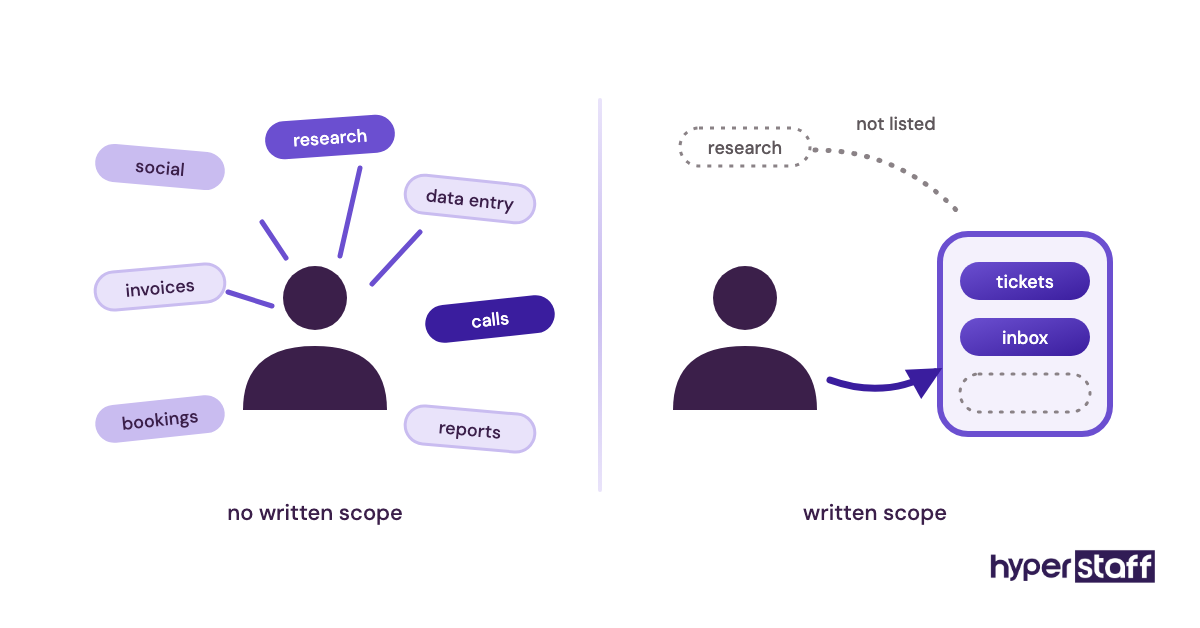
There's a less obvious benefit too. The 90-day success list gives you a fair, agreed standard for a performance conversation, which is far easier than telling someone they missed expectations you never wrote down.
How Do You Adapt the Template to Your Business?
Adapting the virtual assistant job description template starts with cutting. Keep the two workflows that eat the most of your week, delete every bullet that doesn't serve them, then fill each bracket with a real tool name, number or deadline.
Pull the duties from what you already do. Go through your sent email and calendar from the last two weeks and mark anything you did more than twice, then compare it against this list of virtual assistant tasks to catch work you've stopped noticing.
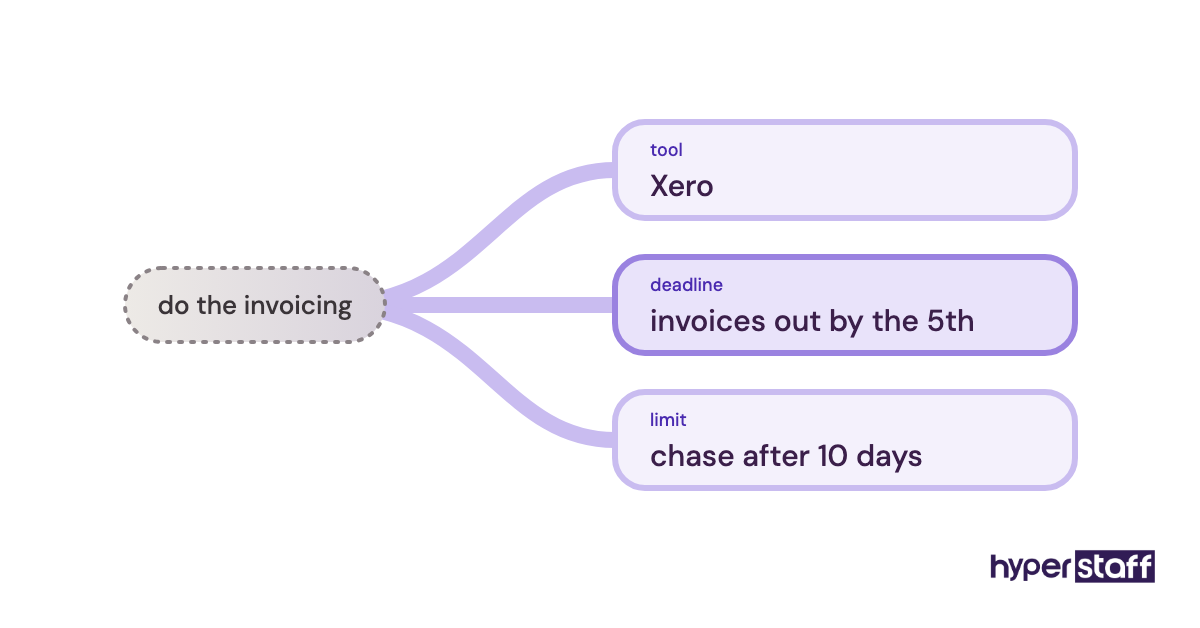
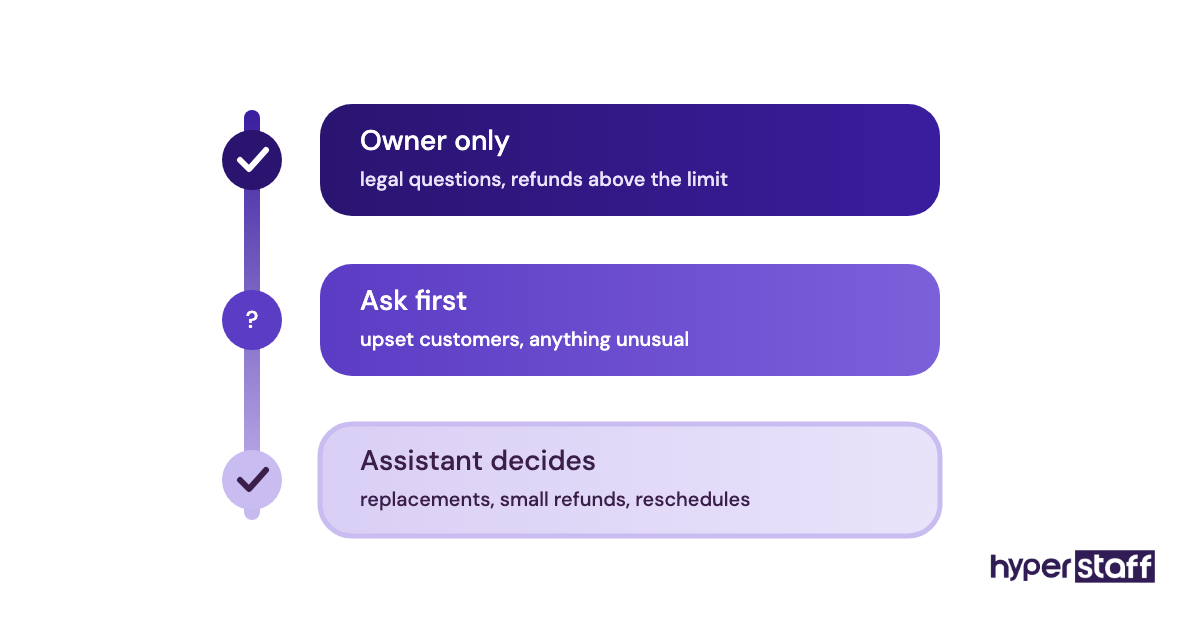
Next, write each duty as an outcome, so "answer customer emails" becomes "reply to every Gorgias ticket within 4 business hours using saved macros, and escalate refunds over $100." The second version gives a candidate the tool, the speed and the boundary in one line.
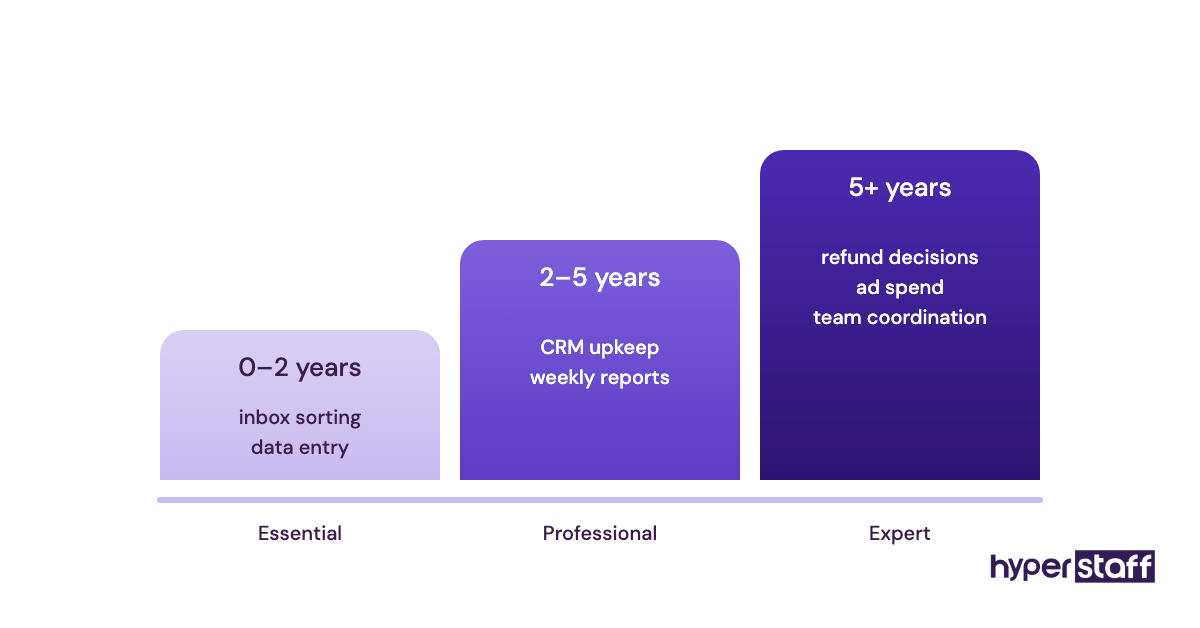
Then set the hours and experience honestly. A role that needs judgment on refunds or ad spend isn't an entry-level role, and pricing it like one is the most common reason a good candidate turns an offer down.
Types of Virtual Assistant Job Descriptions
Virtual assistant job descriptions split by function, and each type needs different duties, tools and experience levels. Pick the row closest to your role, then swap those duties into the template.
| Role type | Core duties to list | Tools to name | Typical experience | Typical hours |
|---|---|---|---|---|
| Executive support VA | Inbox, calendar, travel, meeting notes | Google Workspace or Microsoft 365, Calendly | 2–5 years | 80–160 a month |
| Customer support VA | Tickets, live chat, returns, order updates | Zendesk, Gorgias, Shopify | 0–2 years | 80–160 a month |
| Lead generation VA | Prospect lists, CRM updates, outreach follow-ups | HubSpot, LinkedIn Sales Navigator | 2–5 years | 80–160 a month |
| Bookkeeping VA | Invoicing, reconciliation, bill pay prep | QuickBooks Online, Xero | 2–5+ years | 40–80 a month |
| Digital marketing VA | Social scheduling, email campaigns, reporting | Canva, Mailchimp, Meta Business Suite | 2–5 years | 40–160 a month |
| Operations VA | SOPs, vendor follow-up, project tracking | Asana, ClickUp, Notion | 2–5 years | 80–160 a month |
| Online business manager | Team coordination, KPIs, launch planning | ClickUp, Slack, Google Sheets | 5+ years | 80–160 a month |
How a VA Job Description Differs From Related Roles
A virtual assistant job description differs from related roles mainly in scope, work location and pay basis. The comparison below shows where the lines usually fall.
| Role | Where they work | Scope | Usual pay basis |
|---|---|---|---|
| Virtual assistant | Remote | Several functions, one business | Hourly or monthly hours |
| Executive assistant | Office or remote | One senior person | Salary |
| Administrative assistant | Mostly office | Office and team admin | Salary or hourly |
| Freelance project hire | Remote | One defined project | Fixed price |
VA Job Description vs. Executive Assistant Job Description
An executive assistant job description centers on one senior person's time, so it lists diary management, gatekeeping and board prep. If you want that depth remotely, hire an executive-support VA at the Professional or Expert tier and put "executive support" in the title.
VA Job Description vs. Administrative Assistant Job Description
Administrative assistant postings often include physical duties like reception, mail and supplies, and all of those come out when you convert one into a remote VA post. Strong candidates spot copied office duties immediately and read them as a sign the role hasn't been thought through.
VA Job Description vs. Freelance Project Brief
A freelance project brief ends when the deliverable ships, while a VA job description covers ongoing, recurring work with hours, overlap, reporting and a 90-day success list. Mixing the two attracts freelancers who'll leave the moment the first project wraps.
The Benefits of a Detailed VA Job Description
- Fewer, better applicants, because specific tools and duties put off people who haven't done the work.
- Faster ramp-up, since the responsibilities list doubles as the first-week task plan.
- Fair performance reviews, measured against a 90-day list both sides agreed to.
- Cleaner pricing, with the experience tier and hours set before the first conversation.
- Safer access, with logins planned around named tools instead of handed out on request.
The Drawbacks of a Detailed VA Job Description
- It takes 1–2 hours to write properly, which feels slow when you're already stretched.
- Very specific tool lists can rule out strong candidates who'd learn your stack in a week.
- A detailed scope needs updating as the role grows, or it goes stale within months.
Who Needs a Virtual Assistant Job Description?
Anyone hiring a VA directly, through a freelance platform or for the first time needs a written job description. Agencies usually build one with you on the kickoff call, but you'll still supply the duties, tools and escalation rules.
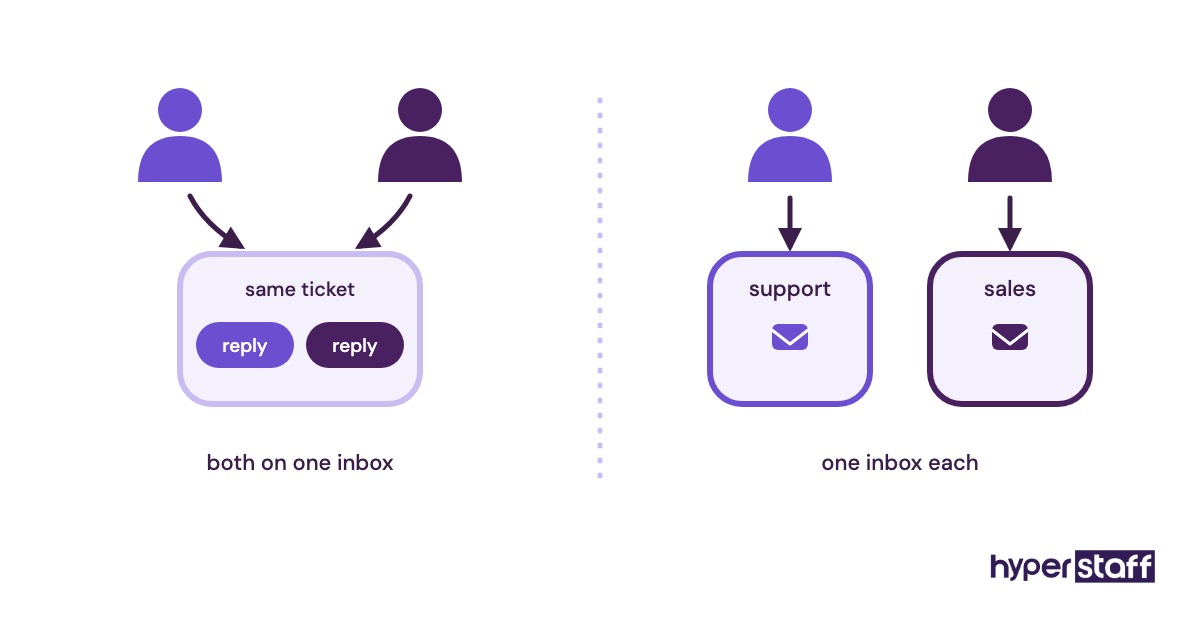
Founders hiring their first assistant gain the most, because they've never had to write down how their business runs. Teams adding a second or third VA need one for a different reason: without separate written scopes, two assistants end up working the same inbox and neither owns it.
Virtual Assistant Job Description Examples
The gap between a weak and a strong virtual assistant job description often sits in a single line. These examples show responsibility lines written the way that attracts the right applicant, followed by the versions that put good people off.
Good VA Job Description Examples
Customer Support VA for an Online Store
"Reply to every Shopify order question in Gorgias within 4 business hours, issue refunds up to $75 yourself, and send anything larger to the store owner with the order number." The line names the tool, the speed and the limit.
Lead Generation VA for a B2B Service Firm
"Build a list of 150 operations managers a week from LinkedIn Sales Navigator, add them to HubSpot with company size and source, and book replies into the sales calendar." A candidate can picture the exact working week from that one bullet.
Bookkeeping VA for a Small Agency
"Send client invoices from QuickBooks Online by the 2nd of each month, chase anything 14 days overdue with our template, and reconcile the business account every Friday." Dates beat adjectives every time.
Bad VA Job Description Examples
The Everything List
"Handle admin, social media, customer service, bookkeeping, research and other tasks as needed." Six unrelated functions in one line tell skilled candidates the job has no shape, so they skip it.
The people who do apply are often the ones who say yes to everything and finish little.
The Personality Ad
"Looking for a rockstar self-starter who thrives in a fast-moving environment and wears many hats." It says nothing about the work, so swap it for one real task and a number.
The Copied Office Post
"Answer the front desk phone, greet visitors and keep the supply cupboard stocked." Posts converted from an in-office role keep physical duties a remote assistant can't do.
Several common virtual assistant mistakes trace back to a scope like this one.
Writing Your Virtual Assistant Job Description, Step-by-Step
Writing a virtual assistant job description takes five steps, from listing the work to setting the application filter. Most people can finish all five in one sitting of 60–90 minutes.
Step #1: Audit Two Weeks of Your Own Work
List every task you did more than twice in the last two weeks, with roughly how long each took. Circle the ones that follow the same steps each time, because those are the VA's duties.
Step #2: Group Tasks Into One or Two Workflows
Sort the circled tasks by function, such as support, sales admin or finance. Keep the one or two groups with the most hours and park the rest for a later hire.
Step #3: Write Each Duty as an Outcome
Rewrite every task with a tool, a deadline and a limit. If you can't attach a number, the duty probably isn't defined well enough to hand over yet.
Step #4: Set Hours, Overlap, Tier and Pay
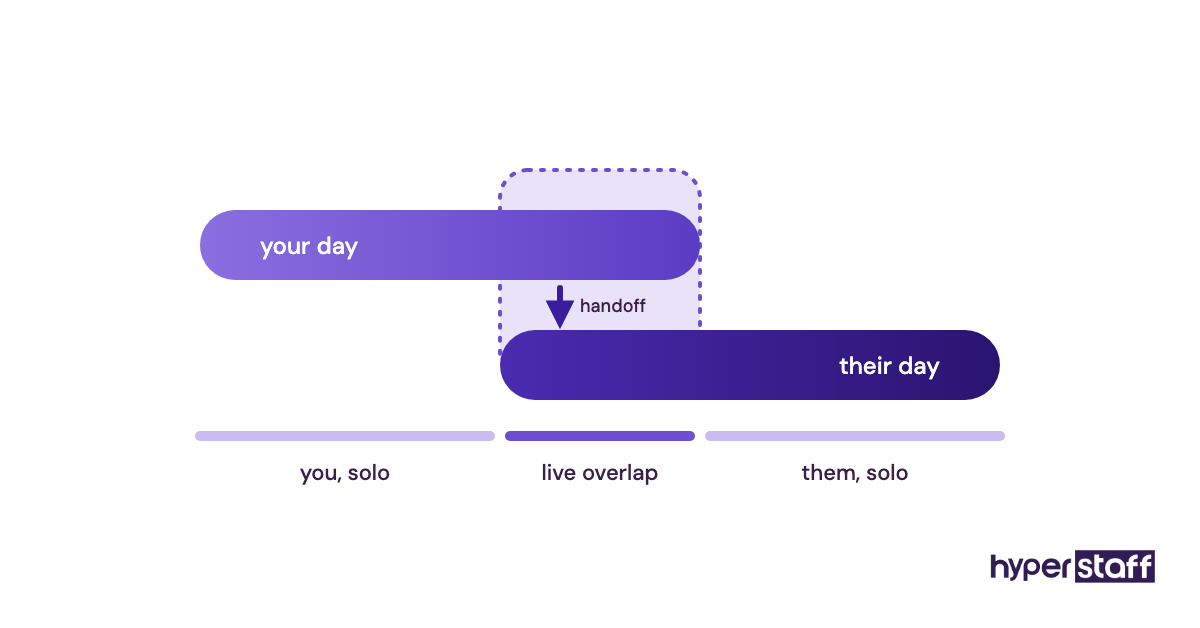
Pick a monthly hour bundle and the daily overlap you need, then match the experience tier to how much judgment the work requires. Put a real pay range in the post, since hiding it mostly wastes interviews on candidates who'd never accept.
Step #5: Add an Application Filter
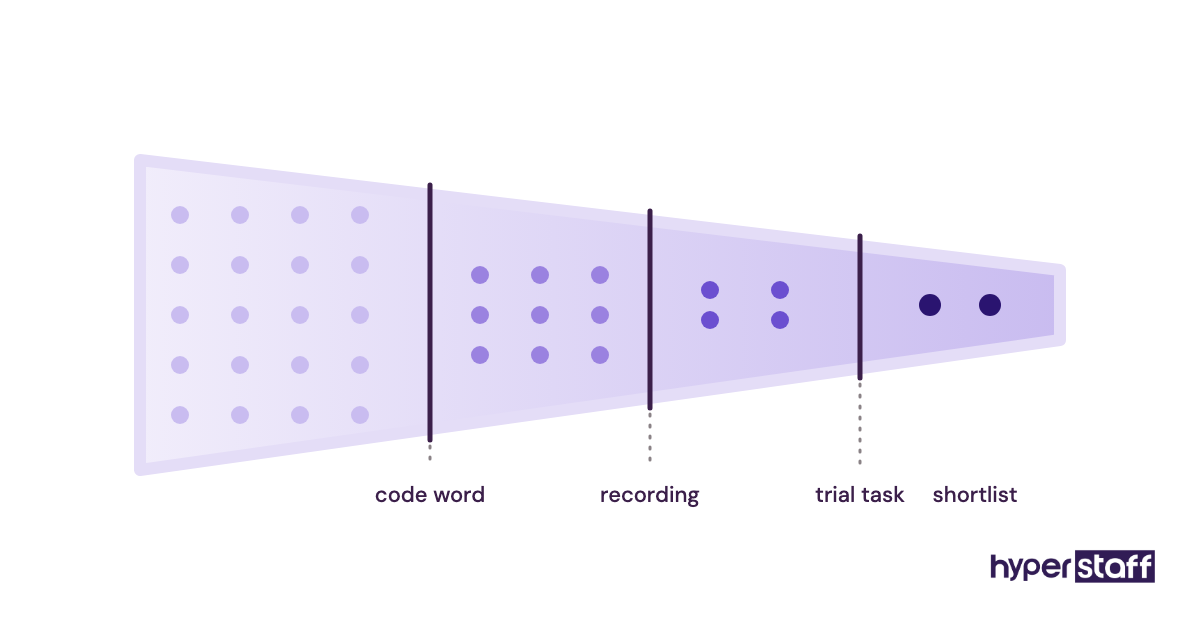
Ask for a short recording or a written answer to one role-specific question, plus a code word in the subject line. Use the replies to shortlist, then move on to these virtual assistant interview questions for the calls.
Tools to Name in a Virtual Assistant Job Description
The tools section of a VA job description should name the specific software the assistant will use daily, grouped by job. Naming the real stack helps candidates self-select, and it tells you which logins to prepare before day one.
- Email and documents: Google Workspace or Microsoft 365.
- Communication: Slack, Microsoft Teams, Zoom or Google Meet.
- Project and task tracking: Asana, ClickUp, Trello or Notion.
- CRM: HubSpot, Pipedrive or Salesforce.
- Customer support: Zendesk, Gorgias, Help Scout or Freshdesk.
- Finance: QuickBooks Online or Xero.
- Scheduling: Calendly or Microsoft Bookings.
- Password sharing: 1Password, Bitwarden or LastPass.
- Screen recording: Loom, for SOPs and handovers.
Of everything on that list, the password manager is the one we'd never leave out. Candidates who've used one have usually worked inside a client's systems properly, and it lets you cut access in minutes if the hire doesn't work out.
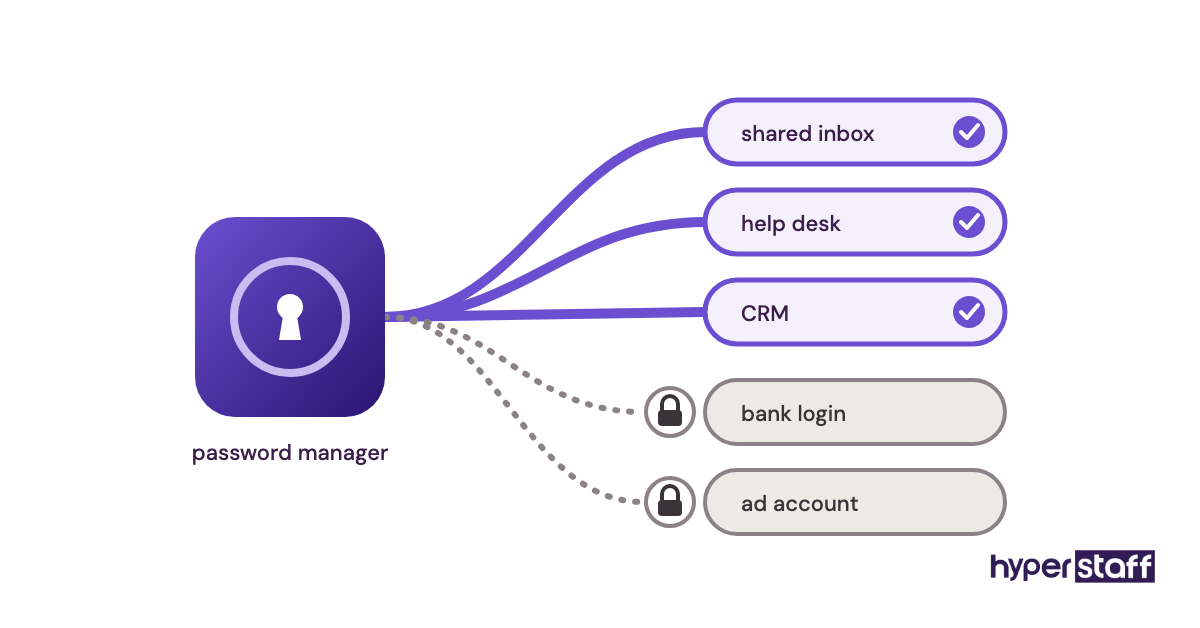
Go lighter on project tools. Someone fluent in Asana picks up ClickUp in days, so list it under "nice to have" unless your workflows are deeply built into one product.
10 Tips for a VA Job Description That Attracts the Right Hire
These tips cover the small edits that change who applies and how quickly the assistant gets up to speed.
- Put the function in the job title, such as "Customer Support Virtual Assistant," because candidates search by function.
- Open with what the business sells and to whom, in two sentences at most.
- Limit responsibilities to 5–8 bullets, each with a tool or a deadline.
- State the time-zone overlap in hours instead of writing "flexible."
- Publish a pay range so applicants can rule themselves in or out.
- Include one escalation rule with a dollar figure.
- List the 90-day success measures in the post itself.
- Mention the NDA and password manager up front, which signals a professional setup.
- Ask for one task-specific sample, such as a reply to a real (anonymized) customer email.
- Re-read the post as the candidate you want, and cut every line that person wouldn't care about.
Overcoming Common VA Job Description Challenges
Scope creep is usually the hardest part. The description says customer support, then marketing tasks drift in during month two.
Add new duties to the written scope as they arrive, and if they belong to a different function, consider a second part-time assistant. A flood of low-quality applications is the other common problem on open job boards, and the code-word filter clears out most copy-paste applicants on the first read.
Underpricing does the quietest damage. A role that needs five years of judgment, posted at entry-level pay, still fills, just with someone who can't do it.
How to Measure Whether Your Job Description Worked
Measure a VA job description by the quality of the shortlist and the assistant's first 90 days. A good description produces a small group of strong applicants who already know your tools.
After the hire, check the 90-day success list every two weeks. If the assistant is on track by week six, the scope was clear; if they're constantly asking what to do next, the description was missing outcomes.
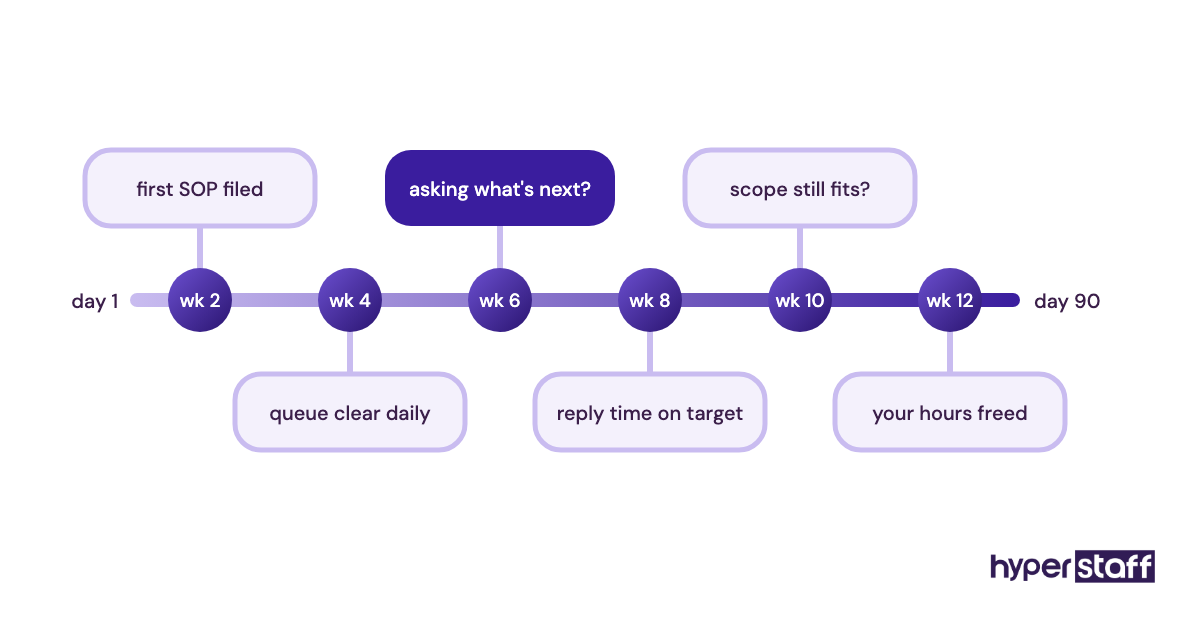
Your virtual assistant onboarding plan should reuse the same list, so the hiring and training documents never drift apart.
How Long Does It Take to Hire a VA From a Job Description?
Hiring a virtual assistant from a job description usually takes 2–6 weeks when you post it yourself. Expect about a week of applications, a week of shortlisting and trial tasks, then interviews and notice periods.
The dead zone is between the trial task and the offer. Strong candidates often hold other offers, so keep that gap to a few days.
Going through an agency shortens the timeline. At Hyperstaff, placement takes 5 business days, followed by a 30-minute kickoff call, and work starts that day or the next morning.
How Much Does a Virtual Assistant Cost?
A virtual assistant costs from about $3 to $12+ per hour through an offshore agency, depending on experience, compared with a median of $23.23 an hour for US secretaries and administrative assistants before benefits. Benefits add a further 30.0% of total compensation for private-industry workers, according to the Bureau of Labor Statistics.
| Option | Hourly rate | 40 hours a month | 80 hours a month | 160 hours a month |
|---|---|---|---|---|
| Hyperstaff Essential (0–2 years) | From $3 | From $120 | From $240 | From $480 |
| Hyperstaff Professional (2–5 years) | From $6 | From $240 | From $480 | From $960 |
| Hyperstaff Expert (5+ years) | From $12 | From $480 | From $960 | From $1,920 |
| In-house admin assistant, wages only (US median) | $23.23 | $929 | $1,858 | $3,717 |
| In-house admin assistant, wages plus benefits (estimate) | About $33 | About $1,330 | About $2,655 | About $5,310 |
The cost line belongs in the job description too. Our guide to a virtual assistant vs an in-house hire sets out the full comparison, and paying Hyperstaff quarterly saves a further 10%.
Important: Hyperstaff figures above are starting rates and typical averages, not fixed quotes. Your final cost depends on the role, the experience tier and the hours your work actually needs.
Is Hiring a Virtual Assistant Worth It?
Yes, hiring a virtual assistant is one of the best-value moves a small business can make when the job description is specific. Take a Professional-tier VA at 80 hours a month: from $480, against about $1,858 in wages alone for the same hours from a median US admin assistant, a gap of roughly $1,378 a month or $16,500 a year.
Pay quarterly and that $1,440 quarter drops to $1,296. Those numbers only hold if the assistant owns real workflows from week one, and that comes back to how clearly the role was written.
The return is weaker when the owner can't let go of tasks or has no repeatable work to hand over. For a fuller breakdown of when it pays and when it doesn't, see our take on whether a virtual assistant is worth it.
How to Choose a Virtual Assistant Agency
Choose a virtual assistant agency by checking how it vets talent, whether your assistant is dedicated to you, how fast it replaces a poor fit and who documents your processes. Ask each one to show you a sample job scope before you sign.
Dedication is the question we'd press hardest. Some providers rotate tasks across a pool, which means nobody learns your business and you re-explain things every week.
Replacement terms come next. Hyperstaff replaces an assistant free in 5 to 7 business days, and the new hire is briefed from your Operations Vault, so the written scope and SOPs carry over instead of starting from zero.
Ask about the account manager too. Every Hyperstaff client has a dedicated one, and that's who you call when the scope in your job description needs to change.
Virtual Assistant Statistics, Trends and Future Predictions
US employment of secretaries and administrative assistants is projected to fall 2% over the next decade, from about 3.5 million jobs, according to the Bureau of Labor Statistics. The same BLS data puts their median annual pay at $48,310.
Benefits make up a large share of what an employer pays for any in-house role. BLS employer cost data shows benefits at $14.07 of the $46.89 average hourly compensation for private-industry workers.
Our read on the trend is that remote assistant roles are getting more specialized. Job descriptions that once said "admin support" now name a function and a tool stack, and we expect the generalist VA post to keep losing ground to function-specific ones.
Virtual Assistant Job Descriptions and AI
AI tools change two things in a virtual assistant job description: how fast you can draft it, and which duties the assistant performs. A chatbot can turn your two-week task audit into a first draft in minutes, though it tends to pad the duties list with generic lines you'll need to cut.
On the role side, more VA work now involves running AI tools well, from drafting replies for review to summarizing calls and cleaning CRM data. Add a line saying which AI tools the assistant may use and which client data must never be pasted into them.
Practitioners still disagree on how far to take it. Some owners now hire fewer, more senior VAs who supervise AI output, others keep entry-level assistants and treat AI as a drafting aid, and the job description should state plainly which model you're hiring for.
Disclaimer: This article is general information, not legal, tax or employment advice. Third-party wage figures and software details change over time, so confirm current terms with each source, and Hyperstaff rates vary by engagement.
Common questions
What should I put in a virtual assistant job description?
Include the job title with its function, a short company summary, 5–8 outcome-based responsibilities, required tools, hours and time-zone overlap, pay range and 90-day success measures. Finish with a specific application instruction.
How long should a VA job description be?
Most effective VA job descriptions run 300–600 words. Longer posts usually repeat duties or add personality lines candidates skip.
Should I include pay in a virtual assistant job posting?
Yes, because a published range filters out applicants whose expectations don't match and saves interview time. Some US states and cities also require pay ranges in job postings, so check the rules where you hire.
Can I use the same job description for a part-time VA?
You can, with fewer duties. Cut the responsibilities to the one workflow that fits 40 or 80 hours a month, and adjust the overlap hours and success measures to match.
Do I need a job description if I hire through an agency?
Yes, though it can be shorter. The agency handles sourcing and vetting, but you still need to define the duties, tools, escalation rules and success measures so the right person gets matched.
Book a free 15 min call
We place a pre-vetted specialist in 5 business days, fully managed, from $3/hour.