Best Shopify Virtual Assistant Tools: 8 Apps Worth Setting Up
Eight tools a Shopify virtual assistant uses for automation, catalog edits, support, email, shipping, logins, training and design, with current prices and honest trade-offs.
On this page
💡 Key Takeaways:
1) The core Shopify virtual assistant tools cover store automation (Shopify Flow), bulk catalog edits (Matrixify), support (Gorgias), email (Klaviyo), shipping (ShipStation), shared logins (1Password), training (Loom) and design (Canva).
2) Start with the free options, like Shopify Flow, Loom's Starter plan and Klaviyo's free tier, and add paid tools only when the manual work costs more in hours than the subscription does.
3) Give a VA their own Shopify staff account with limited permissions, and share every other login through a password manager instead of chat or email.
Better tools, more sales per paid hour
Tools only pay off when the person using them knows your store. Hyperstaff places a pre-vetted dedicated Shopify virtual assistant who learns one business, with 70+ VAs placed across 30+ clients and rates from $3/hour. Placement takes 5 business days, and every client gets a dedicated account manager from day one.
Best Shopify Virtual Assistant Tools Comparison
The best Shopify virtual assistant tools cover eight jobs: automation, bulk catalog edits, support, email marketing, shipping, password sharing, training and design. The table below compares what each one costs to start and what a VA actually does inside it.
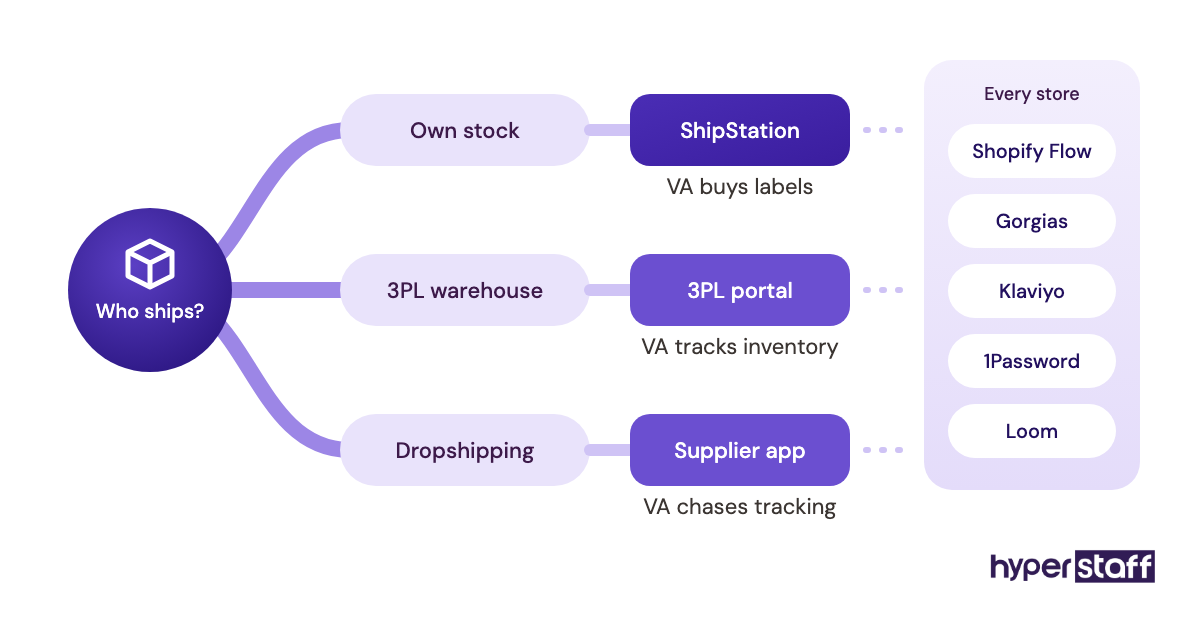
Which tools you need depends on what a Shopify virtual assistant does in your store day to day. A store that ships through a 3PL can skip ShipStation entirely, for example.
| Tool | Best for | What the VA does in it | Starting price | Free option |
|---|---|---|---|---|
| Shopify Flow | Store automation | Builds workflows that tag orders, send alerts and hide sold-out products | Free | Yes, on Basic, Grow, Advanced and Plus |
| Matrixify | Bulk catalog edits | Imports and exports products, prices, customers and redirects | $20 per 30 days | Demo plan, 10 items per job |
| Gorgias | Customer support | Answers tickets, edits orders and issues refunds from one inbox | $10/month for 50 tickets | No free plan |
| Klaviyo | Email and SMS | Schedules campaigns, builds segments and checks automated flows | About $20/month | Up to 250 active profiles |
| ShipStation | Shipping labels | Compares carrier rates, buys labels and fixes address errors | $14.99/month | 30-day trial |
| 1Password | Shared logins | Signs into supplier portals and ad accounts through shared vaults | About $24.95/month for up to 10 users | No free business plan |
| Loom | SOP videos | Watches training videos and records handoffs | $18/user/month (Business) | Starter plan, 25 videos |
| Canva | Store graphics | Edits product images, banners, social posts and email graphics | About $15 to $18/month (Pro) | Free plan |
Subscription fees sit on top of the VA's hourly rate. Count them when you work out the full Shopify virtual assistant cost, because four paid tools can add $100 or more a month for a small store.
Best Shopify Virtual Assistant Tools Reviews
Each Shopify VA tool below is reviewed for what it costs today, what the VA uses it for, and where it tends to go wrong. Prices come from each vendor's own pricing page and change often, so check before you buy.
1) Shopify Flow: Best for automating repeat store admin
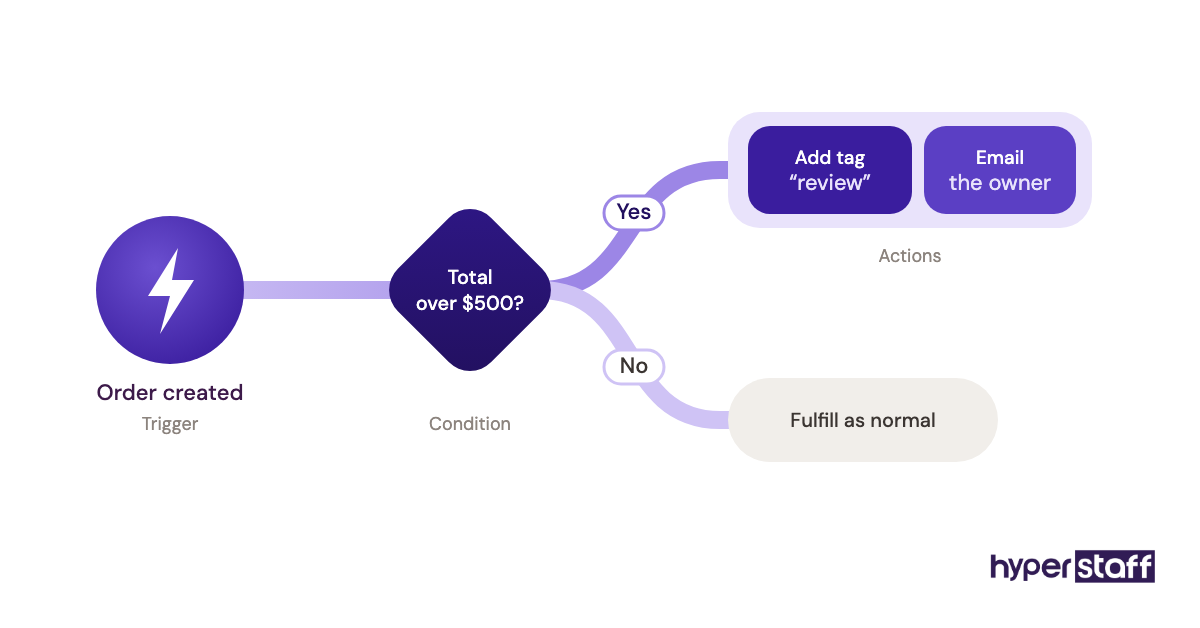
Shopify Flow is Shopify's own free automation app, and it's where a VA's repeat admin should go first. It runs workflows built from a trigger, a condition and an action, all inside the store admin.
Key highlights
- Free app from Shopify
- Works on Basic, Grow, Advanced and Plus
- Ready-made workflow templates
- Tags orders, customers and products
- HTTP request action not on Basic
What a VA actually builds in Flow
The first workflows a VA builds tend to be small: tag orders above a set value for a manual check, alert someone when stock drops below a threshold, or hide sold-out products. Each one removes a check from the list of daily Shopify VA tasks that would otherwise run by hand.
Flow is free and, per Shopify's Help Center, available on every main plan, though the Send HTTP request action needs Grow or above. The catch is ownership: an undocumented workflow keeps firing long after the person who built it has moved on.
Pros
- Costs nothing
- Lives inside the Shopify admin
- Templates cover common jobs
- Works on every paid plan
- Cuts manual tagging and checks
Cons
- Logic gets hard to read as workflows pile up
- Fewer actions on the Basic plan
- Debugging means reading run history
- App connectors vary in depth
- Easy to forget a workflow exists
Where Flow fits in the stack
Set Flow up before paying for anything else. A VA who automates the dull checks spends paid hours on work that needs judgment.
2) Matrixify: Best for bulk product and catalog edits
Matrixify is a paid Shopify app for bulk import and export through Excel, CSV or Google Sheets. It's the tool a VA reaches for when a price change, a supplier feed or a store migration touches hundreds of products at once.
Key highlights
- Free Demo plan, 10 items per job
- Basic from $20 per 30 days
- Covers products, orders, customers and redirects
- Limits apply per job, not per month
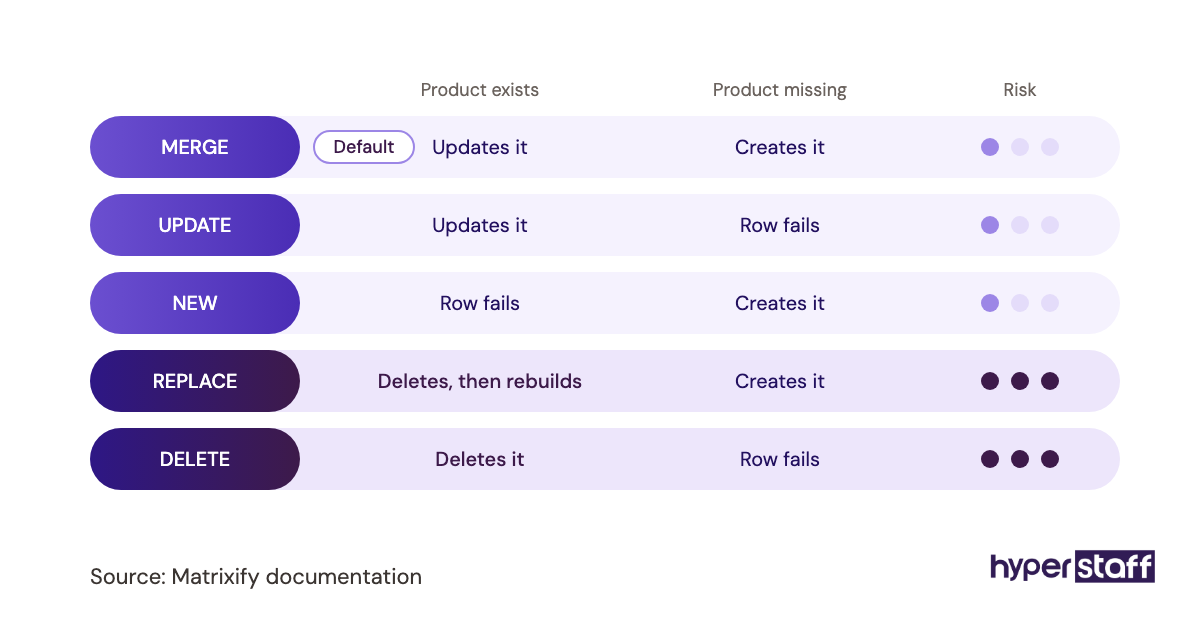
- A command column controls each row
The REPLACE command and other traps
Matrixify lists Basic at $20 per 30 days for up to 5,000 products per job, Big at $50 for 50,000, and Enterprise at $200 with no item cap (Matrixify pricing). The price is low, and the real risk sits in the command column.
The REPLACE command deletes a product and creates it again, which gives it a new product ID and can break anything tied to the old one. A VA who exports a full backup before every import and defaults to MERGE or UPDATE avoids most of the damage, and bulk overwrites belong on any list of common Shopify VA mistakes.
Pros
- Handles thousands of rows per job
- Spreadsheet format most VAs know
- Exports double as store backups
- Scheduled imports from supplier feeds
- Low monthly price
Cons
- One bad file hits the whole catalog
- Column format has a learning curve
- Demo plan too small for real work
- REPLACE can reset product IDs
- Large jobs need higher plans
Worth it once the catalog grows
Below a few dozen SKUs, Shopify's built-in CSV import is enough. Past that, Matrixify pays for itself on the first storewide price update.
3) Gorgias: Best for running customer support from one inbox
Gorgias is a helpdesk built for ecommerce, with Shopify order data shown next to every ticket. A VA can check an order, edit it or refund it without leaving the conversation.
Key highlights
- Starter at $10 a month for 50 tickets
- Basic at $50 to $60 for 300 tickets
- Email, chat, social and SMS in one inbox
- Macros pull in order details
- Extra tickets cost $0.36 to $0.40
How ticket pricing shapes the VA's job
Gorgias prices by ticket volume: Starter is $10 a month for 50 tickets, Basic runs $50 to $60 for 300, and Pro costs $300 to $360 for 2,000 (Gorgias pricing). Tickets above the plan cost $0.36 to $0.40 each, and the AI Agent bills separately per automated interaction.
That model matters when you write the support section of a Shopify VA job description. A VA who sets up rules for spam and auto-replies keeps the inbox closer to real customer questions.
Pros
- Order actions inside each ticket
- Macros speed up repeat answers
- One inbox across channels
- Low entry price
- Rules tag and route tickets
Cons
- Costs climb with ticket volume
- Overage adds up in peak season
- AI Agent priced separately
- Starter is monthly billing only
- Rules take time to tune
When Gorgias earns its fee
If support still runs through Gmail and stays under a few dozen emails a week, wait. Once a VA spends real time copying order numbers between tabs, Gorgias is worth it.
4) Klaviyo: Best for email and SMS a VA can schedule
Klaviyo is the email and SMS platform many Shopify stores grow into, with customer and order data synced from the store. A VA uses it to schedule campaigns, build segments and keep automated flows running.
Key highlights
- Free up to 250 active profiles
- 500 email sends a month on free
- Paid email from about $20 a month
- Price scales with active profiles
- Pre-built cart and welcome flows
Where a VA adds value in Klaviyo
Klaviyo's free plan covers up to 250 active profiles and 500 email sends a month (Klaviyo pricing), and paid email plans start around $20 a month. Because billing follows active profiles, a VA who suppresses long-inactive contacts can keep the account in a lower tier.
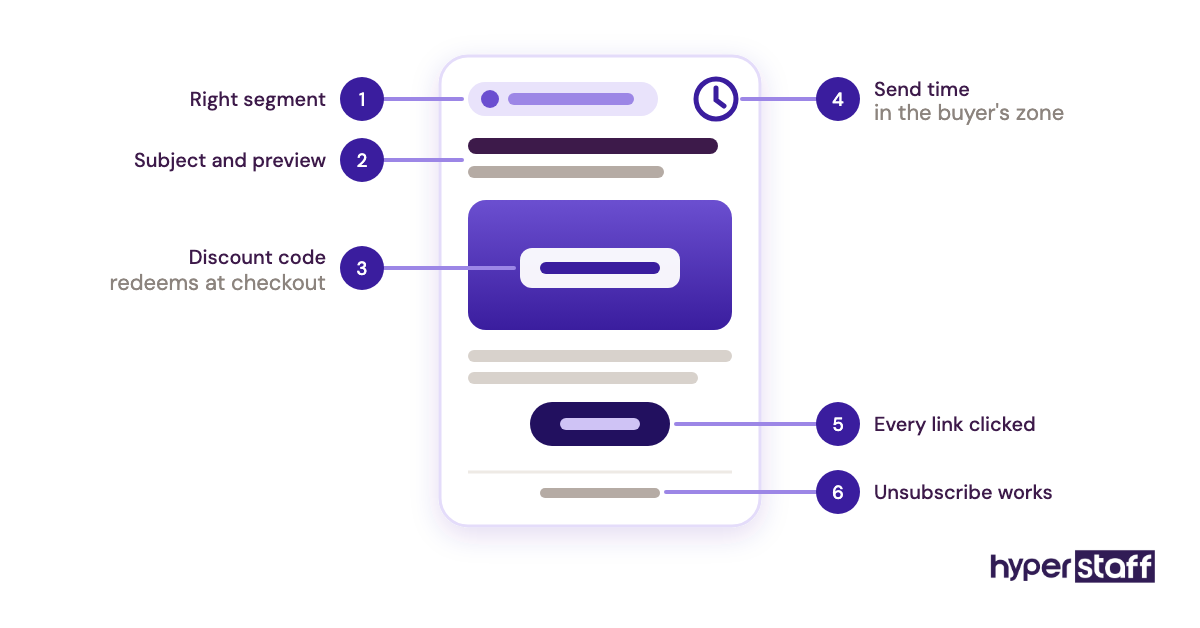
Most VA time here goes to building campaigns from an approved calendar, checking flows still fire and testing links before a send. Writing brand voice from scratch is a separate skill, so ask about it directly when you're hiring a Shopify virtual assistant.
Pros
- Deep Shopify data sync
- Segments built on purchase history
- Free tier for small lists
- Flow templates ready to switch on
- Email and SMS in one tool
Cons
- Bill grows with profile count
- Interface takes time to learn
- SMS costs vary by country
- Wrong-segment sends are easy to make
- Reports can overwhelm new users
A fair warning on Klaviyo
Klaviyo is hard to leave once flows are built. Moving later means rebuilding every one of them, so set it up properly early.
5) ShipStation: Best for order fulfillment and label printing
ShipStation pulls Shopify orders into one queue, compares carrier rates and prints labels in batches. For a store shipping its own stock, it's where a fulfillment VA spends much of the day.
Key highlights
- 30-day free trial, no card
- Starter from $14.99, 3 users
- Standard from $29.99, 10 users
- Price set by monthly shipments
- Batch labels and automation rules
A remote VA and physical packages
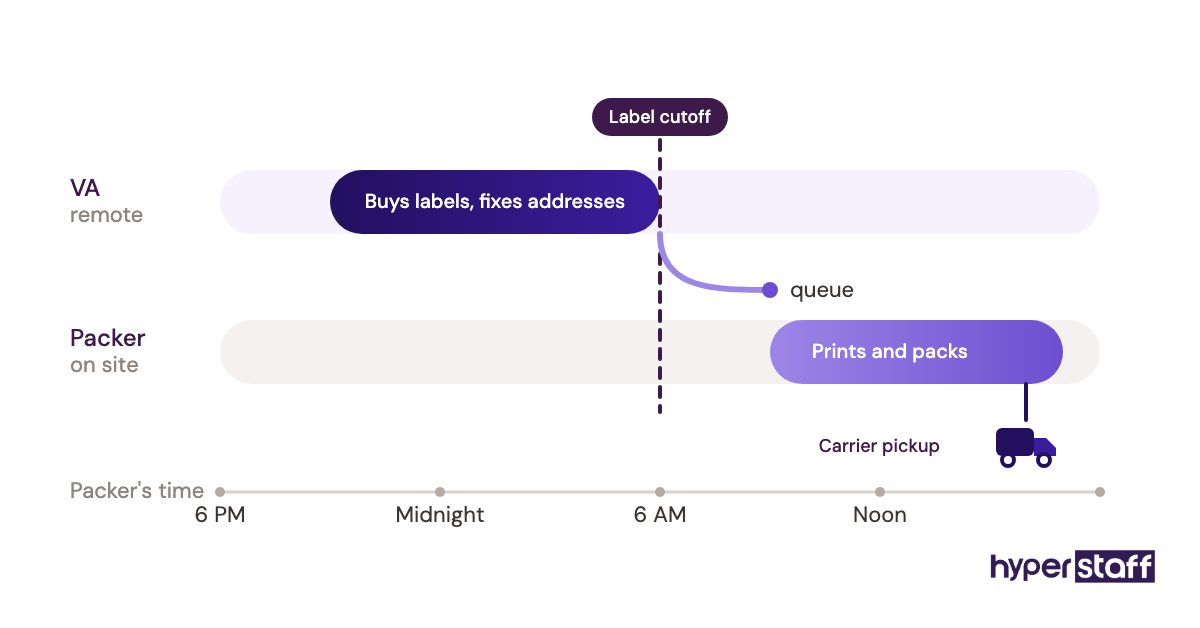
ShipStation's Starter plan begins at $14.99 a month for 50 shipments and 3 users, and Standard starts at $29.99 for 10 users, with prices rising by shipment tier (ShipStation pricing). A remote VA can't pack a box, so the split is simple: the VA buys labels, fixes addresses and chases carrier issues, and whoever holds the stock prints and packs.
The split works best with a fixed label cutoff before each day's pickup. If the packer and VA have no overlapping hours, set that cutoff in the packer's local time.
Pros
- Carrier rates side by side
- Batch printing on busy days
- Rules pick service by weight or destination
- Trial long enough to test properly
- Several users on entry plans
Cons
- Price jumps with shipment volume
- User seats capped by plan
- Pointless if a 3PL handles fulfillment
- Someone on site still prints labels
- Rule setup takes trial and error
Skip it if a 3PL ships for you
Stores using a 3PL or dropshipping rarely need ShipStation. The VA works in the 3PL's portal instead.
6) 1Password: Best for sharing logins safely with a remote VA
1Password is a password manager that shares logins with a VA through vaults you control. Access comes off in one step, which keeps passwords out of chat threads entirely.
Key highlights
- Teams Starter Pack about $24.95 a month
- Covers up to 10 users
- Business about $8.99 per user, billed yearly
- Separate vaults per role
- One-click access removal
What belongs in the vault
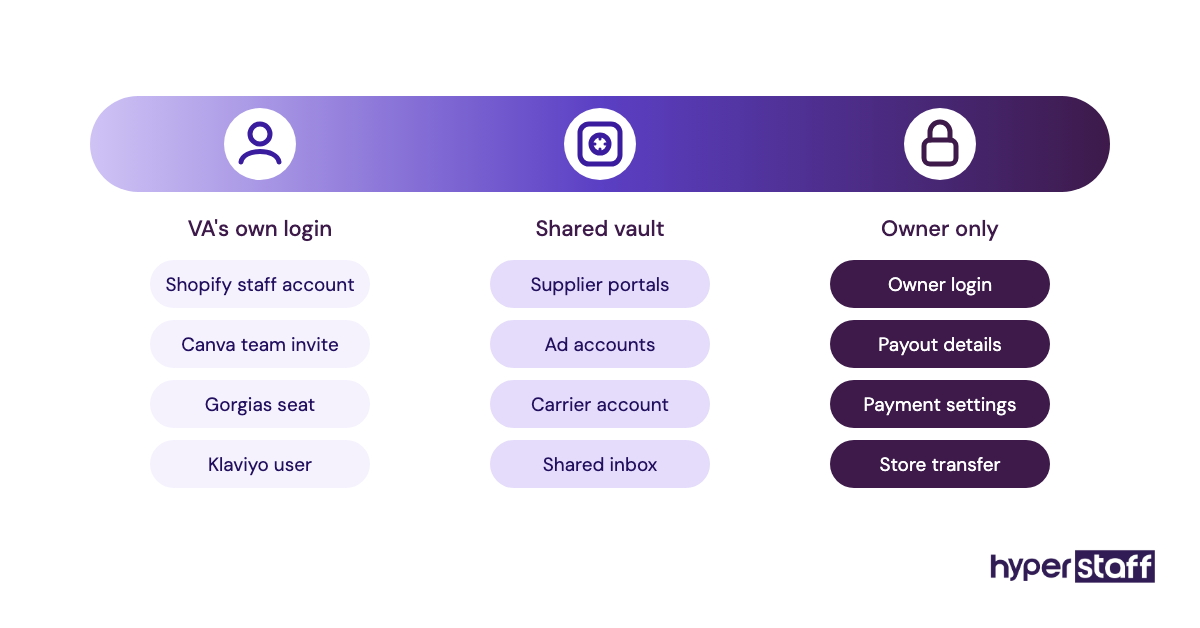
1Password lists its Teams Starter Pack at about $24.95 a month for up to 10 people and Business at roughly $8.99 per user a month, both billed yearly (1Password pricing). Your Shopify owner login never goes in, since the VA gets a staff account of their own.
The vault is for supplier portals, ad accounts and shared inboxes that allow only one login. When a VA changes, Hyperstaff's free replacement in 5 to 7 business days goes faster when the new person inherits a clean vault and nobody has to reset twenty passwords.
Pros
- No passwords pasted in chat
- Fast offboarding
- Vaults split by role
- Works across browsers and phones
- Flat fee suits small teams
Cons
- One more paid subscription
- Shared items can still be revealed
- Text-message 2FA needs a workaround
- Setup takes an afternoon
- Business tier costs more per seat
Set it up before day one
We'd have the vault ready before a VA's first login. It costs less each month than an hour spent chasing a locked account.
7) Loom: Best for recording SOPs and handoffs
Loom records your screen and voice into a shareable link. It's the quickest way to show a VA how you process a return or update a collection once, so you don't explain it again.
Key highlights
- Free Starter plan
- 25 videos, 5 minutes each on free
- Business at $18 per user a month
- Up to 17% off on annual billing
- Comments pinned to timestamps
SOPs your VA can rewatch
Loom's free Starter plan allows 25 videos of up to 5 minutes each, and Business costs $18 per user a month, with up to 17% off yearly (Loom pricing). The 5-minute cap pushes you toward one task per video, which makes for better training anyway.
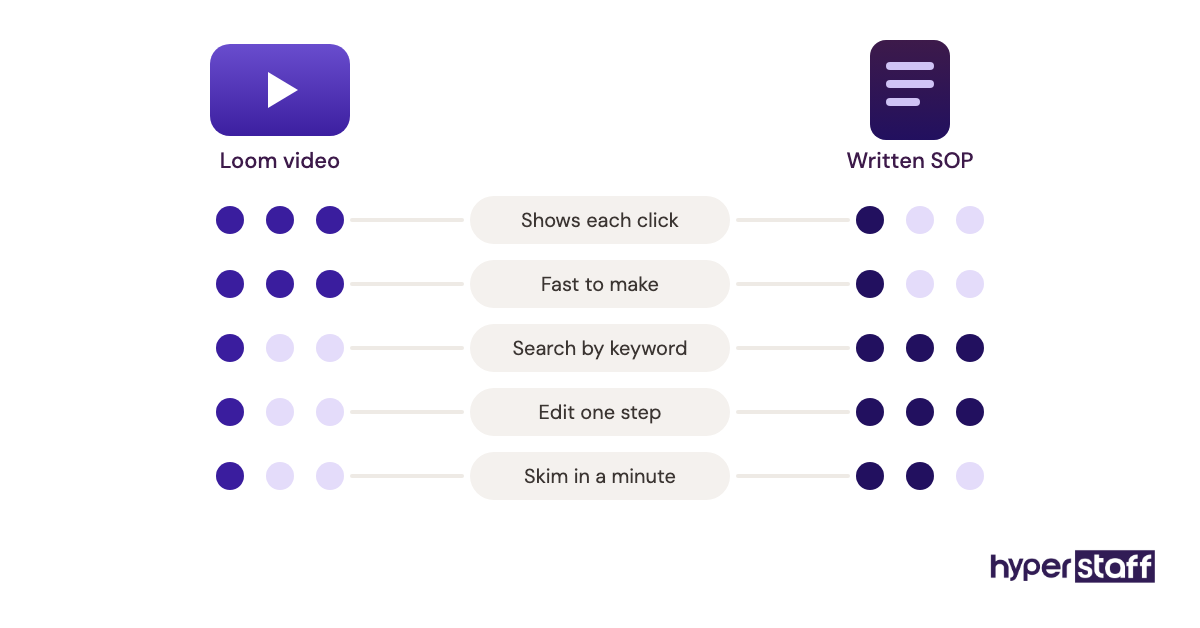
Video ages badly once a process changes. Hyperstaff's Operations Vault keeps SOPs written down and maintained for that reason, so a new VA is briefed from text that stays current.
Pros
- Free plan covers early training
- Recording needs no setup
- Comments tied to exact moments
- VAs replay steps at their own pace
- Works across time zones
Cons
- Free plan caps video count
- Videos go stale when tools change
- Hard to search inside a video
- Per-user pricing adds up
- Needs written SOPs alongside it
Most useful in the first two weeks
Loom does most of its work while a new VA is learning the store. After that, the written SOP becomes the source of truth.
8) Canva: Best for product images and promo graphics
Canva is a browser-based design tool a VA uses for product image edits, banners, social posts and email graphics. Its brand kit locks fonts, colors and logos to your store's look.
Key highlights
- Free plan available
- Pro about $15 to $18 a month
- Business about $25 per person
- Brand kit and templates
- Background remover on paid plans
Seats, brand kits and file ownership
Canva Pro is a one-person plan at roughly $15 to $18 a month depending on billing, and a second login moves you to Business at about $25 per person (Canva pricing). A VA signing into your Pro account means two people sharing one seat.
Keep the account in the store's name and invite the VA, so designs stay put if the VA changes. Ownership comes up in the Shopify virtual assistant vs in-house comparison too, and the answer is the same for both: the store owns every account.
Pros
- Short learning curve
- Templates sized for banners and social
- Brand kit keeps output consistent
- Nothing to install
- Free plan for light work
Cons
- Per-person pricing on Business
- Templates can look generic
- Weak for detailed photo retouching
- Pro license covers one user
- Slow for large photo batches
Good enough for most store graphics
Canva handles most graphics a store VA will make. Heavy product photo retouching still belongs with a designer.
How Should You Give a Shopify VA Access to These Tools?
Give a Shopify VA their own login for every tool, starting with a Shopify staff account, and share anything single-login through a password manager. The order you grant access in matters as much as the tools themselves.
Shopify staff accounts and permissions
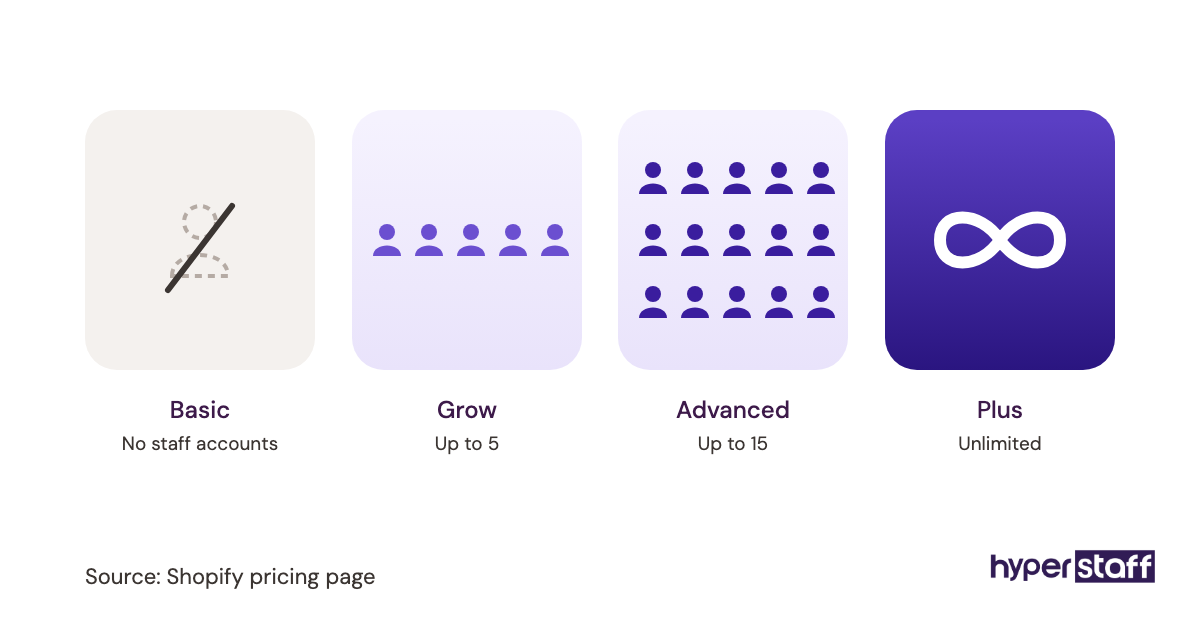
Shopify lets you assign each user a role with only the permissions their tasks need, such as products or orders (Shopify staff accounts). How many staff accounts you get depends on your plan, so check before you add a VA.
A staff account ties every change to a named person. When a price or an order edit looks wrong, the activity record tells you who made it.
Shared owner logins remove that trail. They also mean you change the owner password, and update every connected app, each time someone leaves.
Staff account first
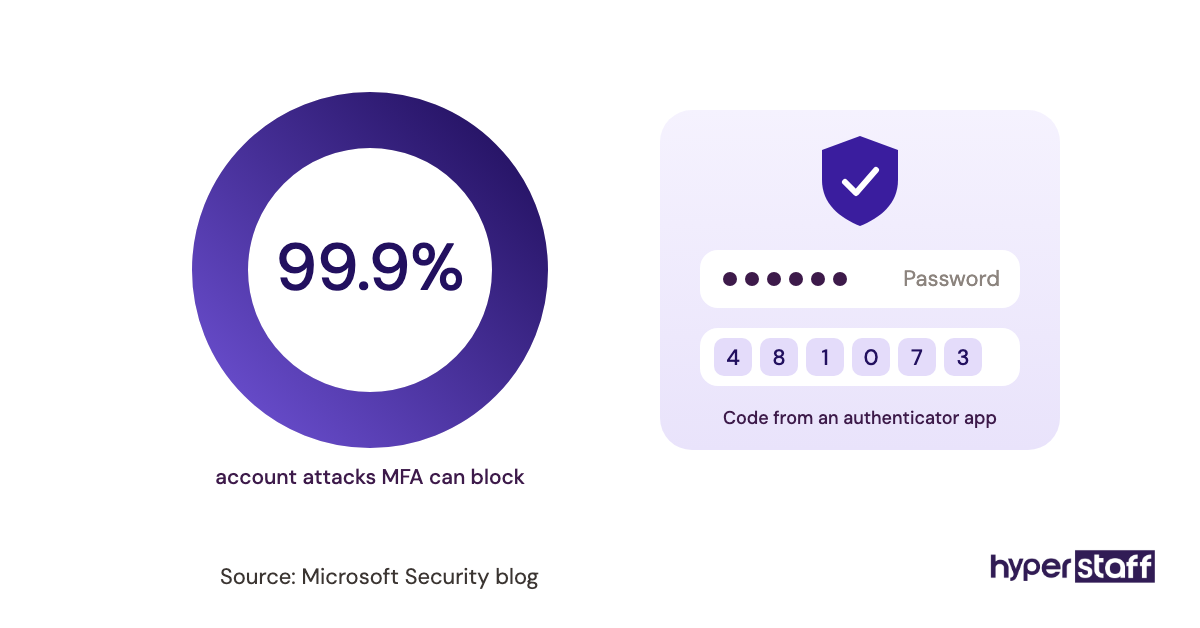
Create the staff account before the kickoff call and ask the VA to switch on two-step authentication straight away. Collaborator accounts exist too, but those are designed for Shopify Partners such as agencies and developers.
Start narrow and widen access as the VA proves reliable. It's easier to add a permission in week three than to take one back.
Permissions to hold back
Payment settings, payout details and store ownership transfer should stay with the owner. App installs are a judgment call, since a new app can request wide data access and add a monthly charge.
Some owners let a trusted VA install apps freely, and others require approval for every one. Both are reasonable, but pick one and say so in writing.
Setup order in the first two weeks
Tool setup runs alongside training, and stacking every login into day one tends to bury a new VA. With Hyperstaff, work starts the day of the 30-minute kickoff call or the next morning, so the access plan needs to be ready before that call.
A sensible order puts access and training tools first, then paid tools once the VA knows the store. For a full plan, see our guide to onboarding a Shopify virtual assistant.
Week one: access and training
Week one covers the staff account, the 1Password vault and a handful of Loom videos for the jobs you hand over first. Shopify Flow can wait until the VA has watched the store's daily rhythm for a few days.
Expect a dip in speed during these first days. A VA learning your catalog moves slower than one who already knows it, and that evens out by week two.
What to add later
Matrixify, Gorgias and Klaviyo come in once the VA handles the manual version of each job confidently. A VA who has answered fifty tickets by hand writes better macros than one who starts with a blank helpdesk.
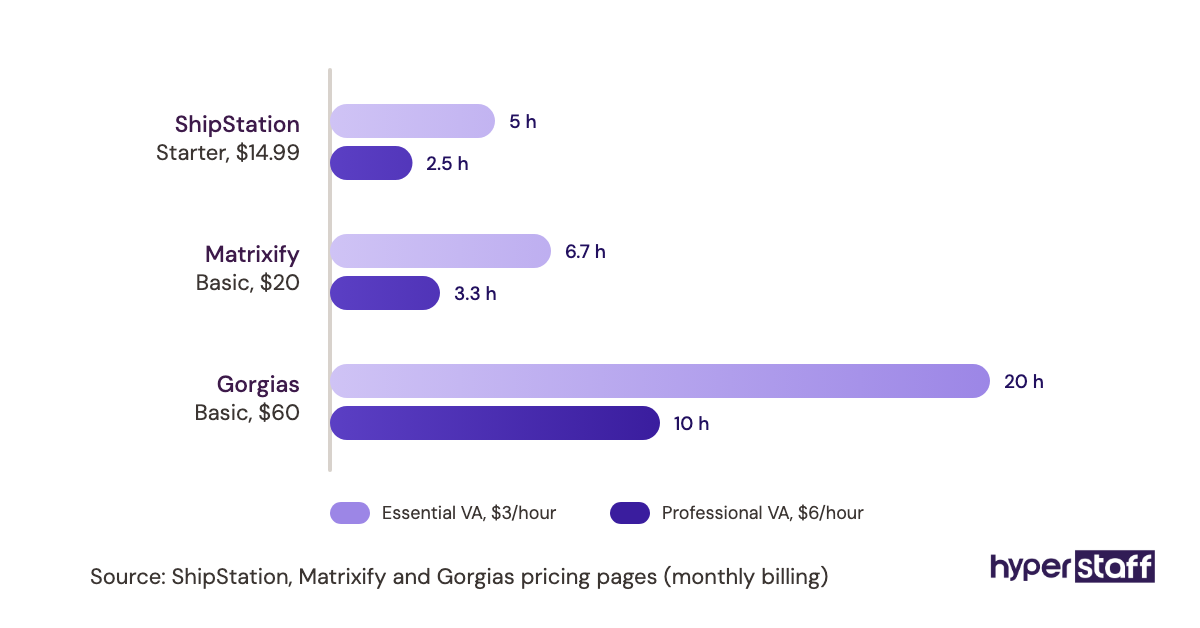
Each paid tool should replace hours the VA would otherwise spend. Run those numbers when deciding whether a Shopify VA is worth it, tools included.
Disclaimer: This article is for general information only. Tool features, plans and prices change often, so confirm current details with each vendor before buying. Hyperstaff has no affiliation with the tools mentioned and accepts no liability for decisions made based on this content.
Common questions
Do I have to pay for tools for my Shopify VA?
Yes, any tool the store runs on should be paid for by the store. You own the account and the data, and the VA works inside it. Several good options cost nothing to start, including Shopify Flow, Loom's Starter plan and Klaviyo's free tier.
Is it safe to give a virtual assistant my Shopify login?
No, never share the owner login. Create a staff account with only the permissions the VA's tasks need, and ask them to turn on two-step authentication. For other single-login tools, share access through a password manager like 1Password.
Can a Shopify VA work with just the Shopify admin?
For a small store, yes. Product uploads, order edits, discounts and basic reporting all happen in the admin, and Shopify's CSV import covers small catalog updates. Extra tools start to pay off once ticket volume, catalog size or email lists grow.
Should my VA use their own accounts for tools like Canva?
Use accounts owned by your store and invite the VA as a user. If the VA leaves, designs, templates and contacts stay with you. That usually means paying for a team or business seat instead of sharing one personal license.
What's the first tool to set up for a new Shopify VA?
Start with a Shopify staff account and a password manager, then record a few Loom videos for the first tasks you hand over. Paid tools like Gorgias or Matrixify can wait until the VA knows how the store runs day to day.
Book a free 15 min call
We place a pre-vetted specialist in 5 business days, fully managed, from $3/hour.