How to Hire a Shopify Virtual Assistant Who Can Run Your Store Admin
A practical hiring guide for Shopify store owners, from scoping the role and testing candidates to staff permissions, costs and the first 60 days.
On this page
- What Does It Mean to Hire a Shopify Virtual Assistant?
- Key Shopify VA Hiring Terms You Should Know
- Why Does the Way You Hire a Shopify VA Matter?
- How Does Hiring a Shopify Virtual Assistant Work?
- Which Types of Shopify Virtual Assistants Can You Hire?
- How a Shopify VA Differs From Related Roles
- What Are the Benefits of Hiring a Shopify Virtual Assistant?
- What Are the Drawbacks of Hiring a Shopify VA?
- Who Should Hire a Shopify Virtual Assistant?
- Shopify VA Hiring Examples
- Creating a Shopify VA Hiring Plan, Step by Step
- What Does an Effective Shopify VA Hiring Strategy Look Like?
- Shopify VA Tools and Software
- 10 Proven Tips for Hiring a Shopify Virtual Assistant
- Overcoming Common Shopify VA Hiring Challenges
- How Do You Measure Shopify VA Hiring Success?
- How Long Does It Take to Hire a Shopify Virtual Assistant?
- How Much Does It Cost to Hire a Shopify Virtual Assistant?
- Is Hiring a Shopify Virtual Assistant Worth It?
- How Do You Choose a Shopify VA Agency?
- Shopify VA Statistics, Trends and Future Predictions
- How Does AI Change Hiring a Shopify Virtual Assistant?
- FAQs
💡 Key Takeaways:
1) To hire a Shopify virtual assistant, write down the store tasks you repeat every week, test finalists inside a copy of your real admin work, and only then make an offer.
2) A Shopify virtual assistant should get a staff account with only the permissions their tasks need, never the store owner login, because Shopify logs every staff action under that person's name.
3) Expect 1 to 6 weeks to hire and another 4 to 8 weeks before a new Shopify VA runs routine work without daily checks.
The right Shopify hire pays for itself fast
Hyperstaff has placed 70+ pre-vetted virtual assistants with 30+ clients, and our Shopify virtual assistant services put a dedicated specialist in your admin within 5 business days, from $3/hour. After a 30-minute kickoff call, your assistant starts that day or the next morning, with a dedicated account manager behind them.
What Does It Mean to Hire a Shopify Virtual Assistant?
To hire a Shopify virtual assistant is to bring in a remote specialist who works inside your Shopify admin on a regular schedule. Their work can cover product listings, orders, customer emails, apps, discounts and reporting, and the scope is yours to set.
The Shopify part matters more than owners expect. Someone who knows the admin already understands variants, metafields, collections and the order timeline, so your first week goes into your store's rules instead of a software tour.
For a fuller picture of the role itself, our guide on what a Shopify virtual assistant does covers the job before you start hiring for it.
Key Shopify VA Hiring Terms You Should Know
- Staff account = a named login to your Shopify admin with permissions you choose
- Collaborator account = access requested by a Shopify Partner, such as a developer or agency, through a request code
- Store owner = the one account that controls billing, store transfer and staff removal
- Variant = one version of a product, like a size or colour, with its own SKU and stock
- Metafield = a custom field that stores extra product or order data
- Shopify Flow = Shopify's built-in automation app for if-this-then-that store rules
- Bulk editor = the spreadsheet-style screen for editing many products at once
- Chargeback = a payment a customer disputes through their bank or card issuer
- SOP = a written, step-by-step guide for one repeat task
- Paid trial = a short piece of real work you pay finalists to complete before hiring
- Overlap hours = the part of the day when you and your VA are both online
Why Does the Way You Hire a Shopify VA Matter?
The way you hire a Shopify VA decides how much risk you're handing over, because the role sits close to your prices, inventory, customer data and refunds. One wrong bulk edit can push the wrong price to every variant in a collection in seconds.
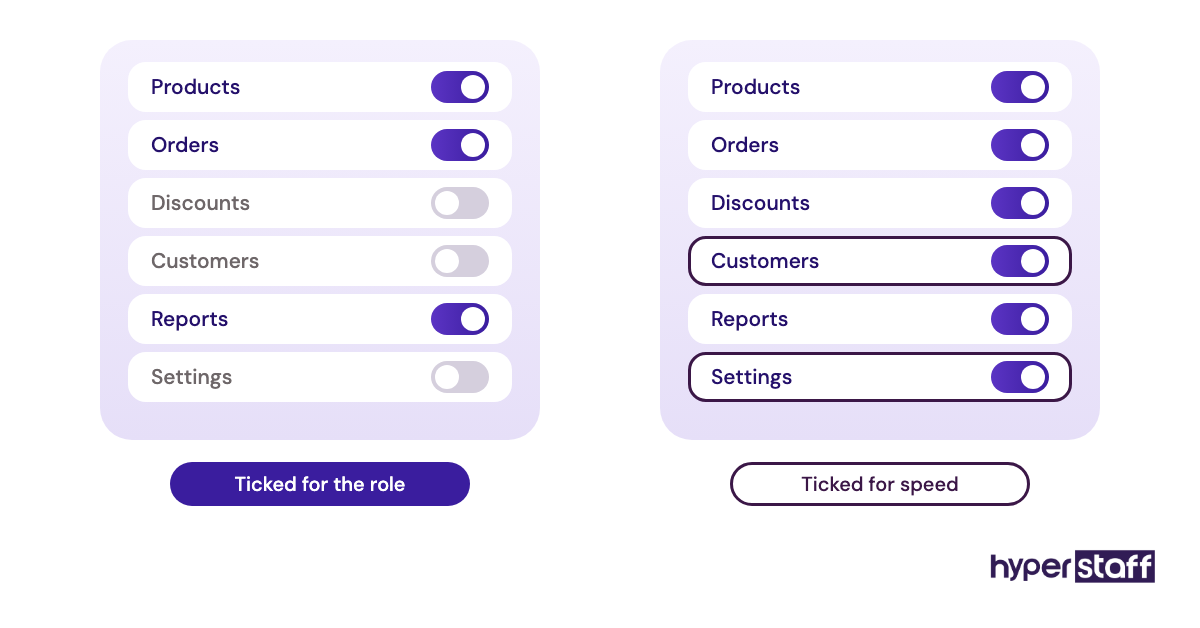
Shopify makes that both safer and riskier. Permissions are granular, so a careful hire gets exactly what they need, but a rushed one often gets everything because ticking every box is faster.
Turnover costs add up too. If the first hire leaves and nothing was written down, your second hire starts from zero, and you lose another month of your own time training them.
How Does Hiring a Shopify Virtual Assistant Work?
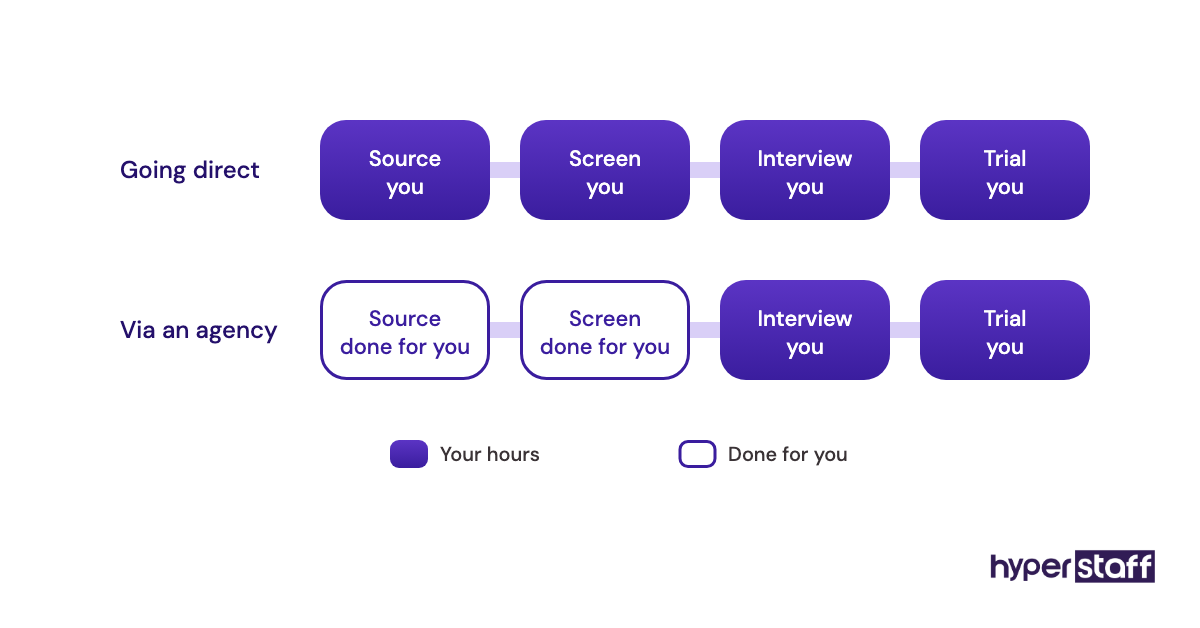
Hiring a Shopify virtual assistant runs in a set order: scope the tasks, write the job post, source candidates, test them on Shopify work, then onboard with limited access. The biggest time sinks are usually sourcing and screening, which is where hiring routes differ most.
Owners who go direct post on job boards or freelance marketplaces and screen applicants themselves. Owners who use an agency get a shortlist of pre-vetted people and spend their time on the final interview and the trial.
Either way, a strong Shopify virtual assistant job post names the platform, the apps you run and the hours you need. Our Shopify VA job description template gives you a version to edit.
Which Types of Shopify Virtual Assistants Can You Hire?
Shopify virtual assistants split into about eight types, each tied to one area of the store. Smaller stores often hire one generalist who covers two or three areas, and add a specialist once one area eats most of the hours.
| Type | Main work | Shopify features and apps | Typical monthly hours | Experience tier that fits |
|---|---|---|---|---|
| Catalog VA | Product uploads, variants, collections, SEO titles | Bulk editor, CSV import, Matrixify | 40 to 80 | Essential or Professional |
| Order operations VA | Order edits, holds, fraud checks, tracking issues | Order timeline, fraud analysis, shipping apps | 40 to 160 | Professional |
| Customer support VA | Emails, chat, returns, exchanges | Shopify Inbox, Gorgias, returns apps | 80 to 160 | Essential or Professional |
| Inventory VA | Stock counts, transfers, reorder alerts | Inventory screens, purchase orders, Flow | 40 to 80 | Professional |
| Email marketing VA | Campaigns, flows, list hygiene | Shopify Email, Klaviyo | 40 to 80 | Professional or Expert |
| Store admin VA | Discount codes, app settings, theme content edits | Theme editor, Discounts, app admin | 40 | Professional |
| Reporting VA | Weekly sales, margin and stock reports | Shopify Analytics, Google Sheets | 40 | Expert |
| Store manager VA | Runs daily operations and other VAs | Full admin minus billing | 160 | Expert |
The full split of daily and weekly duties sits in our Shopify virtual assistant task list, which works well as a checklist when you scope the role.
How a Shopify VA Differs From Related Roles
Three roles get mixed up with a Shopify VA in job posts, and hiring the wrong one wastes the first month. The split comes down to whether you need code, ongoing admin work or a local employee.
Shopify Virtual Assistant vs. Shopify Developer
A Shopify developer writes Liquid code, builds custom theme sections and fixes app conflicts. A Shopify VA works in the admin you already have, so the overlap stops at small theme editor changes like swapping a banner or editing a section's text.
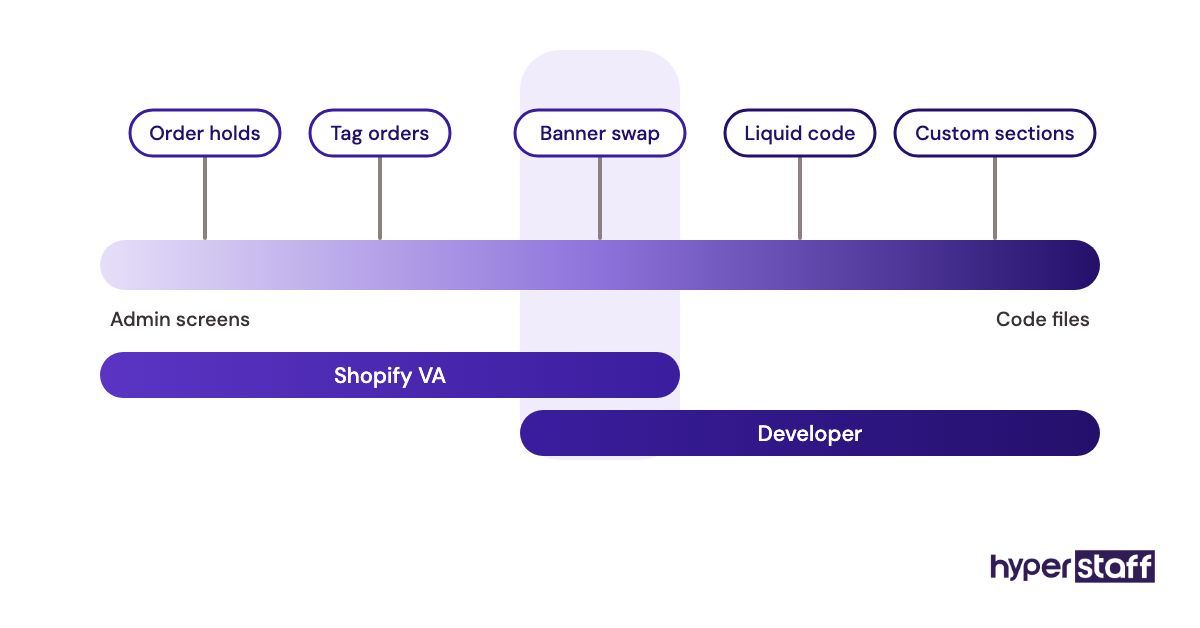
Developers usually bill by project and come in through a collaborator account. Daily store work at developer rates is money spent on the wrong skill.
Shopify Virtual Assistant vs. General Ecommerce VA
A general ecommerce VA has worked across several platforms, often Amazon, Etsy and WooCommerce alongside Shopify. That breadth suits multichannel sellers, while a Shopify-only store gets more from someone who already knows Flow, metafields and the Shopify order timeline.
Practitioners split on this one. Some owners prefer a generalist who can follow them onto new channels, and others want platform depth on day one and add a marketplace specialist later.
Shopify Virtual Assistant vs. In-House Store Assistant
An in-house assistant can pack orders, shoot product photos and handle returns in person. A Shopify VA costs far less per hour and can cover hours you're offline, but anything physical stays with you or your fulfilment partner.
Our side-by-side on the Shopify VA vs in-house hire runs the full cost and coverage math.
What Are the Benefits of Hiring a Shopify Virtual Assistant?
The clearest benefit is getting Shopify admin work done every day for a fraction of a local wage, by someone who already knows the platform.
- Lower hourly cost than a local hire, with no equipment or office to fund
- Faster product launches, since uploads and collection updates stop waiting on you
- Coverage for your evenings and weekends through a different time zone
- Cleaner store data, because one person owns variants, tags and SKUs
- Hours that flex up for a sale and back down after it
- Written SOPs that make the next hire faster
What Are the Drawbacks of Hiring a Shopify VA?
The downsides are real but mostly fixable with setup work done before the start date.
- Your own time goes into training for the first 2 to 4 weeks
- Admin access puts prices, payouts and customer data within reach of a mistake
- Basic plan stores pay to upgrade for staff seats
- Little time zone overlap slows urgent calls during a launch
Who Should Hire a Shopify Virtual Assistant?
A Shopify virtual assistant fits owners who spend 10 or more hours a week on repeat admin work inside their store. Repeat work has a correct answer you could write down, such as editing a variant price, tagging an order or answering a sizing email.
Solo founders feel it first, because every hour handed off goes back into buying, ads or new products. Stores running frequent drops or large catalogs come next, since upload work spikes before every launch.
Brands with an operations lead hire differently. They tend to add a VA for one narrow lane, like returns or catalog cleanup, under a person who already owns the SOPs.
Shopify VA Hiring Examples
Hiring outcomes follow setup more than talent. The patterns below are common across Shopify stores and describe no single business.
Good Examples of Hiring a Shopify VA
Finalists Tested on a Duplicate Product
The owner duplicates one live product as a draft and asks each finalist to add two variants, fix the SEO title and assign it to the right collection. The best candidate leaves the draft unpublished and asks before touching anything live.
Permissions Planned Before the Offer
Before the start date, the owner lists the six admin sections the role needs and nothing else. Day one goes into real work because the staff invite, two-step login and app access are already sorted.
A Catalog Hire That Grew Into Orders
The VA starts on 40 hours a month of product uploads. Once the upload SOPs are written and errors drop, the owner adds order holds and moves to 80 hours.
Bad Examples of Hiring a Shopify VA
Our list of common Shopify VA mistakes covers more of these. Three show up again and again.
The Owner Login Handed Over
To avoid a plan upgrade, the owner shares their own login. Every change in the activity log now reads as the owner's, and removing the VA means changing the password and the two-step device.
A Developer Hired for Admin Work
The job post asks for "Shopify expert" and attracts theme developers. The hire is skilled, expensive and bored by order holds within a month.
Bulk Edits With No Undo Plan
A new VA runs a bulk price change across a collection with no export taken first. A rounding error hits every variant, and fixing it by hand takes most of a day.
Creating a Shopify VA Hiring Plan, Step by Step
These five steps take a vague "I need help with the store" to a working hire.
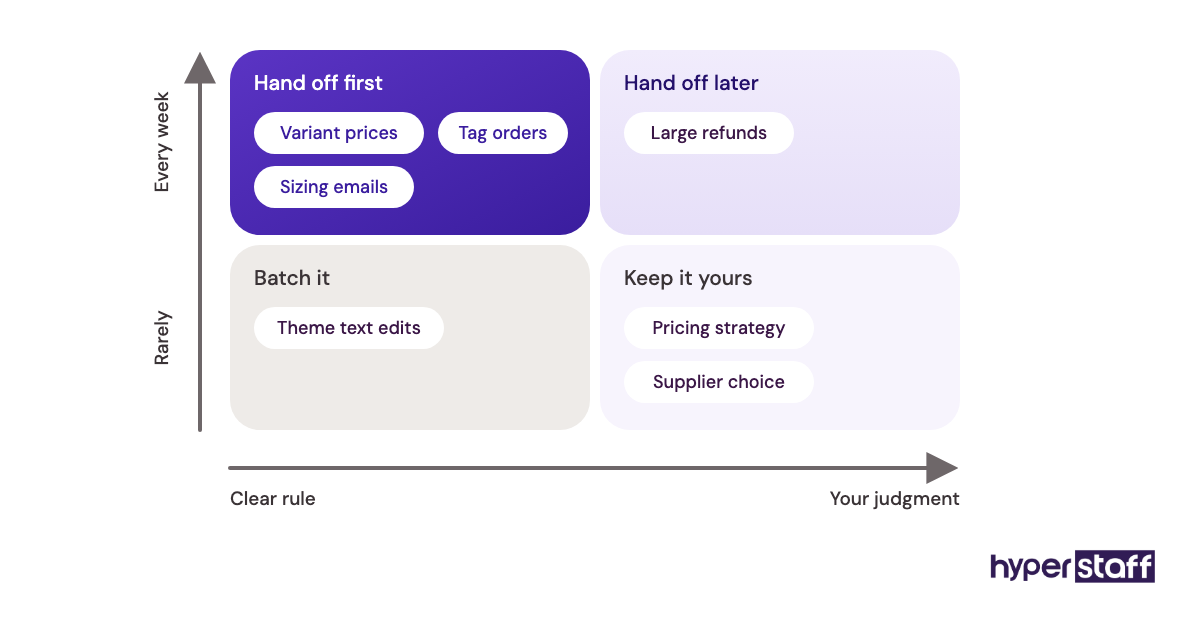
Step #1: Log Every Shopify Task for a Week
Write down each store task for five working days, with minutes spent. Mark each one as rule-based or as needing your judgment.
The rule-based list is the job. Under 10 hours a week, a 40-hour monthly block or a project freelancer is the better start.
Step #2: Write the Job Post Around Shopify Work
Name the admin sections, apps and order volume the person will handle, plus the overlap hours you need. Add two or three outcomes, like "new products live within 48 hours of receiving photos."
Step #3: Choose a Hiring Route
Going direct costs less per hour and more of your time, since you screen every applicant. An agency hands you a pre-vetted shortlist and a replacement if the hire doesn't work out.
Step #4: Interview, Then Pay for a Trial
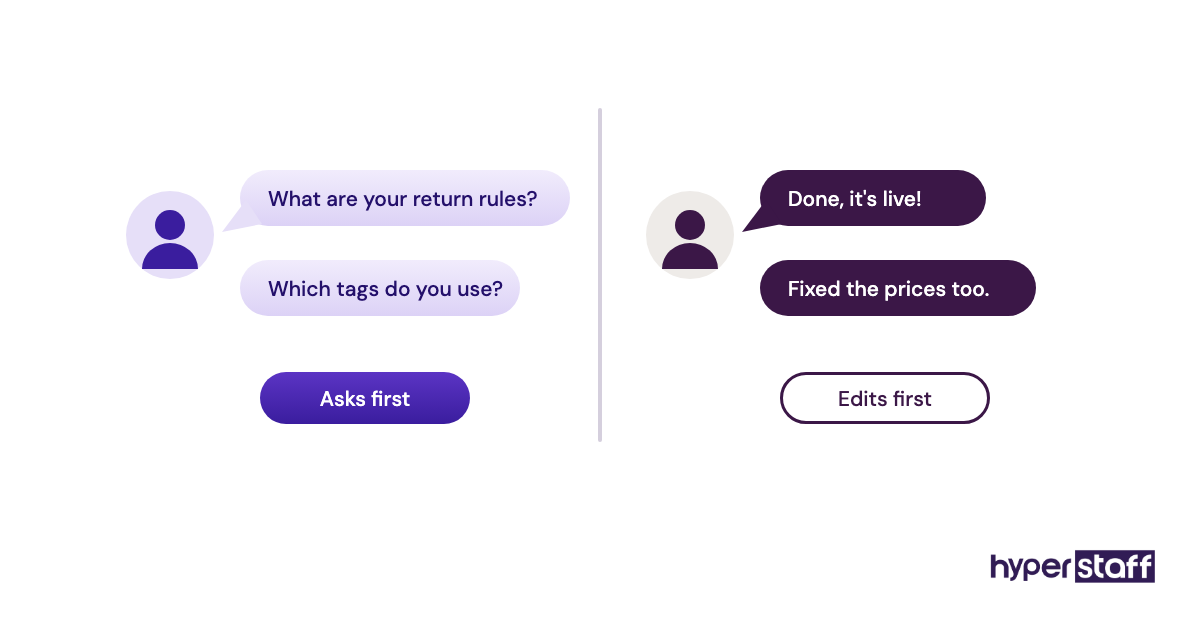
Keep the interview to 30 to 45 minutes and use scenario prompts from our Shopify VA interview questions, like how they'd handle an order flagged for high fraud risk. Then pay two or three finalists for a 1 to 2 hour trial on draft products or anonymized emails.
Watch what they ask before they start. Good Shopify candidates ask about your return policy and tag rules before editing anything.
Step #5: Onboard With Narrow Permissions
Send the staff invite with only the sections the role needs, share app logins through a password manager and write down refund and discount limits. Our guide to onboarding a Shopify VA covers the first 30 days in detail.
Plan for a small gap in week one. Staff invites, two-step codes and app access can take a day or two to settle, so line up recorded walkthroughs for that window.
What Does an Effective Shopify VA Hiring Strategy Look Like?
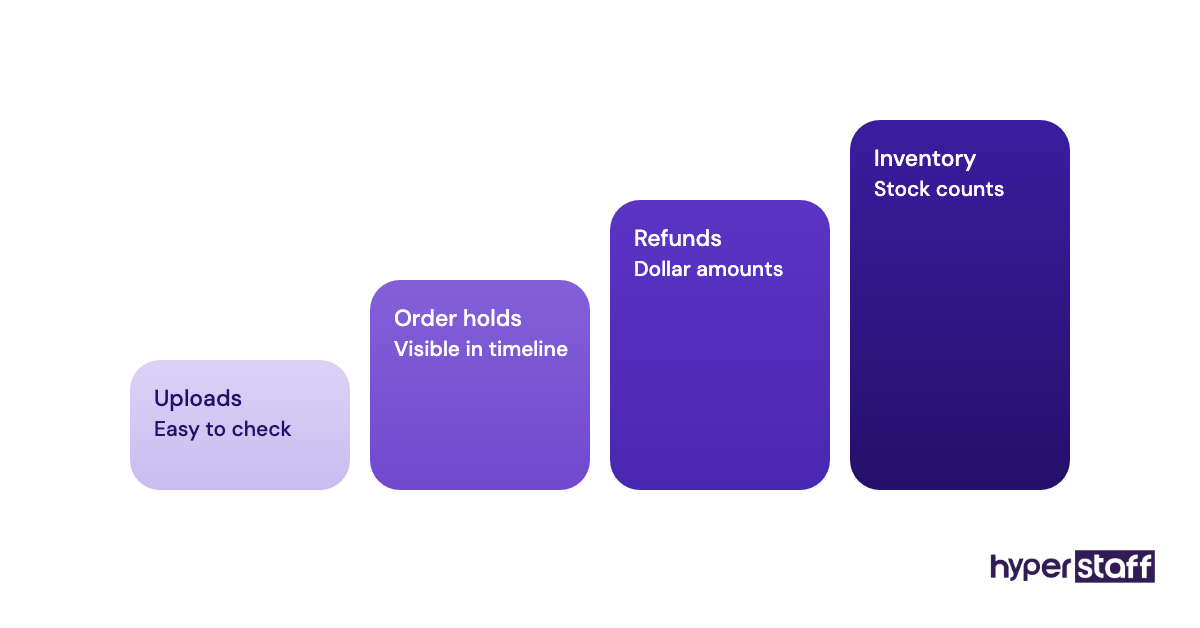
An effective Shopify VA hiring strategy starts with one or two task areas, measures them for a month and widens the role only once those run clean. It also assumes the person will leave one day.
Start with work that's easy to check, like product uploads, where an error is visible on the storefront. Move to refunds, discounts and inventory after the first few weeks of clean work.
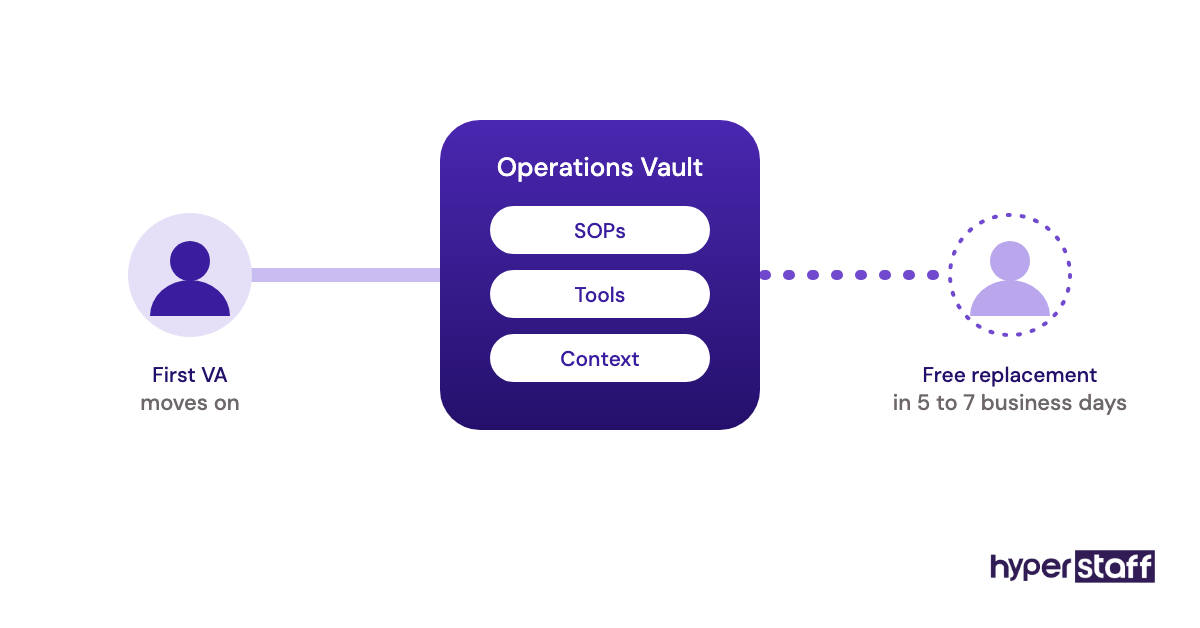
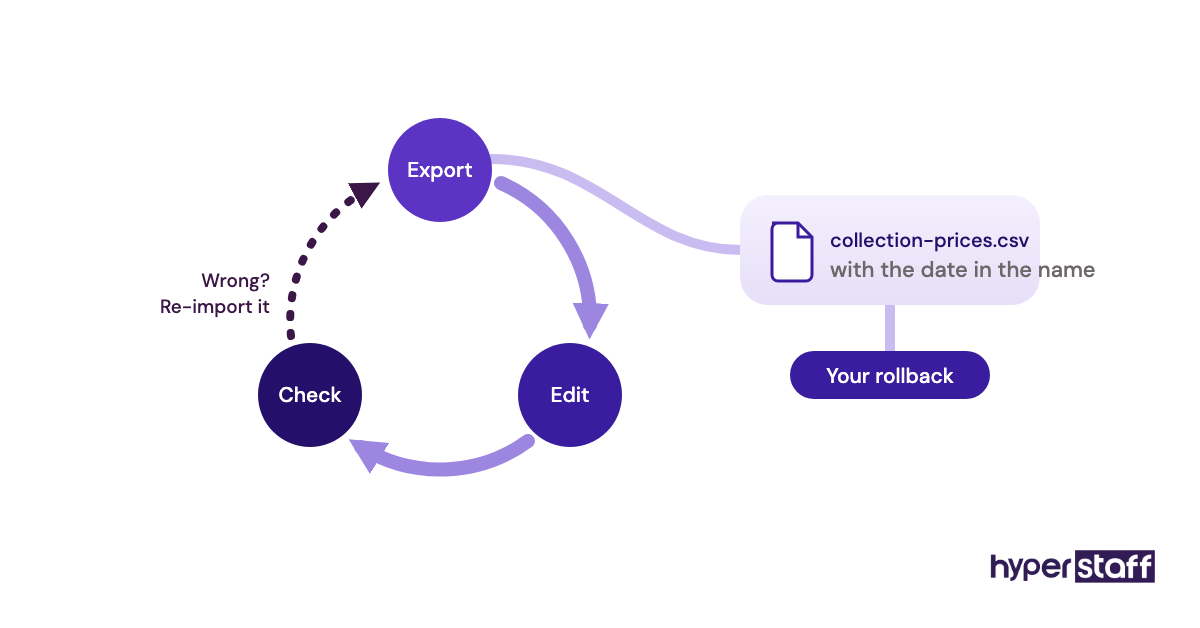
Plan the handover on day one. Keep app logins under business-owned emails and keep every SOP in one shared folder, so a replacement learns from documents.
At Hyperstaff, that folder is the Operations Vault: your SOPs, tools and context, written down and maintained for you.
Shopify VA Tools and Software
A Shopify VA needs a staff account on your store, a password manager, a helpdesk or inbox, an import tool for large catalog jobs and a place to keep SOPs. Set them up before the start date so week one isn't spent waiting for access.
Staff seats depend on your plan. Shopify's pricing page lists Basic with no additional staff accounts, Grow with 5 and Advanced with 15, while collaborator access is included on every plan.
- Shopify Flow, free on most plans, for rules like tagging high-value orders or hiding sold-out products
- Gorgias for support tickets beside order data, with paid plans from about $10 to $60 a month at the low end, priced by ticket volume
- Matrixify for large imports and exports, from $20 per 30 days for up to 5,000 products per job, with a free demo plan
- 1Password or Bitwarden for sharing app logins without showing passwords
- Loom for recording SOPs as short screen videos
- Klaviyo or Shopify Email for campaigns
- Asana, Trello or ClickUp for recurring tasks
If budget forces a choice, buy the import tool last and the password manager first. Shopify's own CSV import and bulk editor cover most catalogs under a few hundred products, and our roundup of Shopify VA tools compares the paid options.
10 Proven Tips for Hiring a Shopify Virtual Assistant
Most of these tips fix steps that owners skip when they're in a hurry to get help.
- Ask for Shopify admin experience by name, and test it on your store's drafts.
- Pay for every trial, so strong candidates treat it like real work.
- Check written English on a real customer complaint about a late order.
- Write refund and discount limits in dollars before the first day.
- Give the VA a staff account and keep the store owner login private.
- Require an export before any bulk edit or import.
- Ask the VA to write an SOP after the first week on each new task.
- Set a fixed daily overlap window and a weekly 15-minute review.
- Start on 40 or 80 hours a month and add hours once errors drop.
- Keep checking a few orders or listings each week, even after trust builds.
Overcoming Common Shopify VA Hiring Challenges
Slow ramp-up, access confusion and too few overlap hours cause most early trouble with a new Shopify VA. Written SOPs and a permissions list made before day one fix the first two.
Overlap is a region choice. Latin America gives US stores daytime hours, and the Philippines or India can cover evenings and overnight email.
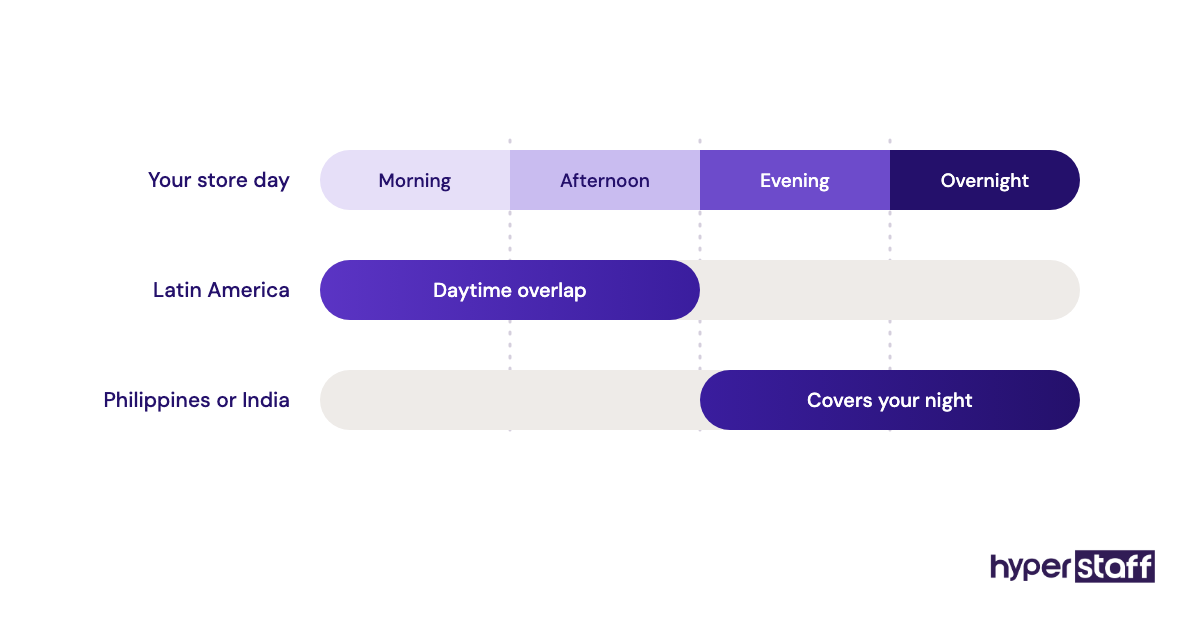
If the fit still feels wrong after four weeks, act early. The SOPs from month one make the second hire start faster than the first.
How Do You Measure Shopify VA Hiring Success?
Measure Shopify VA hiring success against the outcomes in your job post, compared with the task log from Step #1. Good measures are time from photo to live product, listing error rate, first reply time and the hours you got back.
Review monthly for the first quarter. Pair the numbers with a weekly look at a few listings or emails, since counts alone hide tone and accuracy problems.
Your own week is the final test. If your admin hours haven't dropped by week eight, change the role or the setup.
How Long Does It Take to Hire a Shopify Virtual Assistant?
Hiring a Shopify virtual assistant takes about 1 to 6 weeks, depending on the route: agencies can place someone within a week, while direct searches with trials often take 3 to 6. Reaching steady output takes another 4 to 8 weeks.
Week one goes to access and recorded walkthroughs. Weeks two to four are checked work, and by month two most VAs run routine tasks alone.
Roles touching ads, email flows or inventory planning can take closer to three months.
How Much Does It Cost to Hire a Shopify Virtual Assistant?
A Shopify virtual assistant costs about $3 to $15 an hour offshore, depending on experience and region, against roughly $32 an hour all-in for a comparable US admin employee. Agency rates also cover sourcing, vetting and replacement.
The US figure starts from the BLS median pay for administrative assistants, about $47,000 a year or roughly $23 an hour. Benefits are about 30% of private sector compensation in the BLS employer compensation release, which puts the loaded cost near $32.
| Option | Per hour | 40 hours a month | 80 hours a month | 160 hours a month |
|---|---|---|---|---|
| US in-house admin employee (wage plus benefits) | About $32 | About $1,280 | About $2,560 | About $5,120 |
| Offshore freelancer hired direct | About $5 to $15 | $200 to $600 | $400 to $1,200 | $800 to $2,400 |
| Hyperstaff Essential (0 to 2 years) | From $3 | From $120 | From $240 | From $480 |
| Hyperstaff Professional (2 to 5 years) | From $6 | From $240 | From $480 | From $960 |
| Hyperstaff Expert (5+ years) | From $12 | From $480 | From $960 | From $1,920 |
Quarterly payment with Hyperstaff takes 10% off. For a role-by-role breakdown, see our Shopify virtual assistant cost guide.
Important: Hyperstaff prices shown are typical starting rates, not fixed quotes. Your actual cost depends on the tasks, experience tier, region and hours your store needs.
Is Hiring a Shopify Virtual Assistant Worth It?
Yes, hiring a Shopify virtual assistant is one of the most rewarding moves a growing store can make when the role is scoped and set up properly. You buy back hours at a low rate and put them into the work only you can do.
Here's a worked example. Say product uploads, order holds and customer emails take you 20 hours a week, about 80 hours a month, and an Essential-tier VA takes them over from $3 an hour, or $240 a month.
If you spend those 80 hours on new products, wholesale pitches or ads, the hire covers itself once that work adds $240 a month in gross profit. At a 50% margin, that's about $480 in extra monthly sales, or a handful of orders.
The math fails when the freed hours vanish into other admin, or when checking the VA's work takes as long as doing it. Our full answer on whether a Shopify VA is worth it walks through those cases.
How Do You Choose a Shopify VA Agency?
Choose a Shopify VA agency by checking how it tests Shopify skills, whether your VA works only for you, how fast it replaces a hire and who keeps your process documents. Get the replacement terms in writing.
Ask what the Shopify test looks like. A good answer involves real admin tasks, like variant edits or an order hold, instead of a general typing or English test.
Pool models, where whoever is free picks up your queue, suit overflow work. They struggle with anything that depends on knowing your catalog and policies.
Hyperstaff places one dedicated specialist per role, drawn from pre-vetted talent in the Philippines, Latin America, India, Eastern Europe and the United States. If a placement doesn't work out, the replacement arrives free in 5 to 7 business days, briefed from your Operations Vault.
Shopify VA Statistics, Trends and Future Predictions
Online sales keep taking a larger share of US retail, at roughly 16% to 17% in recent quarters of the Census Bureau series tracked by FRED at the St. Louis Fed. More orders through small teams is the steady pressure behind Shopify VA hiring.
Shopify keeps moving routine work into its own admin, with Flow on most plans and built-in AI tools for product copy. We expect Shopify VA roles to lean further toward checking automations and fixing their output.
We're less certain about how fast this reaches support work. Customers with a damaged order still expect a person who knows the policy, and stores that automate too early tend to see it in their reviews.
How Does AI Change Hiring a Shopify Virtual Assistant?
AI changes what you hire a Shopify virtual assistant for, moving the job toward reviewing, correcting and deciding. Shopify's built-in AI can draft product descriptions, and helpdesks like Gorgias can draft ticket replies.
Test for judgment as a result. In the paid trial, give candidates an AI-written product description with a wrong material or size claim and see whether they catch it.
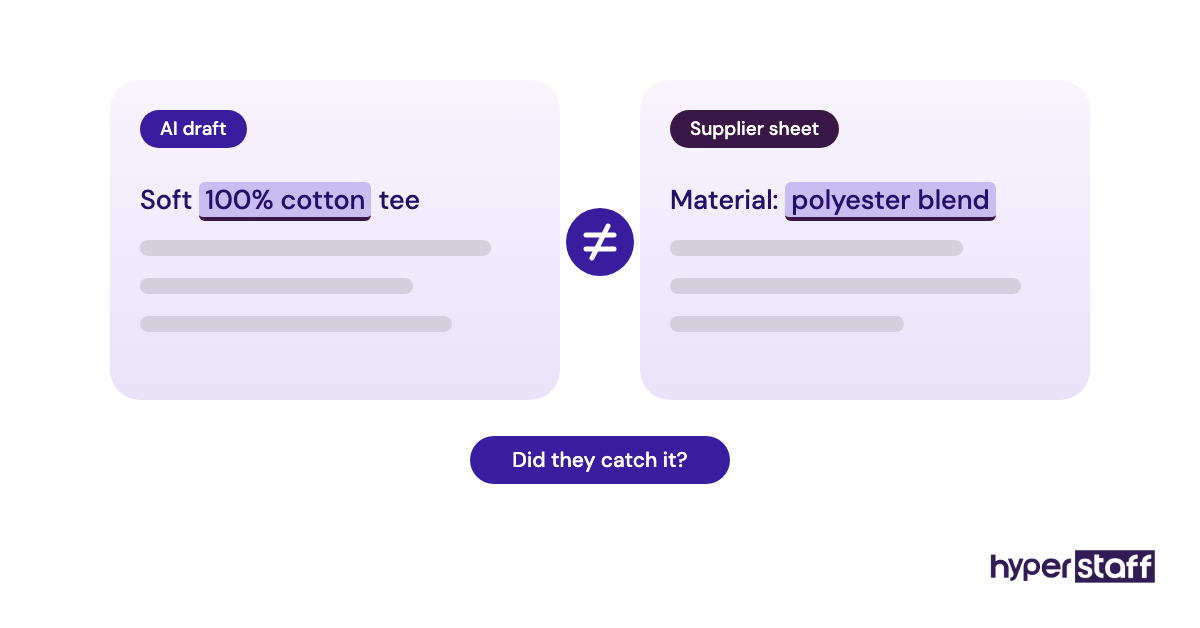
Keep a person on refunds, chargebacks, product claims and anything legal. AI drafts are fast and can be confidently wrong about your return window.
Disclaimer: This article is for general information only and is not legal, tax or employment advice. Platform plans, tool prices and wages change, so confirm current terms with each provider before you decide. Hyperstaff accepts no liability for decisions based on this content.
Common questions
Where can I hire a Shopify virtual assistant?
Freelance marketplaces, remote job boards and staffing agencies are the usual routes. Marketplaces give you more applicants to screen, while an agency sends a pre-vetted shortlist and handles contracts and replacements.
Does a Shopify VA need a staff account on my store?
Yes, for ongoing work. A staff account gives them their own login and permissions, and Shopify's Basic plan doesn't include extra staff seats, so you may need the Grow plan or higher.
Should my Shopify VA be full-time or part-time?
Start part-time unless you already have 30+ hours a week of repeat store work. A 40 or 80-hour monthly block shows you the fit before you commit to more.
Can a Shopify virtual assistant edit my theme?
You can let them make theme editor changes like banners, section text and menu links. Anything needing Liquid code or new sections is developer work, and a duplicate theme is the safe place to test it.
What should I check before I hire a Shopify VA?
Check real Shopify admin experience, written English and care with numbers. A paid trial on draft products or old customer emails shows all three faster than any interview.
Book a free 15 min call
We place a pre-vetted specialist in 5 business days, fully managed, from $3/hour.