10 Shopify virtual assistant mistakes store owners keep making
The setup errors that turn a Shopify virtual assistant into a cost, and the fixes that make the role pay off.
On this page
- Mistake #1: Why does hiring on "Shopify experience" backfire?
- Mistake #2: Are you hiring a Shopify VA only to clear the inbox?
- Mistake #3: Should your VA really log in as the store owner?
- Mistake #4: Handing over the whole store in week one
- Mistake #5: Why do product listings drift once a VA takes over?
- Mistake #6: Is your VA running bulk CSV imports straight onto the live catalog?
- Mistake #7: What happens when a VA edits the live theme?
- Mistake #8: Does your VA know how much they're allowed to refund?
- Mistake #9: Are you tracking hours instead of output?
- Mistake #10: Keeping the store's know-how in your head
- FAQs
💡 Key Takeaways:
1) Most Shopify virtual assistant mistakes come from the owner's setup. Shared logins, missing product data rules and unclear refund limits do more damage than a lack of skill.
2) A staff account with scoped permissions and a fresh theme duplicate for every edit prevent the two errors that can hurt a live store fastest.
3) Judge a Shopify VA on output such as listings published, first response time and error rate, and keep every process written down so a replacement can pick it up within days.
Get your VA paying for itself sooner
Hyperstaff has placed 70+ virtual assistants with 30+ clients, and the setup errors below are the ones worth fixing before day one. Our Shopify virtual assistant services match you with a pre-vetted specialist in 5 business days, from $3/hour, backed by a dedicated account manager and an Operations Vault that holds your SOPs.
Mistake #1: Why does hiring on "Shopify experience" backfire?
"Shopify experience" on a résumé usually means the person has worked inside the admin. It tells you very little about whether they can run your catalog, your apps and your return policy without someone looking over their shoulder.
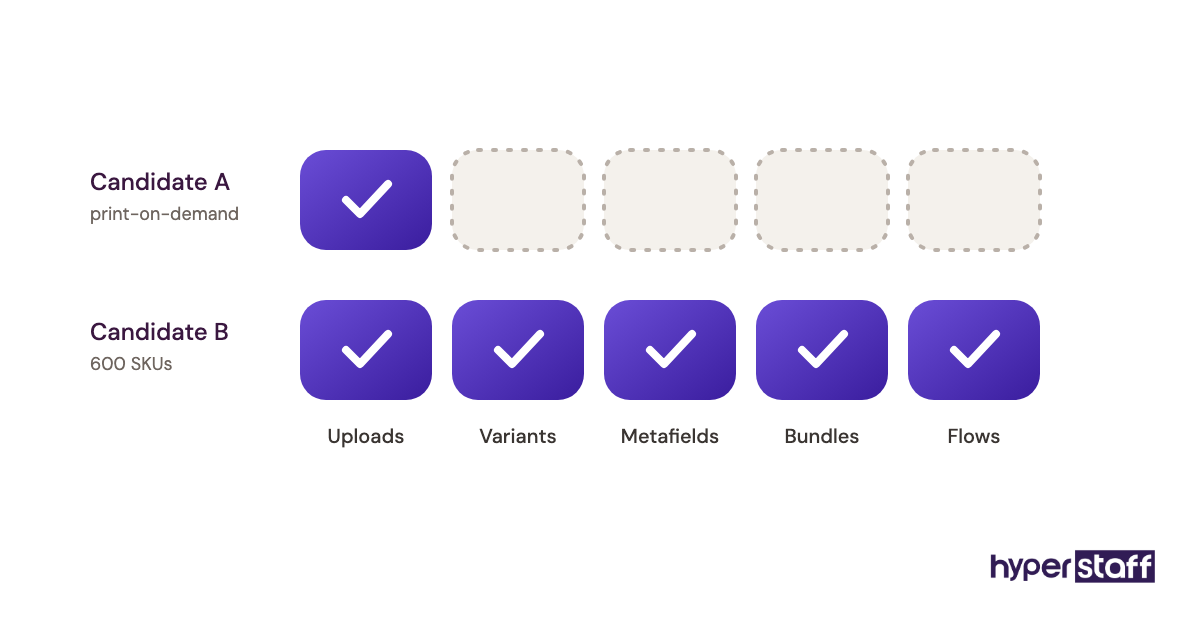
Two candidates with the same claim can sit miles apart. One has uploaded products for a print-on-demand store; the other has managed variants, metafields and a Klaviyo flow for a brand with 600 SKUs.
Why owners fall for it
- The Shopify admin looks simple, so any exposure seems like enough.
- Portfolios show finished stores, not the VA's part in them.
- Interviews ask about features instead of real tasks.
- Hiring feels urgent once orders start piling up.
- The role was never written down first.
What a weak fit costs your store
The bill shows up around week three, when the VA hits the first task nobody tested in the interview. A bundle product, a metafield-driven size chart or a return that crosses two apps stalls, and every question lands back on you.
Early tasks are easy, so a poor match can hide for a month. By then you've paid for hours spent learning on your live store and lost the time you hired help to get back.
How to test Shopify skills properly
Start by writing the role down. A clear Shopify VA job description forces you to pick the four or five tasks that matter most, which is the list you'll test against.
Then run a short paid trial on your real work: two products with variants and one customer email answered from your actual policy. Ask the candidate to talk through their choices, since the reasoning tells you more than the result.
For the conversation itself, our list of Shopify VA interview questions probes each task area. The full sequence, from brief to trial to offer, is in our guide on how to hire a Shopify VA.
Mistake #2: Are you hiring a Shopify VA only to clear the inbox?
Many store owners hire a Shopify virtual assistant for email and order admin, then wonder why revenue doesn't move. A good VA can cover customer support, wholesale lead generation, email marketing, inventory and day-to-day operations, so a narrow brief leaves most of that value unused.
Why the brief stays small
- "Virtual assistant" sounds like admin work.
- Inbox pain is the loudest, so it gets fixed first.
- Owners hesitate to hand over revenue-linked work.
- Nobody mapped where the store's real bottleneck sits.
The hidden price of a narrow role
The inbox gets cleaner while the actual constraint stays put. Stockouts nobody flagged, wholesale inquiries sitting unanswered for a week and an abandoned-cart flow that hasn't been touched since launch all cost more than slow email replies.
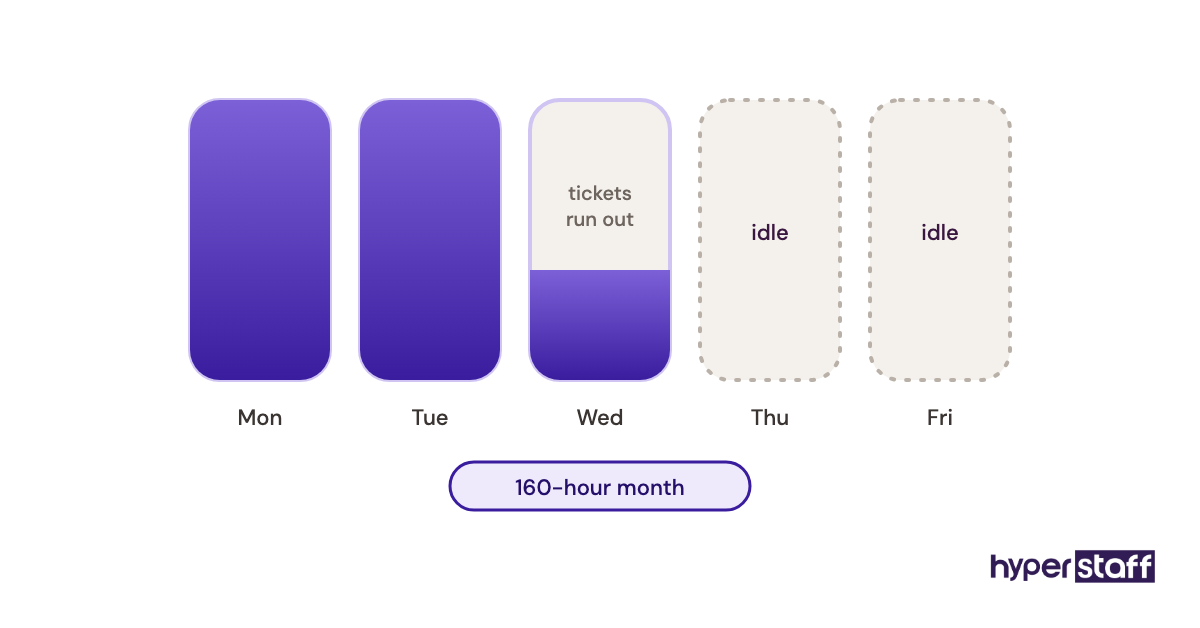
You also pay for idle capacity. A VA on a 160-hour month who runs out of tickets by Wednesday is an underused hire, not a cheap one.
Scope the role around the bottleneck
List the jobs that slip every week, then rank them by what they cost in sales. Our breakdown of Shopify VA tasks is a useful checklist for spotting work you hadn't thought to delegate.
If you're still unsure what the role can realistically include, read what a Shopify VA does before you write the brief. Keep the inbox in scope, and give it a time box so it can't eat the whole week.
Mistake #3: Should your VA really log in as the store owner?
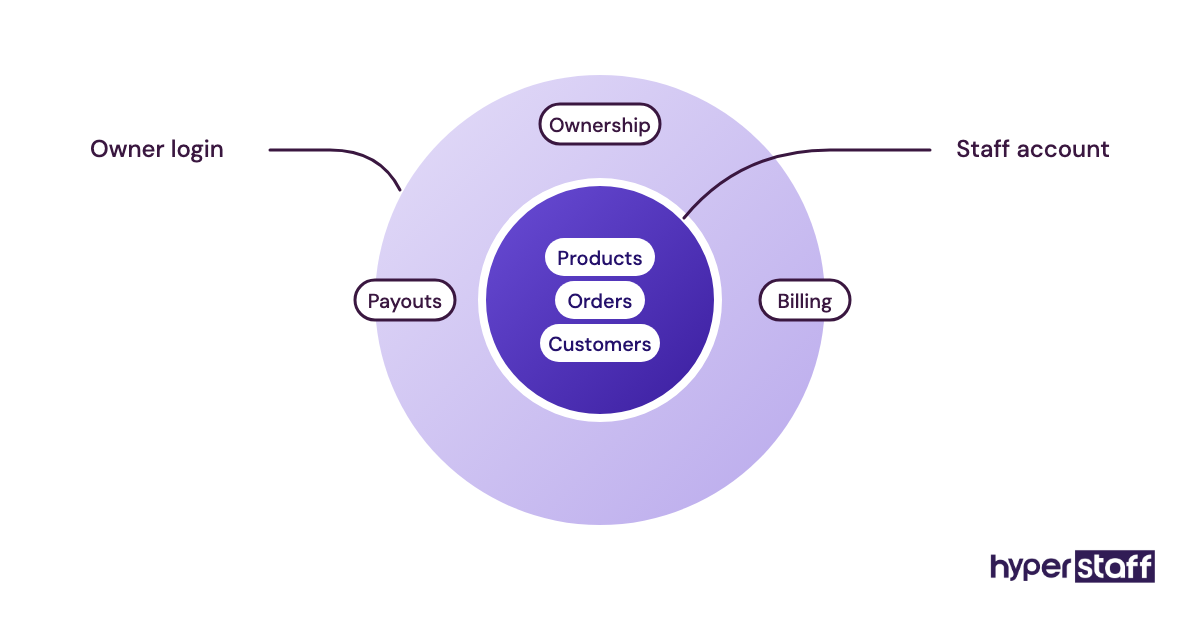
No. A Shopify VA should get their own staff account with only the permissions their tasks need, because the owner login can reach payouts, billing and store ownership settings.
Sharing the owner password feels faster on day one. It's also the setup that's hardest to undo cleanly later.
Why it keeps happening
- It takes ten seconds to paste a password.
- Owners don't know staff permissions are granular.
- Staff account limits on lower plans feel tight.
- Third-party apps get the same shortcut.
- Two-step codes get "solved" by forwarding texts.
What shared credentials cost you
With one login, the activity log shows the owner for every change, so you lose the audit trail when a price or a discount goes wrong. Two-step verification codes also land on your phone, which means you either get pinged at odd hours or someone turns two-step off.
Ending the engagement gets messy too. You have to change the owner password and then re-sign into every device and app tied to it.
Set up scoped access instead
Create a staff account and grant products, orders and customers as needed. Leave finances, store settings and app installation off until there's a specific reason to add them.
For Klaviyo, Gorgias and other apps, use each tool's own user roles and keep any shared passwords in a manager like 1Password or Bitwarden. A shared vault beats passwords pasted into Slack, because you can revoke access in one place.
Mistake #4: Handing over the whole store in week one
A new VA given support, product uploads, ads reporting and supplier emails all at once will make mistakes in all four. The errors overlap, and you can't tell whether the problem is skill, unclear instructions or plain overload.
Why owners front-load everything
- The backlog feels urgent.
- Paying for hours creates pressure to fill them.
- Owners assume an experienced VA needs no ramp.
- Training feels slower than doing the work yourself.
What overload costs
You end up checking everything, so you save no time in the first month. Worse, small habits formed under pressure, like skipping alt text or guessing at a policy, harden into the way the job is done.
Sequence the handover
Work can start the day after a short kickoff, as long as it starts narrow. A realistic order looks like this:
- Days 1 to 3: read-only access, policy reading and shadowing ticket replies.
- Week 1 to 2: product edits and new listings, each reviewed before publishing.
- Weeks 2 to 4: customer replies drafted for approval, then sent directly once accuracy holds.
- Month 2: the second task area, added only after the first runs without daily checks.
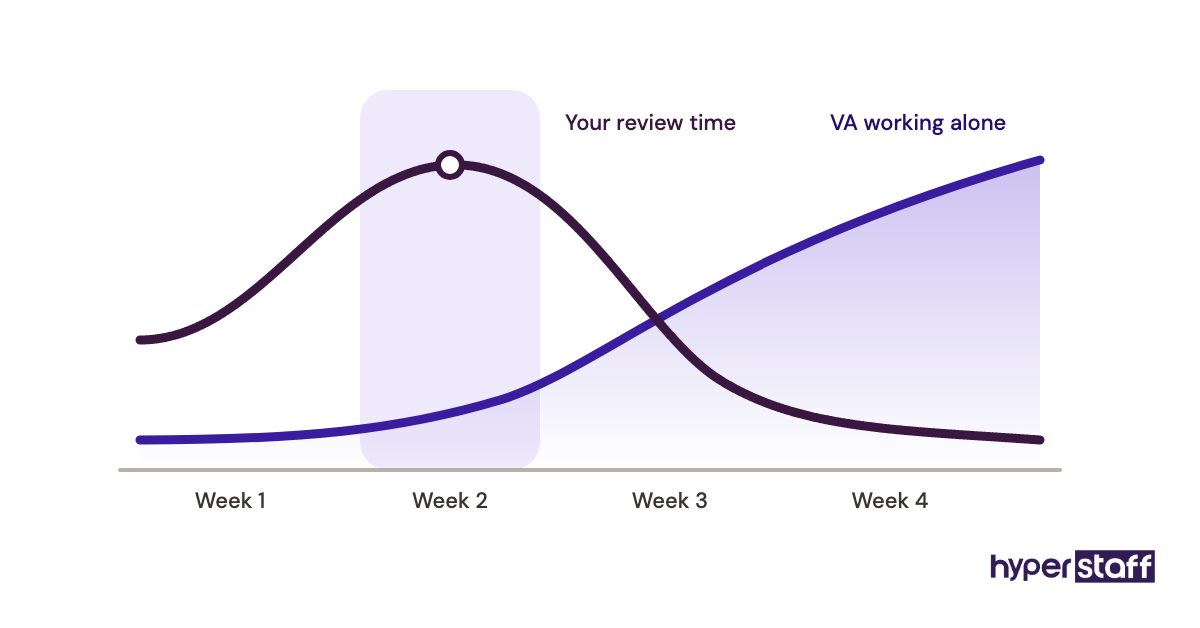
Expect a dead zone in week two where reviews take longer than doing the work yourself. That dip is normal, and our guide to onboarding a Shopify VA covers how to shorten it.
Mistake #5: Why do product listings drift once a VA takes over?
Product listings drift because the rules for titles, tags and options live in the owner's head. A VA copies whatever the last listing looked like, and small inconsistencies multiply across hundreds of products.
Where the drift starts
- No written title formula.
- Tags are typed freehand.
- Older listings already disagree with each other.
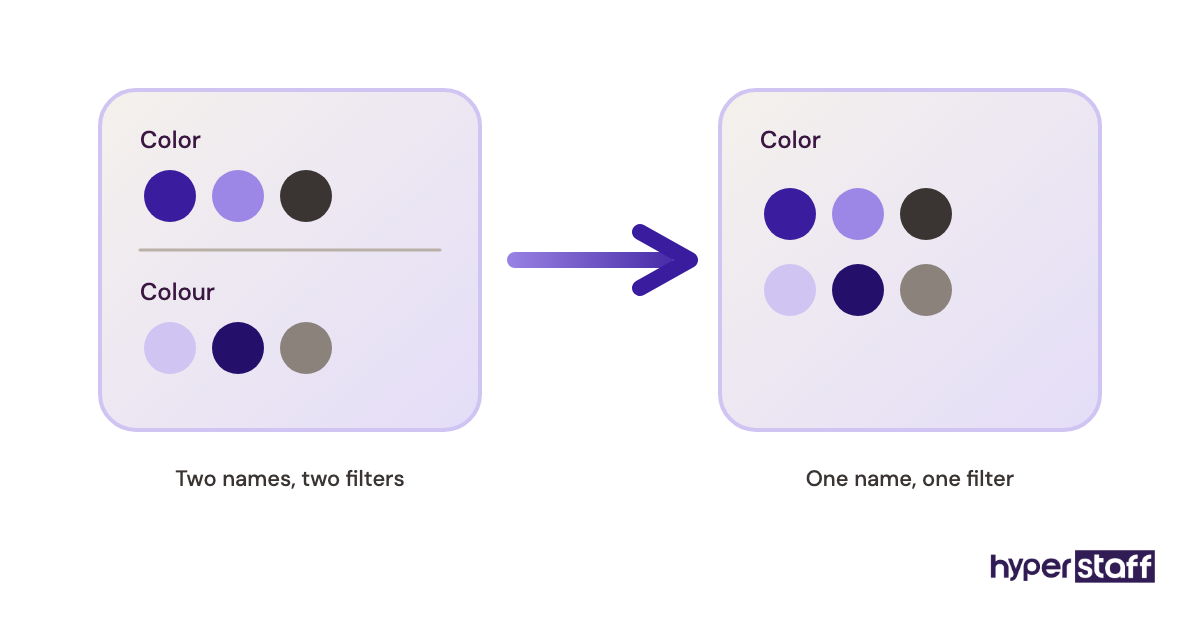
- Option names vary ("Color" here, "Colour" there).
- Alt text is treated as optional.
What messy data costs in sales
Automated collections pull products by conditions such as tag, type or vendor. One misspelled tag drops a product from its collection without a sound, and nobody notices until a customer can't find it.
Mixed option names split storefront filters, so shoppers filtering by color miss half the range. Search, Google Shopping feeds and email product blocks all inherit the same mess.
Write a product style sheet
One page is enough to start: a title formula, the approved tag list, standard option names, image specs and an alt text pattern. Treat the tag list as closed, so a new tag needs your approval before it exists.
Ask the VA to audit 50 existing listings against the sheet before creating anything new. It doubles as training and surfaces the drift that's already there.
Mistake #6: Is your VA running bulk CSV imports straight onto the live catalog?
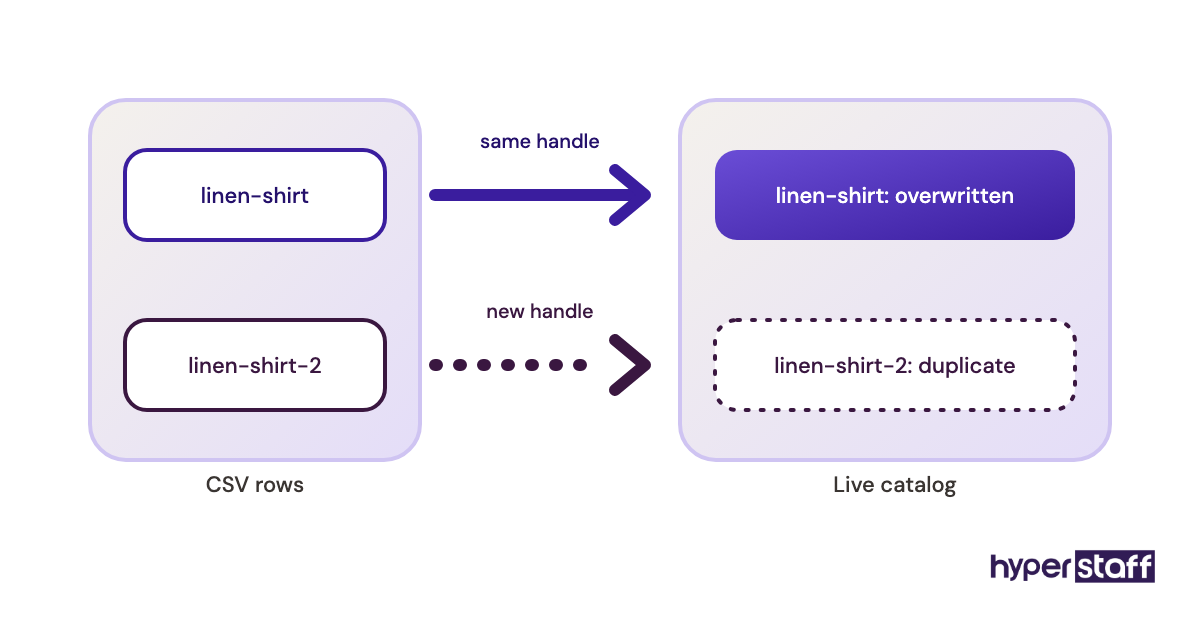
Bulk CSV imports are the fastest way to update a Shopify catalog and the fastest way to break one. Shopify matches products by handle, and with the overwrite option checked, the file becomes the source of truth for the columns it contains.
Why imports go wrong
- The CSV was edited in a spreadsheet that reformatted values.
- Handles changed, so updates became duplicates.
- Variant rows were sorted out of order.
- No backup export existed before the run.
The damage from one bad file
A single import can rewrite prices, strip descriptions or create a few hundred duplicate products in under a minute. Cleaning that up by hand can take a full day, and sales from broken listings don't come back.
Test, then import
Export a full backup first and store it with the date in the file name. Then import 5 to 10 rows, check them on the storefront and in the admin, and only then run the full file.
The native importer handles simple product updates well. For metafields, redirects or larger jobs, an app like Matrixify covers more data types, though it adds a learning curve and a monthly cost, so it's worth it only if imports are a regular task.
Mistake #7: What happens when a VA edits the live theme?
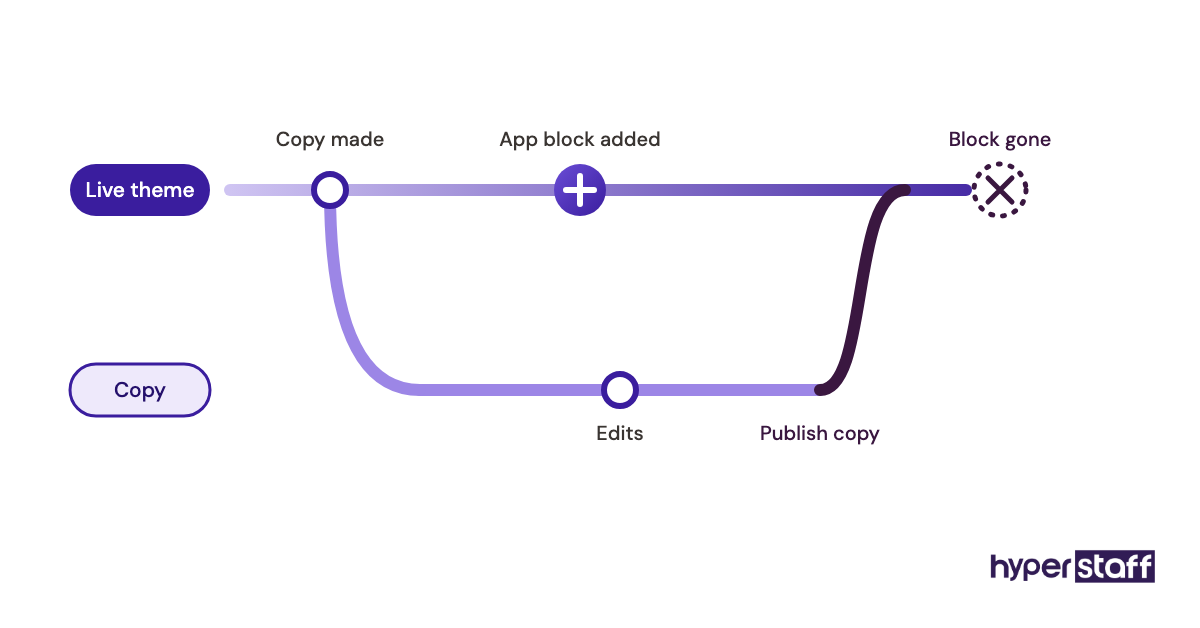
Changes saved in the theme editor on your published theme go live for shoppers the moment they're saved. A VA moving a section or tweaking code there is editing the storefront in front of customers.
Why it slips through
- The editor makes changes feel like drafts.
- Small text edits seem harmless.
- Nobody set a rule for duplicating first.
- Mobile previews get skipped.
What a broken storefront costs
A misplaced block can hide the add-to-cart button on mobile while desktop looks fine. If nobody checks on a phone, the store can lose orders for hours before anyone notices the drop.
The code editor does keep older versions of each file. Rolling back a dozen files under pressure is still slow and easy to get wrong.
Edit a copy, preview, then publish
Every edit starts with a duplicate of the live theme. The VA works on the copy, checks it in preview on desktop and a real phone, and you approve before publishing.
Mistake #8: Does your VA know how much they're allowed to refund?
Most support mistakes come from unclear authority rather than bad writing. Without a refund limit, a VA either escalates every request or refunds too freely, and both cost you.
Why the line stays blurry
- The policy page covers customers, not staff decisions.
- Owners decide refunds case by case.
- Edge cases like late delivery or a wrong size never got a rule.
- Macros exist, but nobody says when to break from them.
- The VA fears being blamed for a wrong call.
What unclear authority costs
Escalating everything means customers wait a day for an answer you could have pre-approved. Over-refunding is less visible but adds up across a month, and generous one-off exceptions train repeat customers to ask for more.
Give the VA a decision rule
Set a dollar cap below which the VA decides alone, plus written rules for the common cases: wrong item, damaged item, late delivery and change of mind. Anything over the cap goes to you the same day.
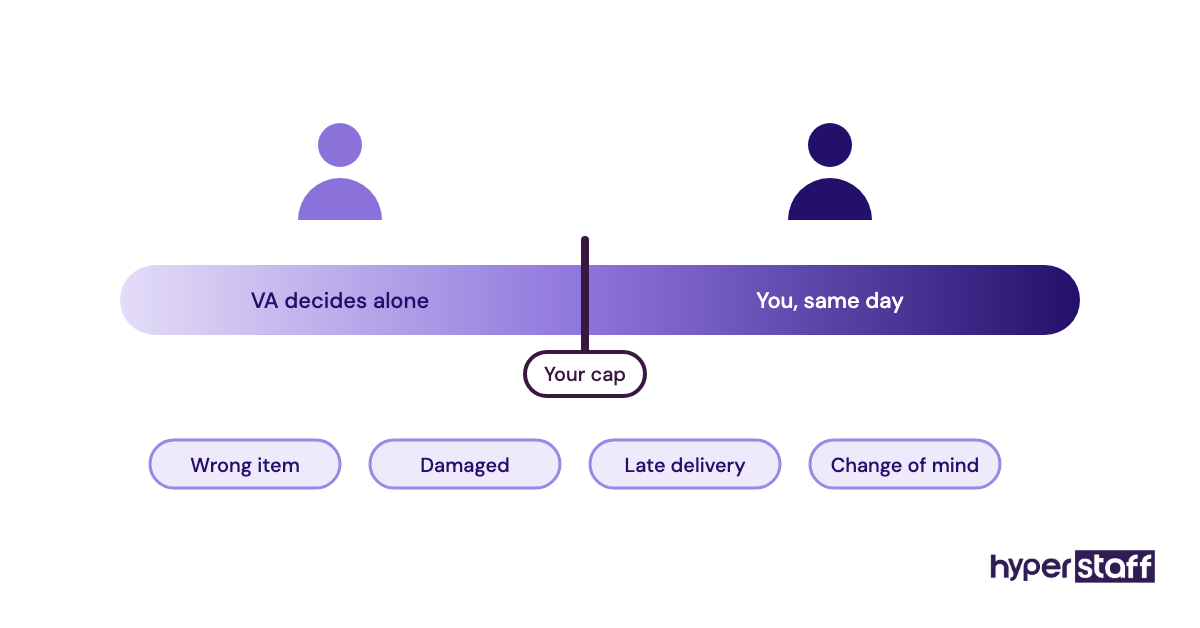
Practitioners genuinely disagree on how high that cap should be. We lean toward a real cap with full authority under it, because a VA who has to ask about every $15 refund stops thinking for themselves. Pair it with saved replies in a help desk; our roundup of Shopify VA tools compares the options.
Mistake #9: Are you tracking hours instead of output?
Hours tell you what you paid for. Output tells you what you got, and a Shopify VA measured only on logged time has no reason to get faster.
Why hours become the metric
- Time tracking apps make hours easy to see.
- Output takes effort to define.
- Monthly hour bundles frame the job as time.
- Nobody set a baseline before the VA started.
What measuring the wrong thing costs
You can't tell a strong month from a weak one, so problems surface late. You also can't answer the money question clearly, which is the one our pieces on Shopify VA cost and whether a Shopify VA is worth it both turn on.
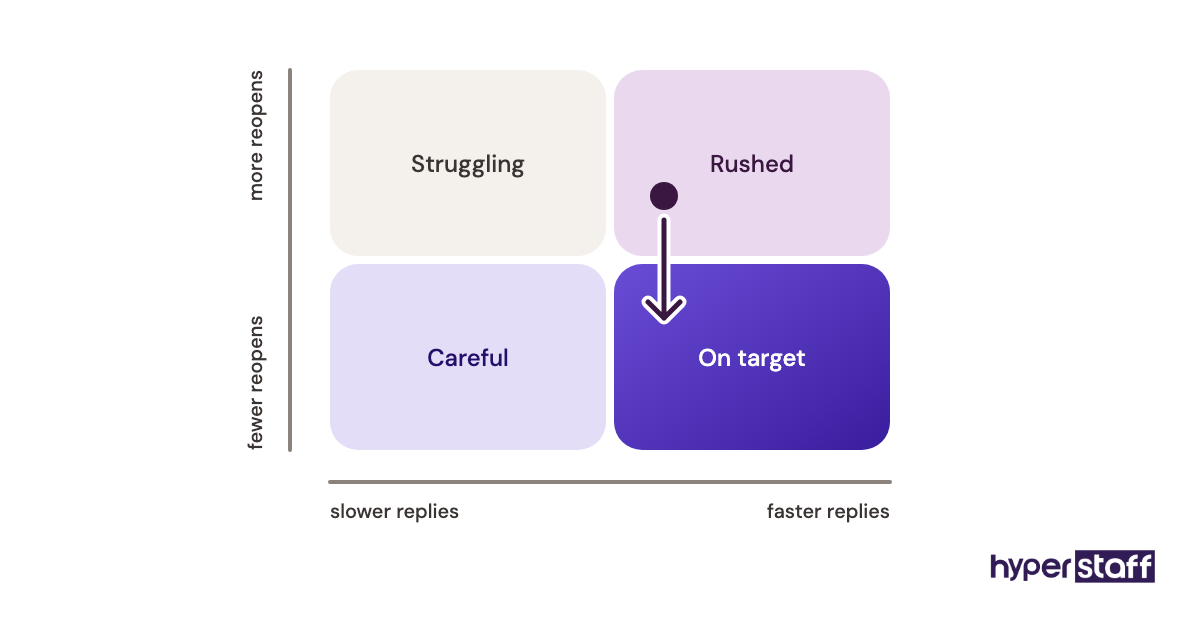
Pick two or three output metrics per task area
| Task area | Metric | What to watch for |
|---|---|---|
| Customer support | First response time and reopened tickets | Fast replies with rising reopens mean answers are rushed |
| Product listings | Listings published per week and errors found in review | Volume matters only while the error count stays low |
| Inventory | Stockouts flagged before they happen | Zero flags in a busy month usually means nobody is checking |
| Email marketing | Campaigns shipped on schedule | Revenue per send belongs to the strategy owner, not the VA alone |
| Wholesale outreach | Qualified replies per week | Count replies, since sent emails say nothing about quality |
Record a baseline in the first two weeks, then review monthly. Hours still matter for budgeting across a 40, 80 or 160-hour month, but they shouldn't be the scorecard.
Mistake #10: Keeping the store's know-how in your head
The most expensive Shopify VA mistake tends to show up only when the VA leaves. If your processes live in your memory and a scattered folder of Loom videos, the knowledge walks out with the person, and you train the next one from scratch.
Why SOPs never get written
- Writing them feels slower than just doing the task.
- Processes change, so documents go stale.
- The current VA "already knows it."
- Nobody owns keeping them updated.
What lost knowledge costs
Every VA change resets you to week one, with the same review load and the same early errors. Owners comparing a remote hire with a Shopify VA vs in-house setup often miss that both face this risk, since in-house staff leave too.
Make documentation part of the job
Ask the VA to write or update an SOP every time they finish a task for the first time. A short written step list beats a long video, because it's searchable and quick to edit when a process changes.
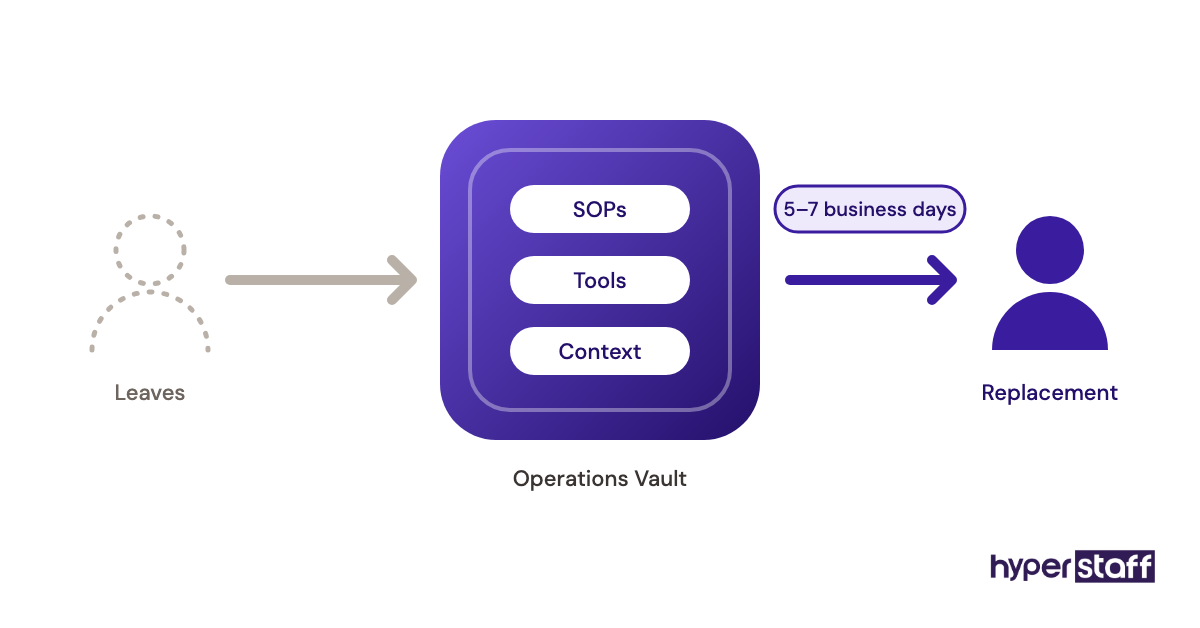
At Hyperstaff, that record sits in your Operations Vault: your SOPs, tools and context, written down and maintained for you. If a placement doesn't work out, the replacement arrives in 5 to 7 business days and gets briefed from the Vault, not from your memory.
Disclaimer: This article is for general information only and does not constitute legal, financial or security advice. Shopify features, permissions and third-party tools change over time, so confirm details with the relevant provider before acting. Hyperstaff accepts no liability for decisions made based on this content.
Common questions
How many hours a week does a Shopify VA actually need?
It depends on order volume and how many task areas you hand over. Support alone for a smaller store often fits a 40-hour month, while support plus listings and inventory usually needs 80 hours or more. Start smaller and add hours once the first area runs well.
Can my Shopify VA work while I'm asleep without causing problems?
You can, if the VA has written rules for decisions they'd otherwise ask you about. Off-hours coverage works well for support and listings. Anything touching prices, the live theme or large refunds should wait for your approval.
What should I do when my Shopify VA makes a mistake on a live order?
Fix the customer issue first, then trace the cause together. Most order mistakes point to a missing rule or a gap in the SOP, so update the document before the same case comes up again.
Should my Shopify VA use AI to write product descriptions?
Yes, with a human check on every listing. AI drafts get the structure right but often invent materials, sizing or care details. Give the VA your style sheet and require them to verify facts against supplier data.
How long before a new Shopify VA stops making beginner mistakes?
Expect four to six weeks for one task area to run without daily review. Adding a second area too early restarts the error curve, so wait until the first one is stable.
Book a free 15 min call
We place a pre-vetted specialist in 5 business days, fully managed, from $3/hour.