How to Onboard a Shopify Virtual Assistant Without Risking Your Store
How to give a Shopify VA safe store access, hand work over in the right order and get them working on their own within a few weeks.

On this page
- What Does Onboarding a Shopify Virtual Assistant Mean?
- Key Shopify VA Onboarding Terms You Should Know
- Why Is Onboarding a Shopify Virtual Assistant Important?
- How Does Shopify VA Onboarding Work?
- Types and Forms of Shopify VA Onboarding
- How Is Shopify VA Onboarding Different From Related Processes?
- The Benefits of Onboarding a Shopify VA Properly
- The Drawbacks of Formal Shopify VA Onboarding
- Who Needs a Formal Shopify VA Onboarding Process?
- Shopify VA Onboarding Examples
- Creating a Shopify VA Onboarding Plan, Step-by-Step
- What Does an Effective Shopify VA Onboarding Strategy Look Like?
- Shopify VA Onboarding Tools and Software
- 9 Proven Shopify VA Onboarding Tips and Habits
- Overcoming Common Shopify VA Onboarding Challenges
- How to Measure Shopify VA Onboarding Success
- How Long Does Shopify VA Onboarding Take to Work?
- How Much Does Onboarding a Shopify Virtual Assistant Cost?
- Is Onboarding a Shopify VA Properly Worth It?
- How Do You Choose a Shopify Virtual Assistant Agency?
- Shopify VA Onboarding Statistics, Trends and Future Predictions
- Shopify VA Onboarding and AI
- FAQs
💡 Key Takeaways:
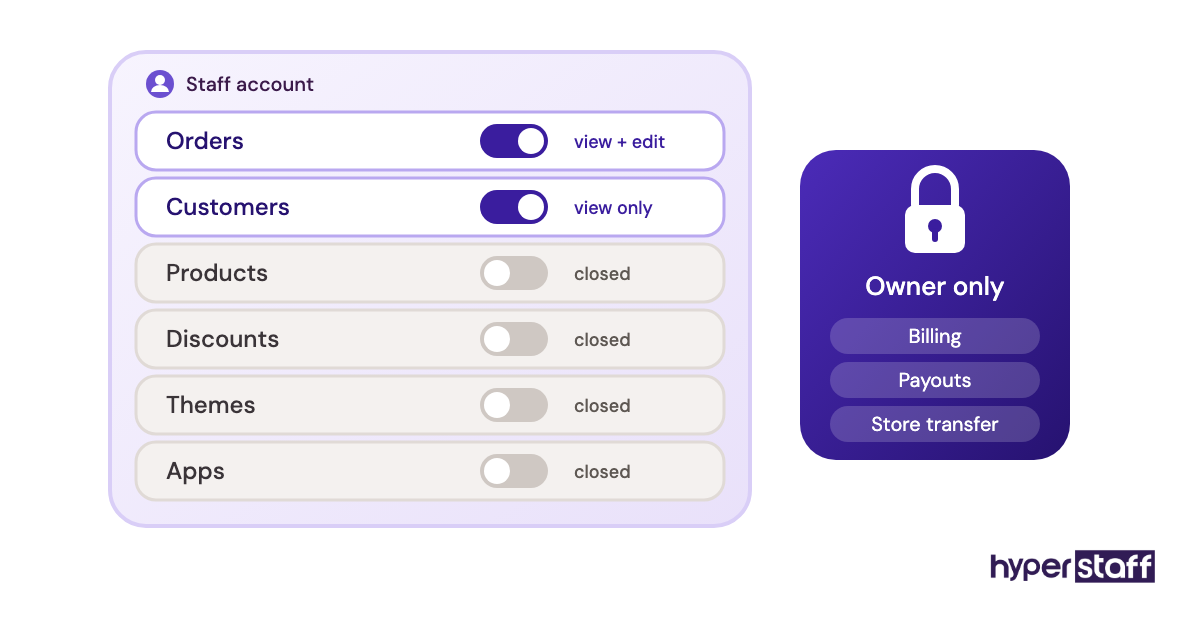
1) Onboarding a Shopify virtual assistant starts with their own staff account, limited to the admin sections their first tasks need, such as Orders or Customers. The store owner login is never shared.
2) Hand work over by risk: order checks and support replies first, then product and inventory edits, and only later anything that touches discounts, refunds above a set amount, apps or the theme.
3) A Shopify VA with a written SOP and a short screen recording for each recurring task usually runs their core work without daily checks in three to five weeks.
Get your Shopify VA earning back hours in week one
Hyperstaff has placed 70+ pre-vetted virtual assistants with 30+ clients, and every placement opens with a 30-minute kickoff call, so work starts that day or the next morning. Our Shopify virtual assistant services match you with a specialist in 5 business days, from $3/hour, with your store SOPs kept current in an Operations Vault.
What Does Onboarding a Shopify Virtual Assistant Mean?
Onboarding a Shopify virtual assistant is the process of giving a remote assistant safe access to your Shopify admin, documenting the tasks they'll own and handing those tasks over in stages. It runs from the day before their first login until they can get through a normal week without asking you how.
The Shopify part carries more weight than most owners expect. One wrong bulk price edit or a discount code set to 100% instead of 10% costs real money within minutes, so access and sequencing matter more here than in a general admin role.
Onboarding also covers the apps around the store: your helpdesk, inventory app, shipping software and team chat. If the role itself still feels fuzzy, our breakdown of what a Shopify VA does sets the scope before any access gets granted.
Key Shopify VA Onboarding Terms You Should Know
- Staff account = a named Shopify admin login with permissions you set section by section.
- Collaborator account = store access for a Shopify Partner, requested with a 4-digit code and not counted toward your user limit.
- Store owner = the one account that controls billing and store transfer. Never shared.
- Permissions = the checkboxes deciding which admin areas, such as Orders, Products or Themes, a user can open.
- Two-step authentication = a second login check through an app or security key.
- SOP = standard operating procedure, the written steps for one recurring task.
- Operations Vault = Hyperstaff's maintained record of your SOPs, tools and store context.
- Shadowing = the VA watches or reviews a task before doing it alone.
- Bulk editor = Shopify's spreadsheet-style screen for changing many products at once.
- Draft order = an order created in the admin, useful for safe practice runs.
- Shopify Flow = Shopify's automation app that triggers actions from store events.
- Ramp-up period = the weeks between first login and independent work.
Why Is Onboarding a Shopify Virtual Assistant Important?
Onboarding decides whether a Shopify virtual assistant saves you hours in month one or costs you hours fixing their work. A VA who gets a login and a vague task list will guess, and guesses in a live store show up as wrong prices, oversold stock or refunds sent to the wrong customer.
Security is the second reason. Shopify gives every staff member their own login and activity trail, and a shared password wipes out the record of who changed what, which is the first thing you'll want when an order goes wrong.
The third reason gets skipped: a store's real knowledge lives in small decisions, like which supplier ships late in peak season, which customers get free returns and which product tag feeds a collection. Writing those down once during onboarding is what makes a replacement, a second VA or your own holiday possible.
How Does Shopify VA Onboarding Work?
Shopify VA onboarding runs in four phases: access, documentation, supervised handover and independent work. Each phase has a gate, and the VA moves on only when the current tasks run clean for about a week.
Access comes first and stays narrow. You create a staff account in Settings > Users, tick only the permissions the first tasks need and turn on two-step authentication before day one.
Documentation runs alongside it. Each recurring task gets a short written SOP plus a screen recording of you doing it once, because a recording catches the filters and clicks you forget to write down.
Supervised handover is where most of the learning happens. The VA does the task, someone checks it the same day and the SOP gets corrected wherever the VA hesitated.
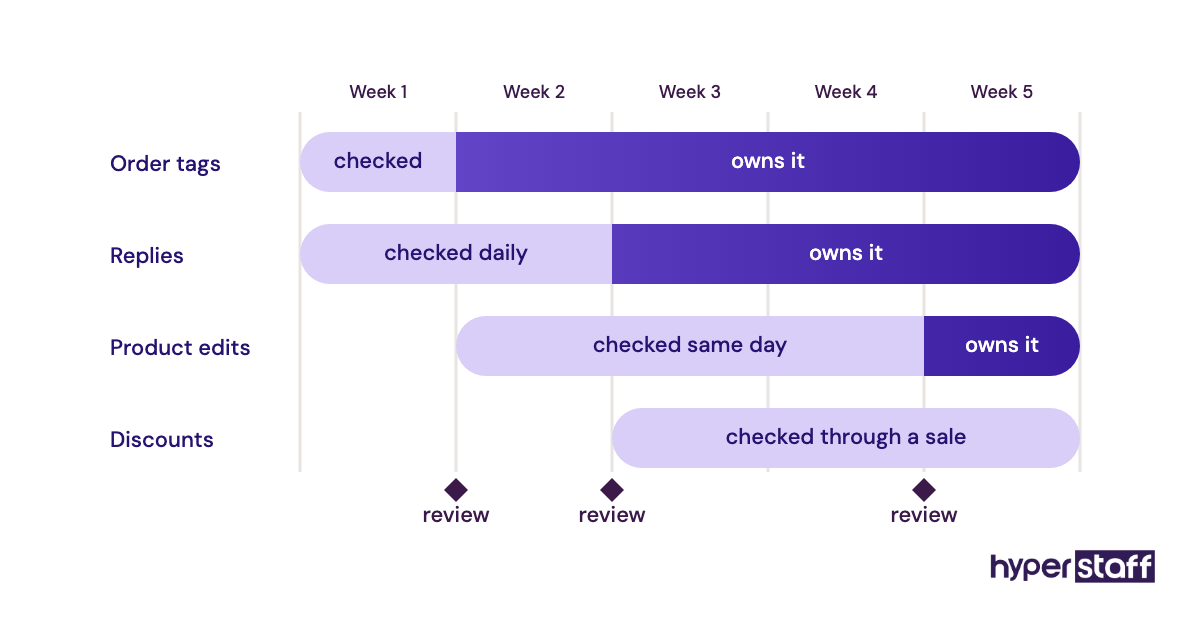
Independent work starts task by task. A VA can own order tagging in week two while still sending product descriptions for review in week four.
Types and Forms of Shopify VA Onboarding
The right onboarding type depends on which part of the store the VA takes over first.
| Onboarding type | Best fit | First permissions | Typical ramp-up | Main risk |
|---|---|---|---|---|
| Support-first | Stores with heavy ticket volume | Orders, Customers, helpdesk | 1 to 2 weeks | Refund and goodwill-discount errors |
| Catalog-first | Stores adding products often | Products, Inventory, Files | 2 to 3 weeks | Bad bulk edits |
| Operations-first | Stores with several suppliers | Orders, Inventory, shipping app | 2 to 4 weeks | Missed fulfillment exceptions |
| Marketing-first | Stores running regular promotions | Marketing, Discounts, email app | 3 to 4 weeks | Wrong discount settings |
| Phased full-store | Owners handing over most admin work | Widens over 4 to 6 weeks | 4 to 6 weeks | Permission creep |
| Agency-briefed | Owners short on time to write SOPs | Set by the agency brief | 1 to 3 weeks | Thin brief if the owner skips week one |
| Replacement | Stores swapping one VA for another | Copied from the previous VA | Under 2 weeks with current SOPs | Inherited shortcuts |
How Is Shopify VA Onboarding Different From Related Processes?
Onboarding a Shopify VA overlaps with three other processes, and mixing them up hands the VA the wrong checklist.
Shopify VA Onboarding vs. Employee Onboarding
Employee onboarding covers contracts, payroll, benefits and company policies. Shopify VA onboarding through an agency is mostly store access and task handover, because the employment paperwork sits with the agency.
Shopify VA Onboarding vs. Bringing In a Shopify Developer
A Shopify developer usually joins as a collaborator with theme and app access for one project. A VA works daily inside orders, products and customers, so their access is wider in those sections and should stay closed on Themes, Apps and store settings.
Shopify VA Onboarding vs. Store Setup
Store setup builds the store: theme, payments, shipping zones, taxes and policies. VA onboarding assumes the store already trades and teaches someone to operate it, so a VA hired to "set up the store" needs a separate brief and separate checks.
The Benefits of Onboarding a Shopify VA Properly
A structured onboarding pays off in the first month and keeps paying when the team changes.
- Fewer pricing, discount and inventory errors in the first weeks
- Faster ramp-up, since the VA spends less time waiting for answers
- A clean audit trail, with every change tied to a named staff account
- SOPs that also train the next hire or a replacement
- Less owner time per week once each handover gate is passed
The Drawbacks of Formal Shopify VA Onboarding
The costs are real, and most land on the owner in weeks one and two.
- Writing SOPs and recording videos takes several hours up front
- Same-day reviews slow you down before they speed you up
- Narrow permissions mean more access requests early on
- SOPs go stale when apps or policies change and nobody updates them
Who Needs a Formal Shopify VA Onboarding Process?
Any Shopify store handing admin work to someone outside the founding team needs a written onboarding process. The need grows with order volume, the number of installed apps and how many people already hold staff accounts.
Solo founders feel it most. They hold every piece of store knowledge in their head, and a VA can't pick it up by watching a team that doesn't exist.
Larger stores on Advanced or Plus face a different version: many staff accounts, overlapping permissions and SOPs written by people who have left. For them, a new VA is a good moment to audit who has access to what.
For stores that haven't picked a candidate yet, our guide on how to hire a Shopify VA covers sourcing and screening before onboarding begins.
Shopify VA Onboarding Examples
Six onboarding setups show up again and again in Shopify stores, three that hold up and three that cost owners money.
Shopify VA Onboarding Good Examples
Scoped Staff Account With a Week-Two Review
The VA starts with Orders and Customers only, handles order tagging and address fixes and gets Products access after one clean week. When something breaks, the activity log points to one person and one change.
Recorded SOP Library Before Day One
The owner records each recurring task once in Loom, under five minutes per video, and links every recording from one SOP index. The VA works through the queue on day one, and their first questions are about edge cases.
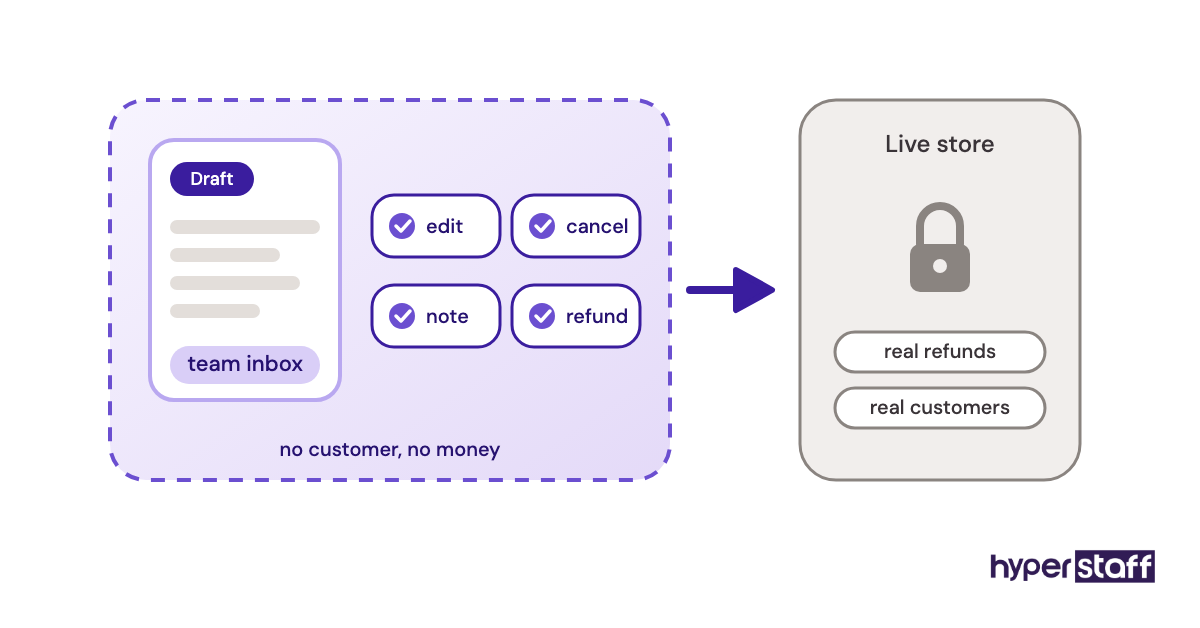
Practice Runs on Draft Orders
Before touching live refunds, the VA creates draft orders addressed to a team email and walks through edits, cancellations and notes. Every path gets tried once with no customer and no money involved.
Shopify VA Onboarding Bad Examples
One Shared Owner Login
The owner hands over their own email and password so the VA "can see everything." Billing, payouts and store transfer are now one phishing email away, and the activity log can't separate the owner's changes from the VA's.
Every Permission Ticked on Day One
All boxes get checked to avoid access requests. The first serious mistake then tends to come from a section the VA never needed, such as a theme edit or an app removal that deletes its data.
Training by Chat Messages Only
Instructions live in scattered Slack or WhatsApp threads. Three weeks later nobody can find the refund rule, and the VA applies whichever version they saw last.
Creating a Shopify VA Onboarding Plan, Step-by-Step
A Shopify VA onboarding plan fits on one page and takes about a week to prepare before the VA's first login.
Step #1: Map the Tasks and Sort Them by Risk
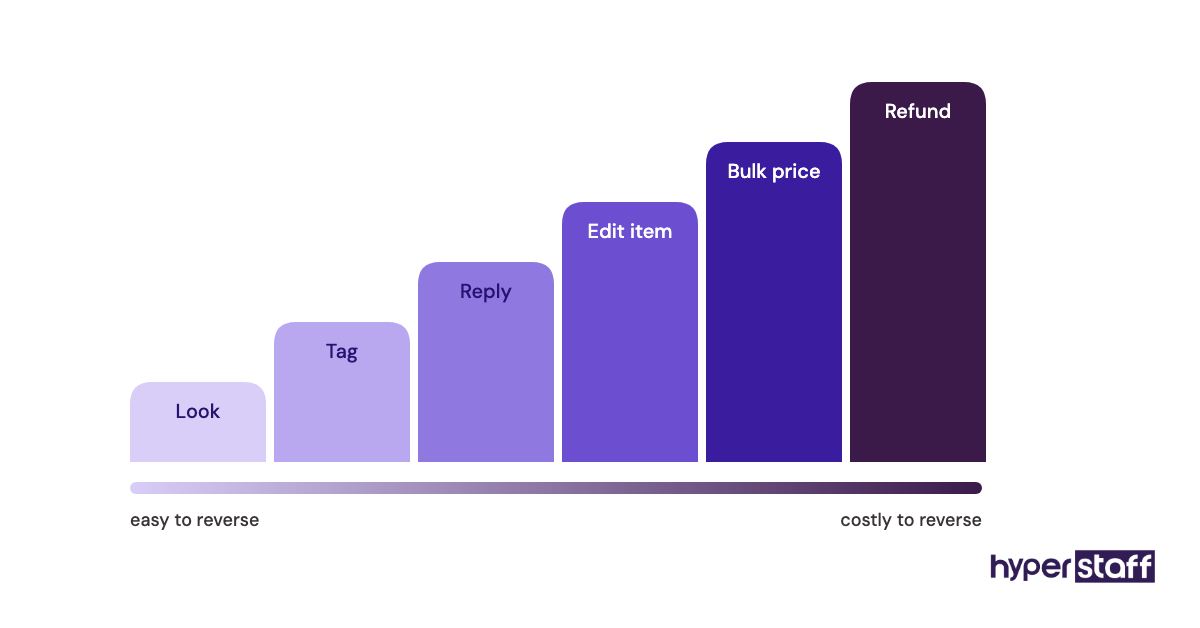
List every task you want off your plate, then sort them into read-only, easy to reverse and costly to reverse. Read-only checks go first, and anything touching money or bulk product data goes last.
A thin list usually means tasks are hiding in your habits. Our list of common Shopify VA tasks helps fill the gaps.
Step #2: Set Up Access Before Day One
Create a staff account in Settings > Users with only the permissions the first two weeks need. Add the VA to your helpdesk, password manager and team chat with the same narrow scope.
Turn on two-step authentication and share any shared app logins through a password manager vault, never by email. If your VA's agency is a Shopify Partner, a collaborator account is another route that won't use a staff seat.
Step #3: Write SOPs and Record the Screens
Each SOP needs a trigger, the steps, the decision rules and what "done" looks like. Pair it with a short recording, because written steps miss the saved views and filters you click by habit.
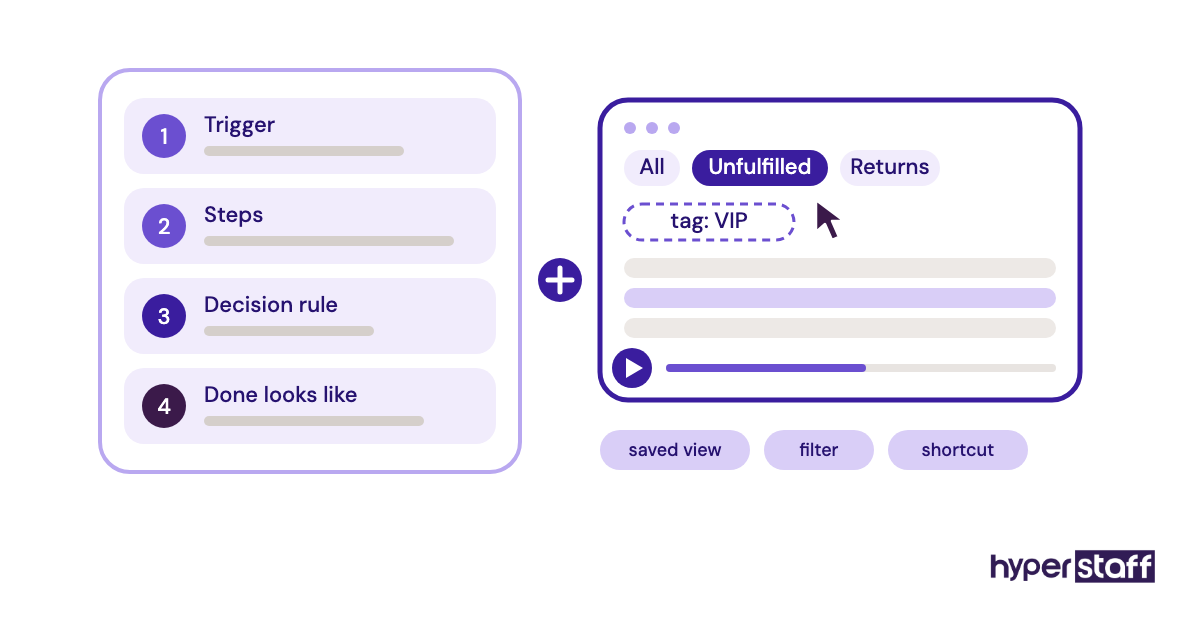
Start with the 5 to 8 tasks that eat the most time. The rest can wait until the VA's questions show you what's missing.
Step #4: Run a Supervised Handover
Hand over one task group at a time and check the work the same day for the first week. Every correction goes into the SOP so the fix outlives the chat thread.
Step #5: Set Review Points and Widen Access
Book a 15-minute review at the end of weeks one, two and four. Widen permissions only after a task group has run a full week without errors, and note the date you did it.
What Does an Effective Shopify VA Onboarding Strategy Look Like?
An effective Shopify VA onboarding strategy ties access to proven accuracy. Permissions widen as errors fall, and every task the VA owns has an SOP, a reviewer and a measure.
The sequence matters more than speed. Support replies come before product edits because a wrong reply is easy to correct, and a bad bulk price change can sell stock at a loss before anyone notices.
Owners split on how long to keep same-day reviews. Some stop after a week to protect their own time; we'd keep them on discounts and refunds until the VA has worked through one sale period, because promotions surface the edge cases normal weeks hide.
Most onboarding problems trace back to a handful of common Shopify VA mistakes. Nearly all of them start with access granted too early.
Shopify VA Onboarding Tools and Software
Shopify VA onboarding needs a short stack: scoped store access, a recording tool, a password vault, an SOP home and a chat channel. Prices below come from each provider's own pricing page and change often.
| Tool | Onboarding job | Price |
|---|---|---|
| Shopify staff and collaborator accounts | Scoped admin access with an activity log | Included in Shopify plans |
| Loom | One recording per SOP | Free (5-minute limit); Business $18 per user/month |
| Bitwarden | Shared logins for helpdesk and apps | Teams $4 per user/month, billed annually |
| Notion | SOP index and checklists | Free plan; paid about $10 to $20 per member/month |
| Google Docs | Simple SOP writing and sharing | Free with a Google account |
| Slack | Daily questions and handover notes | Free plan keeps 90 days of messages; paid per user |
| Shopify Flow | Auto-tagging and alerts the VA acts on | Free Shopify app |
Loom earns its place fastest. A two-minute recording of a refund, with the order timeline visible, answers more questions than a page of written steps, and Loom's pricing page lists what the free tier allows.
Password managers are the tool owners skip and regret. Bitwarden's business plans cost less than a single refund mistake, and our roundup of Shopify VA tools covers the wider stack.
9 Proven Shopify VA Onboarding Tips and Habits
These tips target what tends to break in a Shopify VA's first month.
- Give every VA their own staff account, even on a part-time 40-hour bundle.
- Leave Themes, Apps and store settings unticked unless the job requires them.
- Write refund and discount rules as numbers: amounts, days and who approves.
- Record each SOP once while doing the task for real.
- Pin one SOP index link in your team chat.
- Practice on draft orders before live refunds.
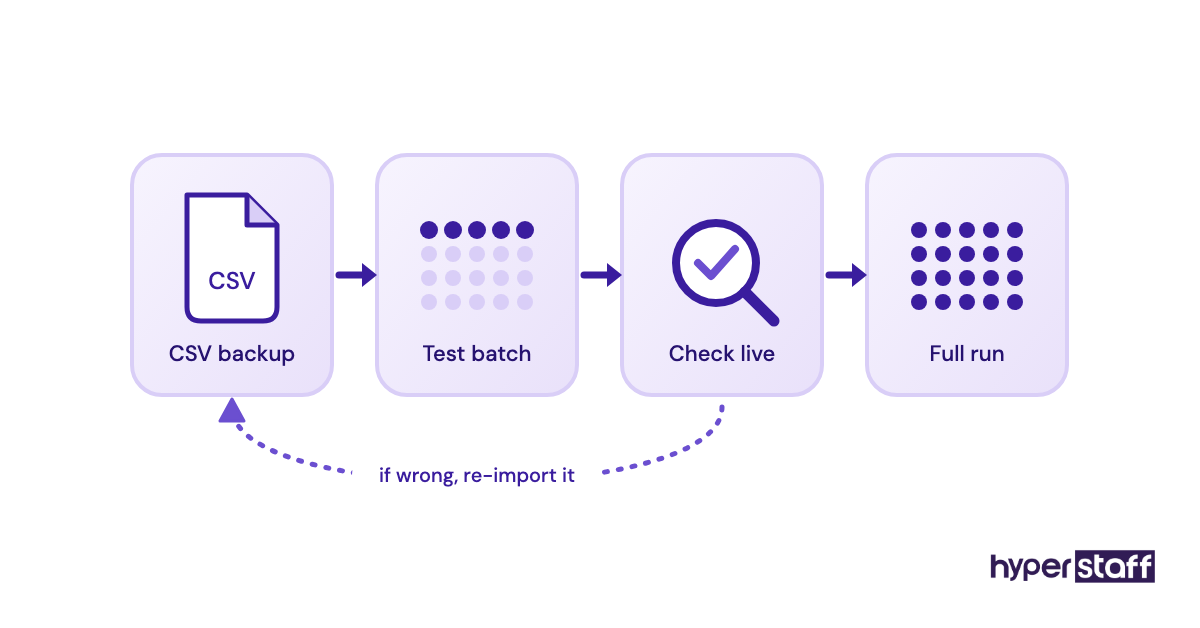
- Export a product CSV backup before any bulk edit.
- Agree on a daily overlap window of 1 to 2 hours during handover.
- Review a sample of tickets weekly once daily checks end.
Overcoming Common Shopify VA Onboarding Challenges
The most common Shopify VA onboarding challenges are missing documentation, time-zone gaps and a pile-up of access requests. Each has a fix that costs an hour or two.
Missing documentation shows up as repeat questions. Answer the question, then add the answer to the SOP the same day, and within two weeks the questions thin out.
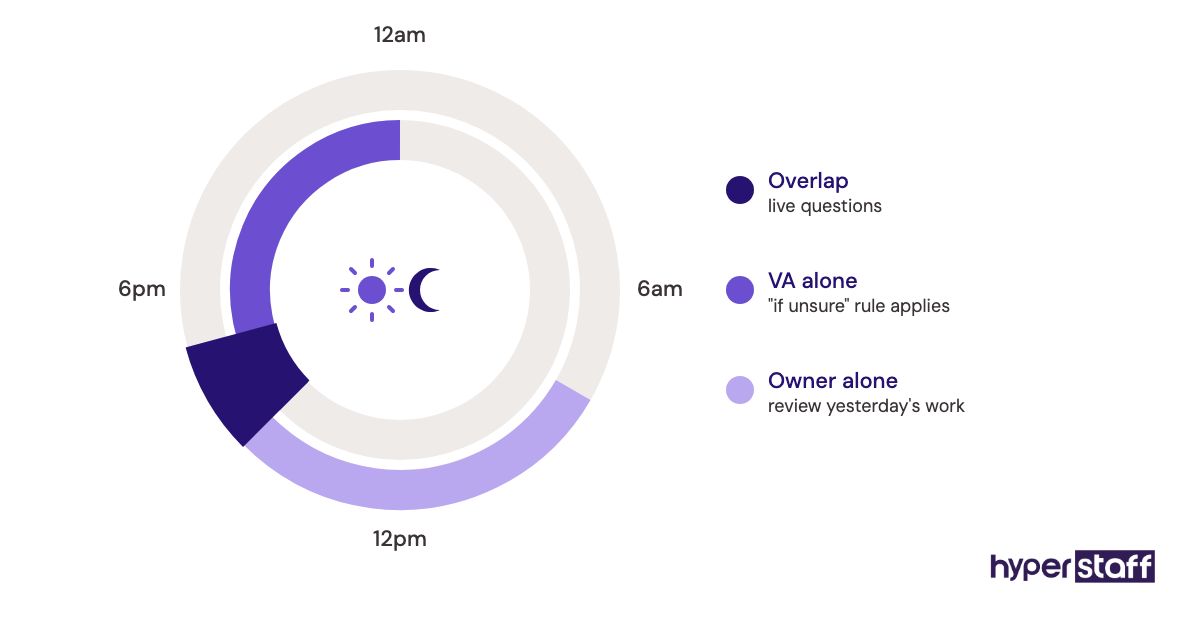
Time-zone gaps hurt most during handover, when the VA needs fast answers. A short daily overlap plus a written "if unsure, do this" rule for each task keeps work moving while you sleep.
How to Measure Shopify VA Onboarding Success
Measure Shopify VA onboarding success by accuracy, independence and the time returned to you. Track errors per task group, questions per day and the hours you spend reviewing.
For support work, watch first-response time and reopened tickets in your helpdesk. For catalog work, count products that needed a fix after going live.
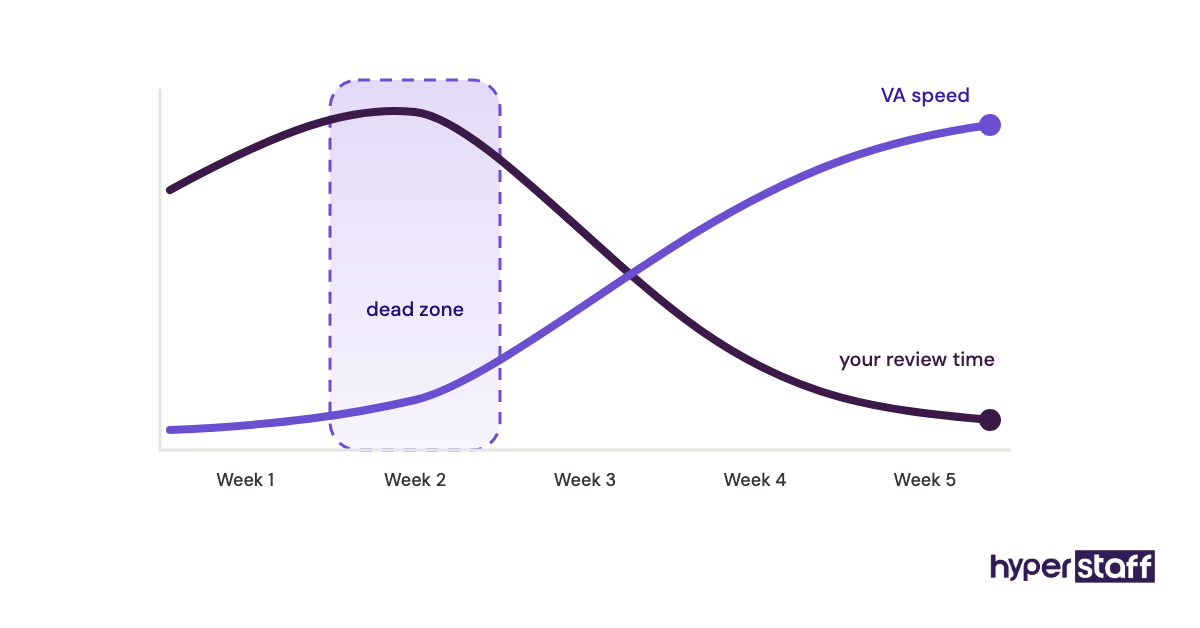
Your own calendar gives the clearest single signal. When review time drops below an hour a week, onboarding has done its job.
How Long Does Shopify VA Onboarding Take to Work?
Onboarding a Shopify virtual assistant usually takes three to five weeks to reach independent work on core tasks. Order checks and support replies settle in the first one to two weeks.
Catalog and inventory work take longer, since mistakes cost more and checks run longer. Discounts and email campaigns often need one full promotion cycle before they're safe to hand over.
Week two is the dead zone. Reviews still eat your time and the VA isn't fast yet, so it can feel slower than doing the work yourself.
How Much Does Onboarding a Shopify Virtual Assistant Cost?
Onboarding a Shopify virtual assistant costs mostly owner time, roughly 6 to 12 hours over the first two weeks, plus the VA's paid hours during ramp-up. The hourly rate decides the rest.
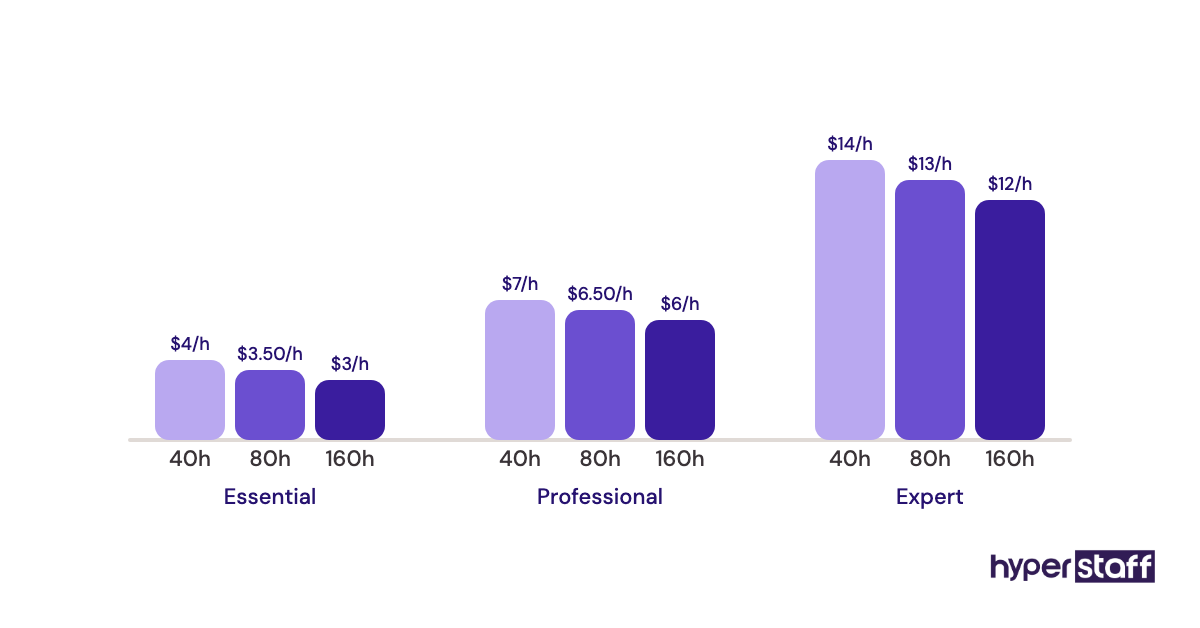
The table sets Hyperstaff's published starting rates against the usual cost of a US in-house ecommerce hire, including payroll costs. For a tier-by-tier view, see our Shopify VA cost breakdown.
| Cost item | Hyperstaff | Typical in-house hire |
|---|---|---|
| Entry-level rate | From $3/hour (Essential, 0 to 2 years) | About $18 to $25/hour plus payroll costs |
| Experienced rate | From $6/hour (Professional), from $12/hour (Expert) | About $25 to $40/hour plus payroll costs |
| 80 hours a month | From $240 to $960+ | About $1,800 to $3,500+ |
| 160 hours a month | From $480 to $1,920+ | About $3,600 to $7,000+ |
| Time to start | Placement in 5 business days | Often 4 to 8 weeks of hiring |
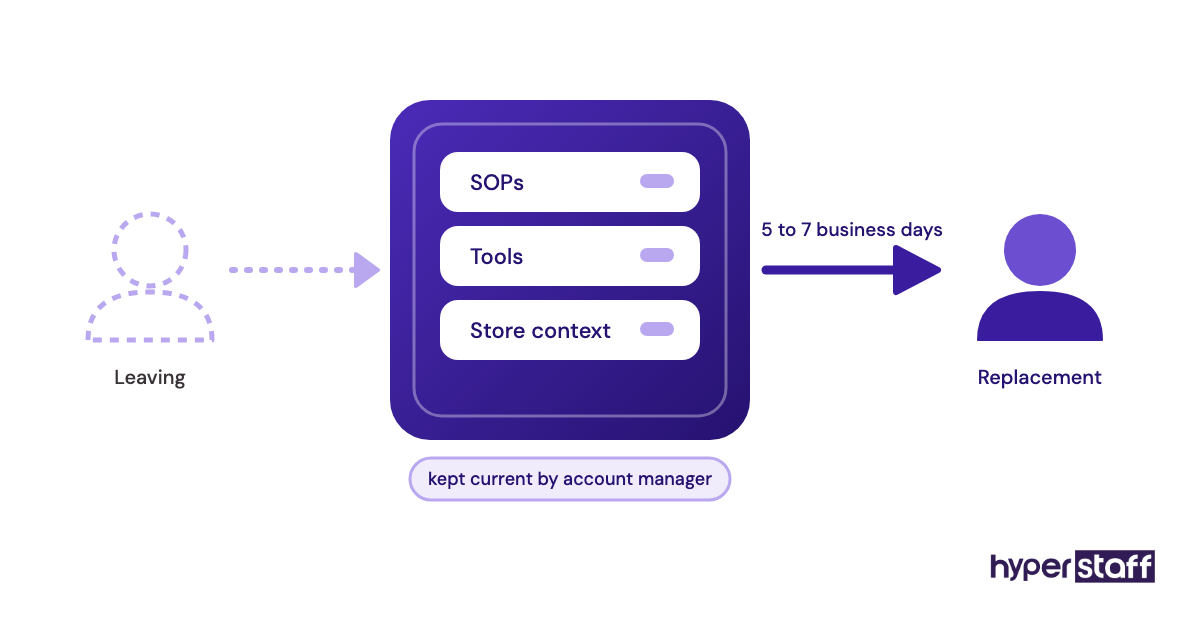
| If the fit is wrong | Free replacement in 5 to 7 business days | A new hiring round |
| Onboarding documents | Operations Vault maintained for you | Written and updated by your team |
| Billing discount | Pay quarterly and save 10% | Rarely offered |
Important: Hyperstaff's figures above are averages built from our starting rates. Your final cost depends on the tier, hours and Shopify tasks your store needs.
Is Onboarding a Shopify VA Properly Worth It?
Yes, onboarding a Shopify virtual assistant properly is one of the better returns a small store can get from a few hours of owner time. The hours you put into weeks one and two come back every week after, for as long as the VA stays.
Here's an example. Say onboarding takes 10 hours of your time, and the VA's first two weeks on the Professional tier run 40 hours at $6/hour, or $240.
If the VA then takes 10 hours a week of order and support work off your plate, your 10 hours come back in the first week of independent work. Over a quarter that's roughly 120 hours returned on an 80-hour monthly bundle of about $480 a month, before the 10% quarterly discount.
Skipped onboarding changes the math fast. One mispriced bulk edit during a sale can erase a month of savings, and our full look at whether a Shopify VA is worth it runs the numbers for other store sizes.
How Do You Choose a Shopify Virtual Assistant Agency?
Choose a Shopify virtual assistant agency by how it handles onboarding and replacement, since those decide how much setup work lands on you. Ask who writes the SOPs, who keeps them current and how fast a replacement starts.
Check the vetting next. A good agency tests Shopify admin skills before placement, and you can add your own check with a few targeted Shopify VA interview questions.
Scope needs to be on paper too. A written Shopify VA job description gives the agency something to match against and gives the VA their first reference document.
Hyperstaff pairs every client with a dedicated account manager and keeps your store context in the Operations Vault. A replacement, if needed, is free and briefed from that vault in 5 to 7 business days.
Owners torn between an agency and a local hire can compare a Shopify VA vs in-house staff on cost, control and speed to start.
Shopify VA Onboarding Statistics, Trends and Future Predictions
Public data on Shopify VA onboarding is thin, so the most useful numbers are the platform limits that shape it. Shopify's pricing page lists 5 staff accounts on Grow, 15 on Advanced and unlimited on Plus.
Shopify's collaborator documentation confirms collaborators don't count toward the user limit, must use two-step authentication and lose access after 90 days without a login. Loom's free Starter plan caps recordings at 5 minutes, which suits one-task SOP videos.
The trend we see runs from shared logins toward named accounts, and from written-only SOPs toward recorded ones. We expect more routine work to move into Shopify Flow and AI tools, with the VA's day tilting toward the exceptions those automations flag.
How fast that happens for small stores is harder to call. Many still run on a handful of manual routines that work well enough, and owners rarely rebuild what isn't broken.
Shopify VA Onboarding and AI
AI speeds up Shopify VA onboarding mostly on the documentation side. Loom AI can draft written steps from a recording, and Sidekick, Shopify's built-in assistant, answers admin how-to questions a new VA would otherwise send you.
AI drafts still need an owner's edit. A generated SOP gets the clicks right and the judgment calls wrong, such as when to refund without asking or which repeat customers get an exception.
Disclaimer: This article is general information only and does not constitute legal, security or financial advice. Shopify features, plan limits and third-party prices change, so confirm current details with each provider before acting.
Common questions
How long does it take to onboard a Shopify virtual assistant?
Most Shopify virtual assistants run core tasks on their own within three to five weeks. Order checks and support replies settle first, and catalog or discount work takes longer.
Should my Shopify VA get a staff account or a collaborator account?
A staff account suits most VAs because it's quick to set up and easy to limit. Collaborator accounts are for Shopify Partners, so they only apply if your VA or their agency holds a Partner account.
Can my Shopify VA see my payouts and billing?
Only if you grant those permissions. Leave billing, payouts and store settings unticked, since the store owner account is the only one that needs them.
What goes on a Shopify VA onboarding checklist?
A scoped staff account, two-step authentication, password manager access, an SOP index with recordings, practice runs on draft orders and dated review points. Add a rule to export a product CSV before any bulk edit.
Do I have to onboard a replacement Shopify VA from scratch?
No, as long as your SOPs are written and current. With Hyperstaff, a replacement is briefed from your Operations Vault and placed within 5 to 7 business days.
Book a free 15 min call
We place a pre-vetted specialist in 5 business days, fully managed, from $3/hour.