Is a Shopify Virtual Assistant Worth It? The Honest Math
The real cost, payback math and failure points of hiring a Shopify virtual assistant, so you can decide whether one makes sense for your store.

On this page
- What Is a Shopify Virtual Assistant, and Is One Worth Hiring?
- Key Shopify Virtual Assistant Terms You Should Know
- Why Does a Shopify Virtual Assistant Matter for a Growing Store?
- How Does Working With a Shopify Virtual Assistant Work?
- Types and Forms of Shopify Virtual Assistants
- How a Shopify Virtual Assistant Differs From Related Roles
- The Benefits of a Shopify Virtual Assistant
- The Drawbacks of a Shopify Virtual Assistant
- Who Needs a Shopify Virtual Assistant?
- Shopify Virtual Assistant Examples
- Creating a Shopify Virtual Assistant Plan, Step-by-Step
- What Does an Effective Shopify Virtual Assistant Strategy Look Like?
- Shopify Virtual Assistant Tools and Software
- 10 Proven Shopify Virtual Assistant Tips and Best Practices
- Overcoming Common Shopify Virtual Assistant Challenges
- How to Measure Shopify Virtual Assistant Success
- How Long Does a Shopify Virtual Assistant Take to Work?
- How Much Does a Shopify Virtual Assistant Cost?
- Is a Shopify Virtual Assistant Worth It?
- How to Choose a Shopify Virtual Assistant Agency
- Shopify Virtual Assistant Statistics, Trends and Future Predictions
- How Does AI Change the Value of a Shopify Virtual Assistant?
- FAQs
💡 Key Takeaways:
1) A Shopify virtual assistant is worth it when your store produces at least 15 to 20 hours a week of repeatable work, such as support tickets, product listings and order exceptions, that you can describe in writing.
2) The payback comes from the hours you move into revenue work like sourcing, ads and wholesale, so the hire only pays off if you actually spend the freed time on those tasks.
3) Most Shopify VA hires that fail do so in the first month because of missing SOPs, shared owner logins or vague task lists, and all three can be fixed before day one.
Turn Store Admin Hours Into Revenue Hours
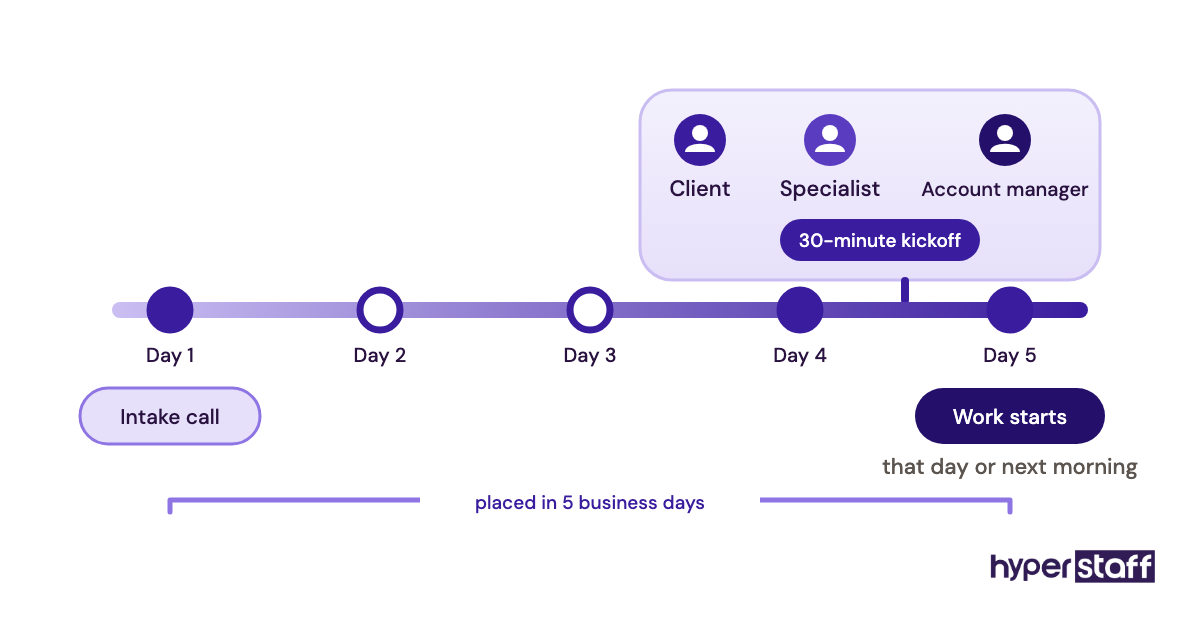
Hyperstaff places pre-vetted Shopify virtual assistant services specialists with stores that need a dedicated person who learns one catalog and one customer base. We've placed 70+ virtual assistants for 30+ clients, rates start at $3/hour, and most placements happen within 5 business days, with a free replacement if the fit is wrong.
What Is a Shopify Virtual Assistant, and Is One Worth Hiring?
A Shopify virtual assistant is a remote team member who runs the daily operations of a Shopify store from inside the admin, its apps and its inbox. Hiring one is worth it when the store has enough repeatable work to fill their hours and the owner has a clear revenue task waiting for the time that frees up.
The role covers far more than inbox and calendar admin. Typical work runs from customer support and order exceptions to product uploads, email campaigns, inventory checks and reporting, and the full Shopify VA role breakdown goes deeper on the scope.
Key Shopify Virtual Assistant Terms You Should Know
- Staff account = a named login to your Shopify admin with permissions you choose, capped by plan.
- Collaborator account = admin access requested by a Shopify Partner, with permissions you approve.
- SOP = a written standard operating procedure the VA follows for one recurring task.
- Macro = a saved reply template in a helpdesk such as Gorgias or Shopify Inbox.
- First response time = how long a customer waits for the first human reply to a ticket.
- Order exception = an order that needs manual handling, such as an address error, a fraud flag or a split shipment.
- Bulk import (CSV) = uploading or editing many products at once through a spreadsheet.
- Hour bundle = a fixed block of monthly hours, such as 40, 80 or 160, billed at one rate.
- Experience tier = the seniority level of the assistant, which sets the hourly rate.
- Operations Vault = Hyperstaff's written record of your SOPs, tools and context, kept up to date for you.
Why Does a Shopify Virtual Assistant Matter for a Growing Store?
A Shopify virtual assistant matters because store admin grows with order volume while the owner's hours stay fixed. Every extra 100 orders brings more tickets, more returns and more stock checks, and that work lands on whoever is already busiest.
Slow replies have a cost you can see. Baymard Institute puts the average documented cart abandonment rate at 70.22%, and a pre-purchase question that sits unanswered overnight is one of the easier leaks to plug with a person covering the inbox in another time zone.
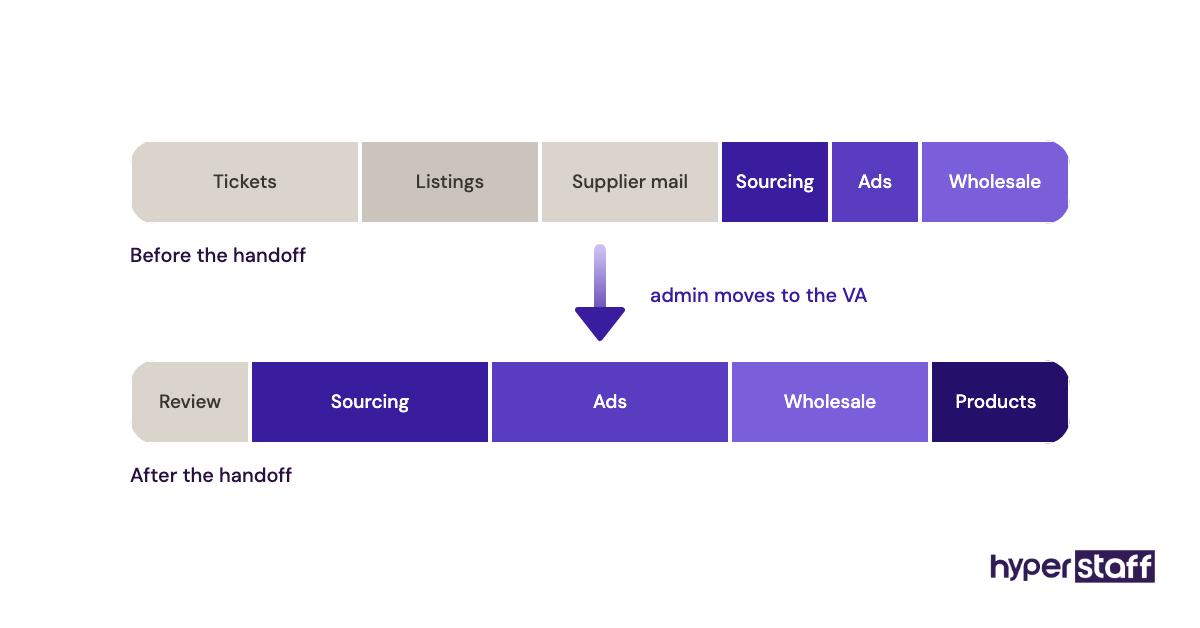
The bigger reason is owner attention. Product sourcing, supplier negotiation and ad creative decide whether a store grows, and those tasks get the leftover hours when the owner is also answering "where's my order?" emails.
How Does Working With a Shopify Virtual Assistant Work?
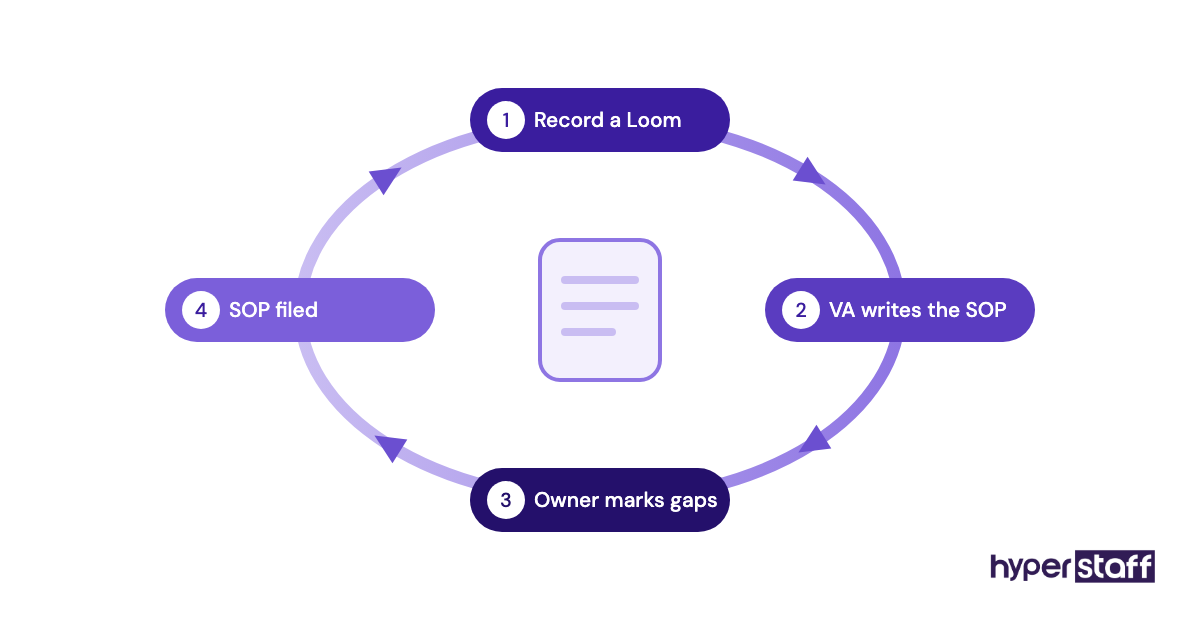
Working with a Shopify virtual assistant follows a simple loop: you grant scoped admin access, hand over written procedures, and review output on a fixed schedule until the assistant runs tasks alone. Communication usually happens in Slack or email, with short Loom videos replacing live training calls.
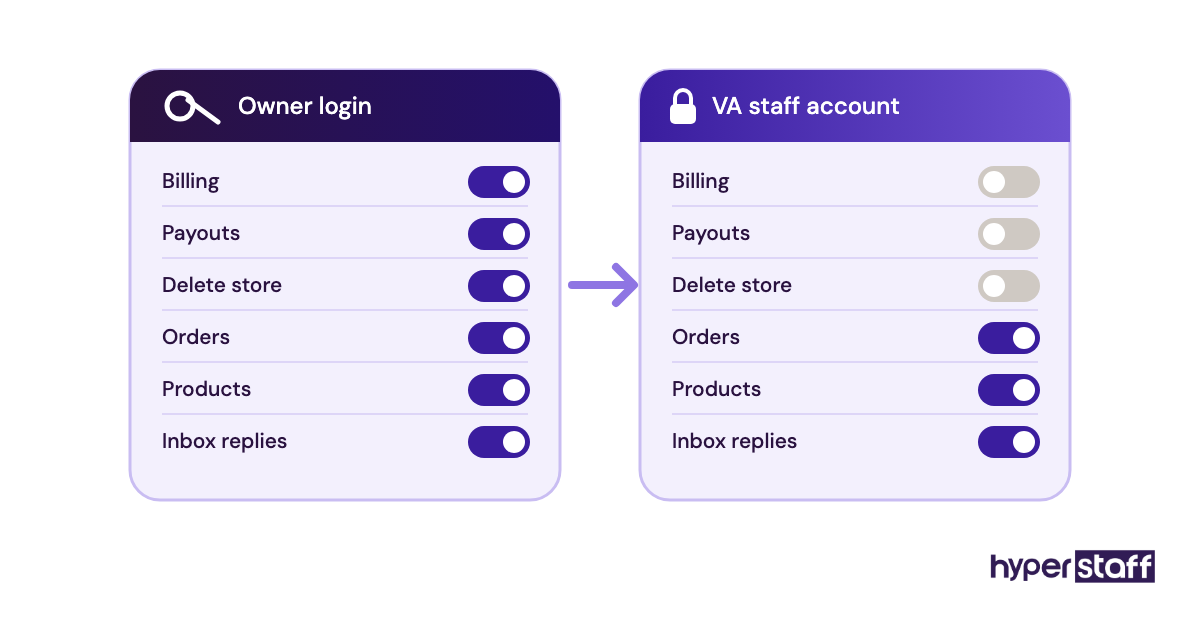
Access is where many owners stumble first. Shopify's help center lists staff account limits by plan: 0 extra staff accounts on Basic, 5 on Grow, 15 on Advanced and unlimited on Plus. On Basic, owners are tempted to share their own login, which hands over billing, payouts and the ability to delete the store.
With Hyperstaff, the sequence is a 30-minute kickoff call, then work starts that day or the next morning. Your procedures go into the Operations Vault, so a replacement, if ever needed, is briefed from the same documents within 5 to 7 business days.
Types and Forms of Shopify Virtual Assistants
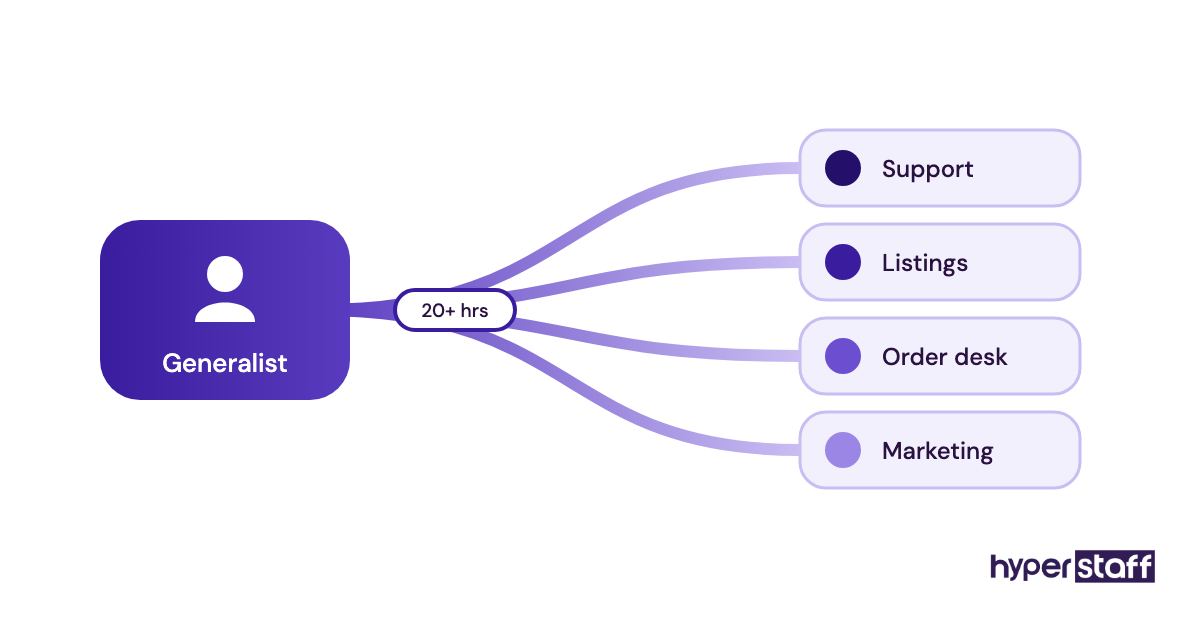
Shopify virtual assistants come in specialist and generalist forms, and the right type depends on where your hours leak. Smaller stores usually start with one generalist, then split roles once a single area fills 20+ hours a week.
| VA type | Core work | Typical tier | Good fit when |
|---|---|---|---|
| Customer support VA | Tickets, live chat, returns, refunds within rules | Essential or Professional | Inbox takes 10+ hours a week |
| Product listing VA | Uploads, descriptions, variants, image edits, CSV imports | Essential | New SKUs launch every month |
| Order and fulfillment VA | Order exceptions, supplier follow-up, tracking issues | Professional | Dropshipping or 3PL setup |
| Email and marketing VA | Klaviyo flows, campaign builds, social scheduling | Professional or Expert | List is growing but campaigns are irregular |
| Inventory VA | Stock counts, reorder alerts, supplier POs | Professional | Stockouts or overselling happen |
| Reporting and bookkeeping VA | Weekly sales reports, payout reconciliation | Professional or Expert | Numbers are checked once a quarter |
| Generalist store VA | A mix of all of the above | Professional | Under roughly 500 orders a month |
How a Shopify Virtual Assistant Differs From Related Roles
A Shopify VA runs the store as it exists today. Developers change how it works, and generic assistants rarely know the admin well enough to work without hand-holding.
Shopify Virtual Assistant vs. Shopify Developer
A Shopify developer edits theme code, builds custom apps and fixes checkout logic, usually on a project basis at higher hourly rates. A VA handles the recurring operations inside the admin and apps, so most stores need a developer occasionally and a VA every week.
Shopify Virtual Assistant vs. General Virtual Assistant
A general VA can manage email and scheduling, but Shopify work needs fluency with orders, variants, metafields and the app stack. The difference shows up in week one, when a store-trained assistant processes a partial refund correctly and a generalist asks how.
Shopify Virtual Assistant vs. In-House Ecommerce Assistant
An in-house ecommerce assistant brings payroll taxes, benefits and a fixed full-time schedule. The detailed Shopify VA vs in-house comparison runs the numbers, but the short version is that a remote hire wins on cost and an in-house one wins when the job involves packing physical orders.
The Benefits of a Shopify Virtual Assistant
- Monthly cost is a fraction of a local hire, with rates from $3 to $12+ per hour depending on tier.
- Time zone offset can give you overnight ticket coverage without paying for night shifts.
- Hours flex with demand through 40, 80 or 160-hour bundles, which suits seasonal stores.
- The owner's hours move to sourcing, ads and partnerships.
- Written SOPs, a by-product of onboarding, make the business easier to sell or delegate later.
The Drawbacks of a Shopify Virtual Assistant
- The first two to four weeks cost you time in training and review before they save any.
- Admin access carries real risk if permissions are set loosely.
- Physical tasks like packing, photography of new stock and returns inspection stay with you.
- Time zone gaps can slow down urgent decisions that need the owner.
Who Needs a Shopify Virtual Assistant?
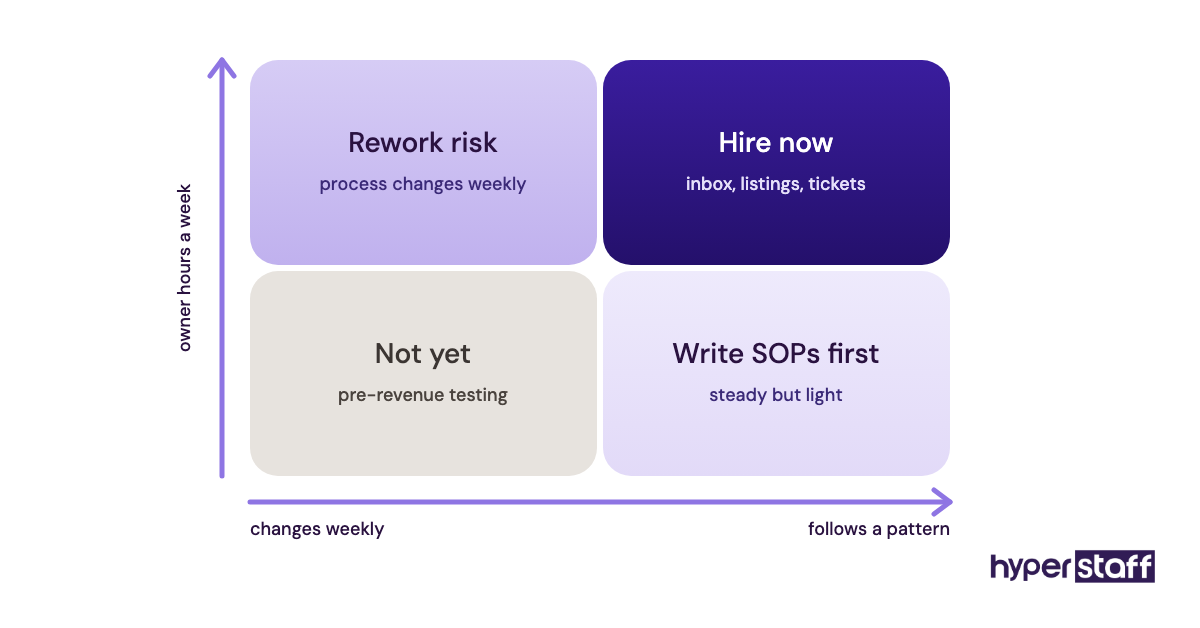
Stores that need a Shopify virtual assistant usually share one trait: the owner spends 15+ hours a week on tasks that follow a pattern. Order volume matters less than the shape of the work.
A store doing 200 orders a month with heavy custom questions may need help sooner than one doing 1,000 orders of a single consumable SKU. For a quick audit, the Shopify VA task checklist helps you count which of your weekly jobs can move.
Two groups tend to wait too long. Solo founders often hold out because they think nobody else can answer customers in their voice, and brands moving from a marketplace onto Shopify underestimate how much catalog work the move creates.
The stores that don't need one yet are pre-revenue stores still testing products. Delegating a process that changes every week mostly produces rework.
Shopify Virtual Assistant Examples
The examples below are common setups we see described when store owners first scope the role. Each one shows the conditions that made the hire pay off or fall flat, so you can match them against your own store.
Shopify Virtual Assistant Good Examples
Support Desk With Written Refund Rules
The owner writes down when to refund, when to replace and when to escalate, with dollar thresholds. The VA clears the queue each morning and only flags cases above the limit, so the owner reads five tickets a day instead of fifty.
Product Launch Pipeline
New SKUs arrive in a shared sheet with supplier specs and raw photos. The VA formats descriptions to a template, builds variants and schedules the products, and the owner's only task is a final approval pass.
Weekly Numbers Report
Every Monday, the assistant pulls sales, refunds, top products and stock levels into one page. Problems like a slow-moving SKU get spotted in week two instead of at the end of the quarter.
Shopify Virtual Assistant Bad Examples
"Just Help With Everything"
No task list, no SOPs and no priorities. The VA waits for instructions, the owner gets frustrated, and both sides conclude remote help doesn't work when the brief was the problem.
Shared Owner Login
The VA uses the owner's email and password because the store is on Basic. Two-factor codes go to the owner's phone at 3 a.m., and the assistant now has access to payouts and billing they never needed.
Hiring for Strategy
An owner hires an Essential-tier assistant and expects them to fix falling conversion rates. Execution roles can't replace a growth plan, and our list of common Shopify VA mistakes covers this and several other traps.
Creating a Shopify Virtual Assistant Plan, Step-by-Step
A Shopify VA plan turns a vague wish for help into a scoped role with hours, access and checkpoints. Owners who skip it usually end up rewriting the role in month two.
Step #1: Log Your Hours for Two Weeks
Track every store task in 15-minute blocks for ten working days. You'll usually find the inbox, product edits and supplier emails take far more time than you'd guess.
Step #2: Pick the Tasks to Hand Off First
Start with high-volume, low-risk work like ticket triage and listing updates. Keep refunds above a set amount, supplier negotiation and pricing decisions with you for now.
Step #3: Write the Job Description and Choose a Tier
Match the tier to the judgment the work needs: Essential for rule-following tasks, Professional for mixed work, Expert for marketing builds or reporting. A clear Shopify VA job description also makes it obvious who should fill the role.
Step #4: Interview for Shopify Fluency
Ask candidates to walk through a partial refund, a variant change and an address correction. The answers separate people who've worked inside a store from people who've only read about one, and these Shopify VA interview questions give you a ready list.
Step #5: Onboard With Access, SOPs and a Review Rhythm
Create a staff account with only the permissions the tasks need, share the SOPs and book a daily 15-minute review for the first two weeks. The Shopify VA onboarding guide lays out a fuller first-month schedule.
What Does an Effective Shopify Virtual Assistant Strategy Look Like?
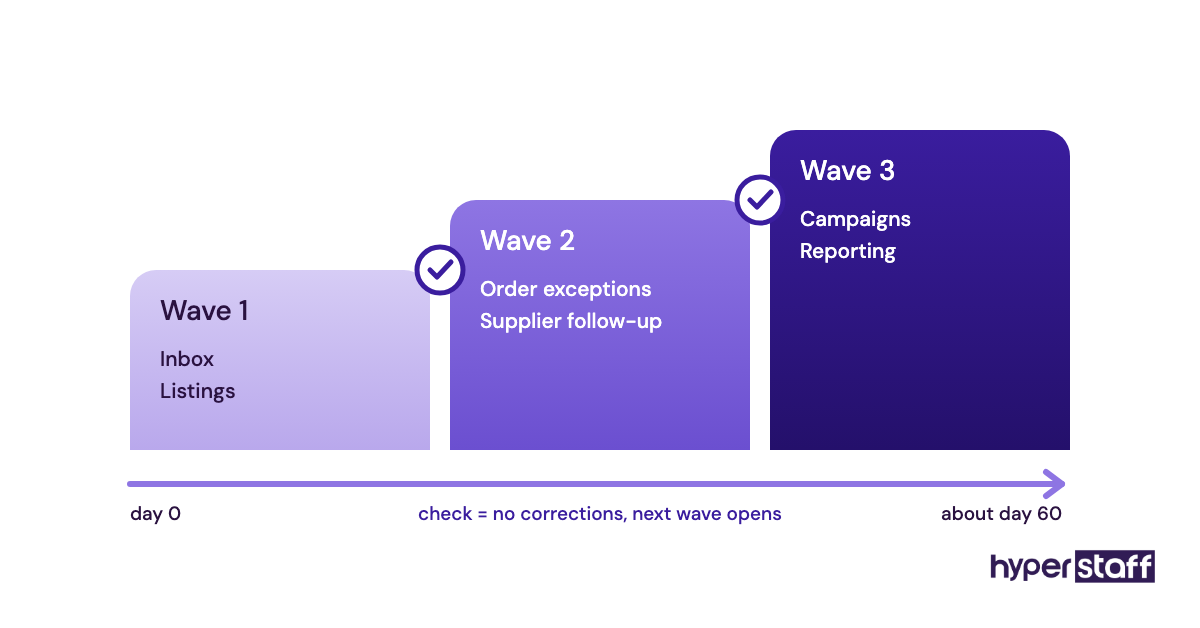
An effective Shopify virtual assistant strategy hands off work in waves, widening scope only after the previous wave runs without corrections. Most stores do best with three waves spread over roughly 60 days.
Wave one is inbox and listings, where mistakes are visible and cheap to fix. Wave two adds order exceptions and supplier follow-up, and wave three brings in campaigns or reporting once the assistant knows the catalog.
Practitioners disagree on one point: whether to give the VA decision rights early. Some owners grant refund authority on day one to free themselves faster, while others hold it for a month. We lean toward a dollar cap from the start, because a VA who must ask about every $12 refund never builds judgment.
Shopify Virtual Assistant Tools and Software
Shopify virtual assistant tools fall into a few groups: access, support, marketing, communication and time tracking. Prices below come from each vendor's own pricing page and change often, so check before you buy.
Shopify admin is the core workspace. Shopify's plans run from about $29 to $39 a month on Basic up to $299 to $399 on Advanced, depending on monthly or yearly billing, and the plan you're on sets how many staff accounts you get.
Gorgias is our pick for support-heavy stores because it pulls order data next to each ticket. Gorgias pricing starts at $10 a month for 50 tickets, with Basic at $50 to $60 a month for 300 tickets.
For email, Klaviyo has a free plan for up to 250 active profiles and 500 email sends a month, with paid pricing scaling by list size. Your VA can build flows there without touching your theme.
Loom is free for up to 25 videos of 5 minutes each, and Business costs $18 per user a month. 1Password lets you share app logins without exposing passwords, from $24.95 a month for up to 10 members on the Teams Starter Pack. A time tracker like Hubstaff, at around $10 per seat on its Team plan, is optional; plenty of owners judge output instead. Our Shopify VA tools roundup goes further on each pick.
10 Proven Shopify Virtual Assistant Tips and Best Practices
These practices make the difference between a VA who saves you 20 hours a week and one who creates 5 hours of review.
- Give every VA their own staff account with only the permissions their tasks require.
- Set refund and discount limits in dollars, in writing.
- Write one SOP per recurring task, with screenshots.
- Build saved replies for the 15 to 20 questions customers ask most.
- Schedule a daily check-in for the first two weeks, then move to weekly.
- Keep a running "questions log" so repeat questions become SOP updates.
- Store app logins in a password manager, never in chat.
- Agree on response-time targets for tickets before the VA starts.
- Review a sample of 10 tickets a week and give specific feedback.
- Add one new responsibility at a time, once the last one runs clean.
Overcoming Common Shopify Virtual Assistant Challenges
The most common Shopify virtual assistant challenges are tone mismatch, slow escalations and knowledge locked in the owner's head. Each one has a practical fix.
Tone problems shrink fast when you give the assistant 20 of your best past replies as examples. Escalation lag usually means the rules are unclear, so write down which issues need you and which don't.
Knowledge loss is the hidden risk. If an assistant leaves and nothing was written down, you start over, which is why Hyperstaff keeps your procedures in the Operations Vault and briefs any replacement from it.
How to Measure Shopify Virtual Assistant Success
Shopify virtual assistant success shows up in two places: store metrics and your own calendar. Track both from week one.
On the store side, watch first response time, ticket backlog, listing errors and order exceptions resolved within 24 hours. On your side, count the weekly hours you no longer spend on admin and what you spend them on instead.
If your hours freed rise but revenue tasks don't get more time, the VA is working and the payoff is leaking somewhere else.
How Long Does a Shopify Virtual Assistant Take to Work?
A Shopify virtual assistant usually takes two to four weeks to handle core tasks alone and around 60 days to run a full scope. Simple listing work can be productive in the first few days.
Expect a dip in week one, when you spend more time reviewing than you save. By week three, reviews should drop to spot checks, and if they haven't, look at the SOPs before you blame the person.
How Much Does a Shopify Virtual Assistant Cost?
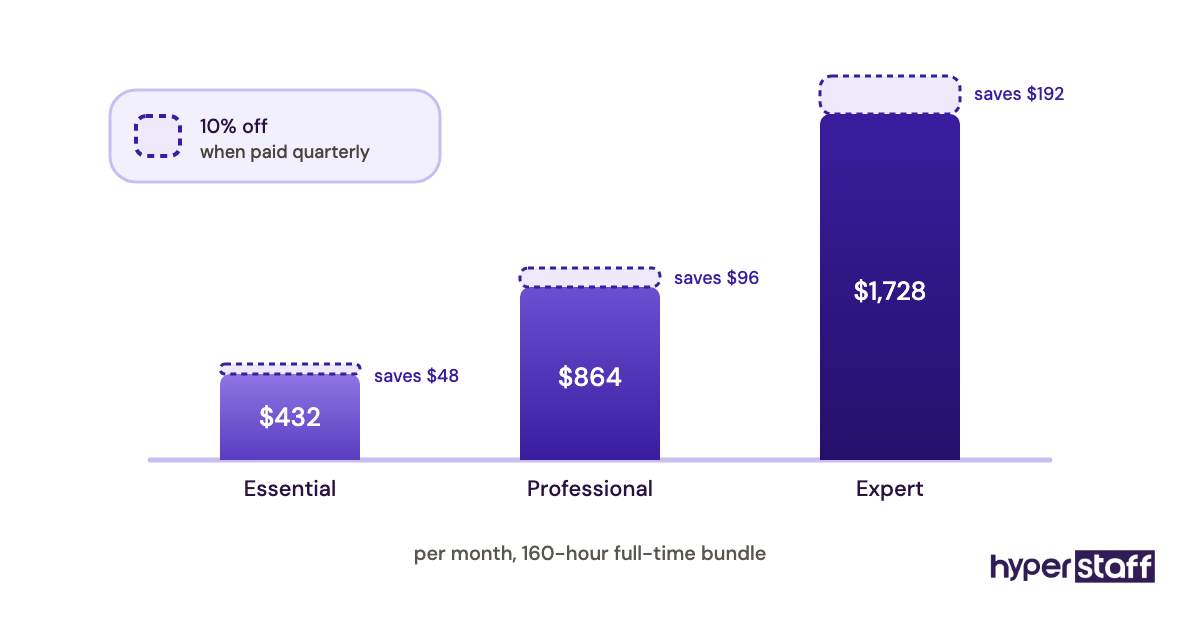
A Shopify virtual assistant costs roughly $240 to $1,920 a month through Hyperstaff, depending on tier and hours, compared with several thousand dollars for an in-house hire. The US Bureau of Labor Statistics lists the median customer service representative wage at $21.53 an hour, before payroll taxes and benefits.
| Monthly hours | Hyperstaff Essential (from $3/hr) | Hyperstaff Professional (from $6/hr) | Hyperstaff Expert (from $12/hr) | In-house US hire (wage only, $21.53/hr) |
|---|---|---|---|---|
| 40 hours | From $120 | From $240 | From $480 | About $861 |
| 80 hours | From $240 | From $480 | From $960 | About $1,722 |
| 160 hours | From $480 | From $960 | From $1,920 | About $3,445 |
Paying quarterly saves 10% on Hyperstaff bundles. The Shopify VA cost breakdown covers freelancer and marketplace rates in more depth.
Important: Hyperstaff prices shown are starting averages. Your actual cost depends on the tasks, hours, experience tier and skills your store needs.
Is a Shopify Virtual Assistant Worth It?
Yes, a Shopify virtual assistant is worth it for most stores past the testing stage, and it can be one of the highest-return hires a store owner makes. The math works when the hourly rate is a fraction of what your own hour earns and you put the recovered time into work that grows revenue.
Here's an example calculation. An 80-hour Professional bundle costs from $480 a month, and if training and review eat 20 of those hours in month one, you still recover about 60 hours.
Value your time conservatively at $40 an hour, and those 60 hours are worth $2,400. That's a 5x return on $480, and it improves from month two as review time falls.
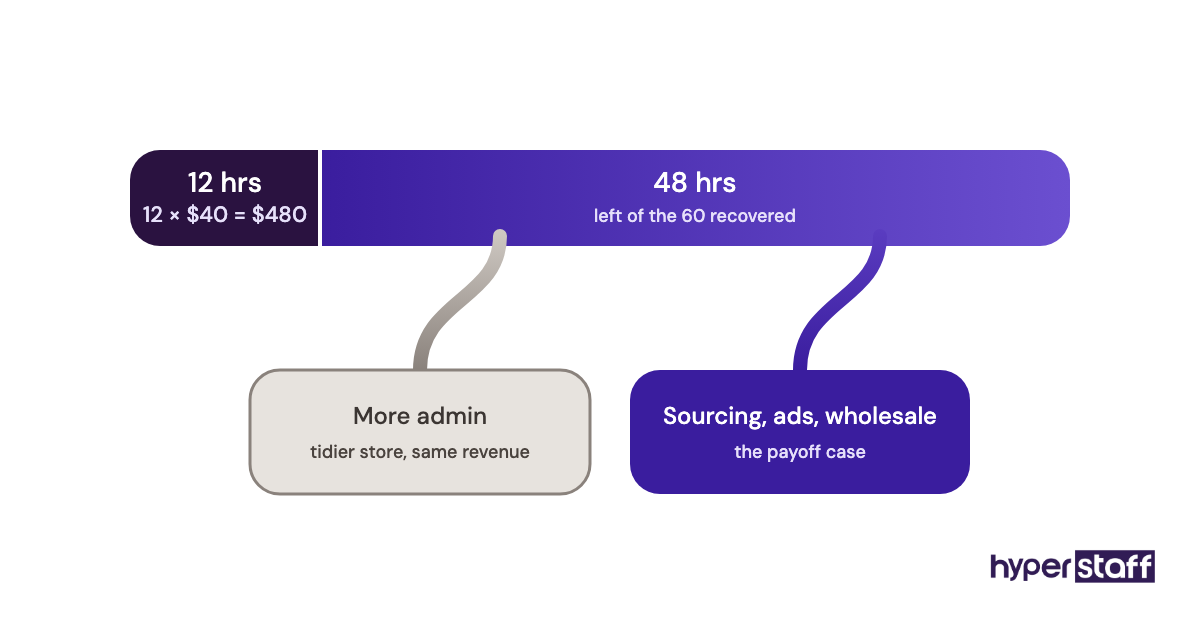
The honest caveat: the return exists only on paper unless those 60 hours go into sourcing, ad testing, wholesale outreach or new products. Owners who fill freed time with more admin get a tidier store and the same revenue.
How to Choose a Shopify Virtual Assistant Agency
Choosing a Shopify virtual assistant agency comes down to vetting, replacement terms and who owns your process knowledge. Ask each agency how they test Shopify skills before placement, not just English and typing speed.
Check the replacement policy in writing, including how fast a new person is briefed. Ask whether you get a dedicated account manager and whether the assistant is assigned to you alone or shared across clients.
Hyperstaff assigns a dedicated specialist, a dedicated account manager and a free replacement in 5 to 7 business days, briefed from your Operations Vault. For the full vetting checklist, see how to hire a Shopify VA.
Shopify Virtual Assistant Statistics, Trends and Future Predictions
Shopify virtual assistant demand ties directly to two numbers: the cost of local labor and the volume of customer contact per order. US customer service representatives earn a median of $44,770 a year according to the BLS Occupational Outlook Handbook, which keeps offshore support attractive for smaller stores.
One trend we're watching is plan-driven access. Shopify's current Basic plan includes no additional staff accounts, which pushes small stores to either upgrade or handle access through workarounds.
Our prediction, stated with moderate confidence: VA roles will shift from pure ticket answering toward supervising automated replies and handling the exceptions those tools can't resolve. The person stays, while the mix of tasks changes.
How Does AI Change the Value of a Shopify Virtual Assistant?
AI raises the value of a Shopify virtual assistant by removing the most repetitive drafting work while leaving judgment calls with a person. Tools like Shopify's built-in AI assistant Sidekick and AI features in Gorgias can draft replies and descriptions in seconds.
Someone still has to check that a drafted refund reply matches your policy and that a generated product description gets the materials right. A VA who uses AI well can cover more tickets and listings per hour, which lowers your cost per task.
We're less certain how far automation will go on complex support. Angry customers, damaged-item claims and wholesale questions still go better with a human who knows your store.
Disclaimer: This article is for general information only and does not constitute financial, legal or business advice. Third-party pricing and data were accurate at the time of writing and may change. Results depend on each business's circumstances.
Common questions
Is a Shopify VA worth it for a small store?
Yes, once you spend 15 or more hours a week on repeatable admin. A 40-hour monthly bundle is a low-risk way to test it before committing to more hours.
Can a Shopify virtual assistant run my store while I travel?
Mostly, yes, for daily operations like support, orders and listings. Keep payouts, pricing and supplier contracts with you, and set clear escalation rules before you leave.
Is it safe to give a VA access to my Shopify store?
It's safe when you use a dedicated staff account with limited permissions. Never share the owner login, and store app passwords in a password manager.
Should I hire a Shopify VA or use apps to automate?
Use both. Apps handle predictable triggers, while a VA handles exceptions, customer judgment calls and the setup and upkeep of those apps.
How many hours a week does a Shopify virtual assistant need?
Most stores start with 10 to 20 hours a week, which maps to a 40 or 80-hour monthly bundle. Move to full time once the role covers support plus catalog or marketing work.
Book a free 15 min call
We place a pre-vetted specialist in 5 business days, fully managed, from $3/hour.