What Is a Shopify Virtual Assistant? Roles, Costs and How It Works
A plain guide to what a Shopify virtual assistant does, what one costs, and how to set the role up so it works.
On this page
- What Is a Shopify Virtual Assistant?
- Key Shopify VA Terms You Should Know
- Why Does a Shopify Virtual Assistant Matter for a Growing Store?
- How Does a Shopify Virtual Assistant Work Day to Day?
- Which Types of Shopify Virtual Assistants Are There?
- How Is a Shopify VA Different From Related Roles?
- What Are the Benefits of a Shopify Virtual Assistant?
- What Are the Drawbacks of a Shopify Virtual Assistant?
- Who Needs a Shopify Virtual Assistant?
- Shopify Virtual Assistant Examples
- Creating a Shopify VA Plan, Step by Step
- What Does an Effective Shopify VA Setup Look Like?
- Which Tools Does a Shopify Virtual Assistant Use?
- 9 Proven Shopify VA Tips and Best Practices
- How Do You Overcome Common Shopify VA Challenges?
- How Do You Measure Shopify Virtual Assistant Success?
- How Long Does a Shopify Virtual Assistant Take to Work?
- How Much Does a Shopify Virtual Assistant Cost?
- Is a Shopify Virtual Assistant Worth It?
- How Do You Choose a Shopify Virtual Assistant Agency?
- Shopify VA Statistics, Trends and Future Predictions
- Shopify Virtual Assistants and AI
- FAQs
💡 Key Takeaways:
1) A Shopify virtual assistant is a remote specialist who runs the daily admin of a Shopify store, such as product listings, order processing, support tickets, inventory updates and app upkeep, through a staff or collaborator account with limited permissions.
2) The role sits between a general virtual assistant and a Shopify developer. It works inside the Shopify admin and its connected apps, and it rarely touches theme code.
3) Setup decides the result. Written SOPs, narrow permissions, a clear first task list and a weekly review are what turn a Shopify VA into saved hours instead of cleanup work.
Turn Store Admin Hours Into Selling Hours
Hyperstaff places pre-vetted Shopify specialists who learn one store and stay with it, with rates from $3/hour and placement in 5 business days. Our dedicated Shopify virtual assistant services have placed 70+ virtual assistants across 30+ clients, each with a dedicated account manager and a free replacement if the fit is wrong.
What Is a Shopify Virtual Assistant?
A Shopify virtual assistant is a remote worker who logs into your Shopify admin and keeps the store running day to day. Typical work: adding products, processing orders, answering customer emails, updating stock and keeping apps in order, all through a staff account or collaborator account you control.
The job reaches further than order admin. A trained Shopify VA can write product descriptions, schedule Klaviyo flows, tag customers for segments, chase supplier tracking numbers and pull a weekly sales report.
Editing Liquid theme code or building custom apps is a different job. That belongs to a developer, and blurring the two roles is one of the most common ways store owners end up paying twice for the same fix.
The full list of duties, grouped by how often they come up, sits in our Shopify virtual assistant task checklist.
Key Shopify VA Terms You Should Know
- Shopify admin = the back end where products, orders, customers and settings live.
- Staff account = a login you create for a team member, with permissions you pick. How many you get depends on your Shopify plan.
- Collaborator account = access for a Shopify Partner, requested with a 4-digit code, that doesn't count toward your staff limit.
- SKU = the stock-keeping unit code that identifies one product variant.
- Metafields = custom fields that hold extra product data, like size charts or care instructions.
- Fulfillment = picking, packing and shipping an order, or passing it to a 3PL or app that does.
- Chargeback = a payment reversal a customer files through their bank, which needs evidence sent before a deadline.
- SOP = a standard operating procedure, the written steps for one recurring task.
- Bulk editor = Shopify's spreadsheet-style screen for changing many products at once.
Why Does a Shopify Virtual Assistant Matter for a Growing Store?
A Shopify virtual assistant matters because store admin grows with every order, and the owner's day stays the same length. Past a certain volume, someone has to answer tickets, fix listings and reconcile stock every single day.
Online sales keep taking a bigger share of retail. The US Census Bureau's quarterly e-commerce report puts e-commerce at about 17% of total US retail sales, and every one of those orders creates some admin somewhere.
The cost of skipped admin is easy to miss. A slow reply to a "where is my order" email can turn into a chargeback, and a variant priced wrong can sell at a loss all weekend before anyone spots it.
How Does a Shopify Virtual Assistant Work Day to Day?
A Shopify VA works from a task list, written SOPs and limited admin access, usually on a fixed daily schedule. You decide what they own. They work through it in your admin and apps, then report back once a day or once a week.
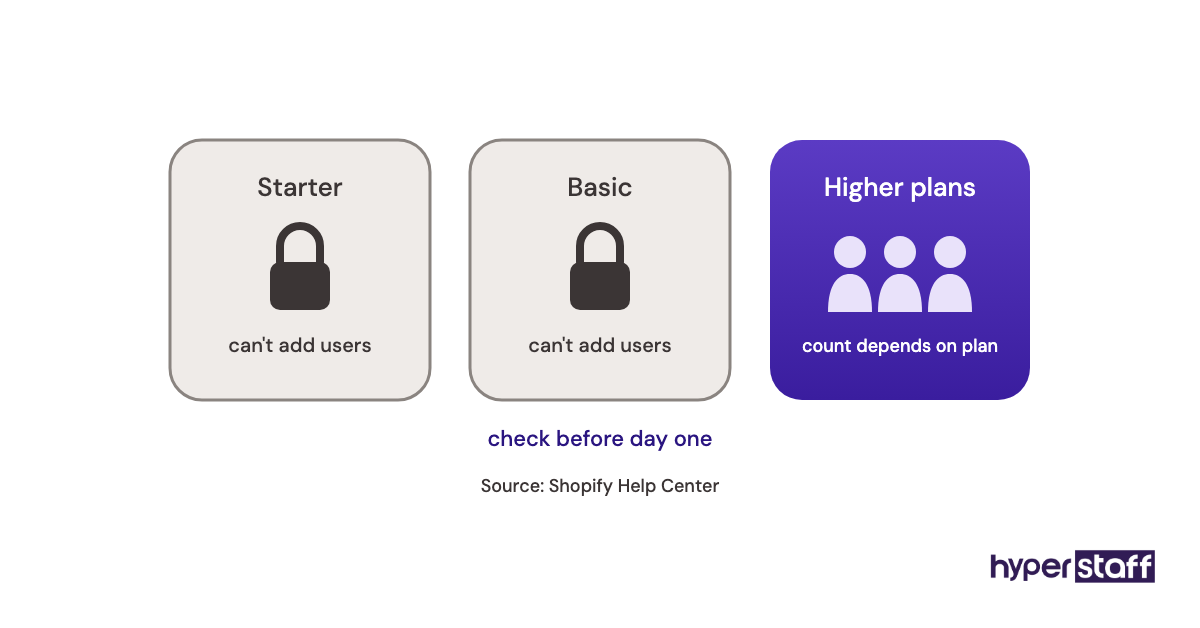
Access comes first, and it trips people up. Staff account limits vary by Shopify plan and the entry plan allows very few, so check yours before the VA's start date rather than on it.
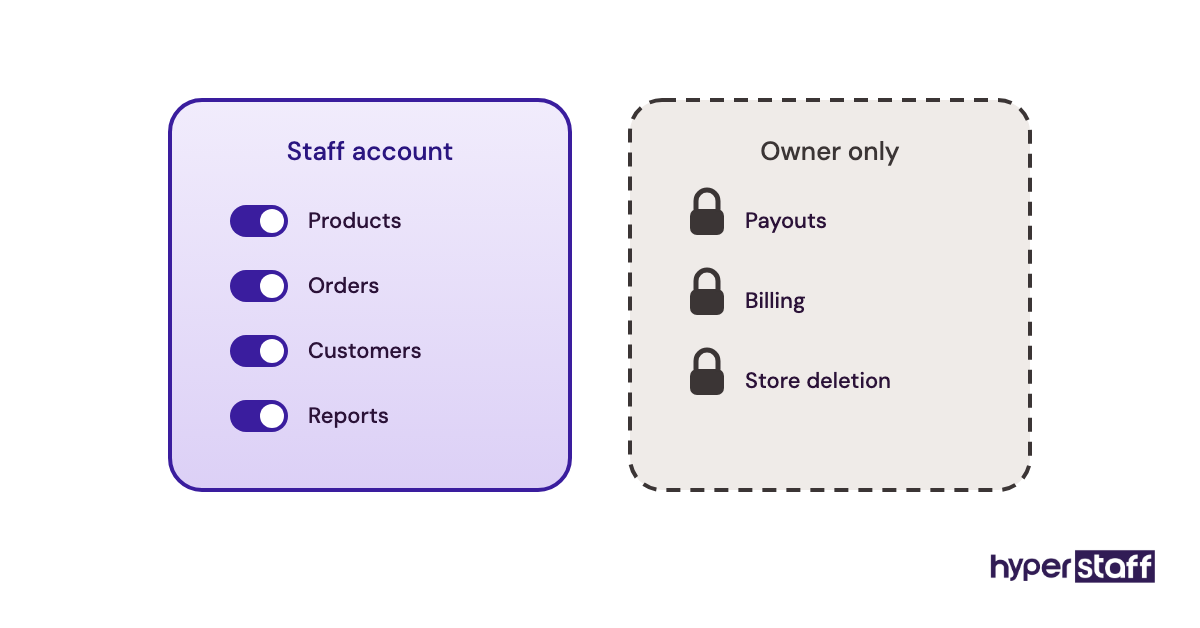
Never hand over the owner login. Owner access includes payouts and billing, and it also breaks two-step authentication the moment two people in two countries share one phone code.
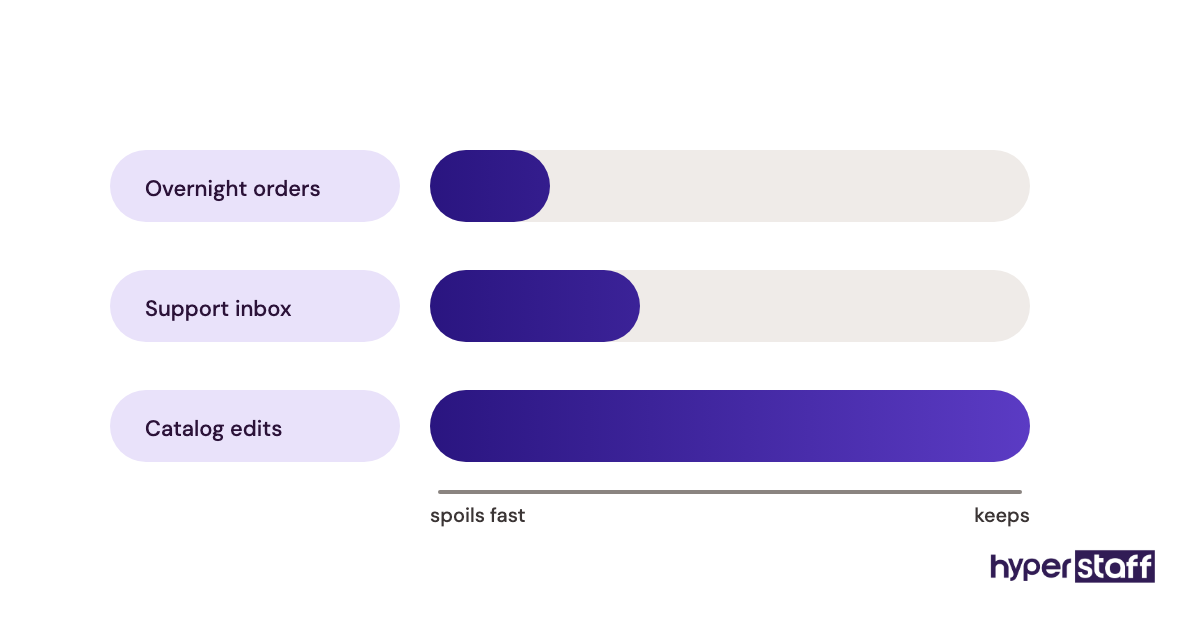
A typical day runs in a set order: overnight orders and fraud flags, then the support inbox, then catalog or inventory work, then a short end-of-day note. The order matters because orders and tickets age badly and product edits don't.
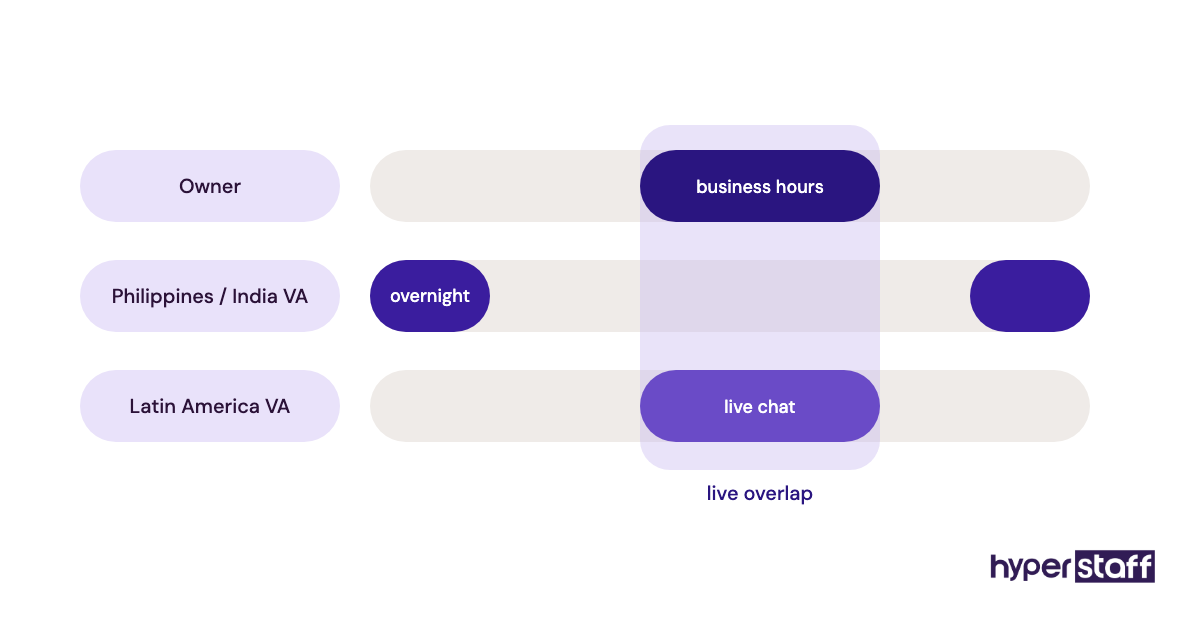
Time zone shapes the role more than most owners expect. A VA in the Philippines or India can clear overnight orders during US night hours, while a Latin America VA overlaps US business hours and suits live chat better.
Which Types of Shopify Virtual Assistants Are There?
Shopify virtual assistants usually fall into seven types, sorted by the part of the store they own. Smaller stores often start with one generalist who mixes two or three of these, then split the work as order volume grows.
| Type | Main work | Typical tools | Best fit |
|---|---|---|---|
| Order and fulfillment VA | Order checks, fraud flags, shipping labels, returns | Shopify admin, ShipStation, 3PL portals | Stores with daily order volume |
| Customer support VA | Email, chat, order status, refunds within policy | Gorgias, Shopify Inbox | High ticket volume, DTC brands |
| Product listing VA | New products, descriptions, images, SEO fields | Bulk editor, Matrixify, Canva | Large or fast-changing catalogs |
| Inventory and supplier VA | Stock counts, reorder sheets, supplier follow-up | Shopify inventory, Google Sheets | Multi-supplier or multi-location stores |
| Email and marketing VA | Campaign builds, flows, segments, social posts | Klaviyo, Meta Business Suite | Brands with a working email list |
| Bookkeeping VA | Payout matching, expense tagging, chargeback evidence | QuickBooks, Xero, Shopify Payments | Stores with messy payout records |
| Store operations VA | Runs the other roles, reports, keeps SOPs current | All of the above, plus a project board | Owners stepping back from daily ops |
How Is a Shopify VA Different From Related Roles?
A Shopify VA runs the store's daily operations, while the roles it gets confused with either build the store or do general admin outside it. Getting the label right stops you hiring a developer for listings or asking a VA to rebuild a theme.
Shopify Virtual Assistant vs. Shopify Developer
A Shopify developer writes code: Liquid templates, custom apps, checkout extensions. A VA uses what's already built and keeps it accurate.
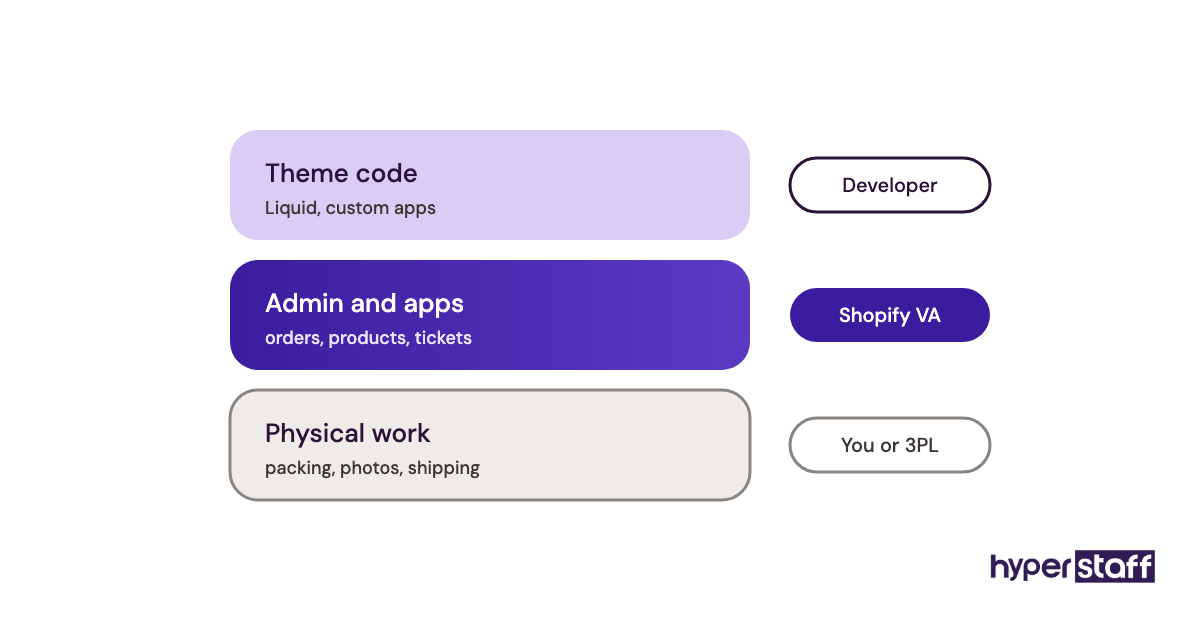
Developers bill for projects, VAs for ongoing hours. A store usually needs a developer for weeks and a VA for years.
Shopify Virtual Assistant vs. General Virtual Assistant
A general virtual assistant manages inboxes, calendars and admin across any business. A Shopify VA knows the admin itself, including how a variant differs from a product and why an unfulfilled order with a high fraud risk score shouldn't ship.
Plenty of general VAs can learn Shopify. The ramp-up time is the difference, and on a live store that ramp-up happens on real orders.
Shopify Virtual Assistant vs. Shopify Partner Agency
A Shopify Partner agency sells projects like store builds, migrations and CRO audits, delivered by a team that works on many stores at once. A dedicated VA works on one store and learns its quirks over months.
Practitioners split on which to start with. Our view: get the store built properly by an agency, then hand the daily running to one person who stays.
What Are the Benefits of a Shopify Virtual Assistant?
The main benefits of a Shopify virtual assistant are owner time back, faster customer replies and a catalog that stays accurate, at a fraction of an in-house salary.
- Lower cost per hour than a local hire, with rates starting around $3/hour offshore.
- Faster response times on tickets, including overnight if the VA's time zone fits.
- Cleaner product data, since one person owns listings instead of whoever has five spare minutes.
- Flexible hours that scale up for peak season and back down after.
- Written SOPs as a side effect, which make every future hire easier.
What Are the Drawbacks of a Shopify Virtual Assistant?
The honest drawbacks of a Shopify virtual assistant come down to setup time, access risk and the limits of remote work. All four are manageable, but none of them fix themselves.
- The first two to three weeks take real owner time for training and review.
- Admin access is a security risk if permissions are too wide.
- Time zone gaps can slow down anything that needs a quick answer from you.
- A VA can't pack orders or photograph new stock, so physical work stays with you or your 3PL.
Who Needs a Shopify Virtual Assistant?
A Shopify virtual assistant suits store owners who spend 10 or more hours a week on admin that follows repeatable steps. Big catalogs, steady ticket volume and seasonal spikes are the strongest signals.
The small-store view and the scaling-brand view differ here. A store doing a handful of orders a day may get more from tightening its own process first, while a brand with several thousand SKUs and a support inbox usually needs dedicated help well before it feels "ready".
Stores still testing which products sell are the weakest fit. Their tasks change weekly, and SOPs written for a moving target go stale fast.
If you're weighing remote help against a local employee, our breakdown of a Shopify VA versus an in-house hire compares the two on cost, control and coverage.
Shopify Virtual Assistant Examples
The examples below are setup patterns, good and bad. They show how the same VA can save a store hours or cost it money depending on how the role is defined.
Shopify Virtual Assistant Good Examples
A Catalog VA Working From a Bulk-Edit Template
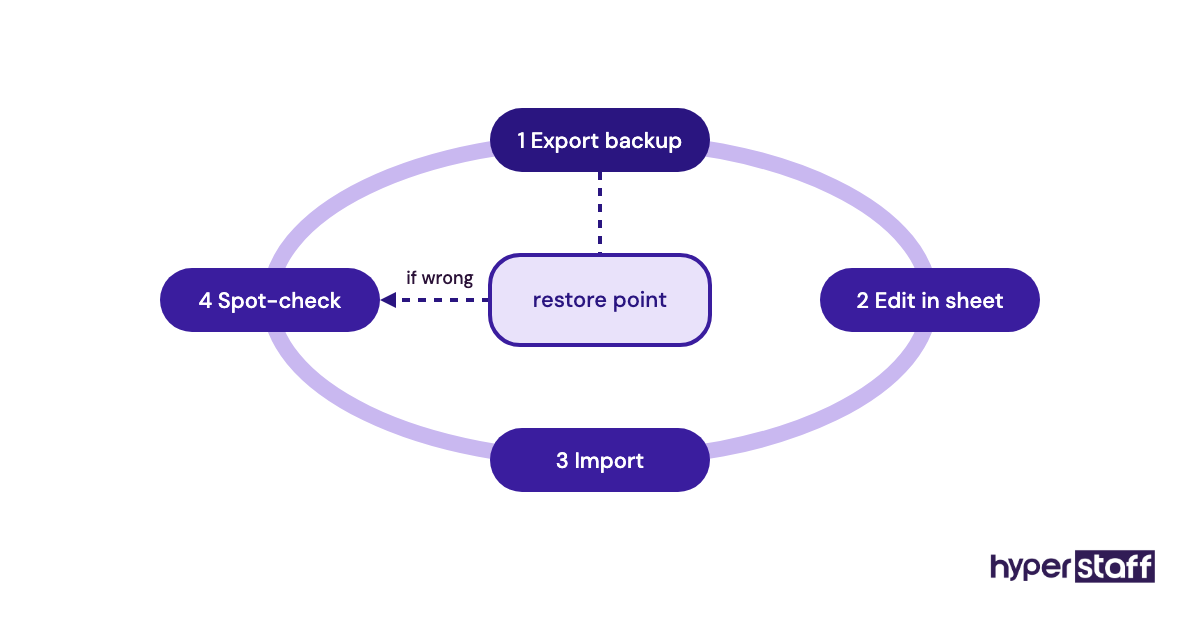
The VA prepares every product change in a spreadsheet, exports a backup first, then imports the change. If an import goes wrong, the backup file restores the old data in minutes.
A Support VA With Macros and Escalation Rules
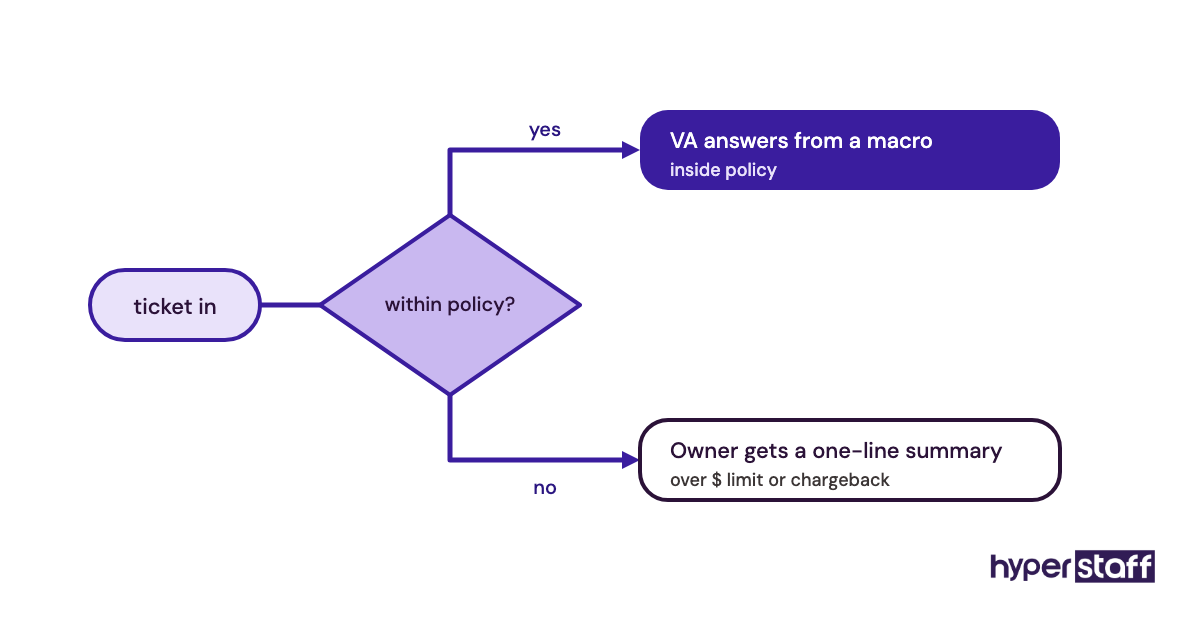
Common replies live as saved macros in the helpdesk, and anything outside policy, such as a refund above a set amount, goes to the owner with a one-line summary. The VA answers fast and never guesses on money.
An Inventory VA Running a Weekly Reorder Sheet
Every Monday the VA compares stock levels against recent sales and flags SKUs likely to run out within the supplier's lead time. Stockouts get caught on paper before customers find them.
Shopify Virtual Assistant Bad Examples
Most of these failures repeat across stores, and our guide to common Shopify VA mistakes goes through them in more depth.
A VA Using the Owner's Login
Shared owner credentials give full access to payouts, billing and store deletion. When something changes, the activity log can't tell you who did it.
A VA Hired to "Grow the Store"
A vague brief produces vague work, usually a mix of half-finished tasks and nothing to measure. A written Shopify VA job description with named duties solves most of that before day one.
A VA Editing the Live Theme
One wrong edit in a live theme file can break the cart on mobile. Theme changes belong in a duplicate theme, tested, then published by whoever owns the code.
Creating a Shopify VA Plan, Step by Step
A Shopify VA plan takes about two weeks to prepare and follows five steps, from tracking your own hours to the first weekly review. Skipping the audit in Step #1 is the shortcut that costs the most later.
Step #1: Track Where Your Store Hours Go
Log every admin task for one to two weeks, with the time spent. Most owners find that a few task types take most of the hours.
Step #2: Pick the First Tasks to Hand Over
Start with tasks that are frequent, rule-based and low risk, like order tagging, listing updates and order-status emails. Keep refunds, pricing and supplier negotiation for later.
Step #3: Write SOPs for Those Tasks
Record a short screen video of yourself doing each task, then turn it into numbered written steps. The written version matters more, because it's searchable and easy to update.
Step #4: Set Up Access and Permissions
Create a staff account with only the sections the first tasks need. Turn on two-step authentication and add helpdesk and app logins one by one.
Step #5: Hire, Onboard and Review Weekly
Our guide on hiring a Shopify virtual assistant walks through sourcing and trial tasks, and these Shopify VA interview questions test real admin skill. Once they start, a structured plan for onboarding your Shopify VA sets the first 30 days.
What Does an Effective Shopify VA Setup Look Like?
An effective Shopify VA setup has clear task ownership, written rules for when to escalate, one weekly report and SOPs that get updated as the store changes. Talent matters, but these four things decide whether the talent shows up in results.
Ownership means one name per task. If the VA owns order-status replies, nobody else answers them, and gaps become visible fast.
Escalation rules need numbers in them. "Ask me about big refunds" fails, while "any refund above a set dollar amount, or any customer mentioning a chargeback, comes to me" works.
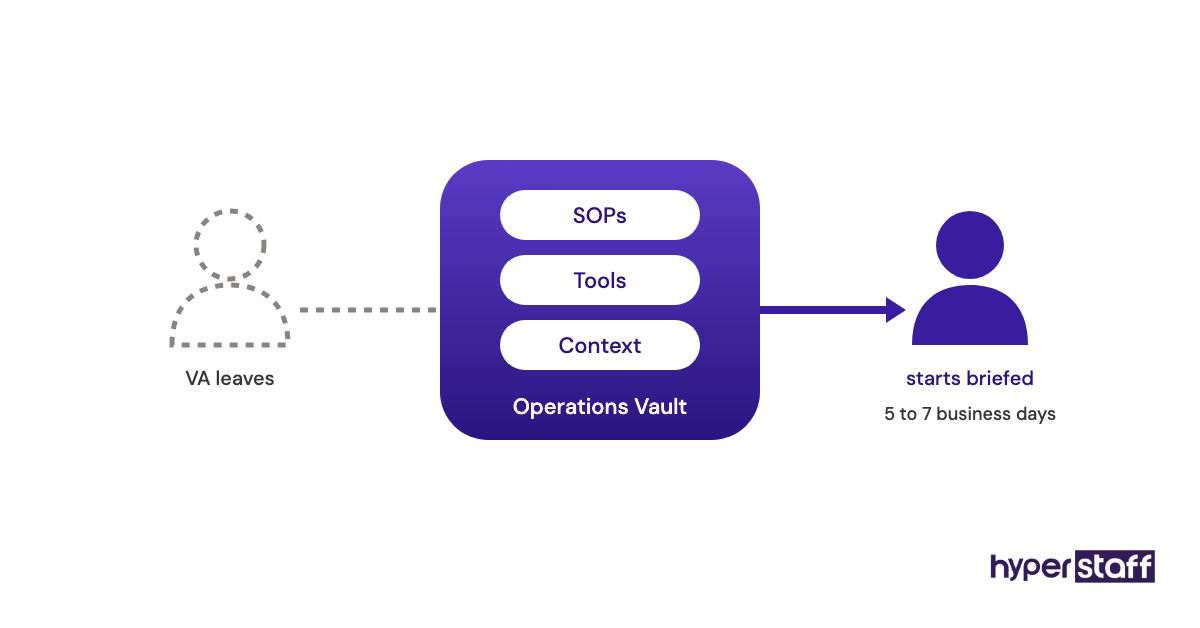
SOPs drift as apps and policies change. At Hyperstaff, every client gets an Operations Vault: your SOPs, tools and context, written down and maintained for you, which is also what a replacement VA is briefed from.
Which Tools Does a Shopify Virtual Assistant Use?
Shopify virtual assistants mostly work inside the Shopify admin plus a few apps for support, email and bulk data. Prices below come from each vendor's own pricing page and change often, so treat them as ranges.
| Tool | What the VA uses it for | Pricing range |
|---|---|---|
| Shopify | Orders, products, customers, reports | About $29 to $399/month on standard plans; Plus costs more |
| Shopify Flow | Auto-tagging orders, low-stock alerts | Included with Shopify plans |
| Gorgias | Support tickets, macros, chat | $10 to $900/month by ticket volume |
| Klaviyo | Email campaigns, flows, segments | Free up to 250 active profiles; paid plans scale by list size |
| Matrixify | Bulk import, export and backups | Free demo; $20 to $200 per 30 days |
| Sidekick | AI help inside the admin | Included with Shopify plans |
Sources: Shopify pricing, Gorgias pricing, Klaviyo pricing and Matrixify pricing.
Our opinion on bulk tools: Shopify's native bulk editor is fine for a few hundred products. Past that, Matrixify earns its fee, since it handles metafields and keeps a file you can roll back to. A longer comparison lives in our list of Shopify virtual assistant tools.
9 Proven Shopify VA Tips and Best Practices
These habits separate Shopify VA setups that last from ones that get cancelled after a month.
- Give a staff account, never the owner login.
- Start with two or three task types and add more only after a clean week.
- Put dollar thresholds in every refund and discount rule.
- Ask for a backup export before any bulk edit.
- Keep theme edits on a duplicate theme.
- Agree on a fixed daily report format, five lines at most.
- Answer VA questions within one working day during the first month.
- Review a random sample of tickets and listings every week.
- Update the SOP the same day a process changes.
How Do You Overcome Common Shopify VA Challenges?
Most Shopify VA challenges trace back to three causes: unclear tasks, slow answers from the owner and permissions set too wide or too narrow. Fixing the cause works better than replacing the person.
Unclear tasks show up as lots of questions or as wrong work nobody flags. Rewrite the SOP rather than explaining again in chat, since chat answers vanish.
Time zone friction is the other big one. Batch your answers into one daily reply window, and move any task needing same-hour decisions back to yourself.
How Do You Measure Shopify Virtual Assistant Success?
Shopify virtual assistant success is measured with a few task-level numbers tracked weekly: first response time on tickets, order processing time, listing error rate and the owner hours freed.
Pick numbers tied to the tasks you actually handed over. A support VA should move response time and ticket backlog, and a catalog VA should move listing accuracy and time-to-publish.
Track your own admin hours too. If those hours don't drop by week six, the problem is usually task scope, and tracking makes that visible early.
How Long Does a Shopify Virtual Assistant Take to Work?
A Shopify virtual assistant usually handles routine tasks alone within two to three weeks and reaches full speed in about two to three months. The timeline depends mostly on SOP quality.
Week one is shadowing and supervised work, and owner time goes up, not down. Weeks two to four bring independent work on the first tasks, with a daily review.
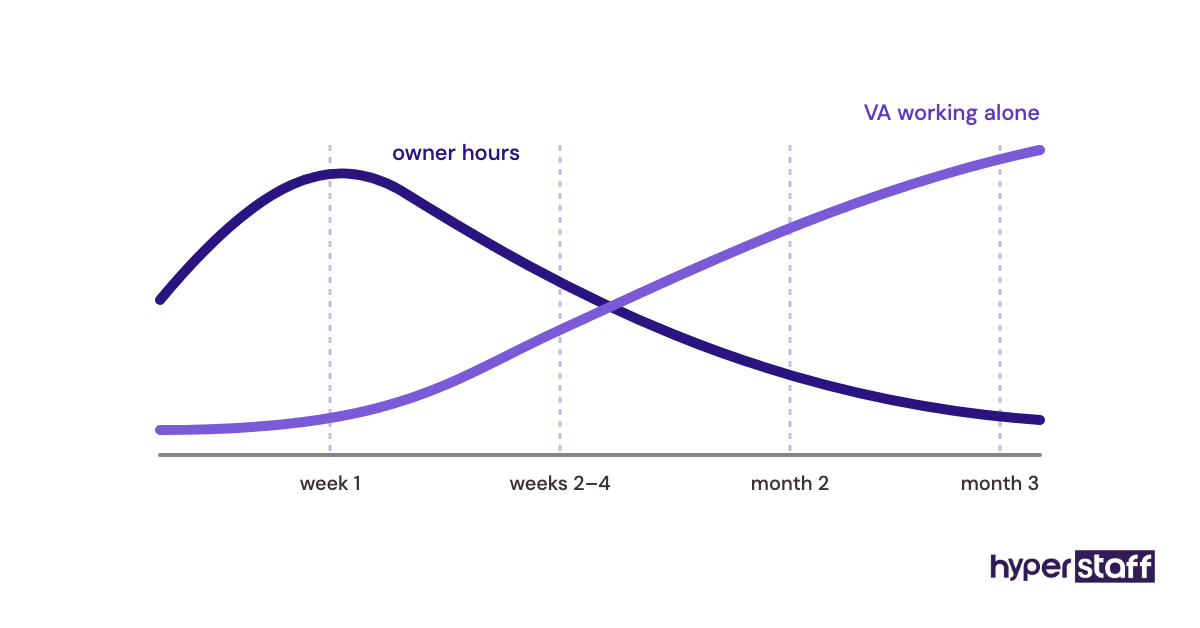
Month two is when new task types get added. By month three, a well-briefed VA should be suggesting process fixes of their own.
How Much Does a Shopify Virtual Assistant Cost?
A Shopify virtual assistant costs roughly $3 to $40 an hour, depending on region, experience and hiring model. Offshore agency VAs sit at the low end, while US-based freelancers and in-house staff sit at the top once overhead is counted.
| Option | Hourly rate | 80 hours/month | 160 hours/month |
|---|---|---|---|
| Hyperstaff Essential (0 to 2 years) | From $3 | From $240 | From $480 |
| Hyperstaff Professional (2 to 5 years) | From $6 | From $480 | From $960 |
| Hyperstaff Expert (5+ years) | From $12 | From $960 | From $1,920 |
| US freelance Shopify VA | $15 to $40 | $1,200 to $3,200 | $2,400 to $6,400 |
| In-house US ecommerce coordinator (with overhead) | $25 to $40 | Rarely part time | $4,000 to $6,400 |
Hyperstaff bundles come in 40, 80 or 160 hours a month, and paying quarterly saves 10%. For a line-by-line breakdown, see our guide to Shopify virtual assistant cost.
Important: Our rates are starting averages, not fixed quotes. The final cost depends on the skills, hours and tasks each store needs.
Is a Shopify Virtual Assistant Worth It?
Yes, a Shopify virtual assistant is one of the best-returning hires a store can make once admin passes 10 hours a week, because the hours go to someone who costs a fraction of your time. It only pays off with SOPs and a weekly review in place.
Here's an example calculation. Take an owner who logs 15 hours a week on order checks, listings and support emails, about 65 hours a month, and values their own time at $50 an hour.
That admin costs roughly $3,250 a month in owner time. An 80-hour Professional bundle from $6/hour runs about $480, so even after counting 10 hours a month of review, the owner keeps around 55 hours for buying, marketing or supplier work.
The math breaks when the hours freed go nowhere useful. For the full case, including when it isn't worth it, read our take on whether a Shopify VA pays off.
How Do You Choose a Shopify Virtual Assistant Agency?
Choose a Shopify virtual assistant agency by checking how it vets Shopify skill, whether your VA is dedicated or pooled, how fast it replaces a bad fit and who keeps your SOPs. Price comes after those four.
Ask for a trial task in a test store, such as fixing ten broken variants or answering five sample tickets. Real admin work exposes skill gaps faster than any interview.
Dedicated versus pooled is the biggest split. A pooled model rotates people across clients, so your store's quirks get relearned again and again, while a dedicated VA builds that knowledge up over time.
Hyperstaff works the dedicated way. Placement takes 5 business days, every client has a dedicated account manager, and a free replacement arrives in 5 to 7 business days, briefed from your Operations Vault.
Shopify VA Statistics, Trends and Future Predictions
Few published statistics track Shopify VAs as a group, so the useful numbers come from the platform and the wider ecommerce market. Shopify's own rules shape how VAs get access more than any survey does.
E-commerce sits at about 17% of total US retail sales, per the US Census Bureau. Shopify's collaborator account rules state that collaborators don't count toward the store's user limit, and their access expires after 90 days without a login.
Two trends stand out in our work. Stores are moving from task-based VAs to one VA who owns an area end to end, and AI tools inside the admin are shrinking the time routine edits take.
Our prediction, held loosely: the entry-level "data entry" Shopify VA job will get smaller, and the VA who can check AI output, run apps and own a process will cost more. We're less sure how fast that happens.
Shopify Virtual Assistants and AI
AI now does part of a Shopify VA's routine work, and the VA's job is shifting toward checking and directing it. Shopify's Sidekick assistant is included with Shopify plans and can write product descriptions, set up discount codes, send low-stock alerts and organize collections.
AI drafts well and checks badly. It will write 200 product descriptions in minutes, but it won't notice that a fabric listed as cotton is actually a blend, and a VA who knows the catalog will.
Practitioners disagree on how far to push AI in customer support. Some stores let AI answer order-status questions alone; others keep a human on every reply because one wrong refund promise costs more than the time saved, and we lean toward the second for stores with high order values.
Disclaimer: This article is for general information only and isn't legal, financial or tax advice. Third-party prices and features change, so confirm them with each vendor. Hyperstaff rates shown are starting averages and aren't a binding quote.
Common questions
Is it safe to give a Shopify virtual assistant access to my store?
Yes, if you use a staff account with limited permissions and two-step authentication. Leave payouts, billing and store ownership off their access entirely. You can remove a staff account in one click if the arrangement ends.
Does a Shopify VA need to know how to code?
No. Most Shopify VA work happens in the admin and apps, with no code involved. Basic HTML helps with product descriptions, but theme and app code belongs with a developer.
Can one Shopify virtual assistant manage several stores?
You can have one VA run several stores if they share processes and the combined volume fits their hours. Separate SOPs per store matter, since return policies and suppliers often differ.
Can I hire a Shopify VA part time?
You can. Many stores start with 40 or 80 hours a month and add hours before peak season. Part time works best when the tasks are batchable, like listings and reports.
What time zone should my Shopify virtual assistant work in?
It depends on the tasks. Overnight coverage from Asia suits order processing and ticket backlogs, while live chat and quick owner decisions work better with a VA who overlaps your business hours.
Book a free 15 min call
We place a pre-vetted specialist in 5 business days, fully managed, from $3/hour.