Shopify virtual assistant vs in-house: which hire fits your store?
A side-by-side look at remote and in-house Shopify help, with real cost math and a clear call on when each one wins.
On this page
- Shopify virtual assistant vs in-house: what's the actual difference?
- Key Shopify staffing terms you should know
- Why does the VA vs in-house choice matter so much?
- How does each model work day to day?
- Types of Shopify support setups
- How this choice differs from related hiring decisions
- Pros and cons of a Shopify VA compared with in-house
- When does an in-house Shopify hire make more sense?
- Creating a Shopify staffing plan, step-by-step
- Which tools does a remote Shopify assistant need?
- 9 proven tips for running a Shopify VA instead of an in-house hire
- Overcoming common Shopify VA challenges
- How to measure Shopify VA success
- How long does a Shopify VA take to pay off?
- How much does a Shopify VA cost compared with in-house?
- Is a Shopify VA worth it over an in-house hire?
- How to choose a Shopify virtual assistant agency
- Shopify staffing trends and where they're heading
- Shopify virtual assistants and AI
- The verdict: which should you hire?
- FAQs
💡 Key Takeaways:
1) A Shopify virtual assistant is a remote team member who works inside your store admin for an hourly rate. An in-house hire is a local employee on your payroll, with benefits, equipment and a longer hiring process.
2) For screen-based work such as product uploads, order processing, customer support and marketing tasks, a dedicated remote assistant costs a fraction of an employee once you count benefits and payroll costs.
3) In-house still wins when the job needs hands on physical stock or senior decisions made in the room. That's why many growing stores pair one local lead with a remote assistant.
Keep more margin from every order you ship
Hyperstaff places a dedicated Shopify virtual assistant who learns one store, from listings to order exceptions, within 5 business days. We've placed 70+ virtual assistants with 30+ clients, rates start at $3/hour, and every client gets a dedicated account manager, so you can test remote help before committing to a full salary.
Shopify virtual assistant vs in-house: what's the actual difference?
A Shopify virtual assistant works remotely from another region and is paid by the hour or in monthly bundles. An in-house hire is an employee on payroll who works at your location, and while both can run the same admin work, they differ on cost, physical reach and how fast you can hire.
If the role is new to you, our guide on what a Shopify virtual assistant does covers the full scope. In short, the job covers product listings, order processing, customer support, marketing tasks, inventory checks and reporting, all inside the Shopify admin and the apps around it.
| Factor | Shopify virtual assistant | In-house hire |
|---|---|---|
| Hourly cost | From $3 to $12+ at Hyperstaff, by experience tier | $21.53 US median for customer service reps, before benefits |
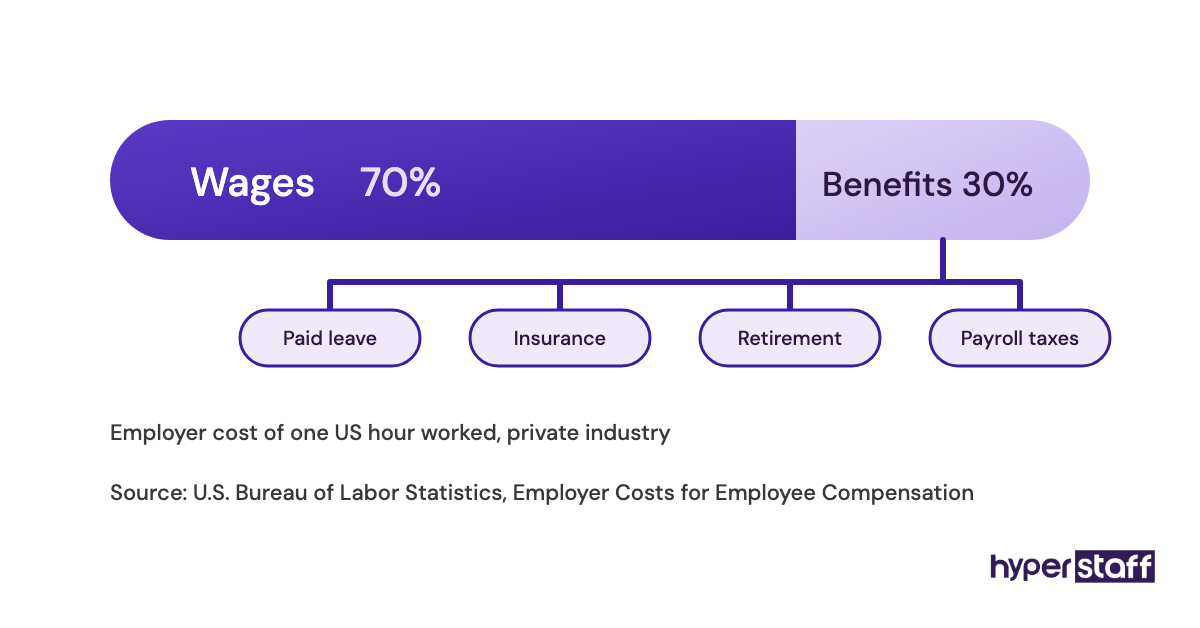
| Benefits and payroll costs | Inside the rate | About 30% of total compensation |
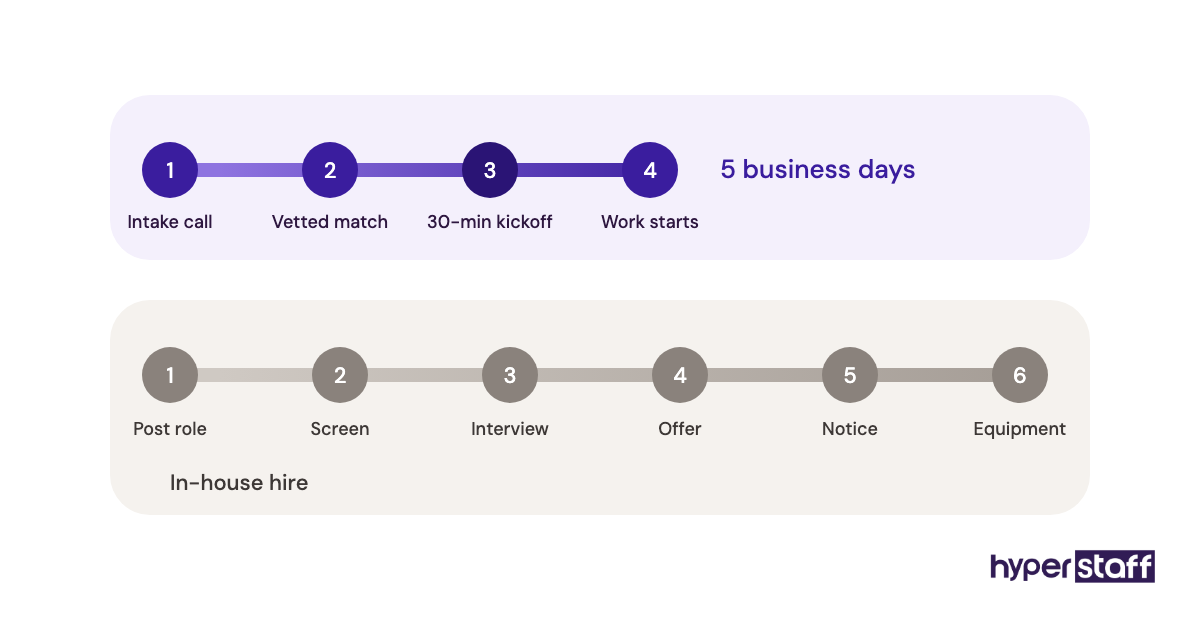
| Time to start | 5 business days (Hyperstaff) | Often 4 to 8 weeks |
| Packing, photos, returns handling | No | Yes |
| Overnight coverage | Possible through time zones | Your local hours |
| Scaling hours up or down | 40, 80 or 160 hours a month | Fixed salary or a new hire |
| If it doesn't work out | Replacement in 5 to 7 business days (Hyperstaff) | Restart the hiring cycle |
| Training style | Written SOPs, screen recordings | Shadowing in person |
The in-house wage is the Bureau of Labor Statistics median for customer service representatives, the closest standard job title to store support. The benefits share comes from the BLS employer costs for employee compensation release, where benefits make up about 30% of private-industry compensation.
Key Shopify staffing terms you should know
- Staff account = a named login in your Shopify admin with permissions you choose; Grow includes 5, Advanced 15, Basic none.
- Collaborator account = limited store access requested by a Shopify Partner, usually a developer or agency.
- Fully loaded cost = wages plus benefits, payroll taxes, equipment and software seats for one employee.
- Dedicated VA = one assistant assigned to your store, as opposed to a shared pool of rotating agents.
- SOP = a written standard operating procedure for a repeatable job, such as refunds or product uploads.
- Hour bundle = a prepaid monthly block of assistant hours, such as 40, 80 or 160.
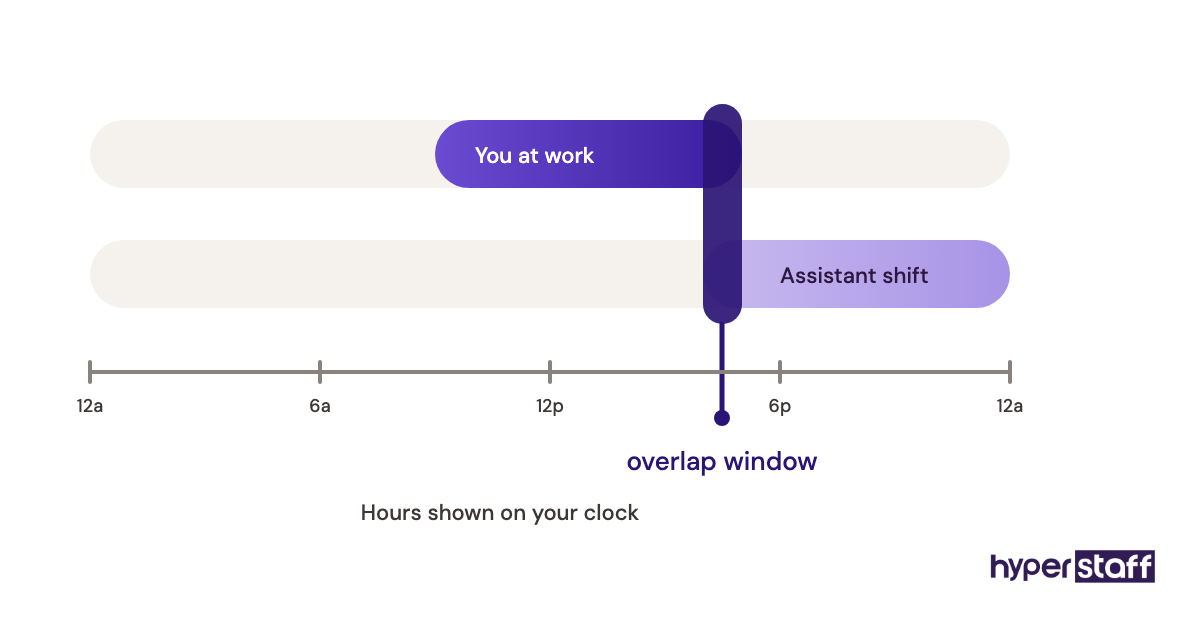
- Overlap window = the hours each day when you and a remote assistant are online together.
- Ramp-up period = the weeks before a new hire works at full speed without constant check-ins.
Why does the VA vs in-house choice matter so much?
After ads and stock, a small Shopify store's first support hire is usually its biggest recurring cost. An employee is also much harder to unwind than a monthly hour bundle, so picking the wrong model costs months of salary or months of slow tickets.
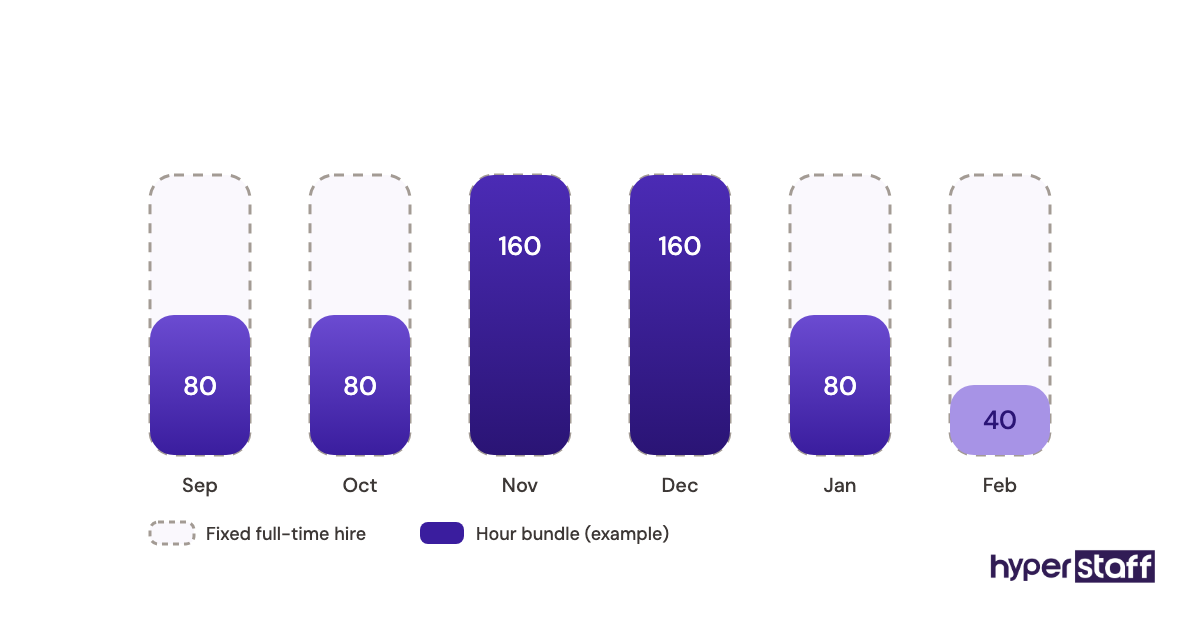
Seasonality makes the choice harder. Order and ticket volume around Black Friday and Cyber Monday can spike for a few weeks and then drop back, and a full-time local hire sized for that peak sits half idle in February.
A remote bundle can move from 80 to 160 hours for the busy stretch and back down afterwards. That flexibility is the single biggest structural gap between the two models, more than the hourly rate.
How does each model work day to day?
An in-house hire works your hours, in your space, and learns by watching and asking. A Shopify virtual assistant works from written SOPs, screen recordings and a shared chat channel, logs in through their own staff account, and reports at fixed times each day.
The remote model lives or dies on documentation. When nobody has written down how a refund over $100 or a split shipment gets handled, a remote assistant either asks every time or guesses, and both slow the queue.
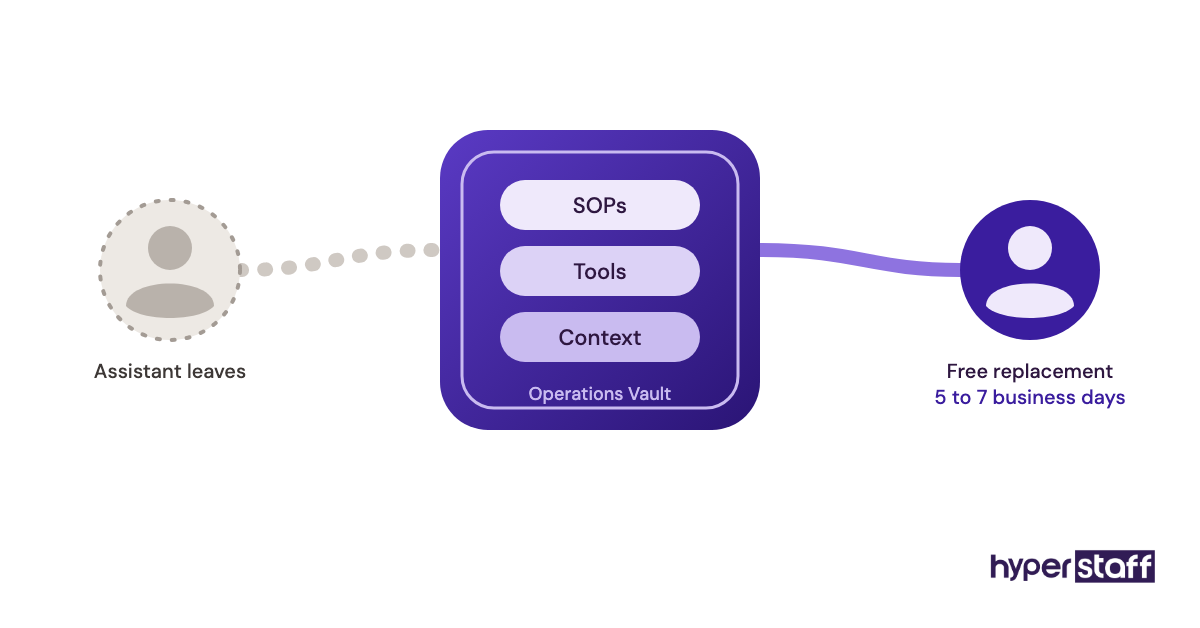
At Hyperstaff, a 30-minute kickoff call starts the engagement, and work begins that day or the next morning. Your SOPs, tools and context go into an Operations Vault that we write down and maintain, so any replacement is briefed from the same file.
Our walkthrough on onboarding a Shopify virtual assistant covers the first two weeks step by step.
In-house onboarding runs on proximity. A new employee can shadow you at the packing table, which is quicker for physical work and slower for anything that only lives in your head.
Types of Shopify support setups
Store owners usually pick from seven setups, and the right one depends on how much of the work is physical. The table compares who does the work, where each fits and the main risk.
| Setup | Who does the work | Best fit | Main risk |
|---|---|---|---|
| Full-time in-house employee | Local employee on payroll | Stock on site, steady daily volume | High fixed cost in slow months |
| Part-time in-house helper | Local part-timer | Packing and photos a few days a week | Admin backlog between shifts |
| Full-time dedicated VA (160 hrs) | One remote assistant | Daily orders, support, catalog work | Needs written SOPs |
| Part-time dedicated VA (40 to 80 hrs) | One remote assistant | Smaller stores with set weekly tasks | Slower replies on urgent tickets |
| Task-based freelancer | Marketplace freelancer | One-off bulk edits or migrations | No continuity between jobs |
| Shopify agency or Partner | Agency project team | Theme builds, custom apps | Project pricing, no daily ops |
| Hybrid: local lead plus VA | Employee and remote assistant | Growing stores with a stockroom | Two people to coordinate |
Our checklist of Shopify virtual assistant tasks shows which jobs move cleanly to a remote setup. Anything that needs hands on a box stays local.
How this choice differs from related hiring decisions
Store owners weighing a VA against an employee usually have two or three other options on the table too. Each one solves a different problem.
Shopify virtual assistant vs freelancer
A freelancer works by the job, often for several stores at once, and leaves when the task ends. A dedicated assistant keeps your context week after week, which matters for support and order work where history decides the answer.
Freelancers still make sense for a one-time migration or a 2,000-SKU bulk edit. Paying someone to relearn your store every month is where that model gets expensive.
Shopify virtual assistant vs Shopify agency
Shopify agencies and Partners build things: themes, custom apps, integrations. They price by project and rarely touch the daily ticket queue.
Many stores use both, an agency for the build and an assistant for running the store once it's live.
Shopify virtual assistant vs apps and automation
Apps and Shopify Flow handle rules: tag this order, hide that out-of-stock product, send this email. A person handles the exceptions, such as the customer whose address failed validation or the supplier who shipped the wrong size.
Operators disagree about which comes first. One camp automates everything and hires for what's left. The other hires first, because a person doing the work by hand finds out which rules are worth automating.
For stores under a few hundred orders a month, the second approach usually surfaces better automations.
Pros and cons of a Shopify VA compared with in-house
A remote Shopify assistant wins on cost, speed of hiring and flexible hours, and loses on physical tasks and same-room collaboration. The lists below weigh both sides against a local employee.
The benefits of a Shopify virtual assistant
- Hourly cost well below a local wage once benefits are added in
- Start in days instead of a multi-week hiring cycle
- Hours scale with the season through monthly bundles
- Overnight inbox coverage from a different time zone
- Forces written SOPs, which outlast any single hire
- No desk, laptop or payroll admin on your side
The drawbacks of a Shopify virtual assistant
- Can't pack orders, shoot photos or process physical returns
- Needs clear written instructions to work well
- Live questions wait for the overlap window
- Store access has to be set up with care
When does an in-house Shopify hire make more sense?
An in-house hire makes more sense when most of the job is physical, such as packing, photography, quality checks and returns, or when the role carries senior decisions that need you in the room. Screen-based work favors a remote assistant.
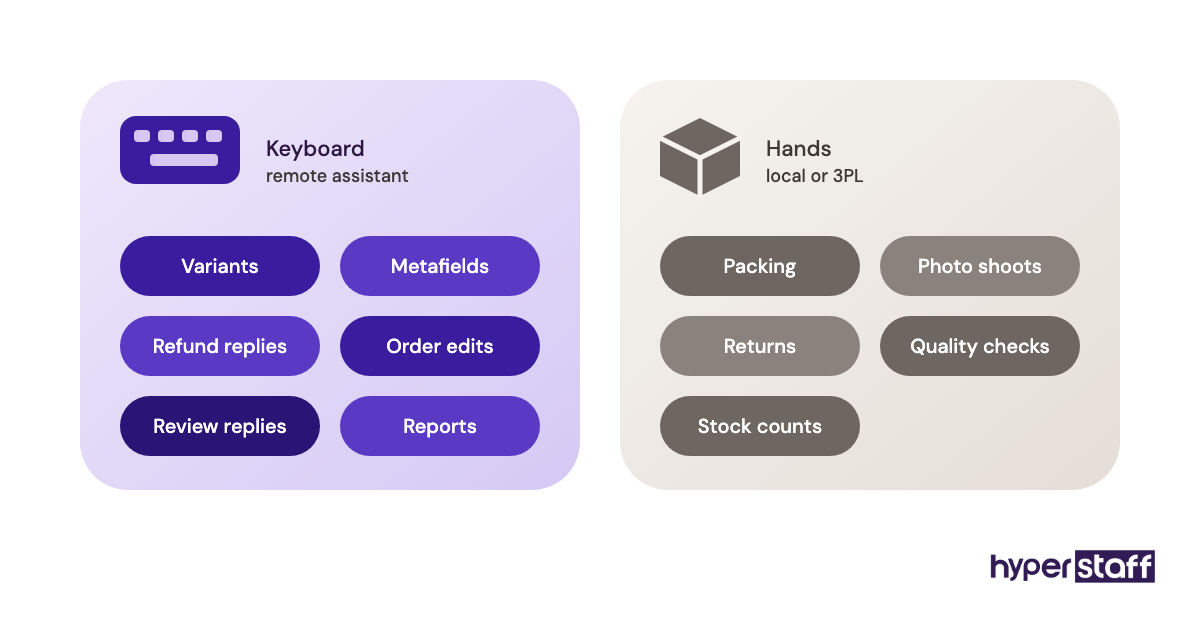
The split also depends on store size. A founder-run store doing a few hundred orders a month rarely has 40 hours of physical work beyond fulfilment, so a remote assistant on admin plus a 3PL or part-time packer covers it.
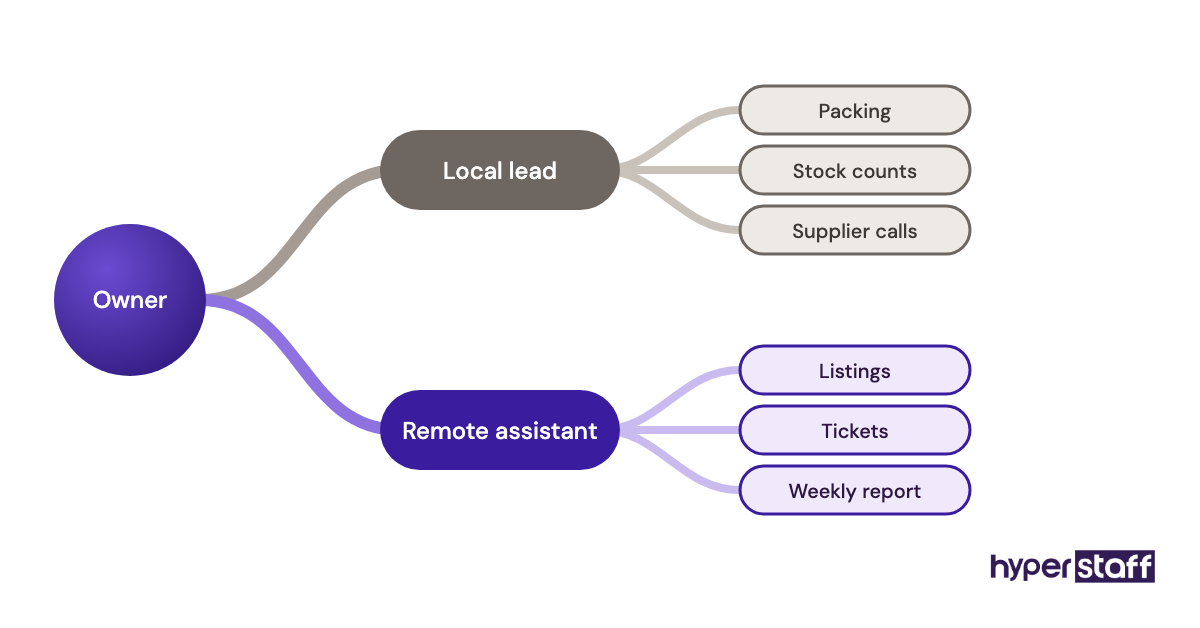
Larger brands with their own stockroom face a different math. They often need a local operations lead anyway, and the remote assistant sits under that person handling listings, tickets and reports.
Some founders argue the first hire should always be local, because culture and judgment transfer best in person. The argument is strong when the hire will become a manager and weak when the role is mostly queue work.
Creating a Shopify staffing plan, step-by-step
A staffing plan sorts your work into physical and screen tasks, then matches each pile to the right model. Five steps take you from a messy to-do list to a hire you can measure.
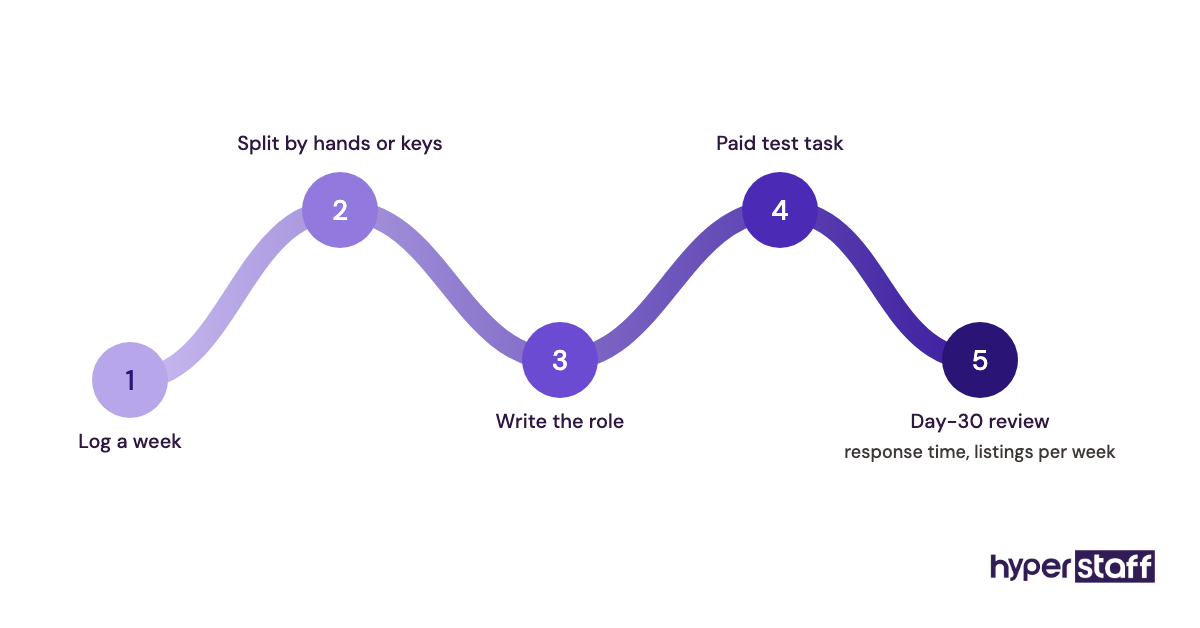
Step #1: Log one real week of store work
Write down every task for five working days, with rough minutes next to each. The log almost always shows more screen work than owners expect, because small jobs like order edits and review replies add up over a week.
Step #2: Split physical from screen work
Mark each task as needing hands or a keyboard. If keyboard work comes to 40+ hours a month, a remote assistant is worth pricing; if hands-on work dominates, look local first.
Step #3: Turn the screen tasks into a role
Group the tasks into one clear role and write it down. Our Shopify virtual assistant job description template gives you a starting structure, and the step-by-step hiring guide covers sourcing and vetting.
Step #4: Test with real work before you commit
Résumés tell you little about Shopify skill. Use our list of Shopify VA interview questions and pair them with a short paid task in a development store.
Step #5: Review the first 30 days against numbers
Pick two or three numbers before day one, such as first-response time and listings published per week. At day 30, compare them with where you started and decide whether to add hours, change the role or replace the hire.
Which tools does a remote Shopify assistant need?
A remote Shopify assistant needs their own staff login, a helpdesk, a way to record SOPs and a secure place to share passwords. In-house staff use most of the same stack, so tool costs barely change the comparison.
Our full roundup of Shopify virtual assistant tools goes deeper, but these are the ones that matter most for the remote setup:
- Shopify staff accounts: Grow ($79 to $105 a month in USD, depending on billing) includes 5 staff accounts and Advanced includes 15, per Shopify's pricing page. Set permissions so an assistant can't see payouts or delete the store.
- Gorgias: a helpdesk built around Shopify orders. Plans start around $10 a month for 50 tickets and climb into the hundreds as ticket volume grows.
- Loom: the fastest way to turn "watch how I do it" into an SOP. The Starter plan is free with short recordings; Business is $18 per user a month on monthly billing.
- A password manager: 1Password or Bitwarden, so app logins are shared without pasting them into chat.
- Slack or a shared channel: the free tier is enough for one assistant.
- Time tracking: Hubstaff bills per seat, with its Team plan at $10 per seat a month.
Time trackers that take screenshots split opinion. They reassure some owners and push good assistants away, and for a dedicated hire with clear output targets, the work they deliver is usually the better check.
9 proven tips for running a Shopify VA instead of an in-house hire
These habits decide whether remote help feels like a teammate or a ticket queue.
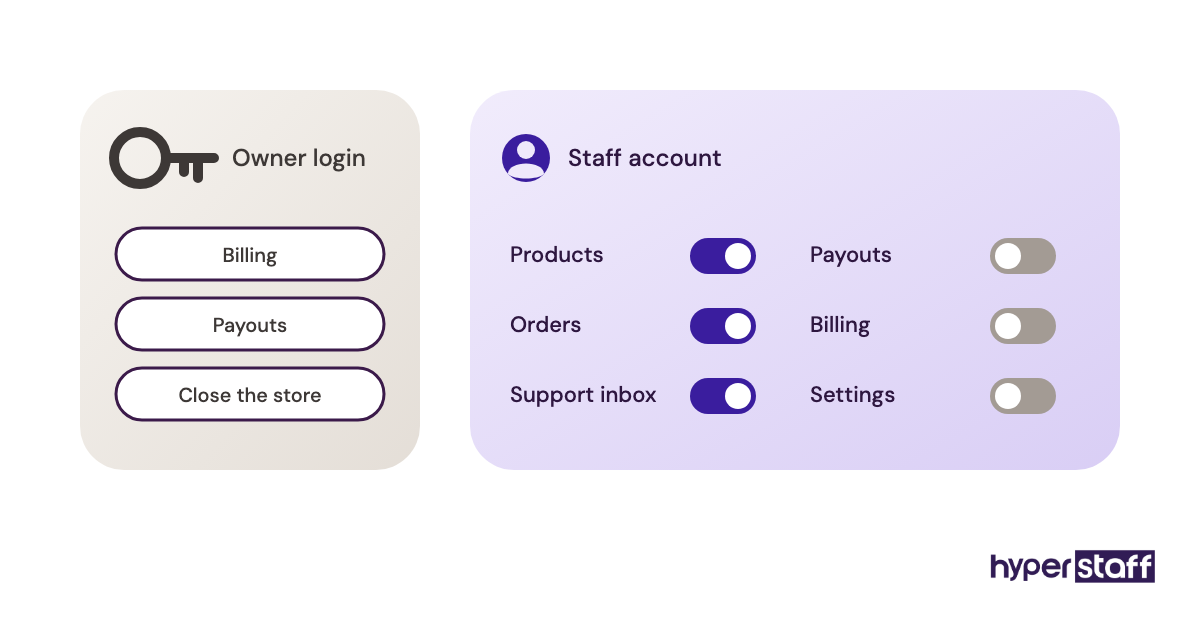
- Give the assistant their own staff account from day one, never the owner login.
- Record a Loom for any task you'd struggle to explain in writing.
- Start with two or three repeatable tasks, then add more each week.
- Write refund and discount limits in dollars, so judgment calls have a ceiling.
- Set one daily overlap window and protect it.
- Keep a running "questions" doc instead of scattered chat messages.
- Agree on response-time targets for email and chat before peak season.
- Review a sample of their tickets and listings weekly for the first month.
- Update the SOP the same day a process changes.
Overcoming common Shopify VA challenges
Most remote Shopify problems come from missing instructions or loose access, and rarely from a lack of skill. When the queue slows down in week two, the assistant is usually waiting on answers that should have been written down.
Access is the other common problem. Shared owner logins and app passwords pasted into chat create risk you can avoid with staff permissions and a password manager.
Our post on common Shopify virtual assistant mistakes lists the patterns to catch early, including vague task handoffs.
How to measure Shopify VA success
Measure a Shopify assistant on output you can count: first-response time, tickets resolved, listings published, order errors and hours you got back. Use the same yardstick you'd use for an in-house hire.
Pick numbers that match the role. A support-heavy assistant is judged on response time and resolution rate; a catalog assistant on listings per week and error rate after spot checks.
Track your own hours too. If you still spend the same time on admin after a month, the role or the handoff needs fixing.
How long does a Shopify VA take to pay off?
A Shopify virtual assistant usually handles simple, documented tasks within the first week and works without constant check-ins after three to six weeks. In-house hires follow a similar curve, but only after a longer hiring cycle.
Weeks two and three are where progress usually stalls. Easy tasks are done and harder ones still need answers, so owners who stop documenting here slow the whole ramp-up.
How much does a Shopify VA cost compared with in-house?
A full-time Shopify virtual assistant at Hyperstaff costs from about $480 to $1,920 a month at 160 hours, depending on experience tier. A full-time US employee at the BLS median customer service wage costs roughly $5,300 a month once benefits are added.
The in-house figures below start from the BLS median of $21.53 an hour, then add benefits so they make up about 30% of total compensation. Recruiting, equipment and cover for paid time off would push it higher.
Our breakdown of Shopify virtual assistant cost covers part-time bundles and regional rates.
| Option | Hourly rate | Monthly at 160 hours | Yearly |
|---|---|---|---|
| Hyperstaff Essential (0 to 2 years) | From $3 | From $480 | From $5,760 |
| Hyperstaff Professional (2 to 5 years) | From $6 | From $960 | From $11,520 |
| Hyperstaff Expert (5+ years) | From $12 | From $1,920 | From $23,040 |
| US in-house, wages only | $21.53 | About $3,730 | About $44,770 |
| US in-house, with benefits | About $30.75 | About $5,330 | About $64,000 |
Paying Hyperstaff quarterly saves a further 10%, and bundles of 40 or 80 hours cut the monthly figure for part-time roles.
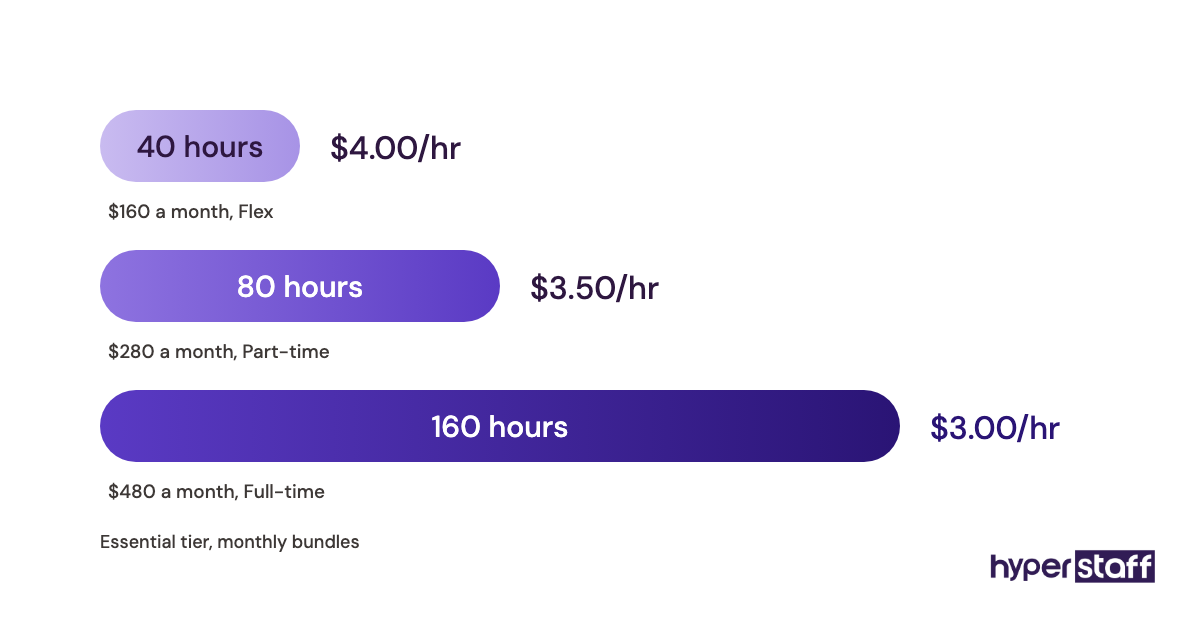
Important: Hyperstaff prices shown are starting averages, not fixed quotes. Your actual cost depends on the role, experience tier, hours and the work your store needs.
Is a Shopify VA worth it over an in-house hire?
For screen-based store work, a dedicated Shopify virtual assistant is one of the highest-return hires a store can make if the handoff is done well. A full-time Professional-tier assistant costs from $11,520 a year, against roughly $64,000 for a US employee at the median wage, which leaves about $52,000 a year for ads, stock or a local packer.
The calculation, step by step: $21.53 an hour × 2,080 hours is $44,770 in wages; divided by 0.70 to add benefits gives about $64,000. The assistant at $6 an hour × 160 hours × 12 months is $11,520, and paying quarterly takes that to about $10,370.
You only save that money if the work actually moves to the assistant. An owner who hires remote help and keeps doing the tasks personally pays twice, and our deeper look at whether a Shopify VA is worth it covers the cases where it doesn't pay off.
How to choose a Shopify virtual assistant agency
Judge a Shopify VA agency on four things. Is the assistant dedicated to your store? How fast does a replacement arrive, who owns your process documentation, and does someone manage the relationship with you? Rate matters too, but those four decide whether the hire lasts.
Ask how candidates are vetted for Shopify work specifically, since general admin experience doesn't cover variants, metafields or order edits. Ask what happens to your SOPs if the assistant leaves.
Hyperstaff's answers, for comparison: a dedicated assistant, placement in 5 business days, free replacement in 5 to 7 business days briefed from your Operations Vault, and a dedicated account manager for every client.
Shopify staffing trends and where they're heading
For many small Shopify stores, remote help is now the usual first hire, and in-house roles are shifting toward fulfilment and senior operations. More store work happens on screen as 3PLs take over packing.
Shopify's own plan design pushes the same way. Staff accounts now start on Grow, so the moment a store adds help is often the moment it upgrades its plan.
Our expectation, though we can't be sure: once stores grow past the founder-only stage, the common team will be one local lead plus one or two remote assistants. How much AI cuts the remote half is still unclear.
Shopify virtual assistants and AI
AI tools now draft product descriptions, suggest support replies and summarize store data, and Shopify ships its own, including Shopify Magic and the Sidekick assistant. They help remote and in-house staff work faster, but someone still has to check what they produce.
In practice, AI changes the mix of work. An assistant who used to write 20 descriptions a day now edits 60 drafts, so the key skill is catching confident mistakes: a wrong fabric, a made-up size chart, a refund promise the policy doesn't allow.
The verdict: which should you hire?
Hire a Shopify virtual assistant for listings, orders, support, marketing tasks and reporting. Hire in-house when the work is mostly physical or the role will grow into managing people.
For stores that need both, a hybrid works best: a local hire for packing and stock, plus a dedicated remote assistant for all the screen work, at a fraction of the cost of a second salary.
Disclaimer: This article is for general information only and isn't legal, tax or financial advice. Wage, benefit and software figures come from the cited sources and may change; Hyperstaff rates are starting prices. Check current terms and get professional advice before making hiring decisions.
Common questions
Can a Shopify virtual assistant replace an in-house employee completely?
Yes, if the role is screen-based work like support, listings and order processing. If the job includes packing, photography or physical returns, keep a local person or a 3PL for that part.
Is it safe to give a virtual assistant access to my Shopify store?
Yes, as long as they have their own staff account with limited permissions. Turn off access to payouts, billing and store settings, and share app logins through a password manager instead of chat.
Do I need the Grow plan to add a Shopify virtual assistant?
In most cases, yes. Basic includes no staff accounts, so Grow (5 staff accounts) is the lowest plan where an assistant gets their own login.
What time zone should my Shopify VA work in?
It depends on the job. For overnight support, an assistant in the Philippines or India covers US night hours; for work that needs your live input, Latin America or the US gives more overlap.
Is an in-house Shopify hire better for customer service quality?
No, not by default. Service quality depends on clear policies, product knowledge and response-time targets, and a dedicated remote assistant who learns one store can meet the same standard as a local hire.
Book a free 15 min call
We place a pre-vetted specialist in 5 business days, fully managed, from $3/hour.