Shopify Virtual Assistant Job Description: Free Template and How to Adapt It
A copy-ready Shopify virtual assistant job description, plus how to adapt it for order ops, listings, support or marketing.

On this page
- What is a Shopify virtual assistant job description?
- Key Shopify VA job description terms you should know
- Why does a Shopify VA job description matter so much?
- How does a Shopify VA job description work in hiring?
- Copy-ready Shopify virtual assistant job description template
- Types and forms of Shopify VA job descriptions
- How is a Shopify VA job description different from related roles?
- What do you gain and lose with a detailed job description?
- Who needs a Shopify virtual assistant job description?
- Shopify VA job description examples
- Writing your Shopify VA job description, step by step
- What does an effective Shopify VA hiring brief look like?
- Which tools should a Shopify VA job description list?
- 9 proven tips for writing a Shopify VA job description
- Overcoming common Shopify VA job description challenges
- How do you measure whether the job description worked?
- How long does it take to fill the role from a job description?
- How much does a Shopify virtual assistant cost?
- Is a Shopify virtual assistant worth it?
- How do you choose a Shopify virtual assistant agency?
- How is AI changing Shopify VA job descriptions?
- FAQs
💡 Key Takeaways:
1) A Shopify virtual assistant job description should name one main duty block, the exact apps used, the store access granted and the KPIs the role is judged on.
2) Staff accounts with limited permissions belong in the job description itself, so no assistant ever needs the owner login.
3) The same document works as your interview script and your onboarding checklist, as long as you update it when the role grows.
Clear briefs protect your store's margins
Hyperstaff places pre-vetted Shopify specialists from 5 regions, starting at $3 an hour, with 70+ virtual assistants placed for 30+ clients so far. Our Shopify virtual assistant services start from a written scope like the one below, and your specialist is placed in 5 business days, with a free replacement if the fit is wrong.
What is a Shopify virtual assistant job description?
A Shopify virtual assistant job description is the written brief that defines what a remote assistant will do inside your Shopify store, which admin areas they can touch, the apps they'll use and how their work gets judged. It doubles as a job ad for candidates and a scope document once they start.
Most store owners picture order processing and product uploads. In practice, the same role can run support tickets, abandoned-cart flows, review requests, supplier follow-ups and weekly sales reporting, so the job description has to pick a lane before it lists duties.
If the role itself still feels fuzzy, our guide on what a Shopify virtual assistant is sorts that out first.
Key Shopify VA job description terms you should know
- Staff account = a Shopify login with permissions you choose, so the assistant never needs the owner password.
- Collaborator account = store access Shopify gives to partners and agencies, approved by the owner, often with a request code.
- Store permissions = the admin sections (Orders, Products, Customers, Analytics, Apps) a staff account can view or edit.
- SKU = the stock-keeping code that ties a product variant to its inventory count.
- Fulfillment = picking, packing and shipping an order, or passing it to a 3PL or dropship supplier.
- WISMO = "where is my order" tickets, usually the biggest share of ecommerce support volume.
- Chargeback = a payment the customer's bank reverses, which needs evidence submitted before a deadline.
- SOP = a standard operating procedure, the written how-to for a recurring task.
- KPI = the number used to judge the role, such as first response time or listing errors.
- Scope creep = duties that pile onto a role after the hire without ever being written down.
Why does a Shopify VA job description matter so much?
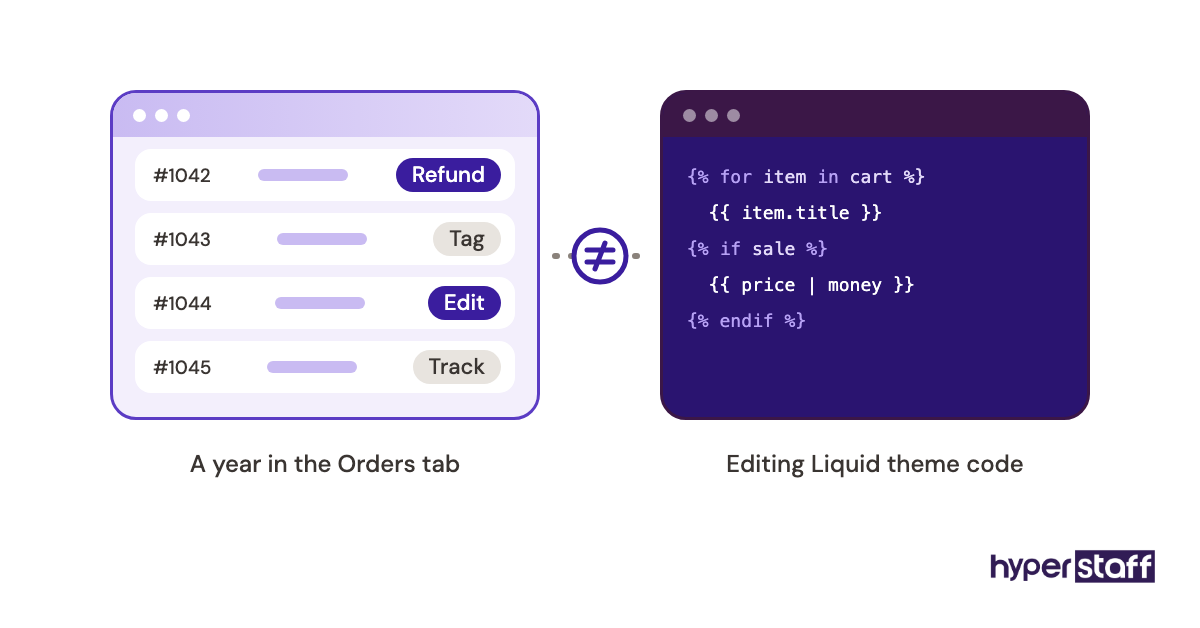
The job description decides who applies, and on Shopify that filter matters more than usual. "Shopify experience" can mean someone who edits Liquid theme code or someone who has spent a year in the Orders tab issuing refunds, and those are very different hires.
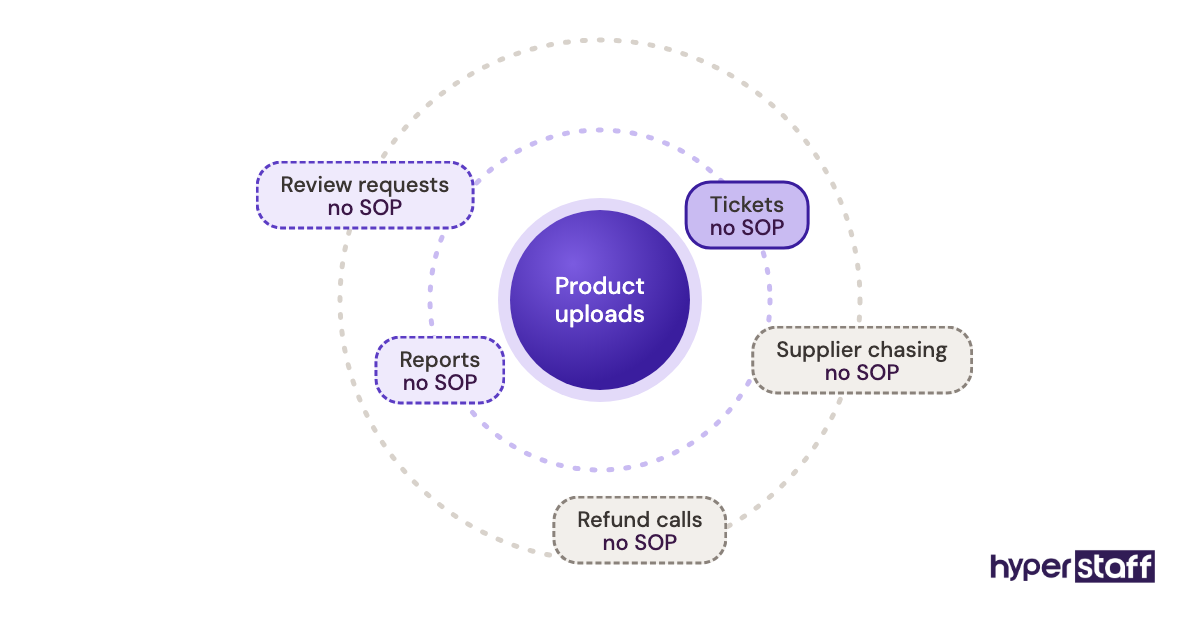
A vague brief keeps costing you after the hire. Duties nobody wrote down turn into scope creep, and the assistant hired for product uploads ends up answering tickets with no SOP and no idea of your refund policy.
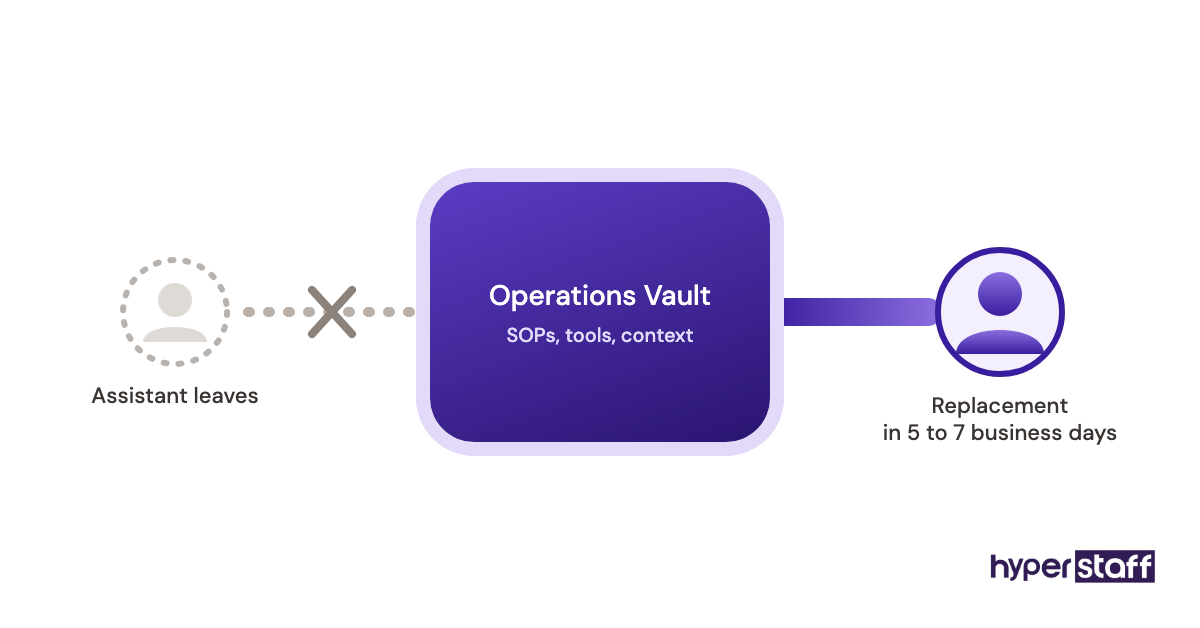
At Hyperstaff, written scope like this is what goes into a client's Operations Vault, where SOPs, tools and context are kept and maintained. A good job description is the first draft of that.
How does a Shopify VA job description work in hiring?
A Shopify VA job description works in two passes. It screens candidates first, on a job board or through an agency, and then becomes the scope you onboard and review against.
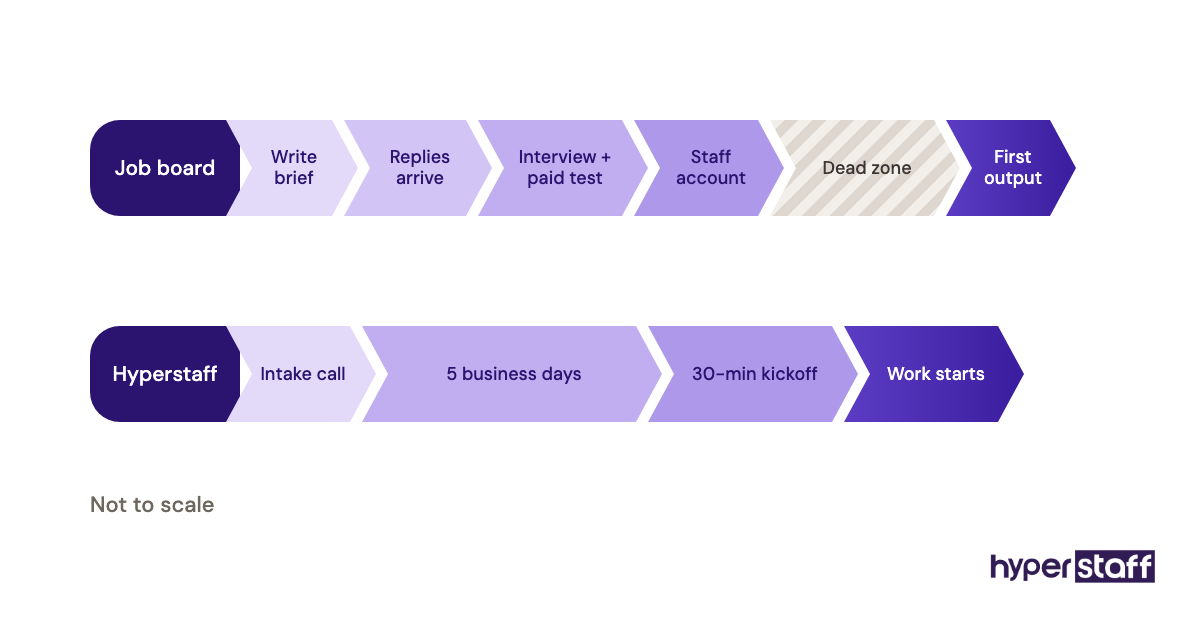
The realistic order runs like this: you write the brief, responses arrive over several days, you interview and run a short paid test, then you create a staff account. There's almost always a dead zone between the offer and the first useful output, while access gets set up and the assistant learns your policies.
Pull your Shopify VA interview questions straight from the duties list, so each duty gets tested once. The sourcing and offer stages around the brief are laid out in our guide on how to hire a Shopify VA.
Through Hyperstaff, the middle stages compress. A pre-vetted specialist is placed in 5 business days, you run a 30-minute kickoff call, and work starts that day or the next morning.
Copy-ready Shopify virtual assistant job description template
The Shopify virtual assistant job description template below is complete enough to post as is. Swap the bracketed parts, delete the duty blocks that don't apply, and keep the access and KPI sections even if they feel like overkill.
Job title: Shopify Virtual Assistant ([Order Operations / Store Admin / Customer Support / Marketing Support])
About the store: [Store name] is a Shopify store selling [product category] to customers in [main markets]. We handle around [X] orders a week across [X] active SKUs.
Hours and schedule: [40 / 80 / 160] hours a month, with at least [X] hours of overlap with [time zone] on weekdays.
Reports to: [Name, role]
About the role: You'll own the day-to-day running of our Shopify admin so orders ship on time, listings stay accurate and customers get quick answers. You'll work from written SOPs and help us keep them current.
Core duties (we've kept the blocks that apply):
- Order operations: process and tag new orders, review fraud-risk flags, edit orders, issue refunds and exchanges within our policy, update tracking and chase late shipments with [carrier / 3PL / supplier].
- Product and catalog: upload new products and variants, write titles and descriptions from our brief, set SKUs, prices and inventory, add image alt text, keep collections and tags tidy, run bulk edits by CSV.
- Customer support: answer email, chat and [helpdesk] tickets within [X] hours, resolve where-is-my-order questions, process returns, and escalate chargebacks and upset customers to [name].
- Marketing support: schedule [Klaviyo / Shopify Email] campaigns, monitor abandoned-cart and post-purchase flows, request and moderate reviews, update discount codes and homepage banners.
- Reporting: send a weekly summary of orders, refunds, open tickets and low-stock items.
Tools you'll use: Shopify admin, [helpdesk], [email platform], [shipping app], Google Sheets, [Slack], [Loom].
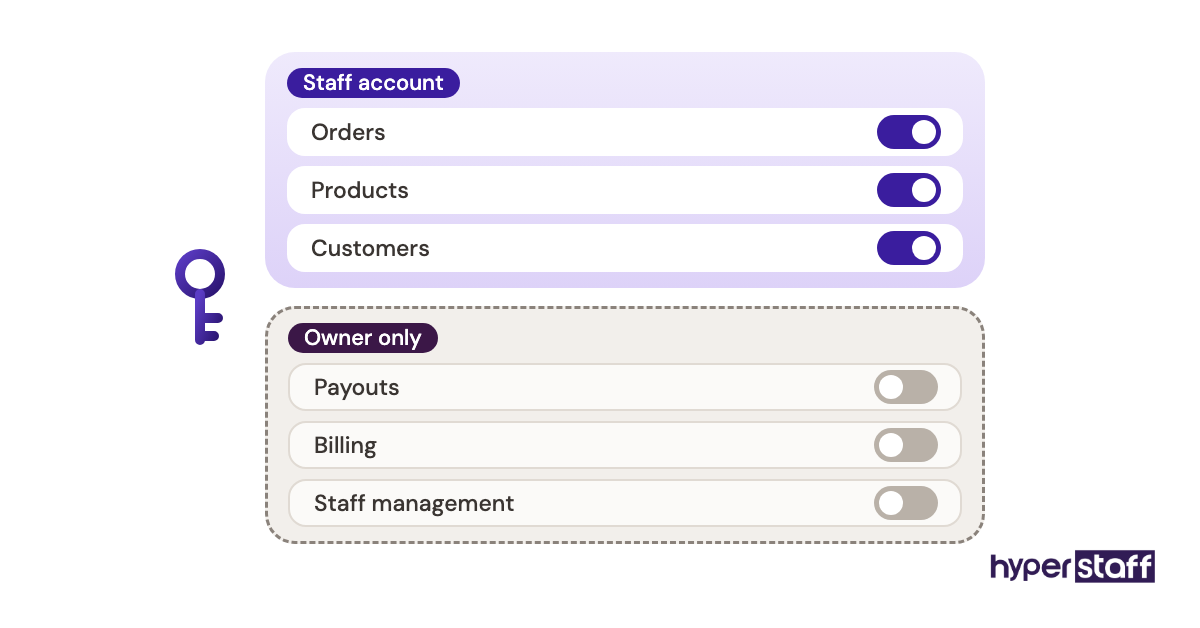
Access you'll get: A Shopify staff account with access to [Orders, Products, Customers]. No access to [payouts, billing, store settings, staff management].
Requirements:
- [X]+ months working inside a live Shopify admin
- Written English strong enough to answer customers in our brand voice
- Comfortable following SOPs and updating them when a process changes
- Reliable internet and a backup plan for outages
Nice to have: Experience with [specific apps], [second language], basic image editing in [Canva].
How we'll measure success in the first 90 days:
- Orders processed within [X] business hours of being placed
- First response time on tickets under [X] hours on weekdays
- Listing errors (wrong price, missing variant) close to zero
- An SOP written or updated for every task you take over
How to apply: Send [a short Loom walking through a Shopify store you've worked in / answers to these questions] to [email]. Shortlisted candidates complete a paid [1–2 hour] test task.
The duties are grouped by function on purpose. A small store rarely needs all five blocks from one person at the start, and the full menu of Shopify virtual assistant tasks runs longer still.
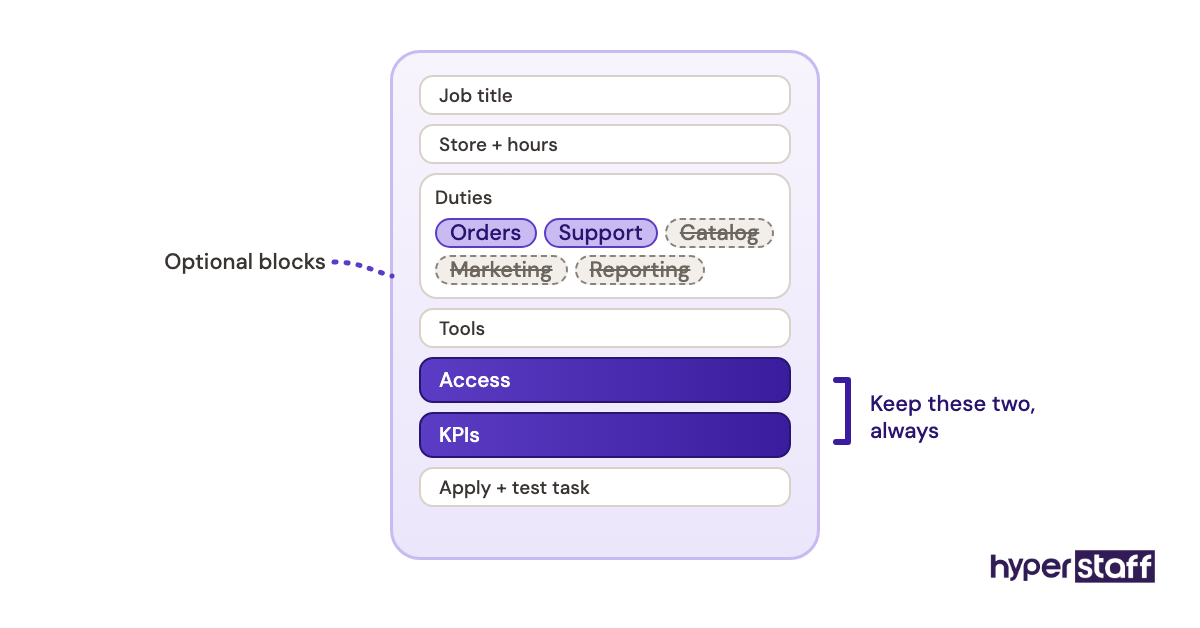
Keep the access section even when you trust the person you're hiring. Writing down what the staff account excludes, like payouts and staff management, is the cheapest security control a store owner can set.
How to adapt the template to your store
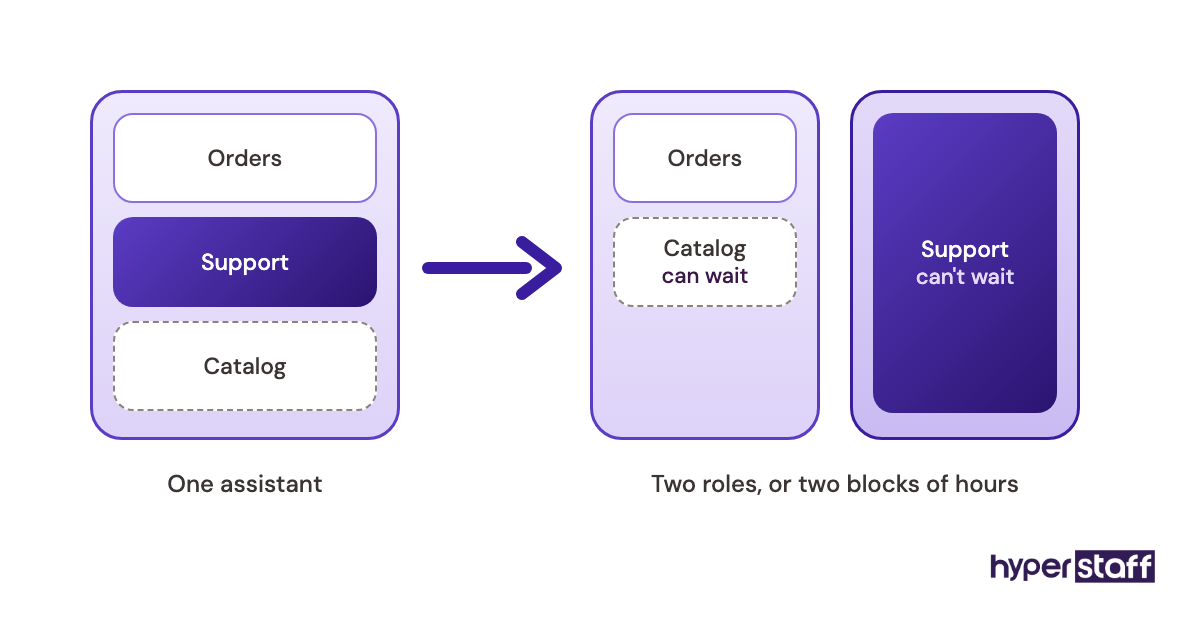
Start with order volume. Low-volume stores can usually fold order operations and support into one role, but as ticket volume climbs, support tends to need its own block of hours because it can't wait for a quiet moment the way catalog work can.
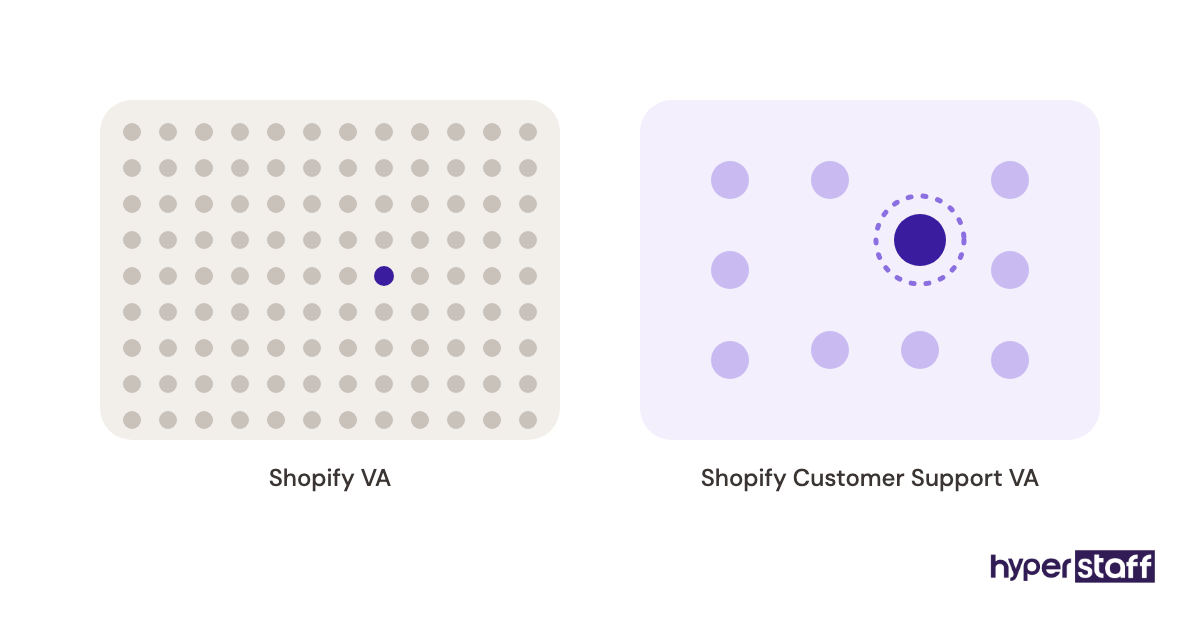
Then match the title to the biggest duty block. "Shopify Customer Support VA" pulls a different applicant pool than "Shopify Product Upload VA", and a generic title buries your post among hundreds of others.
Set the KPI numbers from your own data before posting. If you don't know your current first response time, measure a normal week first, or the target you write down is a guess.
Types and forms of Shopify VA job descriptions
Shopify VA job descriptions usually fall into one of eight shapes, set by the main duty block. The hours below map to monthly bundles of 40, 80 or 160 hours.
| Job description type | Main duties | Typical hours a month | Store access needed | Experience tier to consider |
|---|---|---|---|---|
| Order operations VA | Orders, refunds, tracking, supplier chasing | 80 to 160 | Orders, Customers | Essential or Professional |
| Product listing VA | Uploads, variants, CSV bulk edits, SEO titles | 40 to 80 | Products, Collections | Essential |
| Customer support VA | Tickets, chat, returns, WISMO | 80 to 160 | Orders, Customers, helpdesk | Essential or Professional |
| Marketing support VA | Email flows, reviews, discount codes | 40 to 80 | Marketing, Discounts, email app | Professional |
| Dropshipping VA | Supplier orders, stock sync, delay updates | 80 to 160 | Orders, Products, sourcing app | Essential or Professional |
| Inventory and data entry VA | Stock counts, purchase orders, spreadsheets | 40 to 80 | Products, Inventory | Essential |
| General store manager VA | Mixed duties plus weekly reporting | 160 | Most sections, no payouts or billing | Professional or Expert |
| Shopify Plus or multi-store VA | Several storefronts, B2B orders, Flow automations | 160 | Separate staff account per store | Expert |
How is a Shopify VA job description different from related roles?
A Shopify VA job description is narrower than a general ecommerce brief and far lighter on code than a developer brief. The difference shows up mainly in the access you grant and the skills you test for.
Shopify VA vs. ecommerce virtual assistant
An ecommerce virtual assistant job description can span Amazon Seller Central, Etsy, WooCommerce and other marketplaces at once. A Shopify brief names one admin, so you can test for specifics like order editing, metafields and Shopify Flow.
Selling on two channels? Write one Shopify description and add a single line for the second platform. Two half-written briefs in one post attract people who know neither platform well.
Shopify VA vs. Shopify developer
A Shopify developer job description asks for Liquid, theme architecture, APIs and app builds. Put those in a VA description and you'll pay developer rates for someone who'd rather not answer tickets.
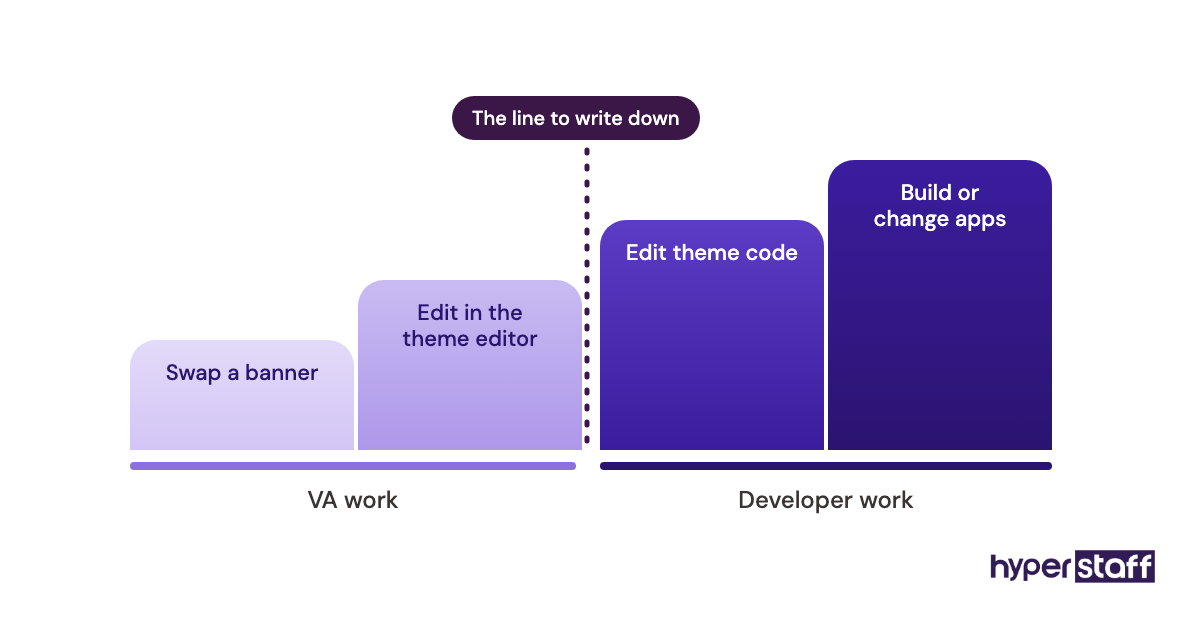
Theme work sits in a grey zone. Swapping a banner or editing a section in the theme editor is VA work, editing theme code is developer work, and the job description should say which side of that line you want.
Shopify VA vs. in-house ecommerce coordinator
An in-house coordinator description adds benefits, location, equipment and often a wider remit like product photography. A remote Shopify VA description sticks to what gets done inside the admin and its connected apps.
The trade-offs go well past the job ad, and our comparison of Shopify virtual assistant vs in-house hiring sets cost and control side by side.
What do you gain and lose with a detailed job description?
A detailed Shopify VA job description mostly pays for itself, though it costs real writing time and some flexibility.
The benefits of a detailed Shopify VA job description
- Fewer unqualified applicants, because candidates can see the exact admin areas and apps
- A ready-made interview script and test task
- Clear permissions from day one, so nobody asks for the owner login
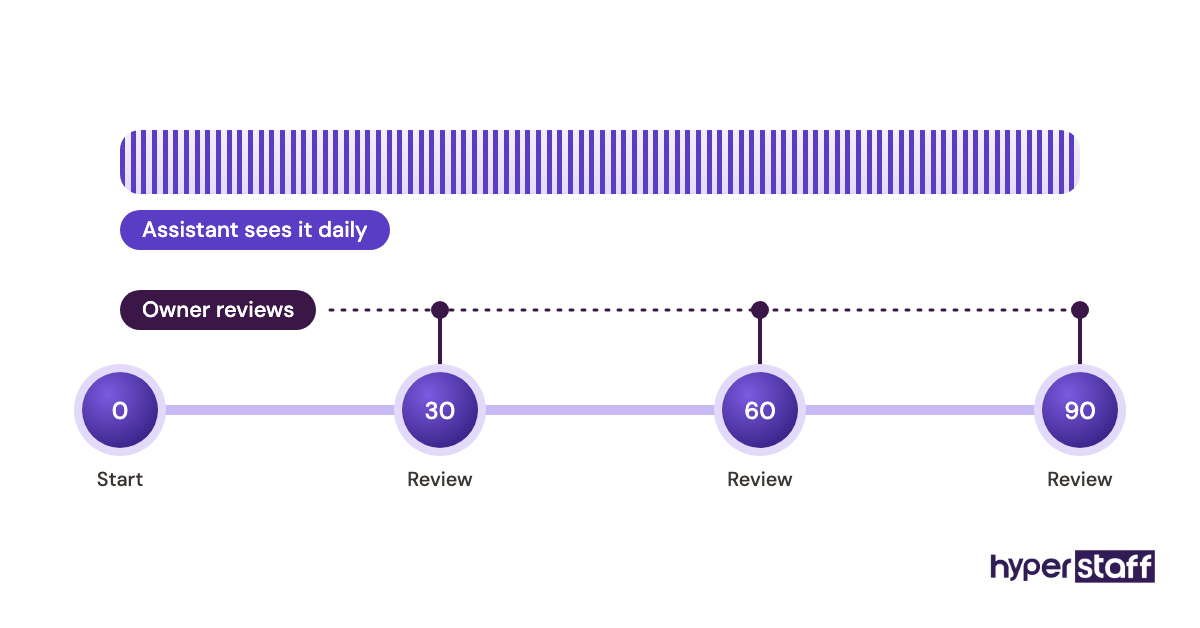
- A baseline for reviews at 30, 60 and 90 days
- Faster replacement if the hire doesn't work out, since the brief already exists
The drawbacks of a detailed Shopify VA job description
- It takes a few hours to write properly, usually more than owners expect
- A narrow list can put off strong generalists who'd grow into the role
- It goes stale as the store changes, unless someone updates it
Who needs a Shopify virtual assistant job description?
Any Shopify store owner hiring outside help for admin work needs one, even for 40 hours a month. It matters most for solo founders handing over tasks they've always done themselves, and for stores adding a second assistant whose duties can't overlap the first.
Larger brands see it differently. Teams with an operations manager often skip the formal job description and hire against an existing SOP library, which works well when that library is already written and kept current.
Still unsure about hiring at all? Read whether a Shopify VA is worth it before you write a word.
Shopify VA job description examples
These sample lines show what separates a useful brief from one that attracts the wrong people. Each comes with the reason it works or fails.
Good Shopify VA job description examples
A duty line with a volume and a deadline
"Process and tag new orders within 4 business hours, around [X] a day, and flag any order Shopify marks as high fraud risk to [name]."
It gives a volume, a time limit and an escalation path. Someone who's done the work can tell at once if it fits.
An access line that names the limits
"Staff account access: Orders, Products and Customers. No access to payouts, billing or staff accounts."
Honest candidates like knowing the boundaries. It also tells them the store runs with some structure.
A KPI the assistant can check alone
"Keep first response time on tickets under [X] hours on weekdays, as shown in [Gorgias]."
The assistant can see the number every day without waiting for your review. KPIs an assistant can check alone get watched daily instead of monthly.
Bad Shopify VA job description examples
The catch-all duty
"Help with anything Shopify-related as needed."
Every applicant qualifies, so nobody stands out. You've also put scope creep in writing.
The developer wish list
"Must know Liquid, React, Shopify APIs, Klaviyo, Facebook Ads, bookkeeping and customer service."
That's four jobs in one line. It draws people who stretch the truth or price themselves as developers.
The owner-login line
"We'll share our login details on day one."
Sharing the owner login removes the per-person activity trail staff accounts give you and puts payouts within reach. More traps like this one sit in our rundown of common Shopify virtual assistant mistakes.
Writing your Shopify VA job description, step by step
Five steps get you from a blank page to a post you can publish. Plan on an afternoon, plus the two weeks of task logging in step one.
Step #1: Log every task you'd hand off
Write down each Shopify task you do over two normal weeks, with rough time per task. The list usually runs longer than expected, and it tells you whether you need 40, 80 or 160 hours.
Step #2: Pick one main duty block
Choose the block that eats the most time and put it in the title. Everything else becomes a secondary duty or waits for a later hire.
Step #3: Decide store access before you post
Map each duty to the Shopify admin section it needs. Any section without a duty attached stays off the staff account.
Step #4: Set KPIs from a measured week
Use numbers you've measured, like current response time or orders shipped per day. Targets pulled from thin air get missed and then argued over.
Step #5: Add a paid test task and an apply instruction
A short paid test, such as uploading five products from a brief or answering three anonymised tickets, shows more than a CV. A specific apply instruction filters out copy-paste replies.
Owners split on the test. Some skip it and hire on interviews alone, which is faster and works best when candidates arrive pre-vetted.
After the hire, the same document drives onboarding a Shopify virtual assistant, so keep it open in week one.
What does an effective Shopify VA hiring brief look like?
An effective brief reads in two minutes and is specific enough that a wrong candidate rules themselves out. Most fit on one page, with duties and access getting more room than the company story.
The stronger ones also say what happens after month three, such as taking over a second duty block. That signals growth to good candidates without loading the role on day one.
Which tools should a Shopify VA job description list?
List the Shopify apps and software the assistant will open in week one, and leave out anything you're only considering. Candidates read the tools line as a skills test.
- Shopify admin and Shopify Flow for orders, products and simple automations
- A helpdesk such as Gorgias, Zendesk or Shopify Inbox for tickets and chat
- Klaviyo or Shopify Email for campaigns and flows
- Matrixify or Shopify's built-in CSV import for bulk product edits
- ShipStation or your 3PL's portal for labels and tracking
- Slack, Loom and Google Sheets for daily updates and reporting
- A password manager such as 1Password or Bitwarden for shared app logins
Of these, the helpdesk matters most in a job description. Experience in your exact helpdesk shortens the learning curve more than experience in your exact email platform, because macros and rules tie straight into your refund policy.
Our guide to Shopify virtual assistant tools compares these in more depth.
9 proven tips for writing a Shopify VA job description
These tips come up again and again when a brief gets rewritten after a weak first round of applicants.
- Put the main duty block in the job title.
- Give order and ticket volumes as ranges, since "busy store" tells a candidate nothing.
- Name the exact apps you use.
- Write the access section, including what's excluded.
- State time zone overlap in hours.
- Ask for a Loom walkthrough of a store the candidate has worked in.
- Pay for the test task.
- Keep the whole thing to one page.
- Review the description every quarter, or whenever you add a sales channel.
Overcoming common Shopify VA job description challenges
Too many applicants and too few fits is the most common problem. Tightening the title and adding one specific apply instruction usually fixes it faster than rewriting the duties.
Role drift comes second. When new duties appear, add them to the description and adjust the hours, or the original KPIs stop meaning anything.
Time zones trip up the rest. If you need live chat covered in your evenings, say so in the post, because an assistant hired for daytime overlap can't cover both.
How do you measure whether the job description worked?
Judge the job description by the hire it produced. Look at how many applicants met the requirements, how long the assistant took to hit the written KPIs, and whether the duties still match the role at 90 days.
KPIs being hit while the work still feels off means the description picked the wrong KPIs. Rewrite them before the next review.
How long does it take to fill the role from a job description?
Hiring from an open job board commonly takes two to six weeks once you count sourcing, interviews, a test task and notice periods. Add a week or two of ramp-up while access, SOPs and policies settle in.
Through Hyperstaff, placement takes 5 business days and work starts after a 30-minute kickoff call. If the fit is wrong, a free replacement arrives in 5 to 7 business days, briefed from your Operations Vault, so the description never has to be rewritten from scratch.
How much does a Shopify virtual assistant cost?
A Shopify virtual assistant through Hyperstaff costs from $3 to $12+ an hour depending on experience tier, billed in monthly bundles of 40, 80 or 160 hours. Paying quarterly saves 10%.
The in-house rows use the US Bureau of Labor Statistics median pay for customer service representatives ($39,680 a year) and the BLS finding that benefits make up about 31% of employer compensation costs.
| Provider | Option | Hourly rate | 40 hrs a month | 80 hrs a month | 160 hrs a month |
|---|---|---|---|---|---|
| Hyperstaff | Essential (0 to 2 years) | From $3 | From $120 | From $240 | From $480 |
| Hyperstaff | Professional (2 to 5 years) | From $6 | From $240 | From $480 | From $960 |
| Hyperstaff | Expert (5+ years) | From $12 | From $480 | From $960 | From $1,920 |
| In-house US hire | Wages only, median | About $19 | Full-time only | Full-time only | About $3,300 |
| In-house US hire | Wages plus benefits | About $28 | Full-time only | Full-time only | About $4,800 |
For a fuller breakdown by region and task, see our guide to Shopify virtual assistant cost.
Important: Hyperstaff prices shown are starting averages, not fixed quotes. Your final cost depends on the tier, hours and region you choose, and on the work your store needs.
Is a Shopify virtual assistant worth it?
Yes, for most stores with steady orders, a Shopify virtual assistant is one of the best-returning hires you'll make, provided the job description is tight. You buy back hours at $3 to $12 an hour and spend them on work only you can do.
Say you spend 20 hours a week on orders, refunds and tickets. That's about 80 hours a month, which a Professional-tier assistant covers from $480, or $432 a month if you pay quarterly.
If your own time is worth $50 an hour on sourcing, ads or wholesale deals, those 80 hours are worth $4,000. Even if half of that never turns into revenue, you're ahead by roughly $1,500 a month.
The honest caveat: month one returns less, because you're writing SOPs and checking work. The payoff shows up from month two, once the assistant runs the duty block without checking in.
How do you choose a Shopify virtual assistant agency?
Choose a Shopify VA agency by how it handles what a job description can't: vetting, replacement and continuity. Ask how candidates get tested on a live Shopify admin and who keeps your SOPs if the assistant leaves.
- Will I get one dedicated assistant or a rotating pool?
- What does a replacement cost, and how fast does it arrive?
- Who owns and maintains our SOPs?
- Can I reach an account manager directly?
Hyperstaff's answers: a dedicated specialist who learns one business, free replacement in 5 to 7 business days, an Operations Vault holding your SOPs, tools and context, and a dedicated account manager for every client. A free discovery call is the easiest way to test the fit.
How is AI changing Shopify VA job descriptions?
AI is moving Shopify VA job descriptions toward review and judgment work. Shopify Magic drafts product descriptions and Sidekick answers admin questions, so a duty like "write product descriptions" now reads better as "edit and fact-check AI drafts against our brand guide".
The duties that stay human carry money or tone: refund calls, chargeback evidence, upset customers and supplier disputes. Add one line asking which AI tools the candidate already uses and how they check the output.
Owners disagree on how far to take it. Some now buy fewer assistant hours and lean on AI drafts, while others keep the hours and push the assistant into marketing work, and the right call depends on whether your bottleneck is cost or growth.
Disclaimer: This article is general information only and isn't legal, tax or employment advice. Pricing and third-party tool details can change, so check current terms with each provider and consult a qualified professional before hiring.
Common questions
What should a Shopify virtual assistant job description include?
Include a title tied to the main duty, store context, hours and time zone overlap, grouped duties, tools, store access, requirements and KPIs. Add an apply instruction and a paid test task so you can compare candidates fairly.
Should I put the pay rate in a Shopify VA job description?
Yes, in most cases. A stated range filters out mismatched expectations and saves days of back-and-forth, so post the range you'll actually pay.
Can one Shopify VA handle orders, support and marketing?
You can hire one for all three at low volume, usually at a higher experience tier. As orders grow, split the duties or add hours, since support tickets and campaign deadlines collide in busy weeks.
How long should a Shopify VA job description be?
Aim for one page, roughly 400 to 600 words. Longer ones tend to repeat duties, and shorter ones skip the access and KPI sections that matter most.
Do I need a different job description for Shopify Plus?
Usually, yes. Shopify Plus stores often run several storefronts, B2B orders and Flow automations, so the description should name each store and the Plus features the assistant will touch.
Book a free 15 min call
We place a pre-vetted specialist in 5 business days, fully managed, from $3/hour.