Is an Amazon Virtual Assistant Worth It? An Honest Look at the Numbers
An Amazon virtual assistant pays off when the role has a clear lane, the right Seller Central permissions and a written playbook, and here is how to check the math for your own store.

On this page
- What Makes an Amazon Virtual Assistant Worth It?
- Key Amazon VA Terms You Should Know
- Why Does the Worth-It Question Matter So Much on Amazon?
- How Does Working With an Amazon Virtual Assistant Work?
- Types and Forms of Amazon Virtual Assistant Support
- How Is an Amazon VA Different From Related Roles?
- What Are the Benefits of an Amazon Virtual Assistant?
- What Are the Drawbacks of an Amazon Virtual Assistant?
- Who Needs an Amazon Virtual Assistant?
- Amazon Virtual Assistant Examples
- Creating an Amazon VA Plan, Step-by-Step
- What Does an Effective Amazon VA Setup Look Like?
- Amazon Virtual Assistant Tools and Software
- 9 Proven Amazon VA Tips Worth Following
- Overcoming Common Amazon VA Challenges
- How to Measure Amazon VA Success
- How Long Does an Amazon VA Take to Work?
- How Much Does an Amazon Virtual Assistant Cost?
- Is an Amazon Virtual Assistant Worth It?
- How to Choose an Amazon VA Agency
- Amazon VA Statistics, Trends and Future Predictions
- Amazon Virtual Assistants and AI
- FAQs
💡 Key Takeaways:
1) An Amazon virtual assistant is worth it when the hours they take over cost less than what those hours earn back, through faster listings, fewer stockouts, tighter ad spend or quicker case resolution.
2) The payback depends less on the assistant's talent and more on setup: a defined lane of tasks, limited Seller Central permissions and written procedures for every recurring job.
3) Most sellers can test the value with a part-time block of 40 to 80 hours a month before committing to a full-time role.
More Sales Hours, Same Owner Hours
Hyperstaff places pre-vetted remote specialists for Amazon sellers, with rates from $3 an hour and placement in 5 business days. Our dedicated Amazon virtual assistant services give you one person who learns your catalog and stays, backed by an account manager and a free replacement in 5 to 7 business days if the fit is wrong. More than 70 assistants placed with 30+ clients so far.
What Makes an Amazon Virtual Assistant Worth It?
An Amazon virtual assistant is worth it when the role pays for itself in recovered revenue or recovered owner time within a few months. That usually means the assistant owns repeatable Seller Central work like listings, inventory checks, reimbursement claims, ad reports and buyer messages.
The role itself is a remote team member trained on Amazon's seller tools. If you're still sorting out the basics, our explainer on what an Amazon VA actually does covers the job before you weigh the return.
Worth is a ratio, so two things decide it. One is the hourly cost of the person. The other is the dollar value of the work that stops falling through the cracks.
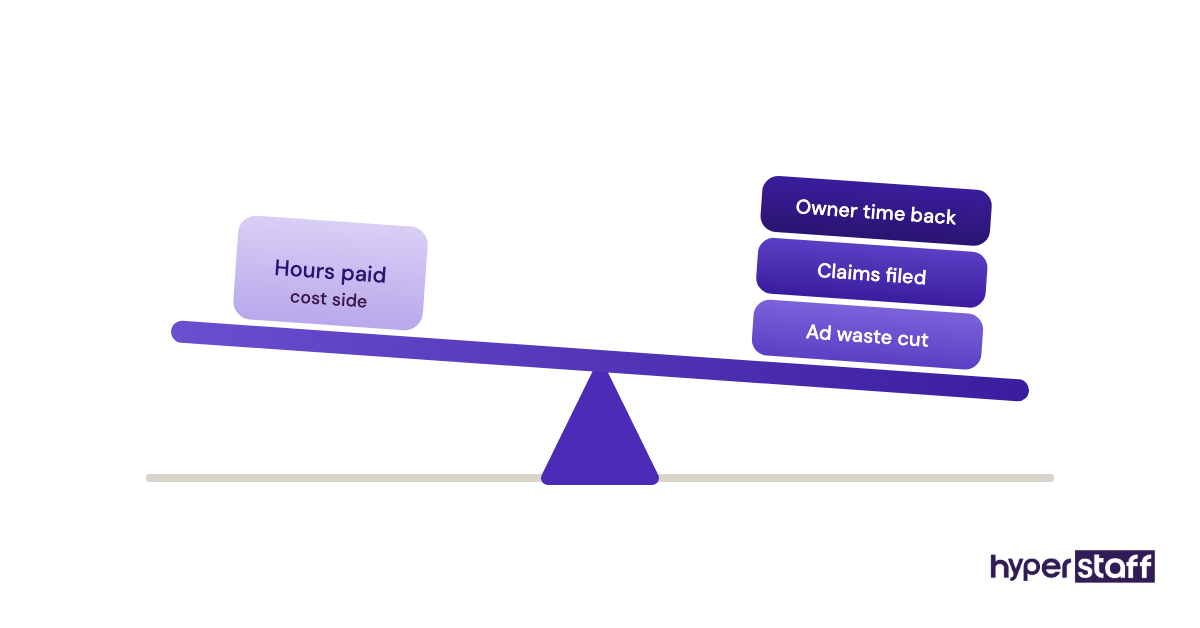
Cheap hours spent on low-value tasks still lose money. Mid-priced hours spent on stranded inventory, suppressed listings and wasted ad spend tend to pay back fast, because those problems leak cash every day they sit unfixed.
Key Amazon VA Terms You Should Know
- ASIN = Amazon's unique ID for each product page in its catalog.
- Seller Central = the dashboard third-party sellers use to run listings, orders, ads and account health.
- User permissions = Seller Central settings that let an owner give an assistant access to some areas without sharing the main login.
- FBA = Fulfillment by Amazon, where Amazon stores, packs and ships your stock.
- Buy Box = the "Add to Cart" slot on a product page that one seller wins at a time.
- ACoS = advertising cost of sales, ad spend divided by ad-attributed sales.
- TACoS = total ad spend divided by total sales, ads and organic combined.
- Stranded inventory = FBA stock with no active offer attached, so it can't sell.
- Account Health Rating = Amazon's score of policy compliance that can put selling privileges at risk.
- Brand Registry = Amazon's program giving brand owners more control over listings and access to A+ Content.
- SOP = standard operating procedure, the written steps for a repeat task.
Why Does the Worth-It Question Matter So Much on Amazon?
Amazon rewards consistency, and a missed daily check costs real money on the platform. A listing that gets suppressed on Friday and sits unnoticed until Monday loses a weekend of sales, and stockouts can drag organic rank down for weeks after the restock lands.
The stakes grew with the seller base. Amazon says more than 60% of sales in its store now come from independent sellers, so most sellers compete against other small businesses that also watch their accounts closely.
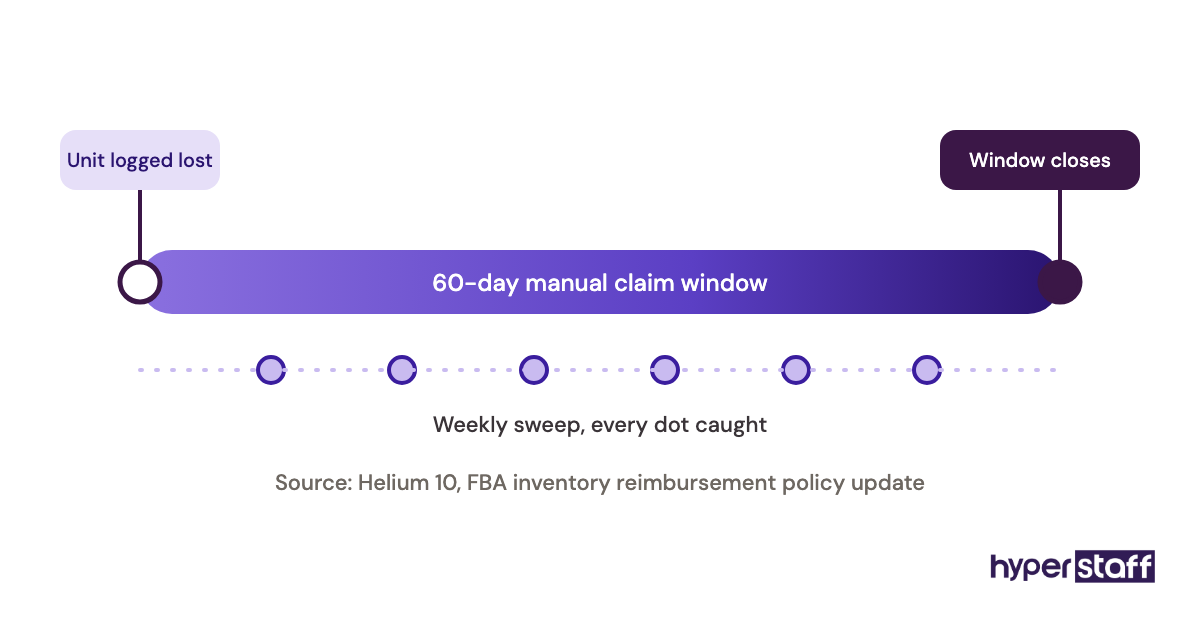
Owners usually feel the problem as a backlog. Reimbursement claims go unfiled, the search term report goes unread, and buyer messages creep toward Amazon's response-time limit.
How Does Working With an Amazon Virtual Assistant Work?
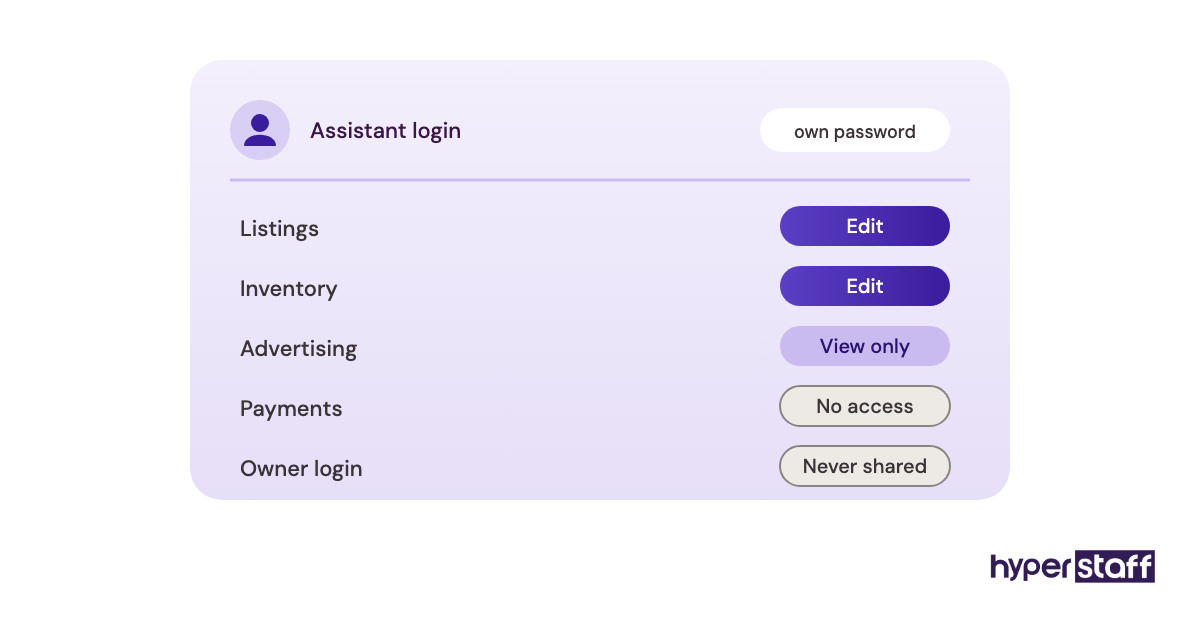
An Amazon virtual assistant works inside your Seller Central account through a secondary user login, with access limited to the areas their tasks need. They follow written SOPs, report on a set cadence and flag anything outside their lane to you.
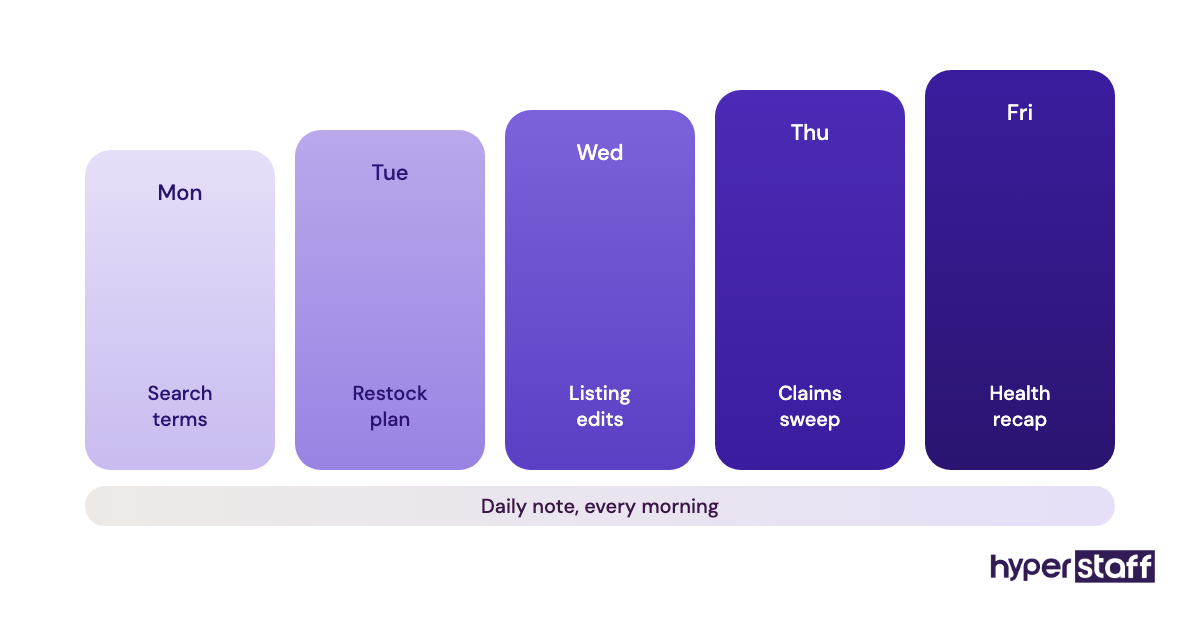
A typical week mixes daily checks with weekly projects. The full spread of Amazon VA tasks you can hand off runs from listing edits to PPC reporting, and most sellers start with five or six of them.
The reporting rhythm matters more than the task list. A short daily note covering account health, stock levels, open cases and buyer messages catches problems while they're still cheap.
Logins from a new country can also trigger extra identity checks from Amazon. Plan for a few days of back-and-forth on two-step verification in week one.
Types and Forms of Amazon Virtual Assistant Support
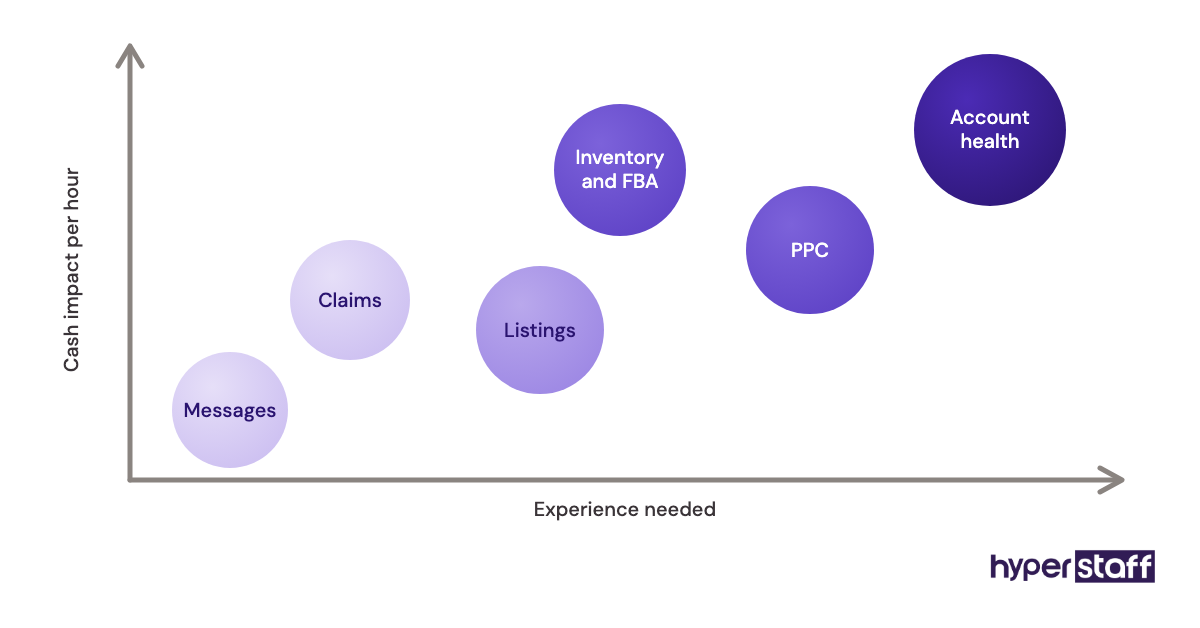
Amazon virtual assistant support comes in several forms, and the form changes the math. A generalist covering daily operations costs less per hour than a PPC or listing specialist, but the specialist's hours usually carry more dollar value each.
| Type | Main work | Typical experience | Hours that fit | Best payback signal |
|---|---|---|---|---|
| Operations generalist | Orders, messages, daily checks | 0 to 2 years | 40 to 80 a month | Faster replies, fewer missed alerts |
| Listing specialist | Titles, bullets, images, A+ Content | 2 to 5 years | 40 to 80 a month | Higher conversion rate |
| PPC assistant | Bids, negative keywords, reports | 2 to 5+ years | 40 to 80 a month | Lower ACoS at steady sales |
| Inventory and FBA coordinator | Restock plans, shipments, stranded stock | 2 to 5 years | 80 to 160 a month | Fewer stockouts |
| Reimbursement and case handler | Lost or damaged stock claims | 0 to 2 years | 40 a month | Recovered cash |
| Account health monitor | Policy alerts, appeals drafts | 5+ years | 40 a month | No suspensions |
| Full-time Amazon operator | Most of the above, one person | 5+ years | 160 a month | Owner leaves daily ops |
Before picking a row, write the role down. A clear Amazon VA job description tells you which type you're hiring and stops scope creep later.
How Is an Amazon VA Different From Related Roles?
An Amazon VA differs from related roles in ownership and cost. You direct the assistant and keep the know-how in your business, while agencies and freelancers bring their own methods and leave with them.
Amazon VA vs. an In-House Hire
An in-house Amazon specialist costs a full local salary plus taxes, benefits and a desk. A remote assistant does much of the same Seller Central work for a fraction of that, though local hires win on overlapping hours and walking over to the warehouse.
Our side-by-side on a remote VA versus in-house staff runs the full comparison.
Amazon VA vs. a Full-Service Amazon Agency
A full-service agency sells strategy and execution as a package, often priced as a monthly retainer or a percentage of sales. Sellers who already know their strategy usually overpay for that package, because they're paying for decisions they could make themselves.
The agency still wins for a seller with no Amazon experience at all. Someone has to set direction, and an assistant follows direction.
Amazon VA vs. a Freelance Gig Worker
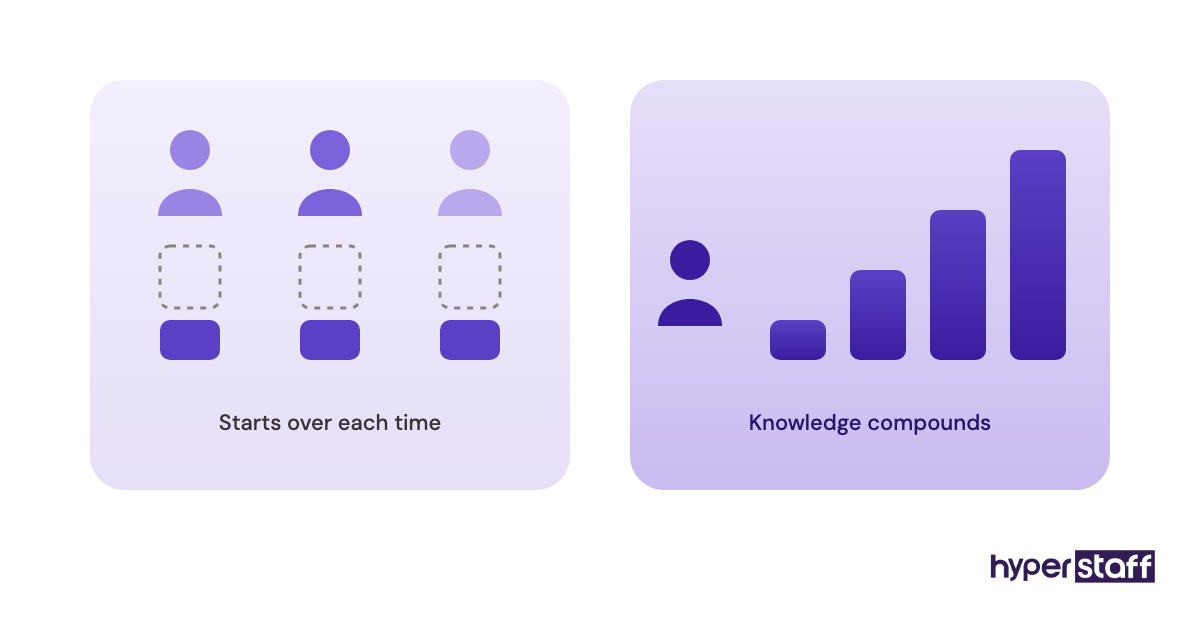
Freelancers on gig sites suit one-off jobs like a listing rewrite. For ongoing work, the rotation problem shows up: each new freelancer relearns your catalog, and the context you paid for leaves with the last one.
What Are the Benefits of an Amazon Virtual Assistant?
The benefits of an Amazon virtual assistant come down to consistent coverage of work that leaks money when skipped. Here's where sellers see the return:
- Daily account checks happen every day, including the dull ones.
- Reimbursement claims for lost or damaged FBA stock actually get filed.
- Ad reports get read weekly, so wasted search terms get cut sooner.
- Owners get hours back for product sourcing and supplier talks.
- Hourly cost sits well below a local hire for the same Seller Central work.
What Are the Drawbacks of an Amazon Virtual Assistant?
The drawbacks of an Amazon virtual assistant are mostly setup costs and access risk. They're real, but each one has a fix:
- The first two to four weeks cost owner time for training.
- Time zones can delay answers on urgent issues.
- Account access needs careful permission limits.
- A poor fit means restarting training unless procedures are written down.
Who Needs an Amazon Virtual Assistant?
Sellers who need an Amazon virtual assistant are usually past the test phase, with steady monthly sales and more recurring tasks than the owner can cover. If you sell fewer than 40 items a month, the work is probably still small enough to handle yourself.
Private label brands with 20 or more ASINs often hit the limit first. Each ASIN brings its own listing, ad campaigns, reviews and stock plan, and the checks multiply.
Wholesale and arbitrage sellers need a different kind of help. Their volume sits in sourcing research and repricing, so an assistant who can work through supplier lists with Keepa data adds the most.
Agencies and aggregators with many client accounts are a third group. They tend to need several assistants, each owning one function across accounts.
Amazon Virtual Assistant Examples
The examples below are common setups we see sellers ask about, described as patterns. They show why the same role can pay back or burn cash depending on structure.
Good Amazon Virtual Assistant Examples
The Reimbursement Sweep
An assistant spends a few hours each week comparing FBA inventory adjustments against claims already filed. Amazon reimburses many lost or damaged units, but only when someone opens the case, and that cash rarely recovers itself.
The Monday Search Term Review
Every Monday, the assistant pulls the search term report, flags terms with spend and zero sales, and sends a short list for approval. The owner keeps budget decisions and loses the two hours of spreadsheet work.
The Daily Health Note
A five-line message each morning: Account Health Rating, stranded units, suppressed listings, open cases, unanswered messages. Small, boring and very hard to argue with.
Bad Amazon Virtual Assistant Examples
The Unlimited Ad Budget
An assistant gets full advertising access and a vague goal like "grow sales." Bids rise, sales rise a little, and ACoS doubles before anyone checks.
The Shared Owner Login
The owner hands over the main email and password to save setup time. Every change now looks like the owner made it, and removing access later means resetting everything.
The Everything Assistant
One junior hire gets listings, ads, sourcing, customer service and graphic design in week one. None of it gets done well, and the owner decides VAs don't work.
Our list of common Amazon VA mistakes covers more of these traps.
Creating an Amazon VA Plan, Step-by-Step
An Amazon VA plan moves from audit to handoff in five steps. Skipping the first one is the most common reason a hire feels expensive.
Step #1: Log Your Own Hours for Two Weeks
Write down every Amazon task you do and how long it takes. Mark which ones have a direct dollar value, such as claims, ads and stock.
Step #2: Pick the First Lane
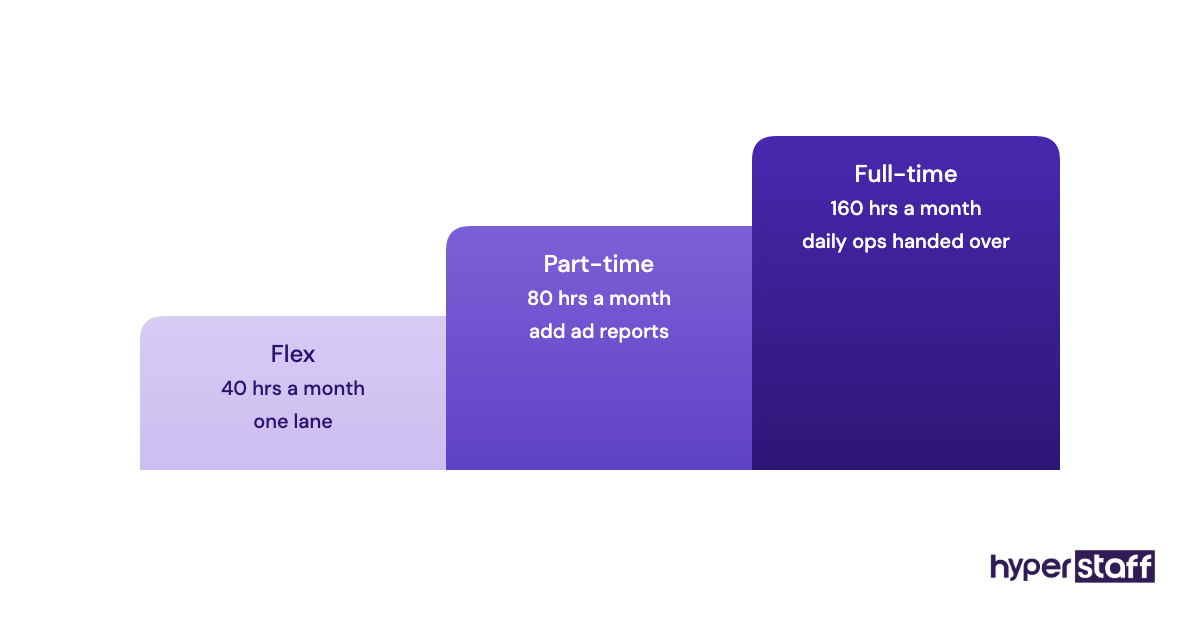
Choose a cluster of tasks worth 40 to 80 hours a month. One lane with clear output beats five half-defined ones.
Step #3: Hire for That Lane
Match experience to the lane's risk. Ads and account health need more experience than order messages, and our guide on hiring an Amazon VA the right way walks through screening.
Step #4: Write the SOPs Before Day One
Record each task once, with screenshots or a short screen video. The written procedure is what lets a new person start fast and what protects you if they leave.
Step #5: Set a 30-Day Review
Agree on two or three numbers to check after a month, like claims filed or response time. Expand the role only once the first lane runs without you.
What Does an Effective Amazon VA Setup Look Like?
An effective Amazon VA setup has narrow permissions, written procedures, a fixed reporting cadence and an owner who reviews output weekly. Each piece is cheap, and missing any one tends to cost more than the assistant.
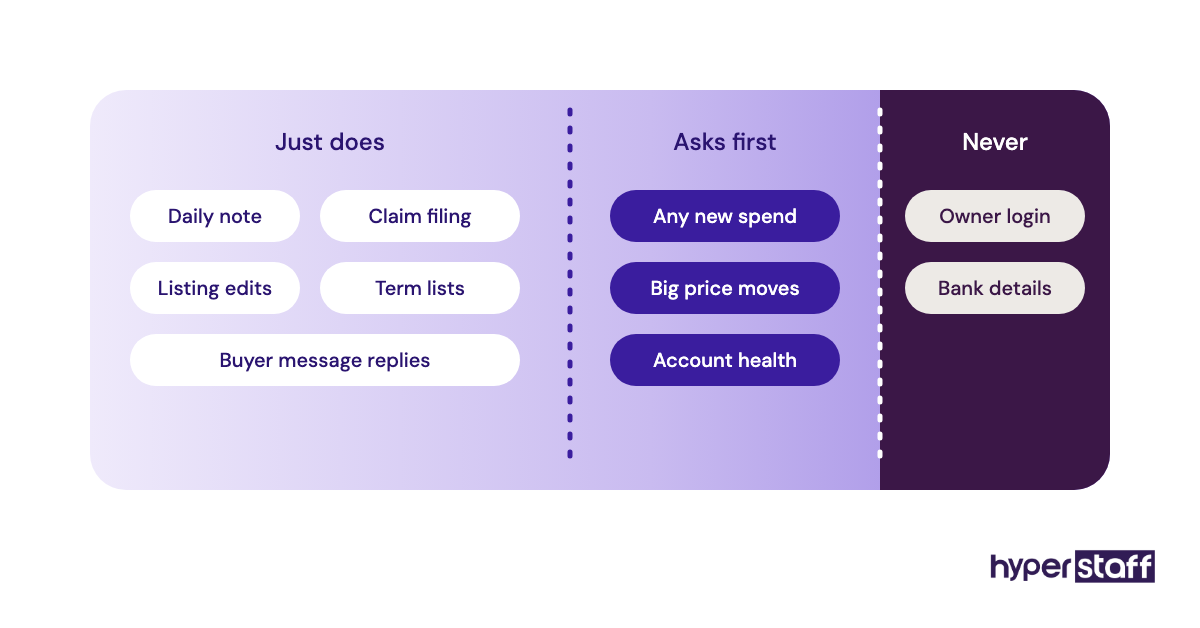
The approval line is the part most sellers get wrong. Anything that spends money, changes a price by more than a set amount, or touches account health goes to the owner first, and everything else the assistant just does.
Practitioners split on one point. Some sellers want an assistant who executes and never decides. Others want them making small bid changes alone within limits, and both work if the limits are written down.
We lean toward the second for anyone past their first month. Approvals for every $2 bid change turn the owner back into the bottleneck.
Amazon Virtual Assistant Tools and Software
Amazon virtual assistant tools start with Seller Central and add research, tracking and documentation software around it. Our roundup of the best Amazon VA tools goes deeper, but these are the ones that show up in most setups:
- Seller Central: Amazon's own dashboard, included in the Professional selling plan at $39.99 a month, which most sellers with an assistant already use.
- Helium 10: keyword research, listing tools and rank tracking, with a free plan and paid tiers from roughly $99 to $359 a month depending on plan and billing.
- Jungle Scout: product and keyword research, roughly $29 to $149 a month depending on plan and whether you pay yearly.
- Keepa: price and rank history, with a free tier and a paid plan around €19 to €29 a month.
- Google Sheets: the daily and weekly reports.
Our earned opinion: most sellers don't need both Helium 10 and Jungle Scout. Pick one, and let the assistant get fast in it.
9 Proven Amazon VA Tips Worth Following
These tips come from the setups that hold up past month three.
- Add the assistant as a Seller Central user with limited permissions.
- Start with one lane of 40 to 80 hours.
- Write a rough SOP for every task before handing it over.
- Set a dollar limit on any change made without approval.
- Ask for a short daily note, even on days when nothing looks wrong.
- Review ad changes weekly for the first two months.
- Keep one research tool, not three.
- Store passwords in a shared password manager, never in chat.
- Add a second lane only once the first runs without you.
Overcoming Common Amazon VA Challenges
Common Amazon VA challenges are time zones, access security and knowledge loss. Each has a known fix.
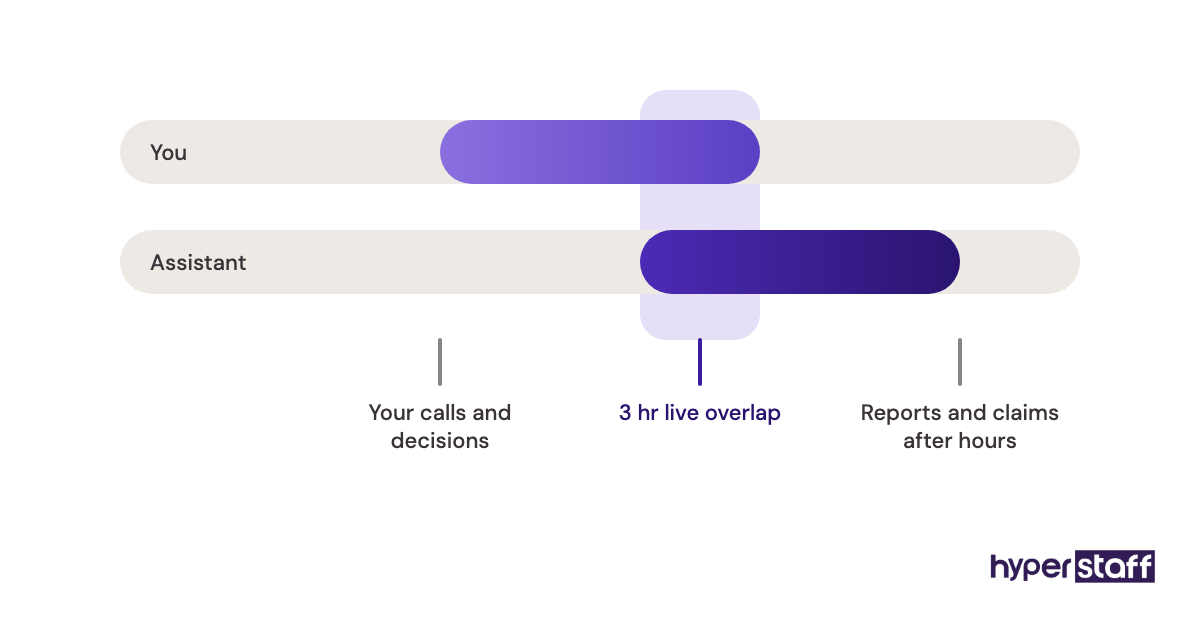
For time zones, split work into overnight tasks (reports, claims, listing edits) and live tasks you keep. A three-hour daily overlap is enough for most stores.
For knowledge loss, the fix is documentation that lives outside the assistant's head. That's why Hyperstaff keeps an Operations Vault for each client, holding your SOPs, tools and context, so a replacement is briefed from it rather than from scratch.
How to Measure Amazon VA Success
Amazon VA success is measured by the numbers tied to their lane. A claims assistant is judged on reimbursements recovered, a PPC assistant on ACoS and TACoS at steady sales, and an operations assistant on response time and missed alerts.
Owner hours count too. Track how many hours a week you spent on Amazon tasks before the hire and after month two.
Avoid judging on total sales alone in the first quarter. Seasonality, stock and competitors move sales more than any one assistant can.
How Long Does an Amazon VA Take to Work?
An Amazon VA usually takes two to six weeks to work independently. Simple lanes like messages and claims settle in two; PPC and inventory planning take longer because they need judgment about your catalog.
The first week goes to access setup and verification. A structured plan for onboarding your Amazon VA shortens the rest.
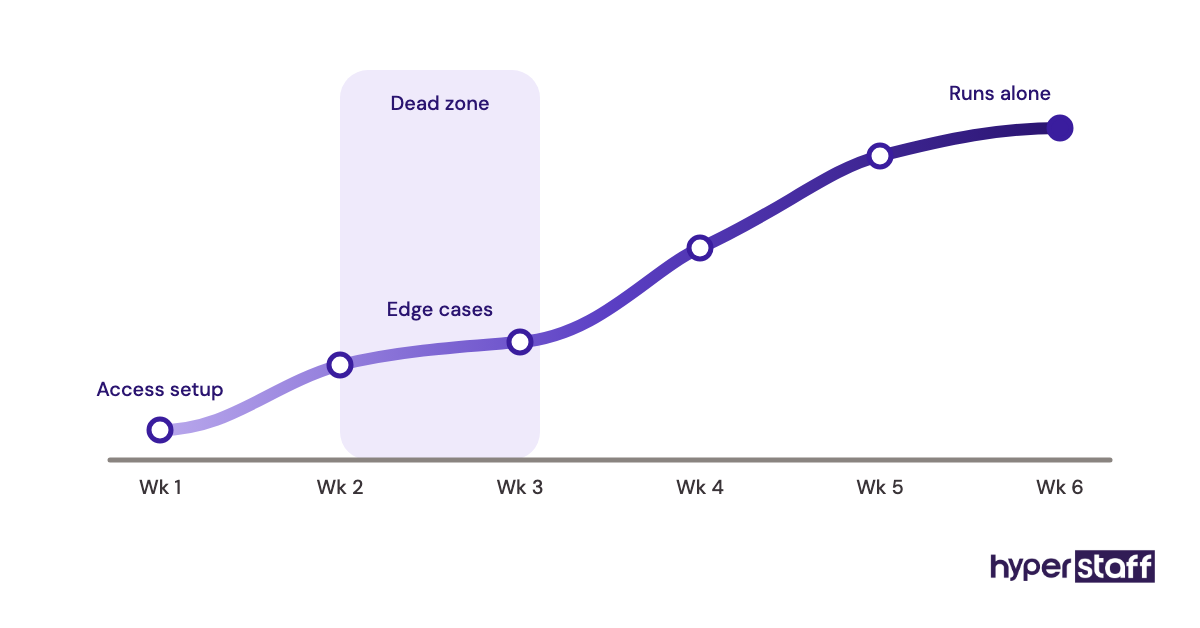
Expect a dead zone around weeks two and three, when the assistant knows the steps but still asks about edge cases. Answer those questions in the SOP, not just in chat.
How Much Does an Amazon Virtual Assistant Cost?
An Amazon virtual assistant costs from $3 to $12+ an hour through Hyperstaff, depending on experience tier. A local in-house Amazon specialist usually costs several times that once salary, taxes and benefits are included.
| Experience | Hyperstaff rate | Hyperstaff 80 hrs/month | Hyperstaff 160 hrs/month | Typical US in-house (hourly, fully loaded) |
|---|---|---|---|---|
| Essential (0 to 2 years) | From $3/hr | From $240 | From $480 | $20 to $30 |
| Professional (2 to 5 years) | From $6/hr | From $480 | From $960 | $28 to $40 |
| Expert (5+ years) | From $12/hr | From $960 | From $1,920 | $38 to $55+ |
Hours come in monthly bundles of 40, 80 or 160, and paying quarterly saves 10%. The full breakdown of Amazon VA cost covers hidden extras like tool seats.
Important: Hyperstaff prices shown are averages, not fixed quotes. Your final cost depends on the role, hours and experience level your store needs.
Is an Amazon Virtual Assistant Worth It?
Yes, an Amazon virtual assistant is one of the best-returning hires a growing seller can make, when the role starts in a lane with dollar value attached. Recovered claims, trimmed ad waste and avoided stockouts can cover the cost within the first few months, and the owner hours freed up keep paying after that.
Here's an example calculation with round inputs. A Professional-tier assistant at $6 an hour for 80 hours a month costs $480, or $432 with the quarterly discount.
Say that assistant cuts $400 a month of ad spend on search terms with no sales and files claims worth $150 a month. That's $550 in hard savings before counting any owner time, so the role pays for itself on cash alone.
Now add 15 owner hours a month freed up. If you value your time at $50 an hour, that's another $750 of capacity, which is where the real upside sits.
The math flips when the inputs are wrong. If the same $480 buys 80 hours of tasks with no dollar value, and you spend 10 hours a month fixing mistakes, the hire loses money.
How to Choose an Amazon VA Agency
Choosing an Amazon VA agency comes down to vetting depth, replacement terms and who owns the documentation. Ask how candidates are tested on Seller Central, how fast a replacement arrives, and whether your procedures stay with you.
Run your own interview even when the agency pre-vets. A short list of Amazon VA interview questions with a live task, like reading a search term report, shows more than any résumé.
Watch for pooled models, where a rotating team shares your account. They can look cheaper per hour, but each person relearns your catalog.
At Hyperstaff, every client gets one dedicated assistant, an account manager, and a 30-minute kickoff call. Work starts that day or the next morning.
Amazon VA Statistics, Trends and Future Predictions
Amazon VA demand tracks the growth of third-party selling. Independent sellers make up more than 60% of Amazon's store sales, and most are small or mid-sized businesses running lean teams.
Across Hyperstaff's work, we've placed 70+ assistants with 30+ clients, drawing from the Philippines, Latin America, India, Eastern Europe and the United States. Region choice usually follows time zone needs more than price.
The trend we expect to continue is specialization. Generalist "Amazon VA" roles are splitting into PPC, listing, inventory and account health specialists, because sellers now judge each hire on one measurable number.
We're less sure about pricing direction. Experienced Amazon PPC talent is in short supply, so expert rates may climb faster than the rest.
Amazon Virtual Assistants and AI
AI changes what an Amazon virtual assistant spends time on, without removing the need for one. Amazon has added generative AI tools in Seller Central that draft listing copy, and research tools now summarize reviews and keyword data in seconds.
Drafts still need a person who knows your brand, Amazon's style rules and which claims get listings flagged. An assistant with AI tools writes ten listings in the time one used to take, and the checking becomes the job.
Our view: AI makes a good assistant more valuable and a weak one more dangerous. Faster output also means faster mistakes, so approval lines matter even more.
Disclaimer: This article is for general information only and isn't legal, tax or financial advice. Amazon fees, tool prices and policies change, so confirm current terms with Amazon and each provider before making decisions. Results vary by store.
Common questions
Is an Amazon VA worth it for a new seller?
Usually not in the first few months. Learn the core tasks yourself first so you can write SOPs and judge the work, then hire once recurring tasks outgrow your week.
Can an Amazon virtual assistant run my PPC campaigns?
Yes, if they have 2+ years of PPC experience and clear spending limits. Keep budget and strategy decisions with you for the first two months, and review weekly.
Is it safe to give an Amazon VA access to Seller Central?
It's safe when you add them as a separate user with limited permissions. Never share the owner login, and remove access the same day the engagement ends.
How many hours does an Amazon VA need each month?
Most sellers start with 40 to 80 hours a month for one lane of tasks. Stores with large catalogs or several marketplaces often move to 160 hours once the role is proven.
Is a part-time Amazon virtual assistant worth it, or should I go full-time?
Part-time is the smarter test. It shows whether the work has enough dollar value before you commit, and moving up to full-time later is simple.
Book a free 15 min call
We place a pre-vetted specialist in 5 business days, fully managed, from $3/hour.