How to Hire a Personal Virtual Assistant: A Practical Guide
A practical, step-by-step guide to hiring a personal virtual assistant who fits your life and work, with real costs and a first-week plan.
On this page
- What Does It Mean to Hire a Personal Virtual Assistant?
- Key Personal Virtual Assistant Hiring Terms You Should Know
- Why Is Hiring a Personal Virtual Assistant the Right Way Important?
- How Does Hiring a Personal Virtual Assistant Work?
- Types of Personal Virtual Assistants You Can Hire
- How a Personal Virtual Assistant Differs From Related Roles
- The Benefits of Hiring a Personal Virtual Assistant
- The Drawbacks of Hiring a Personal Virtual Assistant
- Who Needs to Hire a Personal Virtual Assistant?
- Personal Virtual Assistant Hiring Examples
- Creating a Personal Virtual Assistant Hiring Plan, Step-by-Step
- What Does an Effective Personal Virtual Assistant Hiring Strategy Look Like?
- Personal Virtual Assistant Tools and Software
- 9 Proven Tips for Hiring a Personal Virtual Assistant
- Overcoming Common Personal Virtual Assistant Hiring Challenges
- How to Measure Personal Virtual Assistant Success
- How Long Does Hiring a Personal Virtual Assistant Take to Work?
- How Much Does It Cost to Hire a Personal Virtual Assistant?
- Is Hiring a Personal Virtual Assistant Worth It?
- How to Choose a Personal Virtual Assistant Agency
- Personal Virtual Assistant Statistics, Trends and Future Predictions
- Hiring a Personal Virtual Assistant and AI
- FAQs
💡 Key Takeaways:
1) To hire a personal virtual assistant, write down the recurring tasks you want gone, turn them into a short job description, test candidates on a real task, and run a structured first week with clear access rules.
2) A personal virtual assistant handles far more than inbox and calendar work, including travel, bills, research, customer replies, lead lists and household or business errands done online.
3) Offshore personal assistants usually cost a fraction of an in-house hire, but the savings only show up when tasks are documented and the assistant has someone to answer their questions in the first month.
Buy back the hours that earn you money
Hyperstaff places pre-vetted assistants from the Philippines, Latin America, India, Eastern Europe and the United States, with 70+ assistants placed across 30+ clients so far. Our personal virtual assistant services start from $3/hour, a match usually lands within 5 business days, and every client gets a dedicated account manager who stays with you after day one.
What Does It Mean to Hire a Personal Virtual Assistant?
Hiring a personal virtual assistant means bringing on a remote professional who takes recurring personal and business tasks off one person's plate. They work from their own location, log into your tools with permissions you control, and report to you directly.
The "personal" part matters. A general admin assistant might serve a whole team, while a personal assistant learns one person's preferences: which emails can wait, which clients get a same-day reply, how you like flights booked. If you want the full role breakdown first, our explainer on what a personal virtual assistant is covers it in depth.
The scope is wider than most people expect. A good personal assistant can run your calendar in the morning, chase an unpaid invoice before lunch, and build a lead list in the afternoon.
Key Personal Virtual Assistant Hiring Terms You Should Know
- Personal virtual assistant = a remote assistant dedicated to one person's tasks, both personal and professional.
- Dedicated assistant = one named person who works only on your account, as opposed to a shared pool.
- Task pool model = an agency setup where whoever is free picks up your request.
- SOP = standard operating procedure, a written step-by-step for a recurring task.
- Delegation list = your inventory of tasks ready to hand off, ranked by time spent.
- Paid trial task = a short, real assignment that tests skill before a full commitment.
- Time zone overlap = the hours each day when you and your assistant are both working.
- Access delegation = sharing logins through a password manager or delegated inbox rights instead of handing over passwords.
- Hourly bundle = a prepaid block of hours per month, such as 40, 80 or 160.
- Replacement guarantee = a provider's promise to swap in a new assistant if the fit is wrong.
- NDA = non-disclosure agreement covering what the assistant sees in your accounts.
Why Is Hiring a Personal Virtual Assistant the Right Way Important?
How you hire a personal virtual assistant decides whether they save you ten hours a week or cost you five. A rushed hire with no task list and no access plan leads to constant check-ins, which is the opposite of what you paid for.
The most common failure we see in hiring is vague scope. "Help me with stuff" gets you a capable person waiting for instructions, and instructions are exactly what you don't have time to write every morning.
Trust is the other reason. Your assistant will touch your email, your calendar and often your bank or card details, so the vetting and access setup carry real weight.
How Does Hiring a Personal Virtual Assistant Work?
Hiring a personal virtual assistant follows the same arc whether you go through a freelance platform or an agency: define the work, find candidates, test them, then onboard. The difference is who does the sourcing and vetting, and how fast you get a match.
| Stage | Freelance platform | Staffing agency (Hyperstaff) |
|---|---|---|
| Define tasks | You write it alone | Discovery call, free |
| Source candidates | You screen applicants | Pre-vetted shortlist |
| Time to a match | 1 to 4 weeks, varies | About 5 business days |
| Kickoff | You set it up | 30-minute kickoff call |
| Start date | Negotiated | Same day or next morning |
| If it's a bad fit | Start over | Free replacement in 5 to 7 business days |
A platform is cheaper when you already know how to screen assistants. An agency earns its keep when you'd rather spend your hours on the work than on reading 80 applications.
Types of Personal Virtual Assistants You Can Hire
Personal virtual assistants come in several forms, split by experience level, hours and where the work leans. Picking the right type up front prevents paying expert rates for inbox triage or expecting a junior hire to run your finances.
| Type | Best for | Typical tasks | Experience needed | Usual hours |
|---|---|---|---|---|
| Executive personal assistant | Founders, executives | Calendar, travel, meeting prep, gatekeeping | 2 to 5+ years | 80 to 160/month |
| Life admin assistant | Busy professionals, families | Bills, bookings, appointments, returns | 0 to 2 years | 40/month |
| Inbox and calendar assistant | Anyone drowning in email | Triage, replies, scheduling | 0 to 2 years | 40 to 80/month |
| Business ops assistant | Solo owners, small teams | Invoicing, CRM updates, vendor follow-ups | 2 to 5 years | 80 to 160/month |
| Customer support assistant | Online sellers, coaches | Ticket replies, order issues, refunds | 0 to 5 years | 80 to 160/month |
| Lead generation assistant | Consultants, agencies | Prospect lists, outreach, follow-ups | 2 to 5 years | 40 to 80/month |
| Online business manager | Owners scaling past solo | Projects, team coordination, reporting | 5+ years | 160/month |
How a Personal Virtual Assistant Differs From Related Roles
A personal virtual assistant sits between a general admin hire and a specialist. Comparing the three closest roles makes it easier to see which one your task list actually calls for.
Personal Virtual Assistant vs. In-House Personal Assistant
An in-house assistant sits in your office and can sign for packages, which a remote assistant can't. A remote one costs far less and works from a time zone that can cover your early mornings or late nights. Our breakdown of a personal virtual assistant vs in-house hire runs the full numbers.
Personal Virtual Assistant vs. General Virtual Assistant
A general VA usually supports a team or a function, like support tickets for a whole store. A personal VA follows one person and learns their judgment calls, which makes them slower to replace but far more useful once trained.
Personal Virtual Assistant vs. AI Scheduling Tools
AI tools book meetings and draft replies well. They can't call a hotel to fix a booking, notice that your client sounded annoyed, or decide which of two conflicting requests you'd want first.
The Benefits of Hiring a Personal Virtual Assistant
- Recurring tasks leave your week, often 10+ hours of it.
- Rates start far below a local salary, with no office or equipment costs.
- Time zone differences can cover hours you're offline.
- One person learns your preferences, so instructions get shorter over time.
- Hours scale up or down through monthly bundles.
- Your processes end up written down, which outlasts any single hire.
The Drawbacks of Hiring a Personal Virtual Assistant
- The first two to four weeks take your time before they save it.
- Sharing account access needs a proper security setup.
- Anything physical, like errands in person, stays with you.
- Communication gaps grow if you rely on chat alone.
Who Needs to Hire a Personal Virtual Assistant?
Founders, consultants, executives and busy professionals benefit most, especially anyone whose hourly value is well above an assistant's rate. If you regularly spend evenings clearing email or chasing paperwork, you're already doing an assistant's job unpaid.
A useful test: list everything you did last week that someone else could have done with a short written guide. People who find 8 or more hours on that list usually have enough for a 40-hour monthly bundle.
Small business owners are a second group, and their needs look different. An executive wants a gatekeeper for time, while a shop owner often wants support replies and order follow-ups handled, so the hire profile changes.
Personal Virtual Assistant Hiring Examples
The same role can be hired well or badly, and the difference shows up within the first month. Below are common patterns we see from both sides of the table.
Good Examples of Hiring a Personal Virtual Assistant
Hiring From a Written Task List
An owner who brings a ranked list of tasks to the first call gets a better-matched shortlist. Scope like "inbox triage daily, travel monthly, invoice follow-ups weekly" tells a recruiter exactly which skills to test.
Testing With a Real Task
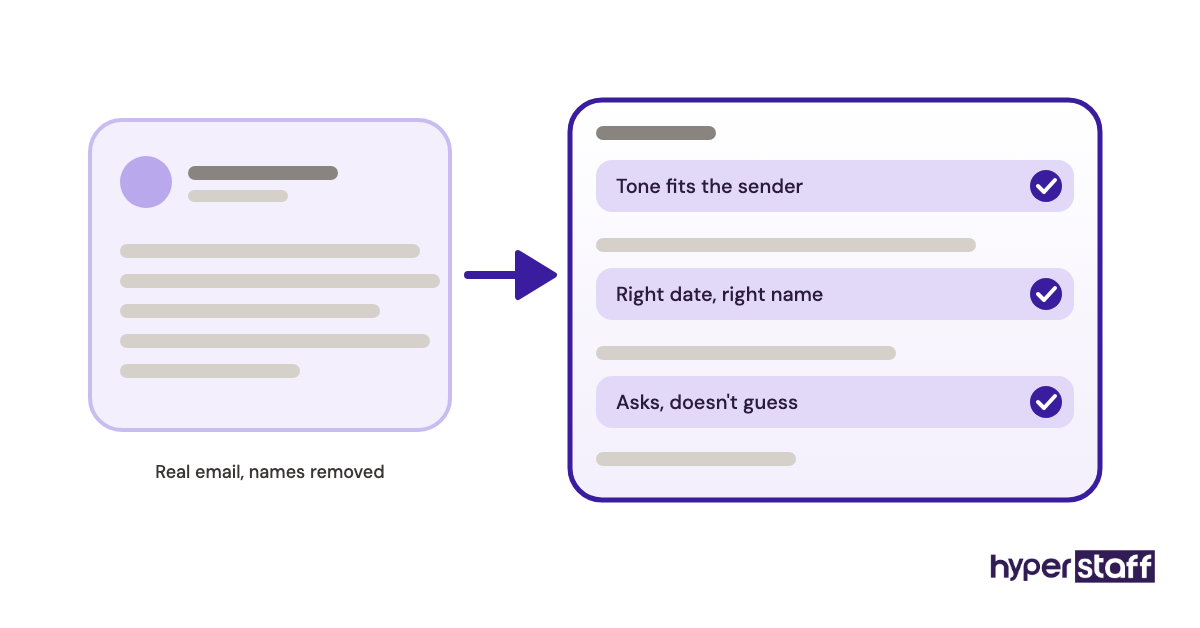
Asking candidates to draft three replies to real (anonymised) emails reveals tone and judgment fast. A paid test task beats any number of interview answers.
Starting Small, Then Expanding
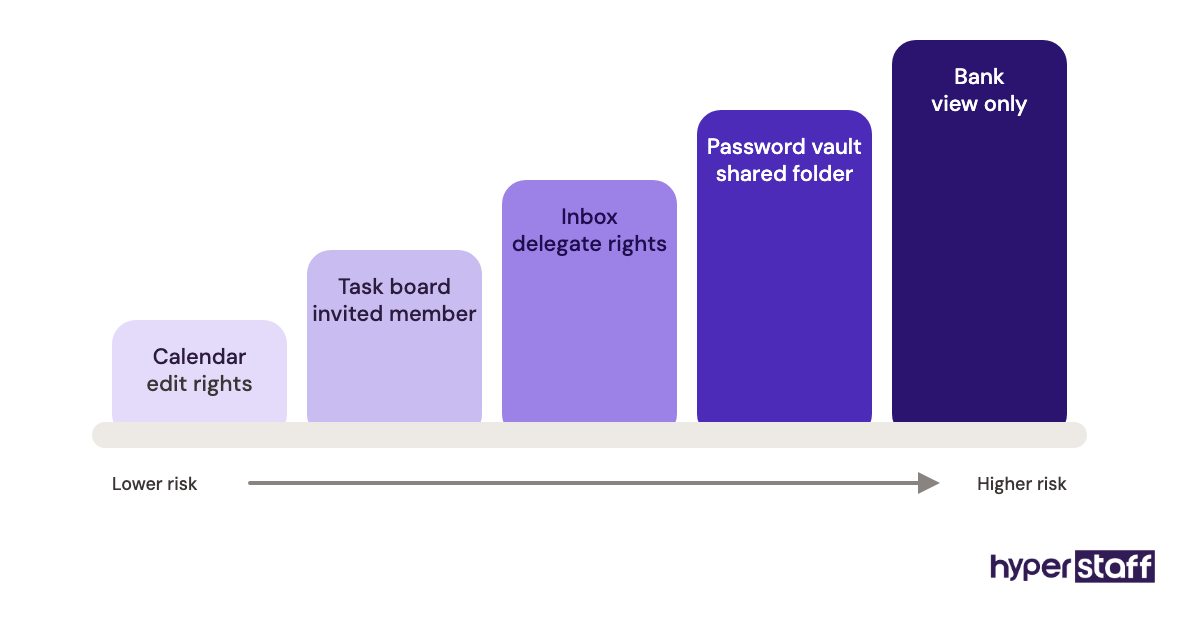
Handing over the calendar first, then email after two weeks, then finances after a month builds trust in steps. Each stage gets checked before the next one opens.
Bad Examples of Hiring a Personal Virtual Assistant
Most failed hires trace back to setup, rarely to the assistant's skill. Our guide to common personal virtual assistant mistakes goes further than the three below.
Hiring on Price Alone
The cheapest applicant on a marketplace often has the least English fluency or reliability. Saving $2 an hour means little if you rewrite every email they send.
Sharing Passwords by Chat
Pasting your bank login into a message thread creates a security problem that lasts long after the hire ends. Use a password manager with shared vaults from day one.
No Daily Check-In
Silence in week one breeds guesses. A 10-minute end-of-day update catches wrong assumptions before they repeat for a month.
Creating a Personal Virtual Assistant Hiring Plan, Step-by-Step
A personal virtual assistant hiring plan takes five steps, from listing tasks to running the first week. Following them in order keeps you from interviewing before you know what you're hiring for.
Step #1: List and Rank Your Tasks
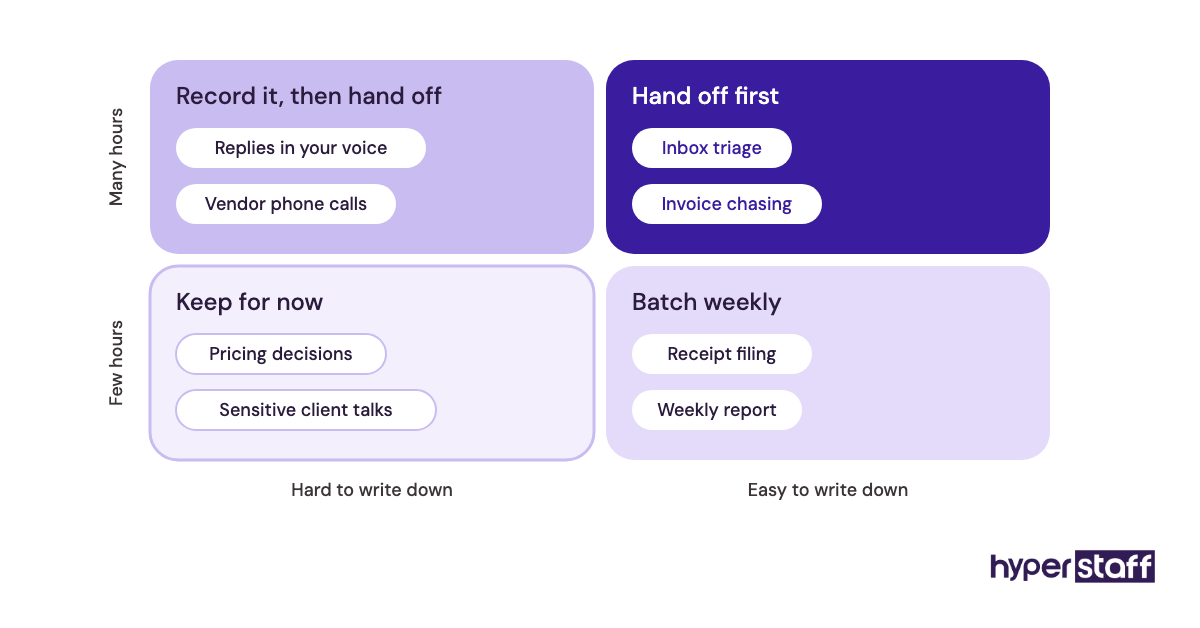
Track a full week, then sort tasks by hours spent and how easily they can be written down. Our list of common personal virtual assistant tasks helps spot ones you'd overlook.
Step #2: Write the Job Description
Turn the top tasks into duties, required tools, working hours and the time zone overlap you need. A clear personal virtual assistant job description filters out wrong-fit applicants before you see them.
Step #3: Choose Your Hiring Channel
Pick between a freelance platform, a direct hire or an agency. Your choice depends mostly on how much screening time you have and how much a bad hire would cost you.
Step #4: Interview and Test
Run a short video call, then a paid task based on real work. Our list of personal virtual assistant interview questions covers judgment, communication and security habits.
Step #5: Onboard the First Week
Set up access, share written SOPs, and agree on a daily update format. A proper plan for onboarding a personal virtual assistant decides how fast they reach full speed.
What Does an Effective Personal Virtual Assistant Hiring Strategy Look Like?
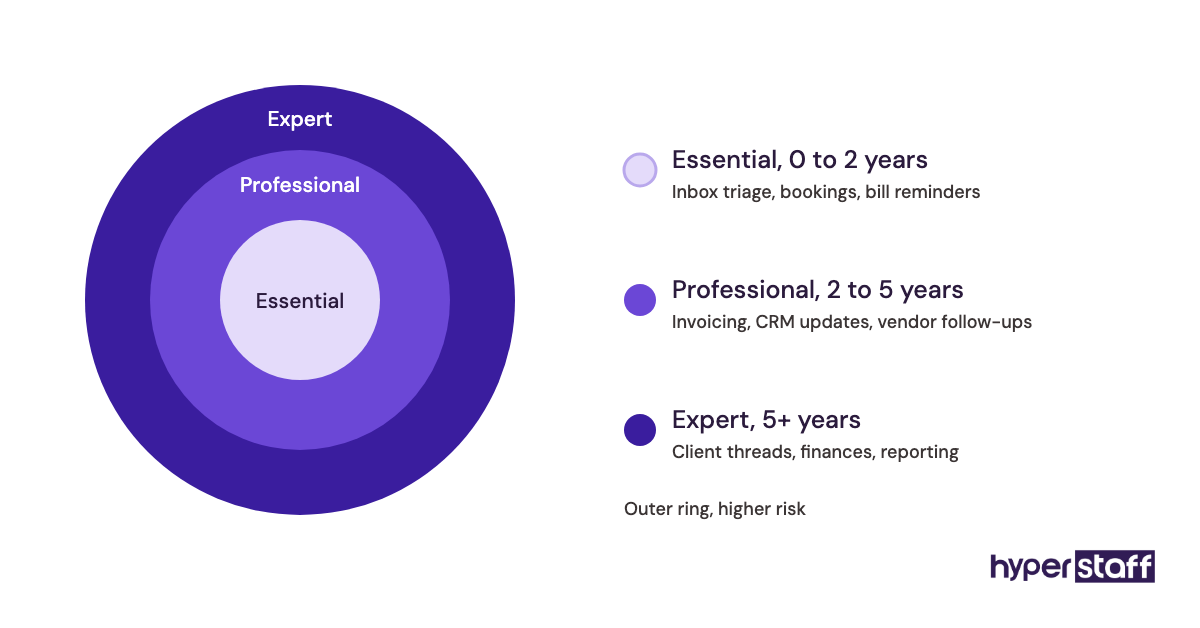
An effective personal virtual assistant hiring strategy matches the assistant's experience to the risk of the tasks. Low-risk, repeatable work goes to an Essential-level hire, while anything touching money, clients or your reputation calls for more experience.
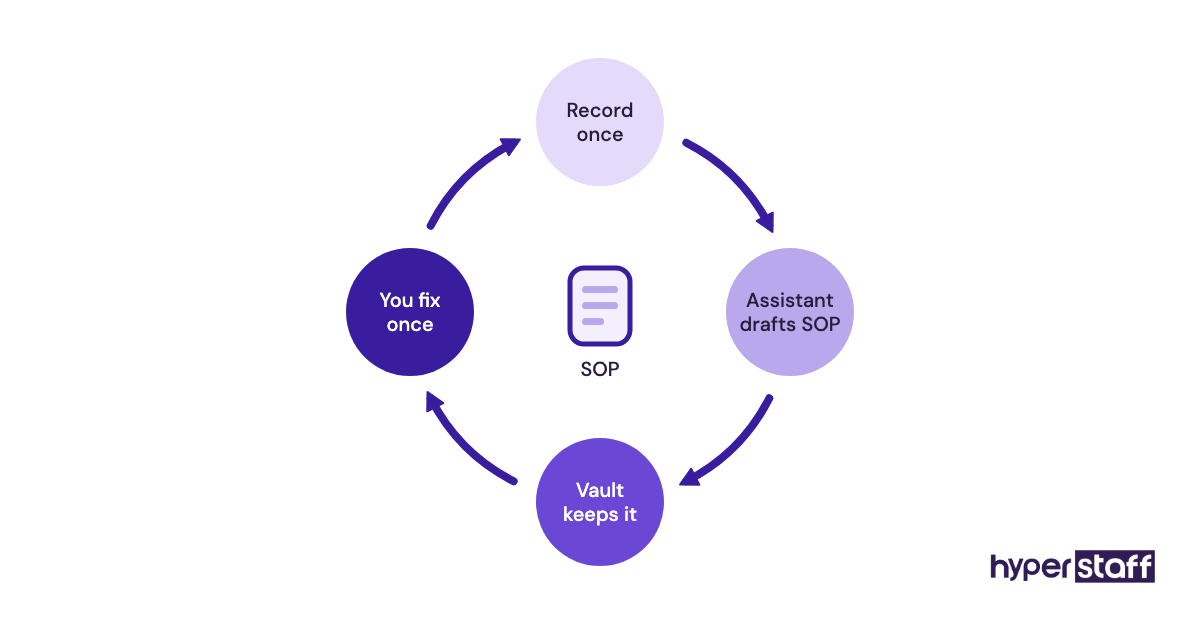
It also plans for the assistant leaving. People get sick, change careers or move on, so the strategy keeps every process in written SOPs that a replacement can read on day one.
Practitioners disagree on one point: whether to hire for skills or for attitude. Our lean is attitude for life admin, skills for business ops, because a quick learner picks up your travel preferences in a week but won't pick up bookkeeping that fast.
Personal Virtual Assistant Tools and Software
The right tools make hiring and managing a personal virtual assistant safer and faster. Set them up before day one, since an assistant without access is an assistant waiting. Our full roundup of personal virtual assistant tools goes deeper on each category.
- Bitwarden for sharing logins. The free personal plan allows sharing with one other user, and the Teams plan starts at $4 per user per month on annual billing.
- Calendly for scheduling. A free plan covers one event type, and paid seats start around $10 per month billed yearly.
- Loom for recording SOPs as short screen videos. The free Starter plan caps screen recordings at 5 minutes and 25 videos per person, which is enough to start.
- Google Workspace or Microsoft 365 delegated inbox access, so your assistant manages email without your password.
- A task board such as Trello, Asana or ClickUp, so requests don't live in chat history.
Our earned opinion: a password manager matters more than any project tool. Teams that skip it end up resetting passwords for weeks after an assistant leaves.
9 Proven Tips for Hiring a Personal Virtual Assistant
These tips come from the patterns that separate hires that stick from hires that fizzle out in month two.
- Write the task list before you talk to anyone.
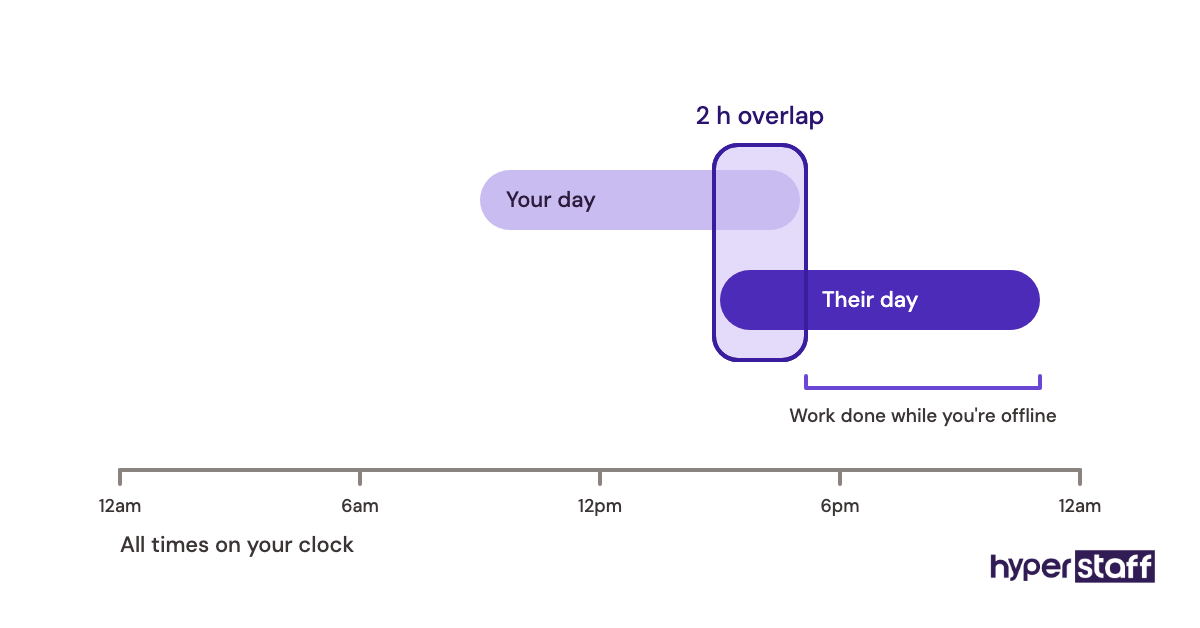
- Ask for at least 2 hours of daily time zone overlap.
- Pay for the test task, so good candidates take it seriously.
- Check written English with a real email reply, never a quiz.
- Hand over access in stages, starting with the lowest-risk tools.
- Record a Loom video the first time you do each task.
- Set a fixed daily update format: done, in progress, blocked.
- Review the first two weeks together before adding new duties.
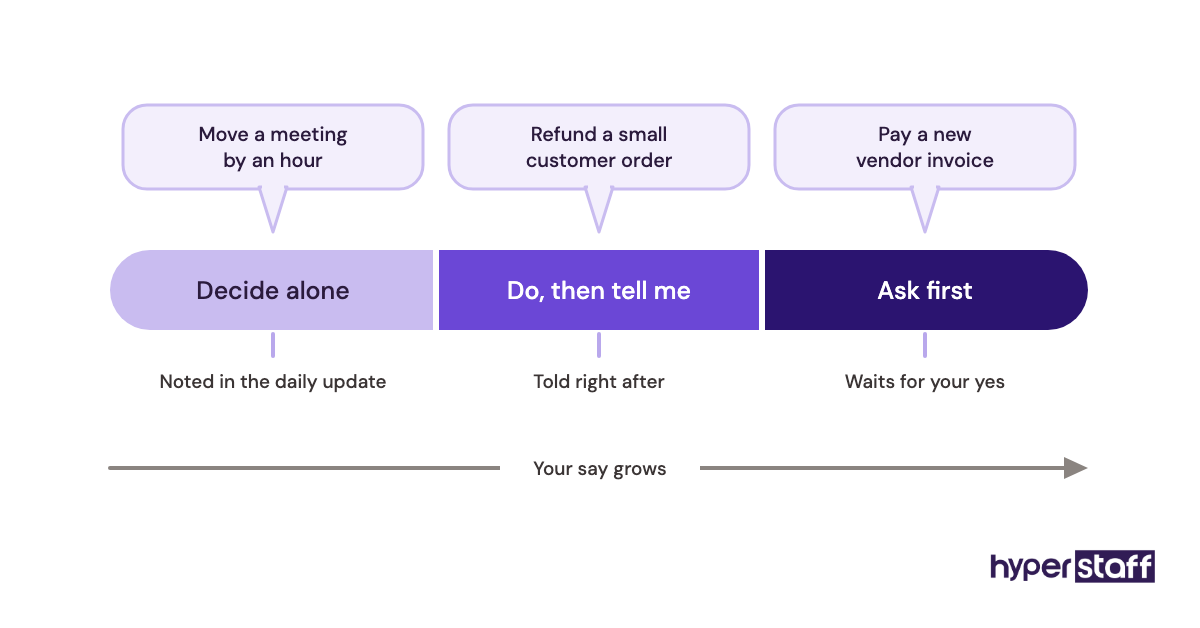
- Agree on what the assistant decides alone and what needs your yes.
Overcoming Common Personal Virtual Assistant Hiring Challenges
Most personal virtual assistant hiring challenges are about trust, communication and time zones. Each has a fix that costs little.
Trust builds through staged access and a signed NDA. Communication gaps close with a daily written update and a weekly 15-minute call, which surfaces confusion faster than chat ever does.
Time zones cut both ways. An assistant in the Philippines can clear your inbox overnight, yet urgent same-hour requests need overlap, so set those hours in writing at the start.
How to Measure Personal Virtual Assistant Success
Measure personal virtual assistant success by the hours you get back and the rework you avoid. Track your own time weekly for the first month and compare it with your pre-hire log.
Useful signals include tasks closed without a question, response time on your inbox, and how often you redo their work. If your instructions are getting shorter each week, the hire is working.
Revisit at 30 and 90 days. By the 90-day mark, an assistant should handle their core tasks with almost no input from you.
How Long Does Hiring a Personal Virtual Assistant Take to Work?
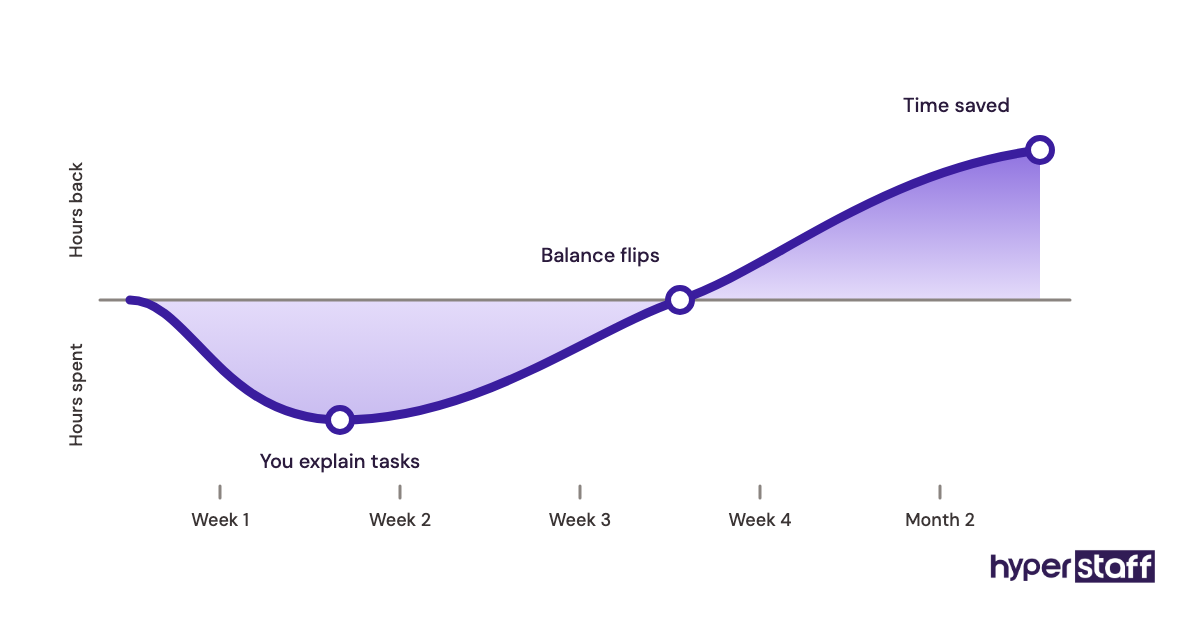
Hiring a personal virtual assistant through an agency takes about a week to a match, then two to four weeks before you feel the time savings. Freelance platform hires tend to take longer at the start because you screen everyone yourself.
Expect a dip first. Week one often costs you extra hours as you explain tasks, and weeks three and four are usually when the balance flips.
Complex roles, like finance or client-facing work, can take two to three months to reach full independence.
How Much Does It Cost to Hire a Personal Virtual Assistant?
Hiring a personal virtual assistant offshore typically costs a small fraction of an in-house assistant. The US Bureau of Labor Statistics puts median hourly pay for secretaries and administrative assistants at $23.23, before benefits. Our full guide to personal virtual assistant cost breaks down every option.
| Option | Hourly cost | 80 hours/month | Benefits and overhead |
|---|---|---|---|
| Hyperstaff Essential (0 to 2 years) | From $3 | From $240 | Included |
| Hyperstaff Professional (2 to 5 years) | From $6 | From $480 | Included |
| Hyperstaff Expert (5+ years) | From $12 | From $960 | Included |
| US in-house assistant (median wage) | About $23 plus benefits | About $1,860 in wages alone | Benefits, payroll tax, equipment extra |
Important: Hyperstaff prices shown are typical starting averages, not fixed quotes. Your final cost depends on the role, experience tier, hours and tasks involved. Paying quarterly saves 10%.
Is Hiring a Personal Virtual Assistant Worth It?
Yes, hiring a personal virtual assistant is one of the most rewarding moves a busy professional can make, when the tasks are documented and the first month is managed. The return comes from swapping low-value hours for high-value ones, and the math tends to favor it quickly.
Here's a simple example calculation. A Professional-tier assistant at $6/hour for 80 hours costs about $480 a month. If they free up 40 of your hours and your time is worth $75 an hour, you've regained roughly $3,000 of capacity.
The caveat is that freed hours only pay off if you use them on billable or growth work. Our deeper look at whether a personal virtual assistant is worth it covers cases where it isn't.
How to Choose a Personal Virtual Assistant Agency
Choose a personal virtual assistant agency by checking how they vet talent, who you'll actually work with, and what happens if the fit fails. Ask these questions on the first call.
- Will I get one dedicated assistant or a rotating pool?
- How are candidates tested before I see them?
- How fast is a replacement, and who briefs the new person?
- Is there an account manager I can reach directly?
- Are hours sold in flexible monthly bundles?
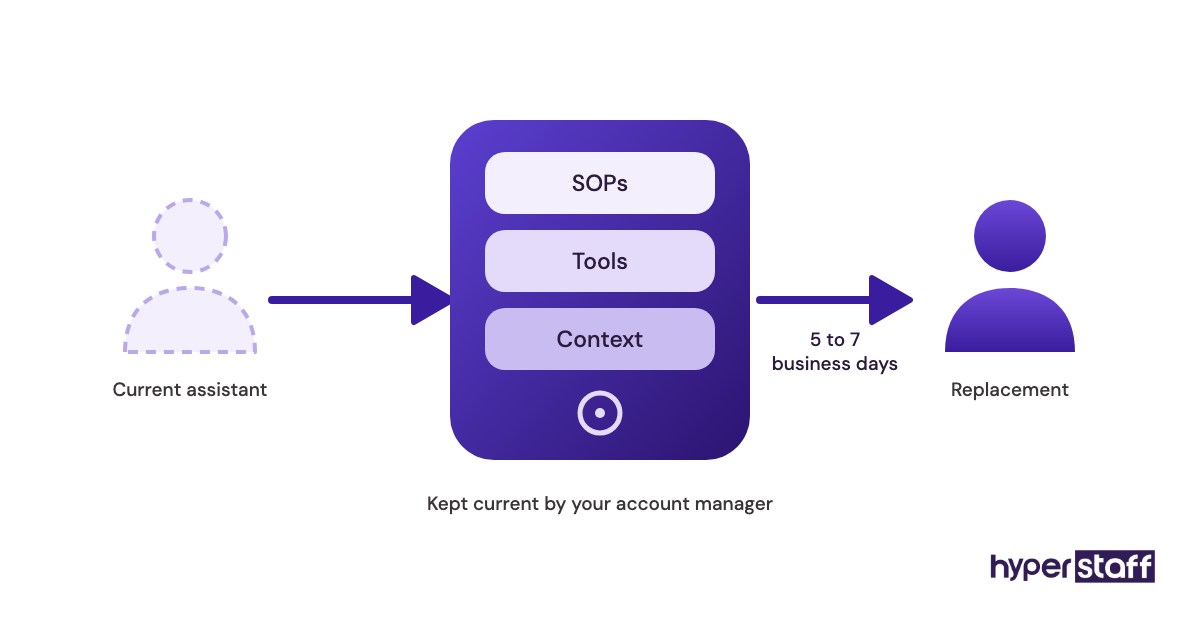
The replacement answer tells you the most. At Hyperstaff, a replacement arrives in 5 to 7 business days and gets briefed from your Operations Vault, where your SOPs, tools and context are written down and kept current.
Personal Virtual Assistant Statistics, Trends and Future Predictions
The cost gap that drives remote assistant hiring is well documented. In private industry, benefits make up 30% of employer compensation costs, according to the BLS Employer Costs for Employee Compensation release, which reports total costs of $46.89 per hour worked.
The BLS also projects employment of secretaries and administrative assistants to decline 2% over the coming decade, with median annual pay at $48,310. Fewer in-house admin roles points to more of that work moving to remote and part-time setups.
Our prediction, based on the hiring requests we see: personal assistants will keep moving toward hybrid roles that mix admin with support, lead generation and light operations. Pure inbox-only roles are getting rarer.
Hiring a Personal Virtual Assistant and AI
AI changes what you should hire a personal virtual assistant for, without removing the need for one. Drafting emails, summarising documents and suggesting meeting times now take minutes with tools like ChatGPT or Gemini.
The judgment layer remains human. Someone still needs to decide which draft goes out, catch the wrong date in a booking, and call the vendor when the chatbot loops.
Disclaimer: This article is for general information only and does not constitute legal, financial or employment advice. Costs, figures and third-party tool pricing may change. Consult a qualified professional before making hiring decisions.
Common questions
Where can I find a personal virtual assistant?
You can find one on freelance platforms, through referrals, or through a staffing agency. Agencies cost a bit more upfront than doing it yourself but handle vetting and replacement for you.
Do I need a contract when I hire a personal virtual assistant?
Yes. A written agreement should cover duties, hours, payment terms and confidentiality, plus an NDA if they'll access financial or client data.
Can I hire a personal virtual assistant part-time?
You can. Many people start with 40 hours a month and move to 80 or 160 as they hand off more work.
Is it safe to give a virtual assistant access to my email and bank?
It's safe when you use delegated access and a password manager instead of sharing passwords. Start with view-only access to finances and widen it as trust builds.
What skills should a personal virtual assistant have?
Strong written English, reliable time management and good judgment come first. After that, look for experience with the specific tools you use, like Google Workspace or your CRM.
Book a free 15 min call
We place a pre-vetted specialist in 5 business days, fully managed, from $3/hour.