Personal Virtual Assistant Job Description: A Template You Can Copy
A copy-ready personal virtual assistant job description, plus how to adapt each section so the right candidates apply.

On this page
- What is a personal virtual assistant job description?
- Key Job Description Terms You Should Know
- Why does a personal VA job description matter so much?
- The Copy-Ready Personal Virtual Assistant Job Description Template
- How does a personal VA job description work in hiring?
- Types and Forms of Personal VA Job Descriptions
- How a Personal VA Job Description Differs From Related Roles
- The Benefits of a Written Personal VA Job Description
- The Drawbacks of a Written Personal VA Job Description
- Who needs a personal virtual assistant job description?
- Personal VA Job Description Examples
- Creating Your Personal VA Job Description, Step-by-Step
- What does an effective personal VA job description look like?
- Tools and Software to Name in the Job Description
- 8 Proven Personal VA Job Description Tips and Best Practices
- Overcoming Common Personal VA Job Description Challenges
- How to Measure Personal VA Job Description Success
- How long does a personal VA job description take to work?
- How much does a personal virtual assistant cost?
- Is writing a personal VA job description worth it?
- How to Choose a Personal Virtual Assistant Agency
- Personal VA Statistics, Trends and Future Predictions
- Personal Virtual Assistant Job Descriptions and AI
- FAQs
💡 Key Takeaways:
1) A personal virtual assistant job description lists the duties, hours, time zone overlap, tools, access level and first-month goals for a remote assistant who manages one person's schedule, inbox and life admin.
2) The strongest descriptions name real recurring tasks with a frequency attached, such as "book travel twice a month," because vague duty lists attract vague applicants.
3) Write the confidentiality terms, decision limits and a short paid test task into the description itself, so candidates screen themselves before the interview stage.
A clear job description wins back billable hours
Hyperstaff has placed 70+ virtual assistants with 30+ clients, and the hires that settle fastest almost always started with a written brief like the template below. Our personal virtual assistant services place a pre-vetted specialist in 5 business days, from $3/hour, with a dedicated account manager beside you from the kickoff call onward.
What is a personal virtual assistant job description?
A personal virtual assistant job description is a written document that defines what a remote assistant does for one specific person: their calendar, inbox, travel, bills, appointments and household admin. It also states hours, time zone, tools, access rights and how success gets judged.
The document does two jobs at once. It filters applicants before you spend an hour on a call, and later it becomes the baseline you check performance against.
Personal assistants sit closer to your private life than most remote hires, so the description carries more weight than it would for a data-entry role. If you're still deciding what the role even covers, our guide to what a personal virtual assistant is sets out the scope before you write a word.
Key Job Description Terms You Should Know
- Scope of work = the full list of duties the assistant owns, with how often each happens.
- Time zone overlap = the hours both of you are online at the same time.
- Access level = which accounts, cards and inboxes the assistant can open, view or act on.
- Decision limit = the spending cap or type of choice the assistant can make without asking first.
- SOP = a standard operating procedure, a written how-to for one recurring task.
- Test task = a short, paid sample of real work used to screen applicants.
- NDA = a non-disclosure agreement covering private and business information.
- Hour bundle = a fixed block of monthly hours, such as 40, 80 or 160.
- Ramp period = the first weeks when output is lower while the assistant learns your preferences.
- Replacement guarantee = an agency's promise to swap in a new assistant if the first one is a poor fit.
Why does a personal VA job description matter so much?
A written job description matters because personal assistant work has no natural boundary. Without one, the role drifts toward whatever felt urgent last Tuesday, and the assistant can't tell a priority from a passing request.
The failure we see most often is a "help me with everything" posting. It pulls in hundreds of applicants with general admin backgrounds, and none of them can be compared fairly because nobody knows what they're being compared against.
There's also a trust problem specific to personal roles. You'll hand over your calendar, possibly your family's schedules, and in many cases a payment card, so the description is the first place to state limits in writing.
A tight brief prevents most of the common personal VA mistakes before hiring even starts. Scope creep, mismatched hours and unclear authority all trace back to a page that was never written.
Worth knowing: the best applicants for personal roles skim the duties list first and the pay second, so a posting that leads with a long company story usually loses them before they reach the part that matters to their decision.
The Copy-Ready Personal Virtual Assistant Job Description Template
Below is a complete personal virtual assistant job description template you can paste into a document and edit. Square brackets mark the parts to replace with your own details.
Job title: Personal Virtual Assistant to [Your Name / Role]
Engagement: [Part-time, 80 hours per month / Full-time, 160 hours per month], remote
Reports to: [Your Name], [Founder / Partner / Director]
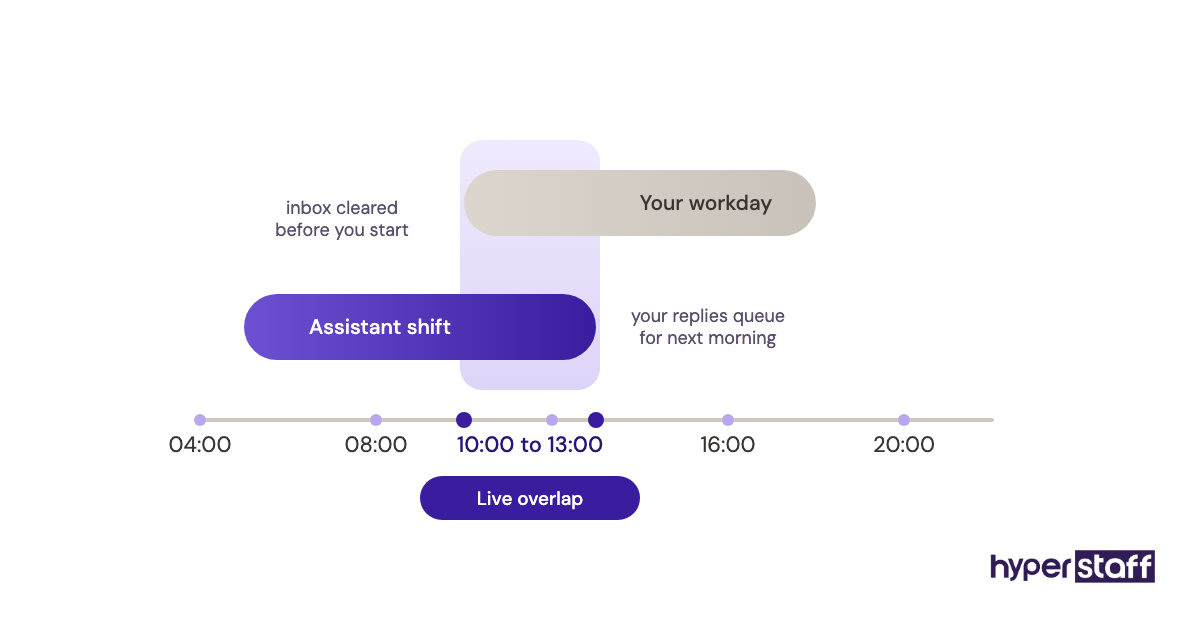
Working hours: At least [3] hours of overlap with [Time zone], between [10:00] and [13:00] my time, Monday to Friday. The remaining hours are flexible.
About the role: You'll manage my calendar, inbox and personal admin so I spend my time on [client work / running the company]. You'll work with me directly, every day, and learn how I like things done.
What you'll do each week:
- Manage my calendar: book, move and confirm meetings, and protect focus blocks I mark as fixed.
- Triage my inbox twice a day, answer routine messages from templates, and flag anything that needs me by [12:00].
- Book flights, hotels and ground transport within my travel preferences document, and build a one-page itinerary for every trip.
- Pay recurring bills, track subscriptions and log receipts in [QuickBooks / a shared spreadsheet] every Friday.
- Schedule personal appointments (doctor, car service, home repairs) and send me reminders the day before.
- Research and shortlist purchases or vendors, with 3 to 5 options and a recommendation.
- Keep my contacts, birthdays and gift list current, and order gifts at least a week ahead.
- [Optional: coordinate family calendars / manage event RSVPs / update my CRM after sales calls].
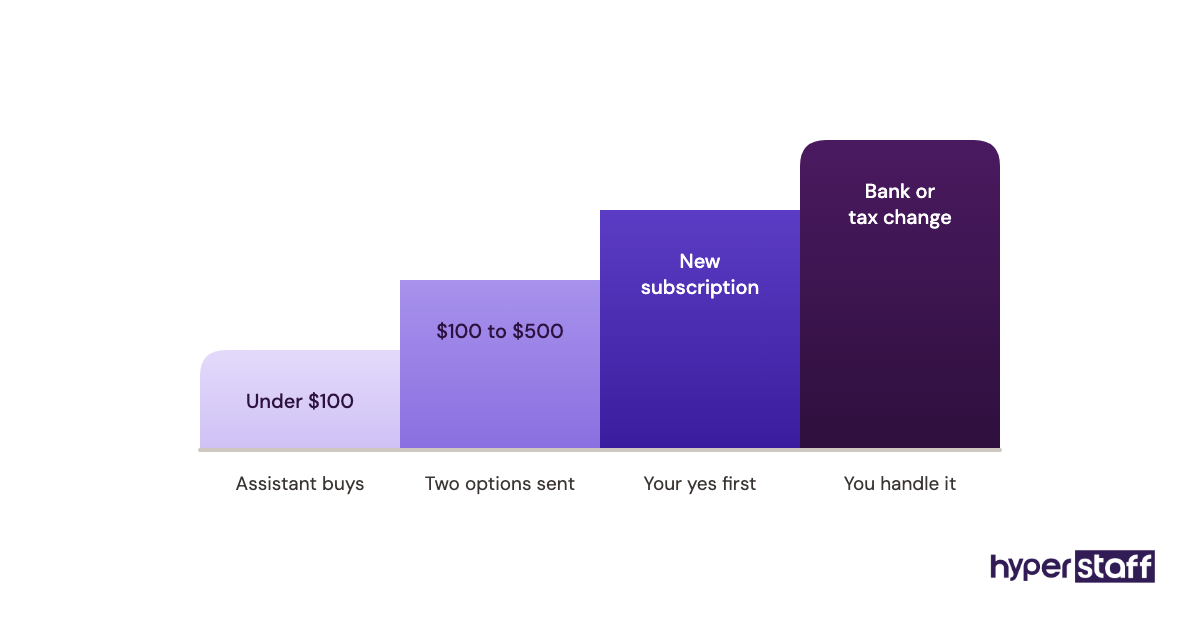
Decision limits: You may approve spending up to $[100] per item without asking. Anything above that, any new subscription, and any reply that commits me to a meeting with someone new needs my approval.
Tools you'll use: [Google Workspace / Microsoft 365], [Slack / WhatsApp], [1Password], [Calendly], [Notion / Google Docs] for SOPs, [Loom] for walkthroughs.
What you need:
- [2+] years supporting one executive, founder or busy professional.
- Clear written English and a habit of confirming details in writing.
- Comfort working from SOPs and writing new ones when a task repeats.
- A reliable internet connection and a low-noise workspace for calls.
Nice to have: Experience booking international travel, basic bookkeeping, or familiarity with [industry].
Confidentiality: You'll sign an NDA before starting. You'll have access to private calendars, financial accounts and family information, and you'll use a password manager for every login.
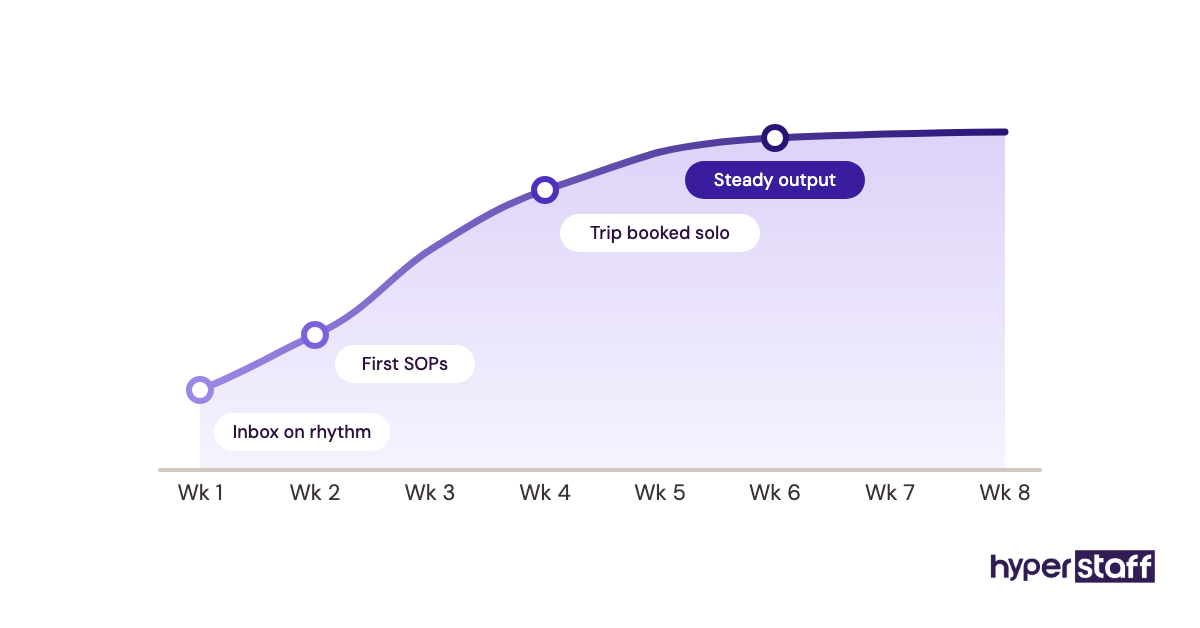
How we'll measure the first 30 days: Inbox triaged on schedule, zero double-booked meetings, one trip booked end to end, and SOPs written for the five tasks you do most.
How to apply: Send a short note telling me about one person you supported and the task you took off their plate first. Shortlisted applicants complete a paid 60-minute test task.
Every line in that template earns its place for a reason. The sections below explain how to change each part without breaking what makes it work.
How does a personal VA job description work in hiring?
The job description works as a filter at three points: the posting, the interview and the first month. Each point uses a different part of the document.
At the posting stage, applicants read the duties and hours and decide if they fit. Specific frequencies like "twice a day" scare off people who want loose, occasional work, which is the outcome you want.
During interviews, the description becomes your question bank. Each duty line turns into a "tell me about a time you did this" prompt, and our list of personal VA interview questions maps closely onto the template's sections.
After the hire, the "first 30 days" section becomes a checklist. It also feeds straight into onboarding a personal virtual assistant, since the duties you listed are the SOPs you'll need to write first.
Types and Forms of Personal VA Job Descriptions
Personal VA job descriptions come in several forms, and the right one depends on how many hours you're buying and how much of your private life the assistant will see.
| Type | Typical hours | Main duties | Access level | Best fit |
|---|---|---|---|---|
| Part-time life admin | 40 hrs/month | Bills, appointments, errands booked online | Low to medium | Busy professionals, families |
| Calendar and inbox | 80 hrs/month | Scheduling, email triage, follow-ups | Medium | Consultants, coaches, solo founders |
| Hybrid personal and business | 80 to 160 hrs/month | Calendar, travel, CRM updates, light support | Medium to high | Founders running small teams |
| Full-time executive-level | 160 hrs/month | Everything above, plus projects and research | High | Executives, multi-business owners |
| Travel-focused | 40 to 80 hrs/month | Bookings, itineraries, loyalty programs | Medium | Frequent flyers, speakers |
| Household and family | 40 to 80 hrs/month | School calendars, vendors, home services | Medium to high | Dual-career households |
| Project-based | Fixed block | A move, an event, a vendor search | Low | One-off needs with an end date |
How a Personal VA Job Description Differs From Related Roles
Three neighbouring documents get confused with this one. The differences show up mainly in scope, access and who the assistant answers to.
Personal VA job description vs. executive assistant job description
An executive assistant description centres on one leader's business role: board prep, stakeholder meetings, internal comms. A personal VA description reaches into private life too, so it needs clearer access rules and a confidentiality section that mentions family and finances by name.
Personal VA job description vs. general admin VA job description
General admin roles often serve a whole team, and the description lists processes. A personal role serves one person, so the description lists that person's preferences, which is why "learns how I like things done" belongs in the template and would look odd in a team posting.
Personal VA job description vs. job ad
The job ad is the short, public version written to attract applicants. The description is the full internal document, and most hiring problems come from posting the ad without ever writing the description behind it.
The Benefits of a Written Personal VA Job Description
- Fewer, better applicants, because specific duties put off people who don't fit.
- Faster interviews, since every duty becomes a ready question.
- A fair way to compare candidates on the same criteria.
- Written spending and access limits from day one.
- A ready-made outline for SOPs and onboarding.
- An objective reference point if performance slips.
The Drawbacks of a Written Personal VA Job Description
- It takes one to two hours to write well the first time.
- A very detailed list can discourage candidates who'd grow into the role.
- It goes stale if you don't revise it after the first quarter.
- Some private details can't go in a public posting and need a separate brief.
Who needs a personal virtual assistant job description?
Anyone hiring a remote assistant for personal or mixed personal and business work needs one, and the need grows with the assistant's access. A founder handing over a corporate card needs a stricter document than someone outsourcing dentist bookings.
Small business owners tend to need the hybrid version, since their personal and business calendars are the same calendar. Executives at larger companies often already have a business-side assistant and want a personal VA for travel and household admin only.
If you're still weighing remote against local hiring, the comparison of a personal virtual assistant vs in-house hire changes which sections of the template you'll need.
Personal VA Job Description Examples
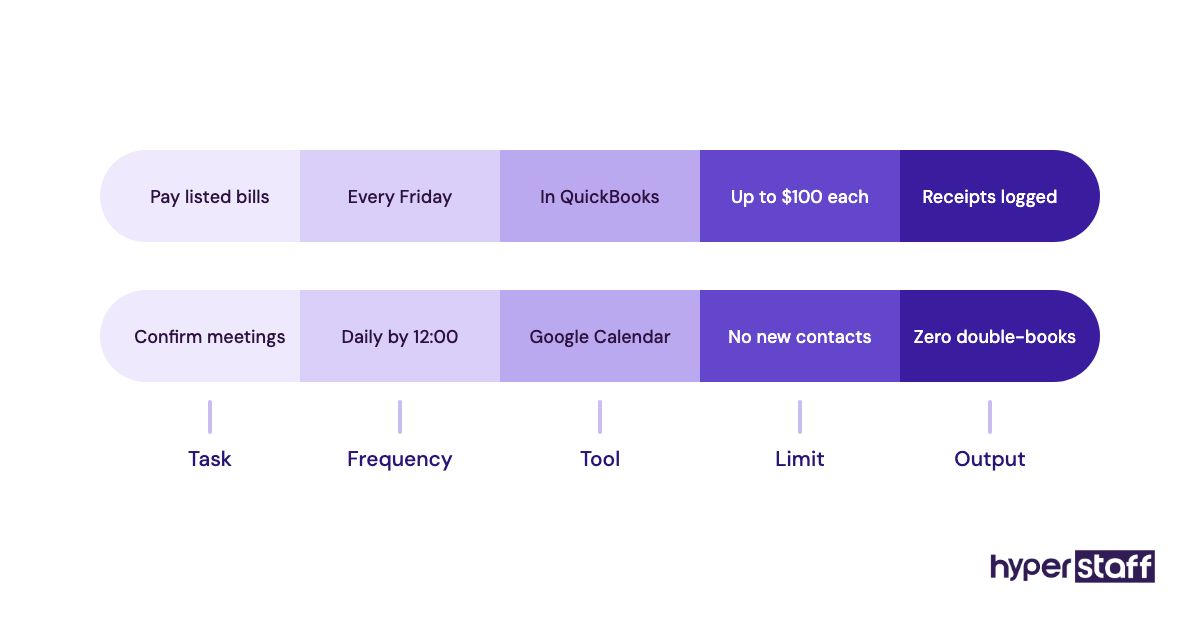
The examples below are individual duty lines, the part of a description that most often goes wrong. Good lines name a task, a frequency and an outcome.
Personal VA Job Description Good Examples
Inbox triage line
"Triage my inbox at 9:00 and 15:00 my time, archive newsletters, reply to scheduling requests from templates, and send me a summary of anything that needs my answer." A candidate reading that knows the rhythm, the tools and the output.
Travel booking line
"Book flights and hotels using my travel preferences document, aisle seats only, with a one-page itinerary in my inbox 48 hours before departure." Preferences in writing save the back-and-forth that eats the first month of most personal VA hires.
Spending limit line
"Approve purchases up to $100 per item without asking; anything higher, send me two options." Clear limits stop small decisions from bouncing back to you.
Personal VA Job Description Bad Examples
"Help with whatever comes up"
No candidate can assess fit from that line, and no manager can measure it. It usually signals the hirer hasn't decided what to delegate yet.
"Must be available 24/7"
Round-the-clock availability is unrealistic for one person and pushes good applicants away. State the overlap window you really need and the response time for real emergencies.
"Manage my finances"
The phrase is far too broad for a role with card access. Split it into named tasks such as paying listed bills and logging receipts, each with its own limit.
Creating Your Personal VA Job Description, Step-by-Step
Writing the description takes five steps, and the order matters because each one feeds the next.
Step #1: Log your own week first
Track every small task you do for five working days before you write anything. The log gives you real duties and real frequencies, and our personal virtual assistant tasks checklist fills the gaps you'll miss.
Step #2: Choose your hour bundle
Add up the delegable tasks and round up to 40, 80 or 160 hours a month. Most first-time hirers underestimate, since they forget the time an assistant spends asking questions in the ramp period.
Step #3: Set access and decision limits
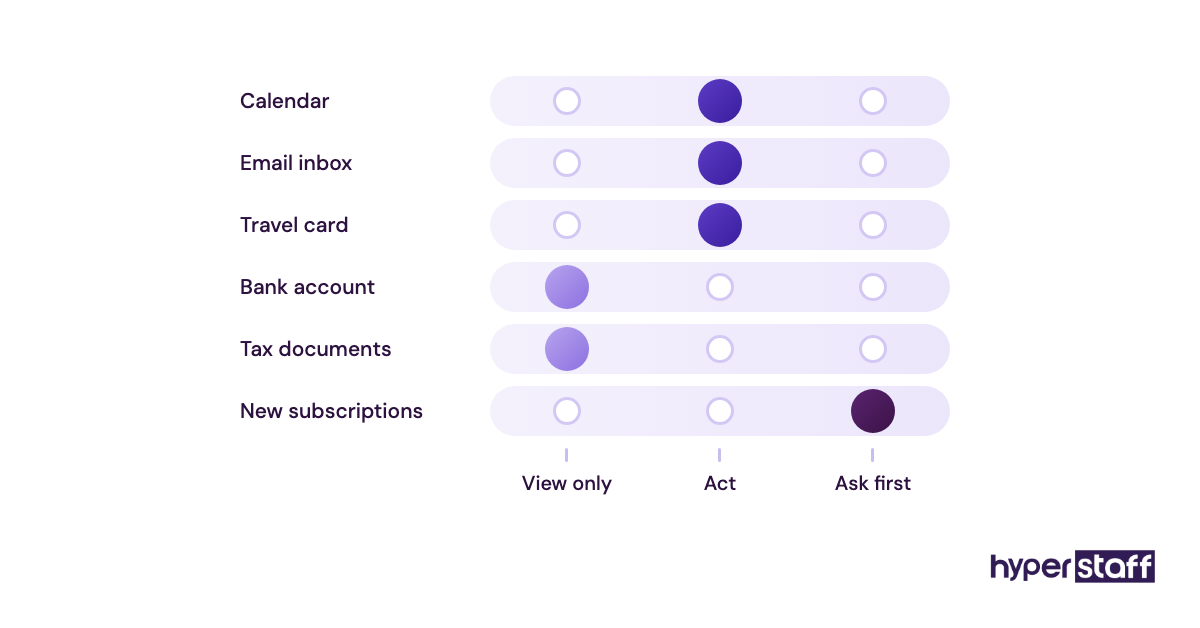
List every account the assistant will touch and mark it view, act or approve. Write the spending cap as a number.
Step #4: Define the first 30 days
Pick four or five outcomes you can check without guessing, such as "no double-bookings." Vague goals like "be proactive" give you nothing to review.
Step #5: Write the test task
Choose one real, low-risk task from your log and pay for it. A 60-minute test shows written English, attention to detail and judgment more clearly than any CV.
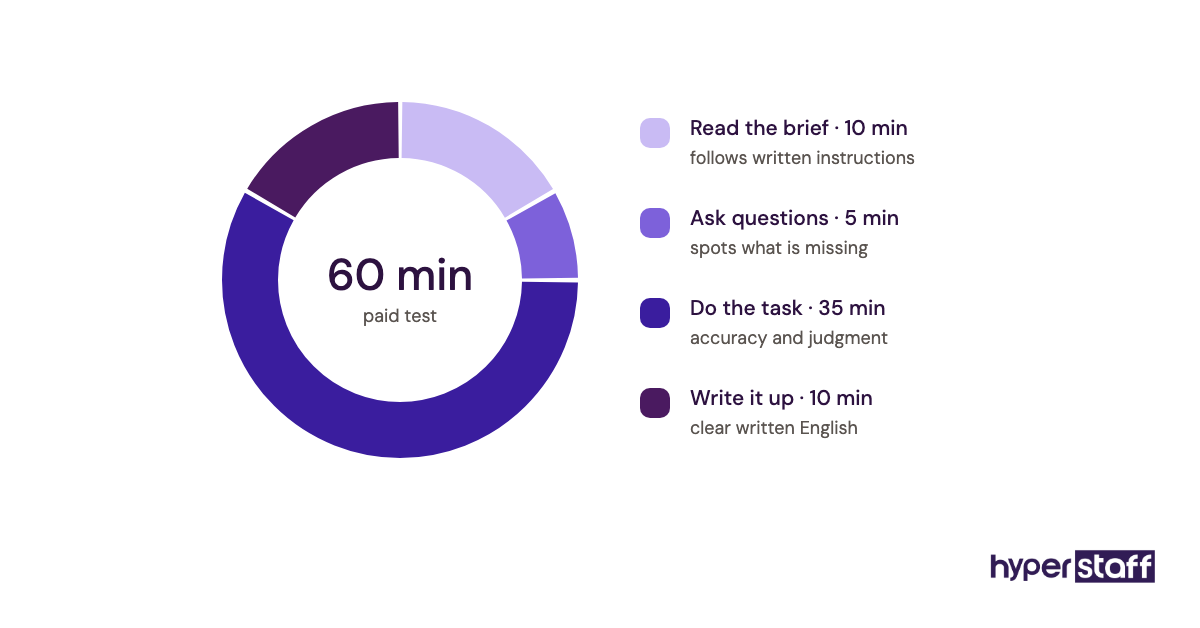
Tip: build the test task from a messy real request, such as a vague email asking to "find a time next week," because the way a candidate asks clarifying questions tells you more than a clean, fully specified exercise ever will.
What does an effective personal VA job description look like?
An effective personal VA job description fits on two pages, names every recurring task with a frequency, and states hours, tools, limits and first-month goals. Applicants should be able to picture a normal Tuesday after reading it.
Length is where practitioners disagree. Some hiring managers want a half-page posting to widen the pool, while others prefer a detailed document that scares off weak applicants early, and both camps have a point.
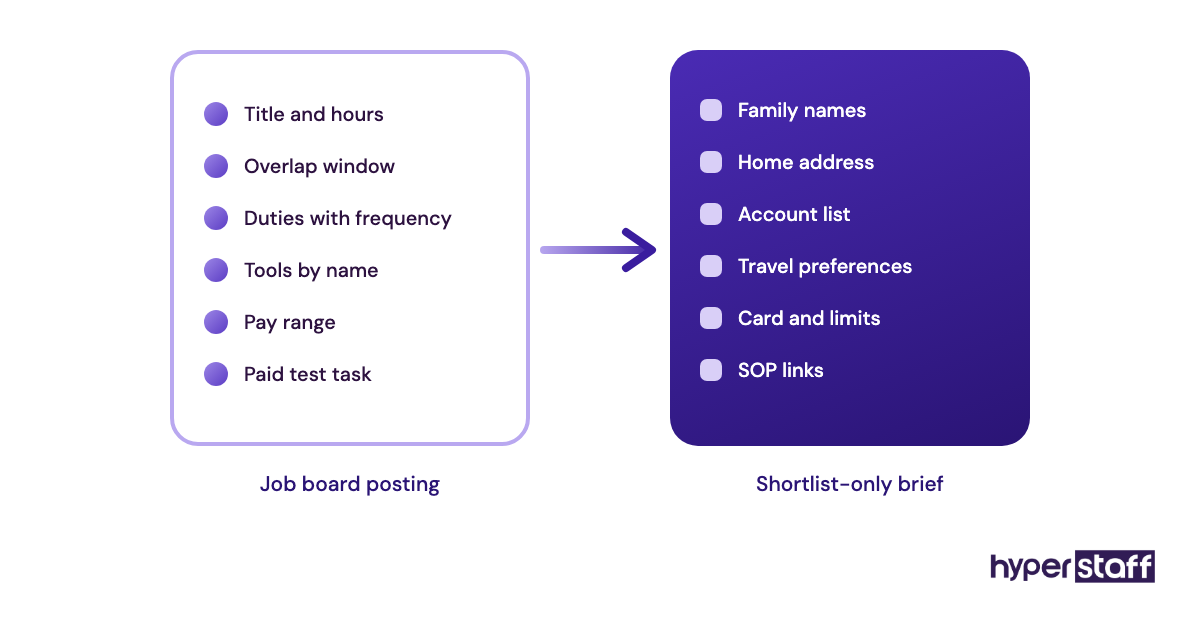
Our view: post the short version publicly and send the full description to shortlisted candidates. You get reach and precision, and private details like family names never sit on a public job board.
Tools and Software to Name in the Job Description
The tools section tells candidates which software they'll use daily, and it's worth naming exact products. "Experience with Google Workspace and 1Password" screens better than "tech-savvy."
- Google Workspace or Microsoft 365 for calendar, email and shared documents.
- 1Password or Bitwarden for sharing logins without revealing passwords.
- Calendly for letting outside contacts book time within your rules.
- Notion or Google Docs for keeping SOPs in one place.
- Loom for recording a task once and handing it over.
- Slack or WhatsApp for quick daily messages.
A password manager is the one we'd never leave out of a personal role. For fuller reviews of each option, see our list of the best personal VA tools.
8 Proven Personal VA Job Description Tips and Best Practices
These tips come from what separates job descriptions that produce a good hire from ones that produce a second round of hiring.
- Write duties with a frequency attached, like "daily" or "every Friday."
- Put the time zone overlap in hours, with exact start and end times.
- State the spending cap as a dollar figure.
- Name the tools by product, never by category.
- Keep family names, addresses and account details out of the public posting.
- Ask applicants one specific question in their application to filter out copy-paste replies.
- Pay for the test task, which attracts experienced assistants who skip unpaid tests.
- Review and rewrite the description after 90 days, once you know the real workload.
Overcoming Common Personal VA Job Description Challenges
The biggest challenge is not knowing what to delegate. The five-day task log solves most of it, since patterns show up fast once tasks are written down.
The second is oversharing in public. Hirers paste private context into a job board posting, so keep a separate brief for shortlisted candidates only.
The third is scope creep after hiring. When new tasks appear, add them to the description in writing and check they still fit the hour bundle.
How to Measure Personal VA Job Description Success
Measure the description by the hire it produces. Look at how many applicants met your must-haves, how many passed the test task, and whether the person you hired hit the 30-day goals.
A good sign is a shortlist you'd be happy to hire from. If most applicants miss basic requirements, the duties or hours section is too vague.
Six months on, check how often you've had to explain a task twice. Repeated explanations point to a duty that was never written into the description or its SOP.
How long does a personal VA job description take to work?
Writing the description takes one to two hours after a week of task logging. Applications usually arrive within days on a public job board.
The description shows its worth in the first month, as the ramp period runs smoothly or doesn't. Most personal assistants reach steady output within four to eight weeks, depending on how many SOPs exist on day one.
Through an agency, the timeline shortens: Hyperstaff places a pre-vetted assistant in 5 business days, and work starts the day after a 30-minute kickoff call.
How much does a personal virtual assistant cost?
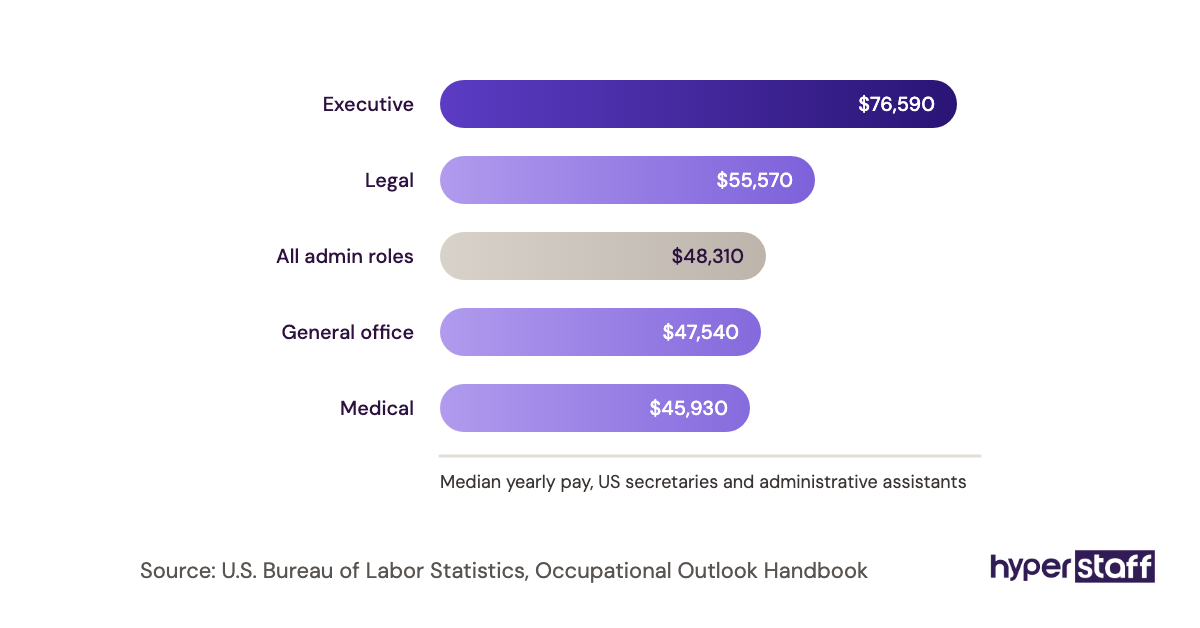
A personal virtual assistant costs from $3 to $12+ per hour through Hyperstaff, depending on experience tier. An in-house administrative assistant in the US earns a median of about $23 an hour before benefits and payroll taxes, according to the U.S. Bureau of Labor Statistics.
| Experience level | Hyperstaff hourly rate | Hyperstaff, 80 hrs/month | Hyperstaff, 160 hrs/month | US in-house assistant, 160 hrs/month |
|---|---|---|---|---|
| Essential (0 to 2 yrs) | From $3 | From $240 | From $480 | About $3,700+ in wages alone |
| Professional (2 to 5 yrs) | From $6 | From $480 | From $960 | About $3,700+ in wages alone |
| Expert (5+ yrs) | From $12 | From $960 | From $1,920 | Higher for senior hires |
Paying quarterly takes 10% off those Hyperstaff figures. The full breakdown, including freelancer rates, sits in our guide to personal virtual assistant cost.
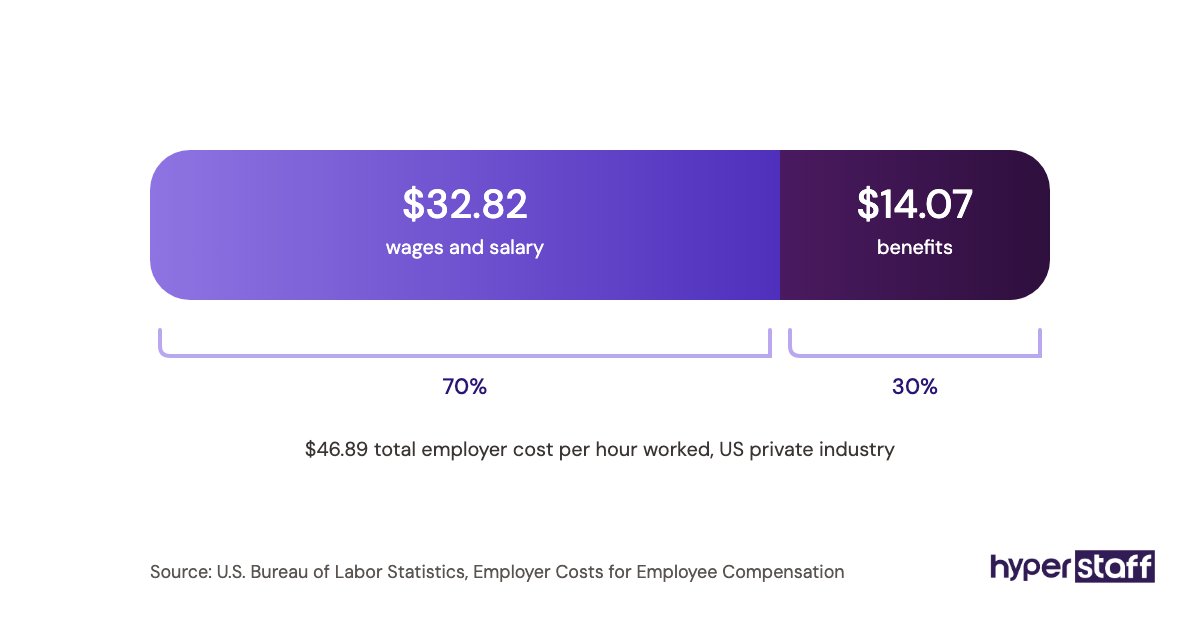
Important: Hyperstaff prices shown are typical starting points. Your final cost depends on the assistant's experience, your hour bundle and the work involved, so we confirm an exact figure after the discovery call.
Is writing a personal VA job description worth it?
Yes, and it's one of the highest-return hours you'll spend on hiring. A clear description gets the right person in the seat on the first try, and a personal assistant who fits can return many times their cost in hours you get back.
Here's a simple calculation. An 80-hour monthly bundle at the Professional tier costs from $480, and if the assistant takes 15 hours a week of admin off your plate, you get back about 60 hours a month.
If an hour of your time is worth $75 to the business, those 60 hours are worth $4,500. A bad hire caused by a vague description wipes that out and adds weeks of rehiring, so the hour spent writing pays off fast. For a broader look at the numbers, read whether a personal virtual assistant is worth it.
Keep in mind: the return depends on what you do with the freed hours, so decide before hiring which revenue-producing work those hours will go to, or they tend to fill with lower-value tasks within a month.
How to Choose a Personal Virtual Assistant Agency
Choose an agency that assigns one dedicated assistant, publishes its rates, and puts replacement terms in writing. Rotating pools are the main thing to avoid for personal work, since a new person each week means re-explaining your preferences each week.
Ask how candidates are vetted, how fast a replacement arrives, and who writes down your processes. At Hyperstaff, free replacement happens in 5 to 7 business days, and the new assistant is briefed from your Operations Vault, where your SOPs, tools and context are written down and maintained for you.
Bring your job description to the discovery call. Agencies that ask detailed questions about it are usually the ones that match well, and you can compare the process step by step in our guide on how to hire a personal virtual assistant.
Personal VA Statistics, Trends and Future Predictions
US demand for in-office administrative assistants is flat to slightly declining. The U.S. Bureau of Labor Statistics projects a small drop in employment over the coming decade, yet still expects around 314,000 openings a year from turnover.
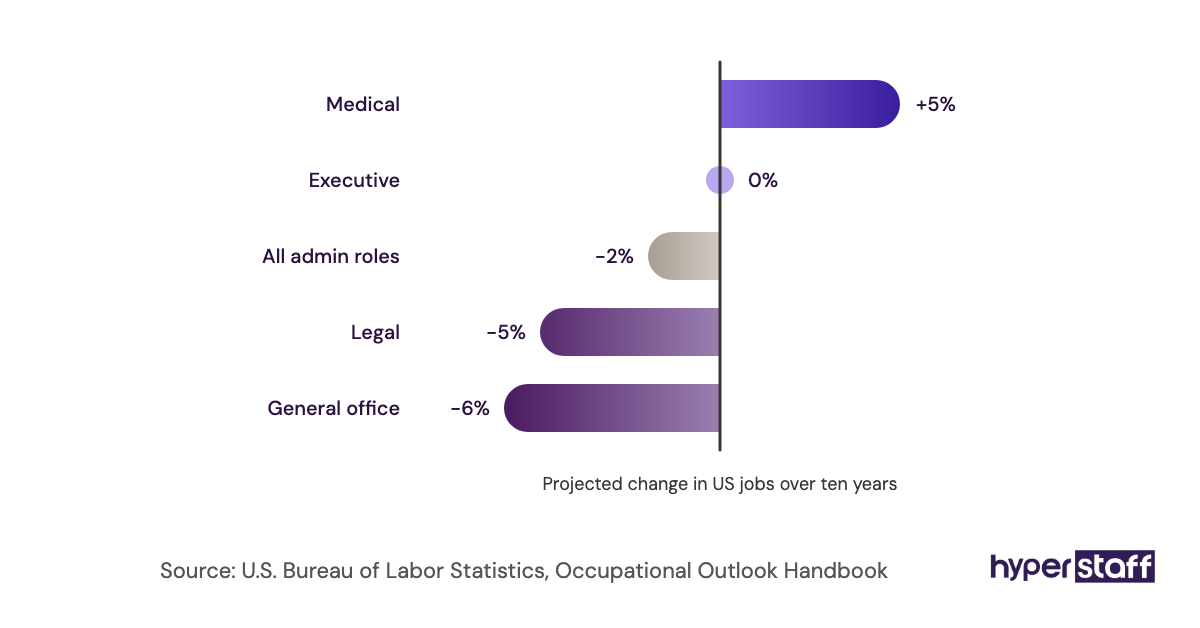
The work itself hasn't disappeared. More of it is moving to remote assistants, and job descriptions are shifting with it: time zone overlap, password managers and written SOPs now appear in postings that a few years ago assumed someone at a desk down the hall.
We expect descriptions to get more specific about access and security. As assistants take on more financial and personal tasks, hirers are writing tighter limits into the document from the start.
Personal Virtual Assistant Job Descriptions and AI
AI tools can draft a first-pass job description in seconds, and that draft is a reasonable starting point. The weak spot is specificity: AI drafts default to generic duty lists because they don't know your week.
Feed the AI your five-day task log and it does a much better job. Then edit every line for frequency, limits and tools, since those are exactly the details a model invents or leaves out.
AI is also changing the role. Scheduling assistants and email summaries take over some routine work, so add a line like "comfortable using AI tools to draft replies and summaries" and judge candidates on how they check what the tool produces.
Watch out: AI-generated applications are now common for remote roles, so a single specific question in your posting, such as asking about one task the applicant took over for someone, filters out copy-paste replies quickly.
Disclaimer: This article is for general information only and isn't legal, tax or employment advice. Pay figures are approximate and may change. Check local employment rules and get professional advice before hiring.
Common questions
What should a personal virtual assistant job description include?
It should include the job title, hours and time zone overlap, recurring duties with frequencies, tools, spending and access limits, confidentiality terms and 30-day goals. A short paid test task at the end screens applicants well.
How long should a personal VA job description be?
The full internal version usually runs one to two pages. The public posting can be half a page, with the detailed version sent to shortlisted candidates.
Should I put the pay rate in the job description?
Yes, a pay range gets better applicants and saves time on both sides. Candidates who'd turn down the rate skip applying, and the ones who apply are already aligned.
Can I use the same job description for a personal and executive assistant?
You can start from the same template, but change the duties and access sections. Personal roles need family, household and financial limits spelled out, while executive roles focus on business meetings and the people with a stake in them.
Do I need an NDA for a personal virtual assistant?
Yes, for any role with access to your inbox, calendar or accounts. Mention it in the job description so candidates expect it, and have it signed before granting any access.
Book a free 15 min call
We place a pre-vetted specialist in 5 business days, fully managed, from $3/hour.