Is a Personal Virtual Assistant Worth It? The Honest Math
A personal virtual assistant pays off when the hours they take back are worth more than their rate, and this guide shows how to run that math before you hire.
On this page
- What Is a Personal Virtual Assistant?
- Key Personal VA Terms Worth Knowing
- Why Does the Worth-It Question Matter Before You Hire?
- How Does a Personal Virtual Assistant Arrangement Work?
- Types of Personal Virtual Assistant Setups
- How Is a Personal VA Different From Similar Help?
- What Are the Benefits of a Personal Virtual Assistant?
- What Are the Drawbacks of a Personal Virtual Assistant?
- Who Gets the Most Out of a Personal Virtual Assistant?
- Personal Virtual Assistant Examples
- How Do You Plan a Personal VA Hire, Step by Step?
- What Does a Personal VA Setup That Pays Off Look Like?
- Personal Virtual Assistant Tools and Software
- 9 Proven Tips for Getting Your Money's Worth From a Personal VA
- How Do You Fix the Usual Personal VA Problems?
- How Do You Measure Whether a Personal VA Is Paying Off?
- How Long Before a Personal Virtual Assistant Pays Off?
- How Much Does a Personal Virtual Assistant Cost?
- Is a Personal Virtual Assistant Worth It?
- How Do You Choose a Personal Virtual Assistant Agency?
- Personal VA Statistics, Trends and Predictions
- Can AI Replace a Personal Virtual Assistant?
- FAQs
💡 Key Takeaways:
1) A personal virtual assistant is worth it when the hourly value of the time they free up is higher than their hourly rate, and that gap usually opens in the second month, once the handover work is done.
2) Offshore personal assistants cost a fraction of an in-house administrative hire, because you pay for the hours you book and carry no payroll taxes, benefits or office overhead.
3) Most personal VA arrangements that fail do so for fixable reasons: undocumented processes, unclear decision rights and too few hours booked for the assistant to build momentum.
Your Hours Are Worth More Than This
Every hour you spend chasing invoices or rescheduling calls is an hour you aren't billing, selling or building, and that's the real price of doing it yourself. Hyperstaff has placed 70+ virtual assistants with 30+ clients, and our dedicated personal assistant services start from $3/hour, with a pre-vetted specialist in place within 5 business days and a free discovery call to scope it first.
What Is a Personal Virtual Assistant?
A personal virtual assistant is a remote professional who handles the recurring admin, scheduling, errands-by-email and life logistics of one specific person, usually a founder, executive or busy professional. They work from their own location through shared inboxes, calendars and password managers, and they're paid by the hour or by a monthly block of hours.
The role reaches further than most people expect. A good personal VA also screens leads, answers routine customer emails, books travel, keeps a CRM tidy and runs small operations tasks, which is why the full definition of a personal virtual assistant covers both work life and personal life.
"Worth it" therefore has a measurable answer. It comes down to the value of the hours returned against the cost of the hours bought, plus the time you spend teaching the assistant your way of doing things.
Key Personal VA Terms Worth Knowing
- Personal virtual assistant (PVA) = a remote assistant who supports one person's work and personal admin.
- Dedicated assistant = one named person who works only on your account and learns your preferences over time.
- Pooled or shared assistant = a rotating team that picks up tasks from a queue, often a different person each time.
- Hour bundle = a prepaid block of monthly hours, such as 40, 80 or 160.
- SOP (standard operating procedure) = a written, step-by-step guide to how a recurring task gets done.
- Handover = the period where you document, demonstrate and transfer tasks to the assistant.
- Delegated access = permission to act inside your email or calendar without holding your main password.
- Decision rights = the written list of what the assistant may approve, spend or reply to without asking.
- Effective hourly value = what an hour of your own time earns or saves when spent on your highest-value work.
- Replacement guarantee = the provider's promise to supply a new assistant if the first one isn't a fit.
Why Does the Worth-It Question Matter Before You Hire?
The worth-it question matters because a personal VA costs you twice: once in fees and once in the hours you spend on handover. Running the numbers first tells you how many hours to book, which tasks to hand over first and how long to wait before judging the result.
Skipping that step tends to produce the same outcome. People book too few hours, hand over scraps, see little change and conclude virtual assistants don't work, when the setup was never given room to work.
How Does a Personal Virtual Assistant Arrangement Work?
A personal virtual assistant arrangement works through shared access and written routines. You grant delegated access to email, calendar and the tools you use, agree on working hours and response times, then hand over tasks in a set order, starting with the most repetitive.
Most of the day-to-day runs on async communication: a shared task board, short recorded walkthroughs and a daily end-of-day summary. Live calls are kept for weekly planning and anything ambiguous.
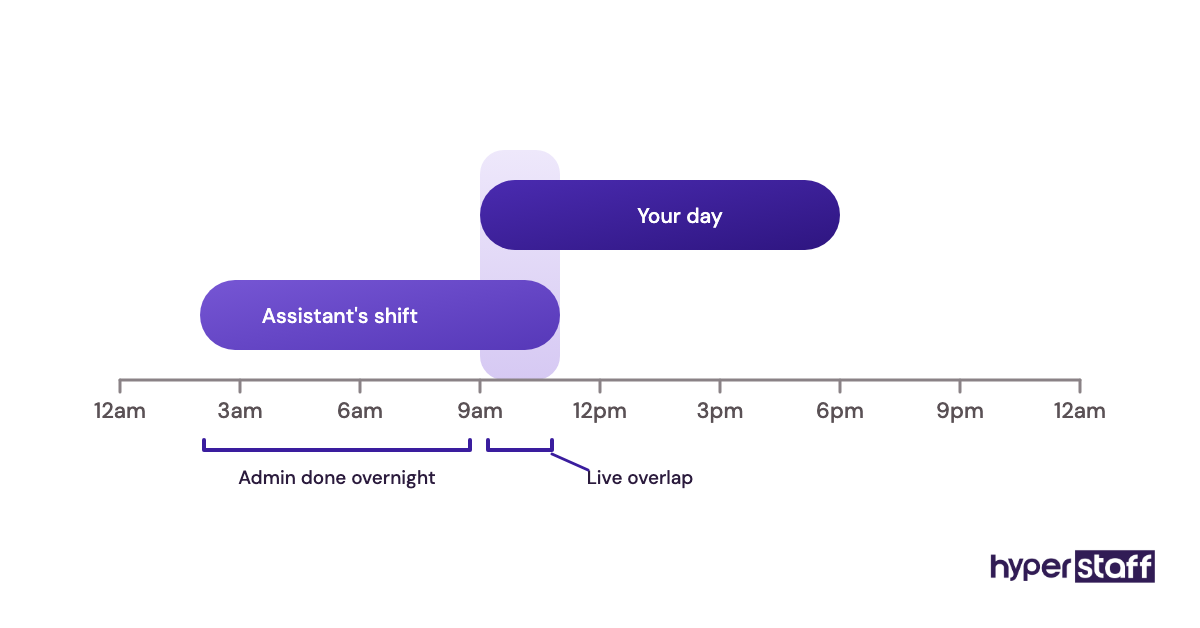
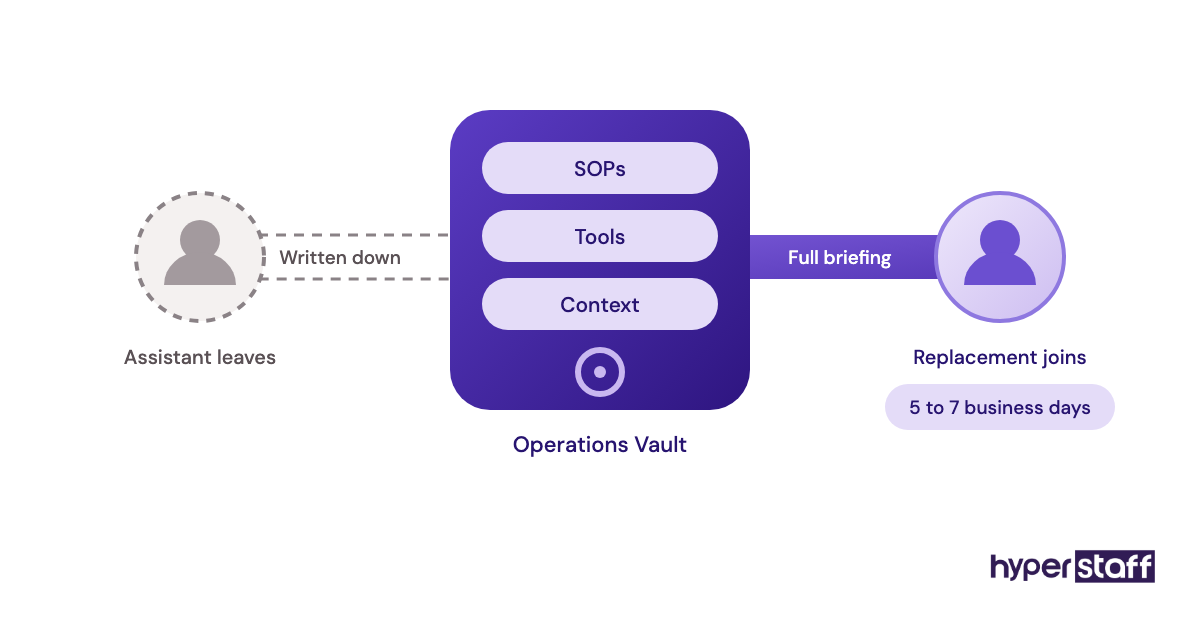
At Hyperstaff, the setup starts with a 30-minute kickoff call, and work begins that day or the next morning. Your SOPs, tools and context go into an Operations Vault that we write and maintain for you, so knowledge stays with your account if the assistant ever changes.
The typical personal VA task list ranges from inbox triage and travel booking to bill payments, lead research and customer follow-ups.
Types of Personal Virtual Assistant Setups
Personal virtual assistant setups differ mainly by hours, exclusivity and experience level. The right type depends on how much recurring work you have and how much judgement the tasks need.
| Setup type | Typical hours | Best suited to | Main risk | Judgement level |
|---|---|---|---|---|
| Part-time dedicated PVA | 40 to 80 per month | Solo founders, consultants, busy professionals | Too few hours to build momentum | Low to medium |
| Full-time dedicated PVA | 160 per month | Executives with heavy inbox and calendar load | Underused if tasks aren't mapped | Medium to high |
| Executive-level PVA | 80 to 160 per month | Leaders who need drafting and stakeholder handling | Higher rate, longer onboarding | High |
| Shared or pooled assistant | Pay per task | One-off errands, overflow work | No continuity, repeated briefings | Low |
| Freelance marketplace VA | Varies by contract | Short trials, narrow tasks | No backup if they disappear | Varies widely |
| Hybrid personal and business VA | 80 to 160 per month | Owners mixing family admin with company ops | Blurry priorities without rules | Medium |
How Is a Personal VA Different From Similar Help?
A personal VA differs from neighbouring options in who they serve and how much context they hold. Three comparisons come up most often when people weigh the cost.
Personal Virtual Assistant vs. In-House Executive Assistant
An in-house executive assistant costs a full salary plus benefits and sits in your office, while a personal VA works remotely and is booked by the hour. The in-house hire wins on physical tasks like mail and visitors, and the personal VA vs in-house comparison walks through the full trade-off.
Personal Virtual Assistant vs. AI Scheduling Tools
AI scheduling tools book meetings well when the rules are simple. They struggle the moment a reply needs tact, such as moving a call with a client who's already rescheduled twice, which is where a human assistant earns their rate.
Personal Virtual Assistant vs. Freelance Task Marketplaces
Task marketplaces suit one-off jobs, but each new freelancer starts from zero knowledge of your preferences. A dedicated assistant gets faster every month because the context accumulates, while marketplace help stays at the same speed.
What Are the Benefits of a Personal Virtual Assistant?
The main benefit of a personal virtual assistant is reclaimed time at a rate far below your own. Other gains follow from that.
- Hours back each week for revenue work, client delivery or rest.
- Faster replies to emails and enquiries, which protects deals and relationships.
- Written processes that outlast any single person on the account.
- Costs that scale up or down with monthly hour bundles.
- Coverage across time zones, so admin moves overnight.
- Fewer dropped balls on renewals, bills and follow-ups.
What Are the Drawbacks of a Personal Virtual Assistant?
The drawbacks are real but mostly front-loaded. They show up in the first few weeks and shrink as the assistant learns.
- Handover takes your time before it saves any.
- Sharing account access needs care and the right tools.
- Physical tasks, like collecting mail, stay with you.
- Communication lags appear if decision rights aren't written down.
Who Gets the Most Out of a Personal Virtual Assistant?
People whose own hour is worth well above the assistant's rate get the most from a personal virtual assistant, especially when they have at least five to ten hours a week of repeatable admin. Founders, consultants, agency owners, real estate agents and executives fit the pattern.
The fit is weaker for someone whose admin is sporadic or highly sensitive and hard to document. Match the hour bundle to the weekly load.
| Weekly admin load | Suggested bundle | Typical profile |
|---|---|---|
| Under 5 hours | Probably not yet | Light inbox, few meetings |
| 5 to 10 hours | 40 hours/month | Solo consultant or coach |
| 10 to 20 hours | 80 hours/month | Founder, agency owner |
| 20+ hours | 160 hours/month | Executive, multi-business owner |
Personal Virtual Assistant Examples
The setups below are patterns we see repeat across placements, described by how the work is structured. Good and bad versions often involve the exact same tasks.
Personal VA Setups That Pay Off
Inbox Triage With Written Rules
The assistant sorts every incoming email into reply, delegate, file or flag, using a one-page rule sheet. The owner reads only flagged mail, and the time saved shows up in week one.
Calendar Ownership With a Buffer Policy
The VA controls the calendar outright, with rules like no calls before 10 a.m. and 15 minutes between meetings. Back-and-forth scheduling emails drop to near zero.
Renewals and Bills on a Shared Tracker
Insurance, subscriptions and domain renewals sit in one tracker the assistant checks weekly. Late fees and surprise cancellations stop because someone owns the dates.
Personal VA Setups That Waste Money
The "Just Help Out" Brief
No task list, no priorities, and the assistant waits for instructions that come in bursts. Paid hours go idle, and the owner decides VAs are a waste of money.
Access Shared by Text Message
Passwords sent in chat, no password manager, and two-factor codes going to the owner's phone at midnight. Every task stalls on a login, a pattern covered in our list of common personal VA mistakes.
Ten Hours a Month for Twenty Tasks
The bundle is too small for the scope, so the assistant touches everything and finishes nothing. Fewer tasks done fully beats many tasks done halfway.
How Do You Plan a Personal VA Hire, Step by Step?
Planning a personal VA hire means deciding the work before choosing the person. The five steps below follow the order that keeps the first month productive.
Step #1: Audit a Normal Week
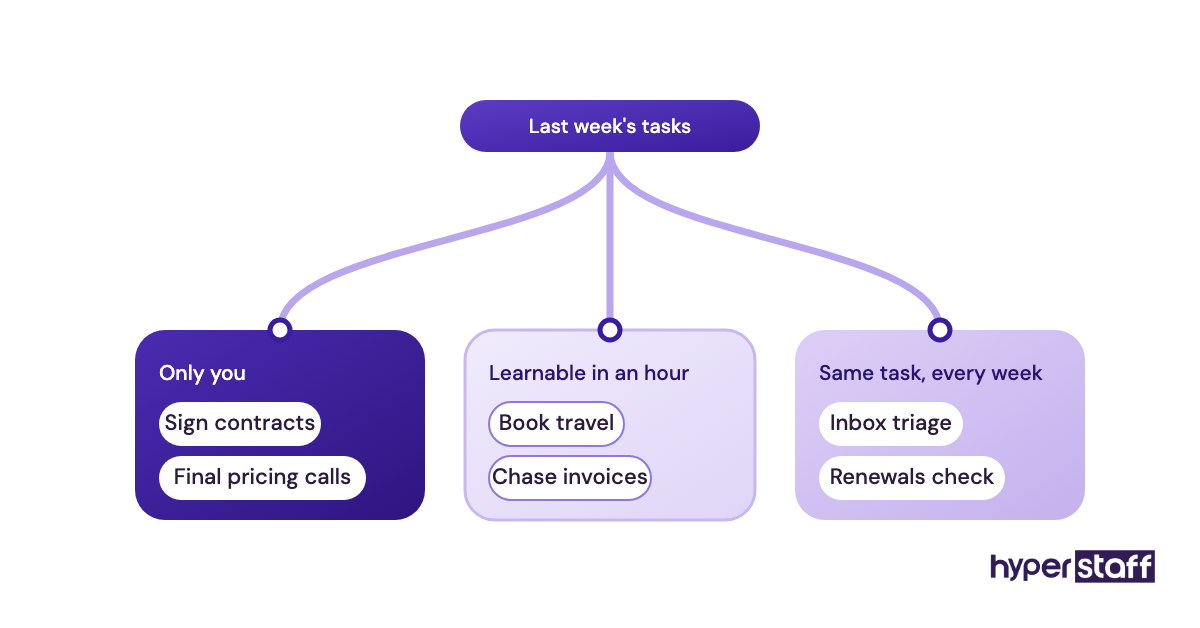
Log every task for five working days with a rough time next to each. Mark anything repetitive, anything a stranger could learn in under an hour, and anything only you can do.
Step #2: Write the Role Down
Turn the audit into a scope with tasks, tools, hours and decision rights. A clear personal VA job description also helps you pick the right experience tier.
Step #3: Test for Judgement
Skills are easy to list and hard to verify, so give candidates a small paid task or a scenario to talk through. These personal VA interview questions focus on how someone handles ambiguity.
Step #4: Hand Over in Waves
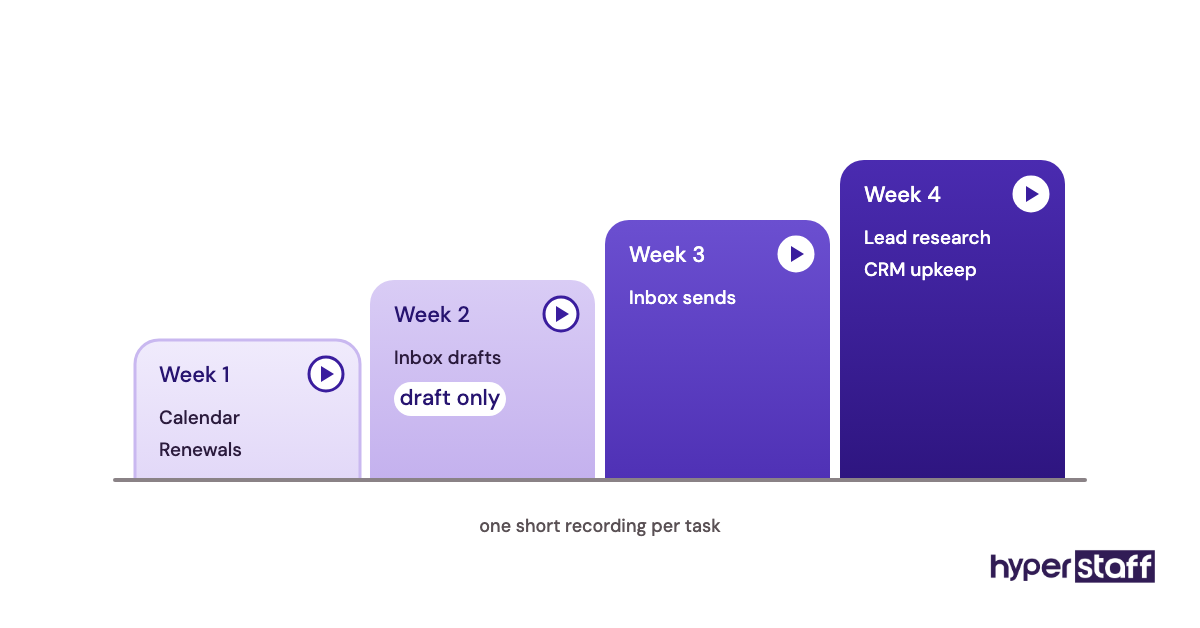
Start with two or three repetitive tasks, record a short walkthrough of each and add more weekly. Our guide to onboarding a personal virtual assistant lays out the sequence in detail.
Step #5: Review at Day 30
Compare hours booked against hours you actually got back. Adjust the bundle, the tier or the task mix, then commit for another month before passing judgement.
If you'd prefer the full process laid out from search to signed contract, see how to hire a personal virtual assistant.
What Does a Personal VA Setup That Pays Off Look Like?
A personal VA setup that pays off has three visible traits: written decision rights, a single task board and a fixed weekly review. With those in place, the assistant can act without waiting on you, which is where the hours come back.
The decision rights doc is the piece most people skip. A line like "approve any meeting under 30 minutes with an existing client" removes dozens of check-in messages a month.
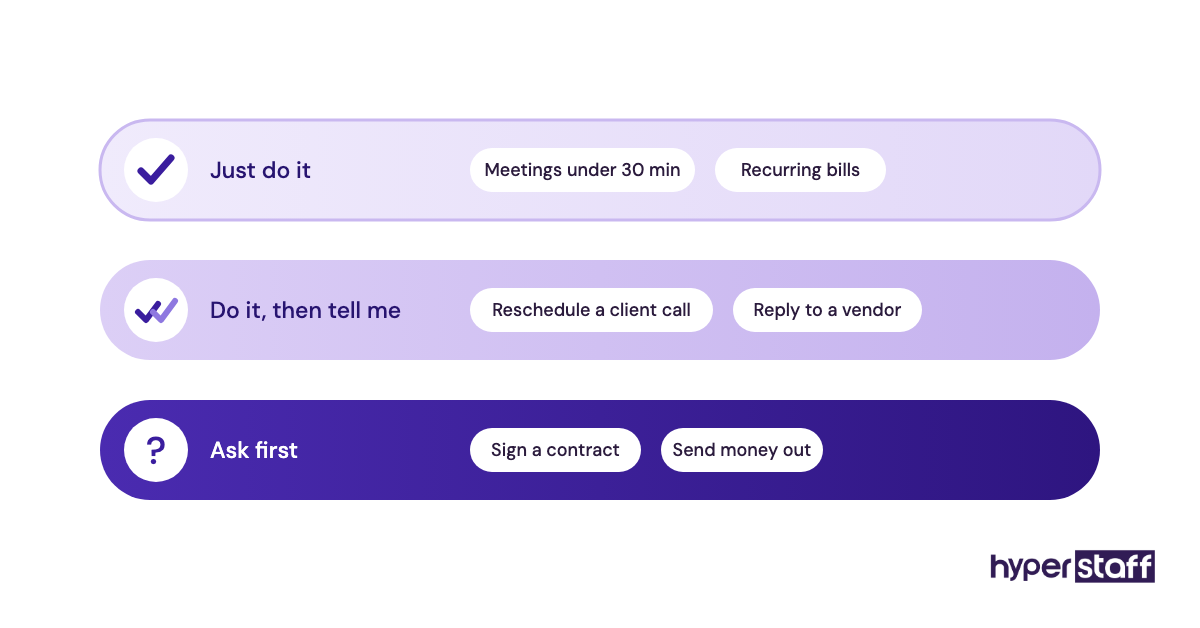
Practitioners disagree on one point: whether to hand over the inbox early or late. Handing it over early saves the most time, and handing it over late is safer, so we lean toward early handover with a "draft only, don't send" rule for the first two weeks.
Personal Virtual Assistant Tools and Software
The tools a personal VA uses decide how safely and quickly they can act for you. Most setups need a shared workspace, a password manager, a scheduler and a way to record walkthroughs.
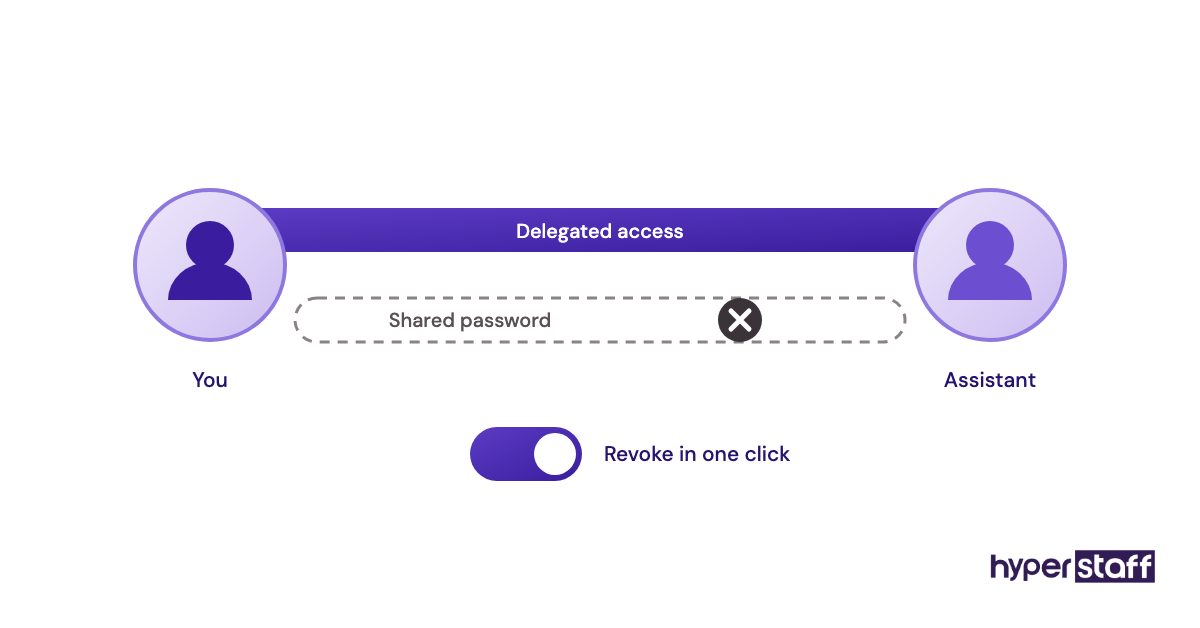
- Google Workspace or Microsoft 365: delegated mailbox and calendar access, so the assistant never needs your main password.
- 1Password or Bitwarden: shared vaults with per-item access, and the simplest way to revoke access later.
- Calendly: booking links that enforce your buffer rules without the assistant's involvement.
- Asana, Trello or ClickUp: one task board with due dates, which beats a long chat thread for anything recurring.
- Loom: short screen recordings that double as SOPs.
- Slack or WhatsApp: quick questions, kept separate from the task board.
Our earned opinion is that the password manager matters more than any other tool on this list. Our roundup of personal virtual assistant tools compares the options side by side.
9 Proven Tips for Getting Your Money's Worth From a Personal VA
These habits separate personal VA arrangements that pay for themselves from those that quietly drain a budget.
- Book enough hours for the assistant to finish tasks fully.
- Write decision rights before day one.
- Hand over repetitive tasks before judgement-heavy ones.
- Record each task once on video instead of explaining it twice.
- Use a password manager from the start.
- Keep one task board and one chat channel.
- Hold a 15-minute weekly review at a fixed time.
- Give feedback on the day the mistake happens.
- Judge results after 60 days, not after the first week.
How Do You Fix the Usual Personal VA Problems?
Most personal VA problems trace back to missing context, so the fix is usually documentation. Repeated mistakes on one task mean the SOP is thin, and a quick re-recording solves it faster than a long correction email.
Slow replies tend to come from unclear decision rights, since the assistant is waiting for permission. Trust problems around money or private accounts ease with spending caps and view-only access at first.
When the person simply isn't a fit, replace them fast. Hyperstaff offers free replacement in 5 to 7 business days, briefed from your Operations Vault, so you don't restart the handover.
How Do You Measure Whether a Personal VA Is Paying Off?
Measure a personal VA by the hours of your own time recovered each week, multiplied by your effective hourly value. Track your hours on admin for one week before the hire and again in month two.
Secondary signals help too. Watch inbox count at day's end, missed deadlines, reply times on enquiries and how often you get pulled into tasks you already handed over.
If recovered hours are flat by month three, the problem is usually scope or hours booked, and changing the person rarely fixes that alone.
How Long Before a Personal Virtual Assistant Pays Off?
A personal virtual assistant usually starts paying off between week three and week eight. Simple tasks like calendar management save time almost immediately, while inbox handling and judgement-based work take longer to transfer.
The first two weeks often feel like a net loss because you're recording walkthroughs and answering questions. Expect a dead zone there, then a steady climb as the context builds up and questions drop off.
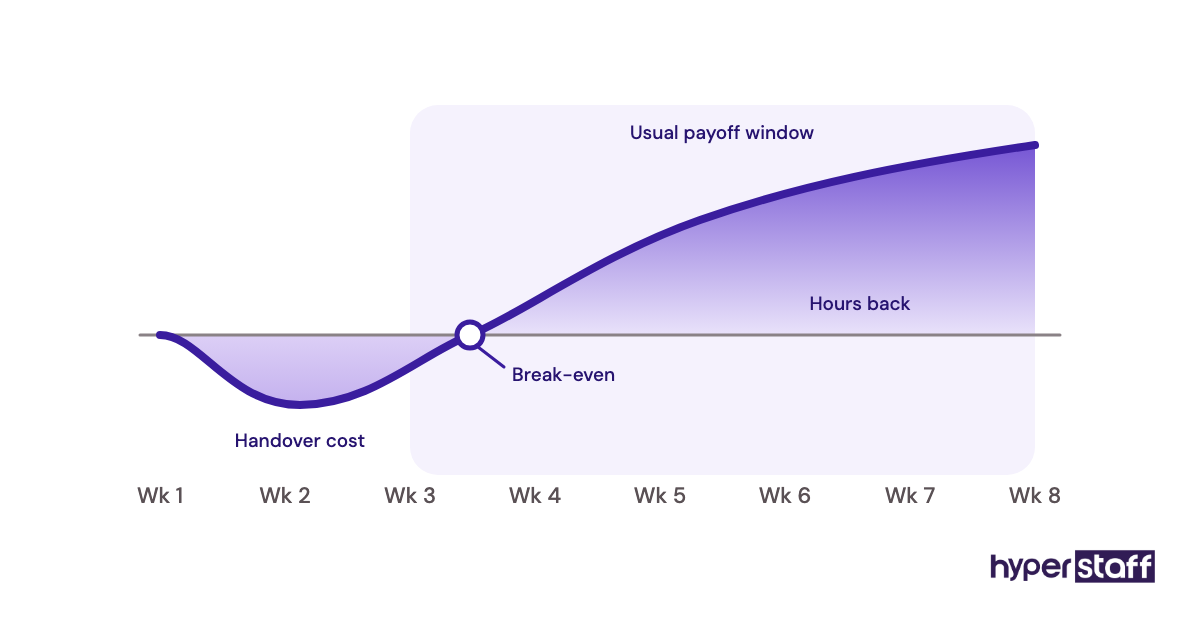
Placement itself is quick. Hyperstaff places assistants in 5 business days, and work begins the day of the kickoff call or the next morning.
How Much Does a Personal Virtual Assistant Cost?
A personal virtual assistant from Hyperstaff costs from $3 to $12 per hour depending on experience, compared with roughly $33 to $53 per hour for an in-house administrative or executive assistant once benefits are counted. The in-house figures below use the BLS median pay for administrative assistants ($23.23 an hour) and executive assistants ($76,590 a year), grossed up by the 30% benefits share of private-industry compensation.
| Option | Experience | Hourly cost | Cost for 80 hours/month | Extra costs |
|---|---|---|---|---|
| Hyperstaff Essential | 0 to 2 years | From $3 | From $240 | None |
| Hyperstaff Professional | 2 to 5 years | From $6 | From $480 | None |
| Hyperstaff Expert | 5+ years | From $12 | From $960 | None |
| Freelance marketplace VA | Varies | Roughly $10 to $40 | Roughly $800 to $3,200 | Platform fees, no backup |
| In-house administrative assistant | Varies | About $33 with benefits | About $2,650 | Hiring, equipment, office |
| In-house executive assistant | Varies | About $53 with benefits | About $4,200 | Hiring, equipment, office |
Hyperstaff bundles come in 40, 80 or 160 hours a month, and paying quarterly saves 10%. Our personal virtual assistant cost breakdown goes deeper into tiers and bundles.
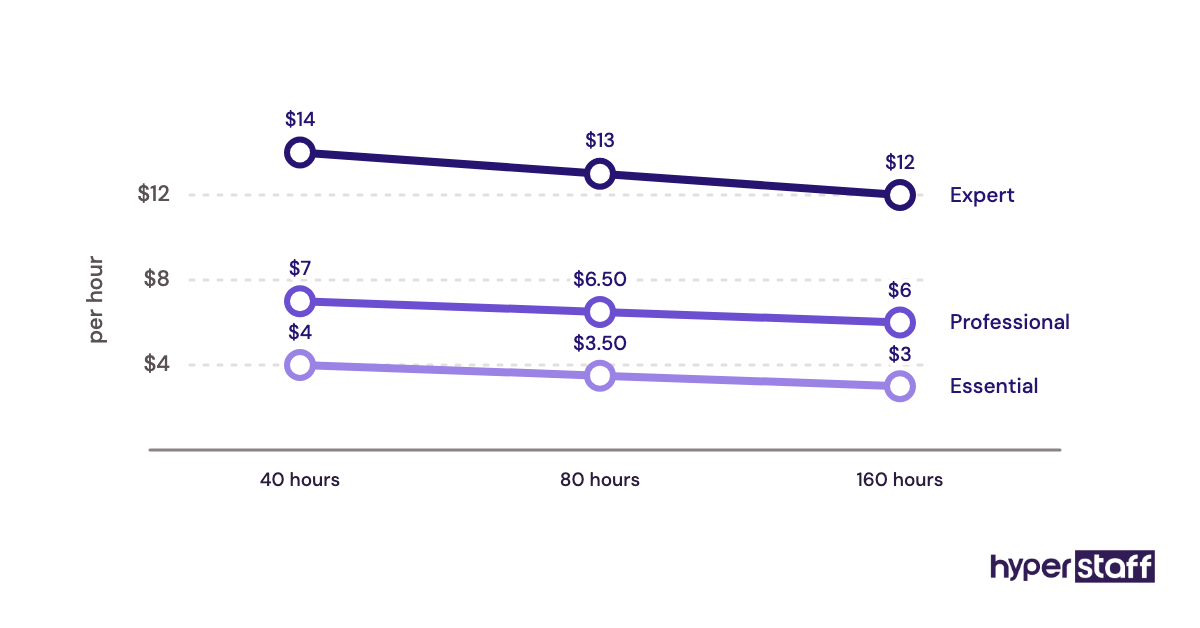
Important: Hyperstaff prices shown are starting averages. Your final cost depends on the assistant's experience tier, the hours you book and the specific work involved.
Is a Personal Virtual Assistant Worth It?
Yes, a personal virtual assistant is worth it for most people with 10+ hours of weekly admin, and when it's set up well it's one of the highest-return hires a busy professional can make. The assistant costs a few dollars an hour, and every hour they take back goes to work only you can do.
Here's an example calculation. Say an hour of your own time is worth $75 in billable work or sales, and you book a Professional assistant for 80 hours a month at $6 an hour, which is $480.
If that returns 10 hours of your time a week, about 43 hours a month, the recovered value is roughly $3,225. In month one, take off about 10 hours of handover time ($750), and you're still ahead by close to $2,000.
From month two, with handover done, the gap widens to around $2,700 a month. The same 80 hours from an in-house assistant at the median wage would run about $2,650 before you've recovered a single hour.
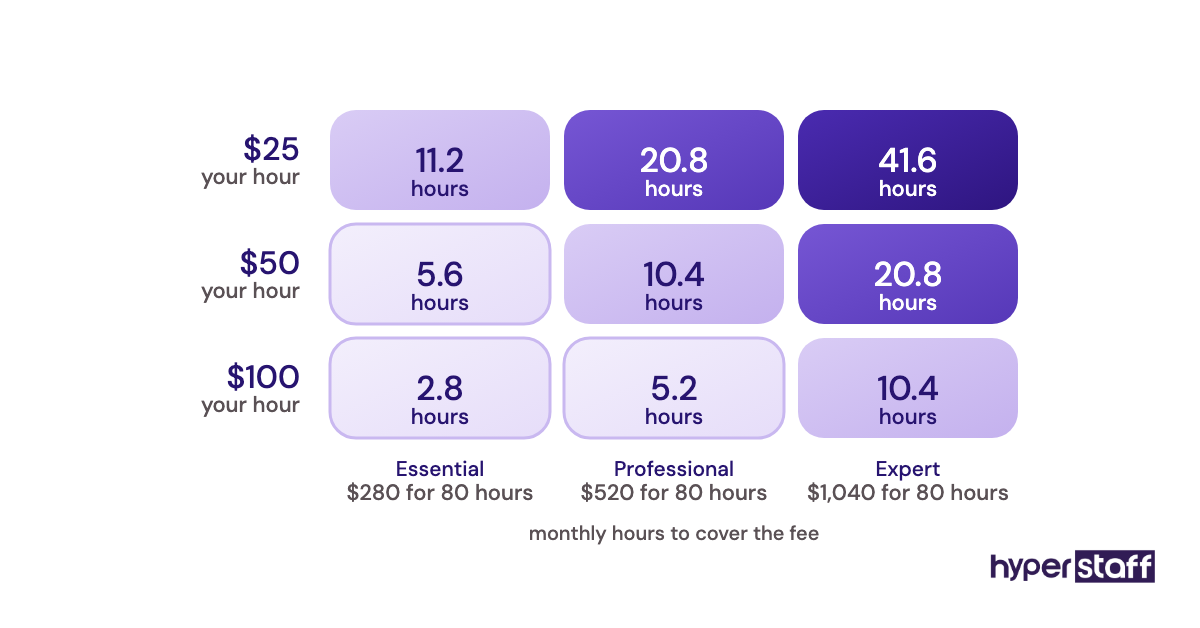
The math breaks down in one situation: when the freed-up hours drift into more admin or idle time. A VA only pays off if you spend the returned hours on something valuable, so decide where they go before you hire.
How Do You Choose a Personal Virtual Assistant Agency?
Choose a personal virtual assistant agency on continuity, vetting and replacement terms before price. A low rate means little if the assistant leaves in month two and you start the handover again from zero.
Ask each agency these questions:
- Will I get one dedicated assistant, or a rotating pool?
- How fast can you place someone, and how fast can you replace them?
- Who documents my processes, and who keeps that documentation if the assistant changes?
- Do I get a named account manager?
- Can I adjust hours monthly?
For reference, Hyperstaff answers those with a dedicated specialist, placement in 5 business days, free replacement in 5 to 7 business days, an Operations Vault we maintain and a dedicated account manager for every client. Talent comes from the Philippines, Latin America, India, Eastern Europe and the United States.
Personal VA Statistics, Trends and Predictions
The cost gap that makes personal VAs worth it comes straight from US labour data. Benefits make up 30% of private-industry compensation according to the BLS Employer Costs for Employee Compensation release, so every in-house hire costs well above the posted wage.
Demand for in-office assistants is flattening. The BLS Occupational Outlook Handbook projects employment of secretaries and administrative assistants to decline 2% over the decade, while still expecting about 314,400 openings a year, mostly from turnover.
Our prediction, based on the roles clients ask us to fill, is that the personal VA job keeps widening. Requests increasingly mix classic admin with lead research, CRM upkeep and customer replies, and we're less certain how fast executive-level remote roles will grow, since those depend on trust built over longer engagements.
Can AI Replace a Personal Virtual Assistant?
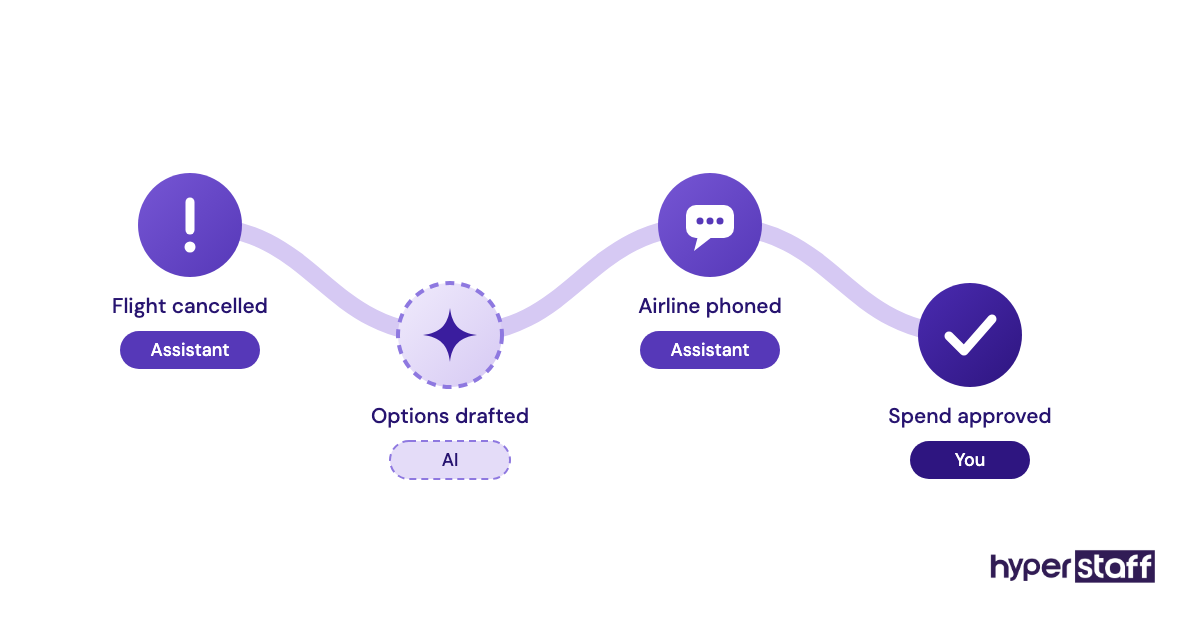
AI can replace parts of a personal virtual assistant's work, such as drafting replies, summarising threads and proposing meeting times, but it can't yet own outcomes. Someone still has to notice the flight was cancelled, call the airline and rebook around three other commitments.
The stronger setup pairs the two. A VA who uses AI for first drafts and research gets through more tasks per hour, which makes each paid hour worth more to you.
Disclaimer: This article is for general information only and isn't financial, legal or employment advice. Costs, savings and figures are estimates that vary by situation. Third-party data belongs to its publishers. Consult a qualified professional before making hiring decisions.
Common questions
Is a personal virtual assistant worth it for a small business owner?
Yes, if you spend at least 10 hours a week on admin. At offshore rates, even a 40-hour monthly bundle usually costs less than the value of a few hours of your own time.
Is it safe to give a personal VA access to my email and bank?
It can be, with the right setup. Use delegated email access and a password manager, start with view-only banking and set spending caps before granting more.
How many hours should I start with?
Match the bundle to your weekly admin load. Around 40 hours a month suits 5 to 10 weekly hours of tasks, and 80 hours suits 10 to 20.
Is a personal virtual assistant worth it if I only need help occasionally?
Probably not as a dedicated hire. Sporadic work rarely builds the context that makes a dedicated assistant valuable, so a pay-per-task service may fit better until the load grows.
What happens if my personal VA quits?
With a freelancer, you start over. With an agency like Hyperstaff, a replacement arrives in 5 to 7 business days, briefed from your Operations Vault.
Book a free 15 min call
We place a pre-vetted specialist in 5 business days, fully managed, from $3/hour.