10 Personal Virtual Assistant Mistakes and What to Do Instead
The setup errors that decide whether a personal virtual assistant saves you time or quietly costs you more of it.
On this page
- Mistake #1: Handing over tasks without the decision rules behind them
- Mistake #2: Sending passwords over chat and email
- Mistake #3: Starting with your most personal tasks in week one
- Mistake #4: Picking the lowest hourly rate and calling it a saving
- Mistake #5: Writing the job description as a chore list
- Mistake #6: Leaving spending and approval limits unwritten
- Mistake #7: Ignoring time zone overlap until the first missed handoff
- Mistake #8: Limiting your assistant to inbox and calendar work
- Mistake #9: Measuring hours logged instead of work finished
- Mistake #10: Having no plan for the day your assistant leaves
- FAQs
💡 Key Takeaways:
1) Most personal virtual assistant mistakes happen before the first task is done, in how access, decision rules and priorities get handed over.
2) A personal virtual assistant performs best with written approval limits, a shared password manager and a fixed daily handoff window across time zones.
3) Judge a personal assistant on finished outcomes, and keep your processes documented outside their head so a replacement can pick up the work in days.
Fix these and your assistant pays for itself
Hyperstaff has placed 70+ virtual assistants with 30+ clients, and the same few setup errors decide whether a hire earns its keep or drains your week. Our personal virtual assistant services start from $3/hour, with placement in 5 business days and a dedicated account manager who helps you sidestep each mistake below.
Mistake #1: Handing over tasks without the decision rules behind them
Most owners give a personal virtual assistant a task list. Very few give them the rules they use to make calls inside those tasks, like which meetings get declined and whose emails jump the queue.
A task without its rule is half a task. The assistant can do the mechanical part, then has to guess or ask about everything else.
Why does this keep happening?
- Your rules live in your head, so they feel obvious.
- Writing them down takes longer than doing the task once.
- The first few tasks are simple enough to work without rules.
- Owners expect a good assistant to "just pick it up."
- Nobody asks for the rules during setup.
What the missing rules cost you
A personal virtual assistant without decision rules has two options: guess or ask. Guessing produces a declined call with someone who mattered, and asking produces a steady stream of pings that eats the time you hired help to save.
The less obvious cost is the verdict owners reach by week three. They decide the assistant "isn't a fit," when the missing piece was a one-page document nobody wrote.
Write a decision sheet first
Before day one, list the 10 to 15 recurring calls you make without thinking. Who always gets a reply within the hour, which meeting requests get a polite no, what you never book before 9am.
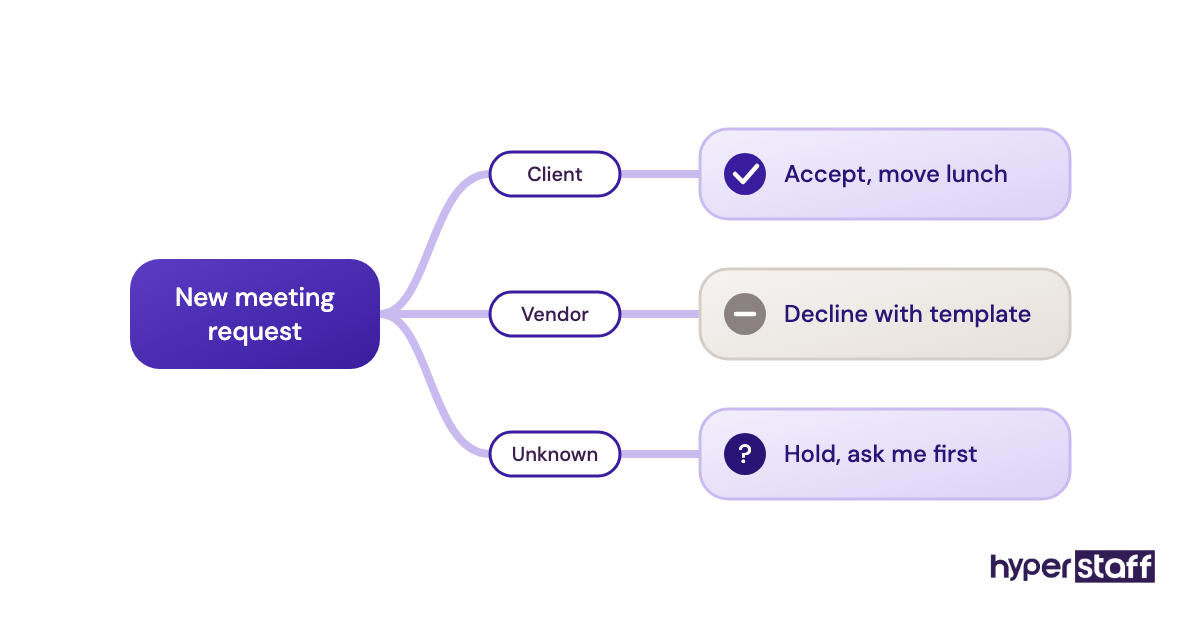
At Hyperstaff, these rules go into your Operations Vault, the written record of your SOPs, tools and context that we keep up to date for you. Your assistant works from it on day one, and so would anyone who ever covers for them.
Mistake #2: Sending passwords over chat and email
Personal assistant access usually starts with a password pasted into WhatsApp or Slack on the first morning. It works, and it leaves your logins sitting in message threads you'll never clean up.
Why owners default to pasting passwords
- Day one feels urgent, and pasting is fastest.
- A password manager feels like overkill for one hire.
- Many people don't know Gmail and Google Calendar offer delegated access.
- Two-factor codes go to your phone, so forwarding them becomes a habit.
The security and time cost
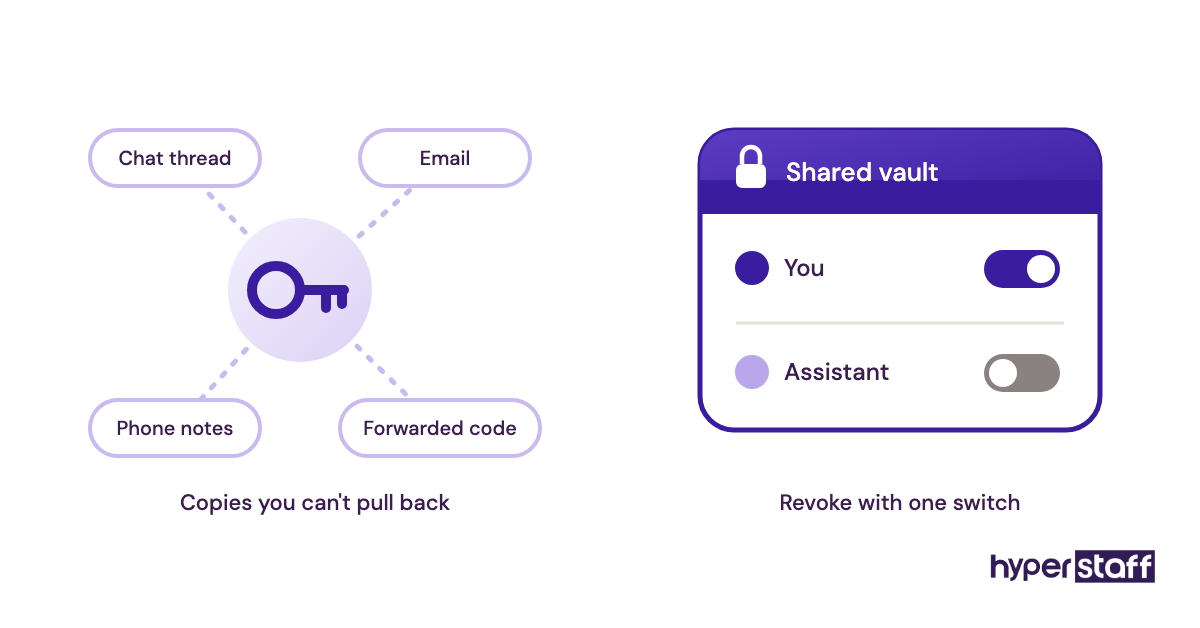
Shared passwords can't be cleanly revoked. If the assistant leaves, you have to change every login they ever saw, and most people miss a few.
There's a practical cost too. A login from a new country often triggers a security lockout on banks and airline accounts, and you end up approving codes from your phone at odd hours, which makes you the bottleneck on your own tasks.
Use delegated access and a shared vault
Gmail delegation lets an assistant read, send and organize mail on your behalf without ever knowing your password, and it can't be used to change your password or settings. Google Calendar sharing with "make changes" permission covers scheduling the same way.
For everything else, use a password manager with a shared vault, such as 1Password or Bitwarden, so you can remove access with one click. Our roundup of personal virtual assistant tools covers how each one handles sharing.
Mistake #3: Starting with your most personal tasks in week one
Owners often hire a personal assistant to take over the most tangled part of their life, then hand that part over on Monday. Family calendars, medical appointments, personal finances and travel bookings carry the most unwritten preferences of any work you'll delegate.
Why the hardest tasks go first
- The pain that triggered the hire is the first thing you want gone.
- Easy tasks feel like a waste of a new hire's time.
- Owners underestimate how many preferences sit inside personal work.
- No one has planned a week-by-week sequence.
Early errors cost trust, and trust is slow to rebuild
A wrong seat on a long-haul flight or a missed school pickup in week one does more damage than ten small wins can repair. Owners take the task back, and the assistant gets boxed into low-value work for months.
The work itself was never the problem. The order of handover was.
Sequence the handover over four weeks
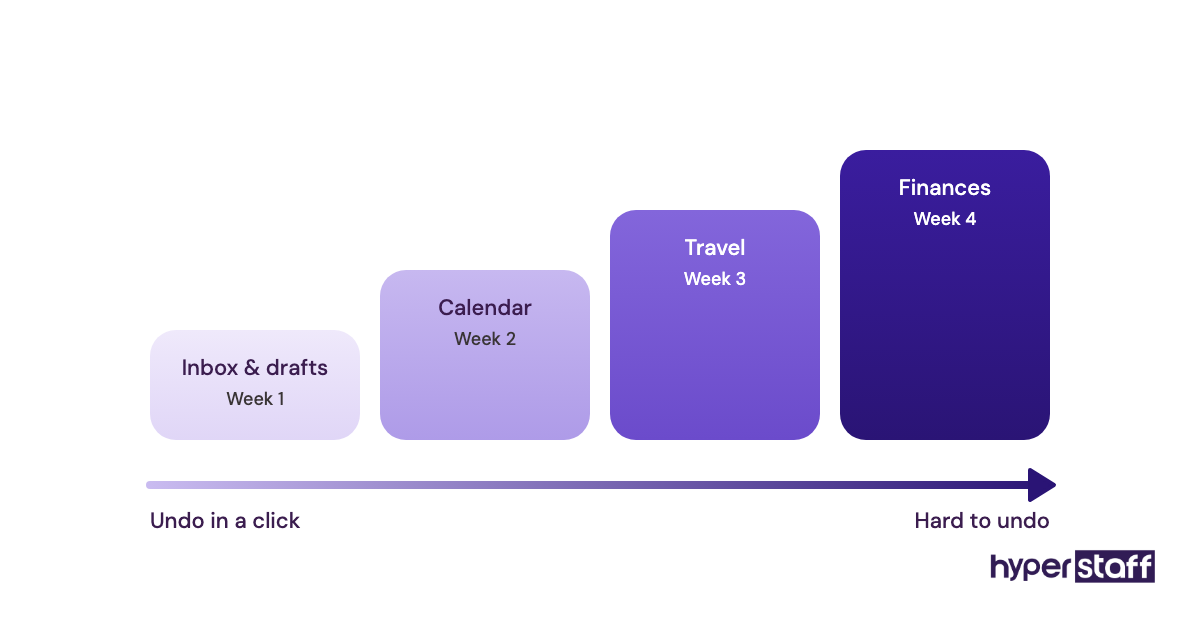
Start with low-stakes, reversible work: inbox labeling, research, filing and drafts you approve before they go out. Move calendar control in during week two, travel in week three with a written preference sheet, and personal finances last.
With Hyperstaff, a 30-minute kickoff call comes first, and work starts that day or the next morning. Our guide to onboarding a personal virtual assistant lays out the full first month.
Mistake #4: Picking the lowest hourly rate and calling it a saving
The hourly rate is the easiest number to compare, so it gets too much weight. The real cost of a personal virtual assistant is their rate plus the hours you spend reviewing and fixing their work.
Why rate shopping feels right
- Rates are listed; review time isn't.
- Owners assume personal tasks are simple by default.
- Budget gets set before the scope is clear.
- Experience levels look similar on a short profile.
- Comparing two numbers feels more objective than judging fit.
Your review hours are the expensive ones
An entry-level assistant handed senior work, like managing a household budget or drafting sensitive letters, needs heavy review. Every hour you spend checking their work costs far more than the gap between two hourly rates.
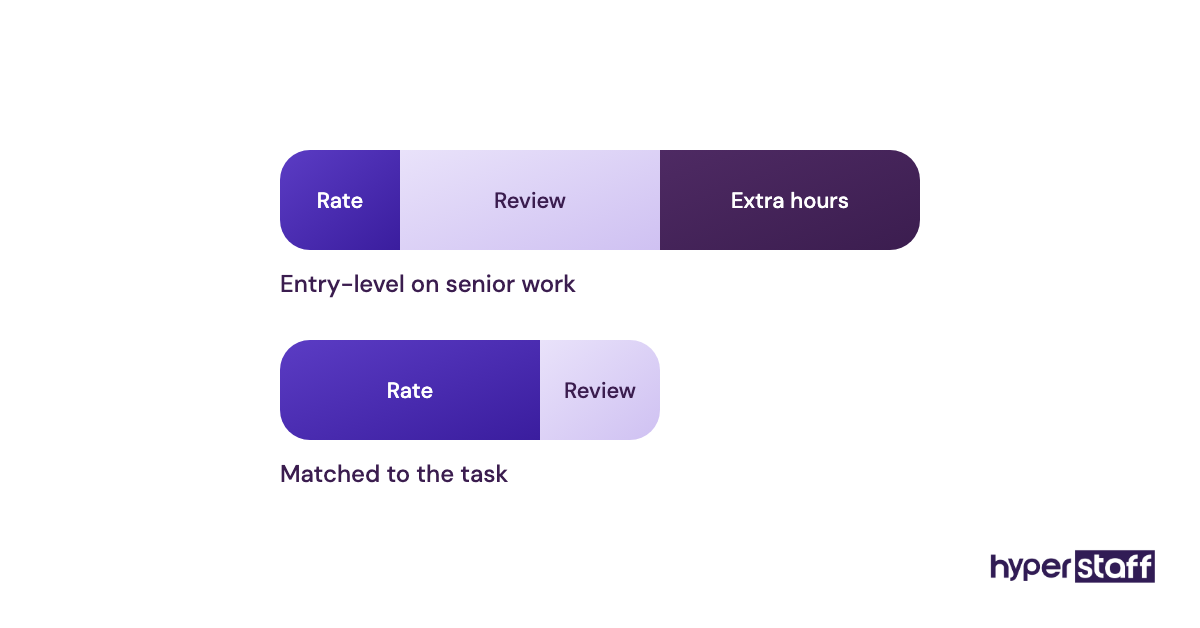
The reverse mistake happens too. Paying senior rates for inbox labeling and appointment booking wastes budget you could spend on more hours.
Match the experience tier to the task
Hyperstaff uses three tiers: Essential (0 to 2 years, from $3/hour), Professional (2 to 5 years, from $6/hour) and Expert (5+ years, from $12/hour). Hours come in monthly bundles of 40, 80 or 160, and paying quarterly saves 10%.
A rule of thumb: if a wrong call would cost you money or a relationship, pay for experience. Our breakdown of personal virtual assistant cost runs the full numbers, and if you're still on the fence, read whether a personal assistant is worth it for your situation.
Mistake #5: Writing the job description as a chore list
A typical personal assistant job post reads like a to-do list: manage email, book travel, schedule appointments. Every candidate can say yes to that list, so it filters for nobody.
Why chore lists are the default
- Listing tasks is quicker than defining outcomes.
- Most templates online are built the same way.
- Owners haven't decided how much authority the role carries.
- Judgment is hard to describe, so it gets left out.
You end up hiring for the wrong skill
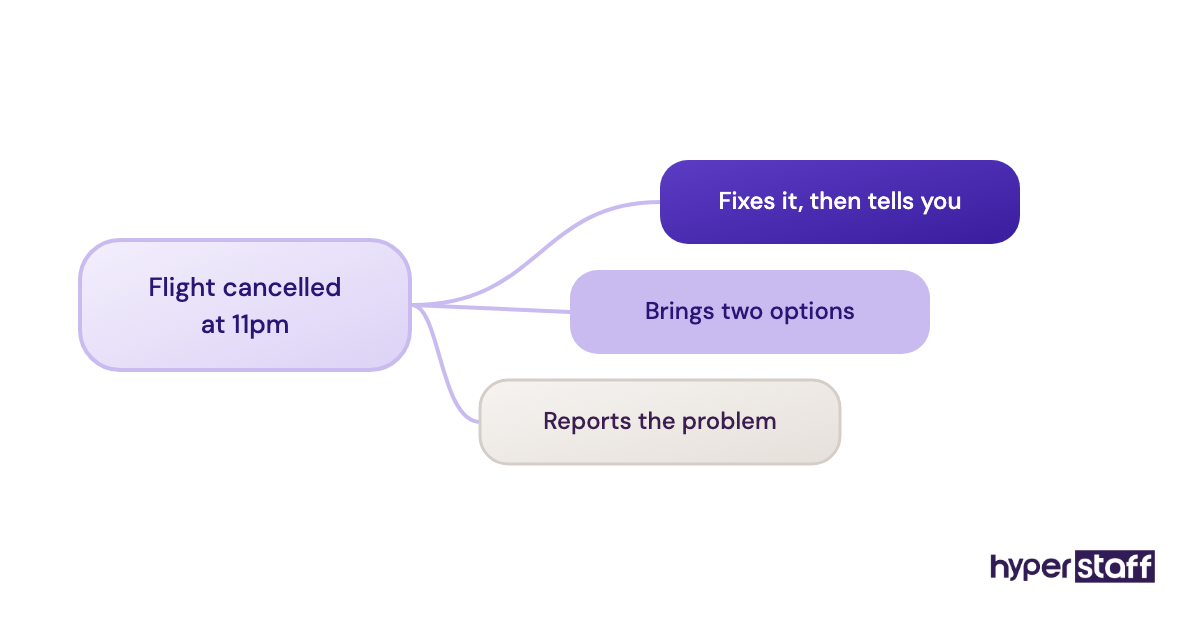
A chore list attracts people who are good at following instructions. Personal assistant work rewards people who handle the moment the instructions run out, like a cancelled flight at 11pm or a double-booked Saturday.
The interview then tests the wrong thing too. Candidates confirm they know Google Calendar, and nobody finds out how they prioritize under pressure.
Describe outcomes, authority and overlap
Write what "done" looks like ("inbox at zero by 10am your time, with three items flagged for you"), what they can decide alone, and the hours you need them online. Our personal virtual assistant job description template is built around that structure.
Then test judgment with scenario questions instead of tool questions. These personal assistant interview questions are written to expose how a candidate thinks when the plan breaks.
Mistake #6: Leaving spending and approval limits unwritten
Without written limits, a personal virtual assistant swings between two extremes. Some ask permission for a $12 courier fee, others rebook a $900 flight without checking.
Why limits never get set
- Owners assume common sense covers it.
- Setting a number feels like a sign of distrust.
- Limits differ by category, so one rule doesn't fit.
- The question only comes up once something has gone wrong.
Both extremes waste money
An assistant who asks about everything turns you back into the person doing the work. An assistant who asks about nothing will eventually make a costly call you'd have vetoed in five seconds.
Each case erodes trust differently. The cautious assistant looks slow, and the bold one looks reckless, even though both behaved reasonably with no rule to follow.
Set thresholds per category
Write a short table of limits: under $50 they decide, $50 to $300 they book and tell you, above $300 they ask first. Add hard lines for anything that can't be undone, like non-refundable fares or signed agreements.
Review the numbers after the first month. Most owners raise them once they've seen how the assistant spends.
Mistake #7: Ignoring time zone overlap until the first missed handoff
Time zone overlap decides how fast your personal virtual assistant can react to anything that comes up during your day. Owners often discuss it for a minute in the interview and never plan it.
Why overlap gets overlooked
- Remote work makes location feel irrelevant.
- Owners assume replies will come "within a few hours."
- Nobody defines which tasks need a same-day answer.
- Overnight work sounds like a pure bonus.
Async gaps hit urgent personal tasks hardest
A dentist rescheduling at 2pm or a flight change on a Friday needs a response in your working day. If your assistant is asleep, the task waits, and you end up handling it yourself.
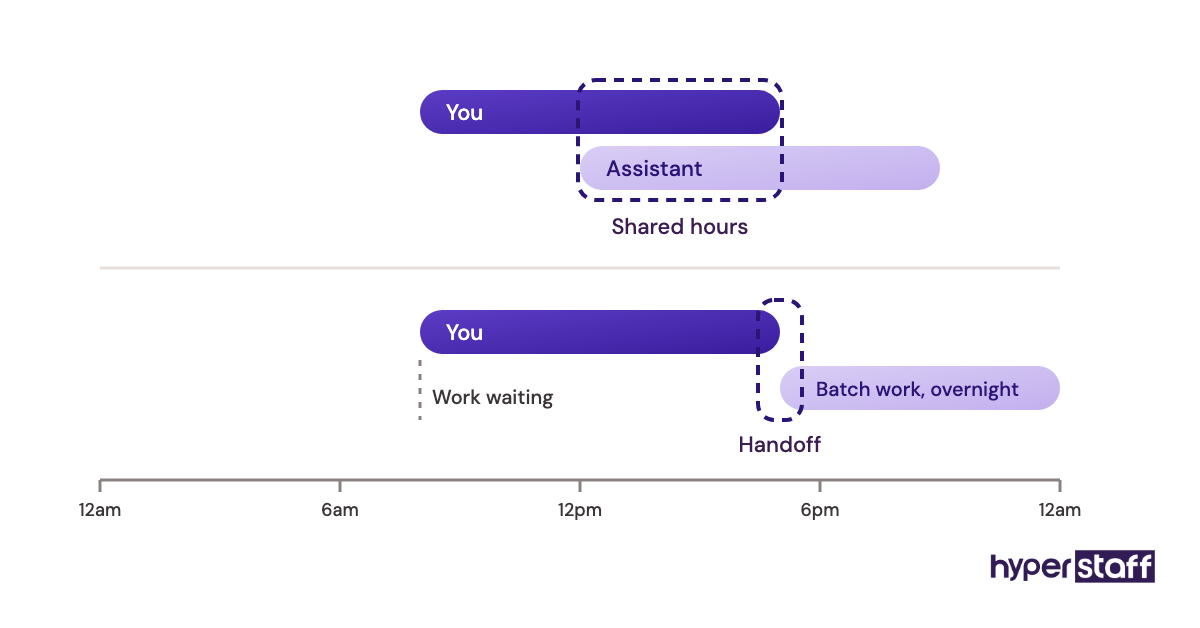
Practitioners genuinely disagree here. Some owners want full overlap for responsiveness, while others prefer a few shared hours and overnight work that's finished before they wake up.
Pick your overlap model on purpose
If most of your tasks are reactive (calendar, calls, travel changes), aim for at least 3 to 4 shared hours. If they're batch work like research and inbox cleanup, a short daily handoff window is enough.
Hyperstaff places pre-vetted talent from the Philippines, Latin America, India, Eastern Europe and the United States, so region is a real choice. Our guide on how to hire a personal virtual assistant walks through matching region to working hours.
Mistake #8: Limiting your assistant to inbox and calendar work
Inbox and calendar management is where most owners start, and where too many stop. A capable personal virtual assistant can also take on customer support, lead generation, digital marketing tasks, operations and online business management.
Why the role stays small
- The label "personal assistant" suggests admin work only.
- Owners hand over what's annoying, not what's valuable.
- Nobody reviews the scope after the first month.
- Business tasks feel too close to the core to delegate.
- Assistants rarely volunteer for work beyond their brief.
You pay for capacity you never use
Once the inbox is under control, the assistant's hours start going to busywork. The higher-value tasks, like following up on warm leads or answering customer questions, stay on your plate.
Audit your week and expand in steps
For one week, note every task you do that someone else could do with a written guide. Our list of personal virtual assistant tasks is a useful prompt for what to look for.
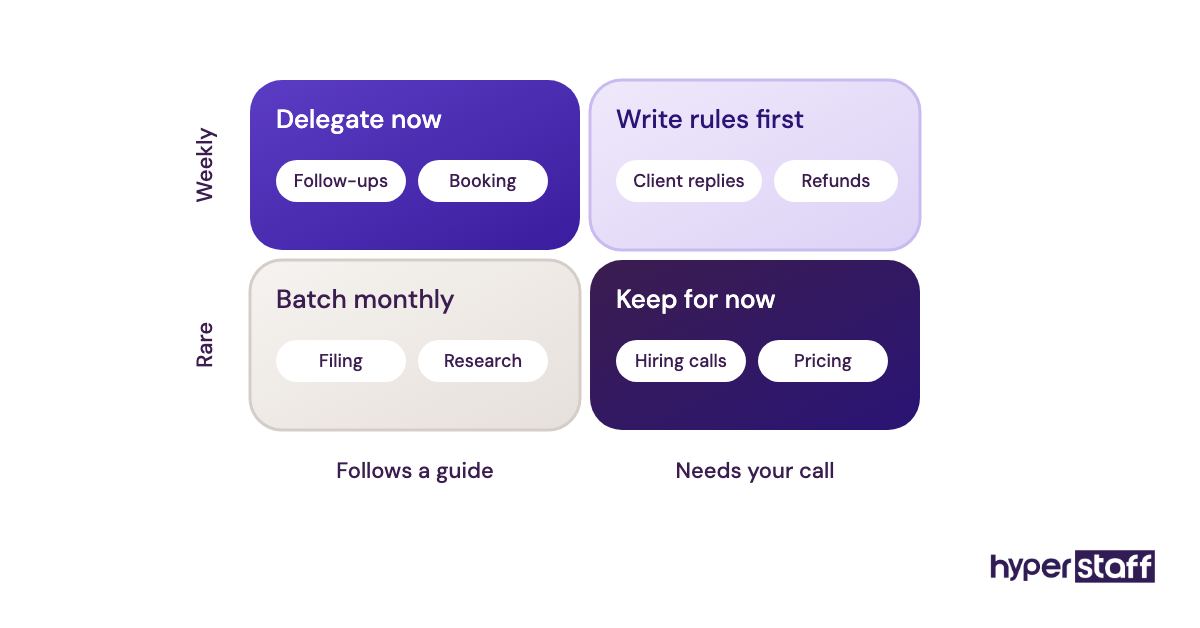
Add one business task per month, documented before it moves. If the boundary between personal and business work is unclear, our explainer on what a personal virtual assistant is draws the line.
Mistake #9: Measuring hours logged instead of work finished
Many owners respond to the unease of remote work by installing screenshot trackers. Screenshot monitoring proves someone was at a keyboard and says nothing about whether your flight got rebooked.
Why owners reach for trackers
- Hours are easy to count and outcomes take thought.
- Remote work feels invisible without proof of activity.
- Trackers come bundled with many payroll tools.
- No one defined what a good week looks like.
Activity data tells you the wrong story
Personal assistant work is uneven. A day spent waiting on a visa office or a contractor's reply looks idle on a tracker and can still be the most useful day of the month.
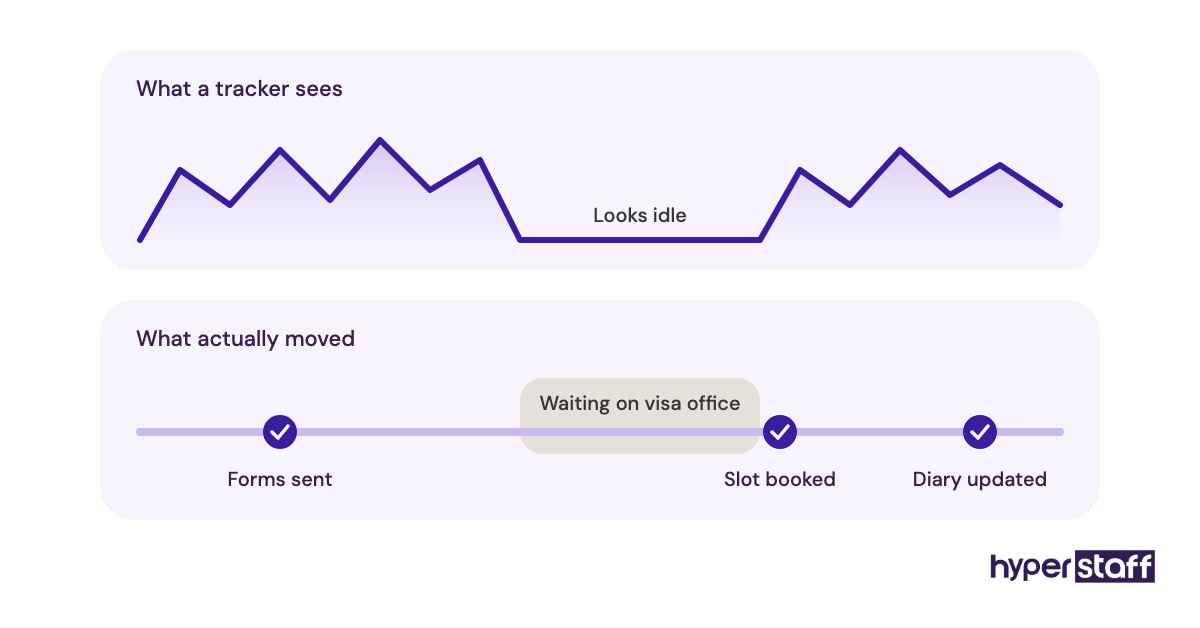
Heavy monitoring also changes behavior. Assistants learn to look busy, which is a different skill from getting things done.
Agree on a weekly outcome list
Keep a shared board in Trello, Asana or Notion with three columns: requested, in progress and done. Review the done column each Friday, and the hours question mostly answers itself.
Time tracking still has a place for billing transparency on hourly bundles, and some owners prefer it for that reason. Use it as a receipt, with the outcome list as the actual measure of performance.
Mistake #10: Having no plan for the day your assistant leaves
The better your personal virtual assistant gets, the more of your life lives in their head. If they get sick, move on or stop responding, all of that knowledge leaves with them.
Why nobody plans for it
- Things are going well, so the risk feels remote.
- Documentation feels like extra work on top of the real work.
- Owners assume a replacement can learn on the job.
- Freelance arrangements rarely include a handover clause.
The rebuild costs more than the original setup
Losing a trained assistant means repeating every step in this article, often under pressure and with tasks already overdue. The hidden cost is the weeks of your own time spent re-explaining preferences you thought were settled.
The same risk exists with an in-house hire. Our comparison of a personal virtual assistant vs in-house staff covers how each model handles turnover.
Keep the knowledge outside one person
Ask your assistant to write an SOP every time a task becomes routine, and store it somewhere you own. Review it quarterly so it matches how the work is actually done.
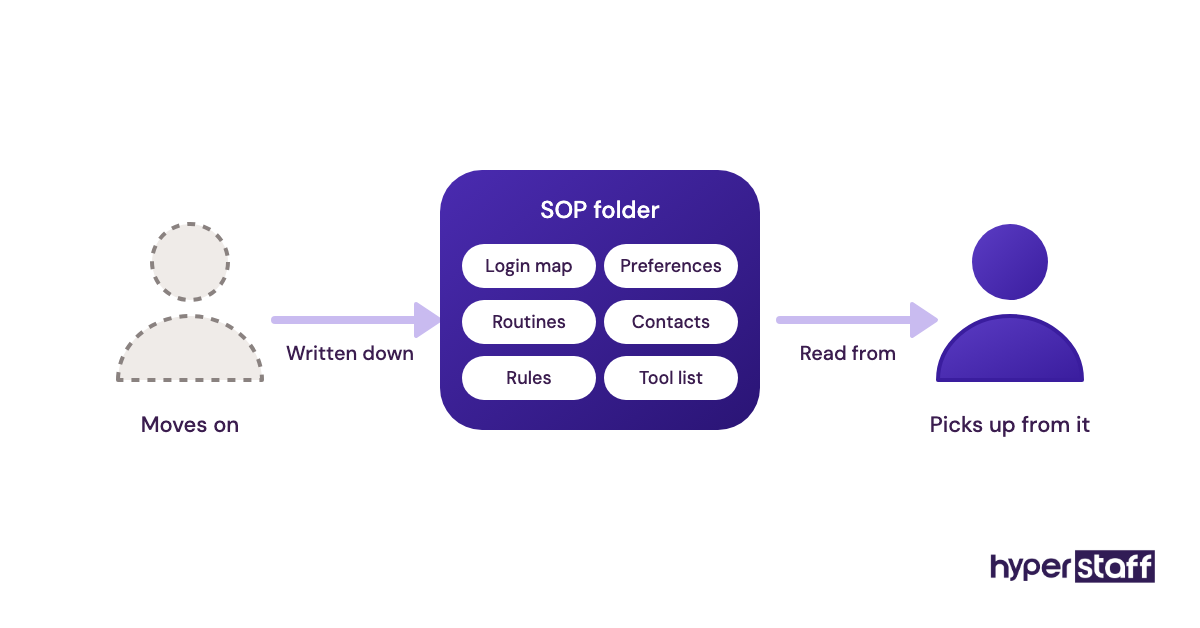
Hyperstaff builds this in. If a placement doesn't work out, a free replacement starts in 5 to 7 business days, briefed from your Operations Vault so they're not learning your life from scratch.
Disclaimer: This article is for general information only and does not constitute legal, financial or security advice. Hyperstaff makes no guarantees about results, and readers should seek professional advice for their own circumstances before acting on it.
Common questions
How long should I give a new personal assistant before judging them?
Give it four weeks with a planned handover sequence. Judge the first two weeks on how they follow your rules and the last two on how much you stopped doing yourself.
Should my personal virtual assistant have my bank login?
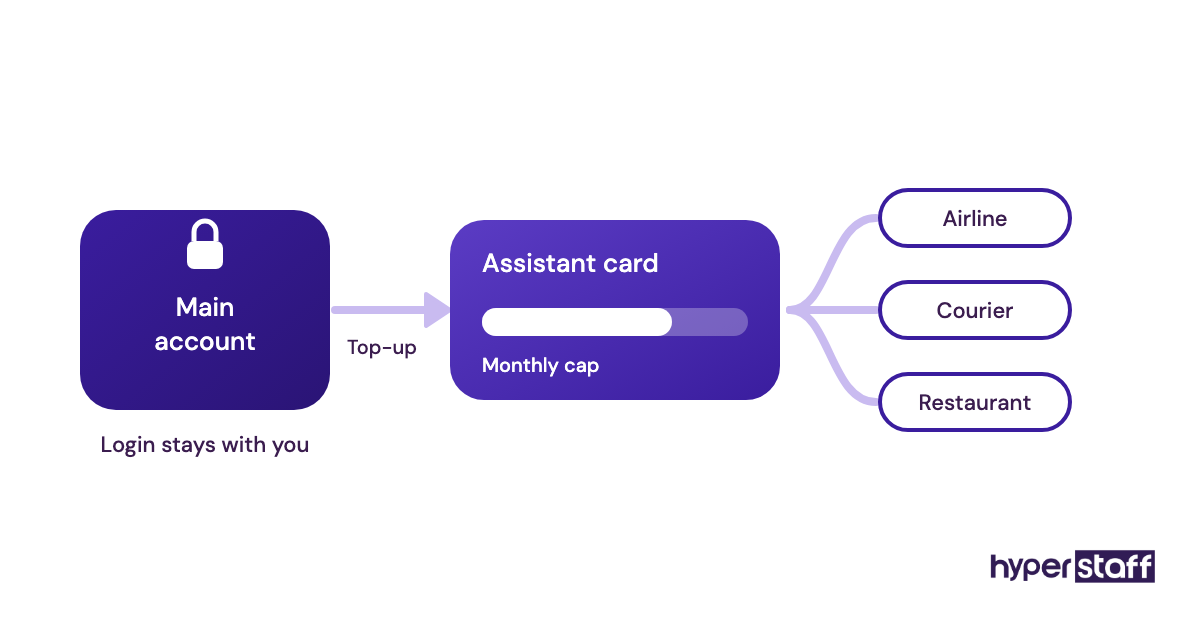
No. Use a separate card with a spending cap and bill pay with approval steps, so your assistant can pay for things without full account access.
What if my personal VA keeps making the same mistake?
Check whether the rule behind the task is written down. Repeated errors usually point to a missing or vague instruction, so fix the SOP first, then raise it with the assistant if it continues.
Is it a mistake to start with a part-time personal assistant?
It depends on how much work you can hand over in the first month. A 40-hour or 80-hour monthly bundle is a sensible way to test fit before committing to full time, as long as you add tasks steadily.
How do I give feedback without micromanaging my virtual assistant?
Batch it. A weekly 15-minute review of the done list, with one or two concrete corrections, works better than commenting on every task as it happens.
Book a free 15 min call
We place a pre-vetted specialist in 5 business days, fully managed, from $3/hour.