What Is a Personal Virtual Assistant? Roles, Costs and How It Works
A plain guide to what a personal virtual assistant is, what they handle day to day, and how to set one up so the hours actually come back to you.
On this page
- What Is a Personal Virtual Assistant?
- Key Personal Virtual Assistant Terms You Should Know
- Why Is a Personal Virtual Assistant Important?
- How Does a Personal Virtual Assistant Work?
- Types and Forms of Personal Virtual Assistants
- How a Personal Virtual Assistant Differs From Related Roles
- The Benefits of a Personal Virtual Assistant
- The Drawbacks of a Personal Virtual Assistant
- Who Needs a Personal Virtual Assistant?
- Personal Virtual Assistant Examples
- Creating a Personal Virtual Assistant Plan, Step-by-Step
- What Does an Effective Personal Virtual Assistant Strategy Look Like?
- Personal Virtual Assistant Tools and Software
- 10 Proven Personal Virtual Assistant Tips and Best Practices
- Overcoming Common Personal Virtual Assistant Challenges
- How to Measure Personal Virtual Assistant Success
- How Long Does a Personal Virtual Assistant Take to Work?
- How Much Does a Personal Virtual Assistant Cost?
- Is a Personal Virtual Assistant Worth It?
- How to Choose a Personal Virtual Assistant Agency
- Personal Virtual Assistant Statistics, Trends and Future Predictions
- Personal Virtual Assistants and AI
- FAQs
💡 Key Takeaways:
1) A personal virtual assistant is a remote professional who manages the admin, scheduling and errands of one person, working through shared inboxes, calendars and accounts.
2) The role reaches well past calendars and email, often taking on customer replies, research, lead lists and light operations once the assistant knows the person's preferences.
3) Results depend more on written instructions and safe account access than on the assistant's talent, and most setups need four to eight weeks before the time savings feel real.
Buy Back Hours That Earn You Money
A personal virtual assistant pays for themselves when your hours go back to paid work. Hyperstaff has placed 70+ virtual assistants with 30+ clients, and our dedicated personal assistant services start from $3/hour, with a pre-vetted match in 5 business days and a free replacement in 5 to 7 business days if the fit is wrong.
What Is a Personal Virtual Assistant?
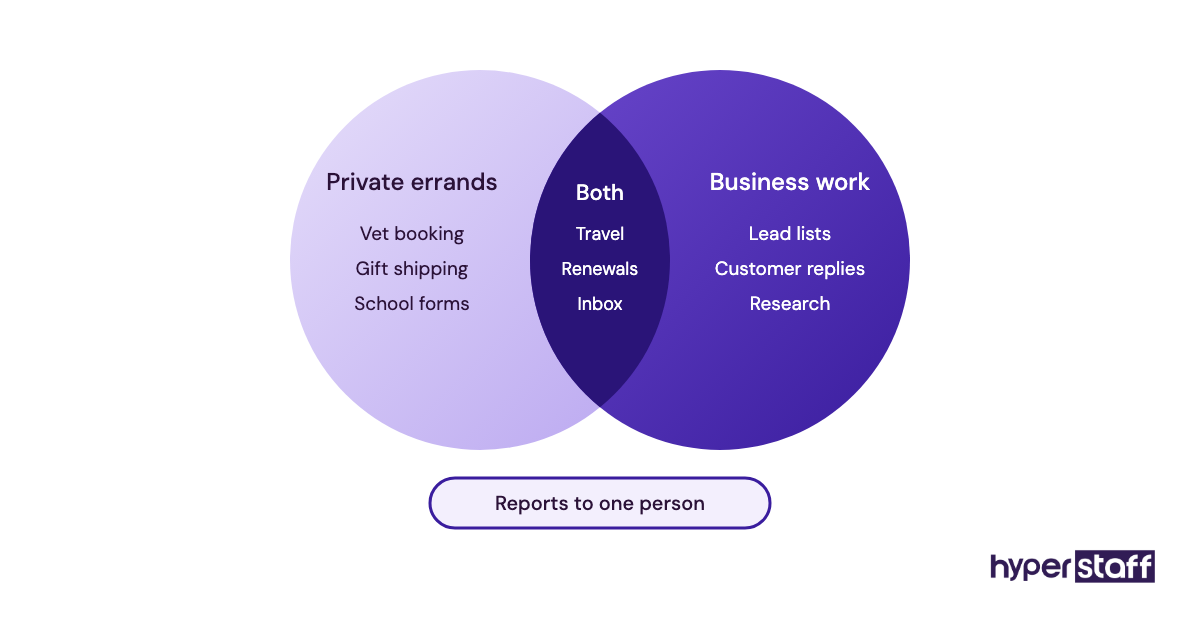
A personal virtual assistant is a remote assistant who works for one individual, usually a founder, executive or busy professional, and runs their admin from a distance. The work happens through shared tools: email, calendar, documents, booking sites and messaging apps.
Typical work spans scheduling, inbox triage, travel bookings, bill tracking, online shopping, research and appointment setting. Over time the job tends to widen, and the full list of personal virtual assistant tasks often grows into customer support, social posts and lead research.
Key Personal Virtual Assistant Terms You Should Know
- Delegation = handing a task to the assistant along with the authority to finish it.
- Inbox triage = sorting email into reply, archive, flag or escalate, using rules you set.
- Calendar delegate access = permission to manage your calendar without your password.
- SOP = a standard operating procedure, the written steps for a repeat task.
- Password manager = a vault that shares logins without revealing the actual password.
- Escalation rule = the point where the assistant stops and asks you first.
- Dedicated assistant = one named person assigned to you, rather than a shared pool.
- Hourly bundle = a fixed block of monthly hours, such as 40, 80 or 160.
- Time zone overlap = the hours when you and the assistant are both online.
- Replacement guarantee = an agency's promise to swap in a new assistant if the match fails.
- Executive assistant = a senior assistant role focused on a leader's business priorities.
Why Is a Personal Virtual Assistant Important?
Small recurring jobs are the reason a personal virtual assistant matters. Rebooking a dentist, chasing a refund or comparing flights takes ten minutes each, and twenty of them eat a working afternoon without anyone noticing.
The hidden cost is the context switch. Dropping a quick errand into focused work rarely costs only the errand, because getting back into the hard task is the slow part.
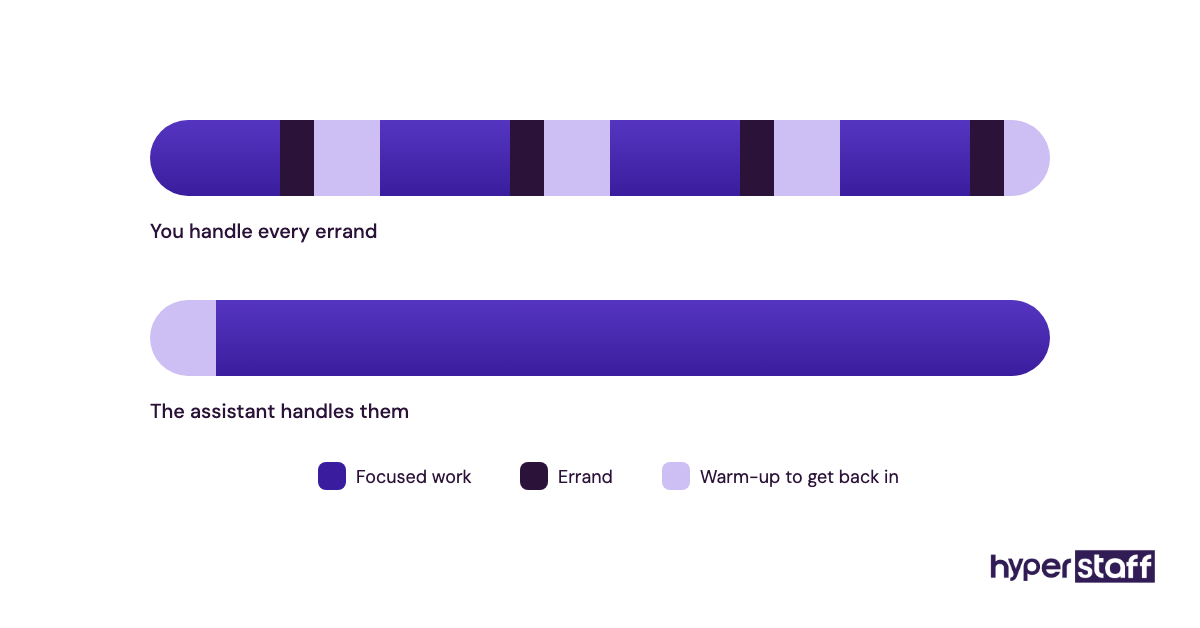
Memory is the other gain. A good assistant keeps the lists busy people stop keeping, like renewal dates, passport expiry and the gift that has to ship by Thursday.
How Does a Personal Virtual Assistant Work?
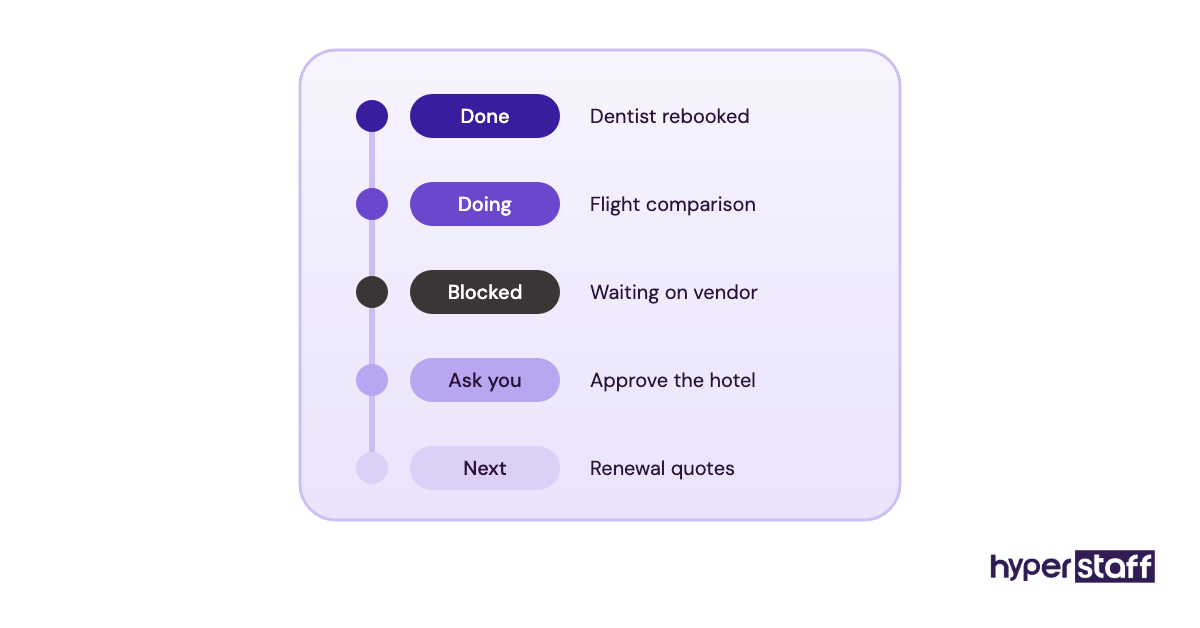
Personal virtual assistants work remotely on a set number of monthly hours, using delegated access to your accounts and a shared task list. You assign work in writing, the assistant completes it inside agreed limits, and updates come back daily.
With Hyperstaff, the sequence is short. We match a pre-vetted assistant within 5 business days, run a 30-minute kickoff call, and work starts that day or the next morning.
Your SOPs, tools and context go into the Operations Vault, which we write down and maintain for you. A dedicated account manager stays on the account, and if a replacement is ever needed, the new assistant is briefed from that Vault within 5 to 7 business days.
| Rhythm | What happens | Common tool |
|---|---|---|
| Daily | Task list worked, end-of-day update sent | Slack, WhatsApp, email |
| Weekly | 15-minute review, next week's priorities | Zoom, Google Meet |
| Monthly | Hours used, SOPs updated | Shared doc, task board |
| As needed | Escalations above spend or risk limits | Direct message |
Most people underestimate the daily update. A five-line note at the end of the assistant's day is what builds trust fastest, far more than a long weekly call.
Types and Forms of Personal Virtual Assistants
Personal virtual assistants come in several forms, split by the kind of work, the seniority needed and the hours booked. The table below maps the common types to who they suit.
| Type | Typical tasks | Best fit | Typical hours per month |
|---|---|---|---|
| Personal admin VA | Email, calendar, bills, bookings | Solo professionals | 40 to 80 |
| Executive-level personal assistant | Meeting prep, board packs, priority inbox | Founders and executives | 80 to 160 |
| Household and family VA | School calendars, home services, renewals | Busy families | 40 |
| Travel and lifestyle VA | Flights, hotels, visas, reservations | Frequent travelers | 40 to 80 |
| Hybrid personal and business VA | Admin plus customer replies and lead lists | Small business owners | 80 to 160 |
| Research VA | Vendor comparisons, purchase research, summaries | Consultants, investors | 40 |
| Bilingual personal VA | Calls and email in two languages | Cross-border owners | 80 |
How a Personal Virtual Assistant Differs From Related Roles
A personal VA overlaps with three roles people often confuse it with. Scope and reporting line explain most of the gap.
Personal Virtual Assistant vs. Executive Assistant
An executive assistant guards a leader's business time: board meetings, investor calls, travel tied to the company. A personal VA can do that work too, but also books the vet and renews the car insurance.
Seniority is the practical difference. Executive work needs judgment about priorities, so it usually calls for our Professional or Expert tier.
Personal Virtual Assistant vs. AI Assistant
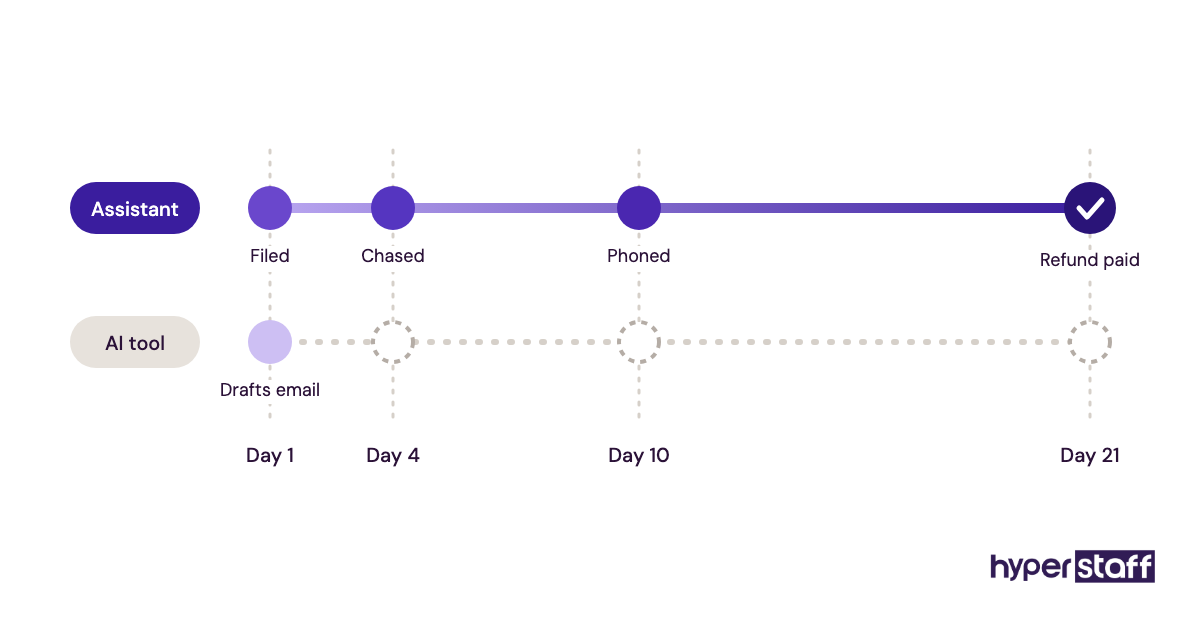
AI assistants like ChatGPT, Gemini or Siri draft, summarize and set reminders instantly. They don't call a clinic, notice that a hotel booking clashes with a school event, or chase a refund for three weeks.
A person brings follow-through. Many of the best assistants now use AI tools themselves, which makes them faster without removing the need for them.
Personal Virtual Assistant vs. General Virtual Assistant
A general VA usually serves a team or a business process, like order processing or data entry. A personal VA serves one person and builds a working memory of that person's preferences.
That memory is the asset. Rotating pools lose it every time the assistant changes, which is why Hyperstaff places a dedicated specialist who learns one business.
The Benefits of a Personal Virtual Assistant
Benefits show up as hours returned, fewer dropped details and lower cost than a local hire. The trade-offs against a local employee are laid out in our personal VA vs in-house comparison.
- Hours back each week for paid or high-value work
- Rates from $3/hour, far below a local salary plus benefits
- Flexible bundles of 40, 80 or 160 hours
- Coverage outside your hours when time zones differ
- Fewer missed renewals, deadlines and follow-ups
The Drawbacks of a Personal Virtual Assistant
Drawbacks are real, and most come from setup rather than the assistant. Expect friction early.
- The first weeks take your time to explain tasks
- Account access needs care to stay secure
- Physical errands are outside a remote role
- Time zone gaps can slow urgent replies
Who Needs a Personal Virtual Assistant?
Founders, executives, consultants, real estate agents, creators and busy families get the most from a personal virtual assistant. The common thread is a person whose hour is worth far more than the admin filling it.
A useful test: if "I'll do it tonight" has applied to the same admin task three weeks running, that task is ready to hand over. Our guide on how to hire a personal virtual assistant covers sourcing and trial periods.
People who change priorities hourly and never write anything down struggle most. Without some written rules, the assistant ends up waiting on questions instead of finishing work.
Personal Virtual Assistant Examples
Good and bad delegation patterns repeat across almost every setup. The ones below are common shapes of work, described as patterns.
Personal Virtual Assistant Good Examples
Inbox Triage With a Written Rulebook
The owner writes ten rules: what to archive, what to answer with a template, what to flag. The assistant clears the inbox twice a day and sends a short list of items that need a decision.
Travel Booked Against a Preference Sheet
Seat choice, airline loyalty numbers, hotel budget and the latest acceptable arrival time live on one page. Bookings stop needing back-and-forth because the preference sheet answers the questions in advance.
A Renewal and Bills Calendar
Every subscription, insurance policy and license renewal goes onto a shared calendar with a two-week warning. The assistant compares prices before each renewal and asks for approval only above a set amount.
Personal Virtual Assistant Bad Examples
Failed setups tend to share a few causes, and our list of common personal virtual assistant mistakes goes deeper on each.
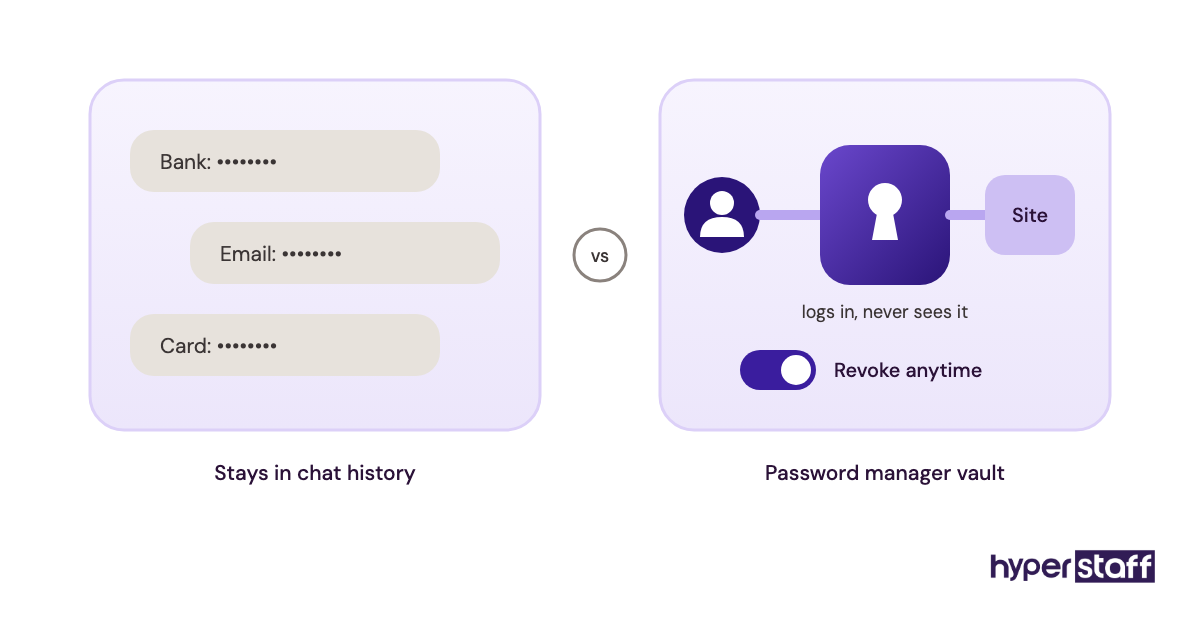
Passwords Sent in a Chat Message
Logins pasted into WhatsApp or email sit in message history forever. A password manager or delegate access fixes this in an afternoon.
Delegating by Vague Text
"Sort out the trip" leaves the assistant guessing on dates, budget and who's going. The result is a round of questions that takes longer than a two-line brief would have.
Expecting Instant Replies at 2 a.m. Their Time
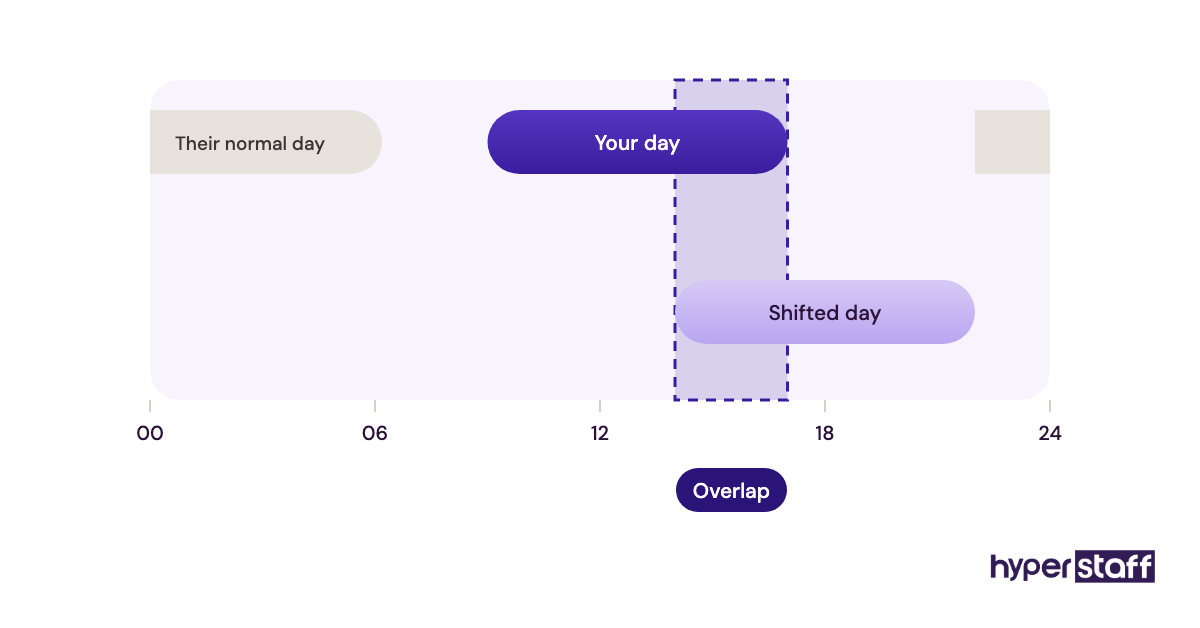
Time zone overlap has to be agreed up front. Owners who expect live replies outside the assistant's hours read the silence as poor effort, when the real issue is a schedule nobody set.
Creating a Personal Virtual Assistant Plan, Step-by-Step
A personal virtual assistant plan runs in five steps, from listing tasks to a 30-day review. Skipping the first two is the most common reason setups stall.
Step #1: Track One Week of Tasks
Write down every admin task for five working days, with the minutes each took. The list usually surprises people, and it becomes the assistant's first task board.
Step #2: Write the Role Down
Turn the list into a short role description with tasks, hours and limits. A personal VA job description template saves time here.
Step #3: Interview for Judgment
Skills are easy to test, while judgment needs scenario questions like "a flight is cancelled and I'm unreachable, what do you do?" Our list of personal VA interview questions includes more of these.
Step #4: Set Up Access and SOPs
Grant delegate access to email and calendar, share logins through a password manager, and record a short video for each repeat task. The full sequence sits in our guide to onboarding a personal virtual assistant.
Step #5: Review at 30 Days
After a month, check which tasks came back to you and why. Fix the instructions, raise or lower the hours, and add the next batch of work.
What Does an Effective Personal Virtual Assistant Strategy Look Like?
An effective personal virtual assistant strategy has one owner, written rules, clear spending limits and a fixed check-in rhythm. Everything else is detail.
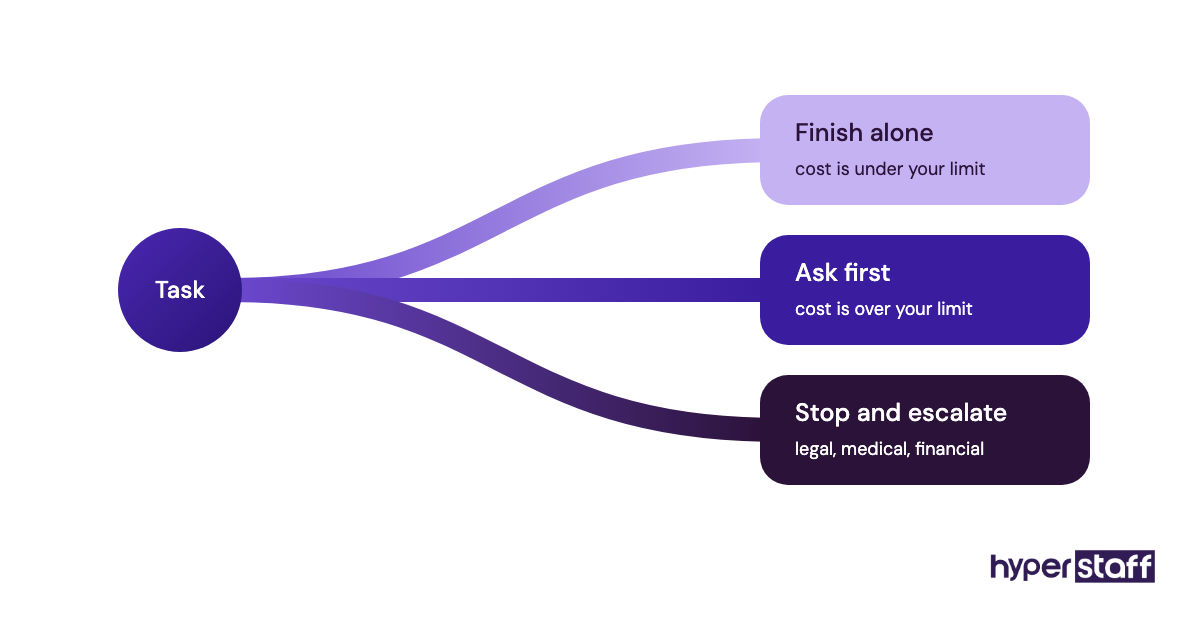
Spending limits matter more than people expect. An assistant who can approve anything under a set amount finishes work in one pass, while one who must ask every time becomes a messenger.
Practitioners disagree on check-ins. Some owners want a daily ten-minute call; others run fully async with a written update, and both work if the choice is made on purpose and kept.
Personal Virtual Assistant Tools and Software
Personal virtual assistant tools fall into a few groups: email and calendar, password sharing, task tracking, scheduling and screen recording. Our roundup of the best personal VA tools compares them in depth.
- Google Workspace or Microsoft 365 for shared email, calendar and documents, with delegate access built in.
- 1Password or Bitwarden for sharing logins safely; Bitwarden has a free personal plan.
- Asana, Trello or Todoist for the task board, all with free plans.
- Calendly for booking links that stop scheduling ping-pong.
- Loom for recording SOPs instead of writing them from scratch.
- Slack or WhatsApp for daily updates and quick questions.
Paid plans for most of these sit between a few dollars and roughly $25 per user per month, and prices change, so check each vendor's pricing page before you buy. Our opinion: a password manager is the one tool worth paying for on day one.
10 Proven Personal Virtual Assistant Tips and Best Practices
These personal virtual assistant habits separate setups that last from the ones that fade after a month.
- Start with five repeat tasks, then add more each week.
- Set a spending limit the assistant can approve alone.
- Write escalation rules for anything legal, medical or financial.
- Use delegate access instead of sharing your main password.
- Ask for a short end-of-day update, every day.
- Keep one task board and stop assigning through five channels.
- Record a video the first time you explain any task.
- Agree on overlap hours before the first day.
- Correct mistakes in the SOP, then let the assistant retry.
- Review hours used each month and resize the bundle.
Overcoming Common Personal Virtual Assistant Challenges
Most personal virtual assistant problems trace back to three causes: unclear instructions, unsafe access and mismatched hours. All three are fixable in the first two weeks.
Unclear instructions show up as repeated questions. When the same question comes twice, the answer belongs in the SOP, and the questions stop.
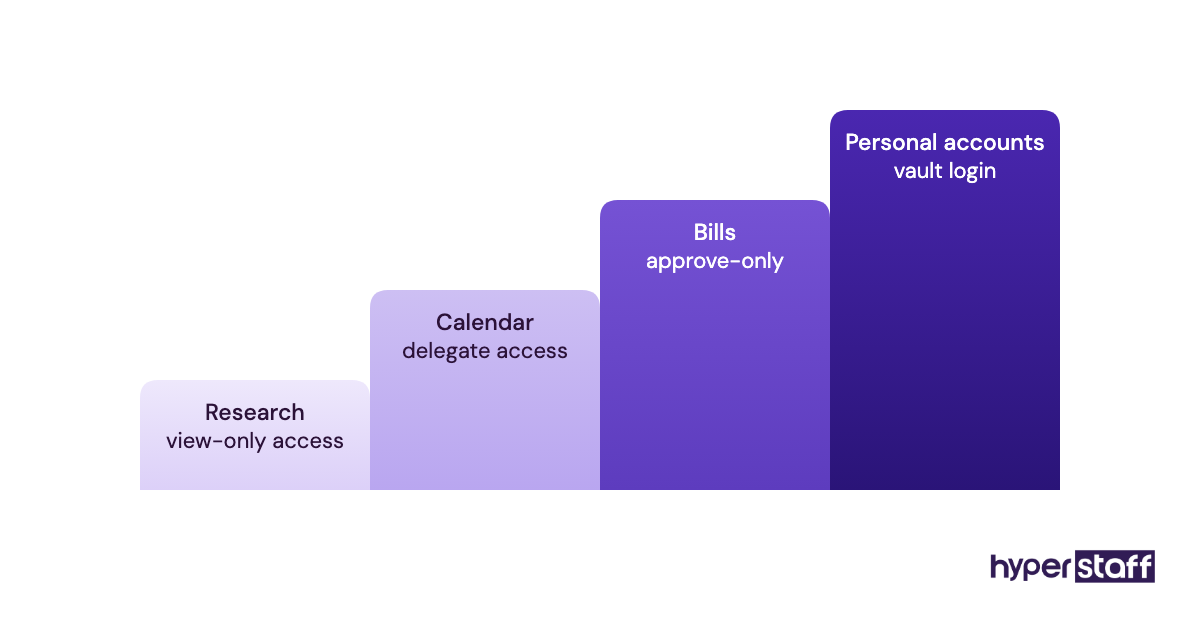
Trust is the slower one. Start with low-risk tasks like research and scheduling, then move to bills and personal accounts once the daily updates prove reliable.
How to Measure Personal Virtual Assistant Success
Personal virtual assistant success is measured in hours returned to you, tasks finished without your input and missed deadlines avoided. Track them monthly.
The simplest metric is your own week. Log your admin hours before the assistant starts and again at day 30 and day 60.
A second signal is the escalation count. Fewer questions per task over time means the rules are working.
How Long Does a Personal Virtual Assistant Take to Work?
A personal virtual assistant usually starts saving time within the first week and reaches full value in four to eight weeks. The gap is the time needed to learn preferences.
Week one feels slower than doing the work yourself, because every task needs explaining. Weeks two to four are when SOPs fill in, and by month two most routine work runs without you.
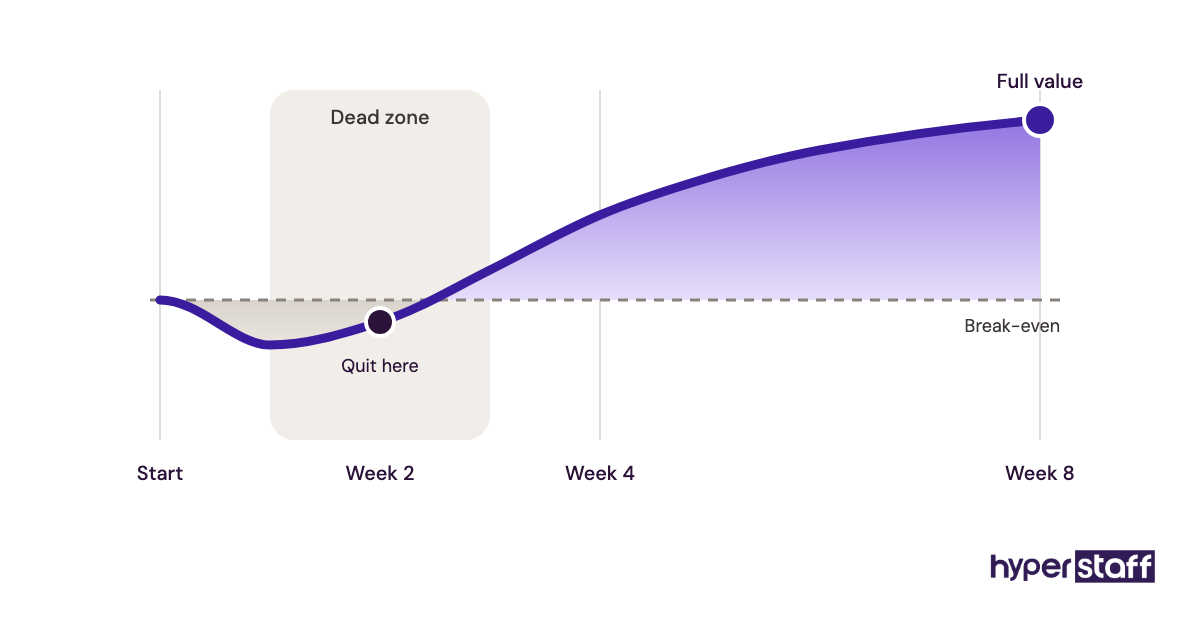
The dead zone is real. Owners who quit in week two quit right before the payoff.
How Much Does a Personal Virtual Assistant Cost?
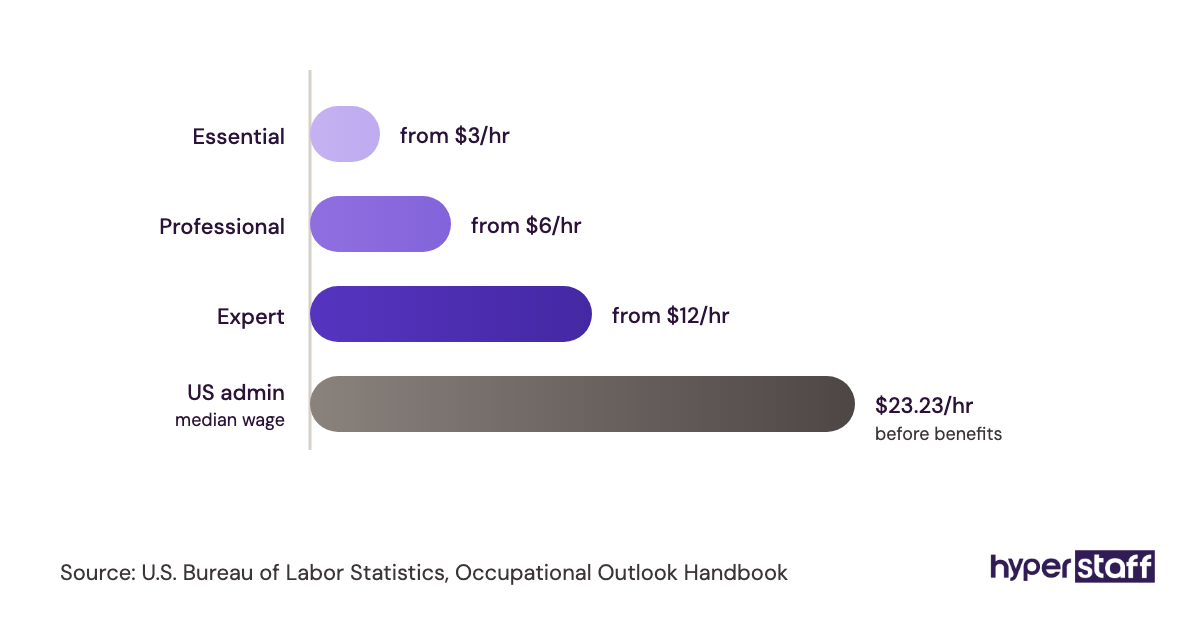
Hyperstaff personal virtual assistants start from $3/hour, set against a typical US in-house admin hire. Our personal virtual assistant cost breakdown goes further.
| Experience tier | Hyperstaff rate | Hyperstaff at 80 hours/month | Typical US in-house equivalent |
|---|---|---|---|
| Essential (0 to 2 years) | From $3/hour | From $240 | $18 to $25/hour plus benefits |
| Professional (2 to 5 years) | From $6/hour | From $480 | $22 to $32/hour plus benefits |
| Expert (5+ years) | From $12/hour | From $960 | $30 to $45/hour plus benefits |
Important: Hyperstaff prices above are typical starting averages, not fixed quotes. Your final cost depends on the tier, hours and work involved. Quarterly payment saves 10%.
Is a Personal Virtual Assistant Worth It?
Yes, for most people whose time earns more than $20 an hour, a personal virtual assistant is one of the highest-return hires available once the setup is done properly. The math gets better every month as the assistant learns more and needs less explaining.
Here's a simple calculation. A consultant billing $100/hour books an 80-hour Professional bundle at $6/hour, which costs $480 a month.
If that frees 10 hours a week, about 40 hours a month, and half of it goes to billable work, that's 20 hours at $100, or $2,000 against $480. The honest catch: the first month returns less, and freed hours only pay if they actually go somewhere useful.
For a fuller look at when the numbers don't work, read our take on whether a personal VA is worth it.
How to Choose a Personal Virtual Assistant Agency
Choose a personal virtual assistant agency on four things: a dedicated assistant, real vetting, written replacement terms and flexible hours. Price matters less than these.
Ask who you'll actually work with. Some agencies route tasks to a shared pool, which resets the learning curve every time someone new picks up your work.
Read the replacement terms closely. At Hyperstaff, a free replacement arrives in 5 to 7 business days, briefed from your Operations Vault, so the new assistant starts with your context already written down.
Check the time zones on offer too. Our pre-vetted talent sits in the Philippines, Latin America, India, Eastern Europe and the United States, and a free discovery call is the fastest way to see which fits your hours.
Personal Virtual Assistant Statistics, Trends and Future Predictions
Personal virtual assistant demand ties closely to the cost of local admin staff. The US Bureau of Labor Statistics puts median pay for secretaries and administrative assistants at roughly $45,000 to $50,000 a year, before benefits and office costs.
One trend is clear from our side: the role keeps getting wider. Requests that once stopped at inbox and calendar now often include customer support, lead research and social media work in the same bundle.
Our prediction is that hybrid roles become the default. The assistant who knows your preferences and can also run a slice of the business is more useful than two separate hires.
Personal Virtual Assistants and AI
AI tools make personal virtual assistants faster at drafting, summarizing and research, but they don't replace the follow-through. Tools like ChatGPT, Claude, Gemini and Otter.ai now sit in many assistants' daily kit.
Where AI falls short is anything involving another person or a judgment call. Chasing a vendor, rebooking a missed connection or noticing a calendar clash with a family event still need someone who knows your life.
Disclaimer : This article is for general information only and is not legal, financial or employment advice. Prices, tools and figures can change, so verify details independently before making decisions. Hyperstaff accepts no liability for actions taken based on this content.
Common questions
Is it safe to give a personal virtual assistant my passwords?
It's safe when you use a password manager like 1Password or Bitwarden and delegate access for email and calendar. The assistant can log in without seeing the password, and you can revoke access in seconds.
Can a personal virtual assistant make phone calls for me?
Yes. Most personal VAs book appointments, call vendors and handle customer service lines, using a business number or calling app you set up. Agree on a script for sensitive calls.
Can a personal VA manage my personal finances?
A personal VA can track bills, organize receipts and flag renewals. Payments are best kept to approval-only, with spending limits in writing.
What hours does a personal virtual assistant work?
Hours depend on the region and the overlap you agree. Many assistants shift their day to cover your morning or evening, so settle this before the start date.
Can one personal virtual assistant work for two people?
You can share one assistant between two people, such as business partners or a couple. It works best with one task board and a clear rule on whose request comes first.
Book a free 15 min call
We place a pre-vetted specialist in 5 business days, fully managed, from $3/hour.