Personal Virtual Assistant vs In-House Assistant: Which One Should You Hire?
A side-by-side look at what a remote personal assistant and an in-house hire cost, when each one wins, and how to decide.
On this page
- What is the difference between a personal virtual assistant and an in-house assistant?
- Personal virtual assistant vs in-house at a glance
- Key personal assistant hiring terms you should know
- How does a personal virtual assistant work compared to an in-house hire?
- What types of personal assistant hiring models are there?
- How the personal VA vs in-house choice compares to related options
- What are the benefits and drawbacks of a personal virtual assistant?
- Who should hire a personal virtual assistant, and who should stay in-house?
- Personal virtual assistant vs in-house examples
- Choosing between a virtual and in-house assistant, step by step
- What does an effective personal assistant setup look like?
- Tools and software that make a remote personal assistant work
- 8 proven tips for moving personal assistant work from in-house to virtual
- Overcoming common personal virtual assistant challenges
- How to measure personal virtual assistant success
- How long does it take for a personal virtual assistant to work?
- How much does a personal virtual assistant cost compared to in-house?
- Is a personal virtual assistant worth it compared to in-house?
- How to choose a personal virtual assistant agency
- Personal assistant hiring statistics, trends and future predictions
- Personal virtual assistants and AI
- FAQs
💡 Key Takeaways:
1) A personal virtual assistant handles the same calendar, inbox, travel and personal admin work as an in-house assistant, from a remote location, at a fraction of the fully loaded cost of a salaried employee.
2) An in-house assistant wins only when the job needs someone physically present, such as handling packages, greeting visitors or running local errands.
3) The deciding factor is how much of your work already lives in software, so list two weeks of tasks and sort them into physical and digital before you choose.
Keep more margin by hiring remote first
Hyperstaff has placed 70+ virtual assistants with 30+ clients, and our dedicated personal assistant services start at $3 an hour. You get one pre-vetted specialist from one of five regions who learns your business, starts within 5 business days, and is replaced free in 5 to 7 business days if the fit is wrong.
What is the difference between a personal virtual assistant and an in-house assistant?
A personal virtual assistant works remotely on the same calendar, inbox, travel bookings and personal admin an in-house assistant handles from a desk in your office. The core difference is physical presence: the in-house assistant can sign for a courier or greet a guest, and the remote one can't.
Almost everything else comes down to cost, hiring speed and how much of your day runs through software. If you're still pinning down the role itself, our guide on what a personal virtual assistant is covers the full scope.
An in-house assistant is your employee. You recruit them, pay salary plus benefits, buy the laptop, and carry the cost of rehiring when they leave.
A personal virtual assistant placed by an agency is billed by the hour or by a monthly bundle of hours. The agency does the sourcing, vetting and replacement, which is the part most people underprice when they compare the two.
Personal virtual assistant vs in-house at a glance
Here are the two options side by side, using US median pay for the in-house column and Hyperstaff's published rates for the remote one.
| Factor | Personal virtual assistant | In-house assistant |
|---|---|---|
| Where they work | Remote, their own setup | Your office or home |
| Typical cost | From $3 to $12+ per hour, by experience | $23.23 median hourly wage, before benefits |
| Time to start | About 5 business days | Often several weeks to a few months |
| Hours | 40, 80 or 160 per month | Usually full-time |
| Physical tasks | No | Yes |
| If they leave | Agency replaces them | You restart hiring |
| Equipment and space | Their own | You provide |
| Best for | Digital admin, scheduling, research, personal errands done online | Front desk, mail, local errands, in-person support |
Key personal assistant hiring terms you should know
- Fully loaded cost = salary plus benefits, payroll taxes, equipment and space.
- Dedicated VA = one assistant assigned only to you.
- Pooled VA = a shared team where different people pick up your requests.
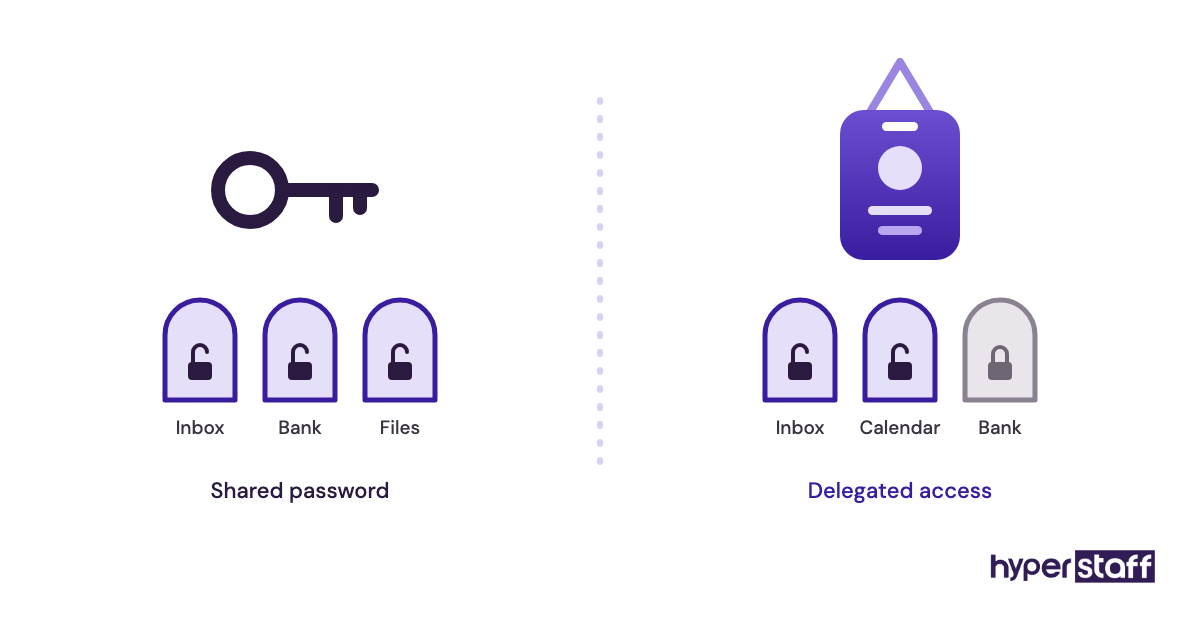
- Delegated access = permission to act in your inbox or calendar without your password.
- Time zone overlap = the hours you and your assistant are both online.
- SOP = a written, step-by-step instruction for a recurring task.
- Hour bundle = a fixed block of monthly hours billed at a set rate.
- Time to fill = days from opening a role to the hire's first day.
- Replacement guarantee = a promise to swap in a new assistant if the first one doesn't fit.
- Hybrid setup = a remote assistant plus occasional local help for physical tasks.
How does a personal virtual assistant work compared to an in-house hire?
A personal virtual assistant works through shared tools: your inbox, your calendar, a messaging channel and a task list. An in-house assistant can do all that too, and can also walk over and ask.
That walk-over habit is where remote setups get tested. People who delegate out loud in hallways struggle for the first two weeks, because every request now has to be written down.
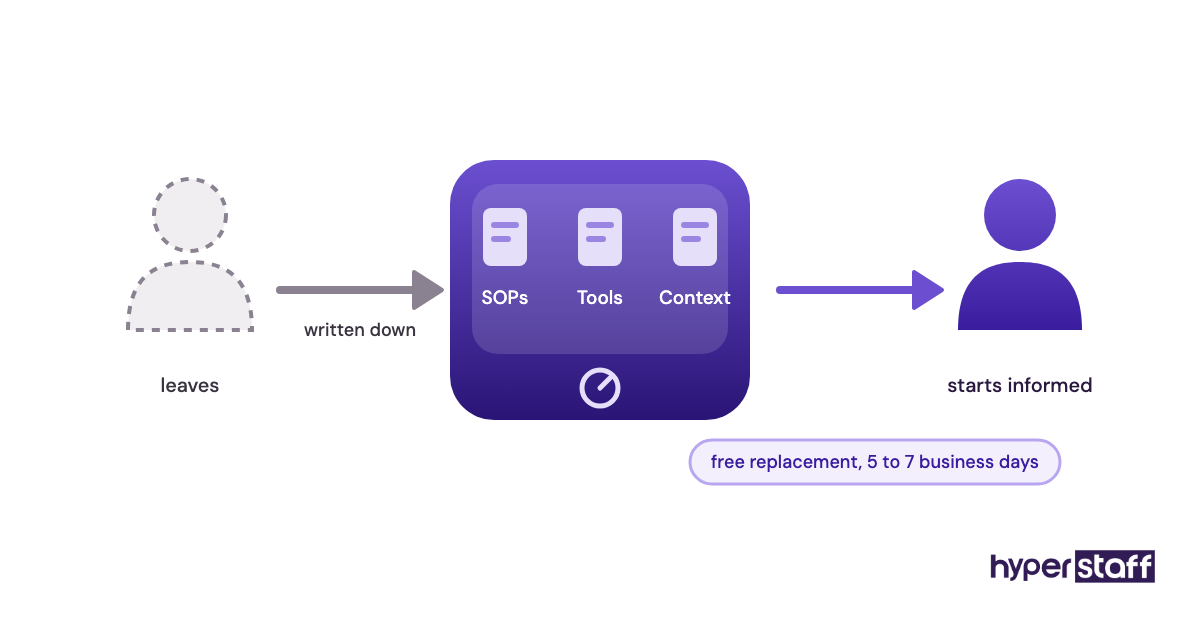
The upside shows up later. A task you explain once in writing becomes an instruction anyone can follow, which is why a written SOP outlives the person who first learned it.
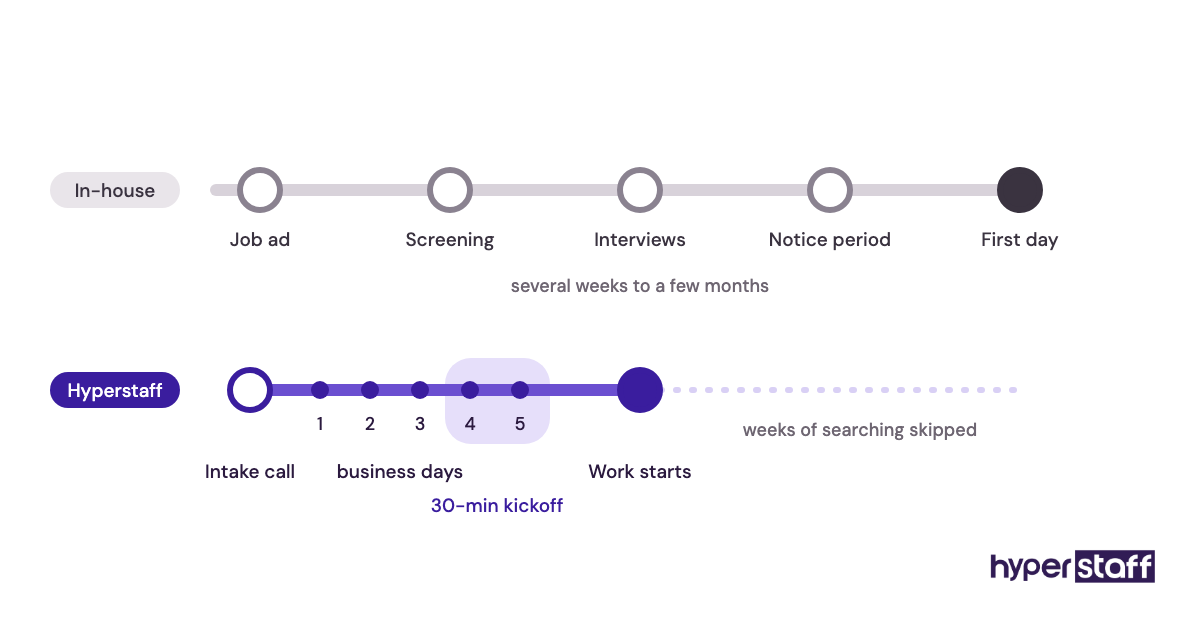
Hiring runs on different clocks, too. An in-house search means a job ad, screening, interviews and the candidate's notice period.
With Hyperstaff, a free discovery call comes first, placement follows in 5 business days, and a 30-minute kickoff call gets work started that day or the next morning. The range of tasks a personal assistant takes on is the same either way.
What types of personal assistant hiring models are there?
Personal assistant hiring sits on a spectrum, from a freelancer found on a marketplace to a full-time executive assistant on payroll.
| Model | How it works | Commitment | Best fit | Main risk |
|---|---|---|---|---|
| Freelance VA | You find and manage them yourself | Hourly, no minimum | Small, one-off jobs | They disappear, you restart |
| Agency-placed dedicated VA | Agency vets and places one person | Monthly hour bundle | Ongoing personal admin | Weak onboarding if you skip the setup |
| Pooled VA service | A team shares your requests | Monthly plan | Overflow tasks | Nobody learns your preferences |
| Part-time in-house assistant | Local employee, set days | Part-time payroll | Mixed physical and digital work | Hard to hire for few hours |
| Full-time in-house assistant | Employee at your office | Salary plus benefits | Heavy in-person needs | High fixed cost |
| In-house executive assistant | Senior employee, gatekeeper role | Senior salary | C-suite with board duties | Long, costly searches |
| AI assistant apps | Software drafts and schedules | Subscription | Simple, rule-based tasks | No judgment on edge cases |
How the personal VA vs in-house choice compares to related options
Most people deciding between remote and in-house are also weighing a third option they haven't named yet. These are the three that come up most.
Personal virtual assistant vs. freelance VA
A freelance VA is cheaper to start with and costlier to lose. You do the vetting yourself, and if they take a better client, your institutional knowledge leaves with them.
An agency-placed assistant costs a little more per hour in some markets, but the agency handles replacement. At Hyperstaff that replacement is briefed from your Operations Vault, so the new person starts with your SOPs and context.
Personal virtual assistant vs. executive assistant
An executive assistant is the senior version of the role, often managing board prep, stakeholder relationships and a whole leadership calendar. In-house executive assistants earn a US median of $76,590 a year, according to the U.S. Bureau of Labor Statistics.
A remote assistant at the Expert tier (5+ years) covers much of the same ground. Board meetings in a physical room are where the in-house version still earns its salary.
Personal virtual assistant vs. part-time local help
Part-time local help sounds like a cheap middle path, and it's hard to hire. Few experienced assistants want 15 hours a week with one employer, so you often end up with someone junior.
A 40-hour monthly bundle with a remote assistant gives you the same small commitment with a vetted person. Pair it with a local errand service for the occasional physical task.
What are the benefits and drawbacks of a personal virtual assistant?
Personal virtual assistants win on cost, speed and flexibility, and lose on anything that needs hands in a specific place. Here's the honest split.
The benefits of a personal virtual assistant
- Fully loaded cost is a fraction of a US salary plus benefits.
- Placement takes days, where in-house hiring often takes weeks.
- You buy 40, 80 or 160 hours a month and scale between them.
- The agency carries recruiting and replacement work.
- No desk, laptop or office space to provide.
- Your processes end up written down, which outlasts any single hire.
The drawbacks of a personal virtual assistant
- No physical tasks: mail, deliveries, local errands.
- Time zone gaps if you pick a region far from yours.
- The first two weeks need more written instruction from you.
- Spontaneous, in-the-room requests take longer to hand off.
Who should hire a personal virtual assistant, and who should stay in-house?
A personal virtual assistant suits anyone whose day runs through email, calendars and online accounts. That covers founders, consultants, executives at remote-first companies and busy professionals managing household admin online.
The view from a solo founder looks very different from the view of a company with a staffed office. For the founder, an in-house salary often costs more than the work justifies, and a remote assistant at 80 hours a month covers the real load.
A company with a front desk, visitors and physical mail sees it the other way. Someone has to be in the building, so the in-house hire is the base and a remote assistant picks up the digital overflow.
Practitioners still disagree on executive support. One camp says a senior leader's assistant has to sit nearby to read the room. Our view, from placing assistants who work entirely through shared tools, is that clear written priorities beat proximity for most leaders who don't host in-person meetings daily.
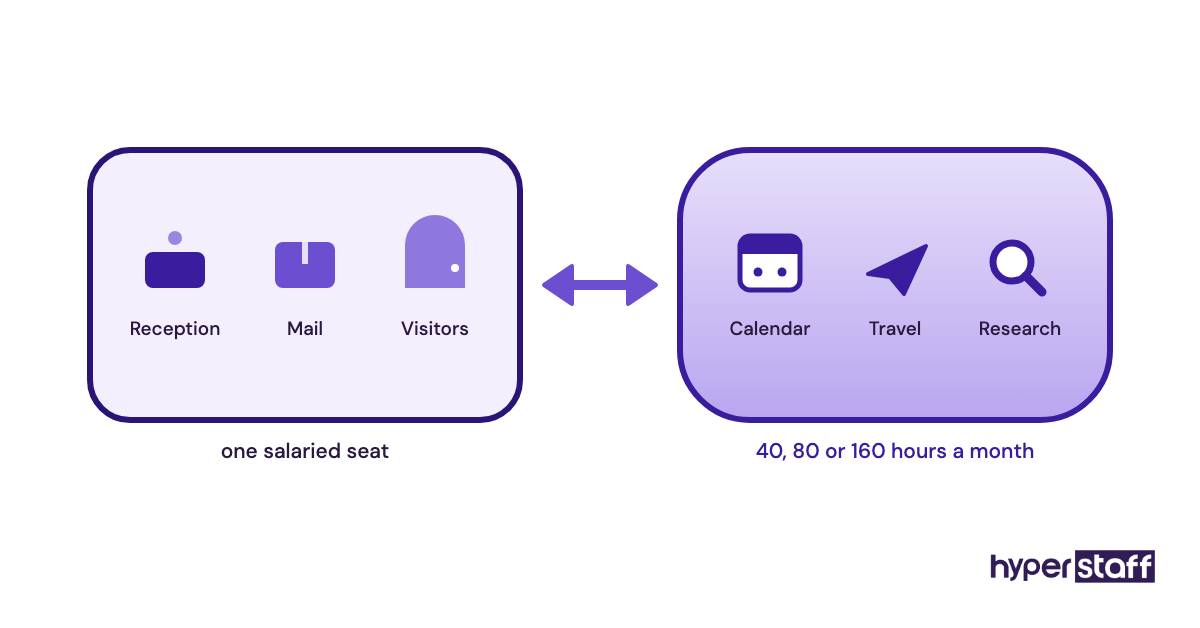
Personal virtual assistant vs in-house examples
These examples sort common assistant duties by whether they need someone present. They're task patterns, so match them against your own list.
Good examples of remote personal assistant work
Calendar and inbox management
Triaging email, drafting replies, confirming meetings and protecting focus blocks all happen inside software. A remote assistant with delegated access does this exactly as well as someone down the hall.
Travel planning and bookings
Flights, hotels, visas, ground transport and a day-by-day itinerary are fully online work. Time zone spread can even help here, because an assistant in a different region can rebook a cancelled flight while you sleep.
Personal and household admin
Bill payments, subscription audits, appointment booking, gift orders and contractor quotes run through email and phone. These tasks pile up fastest for busy people and suit a part-time bundle well.
Bad examples (work that needs someone in the room)
Front desk and visitor greeting
A reception role needs a person at the door. No amount of tooling replaces that.
Physical mail and packages
Signing for couriers, scanning paper post and shipping documents need hands on paper. A virtual mailbox service can cover some of it, but someone still has to set it up and manage it.
Local errands and event setup
Picking up dry cleaning or setting up a meeting room is in-person work. A remote assistant can book the courier or the event crew, but can't carry the boxes.
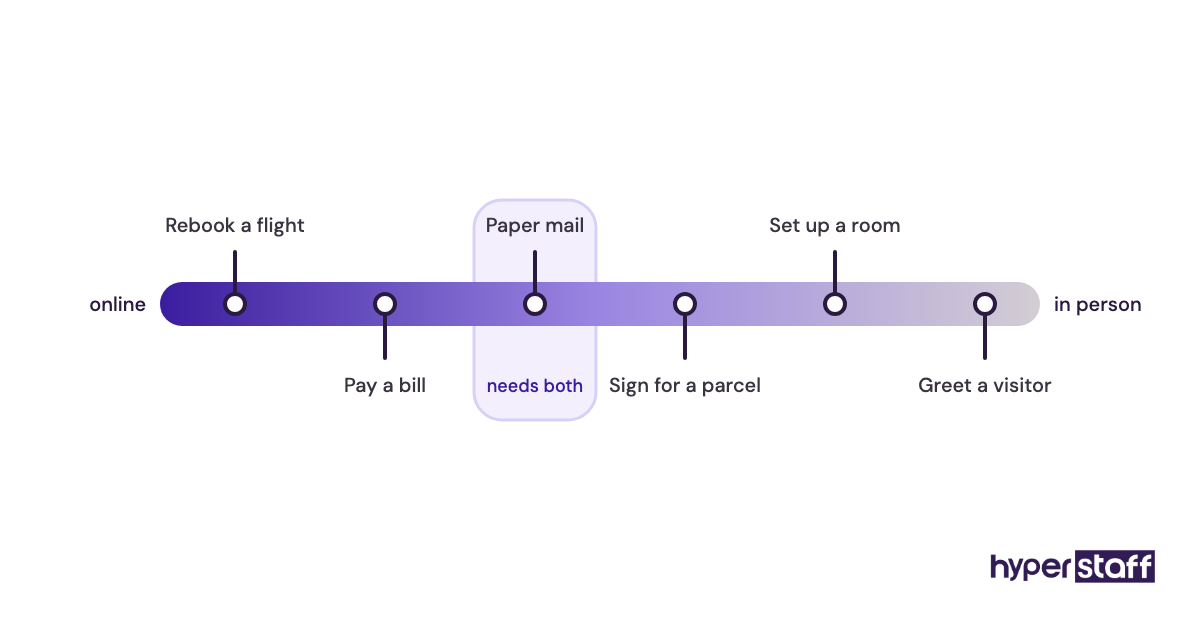
Choosing between a virtual and in-house assistant, step by step
The decision gets simple once your tasks are on paper. These five steps take about two weeks, most of it spent tracking work.
Step #1: Track two weeks of tasks
Write down every task you'd hand off, with rough time spent. Tag each one as digital or physical.
Step #2: Price both options fully loaded
Add benefits, equipment and recruiting time to the in-house salary. Compare that against the remote hours you actually need, which is often 40 or 80 a month, well under full-time.
Step #3: Write the job description
Spell out tasks, tools, working hours and the time zone overlap you need. Our template for a personal VA job description gives you a starting structure.
Step #4: Interview for remote skills
Test written communication and judgment, since those matter more remotely than in person. A short paid task beats a long chat, and these interview questions for personal assistants cover what to ask. Our full guide to hiring a personal virtual assistant walks through the rest.
Step #5: Onboard with SOPs and a 30-day review
Give access through delegation, share written SOPs and set a weekly check-in. Book a review at day 30 to decide what to hand over next.
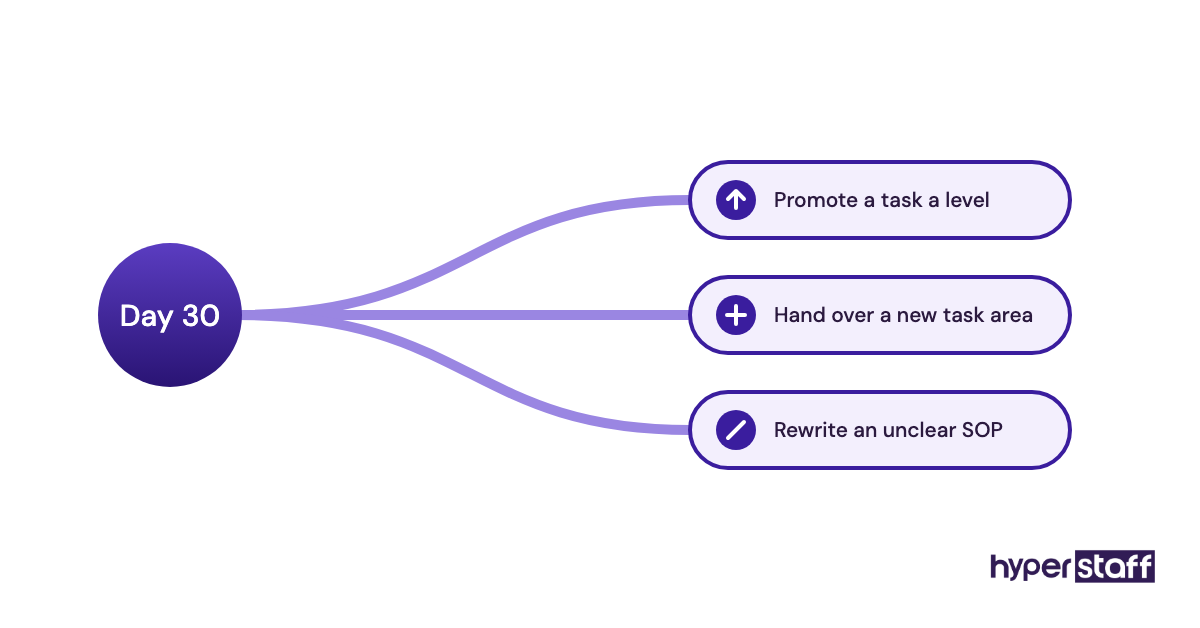
What does an effective personal assistant setup look like?
An effective setup has one channel for requests, one running task list and one weekly check-in of 15 to 20 minutes. Both remote and in-house assistants do better with that structure.
Most failing setups break down over scattered requests: some by text, some by email, some in passing. Pick a single channel and stick to it from day one.
The second piece is a living document of how you like things done. At Hyperstaff this is the Operations Vault, where your SOPs, tools and context are written down and maintained for you.
Tools and software that make a remote personal assistant work
A remote personal assistant needs the same tools an in-house one would use, plus a way to share access safely. This short stack covers most setups, and our roundup of personal virtual assistant tools goes deeper.
- Google Workspace or Microsoft 365: inbox and calendar delegation without sharing passwords.
- 1Password: shared vaults you can revoke in one click.
- Slack or WhatsApp: a single request channel.
- Loom: screen recordings that teach a task once.
- Calendly: booking links your assistant can manage.
- Asana, Trello or Notion: one shared task list.
- Zoom or Google Meet: the weekly check-in.
Loom earns its spot more than any other tool on the list. A three-minute recording of you doing a task once usually replaces a page of written instructions and a round of follow-up questions.
8 proven tips for moving personal assistant work from in-house to virtual
These tips apply to a first remote hire and to a switch from an existing in-house assistant.
- Start with calendar and inbox, since results show up within days.
- Choose a region with at least three to four hours of overlap with your day.
- Use delegated access, never shared passwords.
- Record a Loom for any task you'd explain more than once.
- Keep requests in one channel.
- Hand over one new task area per week during the first month.
- Write your preferences down: airlines, seat choice, meeting buffers, sign-offs.
- If an in-house assistant is leaving, have them write SOPs before their last day.
Overcoming common personal virtual assistant challenges
The most common challenge is under-delegation. People hire a remote assistant, hand over the inbox and nothing else, then judge the whole model on 20% of what it can carry.
Time zones come second. Fix them at hiring time by choosing the right region, because rearranging your day later rarely sticks.
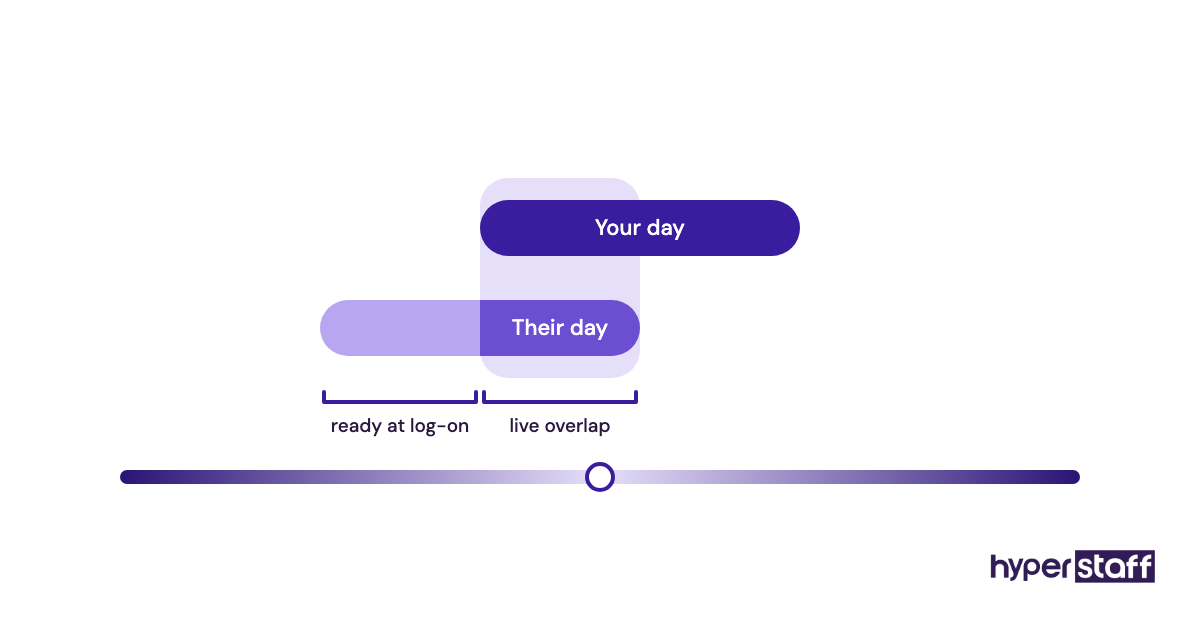
The third is vague instruction. "Book me something nice" works in person, where the assistant can ask a quick follow-up, and stalls in writing. Our list of common personal VA mistakes covers the rest.
How to measure personal virtual assistant success
Measure success by hours you get back each week and by how often you redo the assistant's work. Both numbers should move the right way by the end of the first month.
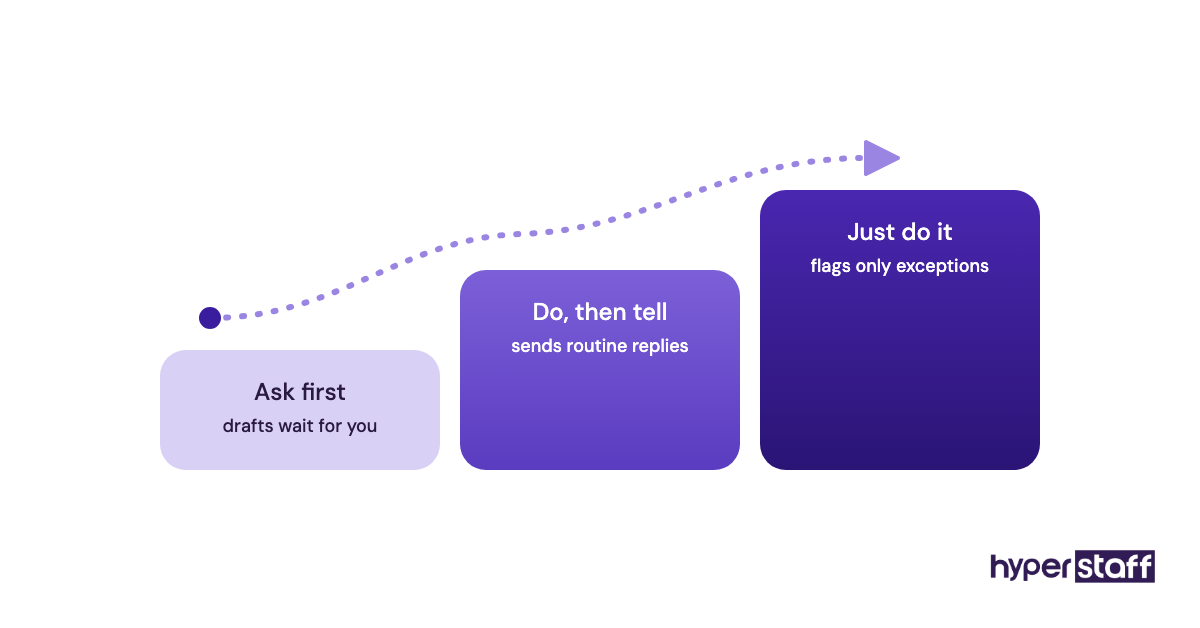
Track a few concrete signals: inbox response time, meetings booked without back-and-forth, and travel changes handled without you. Count how many tasks moved from "ask me first" to "just do it."
For an in-house comparison, use the same yardsticks. Cost per hour of real work, after benefits and idle time, is the number that usually settles the debate.
How long does it take for a personal virtual assistant to work?
A personal virtual assistant from Hyperstaff is placed in 5 business days and starts work the day of the 30-minute kickoff or the next morning. Useful output on simple tasks comes within the first week.
Judgment-heavy work takes longer. Expect three to six weeks before an assistant handles your inbox the way you would, because preferences only show up as edge cases arrive.
An in-house hire follows a similar learning curve, after a much longer search. Our guide to onboarding a personal virtual assistant shortens that curve.
How much does a personal virtual assistant cost compared to in-house?
A personal virtual assistant from Hyperstaff costs from $3 to $12+ per hour depending on experience tier. A US in-house administrative assistant earns a median $48,310 a year, according to the U.S. Bureau of Labor Statistics, before benefits.
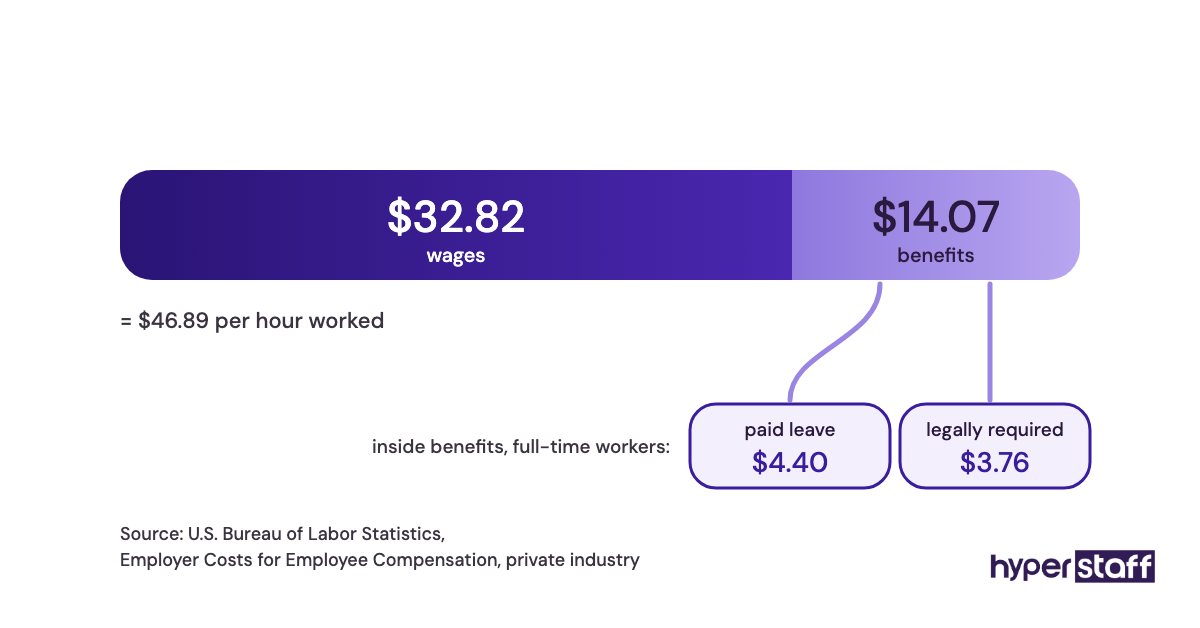
Benefits add a lot. The BLS Employer Costs for Employee Compensation release puts benefits at 30% of total compensation for private industry, which works out to roughly 43% on top of wages. For the itemised version, see our full personal VA cost breakdown.
| Cost item | In-house admin assistant (US median) | In-house executive assistant (US median) | Hyperstaff personal VA |
|---|---|---|---|
| Base pay | $48,310 per year | $76,590 per year | From $3, $6 or $12 per hour by tier |
| Benefits (about 43% of wages) | About $20,700 | About $32,900 | Included in rate |
| Fully loaded per year | About $69,000 | About $109,500 | $5,760 to $23,040 at 160 hours/month |
| Monthly, full-time | About $5,750 | About $9,125 | $480 to $1,920 (160 hours) |
| Monthly, part-time | Hard to hire | Rare | $120 to $480 (40 hours) |
| Equipment and space | You pay | You pay | None |
| Replacement | New search, weeks | New search, months | Free, 5 to 7 business days |
| Quarterly discount | None | None | Save 10% |
Important: Hyperstaff figures above are starting rates and averages. Your actual price depends on the hours, experience tier and scope of work you need, which we confirm on the discovery call.
Is a personal virtual assistant worth it compared to in-house?
For most people whose work runs online, a personal virtual assistant is one of the highest-return hires available. You get an experienced assistant for roughly a third of the fully loaded cost of a US in-house hire, and the hours you buy back go straight into the work only you can do.
Here's a worked example. A full-time in-house administrative assistant at the US median costs about $69,000 a year with benefits.
An Expert-tier Hyperstaff assistant (5+ years) at 160 hours a month costs $1,920 monthly, or $23,040 a year. Paying quarterly saves 10%, bringing it to $20,736, about $48,000 less than the in-house hire.
The catch is effort. Those savings only hold if you put in the first two weeks of writing things down, and our deeper look at whether a personal VA pays off covers the cases where it doesn't.
How to choose a personal virtual assistant agency
Choose an agency by its replacement terms, its talent model and how it handles your process knowledge. Price per hour matters less than those three.
Ask these before signing:
- Is the assistant dedicated to you, or pooled across clients?
- How fast is a replacement, and who briefs them?
- Who writes and keeps your SOPs?
- Which regions can they hire from, for time zone fit?
- What are the rates by experience level?
- Do you get a named account manager?
- What's the smallest monthly commitment?
A pooled service can look cheaper on paper. The cost shows up when you repeat your preferences to a new person every week.
Personal assistant hiring statistics, trends and future predictions
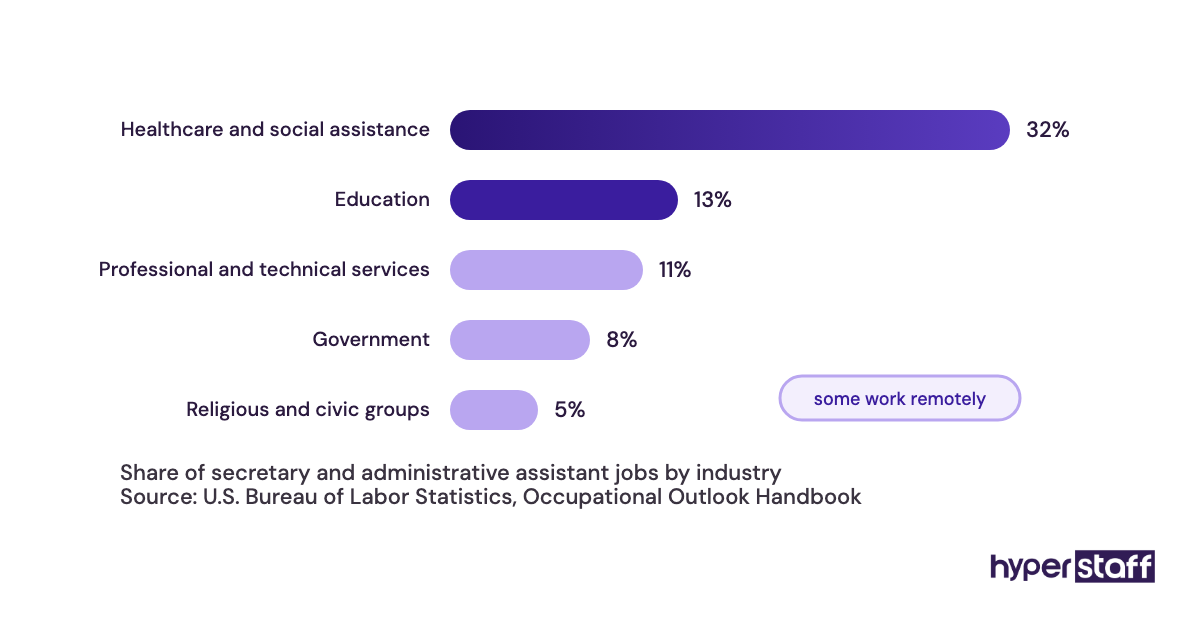
US employment of secretaries and administrative assistants is projected to fall 2% over the next decade, with about 314,400 openings a year from replacement, according to the BLS Occupational Outlook Handbook. Median pay sits at $23.23 an hour for administrative assistants.
Benefits made up 30.0% of private-industry compensation in the latest BLS employer cost data. That share is why salary alone understates in-house cost.
Our prediction, based on the roles clients ask us to fill: assistant work keeps shifting toward online tasks and broader scope. Inbox and calendar are now the starting point, with research, customer follow-ups and light operations added within the first few months.
Personal virtual assistants and AI
AI tools now draft emails, summarise threads and propose meeting times, for remote and in-house assistants alike. They don't decide which meeting to cancel when two investors want the same slot.
A good personal assistant uses AI to work faster and keeps the judgment calls. Remote assistants tend to adopt these tools quickly, since their whole job already runs through software.
Disclaimer: This article is for general information only and isn't legal, tax or financial advice. Salary and cost figures come from public sources and our published starting rates, and may change. Speak to a qualified advisor before making employment decisions.
Common questions
Is a personal virtual assistant safe with confidential information?
Yes, with the right setup. Use delegated inbox access and a password manager so you can revoke access instantly, and sign an NDA as you would with any employee.
Can I keep my in-house assistant and add a virtual one?
You can. Many offices keep an in-house person for reception and physical tasks, and give a remote assistant the calendar, travel and research work.
Can a virtual personal assistant work in my time zone?
Mostly, yes. Hyperstaff hires in the Philippines, Latin America, India, Eastern Europe and the United States, so you can pick a region that overlaps with your working day.
Do I pay benefits for a personal virtual assistant from an agency?
No. You pay for the hours in your monthly bundle, and the agency handles everything behind the placement.
Can I try a virtual assistant part-time before replacing an in-house hire?
You can start with a 40-hour monthly bundle and move to 80 or 160 hours once the work proves out. That gives you a low-risk test before any in-house role changes.
Book a free 15 min call
We place a pre-vetted specialist in 5 business days, fully managed, from $3/hour.