Onboarding a Personal Virtual Assistant: A Four-Week Plan
A phased plan for onboarding a personal virtual assistant, from day-one access to full task ownership in about four weeks.
On this page
- What Does Onboarding a Personal Virtual Assistant Involve?
- Key Personal VA Onboarding Terms You Should Know
- Why Does Onboarding Matter So Much for a Personal VA?
- How Does Personal VA Onboarding Work in Practice?
- What Types of Onboarding Work for a Personal VA?
- How Is VA Onboarding Different From Related Processes?
- What Do You Gain From Onboarding a Personal VA Properly?
- What Are the Drawbacks of Structured VA Onboarding?
- Who Needs a Formal Onboarding Plan for a Personal VA?
- Personal VA Onboarding Examples
- Creating a Personal VA Onboarding Plan, Step by Step
- What Does an Effective Onboarding Strategy Look Like?
- Which Tools Do You Need to Onboard a Personal VA?
- 9 Tips for Onboarding a Personal Virtual Assistant
- What Goes Wrong When Onboarding a Personal VA?
- How Do You Measure Onboarding Success With a Personal VA?
- How Long Does It Take to Onboard a Personal VA?
- How Much Does Onboarding a Personal VA Cost?
- Is Onboarding a Personal Virtual Assistant Worth the Effort?
- How Do You Choose a Personal VA Agency That Handles Onboarding?
- Personal VA Onboarding Trends and Where It's Heading
- Personal VA Onboarding and AI
- FAQs
💡 Key Takeaways:
1) Onboarding a personal virtual assistant works best in phases: low-risk tasks and limited access in week one, then more ownership and wider access once the output holds up.
2) Written SOPs, short screen recordings and a password manager with shared vaults cut most of the back-and-forth that slows a new assistant down.
3) Most personal VAs handle routine work alone within two to four weeks, while judgment-heavy tasks like travel trade-offs or client replies take one to three months.
Onboard Faster, Get Your Billable Hours Back
Hyperstaff places pre-vetted assistants for dedicated personal virtual assistant support in 5 business days, then runs a 30-minute kickoff so work starts that day or the next morning. With 70+ assistants placed for 30+ clients, we write your SOPs into an Operations Vault, so your new assistant never starts from a blank page.
What Does Onboarding a Personal Virtual Assistant Involve?
Onboarding a personal virtual assistant is the process of handing a remote assistant the access, context and written instructions they need to run parts of your work and life without asking you every hour. It covers accounts, communication rules, task priorities and how you like things done.
A personal VA's scope is wider than most people expect. Beyond inbox and calendar work, many handle customer emails, lead follow-up, bookkeeping prep, social posting and online business admin, all laid out in this personal virtual assistant task list.
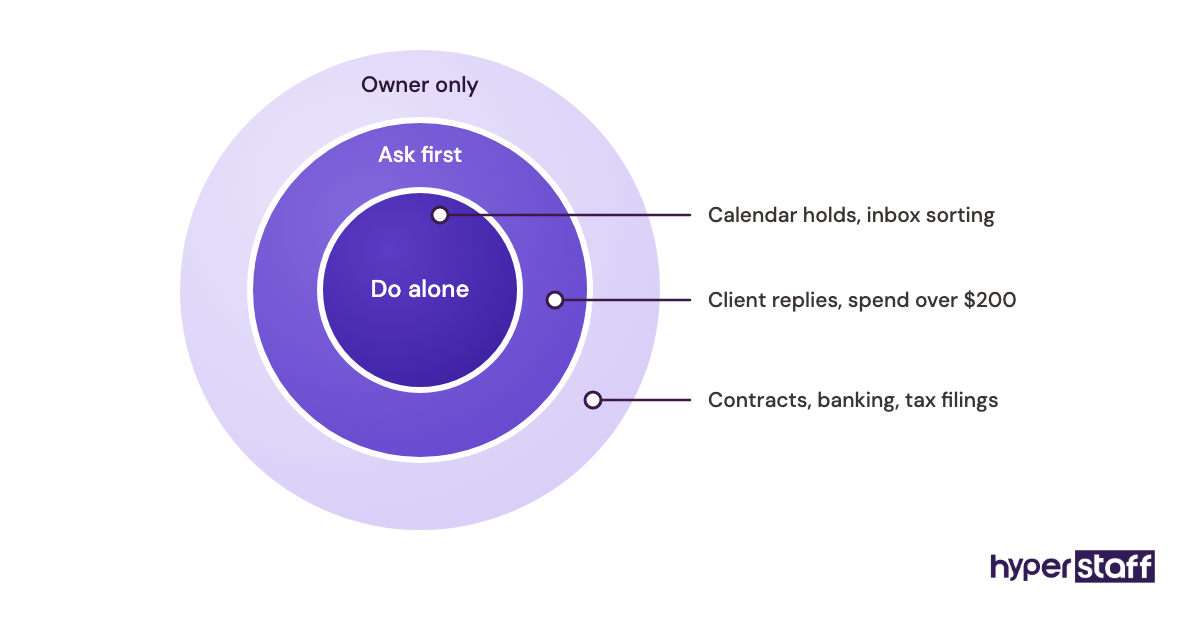
Onboarding is where the delegation boundary gets drawn. Leave it vague and the assistant either asks about everything or guesses about everything, and both burn your time.
If you're still working out what a personal virtual assistant does, settle that first. Onboarding assumes the role is already defined.
Key Personal VA Onboarding Terms You Should Know
- SOP = a written, step-by-step instruction for one recurring task.
- Operations Vault = Hyperstaff's maintained record of your SOPs, tools and context, used to brief your assistant and any replacement.
- Delegated access = permission to act inside your Gmail or Calendar without holding your password.
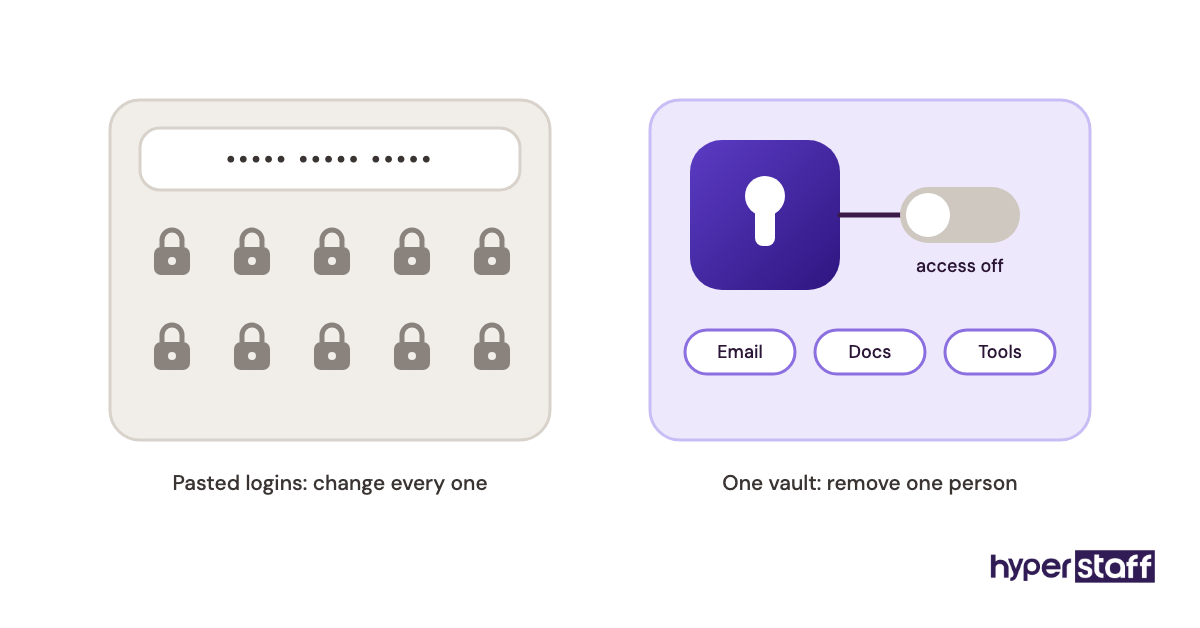
- Shared vault = a password-manager folder you share with your VA and can revoke in one step.
- Ramp-up period = the weeks before an assistant works at full pace without check-ins.
- Escalation rule = a written trigger that tells the VA when to stop and ask you.
- Decision rights = the spending limits and choices your assistant may make alone.
- Shadowing = the VA watching recordings or live sessions of you doing a task before trying it.
- Async update = an end-of-day written report sent without a meeting.
- Trial task = a small, low-stakes assignment that shows how the VA follows instructions.
Why Does Onboarding Matter So Much for a Personal VA?
Onboarding decides how fast a personal VA starts paying for itself. A well-briefed assistant can take routine work off your plate in week one.
A poorly briefed one gives you a new job: checking and redoing their work. When a VA arrangement falls apart early, the cause usually sits in the first two weeks, with missing context, unclear limits or access that arrived late.
Personal work also carries more trust risk than most delegated work. Your assistant may see bank alerts, family schedules and medical appointments, so the access plan matters as much as the task list.
Many of the common personal VA mistakes start right here, with every login handed over on the first morning.
How Does Personal VA Onboarding Work in Practice?
Personal VA onboarding runs in phases: setup, shadowing, supervised work, then ownership. Each phase widens what the assistant can touch once the previous one holds.
The sequence matters more than the speed. Owners who skip shadowing tend to spend week three correcting habits that a 10-minute recording would have prevented.
| Phase | Timing | What the VA does | What you do |
|---|---|---|---|
| Kickoff | Day 1 | Joins a short call, receives first SOPs | Explain priorities and limits |
| Access setup | Days 1 to 2 | Logs in via delegated access and shared vaults | Grant accounts in one sitting |
| Shadowing | Days 2 to 5 | Watches recordings, drafts sample work | Review drafts daily |
| Supervised work | Week 2 | Runs routine tasks, sends daily updates | Spot-check, answer questions |
| Ownership | Weeks 3 to 6 | Owns recurring tasks end to end | Move to weekly reviews |
A dead zone often appears between days 3 and 7. Access requests sit waiting on two-factor codes or an admin approval, and the assistant has little to do.
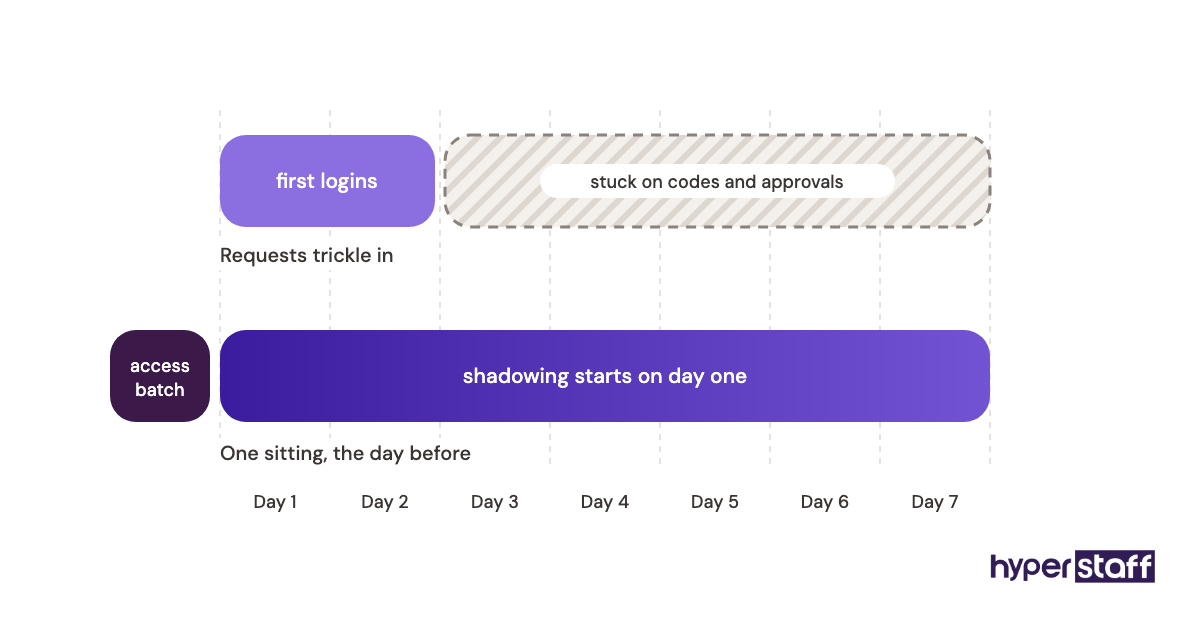
Batching every access request into one session before day one removes most of that wait.
What Types of Onboarding Work for a Personal VA?
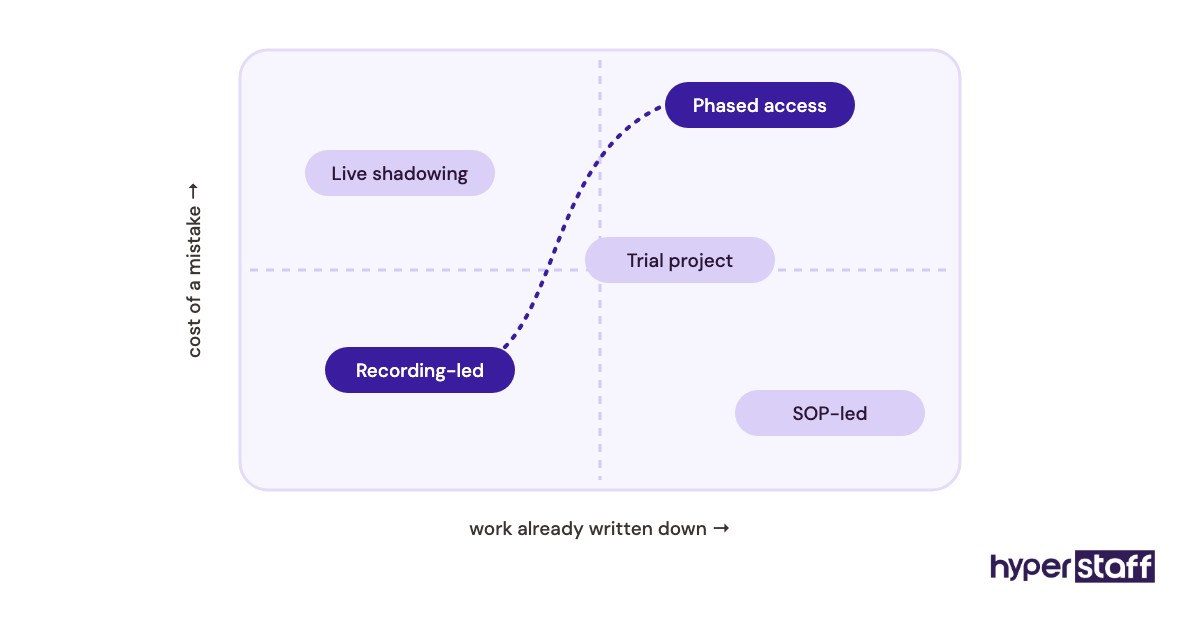
Personal VA onboarding comes in several forms, and most owners mix two or three. The right mix depends on how documented your work already is and how much risk sits in the tasks.
| Onboarding type | How it works | Typical ramp-up | Best fit | Main risk |
|---|---|---|---|---|
| SOP-led | VA follows written step-by-step docs | 1 to 2 weeks | Booking, data entry, repeatable admin | Docs go stale |
| Recording-led | VA watches screen recordings of you working | 1 to 3 weeks | Tasks never written down | Shows clicks, misses reasons |
| Live shadowing | VA joins screen-share sessions | 1 to 2 weeks | Client replies, judgment calls | Eats your calendar |
| Phased access | Accounts unlocked in stages | 3 to 6 weeks | Finance, family, health admin | Slow start if stages drag |
| Trial project | One bounded paid project first | About 1 week | First-time delegators | May not mirror daily work |
| Agency-managed | Agency writes and maintains SOPs, briefs VA | Days to 2 weeks | Busy owners with no docs | Depends on agency quality |
| Sink-or-swim | Full access, task list, no docs | Unpredictable | Rarely a good fit | Errors, rework, early exit |
Our take: recording-led onboarding combined with phased access suits most personal VA setups. Pure SOP-led onboarding looks tidy, yet owners rarely document the messy 20% of a task where the mistakes actually happen.
How Is VA Onboarding Different From Related Processes?
Onboarding a personal VA overlaps with three neighbouring processes, and mixing them up is where most planning gaps come from.
Personal VA Onboarding vs. Hiring
Hiring picks the person, and onboarding makes them useful to you. The job post, interviews and trial all come first, which is why hiring a personal virtual assistant needs its own checklist.
A clear personal VA job description carries straight into onboarding, since the duties you listed become your first SOPs. Answers to your personal VA interview questions also flag where the new assistant will need the most coaching.
Personal VA Onboarding vs. In-House Employee Onboarding
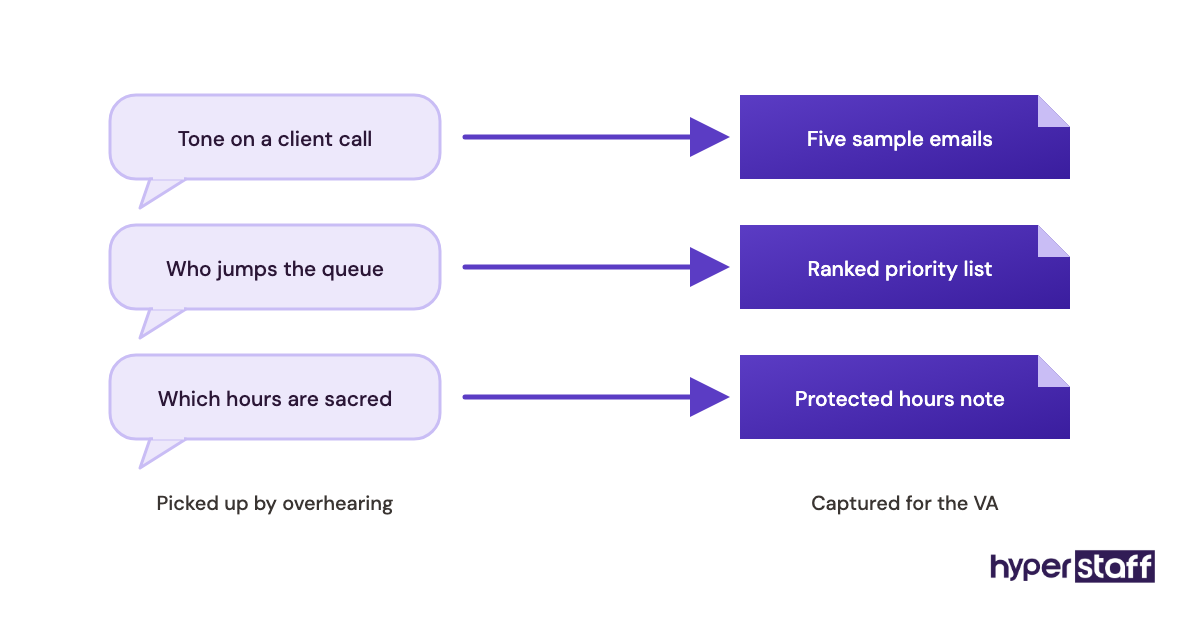
In-house onboarding leans on HR, an office and colleagues who answer quick questions. A remote personal VA has none of that, so anything an employee would pick up by overhearing has to be written down or recorded.
The wider trade-offs between the two models sit in our personal VA versus in-house comparison.
Personal VA Onboarding vs. Freelancer Briefing
A freelancer brief covers one project with a clear finish line. Personal VA onboarding sets up an ongoing working relationship, so it has to cover preferences, weekly rhythms and what to do when something new comes up.
Freelancer briefs can stay thin because the scope is fixed. A VA brief that thin holds for about a week.
What Do You Gain From Onboarding a Personal VA Properly?
Done properly, onboarding pays back in fewer interruptions and faster output.
- Your assistant reaches full pace in weeks rather than months.
- Daily questions drop, because the answers already live in the SOPs.
- Written spending and decision limits lower the risk of costly mistakes.
- Documented processes outlast the assistant, so a replacement ramps faster.
- You find out which of your own habits were never written down.
- Trust builds on a schedule, so access grows without guesswork.
What Are the Drawbacks of Structured VA Onboarding?
Structured onboarding has real costs, mostly in your own time up front.
- Writing SOPs and recording tasks takes roughly 5 to 15 hours of owner time.
- Phased access slows the first two weeks on purpose.
- Docs need upkeep, or the assistant follows steps that no longer apply.
- Some tasks resist documentation and still need live coaching.
Who Needs a Formal Onboarding Plan for a Personal VA?
Anyone giving a personal VA access to money, private accounts or client contact needs a formal onboarding plan. A one-page checklist is enough for someone who only delegates research or data entry.
Founders and consultants with packed calendars feel the gap first, since a scheduling error lands on a client. Executives with family logistics in the mix need the strictest access plan, because the assistant touches school, health and travel details.
Owners using one VA for mixed work (some inbox, some customer replies, some lead follow-up) need each area onboarded separately. Lumping them into one doc is how a support reply ends up written in the clipped tone of a calendar note.
Personal VA Onboarding Examples
These are composite patterns of how personal VA onboarding tends to play out, on both sides of the line.
Personal VA Onboarding Good Examples
The Recorded-Week Start
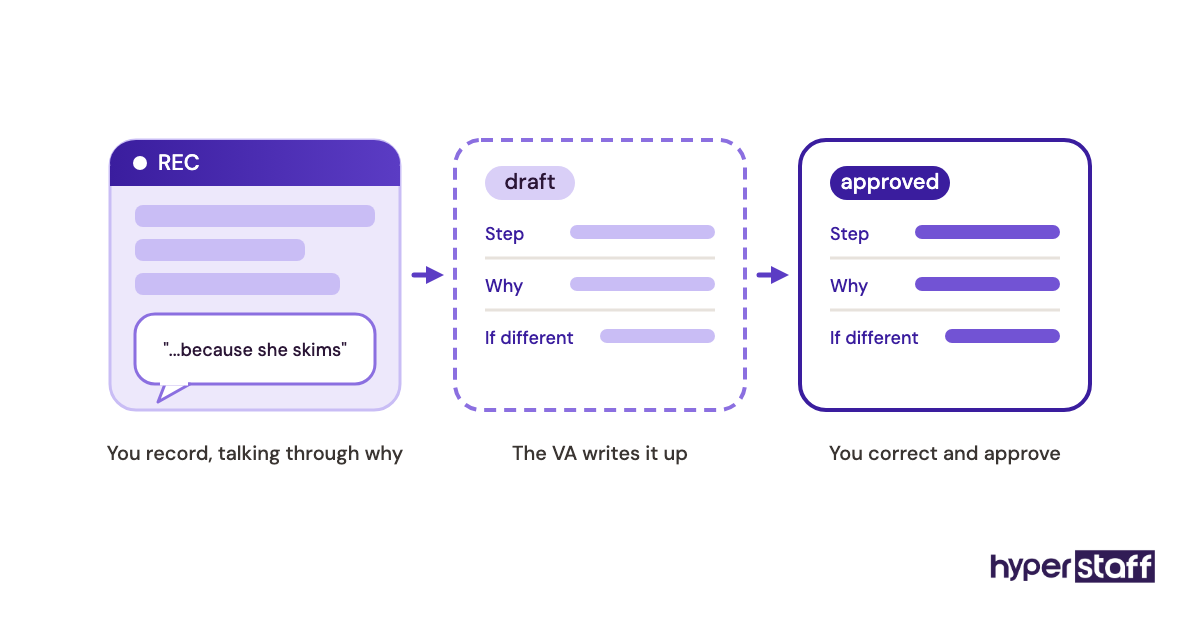
The owner records 8 to 12 short videos of routine tasks during a normal week before the VA starts. On day one, the assistant watches them and writes each one up as an SOP for the owner to correct.
Two jobs get done at once. The docs get written, and the owner sees how closely the VA listens.
The Spending-Limit Card
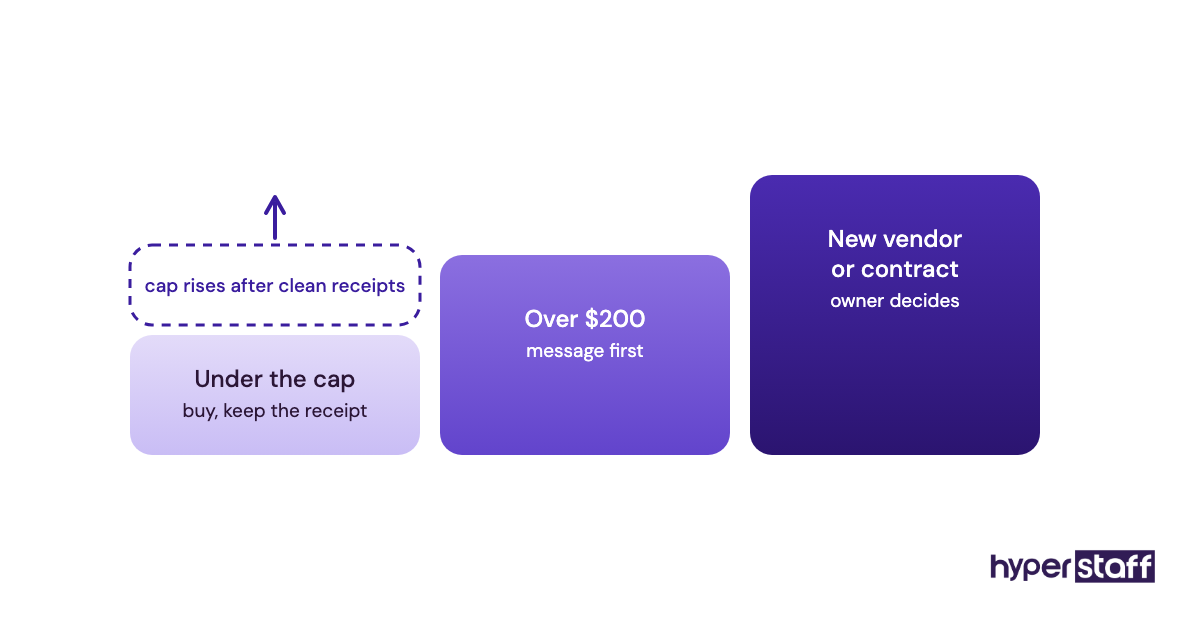
A VA handling travel and purchases gets a card with a fixed monthly cap and one rule: anything over $200 needs a message first. Mistakes stay small, and the cap rises once a month of receipts reconciles cleanly.
The End-of-Day Note
From day one, the assistant sends a short evening note under three headings: done, stuck, tomorrow. The owner reads it in two minutes and replies only to the stuck line.
Personal VA Onboarding Bad Examples
Every Password on Day One
The owner pastes 20 logins into a chat message on the first morning. Nothing can be revoked on its own, and when the arrangement ends, every password has to change.
"Just Handle My Inbox"
The VA gets full Gmail access and a single instruction. Within a week, important threads are archived, a vendor gets an oddly formal reply, and the owner takes the inbox back.
The Ghost Week
The owner hires, then vanishes into a busy week with no SOPs and no check-ins. The assistant waits or guesses, and both sides judge the fit on a week that never really started.
Creating a Personal VA Onboarding Plan, Step by Step
A personal VA onboarding plan fits on one page and runs about four weeks. Each step below unlocks the next.
Step #1: List and Rank the Tasks You'll Hand Over
Start with two columns: tasks you'll delegate now and tasks that wait. Rank the first column by how often each task repeats and how much damage a mistake would do.
Frequent, low-risk tasks go first. Anything that touches money or a client relationship waits until week two at the earliest.
Step #2: Record and Write Down the Process
Record each delegated task once, start to finish, while talking through why you make each choice. The reasons matter more than the clicks, since they're what the assistant needs when a situation doesn't match the recording.
Step #3: Set Up Access in One Sitting
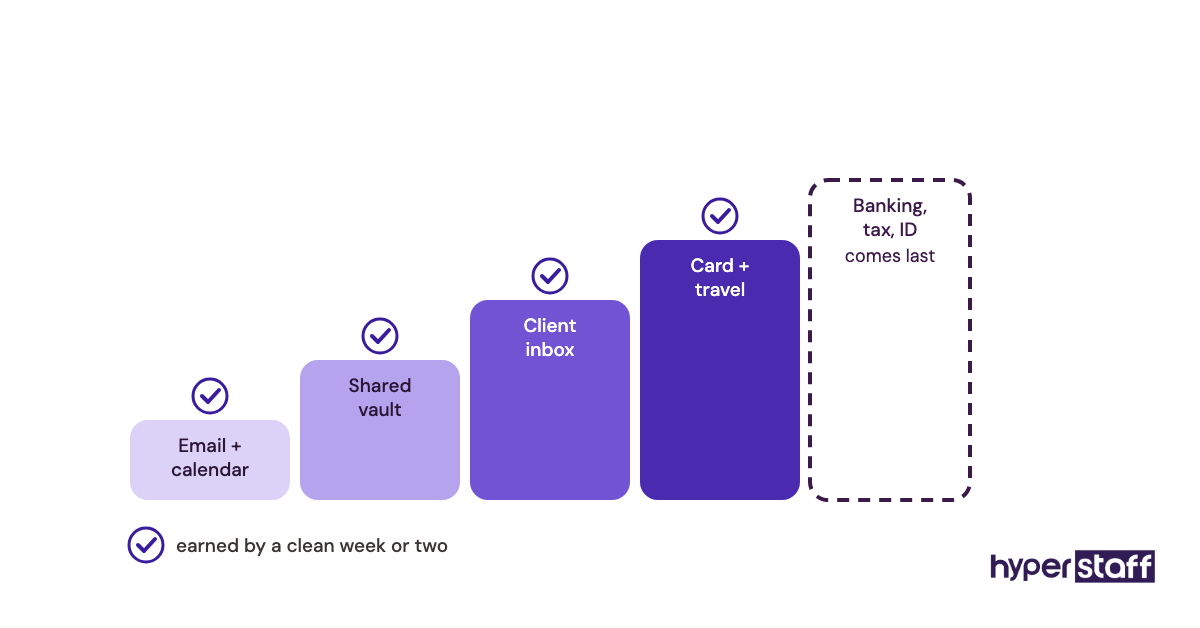
Grant delegated access for email and calendar, then share logins through a password manager vault created only for the assistant. Do it in one session, ideally the day before they start, so nobody waits on two-factor codes.
Keep banking and anything tied to your identity out of the first round.
Step #4: Agree on Communication and Escalation Rules
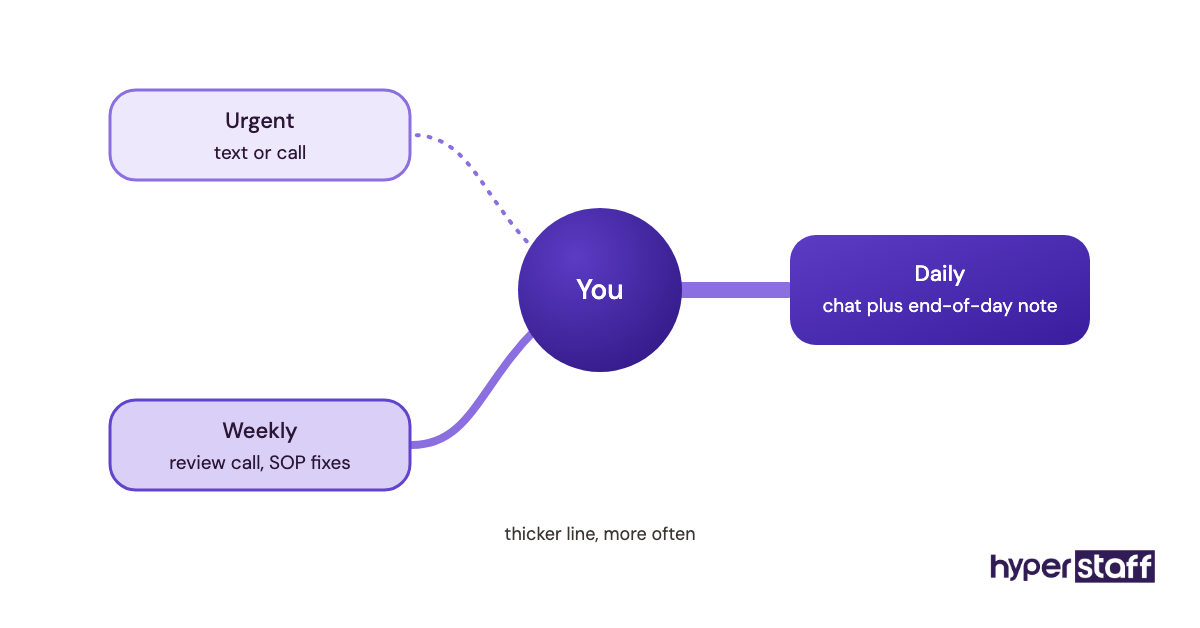
Write down the channel for urgent items, the channel for everything else, and how fast you expect a reply. Then add escalation rules in plain terms: spending over a set amount, anything that commits you to a date, or any message from a named list of people.
Step #5: Review, Adjust and Hand Over Ownership
Review work daily in week one, every other day in week two, then weekly. Each review ends with one SOP fixed and, when the work holds up, one more task or account handed over.
What Does an Effective Onboarding Strategy Look Like?
An effective personal VA onboarding strategy ties access to demonstrated output. The assistant earns each new account by handling the previous one cleanly for a week or two.
Documentation becomes shared work. You supply the first recording, the assistant writes and maintains the SOP from then on, and you only approve changes.
Practitioners split on how much autonomy to give in week one. Some keep a tight script for a month, while others hand over small decisions on day two so judgment develops early.
We lean toward early small decisions under a low spending cap. A VA who never decides anything in month one tends to stay hesitant in month three.
Which Tools Do You Need to Onboard a Personal VA?
Onboarding a personal VA takes a handful of tools covering access, docs, messaging and tasks. Most offer free or low-cost tiers, and plans change often enough that it's worth checking each vendor's current pricing before you commit.
- 1Password or Bitwarden for shared vaults. Revoking one vault at the end beats changing 20 passwords.
- Google Workspace or Microsoft 365 for delegated mail and calendar access.
- Loom for screen recordings. Five-minute clips get watched; 40-minute walkthroughs get skimmed.
- Notion or Google Docs for the SOP library. Google Docs wins for owners who won't learn a new tool.
- Slack, WhatsApp or Microsoft Teams for daily messages.
- Asana, Trello or Todoist for recurring task lists.
We compare these in more depth in our roundup of personal virtual assistant tools.
9 Tips for Onboarding a Personal Virtual Assistant
These nine habits keep personal VA onboarding on track past the first week.
- Batch every access request into one sitting before day one.
- Record tasks during real work, mess included.
- Explain the reason behind each preference, since reasons carry over to new situations.
- Set a written spending limit and raise it on a schedule.
- Ask for an end-of-day update in a fixed format.
- Fix one SOP after every review instead of saving corrections for later.
- Keep banking, tax and identity accounts out of the first month.
- Give feedback within 24 hours, while the task is still fresh.
- Hold a 15-minute check-in at the end of week two to reset priorities.
What Goes Wrong When Onboarding a Personal VA?
Silence is the most common onboarding problem with a personal VA: the assistant gets stuck and doesn't say so. Fix it with the end-of-day note and a rule that 30 minutes stuck means send a message.
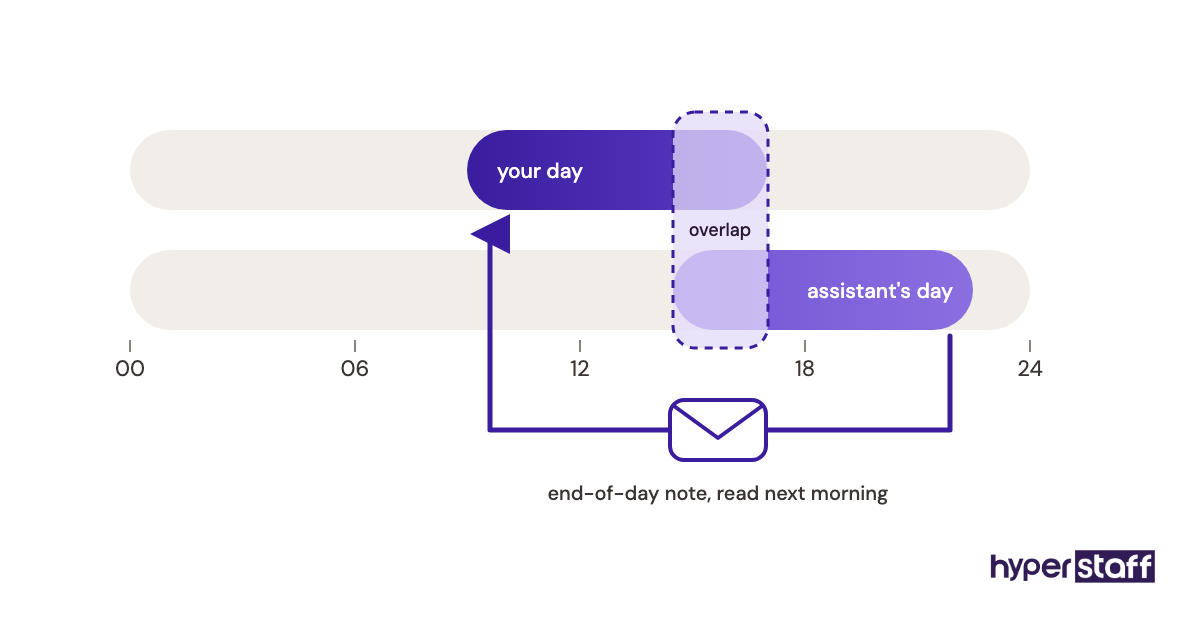
Shift differences come second. When the assistant works different hours, a written handoff note at the end of each day replaces the quick question you'd normally shout across a room.
Tone is the slowest to fix. Give the VA five or six real emails you've sent and ask them to match the voice, which lands faster than any style description.
How Do You Measure Onboarding Success With a Personal VA?
Measure personal VA onboarding success with plain signals: questions asked per day, how often you redo their work, and how many tasks they own without review.
Track them weekly for the first six weeks. Questions should drop week over week, and rework on routine tasks should be close to zero by week four.
Your own calendar gives the clearest read. Count the hours you've stopped spending on delegated work, and if that number isn't growing by week three, fix the onboarding plan before judging the assistant.
How Long Does It Take to Onboard a Personal VA?
Most personal VAs handle routine tasks on their own within two to four weeks. Work that needs judgment, like choosing between travel options or replying to clients, usually takes one to three months.
Week one is mostly setup and shadowing, so expect little time saved. Week two is where owners usually feel the first real relief.
Agency placement can shorten the front end. At Hyperstaff, a 30-minute kickoff call gets work started that day or the next morning, with your SOPs written into the Operations Vault as you go.
How Much Does Onboarding a Personal VA Cost?
Onboarding a personal VA costs mostly owner time, roughly 5 to 15 hours in the first month. The assistant's rate during ramp-up is the other cost, and it swings widely by hiring route, as our personal virtual assistant cost guide shows in detail.
| Cost item | Hyperstaff | Typical in-house assistant |
|---|---|---|
| Hourly rate | From $3 (Essential), $6 (Professional), $12 (Expert) | Roughly $20 to $35, plus benefits and payroll taxes |
| 80 hours a month | From $240 (Essential) to $960 (Expert) | Roughly $1,600 to $2,800 before overhead |
| Time to start | Placement in 5 business days | Often 4 to 8 weeks of recruiting |
| SOP writing | Operations Vault written and maintained for you | Written by you or a manager |
| Kickoff | 30-minute call, work starts same or next day | 1 to 3 days of orientation |
| Replacement | Free, in 5 to 7 business days, briefed from your Vault | New search, new onboarding |
| Equipment | None | Laptop and software, often $1,000+ |
| Billing | Bundles of 40, 80 or 160 hours; 10% off paid quarterly | Salary or hourly payroll |
Important: Hyperstaff prices shown are typical starting points, not fixed quotes. Your final cost depends on the tier, hours and type of work your assistant takes on.
Is Onboarding a Personal Virtual Assistant Worth the Effort?
Yes, onboarding a personal virtual assistant is worth it, and done well it's one of the highest-return blocks of time you'll spend. A few focused hours up front buy back many hours every month after.
Say your time is worth $100 an hour and you spend 12 hours onboarding a Professional-tier assistant at $6 an hour on an 80-hour bundle. Month one costs $480 in fees plus $1,200 of your time, so $1,680 in total.
If the VA takes back 10 hours a week of your work by month two, that's about 40 hours, or $4,000 of your time, against $480 in monthly fees. Even at half that pace, you come out well ahead.
The catch is month one. You'll feel busier before you feel lighter, and owners who quit in week two never see the return.
Our longer take on whether a personal VA pays off covers the cases where it doesn't.
How Do You Choose a Personal VA Agency That Handles Onboarding?
Choose a personal VA agency by how it onboards, since that's where most of your early time goes. Ask who writes the SOPs, how fast a replacement starts, and what happens to your docs if the assistant leaves.
Red flags include a rotating pool of assistants, no named point of contact, and replacements that start from zero. A dedicated assistant ramps once, while a pool ramps again every time someone new picks up your tasks.
Hyperstaff gives every client a dedicated account manager and keeps your SOPs, tools and context in the Operations Vault. A replacement, when needed, is free within 5 to 7 business days and gets briefed from that same source.
Personal VA Onboarding Trends and Where It's Heading
Reliable statistics on personal VA onboarding specifically are thin. Most published onboarding research studies in-office employees with an HR team behind them, so those figures transfer poorly to a remote assistant.
A few shifts are easy to see in practice. Password managers with built-in sharing have replaced pasted logins for careful owners, and short async video has largely replaced long live training calls.
Our prediction, held loosely: onboarding docs will move from static SOPs to living ones the assistant updates weekly with owner approval. Agencies that keep those docs current will place replacements faster than ones handing over a stale folder.
Personal VA Onboarding and AI
AI tools now speed up the slowest part of onboarding a personal VA: turning recordings into written SOPs. Paste a recording's transcript into ChatGPT or Claude and you get a draft step list in a minute, which your assistant then corrects against the real task.
Judgment is where AI falls short. It can draft a reply in your voice, yet it has no idea that one client hates phone calls or that your Friday afternoons are protected.
The practical split is simple. Let AI draft docs and first-pass emails, and let your assistant own the context and the final call.
Disclaimer: This article is general information only and isn't legal, financial or security advice. Costs, tool features and timelines vary, so check current details and get professional advice before acting on them.
Common questions
What should I give my personal VA on the first day?
Give them three to five SOPs or recordings, delegated email and calendar access, a shared password vault and your escalation rules. Hold back financial accounts until they've handled routine work cleanly for a couple of weeks.
Should I give my virtual assistant my passwords?
No, not directly. Share logins through a password manager vault or use delegated access, so you can remove the assistant in one step without resetting every account.
How do I onboard a personal VA in a different time zone?
Overlap two to three hours a day for the first two weeks for questions and reviews. After that, a written end-of-day handoff usually covers it.
Do I need an NDA when onboarding a personal virtual assistant?
It depends on what they'll see. For finances, client data or family details, a confidentiality agreement is sensible, and many agencies already include one in their contracts.
What if my personal VA isn't working out after onboarding?
Check the onboarding first, since unclear SOPs and late access cause most early struggles. If the fit still isn't right, Hyperstaff replaces the assistant free within 5 to 7 business days, briefed from your Operations Vault.
Book a free 15 min call
We place a pre-vetted specialist in 5 business days, fully managed, from $3/hour.