Is a Data Entry Virtual Assistant Worth It? An Honest Cost and Value Breakdown
A data entry virtual assistant pays off when the volume is steady and the rules are written down, and this guide shows the math and the traps.
On this page
- What Does a Data Entry Virtual Assistant Actually Do?
- Key Data Entry Virtual Assistant Terms You Should Know
- Why Is a Data Entry Virtual Assistant Important for a Growing Business?
- How Does Hiring a Data Entry Virtual Assistant Work?
- Types of Data Entry Virtual Assistant Work
- How a Data Entry Virtual Assistant Differs From Related Options
- Data Entry Virtual Assistant vs. an In-House Data Entry Clerk
- Data Entry Virtual Assistant vs. Automation Software
- Data Entry Virtual Assistant vs. a General Virtual Assistant
- The Benefits of a Data Entry Virtual Assistant
- The Drawbacks of a Data Entry Virtual Assistant
- Who Needs a Data Entry Virtual Assistant?
- Data Entry Virtual Assistant Examples
- Good Data Entry Virtual Assistant Examples
- Data Entry Virtual Assistant Bad Examples
- Creating a Data Entry Virtual Assistant Plan, Step-by-Step
- Step #1
- Step #2
- Step #3
- Step #4
- Step #5
- What Does an Effective Data Entry Virtual Assistant Setup Look Like?
- Data Entry Virtual Assistant Tools and Software
- 8 Proven Data Entry Virtual Assistant Tips and Best Practices
- Overcoming Common Data Entry Virtual Assistant Challenges
- How to Measure Data Entry Virtual Assistant Success
- How Long Does a Data Entry Virtual Assistant Take to Work Out?
- How Much Does a Data Entry Virtual Assistant Cost?
- Is a Data Entry Virtual Assistant Worth It?
- How to Choose a Data Entry Virtual Assistant Agency
- Data Entry Virtual Assistant Statistics, Trends and Future Predictions
- Data Entry Virtual Assistants and AI
- FAQs
Your data hours should earn back their cost
Hyperstaff places pre-vetted data entry virtual assistant services from $3/hour, with a dedicated specialist who learns your systems and stays with you. We've served 30+ clients and placed 70+ virtual assistants across 5 regions, and your specialist starts within 5 business days, with a free replacement in 5 to 7 business days if the fit is wrong.
What Does a Data Entry Virtual Assistant Actually Do?
A data entry virtual assistant is a remote specialist who enters, updates, cleans and moves information between your systems, such as a CRM, a spreadsheet, an accounting file or an online store. The work is rule-based and repeatable, which is why it moves well to a remote hire.
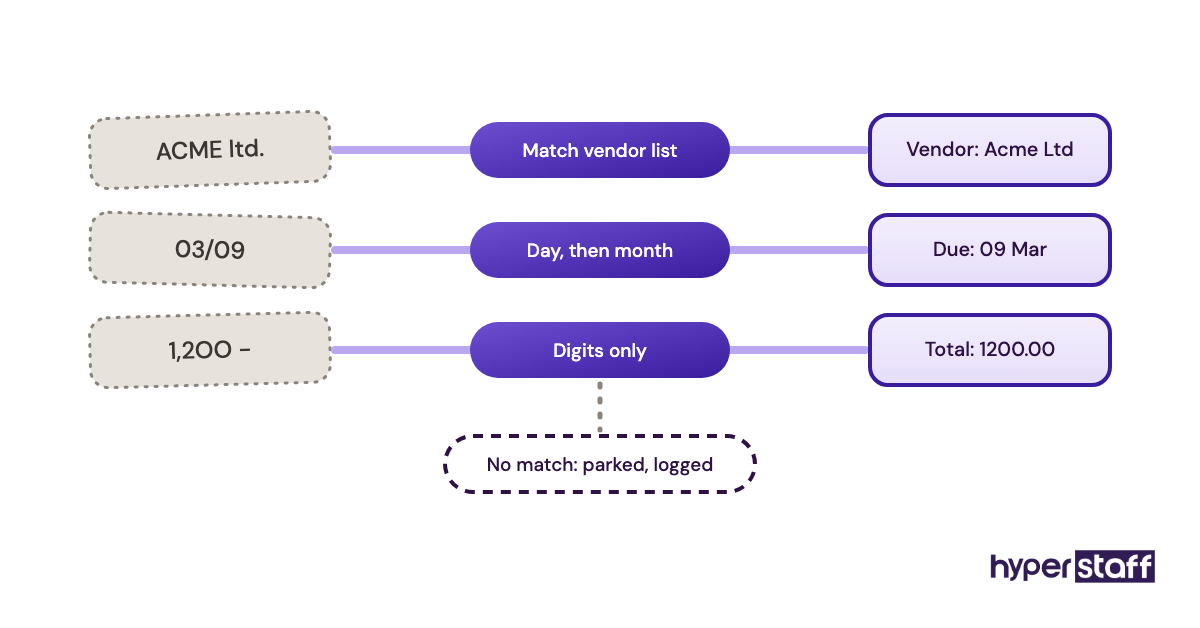
The role reaches further than typing. Good data entry assistants check records against source documents, flag duplicates, research missing fields and keep a log of anything that doesn't match the rules, and our guide on what a data entry assistant is covers the full scope.
Key Data Entry Virtual Assistant Terms You Should Know
- Accuracy rate = the share of records entered without an error, checked against the source.
- Fully loaded cost = wages plus benefits, payroll taxes, equipment and management time for an employee.
- Field mapping = a document that says which source value goes into which field in the target system.
- Data validation = rules that stop bad values from being saved, such as a required date format.
- Deduplication = finding and merging records that describe the same customer, product or invoice.
- OCR = optical character recognition, software that turns scanned text into editable data.
- SOP = standard operating procedure, the written steps for a recurring task.
- Turnaround time = how long a batch takes from hand-off to finished, verified entry.
- Spot check = a review of a random sample of records to estimate quality without rechecking everything.
Why Is a Data Entry Virtual Assistant Important for a Growing Business?
Clean data decides whether invoices go out on time, whether sales follows up on the right lead and whether stock counts match reality. A data entry virtual assistant keeps that data current at a rate that makes daily upkeep affordable.
The less obvious reason is backlog risk. When entry depends on whoever has a spare hour, it slides, and a two-week backlog in a CRM or a bookkeeping file is far harder to fix than a daily 45-minute routine.
We've also noticed that owners rarely know how many hours data work takes until someone else does it. Once a specialist logs time against each task, the real number tends to land well above the owner's guess.
How Does Hiring a Data Entry Virtual Assistant Work?
Hiring a data entry virtual assistant through an agency follows a short sequence: a discovery call, a candidate match, a kickoff call and a first batch of work. At Hyperstaff, placement takes 5 business days and work starts the day of the 30-minute kickoff call or the next morning.
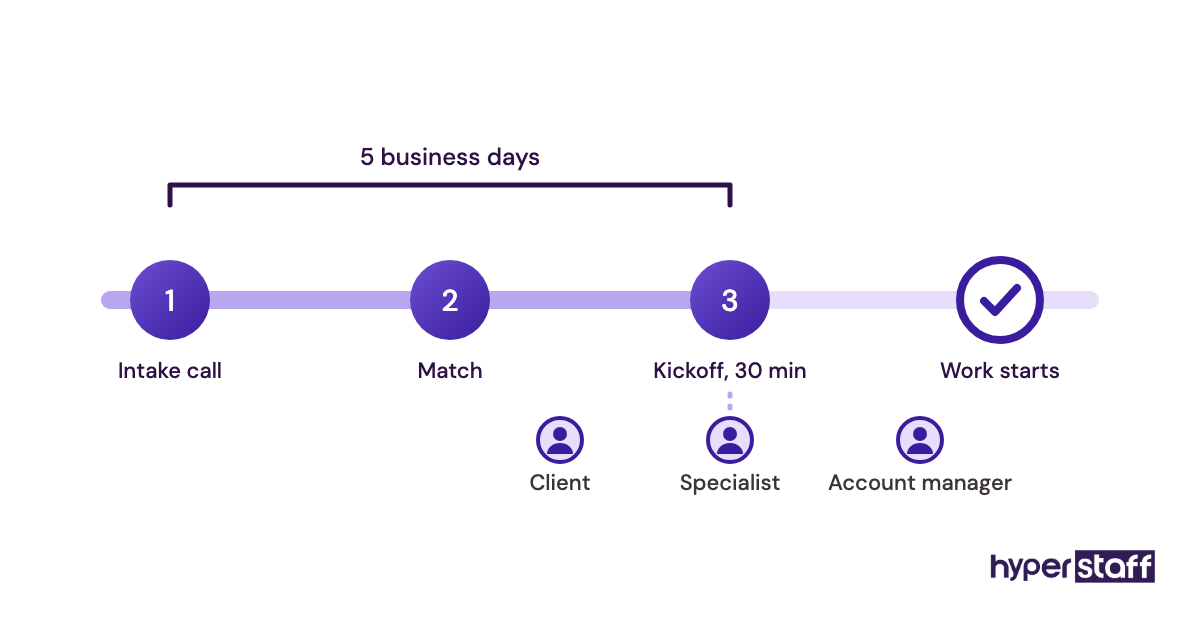
The part that decides success happens before the first record. Your SOPs, logins and field rules go into an Operations Vault, which we write down and maintain for you, so a replacement can be briefed from the same source if one is ever needed.
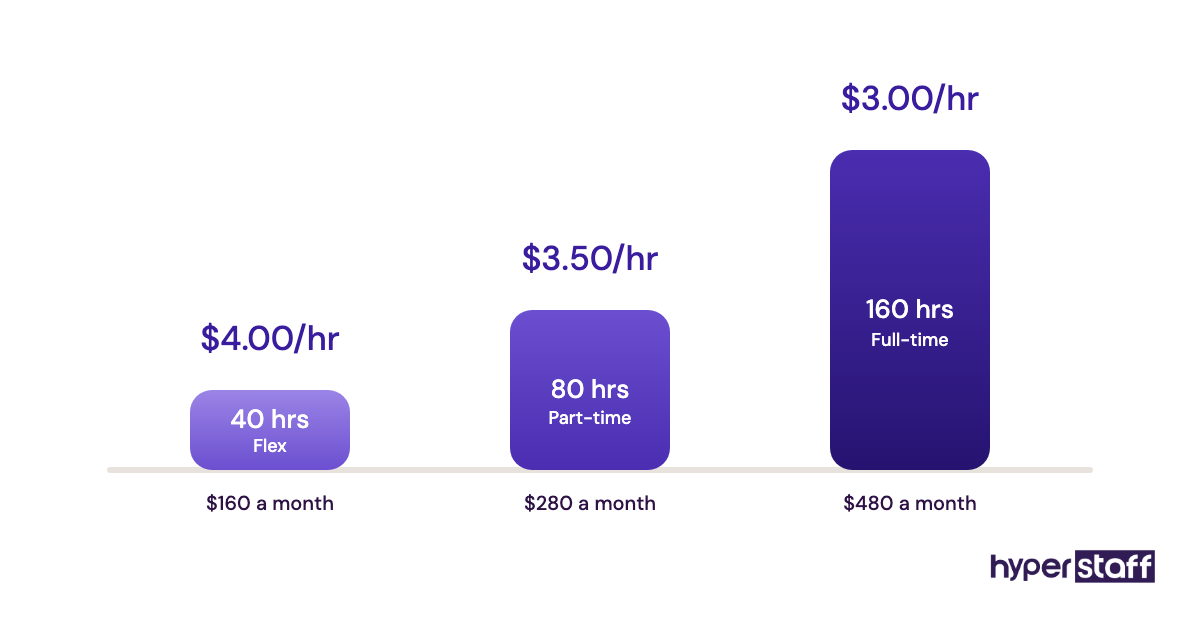
After launch, a dedicated account manager stays on the engagement. You pick a monthly bundle of 40, 80 or 160 hours, and the specialist works inside your tools rather than sending files back and forth.
Types of Data Entry Virtual Assistant Work
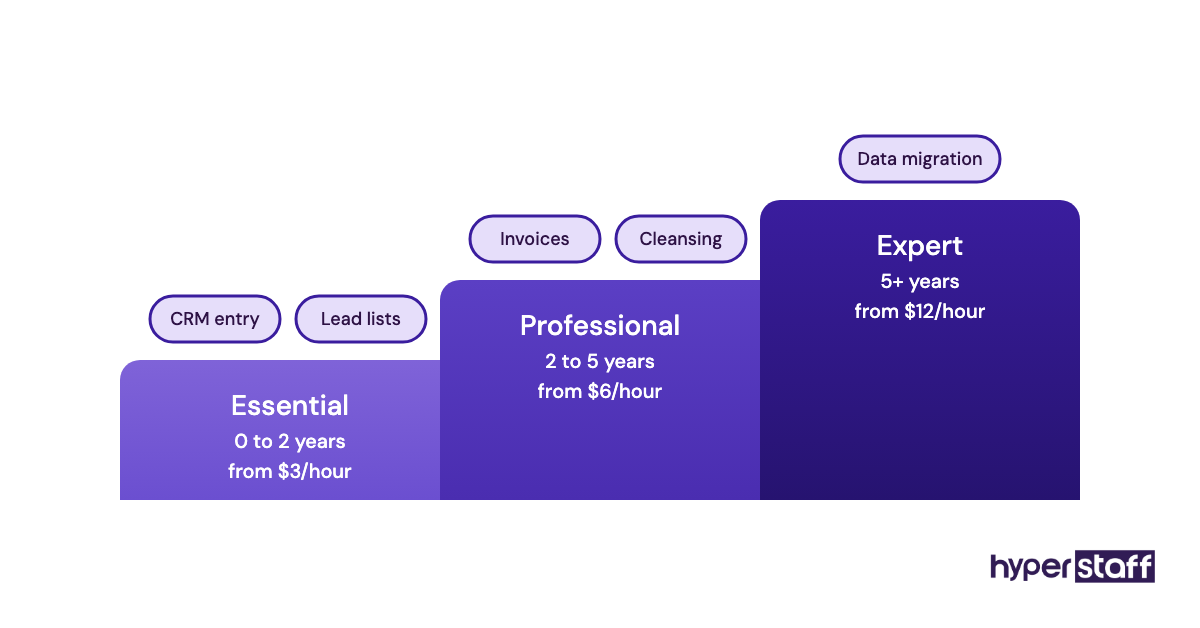
Data entry virtual assistant work splits into a handful of categories, and each one suits a different experience level. The table maps common types to tasks, tools and the tier that usually fits, and our list of data entry assistant tasks goes deeper.
| Type of work | Typical tasks | Common tools | Usual tier fit |
|---|---|---|---|
| CRM data entry | New leads, contact updates, deal stages | HubSpot, Salesforce, Pipedrive | Essential |
| E-commerce catalog entry | Product listings, variants, prices, stock | Shopify, WooCommerce, Amazon Seller Central | Essential to Professional |
| Invoice and bill entry | Vendor bills, receipts, expense coding | QuickBooks, Xero | Professional |
| Data cleansing | Deduplication, formatting, filling gaps | Excel, Google Sheets, Airtable | Professional |
| Lead list building | Web research, contact verification | LinkedIn, Google Sheets, CRM | Essential |
| Document and form capture | Scanned forms, PDFs, applications | OCR tools, Google Sheets | Essential to Professional |
| Data migration | Moving records between systems, field mapping | CSV imports, Zapier, Make | Expert |
How a Data Entry Virtual Assistant Differs From Related Options
The worth-it question only makes sense next to the alternatives. Each one wins in a different situation.
Data Entry Virtual Assistant vs. an In-House Data Entry Clerk
An in-house clerk costs wages plus benefits, which make up about 31% of total employer compensation cost, according to the US Bureau of Labor Statistics Employer Costs for Employee Compensation. A virtual assistant costs a flat hourly rate with no benefits, desk or equipment on your side.
In-house still makes sense when the work needs physical documents or on-site systems. Our breakdown of virtual assistant vs in-house hiring walks through that choice.
Data Entry Virtual Assistant vs. Automation Software
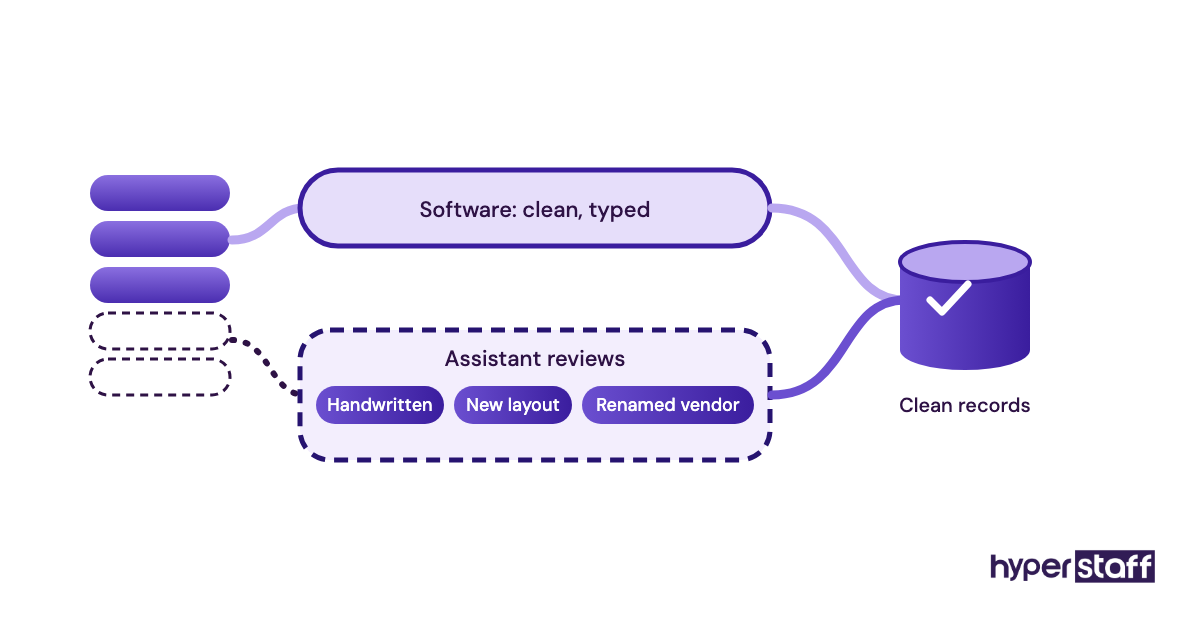
Automation tools like Zapier or OCR software move clean, structured data fast and cheaply. They break on messy inputs: handwritten forms, inconsistent vendor invoices and records that need judgment.
The strongest setups use both. Software does the first pass, and the assistant reviews exceptions and fixes what the tool got wrong.
Data Entry Virtual Assistant vs. a General Virtual Assistant
A general virtual assistant splits time across inbox, calendar and support work, so data entry competes with everything else. A dedicated data entry specialist builds speed and accuracy on one type of task, and the error rate drops faster when the work isn't constantly interrupted.
The Benefits of a Data Entry Virtual Assistant
- Rates from $3/hour, against an in-house clerk's wages plus benefits.
- Steady daily upkeep instead of backlogs cleared in panicked bursts.
- Hours you can scale with monthly bundles of 40, 80 or 160.
- Owners and senior staff get their data hours back for revenue work.
- A written process that survives a staff change, kept in an Operations Vault.
The Drawbacks of a Data Entry Virtual Assistant
- You must write the rules down first, which takes a few hours up front.
- Time zones can delay answers to questions about edge cases.
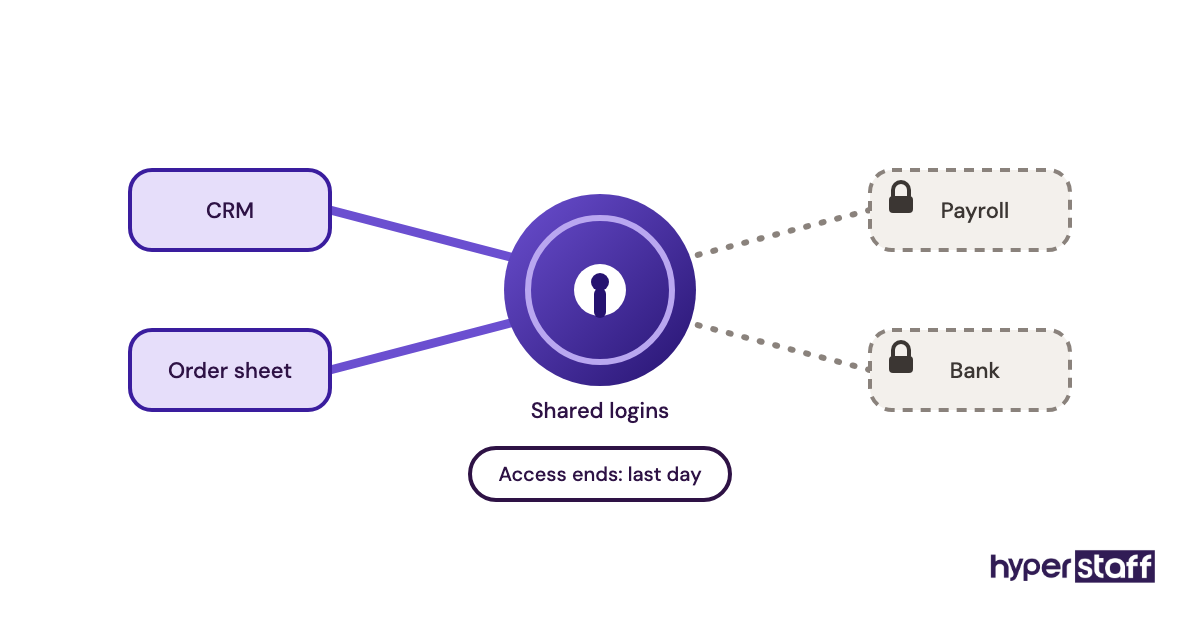
- Sensitive data needs access controls and a password manager.
- Very low volume, under a few hours a week, rarely justifies a hire.
Who Needs a Data Entry Virtual Assistant?
A business needs a data entry virtual assistant when recurring data work eats skilled people's time or when records fall behind every month. The signals below are the ones we check during a discovery call.
| Signal | What it looks like | Typical starting bundle |
|---|---|---|
| Owner does the entry | 5 to 10 hours a week of typing | 40 hours/month |
| Recurring backlog | Records 1 to 3 weeks behind | 80 hours/month |
| Large catalog | 500+ SKUs with frequent changes | 80 to 160 hours/month |
| Migration project | Moving to a new CRM or accounting tool | 160 hours/month |
| Lead volume growth | Leads sit unlogged for days | 40 to 80 hours/month |
Smaller teams usually feel it as lost owner time. Larger teams feel it as data that no report can trust, which is harder to see but costs more.
Data Entry Virtual Assistant Examples
The difference between a good and a bad engagement usually shows up in the setup, long before anyone looks at output quality. These are patterns we see repeatedly, described without client names.
Good Data Entry Virtual Assistant Examples
A Catalog Update With a Field Map
An online store hands over a sheet that lists every product field, the allowed values and three finished examples. The assistant works to the map, and questions drop to almost nothing by the second week.
Daily Invoice Entry With a Spot Check
Bills go into the accounting tool every day, and the owner checks 10 random entries each Friday. Errors get logged against the SOP, so the same mistake doesn't come back.
CRM Cleanup Before a Sales Push
Before a new campaign, the assistant merges duplicates and fills missing job titles from public sources. The sales team gets a list they can actually call, and the ongoing cleanup becomes a weekly task.
Data Entry Virtual Assistant Bad Examples
"Just Figure Out Our System"
No field rules, no examples and a login sent with a one-line message. The assistant guesses, the guesses don't match what the team expected, and the hire gets blamed for a missing brief. Our list of common data entry assistant mistakes covers this one in detail.
Speed Targets With No Accuracy Check
Records per hour get tracked and nothing else. Output looks great for a month, then a report built on the data turns out to be wrong.
Shared Passwords in a Spreadsheet
Logins sit in a shared document that anyone can copy. It works until someone leaves, and then nobody knows which accounts were exposed.
Creating a Data Entry Virtual Assistant Plan, Step-by-Step
A data entry virtual assistant plan takes about a week to put together before the first batch. These five steps keep the trial honest.
Step #1: Measure the Hours You Spend Now
Log every data task for two weeks with a rough time per task. Without this baseline, you can't tell later whether the hire saved anything.
Step #2: Write the Role Down
List the systems, the volume and the accuracy target in a short brief. A clear data entry job description also makes candidate matching faster.
Step #3: Test Candidates on Real Records
Give finalists a 20-record sample from your own system, with one or two tricky cases. Pair it with practical data entry interview questions about how they check their own work, and see our guide on hiring a data entry assistant for the full process.
Step #4: Onboard With Examples and Access Controls
Set up logins through a password manager and share finished examples of correct records. The steps in onboarding a data entry assistant keep the first week focused.
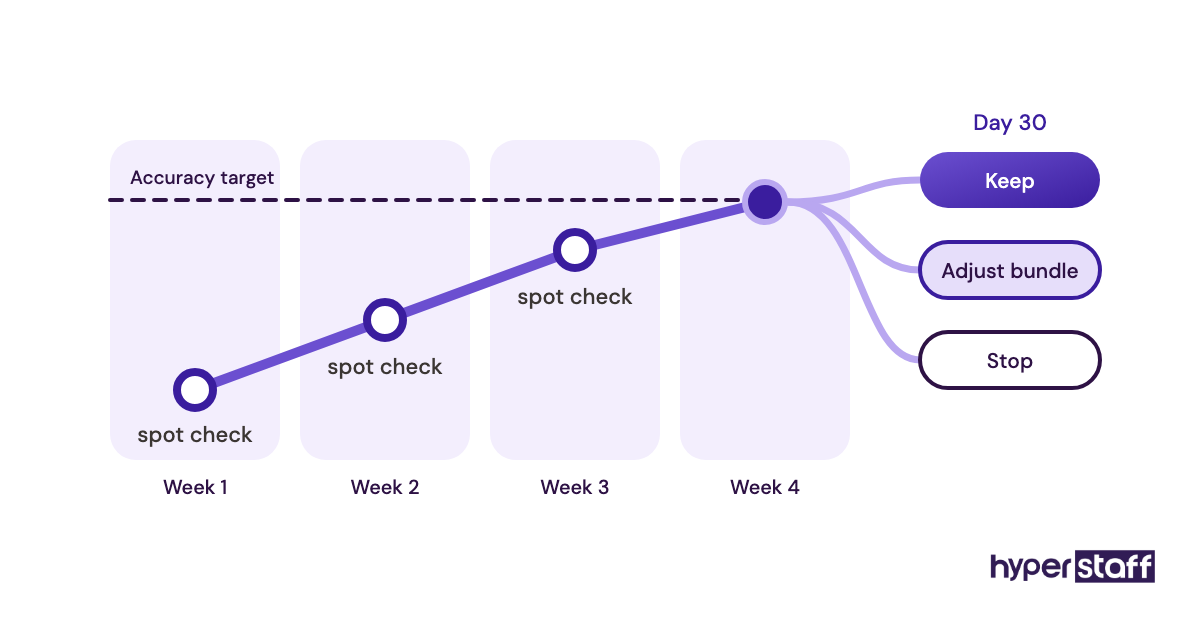
Step #5: Run a 30-Day Pilot With One Metric
Pick accuracy on a weekly spot check as the main measure. At day 30, compare hours saved against the bill and decide to keep, adjust the bundle or stop.
What Does an Effective Data Entry Virtual Assistant Setup Look Like?
An effective data entry virtual assistant setup has three written parts: field rules, an exception path and a review rhythm. If any one of them is missing, quality depends on luck.
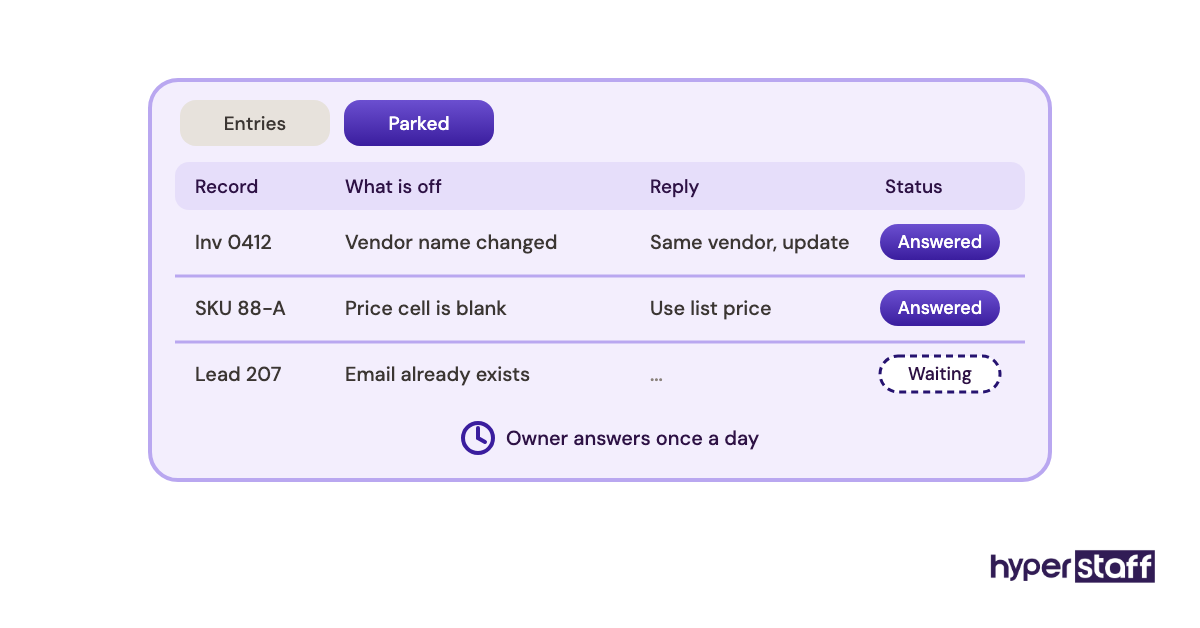
The exception path gets skipped most often. The assistant needs to know what to do with a record that doesn't fit: park it in a tab, tag it, or message someone, and who that someone is.
Practitioners disagree on review depth. Some owners check every record for the first month, while others sample 5% from day one, and we lean toward heavy checking for two weeks, then sampling once the error log stops filling up.
Data Entry Virtual Assistant Tools and Software
Data entry virtual assistant tools fall into a few groups, and most small businesses already pay for half of them. Our roundup of the best data entry assistant tools compares them in detail.
- Google Sheets and Excel for staging data, with data validation rules switched on before the assistant starts.
- Airtable for catalogs and trackers that outgrow a spreadsheet but don't need a database.
- Zapier or Make to move clean records between apps, leaving the assistant to handle exceptions.
- OCR tools such as Docparser or Nanonets for invoices and forms with a consistent layout.
- 1Password or Bitwarden to share logins without exposing passwords.
- Loom to record a two-minute walkthrough of a task, which often beats a written SOP for first-time training.
- Hubstaff or a similar tracker if you want time logged per task.
Plans and prices change often, so check each vendor's own pricing page before you buy.
8 Proven Data Entry Virtual Assistant Tips and Best Practices
These habits separate engagements that last from ones that stall after a month.
- Write field rules with an example of a correct value next to each one.
- Turn on validation in your spreadsheet or CRM so bad formats can't be saved.
- Track accuracy and speed together, never speed alone.
- Answer the question log once a day at a fixed time.
- Give the assistant edit access only to the systems the task needs.
- Update the SOP every time an error repeats.
- Batch similar work, since switching between systems slows entry down.
- Review the bundle size every quarter against actual hours used.
Overcoming Common Data Entry Virtual Assistant Challenges
The most common challenge is inconsistent source data, such as invoices from 40 vendors in 40 layouts. Fix it with a lookup sheet per vendor rather than asking the assistant to remember.
Security is the second worry. A password manager, role-based access and removing access on the last day solve most of it.
The third is slow answers to edge cases. A shared question log, answered once a day, keeps the batch moving while the odd records wait.
How to Measure Data Entry Virtual Assistant Success
Data entry virtual assistant success comes down to four numbers: accuracy on a spot check, records or batches per hour, turnaround time and hours you no longer spend yourself. Accuracy matters most, so set a target before the first week.
Measure your own time saved too. If owner or manager hours on data work haven't dropped by the end of month one, review the setup, since the hire often shows hidden review work that needs a better SOP.
How Long Does a Data Entry Virtual Assistant Take to Work Out?
A data entry virtual assistant usually reaches steady speed in 2 to 4 weeks. Placement at Hyperstaff takes 5 business days, and work begins the day of the kickoff call or the next morning.
Week one is for learning your exceptions. By weeks three and four, questions should fall to a handful a day, and the time you save starts to show in your calendar.
How Much Does a Data Entry Virtual Assistant Cost?
A data entry virtual assistant from Hyperstaff costs from $3 to $12 per hour depending on experience, or roughly $480 to $1,920 for a full 160-hour month. For comparison, the US Bureau of Labor Statistics lists a median of $21.64 per hour for general office clerks, before benefits. Our full data entry assistant cost guide breaks this down further.
| Experience level | Hyperstaff rate | Hyperstaff, 160 hours/month | In-house equivalent, 160 hours/month (wages plus benefits, estimate) |
|---|---|---|---|
| Essential (0 to 2 years) | From $3/hour | From $480 | About $4,000 to $4,600 |
| Professional (2 to 5 years) | From $6/hour | From $960 | About $4,600 to $5,400 |
| Expert (5+ years) | From $12/hour | From $1,920 | About $5,800 to $7,000 |
| 40-hour bundle | $3 to $12/hour | $120 to $480 | Part-time hires rarely come at this size |
| Paying quarterly | 10% off | From $432 | No equivalent |
Important: Hyperstaff figures here are starting rates and averages, not fixed quotes. Your real cost depends on the hours, tier and type of data work your business needs.
Is a Data Entry Virtual Assistant Worth It?
Yes, for most businesses with steady data volume, a data entry virtual assistant is one of the most rewarding hires to make, because the work is measurable, easy to document and costs a fraction of an in-house role. The return depends on written rules and a weekly accuracy check.
Here's an example calculation. An 80-hour Professional bundle at $6/hour costs $480 a month, or $432 if you pay quarterly.
Doing the same 80 hours in-house at the $21.64 median wage, with benefits at about 31% of total compensation, works out to roughly $31.36 per hour, or about $2,509 a month. The gap is around $2,029 a month, close to $24,350 a year, before counting desk space or equipment.
The math changes if your volume is tiny or every record needs senior judgment. Under about 10 hours a week of data work, a software fix or a 40-hour bundle usually makes more sense than a larger commitment.
How to Choose a Data Entry Virtual Assistant Agency
Choose a data entry virtual assistant agency by checking four things: how candidates are tested, how fast a replacement arrives, who keeps your process documented, and whether you get one dedicated person or a rotating pool. A rotating pool resets the learning curve every time someone changes.
Ask how long placement takes and what happens if the fit is wrong. Hyperstaff places in 5 business days and replaces for free in 5 to 7 business days, briefed from your Operations Vault so the new person doesn't start from zero.
Also ask about account management. A named contact who knows your account fixes problems faster than a support inbox.
Data Entry Virtual Assistant Statistics, Trends and Future Predictions
US employment of general office clerks, a role that includes data entry, is projected to decline 6 percent over the coming decade, with about 249,000 openings a year, according to the BLS Occupational Outlook Handbook. Benefits add about 31% to employer compensation cost, per the BLS compensation release.
The trend we see is a shift in what data entry means. Plain typing is shrinking, while checking, cleaning and fixing what automation produces is growing.
Our prediction, with honest uncertainty about speed: data entry roles will look more like data quality roles, and the assistants who can read a validation error or fix a broken import will be the ones in demand.
Data Entry Virtual Assistants and AI
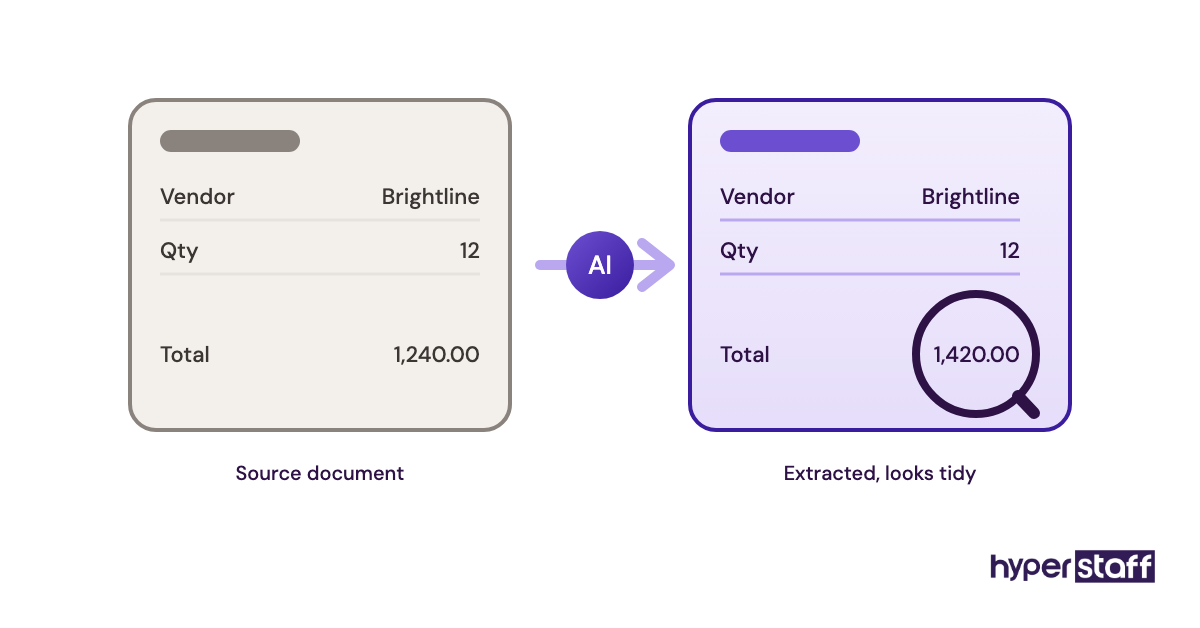
AI tools now read invoices, receipts and forms with good accuracy on clean, consistent layouts. They still miss on handwriting, unusual formats and records that need context, such as knowing a vendor changed its name.
The practical setup pairs the two. AI extracts the first pass, and the assistant reviews low-confidence fields and anything the tool flags.
Disclaimer: This article is for general information only and isn't financial, legal or employment advice. Costs, wage figures and savings are estimates that vary by business, so check current rates and seek professional advice before making hiring decisions.
Common questions
Is a data entry VA worth it for a small business?
Yes, if you have at least 10 hours a week of recurring data work. Below that, a 40-hour monthly bundle or an automation tool may cover it for less.
Can I trust a virtual assistant with sensitive data?
You can, with the right controls. Use a password manager, give access only to the systems the task needs, and remove access when the engagement ends.
How fast is a data entry virtual assistant?
Speed depends on the source data and the system. Clean, typed records move far faster than scanned forms, so set targets after the first two weeks rather than before.
Will AI replace data entry virtual assistants?
No, not for messy or judgment-heavy work. AI handles structured extraction well, but someone still needs to check exceptions and fix errors before they reach your reports.
What should I give a data entry VA on day one?
Give them field rules, a few finished example records and secure logins. A short screen recording of the task often answers more questions than a written document.
Book a free 15 min call
We place a pre-vetted specialist in 5 business days, fully managed, from $3/hour.