How Much Does a Social Media Virtual Assistant Cost?
What a social media virtual assistant really costs per hour, per month and per deliverable, and where the quotes hide extra spend.

On this page
- Social Media Virtual Assistant Retainer Costs
- Social Media Virtual Assistant Cost by Deliverable
- Hyperstaff Cost vs. Other Social Media Virtual Assistant Agencies
- Social Media Virtual Assistant Pricing Models
- Agency vs. Freelancer vs. In-House for a Social Media Virtual Assistant
- How Much Does a Social Media Virtual Assistant Cost by Country?
- What Drives Social Media Virtual Assistant Costs?
- Social Media Virtual Assistant Cost and AI
- The Hidden Costs of a Social Media Virtual Assistant
- How Much Should You Budget for a Social Media Virtual Assistant?
- Calculating Social Media Virtual Assistant ROI
- How to Compare Social Media Virtual Assistant Agency Pricing
- How to Reduce Social Media Virtual Assistant Costs Without Sacrificing Quality
- Is a Social Media Virtual Assistant Worth the Investment?
- FAQs
💡 Key Takeaways:
1) A social media virtual assistant costs roughly $4 to $15 an hour offshore and $25 to $50 an hour in the US, UK, Western Europe or Australia, so a full-time offshore assistant lands near $550 to $2,800 a month.
2) Short-form video editing, response-time coverage and approval rounds move the final bill more than the hourly rate on the quote.
3) Compare quotes on the same monthly hours and the same task list, then add tool seats, ad spend and onboarding time before you pick the cheapest option.
Keep more of every dollar your posts earn
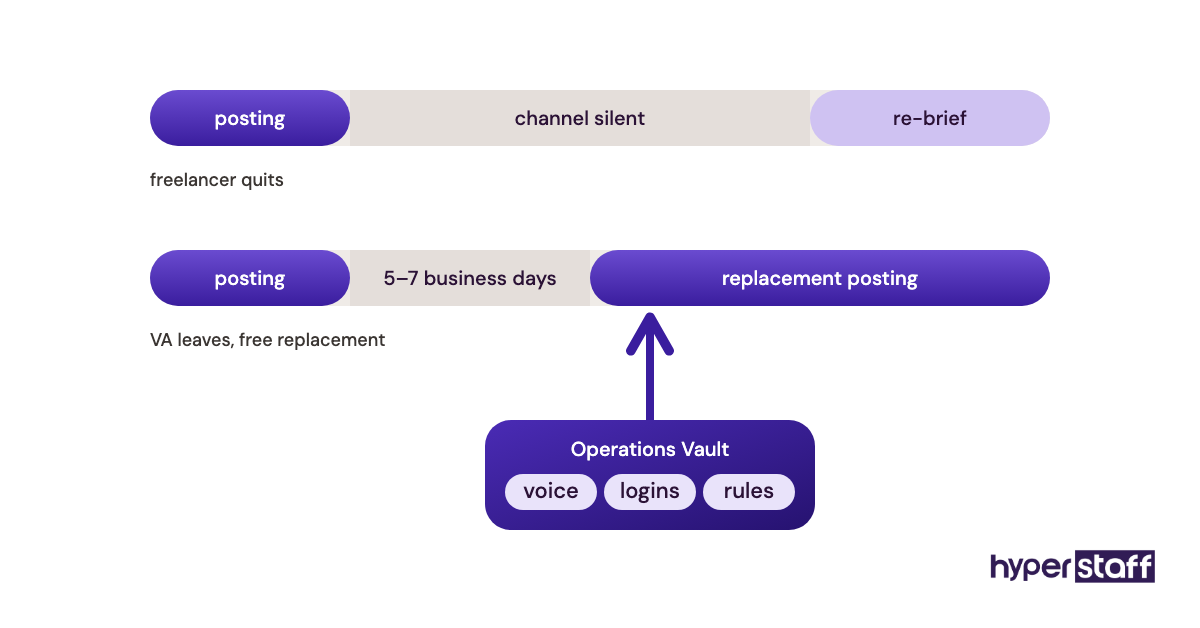
Hyperstaff places pre-vetted social media virtual assistant services from five regions, with rates from $3 an hour and placement in 5 business days. We've placed 70+ virtual assistants with 30+ clients, and every client gets a dedicated account manager plus an Operations Vault that keeps your brand voice, logins and posting rules written down, so a free replacement starts briefed.
Social Media Virtual Assistant Retainer Costs
Social media virtual assistant retainers usually run from about $160 a month for a light 40-hour offshore plan to $8,800 or more for a full-time US-based assistant. The figures below are market averages, and the hours bundle matters more than the label on the plan.
Most retainers are sold as a block of monthly hours. The scope column is the useful one, because it shows what that block of time can realistically produce before you start paying overage.
| Monthly hours | Offshore freelancer | Offshore VA agency | US-based VA agency | Realistic scope |
|---|---|---|---|---|
| 20 hrs | $80–$240 | $160–$300 | $700–$1,100 | Scheduling, light replies |
| 40 hrs | $160–$480 | $320–$600 | $1,400–$2,200 | 2 platforms, static posts |
| 80 hrs | $320–$960 | $640–$1,200 | $2,800–$4,400 | 3 platforms, some video |
| 120 hrs | $480–$1,440 | $960–$1,800 | $4,200–$6,600 | Daily community work |
| 160 hrs | $640–$1,920 | $1,280–$2,400 | $5,600–$8,800 | Full channel ownership |
Rates rise with the share of work that's creative, so a plan built around scheduling and replies sits at the low end while daily Reels editing drifts to the top. Our breakdown of everyday social media VA tasks shows which jobs eat the most hours.
Social Media Virtual Assistant Cost by Deliverable
Priced per deliverable, a social media virtual assistant charges around $10 to $30 for a single designed post and $25 to $100 for a short video edit. All figures here are averages pulled from common freelance, agency and salaried-staff pricing.
The in-house column is the loaded staff time a salaried coordinator spends on the same task, so treat it as an internal cost estimate.
| Deliverable | Freelancer | Agency | In-House | Turnaround |
|---|---|---|---|---|
| Single static post (design + caption) | $10–$30 | $25–$60 | $15–$35 | Same day |
| Carousel, 5–10 slides | $25–$75 | $60–$150 | $40–$90 | 1–2 days |
| Short-form video edit (under 60s) | $25–$100 | $75–$250 | $50–$120 | 1–3 days |
| Monthly content calendar (12–20 posts) | $100–$300 | $250–$600 | $150–$350 | 3–5 days |
| Scheduling 30 posts in a tool | $30–$90 | $75–$200 | $45–$100 | 1 day |
| Community management (1 hr/day, monthly) | $300–$900 | $600–$1,500 | $500–$1,000 | Ongoing |
| Monthly analytics report | $50–$150 | $150–$400 | $75–$200 | 1–2 days |
| Profile setup and optimization (per platform) | $50–$150 | $150–$350 | $60–$150 | 1–2 days |
| Hashtag and keyword research | $30–$80 | $80–$200 | $40–$90 | 1 day |
| Ad campaign setup (ad spend excluded) | $100–$300 | $300–$800 | $150–$350 | 2–4 days |
| Influencer outreach list (50 contacts) | $75–$200 | $200–$500 | $100–$250 | 3–5 days |
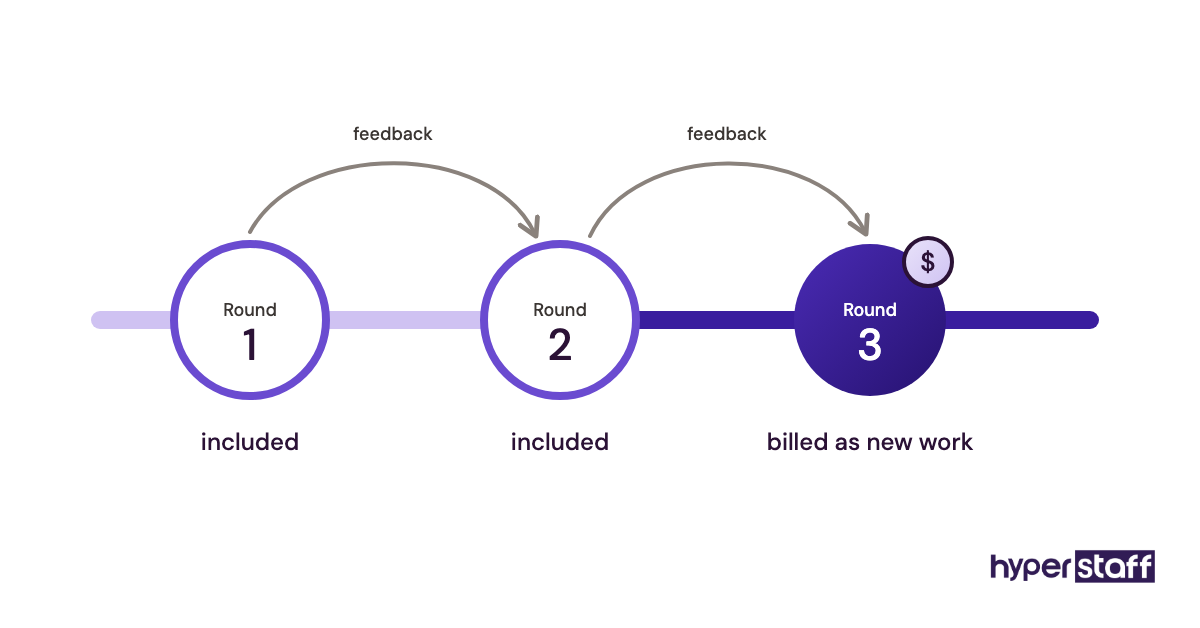
Per-deliverable pricing looks tidy and gets expensive fast once revisions start. Most freelancers include one or two revision rounds, then bill the third as new work.
Hyperstaff Cost vs. Other Social Media Virtual Assistant Agencies
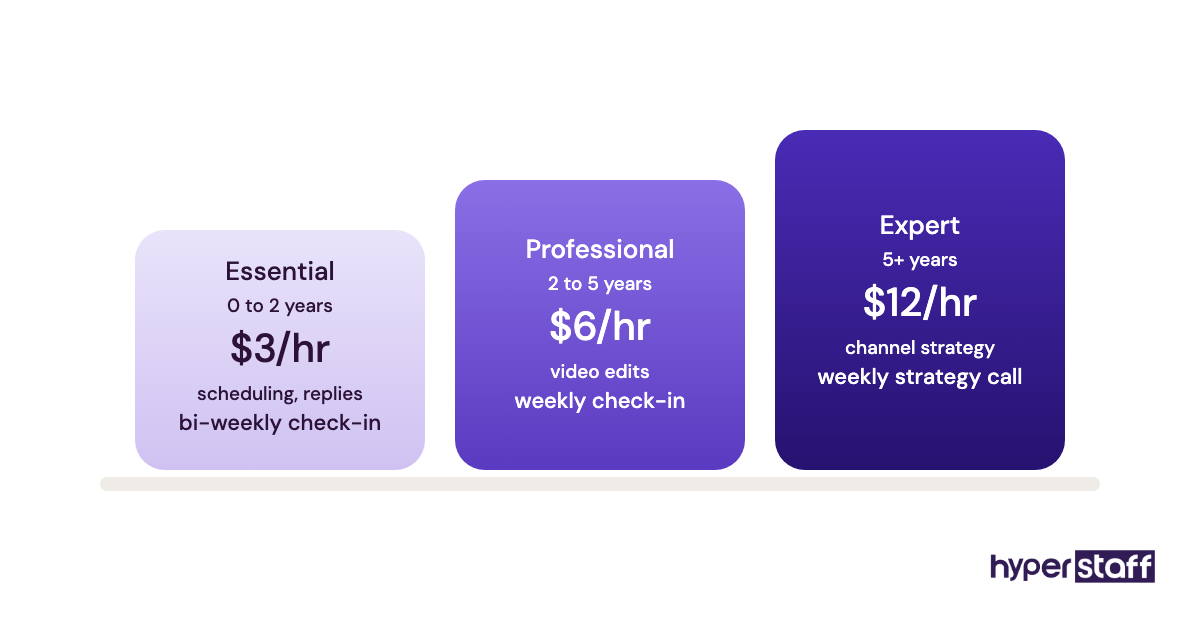
Hyperstaff starts at $3 an hour for the Essential tier and $6 for Professional, against roughly $8 to $15 at other offshore VA agencies and $35 to $55 at US-based ones. The savings column compares each option with our Professional tier at 160 hours.
| Provider | Hourly rate | 80 hrs/month | 160 hrs/month | Replacement | You Save |
|---|---|---|---|---|---|
| Hyperstaff Essential | From $3 | From $240 | From $480 | Free, 5–7 days | Baseline |
| Hyperstaff Professional | From $6 | From $480 | From $960 | Free, 5–7 days | Baseline |
| Offshore VA agency | $8–$15 | $640–$1,200 | $1,280–$2,400 | Often paid | 25–60% |
| US freelancer (marketplace) | $20–$40 | $1,600–$3,200 | $3,200–$6,400 | You rehire | 70–85% |
| US-based VA agency | $35–$55 | $2,800–$4,400 | $5,600–$8,800 | Varies | 83–89% |
Retainer Costs
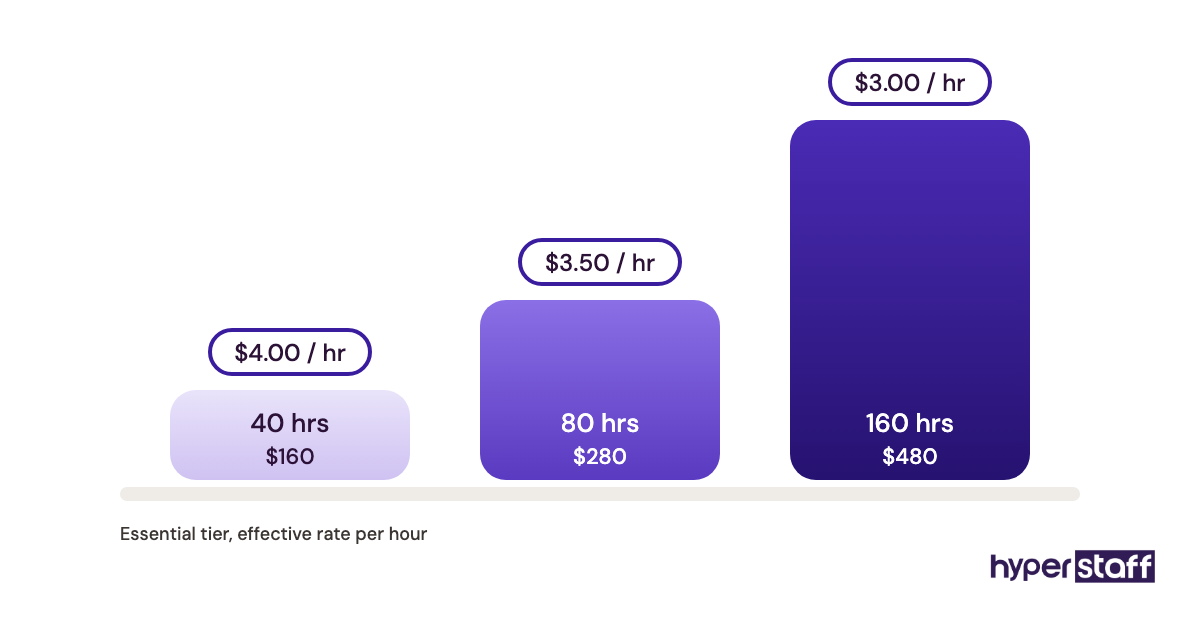
Hyperstaff retainers come in monthly bundles of 40, 80 or 160 hours. Here's how the Essential tier sits next to a typical offshore agency on each bundle.
| Monthly bundle | Hyperstaff Essential | Typical offshore agency |
|---|---|---|
| 40 hrs | From $120 | $320–$600 |
| 80 hrs | From $240 | $640–$1,200 |
| 160 hrs | From $480 | $1,280–$2,400 |
Professional (2 to 5 years) starts at $6 an hour and Expert (5+ years) at $12. A brand that leans on video usually needs Professional at minimum.
Cost by Deliverable
We bill hours, so a deliverable's cost is the time it takes multiplied by the tier rate. A carousel that takes a Professional assistant about 90 minutes works out near $9, which is why hourly billing beats per-post pricing once volume climbs past a handful of posts a week.
Important: Hyperstaff prices shown here are averages. Your final cost depends on the tier, the hours bundle and the work your social channels actually need.
Social Media Virtual Assistant Pricing Models
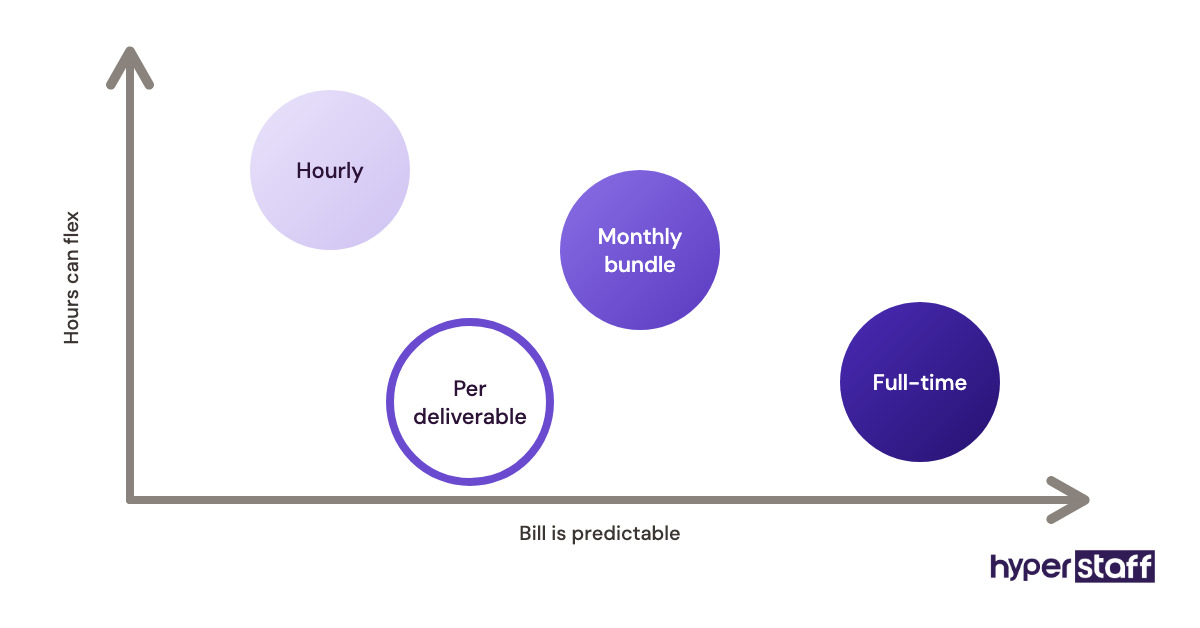
Four pricing models cover almost every quote you'll see:
- Hourly: pay for time tracked. Best for mixed, shifting work.
- Monthly hours bundle: fixed hours, fixed price. Easiest to budget.
- Per deliverable: a price per post, Reel or report. Good for one-off projects.
- Full-time dedicated: 160 hours with one person. Lowest hourly rate.
Some freelancers add a performance bonus tied to follower growth. Skip it until you trust the metrics.
Agency vs. Freelancer vs. In-House for a Social Media Virtual Assistant
A good agency is usually the fastest route for teams that need to scale. You get vetting, a backup when someone leaves, and one bill, at a rate close to a freelancer's.
Freelancers win on small, defined projects. In-house hires make sense once social media is a core revenue line, and our VA vs in-house comparison walks through where that line sits.
How Much Does a Social Media Virtual Assistant Cost by Country?
A social media virtual assistant costs most in the US and Australia, at about $25 to $50 an hour, and least in the Philippines and India, at about $4 to $12. All figures are in US dollars so the regions compare directly.
| Region | Freelance hourly | Full-time monthly | US time zone fit |
|---|---|---|---|
| United States | $25–$50 | $3,800–$5,500 | Native |
| United Kingdom | $20–$40 | $2,600–$3,600 | Morning overlap |
| Western Europe | $22–$45 | $2,800–$4,200 | Morning overlap |
| Australia | $25–$45 | $3,300–$4,600 | Evening overlap |
| Eastern Europe | $10–$25 | $1,400–$2,800 | Morning overlap |
| Latin America | $8–$20 | $1,200–$2,800 | Near-identical |
| Philippines | $4–$12 | $550–$1,500 | Night shift common |
| India | $4–$12 | $500–$1,500 | Night shift common |
The UK, EU and Australian figures are converted from local salaries, so they shift with exchange rates. Latin America costs more than Asia, yet brands that reply to comments in real time during US hours often pick it anyway. Our guide on hiring a social media VA covers how to test for that.
What Drives Social Media Virtual Assistant Costs?
Four things push social media virtual assistant rates up or down more than anything else: video load, response coverage, approval habits and platform count. Skill level matters too, but it's usually a result of the first one.
#1 Cost Driver: Short-Form Video Share
A static post takes 20 to 40 minutes. A 30-second Reel with captions, cuts and trending audio can take two to three hours, so a plan that shifts from statics to video can triple the hours with the same post count.
Video skill also pushes you up a tier. Ask for a sample edit during screening, using questions like the ones in our social media VA interview questions, before you agree to a rate.
#2 Cost Driver: Response-Time Coverage
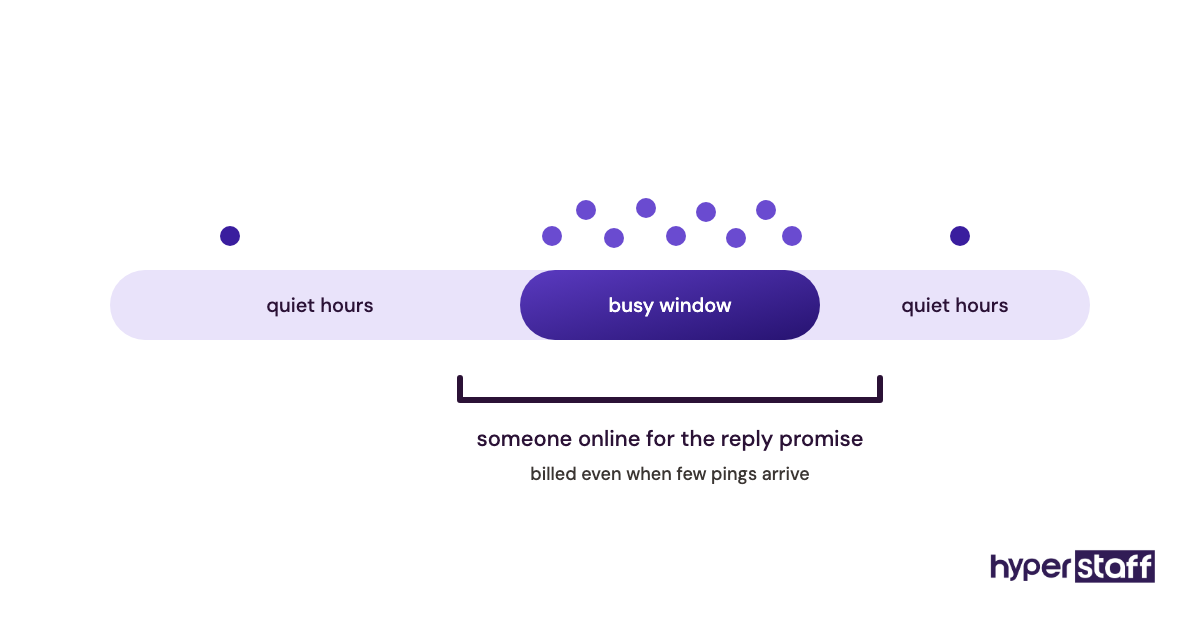
Comment and DM coverage costs hours even on slow days. A brand that promises replies within an hour needs someone online through its busiest window, and that time gets billed on days when only 4 messages arrive.
#3 Cost Driver: Approval Loops
Every extra approval round adds billed waiting and rework. The pattern shows up fast: when a calendar needs three sign-offs, the assistant spends hours chasing feedback instead of producing posts.
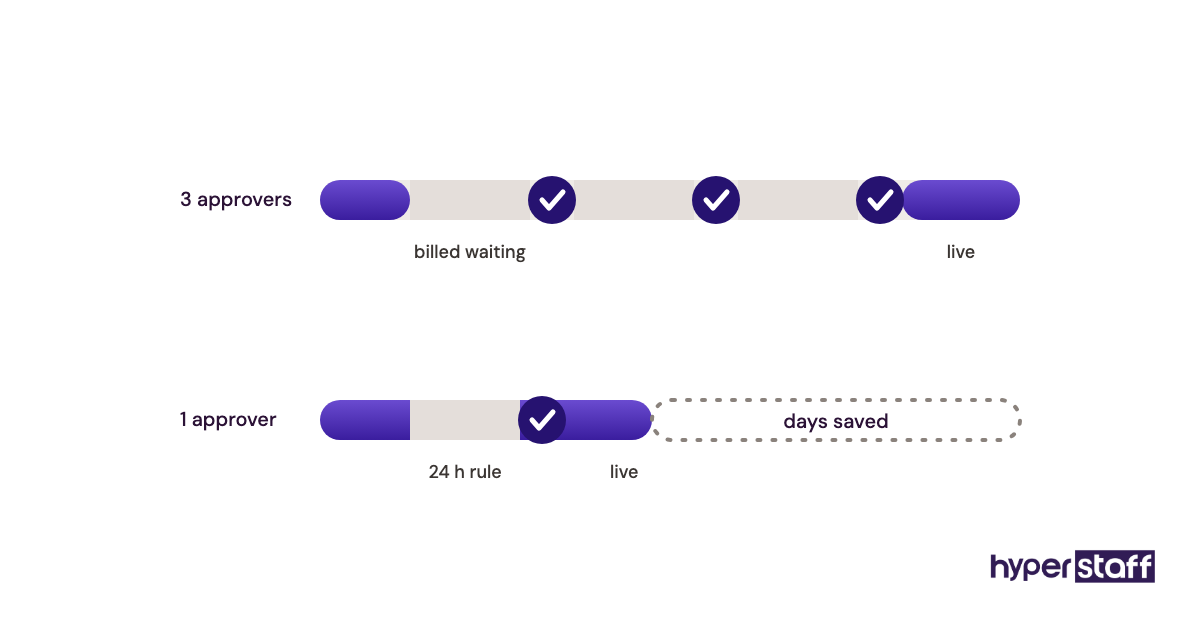
One named approver with a 24-hour turnaround rule is the cheapest fix in this whole post.
#4 Cost Driver: Platform Count and Native Formats
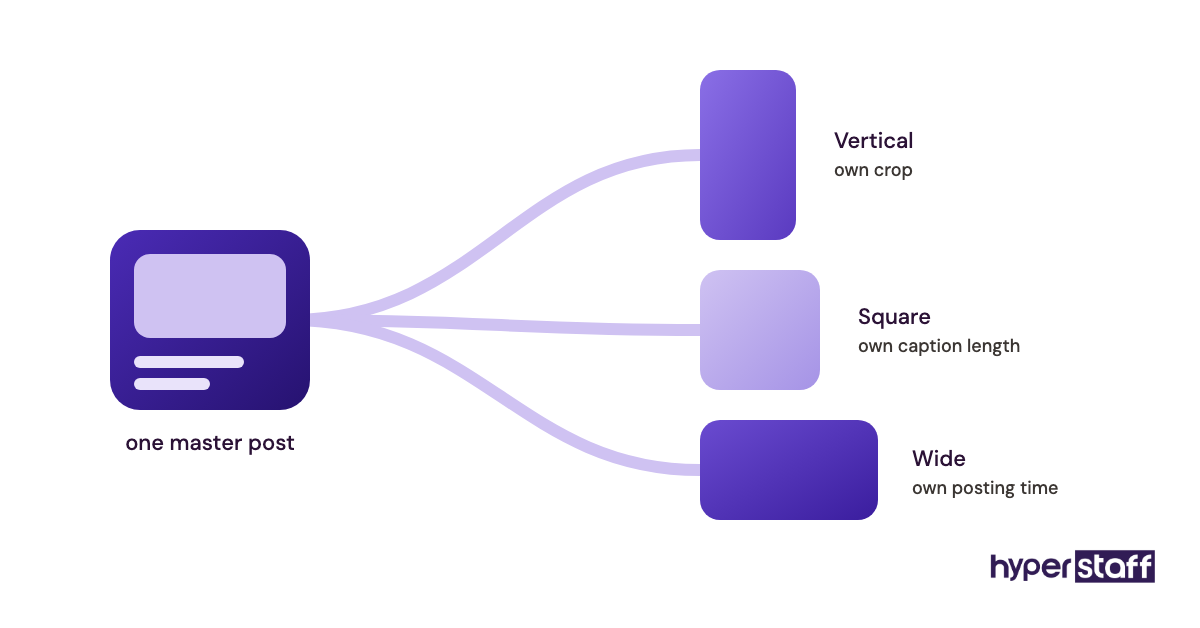
Each added platform needs its own crop, caption length and posting time. Copy-pasting one post everywhere is cheap and tends to underperform, so most brands pay for resizing and rewriting, usually 15 to 30 extra minutes per post per platform.
Social Media Virtual Assistant Cost and AI
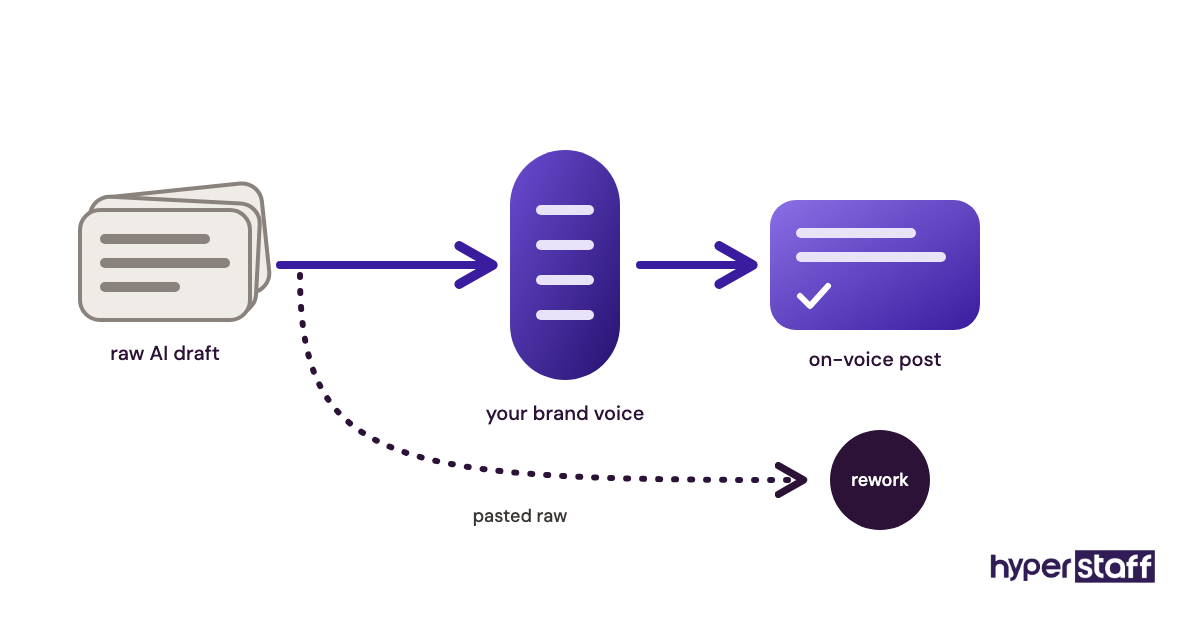
AI tools cut the time a social media virtual assistant spends on first-draft captions, hashtag lists and resizing, which lowers the hours behind static posts. They haven't cut the hours behind editing judgment, replies or strategy.
Caption drafting is where the savings are real. AI-generated video is less settled, and we're openly unsure how fast it will change editing costs, because quality swings a lot between tools from one quarter to the next.
The trade-off is that AI shifts value toward the assistant who can edit a draft into your voice. A cheaper assistant who pastes raw AI output usually costs more in rework, and our list of social media VA tools shows which AI features are worth the seat fee.
The Hidden Costs of a Social Media Virtual Assistant
The hourly rate is rarely the whole bill. These costs show up later:
- Tool seats: scheduling, design and analytics plans, often $0 to $100+ a month.
- Ad spend: almost never inside the retainer.
- Your onboarding hours: brand voice, logins and examples. Our social media VA onboarding guide keeps this short.
- Revision overage: billed past the included rounds.
- Replacement gaps: weeks of silent channels if a freelancer quits.
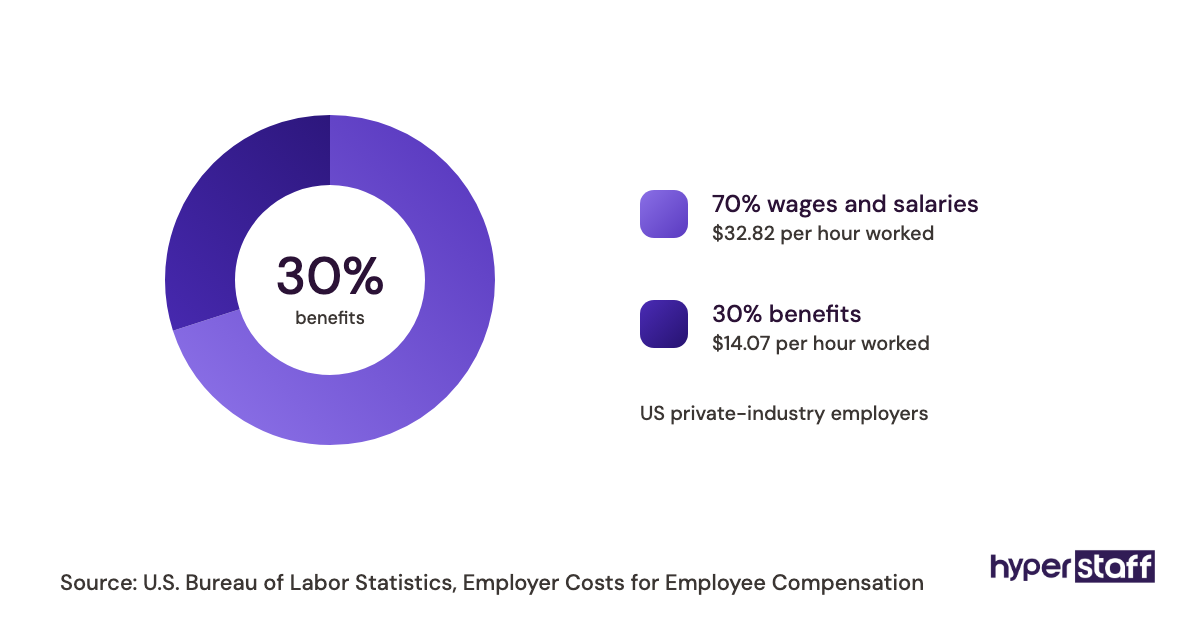
- Benefits, for in-house: about 31% of total compensation cost, per the US Bureau of Labor Statistics.
How Much Should You Budget for a Social Media Virtual Assistant?
Budget about $150 to $600 a month for part-time offshore help on one or two platforms, $500 to $1,500 for a full-time offshore assistant, and $3,000 or more for US-based support. Add 10% to 20% on top for tools and revisions.
Start with the smallest bundle that covers your posting calendar and reply window, then grow it. If the role itself is still fuzzy, read what a social media VA does before you set a number.
Owners of small shops usually get the most from a 40 or 80-hour plan focused on consistency. Larger teams with an in-house strategist tend to buy 160 hours of pure execution, which gives the strategist back their week.
Calculating Social Media Virtual Assistant ROI
Social media virtual assistant ROI equals the value gained minus the assistant's cost, divided by that cost. Value usually comes from two places: hours you stop spending on posting, and revenue you can trace to social channels.
Take an 80-hour plan at $480 a month. If the person who used to post values their time at $50 an hour and gets 20 hours back, that's $1,000 of time, a 108% return before a single sale is counted.
Tracked revenue is harder. UTM links on every bio and post, plus a "how did you hear about us" field at checkout, give you numbers you can defend.
How to Compare Social Media Virtual Assistant Agency Pricing
Compare social media virtual assistant agency pricing by putting every quote on the same monthly hours, the same task list and the same tool assumptions. Then check replacement terms, since a cheap quote with a paid or slow replacement often costs more over a year.
Ask each agency for the hourly rate inside its bundle, because many hide it and the gaps get obvious once you do the division. Our post on common social media VA hiring mistakes lists the contract terms people regret.
Red Flags in Agency Pricing
- No hourly rate visible anywhere in the bundle.
- Setup or "matching" fees before you've met a candidate.
- Replacement only after a 90-day lock-in.
- Video editing priced as a separate add-on with no rate given.
- Annual contracts with no exit clause.
When to Walk Away
Walk away when an agency won't let you speak with the actual assistant before you pay. The same goes for any quote that can't say who covers the channels when that person is sick or leaves.
How to Reduce Social Media Virtual Assistant Costs Without Sacrificing Quality
Lower costs come from cutting wasted hours, so the rate stays the same while the output per hour climbs.
Step 1: Write the Brand Voice Down Once
A one-page voice guide with five sample captions you love removes most revision rounds. Fewer rewrites mean fewer billed hours from the first week.
Step 2: Batch Content Weekly
Plan and shoot a week of content in one sitting. Batching lets the assistant edit in long blocks, which is much faster than switching between tasks all day.
Step 3: Match the Tier to the Task
Use an Essential-tier assistant for scheduling and replies, and pay Professional or Expert rates only for video and strategy work. Paying senior rates for routine posting is the most common overspend.
Step 4: Set One Approver and a Deadline
Name one person who signs off and give them 24 hours. Approval delays are billed time, and they also make timely posts go stale.
Step 5: Pay Quarterly When the Fit Is Proven
After the first month confirms the fit, switch to quarterly billing. At Hyperstaff that saves 10%, which on a full-time Essential plan is about $144 a quarter.
Is a Social Media Virtual Assistant Worth the Investment?
Yes, for most small and mid-sized brands a social media virtual assistant can be one of the highest-ROI hires available, because the cost is low and consistency drives most social results. A full-time offshore assistant costs less per month than many single ad campaigns.
It works best when someone still owns strategy. Our take on when a social media VA pays off covers the cases where it doesn't.
Disclaimer: This article is general information, not financial, legal or tax advice, and all prices are estimates that vary by provider, region and scope. Confirm current pricing directly with any provider before you hire.
Common questions
Is ad spend included in a social media virtual assistant's rate?
No. Ad spend goes straight to Meta, TikTok or LinkedIn from your own account, and the assistant's rate covers setup, monitoring and reporting time only.
Can I hire a social media virtual assistant part time?
You can. Part-time plans of 20 to 80 hours a month are common, and a 40-hour bundle is enough to keep one or two platforms posting consistently with light replies.
Do I pay for my social media VA's tools?
Usually, yes, because the business should own the scheduling, design and analytics accounts so logins and content stay put if the assistant changes. Free tiers work at first, and paid seats often run $10 to $50 a month each.
Are social media virtual assistant rates negotiable?
Sometimes, and longer commitments, bigger hour bundles and upfront payment are the usual levers. Pushing a freelancer far below market tends to show up later as slower replies or a sudden exit.
Do social media VA rates go up over time?
They often do, especially with freelancers who raise rates every 6 to 12 months as their skills grow. Agency rates tend to stay steadier, and a move up in tier is usually your choice, made when the work gets more complex.
Book a free 15 min call
We place a pre-vetted specialist in 5 business days, fully managed, from $3/hour.