How to Onboard a Social Media Virtual Assistant
How to give a remote social media assistant the access, voice rules and approval routine they need to post without you checking every caption.
On this page
- What Does Onboarding a Social Media Virtual Assistant Involve?
- Key Social Media VA Onboarding Terms You Should Know
- Why Is Onboarding a Social Media VA So Important?
- How Does Social Media VA Onboarding Work?
- What Types of Social Media VA Onboarding Are There?
- How Social Media VA Onboarding Differs From Related Processes
- The Benefits of Onboarding a Social Media VA Properly
- The Drawbacks of Onboarding a Social Media VA
- Who Needs a Structured Social Media VA Onboarding Plan?
- Social Media VA Onboarding Examples
- Creating a Social Media VA Onboarding Plan, Step-by-Step
- What Does an Effective Social Media VA Onboarding Strategy Look Like?
- Social Media VA Onboarding Tools and Software
- 9 Social Media VA Onboarding Tips That Hold Up After Week One
- Overcoming Common Social Media VA Onboarding Challenges
- How to Measure Social Media VA Onboarding Success
- How Long Does Social Media VA Onboarding Take to Work?
- How Much Does Onboarding a Social Media VA Cost?
- Is Onboarding a Social Media VA Worth It?
- How to Choose an Agency That Onboards Social Media VAs Well
- Social Media VA Onboarding Statistics, Trends and Future Predictions
- Social Media VA Onboarding and AI
- FAQs
💡 Key Takeaways:
1) Onboarding a social media virtual assistant means handing over access, brand voice rules and an approval routine, so the assistant can draft, schedule and reply without you rewriting every post.
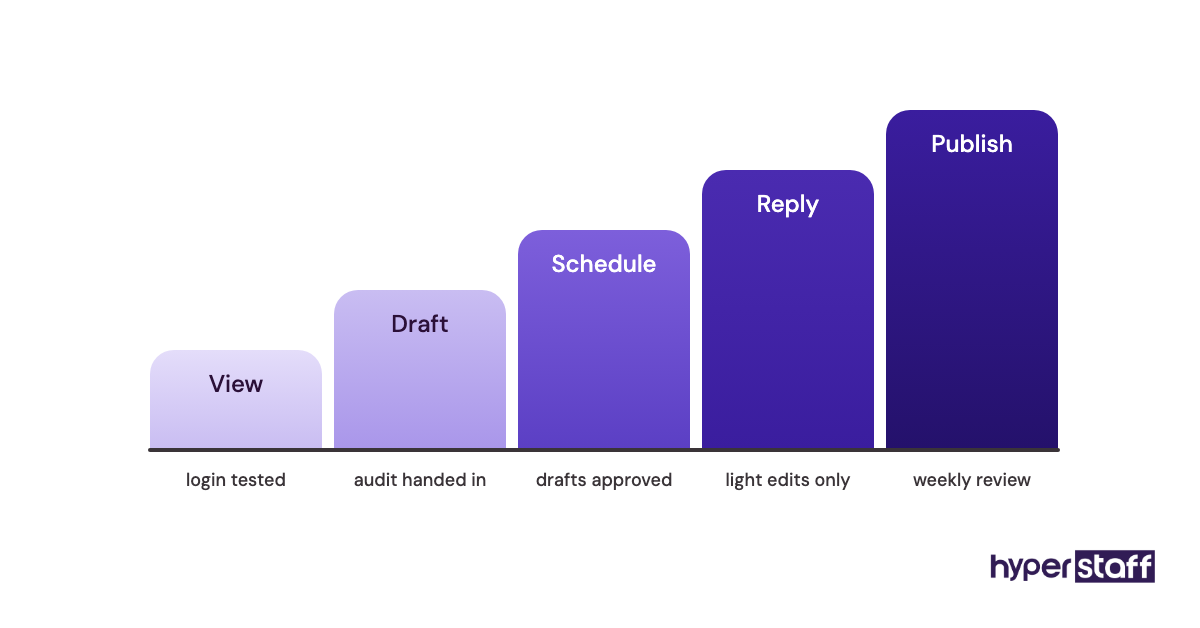
2) Staged access works better than handing over every password on day one: role-based permissions first, publishing rights after the first week of approved drafts.
3) Most social media VAs reach a full, self-scheduled week within two to four weeks, and the speed depends more on how much brand context is written down than on the assistant's skill.
Faster onboarding means your posts start earning sooner
Hyperstaff places pre-vetted social media assistants in 5 business days, with rates from $3/hour and a dedicated account manager for every client. Our social media virtual assistant services start with a 30-minute kickoff call, and your Operations Vault keeps your SOPs, tools and brand context written down, so work starts that day or the next morning.
What Does Onboarding a Social Media Virtual Assistant Involve?
Onboarding a social media virtual assistant is the process of giving a remote hire the account access, brand rules and approval routine they need to run your channels with little oversight. It usually takes two to four weeks, from the first login to the point where the assistant schedules a full week of content alone.
The job reaches well past scheduling. A social media virtual assistant's role can stretch into community replies, DM triage, light design, reporting and lead capture from comments, so onboarding has to prepare them for every one of those.
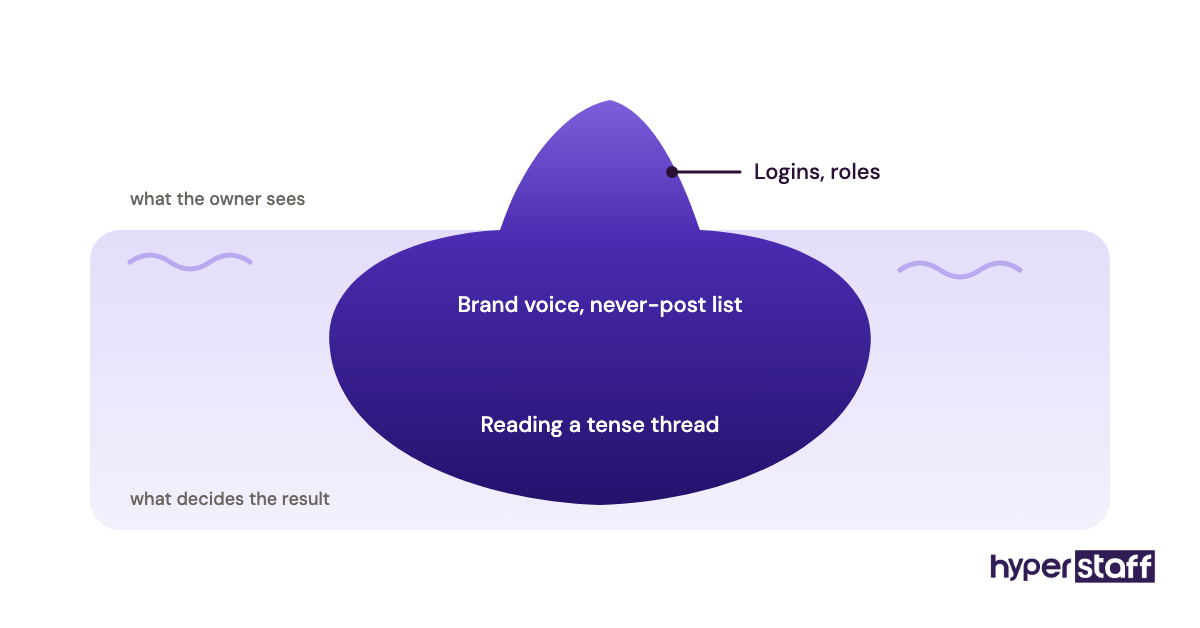
Three things get transferred: access, context and judgment. Access takes an afternoon. Context takes a week, and judgment (knowing which comment to hide, which to answer and which to send to you) takes the longest.
Key Social Media VA Onboarding Terms You Should Know
- Brand voice guide = a short document showing how your brand writes, with approved and rejected caption examples.
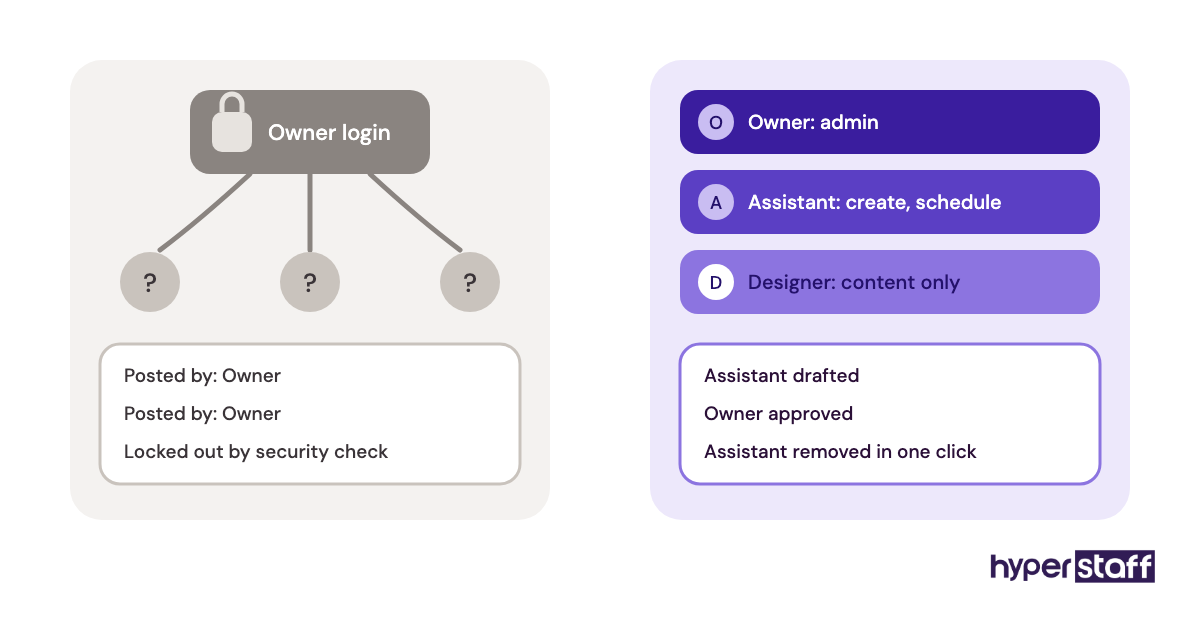
- Role-based access = giving the assistant a named seat with set permissions instead of sharing your password.
- Approval queue = the stage where drafts wait for your sign-off before they go live.
- Content calendar = the planned list of posts by date, channel and format.
- Escalation rule = a written line that says which comments or DMs the assistant must pass to you.
- SOP = standard operating procedure, a step-by-step note for a repeated task.
- Engagement rate = interactions divided by reach or followers, used to judge post quality.
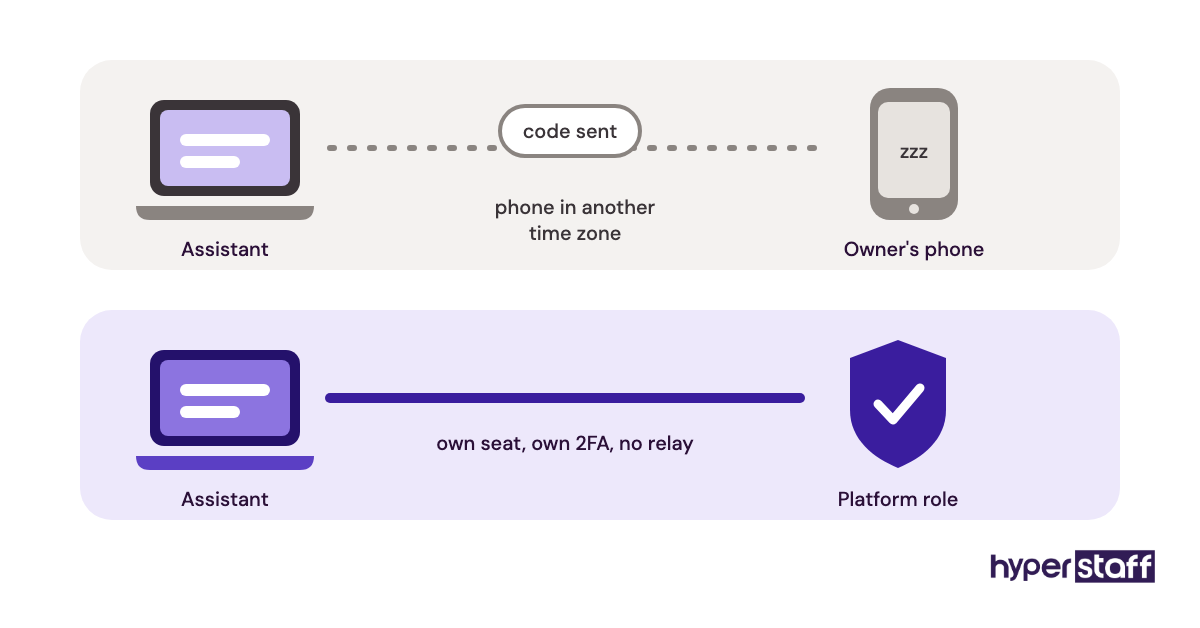
- Two-factor authentication (2FA) = a second login check, often the first thing that blocks a new remote assistant.
- Handover doc = everything a replacement would need to pick up the accounts without starting over.
Why Is Onboarding a Social Media VA So Important?
Onboarding decides whether the assistant saves you hours or adds an editing job to your week. A poorly onboarded VA produces drafts you rewrite, and rewriting a caption often takes longer than writing it yourself.
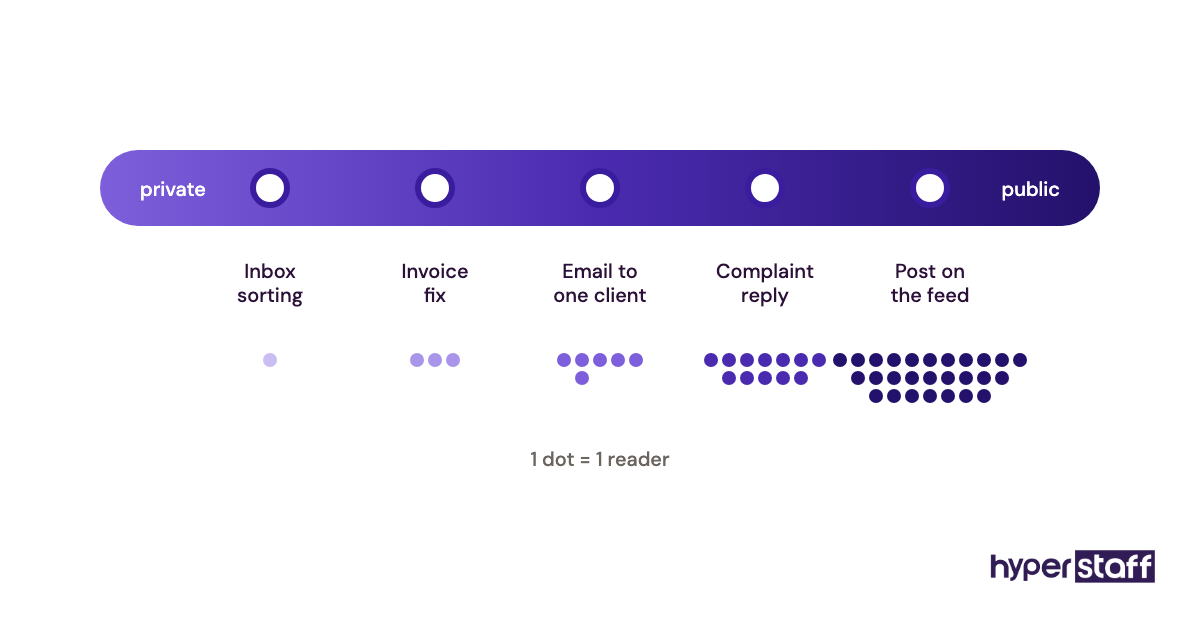
Social media is also public in a way most delegated work isn't. A wrong invoice can be fixed without anyone seeing; a wrong reply on a complaint thread sits there for every customer to read.
Most owners skip the one document that matters most: a list of posts and replies they would never publish. Approved examples teach tone slowly. Rejected ones show the edges in an afternoon.
How Does Social Media VA Onboarding Work?
Social media VA onboarding works in phases: access first, then shadowing, then drafts with approval, then independent scheduling with spot checks. Each phase widens what the assistant can do without asking.
The order matters. Skipping straight to independent posting is where most of the public mistakes happen, because the assistant has rules but no feel for them yet.
| Phase | Typical timing | Assistant can | You do |
|---|---|---|---|
| Access | Day 1 | Log in, read past posts | Assign roles, clear 2FA |
| Shadowing | Days 2 to 5 | Audit accounts, draft samples | Mark samples yes or no |
| Drafts with approval | Weeks 2 to 3 | Fill the calendar, draft replies | Approve daily, then every 2 days |
| Independent scheduling | Week 3 onward | Publish and reply within rules | Weekly review, spot checks |
Expect a dead zone between access and shadowing. 2FA codes go to the owner's phone, platform verification can take a day or two, and the assistant waits. Clear those blocks before the start date, and the whole timeline shrinks by days.
What Types of Social Media VA Onboarding Are There?
Social media VA onboarding comes in several formats, from a quick document handover to a full agency-led setup. The right one depends on how many channels you run and how much brand context already exists in writing.
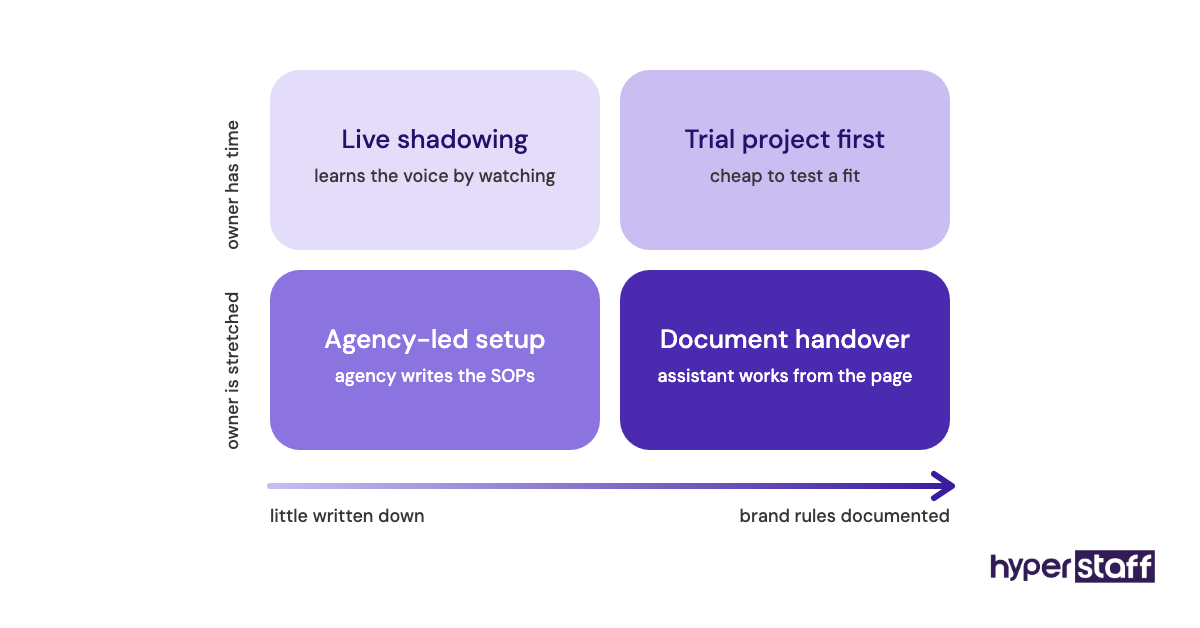
| Onboarding format | Best fit | Time to first scheduled post | Main risk |
|---|---|---|---|
| Document handover | One or two channels, clear voice | 2 to 4 days | Gaps the docs don't mention |
| Live shadowing | Owner-run brands with a strong personal voice | 1 to 2 weeks | Owner time runs out mid-week |
| Agency-led setup | Busy owners with little written down | 1 to 3 days | Relies on how well the agency documents |
| Trial project first | Owners unsure of fit | About 1 week | Trial content isn't real work |
| Phased channel rollout | 4+ channels or several brands | 3 to 5 days for channel one | Later channels wait weeks |
| Part-time onboarding | 40-hour monthly bundles | About 1 week | Context fades between shifts |
| Replacement handover | A previous VA is leaving | Within days if documented | Unwritten habits leave with them |
How Social Media VA Onboarding Differs From Related Processes
Onboarding a social media VA sits between general VA onboarding and onboarding a marketing agency. The difference comes down to public exposure and who owns the strategy.
Social Media VA Onboarding vs. General VA Onboarding
General VA onboarding covers inboxes, calendars and internal tools that customers never see. A social media assistant works in public, so voice and escalation rules get far more attention, and access has to be role-based on each platform.
Social Media VA Onboarding vs. Social Media Agency Onboarding
An agency usually arrives with its own strategy and reporting format, and you approve its plan. A dedicated assistant learns your plan, so you (or your account manager) supply the direction and the assistant runs it daily.
Social Media VA Onboarding vs. In-House Employee Onboarding
In-house onboarding includes payroll, equipment and HR paperwork that a remote assistant skips. The comparison of a social media VA vs in-house hire usually tips on cost and speed, while the brand-voice transfer takes about the same effort either way.
The Benefits of Onboarding a Social Media VA Properly
- Drafts need fewer edits within two to three weeks.
- Posting stays consistent when you are busy or away.
- Comments and DMs get answered within hours, which matters most on complaint threads.
- A written voice guide and SOPs make any future hire faster to train.
- Your time shifts from producing posts to approving and steering them.
The Drawbacks of Onboarding a Social Media VA
- The first two weeks cost you more time, not less.
- Time zone gaps can slow approvals early on.
- Access setup across platforms is fiddly and sometimes blocked by verification.
- Tone takes practice, so early replies can sound slightly off.
Who Needs a Structured Social Media VA Onboarding Plan?
Anyone handing public accounts to a remote assistant needs a structured plan, and the need grows with channel count. A solo coach with one Instagram account can get by on a two-page guide.
A brand with five channels, paid ads and an active comment section needs written escalation rules before day one. So does any business in a regulated field, such as finance or healthcare, where a casual reply can create a compliance problem.
Owners who haven't picked a person yet should read up on hiring a social media VA first, because onboarding goes faster when the hire already matches your channels.
Social Media VA Onboarding Examples
The examples below are patterns we see repeat during onboarding, good and bad. Each one is a choice you can copy or avoid.
Good Social Media VA Onboarding Examples
The Yes/No Caption File
The owner gives the assistant 15 published captions they liked and 10 they would never post, with one line on why. The assistant's first drafts land closer to the voice than any adjective list ("friendly, bold, fun") could manage.
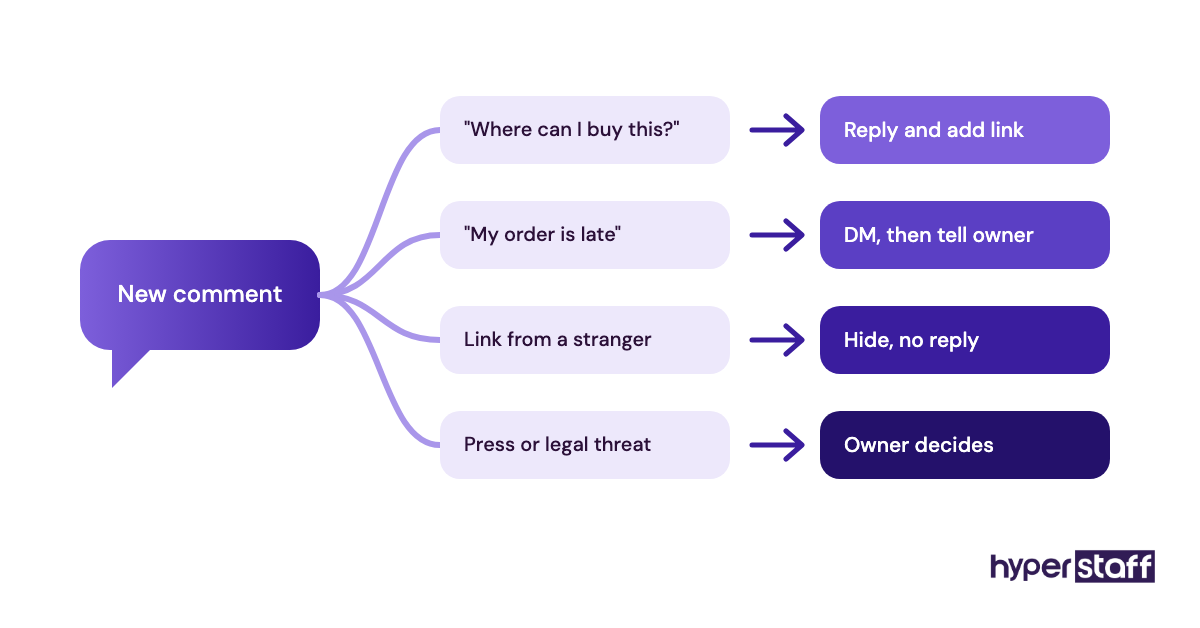
The Reply Decision Table
A short table maps comment types to actions: praise gets a reply, product questions get an answer and a link, complaints go to a DM and to the owner. New assistants stop guessing, and the owner stops getting pinged about every emoji.
Recorded Walkthroughs
Instead of a live call for every tool, the owner records 5-minute screen videos of how they schedule, tag and report. The assistant rewatches them on their own time, which suits time zone gaps well.
Bad Social Media VA Onboarding Examples
Sharing the Owner's Password
Handing over a personal login triggers security checks, locks the owner out and leaves no record of who posted what. The list of common social media VA mistakes starts here more often than anywhere else.
Full Publishing Rights on Day One
An assistant with no approved drafts behind them posts on rules alone. One off-tone post on a busy account can undo weeks of goodwill.
"Just Look at Our Feed"
Telling the assistant to copy the existing feed teaches them the average of every past mistake. The feed shows what was posted, with no record of what worked or why.
Creating a Social Media VA Onboarding Plan, Step-by-Step
A social media VA onboarding plan runs in five steps, and the first two happen before the assistant's start date. Front-loading the prep is what turns a two-week ramp into a few days.
Step #1: Define the Role and Its Limits
Write down which channels, tasks and hours the assistant owns. A clear social media VA job description doubles as the scope for onboarding, and it should name what the assistant must not do, such as replying to press or changing ad budgets.
Use a full list of social media VA tasks to check nothing is missing, then mark each one as "owns", "drafts for approval" or "never".
Step #2: Set Up Access Before Day One
Add the assistant as a named user on each platform and in your scheduling tool. Meta Business Suite and LinkedIn pages both let you assign roles instead of sharing a login, and a password manager covers the tools that don't.
Test every login with the assistant on the first morning. Two-factor prompts to your phone are the usual blocker, so stay reachable for the first hour.
Step #3: Hand Over Brand Context
Share the voice guide, the yes/no caption file, the reply decision table and your content pillars. Add product facts, prices and links the assistant will need for answers.
Step #4: Run a Shadow Week
Ask for a short audit of each account and a week of sample drafts. Mark each sample yes or no with a one-line reason, and add the reasons to the voice guide.
Step #5: Move to Approvals, Then Independence
Approve drafts daily in week two, then every second day. Once a full week passes with only light edits, let the assistant publish on their own and switch to a weekly review.
What Does an Effective Social Media VA Onboarding Strategy Look Like?
An effective onboarding strategy widens trust in steps, with each step earned by evidence. Access expands as edit rates drop, and the owner's role moves from writer to editor to reviewer.
Practitioners split on access speed. Some give full access on day one to avoid bottlenecks; we side with staged access, because the time lost to approvals in week one is small next to the cost of a public mistake.
A good strategy also plans for the assistant's absence. The handover doc gets updated as part of the weekly routine, which is how a replacement can pick up quickly when needed.
Social Media VA Onboarding Tools and Software
Social media VA onboarding needs a scheduler, a design tool, secure credential sharing and a place for SOPs. A full roundup of social media VA tools goes deeper; these are the ones that matter during onboarding.
- Buffer: a free plan for up to 3 channels, then Essentials at $5 per channel per month and Team at $10 per channel per month, per Buffer's pricing page. The Team plan adds draft approvals, which suits the approval phase.
- Hootsuite: plans start from $99 per user per month according to Hootsuite's plans page, which is a lot for one assistant on two or three channels.
- Meta Business Suite: free, with role-based access to Facebook and Instagram, so no password sharing.
- Canva: brand kits keep fonts, colours and logos in one place for the assistant.
- A password manager such as 1Password or Bitwarden: shared vaults for tools that lack role-based seats.
- Loom: recorded walkthroughs the assistant can rewatch.
- Google Drive or Notion: one home for the voice guide, SOPs and handover doc.
9 Social Media VA Onboarding Tips That Hold Up After Week One
These social media VA onboarding tips come from the patterns that separate a fast ramp from a slow one.
- Clear 2FA and platform roles before the start date.
- Write the "never post" list before the "please post" list.
- Give reasons with every rejected draft, in one line.
- Keep one shared document as the single source of brand facts.
- Set a daily approval window that fits both time zones.
- Put escalation rules in a table, never in a paragraph.
- Record tool walkthroughs instead of repeating live demos.
- Review the first 20 replies to comments, not only posts.
- Update the handover doc every Friday.
Overcoming Common Social Media VA Onboarding Challenges
The most common onboarding challenge is slow approvals. Drafts pile up because the owner is busy, and the assistant either waits or posts without sign-off. Fix it with a fixed daily approval window of 15 minutes.
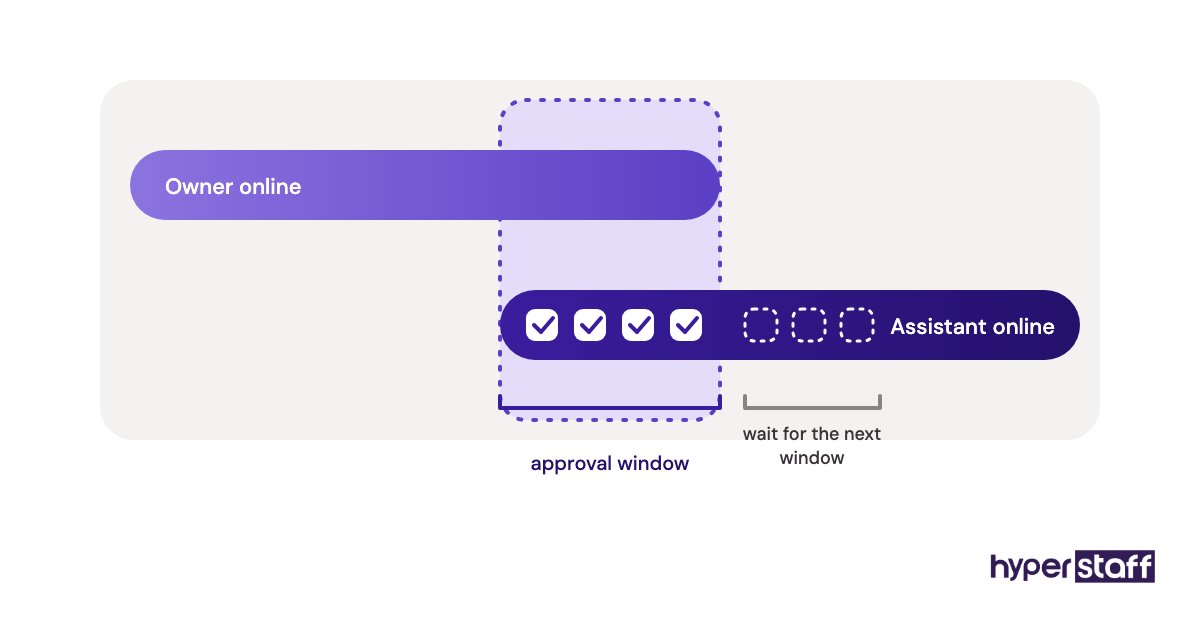
Tone drift is next. Early drafts sound close but generic, and owners tend to rewrite them silently. Return them with a reason instead, so the assistant learns.
Access lockouts round out the list. New logins from another country trigger security checks, so expect one or two in the first week and stay reachable.
How to Measure Social Media VA Onboarding Success
Onboarding success shows up first in edit rate: the share of drafts you approve with no changes or light ones. It should climb week over week.
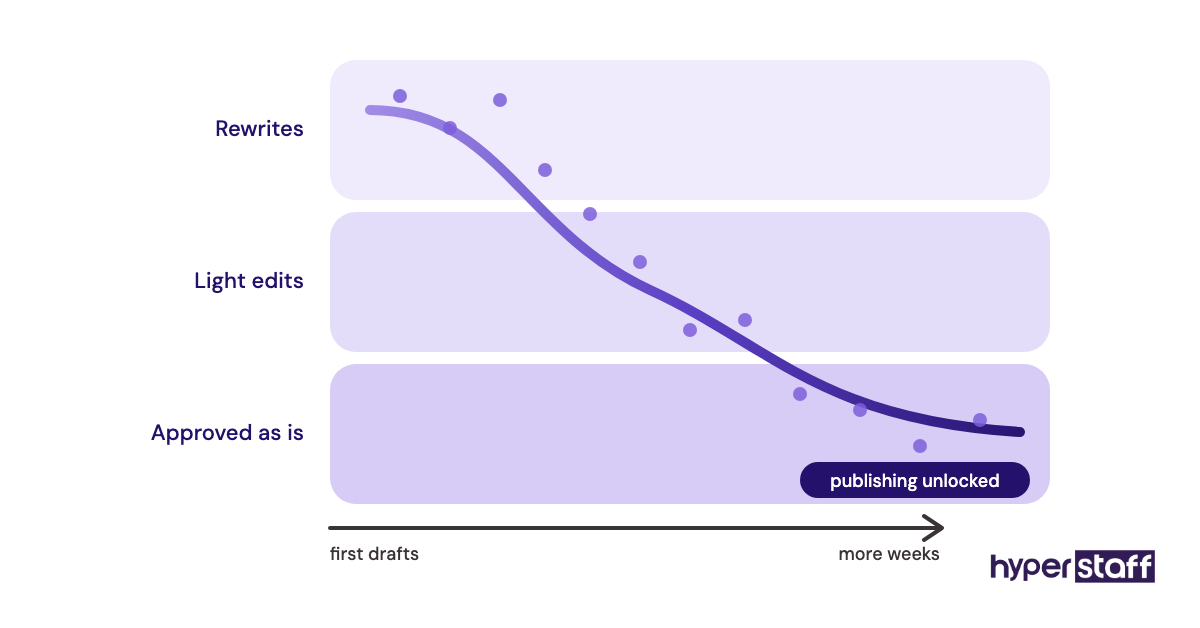
Track reply time on comments and DMs, posting consistency against the calendar, and the hours you personally spend on social each week. Engagement rate matters too, though it lags and swings with the algorithm, so judge it over a month or more.
The plainest test: could you take a week off and have the accounts run without you?
How Long Does Social Media VA Onboarding Take to Work?
Social media VA onboarding usually takes two to four weeks to reach independent scheduling. Simple setups with one or two channels and a clear voice can get there in about a week.
Reply quality takes longer than post quality, because comments throw up cases no guide predicted. Expect another month before the assistant handles tricky threads without checking.
Results on the accounts themselves, such as steadier reach, tend to show after one to three months of consistent posting.
How Much Does Onboarding a Social Media VA Cost?
Onboarding a social media VA costs the assistant's hours plus your own time, usually 6 to 10 hours spread over the first two weeks. The table below compares Hyperstaff's published rates with typical alternatives; the full social media VA cost breakdown covers more scenarios.
| Option | Provider | Typical monthly cost | Onboarding effort for you |
|---|---|---|---|
| Essential VA, 80 hours | Hyperstaff | From $240 | 30-minute kickoff, Operations Vault written for you |
| Professional VA, 80 hours | Hyperstaff | From $480 | 30-minute kickoff, Operations Vault written for you |
| Expert VA, 160 hours | Hyperstaff | From $1,920 | 30-minute kickoff, Operations Vault written for you |
| Freelance VA, 80 hours | Marketplace hire | About $800 to $2,800 | You write all docs and run all training |
| In-house coordinator, full time | Direct hire | About $4,000 to $6,000 plus benefits | Full HR onboarding plus brand training |
Important: Hyperstaff prices shown are starting averages, not fixed quotes. Your final cost depends on the tier, hours and channels your work actually needs.
Is Onboarding a Social Media VA Worth It?
Yes, when it's done in order, onboarding a social media VA is one of the best returns on owner time a small business can get. A couple of weeks of focused effort buys back hours every week for as long as the assistant stays.
Here's an example calculation. An owner spending 8 hours a week on social media puts in about 35 hours a month; valued at $75/hour, that's roughly $2,600 of owner time. A Professional VA on a 40-hour bundle costs from $240 a month, and the onboarding itself takes maybe 8 owner hours, about $600 once.
The catch is month one, when you're still approving drafts daily. A deeper look at whether a social media VA is worth it covers the cases where the maths doesn't work, such as accounts that post once a month.
How to Choose an Agency That Onboards Social Media VAs Well
Choose an agency by how it handles onboarding, since placement speed means little if the assistant ramps slowly. Ask who writes the SOPs, who owns them, and what happens to them if the assistant leaves.
Check that the agency vets for your specific channels and asks for real work samples. Running your own round of social media VA interview questions is still worth doing, even with a vetted shortlist.
Ask about replacement terms in writing. At Hyperstaff, a replacement arrives in 5 to 7 business days, briefed from your Operations Vault, so a change of assistant doesn't mean onboarding from zero.
Social Media VA Onboarding Statistics, Trends and Future Predictions
Social media keeps growing as a channel to manage: DataReportal's Global Overview report counts 5.66 billion social media user identities, about 68.7% of the world's population. More users means more comments and DMs, and onboarding plans now spend more time on replies than on posting.
Short video has pushed onboarding toward editing tools and templates, not only captions. Customer service has moved into DMs too, so escalation rules now matter as much as voice guides.
Our prediction, held loosely: onboarding will shift further toward written systems an assistant can search, because part-time and async work keeps growing and live training doesn't scale across time zones.
Social Media VA Onboarding and AI
AI changes onboarding by adding one more set of rules to hand over: which AI tools the assistant may use, for what, and with what checks. Without that policy, assistants guess, and the guesses vary.
Caption drafting, hashtag research and repurposing long posts into short ones are reasonable AI tasks. Replies to upset customers and anything with prices or claims should stay human-written, or at least human-checked.
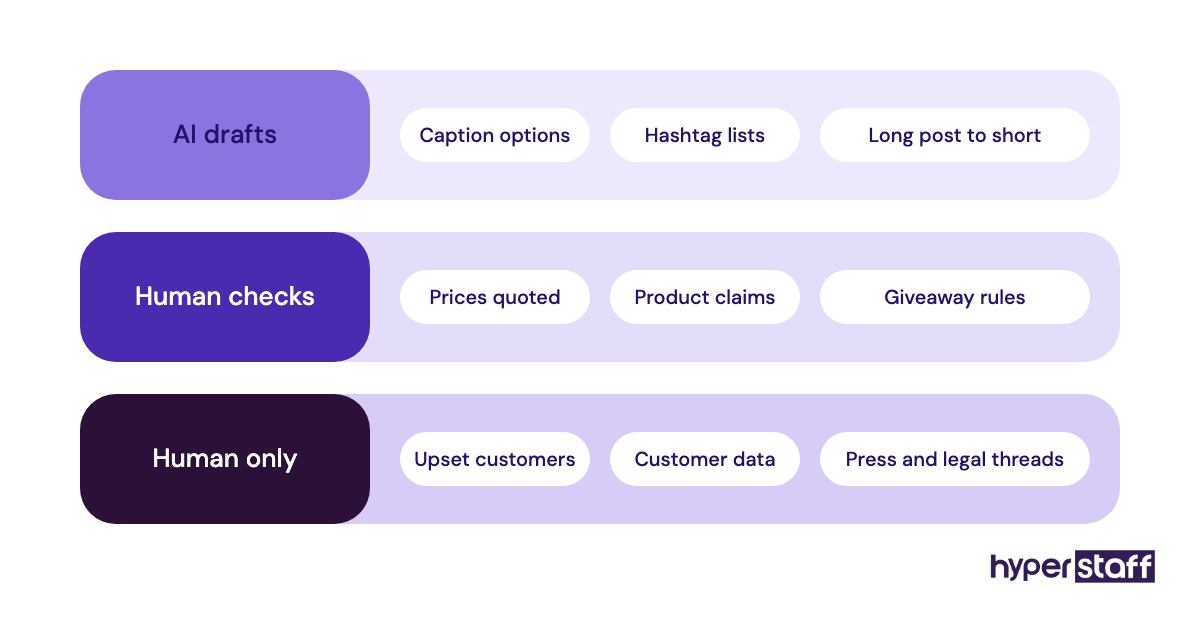
Keep customer data out of public AI tools. Put that rule in writing during week one, next to the escalation table.
Disclaimer: This article is for general information only and isn't legal, financial or professional advice. Tool prices and features change; check each provider's site before buying. Results vary by business, and Hyperstaff makes no guarantee of specific outcomes.
Common questions
Should I give my social media VA my passwords?
No. Use role-based access on each platform, such as Meta Business Suite roles and LinkedIn page admin roles, and a password manager for tools without named seats. You keep control and can remove access in minutes.
What should a social media VA do in the first week?
Audit your accounts, read past posts and draft a week of sample content for your feedback. Publishing on their own should wait until drafts need only light edits.
How do I teach a VA my brand voice?
Show examples instead of adjectives. Give 15 or so captions you liked and 10 you'd never post, each with a one-line reason, and add new reasons as you review drafts.
Can a part-time social media VA be onboarded the same way?
You can, but written context matters more. A part-time assistant works fewer hours a day, so recorded walkthroughs and a searchable brand document replace live questions.
What if the onboarding isn't working after a month?
Check the edit rate and the reasons behind rejected drafts first. If the same issues repeat after clear feedback, the fit may be wrong, and a documented handover makes switching assistants much faster.
Book a free 15 min call
We place a pre-vetted specialist in 5 business days, fully managed, from $3/hour.