Is a Social Media Virtual Assistant Worth It? The Honest Math
A social media virtual assistant is worth it when you need steady posting and fast replies, and someone on your side can approve content each week.
On this page
- What Is a Social Media Virtual Assistant?
- Key Social Media VA Terms You Should Know
- Why Does a Social Media Virtual Assistant Matter?
- How Does Working With a Social Media VA Work?
- Types and Forms of Social Media Virtual Assistants
- How Does a Social Media VA Differ From Related Roles?
- The Benefits of a Social Media Virtual Assistant
- The Drawbacks of a Social Media Virtual Assistant
- Who Needs a Social Media Virtual Assistant?
- Social Media Virtual Assistant Examples
- Creating a Social Media VA Plan, Step-by-Step
- What Does an Effective Social Media VA Strategy Look Like?
- Social Media VA Tools and Software
- 9 Proven Social Media VA Tips and Best Practices
- Overcoming Common Social Media VA Challenges
- How to Measure Social Media VA Success
- How Long Does a Social Media VA Take to Work?
- How Much Does a Social Media VA Cost?
- Is a Social Media Virtual Assistant Worth It?
- How to Choose a Social Media VA Agency
- Social Media VA Statistics, Trends and Future Predictions
- Social Media Virtual Assistants and AI
- FAQs
💡 Key Takeaways:
1) A social media virtual assistant is worth it when you post on two or more platforms every week and someone on your side can approve content within a day or two.
2) The payoff comes from consistent posting, faster replies to comments and DMs, and hours handed back to the owner. Strategy and final sign-off still need a clear owner.
3) An offshore social media VA costs a fraction of a local hire, but results take 60 to 90 days to show up in the data, so judge the hire on output first and growth second.
Social Media Help That Pays for Itself
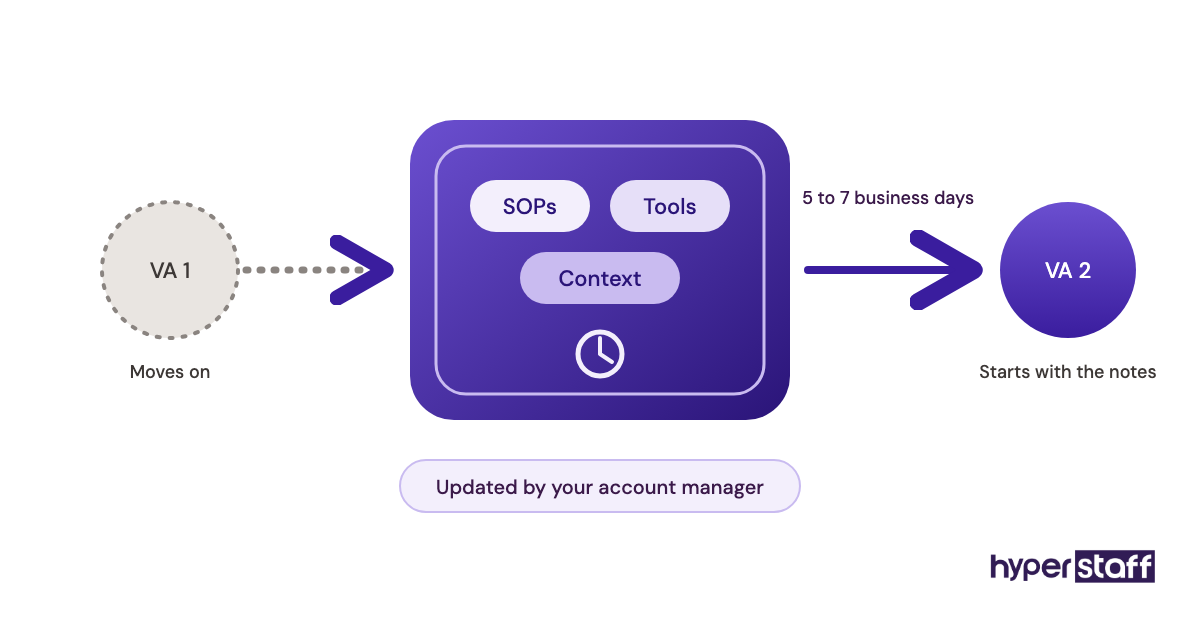
Hyperstaff places pre-vetted remote specialists from five regions, with rates starting at $3 an hour. We've placed 70+ virtual assistants across 30+ clients, and our social media virtual assistant services match you with a dedicated person in 5 business days. If the fit is off, you get a free replacement in 5 to 7 business days.
What Is a Social Media Virtual Assistant?
A social media virtual assistant is a remote team member who runs the daily work behind your social accounts. That covers scheduling posts, making simple graphics and short video edits, replying to comments and DMs, and pulling monthly reports.
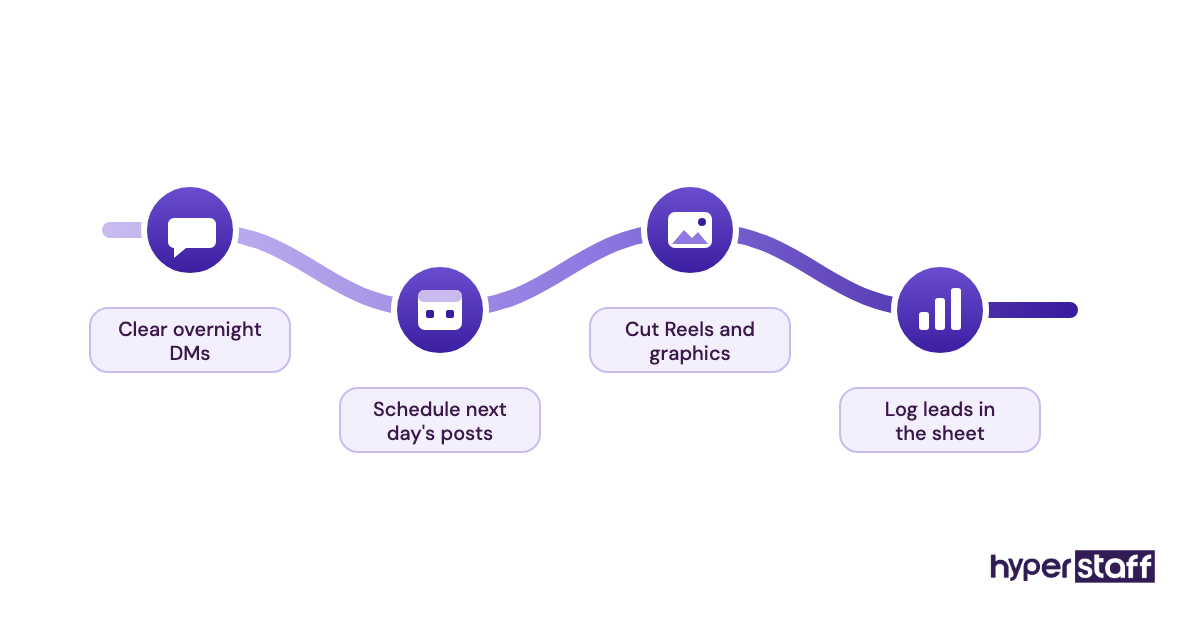
Most work part-time or full-time for one business, inside that business's own tools and logins. For a fuller picture of the role, read our guide on what a social media VA does.
The job runs wider than posting. A good one also handles community management, light ad support and lead capture from DMs, which is why the full list of social VA tasks runs longer than most owners expect.
Key Social Media VA Terms You Should Know
- Content calendar = a dated plan of what goes live, where and when.
- Scheduler = software that publishes posts at set times, such as Buffer or Metricool.
- Batching = making a week or month of content in one sitting.
- Engagement rate = likes, comments, shares and saves divided by reach or followers.
- Community management = replying to comments, DMs and mentions for the brand.
- Brand voice guide = a short document on tone, words to use and words to avoid.
- Approval workflow = who signs off on a post before it publishes.
- SOP = standard operating procedure, a written step-by-step for a repeat task.
- UGC = user-generated content, customer posts a brand reshares with permission.
- Social listening = tracking mentions of a brand, rival or topic across platforms.
- Retainer hours = a fixed block of monthly hours, such as 40, 80 or 160.
Why Does a Social Media Virtual Assistant Matter?
A social media virtual assistant matters because social platforms reward steady posting and quick replies, and both slip first when an owner does it alone. The audience is big enough to justify the effort: DataReportal counts 5.81 billion social media user identities worldwide.
Time spent there is high too. The same DataReportal page cites GWI data showing the typical user spends 19 hours and 18 minutes a week on social platforms.
The failure we see most is burst and stall. An account posts every day around a launch, then goes silent for a month once real work piles up, and the reach drops with it.
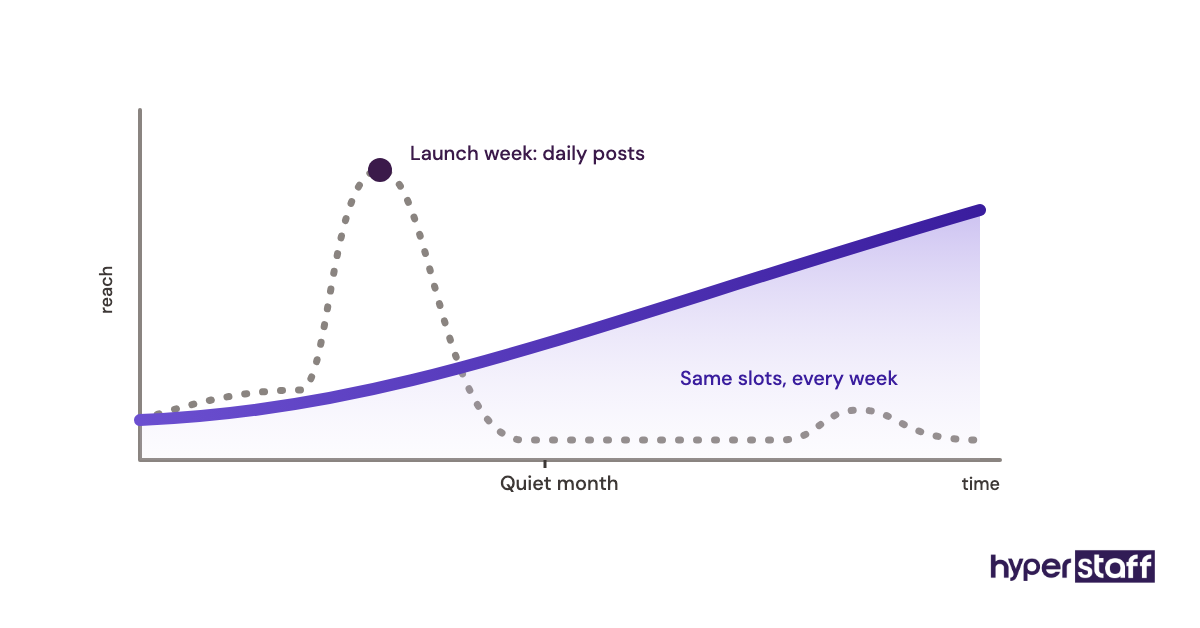
A VA fixes the stall, since posting becomes someone's actual job. Unanswered DMs are the less visible loss, because a sales question sitting for three days often goes to whoever answered first.
How Does Working With a Social Media VA Work?
Working with a social media VA follows a simple loop: you set goals and approve content, and the VA plans, creates, schedules, replies and reports. The order of operations below is what a normal first month looks like.
- Scope the role and pick hours per month.
- Hire or get matched. Our guide to hiring a social media VA covers the vetting side.
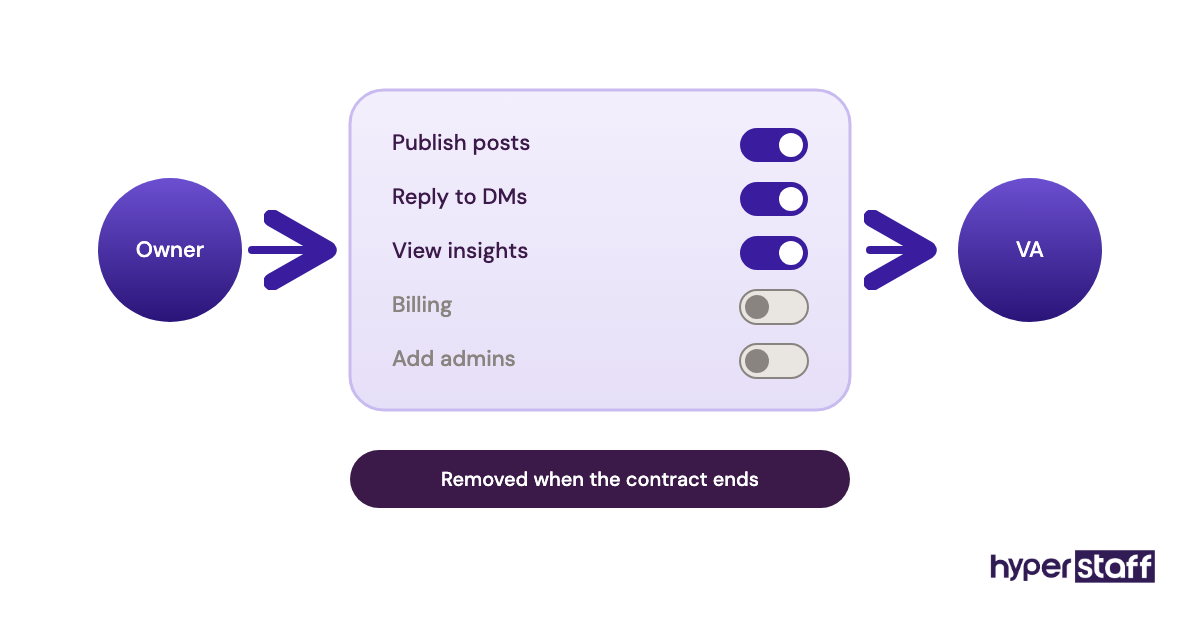
- Grant access through role-based permissions, never shared passwords.
- Hand over the brand voice, past top posts and a list of off-limits topics.
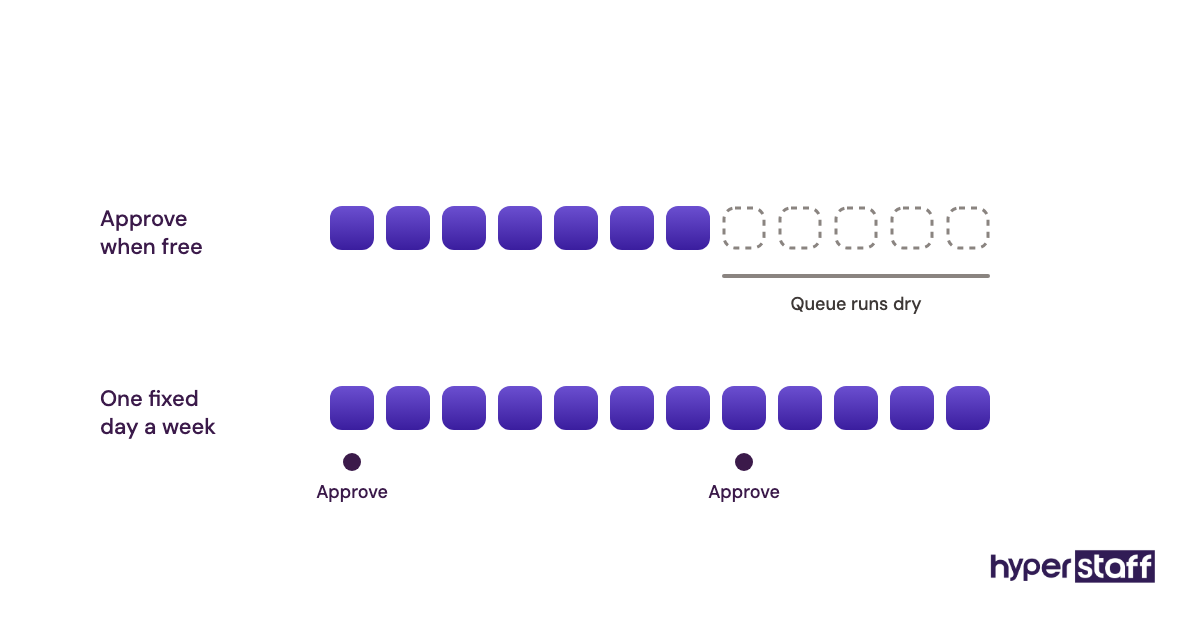
- Run a weekly batch, approval and scheduling cycle.
- Review a monthly report and adjust the plan.
The dead zone sits between steps 3 and 5. Access requests on Meta, LinkedIn pages and TikTok often take a few days to clear, so the first week tends to be setup, which our checklist for onboarding a social media VA plans around.
At Hyperstaff, a 30-minute kickoff call starts things, and work begins that day or the next morning. Your SOPs, tools and context go into an Operations Vault we keep current, so a replacement is briefed from the same notes.
Types and Forms of Social Media Virtual Assistants
Social media VAs split by focus, and the right type depends on whether your gap is content, replies, reporting or ads. Many hires blend two types, which works fine at 80 hours a month or more.
| Type | Core tasks | Best fit | Typical hours per month |
|---|---|---|---|
| Scheduling VA | Calendar upkeep, post scheduling, hashtag lists | Brands with content already made | 20 to 40 |
| Content creation VA | Canva graphics, carousels, short video edits, captions | Brands posting 4+ times a week | 40 to 80 |
| Community management VA | Comment replies, DM triage, review responses | Brands with active audiences or inbound leads | 40 to 160 |
| Analytics VA | Monthly reports, competitor tracking, UTM links | Teams that already post but don't measure | 10 to 20 |
| Ads support VA | Ad creative variants, audience setup, spend checks | Brands running paid social each month | 20 to 80 |
| LinkedIn VA | Founder post drafts, comment engagement, connection follow-up | B2B services and consultants | 20 to 80 |
| Ecommerce social VA | Product tagging, UGC collection, shop updates | Online stores selling on Instagram or TikTok | 40 to 160 |
| Generalist social VA | A mix of all of the above at lower depth | Small businesses with one or two channels | 40 to 80 |
How Does a Social Media VA Differ From Related Roles?
A social media VA executes a plan inside your business, while managers, agencies and freelancers sit at different points on ownership and cost. The three comparisons below cover the roles buyers weigh most often.
Social Media VA vs. Social Media Manager
A social media manager owns strategy, budget and results. A VA owns execution, though an Expert-tier VA with 5+ years often drafts the strategy for an owner to approve.
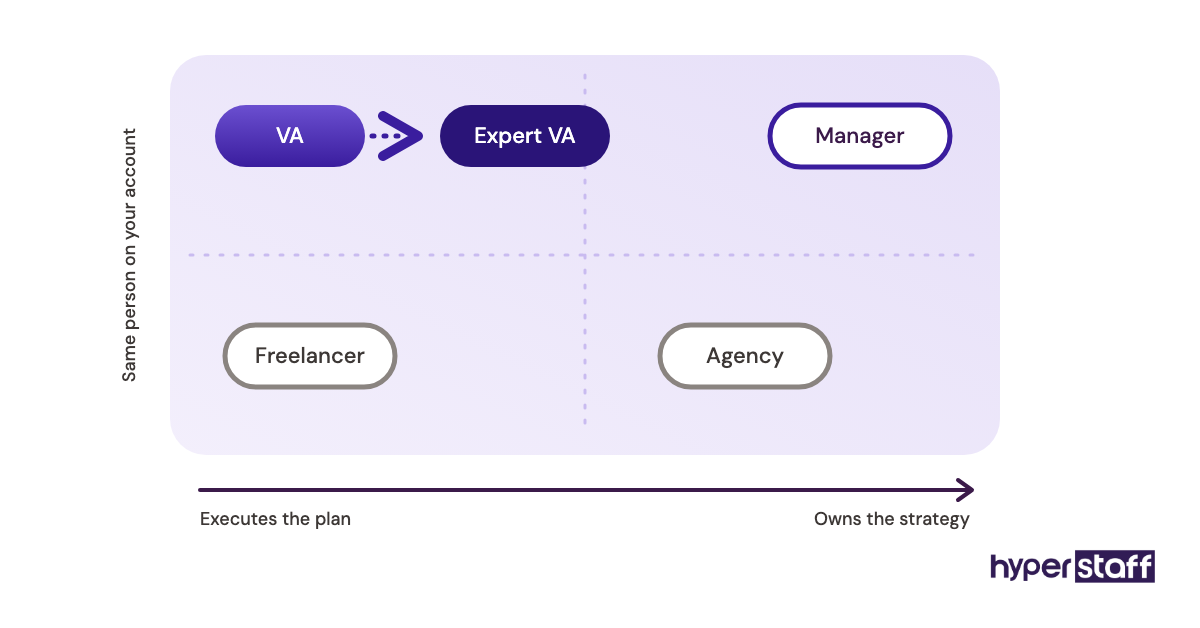
Practitioners genuinely disagree here. Some argue a VA should never set strategy, while others find a seasoned VA who knows the account beats an outside strategist who checks in monthly, and we lean toward the second view for small brands. Our full VA versus in-house comparison runs the numbers.
Social Media VA vs. Social Media Agency
An agency sells a package of deliverables, usually produced by a rotating team. A dedicated VA works only on your accounts, learns your customers and costs far less per hour.
Agencies win on breadth, such as paid media buying, video production and brand strategy under one roof. A VA wins on continuity, since the same person answers your DMs every week.
Social Media VA vs. Freelancer
Freelancers bill per task or per project and often juggle several clients at once. Response times on comments and DMs suffer most from that split attention.
For one-off jobs like a profile redesign, a freelancer is the better buy. For daily posting and replies, a dedicated VA holds up longer.
The Benefits of a Social Media Virtual Assistant
- Posting stays on schedule, even in busy weeks.
- Comments and DMs get answered the same day.
- Offshore rates start at a fraction of a local hire.
- The owner gets back several hours every week.
- Monthly reports turn guesses into numbers.
- Hours flex up or down with monthly bundles.
The Drawbacks of a Social Media Virtual Assistant
- Someone still has to approve content and set goals.
- The first 2 to 4 weeks need extra time from you.
- Time zone gaps can slow live replies.
- Brand voice takes a few rounds of edits to land.
Who Needs a Social Media Virtual Assistant?
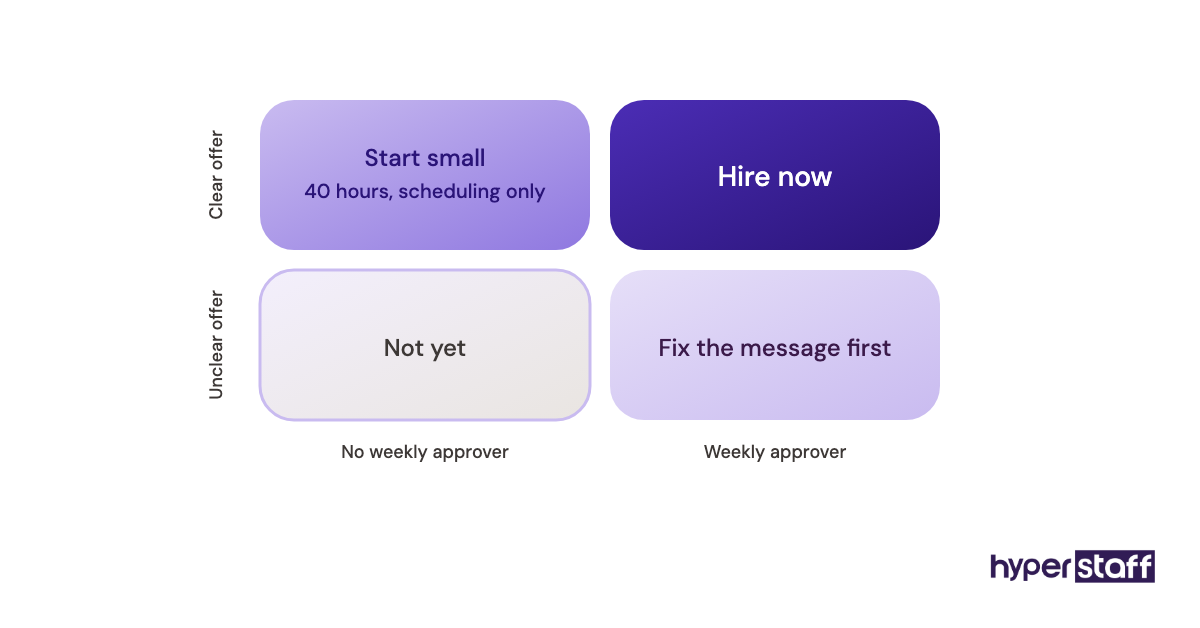
A social media virtual assistant fits any business that posts on at least two platforms, gets questions through DMs or comments, and has someone who can approve content each week. Without that approver, even a skilled VA stalls.
Small businesses and solo founders usually gain most from time handed back. Larger marketing teams use a VA differently, as an extra pair of hands for scheduling, reporting and community replies while their own staff focus on campaigns.
Local service firms, ecommerce stores, coaches and B2B consultants tend to see clear value. A business with no defined offer or audience will struggle, since posting more of an unclear message rarely fixes the message.
Social Media Virtual Assistant Examples
The difference between a VA that pays off and one that doesn't usually shows up in a handful of working habits. Below are patterns we look for and patterns we warn clients about.
Good Social Media VA Examples
A Monthly Batch With One Approval Window
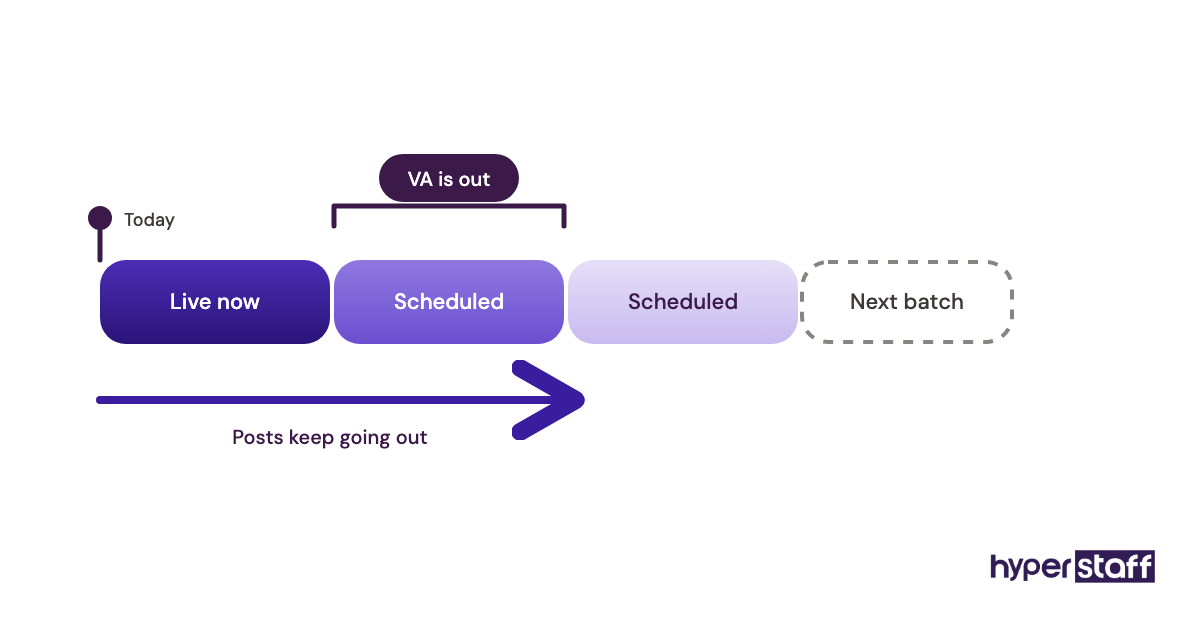
The VA drafts four weeks of posts, sends them in one batch, and the owner approves in a single sitting. Scheduling runs two to three weeks ahead, so a sick day never breaks the calendar.
DM Triage That Feeds the Sales Pipeline
Every DM is tagged as a lead, support request or spam within business hours. Leads get logged in a sheet or CRM with the person's handle and question, so no sales enquiry sits unread for days.
A Report That Names One Next Move
The monthly report shows reach, engagement rate, profile visits and link clicks against last month. It closes with one specific change, such as moving Reels to the time slot that pulled the most saves.
Bad Social Media VA Examples
Passwords Shared Over Chat
Handing over raw passwords by message is the most common security slip. Use page roles in Meta Business Suite and a password manager, and remove access the day a contract ends.
Posting Without a Voice Guide
A VA guessing at tone writes captions that sound like every other brand. The fix is a one-page guide with sample posts you like and words you never use, one of the common social VA mistakes we cover in depth.
Chasing Follower Count
Follow-unfollow tactics and giveaway spikes inflate numbers that never buy anything. Judge the VA on leads, clicks and replies instead.
Creating a Social Media VA Plan, Step-by-Step
A social media VA plan sets scope, hiring, onboarding and rhythm before the first post goes out. Five steps cover it.
Step #1: Audit Your Current Social Media Time
Track a normal week of social media work in 15-minute blocks. Most owners underestimate it, and the real figure tells you whether 40, 80 or 160 hours a month fits.
Step #2: Write the Scope and Job Description
List platforms, posting frequency, reply hours and reporting needs. Our social media VA job description template gives you a starting draft.
Step #3: Interview With a Small Test Task
Ask each candidate to draft three captions and one Canva graphic from your real brief. The test shows voice and attention to detail faster than any résumé, and these interview questions for social VAs cover the rest.
Step #4: Onboard With Access, Voice and a Ramp
Give role-based access, the voice guide and your top 10 past posts on day one. Plan a two-week ramp where every post is reviewed before it goes live.
Step #5: Set a Weekly Rhythm and a Monthly Review
Fix one batch day, one approval day and one reporting date each month. Review the numbers together, then adjust one thing at a time so you can see what moved them.
What Does an Effective Social Media VA Strategy Look Like?
An effective social media VA strategy assigns hours to tasks in proportion to what drives results, with community replies getting more time as the bundle grows. The split below is a starting point we'd suggest, then tune after the first monthly report.
| Task | 40 hours/month | 80 hours/month | 160 hours/month |
|---|---|---|---|
| Content creation and design | 16 | 30 | 60 |
| Scheduling and publishing | 6 | 8 | 12 |
| Comments and DMs | 12 | 26 | 50 |
| Reporting and analysis | 3 | 6 | 10 |
| Ads support and lead follow-up | 3 | 10 | 28 |
Social Media VA Tools and Software
Social media VA tools fall into four groups: schedulers, design apps, analytics and access control. Prices below come from each vendor's own pricing page, and our guide to social media VA tools goes deeper.
- Buffer: free for up to 3 channels, then $5 per channel a month on Essentials or $10 on Team (Buffer pricing). The simplest pick for one to three accounts.
- Metricool: free plan for one brand, Starter at $20 to $25 a month and Advanced at $53 to $67, depending on billing (Metricool pricing). The free plan leaves out LinkedIn and X.
- Hootsuite: Standard from $99 a month and Professional from $199, billed annually (Hootsuite plans). Strong inbox tools, but steep for a small business.
- Canva: Pro runs roughly $15 to $18 a month per person, depending on region and billing. Brand kits keep a VA's graphics on-brand.
- Meta Business Suite: free, and the safest way to grant Facebook and Instagram access by role.
Our honest opinion: a small brand rarely needs Hootsuite. Buffer or Metricool plus Canva covers most VA work for under $50 a month.
9 Proven Social Media VA Tips and Best Practices
These habits separate social media VA setups that last from ones that fizzle in month two.
- Approve content on one fixed day each week.
- Write a one-page voice guide with real example posts.
- Grant access by role and keep a list of every login shared.
- Set reply hours for DMs and post them in the bio if needed.
- Give the VA your sales FAQ so DM answers match what sales says.
- Keep two weeks of posts scheduled as a buffer.
- Track 4 or 5 metrics, never 20.
- Change one variable per month, such as time slot or format.
- Store every process in a shared SOP folder from week one.
Overcoming Common Social Media VA Challenges
Most social media VA problems trace back to slow approvals, unclear voice or time zone gaps. We usually spot the cause within the first two weeks, because the same patterns repeat.
For time zones, pick a VA whose shift overlaps your peak comment hours by at least three to four hours. Latin America suits US brands for live replies, while the Philippines and India often cover late US evenings and early mornings.
For voice issues, mark up drafts with reasons instead of rewriting them yourself. Silent rewrites teach the VA nothing.
How to Measure Social Media VA Success
Measure social media VA success in two layers: output first, outcomes second. Output means posts published on schedule and median DM reply time.
Outcomes are engagement rate, profile visits, link clicks and leads tagged from DMs. Compare month over month, since a single week swings too much to read.
Also count the hours you no longer spend on social. If that number isn't going up, the handover hasn't happened yet.
How Long Does a Social Media VA Take to Work?
A social media VA usually shows output gains in the first two to four weeks and measurable growth in 60 to 90 days. Hyperstaff places a specialist in 5 business days, and work starts after a 30-minute kickoff.
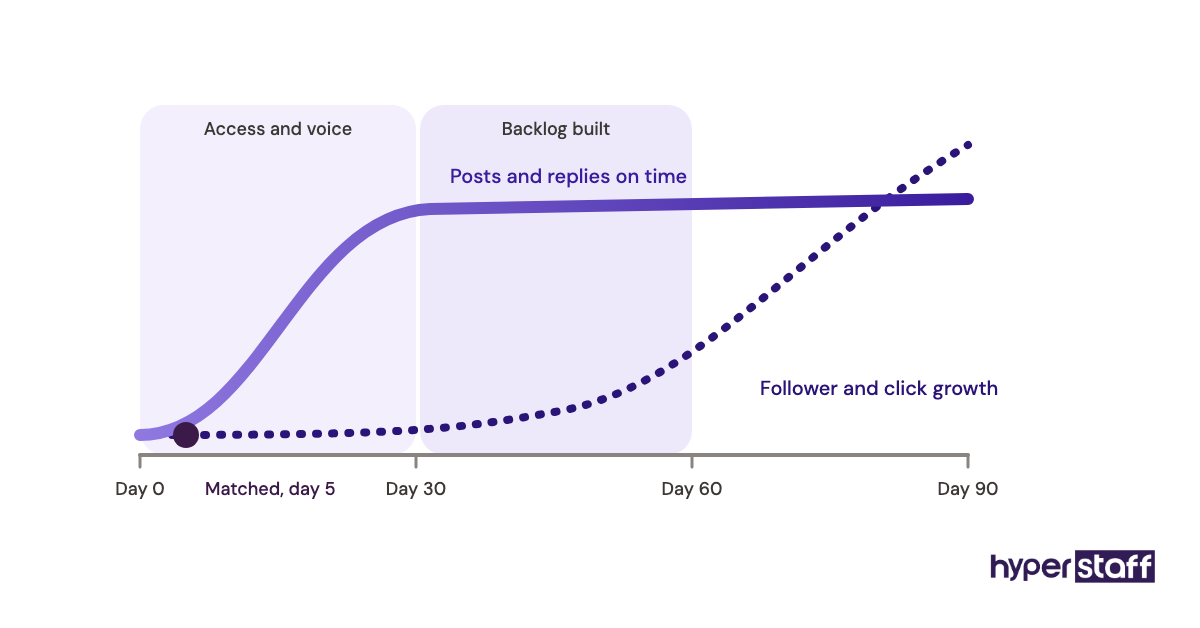
The first month mostly goes to access, voice calibration and building a content backlog. Months two and three are where reply times drop and posting stays steady enough for platform data to mean something.
How Much Does a Social Media VA Cost?
A social media VA costs from $3 to $12 an hour through Hyperstaff, depending on experience, versus roughly $25 to $50 an hour for a US freelancer. The table compares monthly bundles, and our social media VA cost breakdown covers fees and hidden costs.
| Option | Hourly rate | 40 hours/month | 80 hours/month | 160 hours/month |
|---|---|---|---|---|
| Hyperstaff Essential (0 to 2 years) | from $3 | from $120 | from $240 | from $480 |
| Hyperstaff Professional (2 to 5 years) | from $6 | from $240 | from $480 | from $960 |
| Hyperstaff Expert (5+ years) | from $12 | from $480 | from $960 | from $1,920 |
| Typical US freelance social media VA | $25 to $50 | $1,000 to $2,000 | $2,000 to $4,000 | $4,000 to $8,000 |
| Typical US in-house coordinator (salary plus overhead) | $27 to $38 | Rarely hired part-time | Rarely hired part-time | $4,300 to $6,100 |
Important: Hyperstaff prices shown are typical starting averages, not fixed quotes. Your final cost depends on the hours, experience tier and scope your work needs.
Is a Social Media Virtual Assistant Worth It?
Yes, a social media virtual assistant is worth it for most businesses that post on two or more platforms and can approve content weekly. Done right, it is one of the cheapest ways to buy back owner time while keeping accounts active and DMs answered, and the savings start in month one.
Here is a simple example calculation. A Professional-tier VA on an 80-hour bundle costs from $480 a month, or about $432 a month when paid quarterly with the 10% discount.
A US freelancer at $30 an hour for the same 80 hours costs $2,400. That gap is roughly $1,970 a month, or about $23,600 a year, before counting any time the owner gets back.
Add owner time to the math. If you spend 6 hours a week on social and value your hour at $75, that's about $1,950 a month of your time redirected to selling or delivery.
The view shifts by business size. A solo founder buys time, while a marketing team with five people buys capacity, and for the team the case rests on whether their staff actually move to higher-value work.
It isn't worth it if no one will approve content, or if the offer itself isn't clear yet. In those cases, fix the message first and hire after.
How to Choose a Social Media VA Agency
Choose a social media VA agency on four things: a dedicated person, real vetting, replacement terms in writing, and documented processes. Price matters, but a cheap rotating pool costs more in re-training.
Ask who your VA will be and whether that person works only on your account. Then ask how fast a replacement arrives and what they're briefed from.
Hyperstaff places a dedicated specialist in 5 business days, assigns an account manager to every client, and replaces for free in 5 to 7 business days. The replacement is briefed from your Operations Vault, so you don't start onboarding from zero.
Check flexibility too. Monthly bundles of 40, 80 or 160 hours let you start small and scale once the approval habit is working.
Social Media VA Statistics, Trends and Future Predictions
Social media use keeps growing, which keeps demand for social media VAs steady. DataReportal reports 5.81 billion social media user identities and GWI data showing about 19 hours a week spent on social platforms per user.
Three shifts shape the VA role now. Short-form video takes more editing hours per post, DMs act more like a sales inbox, and people search inside TikTok and Instagram the way they once searched Google.
Our prediction, held loosely: community management will take a bigger share of VA hours than content creation within a few years. We're less sure how fast AI video tools will cut editing time, since quality still varies a lot by platform.
Social Media Virtual Assistants and AI
AI speeds up a social media VA's drafting work, but it still needs a person to judge tone, facts and replies. Buffer and Metricool both include AI assistants for captions and post ideas on their free plans.
We see the best results when the VA uses AI for first drafts and caption variants, then edits hard against the voice guide. Fully AI-written posts tend to sound the same as every competitor using the same tool.
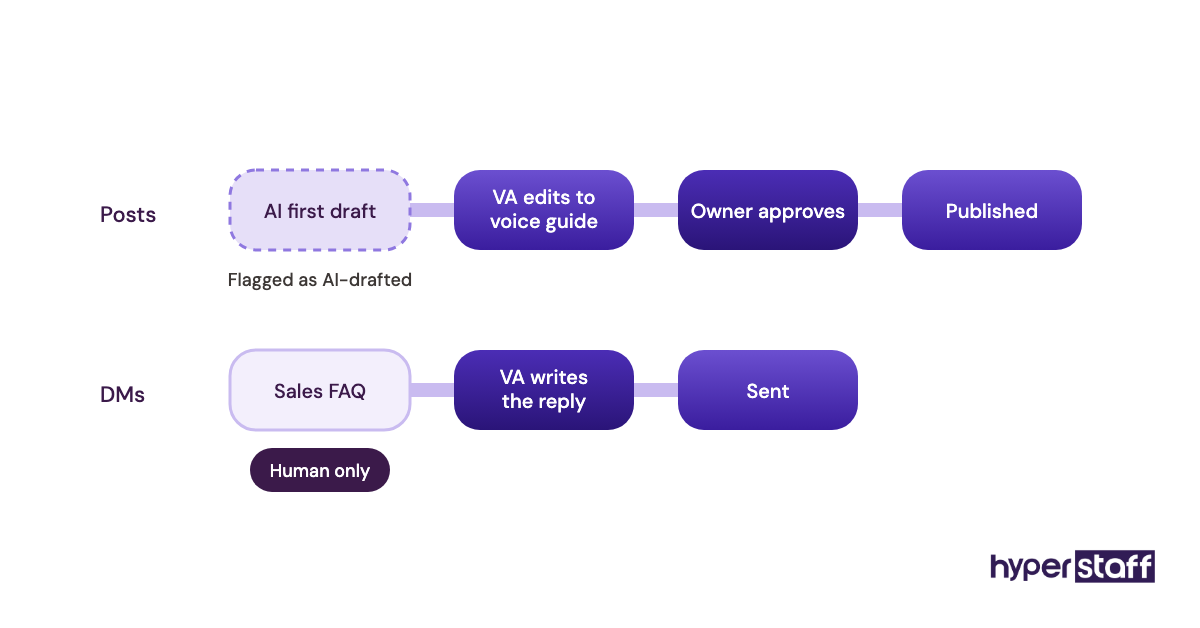
DM replies are where human judgment matters most. A wrong price or a tone-deaf answer to a complaint costs far more than the minutes saved.
Disclaimer: This article is for general information only and isn't financial, legal or employment advice. Prices, tool plans and figures can change, so confirm current details with each provider before you make hiring or purchasing decisions.
Common questions
Is a social media VA worth it for a small business?
Usually yes, if you post on two or more platforms and can approve content weekly. Offshore rates start at a few dollars an hour, so the time you get back often covers the cost in the first month.
How many hours a week does a social media VA need?
Most small brands need 10 to 20 hours a week, which fits a 40 or 80-hour monthly bundle. Brands with heavy DM volume or daily video often need full-time help.
Can a social media VA grow my followers?
A VA can grow followers through steady posting and fast engagement, but growth depends on your offer and content quality too. Expect clear trend data after 60 to 90 days.
Should I give my social media VA my passwords?
No. Grant role-based access through Meta Business Suite, LinkedIn page roles and a password manager, and remove access the day the contract ends.
Is a part-time social media VA enough?
For one or two platforms, a part-time VA is often enough. Move to full-time once comment and DM volume regularly fills the reply hours you set.
Book a free 15 min call
We place a pre-vetted specialist in 5 business days, fully managed, from $3/hour.