How to Hire a Social Media Virtual Assistant: A 5-Step Plan
How to scope, test, hire and onboard a social media virtual assistant without handing over your passwords or guessing on skill.

On this page
- What Does Hiring a Social Media Virtual Assistant Involve?
- Key Social Media VA Hiring Terms You Should Know
- Why Does Hiring the Right Social Media VA Matter?
- How Does Hiring a Social Media Virtual Assistant Work?
- What Are the Ways to Hire a Social Media Virtual Assistant?
- How Is Hiring a Social Media VA Different From Similar Hires?
- The Benefits of Hiring a Social Media Virtual Assistant
- The Drawbacks of Hiring a Social Media Virtual Assistant
- Who Needs to Hire a Social Media Virtual Assistant?
- Social Media VA Hiring Examples
- Creating a Social Media VA Hiring Plan, Step-by-Step
- What Does an Effective Social Media VA Hiring Strategy Look Like?
- Which Tools Do You Need to Hire and Work With a Social Media VA?
- 9 Proven Tips for Hiring a Social Media Virtual Assistant
- Overcoming Common Social Media VA Hiring Challenges
- How to Measure Social Media VA Hiring Success
- How Long Does Hiring a Social Media VA Take to Work?
- How Much Does It Cost to Hire a Social Media Virtual Assistant?
- Is Hiring a Social Media Virtual Assistant Worth It?
- How Do You Choose a Social Media VA Agency?
- Social Media VA Hiring Statistics, Trends and Predictions
- How Does AI Change Hiring a Social Media Virtual Assistant?
- FAQs
💡 Key Takeaways:
1) To hire a social media virtual assistant, first write down the platforms, weekly post count and approval rules. Then test your finalists on a short paid task that looks like the real job.
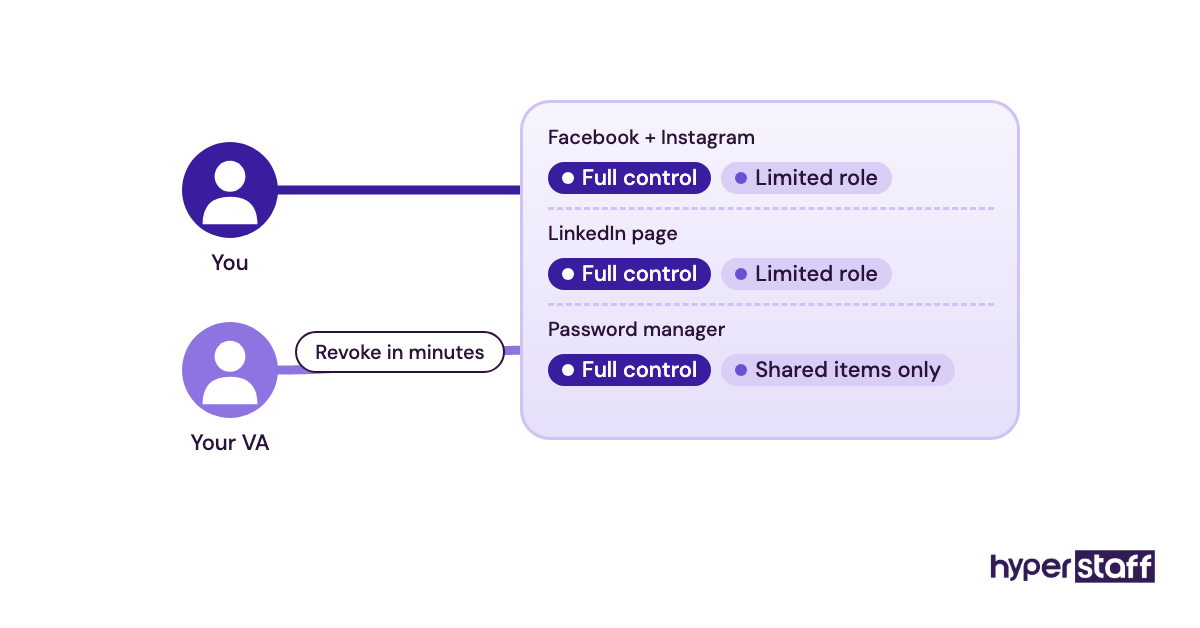
2) Give a new social media VA access through each platform's own team roles and a shared password manager. Never hand over your personal login, so you can remove access in minutes if the hire doesn't work out.
3) Judge a new hire on the first 30 days of work: posts shipped on time, replies answered and how well briefs were followed. Follower growth takes months to mean anything.
The Right Hire Turns Posts Into Paying Customers
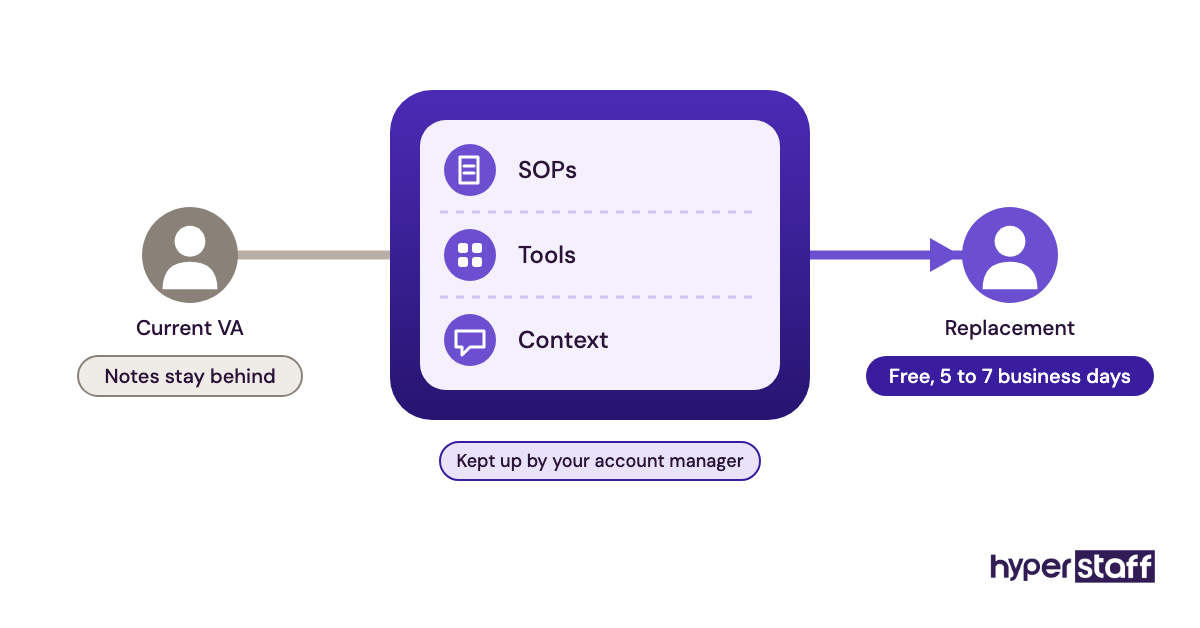
Hyperstaff has placed 70+ virtual assistants with 30+ clients, and we can match you with a dedicated social media virtual assistant in 5 business days. Rates start at $3/hour and every client gets a dedicated account manager. If the fit is wrong, a free replacement is in place within 5 to 7 business days, briefed from your Operations Vault.
What Does Hiring a Social Media Virtual Assistant Involve?
Hiring a social media virtual assistant means bringing on a remote specialist who plans, posts and manages your brand's social accounts for a set number of hours each month. The hiring process runs from scoping the role and testing skills through to handing over account access safely.
The job is bigger than scheduling posts. A capable hire writes captions, edits short videos, answers comments and DMs, tracks results and spots trends worth acting on. You'll find the full range in our list of social media VA tasks.
Most hiring mistakes happen before the first interview. When the job is vague, every candidate looks qualified, and the person who interviews best wins over the person who posts best. If the role is new to you, start with our explainer on what a social media VA does.
Key Social Media VA Hiring Terms You Should Know
- Scope of work = the platforms, post volume and tasks the VA owns each week.
- Content calendar = the shared plan for what goes out, where and when.
- Brand voice guide = a short document showing how your brand sounds, with sample posts and banned phrases.
- Paid test task = a short, paid sample job that mirrors the real work and is used to compare finalists.
- Community management = replying to comments, DMs and mentions on the brand's behalf.
- Approval workflow = the rule for who signs off on a post before it goes live.
- Role-based access = a team role inside each platform, given in place of your password.
- Engagement rate = interactions divided by reach or followers.
- Dedicated VA = one specialist who works only on your accounts.
- Replacement guarantee = the provider's written promise to swap in a new hire if the first one doesn't fit.
Why Does Hiring the Right Social Media VA Matter?
Hiring the right social media VA matters because your accounts are public and permanent. One off-brand reply or a dead month of posting is visible to every buyer who checks your page before they contact you.
A bad hire also costs you hours. Captions get rewritten, scheduled posts get pulled, and the time you meant to free up goes into fixing work instead.
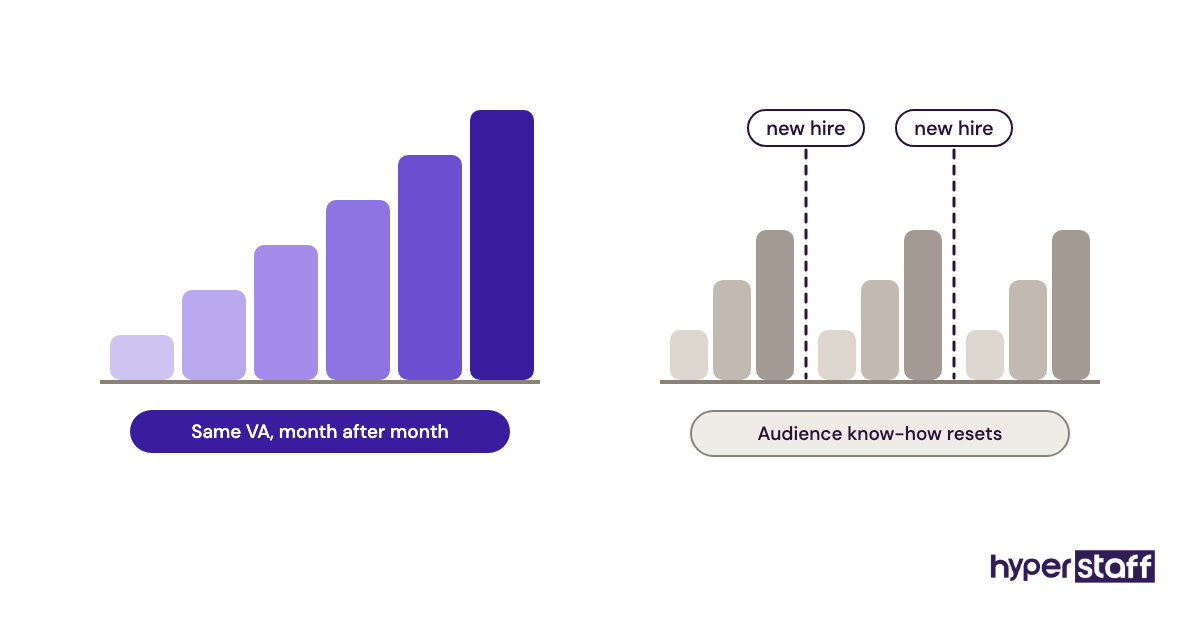
Continuity counts as well. Social content compounds slowly, so a VA who stays a year builds on what worked last quarter, while a string of short hires restarts the learning every time.
How Does Hiring a Social Media Virtual Assistant Work?
Hiring a social media virtual assistant takes four stages: scope the role, source candidates, test them on real work, then onboard with access and a brief. Through an agency, the whole process can take days. On your own, it often takes several weeks.
| Stage | What happens | Hiring on your own | Hiring through Hyperstaff |
|---|---|---|---|
| Scope the role | Platforms, hours, tasks, approval rules | 1–3 days | Done on a free discovery call |
| Source candidates | Job post, marketplace search or shortlist | 1–3 weeks | Pre-vetted talent in 5 regions |
| Test finalists | Paid task plus a short interview | 1–2 weeks | Placement in 5 business days |
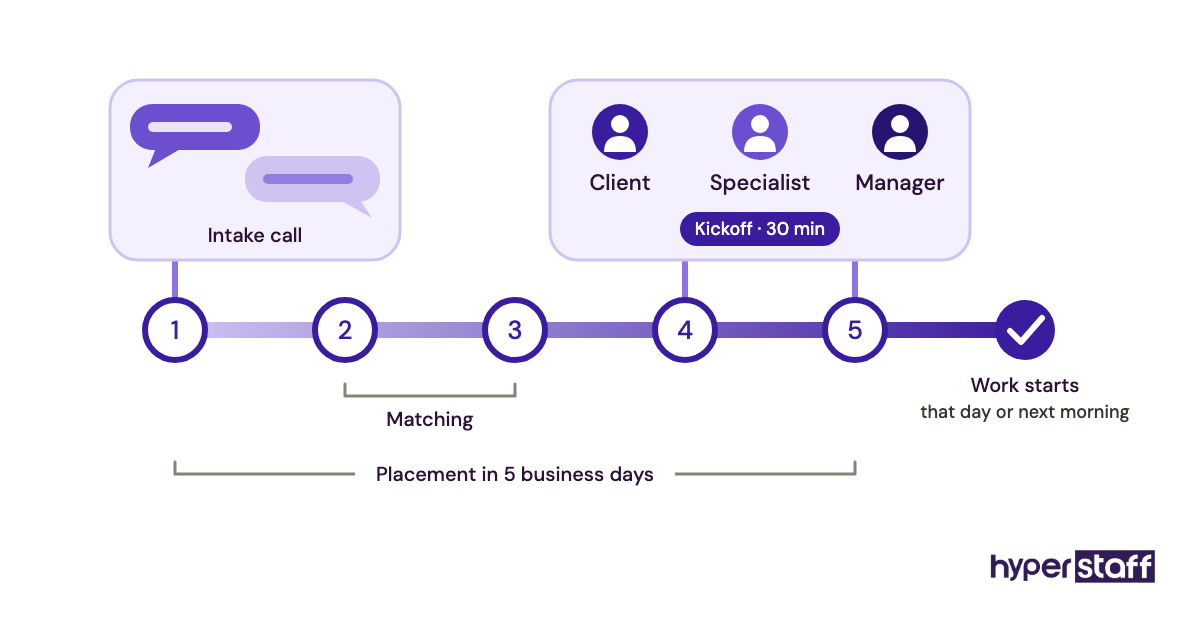
| Onboard | Access, voice brief, first calendar | 1–2 weeks | 30-minute kickoff, work starts that day or next morning |
| Replace if needed | Restart the search | Several weeks | Free, in 5 to 7 business days |
Owners skip the test stage more than any other, yet it predicts the most. A paid task of 60 to 90 minutes shows how someone writes, whether they follow a brief and whether they ask useful questions before starting.
Onboarding is where good hires are made or lost. Our guide to onboarding a social media VA walks through the first two weeks.
What Are the Ways to Hire a Social Media Virtual Assistant?
You can hire a social media virtual assistant through a freelance marketplace, a VA staffing agency, a direct offshore hire or a local in-house role. Each comes in part-time, full-time or project form. The right route depends on how much vetting and management you want to do yourself.
| Hiring route | How you find them | Who vets | Typical commitment | Best fit | Main risk |
|---|---|---|---|---|---|
| Freelance marketplace | Post a job, review proposals | You | Hourly or per project | One-off jobs, tight budgets | Uneven vetting, high churn |
| VA staffing agency | Agency shortlists candidates | Agency, then you | Monthly hour bundles | Ongoing posting and community work | Smaller candidate pool to pick from |
| Direct offshore hire | Job boards, referrals | You | A contract you write | Owners who've hired abroad before | Payroll, contracts and replacement fall on you |
| Part-time VA | Any route | Varies | Around 40–80 hours a month | One or two platforms | Slower reply times |
| Full-time dedicated VA | Agency or direct | Varies | Around 160 hours a month | Brands posting daily on 3+ platforms | Needs a steady content pipeline |
| Project freelancer | Marketplace or referral | You | Fixed scope | Profile setup, audits, launches | No continuity after the project |
| In-house hire | Local job posting | You and HR | Salaried employee | Large brands running daily campaigns | Highest cost, longest search |
For ongoing work, we'd steer most small brands away from project freelancers. A contractor who leaves after each job takes everything they learned about your audience with them.
How Is Hiring a Social Media VA Different From Similar Hires?
A social media VA hire is narrower than a manager, cheaper than an agency and more specialized than a general assistant. Knowing which one you need decides the job post, the test task and the budget.
Social Media VA vs. Social Media Manager
A social media manager sets the strategy, owns the goals and usually reports on revenue impact. A social media VA carries out the plan: posting, replies, design tweaks and reporting.
Experienced VAs at the 5+ year level can shape strategy too, so the gap narrows as you move up tiers. For a side-by-side on cost and control, read our comparison of a social media VA vs in-house staff.
Social Media VA vs. Marketing Agency
A marketing agency runs campaigns with a team, bills a retainer and often rotates who touches your account. A VA is one named person working inside your tools under your direction.
Agencies make sense for big paid campaigns with ad budgets to manage. For daily posting and community work, one dedicated person usually learns your brand faster.
Social Media VA vs. General Virtual Assistant
A general VA covers inbox, calendar, data entry and customer support. Social media work needs writing and visual skills plus platform knowledge, so the test task has to be different.
Plenty of owners hire a general VA and add social later. It can work, but test the social skills on their own before you assume they're there.
The Benefits of Hiring a Social Media Virtual Assistant
- A much lower hourly cost than a local hire, with offshore rates starting at a few dollars an hour.
- Consistent posting, because one person owns the calendar every week.
- Faster replies to comments and DMs, especially when the VA's hours cover your evenings.
- Hours that scale up or down through monthly bundles.
- Your own time goes back to sales and product work.
The Drawbacks of Hiring a Social Media Virtual Assistant
- The first two weeks take effort: a voice guide, access setup and feedback rounds.
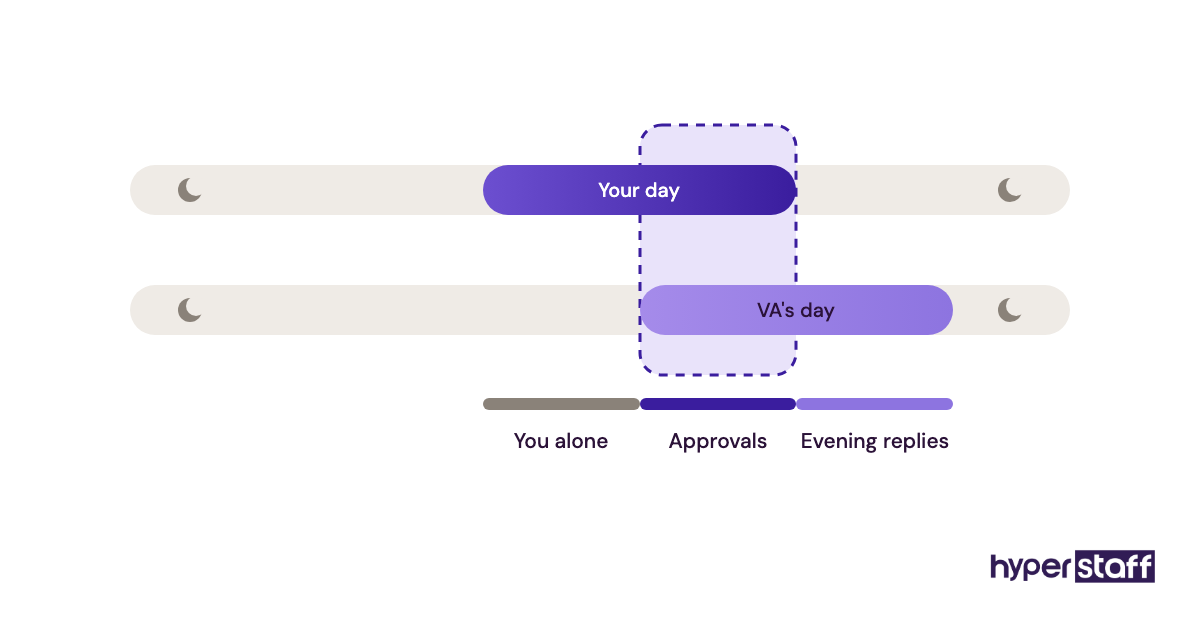
- Time zone gaps slow approvals when every post needs your sign-off.
- Entry-level VAs carry out a strategy well but rarely build one for you.
- Account security needs care, since the VA works inside public-facing accounts.
Who Needs to Hire a Social Media Virtual Assistant?
Businesses posting on two or more platforms that can't keep a steady schedule are the clearest fit for a social media virtual assistant. Typical examples are founders, local service firms, ecommerce brands, coaches and small agencies with more client accounts than staff.
For a solo owner, the hire is mostly about time and consistency. The owner gives direction once a week and the VA runs the rest.
A team with a marketing lead uses the VA differently. The lead keeps strategy and approvals, and the VA takes over production volume, which is usually where an in-house marketer runs out of hours.
Social Media VA Hiring Examples
The examples below are hiring patterns, good and bad, that show up again and again across VA placements. Each one changes how quickly a new hire becomes useful.
Good Social Media VA Hiring Examples
The Paid Test Task Hire
The owner shortlists three candidates and pays each one for the same small job: five captions and one edited Reel from raw footage. The side-by-side comparison makes the choice obvious within a day.
The catch is effort. Someone has to write a clear brief, and a vague brief makes every result look equally average.
The One-Platform Start
The new VA gets one platform for the first month, usually the one that brings in the most leads. A second platform is added only once the first runs without corrections.
Results show up more slowly across the whole account. Mistakes stay small, though, and the VA learns the brand on one channel before it spreads.
The Voice Guide Before the Job Post
The owner writes a one-page voice guide before posting the job, with ten posts they love and five they'd never publish. Candidates see it during the test, so the samples come back in the right tone.
A guide like that becomes the core of the onboarding pack too, which is why it pays to write it first.
Bad Social Media VA Hiring Examples
The "Do Everything" Job Post
The post asks for content creation, paid ads, SEO, email marketing and graphic design on a 40-hour monthly budget. Strong specialists skip it and generalists apply, and the person hired does none of the five tasks well.
Hiring on Follower Count
A candidate's personal account has a big following, so the owner skips the test. Growing your own page and writing in someone else's brand voice are separate skills, and the first doesn't prove the second.
Handing Over the Owner's Password
The VA gets the owner's personal Facebook login on day one. Two-factor codes go to the owner's phone in another time zone, so posting stalls overnight, and removing access later means a full password reset. More cases like these are in our post on common social media VA mistakes.
Creating a Social Media VA Hiring Plan, Step-by-Step
A social media VA hiring plan has five steps, from scoping to a 30-day review. Each one has a clear output, so you know when you're ready to move on.
Step #1: Define the Scope and Monthly Hours
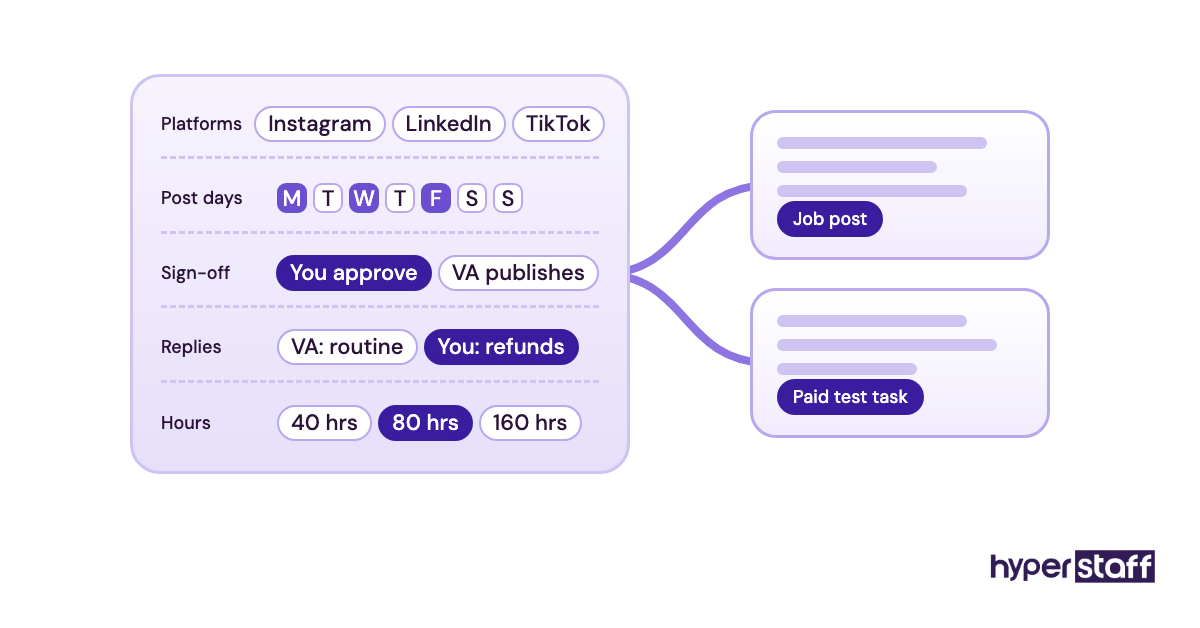
List the platforms, posts per week, reply expectations and who approves content. Then estimate hours: one or two platforms at a few posts a week usually fits in 40 to 80 hours a month, while daily posting across several platforms moves toward full time.
Step #2: Write a Job Description That Filters
Name the platforms, tools, time zone overlap and the exact weekly output. Ask applicants to mention one specific post from your account in their first line, which weeds out copy-paste applications fast. Our social media VA job description template has the full structure.
Step #3: Run a Paid Test Task
Give your two or three finalists the same brief, deadline and raw material. Score the results on tone, accuracy, design and how well they followed instructions, then compare them side by side.
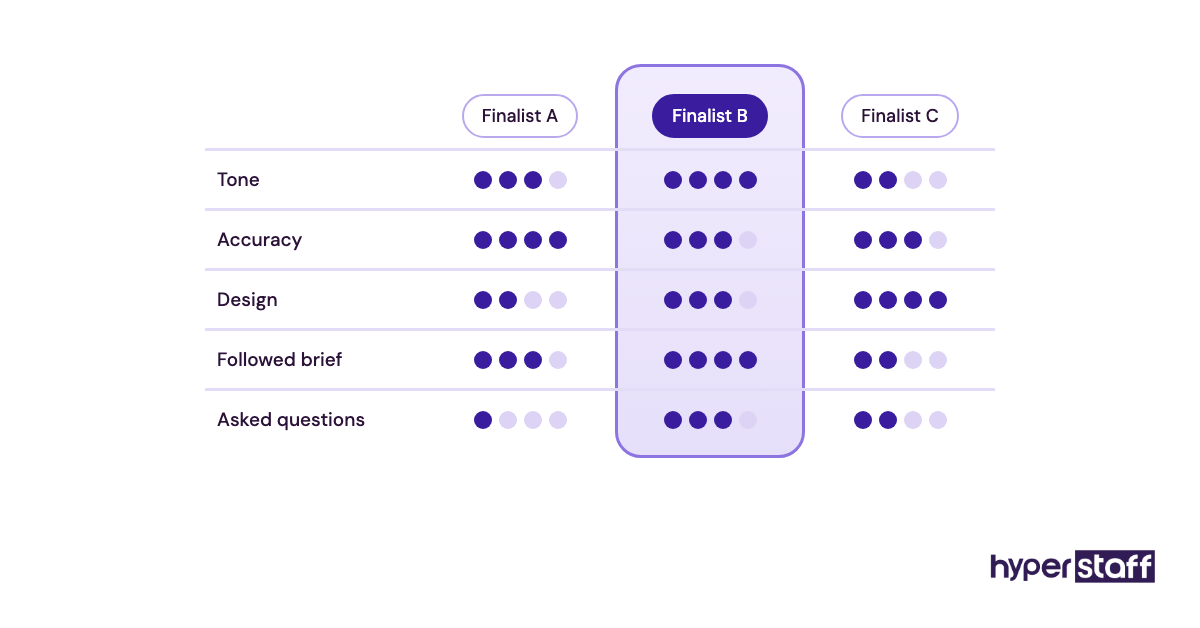
Practitioners disagree on whether a test beats a portfolio review. Portfolios show range but hide how much help someone had. A test shows what they produce alone, which is the job you're hiring for.
Step #4: Interview for Judgment
Use the interview to test judgment rather than to repeat the test task. Ask how they'd answer an angry comment, what they'd do if a trend clashed with your brand, and when they'd escalate to you. Our list of social media VA interview questions covers each area.
Step #5: Set Up Access and a 30-Day Review
Add the VA through each platform's team settings, such as Meta Business Suite roles or LinkedIn page admin roles, and store any remaining logins in a password manager. Book a review for day 30 before the first post goes out.
What Does an Effective Social Media VA Hiring Strategy Look Like?
An effective social media VA hiring strategy matches the hire to the next six months of content, tests real output and keeps one person on the account long enough to learn the audience. Budget follows scope.
Practitioners split on specialist versus generalist hires. A specialist who only does short-form video gets results faster on video-led platforms. A generalist who can write, design and reply is easier to keep busy on a 40 or 80 hour bundle, and that's the better bet for most small brands.
Plan for the person leaving, too. If your SOPs, logins and voice guide live in one place, a replacement can pick up the calendar in days rather than starting again.
Which Tools Do You Need to Hire and Work With a Social Media VA?
The core tools for a social media VA are a scheduler, a design tool, a screen-recording tool for feedback and a password manager. Most have free tiers, so the setup costs little to start. For a longer list, see our roundup of social media VA tools.
- Buffer: simple scheduling for a few platforms. The free plan connects up to 3 channels, and paid plans run about $5 to $10 per channel per month (Buffer pricing).
- Meta Business Suite: free, and it lets you give a VA a team role on Facebook and Instagram without sharing a password.
- Canva: the free plan covers most VA design work. Pro adds brand kits and templates on a per-person monthly fee.
- Loom: a free Starter plan, with Business at $18 per user per month (Loom pricing). A two-minute video is the fastest way to give feedback on a draft.
- 1Password: the Teams Starter Pack is $24.95 a month for up to 10 people, and Business is $8.99 per user per month (1Password pricing).
- Google Docs: a free home for the voice guide and content calendar.
In our view, Buffer is the easiest start for one to three platforms. Brands posting video daily across many platforms usually outgrow it and move to a heavier suite.
9 Proven Tips for Hiring a Social Media Virtual Assistant
These tips are where social media VA hires most often go right or wrong.
- Write the voice guide before the job post.
- Pay for test tasks, even small ones, so strong candidates take them seriously.
- Give every finalist the same brief and score them on the same sheet.
- Hire for the platforms that bring in leads today, and add more later.
- Ask for at least 3 hours of overlap with your working day.
- Use platform roles and a password manager, never your personal login.
- Agree on a reply rule for comments: what the VA answers alone and what comes to you.
- Set one weekly check-in and keep it short.
- Get replacement terms in writing before you sign.
Overcoming Common Social Media VA Hiring Challenges
The most common challenge in hiring a social media VA is tone: early posts sound close to right but slightly off. The fix is line-by-line edits in the first two weeks, with a sentence explaining each change, rather than rewriting posts yourself.
Slow approvals come next. If every post waits for you, the calendar stalls, so decide early which post types the VA can publish without sign-off.
Turnover is the costly one. Keep the SOPs and logins in one shared place so a new person can pick up quickly.
How to Measure Social Media VA Hiring Success
Measure a social media VA hire on output first: posts shipped on schedule, reply time on comments and DMs, and how often posts need edits. These numbers are clear within 30 days.
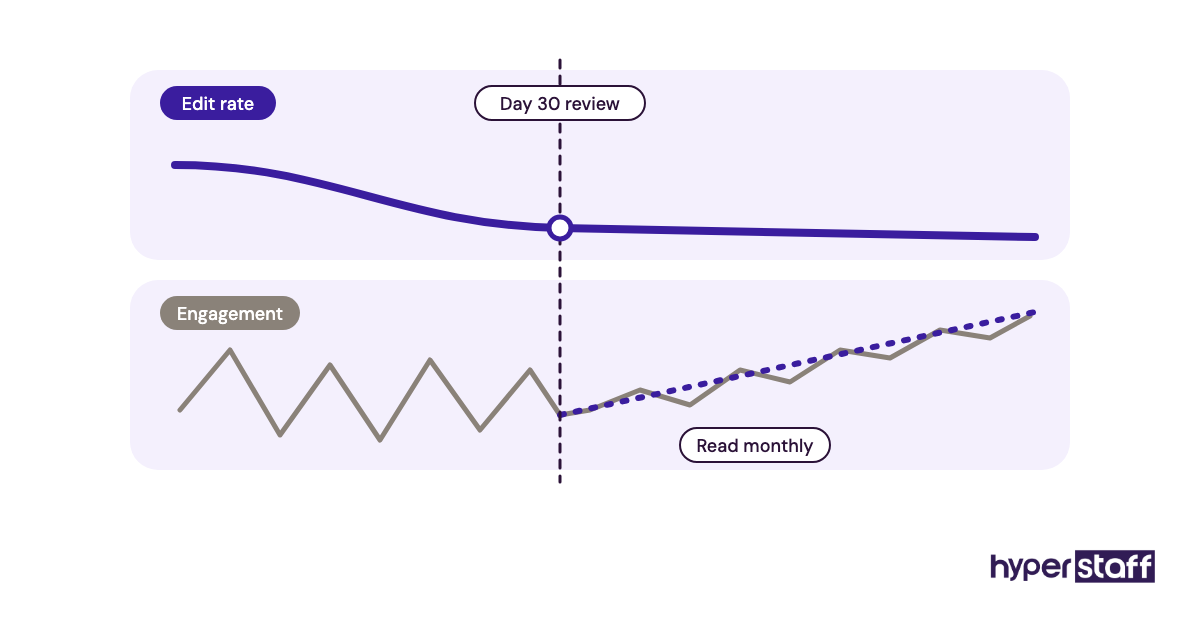
Outcome metrics like engagement rate, reach and profile visits take longer. Read them as monthly trends from month two onward and ignore weekly swings.
A good sign is your edit rate falling. When most posts go live with no changes, the hire is working.
How Long Does Hiring a Social Media VA Take to Work?
Hiring a social media VA usually pays off in output within the first two to four weeks. Audience growth takes longer, often two to three months before the trend means much.
Week one goes on access, the voice guide and a first calendar. Weeks two to four are edit-heavy. Expect your review time to drop sharply after that.
Through an agency, the hiring part is short. Hyperstaff places in 5 business days, and work starts on the kickoff day or the next morning.
How Much Does It Cost to Hire a Social Media Virtual Assistant?
A social media virtual assistant costs from $3 to $12+ an hour through Hyperstaff, depending on experience tier. A US in-house equivalent costs far more: the median wage for public relations specialists, the closest BLS category, is $35.94 an hour before benefits. Our social media VA cost breakdown has more detail.
| Monthly hours | Hyperstaff Essential (0–2 yrs) | Hyperstaff Professional (2–5 yrs) | Hyperstaff Expert (5+ yrs) | US in-house wage only |
|---|---|---|---|---|
| 40 hours | from $120 | from $240 | from $480 | about $1,440 |
| 80 hours | from $240 | from $480 | from $960 | about $2,875 |
| 160 hours | from $480 | from $960 | from $1,920 | about $5,750 |
Paying quarterly saves 10% on Hyperstaff bundles. In-house figures exclude payroll taxes, benefits and software.
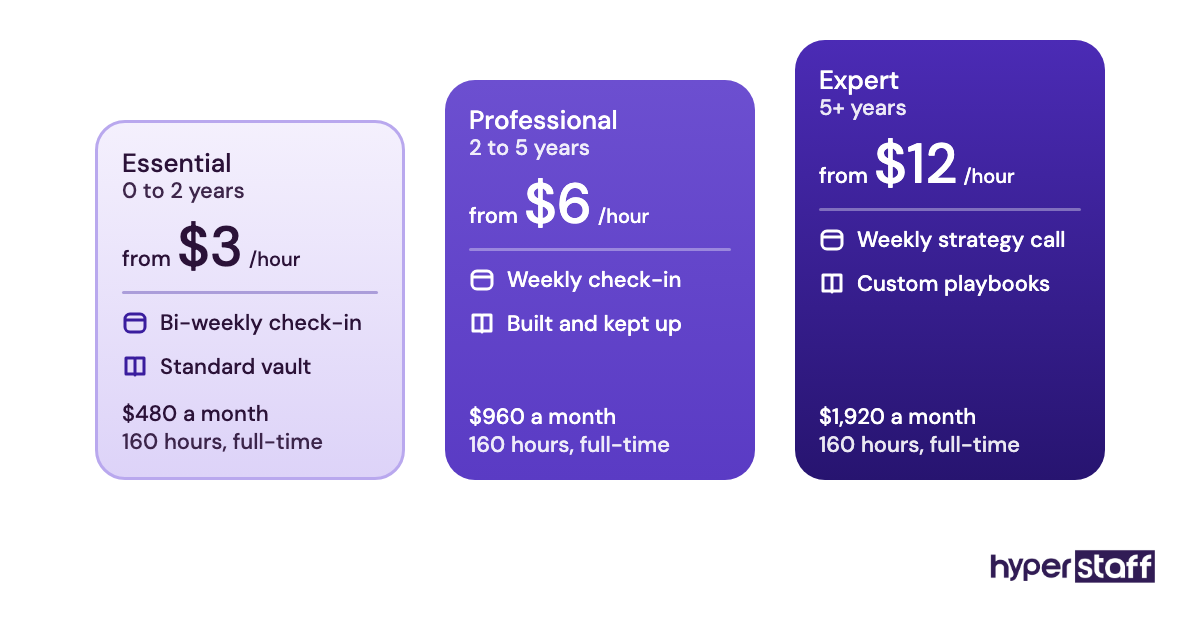
Important: Our rates above are typical starting points, not fixed quotes. Your final cost depends on the tier, hours and work your accounts need.
Is Hiring a Social Media Virtual Assistant Worth It?
Yes, hiring a social media virtual assistant is one of the best-value hires a small brand can make when the scope is clear and the person stays. You get consistent posting and faster replies for a fraction of a local salary, and the gains build as the VA learns your audience.
Here's an example calculation. A Professional-tier VA on an 80-hour bundle costs from $480 a month. The same 80 hours at the US median PR specialist wage is about $2,875, before taxes and benefits.
The gap is roughly $2,395 a month, or about $28,700 a year. It disappears if the hire churns every few months, so stability matters more than the hourly rate. Our post on whether a social media VA is worth it goes deeper.
How Do You Choose a Social Media VA Agency?
Choose a social media VA agency by checking four things: whether you get one dedicated person or a shared pool, how candidates are vetted, written replacement terms, and who keeps your process documented. Price comes after those.
Ask to see how the agency stores your SOPs. At Hyperstaff, the Operations Vault holds your SOPs, tools and context, so a replacement starts briefed.
Check the support model too. A dedicated account manager means you have one contact when something slips, and a free discovery call lets you test the fit before paying.
Social Media VA Hiring Statistics, Trends and Predictions
Social media now reaches about two in three people on Earth, according to DataReportal. Demand for someone to run those accounts keeps growing with it.
In-house hiring is slow and expensive. The US Bureau of Labor Statistics puts the median PR specialist salary at $74,750 and projects only 2% job growth over the decade, slower than average, with about 23,000 openings a year.
Short video keeps taking a bigger share of posting hours, so editing skill is now a core test area. We expect more brands to hire one remote specialist with video skills in place of a part-time local marketer, though that view comes from our own placements and not a published study.
How Does AI Change Hiring a Social Media Virtual Assistant?
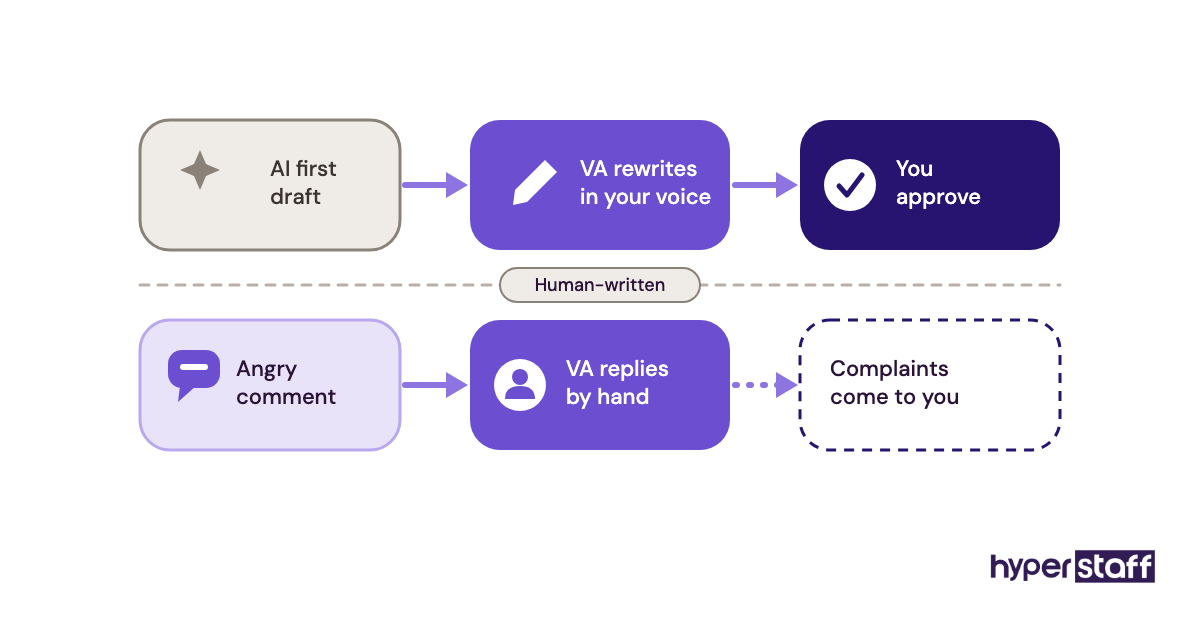
AI changes what you test for when hiring a social media VA. First-draft captions, hashtag research and repurposing are faster with AI tools, so the value moves toward judgment: picking the right idea, matching your voice and handling replies.
Ask candidates how they use AI, then check the test task for generic phrasing. A strong VA edits AI drafts until they sound like you, and a weak one pastes them in.
Disclaimer: This article is for general information only and isn't legal, tax or employment advice. Tool prices and third-party figures can change, so check current terms with each provider before you decide.
Common questions
Can I hire a social media VA for just one platform?
You can, and it's often the smartest start. Pick the platform that brings in the most leads, use a 40-hour bundle, and add platforms once posting runs without corrections.
Should my social media VA answer DMs?
Yes, for routine questions. Write a short reply guide with approved answers and a list of topics that always come to you, such as refunds or complaints.
Do I need an NDA when hiring a social media virtual assistant?
It's a good idea. A simple NDA plus platform roles in place of shared passwords protects your accounts and any unreleased content.
Can a social media VA run paid ads?
Some can, usually at the 5+ year level. Test it separately with a mock campaign brief, because organic posting skill doesn't prove ad skill.
What time zone should a social media VA be in?
Aim for at least 3 hours of overlap with your working day. Outside that window, a VA in a different time zone can cover evening comments and DMs.
Book a free 15 min call
We place a pre-vetted specialist in 5 business days, fully managed, from $3/hour.