Social Media Virtual Assistant Tasks: A Checklist That Holds Up
Nine checks that decide whether a social media virtual assistant's work holds up, from who owns the logins to who can raise an ad budget.

On this page
- Who should own the logins your social media VA uses?
- What can a social media VA post without approval?
- How far ahead should a social media content calendar run?
- Which comments and DMs should a VA escalate?
- How does a DM inquiry reach your sales team?
- Can your VA repost customer photos and trending audio?
- Profile housekeeping your VA should run every month
- Which social media metrics should a VA report weekly?
- Should your social media VA touch the ad account?
- FAQs
💡 Key Takeaways:
1) Social media virtual assistant tasks span account access, approval rules, the content calendar, community replies, lead handoff, content rights, profile upkeep, weekly reporting and, for some businesses, a capped ad budget.
2) Each task needs a written rule and a clear "done" state before the assistant starts, because unclear ownership is where most social media handovers break down.
3) The checks with the biggest payoff are usually the dull ones: who holds admin access, which comments get escalated and how a buying question in the DMs reaches the person who closes the sale.
Social media tasks that bring in paying customers
Hyperstaff has placed 70+ virtual assistants with 30+ clients, each a dedicated specialist who learns one business and stays with it. Our social media virtual assistant services start from $3/hour, with placement in 5 business days, a dedicated account manager and a 30-minute kickoff call, so work can start that day or the next morning.
Who should own the logins your social media VA uses?
The business should own every social account, and the assistant should get their own named role on each one. In our experience, a shared owner password is the shortcut that's hardest to undo later.
Access is the first checkbox because every other task on this list sits on top of it. Get it wrong and a simple staffing change turns into a support ticket with the platform.
What to check on account access
Go platform by platform and confirm the setup below before the first post goes out.
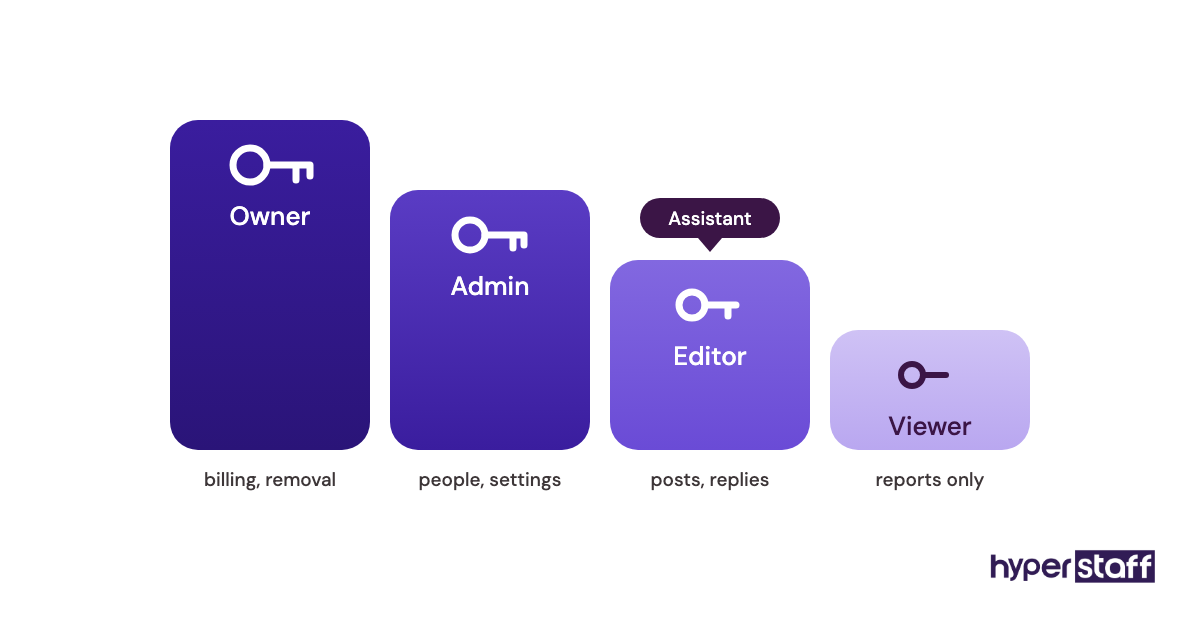
- The business owns the Meta business portfolio, the LinkedIn page and the TikTok account
- The assistant has a named role on each, such as editor or admin
- Two-factor codes go to a phone or app the business controls
- Logins sit in a shared password manager vault, for example 1Password or Bitwarden
- Every account has a second owner in case one person gets locked out
Why access setup matters more than it looks
Role-based access lets an owner remove one person in minutes without resetting anything for anyone else. Meta's business settings and LinkedIn page admin tools both work this way, and both let you choose how much each person can change.
Two-factor authentication is the overlooked risk. When the codes go to the assistant's personal phone, any change in staffing becomes an account recovery request, and those can take days or weeks to resolve.
We sort access in the first days of onboarding a social media virtual assistant. Nothing else on this checklist can be tested until it's done.
Access is done when
Every platform lists the assistant under their own name with a defined role. The owner can remove that role today without touching anyone else's login.
What can a social media VA post without approval?
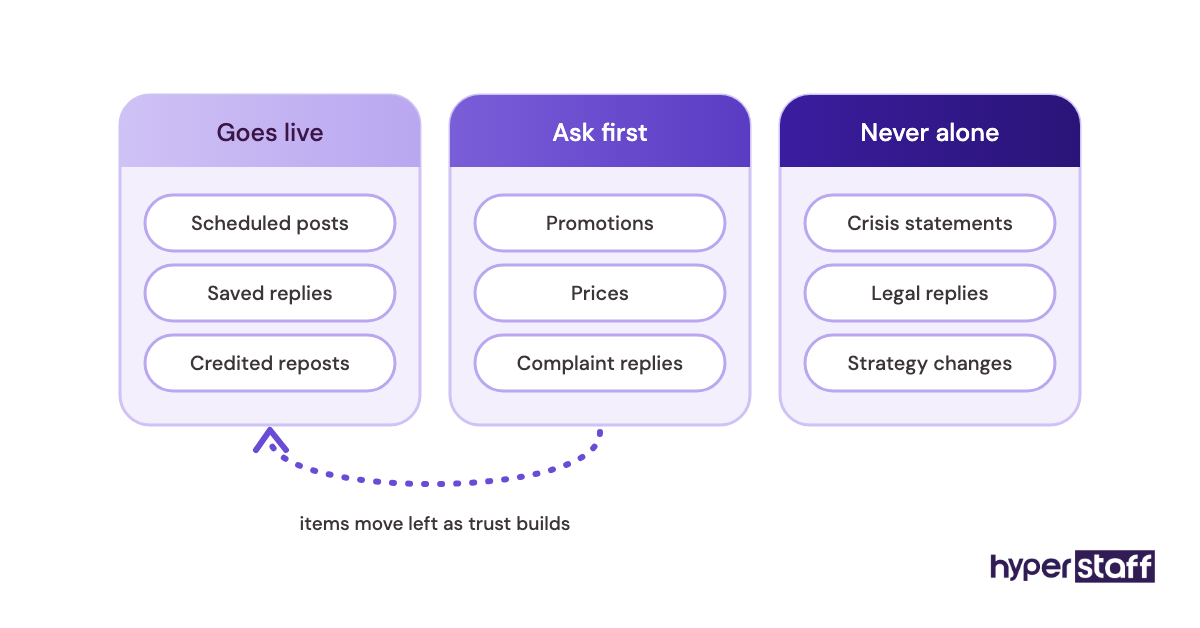
A social media VA can usually publish scheduled, pre-approved content and routine replies without asking first. Anything new for the brand, such as a promotion, a price, a comment on the news or a reply to a complaint, should wait for sign-off from a named approver.
What to write into your approval rules
Keep the rules to a short list the assistant can check in seconds.
- Which post types go live without review
- Which topics always need a second pair of eyes
- Who approves, and how fast they reply
- What happens when the approver is away
Why vague approvals slow the whole account down
Approval rules set your posting speed more than the assistant's skill does. If every post waits on one busy owner, the calendar slips and the assistant starts guessing what's allowed.
Practitioners disagree on how tight to start. Some insist on approving every post for the first month, and others argue that trains the assistant to stop using judgment.
We lean toward a short approved list from day one that widens as trust builds. These rules also belong in the social media virtual assistant job description, so candidates know how much judgment the role expects.
Written rules pay off a second time if the assistant ever changes. At Hyperstaff they live in the Operations Vault, and a free replacement arrives in 5 to 7 business days, briefed from it.
Approvals are settled when
The assistant can name, without looking, what they post freely and what they never post alone. The approver has a backup, and that backup's name is written down.
How far ahead should a social media content calendar run?
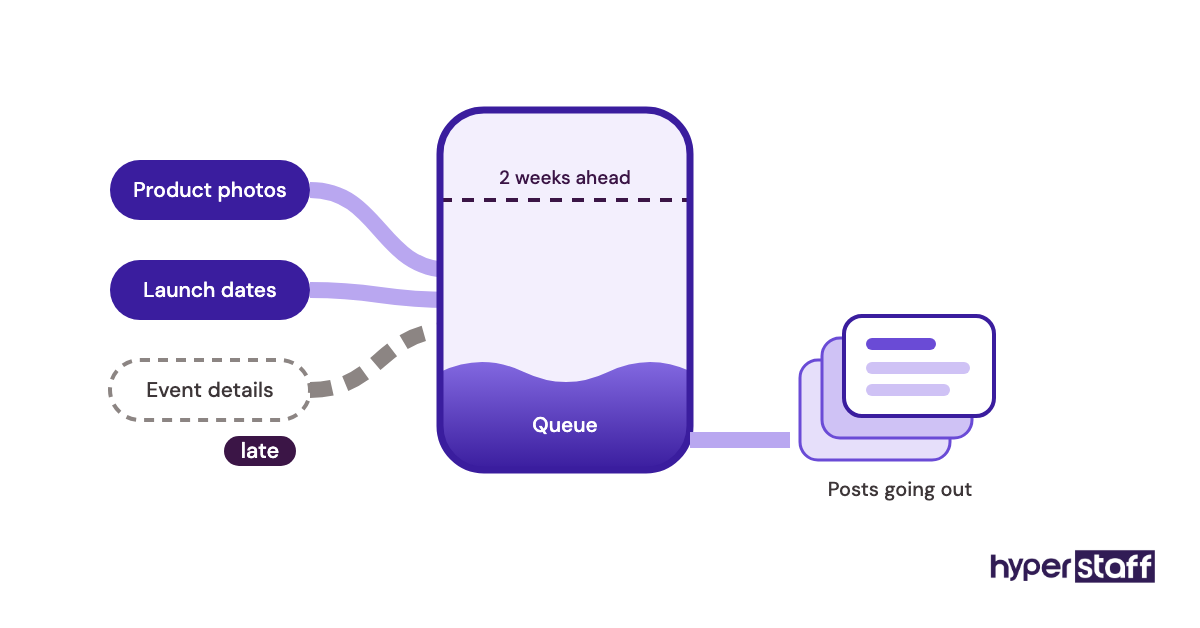
A social media content calendar should run about two to four weeks ahead, with open slots left for timely posts. Shorter than that and the assistant writes on deadline.
Much longer, and the plan goes out of date before it's used. Launches move, stock sells out, and a post written six weeks early often needs rewriting anyway.
What to look for in the calendar
Open the calendar and check for these.
- At least two weeks of posts drafted or scheduled
- Free slots kept for news, trends and replies
- Each post tagged with platform, format and goal
- Launch and campaign dates entered by the business
- Holidays and blackout dates marked
- An owner named for every asset that's still missing
Why the calendar is usually the first thing to break
Calendars fail when the business holds the inputs. The assistant can draft captions all week, but if product photos, launch dates or event details arrive late, the queue runs dry within days.
The scheduling tool matters less than people think. Meta Business Suite, Buffer and Later all do the job, and we compare more of them in our guide to social media virtual assistant tools.
The gap we see more often is a calendar nobody outside the assistant ever opens. Give the owner view access and a fixed weekly time to look.
The calendar is in shape when
Someone other than the assistant can open it, see the next two weeks and spot what's waiting on them.
Which comments and DMs should a VA escalate?
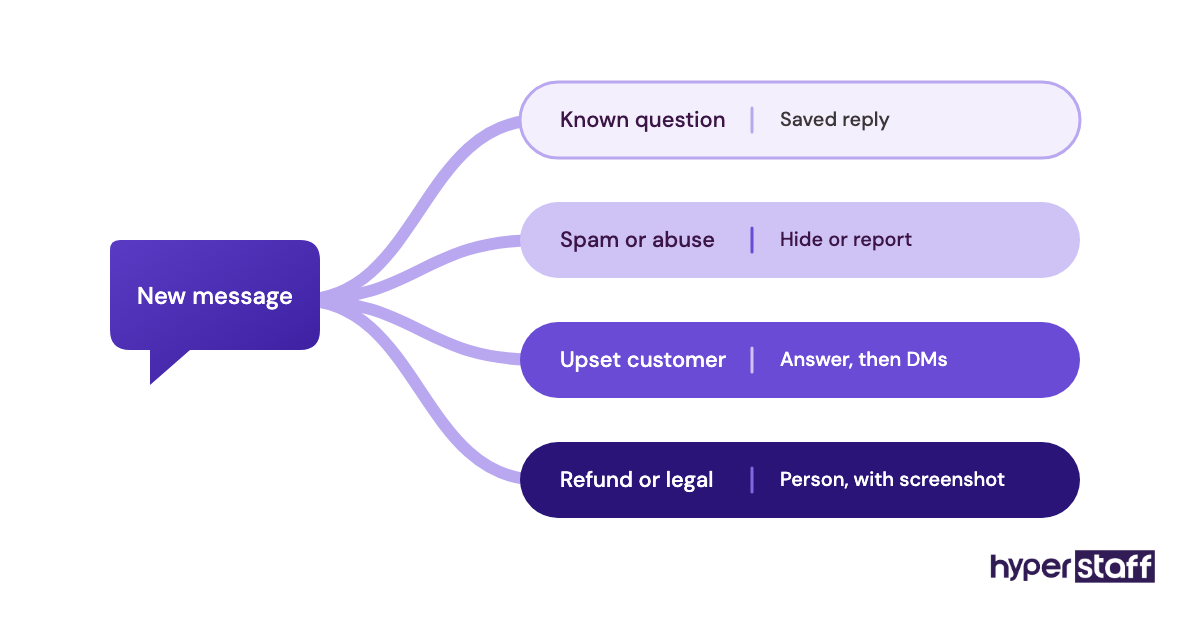
A VA should escalate complaints, refund or billing questions, legal or safety issues, press requests and any thread that's gaining attention for the wrong reasons. Routine questions with a known answer can go out directly from a saved-reply bank.
What to check in the reply rules
Pull the last month of comments and DMs, then confirm the assistant has a rule for each kind of message.
- Saved replies for the most common questions
- A list of topics that always go to a person at the business
- A target response window during business hours
- Who covers weekends and holidays, if anyone
- When to hide, delete or report spam and abuse
Why reply judgment is the real test of the role
Community replies are where a brand's voice gets tested live. A scheduled post can be fixed before it publishes, but a sharp reply to an angry customer can be screenshotted within minutes.
Judgment is hard to read from a CV, so test it with sample complaints. Our list of social media virtual assistant interview questions has prompts built for that.
If you're hiring a social media VA directly, put the reply test early, before any paid trial. It filters faster than a portfolio review.
Weekend coverage is where we're less certain. Some brands lose nothing by replying on Monday, while a restaurant or an event business can lose a booking by Saturday night, so decide this one by looking at when your own messages arrive.
Reply rules are working when
The assistant escalates only the messages on the list, each with a screenshot and a suggested reply attached. Nothing sits unanswered past the agreed response window.
How does a DM inquiry reach your sales team?
A DM inquiry should reach sales through one fixed route, such as a tag in the social inbox plus a message in your team's chat or a new record in the CRM. Without a set route, buying questions stay in an inbox that only the assistant reads.
What to check in the lead handoff
Ask the assistant to talk you through what they'd do with a DM asking for a bulk quote.
- A label or tag for buying-intent messages
- The details to collect before handing off, such as name, need and timing
- Where the lead goes: CRM, email or chat
- Who confirms the lead was picked up
Why social leads go cold so fast
A buyer in the DMs can message a competitor in the same minute. A quick, human first reply from the assistant, followed by a clean handoff, keeps the conversation going until sales steps in.
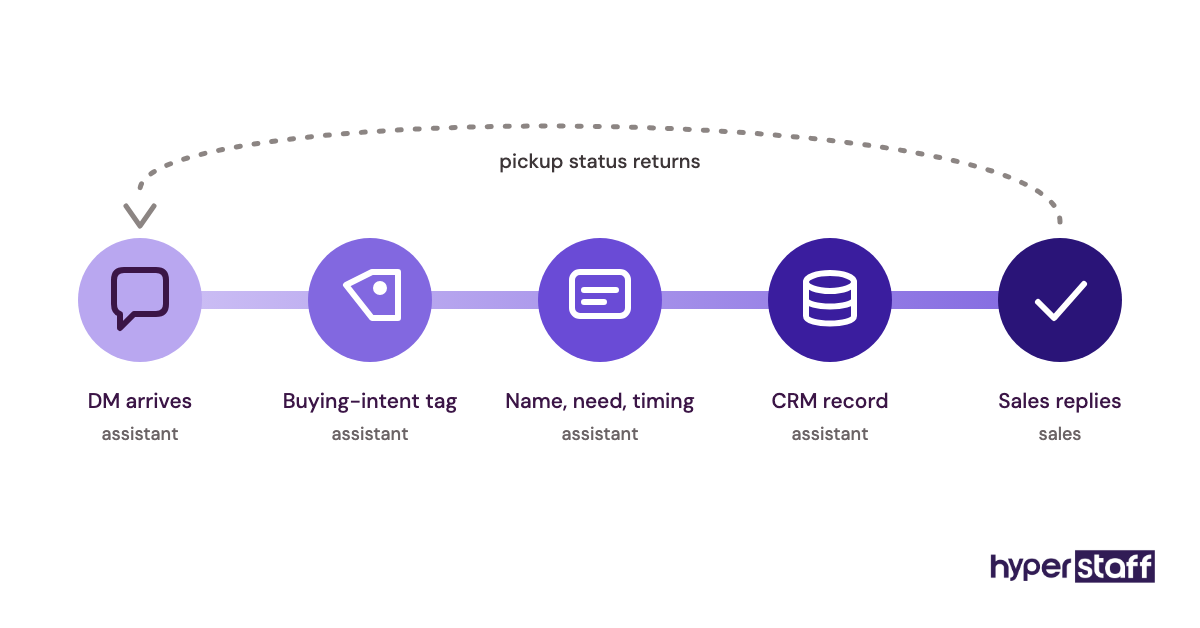
Lead handoff is the point where social media work and lead generation overlap. Treat the assistant as the first step in the sales path, with the same follow-up standards as a web form.
The handoff is done when
Every buying-intent DM from the past week traces to a CRM record or a named person. The assistant can see whether each lead got a reply from sales.
Can your VA repost customer photos and trending audio?
Your VA can repost customer photos only with the creator's permission, and can use trending audio on a business account only when the track is cleared for commercial use. TikTok's Commercial Music Library exists for this reason, and Instagram limits the music some business accounts can use.
What to check on content rights
Go through the asset folder and the last 20 posts with these in mind.
- Saved permission for every reposted customer photo or video
- Stock images from a licence the business holds
- Audio picked from commercial-cleared libraries
- An agreed credit format for reposts
- Fonts, logos and brand files kept in one shared folder
Why rights checks get skipped
Rights checks get skipped because nothing goes wrong until it does. A takedown notice or a muted video often shows up weeks after posting, when nobody remembers where the clip came from.
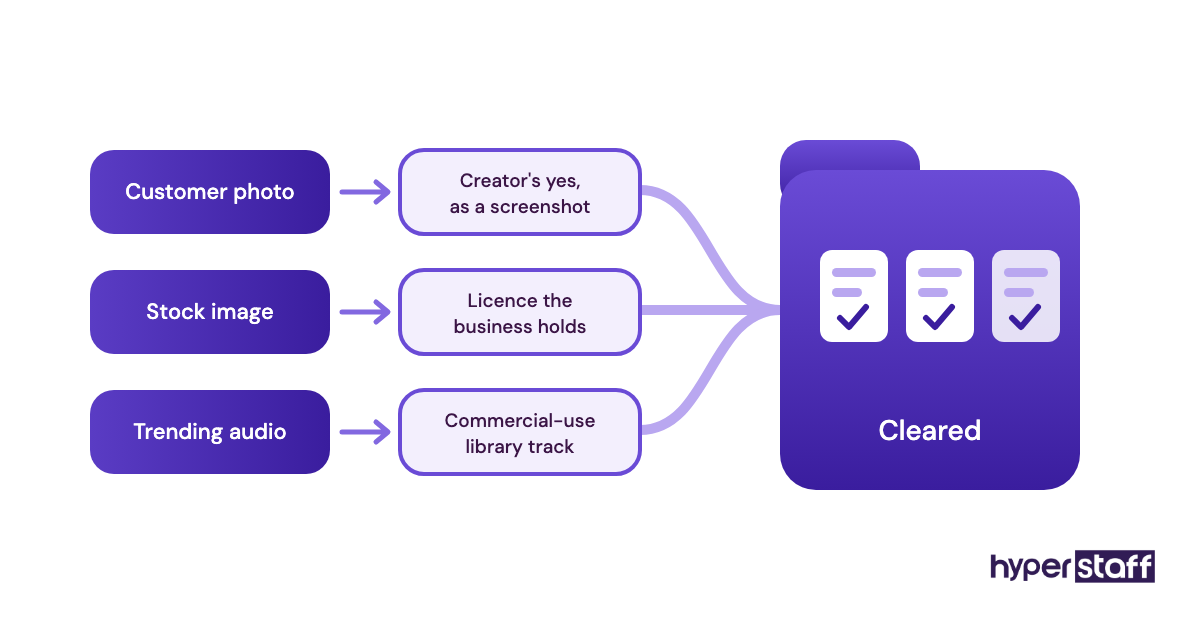
For most small accounts, a comment asking the creator for permission and a screenshot of their yes is a sensible minimum. Skipped permissions also appear in our list of social media virtual assistant mistakes.
Rights are covered when
Every reposted asset has its permission record saved next to the file.
Profile housekeeping your VA should run every month
Profiles decay without anyone noticing. Bio links point to sold-out products, opening hours go stale after a holiday, and a pinned post keeps promoting a sale that ended months ago.
Profile upkeep rarely shows up in descriptions of what a social media VA does. It's still one of the cheapest checks on this list.
What to look at on each profile
A monthly pass of about 20 minutes per profile catches most of it.
- Bio links and link-in-bio pages load and point to live pages
- Hours, address, phone and email match the website
- Pinned posts and story highlights are current
- Profile and cover images fit each platform's current crop
- Old promo codes in captions are flagged or removed
- Google Business Profile details match, if the assistant manages it
Why small profile errors cost sales
The bio link is the one link an interested visitor is most likely to tap. When it breaks, the profile has no other path to the sale.
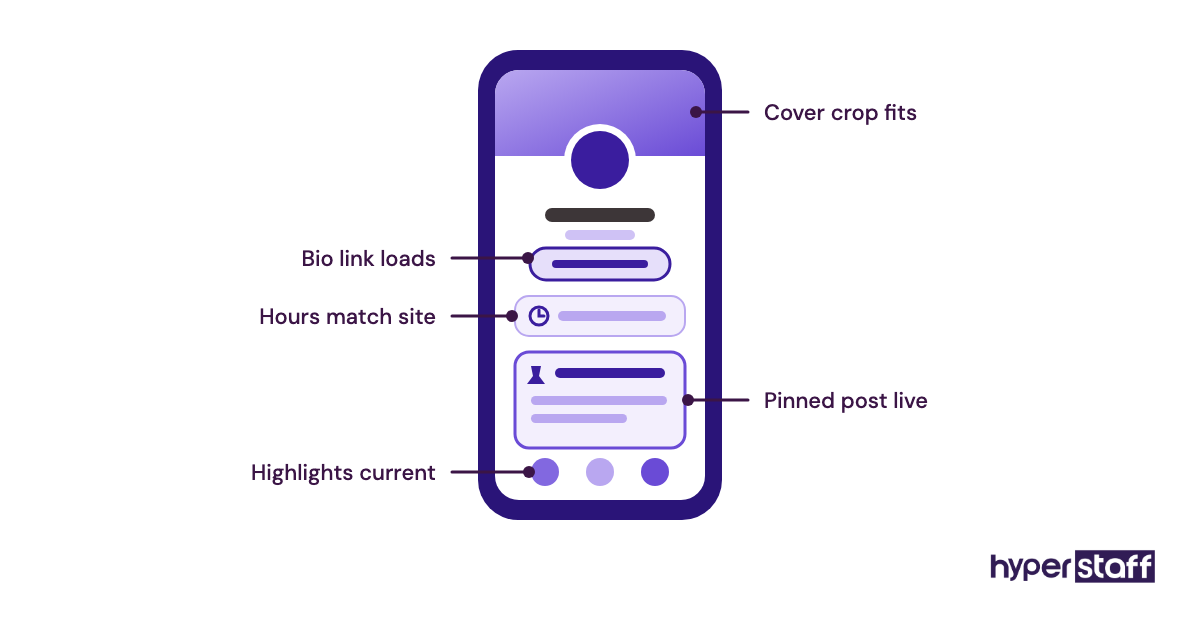
Housekeeping is finished when
Each profile has a dated entry in the Operations Vault for this month, with anything fixed listed underneath.
Which social media metrics should a VA report weekly?
A VA should report a short set of weekly social media metrics tied to business results: reach, saves and shares, profile visits, link clicks, DM inquiries and leads passed to sales. Follower count can sit at the bottom.
What to check in the weekly report
The whole report should fit on one screen.
- Five to eight numbers, the same ones every week
- A comparison with the previous four weeks
- The best and weakest post, with a short guess at why
- Inquiries and leads passed to sales
- One change the assistant plans to test next week
Why reports turn into busywork
Reports turn into busywork when they repeat everything the platform exports. Native dashboards in Meta Business Suite, LinkedIn and TikTok already show the raw numbers, so the assistant's value is two lines of interpretation at the top.
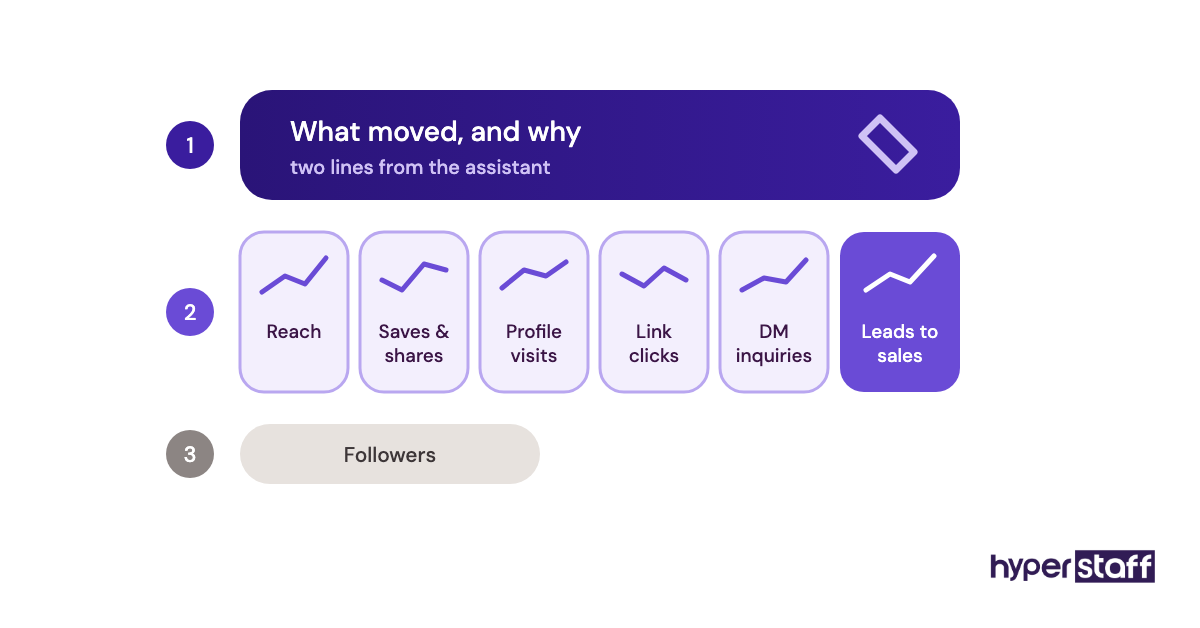
The same report is how you judge whether the role pays for itself. Our breakdowns of social media virtual assistant cost and of whether the hire is worth it lean on these numbers.
Reporting is useful when
You can read it in two minutes and know what to approve, cut or fund next week.
Should your social media VA touch the ad account?
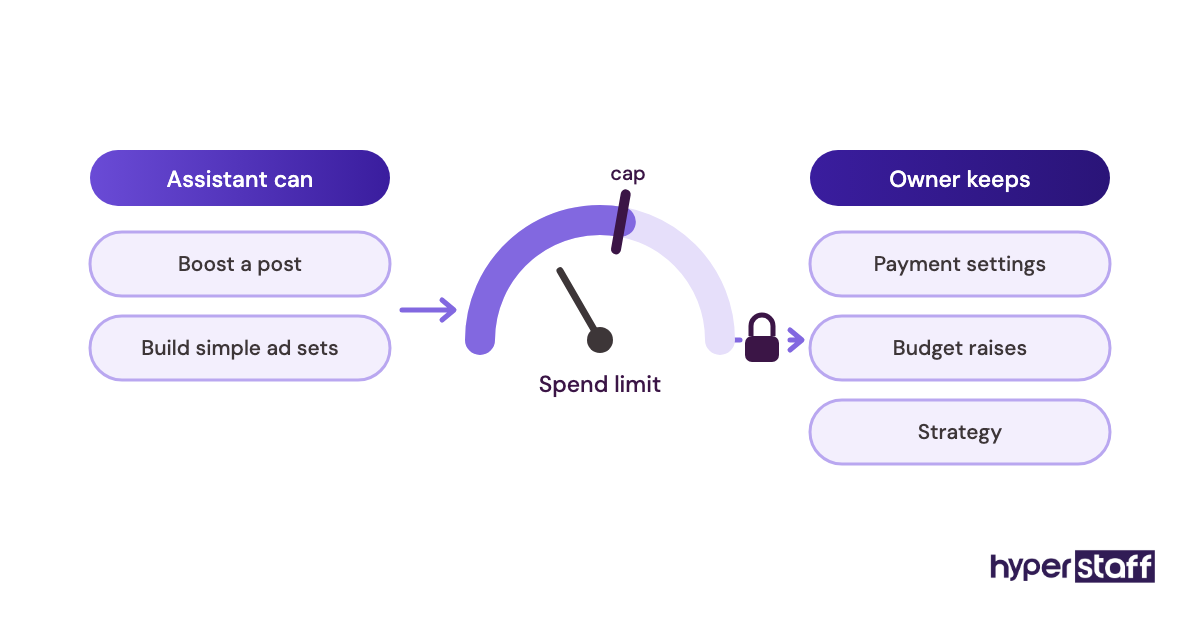
Your social media VA can run boosted posts and simple ad sets, but only inside a spending cap the business sets and controls. Strategy, larger budgets and billing should stay with the owner or a paid media specialist.
What to settle before granting ad access
If the assistant will go near paid campaigns, agree on these first.
- A role that can create ads but can't change payment settings
- An account spending limit set in Meta Ads Manager
- Payment methods that belong to the business
- A rule on who can raise a budget, and by how much
Why ad access needs its own limits
An organic mistake costs a post. A wrong audience or an extra zero on a daily budget can spend a month's plan over one weekend.
Some businesses keep paid media with an in-house marketer and give the VA organic work only. We weigh that split in social media virtual assistant vs in-house.
Ad access is safe when
The worst-case spend from a single mistake is a number the owner has already agreed to.
Disclaimer: This article is general information, not legal, financial or platform-policy advice. Platform features, permissions and rules change, so confirm current terms with each platform and a qualified adviser before acting. Hyperstaff is not responsible for decisions made based on this content.
Common questions
How many hours a week do social media VA tasks take?
One or two platforms with daily posting and replies usually take 10 to 20 hours a week. Video editing, extra platforms or ad work push that toward full time. Hyperstaff's monthly bundles of 40, 80 or 160 hours map onto that range.
Can a social media virtual assistant make Reels and TikToks?
Yes, many can edit short-form video from raw footage, templates and captions. Someone at the business still needs to film anything that has to be shot in person.
Should my VA write captions or just schedule them?
It depends on how settled your brand voice is. With a written voice guide and a few approved examples, most assistants can draft captions within the first couple of weeks.
What social media tasks shouldn't I give a VA?
Keep pricing decisions, crisis statements, legal replies and overall strategy with the owner. The assistant can draft any of them, but a person at the business should approve before anything is published.
How do I check my social media VA's work each week?
Read the weekly report, skim the reply log and spot-check a few scheduled posts. That takes about 15 minutes and catches most problems before they reach customers.
Book a free 15 min call
We place a pre-vetted specialist in 5 business days, fully managed, from $3/hour.