What Is a Social Media Virtual Assistant? Role, Tasks and Cost
A plain guide to what a social media virtual assistant does, how the role works day to day, what it costs and how to tell if you need one.
On this page
- What Is a Social Media Virtual Assistant?
- Key Social Media Virtual Assistant Terms You Should Know
- Why Does a Social Media Virtual Assistant Matter for a Small Business?
- How Does a Social Media Virtual Assistant Work Day to Day?
- Types and Forms of Social Media Virtual Assistants
- How Is a Social Media VA Different From Related Roles?
- The Benefits of a Social Media Virtual Assistant
- The Drawbacks of a Social Media Virtual Assistant
- Who Needs a Social Media Virtual Assistant?
- Social Media Virtual Assistant Examples
- Creating a Social Media Virtual Assistant Plan, Step-by-Step
- What Does an Effective Social Media VA Setup Look Like?
- Social Media Virtual Assistant Tools and Software
- 9 Proven Social Media Virtual Assistant Tips and Best Practices
- What Are the Common Social Media VA Challenges, and How Do You Fix Them?
- How Do You Measure Social Media Virtual Assistant Success?
- How Long Does a Social Media Virtual Assistant Take to Show Results?
- How Much Does a Social Media Virtual Assistant Cost?
- Is a Social Media Virtual Assistant Worth It?
- How Do You Choose a Social Media Virtual Assistant Agency?
- Social Media Virtual Assistant Statistics, Trends and Future Predictions
- How Is AI Changing the Social Media Virtual Assistant Role?
- FAQs
💡 Key Takeaways:
1) A social media virtual assistant is a remote specialist who plans, schedules, publishes and reports on a business's social accounts, and usually answers comments and direct messages as well.
2) The role sits between a general admin assistant and a social media manager: the assistant runs the daily posting and community work, and the owner keeps the brand and budget decisions.
3) Results depend on a written brief, a clear approval rule and two to three months of steady posting before anyone judges the numbers.
Turn Social Feeds Into a Steady Sales Channel
Hyperstaff has placed 70+ virtual assistants with 30+ clients, and our social media virtual assistant services match you with a pre-vetted specialist in 5 business days. Rates start at $3 an hour, every client gets a dedicated account manager, and work starts the same day or the next morning after one 30-minute kickoff call.
What Is a Social Media Virtual Assistant?
A social media virtual assistant is a remote professional who runs the day-to-day work behind a brand's social accounts: content calendars, scheduling, captions, simple graphics, comment replies, DMs and monthly reports. They work for you on a set number of hours, from another city or another country.
Most work inside your tools, under your brand rules, on platforms like Instagram, Facebook, LinkedIn, TikTok, YouTube and X. The full split of daily, weekly and monthly duties is in our list of social media virtual assistant tasks.
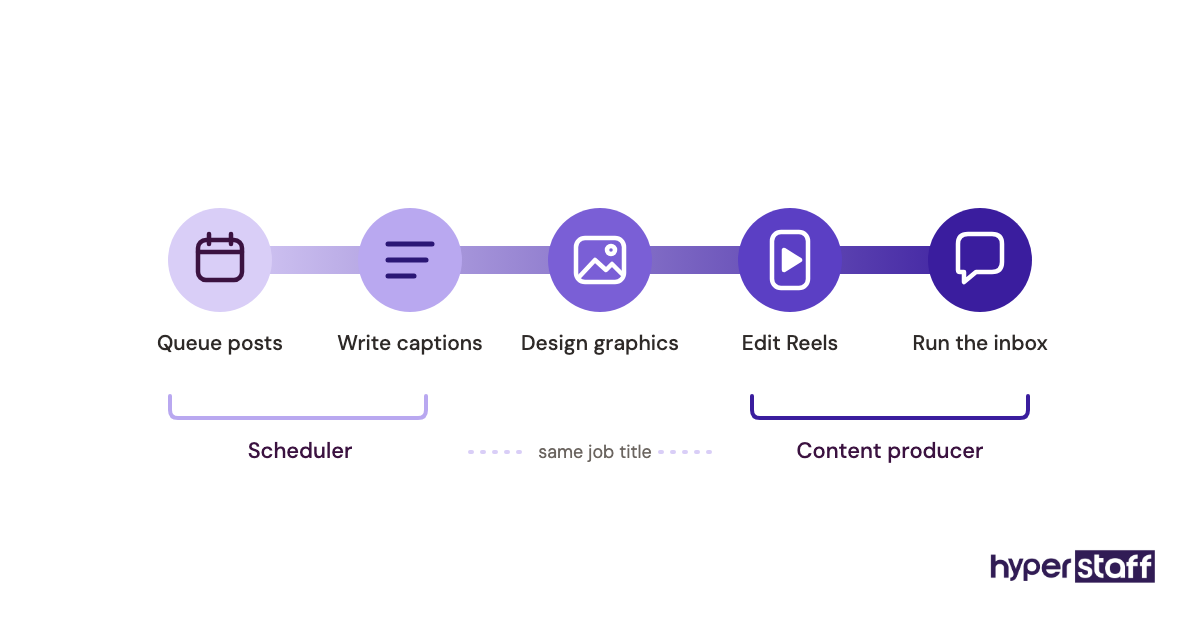
The title is broad on purpose. A social media VA can be a careful scheduler who never writes a caption, or a content producer who shoots Reels from your raw clips and handles the inbox too.
Key Social Media Virtual Assistant Terms You Should Know
- Content calendar = the dated plan of every post, platform and caption for the coming weeks.
- Content pillars = the 3 to 6 recurring themes a brand posts about.
- Scheduler = software that queues posts and publishes them at set times.
- Community management = replying to comments, DMs and mentions in the brand's voice.
- Engagement rate = interactions divided by reach or followers, shown as a percentage.
- Reach = the number of unique accounts that saw a post.
- Brand voice guide = written rules for tone, banned words and reply templates.
- Approval workflow = the sign-off step a post passes before it goes live.
- UGC = user-generated content, such as customer photos or reviews you repost with permission.
- Repurposing = cutting one long asset, like a webinar, into many short posts.
- Retainer hours = the fixed block of monthly hours the assistant works.
Why Does a Social Media Virtual Assistant Matter for a Small Business?
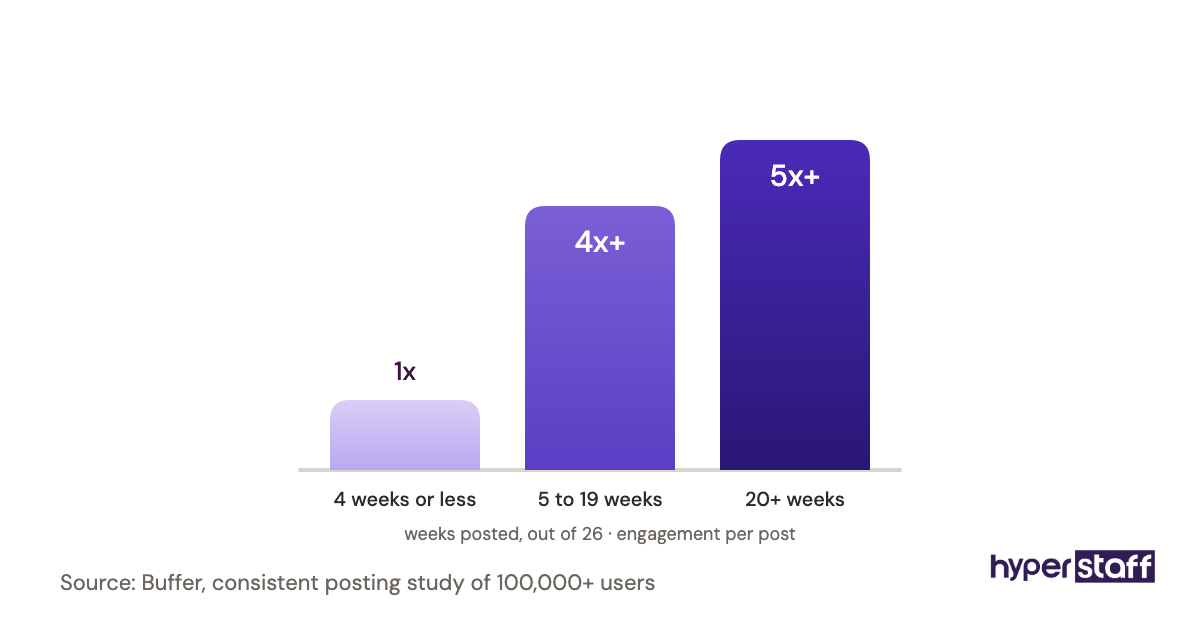
Consistency is the main reason. Social platforms reward accounts that post on a steady rhythm and reply fast, and owners who post "when there's time" end up posting in bursts and then disappearing for weeks.
The scale of the audience is real. DataReportal counts 5.81 billion social media user identities worldwide in its latest update, and the typical internet user spends about 19 hours a week on social platforms.
A dedicated assistant turns social media from a chore into a scheduled operation with an owner. Comments get answered the same day, and leads in the DMs stop sitting unread over a weekend.
How Does a Social Media Virtual Assistant Work Day to Day?
A social media virtual assistant works from a shared brief, a content calendar and logins to your scheduler, design tool and inbox. The typical rhythm is a weekly planning block, daily posting and replies, and a monthly report.
The order of operations matters more than people expect. Week one is mostly access setup and reading old posts, so the first batch of scheduled content tends to go live in week two.
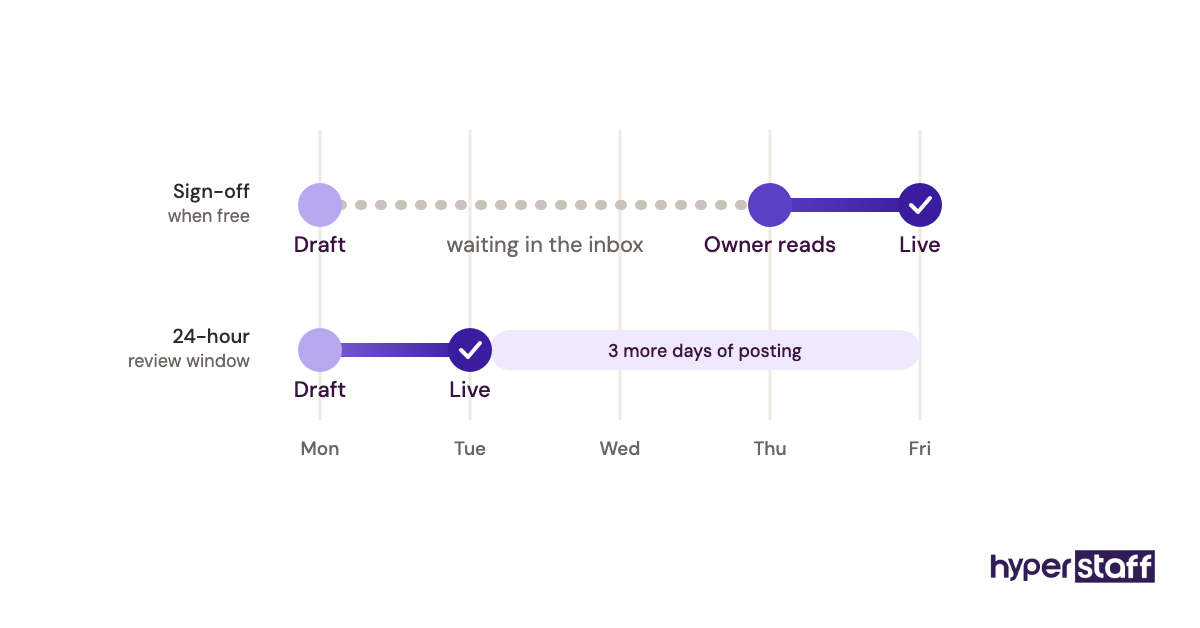
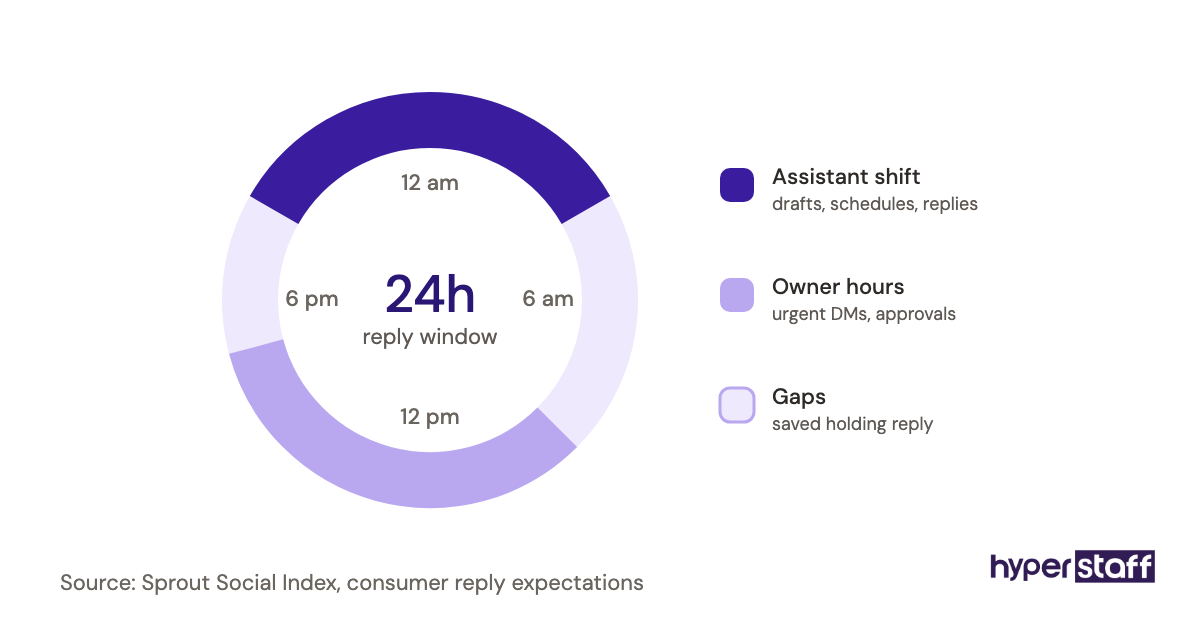
Approvals are where most setups stall. If every caption waits for the owner's sign-off and the owner checks messages twice a week, the calendar slips by days, so set a review window, such as 24 hours, after which approved formats go out.
Types and Forms of Social Media Virtual Assistants
Social media virtual assistants come in six common forms, split by what they produce and how many hours they work. The right type depends on whether your bottleneck is posting, creating or replying.
| Type | Main work | Typical monthly hours | Best fit |
|---|---|---|---|
| Scheduler and publisher | Queues ready-made content, fixes formats, posts on time | 20 to 40 | Brands that already create their own content |
| Content creator | Captions, Canva graphics, carousels, short video edits | 40 to 80 | Owners with ideas but no time to produce |
| Community manager | Comments, DMs, reviews, mention tracking | 40 to 160 | Ecommerce, local services, busy inboxes |
| Full-stack social VA | Calendar, content, posting, replies, reporting | 80 to 160 | Small teams with no marketing hire |
| Platform specialist | Deep work on one channel, like LinkedIn or TikTok | 40 to 80 | B2B founders or video-first brands |
| Paid social support | Ad uploads, audience setup, spend reports | 20 to 80 | Businesses already running Meta or LinkedIn ads |
How Is a Social Media VA Different From Related Roles?
A social media virtual assistant runs execution. Related roles either set strategy, do broader admin, or bring a whole team, and the price and the level of control change with each.
Social Media VA vs. Social Media Manager
A social media manager owns strategy, budgets and results, while the VA owns the calendar and the daily output. Many small businesses only need the second role, because the owner already knows the brand and the audience.
The line blurs at the senior end. An assistant with 5+ years of experience often writes the monthly plan and suggests tests, which is close to a manager's job at a lower rate.
Social Media VA vs. General Virtual Assistant
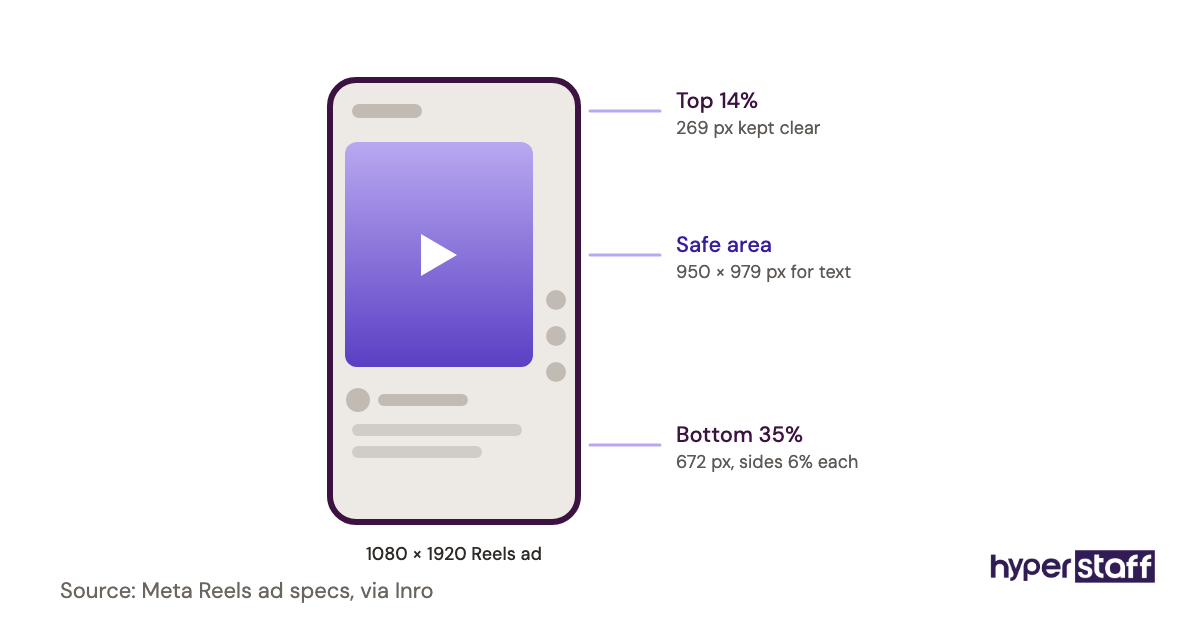
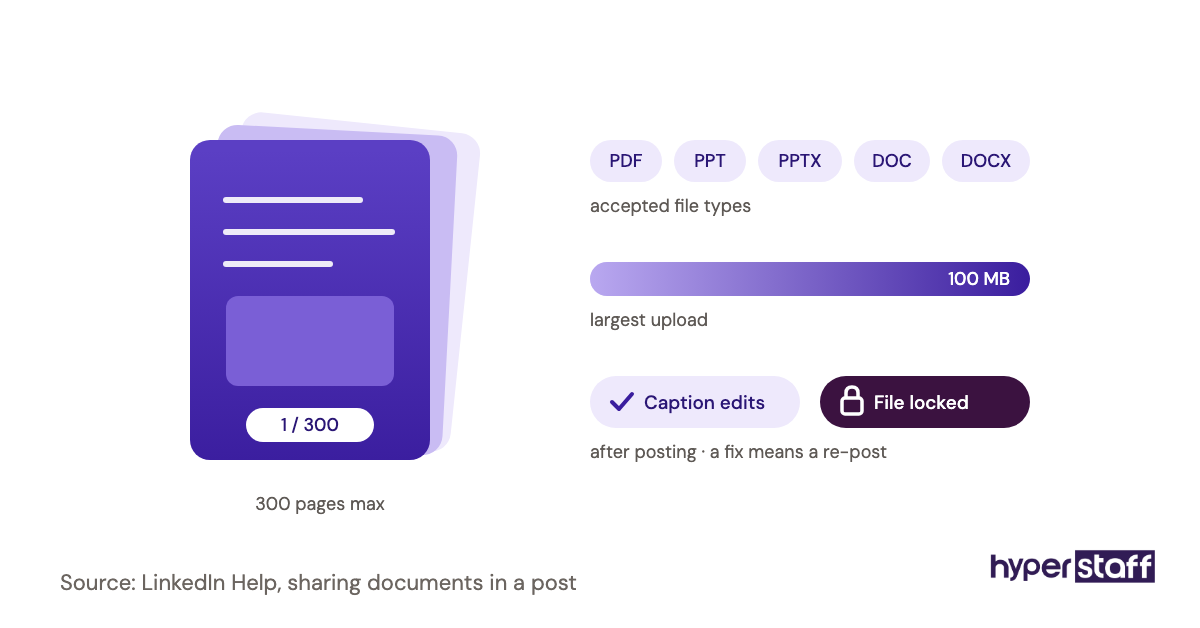
A general virtual assistant splits time across email, calendar, data entry and customer support. A social media VA spends most hours inside platforms and design tools, and knows things like safe-zone sizes for Reels or LinkedIn's document post format.
A general assistant can post for you, but quality drops on anything that needs a feel for the feed, such as hooks and thumbnails.
Social Media VA vs. Social Media Agency
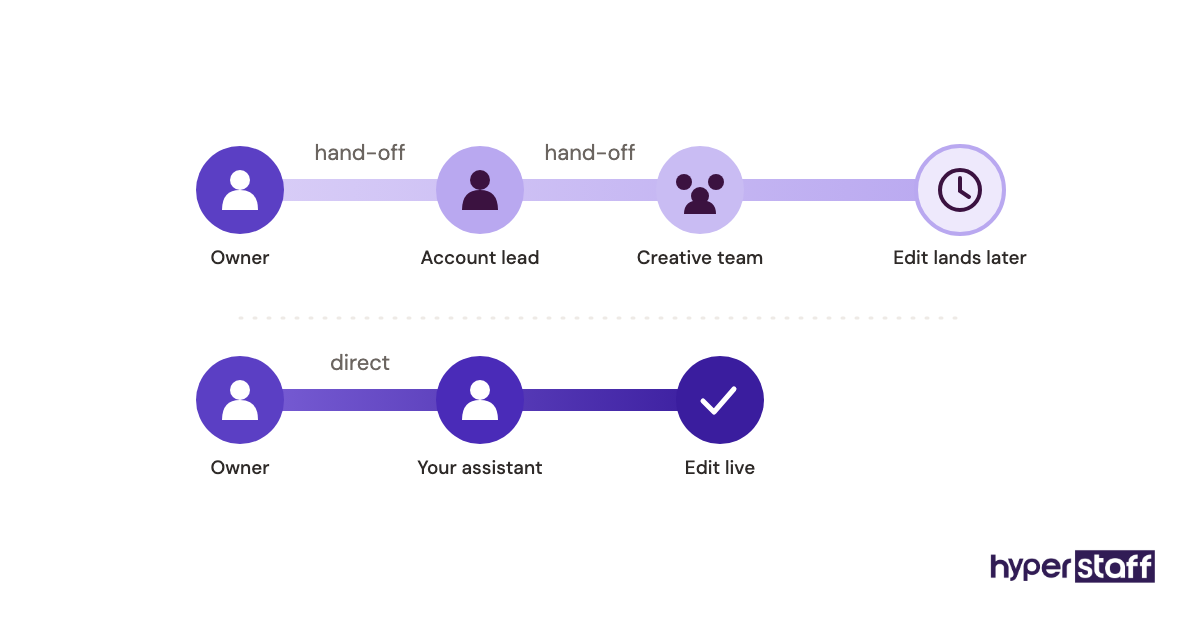
An agency gives you a team and a process, with an account lead between you and the people doing the work. A virtual assistant is one dedicated person who learns your business and talks to you directly.
Agencies make sense for multi-brand ad campaigns with big budgets. For steady organic posting, the single-person model is usually faster to correct, because feedback reaches the doer the same day.
The Benefits of a Social Media Virtual Assistant
- A steady posting schedule that holds up when the owner is busy.
- Faster replies to comments and DMs, which keeps warm leads from going cold.
- Lower cost than an in-house hire, with no office, equipment or payroll setup.
- Flexible hours, from a 40-hour monthly bundle up to full-time.
- Monthly reports that show which posts worked, so the next month's plan is based on data.
- Owner hours freed from routine production and spent on sales or product.
The Drawbacks of a Social Media Virtual Assistant
- Brand voice takes a few weeks to learn, and early captions may need heavy edits.
- Time zone gaps can slow live replies during your business hours.
- Strategy still needs an owner, since most assistants are hired to execute a plan someone else sets.
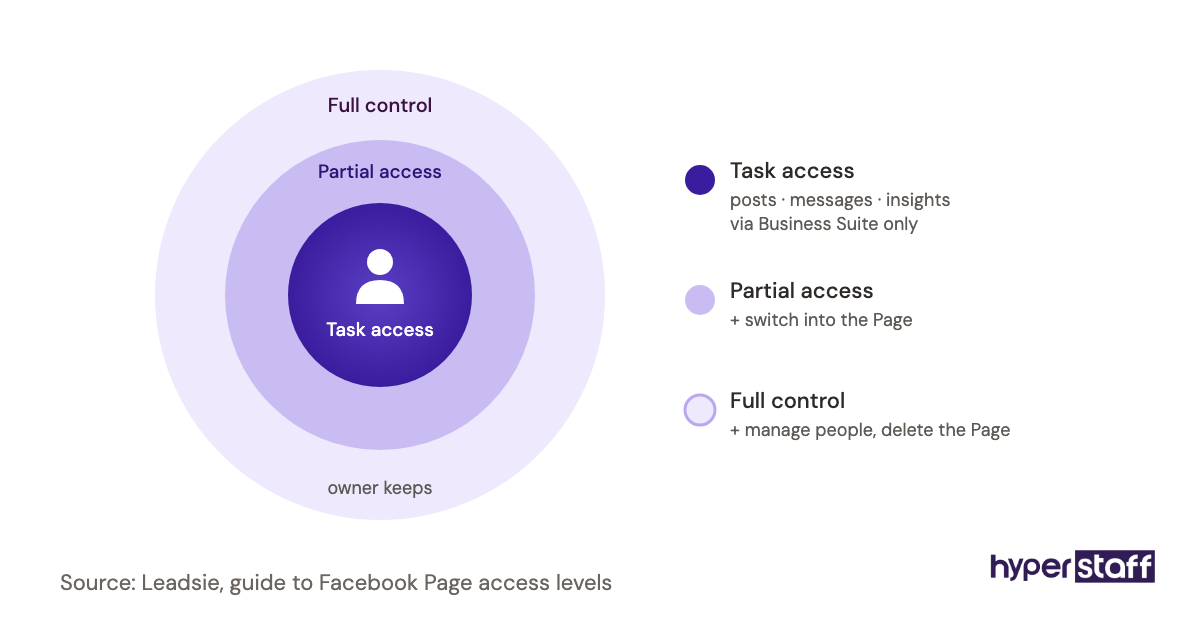
- Account access has to be set up and managed with care.
Who Needs a Social Media Virtual Assistant?
You likely need a social media virtual assistant if your accounts go dead for weeks at a time, or if DMs and comments wait days for a reply. Both are signs the work has no owner.
Common fits include local service businesses, ecommerce stores, coaches, real estate agents and B2B founders posting on LinkedIn. Solo founders often start with 40 hours a month, while ecommerce brands with heavy inbox volume tend to need full-time cover.
The poor fit is a brand still deciding who it sells to. An assistant can post well, but posting without a clear audience gives you neat feeds with no sales, and you should sort the positioning first.
Social Media Virtual Assistant Examples
The setups below are common patterns, good and bad, that show what makes the role work. Each one describes how the work is organized.
Good Social Media Virtual Assistant Examples
The Batch-and-Approve Calendar
The assistant drafts two weeks of posts every other Monday, the owner approves the whole batch in one 20-minute review, and everything is queued by Wednesday. Approval happens once, so nothing waits.
The Inbox-First Ecommerce Setup
The assistant spends the first hour of each shift on DMs and comments, using saved replies for order status, sizing and returns. Questions about refunds above a set amount go straight to the owner.
The Founder's LinkedIn Engine
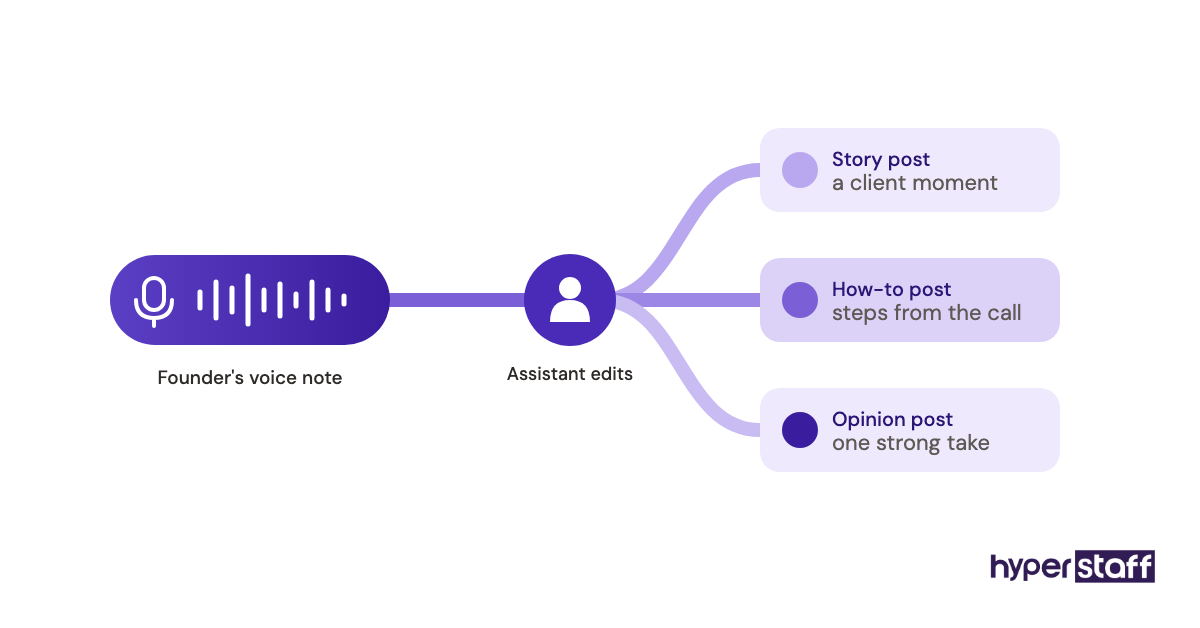
The founder records a 15-minute voice note each week, and the assistant turns it into three LinkedIn posts in the founder's voice. The founder edits lightly, and the posts sound like a person because they started as one.
Social Media Virtual Assistant Bad Examples
The Login-and-Go Hire
The owner hands over passwords and says "just post something." With no pillars, no voice guide and no examples, the assistant fills the feed with stock quotes, and engagement falls.
The Everything Assistant
Social media is one of nine jobs on the list, next to bookkeeping and email. Posting slips first, because it never feels urgent next to an invoice.
The Metric With No Goal
The owner tracks follower count only. The assistant chases follows with giveaways, and the new followers never buy.
Creating a Social Media Virtual Assistant Plan, Step-by-Step
A social media VA plan is a short written setup that covers goals, access, content, approvals and reporting. Finish it before day one, and the first month runs on rails.
Step #1: Pick One Business Goal
Choose one goal for the first quarter, such as booked calls, store visits or email sign-ups. Social metrics like reach come second and only matter if they move that goal.
Step #2: Write the Brief and Voice Guide
One page is enough: audience, content pillars, tone, banned topics and five posts you love. Our guide to writing a social media VA job description has a format you can reuse for the brief.
Step #3: Hire for the Work You Need
Match the type from the table above to your bottleneck, then test for it. The steps in how to hire a social media virtual assistant and our list of interview questions for social media VAs show how to test a candidate with a paid sample task.
Step #4: Set Up Access and Approvals
Grant role-based access to each platform, the scheduler and the design tool, then agree on the review window. The first two weeks are covered in detail in our guide to onboarding a social media virtual assistant.
Step #5: Agree on a Monthly Report
Pick four to six numbers tied to the goal and one written paragraph on what to change. Review it together in a short monthly call.
What Does an Effective Social Media VA Setup Look Like?
An effective social media virtual assistant setup has one owner for strategy, one person for execution, and a written record linking the two. The assistant knows the goal, the pillars, the posting rhythm and who approves what.
The record is the part most businesses skip. At Hyperstaff it lives in the Operations Vault, where your SOPs, tools and brand context are written down and kept current, so a replacement assistant can be briefed in 5 to 7 business days without starting from zero.
Practitioners disagree on platform count. Some argue a small brand should go deep on one platform for a full quarter, others prefer light coverage across three, and we lean toward depth first unless your buyers clearly split across platforms.
Social Media Virtual Assistant Tools and Software
Social media virtual assistants mostly work in a scheduler, a design tool and the platforms' own business suites. The prices below were checked on each vendor's site and change often, so confirm before you buy.
| Tool | Main use | Starting price |
|---|---|---|
| Meta Business Suite | Facebook and Instagram posting, inbox, insights | Free |
| Buffer | Scheduling across channels | Free for 3 channels, paid plans $5 to $10 per channel a month |
| Hootsuite | Scheduling, team inbox, reporting | About $99 to $399 per user a month on annual billing |
| Canva | Graphics, carousels, short video | Free plan, plus paid Pro and Teams plans |
| LinkedIn Page admin | Company page posts and analytics | Free |
Our view: for a single brand, Buffer plus Canva plus the native suites is enough, and Hootsuite earns its price once several people share one inbox. The full shortlist, with what each tool is good and bad at, is in our roundup of social media virtual assistant tools.
9 Proven Social Media Virtual Assistant Tips and Best Practices
These habits separate social media VA setups that last from the ones that fade after a month.
- Write the brief before the first day, even if it is one page.
- Batch content two weeks ahead, so a sick day never empties the feed.
- Use a fixed review window for approvals and stick to it.
- Keep a swipe file of posts you like, from any brand.
- Give the assistant raw material every week: photos, voice notes, customer questions.
- Build saved replies for the ten questions you get most often.
- Set a clear escalation rule for complaints, refunds and press.
- Judge the first 90 days on consistency, then judge on results.
- Read the monthly report and reply to it, or the assistant stops writing it carefully.
What Are the Common Social Media VA Challenges, and How Do You Fix Them?
The three challenges that show up most are an off-brand voice, slow approvals and a time zone gap. Each has a simple fix if you name it early.
Voice problems usually come from a thin brief. Add five approved posts and five rejected ones with a line on why, and drafts improve within a couple of rounds.
For time zones, split the work: the assistant schedules and drafts replies overnight, and urgent DMs get a saved holding reply until someone can answer. Our post on common social media VA mistakes lists the setup errors that cause most of these issues.
How Do You Measure Social Media Virtual Assistant Success?
Measure a social media virtual assistant on output first and outcomes second. Output means posts published on schedule and reply time; outcomes mean reach, engagement rate, profile clicks and leads.
Track one number that touches revenue, such as DM inquiries or link clicks to a booking page. Follower count alone tells you little.
Review the trend over three months, since a single viral post can distort any short window.
How Long Does a Social Media Virtual Assistant Take to Show Results?
Expect output in the first two weeks and measurable results in two to three months. Placement takes 5 business days at Hyperstaff, and the first scheduled posts usually go live in week two.
Month one is setup and learning the voice. By month three the assistant knows which formats your audience responds to and starts doubling down on them.
Slow approvals or a missing brief can add a full month to that timeline.
How Much Does a Social Media Virtual Assistant Cost?
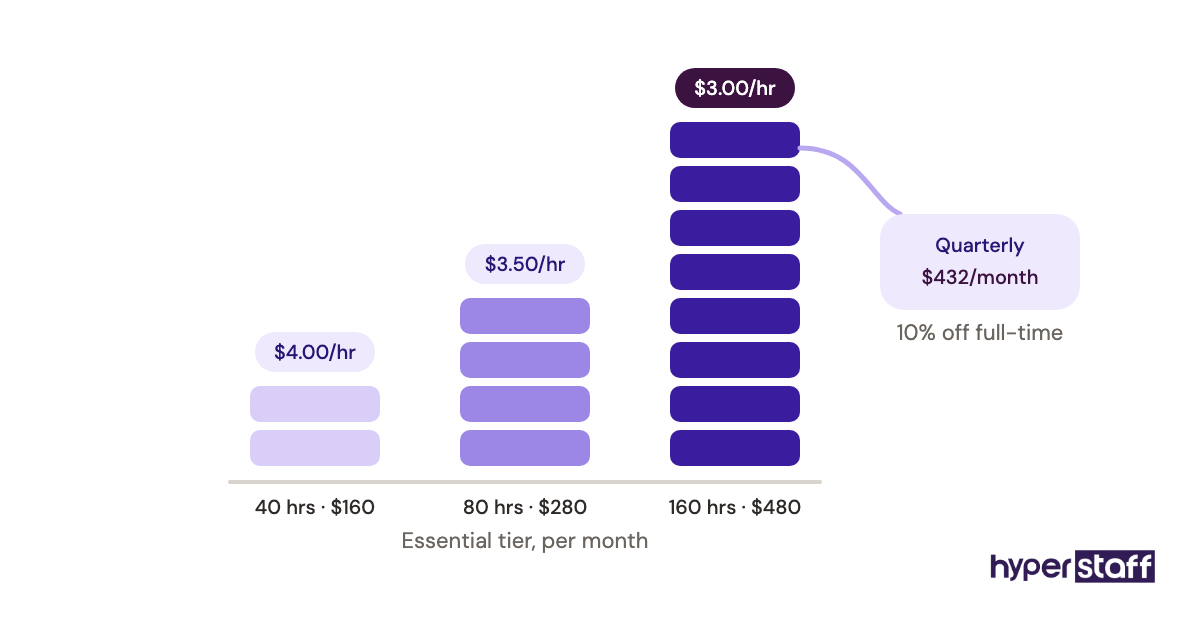
A social media virtual assistant from Hyperstaff costs from $3 to $12 an hour, depending on experience, sold in monthly bundles of 40, 80 or 160 hours. An in-house specialist costs far more once benefits are added.
| Option | Experience | Hourly rate | 40 hrs/month | 160 hrs/month |
|---|---|---|---|---|
| Hyperstaff Essential | 0 to 2 years | From $3 | From $120 | From $480 |
| Hyperstaff Professional | 2 to 5 years | From $6 | From $240 | From $960 |
| Hyperstaff Expert | 5+ years | From $12 | From $480 | From $1,920 |
| US in-house public relations specialist | Varies | About $36 in wages | Not usually hired part-time | About $6,230 in wages, plus benefits |
The in-house row uses the US Bureau of Labor Statistics median pay for public relations specialists of $74,750 a year, a role BLS describes as handling social media questions. Benefits add more on top, since they make up about 31% of total employer compensation in BLS employer cost data.
Paying quarterly saves 10% on Hyperstaff bundles. A detailed breakdown by tier and region is in our guide to social media virtual assistant cost.
Important: Hyperstaff prices shown are starting averages, not fixed quotes. Your final cost depends on the hours, tier and skills your social media work needs.
Is a Social Media Virtual Assistant Worth It?
Yes, for most small businesses with a clear audience, a social media virtual assistant is one of the best-value hires you can make. You get daily posting, fast replies and monthly reporting for a small slice of what a local hire costs, and the work compounds as the assistant learns what your audience buys.
Here is a simple calculation. A Professional-tier assistant at 80 hours a month costs from $480, or about $5,760 a year, while a US in-house specialist at the BLS median earns $74,750 in wages alone.
The gap is roughly $69,000 a year before benefits. If the assistant's DM replies and steady posting bring in even a handful of extra customers a month, the hire pays for itself, and our full analysis of whether a social media VA is worth it walks through the break-even math.
It is not worth it if nobody will write the brief or answer the assistant's questions. The cost is low, but the owner's first month of attention is not optional.
How Do You Choose a Social Media Virtual Assistant Agency?
Choose an agency that vets for social skills specifically, assigns one dedicated person, and has a written plan for replacement. Ask to see how candidates are tested, such as a sample calendar or caption task.
Ask what happens if the assistant leaves. A good answer names a timeline and explains how your brand knowledge transfers to the new person, which is why Hyperstaff keeps an Operations Vault for every client.
Compare the agency route with hiring locally before you sign. Our comparison of a social media VA vs in-house sets out where each makes more sense.
Social Media Virtual Assistant Statistics, Trends and Future Predictions
Social media usage keeps growing, and demand for people who run accounts grows with it. DataReportal reports 5.81 billion social media user identities, and the typical internet user spends about 19 hours and 18 minutes a week on social platforms, according to GWI data it cites.
Pay data shows why remote assistants appeal to smaller firms. BLS puts the median public relations specialist wage at $74,750 a year, which is out of reach for many small businesses that need only 40 to 80 hours of social work a month.
Our predictions, offered as opinion: short video will keep taking a bigger share of assistant hours, and more owners will ask for one person who can edit clips and manage the inbox. We are less certain about which platform gains next, since that has shifted fast in the past.
How Is AI Changing the Social Media Virtual Assistant Role?
AI tools now draft captions, suggest hashtags, resize graphics and cut long videos into clips, so a social media virtual assistant spends less time on first drafts. Buffer, Canva and Meta's suite all include AI writing or design features.
The judgment work stays human. Picking which customer story to post, spotting a comment that needs a careful reply, and matching your voice still take a person who knows the business.
Disclaimer: This article is for general information only and is not professional, legal or financial advice. Prices, statistics and tool details may change, so verify them before making decisions. Hyperstaff is not responsible for actions taken based on this content.
Common questions
How many hours a week does a social media VA need?
Most small brands posting on two or three platforms need 10 to 20 hours a week. Add more if the assistant also handles DMs or video editing.
Can a social media virtual assistant run paid ads?
Some can. Ad uploads, audience setup and spend reports are common skills at the Professional and Expert tiers, but the budget decision should stay with you.
Do I need to give my VA my passwords?
No. Use role-based access in Meta Business Suite, LinkedIn Page admin and your scheduler, so you can remove access at any time.
Can one social media assistant manage several brands?
Yes, if the hours match the workload. Each brand needs its own brief and voice guide, or the posts start to sound the same.
What skills should a social media VA have?
Look for clear writing, basic design in Canva, comfort with a scheduler, and knowledge of each platform's formats. Video editing and simple reporting are strong extras.
Book a free 15 min call
We place a pre-vetted specialist in 5 business days, fully managed, from $3/hour.