8 Real Estate Virtual Assistant Tools Worth Paying For
Eight real estate virtual assistant tools compared on pricing, VA use cases, pros, cons and the compliance limits that decide what an assistant can touch.
On this page
💡 Key Takeaways:
1) The core real estate virtual assistant tools are a real estate CRM such as Follow Up Boss or Lofty, a transaction platform like dotloop, ShowingTime+ for showings, RPR for comps, Canva for listing marketing, Loom for training videos and 1Password for shared access.
2) Several of these tools cost little or nothing extra. RPR is free for REALTOR members, ShowingTime often comes with an MLS subscription, and Canva and Loom have free plans that cover a light workload.
3) A virtual assistant should get their own seat or assistant login in each tool, never the agent's personal MLS credentials, and anything that touches pricing, contracts or negotiation stays with the licensed agent.
Right tools turn VA hours into closings
Hyperstaff has placed 70+ pre-vetted virtual assistants with 30+ clients, and our dedicated real estate virtual assistants start within 5 business days at rates from $3/hour. Every client gets a dedicated account manager, plus an Operations Vault that keeps your SOPs, logins and tool setup written down, so the assistant is working inside your CRM from the first week.
Best Real Estate Virtual Assistant Tools Comparison
The best real estate virtual assistant tools are Follow Up Boss or Lofty for leads, dotloop for transaction files, ShowingTime+ for showings, RPR for pricing data, Canva for listing marketing, Loom for training and 1Password for shared access. Most agents end up using five or six of them.
Prices below come from each vendor's pricing page or, where the vendor doesn't publish one, from named third-party sources in the reviews. Vendors change plans often, so read the figures as ranges and confirm before you buy.
| Tool | Best for | Free plan | Paid pricing | Typical VA use |
|---|---|---|---|---|
| Follow Up Boss | Lead follow-up on solo agents and small teams | 14-day trial | About $58 to $69 per user a month on Grow; Pro from about $416 a month for 10 users | Speed-to-lead texts, Smart Lists, pipeline updates |
| Lofty | CRM, IDX website and lead gen in one login | No, quote-based | Not published; third-party estimates start near $449 a month | Lead tagging, drip plans, website lead triage |
| dotloop | Contracts, e-signatures and compliance files | Check current offer | Premium about $26 to $32 a month per agent; team plans quote-based | Building loops, chasing signatures, tracking deadlines |
| ShowingTime+ | Showing requests and buyer feedback | Often included with MLS dues | Appointment Center add-on about $10 to $15 a month in reported markets | Confirming showings, collecting feedback |
| RPR | Comps, CMAs and property reports | Free for NAR REALTOR members | $0 with membership | Drafting CMAs and buyer reports for agent review |
| Canva | Listing graphics, flyers and social posts | Yes | Pro about $144 to $180 a year for one person; Business about $250 per person a year | Just-listed posts, flyers, Brand Kit upkeep |
| Loom | SOP and walkthrough videos | Yes, 25 videos up to 5 minutes | About $15 to $24 per creator a month | Recording CRM steps and process walkthroughs |
| 1Password | Sharing logins without revealing passwords | Trial only | $24.95 a month for up to 10 users, or $8.99 per user on Business (annual billing) | Vaulted access to portals, Canva and social accounts |
Before you pick from the table, it helps to know what a real estate VA does in your business. An assistant who only runs lead follow-up needs a CRM and 1Password, while one who coordinates transactions lives in dotloop all day.
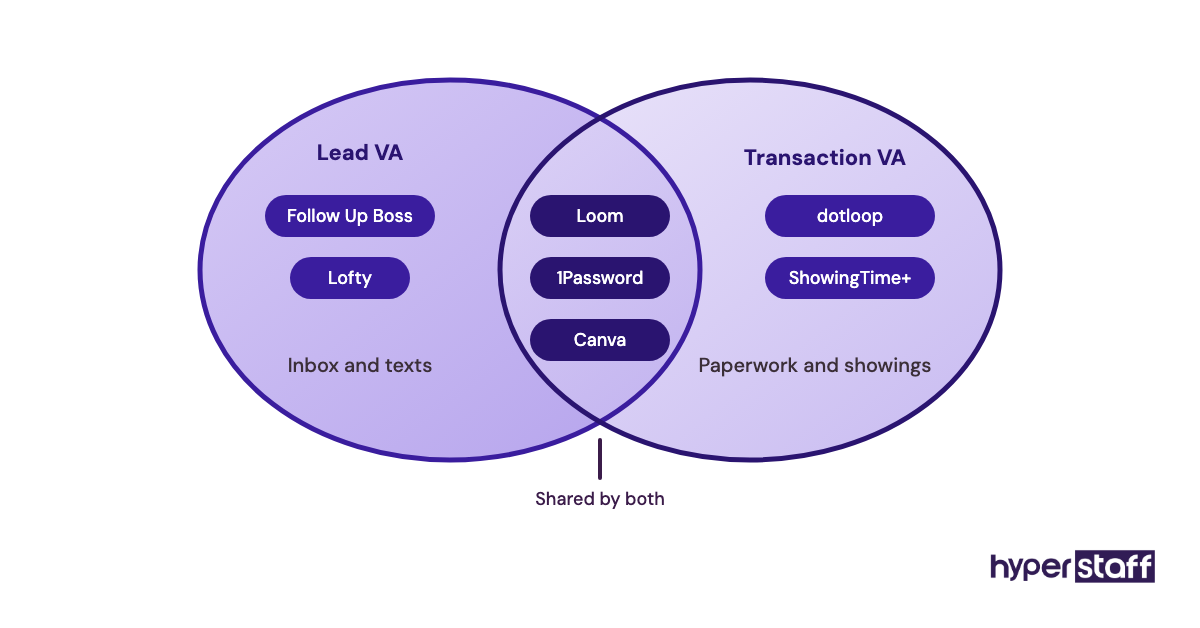
Name the exact tools in your VA job description too. Candidates who already know Follow Up Boss or dotloop skip the slowest part of ramp-up.
Best Real Estate Virtual Assistant Tools Reviews
Each review below covers pricing, what a virtual assistant actually does inside the tool and where it breaks. We've ordered them roughly by how early in a VA engagement they tend to matter.
1) Follow Up Boss: Best for fast lead follow-up on small teams
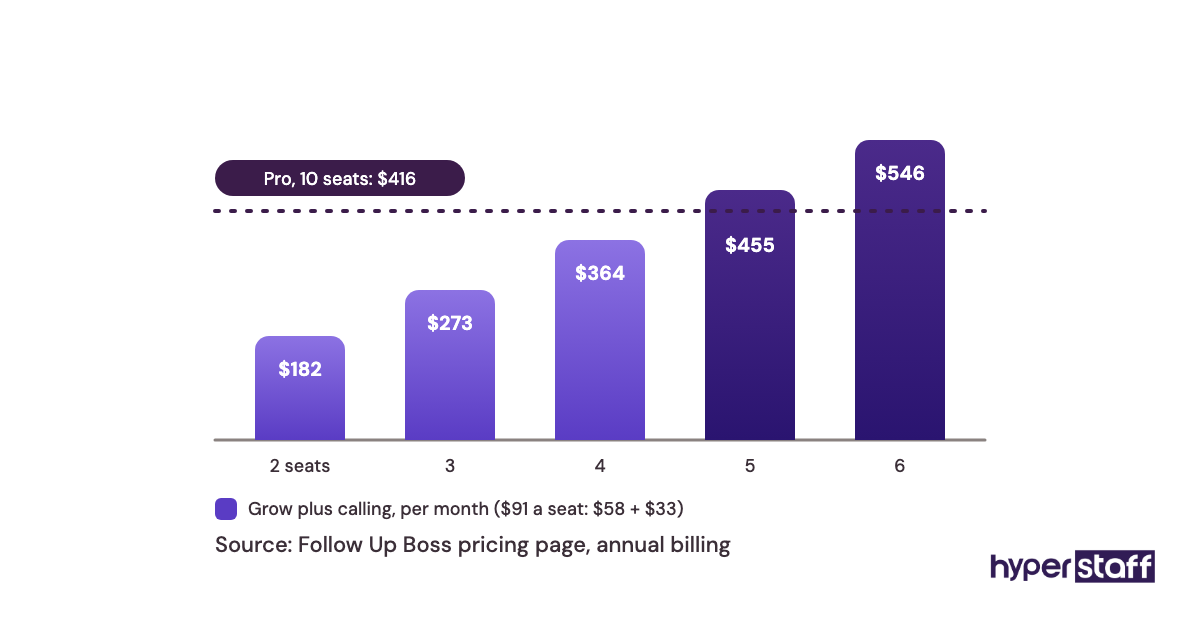
Follow Up Boss is a real estate CRM built around lead routing and follow-up. Its pricing page lists Grow at $58 per user a month on annual billing ($69 monthly), Pro at $416 a month for 10 users and Platform at $833 a month for 30 users.
Follow Up Boss key highlights
- Grow costs about $58 to $69 per user a month
- Pro bundles 10 users with unlimited calling and texting
- Calling on Grow is an add-on, about $33 to $39 per user
- 14-day free trial, no contract
- Unlimited contacts, lead sources and integrations
Why a VA moves faster inside Follow Up Boss
Follow Up Boss gives a virtual assistant one queue to work. New portal leads land in the inbox, Smart Lists sort contacts by last touch, and action plans send the first texts and emails automatically.
The catch is seat pricing: on Grow, a solo agent adding a VA pays for two seats, roughly $116 to $138 a month before calling. Once around five people need calling, Pro's flat bundle usually works out cheaper.
Pros
- Smart Lists turn follow-up into a daily checklist
- Portal and website leads arrive in one place
- Simple enough for a new VA to learn in days
- Cancel anytime, no annual lock-in required
- Phone and email support 7 days a week
Cons
- A VA seat costs the same as an agent seat on Grow
- Calling is extra on the Grow plan
- No built-in IDX website
- Reports are only as good as the VA's data entry
- Monthly cost climbs quickly past three users
Who Follow Up Boss suits
Pick it when leads come from paid portals and follow-up is the VA's main job, which it is in most lists of real estate VA tasks.
2) Lofty: Best for agents who want CRM, IDX site and lead gen in one place
Lofty (formerly Chime) combines a real estate CRM, an IDX website and paid lead generation in one platform. Lofty doesn't publish pricing, and a Luxury Presence pricing breakdown estimates plans start near $449 a month, with setup fees reported between $299 and $1,499.
Lofty key highlights
- Quote-based pricing, no public rate card
- Third-party estimates start near $449 a month
- CRM, IDX website and ads under one login
- Smart plans automate drip texts and emails
- AI and calling features sold as add-ons
What a VA really does inside Lofty
Lofty has far more moving parts than a lead-only CRM. A virtual assistant often spends the first weeks on cleanup: merging duplicate leads, fixing tags and switching off smart plans nobody remembers turning on.
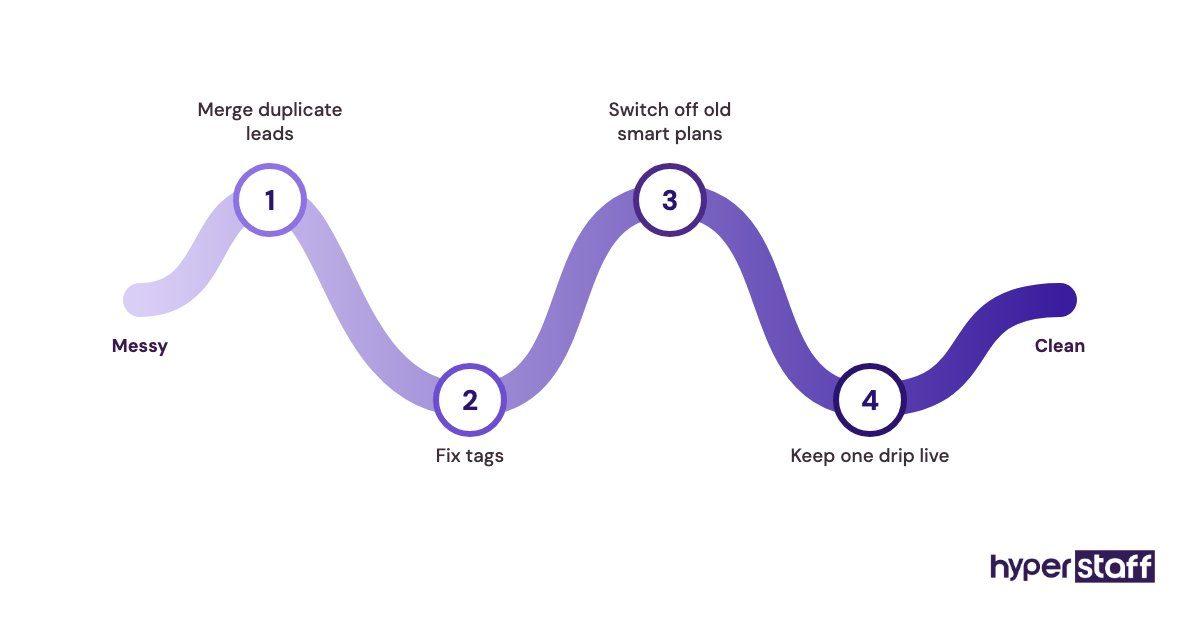
All-in-one platforms usually stall at that cleanup stage, because agents buy the full suite, never configure it, then expect the VA to know which automations matter. Ask about Lofty experience directly when you go through your VA interview questions.
Pros
- Website leads flow straight into the CRM
- One login for the VA instead of four
- Strong drip automation once it's configured
- Built-in lead gen for agents who buy ads
- Suits teams that want everything in one bill
Cons
- No public pricing makes budgeting hard
- Setup fees on top of the subscription
- Steep learning curve for a new assistant
- Add-ons can push costs well past the base plan
- Overkill for an agent working mostly referrals
Is Lofty worth the extra setup?
Lofty earns its price for teams that run paid ads and want the website, CRM and drip plans in one system.
3) dotloop: Best for transaction paperwork and e-signatures
dotloop is a transaction management platform for contracts, e-signatures and compliance files. Capterra lists the agent Premium plan at $31.99 a month, or about $26.16 a month on annual billing, while team and brokerage plans are quote-based.
dotloop key highlights
- Premium about $26 to $32 a month per agent
- Unlimited loops and e-signatures
- Task templates for repeat checklists
- Many brokerages already pay for it
- Mobile app for signing on the go
Where a VA saves the most time in dotloop
dotloop turns a virtual assistant into a lightweight transaction coordinator. The VA builds each loop, drops in the right forms, sends signature requests and tracks contingency dates against a task template.
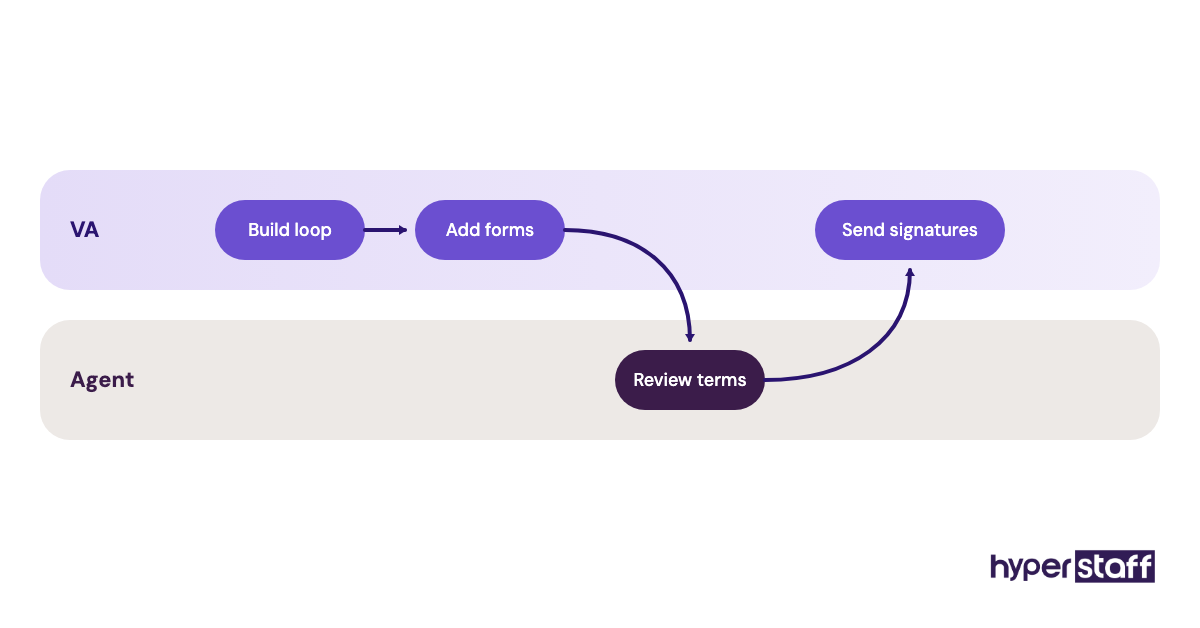
Check with your broker before paying for anything. Plenty of brokerages already license dotloop or SkySlope for every agent, and a VA can usually be added to your loops as a participant at no extra cost.
Pros
- Signature chasing becomes a routine VA task
- Templates keep every file in the same order
- Clients sign without printing anything
- Clear audit trail for broker compliance review
- Often covered by the brokerage already
Cons
- Team pricing isn't published
- Form libraries depend on your state association
- Duplicate loops get messy without naming rules
- Weaker task tracking than a dedicated TC tool
- Brokerage may require a different platform
Should you pay for dotloop yourself?
Only if your brokerage doesn't provide a transaction platform, since the fee adds to the real estate VA cost you're already budgeting.
4) ShowingTime+: Best for showing requests and buyer feedback
ShowingTime+ is Zillow's showing management platform for scheduling, confirmations and feedback. Many MLSs include the base tool with membership, and REcolorado offers the Appointment Center upgrade for $10 a month, against a $15 national price at its launch.
ShowingTime+ key highlights
- Base scheduling often included with MLS dues
- Appointment Center add-on about $10 to $15 a month
- 24/7 human desk answers showing calls
- Automatic buyer-agent feedback requests
- Pricing benchmark reports in select markets
Who should answer showing calls, the VA or the desk?
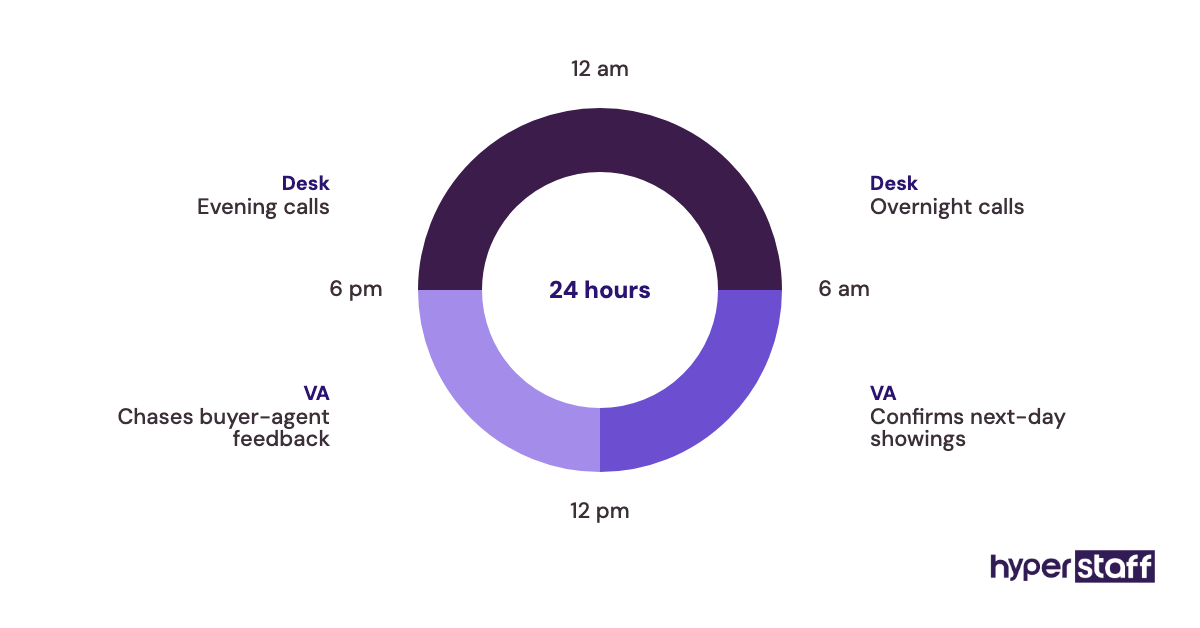
Appointment Center is itself a staffed call desk, so it overlaps with a virtual assistant. Practitioners split on this one: some agents want the desk covering nights and weekends, others want their VA owning every showing because the assistant already knows the sellers.
A common split works well. The desk takes overnight calls, and the VA confirms next-day showings, chases feedback and sends sellers a weekly summary.
Pros
- Low or no cost through most MLSs
- Night and weekend calls covered
- Feedback requests go out automatically
- Seller reports are easy for a VA to compile
- Widely used, so buyer agents know it
Cons
- Availability and price vary by MLS
- Desk staff don't know your sellers personally
- Feedback response rates depend on buyer agents
- Pricing reports aren't in every market
- Two schedulers on one listing cause double bookings
Where ShowingTime+ fits
Any listing agent with more than a couple of active listings gets value from it, and it's one of the cheaper reasons a real estate VA is worth it.
5) RPR: Best for comps and CMA prep on a zero budget
RPR (Realtors Property Resource) is a property data and reporting platform that's free for NAR's REALTOR members, according to GCAR's member services page. It blends public records with locally licensed MLS data and includes the Realtors Valuation Model (RVM) plus branded CMA tools.
RPR key highlights
- Free with REALTOR membership
- Branded CMA, seller and buyer reports
- RVM automated value estimates
- Public records merged with MLS data
- Not available to non-member licensees
How a VA should use RPR without overstepping
RPR lets a virtual assistant draft a CMA or neighborhood report in minutes. The VA pulls comps, adds branding and formats the report, then hands it to the agent.
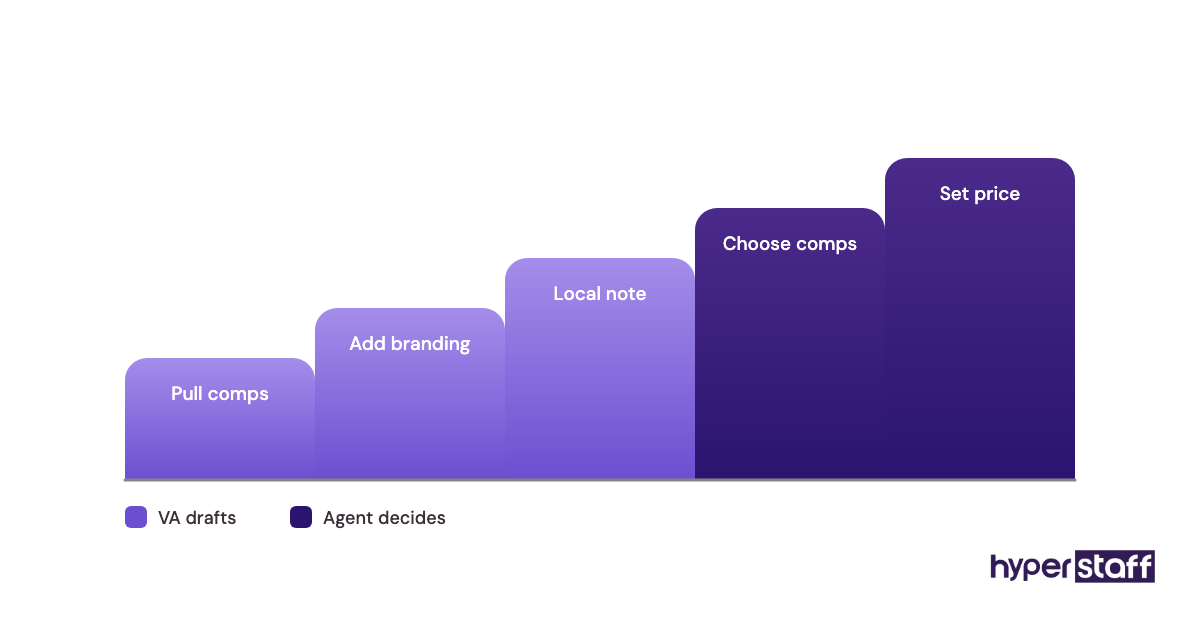
The agent sets the price. RVM estimates can drift from what the MLS shows in neighborhoods where prices move fast, and a VA-sent CMA that nobody checked is the version that loses a listing appointment.
Pros
- No extra cost for members
- Professional reports with your branding
- Good starting point for comps
- Commercial and residential data in one place
- Saves agent time on report formatting
Cons
- REALTOR members only
- Automated values need local judgment
- Data coverage varies by MLS
- Reports look generic without custom notes
- Pricing decisions still belong to the agent
The honest case for RPR
For members, RPR is the easiest free tool on this list to hand to an assistant.
6) Canva: Best for listing graphics and social posts
Canva is a design tool with real estate templates for flyers, just-listed posts and open house graphics. Recent tracking from PricingSaaS shows Canva Pro at about $144 a year for one person after a price cut from $180, while Canva Business runs about $250 per person a year.
Canva key highlights
- Free plan with basic templates
- Pro about $144 to $180 a year, one person
- Business about $250 per person a year
- Brand Kit keeps fonts and colors consistent
- Scheduler posts to social accounts
The licensing detail most agents miss
Canva Pro is licensed to one person. Sharing your Pro login with a virtual assistant breaks the terms, so once two people design, Business is the correct plan.
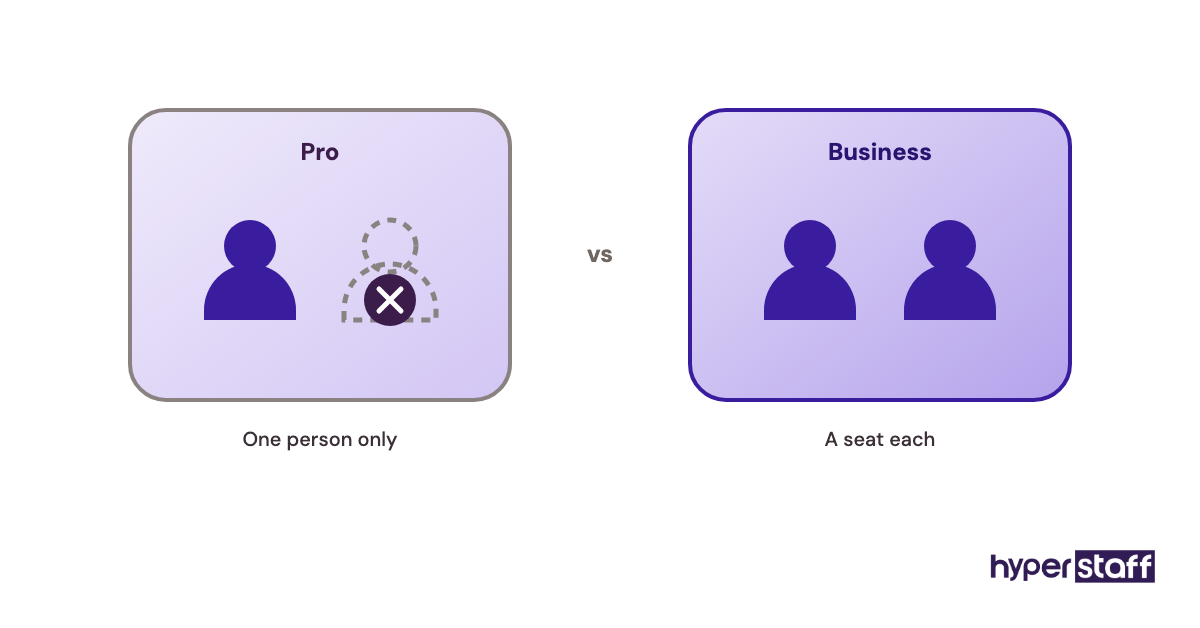
Photo rights catch agents out too, because listing photos usually belong to the photographer and some licenses limit reuse in ads or after closing. Your VA should know the terms before building a just-sold carousel.
Pros
- A VA can produce listing graphics in minutes
- Brand Kit stops off-brand colors and fonts
- Huge library of real estate templates
- Comments make approvals quick
- Free plan covers light use
Cons
- Pro can't be shared with an assistant
- Templates look familiar to buyers who scroll a lot
- Business pricing adds up per seat
- Print quality needs checking before ordering
- Photo licensing is still your responsibility
Is Canva the right design tool for a VA?
For most agents it is, as long as the plan matches the number of people designing.
7) Loom: Best for recording SOPs your VA can rewatch
Loom records your screen and voice so you can show a process once. Its pricing page lists a free Starter plan with 25 videos capped at 5 minutes, Business at $18 per creator a month and Business + AI at $24, with annual billing saving up to 17%.
Loom key highlights
- Free plan: 25 videos, 5 minutes each
- Business about $15 to $18 per creator a month
- Business + AI adds auto summaries
- Viewers watch free, no seat needed
- Timestamped comments for questions
How Loom shortens a VA's ramp-up
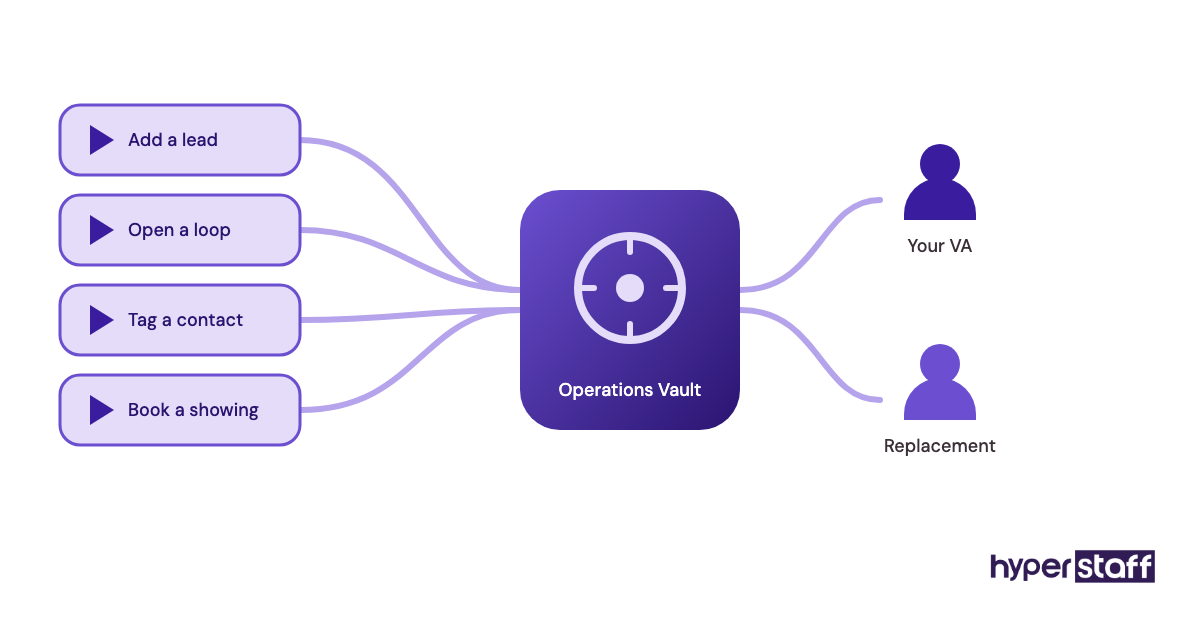
Loom works best as a library of short, single-task videos. One video per process, such as adding a lead in Follow Up Boss or opening a loop in dotloop, is easier to rewatch than an hour-long recording nobody finishes.
The 5-minute free cap enforces that habit, and it belongs in any plan for onboarding a real estate VA. At Hyperstaff these videos go into your Operations Vault, so a replacement assistant gets briefed from them.
Pros
- Agents record once, the VA rewatches anytime
- Free plan suits a small SOP library
- Only the creator needs a paid seat
- Comments keep questions tied to the step
- Faster to make than written SOPs
Cons
- Videos go stale when a tool's screens change
- Hard to search compared with written docs
- 25-video cap fills up fast
- Recordings can expose client data on screen
- AI features cost extra
Who should pay for Loom
Whoever records the processes needs the seat, usually the agent first and the VA later.
8) 1Password: Best for sharing logins without giving away passwords
1Password is a password manager that lets you share vault items with a team. Its business pricing page lists the Teams Starter Pack at $24.95 a month for up to 10 members and Business at $8.99 per user a month, both billed annually.
1Password key highlights
- Teams Starter Pack: $24.95 a month, up to 10 members
- Business: $8.99 per user a month
- Shared vaults with per-item access
- Revoke a user's access in one step
- Watchtower flags weak or reused passwords
What belongs in the vault, and what doesn't
1Password is the right place for shared business logins such as Canva, Zillow agent profiles, Google Business Profile and social accounts. The VA can sign in without ever seeing the password, and offboarding takes one click.
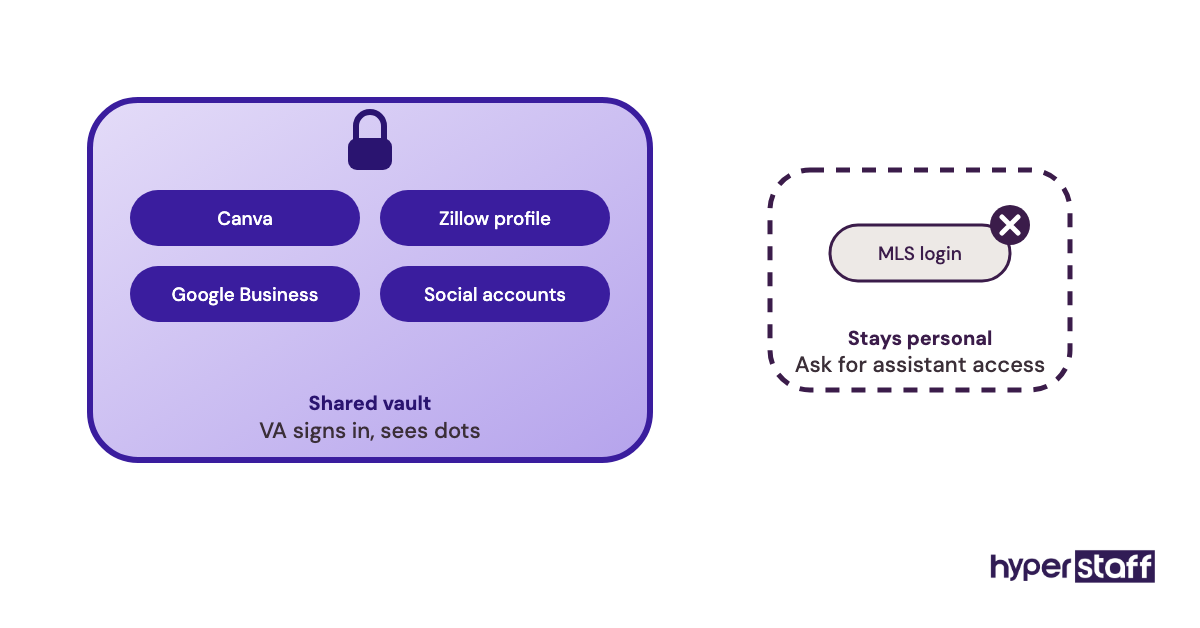
Keep your MLS credentials out of it. MLS logins are personal to the member, and sharing them is a classic entry on any list of real estate VA mistakes.
Pros
- Flat price covers a small team
- VA never sees raw passwords
- Access removal is instant
- Works across browsers and phones
- Business owns every credential
Cons
- No permanent free plan for teams
- Annual billing on the listed prices
- Some portals still send 2FA codes to your phone
- Vault structure needs planning upfront
- Can't fix rules that ban sharing, like MLS terms
Is 1Password a must-have?
For any agent giving a VA access to more than two accounts, yes.
What can a real estate VA legally touch in these tools?
A real estate virtual assistant can run admin, marketing and follow-up inside these tools, but MLS rules, texting law and Fair Housing rules set hard limits. Each limit attaches to the agent's license or account, so the agent carries the risk when a VA crosses one.
MLS and listing systems
MLS access is where agents slip most often. The rules belong to your local MLS, and they cover the assistant as much as you.
Read your MLS's participant rules once before the VA starts.
Login sharing
Most MLSs bar members from sharing their login, and many fine members who do. Fines and suspensions land on the agent.
Multi-factor sign-ins also lock out an assistant working from another country, so shared logins tend to fail on practical grounds before anyone gets caught.
Assistant access
Many MLSs offer a separate assistant account linked to the agent's membership, usually at a lower fee. Ask your MLS before you hire, because it shapes how you hire a real estate VA.
Licensed tasks stay licensed. State rules limit what unlicensed assistants can do, and discussing price or terms with clients falls on the agent's side.
Texting and advertising rules
Automation in Follow Up Boss or Lofty makes it easy for a VA to send hundreds of messages. Ads built in Canva carry legal weight too.
Both rules apply whether the sender is remote or in your office, which is why the VA vs in-house choice rarely changes your compliance setup.
Texting consent
Marketing texts sent with automated tools generally need prior written consent under the Telephone Consumer Protection Act, with damages of $500 to $1,500 per message. Portal leads don't always carry that consent.
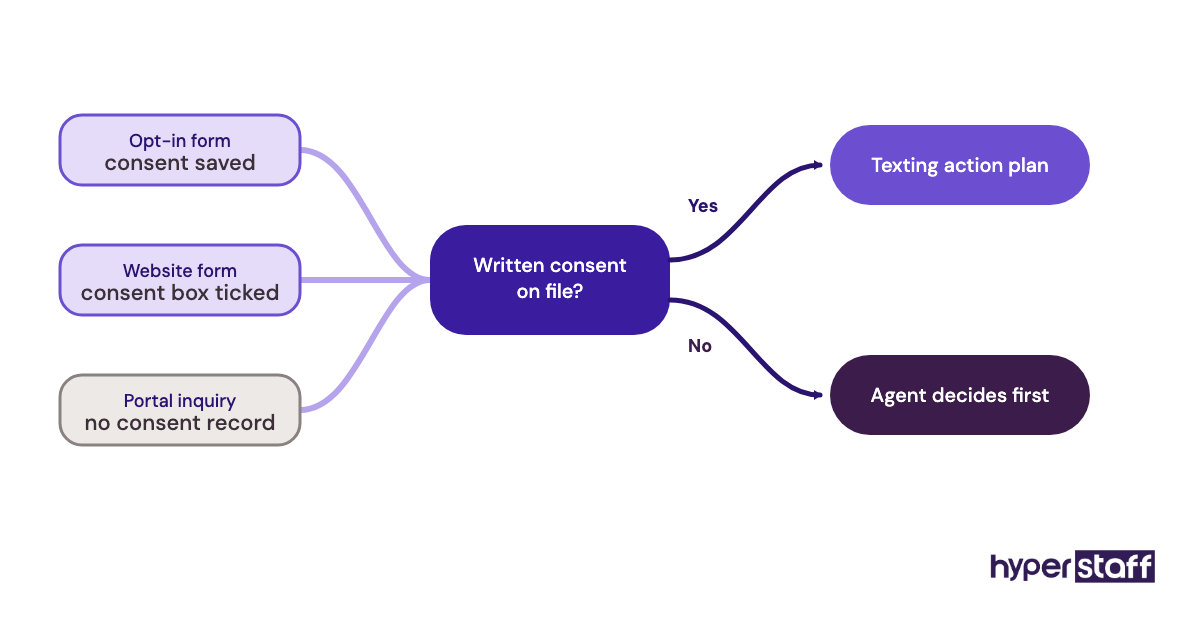
Give the VA a written rule on which lead sources can enter a texting action plan.
Fair Housing in ads
Listing copy and ad targeting must follow the Fair Housing Act. Meta also requires housing ads to run under a special ad category with limited targeting options.
Phrases describing an ideal buyer, such as "perfect for young couples," are the usual problem. Have the VA describe the property and leave the buyer out.
Disclaimer: This article is for general information only and isn't legal, compliance or financial advice. Tool features, prices and MLS or state rules change and vary by location; confirm current terms with each vendor, your MLS and your broker before acting. Hyperstaff isn't affiliated with any vendor named here, and all trademarks belong to their owners.
Common questions
Do real estate virtual assistants bring their own software?
Usually not, and they shouldn't. Buy every tool under your business account so client data, leads and logins stay with you when an assistant changes.
What's the cheapest tool setup for a real estate VA?
RPR, your MLS's ShowingTime tools and the free plans of Canva and Loom cost REALTOR members nothing extra. Add a CRM seat and 1Password, and a solo agent's tool spend lands around $80 to $100 a month.
Can my VA work my Zillow leads in Follow Up Boss?
Yes, Zillow and other portal leads flow into Follow Up Boss, where the VA can reply, tag and assign them under your rules. Set the VA's shift to overlap your busiest lead hours, since response speed matters most here.
Does my VA need their own CRM seat?
Yes, in almost every real estate CRM. A separate seat keeps the activity log honest, lets you limit what the VA sees and means you can remove access without changing your own password.
How do I track a real estate VA's hours across these tools?
Use a time tracker or your provider's reporting rather than counting logins. At Hyperstaff, hours run in monthly bundles of 40, 80 or 160, and your account manager keeps the work matched to the bundle you picked.
Book a free 15 min call
We place a pre-vetted specialist in 5 business days, fully managed, from $3/hour.