Ecommerce Virtual Assistant Mistakes That Quietly Cost Stores Money
The ten ecommerce virtual assistant mistakes that cost stores the most, from shared owner logins to inventory edited in two places, and how to fix each one.
On this page
- Mistake #1: Handing over the owner login instead of creating a staff account
- Why owners share the master login
- What a shared login costs you
- Set up scoped access instead
- Mistake #2: Hiring a generalist for a platform-specific job
- Where the generalist hire comes from
- The price of the learning curve
- Hire for the platform you actually run
- Mistake #3: Uploading products before agreeing on a listing style sheet
- How catalogs drift
- What inconsistent listings do to sales
- Write a one-page style sheet first
- Mistake #4: Letting the VA answer customers with no refund limits
- Why refund rules stay unwritten
- The two ways it goes wrong
- Give them a decision table
- Mistake #5: Tracking hours instead of outcomes
- What drives hour-watching
- What you lose by counting hours
- Pick a few numbers that matter
- Mistake #6: Ignoring time zones and shipping cutoffs
- Why the clock gets overlooked
- When the hours don't match the orders
- Match each task to the right hours
- Mistake #7: Keeping the process in your head (or in 40 loose videos)
- Why SOPs never get written
- What happens when the VA leaves
- Write it down once, keep it current
- Mistake #8: Planning peak-season hours in November
- How the rush catches stores off guard
- What a late scramble costs
- Book the extra capacity by early fall
- Mistake #9: Letting inventory be edited in two places at once
- Why the double edits happen
- The oversell that follows
- Name one system of record
- Mistake #10: Judging the VA in the first week
- Why owners decide too fast
- The cost of a reset
- Diagnose the pattern, then decide
- FAQs
Fewer VA mistakes, more margin on every order
Hyperstaff has placed 70+ virtual assistants across 30+ clients, and our ecommerce virtual assistant services put a dedicated, pre-vetted specialist on your store within 5 business days, from $3/hour. Every client gets an account manager and an Operations Vault that holds your SOPs, so the fixes below stay fixed.
Mistake #1: Handing over the owner login instead of creating a staff account
The fastest way to get a new ecommerce VA working is to send them your own email and password. Almost every store owner does it on day one, and it's the setup decision that causes the most trouble later.
Why owners share the master login
- Setting up permissions feels like a chore when work is piling up
- The owner account already has every app connected
- Two-factor codes go to one phone
- Many owners don't know Seller Central has its own user permissions
- Nobody plans for the day the VA leaves
What a shared login costs you
A sign-in from a new country can trigger a verification hold on Amazon or a security check on Shopify, and the code lands on your phone while you're asleep. Your VA sits blocked until you wake up.
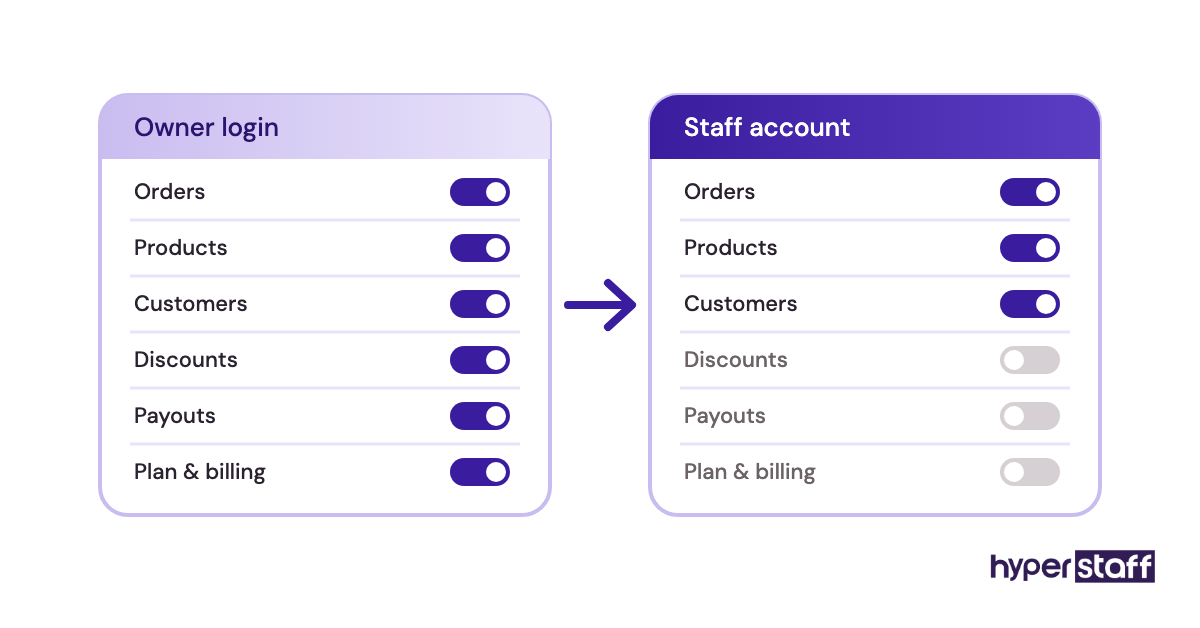
Every action they take also shows up under your name. When a price changes or a refund goes out, you can't tell who did it, and when the engagement ends, cutting access means resetting your own password and reconnecting every app tied to it.
Set up scoped access instead
Create a staff account in Shopify, or invite the VA through User Permissions in Amazon Seller Central, and switch on only the sections their tasks touch. Someone doing customer service rarely needs payout settings.
For logins that can't be split, such as a supplier portal or a 3PL dashboard, keep them in a password manager like 1Password or Bitwarden and share them per item. We compare these and other ecommerce virtual assistant tools in a separate guide.
Mistake #2: Hiring a generalist for a platform-specific job
"Ecommerce virtual assistant" describes both a person who has never opened Seller Central and a person who has written dozens of listing appeals. Same title, very different skills. If you're still working out the scope of the role, our explainer on what an ecommerce virtual assistant is covers it.
Where the generalist hire comes from
- Job posts say "ecommerce" without naming the platform
- General admin experience looks transferable on a CV
- Owners hire for the lowest rate first
- Interviews test communication, never the actual platform
The price of the learning curve
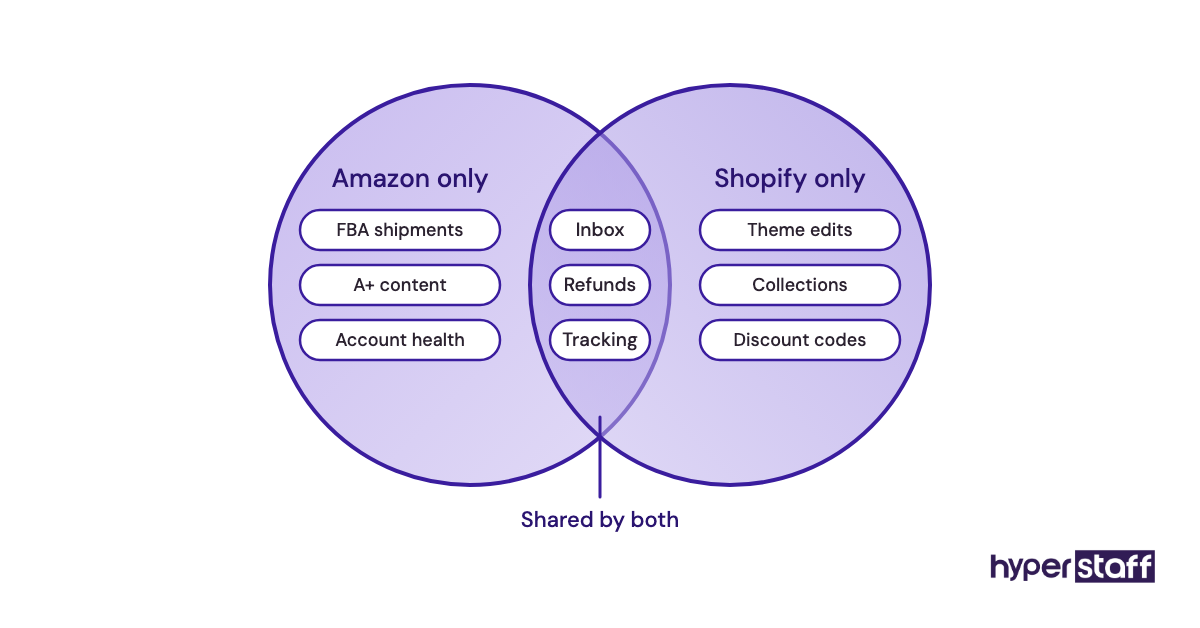
Amazon work runs on flat files, browse nodes, stranded inventory reports and case logs with Seller Support. A VA who learned Shopify can figure it out, but you pay for every hour of that learning while listings sit unpublished.
The reverse is also true. An Amazon specialist dropped into a Shopify store with Klaviyo flows and a subscription app can feel just as lost.
Hire for the platform you actually run
Name the marketplace, the apps and the main daily tasks in your ecommerce virtual assistant job description. Then screen with a short task done inside that platform, which our guide on how to hire an ecommerce virtual assistant puts in order.
Paying a little more for platform experience usually comes out cheaper by month two. Our Professional tier (2 to 5 years, from $6/hour) exists for exactly this gap.
Mistake #3: Uploading products before agreeing on a listing style sheet
Product uploads look like the easiest first task to give a new VA, so they're usually handed over with a spreadsheet and the words "same as the others." The trouble is that the existing listings rarely agree with each other either.
How catalogs drift
- Old listings were written by different people over the years
- Nobody wrote down the title formula
- Variant names were typed by hand
- Image specs live in the owner's memory
- The VA copies whichever listing they open first
What inconsistent listings do to sales
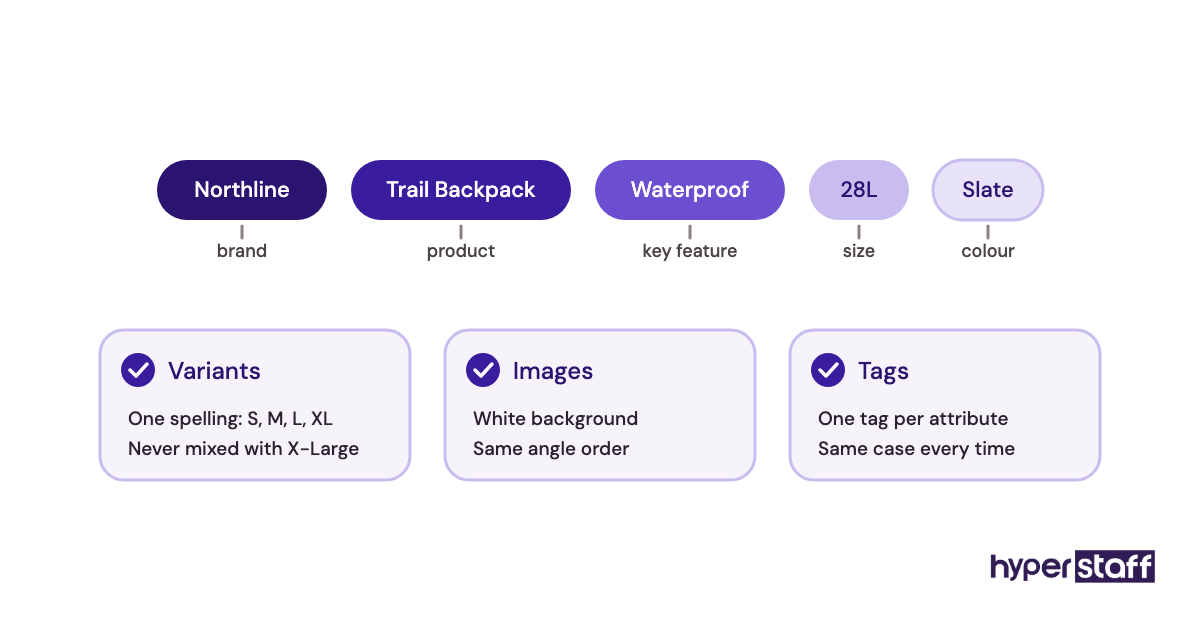
When one product uses "XL" and the next uses "X-Large," collection filters break and shoppers who filter by size never see half your stock. Mixed title formats also hurt search, both on your storefront and in the Google Merchant Center feed, which can flag products with missing identifiers.
Cleaning this up later costs more than writing it right once. Someone has to audit every listing by hand.
Write a one-page style sheet first
Before the first upload, agree on a title formula, variant naming, image dimensions and background, required attributes, and tag rules. One page is enough. Listing work is one of the most frequent ecommerce virtual assistant tasks, so it pays to define it first.
Have the VA publish five products, review them together, adjust the sheet, and only then release the full batch.
Mistake #4: Letting the VA answer customers with no refund limits
Customer service is where an ecommerce VA saves owners the most time and where vague instructions cost the most money. Without written limits, a VA does one of two things, and both hurt.
Why refund rules stay unwritten
- The owner decides case by case and never noticed a pattern
- "Use your judgment" feels like trust
- Return policy pages don't cover edge cases
- Chargebacks are handled by a different person
The two ways it goes wrong
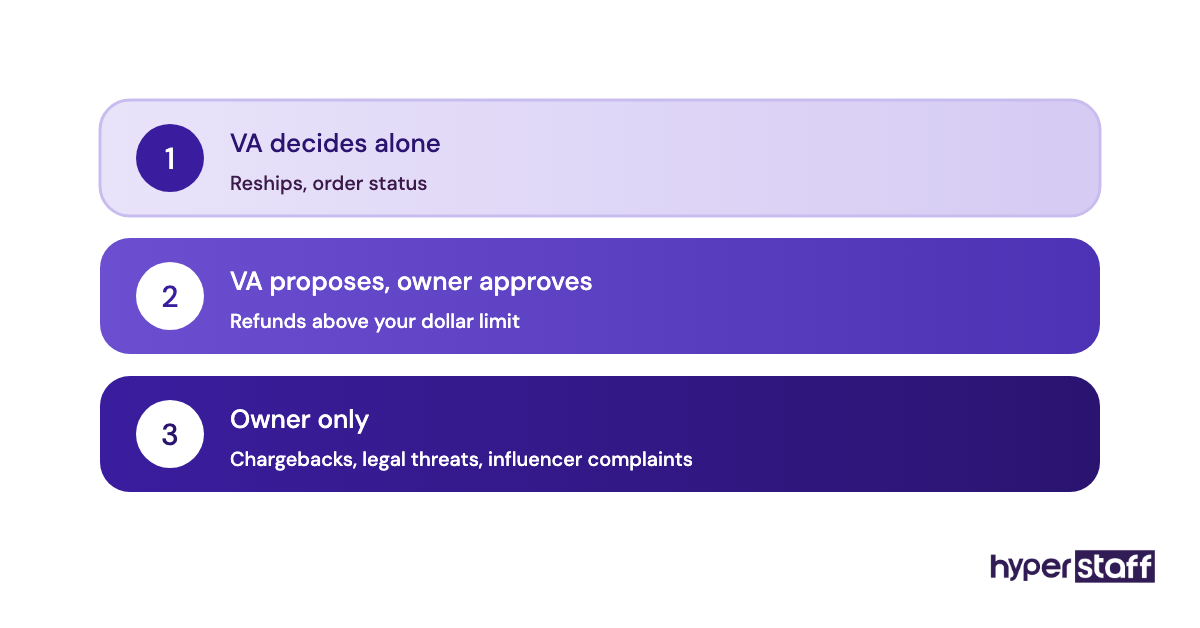
A cautious VA escalates every ticket, so you still read every email and response times climb. A generous VA refunds whenever a customer sounds upset, and your refund rate creeps up without anyone noticing for weeks.
Neither is a bad hire. Both are reasonable responses to having no rules.
Give them a decision table
Set a dollar threshold the VA can refund or reship without asking, list the cases that always escalate (chargebacks, legal threats, influencer complaints), and write template replies for your five most common tickets. Ask how a candidate would handle a refund request during screening, too; our list of ecommerce VA interview questions includes a few.
Mistake #5: Tracking hours instead of outcomes
Time trackers with screenshots tell you a VA was at the keyboard. They don't tell you whether customers got answers or whether the listings went live correctly.
What drives hour-watching
- Hourly billing makes hours feel like the product
- Outcome metrics take effort to define
- Owners worry about paying for idle time
- The tracker came free with the payroll tool
- Nobody agreed on what "done" looks like
What you lose by counting hours
A VA who knows they're judged on screen time learns to look busy. The calm, efficient one who clears the inbox in two hours and then audits listings can look worse on paper than the slow one.
You also lose the numbers that tell you whether the role is paying off. Without them, you're judging a hire on gut feel.
Pick a few numbers that matter
Choose two to four metrics tied to the work: first response time on tickets, listings published without corrections, orders processed before the carrier cutoff, or reviews answered per week. Review them every Friday for the first month.
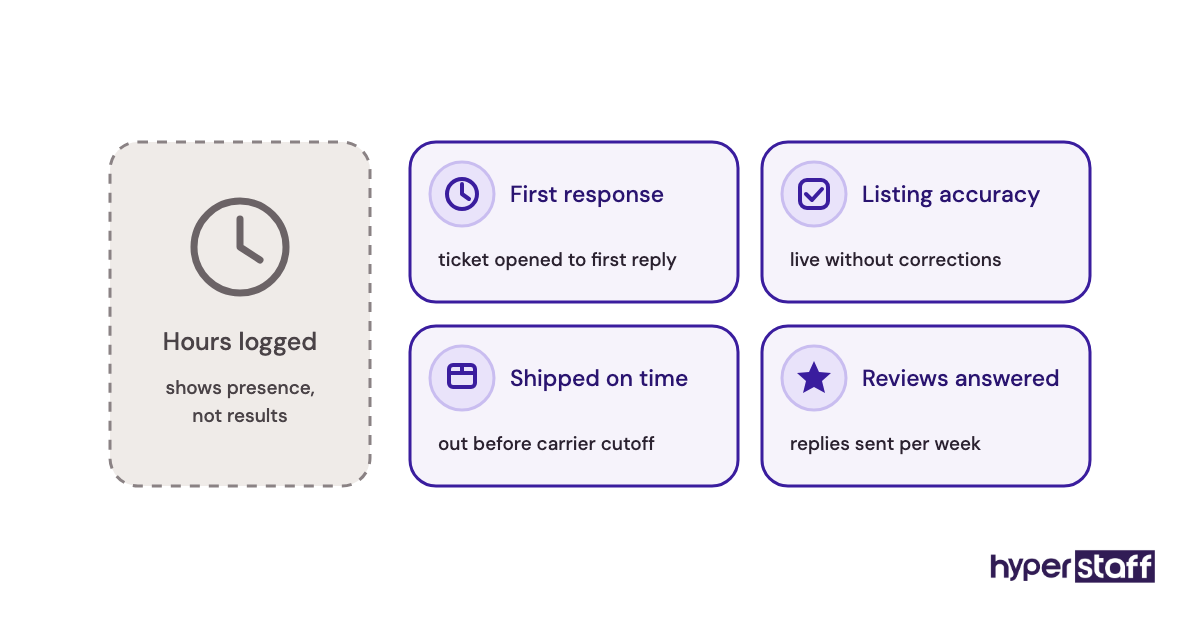
These same numbers settle whether an ecommerce VA is worth it for your store. Hours alone can't answer that.
Mistake #6: Ignoring time zones and shipping cutoffs
Time zones decide which ecommerce tasks a remote VA can actually own. A specialist in the Philippines (UTC+8) works while most of the US sleeps, which is great for some work and a real problem for anything tied to a same-day deadline.
Why the clock gets overlooked
- Owners hire for skill and rate, then think about hours
- Carrier pickup times aren't written anywhere
- Marketplace handling times are set once and forgotten
- Overnight work sounds efficient by default
When the hours don't match the orders
If your VA processes orders but logs off before the afternoon orders come in, those orders wait a full day. On Amazon, that shows up in your late shipment rate, one of the account health metrics Amazon uses to decide whether a seller keeps selling.
Live chat has the same problem in reverse. A chat widget staffed overnight and empty during your peak traffic hours is worse than no widget.
Match each task to the right hours
Split the work by when it has to happen. Overnight VAs are a strong fit for inbox clearing, listing work, review replies and reports that are ready by morning; time-sensitive order processing and live chat often suit a Latin America-based VA whose day overlaps with US hours.
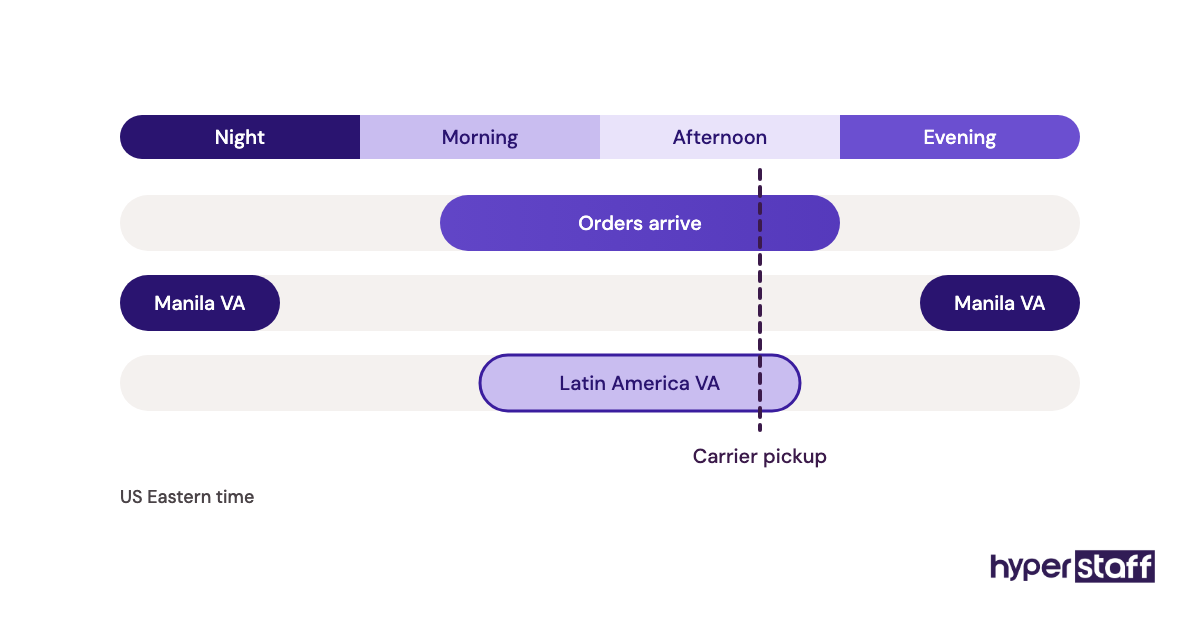
Coverage like this is one of the clearer differences between a virtual assistant and an in-house hire. Use it on purpose.
Mistake #7: Keeping the process in your head (or in 40 loose videos)
Screen recordings feel like documentation. After a few weeks, though, there are dozens of them, half are outdated, and nobody can find the one about split shipments.
Why SOPs never get written
- Recording is faster than writing
- The process keeps changing, so writing feels pointless
- The current VA "already knows it"
- Nobody owns keeping the docs current
What happens when the VA leaves
Undocumented processes are fine until the person who knows them is gone. A replacement starts from zero, you re-train them on everything, and the store runs on half speed for weeks.
Even while the VA stays, gaps cause errors nobody sees. They fill blanks with guesses that seem reasonable and turn out wrong.
Write it down once, keep it current
Keep one written SOP per recurring task in a single place, with screenshots and the exceptions listed. Ask the VA to update the doc whenever a step changes, because they're the one doing it.
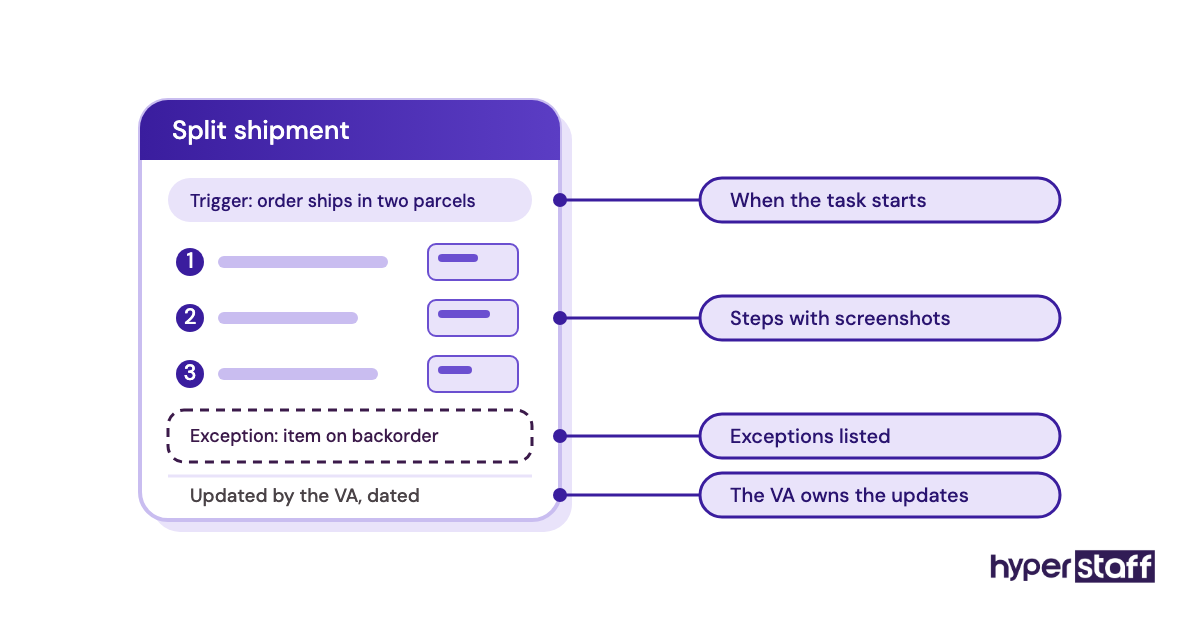
At Hyperstaff, we build this as your Operations Vault and maintain it for you, which is why a free replacement can be briefed and working in 5 to 7 business days. Our guide to onboarding an ecommerce virtual assistant covers what goes in first.
Mistake #8: Planning peak-season hours in November
Black Friday and Cyber Monday volume is predictable, yet most stores decide how much VA help they need only once the tickets are already flooding in. By then, every option is worse.
How the rush catches stores off guard
- Last year's ticket volume was never recorded
- Owners assume the current VA can absorb the spike
- Promotions get planned before support capacity does
- Adding hours feels like a cost to delay
- A second hire seems like overkill for six weeks
What a late scramble costs
Training a second VA in the middle of the rush pulls your first VA off customer work to teach. One VA working double shifts makes the kind of tired errors that turn into chargebacks: wrong addresses, double refunds, missed cancellations.
Customers who have a bad experience during your busiest weeks are often first-time buyers. Losing them hurts more than losing a regular.
Book the extra capacity by early fall
Look at last season's order and ticket volume, then decide in September whether you need more hours or a second person. Moving from a 40-hour to an 80-hour monthly bundle is usually simpler than adding a new face mid-rush.
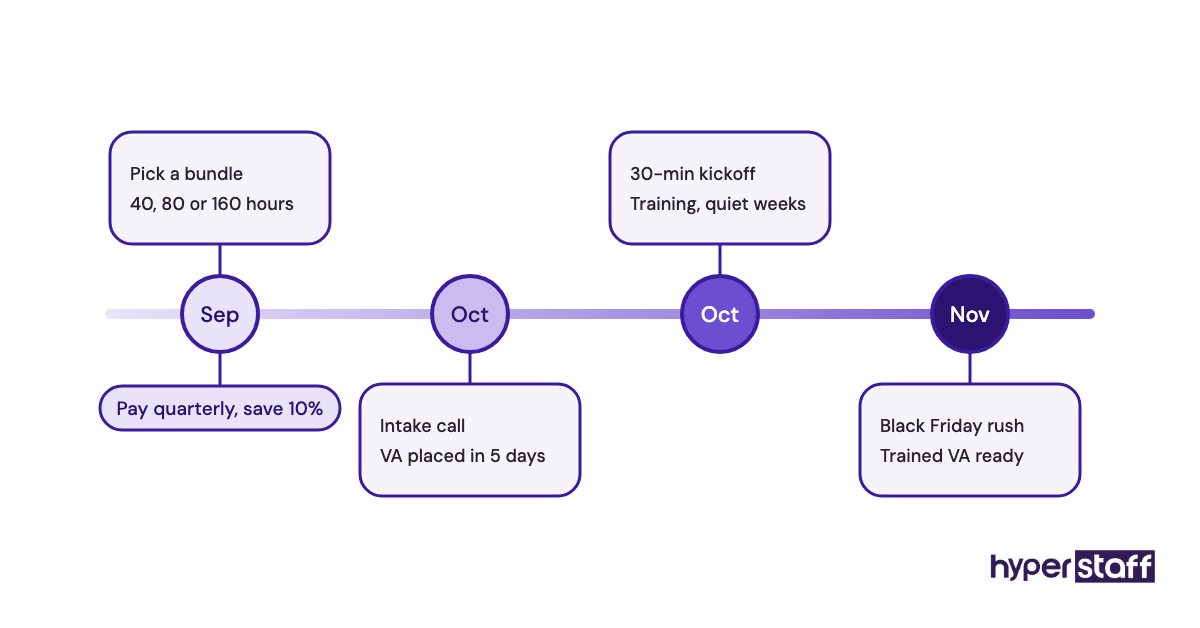
Our breakdown of ecommerce virtual assistant cost shows how the 40, 80 and 160-hour bundles compare. Paying quarterly saves 10%, which lines up well with a planned peak quarter.
Mistake #9: Letting inventory be edited in two places at once
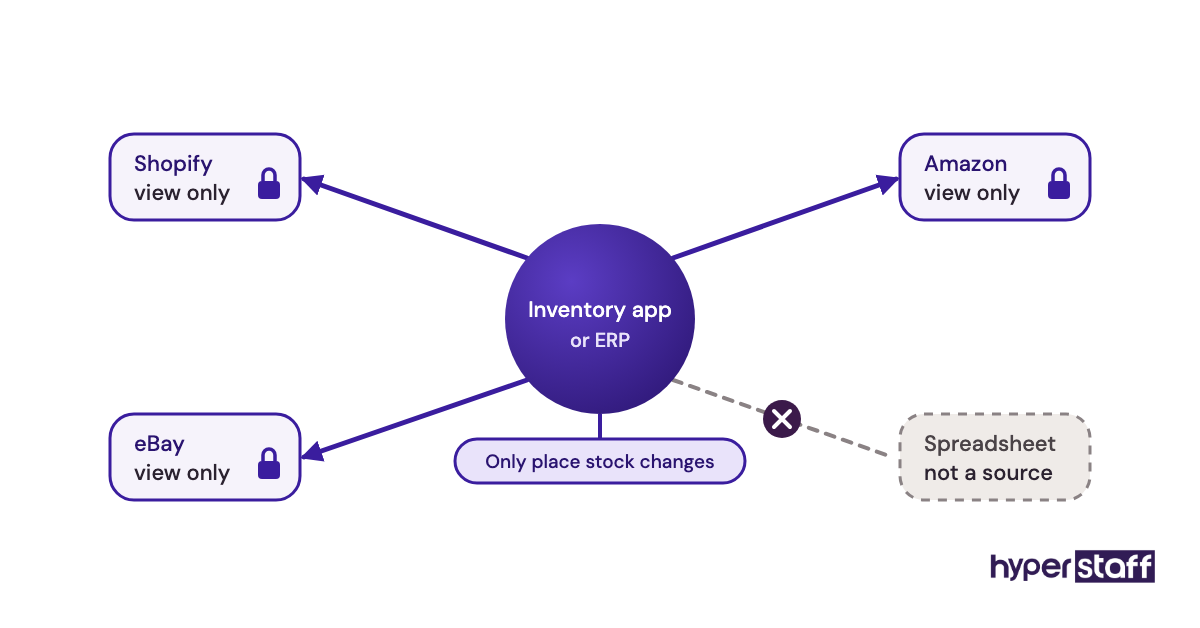
Multichannel stores usually run an inventory app that syncs stock across Shopify, Amazon, eBay and others. Problems start when the VA also edits stock counts directly in one of those channels or in a spreadsheet the owner keeps on the side.
Why the double edits happen
- The owner shows the VA the old manual method
- Nobody said which system is the source of truth
- Channel dashboards let anyone change a count
- Sync delays make a quick manual fix tempting
The oversell that follows
The sync app overwrites the VA's manual change on its next run, or the VA's change overwrites a sale the app just recorded. Either way, you end up overselling stock you don't have, cancelling orders, and taking a hit on marketplace metrics for cancellations.
These errors are hard to trace, too. Each system's log looks correct on its own.
Name one system of record
Pick one place where stock counts change, usually the inventory app or the ERP, and remove the VA's permission to edit stock anywhere else. Write that rule at the top of the inventory SOP.
Mistake #10: Judging the VA in the first week
Early errors feel like proof of a bad hire. Most of the time, they're proof of a brief with gaps in it.
Why owners decide too fast
- The first mistake is the most visible one
- Owners expected the VA to match their own speed
- No checkpoints were agreed in advance
- Replacing someone feels easier than fixing the brief
- Week-one work is mostly new tasks, so errors cluster
The cost of a reset
Letting a VA go after a week throws away the training time you've already put in. The next person hits the same gaps in the brief, makes similar mistakes, and you start to believe good VAs don't exist.
Diagnose the pattern, then decide
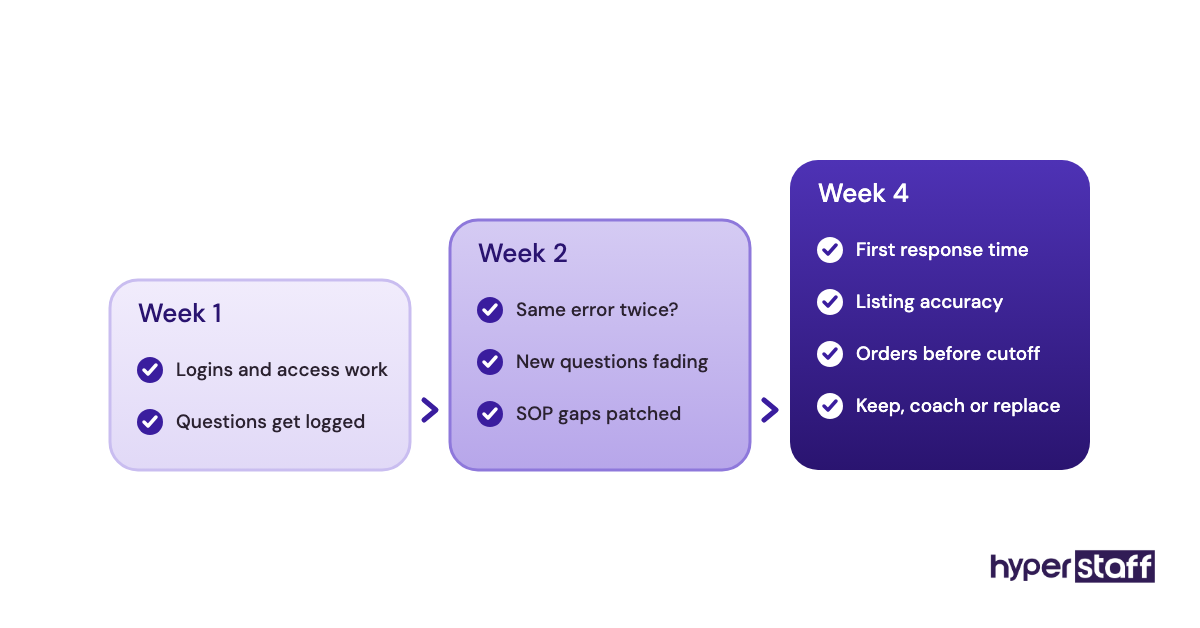
Sort errors into two groups. The same error repeated after a clear correction points to a skill or attention problem; different errors on tasks nobody explained point to the brief.
Set checkpoints at the end of weeks one, two and four, with the outcome metrics from Mistake #5. Practitioners do disagree here: some owners prefer a short paid trial with a hard yes or no, while others give a full month. We lean toward the month for anything involving customers, though a trial works for pure listing work. With Hyperstaff, a 30-minute kickoff call gets work started that day or the next morning, and your account manager tracks those checkpoints with you.
Disclaimer: This article is for general information only and does not constitute legal, financial or platform-compliance advice. Marketplace policies, platform features and pricing change, so confirm details with Amazon, Shopify and other providers directly. Hyperstaff accepts no liability for decisions made based on this content.
Common questions
Can an ecommerce virtual assistant get my Amazon account suspended?
Yes, if they break marketplace policy on your behalf. Asking buyers for positive reviews, offering incentives for reviews, or contacting customers outside Buyer-Seller Messaging can all trigger enforcement. Give your VA Amazon's own policy pages as part of their training.
How do I tell a training problem from a hiring problem?
Correct the error in writing and watch the next two weeks. If the same mistake comes back after a clear correction, it's likely a hiring problem. If new mistakes keep appearing on tasks nobody explained, fix the SOPs first.
Should my ecommerce VA have access to Stripe or PayPal?
Usually not full access. Most refunds can be issued from Shopify or Seller Central with staff permissions, so a VA rarely needs payout or bank settings. If they handle disputes, give them a limited role in the payment tool.
What should I do when my VA makes an expensive mistake?
Fix the customer-facing damage first, then add the missing step to the SOP that day. Talk through what happened without blame, since a VA who hides mistakes is far more costly than one who reports them quickly.
How many stores can one ecommerce VA manage without errors?
It depends on order volume and how similar the stores are. Two Shopify stores running the same apps can work well for one VA. Two stores on different platforms with daily order processing usually need separate people or more hours.
Book a free 15 min call
We place a pre-vetted specialist in 5 business days, fully managed, from $3/hour.