How to Onboard an Ecommerce Virtual Assistant Without Costly Mistakes
How to give a remote ecommerce assistant the access, procedures and decision rules they need to run store work on their own.
On this page
- What Is Onboarding an Ecommerce Virtual Assistant?
- Key Ecommerce VA Onboarding Terms You Should Know
- Why Does Onboarding an Ecommerce VA Matter So Much?
- How Does Ecommerce VA Onboarding Work?
- Types and Forms of Ecommerce VA Onboarding
- How Onboarding Differs From Related Hiring Steps
- Onboarding vs. Hiring an Ecommerce VA
- Onboarding vs. Ongoing Training
- Remote VA Onboarding vs. In-House Employee Onboarding
- What Are the Benefits of Structured Ecommerce VA Onboarding?
- What Are the Drawbacks of Ecommerce VA Onboarding?
- Who Needs a Formal Ecommerce VA Onboarding Plan?
- Ecommerce VA Onboarding Examples
- Good Ecommerce VA Onboarding Examples
- Bad Ecommerce VA Onboarding Examples
- Creating an Ecommerce VA Onboarding Plan, Step-by-Step
- Step #1
- Step #2
- Step #3
- Step #4
- Step #5
- What Does an Effective Ecommerce VA Onboarding Strategy Look Like?
- Which Tools Help With Ecommerce VA Onboarding?
- 9 Proven Ecommerce VA Onboarding Tips and Best Practices
- Overcoming Common Ecommerce VA Onboarding Challenges
- How to Measure Ecommerce VA Onboarding Success
- How Long Does Onboarding an Ecommerce VA Take to Work?
- How Much Does Onboarding an Ecommerce Virtual Assistant Cost?
- Is Onboarding an Ecommerce Virtual Assistant Worth It?
- How to Choose an Agency That Handles Ecommerce VA Onboarding
- Ecommerce VA Onboarding Statistics, Trends and Future Predictions
- Onboarding an Ecommerce Virtual Assistant and AI
- FAQs
Faster onboarding gets store revenue work moving sooner
Hyperstaff has placed 70+ virtual assistants with 30+ clients, and every placement opens with a 30-minute kickoff call. Our ecommerce virtual assistant services match you with a pre-vetted specialist in 5 business days from $3/hour, and your SOPs live in an Operations Vault we maintain, so store work starts that day or the next morning.
What Is Onboarding an Ecommerce Virtual Assistant?
Onboarding an ecommerce virtual assistant is the process of giving a remote hire the access, written procedures and decision rules they need to run store tasks without supervision. It spans the first few weeks, from the first login to the point where the assistant owns orders, listings or customer tickets alone.
The ecommerce part changes the job. A store runs on several linked systems (a storefront like Shopify or Amazon Seller Central, a helpdesk, an inventory or 3PL portal, payment and ad accounts), and each one needs its own permission level and its own rules about what the assistant may change.
If the role itself is still fuzzy, start with what an ecommerce virtual assistant does before you plan the handover. Onboarding goes faster when the scope is settled first.
Key Ecommerce VA Onboarding Terms You Should Know
- SOP = a written, step-by-step procedure for one recurring task, such as processing a return.
- Staff account = a named Shopify login with permissions set per area of the admin.
- Collaborator account = Shopify store access for a Shopify Partner, which doesn't count toward your staff limit.
- User permissions = Amazon Seller Central settings that give each user view or edit rights per tool.
- Least privilege = granting only the access a task needs, and adding more as trust builds.
- Escalation rule = the condition (a dollar amount, a customer type, a keyword) that sends a task back to the owner.
- Macro = a saved helpdesk reply the assistant adapts instead of writing from scratch.
- Shadowing = watching recorded or live work before doing it.
- Ramp period = the weeks between first login and full independent output.
- SLA = an agreed response time, such as first reply on tickets within four business hours.
- 3PL = a third-party logistics warehouse that stores and ships your stock.
- Operations Vault = Hyperstaff's written, maintained record of a client's SOPs, tools and context.
Why Does Onboarding an Ecommerce VA Matter So Much?
Onboarding decides how much a new ecommerce assistant costs you before they start saving you time. Poor onboarding is common across every kind of hire: Gallup finds that only 12% of employees strongly agree their organization does a great job onboarding new staff.
In a store, onboarding gaps turn into money quickly. A refund issued on the wrong order, a price typed as 4.99 instead of 49.99, or an oversold SKU all reach a customer within hours, and these are the kinds of ecommerce virtual assistant mistakes that trace straight back to the first two weeks.
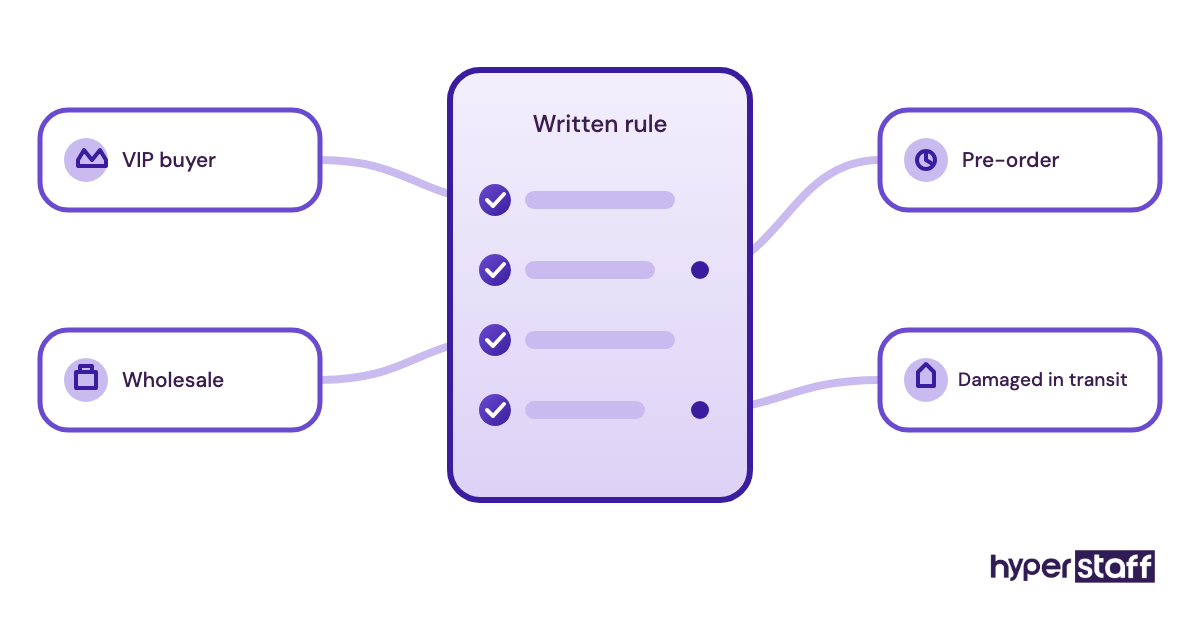
Most early errors come from a rule nobody wrote down. "We never refund shipping on sale items" or "wholesale orders skip the review request" lives in the owner's head, and the assistant has no way to guess it.
How Does Ecommerce VA Onboarding Work?
Ecommerce VA onboarding runs in phases: access setup before day one, a kickoff, a read-only or shadowing week, a week of doing tasks with review, and then full ownership with escalation rules. Each phase widens what the assistant can touch.
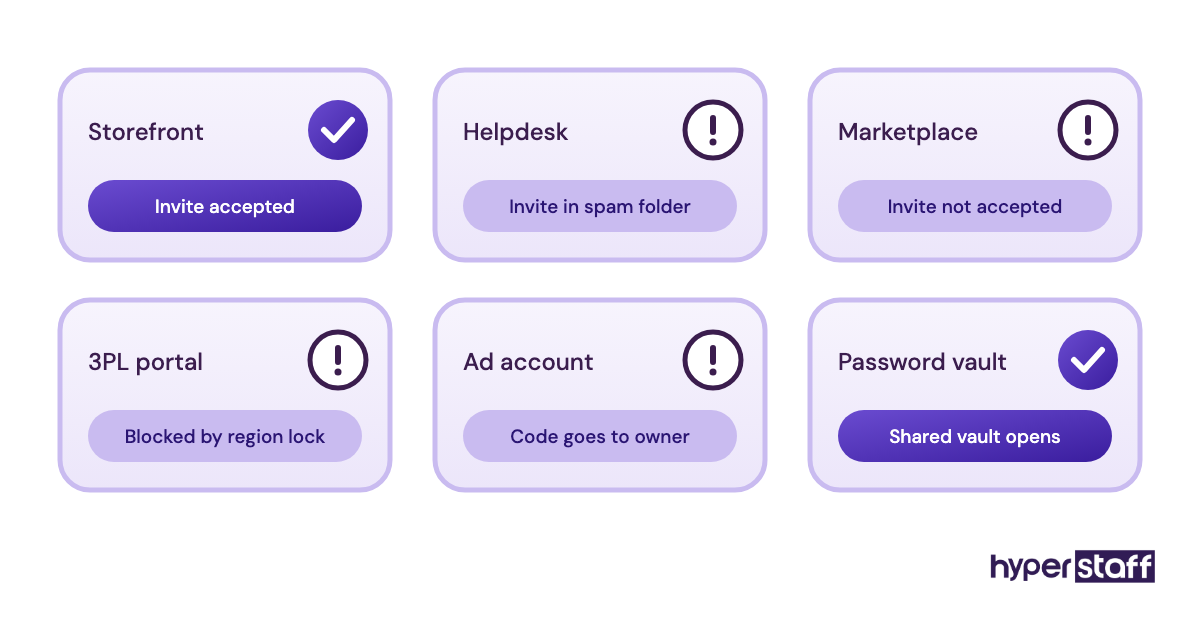
The sequence has dead zones that catch owners off guard. Amazon user invitations have to be accepted from the assistant's side, Shopify staff invites can sit unopened in a spam folder, and two-factor codes often go to the owner's phone, so day one can stall for hours if nobody tested logins in advance.
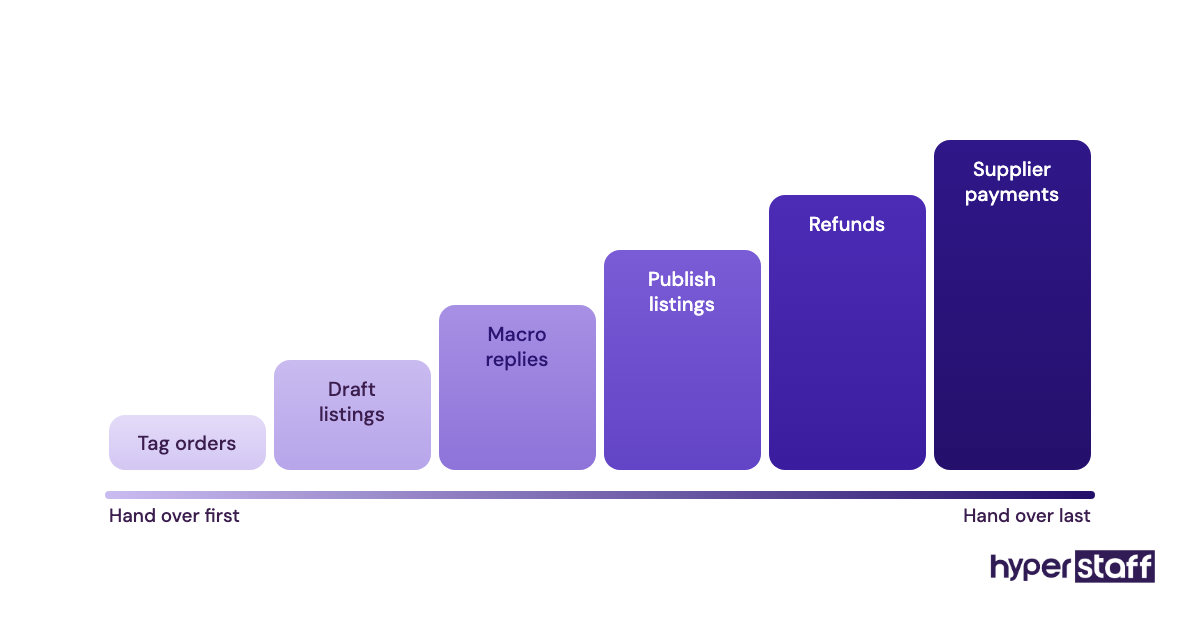
Once access works, the assistant reads the SOPs, watches recordings of you doing each task, and then completes the same task while you check it. The handover order should follow risk, so tagging orders and drafting listings come well before refunds and supplier payments.
For a full inventory of what can be handed over, the ecommerce virtual assistant tasks checklist is a good source for ranking.
Types and Forms of Ecommerce VA Onboarding
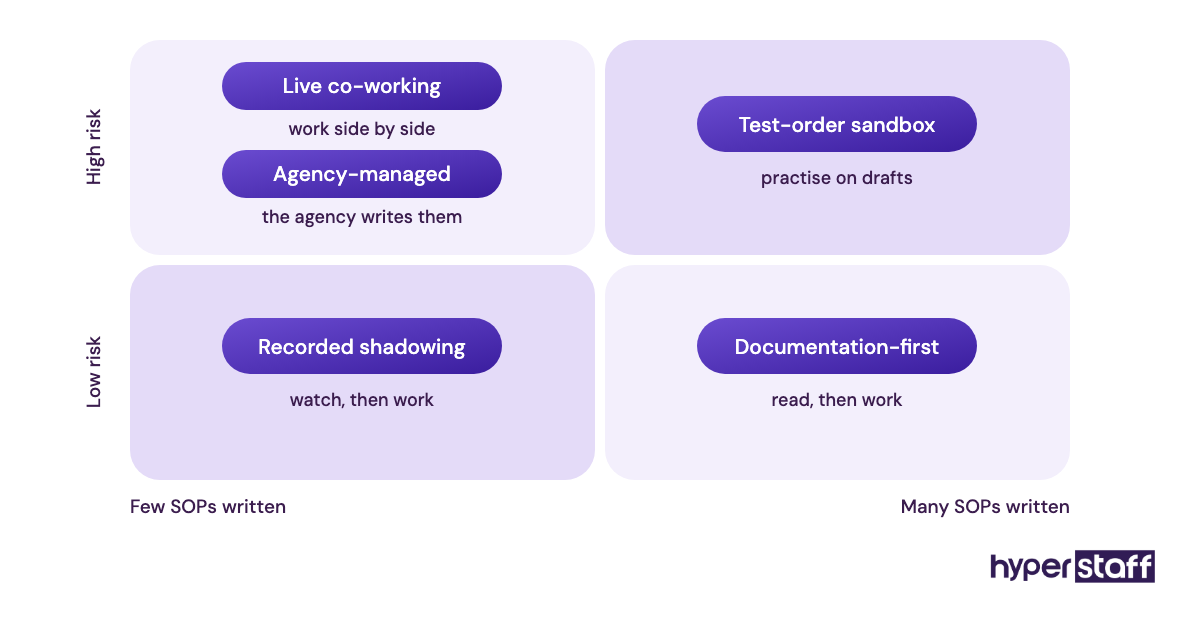
Ecommerce VA onboarding comes in several formats, and most stores combine two or three. The right mix depends on how much is already written down and how risky the first tasks are.
| Onboarding format | How it runs | Best fit | Typical ramp | Main risk |
|---|---|---|---|---|
| Documentation-first | Assistant reads written SOPs, then works | Stores with existing SOPs | 1–3 weeks | Docs out of date |
| Recorded shadowing | Owner records screen walkthroughs | Owners short on writing time | 2–3 weeks | Exceptions never recorded |
| Live co-working | Shared screen calls during tasks | Complex or judgment-heavy work | 2–4 weeks | Heavy owner time |
| Phased by channel | One storefront at a time | Shopify plus Amazon or Etsy sellers | 3–6 weeks | Second channel waits too long |
| Phased by task risk | Low-risk tasks first, money tasks last | Most stores | 2–4 weeks | Owner never hands over the last tier |
| Test-order sandbox | Practice on test orders or draft listings | Order and listing roles | 1–2 weeks added | Practice data left live |
| Agency-managed | Agency documents and maintains SOPs | Owners with no SOPs yet | 1–3 weeks | Depends on agency process |
How Onboarding Differs From Related Hiring Steps
Onboarding starts the moment a hire is confirmed and ends when the assistant works independently. The steps around it get blurred together, which leads owners to skip parts of each.
Onboarding vs. Hiring an Ecommerce VA
Hiring decides who joins; onboarding decides how fast they become useful. The two connect through the job description, since a scope written for the ecommerce virtual assistant job description becomes the first draft of your onboarding task list.
Screening also feeds onboarding. Answers to practical interview questions for ecommerce assistants show which systems a candidate already knows, and those can be fast-tracked. For the full selection process, see how to hire an ecommerce virtual assistant.
Onboarding vs. Ongoing Training
Training continues for as long as the store changes. Onboarding is finite and has an end state: the assistant owns a defined task list with clear escalation rules.
A new app, a new 3PL or a new returns policy needs training months later. Treating that as "more onboarding" keeps the assistant in permanent probation mode.
Remote VA Onboarding vs. In-House Employee Onboarding
A remote assistant can't pick up context from overhearing the office. Everything they learn has to be written, recorded or said in a call, which feels slower in week one and pays back later because the knowledge stays documented.
Time zones add another layer, since questions asked at the end of your day get answered the next morning. The wider trade-offs are covered in ecommerce virtual assistant vs in-house staff.
What Are the Benefits of Structured Ecommerce VA Onboarding?
Structured onboarding shortens the ramp and leaves you with documentation you keep after the first month.
- Fewer costly errors on refunds, pricing and inventory in the first month
- Shorter ramp to full output, often two weeks instead of six
- Written SOPs that survive staff changes and cut retraining time
- Owner time drops faster, since questions get answered once in writing
- Cleaner security, with named logins you can revoke in a minute
What Are the Drawbacks of Ecommerce VA Onboarding?
The drawbacks are mostly front-loaded time and a slower first week.
- Week one takes 5 to 10 hours of owner time for recording and review
- Some tools charge per seat, adding a monthly cost
- Time-zone gaps slow the question-and-answer loop early on
- Strict permissions can block the assistant on tasks they're ready for
Who Needs a Formal Ecommerce VA Onboarding Plan?
Any store handing over work that touches customers or money needs a written onboarding plan. That includes a solo Shopify founder hiring a first assistant for support tickets, as well as an Amazon brand adding a listings specialist next to an existing team.
Multi-channel sellers benefit most, because each marketplace has its own rules and admin. Seasonal sellers should onboard six to eight weeks before their peak, since a peak-week ramp means learning under the heaviest load of the year.
Ecommerce VA Onboarding Examples
The difference between good and bad onboarding usually shows up in how specific the rules are. The patterns below come up repeatedly in store handovers.
Good Ecommerce VA Onboarding Examples
A Returns SOP With a Dollar Threshold
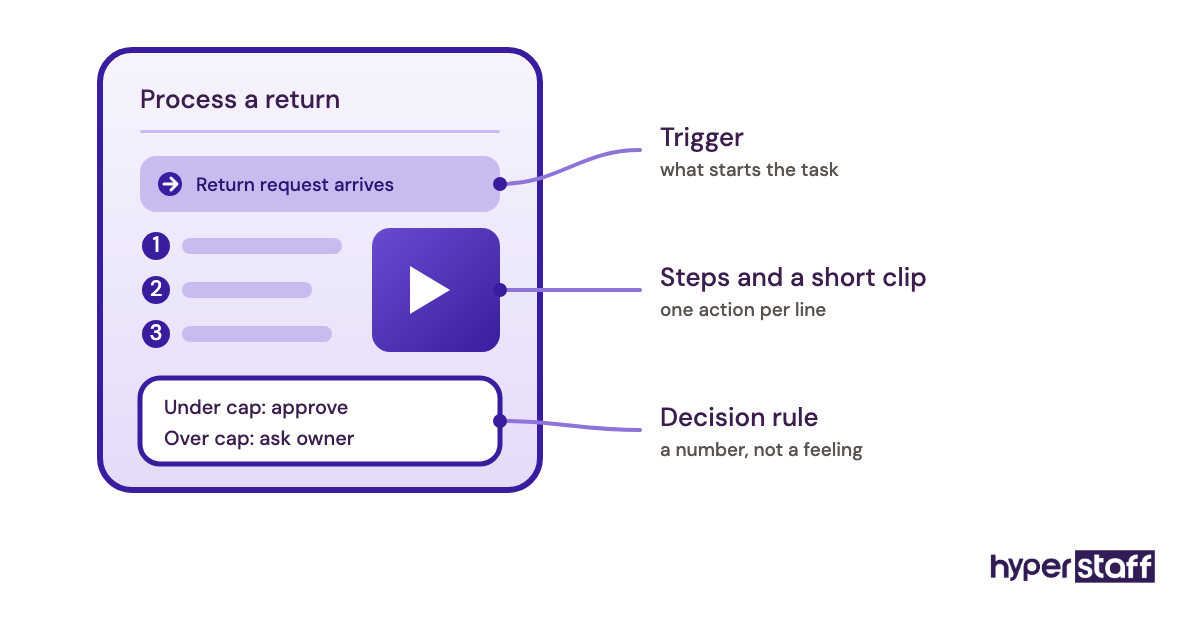
The SOP lets the assistant approve returns under a set amount, say $75, and escalate anything above it or anything from a repeat returner. The threshold turns a judgment call into a rule, and the assistant clears most of the queue on day three.
Listing Work That Starts in Draft
New product listings are created as drafts and published only after owner review for the first 20 or so. Mistakes get caught before a customer sees them, and review is dropped once the error count stays at zero.
Helpdesk Macros With a Weekly Review
The assistant answers tickets from saved macros and flags any reply written from scratch. A 15-minute weekly call goes through the flagged replies, and the good ones become new macros.
Bad Ecommerce VA Onboarding Examples
Owner Login Shared Over Chat
Sending the owner's own Shopify password in a message gives full admin rights, including payouts and store deletion. It also leaves no trail of who changed what.
A Tour Instead of SOPs
A two-hour screen share that walks through everything once feels thorough. A week later the assistant remembers about a third of it and has nothing to check against.
Ad Accounts on Day One
Handing over Meta or Google ad budgets before the assistant understands margins and stock levels invites spend on products that are out of stock. Ad work belongs at the end of the ramp.
Creating an Ecommerce VA Onboarding Plan, Step-by-Step
An ecommerce VA onboarding plan fits on one page and moves through five steps. Most of the work in steps one to three happens before the assistant's first day.
Step #1: Map the Tasks and Rank Them by Risk
List every task you want handed over and mark each as low, medium or high risk based on what a mistake would cost. Order tagging and inbox sorting sit at the low end; refunds, pricing edits and supplier payments sit at the top.
Step #2: Set Up Access With Least Privilege
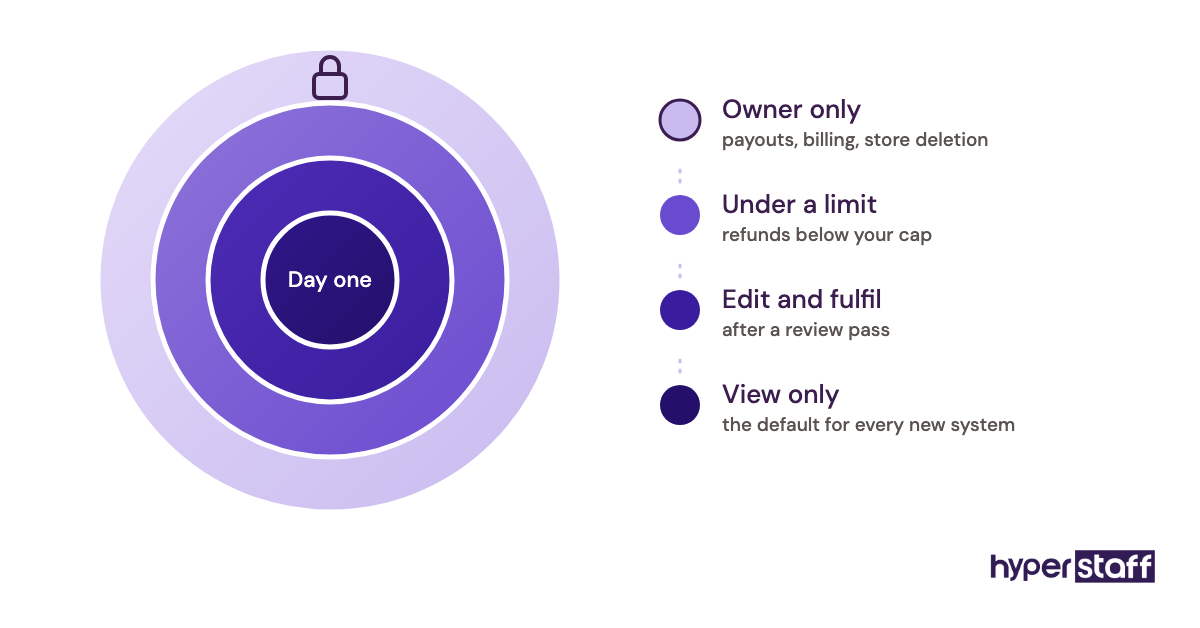
Create a named staff account in each system instead of sharing your login. On Shopify, the Grow plan includes 5 staff accounts and Advanced includes 15, while collaborator accounts for Shopify Partners don't count toward that limit.
Store every shared login in a password manager, and switch two-factor to an authenticator the assistant can use where the platform allows it.
Step #3: Record SOPs and Decision Rules
Record a short screen video of yourself doing each task once, then turn it into a written checklist. Add the decision rules at the bottom: thresholds, exceptions and who to ask.
Step #4: Run a Supervised First Week
The assistant does low-risk tasks while you review the output daily. Keep a running question log, and answer each question by updating the SOP so it never needs asking twice.
Step #5: Hand Over Ownership With Weekly Reviews
Move medium-risk tasks over in week two or three, and high-risk ones only after a clean run. Replace daily checks with a weekly review once errors stop appearing.
What Does an Effective Ecommerce VA Onboarding Strategy Look Like?
An effective strategy widens access on a schedule tied to results. The assistant earns each new permission by completing the previous tier without errors, and the owner commits to handing over the next tier when that happens.
The schedule below is a typical starting point for a Shopify store with a helpdesk and an ad account.
| System | Week 1 | Weeks 2–3 | Week 4+ |
|---|---|---|---|
| Shopify orders | View, tag, notes | Edit, fulfill | Refunds under threshold |
| Shopify products | Drafts only | Publish after review | Publish freely |
| Helpdesk | Macros, reviewed | Macros, spot-checked | Full queue |
| Inventory / 3PL portal | View only | Stock counts | Reorder drafts |
| Ad accounts | No access | Reports only | Edits with approval |
| Payouts and billing | No access | No access | Owner only |
Which Tools Help With Ecommerce VA Onboarding?
The core onboarding tools are your storefront's user permissions, a password manager, a screen recorder and a shared SOP document. Shopify staff accounts and Amazon Seller Central user permissions handle store access at no extra cost on most plans.
1Password is a solid pick for sharing logins, with Business at $8.99 per user per month billed yearly and a Teams Starter Pack at $24.95 per month for up to 10 users, per 1Password's pricing page. Loom covers recorded SOPs: its free Starter plan caps you at 25 videos of 5 minutes each, and Business runs $18 per user per month, according to Loom's pricing.
A Google Doc or Notion page works fine as the SOP library for most stores. Specialized training platforms earn their price only once you have several assistants learning the same procedures, and the wider stack is covered in our list of ecommerce virtual assistant tools.
9 Proven Ecommerce VA Onboarding Tips and Best Practices
These practices make the biggest difference to how fast an ecommerce assistant reaches full output.
- Test every login the day before the start date.
- Give each task its own SOP and its own short video.
- Write escalation rules as numbers (dollar amounts, hours, order counts) wherever possible.
- Answer each question by updating the SOP, then send the link.
- Start listing work in drafts and support work in macros.
- Book a fixed daily 15-minute check-in for the first two weeks, then drop to weekly.
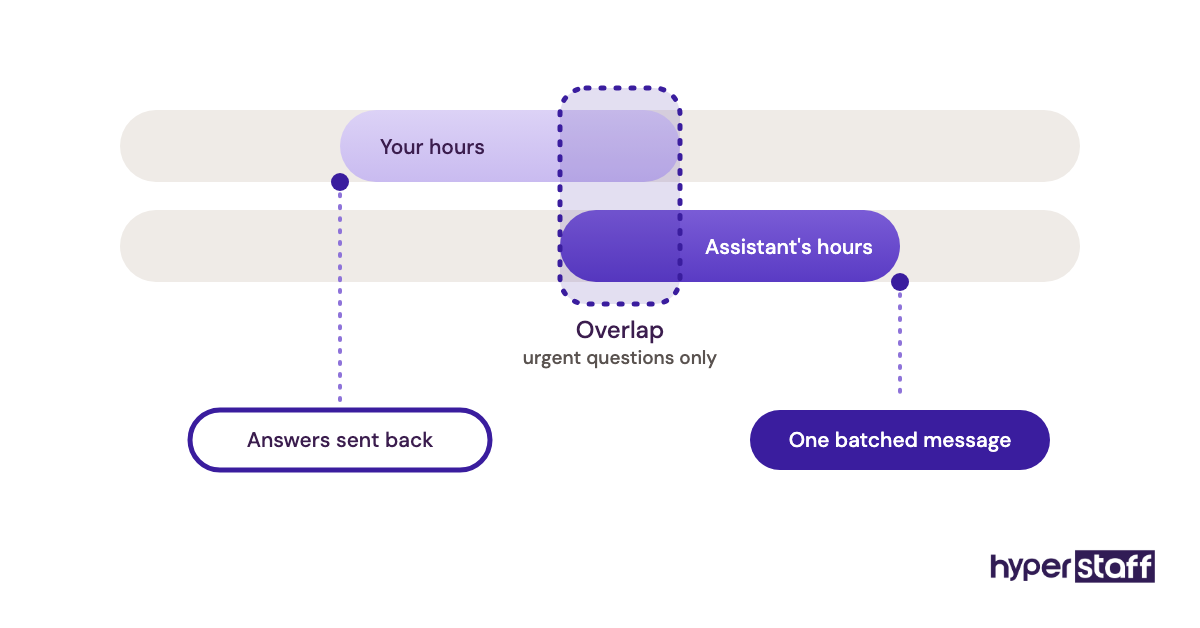
- Agree on a two- to four-hour overlap with your working hours.
- Keep money tasks (payouts, supplier payments, ad budgets) until the end of the ramp.
- Review the access log monthly and remove anything unused.
Overcoming Common Ecommerce VA Onboarding Challenges
The most common challenge is an owner who's too busy to document, which is usually why they hired help in the first place. Recording yourself doing the task once while narrating takes less time than writing, and the assistant can turn the recording into the written SOP.
Time-zone lag is the second. Batch questions into one daily message instead of a stream of pings, and keep at least two overlapping hours for urgent ones.
The third is trust: owners hold back the last tier of tasks for months. Set a date for each handover at the start, and move it only if errors justify it.
How to Measure Ecommerce VA Onboarding Success
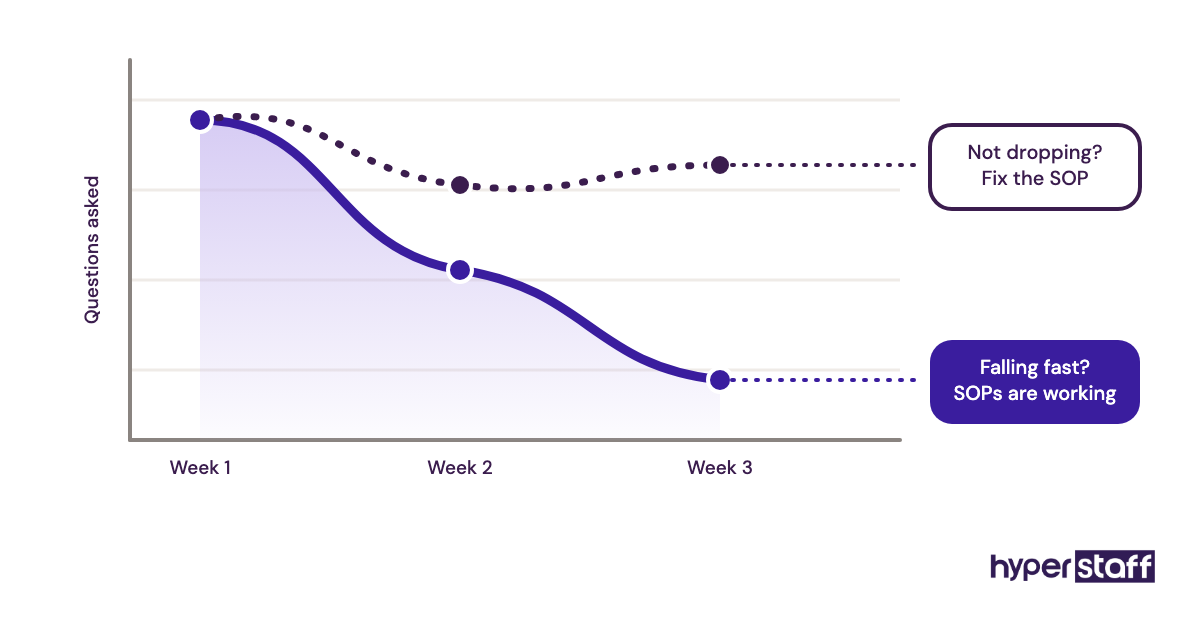
Ecommerce VA onboarding success shows up in three numbers: error rate, response time and questions asked per week. Errors should trend toward zero by week three, and ticket first-response time should meet your SLA.
Questions per week tell you the most. A high count in week one is healthy, while a high count in week four points to gaps in the SOPs. Owner hours spent on the handed-over tasks should also fall week by week, and that's the number that pays for the hire.
How Long Does Onboarding an Ecommerce VA Take to Work?
Onboarding an ecommerce virtual assistant typically takes two to six weeks to reach full output. A single-channel support or order role sits at the short end, while a multi-channel role covering listings, inventory and ads sits at the long end.
Expect the first useful output within days, on low-risk tasks. The slowest stretch is usually week two, when the assistant knows enough to take on harder tasks but still needs review on most of them.
How Much Does Onboarding an Ecommerce Virtual Assistant Cost?
The cost of onboarding an ecommerce virtual assistant is mostly the assistant's paid hours during the ramp plus your own review time, with a few dollars a month in tool seats. The bigger number is the ongoing rate, compared below with a typical US in-house hire.
| Cost item | Hyperstaff | Typical in-house hire |
|---|---|---|
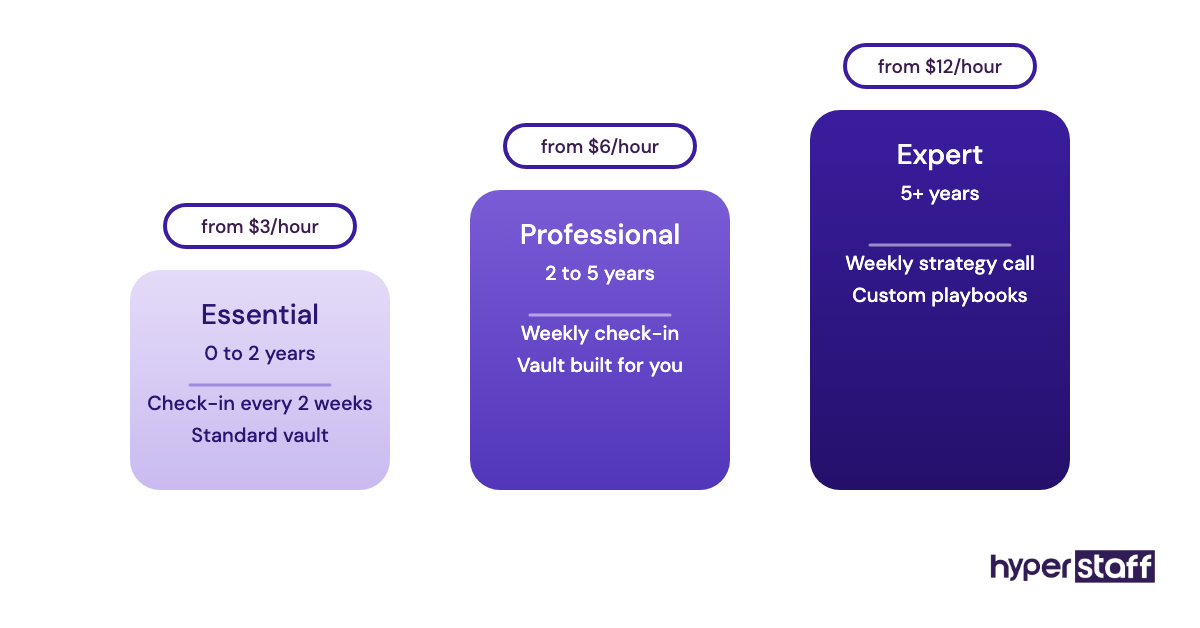
| Hourly rate | From $3 (Essential), $6 (Professional), $12 (Expert) | About $17–$25 plus payroll costs |
| 160 hours a month | From $480–$1,920 | About $2,700–$4,000 before benefits |
| Time to start | Placement in 5 business days | Often 4–8 weeks of recruiting |
| Owner onboarding time | 30-minute kickoff, SOPs kept in Operations Vault | 5–15 hours in week one |
| If it doesn't work out | Free replacement in 5–7 business days | Restart recruiting |
| Billing options | 40, 80 or 160 hours; 10% off quarterly | Fixed salary |
A deeper breakdown by role and region is in our guide to ecommerce virtual assistant cost.
Important: our prices above are starting averages, not fixed quotes. Your final cost depends on the experience tier, hours and type of store work you need.
Is Onboarding an Ecommerce Virtual Assistant Worth It?
Yes, when it's done properly, onboarding an ecommerce virtual assistant is one of the highest-return things a store owner can do with a few hours of time. The setup effort is a one-off, and every hour of store work it frees comes back every week after.
Here's an illustrative calculation. An owner spending 15 hours a week on orders, tickets and listings gives up about 65 hours a month, which at a $50/hour value of their time is roughly $3,250 of capacity.
A Professional-tier assistant on an 80-hour bundle starts from $480 a month. Add 10 owner hours for onboarding (about $500 of time) and a $9 password manager seat, and the first month still costs well under a third of the time it frees.
The catch: the payback depends on those hours going into growth work, not more admin. For the full set of trade-offs, see whether an ecommerce virtual assistant is worth it.
How to Choose an Agency That Handles Ecommerce VA Onboarding
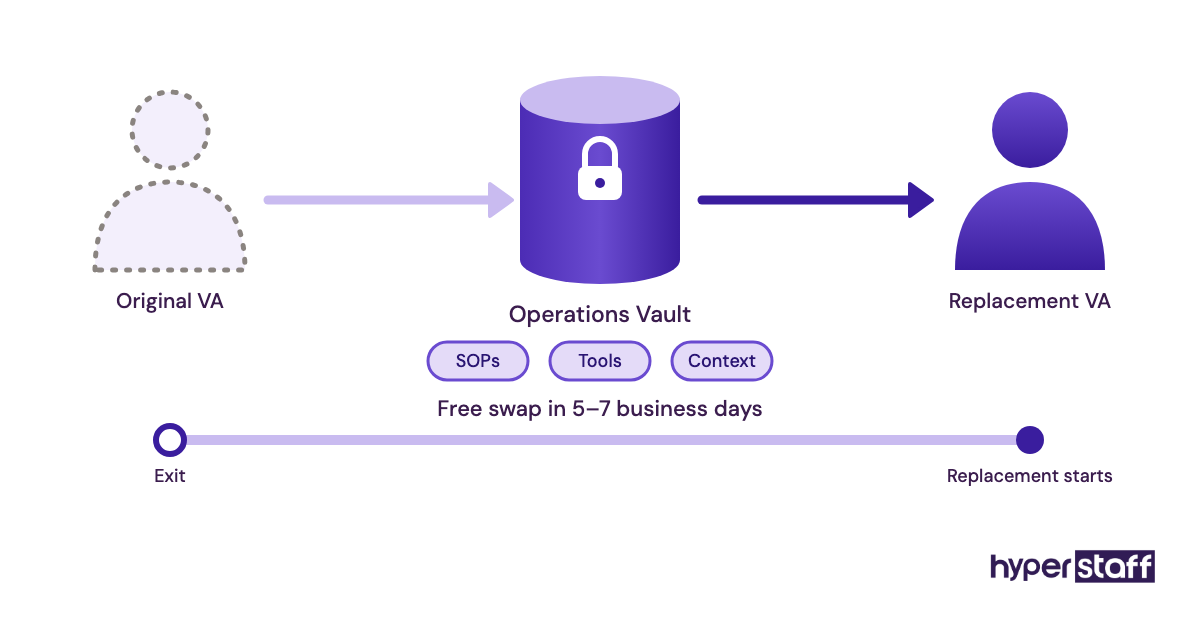
Choose an agency by asking who writes and maintains the SOPs, how fast a replacement arrives, and whether the replacement starts from documentation or from zero. Those three answers decide whether onboarding happens once or every time someone leaves.
Ask too whether you get a named account manager and whether the assistant is dedicated to your store or rotates across clients. At Hyperstaff, every client has a dedicated account manager, and a replacement is briefed from your Operations Vault within 5 to 7 business days, so the store knowledge stays put.
Check the experience tiers against your task risk list. An Essential-tier assistant fits order tagging and ticket macros, while ad accounts and inventory planning usually call for the Professional or Expert tier.
Ecommerce VA Onboarding Statistics, Trends and Future Predictions
The clearest data point on onboarding remains Gallup's finding, cited above, that only 12% of employees think their organization onboards well. For remote ecommerce roles, the main trend is a move to asynchronous onboarding built on short recorded videos and written checklists instead of long live calls.
Platforms keep making access more granular. Shopify's staff and collaborator permissions and Amazon's per-tool user permissions let owners hand over narrow slices of the store, and we expect that to keep pushing onboarding toward staged, permission-by-permission handovers.
Practitioners still disagree on documentation-first versus shadowing-first. Our view: shadowing gets an assistant productive faster in week one, but stores that skip the written version end up re-explaining the same task every time something changes.
Onboarding an Ecommerce Virtual Assistant and AI
AI tools cut the slowest part of onboarding: turning recorded walkthroughs into written SOPs. Loom's Business + AI plan, at $24 per user per month, adds auto-summaries and chapters, and a general AI assistant can turn a transcript into a numbered checklist in a minute.
The draft still needs a human pass. AI-written SOPs reliably miss the exceptions and thresholds, which are exactly the parts that prevent costly mistakes.
Inside the store, Shopify's Sidekick assistant and helpdesk AI reply drafts change what the assistant does day to day. Onboarding then has to cover when to accept an AI draft and when to rewrite it, with the same escalation rules that apply to everything else.
Disclaimer: This article is for general information only and isn't legal, financial or security advice. Tool prices and features change, so confirm them with each provider. Hyperstaff rates shown are starting prices and may vary by engagement.
Common questions
What should my ecommerce VA do on their first day?
Test every login, read the SOPs for low-risk tasks and watch the matching videos. Then complete a few real tasks, such as tagging orders or drafting a listing, with you reviewing the result before the day ends.
Do I need an NDA before onboarding a virtual assistant?
It's sensible for any assistant who sees customer data, supplier prices or sales figures. Sign it before access is granted, and pair it with named logins so every change can be traced.
How do I add a VA to Amazon Seller Central?
Invite them from the User Permissions page, then set view or edit rights per tool once they accept. Start with view-only on inventory and pricing, and widen access after the first clean week.
Can my ecommerce VA work while I'm asleep?
Yes, and it's a real advantage for support and order queues. Keep two to four overlapping hours during onboarding so questions get answered the same day.
What happens if my ecommerce VA leaves after I've trained them?
If your SOPs are written down, the next assistant ramps far faster. With Hyperstaff, a free replacement arrives in 5 to 7 business days, briefed from your Operations Vault.
Book a free 15 min call
We place a pre-vetted specialist in 5 business days, fully managed, from $3/hour.