Ecommerce Virtual Assistant Tasks: A 9-Point Handoff Checklist
Nine ecommerce virtual assistant tasks worth handing off, each with what to check, why it matters and a clear finish line.
On this page
- Checkbox 1: Who handles stuck and flagged orders?
- What to look for in the exceptions queue
- Why a stuck order costs more than it looks
- Finished when the queue is empty or explained
- Checkbox 2: What store access should a virtual assistant get?
- Permissions to set before day one
- How scoped access protects the store
- Done once nothing depends on the owner's password
- Checkbox 3: How much can the assistant refund without asking?
- Refund rules to settle in writing
- Why a number works better than "use your judgment"
- Done when refunds stop waiting on the owner
- Checkbox 4: Product listing data that drifts out of date
- Listing fields worth auditing
- Why listing accuracy shows up in returns
- Done when the catalog matches the supplier sheet
- Checkbox 5: Who watches stock levels across channels?
- Stock signals to review
- Why overselling hurts twice
- Done when low stock is flagged before it's gone
- Checkbox 6: How should a VA handle customer support tickets?
- Support basics to confirm first
- Why tone matters as much as speed
- Done when most tickets close in one reply
- Checkbox 7: Supplier and 3PL follow-ups that slip
- Follow-ups to track
- Why follow-up gaps turn into stockouts
- Done when every open order has a known date
- Checkbox 8: Which numbers should the VA report each week?
- Report contents to agree on
- Why a fixed format beats a long update
- Done when the owner can read it in five minutes
- Checkbox 9: Are the tasks written down well enough for someone new?
- What each SOP should hold
- Why undocumented tasks break at handover
- Done when a new person can follow it cold
- FAQs
Hand off the tasks that leak revenue first
Hyperstaff places pre-vetted assistants who learn one store and stay with it. Our ecommerce operations support covers orders, listings and customer service, run by a dedicated specialist with an account manager beside you. We've served 30+ clients and placed 70+ virtual assistants, with placement in 5 business days and rates from $3/hour.
Checkbox 1: Who handles stuck and flagged orders?
An ecommerce virtual assistant should own the order exceptions queue: failed payments, addresses the carrier rejected, and orders the platform flagged for fraud review. These are the orders that sit unshipped while everything else moves.
Shopify shows a fraud analysis indicator on each order, and Amazon pushes verification and address issues into Seller Central notifications. Somebody has to read those every day, and that daily read makes a clean first task. For a wider view of the role, see what an ecommerce virtual assistant is.
What to look for in the exceptions queue
Run this check once or twice a day, depending on order volume.
- Orders still unfulfilled past the shipping promise
- Medium-risk and high-risk fraud flags
- Failed or pending payments
- Address validation errors from the carrier
- Customer notes asking for changes before dispatch
Why a stuck order costs more than it looks
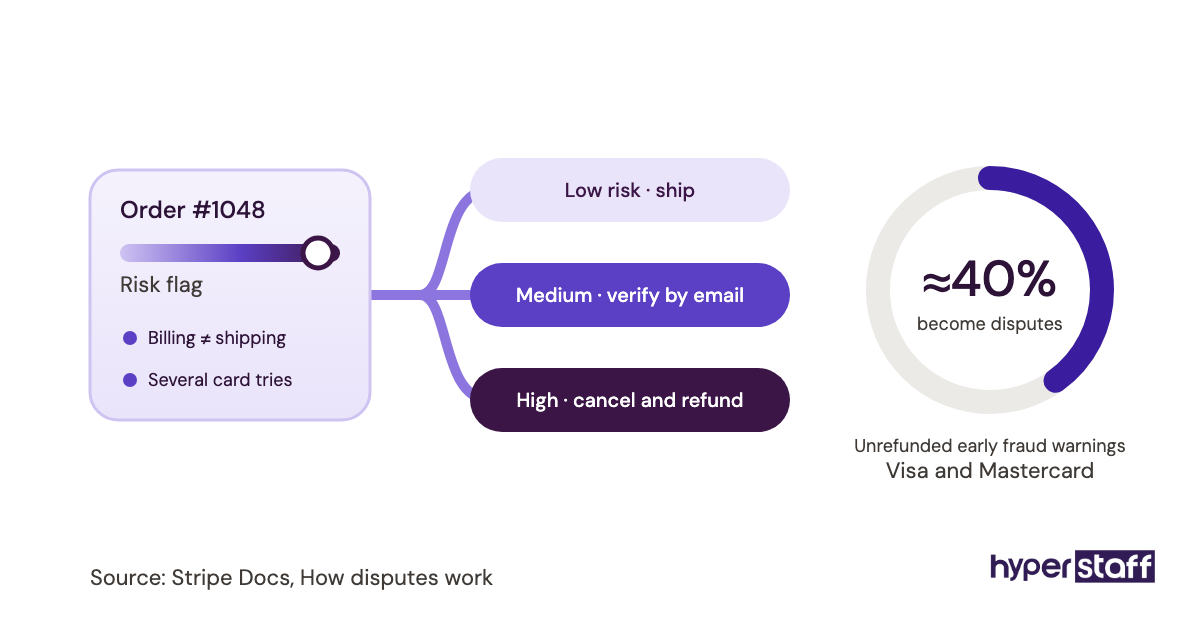
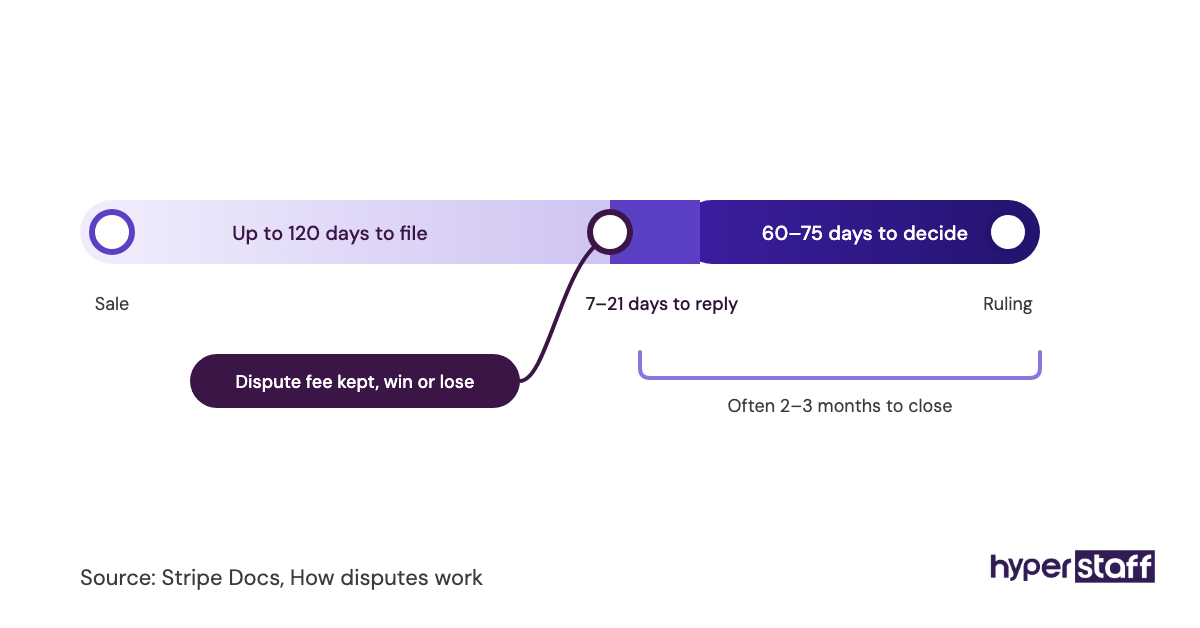
A stuck order tends to become a support ticket, then a refund request, and sometimes a chargeback. Catching it at the first step costs one email, while catching it at the third means dispute paperwork and a fee.
Fraud flags are the tricky part. Shipping a flagged order on a hunch is how a store loses both the goods and the payment, so the assistant needs a written rule: hold, verify by email, or cancel.
Finished when the queue is empty or explained
Every order older than one business day is shipped, on hold with a written reason, or cancelled with the customer told. A short daily note lists anything that needs the owner's decision.
Checkbox 2: What store access should a virtual assistant get?
Store access for a virtual assistant should be a named staff account with only the permissions the tasks need. Shopify, WooCommerce, BigCommerce and Amazon Seller Central all support separate users with limited rights.
Shared owner passwords feel faster on day one. They also hide who changed a price, and they stay valid after the person moves on.
Permissions to set before day one
Set these up before the kickoff call so work can start the same day.
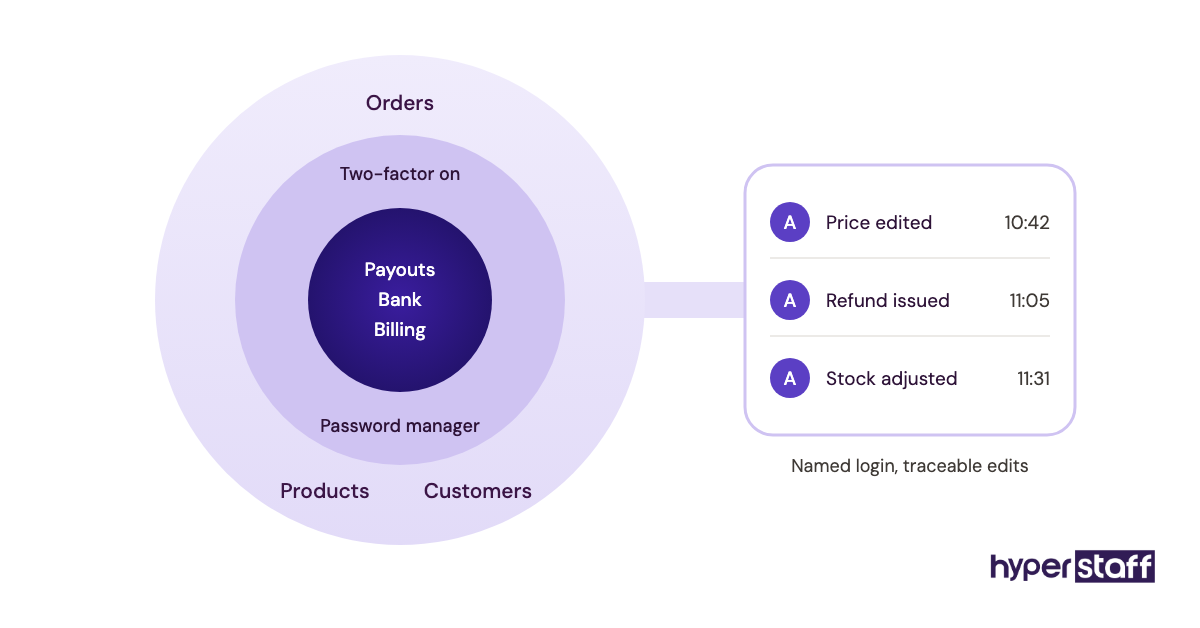
- A separate user account in the assistant's own name
- Access to orders, products or customers only where a task needs it
- No access to payouts, bank details or billing
- Two-factor authentication turned on
- App logins stored in a shared password manager
How scoped access protects the store
Limited permissions cap the damage of an honest mistake. A personal account also leaves an activity trail, so "who changed this?" becomes a two-minute lookup.
The same setup decides how fast a new person can start, which is a big part of hiring an ecommerce virtual assistant well. Our guide to onboarding an ecommerce VA walks through the first week in order.
Done once nothing depends on the owner's password
The assistant completes every assigned task while logged in as themselves. Removing their access would take minutes and break nothing else.
Checkbox 3: How much can the assistant refund without asking?
A refund limit is the dollar amount an ecommerce virtual assistant can approve alone, plus the reasons that qualify. Without one, every return request waits for the owner, or the assistant guesses.
Both outcomes cost money. Slow refunds turn into chargebacks, and generous guesses eat margin.
Refund rules to settle in writing
Put these on one page the assistant can open in the middle of a ticket.
- The maximum refund per order without approval
- Reasons that qualify, such as damaged, wrong item or late delivery
- When to offer a replacement or store credit first
- Whether the item must come back before money goes out
- How each refund and its reason gets logged
Why a number works better than "use your judgment"
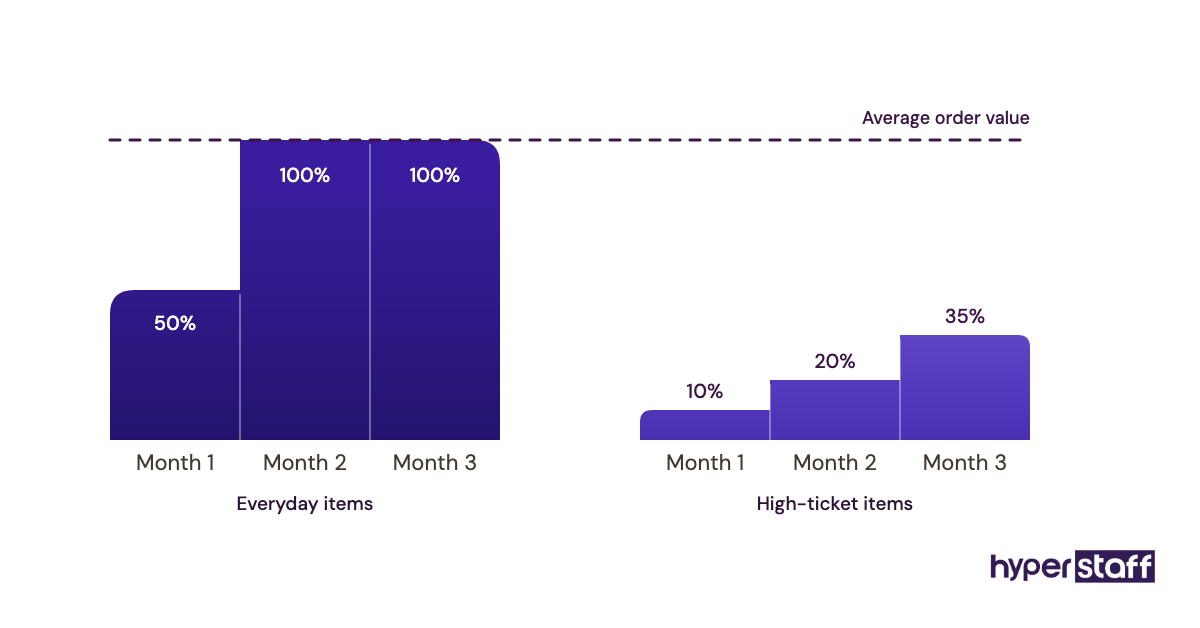
"Use your judgment" sounds like trust, but a new assistant has no history with the store's customers to judge from. A clear threshold lets them close most return tickets in one reply and send only the edge cases up.
Store owners genuinely disagree on where to set it. Some put the limit near their average order value so almost nothing waits, while others start low and raise it after a month of reviewing the refund log, which is the safer route for stores selling expensive items.
How a candidate handles a borderline refund is one of the more revealing ecommerce VA interview questions for exactly this reason.
Done when refunds stop waiting on the owner
Most refund tickets close without escalation, and each one carries a reason code. The owner reviews the log weekly and adjusts the threshold.
Checkbox 4: Product listing data that drifts out of date
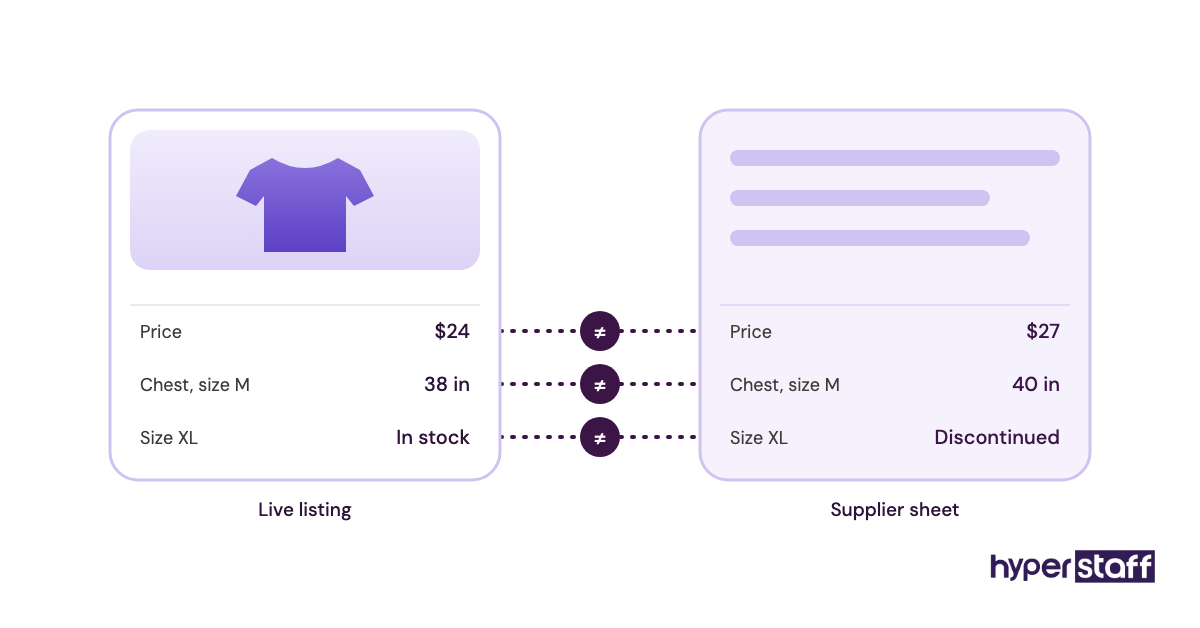
Product listings drift as supplier prices change, variants sell out for good and size charts stop matching the factory. Listing upkeep is one of the most useful ecommerce virtual assistant tasks, because nobody notices the drift until a customer complains.
Listing fields worth auditing
A monthly pass through the catalog catches most of it.
- Prices and compare-at prices against the current supplier sheet
- Variant names, SKUs and barcodes
- Missing images and missing alt text
- Size charts, materials and care details
- Titles and descriptions on each sales channel
Why listing accuracy shows up in returns
Wrong dimensions or an outdated photo are a common source of "not as described" returns. Those returns cost shipping both ways, plus a product that may not be resellable.
Marketplaces add their own pressure. Amazon can suppress a listing that's missing required attributes, and many sellers only find out when sales on that product drop.
Done when the catalog matches the supplier sheet
Each SKU matches current supplier data, and every change is logged with a date. Suppressed or inactive listings appear in the weekly report with a fix or a reason.
Checkbox 5: Who watches stock levels across channels?
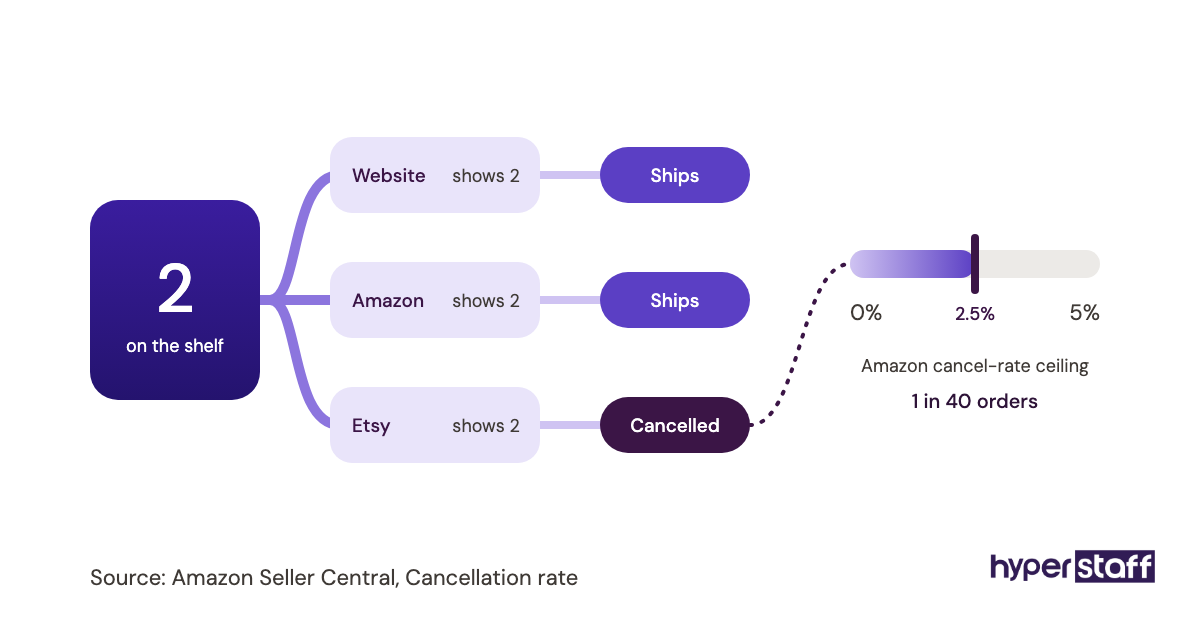
Inventory monitoring means someone compares stock counts across every channel and flags low stock before it runs out. Stores selling on their own site plus Amazon, Etsy or a wholesale portal oversell when those counts fall out of sync.
Stock signals to review
These fit into a daily or every-other-day routine.
- SKUs below a set reorder point
- Counts that differ between channels for the same SKU
- Orders that came in after stock hit zero
- Late purchase orders from suppliers
Why overselling hurts twice
An oversold order ends in a cancellation or a long delay, and both drag down reviews. On Amazon, seller-cancelled orders also count against account health.
Inventory sync apps help, but they break at the edges: bundles, kits and stock split across two locations. An assistant who knows those edge cases catches what the app misses.
How many of these checks fit into a 40, 80 or 160-hour monthly bundle depends on order volume and channel count. Our ecommerce virtual assistant cost breakdown shows how rates and hours add up.
Done when low stock is flagged before it's gone
Every SKU under its reorder point sits on a list for whoever places orders, with days of stock left. No order in the past week shipped late because of a count mismatch.
Checkbox 6: How should a VA handle customer support tickets?
Customer support is usually the first task a store hands to an ecommerce virtual assistant: where-is-my-order emails, sizing questions, return requests and chat messages. It goes well when the assistant has saved replies, a tone guide and a clear escalation list.
Helpdesks like Gorgias, Zendesk and Re:amaze pull order details into the ticket, which saves a tab switch on every tracking lookup. For a small store, a shared inbox with saved replies is often enough, and our roundup of tools ecommerce VAs use compares the options.
Support basics to confirm first
Check these before the assistant answers a single customer.
- Saved replies for the 10 to 15 most common questions
- A tone guide with a few example replies
- Response time targets for email, chat and social messages
- An escalation list covering legal threats, press, injuries and large orders
- One place to log product complaints for the owner
Why tone matters as much as speed
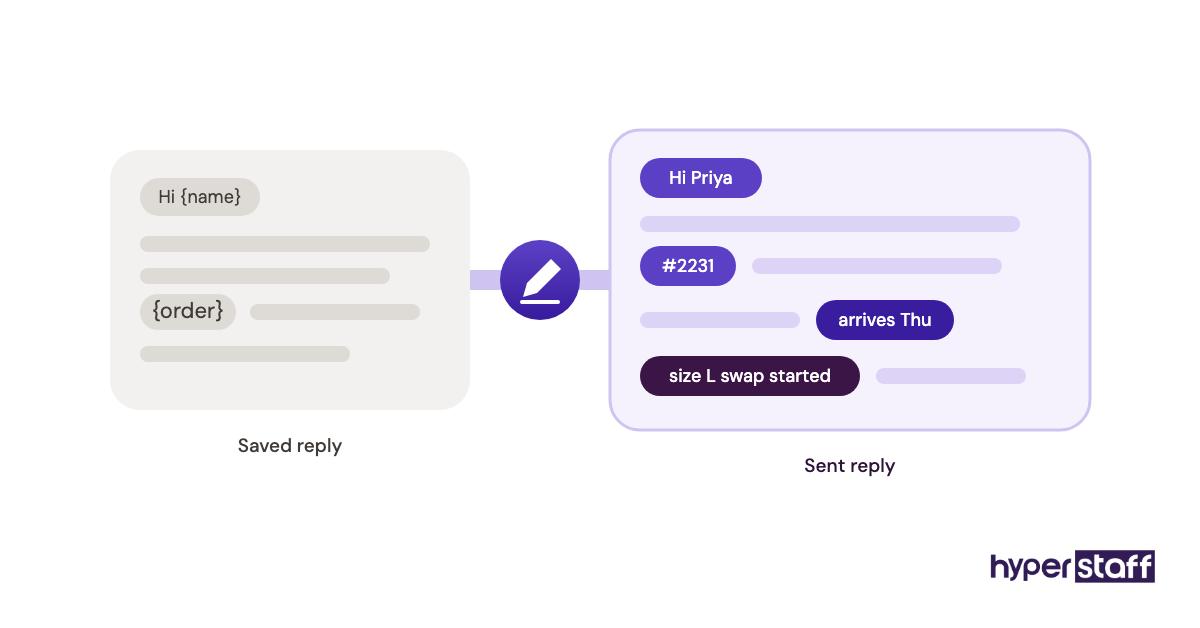
Customers judge a store by its replies. A fast answer that reads like a template can still lose a buyer, while a reply that uses their name and answers the real question keeps them.
Saved replies are a starting draft. The assistant edits each one to fit the ticket, and the owner spot-checks a handful each week during the first month.
Done when most tickets close in one reply
Common questions close in a single reply, and escalations reach the owner the same day. Product complaints are grouped by issue in the weekly report.
Checkbox 7: Supplier and 3PL follow-ups that slip
Supplier follow-up means chasing late purchase orders, confirming ship dates and checking that the 3PL received inbound stock. It's dull work, and it's the first thing to stall when the owner gets busy.
Follow-ups to track
A shared sheet works for most stores.
- Open purchase orders and their promised ship dates
- Inbound shipments and tracking numbers
- 3PL receiving confirmations and count discrepancies
- Shipments stuck in transit for more than a few days
- Damaged or short deliveries, with photos and claims filed
Why follow-up gaps turn into stockouts
A purchase order running two weeks late rarely announces itself. Without someone asking, the first sign is an "out of stock" badge on the product page.
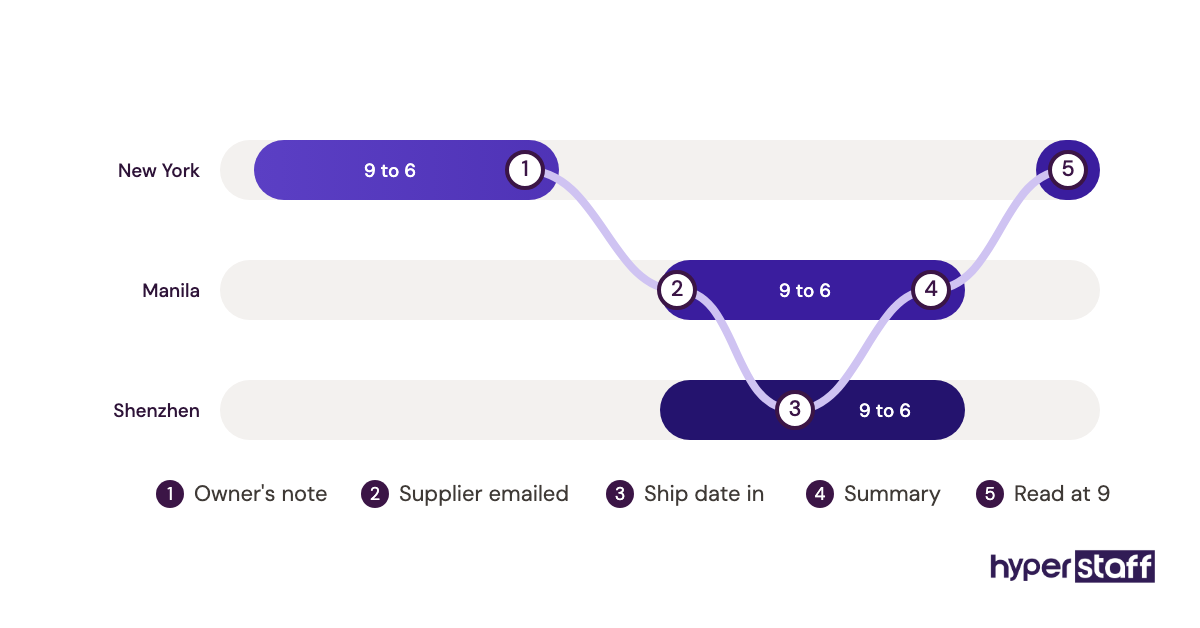
Time zones can work in the store's favor here. An assistant in the Philippines or India can email a supplier in Asia during the supplier's working day, so answers are waiting when a US-based owner logs on.
Packing and receiving still need someone physically present, which is one useful line to draw when weighing an in-house hire against a VA.
Done when every open order has a known date
Each open purchase order has a ship date confirmed within the last seven days. Any 3PL discrepancy has a claim filed or a note naming the next step.
Checkbox 8: Which numbers should the VA report each week?
A weekly report from an ecommerce virtual assistant should cover the numbers the owner acts on: orders, refunds and their reasons, ticket volume, low stock and anything stuck. One page is enough.
The report is also where the owner sees what the assistant actually did. That makes it the easiest way to answer whether an ecommerce VA is worth it with evidence.
Report contents to agree on
Agree the format in week one and keep it fixed.
- Orders, revenue and refunds for the week
- Refund and return reasons, grouped
- Support tickets received and still open
- Low-stock SKUs and late purchase orders
- Suppressed listings or account health warnings
- One line on anything that needs a decision
Why a fixed format beats a long update
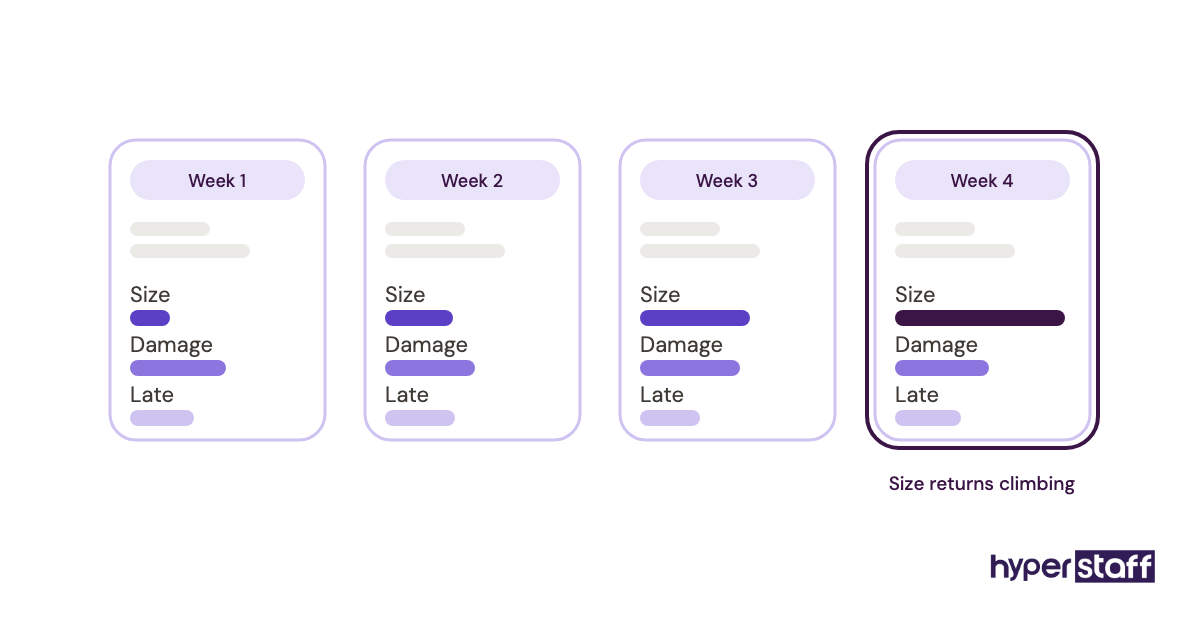
A report that changes shape every week gets skimmed, then ignored. A fixed layout lets the owner compare weeks at a glance and spot a rising refund reason early.
Done when the owner can read it in five minutes
The report lands on the same day each week and fits on one screen. Decisions the owner makes from it go straight into the SOPs.
Checkbox 9: Are the tasks written down well enough for someone new?
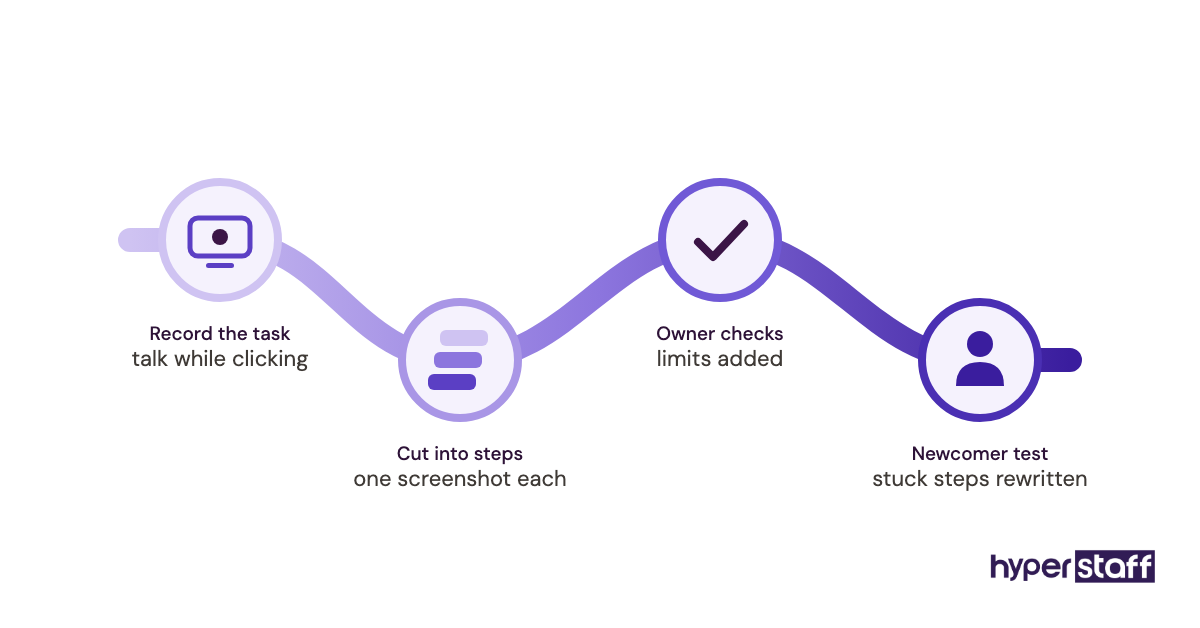
Written SOPs let an ecommerce virtual assistant work alone, and they let a replacement start without retraining. Each task above needs a short document with steps, screenshots, limits and the "done" signal.
At Hyperstaff this lives in the Operations Vault: your SOPs, tools and context, written down and maintained for you. If a replacement is ever needed, it's free and arrives in 5 to 7 business days, briefed from that Vault.
What each SOP should hold
Keep each one short enough to read while doing the task.
- The trigger, meaning when the task runs
- Steps in order, with screenshots
- Authority limits and who to escalate to
- The finished state in one sentence
- The date of the last update
Why undocumented tasks break at handover
A task that lives only in one person's head breaks the first time that person is out sick. Our list of common ecommerce VA mistakes shows how often the root cause is a missing instruction.
Writing SOPs also exposes steps worth cutting. A step nobody can explain in one sentence is usually a workaround for a process that needs fixing.
The finished SOP set doubles as the core of an ecommerce virtual assistant job description, since it already lists the real work.
Done when a new person can follow it cold
Someone who has never seen the store can complete the task from the SOP alone. The assistant updates the document whenever the process changes.
Disclaimer: This article is for general information only and does not constitute legal, financial or business advice. Platform features, policies and permissions change, so confirm details with each provider before acting. Hyperstaff accepts no liability for decisions made based on this content.
Common questions
What ecommerce tasks should I keep for myself?
Keep payouts, banking, final pricing decisions and supplier contract terms. Physical work like packing, photography shoots and receiving stock also needs someone on site.
Can one VA manage Shopify and Amazon at the same time?
Yes, if the order volume fits their hours. Amazon Seller Central has its own policies and account health rules, so ask for someone with marketplace experience instead of assuming Shopify skills transfer.
How many hours a week do these tasks usually take?
It depends on order volume and channel count. A small single-channel store may fit support and order checks into 10 hours a week, while a multi-channel store running every task on this list often needs a full-time assistant.
Can an ecommerce virtual assistant edit product photos?
Yes. Background removal, resizing, cropping to marketplace specs and adding alt text are all common remote tasks, as long as someone else takes the original shots.
Should my ecommerce VA run paid ads?
An assistant can pull ad reports, pause products that are out of stock and upload new creatives. Budget and bidding strategy are better left to the owner or an ads specialist unless the assistant has proven experience managing spend.
Book a free 15 min call
We place a pre-vetted specialist in 5 business days, fully managed, from $3/hour.