Executive virtual assistant job description: a copyable template and how to adapt it
A full executive virtual assistant job description template, with notes on adapting each section so the right candidates apply.
On this page
- What is an executive virtual assistant job description?
- Key executive assistant job description terms you should know
- Executive virtual assistant job description template
- What types of executive virtual assistant roles are there?
- How does an executive VA differ from related roles?
- What are the benefits and drawbacks of a detailed job description?
- Who needs an executive virtual assistant job description?
- Executive virtual assistant job description examples
- Writing your executive VA job description, step by step
- Which tools should the job description list?
- 8 proven tips for writing an executive VA job description
- Overcoming common EVA job description challenges
- How do you measure whether the job description worked?
- How long does it take an executive VA to get up to speed?
- How much does an executive virtual assistant cost?
- Is an executive virtual assistant worth it?
- How do you choose an executive virtual assistant agency?
- Executive assistant statistics, trends and future predictions
- How is AI changing the executive VA job description?
- FAQs
💡 Key Takeaways:
1) An executive virtual assistant job description names the executive being supported, the decisions the assistant may make alone, the systems they can access and the hours they must overlap with that executive.
2) Duties work best grouped by outcome, such as a protected calendar, a triaged inbox and prepared meetings, with a weekly number attached to each, so candidates can judge fit before applying.
3) A copyable template saves drafting time, but each line still needs editing for the executive's time zone, tools, confidentiality needs and the part of the job that changes week to week.
Hire the right assistant and win back billable hours
A sharp job description is how an executive gets hours back for the work that earns money, and a dedicated specialist from our executive virtual assistant services can start in 5 business days. Hyperstaff has placed 70+ pre-vetted virtual assistants with 30+ clients, at rates from $3/hour, with a dedicated account manager for every client and free replacement if the fit is wrong.
What is an executive virtual assistant job description?
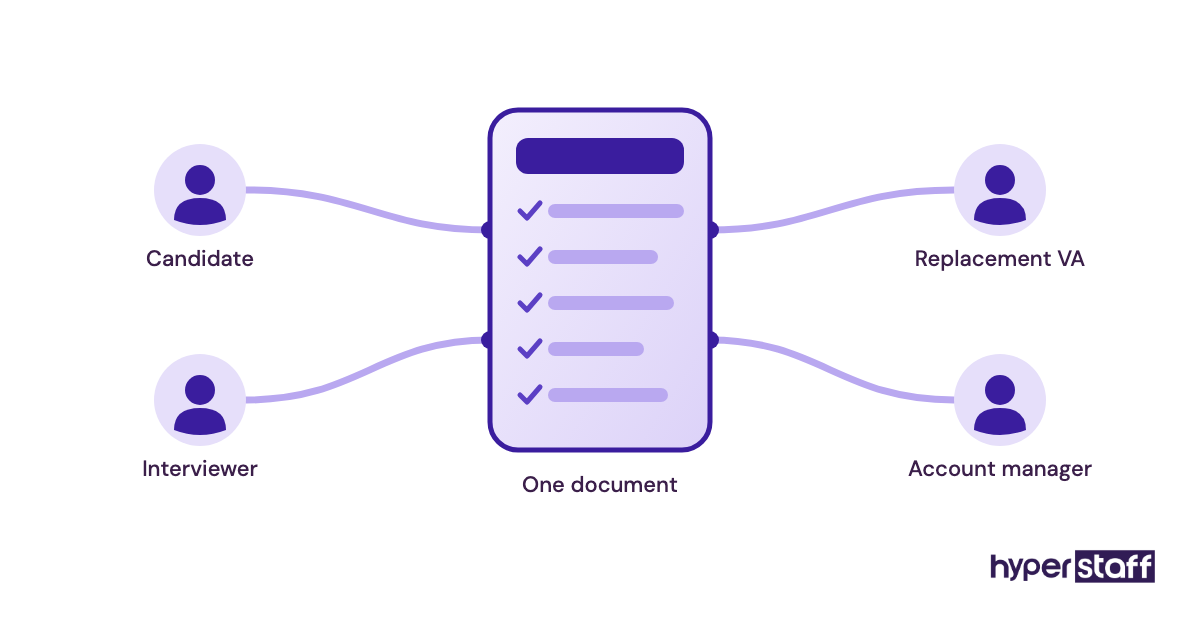
An executive virtual assistant job description is the document that defines what a remote assistant does for one senior leader: the duties, the authority, the access, the schedule and how performance is judged. It doubles as the job ad, the interview script and the first week's brief.
It differs from a general admin posting because the assistant acts on the executive's behalf. If the basics of the role are still fuzzy, start with what an executive virtual assistant does before writing a word of the posting.
Key executive assistant job description terms you should know
- Delegated authority = the decisions the assistant can make without asking, such as accepting meetings under 30 minutes.
- Time zone overlap = the fixed hours each day when assistant and executive are both online.
- Inbox triage = sorting incoming mail into reply, delegate, file or flag for the executive.
- Gatekeeping = deciding who gets the executive's time and who gets redirected.
- Calendar protection = holding focus blocks and buffers so meetings cannot fill every gap.
- Briefing doc = a one-page summary prepared before a meeting, covering attendees, history and asks.
- SOP = a written standard operating procedure for a recurring task.
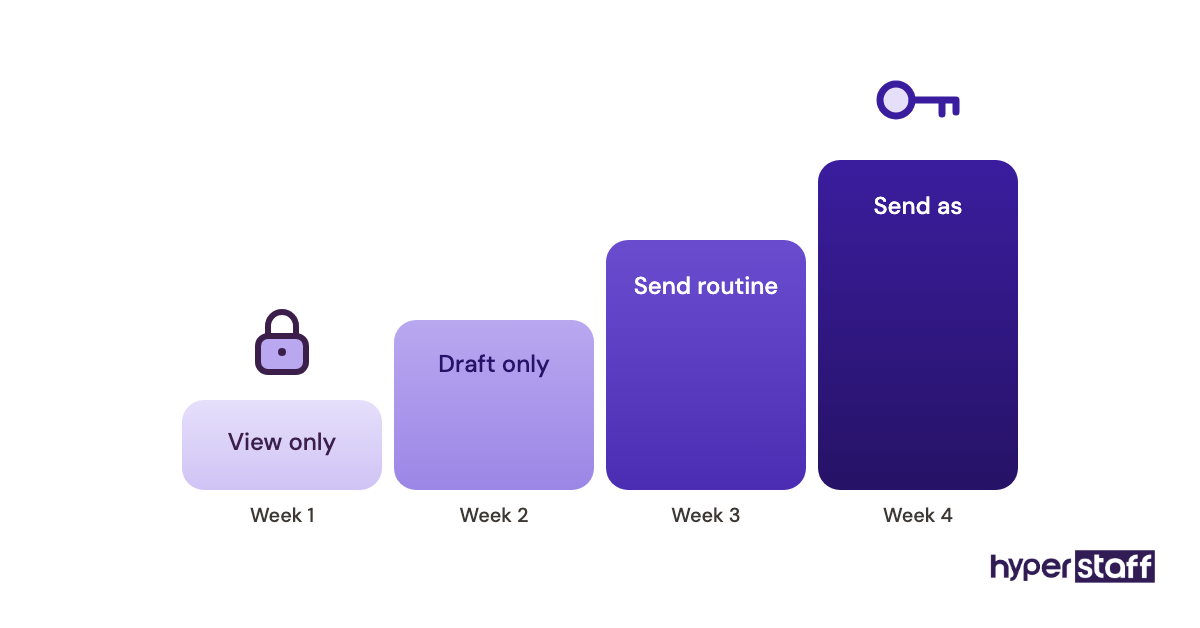
- Access tier = the level of system permissions granted, from view-only to full send-as rights.
- NDA = a non-disclosure agreement covering confidential business and personal information.
- Bundle hours = a fixed monthly block of paid time, such as 40, 80 or 160 hours.
Executive virtual assistant job description template
The template below is complete and ready to paste into a job board, an agency brief or an internal hiring doc. Bracketed fields need your details; everything else can stay as written or be trimmed.
Job title: Executive Virtual Assistant to the [CEO / Founder / Managing Partner]
Location: Remote. Must be online [hours] in [time zone], Monday to Friday.
Hours: [Full-time, 160 hours/month] or [Part-time, 80 hours/month]
About the role: You'll work one-to-one with [name, title] at [company], a [size and type of business]. Your job is to protect their time, keep their commitments on track and make sure they walk into every meeting prepared.
What you'll own:
- Calendar management across [number] calendars, including scheduling, rescheduling and holding two daily focus blocks.
- Inbox triage twice a day, drafting replies for approval and sending routine ones directly.
- Meeting prep: briefing docs 24 hours ahead, agendas, notes and follow-up actions sent within the same day.
- Travel booking and itineraries, including backups for missed connections.
- Expense reports and invoice tracking in [tool] by the [day] of each month.
- Gatekeeping requests for the executive's time, using the priority list we agree in week one.
- Light project coordination: chasing deadlines with [team / vendors] and reporting status every Friday.
- Personal errands that keep the executive's week running, such as appointments and gift orders, where agreed.
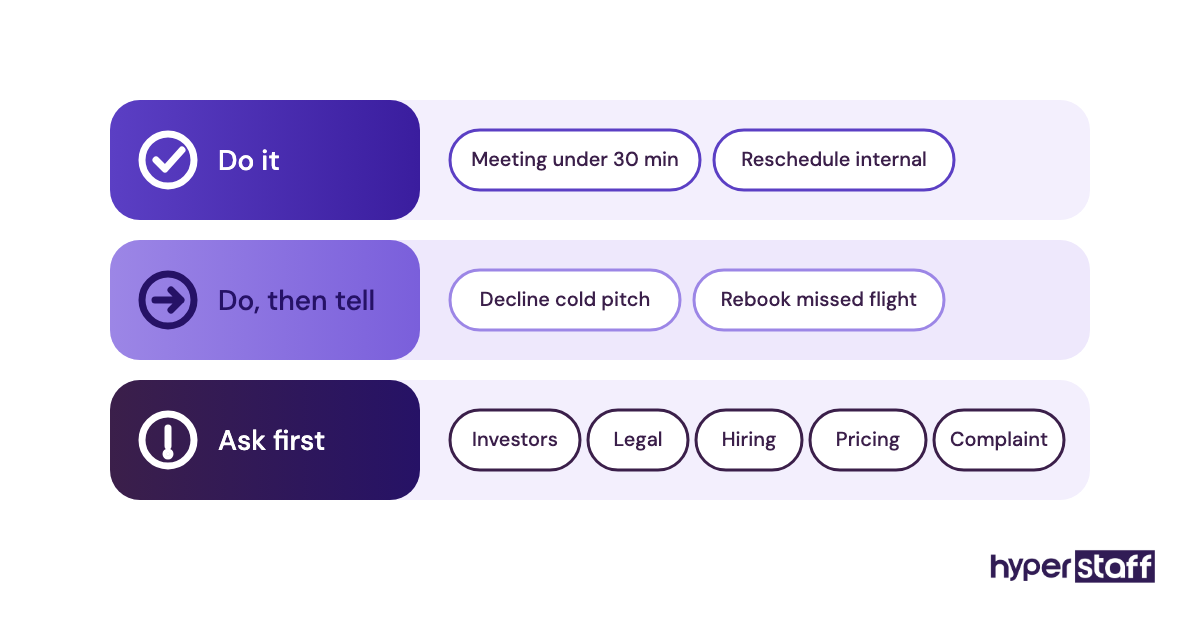
Decisions you can make alone: accepting or declining meetings under [30] minutes, booking travel under [$ amount], replying to [vendor / routine] emails, rescheduling internal meetings.
Decisions you'll escalate: anything involving investors, legal, hiring, pricing or a client complaint.
Tools you'll use: [Google Workspace or Microsoft 365], [Slack or Teams], [Calendly], [Notion / Asana], [1Password], [Expensify / QuickBooks].
You'll do well here if you have:
- [2 to 5 / 5+] years supporting a senior executive.
- Written English good enough to send emails in the executive's name.
- A habit of confirming details instead of assuming them.
- Reliable internet, a backup connection and a low-noise workspace.
How we'll measure the role: zero double bookings, inbox under [25] unread at end of day, briefing docs delivered on time for 95% of meetings, expense reports filed by deadline.
Confidentiality: You'll sign an NDA and work through a password manager. Access grows in stages over your first month.
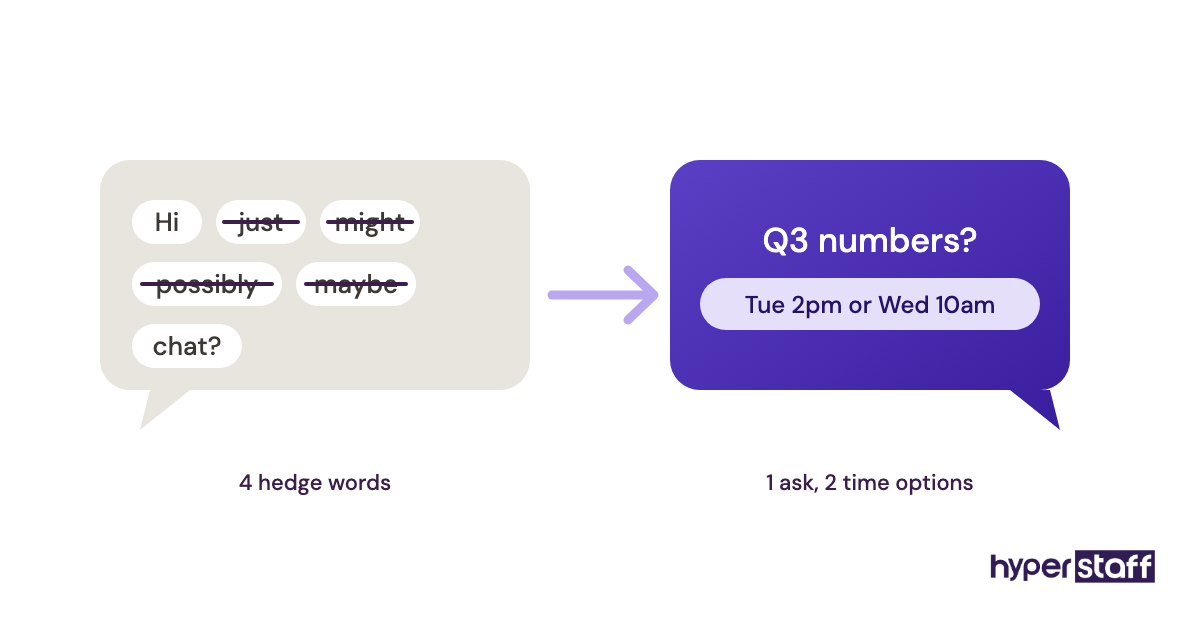
How to apply: Send your CV and a short email that rewrites this sentence as you'd send it to a busy CEO: "Hi, just wanted to check if you might possibly have some time next week to maybe chat about the Q3 numbers?"
The application test at the end does more filtering than the whole requirements list. Candidates who return a two-line, specific email with a proposed time are the ones worth calling.
What types of executive virtual assistant roles are there?
Executive virtual assistant roles split by seniority, hours and how much of the job is personal versus business. Pick the type first, because it decides the rate, the requirements and which template lines to cut.
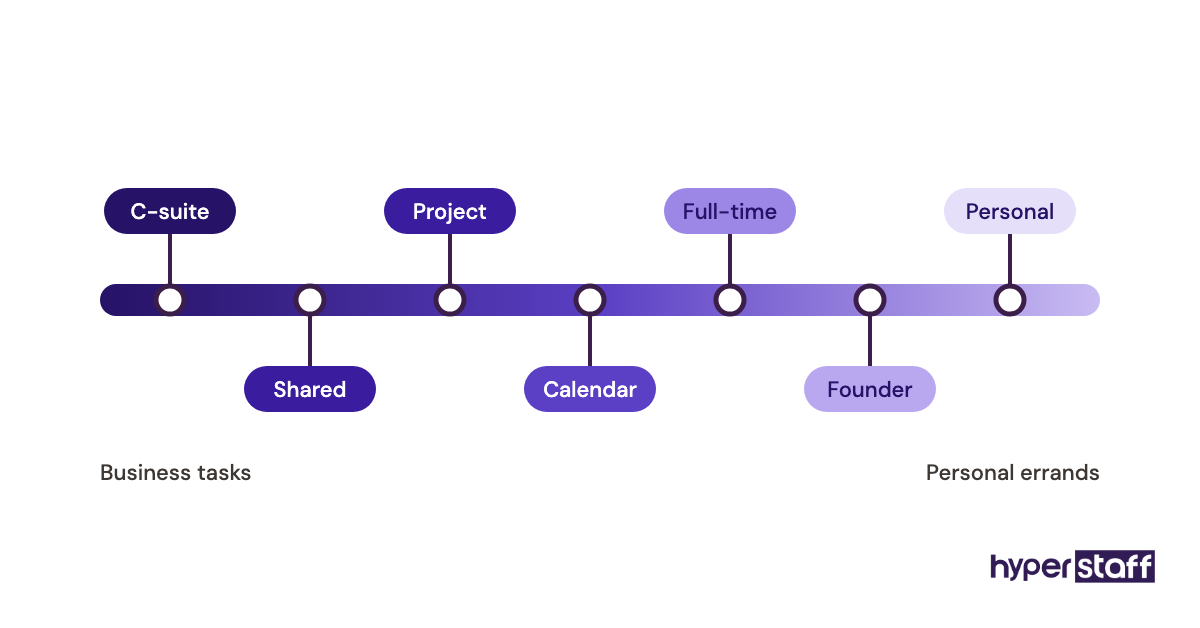
| Role type | Typical hours | Experience | Core focus | Template edits |
|---|---|---|---|---|
| Calendar and inbox EVA | 40 to 80 per month | 0 to 2 years | Scheduling, triage | Cut project coordination |
| Full-time executive EVA | 160 per month | 2 to 5 years | All template duties | Use as written |
| Senior or C-suite EVA | 160 per month | 5+ years | Gatekeeping, board prep | Add board and investor tasks |
| Founder EVA | 80 to 160 per month | 2 to 5 years | Business plus personal | Expand personal errands |
| Shared EVA (2 executives) | 160 per month | 5+ years | Competing calendars | Add priority rules between the two |
| Project-heavy EVA | 80 to 160 per month | 2 to 5 years | Deadlines, vendor follow-up | Add tool skills like Asana |
| Personal EVA | 40 to 80 per month | 0 to 2 years | Travel, family logistics | Cut business reporting |
How does an executive VA differ from related roles?
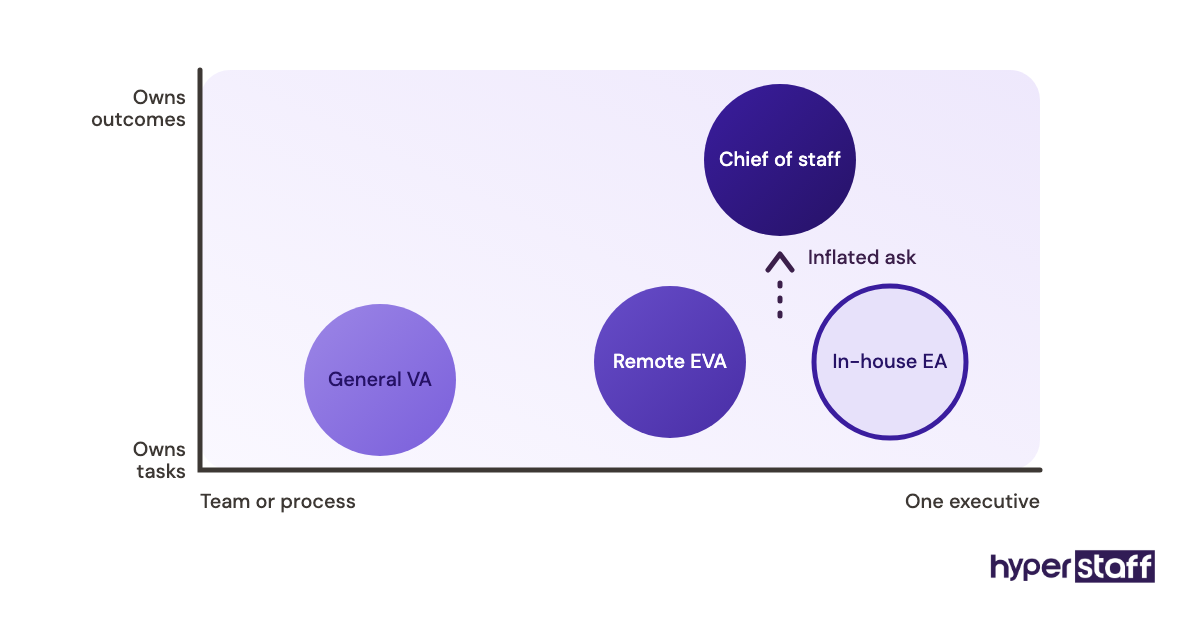
An executive virtual assistant supports one leader directly and acts in their name. Three nearby roles get confused with it, and copying their job descriptions attracts the wrong applicants.
Executive virtual assistant vs. in-house executive assistant
The duties overlap almost entirely; the differences are location, cost and how access is granted. An in-house EA can sign for deliveries and sit in on a meeting room, while a remote EVA works entirely through shared systems.
The job description changes in two places: time zone overlap and security setup. The full trade-off is laid out in this executive VA vs in-house comparison.
Executive virtual assistant vs. general virtual assistant
A general VA usually serves a team or a process, such as order entry or customer support. An EVA is attached to one person and makes judgment calls about that person's time.
Posting a general VA description for an executive role draws applicants who expect a task queue. They'll struggle the first time an investor emails at 10pm asking to move a meeting.
Executive virtual assistant vs. chief of staff
A chief of staff runs strategy projects and often manages people. An EVA supports the executive's operations and rarely owns business outcomes.
Writing "strategic partner" into an EVA posting inflates expectations on both sides. Keep the language about the work the assistant will actually own.
What are the benefits and drawbacks of a detailed job description?
A detailed executive virtual assistant job description filters applicants faster and shortens onboarding. It costs an hour or two of drafting and can scare off generalists who'd have been fine.
The benefits of a detailed EVA job description
- Fewer unqualified applicants, because the application test screens writing before any call.
- Interview questions come straight from the duty list.
- The assistant knows their decision limits from day one.
- Performance reviews have agreed numbers to point to.
- A replacement can be briefed from the same document.
The drawbacks of a detailed EVA job description
- Too many tool requirements shrink the pool for skills that take a week to learn.
- Executives sometimes write the ideal role and then hand over only calendar work.
- A long list of personal errands can read as unprofessional to senior candidates.
Who needs an executive virtual assistant job description?
Any leader hiring a remote assistant to act on their behalf needs one, whether they hire directly or through an agency. Founders running 25+ meetings a week, partners in professional firms and executives with travel-heavy schedules feel the gap first.
The view differs by company size. A founder of a 10-person firm usually wants one person who covers business and personal logistics, while an enterprise executive often has an in-house EA already and needs a remote assistant for overflow, research and after-hours coverage across time zones.
Executive virtual assistant job description examples
Single lines decide whether a posting works. The examples below show the same duty written well and written badly.
Good examples of EVA job description lines
Calendar line with a rule attached
"Hold 9 to 11am daily as focus time; move internal meetings out of it without asking." The candidate knows the goal, the rule and their authority in one sentence.
Inbox line with a number
"Triage the inbox at 8am and 3pm, leaving no more than 25 unread at end of day." A number like that turns a vague duty into something both sides can check.
Meeting prep line with a deadline
"Send a one-page briefing doc 24 hours before every external meeting." It is specific enough to test in an interview task.
Bad examples of EVA job description lines
"Manage the CEO's schedule"
Every assistant believes they can do this. The line gives no rules, no volume and no signal about how busy the calendar is.
"Wear many hats"
Experienced EVAs read this as "no defined scope," and the best ones skip the posting. List the hats instead.
"Must be available 24/7"
Nobody is, and the candidates who claim they are tend to burn out or overpromise. State the real overlap window and an on-call rule for emergencies.
Writing your executive VA job description, step by step
Five steps turn the template into a posting that fits one specific executive. Most people can finish it in a single sitting once Step #1 is done properly.
Step #1: Log two weeks of the executive's work
Write down every task the executive did that someone else could have done. That list, grouped, becomes the duty section; the companion list of executive virtual assistant tasks helps catch items the log missed.
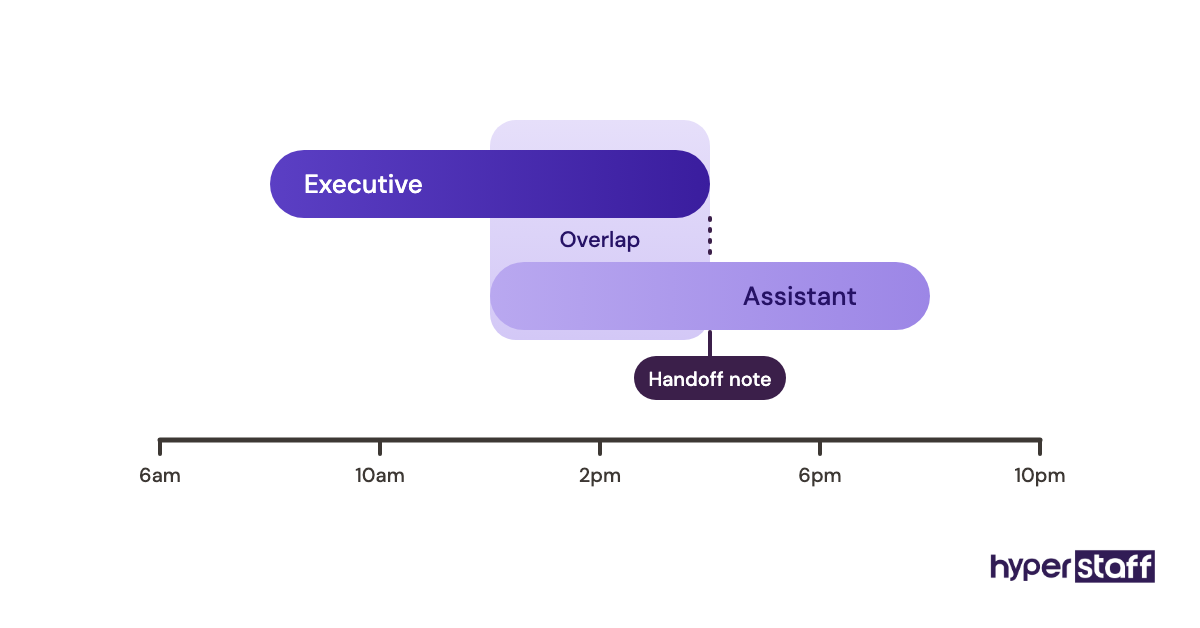
Step #2: Set the hours and the overlap window
Decide between 40, 80 or 160 hours a month and fix at least 3 to 4 hours of daily overlap. Overlap matters more than total hours for calendar-heavy roles.
Step #3: Write the decision limits
Split decisions into "do it" and "ask first," with dollar caps and meeting lengths. Executives who skip this step usually end up answering the same questions every day for a month.
Step #4: Attach a measure to each duty
Pick one number per duty that can be checked weekly. Keep the list short enough to review in five minutes.
Step #5: Add an application test and the interview plan
The rewrite-this-email test in the template filters for written judgment. Build the call around the duty list, using these executive virtual assistant interview questions, and follow the wider process in how to hire an executive virtual assistant.
Which tools should the job description list?
List the tools the executive already uses, and only those. A posting that names a dozen apps filters out good assistants for skills they could learn in a few days.
The usual set covers email and calendar (Google Workspace or Microsoft 365), chat (Slack or Teams), scheduling (Calendly), notes and tasks (Notion, Asana or ClickUp), passwords (1Password or Bitwarden) and expenses (Expensify or QuickBooks). Our longer review of executive virtual assistant tools covers how each fits the role.
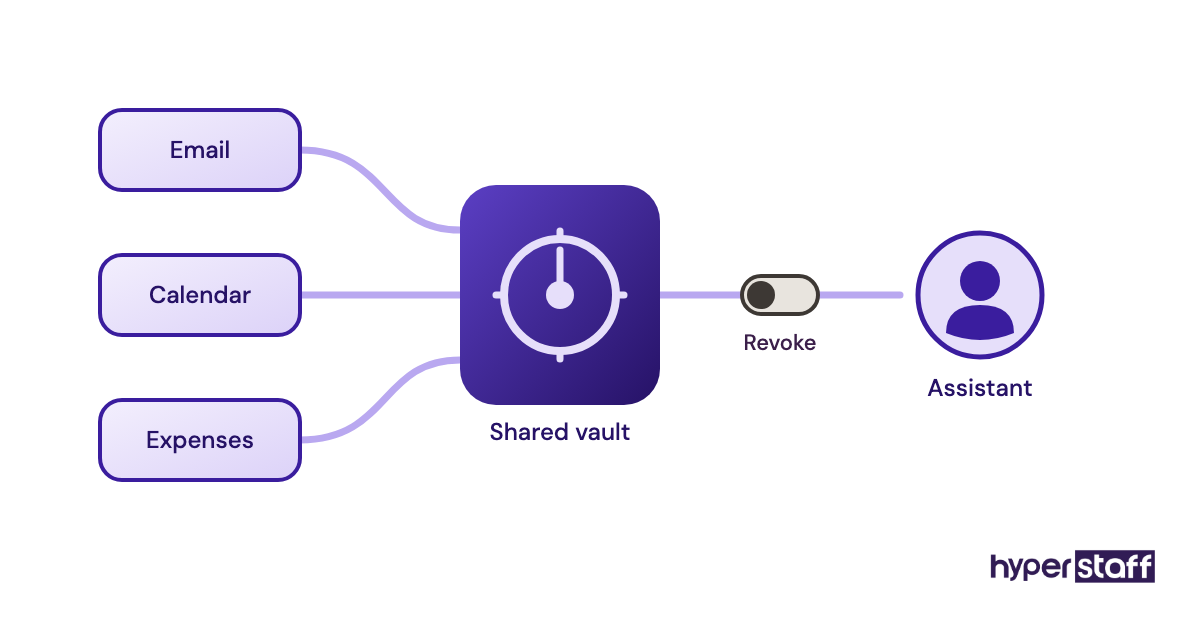
A password manager belongs in every executive VA posting. Sharing logins over chat is the most common security gap in remote executive support, and shared vaults with revocable access fix it.
8 proven tips for writing an executive VA job description
These tips come from what separates postings that attract senior assistants from postings that fill an inbox with generic applications.
- Name the executive's title and company size in the first line.
- State the overlap hours and time zone before the duty list.
- Write duties as outcomes with a number, such as "inbox under 25 unread."
- Include the decisions the assistant can make alone.
- Say which personal tasks are in scope, so nobody is surprised later.
- Cut tool requirements to the ones used daily.
- Use a written application test instead of a cover letter.
- Keep the posting under 600 words; senior candidates skim.
Overcoming common EVA job description challenges
The most common problem is a description that promises more than the executive delegates. The assistant arrives ready to run the calendar and spends three weeks waiting for access, which is one of the executive virtual assistant mistakes that ends placements early.
Scope creep comes second. A role written for scheduling gradually absorbs bookkeeping and social media, with no change to hours.
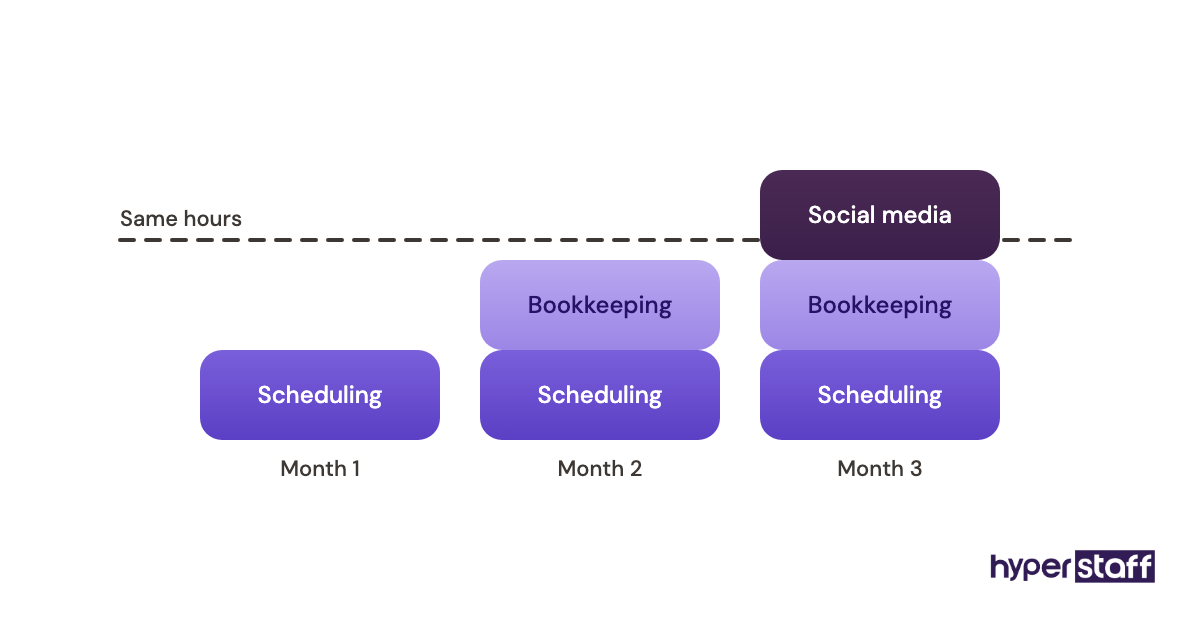
Review the description at 30 and 90 days and rewrite it to match reality. If the work outgrew the hours, move to a larger bundle before quality drops.
How do you measure whether the job description worked?
A job description works when the hire matches it and stays. Track how many applicants passed the written test, how many interviews it took to find a fit and whether the assistant still matches the duty list at 90 days.
After the hire, the measures written into the template become the scorecard. Missed briefings or a creeping unread count usually point back to a vague line in the original description.
How long does it take an executive VA to get up to speed?
Expect the first week to feel slow while access, SOPs and preferences are set up. Routine calendar and inbox work usually runs smoothly in 2 to 4 weeks.
Judgment calls, such as who gets a meeting this week, take longer: often 6 to 8 weeks. The first month of onboarding an executive virtual assistant decides most of that timeline.
How much does an executive virtual assistant cost?
An offshore executive virtual assistant costs a fraction of an in-house hire. The U.S. Bureau of Labor Statistics puts the median annual wage for executive secretaries and executive administrative assistants at $76,590, before benefits and overhead.
| Option | Experience | Hourly rate | Monthly (160 hours) | Yearly |
|---|---|---|---|---|
| Hyperstaff Essential | 0 to 2 years | From $3 | From $480 | From $5,760 |
| Hyperstaff Professional | 2 to 5 years | From $6 | From $960 | From $11,520 |
| Hyperstaff Expert | 5+ years | From $12 | From $1,920 | From $23,040 |
| In-house U.S. executive assistant | Varies | About $37 (salary only) | About $6,380 | $76,590 median, plus benefits |
Hours can also be bought in 40 or 80-hour bundles, and quarterly payment saves 10%. The full breakdown sits in our guide to executive virtual assistant cost.
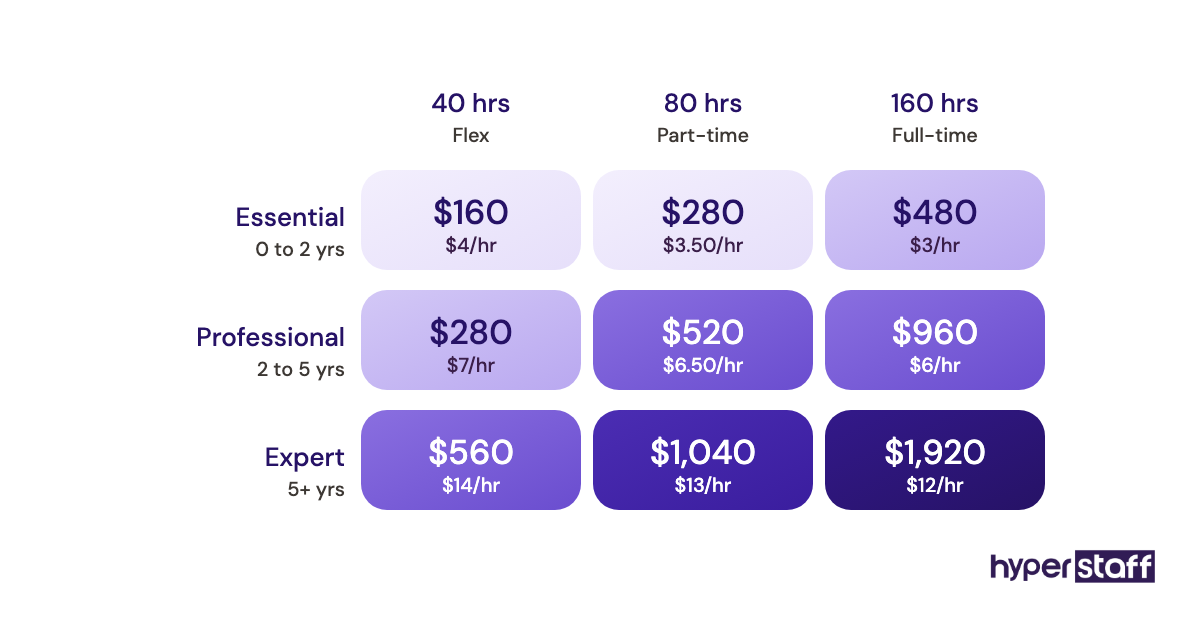
Important: Hyperstaff figures above are starting averages, not fixed quotes. Your actual price depends on the role's experience level, hours and the specific work involved.
Is an executive virtual assistant worth it?
For an executive whose hour is worth more than the assistant's, an executive virtual assistant is one of the highest-return hires available. Take an Expert-tier EVA at $12/hour for 80 hours a month ($960) who takes 10 hours a week of scheduling, email and prep off a founder billing $150/hour: that frees about 43 hours a month, worth roughly $6,450.
The math only holds if the freed hours go to revenue work instead of more email. The honest answer, with the cases where it doesn't pay off, is in whether an executive virtual assistant is worth it.
How do you choose an executive virtual assistant agency?
Choose an agency on four things: whether the assistant is dedicated to you, how fast a replacement arrives, who owns your documented processes and what you pay for unused hours. A rotating pool breaks the core of executive support, which is one person learning one executive.
Ask each agency to place against your written job description and to show how a replacement would be briefed. Hyperstaff keeps an Operations Vault of your SOPs, tools and context, so a free replacement in 5 to 7 business days starts from the same brief.
Executive assistant statistics, trends and future predictions
Demand for in-house executive assistants is flat. The BLS projects 0% employment change for executive secretaries and executive administrative assistants over its current ten-year outlook, from 489,300 to 489,200 jobs.
Flat in-house numbers alongside rising remote hiring suggest the work is moving offshore and part-time rather than disappearing. Expect more job descriptions written for 40 or 80 hours, and more roles that mix executive support with operations work.
How is AI changing the executive VA job description?
AI tools now draft emails, summarize meetings and suggest calendar slots, so job descriptions are shifting toward judgment and away from typing. Lines like "takes meeting notes" are giving way to "reviews AI meeting summaries and sends corrected actions."
Add one line naming the AI tools in use, such as Copilot, Gemini or a meeting recorder, and who checks their output. An assistant who forwards an unchecked AI summary to a client is a bigger risk than one who types slowly.
Disclaimer: This article is for general information only and does not constitute legal, employment, tax or financial advice. Pricing, wage data and tool features may change; verify details with the relevant provider and seek professional advice before making hiring decisions.
Common questions
What should an executive virtual assistant job description include?
It should include the executive's title, overlap hours, duties with measures, decision limits, tools, confidentiality terms and an application test. Leaving out decision limits is the most common gap.
How long should an executive VA job description be?
Aim for 400 to 600 words. Longer postings get skimmed, and the duty list matters more than company background.
What qualifications should I ask for in an executive virtual assistant?
Ask for years supporting a senior executive, strong written English and reliable internet with a backup. Degrees matter far less than a writing test result.
Can I use the same job description for a part-time executive VA?
You can, after trimming duties to fit 40 or 80 hours. Cut project coordination first and keep calendar and inbox work.
Should an executive virtual assistant job description list salary?
Yes, a pay range gets more qualified applicants and fewer mismatched calls. Through an agency, the hourly rate is set by experience tier instead.
Book a free 15 min call
We place a pre-vetted specialist in 5 business days, fully managed, from $3/hour.