Onboarding an Executive Virtual Assistant: The First 30 Days, Step by Step
A practical plan for giving an executive virtual assistant the access, context and decision rules to work on their own within a month.
On this page
- What Does Onboarding an Executive Virtual Assistant Involve?
- Key Executive VA Onboarding Terms You Should Know
- Why Does Onboarding an Executive Virtual Assistant Matter So Much?
- How Does Executive Virtual Assistant Onboarding Work?
- What Types of Executive VA Onboarding Are There?
- How Is Executive VA Onboarding Different From Related Processes?
- What Are the Benefits of a Structured Executive VA Onboarding?
- What Are the Drawbacks of Structured Onboarding?
- Who Needs a Formal Onboarding Plan for an Executive VA?
- Executive VA Onboarding Examples
- Creating an Executive VA Onboarding Plan, Step-by-Step
- What Does an Effective Executive VA Onboarding Strategy Look Like?
- Which Tools Help You Onboard an Executive VA?
- 10 Proven Tips for Onboarding an Executive Virtual Assistant
- How Do You Overcome Common Executive VA Onboarding Challenges?
- How Do You Measure Executive VA Onboarding Success?
- How Long Does Onboarding an Executive Virtual Assistant Take to Work?
- How Much Does Onboarding an Executive Virtual Assistant Cost?
- Is Onboarding an Executive Virtual Assistant Properly Worth It?
- How Do You Choose an Agency That Handles Executive VA Onboarding?
- Executive VA Onboarding Statistics, Trends and Future Predictions
- Onboarding an Executive Virtual Assistant and AI
- FAQs
💡 Key Takeaways:
1) Onboarding an executive virtual assistant means giving one remote assistant the delegated access, written preferences and approval limits they need to run an executive's calendar, inbox and travel without checking every decision.
2) Most executive VA onboarding takes two to six weeks, with access set up in the first days, calendar ownership handed over next and full inbox independence coming last.
3) The highest-value onboarding work is writing context down once, because a documented preference sheet and approval matrix cut the executive's interruptions and let a replacement assistant start in days.
Every Hour You Reclaim Can Earn Revenue Again
Hyperstaff has placed 70+ virtual assistants with 30+ clients, and our executive virtual assistant services start with a 30-minute kickoff call, after which work begins that day or the next morning. We place assistants within 5 business days, from $3/hour, and keep your SOPs in an Operations Vault so onboarding never starts from zero again.
What Does Onboarding an Executive Virtual Assistant Involve?
Onboarding an executive virtual assistant is the process of handing a remote assistant your accounts, preferences and decision rules so they can act for an executive with little supervision. It covers delegated access to email and calendar, a written record of how the executive works and a ramp-up period where trust is earned one task at a time.
General VA onboarding often ends once the logins work. Executive onboarding runs longer because the assistant speaks for someone senior, guards their time and decides what reaches them.
If you're still settling the scope of the role, our guide to the executive virtual assistant role covers it. Everything below assumes the hire is already made.
Key Executive VA Onboarding Terms You Should Know
- Delegated access = permission to read, send or manage email and calendar on the executive's behalf without sharing their password.
- Approval threshold = the spending or commitment limit below which the assistant decides alone.
- VIP list = contacts whose emails and meeting requests always reach the executive the same day.
- Preference sheet = a written record of meeting windows, travel habits, tone of voice and protected time.
- SOP = standard operating procedure, a step-by-step note for one recurring task.
- Operations Vault = Hyperstaff's maintained record of a client's SOPs, tools and context.
- Shadowing period = the stretch where the assistant drafts and the executive approves before anything goes out.
- Daily handoff = an end-of-day note listing what got done, what's pending and what needs a decision.
- Password manager = a shared vault that grants tool access without exposing raw credentials.
- Ramp-up = the weeks between first login and full independence.
Why Does Onboarding an Executive Virtual Assistant Matter So Much?
Onboarding decides whether an executive virtual assistant saves time in month one or adds to the pile. An assistant without context sends every judgment call back upstairs, and the executive ends up managing the help.
The stakes rise with seniority. A wrongly accepted meeting or a too-casual reply to an investor costs reputation, and a job description can't teach those lines.
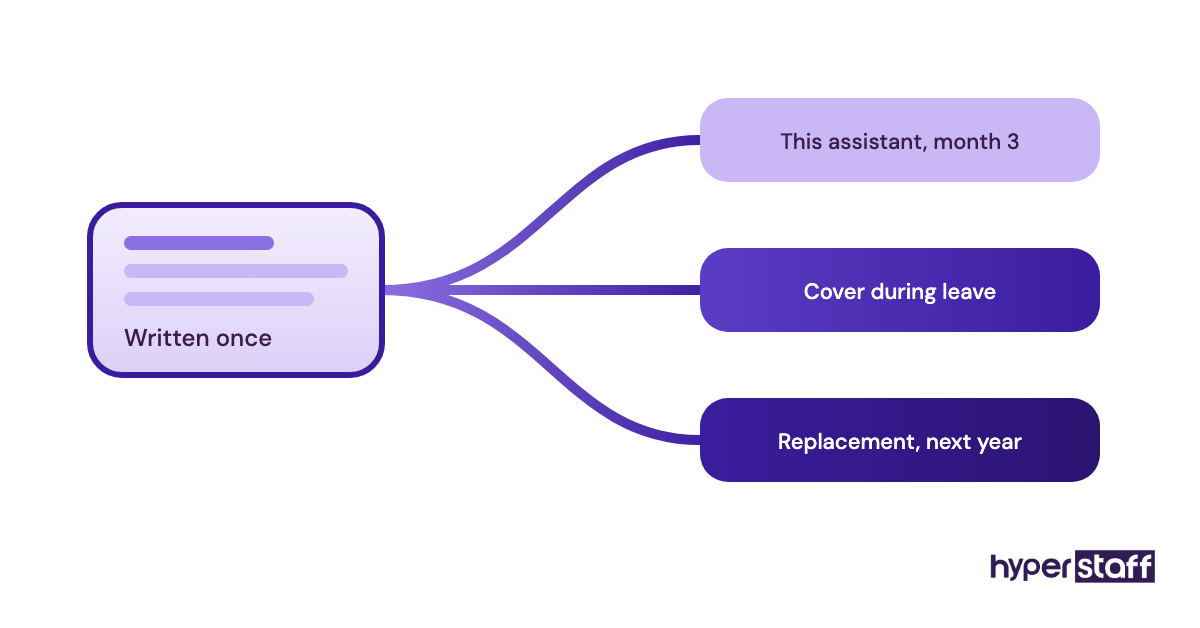
Written onboarding also compounds. Each preference recorded in week one is one the executive never explains again, including to a replacement assistant a year later.
How Does Executive Virtual Assistant Onboarding Work?
Executive virtual assistant onboarding works in phases: access first, then context, then drafting under review, then independent work with spot checks. Trust follows evidence, and each phase produces the evidence for the next.
| Phase | Typical timing | Assistant's job | Executive's job |
|---|---|---|---|
| Access setup | Days 1–2 | Log into email, calendar, password manager | Grant delegated access, set permissions |
| Context transfer | Days 1–5 | Read SOPs, preference sheet, VIP list | Record walk-throughs, answer questions |
| Shadowing | Weeks 1–2 | Draft replies and invites for approval | Approve or correct drafts daily |
| Supervised ownership | Weeks 2–4 | Send routine items alone, flag edge cases | Read the daily handoff |
| Independent work | Week 4 onward | Run calendar, inbox triage, travel | Weekly check-in, spot checks |
The phases overlap in real life. Calendar ownership usually comes before inbox ownership, because a calendar mistake is visible and fixable while a sent email is permanent.
What Types of Executive VA Onboarding Are There?
Executive VA onboarding comes in several forms, and they differ mainly in who writes the documentation and how fast the assistant takes control. The right type depends on how much the executive has already written down.
| Onboarding type | Who leads it | Typical ramp-up | Best fit | Main risk |
|---|---|---|---|---|
| Self-led | The executive | 4–8 weeks | Founders with few systems | Context stays in one head |
| Agency-led | Account manager plus executive | 2–4 weeks | Executives with no ops team | Depends on agency documentation |
| Chief-of-staff-led | Chief of staff or ops lead | 2–3 weeks | Firms with an ops function | Assistant learns the wrong person's habits |
| Handover | Outgoing assistant | 1–2 weeks | Replacements | Gaps if the handover is rushed |
| Shadow-first | Executive, live | 2–3 weeks | Investor or board-heavy inboxes | Heavy executive time in week one |
| Phased by task | Executive | 4–6 weeks | Part-time 40-hour bundles | Slow to reach full value |
| Documentation-first | Whoever writes the SOPs | 1–3 weeks once docs exist | Repeatable workflows | Upfront writing time |
| Shared team | Executive plus team leads | 3–5 weeks | Assistant serving an executive and a team | Competing priorities |
Whichever type you pick, build it around the actual workload. Our executive virtual assistant tasks checklist is a good starting list to sort into "hand over now" and "hand over later".
How Is Executive VA Onboarding Different From Related Processes?
Executive VA onboarding shares steps with employee onboarding, client onboarding and skills training, but its goal is narrower: one assistant learning one executive's judgment. The differences decide what goes into your plan and what you can skip.
Executive VA Onboarding vs. Employee Onboarding
Employee onboarding serves the company: payroll, policies, culture and team introductions. An executive VA needs little of that and a great deal of one person's preferences, which standard HR checklists rarely capture.
Cost works differently too. Our comparison of an executive virtual assistant vs in-house hire covers benefits, desk costs and notice periods.
Executive VA Onboarding vs. Client Onboarding
Client onboarding is how an agency learns your business. Through an agency, both happen at once, and the split that works is the agency documenting company processes while the executive explains personal habits.
Executive VA Onboarding vs. Skills Training
Training builds a skill the assistant lacks. A Professional or Expert tier assistant already knows calendar management, so onboarding teaches the unwritten rules of your calendar, such as which recurring meetings can move and which never do.
What Are the Benefits of a Structured Executive VA Onboarding?
A structured onboarding gets an executive assistant to independent work faster and leaves a written record the business keeps.
- Fewer interruptions for the executive after week two
- Ramp-up in roughly 2 to 4 weeks instead of 6 to 8
- Preferences that outlast any single assistant
- Clear approval limits, so fewer reversed decisions
- Replacements that start from notes instead of a blank page
- Safer access, with every login running through delegation or a password manager
What Are the Drawbacks of Structured Onboarding?
The drawbacks sit almost entirely in the first two weeks, and they cost time and patience.
- Roughly 3 to 6 hours of executive time in week one
- Documents go stale when nobody owns them
- Output is slower while every draft waits for approval
- Some executives find reviewing drafts slower than doing the task themselves at first
Who Needs a Formal Onboarding Plan for an Executive VA?
Anyone handing email or calendar access to an executive VA needs a formal onboarding plan, even on a 40-hour monthly bundle. The plan can be one page for a part-time assistant, but it should exist.
Founders and CEOs of small companies need it most, since nobody else holds their context. Senior leaders inside larger firms usually have IT policies and handover notes already, so their plan leans on access approvals and a VIP list.
Consultants, brokers and agency owners with calendars full of client calls fit here too. If you haven't made the hire yet, read how to hire an executive virtual assistant before planning the first week.
Executive VA Onboarding Examples
The examples below are common patterns in executive assistant onboarding, described by method because the details change from one executive to the next. Each one shows how a single choice in week one shapes month three.
Good Executive VA Onboarding Examples
A Recorded Inbox Walk-Through
The executive records a 20-minute screen share sorting a real morning of email out loud: archive, reply, forward, flag. The assistant hears the triage logic in the executive's own words, and can replay it in week three when an odd email turns up.
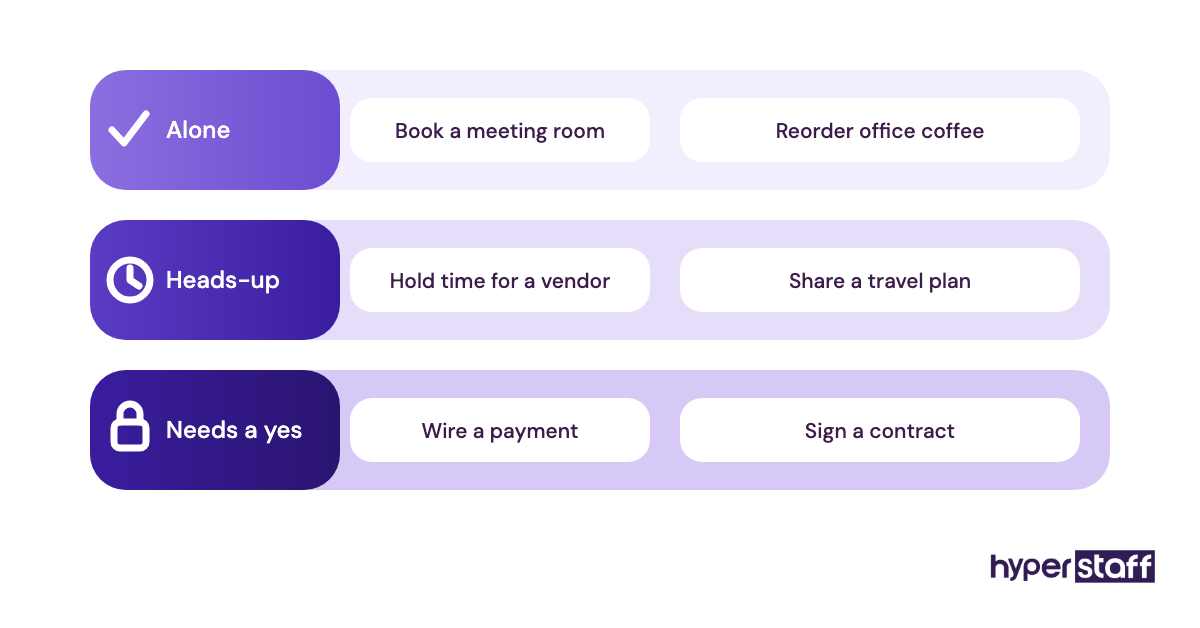
A One-Page Approval Matrix
A single table lists what the assistant does alone, what needs a heads-up and what needs a yes. For example: rebook a delayed flight alone, decline cold sales pitches alone, accept any meeting with a board member only after approval.
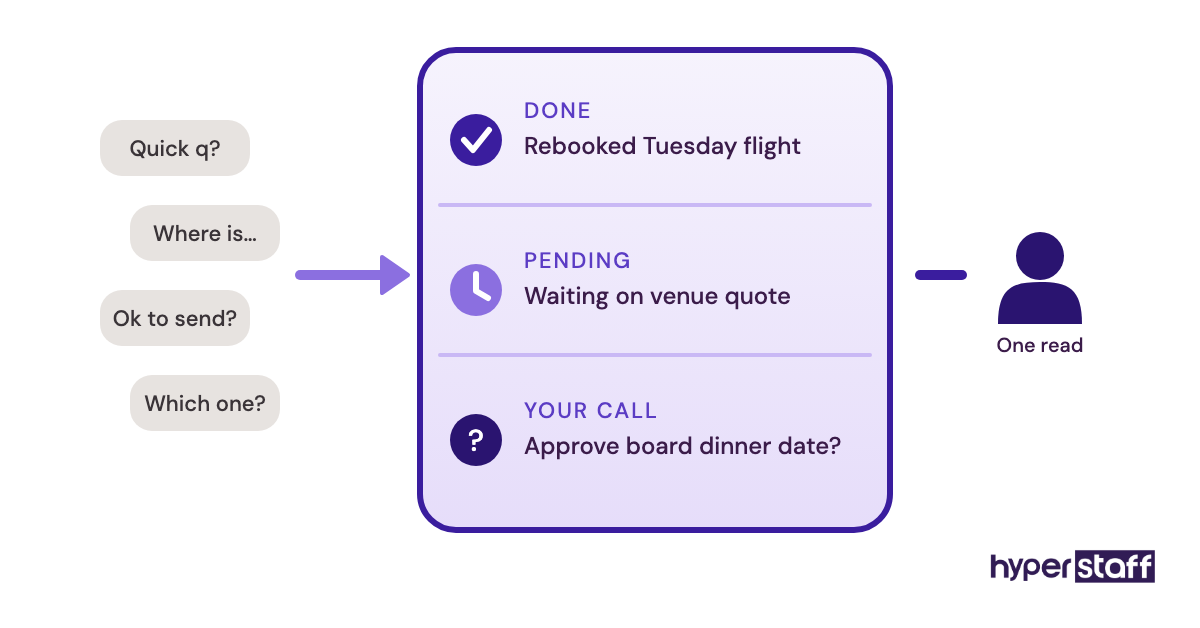
A Daily Handoff From Day One
The assistant sends a five-line note at the end of each day with done, pending and decisions needed. It replaces a dozen chat pings and gives the executive one place to correct course.
Bad Executive VA Onboarding Examples
Passwords Sent by Text Message
Credentials pasted into chat or SMS can't be revoked cleanly and often break when two-factor codes go to the executive's phone. Every access change then needs the executive, which defeats the point of delegating.
"Just Watch What I Do"
Without any documentation, the assistant learns habits by guessing, and each guess becomes a correction. Executives who skip writing things down tend to conclude the assistant "doesn't get it" when the gap is missing context.
Full Send-As Access With No Rules
Granting full inbox control on day one, with no approval matrix, invites a confident reply to the wrong person. Our list of common executive virtual assistant mistakes covers more of these traps.
Creating an Executive VA Onboarding Plan, Step-by-Step
An executive VA onboarding plan runs in five steps, from writing down preferences to handing over ownership. Steps one and two happen before the first working day if you can manage it.
Step #1: Write the Role Scope and Preference Sheet
Start with what the assistant owns and what they never touch, then add the preference sheet: meeting windows, buffer rules, travel class, seat and hotel habits, time zones and the tone for replies. If the scope is still fuzzy, a clear executive virtual assistant job description settles it.
Add the VIP list and the approval matrix here too. One page each is enough to start.
Step #2: Set Up Delegated Access and a Password Manager
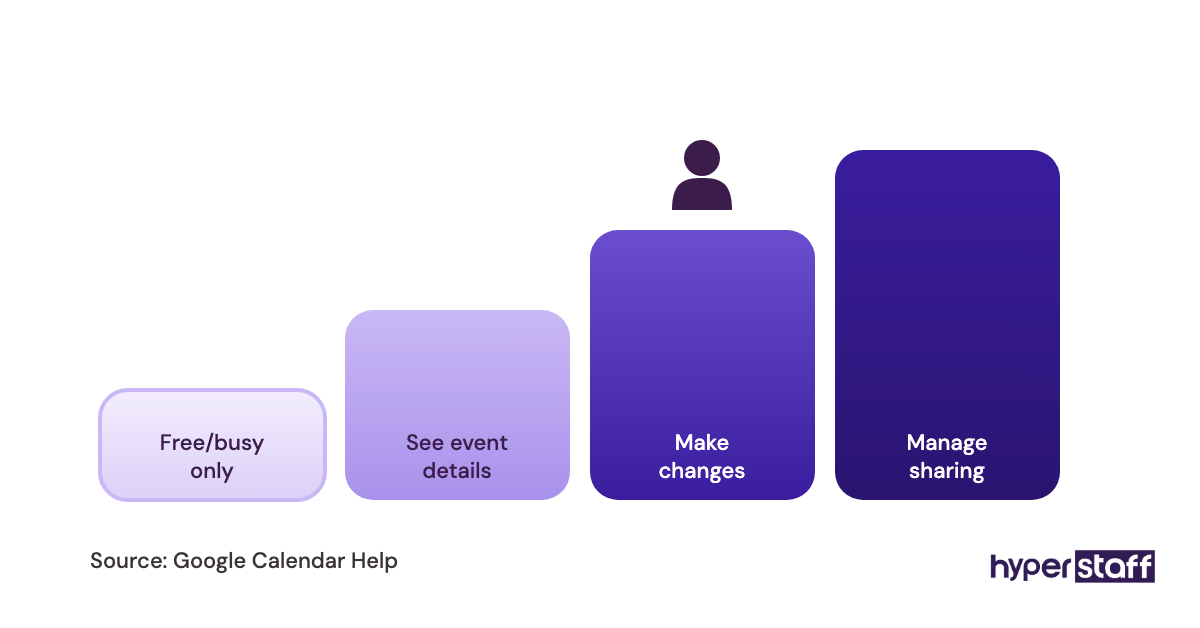
Use the built-in delegation tools. Gmail and Google Calendar let you add a delegate without sharing your password, and Outlook offers delegate access with folder-level permissions.
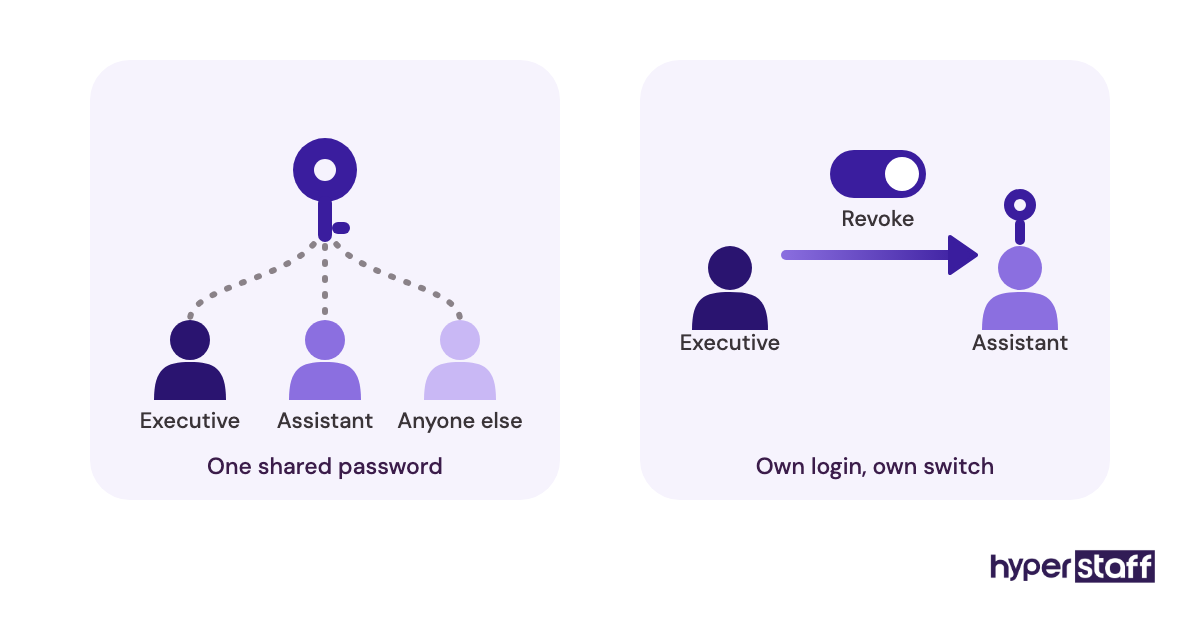
Move every other login into a shared vault in a password manager, including two-factor codes where the tool supports it. Removing access later then takes minutes.
Step #3: Transfer Context in Recorded Sessions
Record short screen-share videos of real work instead of holding long live meetings. A 15-minute recording of how you book travel beats a 60-minute call, because the assistant can rewatch it.
Three or four recordings usually cover inbox triage, scheduling, travel and expenses. Keep them in one shared folder linked from the SOP index.
Step #4: Run a Draft-and-Approve Period
For the first one to two weeks, the assistant drafts replies, invites and bookings, and the executive approves or edits each one. Every edit turns into a line in the preference sheet, so the corrections stop repeating.
Step #5: Hand Over Ownership and Set a Review Rhythm
Hand over one area at a time, usually calendar first, then travel, then inbox triage. Replace daily approvals with a 15-minute weekly check-in and occasional spot checks of sent items.
Review the preference sheet at the 30-day mark. By then it has usually doubled in length, and most of the new lines came from real situations.
What Does an Effective Executive VA Onboarding Strategy Look Like?
An effective executive VA onboarding strategy puts written context before access and access before independence, with one owner for the documents. The executive gives time early so they can give much less of it later.
Practitioners disagree on pace. Some prefer full inbox access on day one so the assistant learns from volume; others insist on two weeks of drafts first.
We side with the gradual route for executives who deal with investors, boards or press, and accept the faster route for founders whose inbox is mostly vendors and internal threads. The deciding question is how much one wrong reply would cost.
Which Tools Help You Onboard an Executive VA?
The tools that matter most for onboarding an executive VA are delegated email and calendar access, a password manager and a way to record screen walk-throughs. Everything else depends on what the executive already uses, and our full list of executive virtual assistant tools goes deeper.
- Google Workspace or Microsoft 365: both include email and calendar delegation, so no extra spend is needed for core access.
- Bitwarden: Teams costs $4 per user per month and Enterprise $6, billed annually. 1Password is the common alternative.
- Loom: free Starter plan for short recordings; Business runs $18 per user per month and Business + AI $24.
- Calendly: a free plan, with Standard at $10 and Teams at $16 per seat per month.
- Notion: Plus at $10 and Business at $20 per seat per month on monthly billing, cheaper yearly. A good home for the preference sheet and SOPs.
- Slack: the free plan works for a daily handoff channel; paid plans add longer message history.
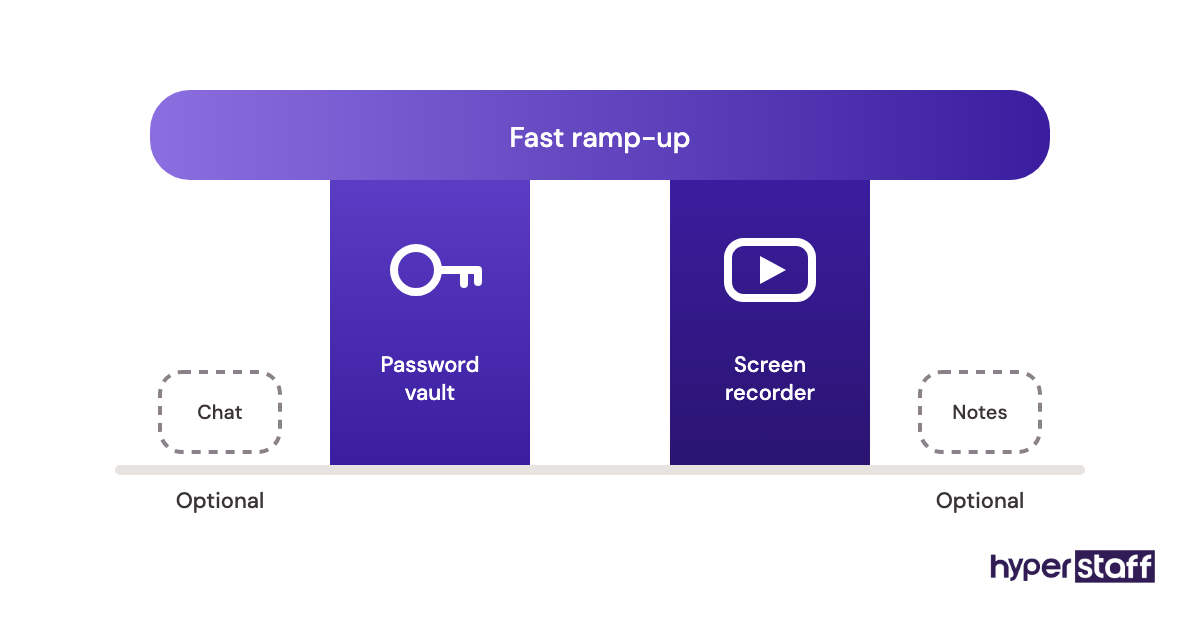
If we had to keep only two, it would be a password manager and a screen recorder. The recorder does more for ramp-up speed than any project tool, because it captures judgment that written steps miss.
10 Proven Tips for Onboarding an Executive Virtual Assistant
A two-week ramp-up and a two-month one usually differ on the habits below.
- Grant access through delegation, never by sharing the executive's own password.
- Write the approval matrix before the first working day.
- Record real work on screen instead of explaining it in meetings.
- Start the daily handoff note on day one.
- Hand over the calendar before the inbox.
- Turn every correction into a line in the preference sheet.
- Name one person who owns the onboarding documents.
- Give the assistant a list of topics they must never answer, such as legal or HR matters.
- Overlap working hours by at least two to three hours a day for the first fortnight.
- Book the 30-day review before the assistant starts.
How Do You Overcome Common Executive VA Onboarding Challenges?
Most executive VA onboarding challenges come down to time zones, missing context and an executive who is too busy to review drafts. Each has a practical fix.
For time zones, set a fixed overlap window and batch questions into it. For missing context, keep a running "questions log" the executive answers once a day instead of fielding pings.
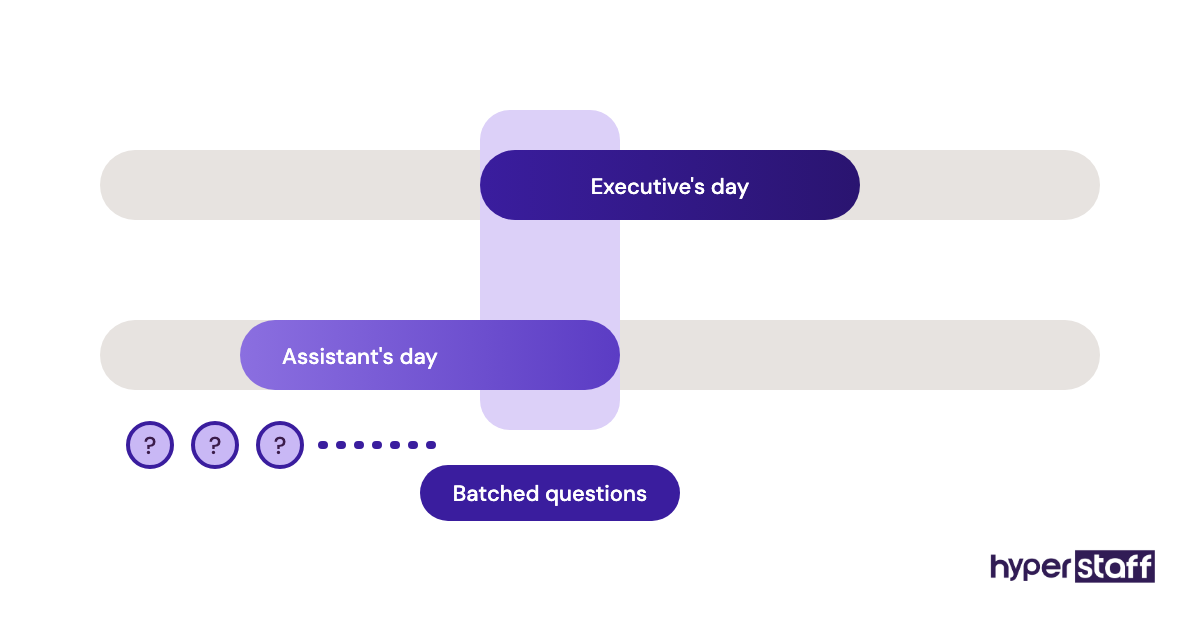
The busy-executive problem is the hardest. Shorten the shadowing period for low-risk tasks like scheduling internal meetings, and keep review only for external email, so the executive's approval time goes where mistakes are expensive.
How Do You Measure Executive VA Onboarding Success?
Executive VA onboarding success shows up as fewer questions, fewer corrections and more hours the executive gets back. Track a handful of numbers weekly for the first month.
Count questions sent to the executive per day, the share of drafts approved without edits and the number of scheduling conflicts. All three should fall week over week.
Then ask the executive one question at day 30: how many hours a week did the assistant return? That estimate, rough as it is, is the figure the investment rests on.
How Long Does Onboarding an Executive Virtual Assistant Take to Work?
Onboarding an executive virtual assistant usually takes two to six weeks to reach independent work. Access and first tasks happen in days; trust on external email comes last.
Expect a dip around days 5 to 10. The assistant knows enough to act but not enough to avoid edits, and executives often feel it's slower than doing the work themselves.
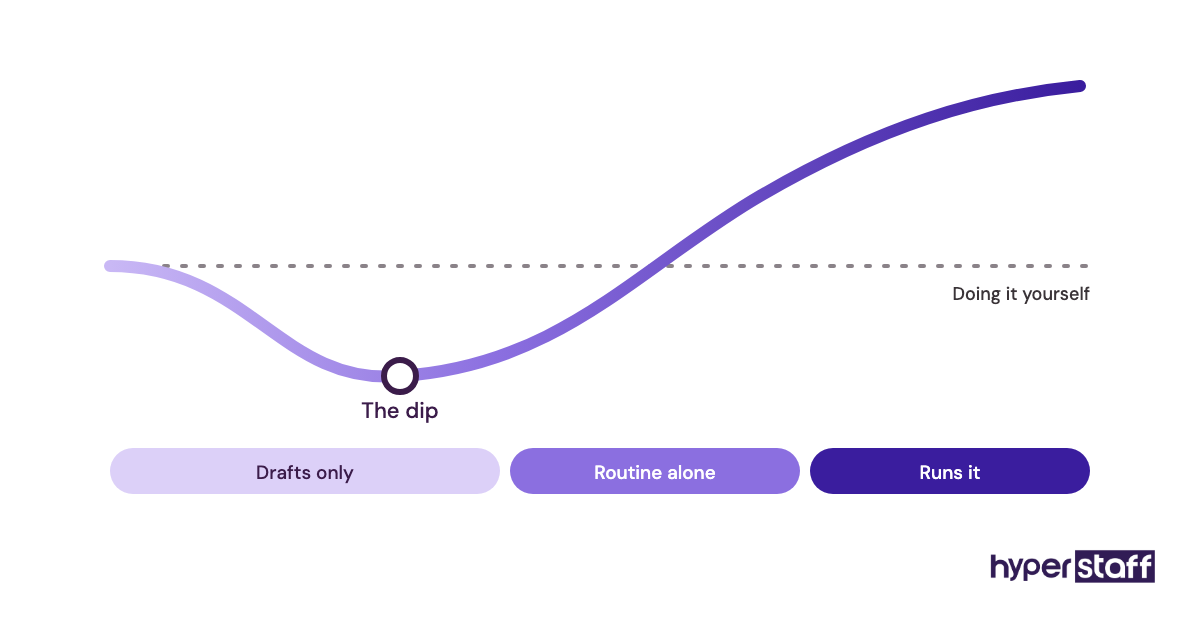
Past week four, the gains keep growing for months, because each new situation adds a rule the assistant never needs to ask about again.
How Much Does Onboarding an Executive Virtual Assistant Cost?
Onboarding an executive virtual assistant costs the assistant's paid hours during ramp-up plus a few hours of the executive's time, and the assistant's rate sets most of that. Through Hyperstaff, rates start at $3, $6 or $12 an hour by experience tier, compared with roughly $37 an hour in wages for an in-house executive assistant.
The in-house figures below use the BLS median wage of $76,590 for executive assistants, and benefits make up 30% of private-sector compensation according to the BLS Employer Costs for Employee Compensation release.
| Monthly hours | Hyperstaff Essential (from $3/hr) | Hyperstaff Professional (from $6/hr) | Hyperstaff Expert (from $12/hr) | In-house EA, wages only (~$37/hr) | In-house EA, with benefits (~$53/hr) |
|---|---|---|---|---|---|
| 40 hours | $120 | $240 | $480 | ~$1,470 | ~$2,100 |
| 80 hours | $240 | $480 | $960 | ~$2,950 | ~$4,210 |
| 160 hours | $480 | $960 | $1,920 | ~$5,890 | ~$8,420 |
| Time to place | 5 business days | 5 business days | 5 business days | Varies by search | Varies by search |
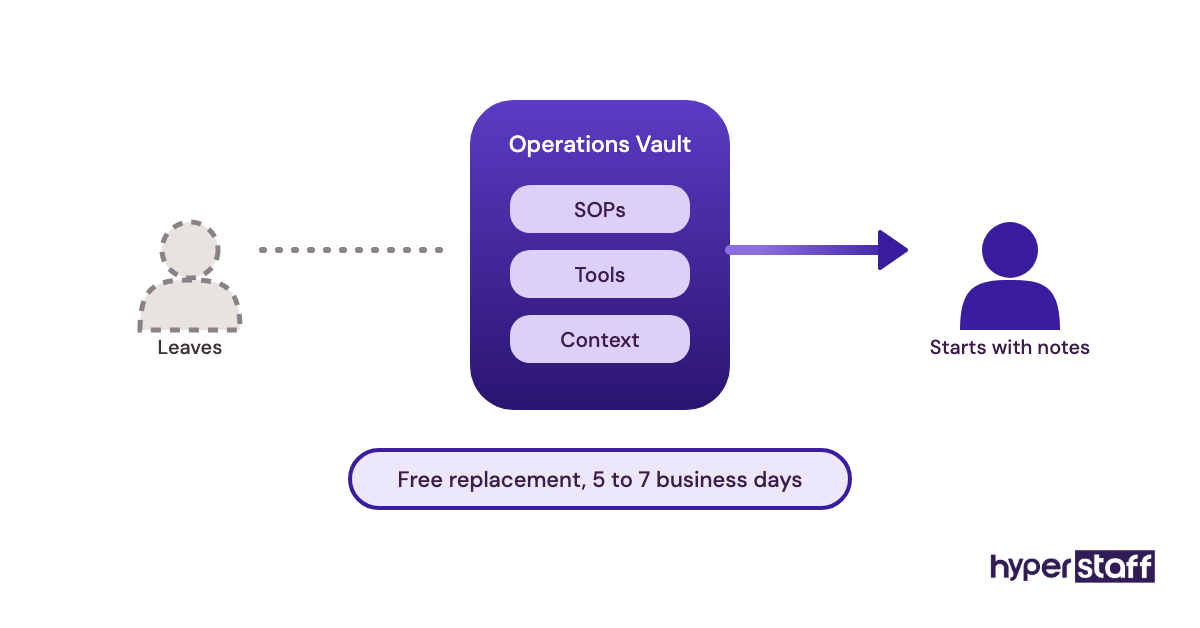
| Replacement | Free, 5–7 business days | Free, 5–7 business days | Free, 5–7 business days | New search | New search |
Paying quarterly with Hyperstaff saves a further 10%. For the full breakdown across providers and regions, see our executive virtual assistant cost guide.
Important: Our rates above are typical starting averages, not fixed quotes. What you actually pay depends on the hours, experience level and type of work your executive needs.
Is Onboarding an Executive Virtual Assistant Properly Worth It?
Yes, a properly onboarded executive virtual assistant is one of the best returns an executive can buy, because the hours spent in week one keep paying back every week after. The math holds even at modest assumptions.
Take an executive whose time is worth $150 an hour and who gets back 8 hours a week after onboarding. That's about $5,200 a month in reclaimed time against $480 for an 80-hour Professional bundle, after spending maybe 6 executive hours ($900) on onboarding once.
The catch is the condition. Skip the preference sheet and approval matrix, and the same assistant may return only two or three hours a week, which still pays but leaves most of the value unused. Our take on whether an executive virtual assistant is worth it covers the cases where it isn't.
How Do You Choose an Agency That Handles Executive VA Onboarding?
Choose an agency that documents your processes for you and can replace an assistant without restarting onboarding. How much onboarding lands on the executive's desk depends mostly on those two points, plus having one named account manager to call.
Ask how long a replacement takes and what the new assistant receives on day one. An agency with written SOPs can brief a replacement in days; one without sends you back to step one.
Ask too whether you can interview candidates yourself. Our list of executive VA interview questions helps you test judgment as well as skills.
Executive VA Onboarding Statistics, Trends and Future Predictions
The U.S. Bureau of Labor Statistics puts the median wage for executive secretaries and executive administrative assistants at $76,590 a year, and projects employment in the role to stay flat (0% change) over the coming decade, according to the Occupational Outlook Handbook. Flat in-house demand alongside steady executive workloads leaves room for remote assistants.
Benefits account for 30% of private-industry employer compensation costs, per the BLS Employer Costs for Employee Compensation release. An in-house hire therefore costs well beyond the salary line before any onboarding starts.
On trends, we expect written documentation to matter more each year. Agencies and executives that keep SOPs current can swap or add assistants quickly, while those relying on memory repeat onboarding with every hire.
Our prediction is less certain on AI. Recorded walk-throughs turned into searchable notes look likely to shorten ramp-up, though we haven't seen enough to put a number on it.
Onboarding an Executive Virtual Assistant and AI
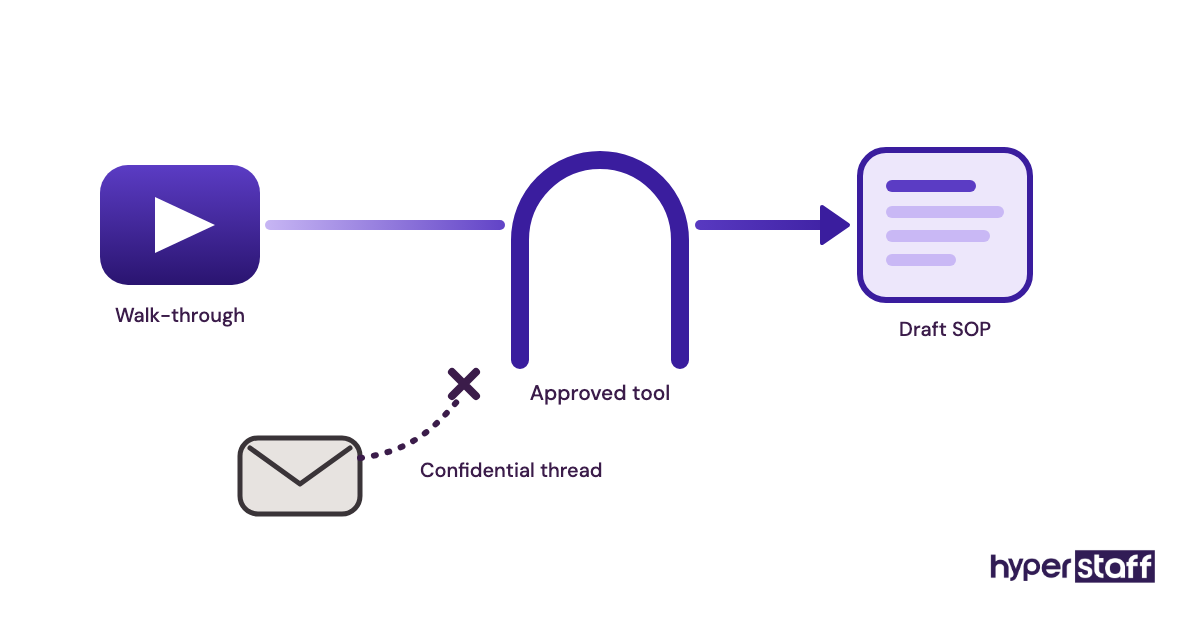
AI shortens executive VA onboarding mostly by turning recordings and email history into written notes faster. Meeting-transcription tools can draft SOPs from a walk-through, and AI writing tools help an assistant match the executive's tone in early drafts.
The judgment part still needs a person. AI won't know that a particular client always gets a phone call before bad news goes out by email, and an assistant learns that only from the executive.
Privacy needs care as well. Check each AI tool's data terms before connecting it to an executive inbox, and keep confidential threads out of tools the company hasn't approved.
Disclaimer: This article is for general information only and isn't legal, financial or security advice. Tool prices and features change, so check each provider's current terms, and consult a qualified professional before granting access to sensitive accounts.
Common questions
Can I onboard an executive VA without giving them my passwords?
You can. Gmail, Google Calendar and Outlook all support delegate access, and a password manager covers the remaining tools. You keep control and can remove access in minutes.
What should my executive virtual assistant get on day one?
Delegated email and calendar access, the preference sheet, the VIP list and the approval matrix. Add one or two recorded walk-throughs so they can start drafting right away.
How much of my time does onboarding an executive assistant take?
Plan for roughly 3 to 6 hours in week one and about 30 minutes a day during the draft-and-approve period. After week four, a weekly 15-minute check-in is usually enough.
Should my executive VA have access to my personal email?
It depends on what they manage. If personal travel and family scheduling are in scope, give delegated access with clear rules; otherwise keep personal accounts separate.
What happens if my executive VA leaves after onboarding?
With written SOPs and a preference sheet, a replacement picks up in days. Through Hyperstaff, replacements are free, arrive in 5 to 7 business days and are briefed from your Operations Vault.
Book a free 15 min call
We place a pre-vetted specialist in 5 business days, fully managed, from $3/hour.