How to Hire an Executive Virtual Assistant Who Lasts
A practical plan for scoping, testing, pricing and onboarding an executive virtual assistant who can act on your behalf from the first month.
On this page
- What Does Hiring an Executive Virtual Assistant Involve?
- Key Executive Assistant Hiring Terms You Should Know
- Why Does Hiring the Right Executive Virtual Assistant Matter?
- How Does Hiring an Executive Virtual Assistant Work?
- What Are the Ways to Hire an Executive Virtual Assistant?
- How Is Hiring an Executive VA Different From Other Hires?
- What Are the Benefits of Hiring an Executive Virtual Assistant?
- What Are the Drawbacks of Hiring a Remote Executive Assistant?
- Who Should Hire an Executive Virtual Assistant?
- Executive Virtual Assistant Hiring Examples
- Creating an Executive Assistant Hiring Plan, Step by Step
- What Does an Effective Hiring Strategy Look Like?
- Which Tools Does an Executive Virtual Assistant Need From Day One?
- 10 Tips for Hiring an Executive Virtual Assistant
- How Do You Fix Common Executive VA Hiring Problems?
- How Do You Measure Whether the Hire Worked?
- How Long Does It Take to Hire an Executive Virtual Assistant?
- How Much Does It Cost to Hire an Executive Virtual Assistant?
- Is Hiring an Executive Virtual Assistant Worth It?
- How Do You Choose an Executive Virtual Assistant Agency?
- Executive Assistant Hiring Statistics, Trends and Predictions
- Does AI Change How You Hire an Executive Virtual Assistant?
- FAQs
💡 Key Takeaways:
1) To hire an executive virtual assistant well, log where your working hours go for two weeks first, then write the role around the tasks that log shows you can hand off.
2) A short paid work test built from your real inbox or calendar reveals a candidate's judgment and discretion far better than a résumé or a friendly interview.
3) Grant access in stages over the first month, starting with delegated email and calendar, and add finance or personal accounts only after the assistant has earned trust.
Buy back the hours that earn your revenue
Hyperstaff places pre-vetted assistants from five regions in 5 business days, with rates from $3/hour and a dedicated account manager for every client. After 70+ placements across 30+ clients, our dedicated executive assistant support starts with a 30-minute kickoff call, and your assistant begins work that day or the next morning.
What Does Hiring an Executive Virtual Assistant Involve?
Learning how to hire an executive virtual assistant starts with knowing what the hire involves: finding, testing and onboarding a remote professional who runs a leader's calendar, inbox, travel, meeting prep and follow-ups. It's a trust decision as much as a skills decision, because this person will read your email and reply in your name.
If you're still pinning down the scope, our guide on what an executive virtual assistant is sets out the full role. The short version: the work reaches well past calendar admin into investor updates, CRM upkeep, vendor follow-ups and board pack prep.
The hardest part of the hire is access design, meaning what the assistant can see, send and approve, and in what order. Skills tests are the easier half.
Key Executive Assistant Hiring Terms You Should Know
- Executive virtual assistant (EVA) = a remote assistant who supports one leader's calendar, inbox, travel and priorities.
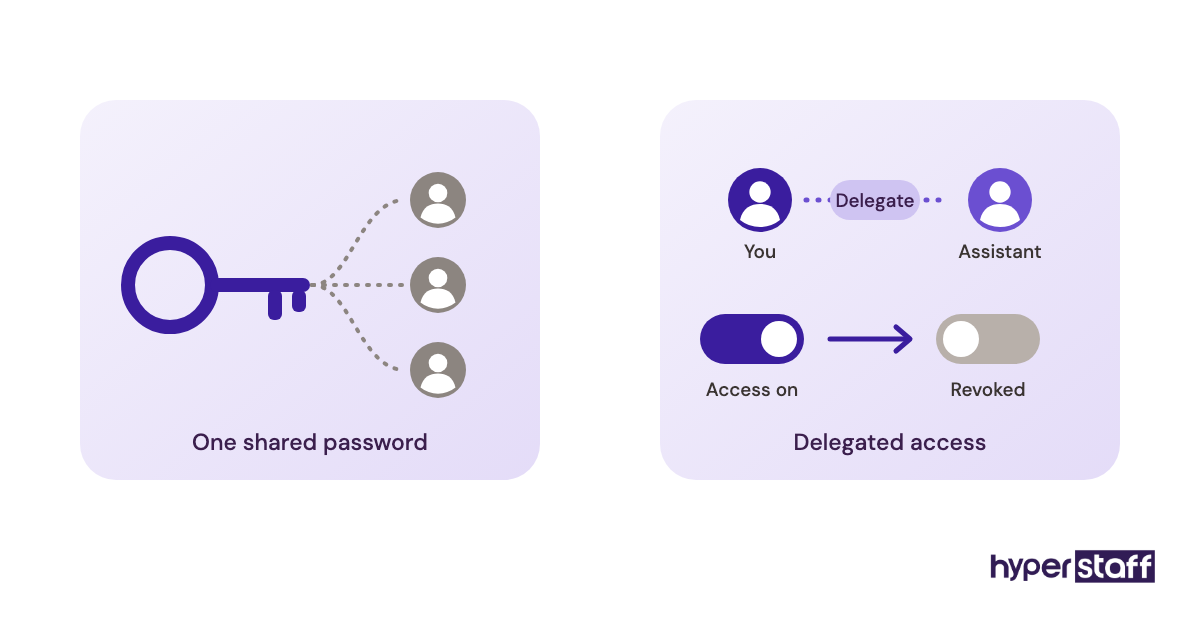
- Delegated access = permission to read, send or edit inside your email or calendar without holding your password.
- Work sample test = a short, paid task built from real material that shows how a candidate thinks.
- Experience tier = the seniority band a candidate falls into, which sets the hourly rate.
- Hour bundle = a fixed block of monthly hours, such as 40, 80 or 160.
- Time-zone overlap = the hours each day when you and the assistant are both online.
- SOP = a standard operating procedure, written step by step so anyone can repeat the task.
- Access ladder = a planned order for granting account permissions as trust builds.
- Operations Vault = Hyperstaff's written, maintained record of a client's SOPs, tools and context.
- Replacement guarantee = an agency's promise to swap in a new assistant if the match fails.
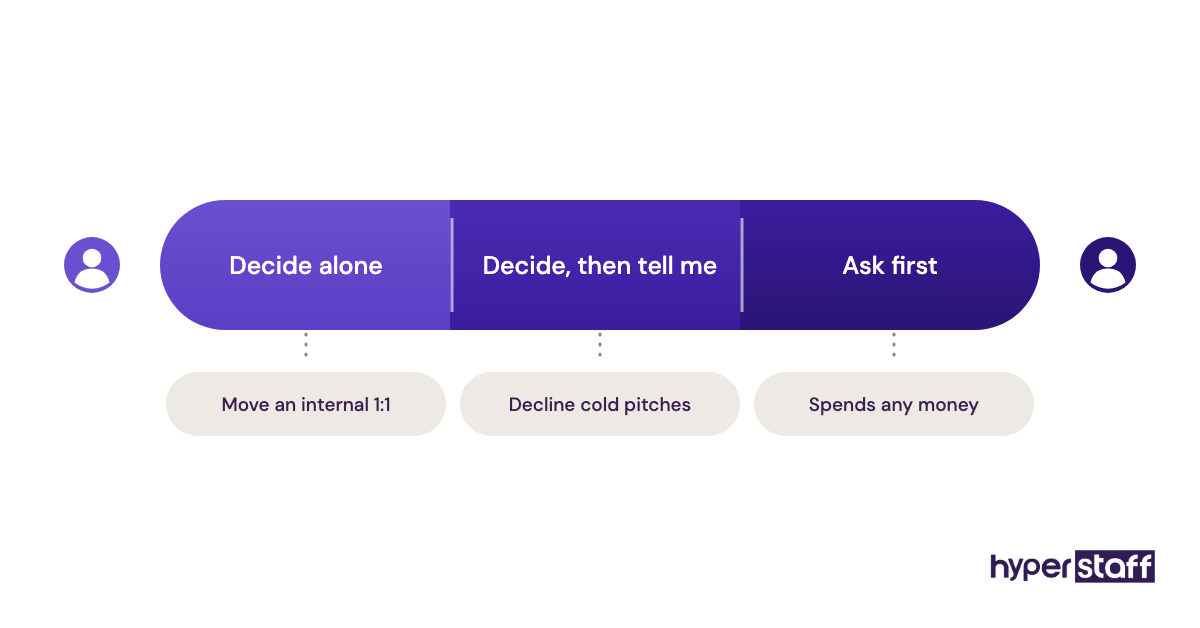
- Escalation rule = a written line between what the assistant decides alone and what comes to you.
Why Does Hiring the Right Executive Virtual Assistant Matter?
The right executive virtual assistant hands back hours of a leader's week, while the wrong one costs those hours twice: once doing the work badly and again fixing it. Executives feel a bad hire faster than most roles do, because every missed email or double-booked meeting lands on their name.
Executive support also compounds. An assistant who has run your inbox for six months knows which investors get same-day replies and which vendors can wait until Friday, and none of that shows up on a résumé.
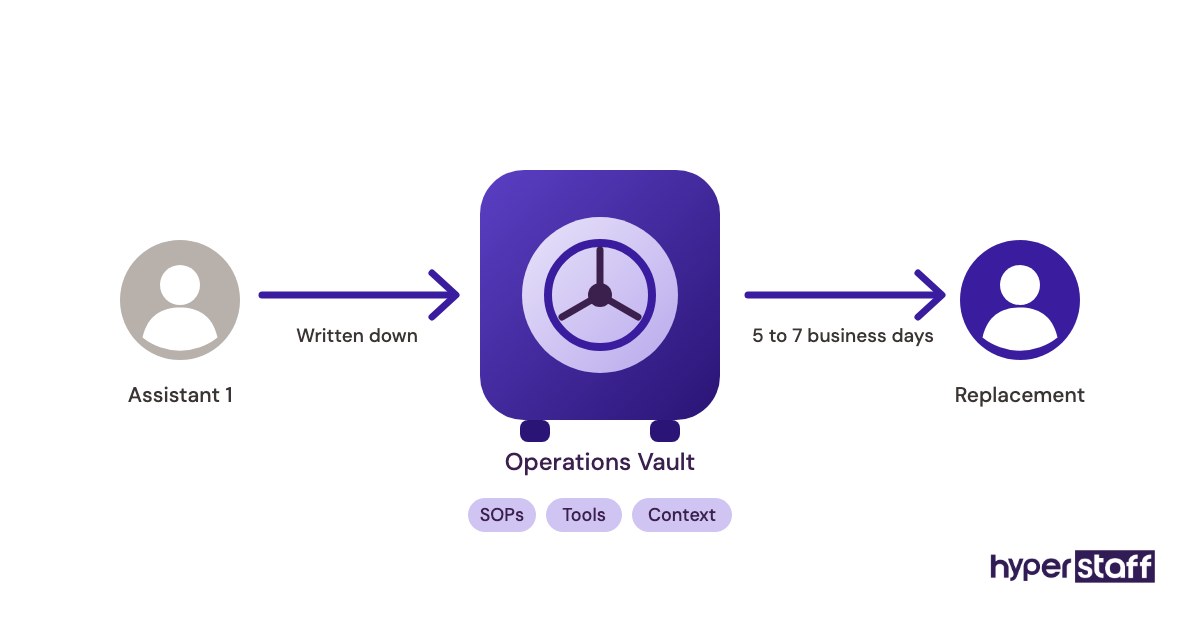
Turnover hurts the executive more than the assistant. Each restart means re-sharing logins, re-explaining preferences and re-teaching the tone of your email, which is why Hyperstaff keeps all of it written down in each client's Operations Vault.
How Does Hiring an Executive Virtual Assistant Work?
Hiring an executive virtual assistant moves through five stages: scoping the role, sourcing candidates, testing them, making the offer and onboarding with staged access. Through an agency, sourcing and first-round vetting happen for you, and the timeline shrinks from weeks to days.
| Stage | What happens | Typical timing, hiring on your own | Through Hyperstaff |
|---|---|---|---|
| Scope the role | Time log, task list, access list | 1 to 2 weeks | Free discovery call |
| Source candidates | Job posts, referrals, marketplaces | 1 to 3 weeks | Pre-vetted talent in 5 regions |
| Test and interview | Paid work sample, interviews, references | 1 to 2 weeks | Placement in 5 business days |
| Offer and contract | Rate, hours, NDA, payment setup | 2 to 5 days | Monthly bundle of 40, 80 or 160 hours |
| Onboard | Access, SOPs, first tasks | 2 to 4 weeks | 30-minute kickoff, work starts that day or next morning |
The do-it-yourself timings are rough ranges, and they stretch when the role is vague. Scoping slips most, because executives tend to start interviewing before they know which tasks they're handing off.
What Are the Ways to Hire an Executive Virtual Assistant?
You can hire an executive virtual assistant through an agency, a freelance marketplace, an offshore job board, a referral or an employer of record, among other routes. The route decides who carries the vetting work and how fast someone starts.
| Hiring route | How it works | Typical time to start | Who vets | Best fit |
|---|---|---|---|---|
| Dedicated staffing agency | Agency sources, vets and places one assistant who works only for you | Days to 2 weeks | Agency, then you | Leaders who want one person learning the business |
| Freelance marketplace (Upwork, Fiverr) | You post a job and screen proposals | 1 to 4 weeks | You | Short, well-defined projects |
| Offshore job board (OnlineJobs.ph) | You hire a worker directly and run payments yourself | 2 to 4 weeks | You | Hands-on owners comfortable with contracts |
| Pooled assistant service | A rotating team works through your requests | Days | Provider | Overflow admin with little context |
| Referral hire | A peer introduces someone they've worked with | Varies widely | You, plus the referrer's word | Leaders with a strong network |
| Fractional senior EA | A senior assistant splits hours across a few executives | 1 to 3 weeks | You or an agency | Founders needing 10 to 20 hours a week |
| Employer of record (EOR) | A third party employs an overseas assistant on your behalf | 2 to 6 weeks | You | Companies wanting a full-time overseas employee |
| In-house employee | Local salaried hire with benefits | 1 to 3 months | You and HR | Roles needing physical presence |
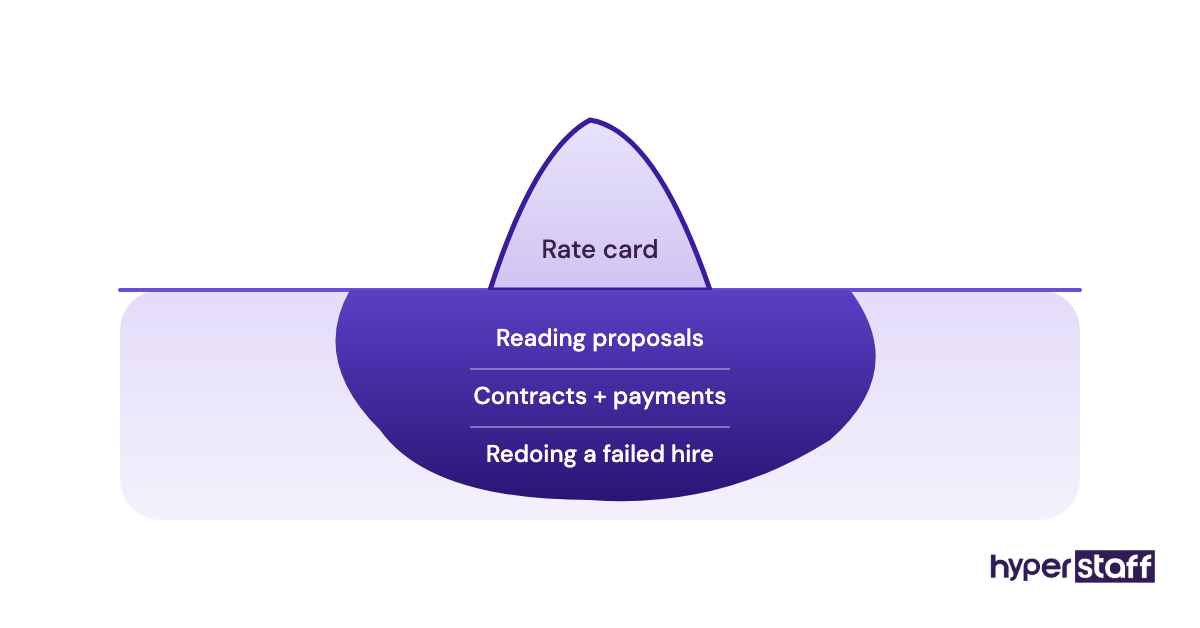
Marketplaces look cheapest on the rate card. The hidden cost is your own screening time, which for an executive role can mean reading dozens of proposals per post.
How Is Hiring an Executive VA Different From Other Hires?
Hiring an executive virtual assistant sits close to three other hires, and mixing them up produces the wrong job post. The differences come down to scope, location and decision rights.
Executive Virtual Assistant vs. In-House Executive Assistant
An in-house executive assistant shares your office, payroll and benefits plan, while an executive virtual assistant works remotely on a contract or monthly bundle. The day-to-day work overlaps almost completely, apart from physical tasks like greeting visitors or sorting mail.
Cost is the big gap, which we break down in executive VA vs. in-house hire. Presence is the other: some leaders think out loud and want someone within earshot, and a remote hire won't give them that.
Executive Virtual Assistant vs. General Virtual Assistant
A general virtual assistant takes tasks from several people or a whole team, and an executive virtual assistant serves one leader and acts on their behalf. The hiring bar is higher, because an EVA needs escalation judgment, a good ear for tone in written replies and discretion with confidential material.
Hiring a general VA and hoping they'll grow into executive support rarely works. Screen for executive skills from the first interview.
Executive Virtual Assistant vs. Chief of Staff
A chief of staff owns outcomes and makes decisions across the company, while an executive assistant owns the leader's time and the logistics around it. Some senior EVAs grow into chief-of-staff work, and in small companies the line blurs.
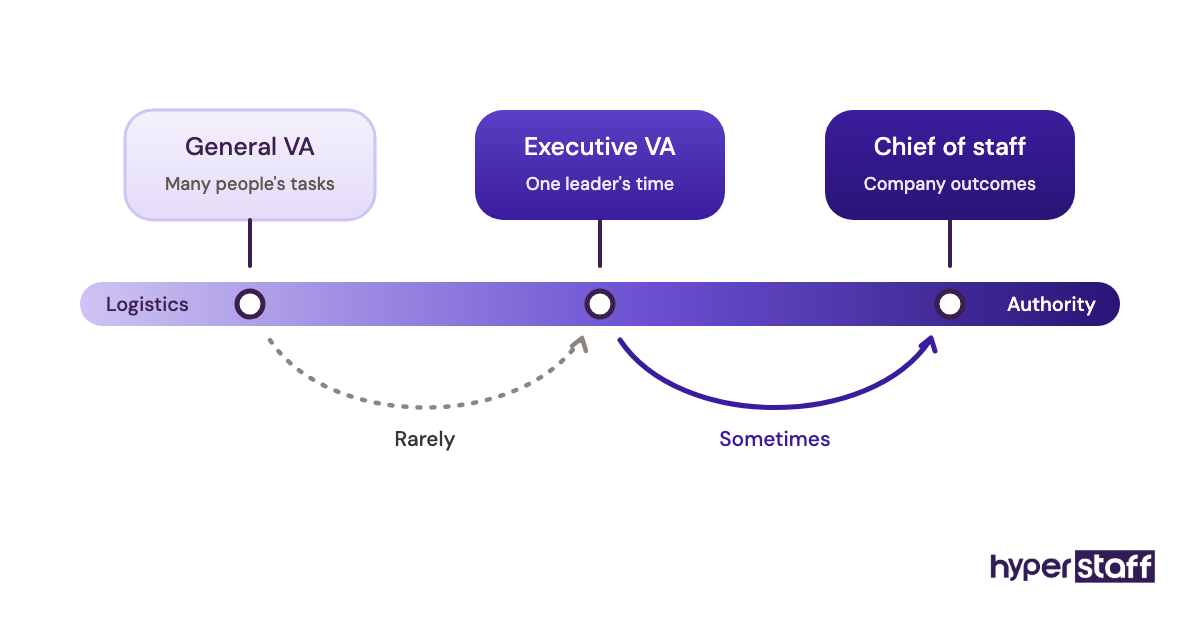
Hire for the job you need over the next six months. A chief of staff paid to book flights gets bored fast, and an assistant asked to run strategy without authority stalls.
What Are the Benefits of Hiring an Executive Virtual Assistant?
Hiring an executive virtual assistant gives a leader back hours at a fraction of in-house cost, with a much wider talent pool to choose from.
- Rates start far below local salaries, with Hyperstaff's Expert tier from $12/hour.
- Talent from the Philippines, Latin America, India, Eastern Europe and the United States.
- Flexible capacity through 40, 80 or 160-hour monthly bundles.
- Time-zone spread can cover early mornings or late nights.
- Remote work forces written SOPs that survive staff changes.
- Placement can happen within 5 business days.
What Are the Drawbacks of Hiring a Remote Executive Assistant?
The main drawbacks are the setup work and the trust gap in the first month. Each one needs a plan, and none of them is a reason to skip the hire.
- Onboarding takes real executive time in weeks one to three.
- Physical tasks like signing for deliveries stay with you.
- Time-zone gaps slow urgent replies unless overlap hours are agreed.
- Shared logins without a password manager create a security risk.
Who Should Hire an Executive Virtual Assistant?
Founders, CEOs, managing partners and senior leaders who lose several hours a week to scheduling, email triage and follow-ups are the clearest fit for an executive virtual assistant. The signal is simple: if admin work is pushing revenue or strategy work into your evenings, the hire pays for itself.
Agency owners, real estate brokers, consultants and investors fit too, since their calendars are dense and client-facing. A list of the tasks an executive VA takes on helps you check that fit against your own week.
Leaders who can't name ten recurring tasks to hand over should wait. An assistant without a clear queue ends up waiting for instructions, and the leader ends up managing instead of delegating.
Executive Virtual Assistant Hiring Examples
Good and bad hires often look alike on paper. The gap shows up in how the executive scoped, tested and onboarded the person.
Good Executive VA Hiring Examples
A Two-Week Time Log Before the Job Post
A founder tracks every task in 30-minute blocks for two weeks, then sorts the list into keep, delegate and drop. The job post that follows names specific tasks, so weak-fit candidates self-select out and interviews focus on real work.
A Paid Inbox Triage Test
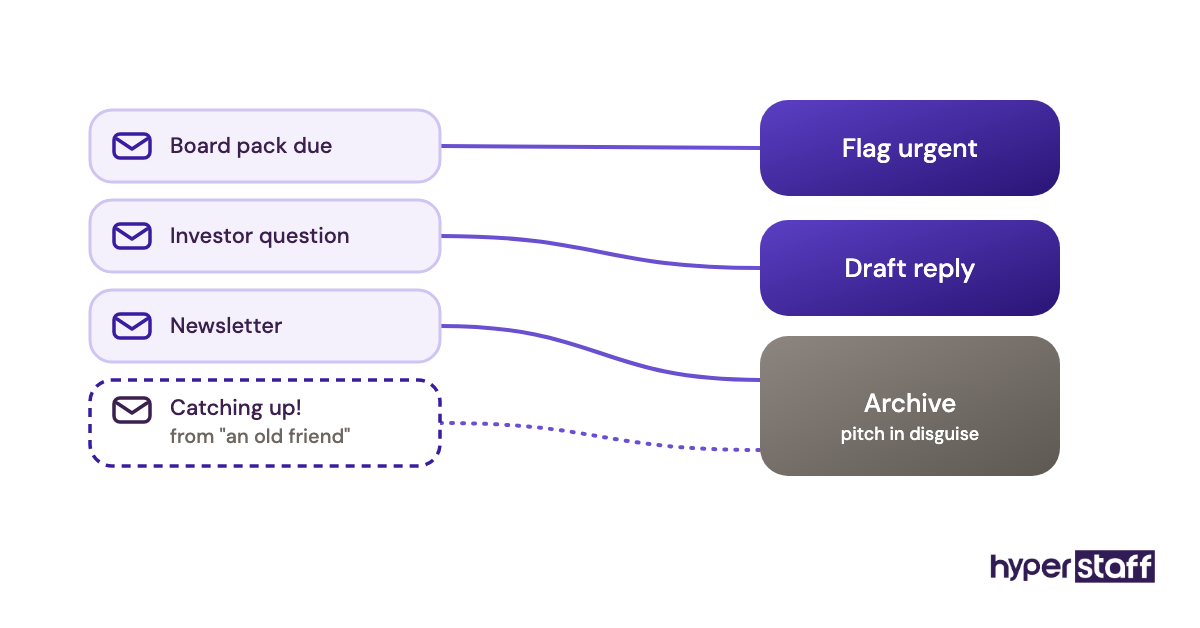
Shortlisted candidates get 45 minutes with a cleaned copy of 50 real emails and one instruction: sort them, draft five replies and flag anything urgent. The test exposes judgment calls no interview question can, like spotting that a warm note from a "friend" is a sales pitch.
An Access Ladder Over the First Month
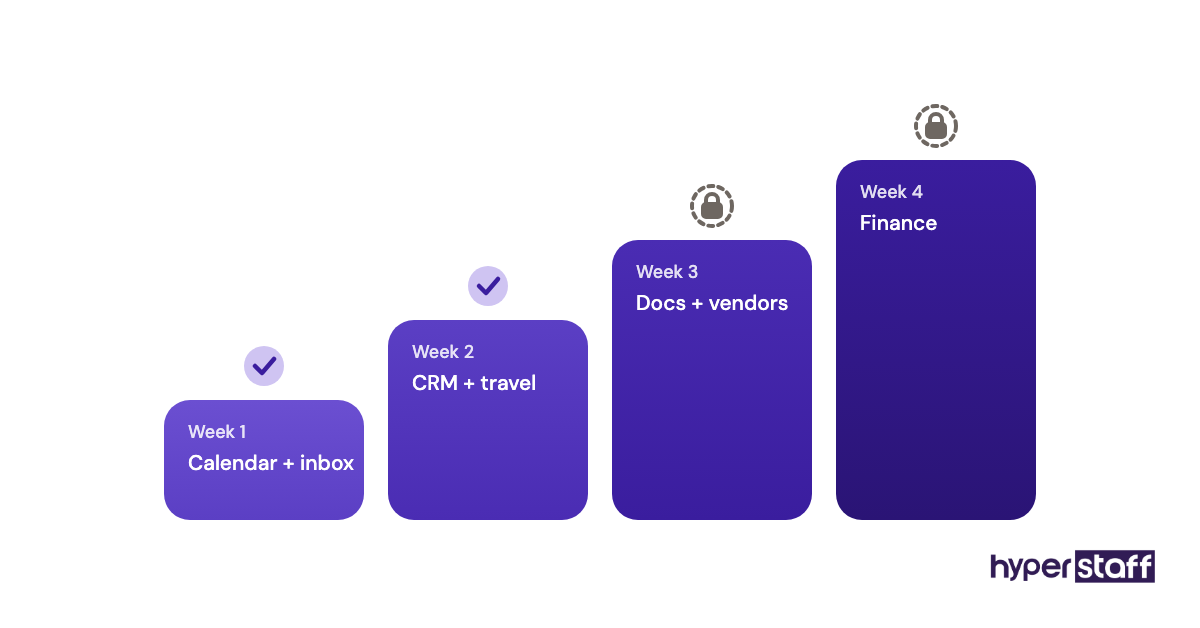
Week one brings delegated calendar and inbox access, week two adds the CRM and travel accounts, and finance tools wait until week four. Each step up follows a short review of what the assistant handled well.
Bad Executive VA Hiring Examples
Most failed hires trace back to a short list of avoidable executive VA hiring mistakes. The patterns below come up again and again.
Hiring Off a Résumé and a Friendly Call
A warm half-hour call and a polished résumé feel like enough. The first real test then happens in your live inbox, where a misjudged reply goes straight to an investor.
Sharing Every Password on Day One
A spreadsheet of logins speeds up week one and opens a security hole that stays open until you change every password. Delegated access plus a password manager takes about an extra hour to set up.
A Job Post With 40 Tasks
A task list spanning bookkeeping, social media, design and travel attracts generalists and puts off strong executive assistants. Pick the core executive work, and hire separately for specialist tasks.
Creating an Executive Assistant Hiring Plan, Step by Step
A hiring plan for an executive virtual assistant runs in five steps, from mapping your week to a structured first month. Skipping the first two is the most common reason the later ones fail.
Step #1: Log Where Your Week Actually Goes
Track your work for two weeks in a notes app or Toggl Track, then mark each task keep, delegate or drop. Recurring tasks under an hour, like scheduling, expense reports and meeting notes, make the easiest first handoffs.
Expect the log to surprise you. Email and scheduling usually eat a bigger share of the week than leaders guess.
Step #2: Write the Role and the Access List
Turn the delegate column into a role description with outcomes, weekly hours, overlap time and the tools involved. Our executive VA job description guide gives you a starting structure.
Then write a second list: every account the assistant needs, in the order you'll grant it. Doing this early forces decisions about finance, personal email and confidential files before a candidate is in front of you.
Step #3: Choose the Hiring Route and Tier
Pick a route from the table above based on how much screening time you can spare. Match the tier to the work, since drafting investor replies takes more experience than booking travel.
At Hyperstaff, Essential covers 0 to 2 years of experience, Professional 2 to 5 years and Expert 5+ years. In our experience, executive roles usually call for Professional or Expert.
Step #4: Test With Real Work and Structured Interviews
Give each shortlisted candidate a paid task drawn from your actual week, then interview them on how they approached it. A set bank of executive VA interview questions keeps each conversation comparable.
Score written English, escalation judgment and turnaround speed. Call references and ask one direct question: would you hire this person again for the same job?
Step #5: Onboard With Staged Access and a 30-Day Review
Start with delegated calendar and inbox access, record short Loom walkthroughs of recurring tasks, and hold a 15-minute daily check-in for the first two weeks. Our guide to onboarding an executive VA lays out a week-by-week sequence.
Book the 30-day review on day one. Agree on what good looks like by then, so the review measures facts.
What Does an Effective Hiring Strategy Look Like?
An effective strategy for hiring an executive virtual assistant matches the person to a defined workload, tests them on real tasks and plans the first 90 days before the start date. Fit beats speed, since a rushed hire usually costs you a second search.
The order of operations is where plans bend. Leaders often want to interview first and scope later, and they end up with a hire chosen on personality who then waits a week for clear work.
Practitioners split on one question: one senior assistant for everything, or a junior assistant plus specialists. A single senior hire is simpler to manage, while the split model costs less per hour and needs more coordination, so we'd only suggest it to leaders who already manage teams.
Plan for dead time too. Account approvals, two-factor setup and IT sign-offs can eat several days of week one, so keep written SOPs ready for the assistant to read during those gaps.
Which Tools Does an Executive Virtual Assistant Need From Day One?
An executive virtual assistant needs delegated email and calendar access, a password manager, a scheduling tool and a shared home for notes and SOPs. Set these up before the start date so day one goes to real work.
Gmail and Google Calendar delegation, or delegate access in Microsoft 365 Outlook, let the assistant read, send and schedule for you without your password. We'd always pick delegation over shared logins, because you can revoke it in one click.
1Password or Bitwarden covers every other login, and both let you share specific vault items with one person. Calendly cuts scheduling back-and-forth, Loom turns a five-minute screen recording into a reusable SOP, and Notion or Google Docs holds the written playbook.
Slack or Microsoft Teams keeps quick questions out of the inbox. For the full list with use cases, see our roundup of executive VA tools.
10 Tips for Hiring an Executive Virtual Assistant
These tips target the parts of the hiring process that most often go wrong.
- Write the job post around outcomes, such as "inbox under 20 unread by 6 p.m."
- Pay for the work sample test, even if it's only an hour.
- Test written English by asking for a draft reply to a real email.
- Ask each candidate how they decide what to escalate.
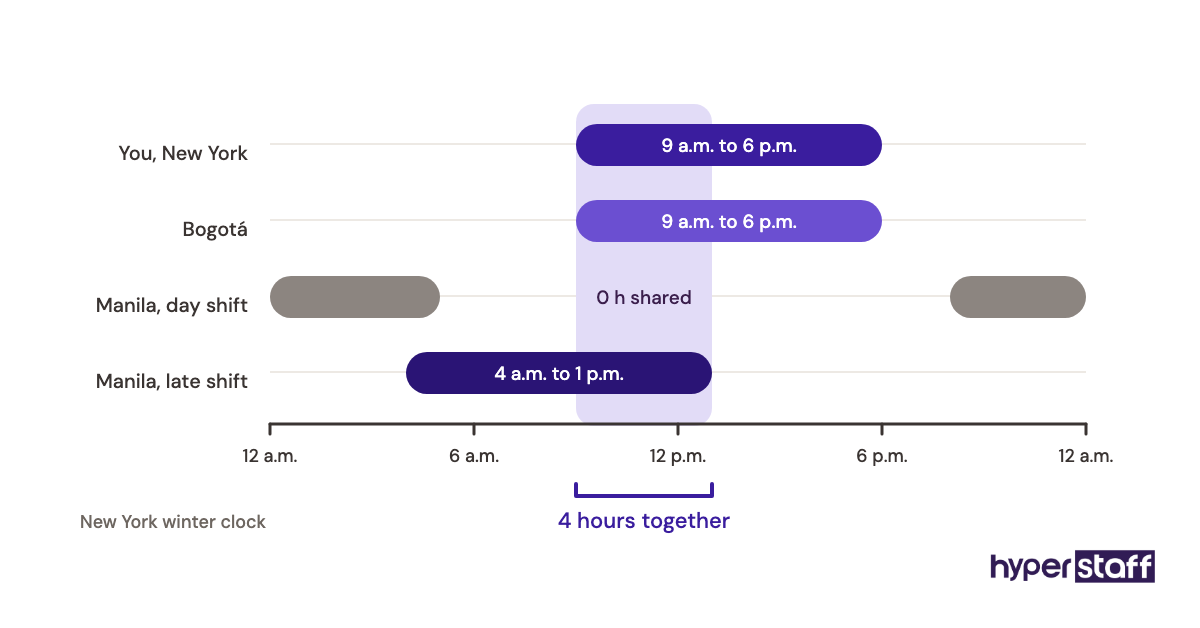
- Agree on 3 to 4 hours of daily time-zone overlap.
- Use delegated access and a password manager from day one.
- Record Loom videos of recurring tasks during week one.
- Hand over one decision right early, like accepting meetings under 30 minutes.
- Hold a short daily check-in for two weeks, then switch to weekly.
- Review at 30 days against the outcomes in the job post.
How Do You Fix Common Executive VA Hiring Problems?
The most common executive VA hiring problems are slow delegation, unclear priorities and weak overlap hours. Slow delegation is usually the executive's habit, and a written list of tasks the assistant owns by week two fixes most of it.
Unclear priorities show up as an assistant who is busy on the wrong things. A 10-minute Monday call that ranks the week's top items solves it fast.
Overlap trouble needs a schedule fix. Shift the assistant's hours, or batch urgent requests into the shared window.
How Do You Measure Whether the Hire Worked?
Measure an executive virtual assistant hire by hours returned to the executive, response times on email and scheduling, and error rate on recurring tasks. Run your time log again at day 30 and day 90, then compare it with the log from before the hire.
Softer signals count too. If you've stopped double-checking calendar invites and reply drafts by the second month, trust is building at a healthy pace.
How Long Does It Take to Hire an Executive Virtual Assistant?
Hiring an executive virtual assistant on your own takes roughly 3 to 8 weeks, and about a week through an agency. Hyperstaff places assistants in 5 business days, and after a 30-minute kickoff the work starts that day or the next morning.
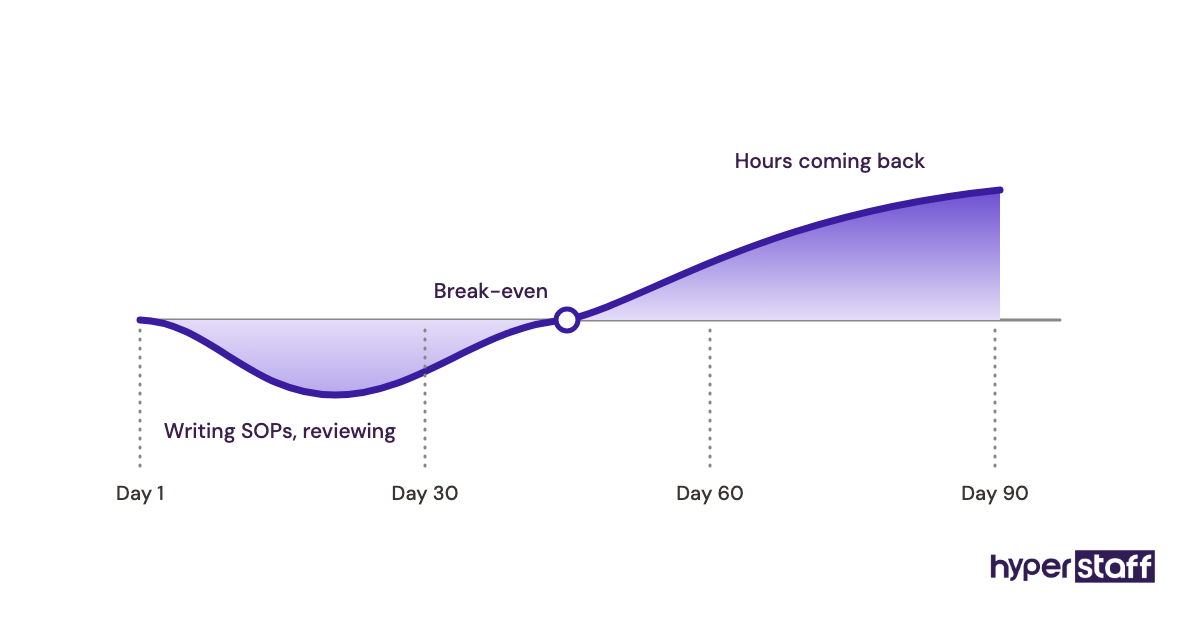
Full productivity takes longer. Expect 30 to 90 days before the assistant runs recurring work without checks, depending on how fast you hand over access and context.
How Much Does It Cost to Hire an Executive Virtual Assistant?
Hiring an executive virtual assistant through Hyperstaff costs from $3 to $12+ per hour by tier, so a full-time Expert assistant on 160 hours a month starts at $1,920. An in-house executive assistant earns a median of $76,590 a year, according to the U.S. Bureau of Labor Statistics, before benefits.
Benefits make up about 30% of private-industry employer compensation costs, per the BLS employer costs release. The in-house column below uses those two figures, and our executive VA cost breakdown goes route by route.
| Monthly hours | Hyperstaff Essential (from $3/hour) | Hyperstaff Professional (from $6/hour) | Hyperstaff Expert (from $12/hour) | Typical in-house executive assistant |
|---|---|---|---|---|
| 40 hours | from $120 | from $240 | from $480 | about $1,470 in wages |
| 80 hours | from $240 | from $480 | from $960 | about $2,950 in wages |
| 160 hours | from $480 | from $960 | from $1,920 | about $6,380 in wages, about $9,100 with benefits |
| Yearly at 160 hours | from $5,760 | from $11,520 | from $23,040 | about $76,590 in wages, about $109,000 with benefits |
| Quarterly billing | 10% off | 10% off | 10% off | Not applicable |
Important: Hyperstaff prices above are starting averages, not fixed quotes. Your final cost depends on the assistant's experience, the hours you book and the work involved, and we confirm it on the free discovery call.
Is Hiring an Executive Virtual Assistant Worth It?
Yes, hiring an executive virtual assistant is worth it for most leaders whose time earns more than the assistant costs, and done right it's one of the best-returning hires a small company can make. The payoff arrives once delegation becomes a habit, usually in the second month.
Here's an example calculation. An Expert assistant on an 80-hour bundle costs from $960 a month, and if that frees 8 hours of your week (about 34 hours a month) at a value of $150 an hour, you get back roughly $5,100 of capacity.
The math holds only if the freed hours go to revenue or strategy work. Leaders who refill them with more email see the cost without the gain, a trade-off we cover in whether an executive VA pays off.
Month one is the exception. You'll likely spend more time than you save while writing SOPs and reviewing work, so judge the return at day 60 or day 90.
How Do You Choose an Executive Virtual Assistant Agency?
Choose an executive virtual assistant agency on vetting depth, whether you get a dedicated assistant, replacement terms and who keeps your processes documented. Price matters too, but a cheap agency with slow replacements costs more in lost weeks.
Ask pointed questions on the discovery call. How is the assistant vetted for executive work, how fast does a replacement arrive, and what happens to your SOPs if the person leaves?
Hyperstaff answers those with a dedicated specialist, a free replacement in 5 to 7 business days briefed from your Operations Vault, and a dedicated account manager for every client. One person learning one business suits executive work far better than a rotating pool.
Executive Assistant Hiring Statistics, Trends and Predictions
The U.S. median annual wage for executive secretaries and executive administrative assistants is $76,590 in the latest BLS data, and that figure is the benchmark remote hires get measured against. On the same BLS page, employment in the role is projected to hold flat over the next decade, against a 2% decline for secretaries and administrative assistants overall.
Senior, judgment-heavy assistant roles are holding up while routine admin shrinks. Two shifts show up in hiring now: more executives hire offshore for senior assistant work that used to stay local, and more job posts ask for AI tool fluency.
Our prediction is that the role keeps moving toward prioritizing, drafting and owning follow-ups, while scheduling mechanics move to software. We're less sure about the pace, because adoption depends on how far executives trust AI with their inbox.
Does AI Change How You Hire an Executive Virtual Assistant?
AI shifts the executive virtual assistant role toward checking, editing and deciding, so test for those skills when you hire. Microsoft Copilot, Gemini in Google Workspace and Reclaim.ai can draft replies, summarize threads and juggle calendar blocks, and someone still has to judge which draft goes out.
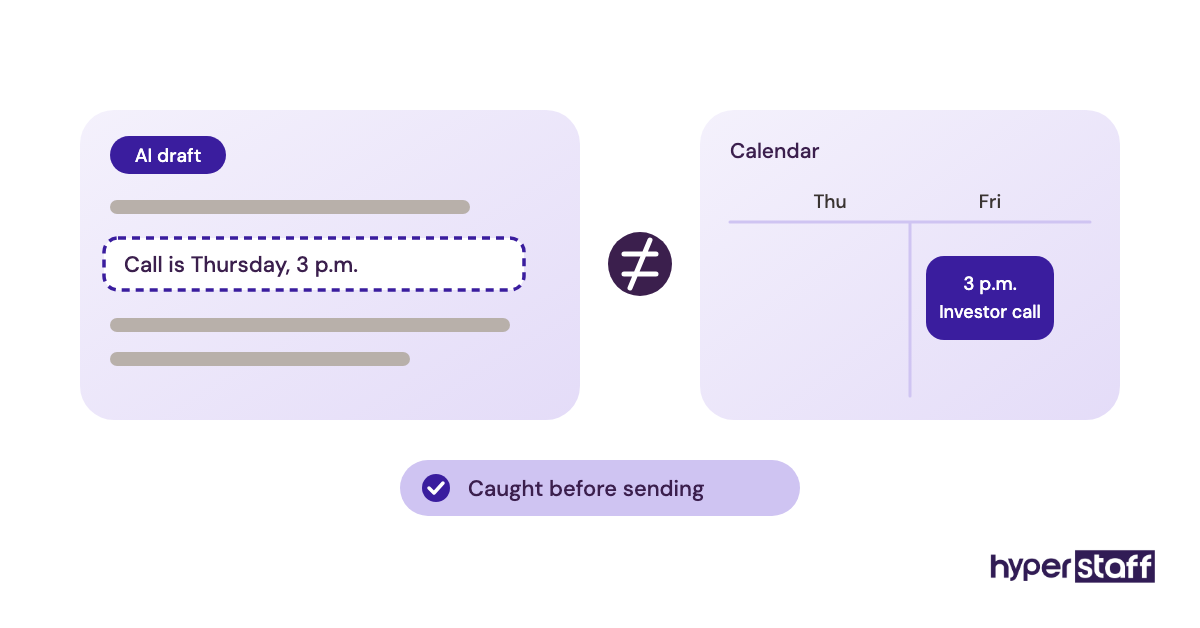
Add an AI task to the work sample: hand the candidate an AI-drafted reply with one wrong fact and see if they catch it. An assistant who edits AI output well is worth more than one who types fast.
Agree on data rules early. Before an assistant pastes client emails into any AI tool, decide which tools are approved and whether your company plan keeps that data out of model training.
Disclaimer: This article is general information only and isn't legal, tax, financial or employment advice. Pricing, statistics and tool features can change, so confirm details with the provider or a qualified professional before making hiring decisions.
Common questions
How many hours a week does an executive virtual assistant need?
Many executives start at about 20 hours a week, an 80-hour monthly bundle, and adjust after a month. Leaders with heavy travel or investor activity often move to full time.
Should my executive VA sign an NDA?
Yes. Put an NDA and a written data-handling policy in place before granting access, and keep confidential files behind delegated permissions you can revoke.
Can an executive virtual assistant handle personal tasks too?
Yes, many handle family calendars, personal travel and household bills. Spell those tasks out in the role description so the boundaries are clear from the start.
What time zone should my executive VA work in?
Pick an assistant who can overlap 3 to 4 hours with your working day. The Philippines and India suit early-morning or overnight coverage for U.S. leaders, while Latin America usually sits closer to U.S. hours.
What if the executive VA I hire isn't a good fit?
Raise it early, ideally at the 30-day review. Through Hyperstaff, a free replacement arrives in 5 to 7 business days, briefed from your Operations Vault with your SOPs, tools and context.
Book a free 15 min call
We place a pre-vetted specialist in 5 business days, fully managed, from $3/hour.