Is an Executive Virtual Assistant Worth It? An Honest Cost and Value Breakdown
An executive virtual assistant pays off when the hours they recover go into revenue work, and this guide shows the math, the costs and the failure points.
On this page
- What Is an Executive Virtual Assistant, and What Are You Paying For?
- Key Executive Virtual Assistant Terms You Should Know
- Why Does an Executive Virtual Assistant Matter for Leaders?
- How Does Working With an Executive Virtual Assistant Work?
- Types and Forms of Executive Virtual Assistant Support
- How an Executive Virtual Assistant Differs From Related Roles
- The Benefits of an Executive Virtual Assistant
- The Drawbacks of an Executive Virtual Assistant
- Who Needs an Executive Virtual Assistant?
- Executive Virtual Assistant Examples
- Creating an Executive Virtual Assistant Plan, Step-by-Step
- What Does an Effective Executive Virtual Assistant Strategy Look Like?
- Executive Virtual Assistant Tools and Software
- 10 Proven Executive Virtual Assistant Tips and Best Practices
- Overcoming Common Executive Virtual Assistant Challenges
- How to Measure Executive Virtual Assistant Success
- How Long Does an Executive Virtual Assistant Take to Work?
- How Much Does an Executive Virtual Assistant Cost?
- Is an Executive Virtual Assistant Worth It?
- How to Choose an Executive Virtual Assistant Agency
- Executive Virtual Assistant Statistics, Trends and Future Predictions
- Executive Virtual Assistants and AI
- FAQs
💡 Key Takeaways:
1) An executive virtual assistant is worth it when the hours they take off a leader's plate go into sales, hiring, client work or strategy, and the monthly fee is a small fraction of what those hours earn.
2) The real cost gap is large: a US executive assistant earning the national median costs over $100,000 a year once benefits are added, while a dedicated remote executive assistant can cost a fraction of that.
3) Most failed engagements break on setup, not talent: no written processes, access granted all at once or not at all, and no review point at 30 and 90 days.
Turn Executive Hours Back Into Revenue
Hyperstaff places pre-vetted executive virtual assistant services specialists from five regions, with rates starting at $3/hour and placement in 5 business days. We've placed 70+ virtual assistants with 30+ clients, and every client gets a dedicated account manager plus an Operations Vault that keeps your processes written down, so the person who learns your business stays productive from week one.
What Is an Executive Virtual Assistant, and What Are You Paying For?
An executive virtual assistant is a remote professional who manages a senior leader's calendar, inbox, travel, meetings, follow-ups and selected projects. You're paying for decision-ready time: fewer small choices landing on your desk, and the ones that do arrive already researched.
The role reaches well past scheduling. A capable EA drafts replies in your voice, prepares board and investor materials, tracks commitments made in meetings, and often runs pieces of customer support, recruiting coordination or CRM hygiene. Our guide on what an executive virtual assistant is goes deeper into the role itself.
Key Executive Virtual Assistant Terms You Should Know
- Executive virtual assistant (EVA) = a remote assistant supporting a senior leader across admin, communication and project work.
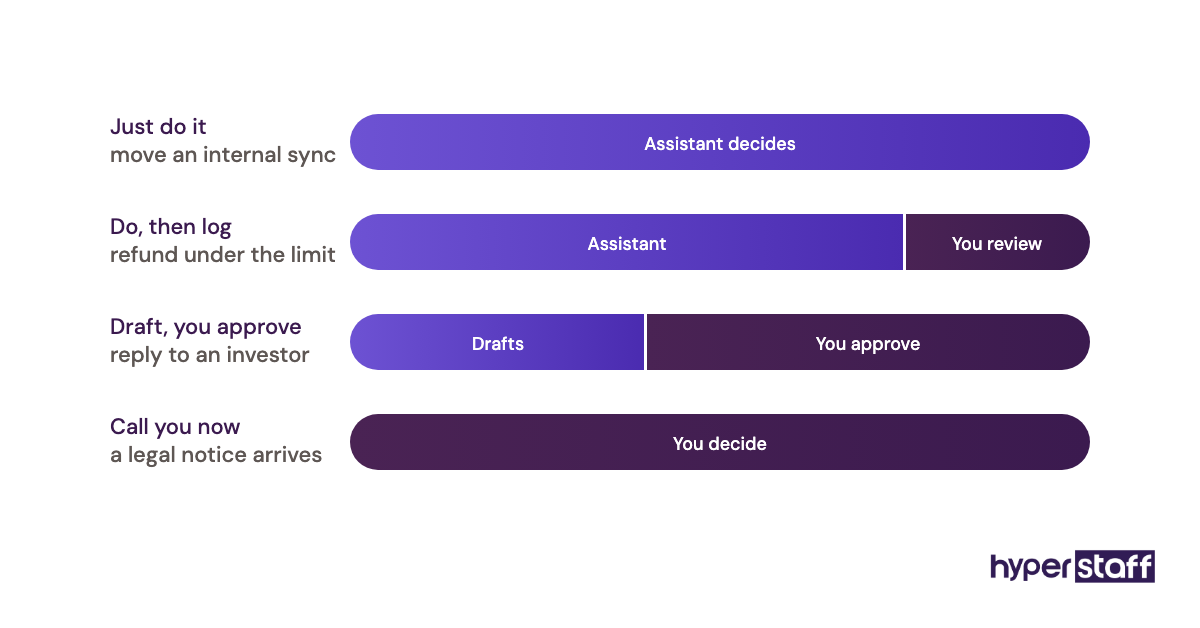
- Delegation threshold = the dollar or risk level below which the assistant decides without asking.
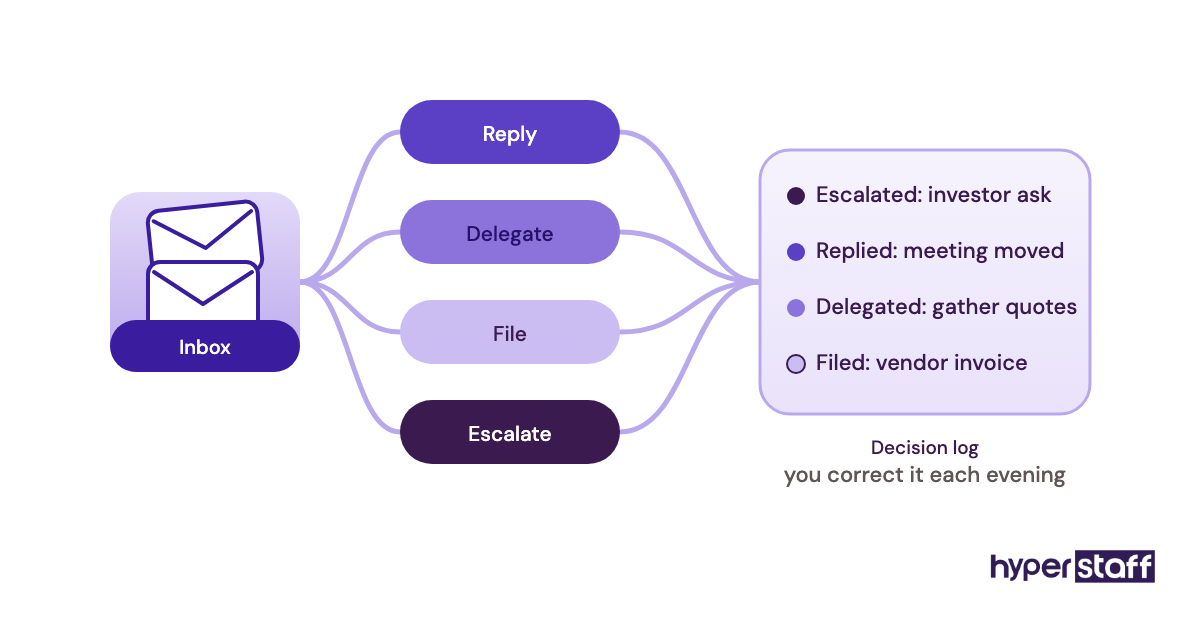
- Inbox triage = sorting incoming email into reply, delegate, file or escalate.
- Calendar ownership = the assistant accepts, declines and moves meetings under agreed rules.
- SOP = a standard operating procedure, written steps for a recurring task.
- Operations Vault = Hyperstaff's maintained record of your SOPs, tools and context.
- Dedicated assistant = one person assigned to you, as opposed to a shared task pool.
- Fully loaded cost = salary plus benefits, payroll taxes, equipment and overhead.
- Effective hourly value = what one hour of a leader's time earns the business.
- Replacement window = the time it takes to put a new assistant in place if one leaves.
Why Does an Executive Virtual Assistant Matter for Leaders?
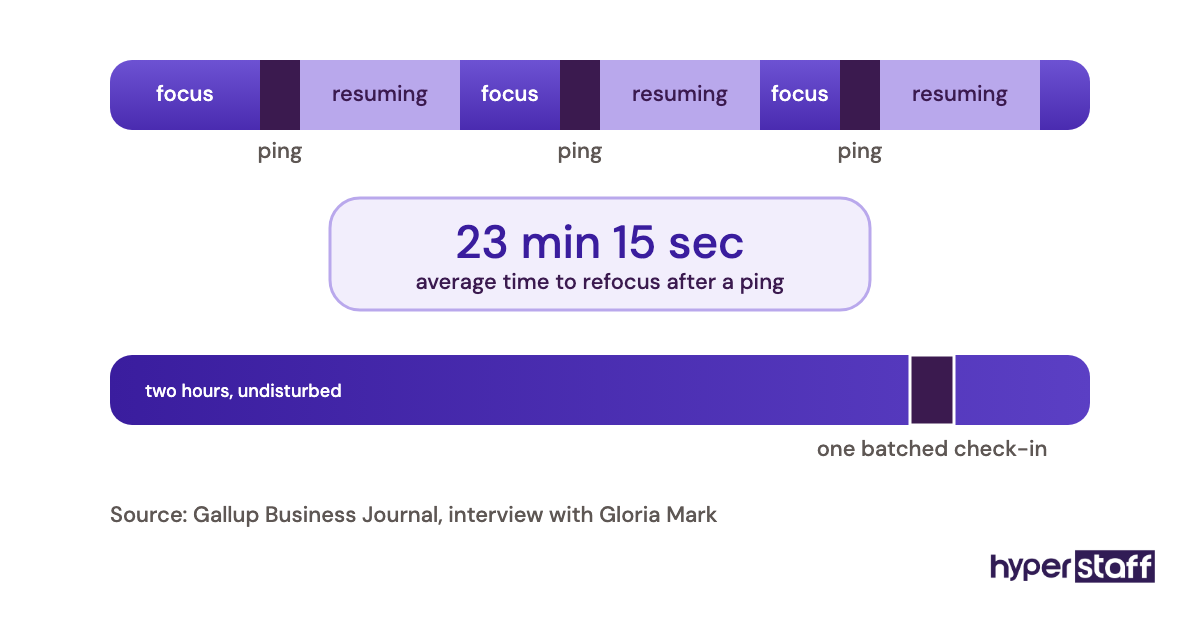
An executive virtual assistant matters because a leader's hours are the most expensive and least replaceable resource in a small company. Every hour spent rebooking flights or chasing signatures is an hour pulled from selling, hiring or fixing the product.
The less obvious cost is fragmentation. Ten five-minute admin interruptions don't cost fifty minutes; they break the two-hour block where hard thinking happens, and an EA who batches and filters those interruptions protects that block.
There's a continuity angle too. When one person holds the threads of your week (who promised what, which contract is waiting, which investor needs an update), dropped follow-ups become rare instead of routine.
How Does Working With an Executive Virtual Assistant Work?
Working with an executive virtual assistant follows a predictable sequence: scope the role, match a candidate, hand over access and processes, then widen their authority as trust builds. With Hyperstaff, the first steps move fast, and the trust-building phase sets the pace after that.
| Stage | What happens | Typical timing |
|---|---|---|
| Discovery call | Scope, hours, time zone, tools | Day 1 (free) |
| Placement | Pre-vetted assistant matched | Within 5 business days |
| Kickoff | 30-minute call with you and the assistant | Right after placement |
| First tasks | Inbox, calendar, simple follow-ups | Same day or next morning |
| Wider authority | Drafting in your voice, vendor calls, projects | Weeks 3 to 8 |
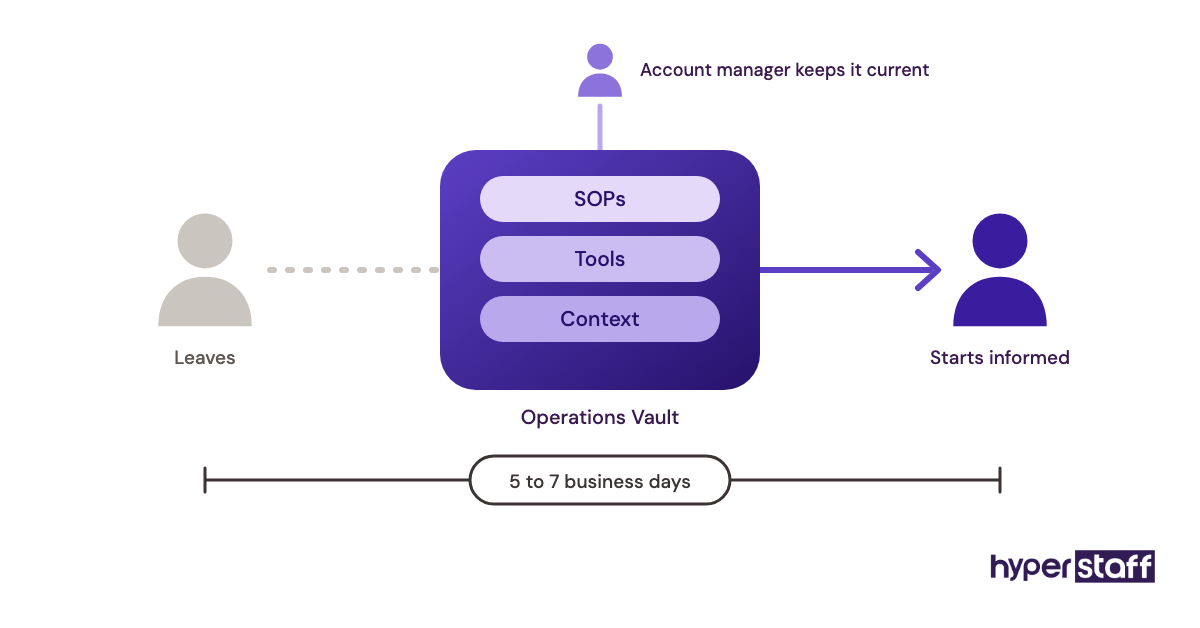
| Replacement (if needed) | New assistant briefed from the Operations Vault | 5 to 7 business days |
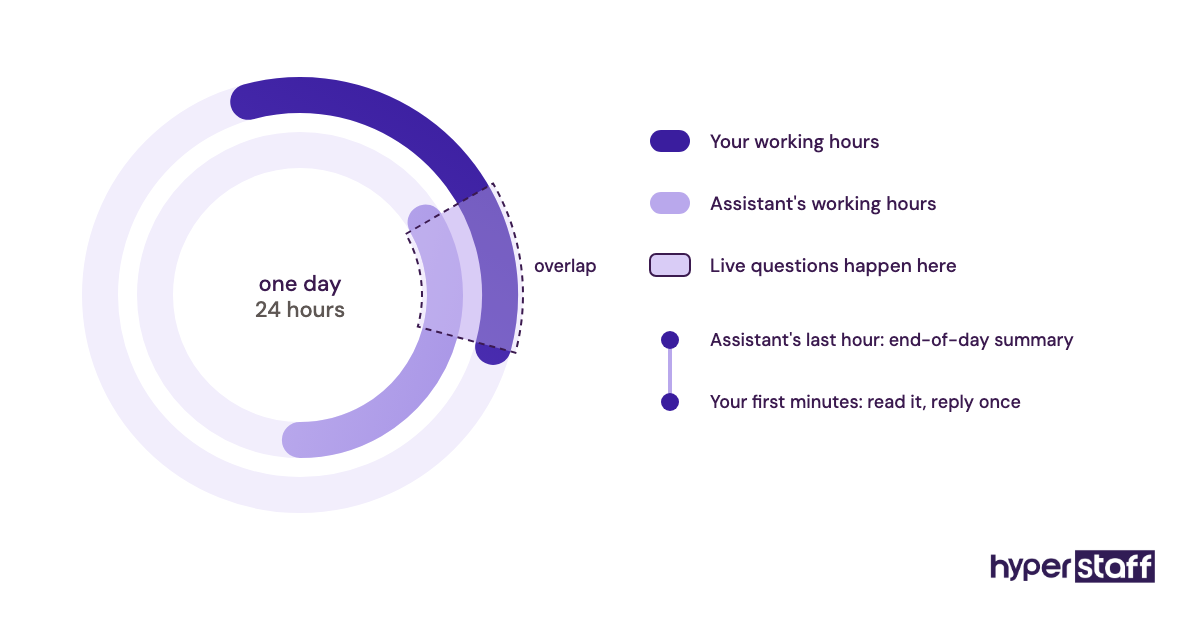
Day-to-day, most pairs settle into a short daily check-in (often asynchronous in Slack or a shared doc) and a weekly 20 to 30 minute review. Time zone overlap of two to four hours is usually enough for an executive role.
Types and Forms of Executive Virtual Assistant Support
Executive virtual assistant support comes in several forms, set mainly by hours per month, how much authority the assistant holds, and whether the work leans administrative or project-driven. Matching the type to your actual workload matters more than matching a job title.
| Type | Monthly hours | Typical work | Best fit | Suggested experience |
|---|---|---|---|---|
| Part-time admin EA | 40 | Calendar, inbox triage, travel | Solo founders testing delegation | Essential or Professional |
| Half-time EA | 80 | Admin plus follow-ups and light research | Leaders with steady meeting loads | Professional |
| Full-time dedicated EA | 160 | Full calendar and inbox ownership, projects | CEOs and busy partners | Professional or Expert |
| Founder and CEO EA | 80 to 160 | Investor updates, board prep, hiring logistics | Funded startups | Expert |
| Project-focused EA | 80 to 160 | Tracking initiatives, status reports, vendors | Operators running many workstreams | Expert |
| Sales leader EA | 40 to 160 | CRM updates, meeting booking, proposal prep | Founders who still sell | Professional |
| Shared EA for a small leadership team | 160 | Calendars for 2 to 3 people, team logistics | Lean leadership groups | Expert |
| Personal and business EA | 40 to 80 | Work tasks plus household admin and bookings | Owners whose personal admin eats work hours | Essential or Professional |
How an Executive Virtual Assistant Differs From Related Roles
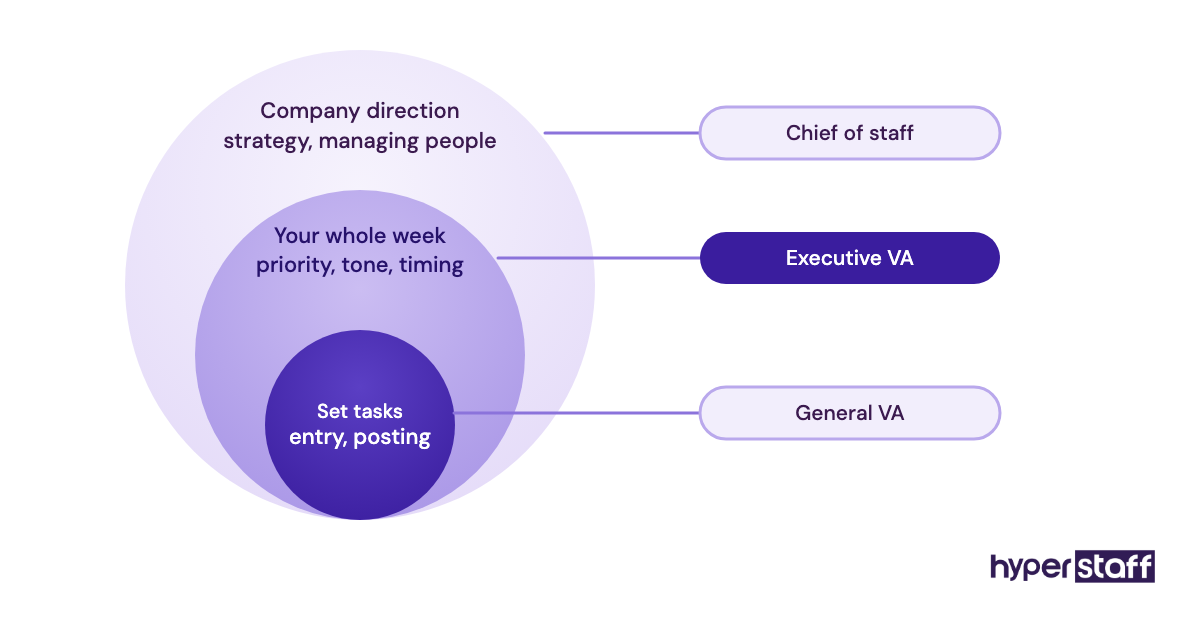
An executive virtual assistant sits between a general virtual assistant and an in-house chief of staff. The differences come down to authority, judgment and cost.
Executive Virtual Assistant vs. General Virtual Assistant
A general virtual assistant works through defined tasks: data entry, scheduling, posting content. An executive VA works on a person, so they anticipate needs across your whole week and make judgment calls about priority, tone and timing.
Executive Virtual Assistant vs. In-House Executive Assistant
An in-house EA can sign for deliveries and walk into the room. A remote EA can't, but costs far less and draws from a wider talent pool, and our comparison of an executive virtual assistant vs in-house hire weighs both sides in detail.
Executive Virtual Assistant vs. Chief of Staff
A chief of staff shapes strategy, runs leadership meetings and often manages people. An EA executes and coordinates; some experienced EAs grow toward chief-of-staff work over a year or two, but hiring an EA expecting strategy on day one sets both of you up for disappointment.
The Benefits of an Executive Virtual Assistant
- Recovered leader time, often 6 to 15 hours a week once the assistant owns inbox and calendar.
- Large savings against the fully loaded cost of a local hire.
- Faster follow-through on meeting commitments and proposals.
- Coverage across time zones, so replies and bookings happen while you sleep.
- Written processes, which make the business less dependent on what's in your head.
- Flexible hours, from 40 to 160 a month, that scale with your workload.
The Drawbacks of an Executive Virtual Assistant
- A ramp-up period of several weeks before the time savings feel real.
- Your own effort to document preferences and processes at the start.
- Security exposure if access and passwords aren't managed properly.
- No physical presence for errands, mail or in-person events.
Who Needs an Executive Virtual Assistant?
Founders, CEOs, managing partners and senior operators need an executive virtual assistant when admin regularly eats more than 8 to 10 hours of their week. The clearest sign is revenue or hiring work slipping because the calendar and inbox come first.
The small-business owner and the scaling startup see this differently. An owner-operator usually wants someone who handles everything from invoices to travel, while a funded CEO cares most about board prep, investor relations and a protected calendar.
People who rarely benefit: leaders with light meeting loads, or those unwilling to share inbox access. Without access, an EA becomes an expensive note-taker.
Executive Virtual Assistant Examples
The patterns below show what separates a setup that pays for itself from one that drains money without anyone noticing. Each describes a recurring setup shape rather than a single client.
Good Executive Virtual Assistant Examples
Inbox Triage With a Decision Log
The assistant sorts every message into four folders and keeps a running log of decisions made on your behalf. You scan the log in five minutes each evening and correct anything off, so their judgment improves week by week.
Calendar Rules Written Down
Rules like "no external calls before 10am, two focus blocks a day, investors get priority" live in a shared doc. The assistant books without asking, and the rare conflict comes to you with two options already drafted.
Meeting Follow-Up Ownership
After each call, the assistant sends the recap and logs action items with owners and dates. Commitments made on Tuesday get chased on Friday without you remembering to ask.
Bad Executive Virtual Assistant Examples
The "Do Everything" Hire With No Access
The leader hires an EA but keeps inbox and calendar locked down, then sends tasks one at a time over chat. The assistant spends half the day waiting, and the leader concludes remote help doesn't work; our list of common executive virtual assistant mistakes covers this trap and others.
Passwords Shared by Email
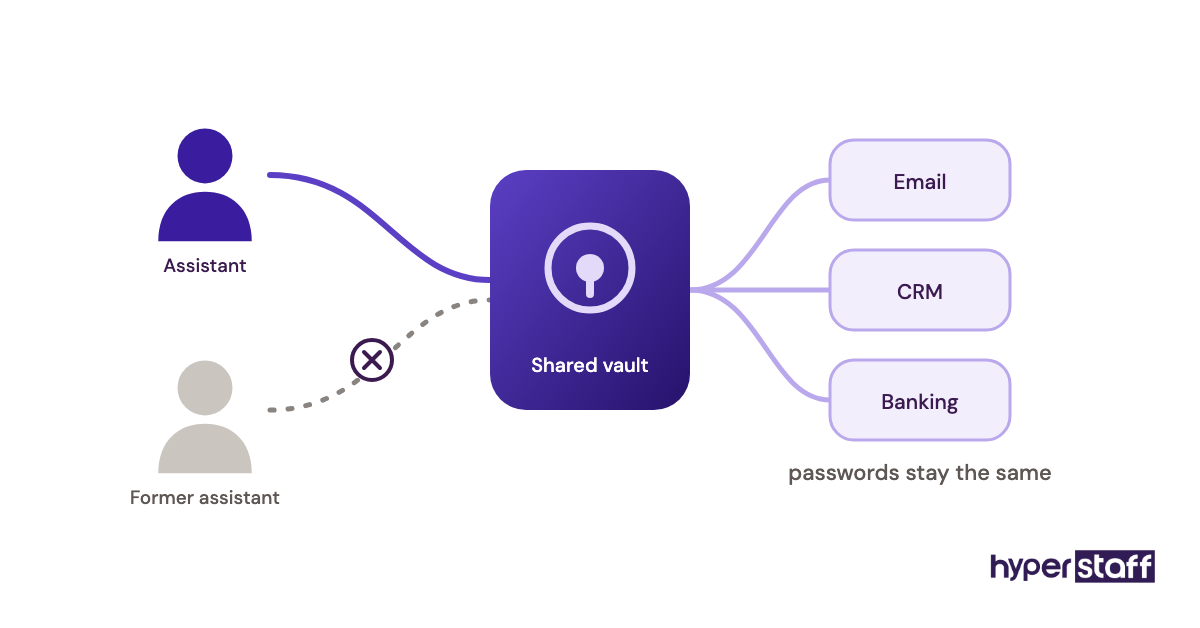
Credentials sent in plain text across a dozen threads create risk and chaos when anything changes. A password manager with shared vaults fixes this in an afternoon.
No Review Point
Nobody checks at 30 or 90 days whether the hours bought are going to the right work. Six months later, the EA is doing tasks you could have automated, and the high-value work never moved.
Creating an Executive Virtual Assistant Plan, Step-by-Step
An executive virtual assistant plan turns "I need help" into a defined role, a set of rules and a review schedule. Five steps cover it.
Step #1: Audit Two Weeks of Your Time
Log every task for ten working days, then mark which ones need you specifically. Most leaders find a long list of executive virtual assistant tasks they've been doing out of habit.
Step #2: Choose Hours and Experience Level
Match the hours to the audit: 40, 80 or 160 a month. Pick Expert-level experience when the role involves investor contact or drafting in your voice, and Professional when it's mainly calendar and logistics.
Step #3: Write the Role and Starter SOPs
Draft a one-page role description, using an executive virtual assistant job description as a template. Add three to five SOPs for your most frequent tasks; they don't need polish, just accuracy.
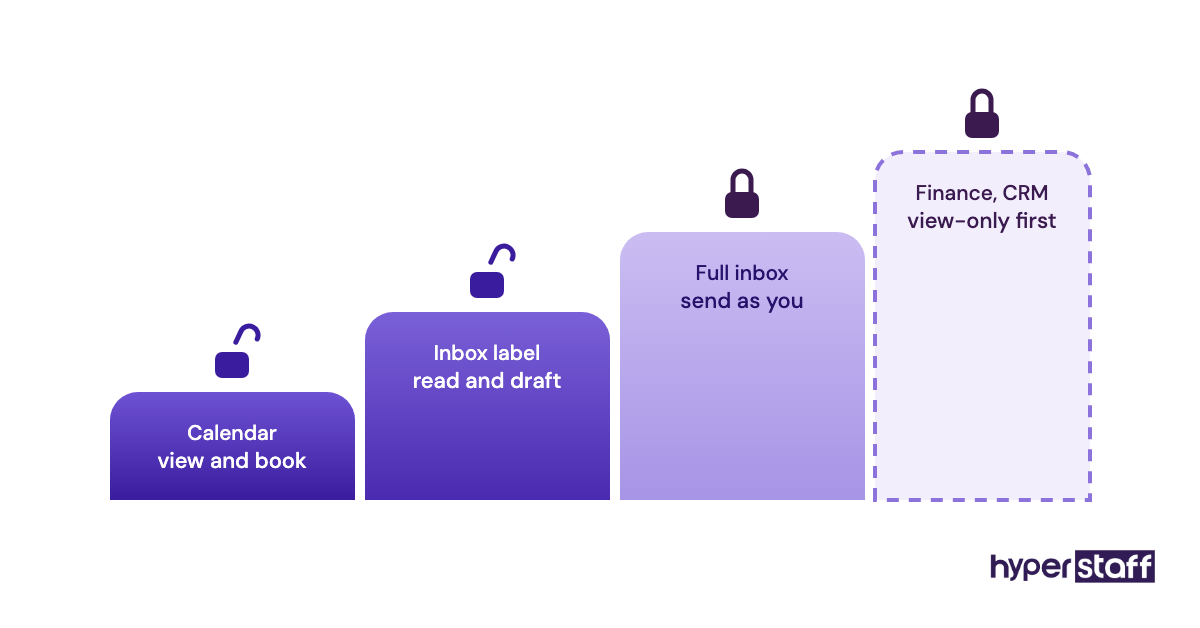
Step #4: Grant Access in Stages
Start with calendar and a shared inbox label, then open the full inbox, then finance or CRM tools once trust exists. Our guide to onboarding an executive virtual assistant lays out the order in more detail.
Step #5: Review at Day 30 and Day 90
At day 30, check hours recovered and error rate. At day 90, decide which tasks to add, which to automate, and whether the hours bundle still fits.
What Does an Effective Executive Virtual Assistant Strategy Look Like?
An effective executive virtual assistant strategy ties the assistant's hours to the leader's highest-value work and measures whether that work actually grew. The admin handover is the means; more selling, hiring or building time is the goal.
In practice, the strongest setups share a few traits: one person dedicated to you, written rules for calendar and email, a weekly review, and a widening scope every month or two. Practitioners do disagree on one point. Some prefer giving an EA full inbox control from week one to force speed, while others ramp access slowly; we lean toward staged access for anyone handling investor or client money conversations, and faster handover for leaders whose inbox is mostly vendors and scheduling.
Executive Virtual Assistant Tools and Software
Executive virtual assistant tools fall into a handful of groups: email and calendar, scheduling, communication, task tracking and password management. The right stack is usually the one you already run, with one or two additions.
Google Workspace or Microsoft 365 carry most of the load, since delegated inbox and calendar access are built in. Calendly or a similar booking tool cuts the email ping-pong for external meetings, and Slack works well for quick asynchronous check-ins.
For tracking, Asana, Trello or Notion all work; the tool matters less than the habit of logging every commitment. A password manager such as 1Password or Bitwarden is non-negotiable, because shared vaults let you grant and revoke access without changing passwords everywhere. See our full list of executive virtual assistant tools for setups by role.
10 Proven Executive Virtual Assistant Tips and Best Practices
These practices separate the engagements that pay back quickly from the ones that stall.
- Hand over whole processes, like travel booking end to end, instead of single tasks.
- Record a short screen video the first time you do a task, then let the assistant write the SOP.
- Keep a running "preferences" doc: airlines, seat choice, meeting buffers, tone of replies.
- Agree on a response-time rule for urgent items and a channel reserved for them.
- Give feedback within 24 hours while the context is fresh.
- Use a shared vault for credentials and never send passwords in chat.
- Protect two to four hours of daily overlap for live questions.
- Let the assistant decline meetings that fail your written criteria.
- Review the decision log weekly for the first two months.
- Add one new responsibility each month once the current ones run cleanly.
Overcoming Common Executive Virtual Assistant Challenges
The most common executive virtual assistant challenges are slow ramp-up, communication gaps across time zones, and leaders who struggle to let go. Each has a fix that costs little.
Ramp-up shortens when your processes are written down before the assistant starts, which is what the Operations Vault does. Time zone gaps shrink with a fixed overlap window and an end-of-day summary from the assistant.
Letting go is harder. Start with tasks where a mistake is cheap, such as internal scheduling, and move to client-facing work only after a few clean weeks.
How to Measure Executive Virtual Assistant Success
Measure executive virtual assistant success by hours recovered per week, how many of those hours go to revenue or strategic work, and error rate on delegated tasks. A simple weekly time log, kept for the first 90 days, tracks all three.
Secondary signals include inbox count at day's end, follow-ups closed on time, and how often you redo the assistant's work. If redo rates aren't falling by week six, the issue is usually unclear instructions rather than skill.
How Long Does an Executive Virtual Assistant Take to Work?
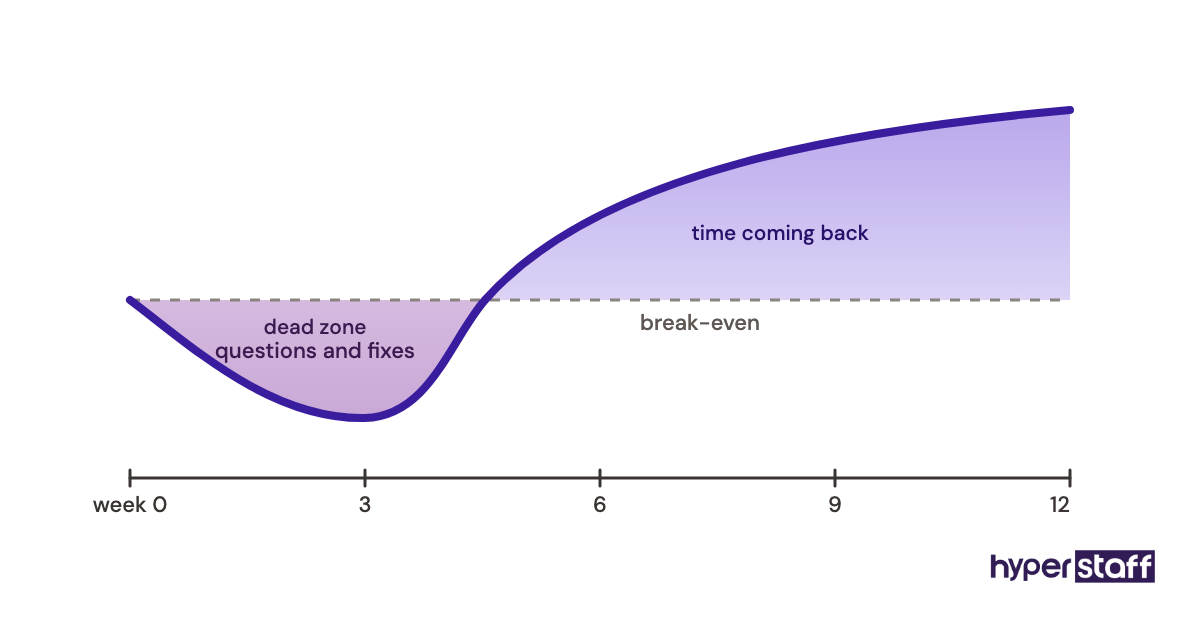
An executive virtual assistant usually starts saving visible time within two to three weeks, and reaches full value around the two to three month mark. With Hyperstaff, work begins the same day or next morning after a 30-minute kickoff.
The dead zone sits in weeks two to four. You're answering questions and correcting drafts, and it can feel like more work than doing it yourself, which is exactly when many leaders quit too early.
How Much Does an Executive Virtual Assistant Cost?
An executive virtual assistant through Hyperstaff starts at $3/hour for Essential, $6/hour for Professional and $12/hour for Expert, billed in monthly bundles of 40, 80 or 160 hours. A local in-house executive assistant costs far more once benefits are counted.
The US Bureau of Labor Statistics puts the median wage for executive assistants at $76,590 a year. Benefits make up 30% of private employer compensation costs according to the BLS employer cost data, which lifts the fully loaded figure to roughly $109,000.
| Option | Hourly cost | Monthly (160 hrs) | Yearly | Experience |
|---|---|---|---|---|
| US in-house EA (median, salary only) | About $37 | About $6,380 | $76,590 | Varies |
| US in-house EA (with benefits) | About $53 | About $9,120 | About $109,400 | Varies |
| Hyperstaff Essential | From $3 | From $480 | From $5,760 | 0 to 2 years |
| Hyperstaff Professional | From $6 | From $960 | From $11,520 | 2 to 5 years |
| Hyperstaff Expert | From $12 | From $1,920 | From $23,040 | 5+ years |
Paying quarterly cuts Hyperstaff rates by 10%. For a fuller breakdown by region and hours, read our executive virtual assistant cost guide.
Important: Hyperstaff figures above are starting rates and averages, not fixed quotes. Your final cost depends on the hours, experience level, region and scope of work your role needs.
Is an Executive Virtual Assistant Worth It?
Yes, an executive virtual assistant is worth it for most leaders whose time earns more than the assistant costs, and it ranks among the highest-return hires a small company can make when the setup is done properly. The math works because you're buying hours at a few dollars each and redeploying your own hours at many times that rate.
Here's an example calculation. Say a founder's time is worth $250/hour in closed deals or billable work, and they take an Expert assistant at 80 hours a month, which costs from $960.
If the assistant recovers 8 hours a week, that's about 34 hours a month, worth around $8,500 of founder capacity. Even if only a third of those hours turn into revenue work, the return is roughly $2,800 against $960.
The honest caveat: recovered hours that drift into more email or more meetings return nothing. The investment pays only when you decide in advance where the freed time goes.
How to Choose an Executive Virtual Assistant Agency
Choose an executive virtual assistant agency by checking whether you get one dedicated person, how candidates are vetted, how fast replacement happens, and who keeps your processes if the assistant leaves. Price matters, but replacement and continuity matter more over a year.
Ask for the vetting steps in writing and interview the shortlisted candidate yourself; our list of executive virtual assistant interview questions helps there. If you'd rather recruit directly, our walkthrough on how to hire an executive virtual assistant covers both routes.
At Hyperstaff, every client gets a dedicated account manager, a free replacement within 5 to 7 business days, and an Operations Vault that briefs any new assistant on your SOPs and tools. Talent comes from the Philippines, Latin America, India, Eastern Europe and the United States, so time zone fit is rarely a blocker.
Executive Virtual Assistant Statistics, Trends and Future Predictions
The clearest executive assistant statistic is cost: a $76,590 median US salary, per the BLS, before benefits. The same BLS outlook projects flat employment for executive secretaries and executive administrative assistants over the coming decade, a 0% change.
Flat local demand alongside steady remote hiring points to a shift in where the work gets done. Our view is that more small companies will skip the local EA hire entirely and start with a remote assistant at 40 or 80 hours.
We're less certain how quickly EA work will move toward project coordination. The direction seems clear, but the pace varies widely by industry, and regulated fields like finance and healthcare will likely move slower because of access controls.
Executive Virtual Assistants and AI
AI tools handle parts of executive assistant work well, including drafting email replies, summarizing meeting transcripts and suggesting meeting times. They don't replace the judgment calls: which investor gets moved, which vendor gets a firm no, and when to interrupt you.
The strongest pairing we see is an EA who uses AI drafting and transcription to work faster, then applies context the tools lack. Assistants comfortable with these tools can cover more ground in the same hours, which improves the cost math further.
Disclaimer: This article is for general information only and does not constitute financial, legal or employment advice. Cost figures and return examples are estimates that vary by business. Consult qualified professionals before making hiring or financial decisions.
Common questions
Is an executive virtual assistant worth it for a solo founder?
Usually, yes, if admin takes more than 8 hours of your week. A 40-hour monthly bundle is a low-risk way to test delegation before committing to more hours.
How many hours a week can an executive VA save me?
Most leaders recover 6 to 15 hours a week once the assistant owns inbox and calendar. The number climbs as you hand over whole processes instead of single tasks.
Is it safe to give a virtual assistant access to my email?
It can be, with staged access, a password manager and two-factor authentication on every account. Start with calendar and a filtered inbox label, then widen access once trust is established.
What if my executive virtual assistant quits?
With Hyperstaff, you get a free replacement within 5 to 7 business days. The new assistant is briefed from your Operations Vault, so your processes don't leave with the person.
When is an executive virtual assistant not worth it?
It's rarely worth it if your admin load is light or you won't share access. It also fails when freed hours drift into more email instead of revenue or strategic work.
Book a free 15 min call
We place a pre-vetted specialist in 5 business days, fully managed, from $3/hour.