10 executive virtual assistant mistakes that cost you time and money
The ten most common executive virtual assistant mistakes, why each one happens, what it costs, and the fix that works.
On this page
- Mistake #1: Delegating tasks but keeping every decision
- Mistake #2: Opening your inbox with no triage rules
- Mistake #3: Handing over your calendar without the logic behind it
- Mistake #4: Handing over your highest-stakes work in week one
- Mistake #5: Keeping the playbook in your head
- Mistake #6: Picking the experience tier on hourly rate alone
- Mistake #7: Ignoring time-zone overlap until a deadline slips
- Mistake #8: Sharing passwords in chat and email
- Mistake #9: Measuring hours logged as the success metric
- Mistake #10: Keeping your assistant invisible to your team and contacts
- FAQs
💡 Key Takeaways:
1) Most executive virtual assistant mistakes come from the executive's side of the handoff, especially missing decision rights, unwritten inbox and calendar rules, and high-stakes work handed over too early.
2) An executive assistant works fastest with written authority limits, a documented playbook, secure delegated access, and a few hours of daily time-zone overlap.
3) Judge an executive virtual assistant by the hours and decisions they take off your plate, because hours logged tell you very little about the value of the work.
Every fixed mistake buys back revenue hours
Hyperstaff has placed 70+ virtual assistants with 30+ clients, and the executives who get the most from our executive virtual assistant services avoid the ten traps below. Each pre-vetted specialist starts within 5 business days, works from a written Operations Vault, and comes with a dedicated account manager who keeps the handoff on track from the first 30-minute kickoff call.
Mistake #1: Delegating tasks but keeping every decision
Most executives hand an assistant a task list and assume the judgment comes with it. It doesn't, so the EA either escalates everything or guesses without telling anyone.
The task-versus-decision gap is the most common executive virtual assistant mistake we see, and it rarely looks like a mistake at first. Work gets done. It just keeps landing back on your desk for a yes or no.
Why owners hold on to the decisions
- Tasks are easy to list. Decisions feel personal.
- Nobody wrote down a spending limit.
- One early error makes owners pull authority back.
- Job descriptions list duties and skip authority.
- "Just check with me" feels safer than a rule.
The price of constant approval loops
An executive VA without decision rights turns into a messenger. Every reschedule, vendor reply and small software renewal comes back to you as a question, and your inbox fills with the very items you hired help to clear.
The cost shows up as latency. A meeting that could have been confirmed in ten minutes waits half a day for your thumbs-up, and the other party notices.
Write a one-page authority matrix
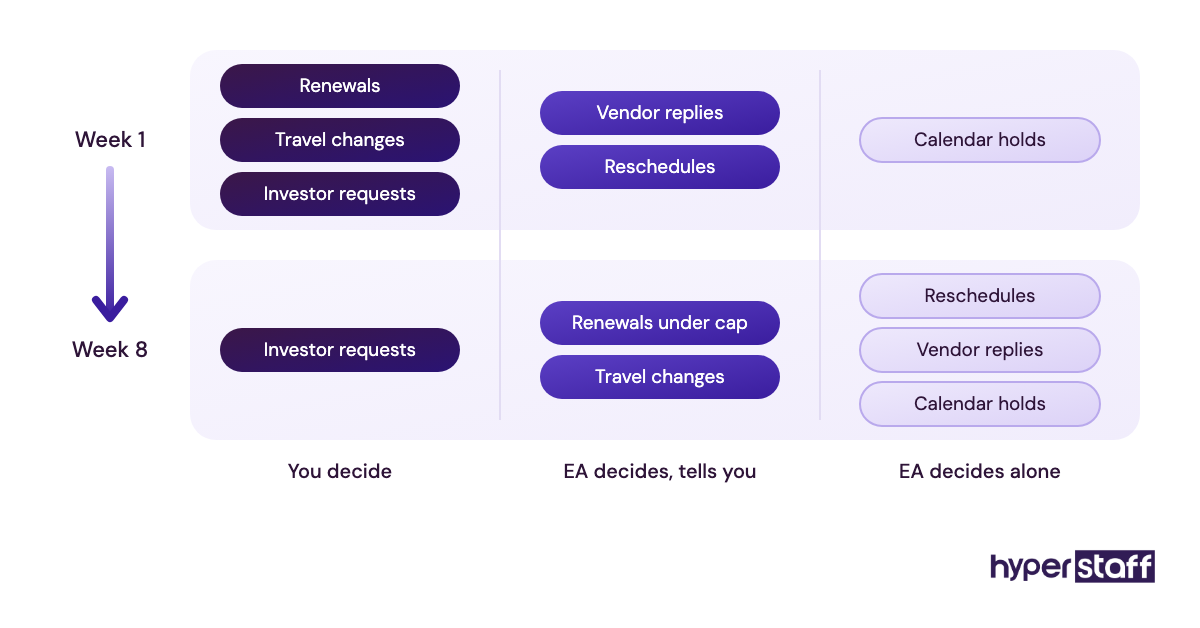
An authority matrix fixes this in under an hour. List the recurring decision types in one column, then mark each as "EA decides alone," "EA decides and tells me," or "I decide." Add a dollar ceiling for purchases and a list of people whose requests always come to you.
Start narrow and widen it every few weeks as trust builds. Our executive virtual assistant job description includes a section for these limits, which most templates leave out.
Mistake #2: Opening your inbox with no triage rules
Giving an assistant inbox access feels like the big step. The real work is telling them what "important" means to you.
Where inbox handoffs break down
- Your sorting rules live in your head.
- Every sender looks equally urgent to a newcomer.
- No agreed format for summaries.
- Owners still answer email at midnight, so the EA can't tell what's handled.
What a messy inbox handoff costs
Two failure modes show up, and they pull in opposite directions. A cautious assistant flags almost everything, so you still read every thread, while a confident one archives the investor email that looked like a newsletter.
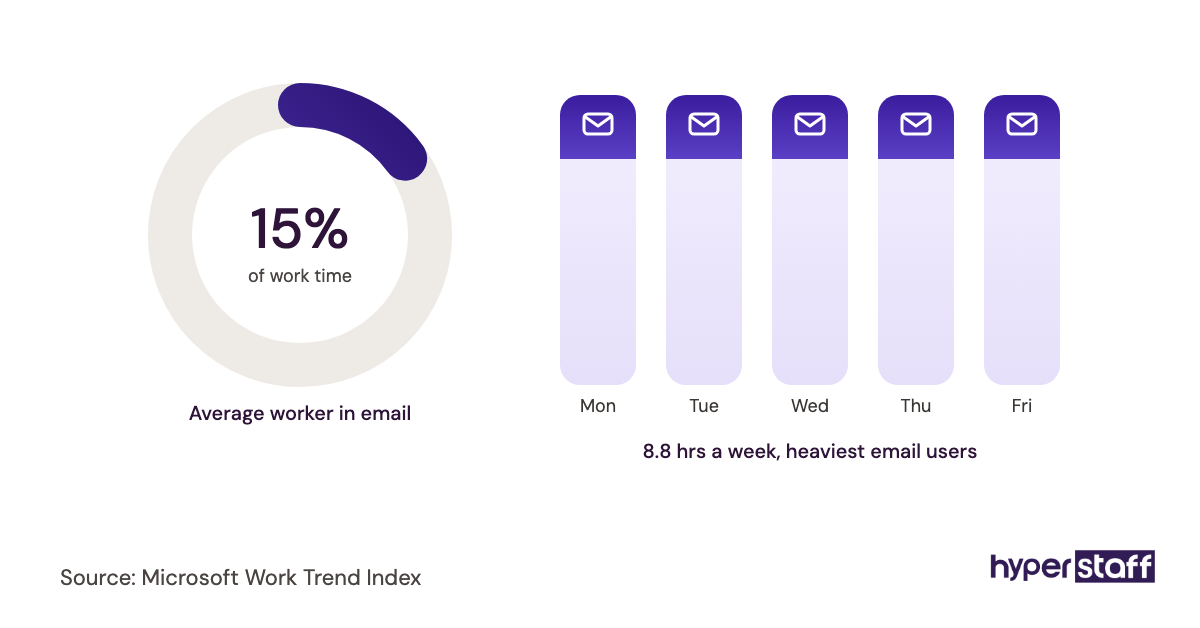
Practitioners genuinely split on the fix. Some executives want inbox zero every evening, while others prefer the EA to label and summarize and leave archiving to them, and both work if the rule is written down.
Hand over a sorting rulebook first
Create four or five labels, such as Action, Waiting On, Read Later, Delegated and Archive, and write one sentence on what goes in each. Then name your VIP senders, the ones whose emails always reach you within the hour.
Ask for a daily digest at a fixed time with three sections: needs your reply, handled for you, and waiting on others. If you're still mapping the scope of the job, our guide on what an executive virtual assistant is covers the full range beyond email.
Mistake #3: Handing over your calendar without the logic behind it
Your calendar holds rules you've never said out loud. You know Monday mornings are for planning and that a certain client always runs long, but the assistant sees only open slots.
Why calendar handoffs go sideways
- Free time looks bookable to anyone but you.
- Priority between people is unspoken.
- Buffers and travel-free focus blocks never get labeled.
- Time zones get converted by memory.
- Scheduling links get shared too widely.
The damage to your working week
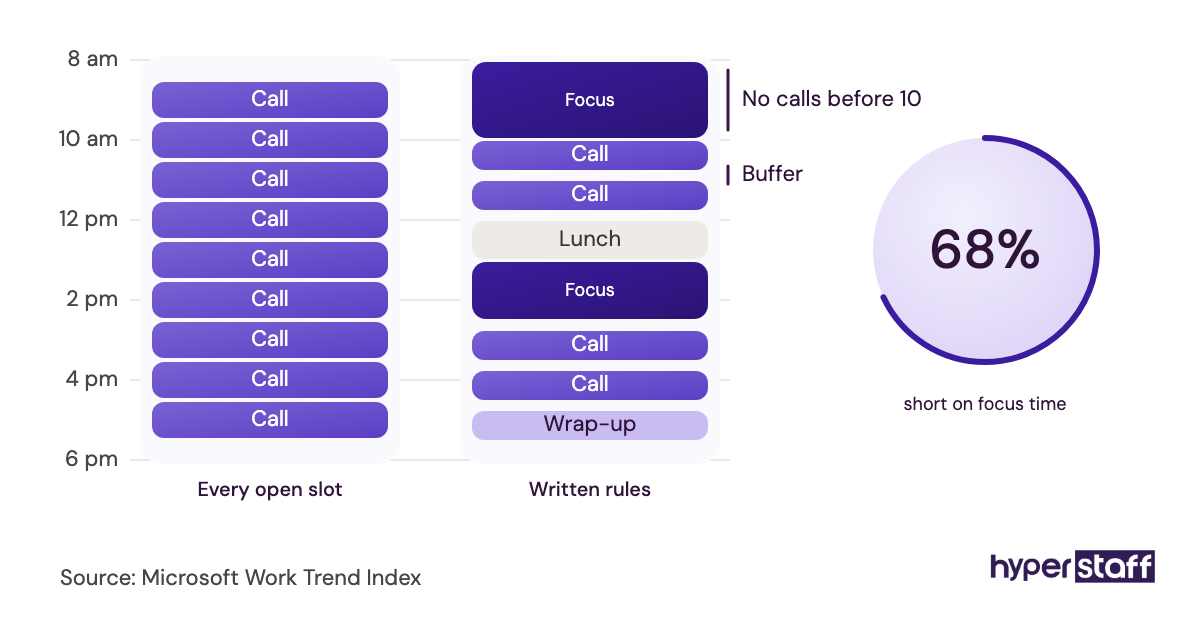
A literal-minded schedule produces back-to-back days with no room to think. The meetings are all real, yet the strategic work that pays for the whole operation keeps sliding to evenings.
Double-bookings across time zones are the other classic. They're small, but each one costs you an apology to someone you wanted to impress.
Write your calendar rules down
Put the rules in a short document: protected blocks, the maximum meetings per day, buffer length between calls, and a ranked list of who gets priority when slots clash. A rule as plain as "no external calls before 10 a.m. my time" removes dozens of small questions.
Our earned opinion on scheduling links like Calendly: they're great for sales calls and recruiting screens, and they land badly with senior executives who expect a personal reply from your assistant. Calendar rules sit alongside the other recurring duties on our executive virtual assistant tasks checklist.
Mistake #4: Handing over your highest-stakes work in week one
Eager executives often test a new assistant on the board pack or the investor follow-ups first. The thinking is reasonable, and the timing is wrong.
Why owners front-load the hard work
- They want proof the hire was right.
- The urgent work is also the visible work.
- Low-risk tasks feel like a waste of a skilled hire.
- No onboarding plan exists, so the queue decides.
What a rushed start costs
One visible error on a high-stakes email can reset trust for months. The executive pulls authority back, the assistant gets cautious, and both sides settle into a smaller role than the one that was hired for.
The context gap causes most of these errors. A skilled EA simply hasn't learned your relationships, tone and history in five days, and nobody could.
Sequence the handoff in phases
A realistic order looks like this: in week one the assistant shadows and documents, then in weeks two and three they own low-risk recurring work like scheduling and expense reports. From roughly week four onward, they take on drafting external email in your voice and preparing materials for important meetings.
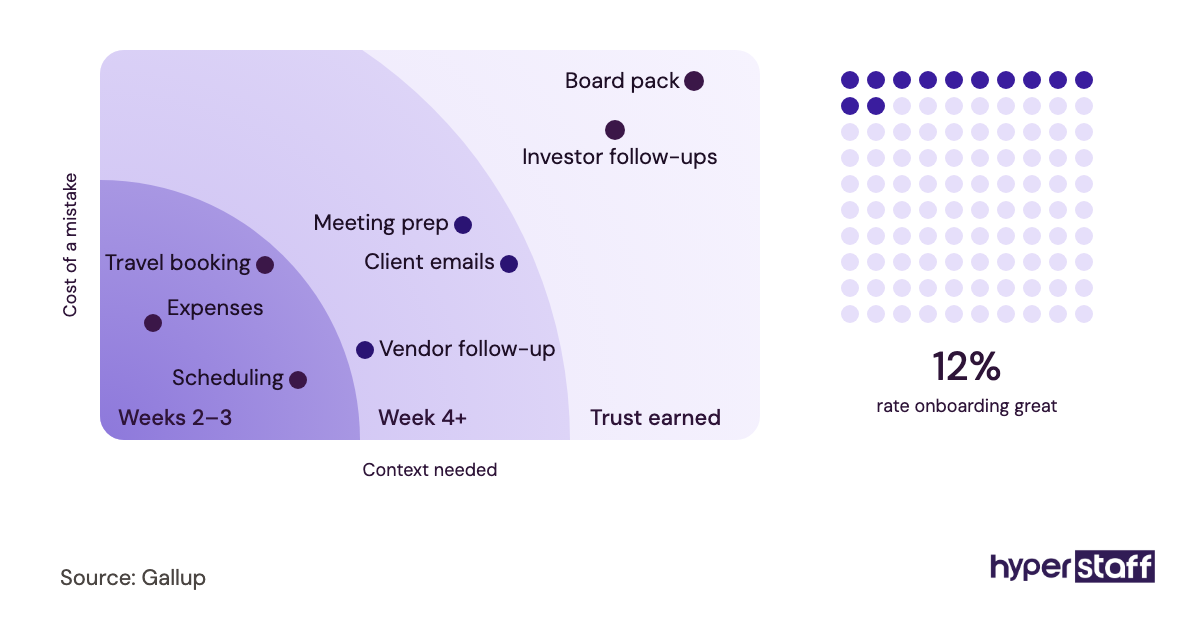
Expect a dead zone around week two, when the EA knows enough to ask lots of questions and not enough to answer them alone. Our guide to onboarding an executive virtual assistant walks through each phase in detail.
Mistake #5: Keeping the playbook in your head
Your preferences, logins, vendor quirks and "how we do it" knowledge are the real job. If none of it is written down, the role belongs to one person's memory.
Why nothing gets documented
- Writing SOPs feels slower than doing the task.
- The assistant learns by asking, so it works for now.
- Nobody owns keeping documents current.
- Executives assume the EA will stay forever.
When the knowledge walks out the door
Assistants get sick, take leave and sometimes move on. Without a written playbook, every one of those moments drops you back to day one, and you end up rebuilding the same context from scratch with the next person.
Stale documents are almost as bad as missing ones. A process doc that still lists a tool you dropped last quarter sends the next person down the wrong path with full confidence.
Record once, let the EA write it up
The fastest method we know: record a quick screen video while you do a task once, then have the assistant turn it into written steps. You spend five minutes talking, and the EA produces the document and owns its updates.
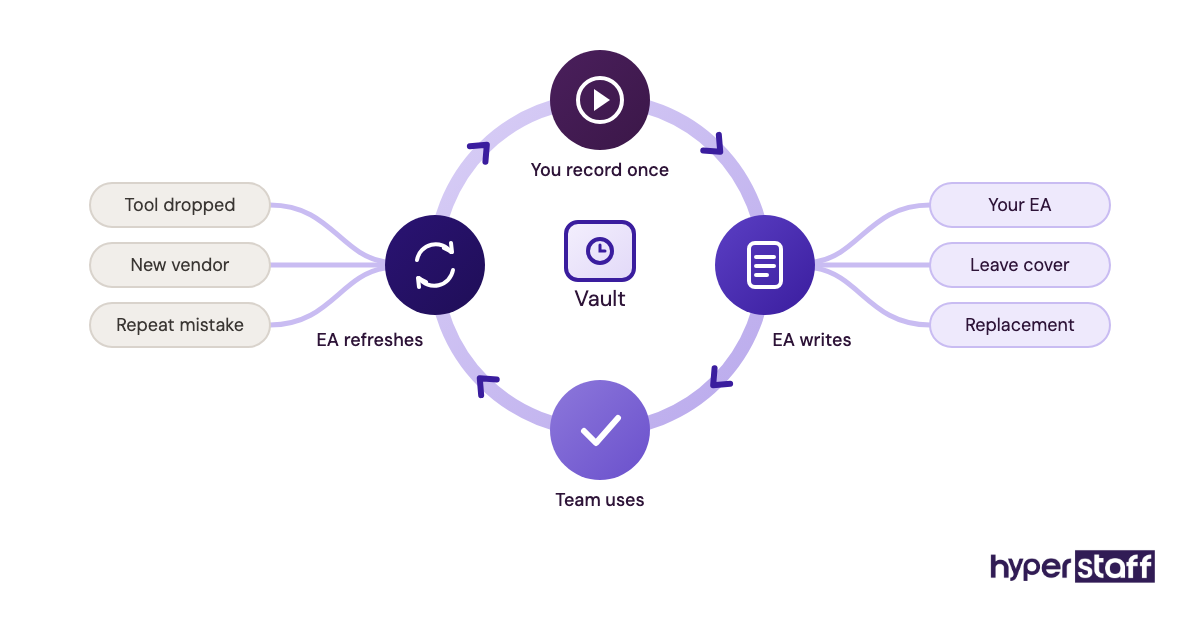
Hyperstaff builds this in as the Operations Vault, where your SOPs, tools and context are written down and maintained for you. If a specialist ever needs replacing, the free replacement arrives in 5 to 7 business days, already briefed from that vault.
Mistake #6: Picking the experience tier on hourly rate alone
The cheapest rate looks like the safest choice until the rework starts. Paying top rate for calendar admin is the mirror-image error, and it's just as common.
Why rate becomes the deciding factor
- Hourly rates are easy to compare.
- Judgment is hard to price up front.
- Owners describe tasks, not the decisions inside them.
- Budgets get set before the role is scoped.
- "Executive" in the title suggests the top tier by default.
Paying twice for the wrong fit
An entry-level assistant on board communications usually means you rewrite the drafts, which costs you the hours you were trying to buy back. An expert on pure scheduling work is underused, and underused people get bored and leave.
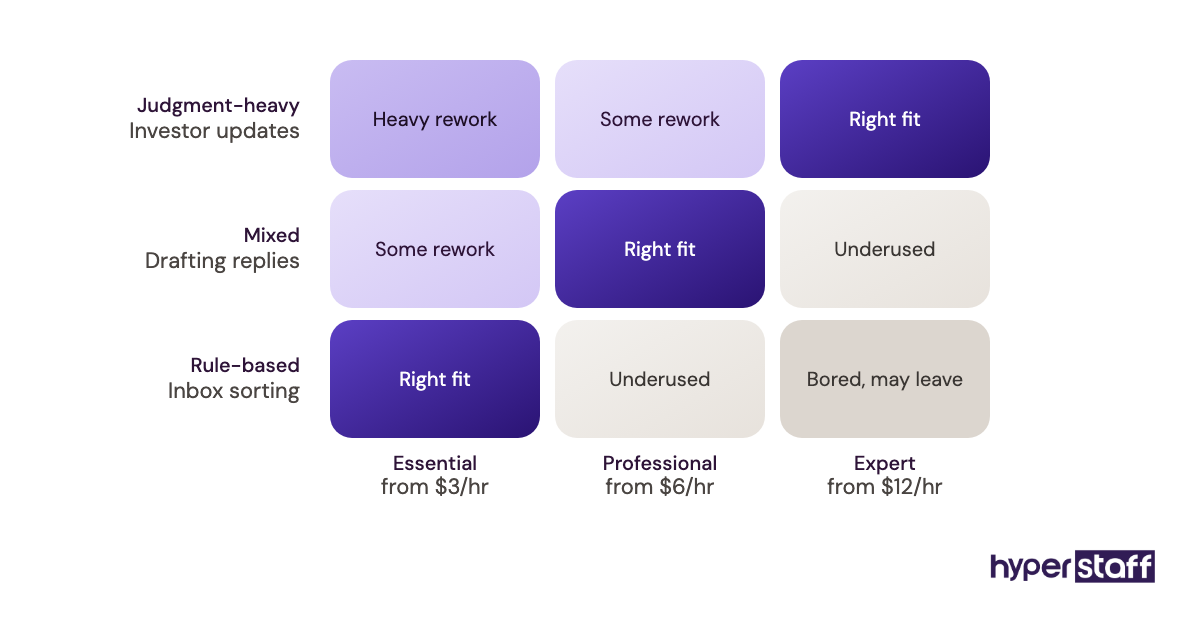
Hyperstaff offers three tiers, and the right one depends on how much judgment the work needs:
| Tier | Experience | Rate | Fits work like |
|---|---|---|---|
| Essential | 0 to 2 years | From $3/hour | Scheduling, data entry, inbox sorting with clear rules |
| Professional | 2 to 5 years | From $6/hour | Drafting replies, travel planning, vendor follow-up, meeting prep |
| Expert | 5+ years | From $12/hour | Stakeholder communication, board and investor materials, project coordination |
Scope the judgment, then pick the tier
List the ten tasks the assistant will do most, and mark each one by how often it requires a call you'd otherwise make yourself. Mostly rule-following points to Essential, while frequent judgment calls point to Professional or Expert.
Run the numbers both ways in our breakdown of executive virtual assistant cost, and weigh them against your own hourly value using whether an executive VA is worth it. Tier choice is also the first decision in hiring an executive virtual assistant well.
Mistake #7: Ignoring time-zone overlap until a deadline slips
Overlap hours rarely come up in the first conversation. They come up the first time an urgent request sits unanswered for eight hours.
How overlap gets overlooked
- Rate and skills dominate the shortlist.
- "Async-first" sounds modern and efficient.
- Nobody maps when urgent requests actually arrive.
- Daylight saving shifts the overlap twice a year.
The cost of a zero-overlap setup
Executive work has a same-day rhythm: a meeting moves, a flight gets cancelled, a client wants a call this afternoon. With no shared hours, those changes queue up overnight and you handle them yourself.
Some executives argue for the opposite setup, where the assistant works while they sleep and the morning starts with everything done. That model works for research and document prep, and in our view it breaks down for calendar and inbox ownership.
Plan the overlap before you hire
Aim for two to four hours of shared working time, placed where your urgent requests tend to cluster. Hyperstaff places talent in the Philippines, Latin America, India, Eastern Europe and the United States, so the region can follow the overlap you need.
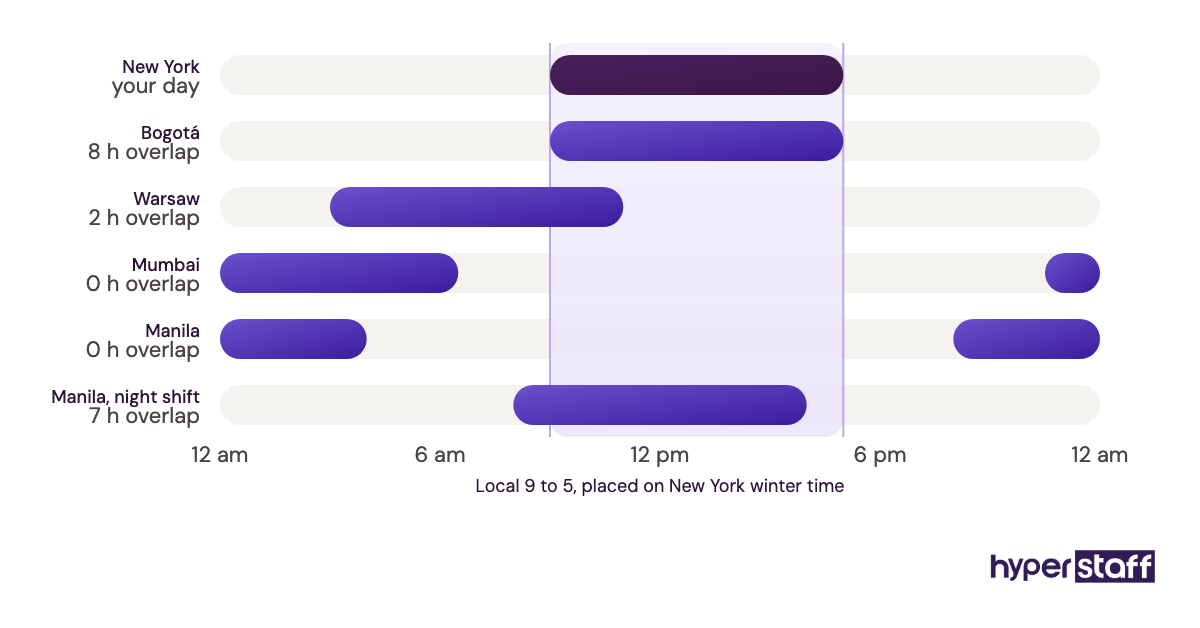
Pair the overlap with an end-of-day handoff note covering what's done, what's pending and what needs you. Ask about overlap hours directly in interviews, and our list of executive virtual assistant interview questions includes the follow-ups worth asking.
Mistake #8: Sharing passwords in chat and email
A password pasted into a chat thread feels temporary. It sits there for years, searchable by anyone who ever gets into that account.
Why credentials end up in chat
- It's the fastest way to unblock a task.
- No password manager is set up yet.
- Two-factor codes go to the executive's phone.
- Offboarding steps were never written.
- Delegate access feels technical, so it gets skipped.
What loose credentials put at risk
Credential sprawl means you can't cleanly remove access when the role changes. You end up resetting dozens of passwords from memory and hoping you caught them all.
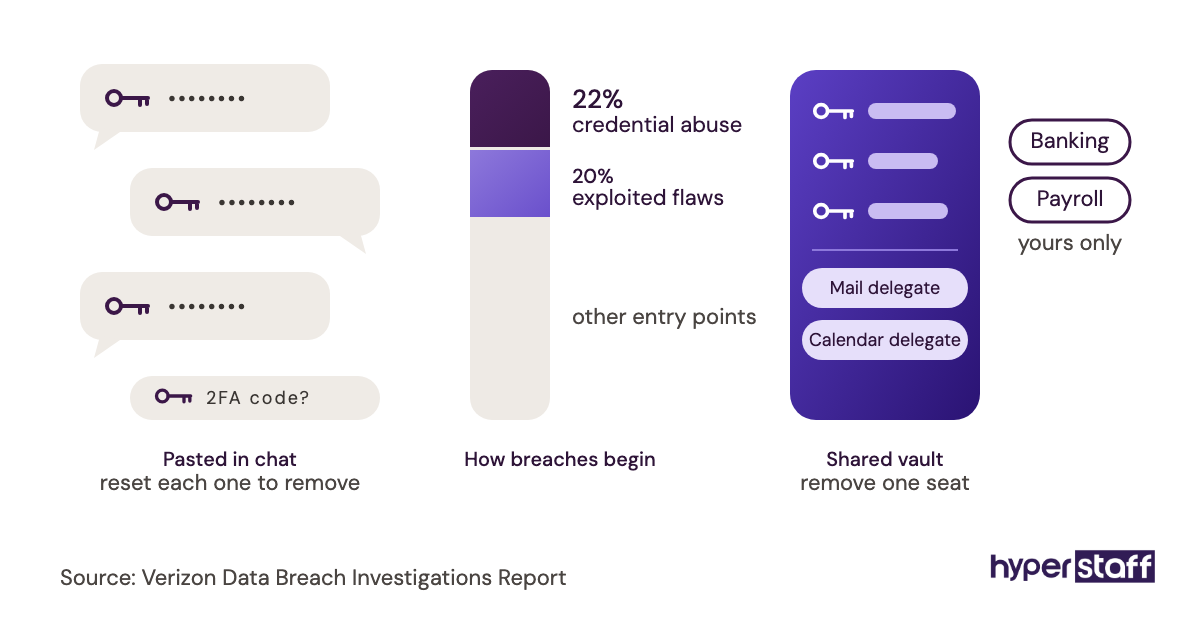
Two-factor codes cause a less obvious cost. If every login texts a code to your phone, your assistant is blocked each morning until you wake up and forward it.
Use a shared vault and delegated access
Set up a password manager such as 1Password or Bitwarden with a shared vault that holds only the logins the assistant needs. Use native delegate features for email and calendar, and keep banking and payroll on your own devices unless you've made a deliberate choice otherwise.
For tools that support it, store two-factor codes inside the shared vault so the assistant isn't waiting on your phone. Our guide to the best executive virtual assistant tools compares the options in more depth.
Mistake #9: Measuring hours logged as the success metric
Hours are easy to count, so they become the scoreboard. They tell you the assistant was busy, which is a different thing from useful.
Why hours become the yardstick
- Monthly bundles are sold in hours.
- Time trackers produce a tidy report.
- Outcomes take effort to define.
- Owners don't track their own time before the hire.
What the wrong metric hides
An assistant judged on hours learns to fill the hours. Meanwhile the questions that matter go unasked: did your week get lighter, are fewer things escalating to you, did that project close faster?
Screenshot-based time trackers are a contested topic among people who manage remote teams. Our view: they're fine for billing checks and a poor fit for executive work, where much of the value is judgment that no screenshot captures.
Track the hours you got back
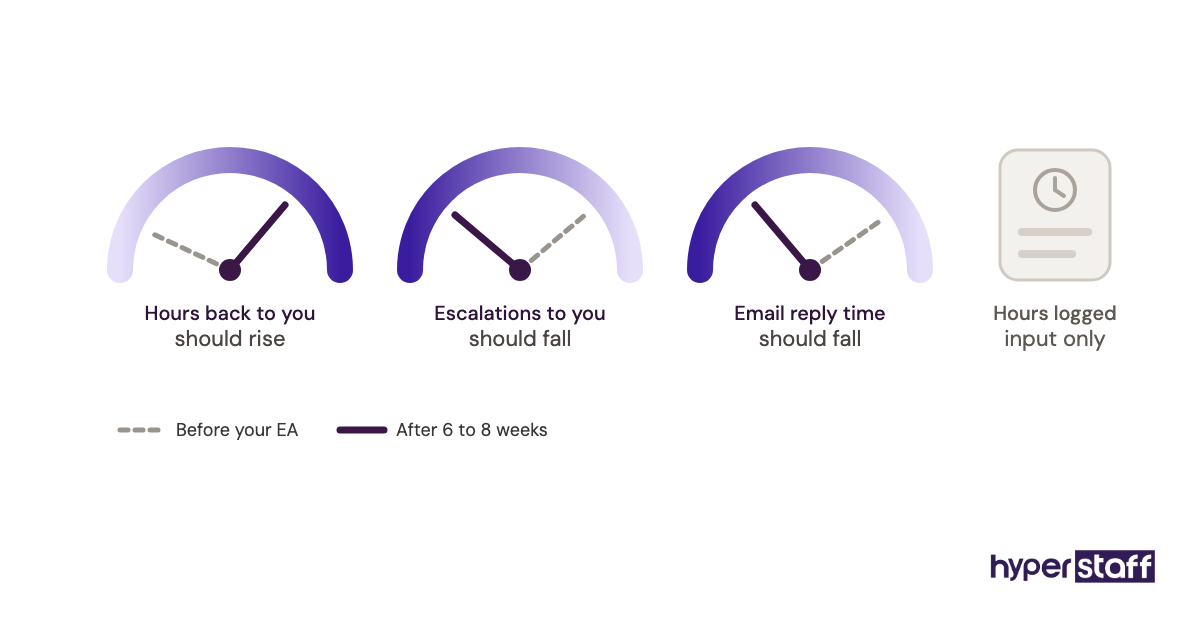
Before the assistant starts, log one normal week of your own time by category. Repeat the log after six to eight weeks, and compare how much admin moved off your plate.
Add two or three operational signals, such as average response time to external emails and the number of items escalated to you each week. A falling escalation count is the clearest sign your authority matrix from Mistake #1 is doing its job.
Mistake #10: Keeping your assistant invisible to your team and contacts
Plenty of executives hire an EA and never tell anyone. Colleagues keep messaging the executive directly, and the assistant works around the edges.
Why the EA stays in the background
- Owners worry contacts will feel handed off.
- Nobody sends an introduction email.
- The assistant isn't added to team channels.
- Remote hires don't appear in the office by default.
What invisibility costs
When people bypass the assistant, requests split across two channels and nothing has a single owner. The EA schedules a meeting while you accept a conflicting invite someone sent you directly.
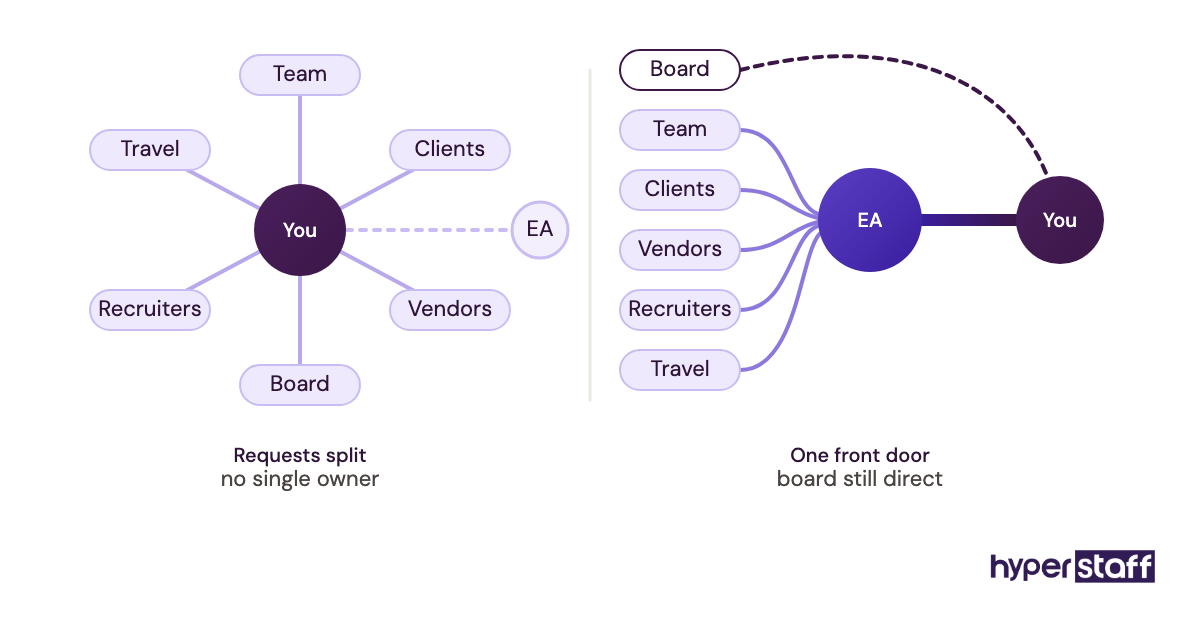
An in-house assistant becomes visible just by sitting near the team, while a remote one has to be introduced on purpose. Our comparison of an executive virtual assistant vs in-house hire covers the other differences that matter.
Introduce them on day one
Send a short introduction email to your team and key external contacts naming the assistant and what they'll handle. Add them to the relevant Slack or Teams channels, and give them an email signature that reads "Assistant to" your name.
Then redirect requests consistently for the first few weeks. Each "loop in my assistant, they'll set it up" reply teaches people the new route faster than any announcement.
Disclaimer: This article is for general information only and does not constitute legal, financial, security or employment advice. Hyperstaff makes no guarantees about outcomes, and readers should consult qualified professionals before making decisions based on this content.
Common questions
How long until an executive VA stops making beginner mistakes?
Most handoffs settle within four to eight weeks. Errors in the first month usually trace back to missing context, so documenting your preferences early shortens that window.
What should I do if my executive assistant keeps repeating the same mistake?
Check whether a written rule covers that situation. If it doesn't, write one together and add it to the playbook, and if it does, the issue is fit or training, which is worth raising with your account manager.
Is hiring a part-time executive virtual assistant a mistake?
No, provided the hours match the workload and the overlap. Many executives start with 40 or 80 hours a month and scale up once they see which tasks move off their plate.
Should my executive VA handle personal errands too?
It depends on your agreement and comfort level. Mixing personal and business work is fine when it's scoped and counted inside the hours, and it causes friction when it creeps in unannounced.
How do I give feedback to an executive VA without micromanaging?
Batch it into a short weekly review instead of correcting each task as it happens. Focus on patterns and update the written rules, so the fix lasts beyond one conversation.
Book a free 15 min call
We place a pre-vetted specialist in 5 business days, fully managed, from $3/hour.